Chapter 5. Conditionals and Recursion
The main topic of this chapter is the if statement, which executes different code depending on the state of the program. With the if statement we’ll be able to explore one of the most powerful ideas in computing, recursion.
But we’ll start with three new features: the modulus operator, boolean expressions, and logical operators.
Integer Division and Modulus
Recall that the integer division operator, //, divides two numbers and rounds down to an integer. For example, suppose the runtime of a movie is 105 minutes. You might want to know how long that is in hours. Conventional division returns a floating-point number:
minutes=105minutes/60
1.75
But we don’t normally write hours with decimal points. Floor division returns the integer number of hours, rounding down:
minutes=105hours=minutes//60hours
1
To get the remainder, you could subtract off one hour, in minutes:
remainder=minutes-hours*60remainder
45
Or you could use the modulus operator, %, which divides two numbers and returns the remainder:
remainder=minutes%60remainder
45
The modulus operator is more useful than it might seem. For example, it can check whether one number is divisible by another: if x % y is zero, then x is divisible by y.
Also, it can extract the rightmost digit or digits from a number. For example, x % 10 yields the rightmost digit of x (in base 10). Similarly, x % 100 yields the last two digits.
Finally, the modulus operator can do “clock arithmetic.” For example, if an event starts at 11 A.M. and lasts three hours, we can use the modulus operator to figure out what time it ends:
start=11duration=3end=(start+duration)%12end
2
The event would end at 2 P.M.:
a=25//10b=25%10a,b
(2, 5)
Boolean Expressions
A boolean expression is an expression that is either true or false. For example, the following expressions use the equals operator, ==, which compares two values and produces True if they are equal and False otherwise:
5==5
True
5==7
False
A common error is to use a single equals sign (=) instead of a double equals sign (==). Remember that = assigns a value to a variable and == compares two values:
x=5y=7
x==y
False
True and False are special values that belong to the type bool; they are not strings:
type(True)
bool
type(False)
bool
The == operator is one of the relational operators; the others are:
x!=y# x is not equal to y
True
x>y# x is greater than y
False
x<y# x is less than to y
True
x>=y# x is greater than or equal to y
False
x<=y# x is less than or equal to y
True
Logical Operators
To combine boolean values into expressions, we can use logical operators. The most common are and, or, and not. The meaning of these operators is similar to their meaning in English. For example, the value of the following expression is True only if x is greater than 0 and less than 10:
x>0andx<10
True
The following expression is True if either or both of the conditions is true, that is, if the number is divisible by 2 or 3:
x%2==0orx%3==0
False
Finally, the not operator negates a boolean expression, so the following expression is True if x > y is False:
notx>y
True
Strictly speaking, the operands of a logical operator should be boolean expressions, but Python is not very strict. Any nonzero number is interpreted as True:
42andTrue
True
This flexibility can be useful, but there are some subtleties to it that can be confusing. You might want to avoid it.
if Statements
In order to write useful programs, we almost always need the ability to check conditions and change the behavior of the program accordingly. Conditional statements give us this ability. The simplest form is the if statement:
ifx>0:('x is positive')
x is positive
if is a Python keyword. if statements have the same structure as function definitions: a header followed by an indented statement or sequence of statements called a block.
The boolean expression after if is called the condition. If it is true, the statements in the indented block run. If not, they don’t.
There is no limit to the number of statements that can appear in the block, but there has to be at least one. Occasionally, it is useful to have a block that does nothing—usually as a place keeper for code you haven’t written yet. In that case, you can use the pass statement, which does nothing:
ifx<0:pass# TODO: need to handle negative values!
The word TODO in a comment is a conventional reminder that there’s something you need to do later.
The else Clause
An if statement can have a second part, called an else clause. The syntax looks like this:
ifx%2==0:('x is even')else:('x is odd')
x is odd
If the condition is true, the first indented statement runs; otherwise, the second indented statement runs.
In this example, if x is even, the remainder when x is divided by 2 is 0, so the condition is true and the program displays x is even. If x is odd, the remainder is 1, so the condition is false, and the program displays x is odd.
Since the condition must be true or false, exactly one of the alternatives will run. The alternatives are called branches.
Chained Conditionals
Sometimes there are more than two possibilities and we need more than two branches. One way to express a computation like that is a chained conditional, which includes an elif clause:
ifx<y:('x is less than y')elifx>y:('x is greater than y')else:('x and y are equal')
x is less than y
elif is an abbreviation of “else if.” There is no limit on the number of elif clauses. If there is an else clause, it has to be at the end, but there doesn’t have to be one.
Each condition is checked in order. If the first is false, the next is checked, and so on. If one of them is true, the corresponding branch runs and the if statement ends. Even if more than one condition is true, only the first true branch runs.
Nested Conditionals
One conditional can also be nested within another. We could have written the example in the previous section like this:
ifx==y:('x and y are equal')else:ifx<y:('x is less than y')else:('x is greater than y')
x is less than y
The outer if statement contains two branches. The first branch contains a simple statement. The second branch contains another if statement, which has two branches of its own. Those two branches are both simple statements, although they could have been conditional statements as well.
Although the indentation of the statements makes the structure apparent, nested conditionals can be difficult to read. I suggest you avoid them when you can.
Logical operators often provide a way to simplify nested conditional statements. Here’s an example with a nested conditional:
if0<x:ifx<10:('x is a positive single-digit number.')
x is a positive single-digit number.
The print statement runs only if we make it past both conditionals, so we get the same effect with the and operator:
if0<xandx<10:('x is a positive single-digit number.')
x is a positive single-digit number.
For this kind of condition, Python provides a more concise option:
if0<x<10:('x is a positive single-digit number.')
x is a positive single-digit number.
Recursion
It is legal for a function to call itself. It may not be obvious why that is a good thing, but it turns out to be one of the most magical things a program can do. Here’s an example:
defcountdown(n):ifn<=0:('Blastoff!')else:(n)countdown(n-1)
If n is 0 or negative, countdown outputs the word, “Blastoff!”. Otherwise, it outputs n and then calls itself, passing n-1 as an argument.
Here’s what happens when we call this function with the argument 3:
countdown(3)
3
2
1
Blastoff!
The execution of
countdownbegins withn=3, and sincenis greater than0, it displays3, and then calls itself…The execution of
countdownbegins withn=2, and sincenis greater than0, it displays2, and then calls itself…The execution of
countdownbegins withn=1, and sincenis greater than0, it displays1, and then calls itself…The execution of
countdownbegins withn=0, and sincenis not greater than0, it displays “Blastoff!” and returns.The
countdownthat gotn=1returns.The
countdownthat gotn=2returns.The
countdownthat gotn=3returns.
A function that calls itself is recursive. As another example, we can write a function that prints a string n times:
defprint_n_times(string,n):ifn>0:(string)print_n_times(string,n-1)
If n is positive, print_n_times displays the value of string and then calls itself, passing along string and n-1 as arguments.
If n is 0 or negative, the condition is false and print_n_times does nothing.
Here’s how it works:
print_n_times('Spam ',4)
Spam
Spam
Spam
Spam
For simple examples like this, it is probably easier to use a for loop. But we will see examples later that are hard to write with a for loop and easy to write with recursion, so it is good to start early.
Stack Diagrams for Recursive Functions
Here’s a stack diagram that shows the frames created when we called countdown with n = 3:
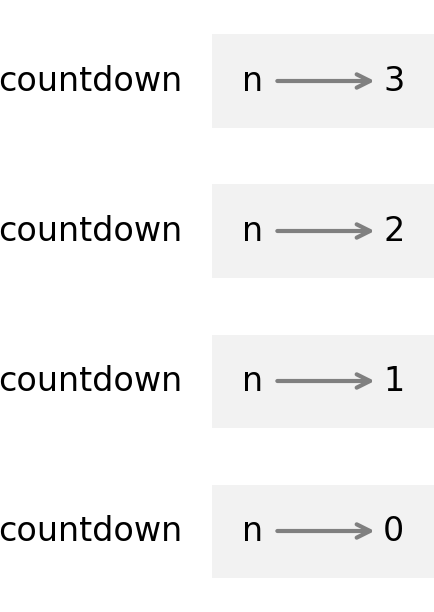
The four countdown frames have different values for the parameter n. The bottom of the stack, where n=0, is called the base case. It does not make a recursive call, so there are no more frames.
Infinite Recursion
If a recursion never reaches a base case, it goes on making recursive calls forever, and the program never terminates. This is known as infinite recursion, and it is generally not a good idea. Here’s a minimal function with an infinite recursion:
defrecurse():recurse()
Every time recurse is called, it calls itself, which creates another frame. In Python, there is a limit to the number of frames that can be on the stack at the same time.
If a program exceeds the limit, it causes a runtime error:
recurse()
---------------------------------------------------------------------------
RecursionError                            Traceback (most recent call last)
Cell In[41], line 1
----> 1 recurse()

Cell In[39], line 2, in recurse()
      1 def recurse():
----> 2     recurse()

Cell In[39], line 2, in recurse()
      1 def recurse():
----> 2     recurse()

    [... skipping similar frames: recurse at line 2 (2958 times)]

Cell In[39], line 2, in recurse()
      1 def recurse():
----> 2     recurse()

RecursionError: maximum recursion depth exceeded
The traceback indicates that there were almost three thousand frames on the stack when the error occurred.
If you encounter an infinite recursion by accident, review your function to confirm that there is a base case that does not make a recursive call. And if there is a base case, check whether you are guaranteed to reach it.
Keyboard Input
The programs we have written so far accept no input from the user. They just do the same thing every time.
Python provides a built-in function called input that stops the program and waits for the user to type something. When the user presses Return or Enter the program resumes, and input returns what the user typed as a string:
text=input()
Before getting input from the user, you might want to display a prompt telling the user what to type. input can take a prompt as an argument:
name=input('What...is your name?\n')name
What...is your name?
It is Arthur, King of the Britons
'It is Arthur, King of the Britons'
The sequence \n at the end of the prompt represents a newline, which is a special character that causes a line break—that way the user’s input appears below the prompt.
If you expect the user to type an integer, you can use the int function to convert the return value to int:
prompt='What...is the airspeed velocity of an unladen swallow?\n'speed=input(prompt)speed
What...is the airspeed velocity of an unladen swallow?
What do you mean: an African or European swallow?
'What do you mean: an African or European swallow?'
But if they type something that’s not an integer, you’ll get a runtime error.
int(speed)
ValueError: invalid literal for int() with base 10: 'What do you mean:
            an African or European swallow?'
We will see how to handle this kind of error later.
Debugging
When a syntax or runtime error occurs, the error message contains a lot of information, but it can be overwhelming. The most useful parts are usually:
-
What kind of error it was, and
-
Where it occurred.
Syntax errors are usually easy to find, but there are a few gotchas. Errors related to spaces and tabs can be tricky because they are invisible and we are used to ignoring them:
x=5y=6
Cell In[50], line 2
  y = 6
  ^
IndentationError: unexpected indent
In this example, the problem is that the second line is indented by one space. But the error message points to y, which is misleading. Error messages indicate where the problem was discovered, but the actual error might be earlier in the code.
The same is true of runtime errors. For example, suppose you are trying to convert a ratio to decibels, like this:
importmathnumerator=9denominator=10ratio=numerator//denominatordecibels=10*math.log10(ratio)
---------------------------------------------------------------------------
ValueError                                Traceback (most recent call last)
Cell In[52], line 5
      3 denominator = 10
      4 ratio = numerator // denominator
----> 5 decibels = 10 * math.log10(ratio)

ValueError: math domain error
The error message indicates line 5, but there is nothing wrong with that line. The problem is in line 4, which uses floor division instead of floating-point division—as a result, the value of ratio is 0. When we call math.log10, we get a ValueError with the message math domain error, because 0 is not in the “domain” of valid arguments for math.log10, because the logarithm of 0 is undefined.
In general, you should take the time to read error messages carefully, but don’t assume that everything they say is correct.
Glossary
recursion: The process of calling the function that is currently executing.
modulus operator: An operator, %, that works on integers and returns the remainder when one number is divided by another.
boolean expression: An expression whose value is either True or False.
relational operator: One of the operators that compares its operands: ==, !=, >, <, >=, and <=.
logical operator: One of the operators that combines boolean expressions, including and, or, and not.
conditional statement: A statement that controls the flow of execution, depending on some condition.
block: One or more statements indented to indicate they are part of another statement.
condition: The boolean expression in a conditional statement that determines which branch runs.
branch: One of the alternative sequences of statements in a conditional statement.
chained conditional: A conditional statement with a series of alternative branches.
nested conditional: A conditional statement that appears in one of the branches of another conditional statement.
recursive: A function that calls itself.
base case: A conditional branch in a recursive function that does not make a recursive call.
infinite recursion: A recursion that doesn’t have a base case, or never reaches it. Eventually, an infinite recursion causes a runtime error.
newline: A character that creates a line break between two parts of a string.
Exercises
Ask a Virtual Assistant
-
Ask a virtual assistant, “What are some uses of the modulus operator?”
-
Python provides operators to compute the logical operations
and,or, andnot, but it doesn’t have an operator that computes the exclusiveoroperation, usually writtenxor. Ask an assistant “What is the logicalxoroperation and how do I compute it in Python?”
In this chapter, we saw two ways to write an if statement with three branches, using a chained conditional or a nested conditional. You can use a virtual assistant to convert from one to the other. For example, ask a virtual assistant, “Convert this statement to a chained conditional”:
ifx==y:('x and y are equal')else:ifx<y:('x is less than y')else:('x is greater than y')
x is less than y
Ask a virtual assistant, “Rewrite this statement with a single conditional”:
if0<x:ifx<10:('x is a positive single-digit number.')
x is a positive single-digit number.
See if a virtual assistant can simplify this unnecessary complexity:
ifnotx<=0andnotx>=10:('x is a positive single-digit number.')
x is a positive single-digit number.
Here’s an attempt at a recursive function that counts down by two:
defcountdown_by_two(n):ifn==0:('Blastoff!')else:(n)countdown_by_two(n-2)
It seems to work:
countdown_by_two(6)
6
4
2
Blastoff!
But it has an error. Ask a virtual assistant what’s wrong and how to fix it. Paste the solution it provides here and test it.
Exercise
The time module provides a function, also called time, that returns the number of seconds since the “Unix epoch,” which is January 1, 1970, 00:00:00 UTC (Coordinated Universal Time):
fromtimeimporttimenow=time()now
1709908595.7334914
Use floor division and the modulus operator to compute the number of days since January 1, 1970, and the current time of day in hours, minutes, and seconds.
Exercise
If you are given three sticks, you may or may not be able to arrange them in a triangle. For example, if one of the sticks is 12 inches long and the other two are 1 inch long, you will not be able to get the short sticks to meet in the middle. For any three lengths, there is a test to see if it is possible to form a triangle:
If any of the three lengths is greater than the sum of the other two, then you cannot form a triangle. Otherwise, you can. (If the sum of two lengths equals the third, they form what is called a “degenerate” triangle.)
Write a function named is_triangle that takes three integers as arguments, and that prints either “Yes” or “No,” depending on whether you can or cannot form a triangle from sticks with the given lengths. Hint: use a chained conditional.
Exercise
The following exercises use the jupyturtle module, described in Chapter 4.
Read the following function and see if you can figure out what it does. Then run it and see if you got it right. Adjust the values of length, angle, and factor and see what effect they have on the result. If you are not sure you understand how it works, try asking a virtual assistant.
fromjupyturtleimportforward,left,right,backdefdraw(length):angle=50factor=0.6iflength>5:forward(length)left(angle)draw(factor*length)right(2*angle)draw(factor*length)left(angle)back(length)
Exercise
Ask a virtual assistant, “What is the Koch curve?”
To draw a Koch curve with length x, all you have to do is:
-
Draw a Koch curve with length
x/3. -
Turn left 60 degrees.
-
Draw a Koch curve with length
x/3. -
Turn right 120 degrees.
-
Draw a Koch curve with length
x/3. -
Turn left 60 degrees.
-
Draw a Koch curve with length
x/3.
The exception is if x is less than 5—in that case, you can just draw a straight line with length x.
Write a function called koch that takes x as a parameter and draws a Koch curve with the given length. The result should look like this:
make_turtle(delay=0)koch(120)

Exercise
Virtual assistants know about the functions in the jupyturtle module, but because there are many versions of these functions, with different names, it might not know which one you are talking about.
To solve this problem, you can provide additional information before you ask a question. For example, you could start a prompt with “Here’s a program that uses the jupyturtle module,” and then paste in one of the examples from this chapter. After that, the virtual assistant should be able to generate code that uses this module.
As an example, ask a virtual assistant for a program that draws a Sierpiński triangle. The code you get should be a good starting place, but you might have to do some debugging. If the first attempt doesn’t work, you can tell the virtual assistant what happened and ask for help—or you can debug it yourself.
Here’s what the result might look like, although the version you get might be different:
make_turtle(delay=0,height=200)draw_sierpinski(100,3)