Chapter 3. Functions
In the previous chapter we used several functions provided by Python, like int and float, and a few provided by the math module, like sqrt and pow. In this chapter, you will learn how to create your own functions and run them. And we’ll see how one function can call another. As examples, we’ll display lyrics from Monty Python songs. These silly examples demonstrate an important feature—the ability to write your own functions is the foundation of programming.
This chapter also introduces a new statement, the for loop, which is used to repeat a computation.
Defining New Functions
A function definition specifies the name of a new function and the sequence of statements that run when the function is called. Here’s an example:
defprint_lyrics():("I'm a lumberjack, and I'm okay.")("I sleep all night and I work all day.")
def is a keyword that indicates that this is a function definition. The name of the function is print_lyrics. Anything that’s a legal variable name is also a legal function name.
The empty parentheses after the name indicate that this function doesn’t take any arguments.
The first line of the function definition is called the header—the rest is called the body. The header has to end with a colon and the body has to be indented. By convention, indentation is always four spaces. The body of this function is two print statements; in general, the body of a function can contain any number of statements of any kind.
Defining a function creates a function object, which we can display like this:
print_lyrics
<function __main__.print_lyrics()>
The output indicates that print_lyrics is a function that takes no arguments. __main__ is the name of the module that contains print_lyrics.
Now that we’ve defined a function, we can call it the same way we call built-in functions:
print_lyrics()
I'm a lumberjack, and I'm okay.
I sleep all night and I work all day.
When the function runs, it executes the statements in the body, which display the first two lines of “The Lumberjack Song.”
Parameters
Some of the functions we have seen require arguments; for example, when you call abs you pass a number as an argument. Some functions take more than one argument; for example, math.pow takes two, the base and the exponent.
Here is a definition for a function that takes an argument:
defprint_twice(string):(string)(string)
The variable name in parentheses is a parameter. When the function is called, the value of the argument is assigned to the parameter. For example, we can call print_twice like this:
print_twice('Dennis Moore, ')
Dennis Moore,
Dennis Moore,
Running this function has the same effect as assigning the argument to the parameter and then executing the body of the function, like this:
string='Dennis Moore, '(string)(string)
Dennis Moore,
Dennis Moore,
You can also use a variable as an argument:
line='Dennis Moore, 'print_twice(line)
Dennis Moore,
Dennis Moore,
In this example, the value of line gets assigned to the parameter string.
Calling Functions
Once you have defined a function, you can use it inside another function. To demonstrate, we’ll write functions that print the lyrics of “The Spam Song”:
Spam, Spam, Spam, Spam,
Spam, Spam, Spam, Spam,
Spam, Spam,
(Lovely Spam, Wonderful Spam!)
Spam, Spam,
We’ll start with the following function, which takes two parameters:
defrepeat(word,n):(word*n)
We can use this function to print the first line of the song, like this:
spam='Spam, 'repeat(spam,4)
Spam, Spam, Spam, Spam,
To display the first two lines, we can define a new function that uses repeat:
deffirst_two_lines():repeat(spam,4)repeat(spam,4)
And then call it like this:
first_two_lines()
Spam, Spam, Spam, Spam,
Spam, Spam, Spam, Spam,
To display the last three lines, we can define another function, which also uses repeat:
deflast_three_lines():repeat(spam,2)('(Lovely Spam, Wonderful Spam!)')repeat(spam,2)
last_three_lines()
Spam, Spam,
(Lovely Spam, Wonderful Spam!)
Spam, Spam,
Finally, we can bring it all together with one function that prints the whole verse:
defprint_verse():first_two_lines()last_three_lines()
print_verse()
Spam, Spam, Spam, Spam,
Spam, Spam, Spam, Spam,
Spam, Spam,
(Lovely Spam, Wonderful Spam!)
Spam, Spam,
When we run print_verse, it calls first_two_lines, which calls repeat, which calls print. That’s a lot of functions.
Of course, we could have done the same thing with fewer functions, but the point of this example is to show how functions can work together.
Repetition
If we want to display more than one verse, we can use a for statement. Here’s a simple example:
foriinrange(2):(i)
0
1
The first line is a header that ends with a colon. The second line is the body, which has to be indented.
The first line starts with the keyword for, a new variable named i, and another keyword, in. It uses the range function to create a sequence of two values, which are 0 and 1. In Python, when we start counting, we usually start from 0.
When the for statement runs, it assigns the first value from range to i and then runs the print function in the body, which displays 0.
When it gets to the end of the body, it loops back around to the header, which is why this statement is called a loop. The second time through the loop, it assigns the next value from range to i, and displays it. Then, because that’s the last value from range, the loop ends.
Here’s how we can use a for loop to print two verses of the song:
foriinrange(2):("Verse",i)print_verse()()
Verse 0
Spam, Spam, Spam, Spam,
Spam, Spam, Spam, Spam,
Spam, Spam,
(Lovely Spam, Wonderful Spam!)
Spam, Spam,

Verse 1
Spam, Spam, Spam, Spam,
Spam, Spam, Spam, Spam,
Spam, Spam,
(Lovely Spam, Wonderful Spam!)
Spam, Spam,
You can put a for loop inside a function. For example, print_n_verses takes a parameter named n, which has to be an integer, and displays the given number of verses:
defprint_n_verses(n):foriinrange(n):print_verse()()
In this example, we don’t use i in the body of the loop, but there has to be a variable name in the header anyway.
Variables and Parameters Are Local
When you create a variable inside a function, it is local, which means that it only exists inside the function. For example, the following function takes two arguments, concatenates them, and prints the result twice:
defcat_twice(part1,part2):cat=part1+part2print_twice(cat)
Here’s an example that uses it:
line1='Always look on the 'line2='bright side of life.'cat_twice(line1,line2)
Always look on the bright side of life.
Always look on the bright side of life.
When cat_twice runs, it creates a local variable named cat, which is destroyed when the function ends. If we try to display it, we get a NameError:
(cat)
NameError: name 'cat' is not defined
Outside of the function, cat is not defined.
Parameters are also local. For example, outside cat_twice, there is no such thing as part1 or part2.
Stack Diagrams
To keep track of which variables can be used where, it is sometimes useful to draw a stack diagram. Like state diagrams, stack diagrams show the value of each variable, but they also show the function each variable belongs to.
Each function is represented by a frame. A frame is a box with the name of a function on the outside and the parameters and local variables of the function on the inside.
Here’s the stack diagram for the previous example:
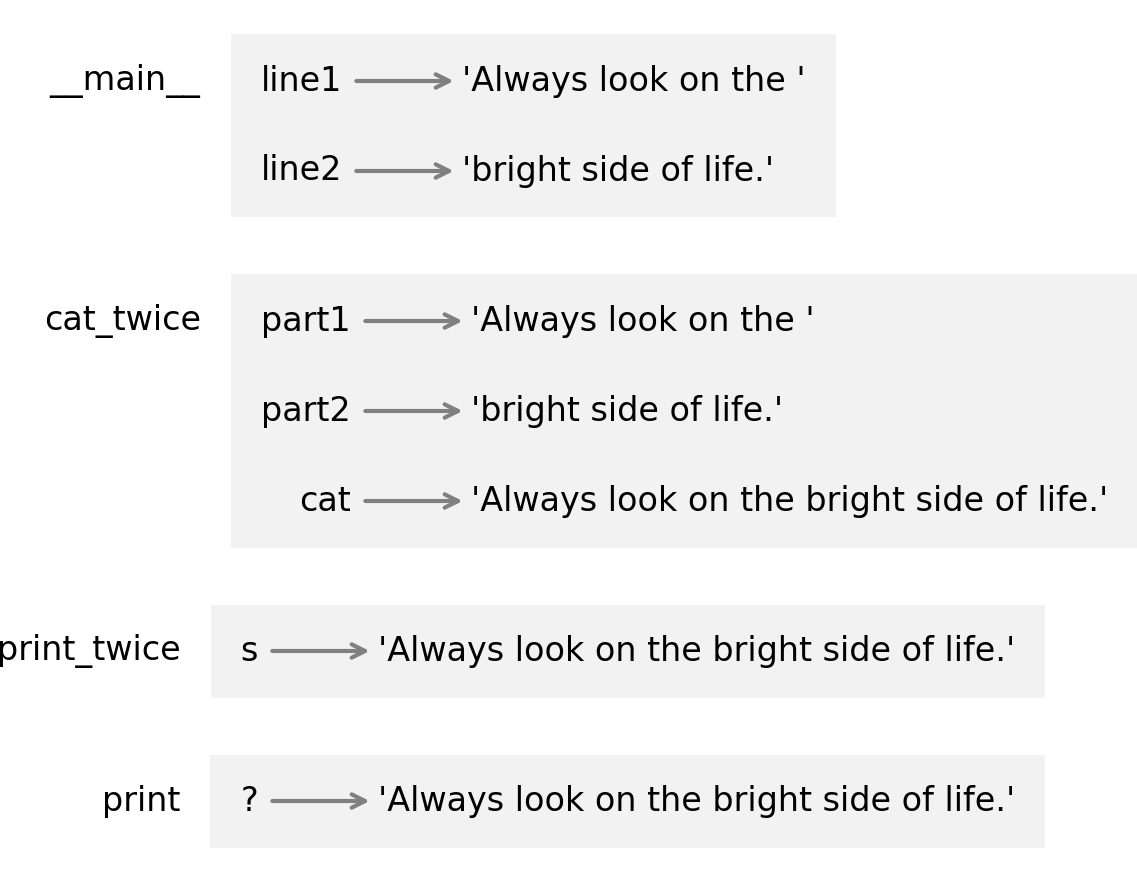
The frames are arranged in a stack that indicates which function called which, and so on. Reading from the bottom, print was called by print_twice, which was called by cat_twice, which was called by __main__—which is a special name for the topmost frame. When you create a variable outside of any function, it belongs to __main__.
In the frame for print, the question mark indicates that we don’t know the name of the parameter. If you are curious, ask a virtual assistant, “What are the parameters of the Python print function?”
Tracebacks
When a runtime error occurs in a function, Python displays the name of the function that was running, the name of the function that called it, and so on, up the stack.
To see an example, I’ll define a version of print_twice that contains an error—it tries to print cat, which is a local variable in another function:
defprint_twice(string):(cat)# NameError(cat)
Now here’s what happens when we run cat_twice:
cat_twice(line1,line2)
Traceback (most recent call last):

    File <string>:2

    Cell In[21], line 3 in cat_twice
      print_twice(cat)

    Cell In[26], line 2 in print_twice
      print(cat)            # NameError

NameError: name 'cat' is not defined
The error message includes a traceback, which shows the function that was running when the error occurred, the function that called it, and so on. In this example, it shows that cat_twice called print_twice, and the error occurred in a print_twice.
The order of the functions in the traceback is the same as the order of the frames in the stack diagram. The function that was running is at the bottom.
Why Functions?
It may not be clear yet why it is worth the trouble to divide a program into functions. There are several reasons:
-
Creating a new function gives you an opportunity to name a group of statements, which makes your program easier to read and debug.
-
Functions can make a program smaller by eliminating repetitive code. Later, if you make a change, you only have to make it in one place.
-
Dividing a long program into functions allows you to debug the parts one at a time and then assemble them into a working whole.
-
Well-designed functions are often useful for many programs. Once you write and debug one, you can reuse it.
Debugging
Debugging can be frustrating, but it is also challenging, interesting, and sometimes even fun. And it is one of the most important skills you can learn.
In some ways debugging is like detective work. You are given clues and you have to infer the events that led to the results you see.
Debugging is also like experimental science. Once you have an idea about what is going wrong, you modify your program and try again. If your hypothesis was correct, you can predict the result of the modification, and you take a step closer to a working program. If your hypothesis was wrong, you have to come up with a new one.
For some people, programming and debugging are the same thing; that is, programming is the process of gradually debugging a program until it does what you want. The idea is that you should start with a working program and make small modifications, debugging them as you go.
If you find yourself spending a lot of time debugging, that is often a sign that you are writing too much code before you start tests. If you take smaller steps, you might find that you can move faster.
Glossary
function definition: A statement that creates a function.
header: The first line of a function definition.
body: The sequence of statements inside a function definition.
function object: A value created by a function definition. The name of the function is a variable that refers to a function object.
parameter: A name used inside a function to refer to the value passed as an argument.
loop: A statement that runs one or more statements, often repeatedly.
local variable: A variable defined inside a function, which can only be accessed inside the function.
stack diagram: A graphical representation of a stack of functions, their variables, and the values they refer to.
frame: A box in a stack diagram that represents a function call. It contains the local variables and parameters of the function.
traceback: A list of the functions that are executing, printed when an exception occurs.
Exercises
Ask a Virtual Assistant
By convention, the statements in a function or a for loop are indented by four spaces. But not everyone agrees with that convention. If you are curious about the history of this great debate, ask a virtual assistant to “tell me about spaces and tabs in Python.”
Virtual assistants are pretty good at writing small functions:
-
Ask your favorite VA to “write a function called
repeatthat takes a string and an integer and prints the string the given number of times.” -
If the result uses a
forloop, you could ask, “Can you do it without aforloop?” -
Pick any other function in this chapter and ask a virtual assistant to write it. The challenge is to describe the function precisely enough to get what you want. Use the vocabulary you have learned so far in this book.
Virtual assistants are also pretty good at debugging functions:
-
Ask a virtual assistant what’s wrong with this version of
print_twice:def print_twice(string): print(cat) print(cat)
And if you get stuck on any of the following exercises, consider asking a virtual assistant for help.
Exercise
Write a function named print_right that takes a string named text as a parameter and prints the string with enough leading spaces that the last letter of the string is in the 40th column of the display.
Hint: use the len function, the string concatenation operator (+), and the string repetition operator (*).
Here’s an example that shows how it should work:
print_right("Monty")print_right("Python's")print_right("Flying Circus")
                                Monty
                             Python's
                        Flying Circus
Exercise
Write a function called triangle that takes a string and an integer and draws a triangle with the given height, made up of copies of the string. Here’s an example of a triangle with five levels using the string 'L':
triangle('L',5)
L
LL
LLL
LLLL
LLLLL
Exercise
Write a function called rectangle that takes a string and two integers and draws a rectangle with the given width and height, made up of copies of the string. Here’s an example of a rectangle with width 5 and height 4, using the string 'H':
rectangle('H',5,4)
HHHHH
HHHHH
HHHHH
HHHHH
Exercise
The song “99 Bottles of Beer” starts with this verse:
99 bottles of beer on the wall,
99 bottles of beer.
Take one down, pass it around,
98 bottles of beer on the wall.
Then the second verse is the same, except that it starts with 98 bottles and ends with 97. The song continues—for a very long time—until there are 0 bottles of beer.
Write a function called bottle_verse that takes a number as a parameter and displays the verse that starts with the given number of bottles.
Hint: consider starting with a function that can print the first, second, or last line of the verse, and then use it to write bottle_verse.
Use this function call to display the first verse:
bottle_verse(99)
99 bottles of beer on the wall
99 bottles of beer
Take one down, pass it around
98 bottles of beer on the wall
If you want to print the whole song, you can use this for loop, which counts down from 99 to 1. You don’t have to completely understand this example—we’ll learn more about for loops and the range function later.
forninrange(99,0,-1):bottle_verse(n)()