As you saw in Chapter 7, Using Methods, there are two ways to call a method. One way is to access the method through the class, and the other is to use object-oriented syntax. These two calls are equivalent:
| | >>> str.capitalize('browning') |
| | 'Browning' |
| | >>> 'browning'.capitalize() |
| | 'Browning' |
We’d like to be able to write similar code involving class Book. For example, we might want to be able to ask how many authors a Book has:
| | >>> Book.num_authors(ruby_book) |
| | 3 |
| | >>> ruby_book.num_authors() |
| | 3 |
To get this to work, we’ll define a method called num_authors inside Book. Here it is:
| | class Book: |
| | """Information about a book.""" |
| | |
| | def num_authors(self) -> int: |
| | """Return the number of authors of this book. |
| | """ |
| | |
| | return len(self.authors) |
Book method num_authors looks just like a function except that it has a parameter called self, which refers to a Book. Assuming this class is defined in the file book.py, we can import it, create a Book object, and call num_authors in two different ways:
| | >>> import book |
| | >>> ruby_book = book.Book() |
| | >>> ruby_book.title = 'Programming Ruby' |
| | >>> ruby_book.authors = ['Thomas', 'Fowler', 'Hunt'] |
| | >>> book.Book.num_authors(ruby_book) |
| | 3 |
| | >>> ruby_book.num_authors() |
| | 3 |
Let’s take a close look at the first call on method num_authors:
| | >>> book.Book.num_authors(ruby_book) |
The book part says to look in the imported module. In that module is class Book. Inside Book is method num_authors. The argument to the call, ruby_book, is passed to parameter self.
Python treats the second call on num_authors exactly as it did the first; the first call is equivalent to this one:
| | >>> ruby_book.num_authors() |
The second version is much more common because it lists the object first; we think of that version as asking the book how many authors it has. Thinking of method calls this way can really help develop an object-oriented mentality.
In the ruby_book example, we assigned the title and list of authors after the Book object was created. That approach isn’t scalable; we don’t want to have to type those extra assignment statements every time we create a Book. Instead, we’ll write a method that does this for us as we create the Book. This is a special method and is called __init__. We’ll also include the publisher, ISBN, and price as parameters of __init__:
| | from typing import List, Any |
| | |
| | class Book: |
| | """Information about a book, including title, list of authors, |
| | publisher, ISBN, and price. |
| | """ |
| | |
| | def __init__(self, title: str, authors: List[str], publisher: str, |
| | isbn: str, price: float) -> None: |
| | """Create a new book entitled title, written by the people in authors, |
| | published by publisher, with ISBN isbn and costing price dollars. |
| | |
| | >>> python_book = Book( \ |
| | 'Practical Programming', \ |
| | ['Campbell', 'Gries', 'Montojo'], \ |
| | 'Pragmatic Bookshelf', \ |
| | '978-1-6805026-8-8', \ |
| | 25.0) |
| | >>> python_book.title |
| | 'Practical Programming' |
| | >>> python_book.authors |
| | ['Campbell', 'Gries', 'Montojo'] |
| | >>> python_book.publisher |
| | 'Pragmatic Bookshelf' |
| | >>> python_book.ISBN |
| | '978-1-6805026-8-8' |
| | >>> python_book.price |
| | 25.0 |
| | """ |
| | |
| | self.title = title |
| | # Copy the authors list in case the caller modifies that list later. |
| | self.authors = authors[:] |
| | self.publisher = publisher |
| | self.ISBN = isbn |
| | self.price = price |
| | |
| | def num_authors(self) -> int: |
| | """Return the number of authors of this book. |
| | |
| | >>> python_book = Book( \ |
| | 'Practical Programming', \ |
| | ['Campbell', 'Gries', 'Montojo'], \ |
| | 'Pragmatic Bookshelf', \ |
| | '978-1-6805026-8-8', \ |
| | 25.0) |
| | >>> python_book.num_authors() |
| | 3 |
| | """ |
| | |
| | return len(self.authors) |
Notice that we can include doctests for methods just as we do for functions. Notice also that we do not specify the type of the first parameter of a method, since its type is always the class in which it is defined.
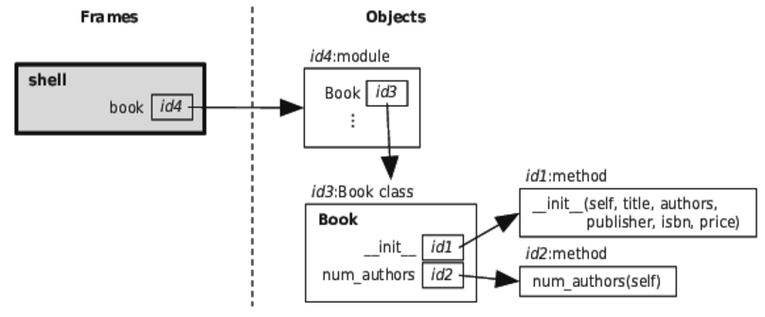
This module contains a single (complicated) statement: the class definition. When Python executes this module, it creates a class object and assigns it to variable Book:
Method __init__ is called whenever a Book object is created. Its purpose is to initialize the new object; this method is sometimes called a constructor. Here are the steps that Python follows when creating an object:
Let’s try it out in the shell:
| | >>> import book |
| | >>> python_book = book.Book( |
| | ... 'Practical Programming', |
| | ... ['Campbell', 'Gries', 'Montojo'], |
| | ... 'Pragmatic Bookshelf', |
| | ... '978-1-6805026-8-8', |
| | ... 25.0) |
| | >>> python_book.title |
| | 'Practical Programming' |
| | >>> python_book.authors |
| | ['Campbell', 'Gries', 'Montojo'] |
| | >>> python_book.publisher |
| | 'Pragmatic Bookshelf' |
| | >>> python_book.ISBN |
| | '978-1-6805026-8-8' |
| | >>> python_book.price |
| | 25.0 |
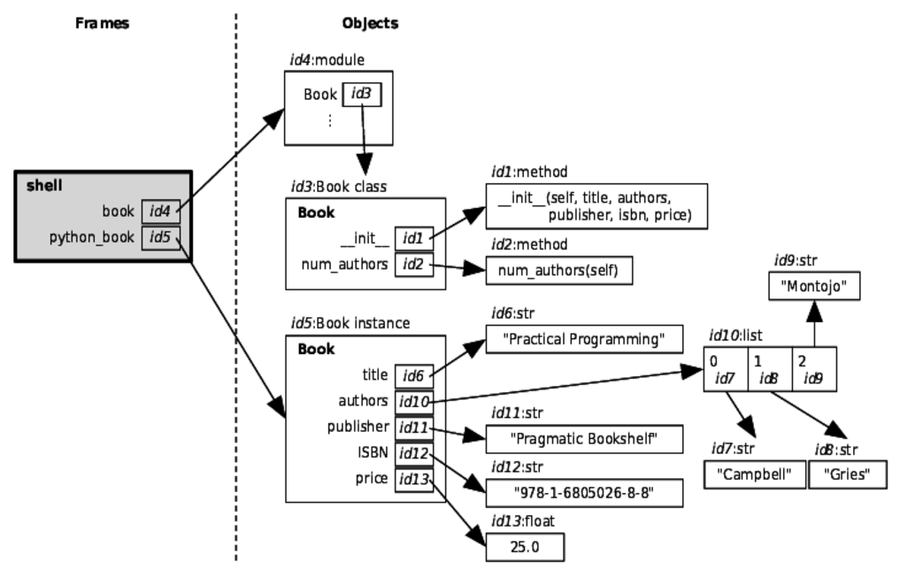
The following image shows the memory model that results from this code:
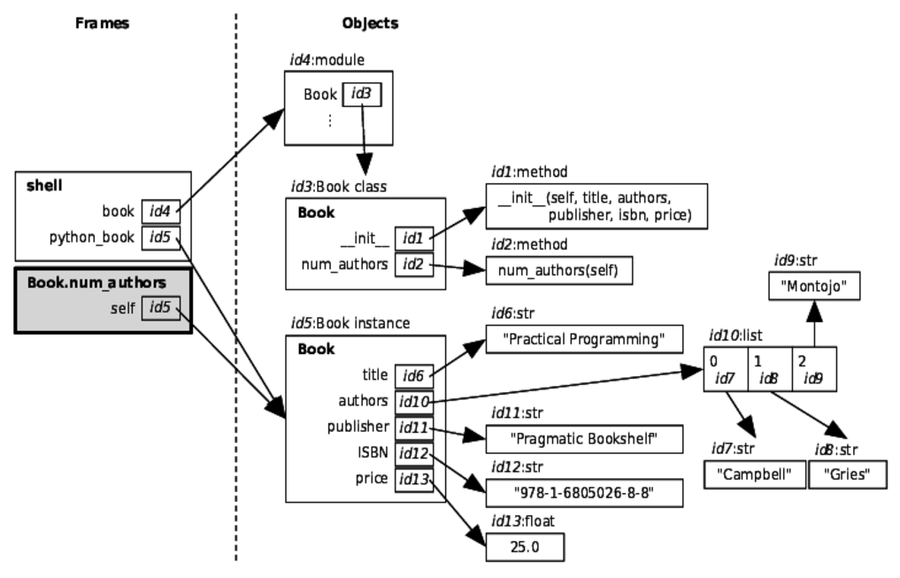
Let’s trace method call python_book.num_authors(). (As a reminder, this is equivalent to Book.num_authors(python_book).) Python first finds the object that python_book refers to and calls its method num_authors. There are no explicit arguments, so Python only passes in the Book object that python_book refers to, assigning that object to the self parameter:
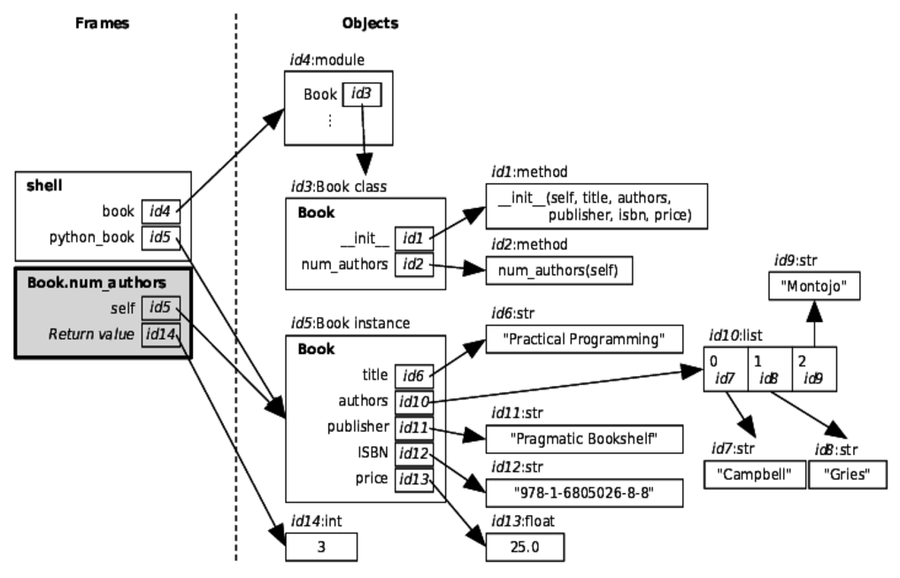
The return statement, return len(self.authors), is then executed. The expression, len(self.authors), is a function call. Python evaluates the argument, self.authors, by finding the object that self refers to and then, in that object, finds instance variable authors. This is a list, and the length of that list is the value that Python returns, as shown here:
With constructors, methods, and instance variables in hand, we can now create classes that look and work like those that come with Python itself.