Function isinstance reports whether an object is an instance of a class—that is, whether an object has a particular type:
| | >>> isinstance('abc', str) |
| | True |
| | >>> isinstance(55.2, str) |
| | False |
’abc’ is an instance of str, but 55.2 is not.
Python has a class called object. Every other class is based on it:
| | >>> help(object) |
| | Help on class object in module builtins: |
| | |
| | class object |
| | | The most base type |
Function isinstance reports that both ’abc’ and 55.2 are instances of class object:
| | >>> isinstance(55.2, object) |
| | True |
| | >>> isinstance('abc', object) |
| | True |
Even classes and functions are instances of object:
| | >>> isinstance(str, object) |
| | True |
| | >>> isinstance(max, object) |
| | True |
What’s happening here is that every class in Python is derived from class object, and so every instance of every class is an object.
Using object-oriented lingo, we say that class object is the superclass of class str, and class str is a subclass of class object. The superclass information is available in the help documentation for a type:
| | >>> help(int) |
| | Help on class int in module builtins: |
| | |
| | class int(object) |
Here we see that class SyntaxError is a subclass of class Exception:
| | >>> help(SyntaxError) |
| | Help on class SyntaxError in module builtins: |
| | |
| | class SyntaxError(Exception) |
Class object has the following attributes (attributes are variables inside a class that refer to methods, functions, variables, or even other classes):
| | >>> dir(object) |
| | ['__class__', '__delattr__', '__dir__', '__doc__', '__eq__', '__format__', |
| | '__ge__', '__getattribute__', '__gt__', '__hash__', '__init__', |
| | '__init_subclass__', '__le__', '__lt__', '__ne__', '__new__', '__reduce__', |
| | '__reduce_ex__', '__repr__', '__setattr__', '__sizeof__', '__str__', |
| | '__subclasshook__'] |
Every class in Python, including ones that you define, automatically inherits these attributes from class object. More generally, every subclass inherits the features of its superclass. This is a powerful tool; it helps avoid a lot of duplicate code and makes interactions between related types consistent.
Let’s try this out. Here is the simplest class that we can write:
| | >>> class Book: |
| | ... """Information about a book.""" |
| | ... |
Just as keyword def tells Python that we’re defining a new function, keyword class signals that we’re defining a new type.
Much like str is a type, Book is a type:
| | >>> type(str) |
| | <class 'type'> |
| | >>> type(Book) |
| | <class 'type'> |
Our Book class isn’t empty, either, because it has inherited all the attributes of class object:
| | >>> dir(Book) |
| | ['__class__', '__delattr__', '__dict__', '__dir__', '__doc__', '__eq__', |
| | '__format__', '__ge__', '__getattribute__', '__gt__', '__hash__', '__init__', |
| | '__init_subclass__', '__le__', '__lt__', '__module__', '__ne__', '__new__', |
| | '__reduce__', '__reduce_ex__', '__repr__', '__setattr__', '__sizeof__', |
| | '__str__', '__subclasshook__', '__weakref__'] |
If you look carefully, you’ll see that this list is nearly identical to the output for dir(object). There are three extra attributes in class Book; every subclass of class object automatically has these attributes in addition to the inherited ones:
| | >>> set(dir(Book)) - set(dir(object)) |
| | {'__module__', '__weakref__', '__dict__'} |
We’ll get to those attributes later on in this chapter in What Are Those Special Attributes?. First, let’s create a Book object and give that Book a title and a list of authors:
| | >>> ruby_book = Book() |
| | >>> ruby_book.title = 'Programming Ruby' |
| | >>> ruby_book.authors = ['Thomas', 'Fowler', 'Hunt'] |
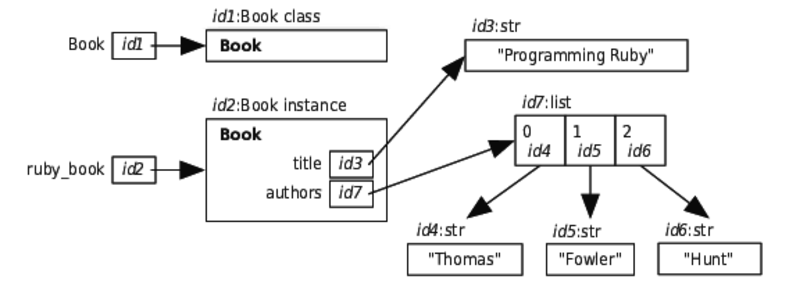
The first assignment statement creates a Book object and then assigns that object to variable ruby_book. The second assignment statement creates a title variable inside the Book object; that variable refers to the string ’Programming Ruby’. The third assignment statement creates variable authors, also inside the Book object, which refers to the list of strings [’Thomas’, ’Fowler’, ’Hunt’].
Variables title and authors are called instance variables because they are variables inside an instance of a class. We can access these instance variables through variable ruby_book:
| | >>> ruby_book.title |
| | 'Programming Ruby' |
| | >>> ruby_book.authors |
| | ['Thomas', 'Fowler', 'Hunt'] |
In the expression ruby_book.title, Python finds variable ruby_book, then sees the dot and goes to the memory location of the Book object, and then looks for variable title. Here is a model of computer memory for this situation:
We can even get help on our Book class:
| | >>> help(Book) |
| | Help on class Book in module __main__: |
| | |
| | class Book(builtins.object) |
| | | Information about a book. |
| | | |
| | | Data descriptors defined here: |
| | | |
| | | __dict__ |
| | | dictionary for instance variables (if defined) |
| | | |
| | | __weakref__ |
| | | list of weak references to the object (if defined) |
The first line tells us that we asked for help on class Book. After that is the header for class Book; the (builtins.object) part tells us that Book is a subclass of class object. The next line shows the Book docstring. Last is a section called “data descriptors,” which are special pieces of information that Python keeps with every user-defined class that it uses for its own purposes. Again, we’ll get to those in What Are Those Special Attributes?.