Functions That Python Provides, and Operations on Strings, introduced a few of Python’s built-in functions. Some of these, such as len, can be applied to lists, as well as others we haven’t seen before. (See the following table.)
|
Function |
Description |
|---|---|
|
len(L) |
Returns the number of items in list L |
|
max(L) |
Returns the maximum value in list L |
|
min(L) |
Returns the minimum value in list L |
|
sum(L) |
Returns the sum of the values in list L |
|
sorted(L) |
Returns a copy of list L where the items are in order from smallest to largest (This does not mutate L.) |
Here are some examples. The half-life of a radioactive substance is the time taken for half of it to decay. After twice this time has gone by, three-quarters of the material will have decayed; after three times, seven-eighths will have decayed, and so on.
An isotope is a form of a chemical element. Plutonium has several isotopes, and each has a different half-life. Here are some of the built-in functions in action working on a list of the half-lives of plutonium isotopes Pu-238, Pu-239, Pu-240, Pu-241, and Pu-242:
| | >>> half_lives = [887.7, 24100.0, 6563.0, 14, 373300.0] |
| | >>> len(half_lives) |
| | 5 |
| | >>> max(half_lives) |
| | 373300.0 |
| | >>> min(half_lives) |
| | 14 |
| | >>> sum(half_lives) |
| | 404864.7 |
| | >>> sorted(half_lives) |
| | [14, 887.7, 6563.0, 24100.0, 373300.0] |
| | >>> half_lives |
| | [887.7, 24100.0, 6563.0, 14, 373300.0] |
In addition to built-in functions, some of the operators that we have seen can also be applied to lists. Like strings, lists can be combined using the concatenation (+) operator:
| | >>> original = ['H', 'He', 'Li'] |
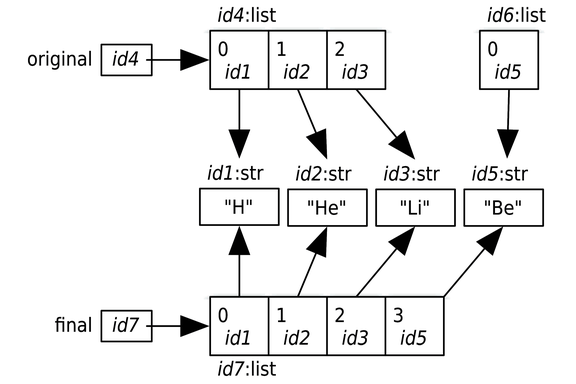
| | >>> final = original + ['Be'] |
| | >>> final |
| | ['H', 'He', 'Li', 'Be'] |
This code doesn’t mutate either of the original list objects. Instead, it creates a new list whose entries refer to the items in the original lists.
A list has a type, and Python complains if you use a value of some type in an inappropriate way. For example, an error occurs when the concatenation operator is applied to a list and a string:
| | >>> ['H', 'He', 'Li'] + 'Be' |
| | Traceback (most recent call last): |
| | File "<stdin>", line 1, in <module> |
| | TypeError: can only concatenate list (not "str") to list |
You can also multiply a list by an integer to get a new list containing the elements from the original list repeated that number of times:
| | >>> metals = ['Fe', 'Ni'] |
| | >>> metals * 3 |
| | ['Fe', 'Ni', 'Fe', 'Ni', 'Fe', 'Ni'] |
As with concatenation, the original list isn’t modified; instead, a new list is created.
One operator that does modify a list is del, which stands for delete. It can be used to remove an item from a list, as follows:
| | >>> metals = ['Fe', 'Ni'] |
| | >>> del metals[0] |
| | >>> metals |
| | ['Ni'] |
The in operator can be applied to lists to check whether an object is in a list:
| | >>> nobles = ['helium', 'neon', 'argon', 'krypton', 'xenon', 'radon'] |
| | >>> gas = input('Enter a gas: ') |
| | Enter a gas: argon |
| | >>> if gas in nobles: |
| | ... print('{} is noble.'.format(gas)) |
| | ... |
| | argon is noble. |
| | >>> gas = input('Enter a gas: ') |
| | Enter a gas: nitrogen |
| | >>> if gas in nobles: |
| | ... print('{} is noble.'.format(gas)) |
| | ... |
| | >>> |
Unlike with strings, when used with lists, the in operator checks only for a single item. This code checks whether the list [1, 2] is an item in the list [0, 1, 2, 3]:
| | >>> [1, 2] in [0, 1, 2, 3] |
| | False |