13
Aliens!
In this chapter, we’ll add aliens to Alien Invasion. We’ll add one alien near the top of the screen and then generate a whole fleet of aliens. We’ll make the fleet advance sideways and down, and we’ll get rid of any aliens hit by a bullet. Finally, we’ll limit the number of ships a player has and end the game when the player runs out of ships.
As you work through this chapter, you’ll learn more about Pygame and about managing a large project. You’ll also learn to detect collisions between game objects, like bullets and aliens. Detecting collisions helps you define interactions between elements in your games. For example, you can confine a character inside the walls of a maze or pass a ball between two characters. We’ll continue to work from a plan that we revisit occasionally to maintain the focus of our code-writing sessions.
Before we start writing new code to add a fleet of aliens to the screen, let’s look at the project and update our plan.
Reviewing the Project
When you’re beginning a new phase of development on a large project, it’s always a good idea to revisit your plan and clarify what you want to accomplish with the code you’re about to write. In this chapter, we’ll do the following:
- Add a single alien to the top-left corner of the screen, with appropriate spacing around it.
- Fill the upper portion of the screen with as many aliens as we can fit horizontally. We’ll then create additional rows of aliens until we have a full fleet.
- Make the fleet move sideways and down until the entire fleet is shot down, an alien hits the ship, or an alien reaches the ground. If the entire fleet is shot down, we’ll create a new fleet. If an alien hits the ship or the ground, we’ll destroy the ship and create a new fleet.
- Limit the number of ships the player can use, and end the game when the player has used up the allotted number of ships.
We’ll refine this plan as we implement features, but this is specific enough to start writing code.
You should also review your existing code when you begin working on a new series of features in a project. Because each new phase typically makes a project more complex, it’s best to clean up any cluttered or inefficient code. We’ve been refactoring as we go, so there isn’t any code that we need to refactor at this point.
Creating the First Alien
Placing one alien on the screen is like placing a ship on the screen. Each alien’s behavior is controlled by a class called Alien, which we’ll structure like the Ship class. We’ll continue using bitmap images for simplicity. You can find your own image for an alien or use the one shown in Figure 13-1, which is available in the book’s resources at https://ehmatthes.github.io/pcc_3e. This image has a gray background, which matches the screen’s background color. Make sure you save the image file you choose in the images folder.

Figure 13-1: The alien we’ll use to build the fleet
Creating the Alien Class
Now we’ll write the Alien class and save it as alien.py:
alien.py
import pygame
from pygame.sprite import Sprite

class Alien(Sprite):
    """A class to represent a single alien in the fleet."""

    def __init__(self, ai_game):
        """Initialize the alien and set its starting position."""
        super().__init__()
        self.screen = ai_game.screen

        # Load the alien image and set its rect attribute.
        self.image = pygame.image.load('images/alien.bmp')
        self.rect = self.image.get_rect()

        # Start each new alien near the top left of the screen.
❶         self.rect.x = self.rect.width
        self.rect.y = self.rect.height

        # Store the alien's exact horizontal position.
❷         self.x = float(self.rect.x)
Most of this class is like the Ship class, except for the alien’s placement on the screen. We initially place each alien near the top-left corner of the screen; we add a space to the left of it that’s equal to the alien’s width and a space above it equal to its height ❶, so it’s easy to see. We’re mainly concerned with the aliens’ horizontal speed, so we’ll track the horizontal position of each alien precisely ❷.
This Alien class doesn’t need a method for drawing it to the screen; instead, we’ll use a Pygame group method that automatically draws all the elements of a group to the screen.
Creating an Instance of the Alien
We want to create an instance of Alien so we can see the first alien on the screen. Because it’s part of our setup work, we’ll add the code for this instance at the end of the __init__() method in AlienInvasion. Eventually, we’ll create an entire fleet of aliens, which will be quite a bit of work, so we’ll make a new helper method called _create_fleet().
The order of methods in a class doesn’t matter, as long as there’s some consistency to how they’re placed. I’ll place _create_fleet() just before the _update_screen() method, but anywhere in AlienInvasion will work. First, we’ll import the Alien class.
Here are the updated import statements for alien_invasion.py:
alien_invasion.py
--snip--
from bullet import Bullet
from alien import Alien
And here’s the updated __init__() method:
alien_invasion.py
    def __init__(self):
        --snip--
        self.ship = Ship(self)
        self.bullets = pygame.sprite.Group()
        self.aliens = pygame.sprite.Group()

        self._create_fleet()
We create a group to hold the fleet of aliens, and we call _create_fleet(), which we’re about to write.
Here’s the new _create_fleet() method:
alien_invasion.py
    def _create_fleet(self):
        """Create the fleet of aliens."""
        # Make an alien.
        alien = Alien(self)
        self.aliens.add(alien)
In this method, we’re creating one instance of Alien and then adding it to the group that will hold the fleet. The alien will be placed in the default upper-left area of the screen.
To make the alien appear, we need to call the group’s draw() method in _update_screen():
alien_invasion.py
    def _update_screen(self):
        --snip--
        self.ship.blitme()
        self.aliens.draw(self.screen)

        pygame.display.flip()
When you call draw() on a group, Pygame draws each element in the group at the position defined by its rect attribute. The draw() method requires one argument: a surface on which to draw the elements from the group. Figure 13-2 shows the first alien on the screen.
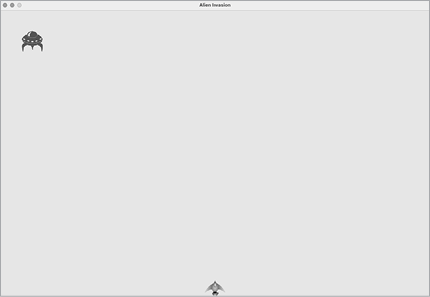
Figure 13-2: The first alien appears.
Now that the first alien appears correctly, we’ll write the code to draw an entire fleet.
Building the Alien Fleet
To draw a fleet, we need to figure out how to fill the upper portion of the screen with aliens, without overcrowding the game window. There are a number of ways to accomplish this goal. We’ll approach it by adding aliens across the top of the screen, until there’s no space left for a new alien. Then we’ll repeat this process, as long as we have enough vertical space to add a new row.
Creating a Row of Aliens
Now we’re ready to generate a full row of aliens. To make a full row, we’ll first make a single alien so we have access to the alien’s width. We’ll place an alien on the left side of the screen and then keep adding aliens until we run out of space:
alien_invasion.py
    def _create_fleet(self):
        """Create the fleet of aliens."""
        # Create an alien and keep adding aliens until there's no room left.
        # Spacing between aliens is one alien width.
        alien = Alien(self)
        alien_width = alien.rect.width

❶         current_x = alien_width
❷         while current_x < (self.settings.screen_width - 2 * alien_width):
❸             new_alien = Alien(self)
❹             new_alien.x = current_x
            new_alien.rect.x = current_x
            self.aliens.add(new_alien)
❺             current_x += 2 * alien_width
We get the alien’s width from the first alien we created, and then define a variable called current_x ❶. This refers to the horizontal position of the next alien we intend to place on the screen. We initially set this to one alien width, to offset the first alien in the fleet from the left edge of the screen.
Next, we begin the while loop ❷; we’re going to keep adding aliens while there’s enough room to place one. To determine whether there’s room to place another alien, we’ll compare current_x to some maximum value. A first attempt at defining this loop might look like this:
while current_x < self.settings.screen_width:This seems like it might work, but it would place the final alien in the row at the far-right edge of the screen. So we add a little margin on the right side of the screen. As long as there’s at least two alien widths’ worth of space at the right edge of the screen, we enter the loop and add another alien to the fleet.
Whenever there’s enough horizontal space to continue the loop, we want to do two things: create an alien at the correct position, and define the horizontal position of the next alien in the row. We create an alien and assign it to new_alien ❸. Then we set the precise horizontal position to the current value of current_x ❹. We also position the alien’s rect at this same x-value, and add the new alien to the group self.aliens.
Finally, we increment the value of current_x ❺. We add two alien widths to the horizontal position, to move past the alien we just added and to leave some space between the aliens as well. Python will re-evaluate the condition at the start of the while loop and decide if there’s room for another alien. When there’s no room left, the loop will end, and we should have a full row of aliens.
When you run Alien Invasion now, you should see the first row of aliens appear, as in Figure 13-3.
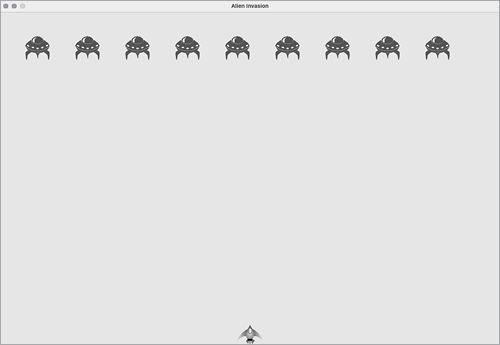
Figure 13-3: The first row of aliens
Refactoring _create_fleet()
If the code we’ve written so far was all we needed to create a fleet, we’d probably leave _create_fleet() as is. But we have more work to do, so let’s clean up the method a bit. We’ll add a new helper method, _create_alien(), and call it from _create_fleet():
alien_invasion.py
    def _create_fleet(self):
        --snip--
        while current_x < (self.settings.screen_width - 2 * alien_width):
            self._create_alien(current_x)
            current_x += 2 * alien_width

❶     def _create_alien(self, x_position):
        """Create an alien and place it in the row."""
        new_alien = Alien(self)
        new_alien.x = x_position
        new_alien.rect.x = x_position
        self.aliens.add(new_alien)
The method _create_alien() requires one parameter in addition to self: the x-value that specifies where the alien should be placed ❶. The code in the body of _create_alien() is the same code that was in _create_fleet(), except we use the parameter name x_position in place of current_x. This refactoring will make it easier to add new rows and create an entire fleet.
Adding Rows
To finish the fleet, we’ll keep adding more rows until we run out of room. We’ll use a nested loop—we’ll wrap another while loop around the current one. The inner loop will place aliens horizontally in a row by focusing on the aliens’ x-values. The outer loop will place aliens vertically by focusing on the y-values. We’ll stop adding rows when we get near the bottom of the screen, leaving enough space for the ship and some room to start firing at the aliens.
Here’s how to nest the two while loops in _create_fleet():
    def _create_fleet(self):
        """Create the fleet of aliens."""
        # Create an alien and keep adding aliens until there's no room left.
        # Spacing between aliens is one alien width and one alien height.
        alien = Alien(self)
❶         alien_width, alien_height = alien.rect.size

❷         current_x, current_y = alien_width, alien_height
❸         while current_y < (self.settings.screen_height - 3 * alien_height):
            while current_x < (self.settings.screen_width - 2 * alien_width):
❹                 self._create_alien(current_x, current_y)
                current_x += 2 * alien_width

❺             # Finished a row; reset x value, and increment y value.
            current_x = alien_width
            current_y += 2 * alien_height
We’ll need to know the alien’s height in order to place rows, so we grab the alien’s width and height using the size attribute of an alien rect ❶. A rect’s size attribute is a tuple containing its width and height.
Next, we set the initial x- and y-values for the placement of the first alien in the fleet ❷. We place it one alien width in from the left and one alien height down from the top. Then we define the while loop that controls how many rows are placed onto the screen ❸. As long as the y-value for the next row is less than the screen height, minus three alien heights, we’ll keep adding rows. (If this doesn’t leave the right amount of space, we can adjust it later.)
We call _create_alien(), and pass it the y-value as well as its x-position ❹. We’ll modify _create_alien() in a moment.
Notice the indentation of the last two lines of code ❺. They’re inside the outer while loop, but outside the inner while loop. This block runs after the inner loop is finished; it runs once after each row is created. After each row has been added, we reset the value of current_x so the first alien in the next row will be placed at the same position as the first alien in the previous rows. Then we add two alien heights to the current value of current_y, so the next row will be placed further down the screen. Indentation is really important here; if you don’t see the correct fleet when you run alien_invasion.py at the end of this section, check the indentation of all the lines in these nested loops.
We need to modify _create_alien() to set the vertical position of the alien correctly:
    def _create_alien(self, x_position, y_position):
        """Create an alien and place it in the fleet."""
        new_alien = Alien(self)
        new_alien.x = x_position
        new_alien.rect.x = x_position
        new_alien.rect.y = y_position
        self.aliens.add(new_alien)
We modify the definition of the method to accept the y-value for the new alien, and we set the vertical position of the rect in the body of the method.
When you run the game now, you should see a full fleet of aliens, as shown in Figure 13-4.
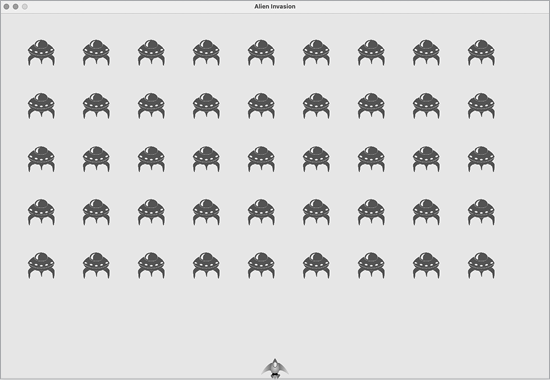
Figure 13-4: The full fleet appears.
In the next section, we’ll make the fleet move!
Making the Fleet Move
Now let’s make the fleet of aliens move to the right across the screen until it hits the edge, and then make it drop a set amount and move in the other direction. We’ll continue this movement until all aliens have been shot down, one collides with the ship, or one reaches the bottom of the screen. Let’s begin by making the fleet move to the right.
Moving the Aliens Right
To move the aliens, we’ll use an update() method in alien.py, which we’ll call for each alien in the group of aliens. First, add a setting to control the speed of each alien:
settings.py
    def __init__(self):
        --snip--
        # Alien settings
        self.alien_speed = 1.0
Then use this setting to implement update() in alien.py:
alien.py
    def __init__(self, ai_game):
        """Initialize the alien and set its starting position."""
        super().__init__()
        self.screen = ai_game.screen
        self.settings = ai_game.settings
        --snip--

    def update(self):
        """Move the alien to the right."""
❶         self.x += self.settings.alien_speed
❷         self.rect.x = self.x
We create a settings parameter in __init__() so we can access the alien’s speed in update(). Each time we update an alien’s position, we move it to the right by the amount stored in alien_speed. We track the alien’s exact position with the self.x attribute, which can hold float values ❶. We then use the value of self.x to update the position of the alien’s rect ❷.
In the main while loop, we already have calls to update the ship and bullet positions. Now we’ll add a call to update the position of each alien as well:
alien_invasion.py
        while True:
            self._check_events()
            self.ship.update()
            self._update_bullets()
            self._update_aliens()
            self._update_screen()
            self.clock.tick(60)
We’re about to write some code to manage the movement of the fleet, so we create a new method called _update_aliens(). We update the aliens’ positions after the bullets have been updated, because we’ll soon be checking to see whether any bullets hit any aliens.
Where you place this method in the module is not critical. But to keep the code organized, I’ll place it just after _update_bullets() to match the order of method calls in the while loop. Here’s the first version of _update_aliens():
alien_invasion.py
    def _update_aliens(self):
        """Update the positions of all aliens in the fleet."""
        self.aliens.update()
We use the update() method on the aliens group, which calls each alien’s update() method. When you run Alien Invasion now, you should see the fleet move right and disappear off the side of the screen.
Creating Settings for Fleet Direction
Now we’ll create the settings that will make the fleet move down the screen and to the left when it hits the right edge of the screen. Here’s how to implement this behavior:
settings.py
        # Alien settings
        self.alien_speed = 1.0
        self.fleet_drop_speed = 10
        # fleet_direction of 1 represents right; -1 represents left.
        self.fleet_direction = 1
The setting fleet_drop_speed controls how quickly the fleet drops down the screen each time an alien reaches either edge. It’s helpful to separate this speed from the aliens’ horizontal speed so you can adjust the two speeds independently.
To implement the setting fleet_direction, we could use a text value such as 'left' or 'right', but we’d end up with if-elif statements testing for the fleet direction. Instead, because we only have two directions to deal with, let’s use the values 1 and −1 and switch between them each time the fleet changes direction. (Using numbers also makes sense because moving right involves adding to each alien’s x-coordinate value, and moving left involves subtracting from each alien’s x-coordinate value.)
Checking Whether an Alien Has Hit the Edge
We need a method to check whether an alien is at either edge, and we need to modify update() to allow each alien to move in the appropriate direction. This code is part of the Alien class:
alien.py
    def check_edges(self):
        """Return True if alien is at edge of screen."""
        screen_rect = self.screen.get_rect()
❶         return (self.rect.right >= screen_rect.right) or (self.rect.left <= 0)

    def update(self):
        """Move the alien right or left."""
❷         self.x += self.settings.alien_speed * self.settings.fleet_direction
        self.rect.x = self.x
We can call the new method check_edges() on any alien to see whether it’s at the left or right edge. The alien is at the right edge if the right attribute of its rect is greater than or equal to the right attribute of the screen’s rect. It’s at the left edge if its left value is less than or equal to 0 ❶. Rather than put this conditional test in an if block, we put the test directly in the return statement. This method will return True if the alien is at the right or left edge, and False if it is not at either edge.
We modify the method update() to allow motion to the left or right by multiplying the alien’s speed by the value of fleet_direction ❷. If fleet_direction is 1, the value of alien_speed will be added to the alien’s current position, moving the alien to the right; if fleet_direction is −1, the value will be subtracted from the alien’s position, moving the alien to the left.
Dropping the Fleet and Changing Direction
When an alien reaches the edge, the entire fleet needs to drop down and change direction. Therefore, we need to add some code to AlienInvasion because that’s where we’ll check whether any aliens are at the left or right edge. We’ll make this happen by writing the methods _check_fleet_edges() and _change_fleet_direction(), and then modifying _update_aliens(). I’ll put these new methods after _create_alien(), but again, the placement of these methods in the class isn’t critical.
alien_invasion.py
    def _check_fleet_edges(self):
        """Respond appropriately if any aliens have reached an edge."""
❶         for alien in self.aliens.sprites():
            if alien.check_edges():
❷                 self._change_fleet_direction()
                break

    def _change_fleet_direction(self):
        """Drop the entire fleet and change the fleet's direction."""
        for alien in self.aliens.sprites():
❸             alien.rect.y += self.settings.fleet_drop_speed
        self.settings.fleet_direction *= -1
In _check_fleet_edges(), we loop through the fleet and call check_edges() on each alien ❶. If check_edges() returns True, we know an alien is at an edge and the whole fleet needs to change direction; so we call _change_fleet_direction() and break out of the loop ❷. In _change_fleet_direction(), we loop through all the aliens and drop each one using the setting fleet_drop_speed ❸; then we change the value of fleet_direction by multiplying its current value by −1. The line that changes the fleet’s direction isn’t part of the for loop. We want to change each alien’s vertical position, but we only want to change the direction of the fleet once.
Here are the changes to _update_aliens():
alien_invasion.py
    def _update_aliens(self):
        """Check if the fleet is at an edge, then update positions."""
        self._check_fleet_edges()
        self.aliens.update()
We’ve modified the method by calling _check_fleet_edges() before updating each alien’s position.
When you run the game now, the fleet should move back and forth between the edges of the screen and drop down every time it hits an edge. Now we can start shooting down aliens and watch for any aliens that hit the ship or reach the bottom of the screen.
Shooting Aliens
We’ve built our ship and a fleet of aliens, but when the bullets reach the aliens, they simply pass through because we aren’t checking for collisions. In game programming, collisions happen when game elements overlap. To make the bullets shoot down aliens, we’ll use the function sprite.groupcollide() to look for collisions between members of two groups.
Detecting Bullet Collisions
We want to know right away when a bullet hits an alien so we can make an alien disappear as soon as it’s hit. To do this, we’ll look for collisions immediately after updating the position of all the bullets.
The sprite.groupcollide() function compares the rects of each element in one group with the rects of each element in another group. In this case, it compares each bullet’s rect with each alien’s rect and returns a dictionary containing the bullets and aliens that have collided. Each key in the dictionary will be a bullet, and the corresponding value will be the alien that was hit. (We’ll also use this dictionary when we implement a scoring system in Chapter 14.)
Add the following code to the end of _update_bullets() to check for collisions between bullets and aliens:
alien_invasion.py
    def _update_bullets(self):
        """Update position of bullets and get rid of old bullets."""
        --snip--

        # Check for any bullets that have hit aliens.
        #   If so, get rid of the bullet and the alien.
        collisions = pygame.sprite.groupcollide(
                self.bullets, self.aliens, True, True)
The new code we added compares the positions of all the bullets in self.bullets and all the aliens in self.aliens, and identifies any that overlap. Whenever the rects of a bullet and alien overlap, groupcollide() adds a key-value pair to the dictionary it returns. The two True arguments tell Pygame to delete the bullets and aliens that have collided. (To make a high-powered bullet that can travel to the top of the screen, destroying every alien in its path, you could set the first Boolean argument to False and keep the second Boolean argument set to True. The aliens hit would disappear, but all bullets would stay active until they disappeared off the top of the screen.)
When you run Alien Invasion now, aliens you hit should disappear. Figure 13-5 shows a fleet that has been partially shot down.
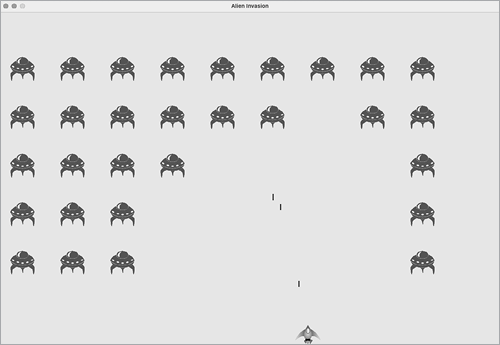
Figure 13-5: We can shoot aliens!
Making Larger Bullets for Testing
You can test many features of Alien Invasion simply by running the game, but some features are tedious to test in the normal version of the game. For example, it’s a lot of work to shoot down every alien on the screen multiple times to test whether your code responds to an empty fleet correctly.
To test particular features, you can change certain game settings to focus on a particular area. For example, you might shrink the screen so there are fewer aliens to shoot down or increase the bullet speed and give yourself lots of bullets at once.
My favorite change for testing Alien Invasion is to use really wide bullets that remain active even after they’ve hit an alien (see Figure 13-6). Try setting bullet_width to 300, or even 3,000, to see how quickly you can shoot down the fleet!
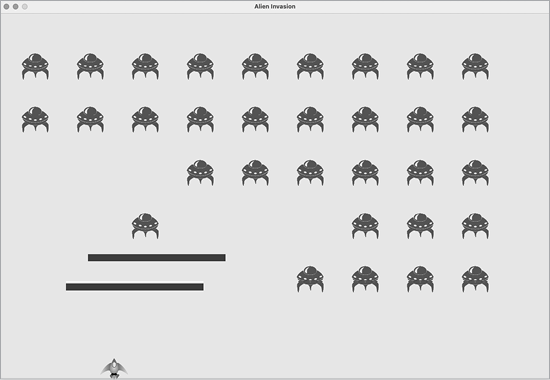
Figure 13-6: Extra-powerful bullets make some aspects of the game easier to test.
Changes like these will help you test the game more efficiently and possibly spark ideas for giving players bonus powers. Just remember to restore the settings to normal when you’re finished testing a feature.
Repopulating the Fleet
One key feature of Alien Invasion is that the aliens are relentless: every time the fleet is destroyed, a new fleet should appear.
To make a new fleet of aliens appear after a fleet has been destroyed, we first check whether the aliens group is empty. If it is, we make a call to _create_fleet(). We’ll perform this check at the end of _update_bullets(), because that’s where individual aliens are destroyed.
alien_invasion.py
    def _update_bullets(self):
        --snip--
❶         if not self.aliens:
            # Destroy existing bullets and create new fleet.
❷             self.bullets.empty()
            self._create_fleet()
We check whether the aliens group is empty ❶. An empty group evaluates to False, so this is a simple way to check whether the group is empty. If it is, we get rid of any existing bullets by using the empty() method, which removes all the remaining sprites from a group ❷. We also call _create_fleet(), which fills the screen with aliens again.
Now a new fleet appears as soon as you destroy the current fleet.
Speeding Up the Bullets
If you’ve tried firing at the aliens in the game’s current state, you might find that the bullets aren’t traveling at the best speed for gameplay. They might be a little too slow or a little too fast. At this point, you can modify the settings to make the gameplay more interesting. Keep in mind that the game is going to get progressively faster, so don’t make the game too fast at the beginning.
We modify the speed of the bullets by adjusting the value of bullet_speed in settings.py. On my system, I’ll adjust the value of bullet_speed to 2.5, so the bullets travel a little faster:
settings.py
        # Bullet settings
        self.bullet_speed = 2.5
        self.bullet_width = 3
        --snip--
The best value for this setting depends on your experience of the game, so find a value that works for you. You can adjust other settings as well.
Refactoring _update_bullets()
Let’s refactor _update_bullets() so it’s not doing so many different tasks. We’ll move the code for dealing with bullet-alien collisions to a separate method:
alien_invasion.py
   def _update_bullets(self):
        --snip--
        # Get rid of bullets that have disappeared.
        for bullet in self.bullets.copy():
            if bullet.rect.bottom <= 0:
                 self.bullets.remove(bullet)

        self._check_bullet_alien_collisions()

    def _check_bullet_alien_collisions(self):
        """Respond to bullet-alien collisions."""
        # Remove any bullets and aliens that have collided.
        collisions = pygame.sprite.groupcollide(
                self.bullets, self.aliens, True, True)

        if not self.aliens:
            # Destroy existing bullets and create new fleet.
            self.bullets.empty()
            self._create_fleet()
We’ve created a new method, _check_bullet_alien_collisions(), to look for collisions between bullets and aliens and to respond appropriately if the entire fleet has been destroyed. Doing so keeps _update_bullets() from growing too long and simplifies further development.
Ending the Game
What’s the fun and challenge in playing a game you can’t lose? If the player doesn’t shoot down the fleet quickly enough, we’ll have the aliens destroy the ship when they make contact. At the same time, we’ll limit the number of ships a player can use, and we’ll destroy the ship when an alien reaches the bottom of the screen. The game will end when the player has used up all their ships.
Detecting Alien-Ship Collisions
We’ll start by checking for collisions between aliens and the ship so we can respond appropriately when an alien hits it. We’ll check for alien-ship collisions immediately after updating the position of each alien in AlienInvasion:
alien_invasion.py
    def _update_aliens(self):
        --snip--
        self.aliens.update()

        # Look for alien-ship collisions.
❶         if pygame.sprite.spritecollideany(self.ship, self.aliens):
❷             print("Ship hit!!!")
The spritecollideany() function takes two arguments: a sprite and a group. The function looks for any member of the group that has collided with the sprite and stops looping through the group as soon as it finds one member that has collided with the sprite. Here, it loops through the group aliens and returns the first alien it finds that has collided with ship.
If no collisions occur, spritecollideany() returns None and the if block won’t execute ❶. If it finds an alien that has collided with the ship, it returns that alien and the if block executes: it prints Ship hit!!! ❷. When an alien hits the ship, we’ll need to do a number of tasks: delete all remaining aliens and bullets, recenter the ship, and create a new fleet. Before we write code to do all this, we want to know that our approach to detecting alien-ship collisions works correctly. Writing a print() call is a simple way to ensure we’re detecting these collisions properly.
Now when you run Alien Invasion, the message Ship hit!!! should appear in the terminal whenever an alien runs into the ship. When you’re testing this feature, set fleet_drop_speed to a higher value, such as 50 or 100, so the aliens reach your ship faster.
Responding to Alien-Ship Collisions
Now we need to figure out exactly what will happen when an alien collides with the ship. Instead of destroying the ship instance and creating a new one, we’ll count how many times the ship has been hit by tracking statistics for the game. Tracking statistics will also be useful for scoring.
Let’s write a new class, GameStats, to track game statistics, and let’s save it as game_stats.py:
game_stats.py
class GameStats:
    """Track statistics for Alien Invasion."""

    def __init__(self, ai_game):
        """Initialize statistics."""
        self.settings = ai_game.settings
❶         self.reset_stats()

    def reset_stats(self):
        """Initialize statistics that can change during the game."""
        self.ships_left = self.settings.ship_limit
We’ll make one GameStats instance for the entire time Alien Invasion is running, but we’ll need to reset some statistics each time the player starts a new game. To do this, we’ll initialize most of the statistics in the reset_stats() method, instead of directly in __init__(). We’ll call this method from __init__() so the statistics are set properly when the GameStats instance is first created ❶. But we’ll also be able to call reset_stats() anytime the player starts a new game. Right now we have only one statistic, ships_left, the value of which will change throughout the game.
The number of ships the player starts with should be stored in settings.py as ship_limit:
settings.py
        # Ship settings
        self.ship_speed = 1.5
        self.ship_limit = 3
We also need to make a few changes in alien_invasion.py to create an instance of GameStats. First, we’ll update the import statements at the top of the file:
alien_invasion.py
import sys
from time import sleep

import pygame

from settings import Settings
from game_stats import GameStats
from ship import Ship
--snip--
We import the sleep() function from the time module in the Python standard library, so we can pause the game for a moment when the ship is hit. We also import GameStats.
We’ll create an instance of GameStats in __init__():
alien_invasion.py
    def __init__(self):
        --snip--
        self.screen = pygame.display.set_mode(
            (self.settings.screen_width, self.settings.screen_height))
        pygame.display.set_caption("Alien Invasion")

        # Create an instance to store game statistics.
        self.stats = GameStats(self)

        self.ship = Ship(self)
        --snip--
We make the instance after creating the game window but before defining other game elements, such as the ship.
When an alien hits the ship, we’ll subtract 1 from the number of ships left, destroy all existing aliens and bullets, create a new fleet, and reposition the ship in the middle of the screen. We’ll also pause the game for a moment so the player can notice the collision and regroup before a new fleet appears.
Let’s put most of this code in a new method called _ship_hit(). We’ll call this method from _update_aliens() when an alien hits the ship:
alien_invasion.py
    def _ship_hit(self):
        """Respond to the ship being hit by an alien."""
        # Decrement ships_left.
❶         self.stats.ships_left -= 1

        # Get rid of any remaining bullets and aliens.
❷         self.bullets.empty()
        self.aliens.empty()

        # Create a new fleet and center the ship.
❸         self._create_fleet()
        self.ship.center_ship()

        # Pause.
❹         sleep(0.5)
The new method _ship_hit() coordinates the response when an alien hits a ship. Inside _ship_hit(), the number of ships left is reduced by 1 ❶, after which we empty the groups bullets and aliens ❷.
Next, we create a new fleet and center the ship ❸. (We’ll add the method center_ship() to Ship in a moment.) Then we add a pause after the updates have been made to all the game elements but before any changes have been drawn to the screen, so the player can see that their ship has been hit ❹. The sleep() call pauses program execution for half a second, long enough for the player to see that the alien has hit the ship. When the sleep() function ends, code execution moves on to the _update_screen() method, which draws the new fleet to the screen.
In _update_aliens(), we replace the print() call with a call to _ship_hit() when an alien hits the ship:
alien_invasion.py
    def _update_aliens(self):
        --snip--
        if pygame.sprite.spritecollideany(self.ship, self.aliens):
            self._ship_hit()
Here’s the new method center_ship(), which belongs in ship.py:
ship.py
    def center_ship(self):
        """Center the ship on the screen."""
        self.rect.midbottom = self.screen_rect.midbottom
        self.x = float(self.rect.x)
We center the ship the same way we did in __init__(). After centering it, we reset the self.x attribute, which allows us to track the ship’s exact position.
Run the game, shoot a few aliens, and let an alien hit the ship. The game should pause, and a new fleet should appear with the ship centered at the bottom of the screen again.
Aliens That Reach the Bottom of the Screen
If an alien reaches the bottom of the screen, we’ll have the game respond the same way it does when an alien hits the ship. To check when this happens, add a new method in alien_invasion.py:
alien_invasion.py
    def _check_aliens_bottom(self):
        """Check if any aliens have reached the bottom of the screen."""
        for alien in self.aliens.sprites():
❶             if alien.rect.bottom >= self.settings.screen_height:
                # Treat this the same as if the ship got hit.
                self._ship_hit()
                break
The method _check_aliens_bottom() checks whether any aliens have reached the bottom of the screen. An alien reaches the bottom when its rect.bottom value is greater than or equal to the screen’s height ❶. If an alien reaches the bottom, we call _ship_hit(). If one alien hits the bottom, there’s no need to check the rest, so we break out of the loop after calling _ship_hit().
We’ll call this method from _update_aliens():
alien_invasion.py
    def _update_aliens(self):
        --snip--
        # Look for alien-ship collisions.
        if pygame.sprite.spritecollideany(self.ship, self.aliens):
            self._ship_hit()

        # Look for aliens hitting the bottom of the screen.
        self._check_aliens_bottom()
We call _check_aliens_bottom() after updating the positions of all the aliens and after looking for alien-ship collisions. Now a new fleet will appear every time the ship is hit by an alien or an alien reaches the bottom of the screen.
Game Over!
Alien Invasion feels more complete now, but the game never ends. The value of ships_left just grows increasingly negative. Let’s add a game_active flag, so we can end the game when the player runs out of ships. We’ll set this flag at the end of the __init__() method in AlienInvasion:
alien_invasion.py
    def __init__(self):
        --snip--
        # Start Alien Invasion in an active state.
        self.game_active = True
Now we add code to _ship_hit() that sets game_active to False when the player has used up all their ships:
alien_invasion.py
    def _ship_hit(self):
        """Respond to ship being hit by alien."""
        if self.stats.ships_left > 0:
            # Decrement ships_left.
            self.stats.ships_left -= 1
            --snip--
            # Pause.
            sleep(0.5)
        else:
            self.game_active = False
Most of _ship_hit() is unchanged. We’ve moved all the existing code into an if block, which tests to make sure the player has at least one ship remaining. If so, we create a new fleet, pause, and move on. If the player has no ships left, we set game_active to False.
Identifying When Parts of the Game Should Run
We need to identify the parts of the game that should always run and the parts that should run only when the game is active:
alien_invasion.py
    def run_game(self):
        """Start the main loop for the game."""
        while True:
            self._check_events()

            if self.game_active:
                self.ship.update()
                self._update_bullets()
                self._update_aliens()

            self._update_screen()
            self.clock.tick(60)
In the main loop, we always need to call _check_events(), even if the game is inactive. For example, we still need to know if the user presses Q to quit the game or clicks the button to close the window. We also continue updating the screen so we can make changes to the screen while waiting to see whether the player chooses to start a new game. The rest of the function calls need to happen only when the game is active, because when the game is inactive, we don’t need to update the positions of game elements.
Now when you play Alien Invasion, the game should freeze when you’ve used up all your ships.
Summary
In this chapter, you learned how to add a large number of identical elements to a game by creating a fleet of aliens. You used nested loops to create a grid of elements, and you made a large set of game elements move by calling each element’s update() method. You learned to control the direction of objects on the screen and to respond to specific situations, such as when the fleet reaches the edge of the screen. You detected and responded to collisions when bullets hit aliens and aliens hit the ship. You also learned how to track statistics in a game and use a game_active flag to determine when the game is over.
In the next and final chapter of this project, we’ll add a Play button so the player can choose when to start their first game and whether to play again when the game ends. We’ll speed up the game each time the player shoots down the entire fleet, and we’ll add a scoring system. The final result will be a fully playable game!