Chapter 8. Adversarial search
A two-player, zero-sum, perfect information game is one in which both opponents have all of the information about the state of the game available to them, and any gain in advantage for one is a loss of advantage for the other. Such games include tic-tac-toe, Connect Four, checkers, and chess. In this chapter we will study how to create an artificial opponent that can play such games with great skill. In fact, the techniques discussed in this chapter, coupled with modern computing power, can create artificial opponents that play simple games of this class perfectly and that can play complex games beyond the ability of any human opponent.
8.1. Basic board game components
As with most of our more complex problems in this book, we will try to make our solution as generic as possible. In the case of adversarial search, that means making our search algorithms non-game-specific. Let’s start by defining some simple base classes that define all of the state our search algorithms will need. Later, we can subclass those base classes for the specific games we are implementing (tic-tac-toe and Connect Four) and feed the subclasses into the search algorithms to make them “play” the games. Here are those base classes:
Listing 8.1. board.py
from __future__ import annotations
from typing import NewType, List
from abc import ABC, abstractmethod

Move = NewType('Move', int)


class Piece:
    @property
    def opposite(self) -> Piece:
        raise NotImplementedError("Should be implemented by subclasses.")


class Board(ABC):
    @property
    @abstractmethod
    def turn(self) -> Piece:
        ...

    @abstractmethod
    def move(self, location: Move) -> Board:
        ...

    @property
    @abstractmethod
    def legal_moves(self) -> List[Move]:
        ...

    @property
    @abstractmethod
    def is_win(self) -> bool:
        ...

    @property
    def is_draw(self) -> bool:
        return (not self.is_win) and (len(self.legal_moves) == 0)

    @abstractmethod
    def evaluate(self, player: Piece) -> float:
        ...
The Move type will represent a move in a game. It is, at heart, just an integer. In games like tic-tac-toe and Connect Four, an integer can represent a move by indicating a square or column where a piece should be placed. Piece is a base class for a piece on the board in a game. It will also double as our turn indicator. This is why the opposite property is needed. We need to know whose turn follows a given turn.
TIP
Because tic-tac-toe and Connect Four only have one kind of piece, the Piece class can double as a turn indicator in this chapter. For a more complex game, like chess, that has different kinds of pieces, turns can be indicated by an integer or a Boolean. Alternatively, just the “color” attribute of a more complex Piece type could be used to indicate turn.
The Board abstract base class is the actual maintainer of state. For any given game that our search algorithms will compute, we need to be able to answer four questions:
- Whose turn is it?
- What legal moves can be played in the current position?
- Is the game won?
- Is the game drawn?
That last question, about draws, is actually a combination of the previous two questions for many games. If the game is not won but there are no legal moves, then it is a draw. This is why our abstract base class, Game, can already have a concrete implementation of the is_draw property. In addition, there are a couple of actions we need to be able to take:
- Make a move to go from the current position to a new position.
- Evaluate the position to see which player has an advantage.
Each of the methods and properties in Board is a proxy for one of the preceding questions or actions. The Board class could also be called Position in game parlance, but we will use that nomenclature for something more specific in each of our subclasses.
8.2. Tic-tac-toe
Tic-tac-toe is a simple game, but it can be used to illustrate the same minimax algorithm that can be applied in advanced strategy games like Connect Four, checkers, and chess. We will build a tic-tac-toe AI that plays perfectly using minimax.
Note
This section assumes that you are familiar with the game tic-tac-toe and its standard rules. If not, a quick search on the web should get you up to speed.
8.2.1. Managing tic-tac-toe state
Let’s develop some structures to keep track of the state of a tic-tac-toe game as it progresses.
First, we need a way of representing each square on the tic-tac-toe board. We will use an enum called TTTPiece, a subclass of Piece. A tic-tac-toe piece can be X, O, or empty (represented by E in the enum).
Listing 8.2. tictactoe.py
from __future__ import annotations
from typing import List
from enum import Enum
from board import Piece, Board, Move


class TTTPiece(Piece, Enum):
    X = "X"
    O = "O"
    E = " " # stand-in for empty

    @property
    def opposite(self) -> TTTPiece:
        if self == TTTPiece.X:
            return TTTPiece.O
        elif self == TTTPiece.O:
            return TTTPiece.X
        else:
            return TTTPiece.E

def __str__(self) -> str:
    return self.value
The class TTTPiece has a property, opposite, that returns another TTTPiece. This will be useful for flipping from one player’s turn to the other player’s turn after a tic-tac-toe move. To represent moves, we will just use an integer that corresponds to a square on the board where a piece is placed. As you recall, Move was defined as an integer in board.py.
A tic-tac-toe board has nine positions organized in three rows and three columns. For simplicity, these nine positions can be represented using a one-dimensional list. Which squares receive which numeric designation (a.k.a., index in the array) is arbitrary, but we will follow the scheme outlined in figure 8.1.
Figure 8.1. The one-dimensional list indices that correspond to each square in the tic-tac-toe board
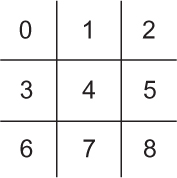
The main holder of state will be the class TTTBoard. TTTBoard keeps track of two different pieces of state: the position (represented by the aforementioned one-dimensional list) and the player whose turn it is.
Listing 8.3. tictactoe.py continued
class TTTBoard(Board):
    def __init__(self, position: List[TTTPiece] = [TTTPiece.E] * 9, turn:
     TTTPiece = TTTPiece.X) -> None:
        self.position: List[TTTPiece] = position
        self._turn: TTTPiece = turn

    @property
    def turn(self) -> Piece:
        return self._turn
A default board is one where no moves have yet been made (an empty board). The constructor for Board has default parameters that initialize such a position, with X to move (the usual first player in tic-tac-toe). You may wonder why the _turn instance variable and turn property exist. This was a trick to ensure that all Board subclasses will keep track of whose turn it is. There is no clear and obvious way in Python to specify in an abstract base class that subclasses must include a particular instance variable, but there is such a mechanism for properties.
TTTBoard is an informally immutable data structure; TTTBoards should not be modified. Instead, every time a move needs to be played, a new TTTBoard with the position changed to accommodate the move will be generated. This will later be helpful in our search algorithm. When the search branches, we will not inadvertently change the position of a board from which potential moves are still being analyzed.
Listing 8.4. tictactoe.py continued
def move(self, location: Move) -> Board:
    temp_position: List[TTTPiece] = self.position.copy()
    temp_position[location] = self._turn
    return TTTBoard(temp_position, self._turn.opposite)
A legal move in tic-tac-toe is any empty square. The following property, legal_moves, uses a list comprehension to generate potential moves for a given position.
Listing 8.5. tictactoe.py continued
@property
def legal_moves(self) -> List[Move]:
    return [Move(l) for l in range(len(self.position)) if self.position[l] ==
     TTTPiece.E]
The indices that the list comprehension acts on are int indexes into the position list. Conveniently (and purposely), a Move is also defined as a type of int, allowing this definition of legal_moves to be so succinct.
There are many ways to scan the rows, columns, and diagonals of a tic-tac-toe board to check for wins. The following implementation of the property is_win does so with a hard-coded, seemingly endless amalgamation of and, or, and ==. It is not the prettiest code, but it does the job in a straightforward manner.
Listing 8.6. tictactoe.py continued
@property
def is_win(self) -> bool:
    # three row, three column, and then two diagonal checks
    return self.position[0] == self.position[1] and self.position[0] ==
     self.position[2] and self.position[0] != TTTPiece.E or \
    self.position[3] == self.position[4] and self.position[3] ==
     self.position[5] and self.position[3] != TTTPiece.E or \
    self.position[6] == self.position[7] and self.position[6] ==
     self.position[8] and self.position[6] != TTTPiece.E or \
    self.position[0] == self.position[3] and self.position[0] ==
     self.position[6] and self.position[0] != TTTPiece.E or \
    self.position[1] == self.position[4] and self.position[1] ==
     self.position[7] and self.position[1] != TTTPiece.E or \
    self.position[2] == self.position[5] and self.position[2] ==
     self.position[8] and self.position[2] != TTTPiece.E or \
    self.position[0] == self.position[4] and self.position[0] ==
     self.position[8] and self.position[0] != TTTPiece.E or \
    self.position[2] == self.position[4] and self.position[2] ==
     self.position[6] and self.position[2] != TTTPiece.E
If all of a row’s, column’s, or diagonal’s squares are not empty, and they contain the same piece, the game has been won.
A game is drawn if it is not won and there are no more legal moves left; that property was already covered by the Board abstract base class. Finally, we need a way of evaluating a particular position and pretty-printing the board.
Listing 8.7. tictactoe.py continued
    def evaluate(self, player: Piece) -> float:
        if self.is_win and self.turn == player:
           return -1
        elif self.is_win and self.turn != player:
           return 1
        else:
           return 0

    def __repr__(self) -> str:
        return f"""{self.position[0]}|{self.position[1]}|{self.position[2]}
-----
{self.position[3]}|{self.position[4]}|{self.position[5]}
-----
{self.position[6]}|{self.position[7]}|{self.position[8]}"""
For most games, an evaluation of a position needs to be an approximation, because we cannot search the game to the very end to find out with certainty who wins or loses depending on what moves are played. But tic-tac-toe has a small enough search space that we can search from any position to the very end. Therefore, the evaluate() method can simply return one number if the player wins, a worse number for a draw, and an even worse number for a loss.
8.2.2. Minimax
Minimax is a classic algorithm for finding the best move in a two-player, zero-sum game with perfect information, like tic-tac-toe, checkers, or chess. It has been extended and modified for other types of games as well. Minimax is typically implemented using a recursive function in which each player is designated either the maximizing player or the minimizing player.
The maximizing player aims to find the move that will lead to maximal gains. However, the maximizing player must account for moves by the minimizing player. After each attempt to maximize the gains of the maximizing player, minimax is called recursively to find the opponent’s reply that minimizes the maximizing player’s gains. This continues back and forth (maximizing, minimizing, maximizing, and so on) until a base case in the recursive function is reached. The base case is a terminal position (a win or a draw) or a maximal search depth.
Minimax will return an evaluation of the starting position for the maximizing player. For the evaluate() method of the TTTBoard class, if the best possible play by both sides will result in a win for the maximizing player, a score of 1 will be returned. If the best play will result in a loss, -1 is returned. A 0 is returned if the best play is a draw.
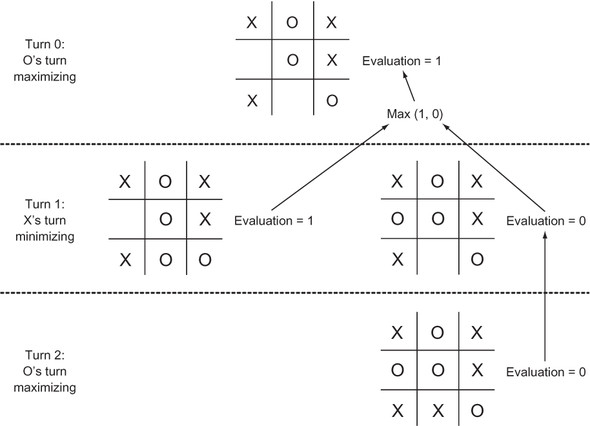
These numbers are returned when a base case is reached. They then bubble up through all of the recursive calls that led to the base case. For each recursive call to maximize, the best evaluations one level further down bubble up. For each recursive call to minimize, the worst evaluations one level further down bubble up. In this way, a decision tree is built. Figure 8.2 illustrates such a tree that facilitates bubbling up for a game with two moves left.
Figure 8.2. A minimax decision tree for a tic-tac-toe game with two moves left. To maximize the likelihood of winning, the initial player, O, will choose to play O in the bottom center. Arrows indicate the positions from which a decision is made.
For games that have too deep a search space to reach a terminal position (such as checkers and chess), minimax is stopped after a certain depth (the number of moves deep to search, sometimes called ply). Then the evaluation function kicks in, using heuristics to score the state of the game. The better the game is for the originating player, the higher the score that is awarded. We will come back to this concept with Connect Four, which has a much larger search space than tic-tac-toe.
Here is minimax() in its entirety:
Listing 8.8. minimax.py
from __future__ import annotations
from board import Piece, Board, Move

# Find the best possible outcome for original player
def minimax(board: Board, maximizing: bool, original_player: Piece, max_
     depth: int = 8) -> float:
    # Base case – terminal position or maximum depth reached
    if board.is_win or board.is_draw or max_depth == 0:
        return board.evaluate(original_player)

    # Recursive case - maximize your gains or minimize the opponent's gains
    if maximizing:
        best_eval: float = float("-inf") # arbitrarily low starting point
        for move in board.legal_moves:
            result: float = minimax(board.move(move), False, original_player,
    max_depth - 1)
            best_eval = max(result, best_eval)
        return best_eval
    else: # minimizing
        worst_eval: float = float("inf")
        for move in board.legal_moves:
            result = minimax(board.move(move), True, original_player, max_
    depth - 1)
            worst_eval = min(result, worst_eval)
        return worst_eval
In each recursive call, we need to keep track of the board position, whether we are maximizing or minimizing, and who we are trying to evaluate the position for (original_player). The first few lines of minimax() deal with the base case: a terminal node (a win, loss, or draw) or the maximum depth being reached. The rest of the function is the recursive cases.
One recursive case is maximization. In this situation, we are looking for a move that yields the highest possible evaluation. The other recursive case is minimization, where we are looking for the move that results in the lowest possible evaluation. Either way, the two cases alternate until we reach a terminal state or the maximum depth (base case).
Unfortunately, we cannot use our implementation of minimax() as is to find the best move for a given position. It returns an evaluation (a float value). It does not tell us what best first move led to that evaluation.
Instead, we will create a helper function, find_best_move(), that loops through calls to minimax() for each legal move in a position to find the move that evaluates to the highest value. You can think of find_best_move() as the first maximizing call to minimax(), but with us keeping track of those initial moves.
Listing 8.9. minimax.py continued
# Find the best possible move in the current position
# looking up to max_depth ahead
def find_best_move(board: Board, max_depth: int = 8) -> Move:
    best_eval: float = float("-inf")
    best_move: Move = Move(-1)
    for move in board.legal_moves:
        result: float = minimax(board.move(move), False, board.turn, max_
     depth)
        if result > best_eval:
            best_eval = result
            best_move = move
    return best_move
We now have everything ready to find the best possible move for any tic-tac-toe position.
8.2.3. Testing minimax with tic-tac-toe
Tic-tac-toe is such a simple game that it’s easy for us, as humans, to figure out the definite correct move in a given position. This makes it possible to easily develop unit tests. In the following code snippet, we will challenge our minimax algorithm to find the correct next move in three different tic-tac-toe positions. The first is easy and only requires it to think to the next move for a win. The second requires a block; the AI must stop its opponent from scoring a victory. The last is a little bit more challenging and requires the AI to think two moves into the future.
Listing 8.10. tictactoe_tests.py
import unittest
from typing import List
from minimax import find_best_move
from tictactoe import TTTPiece, TTTBoard
from board import Move


class TTTMinimaxTestCase(unittest.TestCase):
    def test_easy_position(self):
        # win in 1 move
        to_win_easy_position: List[TTTPiece] = [TTTPiece.X, TTTPiece.O,
     TTTPiece.X,
                                                TTTPiece.X, TTTPiece.E,
     TTTPiece.O,
                                                TTTPiece.E, TTTPiece.E,
     TTTPiece.O]
        test_board1: TTTBoard = TTTBoard(to_win_easy_position, TTTPiece.X)
        answer1: Move = find_best_move(test_board1)
        self.assertEqual(answer1, 6)

    def test_block_position(self):
        # must block O's win
        to_block_position: List[TTTPiece] = [TTTPiece.X, TTTPiece.E,
     TTTPiece.E,
                                             TTTPiece.E, TTTPiece.E,
     TTTPiece.O,
                                             TTTPiece.E, TTTPiece.X,
     TTTPiece.O]
        test_board2: TTTBoard = TTTBoard(to_block_position, TTTPiece.X)
        answer2: Move = find_best_move(test_board2)
        self.assertEqual(answer2, 2)

    def test_hard_position(self):
        # find the best move to win 2 moves
        to_win_hard_position: List[TTTPiece] = [TTTPiece.X, TTTPiece.E,
     TTTPiece.E,
                                                TTTPiece.E, TTTPiece.E,
     TTTPiece.O,
                                                TTTPiece.O, TTTPiece.X,
     TTTPiece.E]
        test_board3: TTTBoard = TTTBoard(to_win_hard_position, TTTPiece.X)
        answer3: Move = find_best_move(test_board3)
        self.assertEqual(answer3, 1)


if __name__ == '__main__':
    unittest.main()
All three of the tests should pass when you run tictactoe_tests.py.
TIP
It does not take much code to implement minimax, and it will work for many more games than just tic-tac-toe. If you plan to implement minimax for another game, it is important to set yourself up for success by creating data structures that work well for the way minimax is designed, like the Board class. A common mistake for students learning minimax is to use a modifiable data structure that gets changed by a recursive call to minimax and then cannot be rewound to its original state for additional calls.
8.2.4. Developing a tic-tac-toe AI
With all of these ingredients in place, it is trivial to take the next step and develop a full artificial opponent that can play an entire game of tic-tac-toe. Instead of evaluating a test position, the AI will just evaluate the position generated by each opponent’s move. In the following short code snippet, the tic-tac-toe AI plays against a human opponent who goes first:
Listing 8.11. tictactoe_ai.py
from minimax import find_best_move
from tictactoe import TTTBoard
from board import Move, Board

board: Board = TTTBoard()


def get_player_move() -> Move:
    player_move: Move = Move(-1)
    while player_move not in board.legal_moves:
        play: int = int(input("Enter a legal square (0-8):"))
        player_move = Move(play)
    return player_move


if __name__ == "__main__":
    # main game loop
    while True:
        human_move: Move = get_player_move()
        board = board.move(human_move)
        if board.is_win:
            print("Human wins!")
            break
        elif board.is_draw:
            print("Draw!")
            break
        computer_move: Move = find_best_move(board)
        print(f"Computer move is {computer_move}")
        board = board.move(computer_move)
        print(board)
        if board.is_win:
            print("Computer wins!")
            break
        elif board.is_draw:
            print("Draw!")
            break
Because the default max_depth of find_best_move() is 8, this tic-tac-toe AI will always see to the very end of the game. (The maximum number of moves in tic-tac-toe is nine, and the AI goes second.) Therefore, it should play perfectly every time. A perfect game is one in which both opponents play the best possible move every turn. The result of a perfect game of tic-tac-toe is a draw. With this in mind, you should never be able to beat the tic-tac-toe AI. If you play your best, it will be a draw. If you make a mistake, the AI will win. Try it out yourself. You should not be able to beat it
8.3. Connect Four
In Connect Four,[2] two players alternate dropping different-colored pieces in a seven-column, six-row vertical grid. Pieces fall from the top of the grid to the bottom until they hit the bottom or another piece. In essence, the player’s only decision each turn is which of the seven columns to drop a piece into. The player may not drop it into a full column. The first player that has four pieces of their color next to one another with no breaks in a row, column, or diagonal wins. If no player achieves this, and the grid is completely filled, the game is a draw.
Connect Four is a trademark of Hasbro, Inc. It is used here only in a descriptive and positive manner.
8.3.1. Connect Four game machinery
Connect Four, in many ways, is similar to tic-tac-toe. Both games are played on a grid and require the player to line up pieces to win. But because the Connect Four grid is larger and has many more ways to win, evaluating each position is significantly more complex.
Some of the following code will look very familiar, but the data structures and the evaluation method are quite different from tic-tac-toe. Both games are implemented as subclasses of the same base Piece and Board classes you saw at the beginning of the chapter, making minimax() usable for both games.
Listing 8.12. connectfour.py
from __future__ import annotations
from typing import List, Optional, Tuple
from enum import Enum
from board import Piece, Board, Move


class C4Piece(Piece, Enum):
    B = "B"
    R = "R"
    E = " " # stand-in for empty

    @property
    def opposite(self) -> C4Piece:
        if self == C4Piece.B:
            return C4Piece.R
        elif self == C4Piece.R:
            return C4Piece.B
        else:
            return C4Piece.E
    def __str__(self) -> str:
        return self.value
The C4Piece class is almost identical to the TTTPiece class.
Next, we have a function for generating all of the potential winning segments in a certain-size Connect Four grid:
Listing 8.13. connectfour.py continued
def generate_segments(num_columns: int, num_rows: int, segment_length: int) -
     > List[List[Tuple[int, int]]]:
    segments: List[List[Tuple[int, int]]] = []
    # generate the vertical segments
    for c in range(num_columns):
        for r in range(num_rows - segment_length + 1):
            segment: List[Tuple[int, int]] = []
            for t in range(segment_length):
                segment.append((c, r + t))
            segments.append(segment)

    # generate the horizontal segments
    for c in range(num_columns - segment_length + 1):
        for r in range(num_rows):
            segment = []
            for t in range(segment_length):
                segment.append((c + t, r))
            segments.append(segment)

    # generate the bottom left to top right diagonal segments
    for c in range(num_columns - segment_length + 1):
        for r in range(num_rows - segment_length + 1):
            segment = []
            for t in range(segment_length):
                segment.append((c + t, r + t))
            segments.append(segment)

    # generate the top left to bottom right diagonal segments
    for c in range(num_columns - segment_length + 1):
        for r in range(segment_length - 1, num_rows):
            segment = []
            for t in range(segment_length):
                segment.append((c + t, r - t))
            segments.append(segment)
    return segments
This function returns a list of lists of grid locations (tuples of column/row combinations). Each list in the list contains four grid locations. We call each of these lists of four grid locations a segment. If any segment from the board is all the same color, that color has won the game.
Being able to quickly search all of the segments on the board is useful for both checking whether a game is over (someone has won) and for evaluating a position. Hence, you will notice in the next code snippet that we cache the segments for a given size board as a class variable called SEGMENTS in the C4Board class.
Listing 8.14. connectfour.py continued
class C4Board(Board):
    NUM_ROWS: int = 6
    NUM_COLUMNS: int = 7
    SEGMENT_LENGTH: int = 4
    SEGMENTS: List[List[Tuple[int, int]]] = generate_segments(NUM_COLUMNS,
     NUM_ROWS, SEGMENT_LENGTH)
The C4Board class has an internal class called Column. This class is not strictly necessary because we could use a one-dimensional list to represent the grid as we did for tic-tac-toe or a two-dimensional list just as well. And using the Column class probably slightly decreases performance as opposed to either of those solutions. But thinking about the Connect Four board as a group of seven columns is conceptually powerful and makes writing the rest of the C4Board class slightly easier.
Listing 8.15. connectfour.py continued
class Column:
    def __init__(self) -> None:
        self._container: List[C4Piece] = []

    @property
    def full(self) -> bool:
        return len(self._container) == C4Board.NUM_ROWS

    def push(self, item: C4Piece) -> None:
        if self.full:
            raise OverflowError("Trying to push piece to full column")
        self._container.append(item)

    def __getitem__(self, index: int) -> C4Piece:
        if index > len(self._container) - 1:
            return C4Piece.E
        return self._container[index]

    def __repr__(self) -> str:
        return repr(self._container)

    def copy(self) -> C4Board.Column:
        temp: C4Board.Column = C4Board.Column()
        temp._container = self._container.copy()
        return temp
The Column class is very similar to the Stack class we used in earlier chapters. This makes sense, because conceptually during play, a Connect Four column is a stack that can be pushed to but never popped. But unlike our earlier stacks, a column in Connect Four has an absolute limit of six items. Also interesting is the __getitem__() special method that allows a Column instance to be subscripted by index. This enables a list of columns to be treated like a two-dimensional list. Note that even if the backing _container does not have an item at some particular row, __getitem__() will still return an empty piece.
The next four methods are relatively similar to their tic-tac-toe equivalents.
Listing 8.16. connectfour.py continued
def __init__(self, position: Optional[List[C4Board.Column]] = None, turn:
     C4Piece = C4Piece.B) -> None:
    if position is None:
        self.position: List[C4Board.Column] = [C4Board.Column() for _ in
     range(C4Board.NUM_COLUMNS)]
    else:
        self.position = position
    self._turn: C4Piece = turn

@property
def turn(self) -> Piece:
    return self._turn

def move(self, location: Move) -> Board:
    temp_position: List[C4Board.Column] = self.position.copy()
    for c in range(C4Board.NUM_COLUMNS):
        temp_position[c] = self.position[c].copy()
    temp_position[location].push(self._turn)
    return C4Board(temp_position, self._turn.opposite)

@property
def legal_moves(self) -> List[Move]:
    return [Move(c) for c in range(C4Board.NUM_COLUMNS) if not
     self.position[c].full]
A helper method, _count_segment(), returns the number of black and red pieces in a particular segment. It is followed by the win-checking method, is_win(), which looks at all of the segments in the board and determines a win by using _count_segment() to see if any segments have four of the same color.
Listing 8.17. connectfour.py continued
# Returns the count of black and red pieces in a segment
def _count_segment(self, segment: List[Tuple[int, int]]) -> Tuple[int, int]:
    black_count: int = 0
    red_count: int = 0
    for column, row in segment:
        if self.position[column][row] == C4Piece.B:
            black_count += 1
        elif self.position[column][row] == C4Piece.R:
            red_count += 1
    return black_count, red_count

@property
def is_win(self) -> bool:
    for segment in C4Board.SEGMENTS:
        black_count, red_count = self._count_segment(segment)
        if black_count == 4 or red_count == 4:
            return True
    return False
Like TTTBoard, C4Board can use the abstract base class Board’s is_draw property without modification.
Finally, to evaluate a position, we will evaluate all of its representative segments, one segment at a time, and sum those evaluations to return a result. A segment that has both red and black pieces will be considered worthless. A segment that has two of the same color and two empties will be considered a score of 1. A segment with three of the same color will be scored 100. Finally, a segment with four of the same color (a win) is scored 1,000,000. If the segment is the opponent’s segment, we will negate its score. _evaluate_segment() is a helper method that evaluates a single segment using the preceding formula. The composite score of all segments using _evaluate_segment() is generated by evaluate().
Listing 8.18. connectfour.py continued
def _evaluate_segment(self, segment: List[Tuple[int, int]], player: Piece) ->
     float:
    black_count, red_count = self._count_segment(segment)
    if red_count > 0 and black_count > 0:
        return 0 # mixed segments are neutral
    count: int = max(red_count, black_count)
    score: float = 0
    if count == 2:
        score = 1
    elif count == 3:
        score = 100
    elif count == 4:
        score = 1000000
    color: C4Piece = C4Piece.B
    if red_count > black_count:
        color = C4Piece.R
    if color != player:
        return -score
    return score

def evaluate(self, player: Piece) -> float:
    total: float = 0
    for segment in C4Board.SEGMENTS:
        total += self._evaluate_segment(segment, player)
    return total

def __repr__(self) -> str:
    display: str = ""
    for r in reversed(range(C4Board.NUM_ROWS)):
        display += "|"
        for c in range(C4Board.NUM_COLUMNS):
            display += f"{self.position[c][r]}" + "|"
        display += "\n"
    return display
8.3.2. A Connect Four AI
Amazingly, the same minimax() and find_best_move() functions we developed for tic-tac-toe can be used unchanged with our Connect Four implementation. In the following code snippet, there are only a couple of changes from the code for our tic-tac-toe AI. The big difference is that max_depth is now set to 3. That enables the computer’s thinking time per move to be reasonable. In other words, our Connect Four AI looks at (evaluates) positions up to three moves in the future.
Listing 8.19. connectfour_ai.py
from minimax import find_best_move
from connectfour import C4Board
from board import Move, Board

board: Board = C4Board()

def get_player_move() -> Move:
    player_move: Move = Move(-1)
    while player_move not in board.legal_moves:
        play: int = int(input("Enter a legal column (0-6):"))
        player_move = Move(play)
    return player_move


if __name__ == "__main__":
    # main game loop
    while True:
        human_move: Move = get_player_move()
        board = board.move(human_move)
        if board.is_win:
            print("Human wins!")
            break
        elif board.is_draw:
            print("Draw!")
            break
        computer_move: Move = find_best_move(board, 3)
        print(f"Computer move is {computer_move}")
        board = board.move(computer_move)
        print(board)
        if board.is_win:
            print("Computer wins!")
            break
        elif board.is_draw:
            print("Draw!")
            break
Try playing the Connect Four AI. You will notice that it takes a few seconds to generate each move, unlike the tic-tac-toe AI. It will probably still beat you unless you’re carefully thinking about your moves. It at least will not make any completely obvious mistakes. We can improve its play by increasing the depth that it searches, but each computer move will take exponentially longer to compute.
TIP
Did you know Connect Four has been “solved” by computer scientists? To solve a game means to know the best move to play in any position. The best first move in Connect Four is to place your piece in the center column.
8.3.3. Improving minimax with alpha-beta pruning
Minimax works well, but we are not getting a very deep search at present. There is a small extension to minimax, known as alpha-beta pruning, that can improve search depth by excluding positions in the search that will not result in improvements over positions already searched. This magic is accomplished by keeping track of two values between recursive minimax calls: alpha and beta. Alpha represents the evaluation of the best maximizing move found up to this point in the search tree, and beta represents the evaluation of the best minimizing move found so far for the opponent. If beta is ever less than or equal to alpha, it’s not worth further exploring this branch of the search, because a better or equivalent move has already been found than what will be found farther down this branch. This heuristic decreases the search space significantly.
Here is alphabeta() as just described. It should be put into our existing minimax.py file.
Listing 8.20. minimax.py continued
def alphabeta(board: Board, maximizing: bool, original_player: Piece, max_
     depth: int = 8, alpha: float = float("-inf"), beta: float =
     float("inf")) -> float:
    # Base case – terminal position or maximum depth reached
    if board.is_win or board.is_draw or max_depth == 0:
        return board.evaluate(original_player)

    # Recursive case - maximize your gains or minimize the opponent's gains
    if maximizing:
        for move in board.legal_moves:
            result: float = alphabeta(board.move(move), False, original_
     player, max_depth - 1, alpha, beta)
            alpha = max(result, alpha)
            if beta <= alpha:
                break
        return alpha
    else:  # minimizing
        for move in board.legal_moves:
            result = alphabeta(board.move(move), True, original_player, max_
     depth - 1, alpha, beta)
            beta = min(result, beta)
            if beta <= alpha:
                break
        return beta
Now you can make two very small changes to take advantage of our new function. Change find_best_move() in minimax.py to use alphabeta() instead of minimax(), and change the search depth in connectfour_ai.py to 5 from 3. With these changes, your average Connect Four player will not be able to beat our AI. On my computer, using minimax() at a depth of 5, our Connect Four AI takes about 3 minutes per move, whereas using alphabeta() at the same depth takes about 30 seconds per move. That’s one sixth of the time! That is quite an incredible improvement.
8.4. Minimax improvements beyond alpha-beta pruning
The algorithms presented in this chapter have been deeply studied, and many improvements have been found over the years. Some of those improvements are game-specific, such as “bitboards” in chess decreasing the time it takes to generate legal moves, but most are general techniques that can be utilized for any game.
One common technique is iterative deepening. In iterative deepening, first the search function is run to a maximum depth of 1. Then it is run to a maximum depth of 2. Then it is run to a maximum depth of 3, and so on. When a specified time limit is reached, the search is stopped. The result from the last completed depth is returned.
The examples in this chapter were hardcoded to a certain depth. This is okay if the game is played without a game clock and time limits or if we do not care how long the computer takes to think. Iterative deepening enables an AI to take a fixed amount of time to find its next move instead of a fixed amount of search depth with a variable amount of time to complete it.
Another potential improvement is quiescence search. In this technique, the minimax search tree will be further expanded along routes that cause large changes in position (captures in chess, for instance), rather than routes that have relatively “quiet” positions. In this way, ideally the search will not waste computing time on boring positions that are unlikely to gain the player a significant advantage.
The two best ways to improve upon minimax search is to search to a greater depth in the allotted amount of time or improve upon the evaluation function used to assess a position. Searching more positions in the same amount of time requires spending less time on each position. This can come from finding code efficiencies or using faster hardware, but it can also come at the expense of the latter improvement technique—improving the evaluation of each position. Using more parameters or heuristics to evaluate a position may take more time, but it can ultimately lead to a better engine that needs less search depth to find a good move.
Some evaluation functions used for minimax search with alpha-beta pruning in chess have dozens of heuristics. Genetic algorithms have even been used to tune these heuristics. How much should the capture of a knight be worth in a game of chess? Should it be worth as much as a bishop? These heuristics can be the secret sauce that separates a great chess engine from one that is just good.
8.5. Real-world applications
Minimax, combined with further extensions like alpha-beta pruning, is the basis of most modern chess engines. It has been applied to a wide variety of strategy games with great success. In fact, most of the board-game artificial opponents that you play on your computer probably use some form of minimax.
Minimax (with its extensions, like alpha-beta pruning) has been so effective in chess that it led to the famous 1997 defeat of the human chess world champion, Gary Kasparov, by Deep Blue, a chess-playing computer made by IBM. The match was a highly anticipated and game-changing event. Chess was seen as a domain of the highest intellectual caliber. The fact that a computer could exceed human ability in chess meant, to some, that artificial intelligence should be taken seriously.
Two decades later, the vast majority of chess engines still are based on minimax. Today’s minimax-based chess engines far exceed the strength of the world’s best human chess players. New machine-learning techniques are starting to challenge pure minimax-based (with extensions) chess engines, but they have yet to definitively prove their superiority in chess.
The higher the branching factor for a game, the less effective minimax will be. The branching factor is the average number of potential moves in a position for some game. This is why recent advances in computer play of the board game Go have required exploration of other domains, like machine learning. A machine-learning-based Go AI has now defeated the best human Go player. The branching factor (and therefore the search space) for Go is simply overwhelming for minimax-based algorithms that attempt to generate trees containing future positions. But Go is the exception rather than the rule. Most traditional board games (checkers, chess, Connect Four, Scrabble, and the like) have search spaces small enough that minimax-based techniques can work well.
If you are implementing a new board-game artificial opponent or even an AI for a turn-based purely computer-oriented game, minimax is probably the first algorithm you should reach for. Minimax can also be used for economic and political simulations, as well as experiments in game theory. Alpha-beta pruning should work with any form of minimax.
8.6. Exercises
- Add unit tests to tic-tac-toe to ensure that the properties legal_moves, is_win, and is_draw work correctly.
- Create minimax unit tests for Connect Four.
- The code in tictactoe_ai.py and connectfour_ai.py is almost identical. Refactor it into two methods that can be used for either game.
- Change connectfour_ai.py to have the computer play against itself. Does the first player or the second player win? Is it the same player every time?
- Can you find a way (through profiling the existing code or otherwise) to optimize the evaluation method in connectfour.py to enable a higher search depth in the same amount of time?
- Use the alphabeta() function developed in this chapter together with a Python library for legal chess move generation and maintenance of chess game state to develop a chess AI.