Chapter 3. Constraint-satisfaction problems
A large number of problems that computational tools are used to solve can be broadly categorized as constraint-satisfaction problems (CSPs). CSPs are composed of variables with possible values that fall into ranges known as domains. Constraints between the variables must be satisfied in order for constraint-satisfaction problems to be solved. Those three core concepts—variables, domains, and constraints—are simple to understand, and their generality underlies the wide applicability of constraint-satisfaction problem solving.
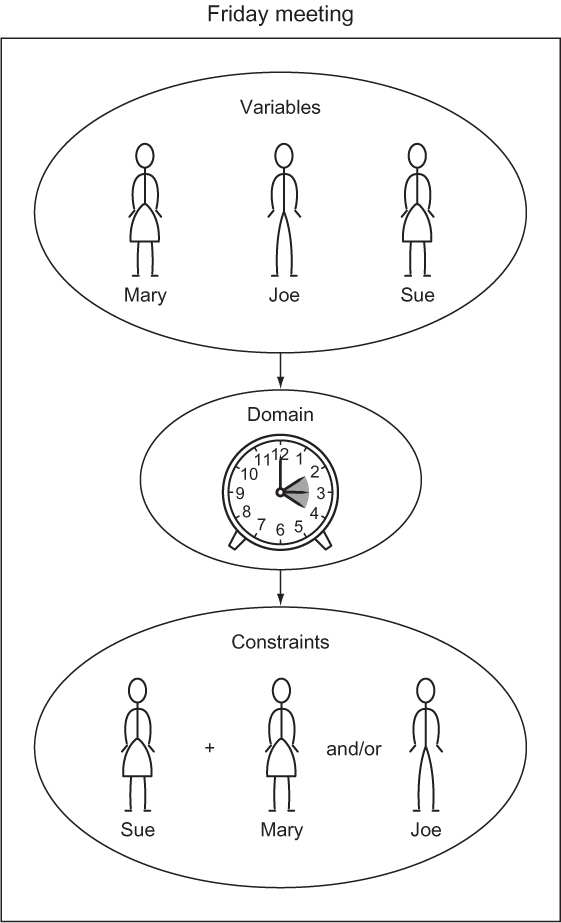
Let’s consider an example problem. Suppose you are trying to schedule a Friday meeting for Joe, Mary, and Sue. Sue has to be at the meeting with at least one other person. For this scheduling problem, the three people—Joe, Mary, and Sue—may be the variables. The domain for each variable may be their respective hours of availability. For instance, the variable Mary has the domain 2 p.m., 3 p.m., and 4 p.m. This problem also has two constraints. One is that Sue has to be at the meeting. The other is that at least two people must attend the meeting. A constraint-satisfaction problem solver will be provided with the three variables, three domains, and two constraints, and it will then solve the problem without having the user explain exactly how. Figure 3.1 illustrates this example.
Figure 3.1. Scheduling problems are a classic application of constraint-satisfaction frameworks.
Programming languages like Prolog and Picat have facilities for solving constraint-satisfaction problems built in. The usual technique in other languages is to build a framework that incorporates a backtracking search and several heuristics to improve the performance of that search. In this chapter we will first build a framework for CSPs that solves them using a simple recursive backtracking search. Then we will use the framework to solve several different example problems.
3.1. Building a constraint-satisfaction problem framework
Constraints will be defined using a Constraint class. Each Constraint consists of the variables it constrains and a method that checks whether it is satisfied(). The determination of whether a constraint is satisfied is the main logic that goes into defining a specific constraint-satisfaction problem. The default implementation should be overridden. In fact, it must be, because we are defining our Constraint class as an abstract base class. Abstract base classes are not meant to be instantiated. Instead, only their subclasses that override and implement their @abstractmethods are for actual use.
Listing 3.1. csp.py
from typing import Generic, TypeVar, Dict, List, Optional
from abc import ABC, abstractmethod

V = TypeVar('V') # variable type
D = TypeVar('D') # domain type

# Base class for all constraints
class Constraint(Generic[V, D], ABC):
    # The variables that the constraint is between
    def __init__(self, variables: List[V]) -> None:
        self.variables = variables


    # Must be overridden by subclasses
    @abstractmethod
    def satisfied(self, assignment: Dict[V, D]) -> bool:
        ...
TIP
Abstract base classes serve as templates for a class hierarchy. They are more prevalent in other languages, like C++, as a user-facing feature than they are in Python. In fact, they were only introduced to Python about halfway through the language’s lifetime. With that said, many of the collection classes in Python’s standard library are implemented via abstract base classes. The general advice is not to use them in your own code unless you are sure that you are building a framework upon which others will build, and not just a class hierarchy for internal use. For more information, see chapter 11 of Fluent Python by Luciano Ramalho (O’Reilly, 2015).
The centerpiece of our constraint-satisfaction framework will be a class called CSP. CSP is the gathering point for variables, domains, and constraints. In terms of its type hints, it uses generics to make itself flexible enough to work with any kind of variables and domain values (V keys and D domain values). Within CSP, the variables, domains, and constraints collections are of types that you would expect. The variables collection is a list of variables, domains is a dict mapping variables to lists of possible values (the domains of those variables), and constraints is a dict that maps each variable to a list of the constraints imposed on it.
Listing 3.2. csp.py continued
# A constraint satisfaction problem consists of variables of type V
# that have ranges of values known as domains of type D and constraints
# that determine whether a particular variable's domain selection is valid
class CSP(Generic[V, D]):
    def __init__(self, variables: List[V], domains: Dict[V, List[D]]) ->
     None:
        self.variables: List[V] = variables # variables to be constrained
        self.domains: Dict[V, List[D]] = domains # domain of each variable
        self.constraints: Dict[V, List[Constraint[V, D]]] = {}
        for variable in self.variables:
            self.constraints[variable] = []
            if variable not in self.domains:
                raise LookupError("Every variable should have a domain
     assigned to it.")

    def add_constraint(self, constraint: Constraint[V, D]) -> None:
        for variable in constraint.variables:
            if variable not in self.variables:
                raise LookupError("Variable in constraint not in CSP")
            else:
                self.constraints[variable].append(constraint)
The __init__() initializer creates the constraints dict. The add_constraint() method goes through all of the variables touched by a given constraint and adds itself to the constraints mapping for each of them. Both methods have basic error-checking in place and will raise an exception when a variable is missing a domain or a constraint is on a nonexistent variable.
How do we know if a given configuration of variables and selected domain values satisfies the constraints? We will call such a given configuration an “assignment.” We need a function that checks every constraint for a given variable against an assignment to see if the variable’s value in the assignment works for the constraints. Here, we implement a consistent() function as a method on CSP.
Listing 3.3. csp.py continued
# Check if the value assignment is consistent by checking all constraints
# for the given variable against it
def consistent(self, variable: V, assignment: Dict[V, D]) -> bool:
    for constraint in self.constraints[variable]:
        if not constraint.satisfied(assignment):
            return False
    return True
consistent() goes through every constraint for a given variable (it will always be the variable that was just added to the assignment) and checks if the constraint is satisfied, given the new assignment. If the assignment satisfies every constraint, True is returned. If any constraint imposed on the variable is not satisfied, False is returned.
This constraint-satisfaction framework will use a simple backtracking search to find solutions to problems. Backtracking is the idea that once you hit a wall in your search, you go back to the last known point where you made a decision before the wall, and choose a different path. If you think that sounds like depth-first search from chapter 2, you are perceptive. The backtracking search implemented in the following backtracking_search() function is a kind of recursive depth-first search, combining ideas you saw in chapters 1 and 2 This function is added as a method to the CSP class.
Listing 3.4. csp.py continued
def backtracking_search(self, assignment: Dict[V, D] = {}) ->
     Optional[Dict[V, D]]:
    # assignment is complete if every variable is assigned (our base case)
    if len(assignment) == len(self.variables):
        return assignment

    # get all variables in the CSP but not in the assignment
    unassigned: List[V] = [v for v in self.variables if v not in assignment]

    # get the every possible domain value of the first unassigned variable
    first: V = unassigned[0]
    for value in self.domains[first]:
        local_assignment = assignment.copy()
        local_assignment[first] = value
        # if we're still consistent, we recurse (continue)
        if self.consistent(first, local_assignment):
            result: Optional[Dict[V, D]] = self.backtracking_search(local_
     assignment)
            # if we didn't find the result, we will end up backtracking
            if result is not None:
                return result
    return None
Let’s walk through backtracking_search(), line by line.
if len(assignment) == len(self.variables):
    return assignment
The base case for the recursive search is having found a valid assignment for every variable. Once we have, we return the first instance of a solution that was valid. (We do not keep searching.)
unassigned: List[V] = [v for v in self.variables if v not in assignment]
first: V = unassigned[0]
To select a new variable whose domain we will explore, we simply go through all of the variables and find the first that does not have an assignment. To do this, we create a list of variables in self.variables but not in assignment through a list comprehension, and call it unassigned. Then we pull out the first value in unassigned.
for value in self.domains[first]:
    local_assignment = assignment.copy()
    local_assignment[first] = value
We try assigning all possible domain values for that variable, one at a time. The new assignment for each is stored in a local dictionary called local_assignment.
if self.consistent(first, local_assignment):
    result: Optional[Dict[V, D]] = self.backtracking_search(local_assignment)
    if result is not None:
        return result
If the new assignment in local_assignment is consistent with all of the constraints (that is what consistent() checks for), we continue recursively searching with the new assignment in place. If the new assignment turns out to be complete (the base case), we return the new assignment up the recursion chain.
return None # no solution
Finally, if we have gone through every possible domain value for a particular variable, and there is no solution utilizing the existing set of assignments, we return None, indicating no solution. This will lead to backtracking up the recursion chain to the point where a different prior assignment could have been made.
3.2. The Australian map-coloring problem
Imagine you have a map of Australia that you want to color by state/territory (which we will collectively call “regions”). No two adjacent regions should share a color. Can you color the regions with just three different colors?
The answer is yes. Try it out on your own. (The easiest way is to print out a map of Australia with a white background.) As human beings, we can quickly figure out the solution by inspection and a little trial and error. It is a trivial problem, really, and a great first problem for our backtracking constraint-satisfaction solver. The problem is illustrated in figure 3.2.
Figure 3.2. In a solution to the Australian map-coloring problem, no two adjacent parts of Australia can be colored with the same color.

To model the problem as a CSP, we need to define the variables, domains, and constraints. The variables are the seven regions of Australia (at least the seven that we will restrict ourselves to): Western Australia, Northern Territory, South Australia, Queensland, New South Wales, Victoria, and Tasmania. In our CSP, they can be modeled with strings. The domain of each variable is the three different colors that can possibly be assigned. (We will use red, green, and blue.) The constraints are the tricky part. No two adjacent regions can be colored with the same color, so our constraints will be dependent on which regions border one another. We can use what are called binary constraints (constraints between two variables). Every two regions that share a border will also share a binary constraint indicating that they cannot be assigned the same color.
To implement these binary constraints in code, we need to subclass the Constraint class. The MapColoringConstraint subclass will take two variables in its constructor: the two regions that share a border. Its overridden satisfied() method will check first whether the two regions have domain values (colors) assigned to them; if either does not, the constraint is trivially satisfied until they do. (There cannot be a conflict when one does not yet have a color.) Then it will check whether the two regions are assigned the same color. Obviously, there is a conflict, meaning that the constraint is not satisfied, when they are the same.
The class is presented here in its entirety. MapColoringConstraint itself is not generic in terms of type hinting, but it subclasses a parameterized version of the generic class Constraint that indicates both variables and domains are of type str.
Listing 3.5. map_coloring.py
from csp import Constraint, CSP
from typing import Dict, List, Optional

class MapColoringConstraint(Constraint[str, str]):
    def __init__(self, place1: str, place2: str) -> None:
        super().__init__([place1, place2])
        self.place1: str = place1
        self.place2: str = place2

    def satisfied(self, assignment: Dict[str, str]) -> bool:
        # If either place is not in the assignment, then it is not
        # yet possible for their colors to be conflicting
        if self.place1 not in assignment or self.place2 not in assignment:
            return True
        # check the color assigned to place1 is not the same as the
        # color assigned to place2
        return assignment[self.place1] != assignment[self.place2]
Tip
super() is sometimes used to call a method on the superclass, but you can also use the name of the class itself, as in Constraint.__init__ ([place1, place2]). This is especially helpful when dealing with multiple inheritance, so that you know which superclass’s method you are calling.
Now that we have a way of implementing the constraints between regions, fleshing out the Australian map-coloring problem with our CSP solver is simply a matter of filling in domains and variables, and then adding constraints.
Listing 3.6. map_coloring.py continued
if __name__ == "__main__":
    variables: List[str] = ["Western Australia", "Northern Territory", "South
     Australia", "Queensland", "New South Wales", "Victoria", "Tasmania"]
    domains: Dict[str, List[str]] = {}
    for variable in variables:
        domains[variable] = ["red", "green", "blue"]
    csp: CSP[str, str] = CSP(variables, domains)
    csp.add_constraint(MapColoringConstraint("Western Australia", "Northern
     Territory"))
    csp.add_constraint(MapColoringConstraint("Western Australia", "South
     Australia"))
    csp.add_constraint(MapColoringConstraint("South Australia", "Northern
     Territory"))
    csp.add_constraint(MapColoringConstraint("Queensland", "Northern
     Territory"))
    csp.add_constraint(MapColoringConstraint("Queensland", "South
     Australia"))
    csp.add_constraint(MapColoringConstraint("Queensland", "New South
     Wales"))
    csp.add_constraint(MapColoringConstraint("New South Wales", "South
     Australia"))
    csp.add_constraint(MapColoringConstraint("Victoria", "South Australia"))
    csp.add_constraint(MapColoringConstraint("Victoria", "New South Wales"))
    csp.add_constraint(MapColoringConstraint("Victoria", "Tasmania"))
Finally, backtracking_search() is called to find a solution.
Listing 3.7. map_coloring.py continued
solution: Optional[Dict[str, str]] = csp.backtracking_search()
if solution is None:
    print("No solution found!")
else:
    print(solution)
A correct solution will include an assigned color for every region.
{'Western Australia': 'red', 'Northern Territory': 'green', 'South
      Australia': 'blue', 'Queensland': 'red', 'New South Wales': 'green',
      'Victoria': 'red', 'Tasmania': 'green'}
3.3. The eight queens problem
A chessboard is an eight-by-eight grid of squares. A queen is a chess piece that can move on the chessboard any number of squares along any row, column, or diagonal. A queen is attacking another piece if in a single move, it can move to the square the piece is on without jumping over any other piece. (In other words, if the other piece is in the line of sight of the queen, then it is attacked by it.) The eight queens problem poses the question of how eight queens can be placed on a chessboard without any queen attacking another queen. The problem is illustrated in figure 3.3.
Figure 3.3. In a solution to the eight queens problem (there are many solutions), no two queens can be threatening each other.
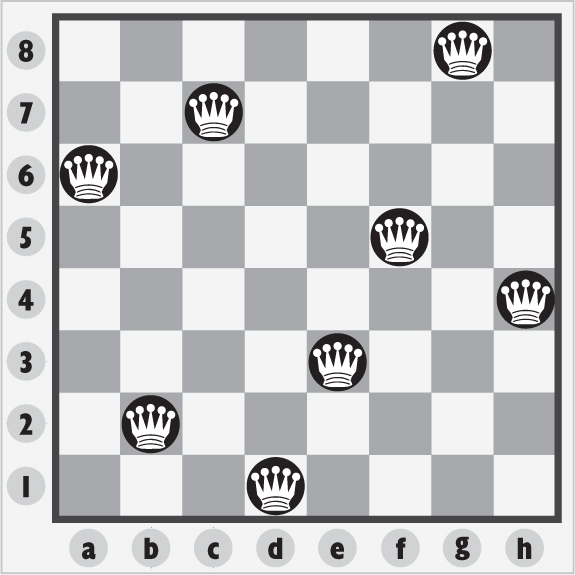
To represent squares on the chessboard, we will assign each an integer row and an integer column. We can ensure each of the eight queens is not on the same column by simply assigning them sequentially the columns 1 through 8. The variables in our constraint-satisfaction problem can just be the column of the queen in question. The domains can be the possible rows (again, 1 through 8). The following code listing shows the end of our file, where we define these variables and domains.
Listing 3.8. queens.py
if __name__ == "__main__":
    columns: List[int] = [1, 2, 3, 4, 5, 6, 7, 8]
    rows: Dict[int, List[int]] = {}
    for column in columns:
        rows[column] = [1, 2, 3, 4, 5, 6, 7, 8]
    csp: CSP[int, int] = CSP(columns, rows)
To solve the problem, we will need a constraint that checks whether any two queens are on the same row or diagonal. (They were all assigned different sequential columns to begin with.) Checking for the same row is trivial, but checking for the same diagonal requires a little bit of math. If any two queens are on the same diagonal, the difference between their rows will be the same as the difference between their columns. Can you see where these checks take place in QueensConstraint? Note that the following code is at the top of our source file.
Listing 3.9. queens.py continued
from csp import Constraint, CSP
from typing import Dict, List, Optional
class QueensConstraint(Constraint[int, int]):
    def __init__(self, columns: List[int]) -> None:
        super().__init__(columns)
        self.columns: List[int] = columns

    def satisfied(self, assignment: Dict[int, int]) -> bool:
       # q1c = queen 1 column, q1r = queen 1 row
        for q1c, q1r in assignment.items():
        # q2c = queen 2 column
            for q2c in range(q1c + 1, len(self.columns) + 1):
                if q2c in assignment:
                    q2r: int = assignment[q2c] # q2r = queen 2 row
                    if q1r == q2r: # same row?
                        return False
                    if abs(q1r - q2r) == abs(q1c - q2c): # same diagonal?
                        return False
        return True # no conflict
All that is left is to add the constraint and run the search. We’re now back at the bottom of the file.
Listing 3.10. queens.py continued
csp.add_constraint(QueensConstraint(columns))
solution: Optional[Dict[int, int]] = csp.backtracking_search()
if solution is None:
    print("No solution found!")
else:
    print(solution)
Notice that we were able to reuse the constraint-satisfaction problem-solving framework that we built for map coloring fairly easily for a completely different type of problem. This is the power of writing code generically! Algorithms should be implemented in as broadly applicable a manner as possible unless a performance optimization for a particular application requires specialization.
A correct solution will assign a column and row to every queen.
{1: 1, 2: 5, 3: 8, 4: 6, 5: 3, 6: 7, 7: 2, 8: 4}
3.4. Word search
A word search is a grid of letters with hidden words placed along rows, columns, and diagonals. A player of a word-search puzzle attempts to find the hidden words by carefully scanning through the grid. Finding places to put the words so that they all fit on the grid is a kind of constraint-satisfaction problem. The variables are the words, and the domains are the possible locations of those words. The problem is illustrated in figure 3.4.
For the purposes of expediency, our word search will not include words that overlap. You can improve it to allow for overlapping words as an exercise.
Figure 3.4. A classic word search, such as you might find in a children’s puzzle book
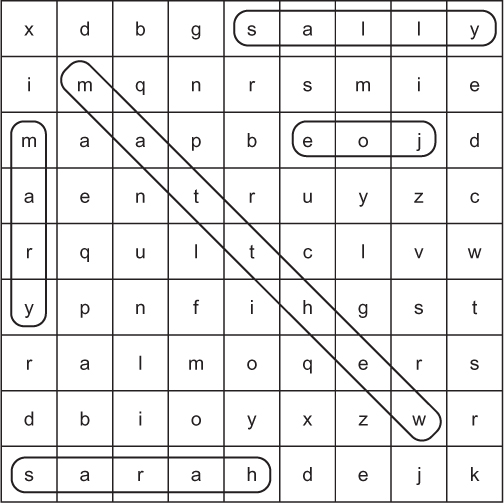
The grid of this word-search problem is not entirely dissimilar from the mazes of chapter 2. Some of the following data types should look familiar.
Listing 3.11. word_search.py
from typing import NamedTuple, List, Dict, Optional
from random import choice
from string import ascii_uppercase
from csp import CSP, Constraint

Grid = List[List[str]]  # type alias for grids


class GridLocation(NamedTuple):
    row: int
    column: int
Initially, we will fill the grid with the letters of the English alphabet (ascii_uppercase). We will also need a function for displaying the grid.
Listing 3.12. word_search.py continued
def generate_grid(rows: int, columns: int) -> Grid:
    # initialize grid with random letters
    return [[choice(ascii_uppercase) for c in range(columns)] for r in
     range(rows)]

def display_grid(grid: Grid) -> None:
    for row in grid:
        print("".join(row))
To figure out where words can fit in the grid, we will generate their domains. The domain of a word is a list of lists of the possible locations of all of its letters (List[List[GridLocation]]). Words cannot just go anywhere, though. They must stay within a row, column, or diagonal that is within the bounds of the grid. In other words, they should not go off the end of the grid. The purpose of generate_domain() is to build these lists for every word.
Listing 3.13. word_search.py continued
def generate_domain(word: str, grid: Grid) -> List[List[GridLocation]]:
    domain: List[List[GridLocation]] = []
    height: int = len(grid)
    width: int = len(grid[0])
    length: int = len(word)
    for row in range(height):
        for col in range(width):
            columns: range = range(col, col + length + 1)
            rows: range = range(row, row + length + 1)
            if col + length <= width:
                # left to right
                domain.append([GridLocation(row, c) for c in columns])
                # diagonal towards bottom right
                if row + length <= height:
                    domain.append([GridLocation(r, col + (r - row)) for r in
    rows])
            if row + length <= height:
                # top to bottom
                domain.append([GridLocation(r, col) for r in rows])
                # diagonal towards bottom left
                if col - length >= 0:
                    domain.append([GridLocation(r, col - (r - row)) for r in
    rows])
   return domain
For the range of potential locations of a word (along a row, column, or diagonal), list comprehensions translate the range into a list of GridLocation by using that class’s constructor. Because generate_domain() loops through every grid location from the top left through to the bottom right for every word, it involves a lot of computation. Can you think of a way to do it more efficiently? What if we looked through all of the words of the same length at once, inside the loop?
To check if a potential solution is valid, we must implement a custom constraint for the word search. The satisfied() method of WordSearchConstraint simply checks whether any of the locations proposed for one word are the same as a location proposed for another word. It does this using a set. Converting a list into a set will remove all duplicates. If there are fewer items in a set converted from a list than there were in the original list, that means the original list contained some duplicates. To prepare the data for this check, we will use a somewhat complicated list comprehension to combine multiple sublists of locations for each word in the assignment into a single larger list of locations.
Listing 3.14. word_search.py continued
class WordSearchConstraint(Constraint[str, List[GridLocation]]):
    def __init__(self, words: List[str]) -> None:
        super().__init__(words)
        self.words: List[str] = words

    def satisfied(self, assignment: Dict[str, List[GridLocation]]) -> bool:
        # if there are any duplicates grid locations, then there is an
     overlap
        all_locations = [locs for values in assignment.values() for locs in
     values]
        return len(set(all_locations)) == len(all_locations)
Finally, we are ready to run it. For this example, we have five words in a nine-by-nine grid. The solution we get back should contain mappings between each word and the locations where its letters can fit in the grid.
Listing 3.15. word_search.py continued
if __name__ == "__main__":
    grid: Grid = generate_grid(9, 9)
    words: List[str] = ["MATTHEW", "JOE", "MARY", "SARAH", "SALLY"]
    locations: Dict[str, List[List[GridLocation]]] = {}
    for word in words:
        locations[word] = generate_domain(word, grid)
    csp: CSP[str, List[GridLocation]] = CSP(words, locations)
    csp.add_constraint(WordSearchConstraint(words))
    solution: Optional[Dict[str, List[GridLocation]]] = csp.backtracking_
     search()
    if solution is None:
        print("No solution found!")
    else:
        for word, grid_locations in solution.items():
            # random reverse half the time
            if choice([True, False]):
                grid_locations.reverse()
            for index, letter in enumerate(word):
                (row, col) = (grid_locations[index].row, grid_
    locations[index].column)
               grid[row][col] = letter
       display_grid(grid)
There is a finishing touch in the code that fills the grid with words. Some words are randomly chosen to be reversed. This is valid, because this example does not allow overlapping words. Your ultimate output should look something like the following. Can you find Matthew, Joe, Mary, Sarah, and Sally?
LWEHTTAMJ
MARYLISGO
DKOJYHAYE
IAJYHALAG
GYZJWRLGM
LLOTCAYIX
PEUTUSLKO
AJZYGIKDU
HSLZOFNNR
3.5. SEND+MORE=MONEY
SEND+MORE=MONEY is a cryptarithmetic puzzle, meaning that it is about finding digits that replace letters to make a mathematical statement true. Each letter in the problem represents one digit (0–9). No two letters can represent the same digit. When a letter repeats, it means a digit repeats in the solution.
To solve this puzzle by hand, it helps to line up the words.
  SEND
 +MORE
=MONEY
It is absolutely solvable by hand, with a bit of algebra and intuition. But a fairly simple computer program can solve it faster by brute-forcing many possible solutions. Let’s represent SEND+MORE=MONEY as a constraint-satisfaction problem.
Listing 3.16. send_more_money.py
from csp import Constraint, CSP
from typing import Dict, List, Optional

class SendMoreMoneyConstraint(Constraint[str, int]):
    def __init__(self, letters: List[str]) -> None:
        super().__init__(letters)
        self.letters: List[str] = letters

    def satisfied(self, assignment: Dict[str, int]) -> bool:
        # if there are duplicate values, then it's not a solution
        if len(set(assignment.values())) < len(assignment):
            return False

        # if all variables have been assigned, check if it adds correctly
        if len(assignment) == len(self.letters):
            s: int = assignment["S"]
            e: int = assignment["E"]
            n: int = assignment["N"]
            d: int = assignment["D"]
            m: int = assignment["M"]
            o: int = assignment["O"]
            r: int = assignment["R"]
            y: int = assignment["Y"]
            send: int = s * 1000 + e * 100 + n * 10 + d
            more: int = m * 1000 + o * 100 + r * 10 + e
            money: int = m * 10000 + o * 1000 + n * 100 + e * 10 + y
            return send + more == money
        return True # no conflict
SendMoreMoneyConstraint’s satisfied() method does a few things. First, it checks if multiple letters represent the same digits. If they do, that’s an invalid solution, and it returns False. Next, it checks if all letters have been assigned. If they have, it checks to see if the formula (SEND+MORE=MONEY) is correct with the given assignment. If it is, a solution has been found, and it returns True. Otherwise, it returns False. Finally, if all letters have not yet been assigned, it returns True. This is to ensure that a partial solution continues to be worked on.
Let’s try running it.
Listing 3.17. send_more_money.py continued
if __name__ == "__main__":
    letters: List[str] = ["S", "E", "N", "D", "M", "O", "R", "Y"]
    possible_digits: Dict[str, List[int]] = {}
    for letter in letters:
        possible_digits[letter] = [0, 1, 2, 3, 4, 5, 6, 7, 8, 9]
    possible_digits["M"] = [1]  # so we don't get answers starting with a 0
    csp: CSP[str, int] = CSP(letters, possible_digits)
    csp.add_constraint(SendMoreMoneyConstraint(letters))
    solution: Optional[Dict[str, int]] = csp.backtracking_search()
    if solution is None:
        print("No solution found!")
    else:
        print(solution)
You will notice that we preassigned the answer for the letter M. This was to ensure that the answer doesn’t include a 0 for M, because if you think about it, our constraint has no notion of the concept that a number can’t start with zero. Feel free to try it out without that preassigned answer.
The solution should look something like this:
{'S': 9, 'E': 5, 'N': 6, 'D': 7, 'M': 1, 'O': 0, 'R': 8, 'Y': 2}
3.6. Circuit board layout
A manufacturer needs to fit certain rectangular chips onto a rectangular circuit board. Essentially, this problem asks, “How can several different-sized rectangles all fit snugly inside of another rectangle?” A constraint-satisfaction problem solver can find the solution. The problem is illustrated in figure 3.5.
Figure 3.5. The circuit board layout problem is very similar to the word-search problem, but the rectangles are of variable width.
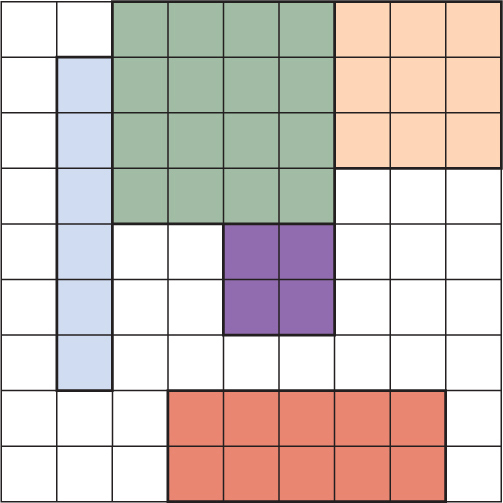
The circuit board layout problem is similar to the word-search problem. Instead of 1×N rectangles (words), the problem presents M×N rectangles. Like in the word-search problem, the rectangles cannot overlap. The rectangles cannot be put on diagonals, so in that sense the problem is actually simpler than the word search.
On your own, try rewriting the word-search solution to accommodate circuit board layout. You can reuse much of the code, including the code for the grid.
3.7. Real-world applications
As was mentioned in the introduction to this chapter, constraint-satisfaction problem solvers are commonly used in scheduling. Several people need to be at a meeting, and they are the variables. The domains consist of the open times on their calendars. The constraints may involve what combinations of people are required at the meeting.
Constraint-satisfaction problem solvers are also used in motion planning. Imagine a robot arm that needs to fit inside of a tube. It has constraints (the walls of the tube), variables (the joints), and domains (possible movements of the joints).
There are also applications in computational biology. You can imagine constraints between molecules required for a chemical reaction. And, of course, as is common with AI, there are applications in games. Writing a Sudoku solver is one of the following exercises, but many logic puzzles can be solved using constraint-satisfaction problem solving.
In this chapter, we built a simple backtracking, depth-first search, problem-solving framework. But it can be greatly improved by adding heuristics (remember A*?)—intuitions that can aid the search process. A newer technique than backtracking, known as constraint propagation, is also an efficient avenue for real-world applications. For more information, check out chapter 6 of Stuart Russell and Peter Norvig’s Artificial Intelligence: A Modern Approach, third edition (Pearson, 2010).
3.8. Exercises
- Revise WordSearchConstraint so that overlapping letters are allowed.
- Build the circuit board layout problem solver described in section 3.6, if you have not already.
- Build a program that can solve Sudoku problems using this chapter’s constraint-satisfaction problem-solving framework.