Chapter 24. Class Metaprogramming
Everyone knows that debugging is twice as hard as writing a program in the first place. So if you’re as clever as you can be when you write it, how will you ever debug it?
Brian W. Kernighan and P. J. Plauger, The Elements of Programming Style1
Class metaprogramming is the art of creating or customizing classes at runtime.
Classes are first-class objects in Python,
so a function can be used to create a new class at any time,
without using the class keyword.
Class decorators are also functions, but designed to inspect, change,
and even replace the decorated class with another class.
Finally, metaclasses are the most advanced tool for class metaprogramming:
they let you create whole new categories of classes with special traits,
such as the abstract base classes we’ve already seen.
Metaclasses are powerful, but hard to justify and even harder to get right. Class decorators solve many of the same problems and are easier to understand. Furthermore, Python 3.6 implemented PEP 487—Simpler customization of class creation, providing special methods supporting tasks that previously required metaclasses or class decorators.2
This chapter presents the class metaprogramming techniques in ascending order of complexity.
Warning
This is an exciting topic, and it’s easy to get carried away. So I must offer this advice.
For the sake of readability and maintainability, you should probably avoid the techniques described in this chapter in application code.
On the other hand, these are the tools of the trade if you want to write the next great Python framework.
What’s New in This Chapter
All the code in the “Class Metaprogramming” chapter of the first edition of Fluent Python still runs correctly. However, some of the previous examples no longer represent the simplest solutions in light of new features added since Python 3.6.
I replaced those examples with different ones,
highlighting Python’s new metaprogramming features
or adding further requirements to justify the use of the more advanced techniques.
Some of the new examples leverage type hints to provide class builders similar to the @dataclass decorator and typing.NamedTuple.
“Metaclasses in the Real World” is a new section with some high-level considerations about the applicability of metaclasses.
Tip
Some of the best refactorings are removing code made redundant by newer and simpler ways of solving the same problems. This applies to production code as well as books.
We’ll get started by reviewing attributes and methods defined in the Python Data Model for all classes.
Classes as Objects
Like most program entities in Python, classes are also objects.
Every class has a number of attributes defined in the Python Data Model,
documented in “4.13. Special Attributes”
of the “Built-in Types” chapter in The Python Standard Library.
Three of those attributes appeared several times in this book already:
__class__, __name__, and __mro__.
Other class standard attributes are:
cls.__bases__cls.__qualname__-
The qualified name of a class or function, which is a dotted path from the global scope of the module to the class definition. This is relevant when the class is defined inside another class. For example, in a Django model class such as
Ox, there is an inner class calledMeta. The__qualname__ofMetaisOx.Meta, but its__name__is justMeta. The specification for this attribute is PEP 3155—Qualified name for classes and functions. cls.__subclasses__()-
This method returns a list of the immediate subclasses of the class. The implementation uses weak references to avoid circular references between the superclass and its subclasses—which hold a strong reference to the superclasses in their
__bases__attribute. The method lists subclasses currently in memory. Subclasses in modules not yet imported will not appear in the result. cls.mro()-
The interpreter calls this method when building a class to obtain the tuple of superclasses stored in the
__mro__attribute of the class. A metaclass can override this method to customize the method resolution order of the class under construction.
Tip
None of the attributes mentioned in this section are listed by the dir(…) function.
Now, if a class is an object, what is the class of a class?
type: The Built-In Class Factory
We usually think of type as a function that returns the class of an object, because that’s what type(my_object) does: it returns my_object.__class__.
However, type is a class that creates a new class when invoked with three arguments.
Consider this simple class:
classMyClass(MySuperClass,MyMixin):x=42defx2(self):returnself.x*2
Using the type constructor, you can create MyClass at runtime with this code:
MyClass=type('MyClass',(MySuperClass,MyMixin),{'x':42,'x2':lambdaself:self.x*2},)
That type call is functionally equivalent to the previous class MyClass… block
statement.
When Python reads a class statement, it calls type to build the class object with these parameters:
name-
The identifier that appears after the
classkeyword, e.g.,MyClass. bases-
The tuple of superclasses given in parentheses after the class identifier, or
(object,)if superclasses are not mentioned in theclassstatement. dict-
A mapping of attribute names to values. Callables become methods, as we saw in “Methods Are Descriptors”. Other values become class attributes.
Note
The type constructor accepts optional keyword arguments,
which are ignored by type itself, but are passed untouched into
__init_subclass__, which must consume them.
We’ll study that special method in “Introducing __init_subclass__”,
but
I won’t cover the use of keyword arguments.
For more, please read
PEP 487—Simpler customization of class creation.
The type class is a metaclass: a class that builds classes.
In other words, instances of the type class are classes.
The standard library provides a few other metaclasses,
but type is the default:
>>>type(7)<class 'int'>>>>type(int)<class 'type'>>>>type(OSError)<class 'type'>>>>classWhatever:...pass...>>>type(Whatever)<class 'type'>
We’ll build custom metaclasses in “Metaclasses 101”.
Next, we’ll use the type built-in to make a function that builds classes.
A Class Factory Function
The standard library has a class factory function that appears several times in this book: collections.namedtuple.
In Chapter 5 we also saw typing.NamedTuple and @dataclass.
All of these class builders leverage techniques covered in this chapter.
We’ll start with a super simple factory for classes of mutable objects—the simplest possible replacement for @dataclass.
Suppose I’m writing a pet shop application and I want to store data for dogs as simple records. But I don’t want to write boilerplate like this:
classDog:def__init__(self,name,weight,owner):self.name=nameself.weight=weightself.owner=owner
Boring…each field name appears three times, and that boilerplate doesn’t even buy us a nice repr:
>>>rex=Dog('Rex',30,'Bob')>>>rex<__main__.Dog object at 0x2865bac>
Taking a hint from collections.namedtuple, let’s create a record_factory that creates simple classes like Dog on the fly. Example 24-1 shows how it should work.
Example 24-1. Testing record_factory, a simple class factory
>>>Dog=record_factory('Dog','name weight owner')>>>rex=Dog('Rex',30,'Bob')>>>rexDog(name='Rex',weight=30,owner='Bob')>>>name,weight,_=rex>>>name,weight('Rex',30)>>>"{2}'s dog weighs {1}kg".format(*rex)"Bob's dog weighs 30kg">>>rex.weight=32>>>rexDog(name='Rex',weight=32,owner='Bob')>>>Dog.__mro__(<class'factories.Dog'>, <class'object'>)

Factory can be called like
namedtuple: class name, followed by attribute names separated by spaces in a single string.
Nice
repr.
Instances are iterable, so they can be conveniently unpacked on assignment…

…or when passing to functions like
format.
A record instance is mutable.

The newly created class inherits from
object—no relationship to our factory.
The code for record_factory is in Example 24-2.3
Example 24-2. record_factory.py: a simple class factory
fromtypingimportUnion,Anyfromcollections.abcimportIterable,IteratorFieldNames=Union[str,Iterable[str]]defrecord_factory(cls_name:str,field_names:FieldNames)->type[tuple]:slots=parse_identifiers(field_names)def__init__(self,*args,**kwargs)->None:attrs=dict(zip(self.__slots__,args))attrs.update(kwargs)forname,valueinattrs.items():setattr(self,name,value)def__iter__(self)->Iterator[Any]:fornameinself.__slots__:yieldgetattr(self,name)def__repr__(self):values=','.join(f'{name}={value!r}'forname,valueinzip(self.__slots__,self))cls_name=self.__class__.__name__returnf'{cls_name}({values})'cls_attrs=dict(__slots__=slots,__init__=__init__,__iter__=__iter__,__repr__=__repr__,)returntype(cls_name,(object,),cls_attrs)defparse_identifiers(names:FieldNames)->tuple[str,...]:ifisinstance(names,str):names=names.replace(',','').split()ifnotall(s.isidentifier()forsinnames):raiseValueError('names must all be valid identifiers')returntuple(names)
User can provide field names as a single string or an iterable of strings.
Accept arguments like the first two of
collections.namedtuple; return atype—i.e., a class that behaves like atuple.Build a tuple of attribute names; this will be the
__slots__attribute of the new class.This function will become the
__init__method in the new class. It accepts positional and/or keyword arguments.4Yield the field values in the order given by
__slots__.Produce the nice
repr, iterating over__slots__andself.
Assemble a dictionary of class attributes.

Build and return the new class, calling the
typeconstructor.
Convert
namesseparated by spaces or commas to list ofstr.
Example 24-2 is the first time we’ve seen type in a type hint.
If the annotation was just -> type, that would mean that record_factory returns a class—and it would be correct.
But the annotation -> type[tuple] is more precise: it says the returned class will be a subclass of tuple.
The last line of record_factory in Example 24-2 builds a class
named by the value of cls_name,
with object as its single immediate base class, and
with a namespace loaded with __slots__, __init__, __iter__, and __repr__, of which the last three are instance methods.
We could have named the __slots__ class attribute anything else, but then we’d have to implement __setattr__ to validate the names of attributes being assigned, because for our record-like classes we want the set of attributes to be always the same and in the same order. However, recall that the main feature of __slots__ is saving memory when you are dealing with millions of instances, and using __slots__ has some drawbacks, discussed in “Saving Memory with __slots__”.
Warning
Instances of classes created by record_factory are not serializable—that is, they can’t be exported with the dump function from the pickle module. Solving this problem is beyond the scope of this example, which aims to show the type class in action in a simple use case. For the full solution, study the source code for collections.namedtuple; search for the word
“pickling.”
Now let’s see how to emulate more modern class builders like typing.NamedTuple,
which takes a user-defined class written as a class statement,
and automatically enhances it with more functionality.
Introducing __init_subclass__
Both __init_subclass__ and __set_name__ were proposed in
PEP 487—Simpler customization of class creation.
We saw the __set_name__ special method for descriptors for the first time in
“LineItem Take #4: Automatic Naming of Storage Attributes”.
Now let’s study __init_subclass__.
In Chapter 5, we saw that typing.NamedTuple and @dataclass
let programmers use the class statement to specify attributes for a new class,
which is then enhanced by the class builder with the automatic addition of
essential methods like __init__, __repr__, __eq__, etc.
Both of these class builders read type hints in the user’s class statement to enhance the class.
Those type hints also allow static type checkers to validate
code that sets or gets those attributes.
However, NamedTuple and @dataclass do not take advantage
of the type hints
for attribute validation at runtime. The Checked class in the next
example does.
Note
It is not possible to support every conceivable static type hint for runtime type checking,
which is probably why typing.NamedTuple and @dataclass don’t even try it.
However, some types that are also concrete classes can be used with Checked.
This includes simple types often used for field contents, such as
str, int, float, and bool, as well as lists of those types.
Example 24-3 shows how to use Checked to build a Movie class.
Example 24-3. initsub/checkedlib.py: doctest for creating a Movie subclass of Checked
>>>classMovie(Checked):...title:str...year:int...box_office:float...>>>movie=Movie(title='The Godfather',year=1972,box_office=137)>>>movie.title'The Godfather'>>>movieMovie(title='The Godfather',year=1972,box_office=137.0)
Movieinherits fromChecked—which we’ll define later in Example 24-5.Each attribute is annotated with a constructor. Here I used built-in types.
Movieinstances must be created using keyword arguments.In return, you get a nice
__repr__.
The constructors used as the attribute type hints may be any callable
that takes zero or one argument and returns a value suitable for the intended field type,
or rejects the argument by raising TypeError or ValueError.
Using built-in types for the annotations in Example 24-3
means the values must be acceptable by the constructor of the type.
For int, this means any x such that int(x) returns an int.
For str, anything goes at runtime, because str(x) works with any x in
Python.5
When called with no arguments, the constructor should return a default value of its type.6
This is standard behavior for Python’s built-in constructors:
>>>int(),float(),bool(),str(),list(),dict(),set()(0,0.0,False,'',[],{},set())
In a Checked subclass like Movie,
missing parameters create instances with default values
returned by the field constructors. For example:
>>>Movie(title='Life of Brian')Movie(title='Life of Brian',year=0,box_office=0.0)
The constructors are used for validation during instantiation and when an attribute is set directly on an instance:
>>>blockbuster=Movie(title='Avatar',year=2009,box_office='billions')Traceback(mostrecentcalllast):...TypeError:'billions'isnotcompatiblewithbox_office:float>>>movie.year='MCMLXXII'Traceback(mostrecentcalllast):...TypeError:'MCMLXXII'isnotcompatiblewithyear:int
Checked Subclasses and Static Type Checking
In a .py source file with a movie instance of Movie, as defined in Example 24-3, Mypy flags this assignment as a type error:
movie.year='MCMLXXII'
However, Mypy can’t detect type errors in this constructor call:
blockbuster=Movie(title='Avatar',year='MMIX')
That’s because Movie inherits Checked.__init__,
and the signature of that method must accept any keyword arguments
to support arbitrary user-defined classes.
On the other hand, if you declare a Checked subclass field with the type hint list[float],
Mypy can flag assignments of lists with incompatible contents,
but Checked will ignore the type parameter and treat that the same as list.
Now let’s look at the implementation of checkedlib.py.
The first class is the Field descriptor, as shown in Example 24-4.
Example 24-4. initsub/checkedlib.py: the Field descriptor class
fromcollections.abcimportCallablefromtypingimportAny,NoReturn,get_type_hintsclassField:def__init__(self,name:str,constructor:Callable)->None:ifnotcallable(constructor)orconstructoristype(None):raiseTypeError(f'{name!r} type hint must be callable')self.name=nameself.constructor=constructordef__set__(self,instance:Any,value:Any)->None:ifvalueis...:value=self.constructor()else:try:value=self.constructor(value)except(TypeError,ValueError)ase:type_name=self.constructor.__name__msg=f'{value!r} is not compatible with {self.name}:{type_name}'raiseTypeError(msg)fromeinstance.__dict__[self.name]=value
Recall that since Python 3.9, the
Callabletype for annotations is the ABC incollections.abc, and not the deprecatedtyping.Callable.This is a minimal
Callabletype hint; the parameter type and return type forconstructorare both implicitlyAny.For runtime checking, we use the
callablebuilt-in.7 The test againsttype(None)is necessary because Python readsNonein a type asNoneType, the class ofNone(therefore callable), but a useless constructor that only returnsNone.If
Checked.__init__sets thevalueas...(theEllipsisbuilt-in object), we call theconstructorwith no arguments.Otherwise, call the
constructorwith the givenvalue.If
constructorraises either of these exceptions, we raiseTypeErrorwith a helpful message including the names of the field and constructor; e.g.,'MMIX' is not compatible with year:int.If no exceptions were raised, the
valueis stored in theinstance.__dict__.
In __set__, we need to catch TypeError and ValueError because built-in constructors
may raise either of them, depending on the argument.
For example, float(None) raises TypeError, but float('A') raises ValueError.
On the other hand, float('8') raises no error and returns 8.0.
I hereby declare that this is a feature and not a bug of this toy example.
Tip
In “LineItem Take #4: Automatic Naming of Storage Attributes”, we saw the handy __set_name__ special method for descriptors.
We don’t need it in the Field class because the descriptors are not
instantiated in client source code; the user declares types that are constructors,
as we saw in the Movie class (Example 24-3).
Instead, the Field descriptor instances are created at runtime by the Checked.__init_subclass__ method, which we’ll see in Example 24-5.
Now let’s focus on the Checked class.
I split it in two listings. Example 24-5 shows the top of
the class, which includes the most important methods in this example.
The remaining methods are in Example 24-6.
Example 24-5. initsub/checkedlib.py: the most important methods of the Checked class
classChecked:@classmethoddef_fields(cls)->dict[str,type]:returnget_type_hints(cls)def__init_subclass__(subclass)->None:super().__init_subclass__()forname,constructorinsubclass._fields().items():setattr(subclass,name,Field(name,constructor))def__init__(self,**kwargs:Any)->None:fornameinself._fields():value=kwargs.pop(name,...)setattr(self,name,value)ifkwargs:self.__flag_unknown_attrs(*kwargs)
I wrote this class method to hide the call to
typing.get_type_hintsfrom the rest of the class. If I need to support Python ≥ 3.10 only, I’d callinspect.get_annotationsinstead. Review “Problems with Annotations at Runtime” for the issues with those functions.__init_subclass__is called when a subclass of the current class is defined. It gets that new subclass as its first argument—which is why I named the argumentsubclassinstead of the usualcls. For more on this, see “__init_subclass__ Is Not a Typical Class Method”.super().__init_subclass__()is not strictly necessary, but should be invoked to play nice with other classes that might implement.__init_subclass__()in the same inheritance graph. See “Multiple Inheritance and Method Resolution Order”.Iterate over each field
nameandconstructor……creating an attribute on
subclasswith thatnamebound to aFielddescriptor parameterized withnameandconstructor.For each
namein the class fields……get the corresponding
valuefromkwargsand remove it fromkwargs. Using...(theEllipsisobject) as default allows us to distinguish between arguments given the valueNonefrom arguments that were not given.8This
setattrcall triggersChecked.__setattr__, shown in Example 24-6.If there are remaining items in
kwargs, their names do not match any of the declared fields, and__init__will fail.
The error is reported by
__flag_unknown_attrs, listed in Example 24-6. It takes a*namesargument with the unknown attribute names. I used a single asterisk in*kwargsto pass its keys as a sequence of arguments.
Now let’s see the remaining methods of the Checked class,
continuing from Example 24-5.
Note that I prepended _ to the _fields and _asdict method names
for the same reason the collections.namedtuple API does:
to reduce the chance of name clashes with user-defined field names.
Example 24-6. initsub/checkedlib.py: remaining methods of the Checked class
def__setattr__(self,name:str,value:Any)->None:ifnameinself._fields():cls=self.__class__descriptor=getattr(cls,name)descriptor.__set__(self,value)else:self.__flag_unknown_attrs(name)def__flag_unknown_attrs(self,*names:str)->NoReturn:plural='s'iflen(names)>1else''extra=','.join(f'{name!r}'fornameinnames)cls_name=repr(self.__class__.__name__)raiseAttributeError(f'{cls_name} object has no attribute{plural} {extra}')def_asdict(self)->dict[str,Any]:return{name:getattr(self,name)forname,attrinself.__class__.__dict__.items()ifisinstance(attr,Field)}def__repr__(self)->str:kwargs=','.join(f'{key}={value!r}'forkey,valueinself._asdict().items())returnf'{self.__class__.__name__}({kwargs})'
Intercept all attempts to set an instance attribute. This is needed to prevent setting an unknown attribute.
If the attribute
nameis known, fetch the correspondingdescriptor.Usually we don’t need to call the descriptor
__set__explicitly. It was necessary in this case because__setattr__intercepts all attempts to set an attribute on the instance, including in the presence of an overriding descriptor such asField.9Otherwise, the attribute
nameis unknown, and an exception will be raised by__flag_unknown_attrs.Build a helpful error message listing all unexpected arguments, and raise
AttributeError. This is a rare example of theNoReturnspecial type, covered in “NoReturn”.Create a
dictfrom the attributes of aMovieobject. I’d call this method_as_dict, but I followed the convention started by the_asdictmethod incollections.namedtuple.Implementing a nice
__repr__is the main reason for having_asdictin this example.
The Checked example illustrates how to handle overriding descriptors when implementing __setattr__ to block arbitrary attribute setting after instantiation.
It is debatable whether implementing __setattr__ is worthwhile in this example.
Without it, setting movie.director = 'Greta Gerwig' would succeed,
but the director attribute would not be checked in any way,
and would not appear in the __repr__ nor would it be included in the dict returned by _asdict—both defined in Example 24-6.
In record_factory.py (Example 24-2) I solved this issue
using the __slots__ class attribute.
However, this simpler solution is not viable in this case, as explained next.
Why __init_subclass__ Cannot Configure __slots__
The __slots__ attribute is only effective if it is
one of the entries in the class namespace passed to type.__new__.
Adding __slots__ to an existing class has no effect.
Python invokes __init_subclass__ only after the class is built—by then
it’s too late to configure __slots__.
A class decorator can’t configure __slots__ either,
because it is applied even later than __init_subclass__.
We’ll explore these timing issues in “What Happens When: Import Time Versus Runtime”.
To configure __slots__ at runtime,
your own code must build the class namespace passed as the last argument of type.__new__.
To do that, you can write a class factory function, like record_factory.py,
or you can take the nuclear option and implement a metaclass.
We will see how to dynamically configure __slots__ in “Metaclasses 101”.
Before PEP 487 simplified the customization of class creation with __init_subclass__ in Python 3.7,
similar functionality had to be implemented using a class decorator.
That’s the focus of the next section.
Enhancing Classes with a Class Decorator
A class decorator is a callable that behaves similarly to a function decorator: it gets the decorated class as an argument, and should return a class to replace the decorated class. Class decorators often return the decorated class itself, after injecting more methods in it via attribute assignment.
Probably the most common reason to choose a class decorator over
the simpler __init_subclass__ is to avoid interfering with other class features,
such as inheritance and metaclasses.10
In this section, we’ll study checkeddeco.py, which provides the same service as checkedlib.py, but using a class decorator. As usual, we’ll start by looking at a usage example, extracted from the doctests in checkeddeco.py (Example 24-7).
Example 24-7. checkeddeco.py: creating a Movie class decorated with @checked
>>>@checked...classMovie:...title:str...year:int...box_office:float...>>>movie=Movie(title='The Godfather',year=1972,box_office=137)>>>movie.title'The Godfather'>>>movieMovie(title='The Godfather',year=1972,box_office=137.0)
The only difference between Example 24-7 and Example 24-3
is the way the Movie class is declared: it is decorated with @checked
instead of subclassing Checked.
Otherwise, the external behavior is the same,
including the type validation and default value assignments shown after
Example 24-3 in “Introducing __init_subclass__”.
Now let’s look at the implementation of checkeddeco.py.
The imports and Field class are the same as in checkedlib.py,
listed in Example 24-4.
There is no other class, only functions in checkeddeco.py.
The logic previously implemented in __init_subclass__ is now part of
the checked function—the class decorator listed in Example 24-8.
Example 24-8. checkeddeco.py: the class decorator
defchecked(cls:type)->type:forname,constructorin_fields(cls).items():setattr(cls,name,Field(name,constructor))cls._fields=classmethod(_fields)# type: ignoreinstance_methods=(__init__,__repr__,__setattr__,_asdict,__flag_unknown_attrs,)formethodininstance_methods:setattr(cls,method.__name__,method)returncls
Recall that classes are instances of
type. These type hints strongly suggest this is a class decorator: it takes a class and returns a class._fieldsis a top-level function defined later in the module (in Example 24-9).Replacing each attribute returned by
_fieldswith aFielddescriptor instance is what__init_subclass__did in Example 24-5. Here there is more work to do…Build a class method from
_fields, and add it to the decorated class. Thetype: ignorecomment is needed because Mypy complains thattypehas no_fieldsattribute.Module-level functions that will become instance methods of the decorated class.
Add each of the
instance_methodstocls.Return the decorated
cls, fulfilling the essential contract of a class decorator.
Every top-level function in checkeddeco.py is prefixed with an underscore,
except the checked decorator.
This naming convention makes sense for a couple of reasons:
-
checkedis part of the public interface of the checkeddeco.py module, but the other functions are not. -
The functions in Example 24-9 will be injected in the decorated class, and the leading
_reduces the chance of naming conflicts with user-defined attributes and methods of the decorated class.
The rest of checkeddeco.py is listed in Example 24-9.
Those module-level functions have the same code as the corresponding methods
of the Checked class of checkedlib.py.
They were explained in Examples 24-5 and 24-6.
Note that the _fields function does double duty in checkeddeco.py.
It is used as a regular function in the first line of the checked decorator,
and it will also be injected as a class method of the decorated class.
Example 24-9. checkeddeco.py: the methods to be injected in the decorated class
def_fields(cls:type)->dict[str,type]:returnget_type_hints(cls)def__init__(self:Any,**kwargs:Any)->None:fornameinself._fields():value=kwargs.pop(name,...)setattr(self,name,value)ifkwargs:self.__flag_unknown_attrs(*kwargs)def__setattr__(self:Any,name:str,value:Any)->None:ifnameinself._fields():cls=self.__class__descriptor=getattr(cls,name)descriptor.__set__(self,value)else:self.__flag_unknown_attrs(name)def__flag_unknown_attrs(self:Any,*names:str)->NoReturn:plural='s'iflen(names)>1else''extra=', '.join(f'{name!r}'fornameinnames)cls_name=repr(self.__class__.__name__)raiseAttributeError(f'{cls_name} has no attribute{plural} {extra}')def_asdict(self:Any)->dict[str,Any]:return{name:getattr(self,name)forname,attrinself.__class__.__dict__.items()ifisinstance(attr,Field)}def__repr__(self:Any)->str:kwargs=', '.join(f'{key}={value!r}'forkey,valueinself._asdict().items())returnf'{self.__class__.__name__}({kwargs})'
The checkeddeco.py module implements a simple but usable class decorator.
Python’s @dataclass does a lot more.
It supports many configuration options, adds more methods to the decorated class,
handles or warns about conflicts with user-defined methods in the decorated class,
and even traverses the __mro__ to collect user-defined attributes
declared in the superclasses of the decorated class.
The source code of the dataclasses package in Python 3.9 is more than 1,200 lines long.
For metaprogramming classes, we must be aware of when the Python interpreter evaluates each block of code during the construction of a class. This is covered next.
What Happens When: Import Time Versus Runtime
Python programmers talk about “import time” versus “runtime,” but the terms are not strictly defined and there is a gray area between them.
At import time, the interpreter:
-
Parses the source code of a .py module in one pass from top to bottom. This is when a
SyntaxErrormay occur. -
Compiles the bytecode to be executed.
-
Executes the top-level code of the compiled module.
If there is an up-to-date .pyc file available in the local __pycache__, parsing and compiling are skipped because the bytecode is ready to run.
Although parsing and compiling are definitely “import time” activities, other things may happen at that time, because almost every statement in Python is executable in the sense that they can potentially run user code and may change the state of the user program.
In particular, the import statement is not merely a
declaration,11
but it actually runs all the top-level code of a module when it is imported
for the first time in the process. Further imports of the same module will use a cache,
and then the only effect will be binding the imported objects to names in the client module.
That top-level code may do anything, including actions typical of “runtime,”
such as writing to a log or connecting to a database.12
That’s why the border between “import time” and “runtime” is fuzzy:
the import statement can trigger all sorts of “runtime” behavior.
Conversely, “import time” can also happen deep inside runtime,
because the import statement and the __import__() built-in
can be used inside any regular function.
This is all rather abstract and subtle, so let’s do some experiments to see what happens when.
Evaluation Time Experiments
Consider an evaldemo.py script that uses a class decorator,
a descriptor, and a class builder based on __init_subclass__,
all defined in a builderlib.py module.
The modules have several print calls to show what happens under the covers.
Otherwise, they don’t perform anything useful.
The goal of these experiments is to observe the order in which
these print calls happen.
Warning
Applying a class decorator and a class builder with __init_subclass__
together in single class is likely a sign of overengineering or
desperation.
This unusual combination is useful in these experiments to show
the timing of the changes that a class decorator
and __init_subclass__ can apply to a class.
Let’s start by checking out builderlib.py, split into two parts: Example 24-10 and Example 24-11.
Example 24-10. builderlib.py: top of the module
('@ builderlib module start')classBuilder:('@ Builder body')def__init_subclass__(cls):(f'@ Builder.__init_subclass__({cls!r})')definner_0(self):(f'@ SuperA.__init_subclass__:inner_0({self!r})')cls.method_a=inner_0def__init__(self):super().__init__()(f'@ Builder.__init__({self!r})')defdeco(cls):(f'@ deco({cls!r})')definner_1(self):(f'@ deco:inner_1({self!r})')cls.method_b=inner_1returncls
This is a class builder to implement…
…an
__init_subclass__method.Define a function to be added to the subclass in the assignment below.
A class decorator.
Function to be added to the decorated class.
Return the class received as an argument.
Continuing with builderlib.py in Example 24-11…
Example 24-11. builderlib.py: bottom of the module
classDescriptor:('@ Descriptor body')def__init__(self):(f'@ Descriptor.__init__({self!r})')def__set_name__(self,owner,name):args=(self,owner,name)(f'@ Descriptor.__set_name__{args!r}')def__set__(self,instance,value):args=(self,instance,value)(f'@ Descriptor.__set__{args!r}')def__repr__(self):return'<Descriptor instance>'('@ builderlib module end')
A descriptor class to demonstrate when…
…a descriptor instance is created, and when…
…
__set_name__will be invoked during theownerclass construction.Like the other methods, this
__set__doesn’t do anything except display its arguments.
If you import builderlib.py in the Python console, this is what you get:
>>>importbuilderlib@ builderlib module start@ Builder body@ Descriptor body@ builderlib module end
Note that the lines printed by builderlib.py are prefixed with @.
Now let’s turn to evaldemo.py, which will trigger special methods in builderlib.py (Example 24-12).
Example 24-12. evaldemo.py: script to experiment with builderlib.py
#!/usr/bin/env python3frombuilderlibimportBuilder,deco,Descriptor('# evaldemo module start')@decoclassKlass(Builder):('# Klass body')attr=Descriptor()def__init__(self):super().__init__()(f'# Klass.__init__({self!r})')def__repr__(self):return'<Klass instance>'defmain():obj=Klass()obj.method_a()obj.method_b()obj.attr=999if__name__=='__main__':main()('# evaldemo module end')
Apply a decorator.
Subclass
Builderto trigger its__init_subclass__.Instantiate the descriptor.
This will only be called if the module is run as the main program.
The print calls in evaldemo.py show a # prefix.
If you open the console again and import evaldemo.py, Example 24-13 is the output.
Example 24-13. Console experiment with evaldemo.py
>>>importevaldemo@ builderlib module start@ Builder body@ Descriptor body@ builderlib module end# evaldemo module start# Klass body@ Descriptor.__init__(<Descriptor instance>)@ Descriptor.__set_name__(<Descriptor instance>,<class 'evaldemo.Klass'>, 'attr')@ Builder.__init_subclass__(<class 'evaldemo.Klass'>)@ deco(<class 'evaldemo.Klass'>)# evaldemo module end
The top four lines are the result of
from builderlib import…. They will not appear if you didn’t close the console after the previous experiment, because builderlib.py is already loaded.This signals that Python started reading the body of
Klass. At this point, the class object does not exist yet.The descriptor instance is created and bound to
attrin the namespace that Python will pass to the default class object constructor:type.__new__.At this point, Python’s built-in
type.__new__has created theKlassobject and calls__set_name__on each descriptor instance of descriptor classes that provide that method, passingKlassas theownerargument.type.__new__then calls__init_subclass__on the superclass ofKlass, passingKlassas the single argument.When
type.__new__returns the class object, Python applies the decorator. In this example, the class returned bydecois bound toKlassin the module namespace.
The implementation of type.__new__ is written in C.
The behavior I just described is documented in the
“Creating the class object”
section of Python’s
“Data Model” reference.
Note that the main() function of evaldemo.py (Example 24-12)
was not executed in the console session (Example 24-13),
therefore no instance of Klass was created.
All the action we saw was triggered by “import time” operations:
importing builderlib and defining Klass.
If you run evaldemo.py as a script, you will see the same output as
Example 24-13 with extra lines right before the end.
The extra lines are the result of running main() (Example 24-14).
Example 24-14. Running evaldemo.py as a program
$ ./evaldemo.py [... 9 lines omitted ...] @ deco(<class '__main__.Klass'>)
The top 10 lines—including this one—are the same as shown in Example 24-13.
Triggered by
super().__init__()inKlass.__init__.Triggered by
obj.method_a()inmain;method_awas injected bySuperA.__init_subclass__.Triggered by
obj.method_b()inmain;method_bwas injected bydeco.Triggered by
obj.attr = 999inmain.
A base class with __init_subclass__ and a class decorator are powerful tools,
but they are limited to working with a class already built by type.__new__ under the
covers.
In the rare occasions when you need to adjust the arguments passed to type.__new__,
you need a metaclass.
That’s the final destination of this chapter—and this book.
Metaclasses 101
[Metaclasses] are deeper magic than 99% of users should ever worry about. If you wonder whether you need them, you don’t (the people who actually need them know with certainty that they need them, and don’t need an explanation about why).
Tim Peters, inventor of the Timsort algorithm and prolific Python contributor13
A metaclass is a class factory.
In contrast with record_factory from Example 24-2,
a metaclass is written as a class.
In other words, a metaclass is a class whose instances are classes.
Figure 24-1 depicts a metaclass using the Mills & Gizmos Notation: a mill producing another mill.

Figure 24-1. A metaclass is a class that builds classes.
Consider the Python object model: classes are objects,
therefore each class must be an instance of some other class.
By default, Python classes are instances of type.
In other words, type is the metaclass for most built-in and user-defined classes:
>>>str.__class__<class 'type'>>>>frombulkfood_v5importLineItem>>>LineItem.__class__<class 'type'>>>>type.__class__<class 'type'>
To avoid infinite regress, the class of type is type, as the last line shows.
Note that I am not saying that str or LineItem are subclasses of type.
What I am saying is that str and LineItem are instances of type.
They all are subclasses of object. Figure 24-2 may help you confront this strange reality.
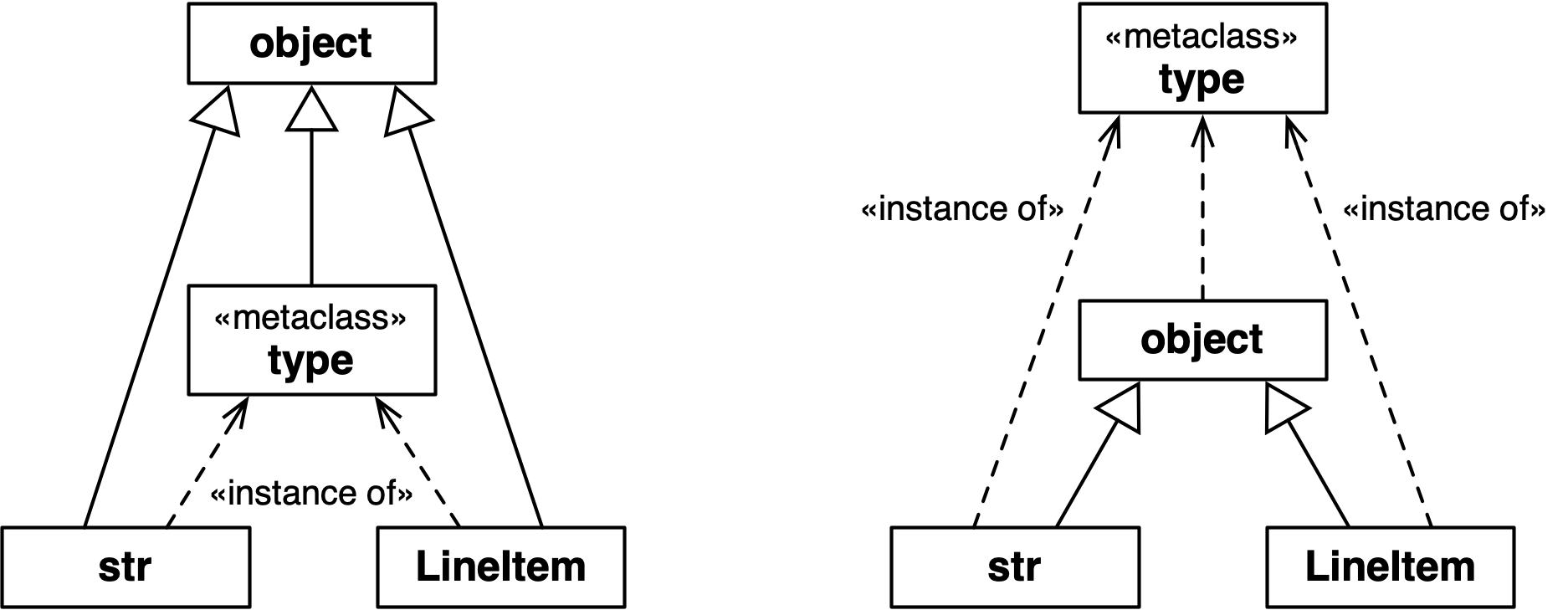
Figure 24-2. Both diagrams are true. The left one emphasizes that str, type, and LineItem are subclasses of object. The right one makes it clear that str, object, and LineItem are instances type, because they are all classes.
Note
The classes object and type have a unique relationship: object is an instance of type, and type is a subclass of object. This relationship is “magic”: it cannot be expressed in Python because either class would have to exist before the other could be defined. The fact that type is an instance of itself is also magical.
The next snippet shows that the class of collections.Iterable is abc.ABCMeta.
Note that Iterable is an abstract class,
but ABCMeta is a concrete class—after all, Iterable is
an instance of ABCMeta:
>>>fromcollections.abcimportIterable>>>Iterable.__class__<class 'abc.ABCMeta'>>>>importabc>>>fromabcimportABCMeta>>>ABCMeta.__class__<class 'type'>
Ultimately, the class of ABCMeta is also type.
Every class is an instance of type, directly or indirectly,
but only metaclasses are also subclasses of type.
That’s the most important relationship to understand metaclasses:
a metaclass, such as ABCMeta,
inherits from type the power to construct classes.
Figure 24-3 illustrates this crucial relationship.
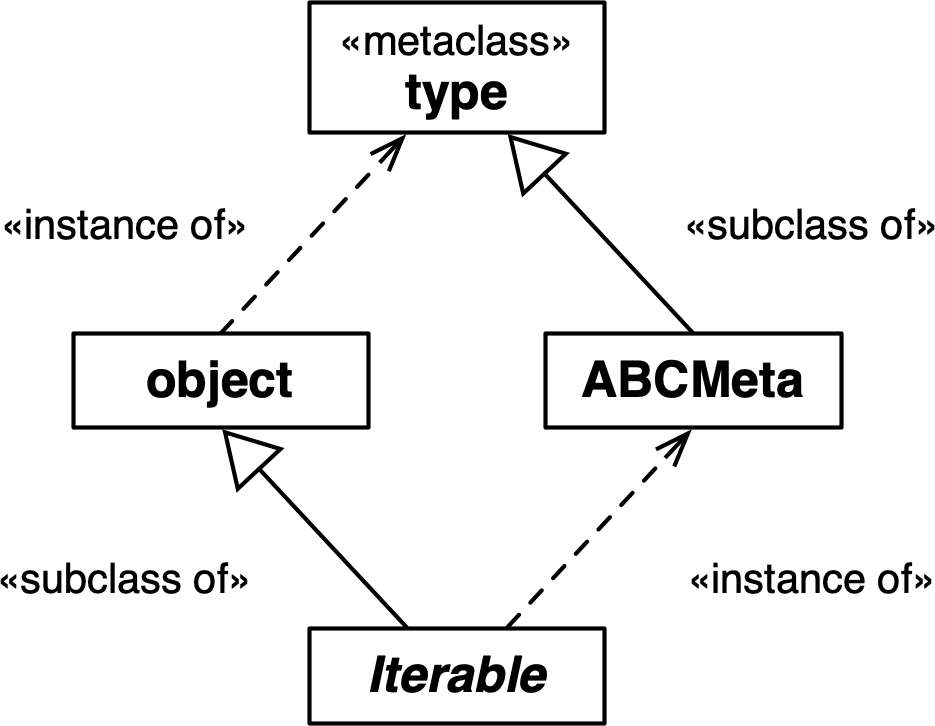
Figure 24-3. Iterable is a subclass of object and an instance of ABCMeta. Both object and ABCMeta are instances of type, but the key relationship here is that ABCMeta is also a subclass of type, because ABCMeta is a metaclass. In this diagram, Iterable is the only abstract class.
The important takeaway here is that metaclasses are subclasses of type,
and that’s what makes them work as class factories.
A metaclass can customize its instances by implementing special methods,
as the next sections demonstrate.
How a Metaclass Customizes a Class
To use a metaclass, it’s critical to understand how __new__ works on any class.
This was discussed in “Flexible Object Creation with __new__”.
The same mechanics happen at a “meta” level when a metaclass is about to create a new instance, which is a class. Consider this declaration:
classKlass(SuperKlass,metaclass=MetaKlass):x=42def__init__(self,y):self.y=y
To process that class statement, Python calls MetaKlass.__new__ with these
arguments:
meta_cls-
The metaclass itself (
MetaKlass), because__new__works as class method. cls_name-
The string
Klass. bases-
The single-element tuple
(SuperKlass,), with more elements in the case of multiple inheritance. cls_dict-
A mapping like:
{x: 42, `__init__`: <function __init__ at 0x1009c4040>}
When you implement MetaKlass.__new__, you can inspect and change those arguments
before passing them to super().__new__,
which will eventually call type.__new__ to create the new class object.
After super().__new__ returns,
you can also apply further processing to the newly created class before returning it to Python.
Python then calls SuperKlass.__init_subclass__, passing the class you created,
and then applies a class decorator to it, if one is present.
Finally, Python binds the class object to its name in the surrounding namespace—usually
the global namespace of a module, if the class statement was a top-level statement.
The most common processing made in a metaclass __new__ is to add or replace
items in the cls_dict—the mapping that represents the namespace of the class
under construction. For instance, before calling super().__new__, you can inject
methods in the class under construction by adding functions to cls_dict.
However, note that adding methods can also be done after the class is built,
which is why we were able to do it using __init_subclass__ or a class decorator.
One attribute that you must add to the cls_dict before type.__new__ runs
is __slots__, as discussed in “Why __init_subclass__ Cannot Configure __slots__”.
The __new__ method of a metaclass is the ideal place to configure __slots__.
The next section shows how to do that.
A Nice Metaclass Example
The MetaBunch metaclass presented here is a variation of the last example
in Chapter 4 of Python in a Nutshell, 3rd ed.,
by Alex Martelli, Anna Ravenscroft, and Steve
Holden,
written to run on Python 2.7 and 3.5.14
Assuming Python 3.6 or later, I was able to further simplify the code.
First, let’s see what the Bunch base class provides:
>>> class Point(Bunch):... x = 0.0... y = 0.0... color = 'gray'...>>> Point(x=1.2, y=3, color='green')Point(x=1.2, y=3, color='green')>>> p = Point()>>> p.x, p.y, p.color(0.0, 0.0, 'gray')>>> pPoint()
Remember that Checked assigns names to the Field descriptors in subclasses
based on class variable type hints,
which do not actually become attributes on the class since they don’t have values.
Bunch subclasses, on the other hand, use actual class attributes with values,
which then become the default values of the instance attributes.
The generated __repr__ omits the arguments for attributes that are equal to the defaults.
MetaBunch—the metaclass of Bunch—generates __slots__ for the new class
from the class attributes declared in the user’s class.
This blocks the instantiation and later assignment of undeclared attributes:
>>> Point(x=1, y=2, z=3)Traceback (most recent call last):...AttributeError: No slots left for: 'z'>>> p = Point(x=21)>>> p.y = 42>>> pPoint(x=21, y=42)>>> p.flavor = 'banana'Traceback (most recent call last):...AttributeError: 'Point' object has no attribute 'flavor'
Now let’s dive into the elegant code of MetaBunch in Example 24-15.
Example 24-15. metabunch/from3.6/bunch.py: MetaBunch metaclass and Bunch class
classMetaBunch(type):def__new__(meta_cls,cls_name,bases,cls_dict):defaults={}def__init__(self,**kwargs):forname,defaultindefaults.items():setattr(self,name,kwargs.pop(name,default))ifkwargs:extra=','.join(kwargs)raiseAttributeError(f'No slots left for:{extra!r}')def__repr__(self):rep=','.join(f'{name}={value!r}'forname,defaultindefaults.items()if(value:=getattr(self,name))!=default)returnf'{cls_name}({rep})'new_dict=dict(__slots__=[],__init__=__init__,__repr__=__repr__)forname,valueincls_dict.items():ifname.startswith('__')andname.endswith('__'):ifnameinnew_dict:raiseAttributeError(f"Can't set{name!r}in{cls_name!r}")new_dict[name]=valueelse:new_dict['__slots__'].append(name)defaults[name]=valuereturnsuper().__new__(meta_cls,cls_name,bases,new_dict)classBunch(metaclass=MetaBunch):pass
To create a new metaclass, inherit from
type.__new__works as a class method, but the class is a metaclass, so I like to name the first argumentmeta_cls(mcsis a common alternative). The remaining three arguments are the same as the three-argument signature for callingtype()directly to create a class.defaultswill hold a mapping of attribute names and their default values.This will be injected into the new class.
Read the
defaultsand set the corresponding instance attribute with a value popped fromkwargsor a default.If there is still any item in
kwargs, it means there are no slots left where we can place them. We believe in failing fast as best practice, so we don’t want to silently ignore extra items. A quick and effective solution is to pop one item fromkwargsand try to set it on the instance, triggering anAttributeErroron purpose.__repr__returns a string that looks like a constructor call—e.g.,Point(x=3), omitting the keyword arguments with default values.Initialize namespace for the new class.
Iterate over the namespace of the user’s class.
If a dunder
nameis found, copy the item to the new class namespace, unless it’s already there. This prevents users from overwriting__init__,__repr__, and other attributes set by Python, such as__qualname__and__module__.
If not a dunder
name, append to__slots__and save itsvalueindefaults.
Build and return the new class.

Provide a base class, so users don’t need to see
MetaBunch.
MetaBunch works because it is able to configure __slots__
before calling super().__new__ to build the final class.
As usual when metaprogramming, understanding the sequence of actions is key.
Let’s do another evaluation time experiment, now with a metaclass.
Metaclass Evaluation Time Experiment
This is a variation of “Evaluation Time Experiments”, adding a metaclass to the mix. The builderlib.py module is the same as before, but the main script is now evaldemo_meta.py, listed in Example 24-16.
Example 24-16. evaldemo_meta.py: experimenting with a metaclass
#!/usr/bin/env python3frombuilderlibimportBuilder,deco,DescriptorfrommetalibimportMetaKlass('# evaldemo_meta module start')@decoclassKlass(Builder,metaclass=MetaKlass):('# Klass body')attr=Descriptor()def__init__(self):super().__init__()(f'# Klass.__init__({self!r})')def__repr__(self):return'<Klass instance>'defmain():obj=Klass()obj.method_a()obj.method_b()obj.method_c()obj.attr=999if__name__=='__main__':main()('# evaldemo_meta module end')
Import
MetaKlassfrom metalib.py, which we’ll see in Example 24-18.Declare
Klassas a subclass ofBuilderand an instance ofMetaKlass.This method is injected by
MetaKlass.__new__, as we’ll see.
Warning
In the interest of science, Example 24-16 defies all reason and
applies three different metaprogramming techniques together on Klass:
a decorator, a base class using __init_subclass__, and a custom metaclass.
If you do this in production code, please don’t blame me.
Again, the goal is to observe the order in which
the three techniques interfere in the class construction process.
As in the previous evaluation time experiment, this example does nothing but print messages revealing the flow of execution. Example 24-17 shows the code for the top part of metalib.py—the rest is in Example 24-18.
Example 24-17. metalib.py: the NosyDict class
('% metalib module start')importcollectionsclassNosyDict(collections.UserDict):def__setitem__(self,key,value):args=(self,key,value)(f'% NosyDict.__setitem__{args!r}')super().__setitem__(key,value)def__repr__(self):return'<NosyDict instance>'
I wrote the NosyDict class to override __setitem__ to display
each key and value as they are set.
The metaclass will use a NosyDict instance to hold the namespace of the class
under construction, revealing more of Python’s inner workings.
The main attraction of metalib.py is the metaclass in Example 24-18.
It implements the __prepare__ special method,
a class method that Python only invokes on metaclasses.
The __prepare__ method provides the earliest
opportunity to influence the process of creating a new class.
Tip
When coding a metaclass, I find it useful to adopt this naming convention for special method arguments:
-
Use
clsinstead ofselffor instance methods, because the instance is a class. -
Use
meta_clsinstead ofclsfor class methods, because the class is a metaclass. Recall that__new__behaves as a class method even without the@classmethoddecorator.
Example 24-18. metalib.py: the MetaKlass
classMetaKlass(type):('%MetaKlass body')@classmethoddef__prepare__(meta_cls,cls_name,bases):args=(meta_cls,cls_name,bases)(f'%MetaKlass.__prepare__{args!r}')returnNosyDict()def__new__(meta_cls,cls_name,bases,cls_dict):args=(meta_cls,cls_name,bases,cls_dict)(f'%MetaKlass.__new__{args!r}')definner_2(self):(f'%MetaKlass.__new__:inner_2({self!r})')cls=super().__new__(meta_cls,cls_name,bases,cls_dict.data)cls.method_c=inner_2returnclsdef__repr__(cls):cls_name=cls.__name__returnf"<class{cls_name!r}built by MetaKlass>"('%metalib module end')
__prepare__should be declared as a class method. It is not an instance method because the class under construction does not exist yet when Python calls__prepare__.Python calls
__prepare__on a metaclass to obtain a mapping to hold the namespace of the class under construction.Return
NosyDictinstance to be used as the namespace.cls_dictis aNosyDictinstance returned by__prepare__.type.__new__requires a realdictas the last argument, so I give it thedataattribute ofNosyDict, inherited fromUserDict.Inject a method in the newly created class.
As usual,
__new__must return the object just created—in this case, the new class.Defining
__repr__on a metaclass allows customizing therepr()of class objects.
The main use case for __prepare__ before Python 3.6 was to provide an
OrderedDict to hold the attributes of the class under construction,
so that the metaclass __new__ could process those attributes in the order
in which they appear in the source code of the user’s class definition.
Now that dict preserves the insertion order, __prepare__ is rarely needed.
You will see a creative use for it in “A Metaclass Hack with __prepare__”.
Importing metalib.py in the Python console is not very exciting.
Note the use of % to prefix the lines output by this module:
>>>importmetalib% metalib module start% MetaKlass body% metalib module end
Lots of things happen if you import evaldemo_meta.py, as you can see in Example 24-19.
Example 24-19. Console experiment with evaldemo_meta.py
>>>importevaldemo_meta@ builderlib module start@ Builder body@ Descriptor body@ builderlib module end% metalib module start% MetaKlass body% metalib module end# evaldemo_meta module start% MetaKlass.__prepare__(<class 'metalib.MetaKlass'>, 'Klass',(<class 'builderlib.Builder'>,))% NosyDict.__setitem__(<NosyDict instance>, '__module__', 'evaldemo_meta')% NosyDict.__setitem__(<NosyDict instance>, '__qualname__', 'Klass')# Klass body@ Descriptor.__init__(<Descriptor instance>)% NosyDict.__setitem__(<NosyDict instance>, 'attr', <Descriptor instance>)% NosyDict.__setitem__(<NosyDict instance>, '__init__',<function Klass.__init__ at …>)% NosyDict.__setitem__(<NosyDict instance>, '__repr__',<function Klass.__repr__ at …>)% NosyDict.__setitem__(<NosyDict instance>, '__classcell__', <cell at …: empty>)% MetaKlass.__new__(<class 'metalib.MetaKlass'>, 'Klass',(<class 'builderlib.Builder'>,), <NosyDict instance>)@ Descriptor.__set_name__(<Descriptor instance>,<class 'Klass' built by MetaKlass>, 'attr')@ Builder.__init_subclass__(<class 'Klass' built by MetaKlass>)@ deco(<class 'Klass' built by MetaKlass>)# evaldemo_meta module end
The lines before this are the result of importing builderlib.py and metalib.py.
Python invokes
__prepare__to start processing aclassstatement.Before parsing the class body, Python adds the
__module__and__qualname__entries to the namespace of the class under construction.The descriptor instance is created…
…and bound to
attrin the class namespace.__init__and__repr__methods are defined and added to the namespace.Once Python finishes processing the class body, it calls
MetaKlass.__new__.__set_name__,__init_subclass__, and the decorator are invoked in this order, after the__new__method of the metaclass returns the newly constructed class.
If you run evaldemo_meta.py as script, main() is called, and a few more things
happen (Example 24-20).
Example 24-20. Running evaldemo_meta.py as a program
$ ./evaldemo_meta.py [... 20 lines omitted ...] @ deco(<class 'Klass' built by MetaKlass>)
The top 21 lines—including this one—are the same shown in Example 24-19.
Triggered by
obj.method_c()inmain;method_cwas injected byMetaKlass.__new__.
Let’s now go back to the idea of the Checked class with the Field descriptors
implementing runtime type validation, and see how it can be done with a metaclass.
A Metaclass Solution for Checked
I don’t want to encourage premature optimization and overengineering,
so here is a make-believe scenario to justify rewriting checkedlib.py with __slots__,
which requires the application of a metaclass.
Feel free to skip it.
The metaclass/checkedlib.py module we’ll study next is a drop-in replacement for initsub/checkedlib.py. The doctests embedded in them are identical, as well as the checkedlib_test.py files for pytest.
The complexity in checkedlib.py is abstracted away from the user. Here is the source code of a script using the package:
fromcheckedlibimportCheckedclassMovie(Checked):title:stryear:intbox_office:floatif__name__=='__main__':movie=Movie(title='The Godfather',year=1972,box_office=137)(movie)(movie.title)
That concise Movie class definition leverages three instances of the Field
validating descriptor, a __slots__ configuration,
five methods inherited from Checked,
and a metaclass to put it all together.
The only visible part of checkedlib is the Checked base class.
Consider Figure 24-4. The Mills & Gizmos Notation complements the UML class diagram by making the relationship between classes and instances more visible.
For example, a Movie class using the new checkedlib.py is an instance of CheckedMeta,
and a subclass of Checked.
Also, the title, year, and box_office class attributes of Movie are three separate instances of Field.
Each Movie instance has its own _title, _year, and _box_office attributes,
to store the values of the corresponding fields.
Now let’s study the code, starting with the Field class, shown in Example 24-21.
The Field descriptor class is now a bit different.
In the previous examples, each Field descriptor instance stored its value in the managed
instance using an attribute of the same name. For example, in the Movie class, the title
descriptor stored the field value in a title attribute in the managed instance.
This made it unnecessary for Field to provide a __get__ method.
However, when a class like Movie uses __slots__,
it cannot have class attributes and instance attributes with the same name.
Each descriptor instance is a class attribute,
and now we need separate per-instance storage attributes.
The code uses the descriptor name prefixed with a single _.
Therefore Field instances have separate name and storage_name attributes,
and we implement Field.__get__.
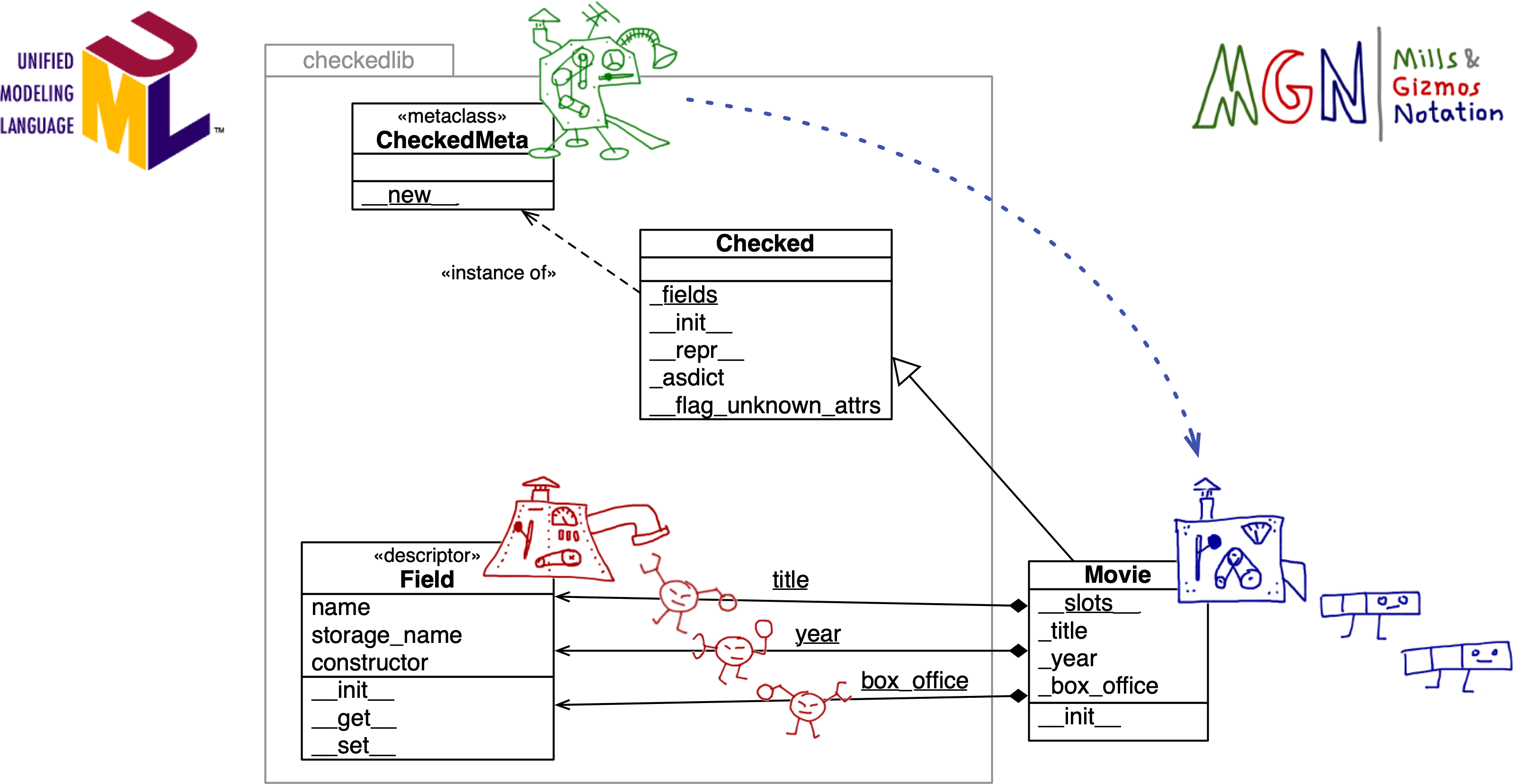
Figure 24-4. UML class diagram annotated with MGN: the CheckedMeta meta-mill builds the Movie mill. The Field mill builds the title, year, and box_office descriptors, which are class attributes of Movie. The per-instance data for the fields is stored in the _title, _year, and _box_office instance attributes of Movie. Note the package boundary of checkedlib. The developer of Movie doesn’t need to grok all the machinery inside checkedlib.py.
Example 24-21 shows the source code for Field, with callouts describing only the changes in this version.
Example 24-21. metaclass/checkedlib.py: the Field descriptor with storage_name and __get__
classField:def__init__(self,name:str,constructor:Callable)->None:ifnotcallable(constructor)orconstructoristype(None):raiseTypeError(f'{name!r} type hint must be callable')self.name=nameself.storage_name='_'+nameself.constructor=constructordef__get__(self,instance,owner=None):ifinstanceisNone:returnselfreturngetattr(instance,self.storage_name)def__set__(self,instance:Any,value:Any)->None:ifvalueis...:value=self.constructor()else:try:value=self.constructor(value)except(TypeError,ValueError)ase:type_name=self.constructor.__name__msg=f'{value!r} is not compatible with {self.name}:{type_name}'raiseTypeError(msg)fromesetattr(instance,self.storage_name,value)
Compute
storage_namefrom thenameargument.If
__get__getsNoneas theinstanceargument, the descriptor is being read from the managed class itself, not a managed instance. So we return the descriptor.Otherwise, return the value stored in the attribute named
storage_name.__set__now usessetattrto set or update the managed attribute.
Example 24-22 shows the code for the metaclass that drives this example.
Example 24-22. metaclass/checkedlib.py: the CheckedMeta metaclass
classCheckedMeta(type):def__new__(meta_cls,cls_name,bases,cls_dict):if'__slots__'notincls_dict:slots=[]type_hints=cls_dict.get('__annotations__',{})forname,constructorintype_hints.items():field=Field(name,constructor)cls_dict[name]=fieldslots.append(field.storage_name)cls_dict['__slots__']=slotsreturnsuper().__new__(meta_cls,cls_name,bases,cls_dict)
__new__is the only method implemented inCheckedMeta.Only enhance the class if its
cls_dictdoesn’t include__slots__. If__slots__is already present, assume it is theCheckedbase class and not a user-defined subclass, and build the class as is.To get the type hints in prior examples, we used
typing.get_type_hints, but that requires an existing class as the first argument. At this point, the class we are configuring does not exist yet, so we need to retrieve the__annotations__directly from thecls_dict—the namespace of the class under construction, which Python passes as the last argument to the metaclass__new__.Iterate over
type_hintsto……build a
Fieldfor each annotated attribute……overwrite the corresponding entry in
cls_dictwith theFieldinstance……and append the
storage_nameof the field in the list we’ll use to……populate the
__slots__entry incls_dict—the namespace of the class under construction.Finally, we call
super().__new__.
The last part of metaclass/checkedlib.py is the Checked base class
that users of this library will subclass to enhance their classes, like Movie.
The code for this version of Checked is the same as Checked in initsub/checkedlib.py
(listed in Example 24-5 and Example 24-6),
with three changes:
-
Added an empty
__slots__to signal toCheckedMeta.__new__that this class doesn’t require special processing. -
Removed
__init_subclass__. Its job is now done byCheckedMeta.__new__. -
Removed
__setattr__. It became redundant because adding__slots__to the user-defined class prevents setting undeclared attributes.
Example 24-23 is a complete listing of the final version of Checked.
Example 24-23. metaclass/checkedlib.py: the Checked base class
classChecked(metaclass=CheckedMeta):__slots__=()# skip CheckedMeta.__new__ processing@classmethoddef_fields(cls)->dict[str,type]:returnget_type_hints(cls)def__init__(self,**kwargs:Any)->None:fornameinself._fields():value=kwargs.pop(name,...)setattr(self,name,value)ifkwargs:self.__flag_unknown_attrs(*kwargs)def__flag_unknown_attrs(self,*names:str)->NoReturn:plural='s'iflen(names)>1else''extra=', '.join(f'{name!r}'fornameinnames)cls_name=repr(self.__class__.__name__)raiseAttributeError(f'{cls_name} object has no attribute{plural} {extra}')def_asdict(self)->dict[str,Any]:return{name:getattr(self,name)forname,attrinself.__class__.__dict__.items()ifisinstance(attr,Field)}def__repr__(self)->str:kwargs=', '.join(f'{key}={value!r}'forkey,valueinself._asdict().items())returnf'{self.__class__.__name__}({kwargs})'
This concludes the third rendering of a class builder with validated descriptors.
The next section covers some general issues related to metaclasses.
Metaclasses in the Real World
Metaclasses are powerful, but tricky. Before deciding to implement a metaclass, consider the following points.
Modern Features Simplify or Replace Metaclasses
Over time, several common use cases of metaclasses were made redundant by new language features:
- Class decorators
-
Simpler to understand than metaclasses, and less likely to cause conflicts with base classes and metaclasses.
__set_name__-
Avoids the need for custom metaclass logic to automatically set the name of a descriptor.15
__init_subclass__-
Provides a way to customize class creation that is transparent to the end user and even simpler than a decorator—but may introduce conflicts in a complex class hierarchy.
- Built-in
dictpreserving key insertion order -
Eliminated the #1 reason to use
__prepare__: to provide anOrderedDictto store the namespace of the class under construction. Python only calls__prepare__on metaclasses, so if you needed to process the class namespace in the order it appears in the source code, you had to use a metaclass before Python 3.6.
As of 2021, every actively maintained version of CPython supports all the features just listed.
I keep advocating these features because I see too much unnecessary complexity in our profession, and metaclasses are a gateway to complexity.
Metaclasses Are Stable Language Features
Metaclasses were introduced in Python 2.2 in 2002, together with so-called “new-style classes,” descriptors, and properties.
It is remarkable that the MetaBunch example, first posted by Alex Martelli in July 2002,
still works in Python 3.9—the only change being the way to specify the metaclass to use,
which in Python 3 is done with the syntax class Bunch(metaclass=MetaBunch):.
None of the additions I mentioned in “Modern Features Simplify or Replace Metaclasses” broke existing code using metaclasses. But legacy code using metaclasses can often be simplified by leveraging those features, especially if you can drop support to Python versions before 3.6—which are no longer maintained.
A Class Can Only Have One Metaclass
If your class declaration involves two or more metaclasses, you will see this puzzling error message:
TypeError: metaclass conflict: the metaclass of a derived class
must be a (non-strict) subclass of the metaclasses of all its bases
This may happen even without multiple inheritance.
For example, a declaration like this could trigger that TypeError:
classRecord(abc.ABC,metaclass=PersistentMeta):pass
We saw that abc.ABC is an instance of the abc.ABCMeta metaclass.
If that Persistent metaclass is not itself a subclass of abc.ABCMeta,
you get a metaclass conflict.
There are two ways of dealing with that error:
-
Find some other way of doing what you need to do, while avoiding at least one of the metaclasses involved.
-
Write your own
PersistentABCMetametaclass as a subclass of bothabc.ABCMetaandPersistentMeta, using multiple inheritance, and use that as the only metaclass forRecord.16
Tip
I can imagine the solution of the metaclass with two base metaclasses implemented to meet a deadline. In my experience, metaclass programming always takes longer than anticipated, which makes this approach risky before a hard deadline. If you do it and make the deadline, the code may contain subtle bugs. Even in the absence of known bugs, you should consider this approach as technical debt simply because it is hard to understand and maintain.
Metaclasses Should Be Implementation Details
Besides type, there are only six metaclasses in the entire Python 3.9 standard library.
The better known metaclasses are probably abc.ABCMeta, typing.NamedTupleMeta, and enum.EnumMeta.
None of them are intended to appear explicitly in user code.
We may consider them implementation details.
Although you can do some really wacky metaprogramming with metaclasses, it’s best to heed the principle of least astonishment so that most users can indeed regard metaclasses as implementation details.17
In recent years, some metaclasses in the Python standard library were replaced by other mechanisms, without breaking the public API of their packages. The simplest way to future-proof such APIs is to offer a regular class that users subclass to access the functionality provided by the metaclass, as we’ve done in our examples.
To wrap up our coverage of class metaprogramming, I will share with you the coolest, small example of metaclass I found as I researched this chapter.
A Metaclass Hack with __prepare__
When I updated this chapter for the second edition,
I needed to find simple but illuminating examples to replace the bulkfood LineItem
code that no longer require metaclasses since Python 3.6.
The simplest and most interesting metaclass idea was given to me by João S. O. Bueno—better known as JS in the Brazilian Python community. One application of his idea is to create a class that autogenerates numeric constants:
>>>classFlavor(AutoConst):...banana...coconut...vanilla...>>>Flavor.vanilla2>>>Flavor.banana,Flavor.coconut(0,1)
Yes, that code works as shown! That’s actually a doctest in autoconst_demo.py.
Here is the user-friendly AutoConst base class and the metaclass behind it,
implemented in autoconst.py:
classAutoConstMeta(type):def__prepare__(name,bases,**kwargs):returnWilyDict()classAutoConst(metaclass=AutoConstMeta):pass
That’s it.
Clearly the trick is in WilyDict.
When Python processes the namespace of the user’s class and reads banana,
it looks up that name in the mapping provided by __prepare__: an instance of WilyDict.
WilyDict implements __missing__, covered in “The __missing__ Method”.
The WilyDict instance initially has no 'banana' key,
so the __missing__ method is triggered.
It makes an item on the fly
with the key 'banana' and the value 0, returning that value.
Python is happy with that, then tries to retrieve 'coconut'.
WilyDict promptly adds that entry with the value 1, returning it.
The same happens with 'vanilla', which is then mapped to 2.
We’ve seen __prepare__ and __missing__ before.
The real innovation is how JS put them together.
Here is the source code for WilyDict, also from autoconst.py:
classWilyDict(dict):def__init__(self,*args,**kwargs):super().__init__(*args,**kwargs)self.__next_value=0def__missing__(self,key):ifkey.startswith('__')andkey.endswith('__'):raiseKeyError(key)self[key]=value=self.__next_valueself.__next_value+=1returnvalue
While experimenting, I found that Python looked up __name__ in the namespace
of the class under construction, causing WilyDict to add a __name__
entry, and increment __next_value.
So I added that if statement in __missing__ to
raise KeyError for keys that look like dunder attributes.
The autoconst.py package both requires and illustrates mastery of Python’s dynamic class building machinery.
I had a great time adding more functionality to AutoConstMeta and AutoConst,
but instead of sharing my experiments, I will let you have fun
playing with JS’s ingenious hack.
Here are some ideas:
-
Make it possible to retrieve the constant name if you have the value. For example,
Flavor[2]could return'vanilla'. You can to this by implementing__getitem__inAutoConstMeta. Since Python 3.9, you can implement__class_getitem__inAutoConstitself. -
Support iteration over the class, by implementing
__iter__on the metaclass. I would make the__iter__yield the constants as(name, value)pairs. -
Implement a new
Enumvariant. This would be a major undertaking, because theenumpackage is full of tricks, including theEnumMetametaclass with hundreds of lines of code and a nontrivial__prepare__method.
Enjoy!
Note
The __class_getitem__ special method was added in Python 3.9 to support generic types,
as part of PEP 585—Type Hinting Generics In Standard Collections.
Thanks to __class_getitem__, Python’s core developers did not have to write a new
metaclass for the built-in types to implement __getitem__ so that
we could write generic type hints like list[int].
This is a narrow feature, but representative of a wider use case for metaclasses:
implementing operators and other special methods to work at the class level,
such as making the class itself iterable, just like Enum subclasses.
Wrapping Up
Metaclasses, as well as class decorators and __init_subclass__ are useful for:
-
Subclass registration
-
Subclass structural validation
-
Applying decorators to many methods at once
-
Object serialization
-
Object-relational mapping
-
Object-based persistence
-
Implementing special methods at the class level
-
Implementing class features found in other languages, such as traits and aspect-oriented programming
Class metaprogramming can also help with performance issues in some cases, by performing tasks at import time that otherwise would execute repeatedly at runtime.
To wrap up, let’s recall Alex Martelli’s final advice from his essay “Waterfowl and ABCs”:
And, don’t define custom ABCs (or metaclasses) in production code… if you feel the urge to do so, I’d bet it’s likely to be a case of “all problems look like a nail”-syndrome for somebody who just got a shiny new hammer—you (and future maintainers of your code) will be much happier sticking with straightforward and simple code, eschewing such depths.
I believe Martelli’s advice applies not only to ABCs and metaclasses,
but also to class hierarchies, operator overloading, function decorators,
descriptors, class decorators, and class builders using __init_subclass__.
Those powerful tools exist primarily to support library and framework development. Applications naturally should use those tools, as provided by the Python standard library or external packages. But implementing them in application code is often premature abstraction.
Good frameworks are extracted, not invented.18
David Heinemeier Hansson, creator of Ruby on Rails
Chapter Summary
This chapter started with an overview of attributes found in class objects,
such as __qualname__ and the __subclasses__() method.
Next, we saw how the type built-in can be used to construct classes at runtime.
The __init_subclass__ special method was introduced, with the first iteration of
a Checked base class designed to replace attribute type hints in user-defined subclasses
with Field instances that apply constructors to
enforce the type of those attributes at runtime.
The same idea was implemented with a @checked class decorator that
adds features to user-defined classes, similar to what __init_subclass__ allows.
We saw that neither __init_subclass__ nor a class decorator can dynamically configure
__slots__, because they operate only after a class is created.
The concepts of “import time” and “runtime” were clarified with experiments showing the
order in which Python code is executed when modules, descriptors, class decorators, and
__init_subclass__ is involved.
Our coverage of metaclasses began with an overall explanation of type as a metaclass,
and how user-defined metaclasses can implement __new__ to customize the classes it builds.
We then saw our first custom metaclass, the classic MetaBunch example using
__slots__.
Next, another evaluation time experiment demonstrated how the __prepare__ and __new__
methods of a metaclass are invoked earlier than __init_subclass__ and class decorators,
providing opportunities for deeper class customization.
The third iteration of a Checked class builder with Field descriptors and
custom __slots__ configuration was presented,
followed by some general considerations about metaclass usage in practice.
Finally, we saw the AutoConst hack invented by João S. O. Bueno,
based on the cunning idea of a metaclass with __prepare__
returning a mapping that implements __missing__.
In less than 20 lines of code, autoconst.py showcases
the power of combining Python metaprogramming techniques
I haven’t yet found a language that manages to be easy for beginners, practical for professionals, and exciting for hackers in the way that Python is. Thanks, Guido van Rossum and everybody else who makes it so.
Further Reading
Caleb Hattingh—a technical reviewer of this book—wrote the autoslot package,
providing a metaclass to automatically create a __slots__ attribute in a user-defined class
by inspecting the bytecode of __init__ and finding all assignments to attributes of self.
It’s useful and also an excellent example to study: only
74 lines of code in
autoslot.py, including 20 lines of comments explaining the most
difficult parts.
The essential references for this chapter in the Python documentation are “3.3.3. Customizing class creation” in the “Data Model” chapter of The Python Language Reference, which covers __init_subclass__ and metaclasses. The type class documentation in the “Built-in Functions” page, and “4.13. Special Attributes” of the “Built-in Types” chapter in the The Python Standard Library are also essential reading.
In the The Python Standard Library, the types module documentation covers two functions added in Python 3.3 that simplify class metaprogramming: types.new_class and types.prepare_class.
Class decorators were formalized in PEP 3129—Class Decorators, written by Collin Winter, with the reference implementation authored by Jack Diederich. The PyCon 2009 talk “Class Decorators: Radically Simple” (video), also by Jack Diederich, is a quick introduction to the feature.
Besides @dataclass, an interesting—and much simpler—example of
a class decorator in Python’s standard library is
functools.total_ordering
that generates special methods for object comparison.
For metaclasses, the main reference in Python’s documentation is
PEP 3115—Metaclasses in Python 3000,
in which the __prepare__ special method was introduced.
Python in a Nutshell, 3rd ed., by Alex Martelli, Anna Ravenscroft, and Steve Holden, is authoritative, but
was written before PEP 487—Simpler customization of class creation came out. The main metaclass example in that book—MetaBunch—is still valid,
because it can’t be written with simpler mechanisms.
Brett Slatkin’s Effective Python, 2nd ed. (Addison-Wesley) has several up-to-date examples of class building techniques, including metaclasses.
To learn about the origins of class metaprogramming in Python, I recommend Guido van Rossum’s paper from 2003, “Unifying types and classes in Python 2.2”. The text applies to modern Python as well, as it covers what were then called the “new-style” class semantics—the default semantics in Python 3—including descriptors and metaclasses. One of the references cited by Guido is Putting Metaclasses to Work: a New Dimension in Object-Oriented Programming, by Ira R. Forman and Scott H. Danforth (Addison-Wesley), a book to which he gave five stars on Amazon.com, adding the following review:
This book contributed to the design for metaclasses in Python 2.2
Too bad this is out of print; I keep referring to it as the best tutorial I know for the difficult subject of cooperative multiple inheritance, supported by Python via the
super()function.19
If you are keen on metaprogramming, you may wish Python had the ultimate metaprogramming feature: syntactic macros, as offered in the Lisp family of languages and—more recently—by Elixir and Rust. Syntactic macros are more powerful and less error prone than the primitive code substitution macros in the C language. They are special functions that rewrite source code using custom syntax into standard code before the compilation step, enabling developers to introduce new language constructs without changing the compiler. Like operator overloading, syntactic macros can be abused. But as long as the community understands and manages the downsides, they support powerful and user-friendly abstractions, like DSLs (Domain-Specific Languages). In September 2020, Python core developer Mark Shannon posted PEP 638—Syntactic Macros, advocating just that. A year after it was initially published, PEP 638 was still in draft and there were no ongoing discussions about it. Clearly it’s not a top priority for the Python core developers. I would like to see PEP 638 further discussed and eventually approved. Syntactic macros would allow the Python community to experiment with controversial new features, such as the walrus operator (PEP 572), pattern matching (PEP 634), and alternative rules for evaluating type hints (PEPs 563 and 649) before making permanent changes to the core language. Meanwhile, you can get a taste of syntactic macros with the MacroPy package.
1 Quote from Chapter 2, “Expression” of The Elements of Programming Style, 2nd ed. (McGraw-Hill), page 10.
2 That doesn’t mean PEP 487 broke code that used those features. It just means that some code that used class decorators or metaclasses prior to Python 3.6 can now be refactored to use plain classes, resulting in simpler and possibly more efficient code.
3 Thanks to my friend J. S. O. Bueno for contributing to this example.
4 I did not add type hints to the arguments because the actual types are Any. I put the return type hint because otherwise Mypy will not check inside the method.
5 That’s true for any object, except when its class overrides the __str__ or __repr__ methods inherited from object with broken implementations.
6 This solution avoids using None as a default. Avoiding null values is a good idea. They are hard to avoid in general, but easy in some cases. In Python as well as SQL, I prefer to represent missing data in a text field with an empty string instead of None or NULL. Learning Go reinforced this idea: variables and struct fields of primitive types in Go are initialized by default with a “zero value.” See “Zero values” in the online Tour of Go if you are curious.
7 I believe that callable should be made suitable for type hinting. As of May 6, 2021, this is an open issue.
8 As mentioned in “Loops, Sentinels, and Poison Pills”, the Ellipsis object is a convenient and safe sentinel value. It has been around for a long time, but recently people are finding more uses for it, as we see in type hints and NumPy.
9 The subtle concept of an overriding descriptor was explained in “Overriding Descriptors”.
10 This rationale appears in the abstract of PEP 557–Data Classes to explain why it was implemented as a class decorator.
11 Contrast with the import statement in Java, which is just a declaration to let the compiler know that certain packages are required.
12 I’m not saying opening a database connection just because a module is imported is a good idea, only pointing out it can be done.
13 Message to comp.lang.python, subject: “Acrimony in c.l.p.”. This is another part of the same message from December 23, 2002, quoted in the Preface. The TimBot was inspired that day.
14 The authors kindly gave me permission to use their example. MetaBunch first appeared in a message posted by Martelli in the comp.lang.python group on July 7, 2002, with the subject line “a nice metaclass example (was Re: structs in python)”, following a discussion about record-like data structures in Python. Martelli’s original code for Python 2.2 still runs after a single change: to use a metaclass in Python 3, you must use the metaclass keyword argument in the class declaration, e.g., Bunch(metaclass=MetaBunch), instead of the older convention of adding a __metaclass__ class-level attribute.
15 In the first edition of Fluent Python, the more advanced versions of the LineItem class used a metaclass just to set the storage name of the attributes. See the code in the metaclasses of bulkfood in the first edition code repository.
16 If you just got dizzy considering the implications of multiple inheritance with metaclasses, good for you. I’d stay way from this solution as well.
17 I made a living writing Django code for a few years before I decided to study how Django’s model fields were implemented. Only then I learned about descriptors and metaclasses.
18 The phrase is widely quoted. I found an early direct quote in a post in DHH’s blog from 2005.
19 I bought a used copy and found it a very challenging read.
20 See p. xvii. Full text available at Berkeley.edu.
21 Machine Beauty: Elegance and the Heart of Technology by David Gelernter (Basic Books) opens with an intriguing discussion of elegance and aesthetics in works of engineering, from bridges to software. The later chapters are not great, but the opening is worth the price.