Chapter 22. Dynamic Attributes and Properties
The crucial importance of properties is that their existence makes it perfectly safe and indeed advisable for you to expose public data attributes as part of your class’s public interface.
Martelli, Ravenscroft, and Holden, “Why properties are important”1
Data attributes and methods are collectively known as attributes in Python.
A method is an attribute that is callable.
Dynamic attributes present the same interface as data attributes—i.e., obj.attr—but are computed on demand.
This follows Bertrand Meyer’s Uniform Access Principle:
All services offered by a module should be available through a uniform notation, which does not betray whether they are implemented through storage or through computation.2
There are several ways to implement dynamic attributes in Python.
This chapter covers the simplest ways:
the @property decorator and the __getattr__ special method.
A user-defined class implementing __getattr__ can implement
a variation of dynamic attributes that I call virtual attributes:
attributes that are not explicitly declared anywhere in the source code of the class,
and are not present in the instance __dict__,
but may be retrieved elsewhere or computed on the fly whenever a user tries to read a nonexistent attribute like obj.no_such_attr.
Coding dynamic and virtual attributes is the kind of metaprogramming that framework authors do. However, in Python the basic techniques are straightforward, so we can use them in everyday data wrangling tasks. That’s how we’ll start this chapter.
What’s New in This Chapter
Most of the updates to this chapter were motivated by a discussion of @functools.cached_property (introduced in Python 3.8),
as well as the combined use of @property with @functools.cache (new in 3.9).
This affected the code for the Record and Event classes that appear in “Computed Properties”.
I also added a refactoring to leverage the PEP 412—Key-Sharing Dictionary optimization.
To highlight more relevant features while keeping the examples readable, I removed some nonessential code—merging the old DbRecord class into Record, replacing shelve.Shelve with a dict, and deleting the logic to download the OSCON dataset—which the examples now read from a local file included in the Fluent Python code repository.
Data Wrangling with Dynamic Attributes
In the next few examples, we’ll leverage dynamic attributes to work with a JSON dataset published by O’Reilly for the OSCON 2014 conference. Example 22-1 shows four records from that dataset.3
Example 22-1. Sample records from osconfeed.json; some field contents abbreviated
{"Schedule":{"conferences":[{"serial":115}],"events":[{"serial":34505,"name":"Why Schools Don´t Use Open Source to Teach Programming","event_type":"40-minute conference session","time_start":"2014-07-23 11:30:00","time_stop":"2014-07-23 12:10:00","venue_serial":1462,"description":"Aside from the fact that high school programming...","website_url":"http://oscon.com/oscon2014/public/schedule/detail/34505","speakers":[157509],"categories":["Education"]}],"speakers":[{"serial":157509,"name":"Robert Lefkowitz","photo":null,"url":"http://sharewave.com/","position":"CTO","affiliation":"Sharewave","twitter":"sharewaveteam","bio":"Robert ´r0ml´ Lefkowitz is the CTO at Sharewave, a startup..."}],"venues":[{"serial":1462,"name":"F151","category":"Conference Venues"}]}}
Example 22-1 shows 4 of the 895 records in the JSON file. The entire dataset is a single JSON object with the key "Schedule", and its value is another mapping with four keys: "conferences", "events", "speakers", and "venues".
Each of those four keys maps to a list of records.
In the full dataset, the "events", "speakers", and "venues"
lists have dozens or hundreds of records, while "conferences" has only that one record shown in Example 22-1.
Every record has a "serial" field, which is a unique identifier for the record within the list.
I used Python’s console to explore the dataset, as shown in Example 22-2.
Example 22-2. Interactive exploration of osconfeed.json
>>>importjson>>>withopen('data/osconfeed.json')asfp:...feed=json.load(fp)>>>sorted(feed['Schedule'].keys())['conferences', 'events', 'speakers', 'venues']>>>forkey,valueinsorted(feed['Schedule'].items()):...(f'{len(value):3}{key}')...1 conferences484 events357 speakers53 venues>>>feed['Schedule']['speakers'][-1]['name']'Carina C. Zona'>>>feed['Schedule']['speakers'][-1]['serial']141590>>>feed['Schedule']['events'][40]['name']'There *Will* Be Bugs'>>>feed['Schedule']['events'][40]['speakers'][3471, 5199]

feedis adictholding nested dicts and lists, with string and integer values.
List the four record collections inside
"Schedule".
Display record counts for each collection.

Navigate through the nested dicts and lists to get the name of the last speaker.

Get the serial number of that same speaker.

Each event has a
'speakers'list with zero or more speaker serial numbers.
Exploring JSON-Like Data with Dynamic Attributes
Example 22-2 is simple enough, but the syntax feed['Schedule']['events'][40]['name'] is cumbersome. In JavaScript, you can get the same value by writing feed.Schedule.events[40].name. It’s easy to implement a dict-like class that does the same in Python—there are plenty of implementations on the web.4 I wrote
FrozenJSON, which is simpler than most recipes because it supports reading only: it’s just for exploring the data. FrozenJSON is also recursive, dealing automatically with nested mappings and lists.
Example 22-3 is a demonstration of FrozenJSON, and the source code is shown in Example 22-4.
Example 22-3. FrozenJSON from Example 22-4 allows reading attributes like name, and calling methods like .keys() and .items()
>>>importjson>>>raw_feed=json.load(open('data/osconfeed.json'))>>>feed=FrozenJSON(raw_feed)>>>len(feed.Schedule.speakers)357>>>feed.keys()dict_keys(['Schedule'])>>>sorted(feed.Schedule.keys())['conferences','events','speakers','venues']>>>forkey,valueinsorted(feed.Schedule.items()):...(f'{len(value):3} {key}')...1conferences484events357speakers53venues>>>feed.Schedule.speakers[-1].name'Carina C. Zona'>>>talk=feed.Schedule.events[40]>>>type(talk)<class'explore0.FrozenJSON'>>>>talk.name'There *Will* Be Bugs'>>>talk.speakers[3471,5199]>>>talk.flavorTraceback(mostrecentcalllast):...KeyError:'flavor'
Build a
FrozenJSONinstance from theraw_feedmade of nested dicts and lists.FrozenJSONallows traversing nested dicts by using attribute notation; here we show the length of the list of speakers.Methods of the underlying dicts can also be accessed, like
.keys(), to retrieve the record collection names.Using
items(), we can retrieve the record collection names and their contents, to display thelen()of each of them.A
list, such asfeed.Schedule.speakers, remains a list, but the items inside are converted toFrozenJSONif they are mappings.Item 40 in the
eventslist was a JSON object; now it’s aFrozenJSONinstance.
Event records have a
speakerslist with speaker serial numbers.
Trying to read a missing attribute raises
KeyError, instead of the usualAttributeError.
The keystone of the FrozenJSON class is the __getattr__ method, which we already used in the Vector example in “Vector Take #3: Dynamic Attribute Access”, to retrieve Vector components by letter: v.x, v.y, v.z, etc. It’s essential to recall that the __getattr__ special method is only invoked by the interpreter when the usual process fails to retrieve an attribute (i.e., when the named attribute cannot be found in the instance, nor in the class or in its superclasses).
The last line of Example 22-3 exposes a minor issue with my code: trying to read a missing attribute should raise AttributeError, and not KeyError as shown.
When I implemented the error handling to do that,
the __getattr__ method became twice as long, distracting from the most important logic I wanted to show.
Given that users would know that a FrozenJSON is built from mappings and lists,
I think the KeyError is not too confusing.
Example 22-4. explore0.py: turn a JSON dataset into a FrozenJSON holding nested
FrozenJSON objects, lists, and simple types
fromcollectionsimportabcclassFrozenJSON:"""A read-only façade for navigating a JSON-like object using attribute notation """def__init__(self,mapping):self.__data=dict(mapping)def__getattr__(self,name):try:returngetattr(self.__data,name)exceptAttributeError:returnFrozenJSON.build(self.__data[name])def__dir__(self):returnself.__data.keys()@classmethoddefbuild(cls,obj):ifisinstance(obj,abc.Mapping):returncls(obj)elifisinstance(obj,abc.MutableSequence):return[cls.build(item)foriteminobj]else:returnobj
Build a
dictfrom themappingargument. This ensures we get a mapping or something that can be converted to one. The double-underscore prefix on__datamakes it a private attribute.__getattr__is called only when there’s no attribute with thatname.If
namematches an attribute of the instance__datadict, return that. This is how calls likefeed.keys()are handled: thekeysmethod is an attribute of the__datadict.Otherwise, fetch the item with the key
namefromself.__data, and return the result of callingFrozenJSON.build()on that.5Implementing
__dir__suports thedir()built-in, which in turns supports auto-completion in the standard Python console as well as IPython, Jupyter Notebook, etc. This simple code will enable recursive auto-completion based on the keys inself.__data, because__getattr__buildsFrozenJSONinstances on the fly—useful for interactive exploration of the data.This is an alternate constructor, a common use for the
@classmethoddecorator.If
objis a mapping, build aFrozenJSONwith it. This is an example of goose typing—see “Goose Typing” if you need a refresher.If it is a
MutableSequence, it must be a list,6 so we build alistby passing each item inobjrecursively to.build().
If it’s not a
dictor alist, return the item as it is.
A FrozenJSON instance has the __data private instance attribute stored under the name _FrozenJSON__data, as explained in “Private and ‘Protected’ Attributes in Python”.
Attempts to retrieve attributes by other names will trigger __getattr__.
This method will first look if the self.__data dict has an attribute (not a key!) by that name; this allows FrozenJSON instances to handle dict methods such as items, by delegating to self.__data.items(). If self.__data doesn’t have an attribute with the given name, __getattr__ uses name as a key to retrieve an item from self.__data, and passes that item to FrozenJSON.build. This allows navigating through nested structures in the JSON data, as each nested mapping is converted to another FrozenJSON instance by the build class method.
Note that FrozenJSON does not transform or cache the original dataset.
As we traverse the data, __getattr__ creates FrozenJSON instances again and again.
That’s OK for a dataset of this size,
and for a script that will only be used to explore or convert the data.
Any script that generates or emulates dynamic attribute names from arbitrary sources must deal with one issue: the keys in the original data may not be suitable attribute names. The next section addresses this.
The Invalid Attribute Name Problem
The FrozenJSON code doesn’t handle attribute names that are Python keywords. For example, if you build an object like this:
>>>student=FrozenJSON({'name':'Jim Bo','class':1982})
You won’t be able to read student.class because class is a reserved keyword in Python:
>>>student.classFile"<stdin>", line1student.class^SyntaxError:invalid syntax
You can always do this, of course:
>>>getattr(student,'class')1982
But the idea of FrozenJSON is to provide convenient access to the data, so a better solution is checking whether a key in the mapping given to FrozenJSON.__init__ is a keyword, and if so, append an _ to it, so the attribute can be read like this:
>>>student.class_1982
This can be achieved by replacing the one-liner __init__ from Example 22-4 with the version in Example 22-5.
Example 22-5. explore1.py: append an _ to attribute names that are Python keywords
def__init__(self,mapping):self.__data={}forkey,valueinmapping.items():ifkeyword.iskeyword(key):key+='_'self.__data[key]=value
The
keyword.iskeyword(…)function is exactly what we need; to use it, thekeywordmodule must be imported, which is not shown in this snippet.
A similar problem may arise if a key in a JSON record is not a valid Python identifier:
>>>x=FrozenJSON({'2be':'or not'})>>>x.2beFile"<stdin>", line1x.2be^SyntaxError:invalid syntax
Such problematic keys are easy to detect in Python 3 because the str class provides the s.isidentifier() method, which tells you whether s is a valid Python identifier according to the language grammar. But turning a key that is not a valid identifier into a valid attribute name is not trivial. One solution would be to implement __getitem__ to allow attribute access using notation like x['2be']. For the sake of simplicity, I will not worry about this issue.
After giving some thought to the dynamic attribute names, let’s turn to another essential feature of FrozenJSON: the logic of the build class method.
Frozen.JSON.build is used by __getattr__ to return a different type of object depending on the value of the attribute being accessed: nested structures are converted to FrozenJSON instances or lists of FrozenJSON instances.
Instead of a class method, the same logic could be implemented as the __new__ special method, as we’ll see next.
Flexible Object Creation with __new__
We often refer to __init__ as the constructor method,
but that’s because we adopted jargon from other languages.
In Python, __init__ gets self as the first argument,
therefore the object already exists when __init__ is called by the interpreter.
Also, __init__ cannot return anything.
So it’s really an initializer, not a constructor.
When a class is called to create an instance,
the special method that Python calls on that class to construct an instance is __new__.
It’s a class method, but gets special treatment,
so the @classmethod decorator is not applied to it.
Python takes the instance returned by __new__ and then passes it as
the first argument self of __init__.
We rarely need to code __new__,
because the implementation inherited from object suffices for the vast majority of use cases.
If necessary, the __new__ method can also return an instance of a different class.
When that happens, the interpreter does not call __init__.
In other words, Python’s logic for building an object is similar to this pseudocode:
# pseudocode for object constructiondefmake(the_class,some_arg):new_object=the_class.__new__(some_arg)ifisinstance(new_object,the_class):the_class.__init__(new_object,some_arg)returnnew_object# the following statements are roughly equivalentx=Foo('bar')x=make(Foo,'bar')
Example 22-6 shows a variation of FrozenJSON where the logic of the former build class method was moved to __new__.
Example 22-6. explore2.py: using __new__ instead of build to construct new objects that may or may not be instances of FrozenJSON
fromcollectionsimportabcimportkeywordclassFrozenJSON:"""A read-only façade for navigating a JSON-like object using attribute notation """def__new__(cls,arg):ifisinstance(arg,abc.Mapping):returnsuper().__new__(cls)elifisinstance(arg,abc.MutableSequence):return[cls(item)foriteminarg]else:returnargdef__init__(self,mapping):self.__data={}forkey,valueinmapping.items():ifkeyword.iskeyword(key):key+='_'self.__data[key]=valuedef__getattr__(self,name):try:returngetattr(self.__data,name)exceptAttributeError:returnFrozenJSON(self.__data[name])def__dir__(self):returnself.__data.keys()
As a class method, the first argument
__new__gets is the class itself, and the remaining arguments are the same that__init__gets, except forself.The default behavior is to delegate to the
__new__of a superclass. In this case, we are calling__new__from theobjectbase class, passingFrozenJSONas the only argument.The remaining lines of
__new__are exactly as in the oldbuildmethod.This was where
FrozenJSON.buildwas called before; now we just call theFrozenJSONclass, which Python handles by callingFrozenJSON.__new__.
The __new__ method gets the class as the first argument because, usually, the created object will be an instance of that class.
So, in FrozenJSON.__new__, when the
expression super().__new__(cls) effectively calls object.__new__(FrozenJSON), the instance built by the object class is actually an instance of FrozenJSON.
The __class__ attribute of the new instance will hold a reference to FrozenJSON, even though the actual construction is performed by object.__new__, implemented in C, in the guts of the interpreter.
The OSCON JSON dataset is structured in a way that is not helpful for interactive exploration.
For example, the event at index 40, titled 'There *Will* Be Bugs' has two speakers, 3471 and 5199.
Finding the names of the speakers is awkward,
because those are serial numbers and the Schedule.speakers list is not indexed by them.
To get each speaker, we must iterate over that list until we find a record with a matching serial number.
Our next task is restructuring the data to prepare for automatic retrieval of linked records.
Computed Properties
We first saw the @property decorator in Chapter 11,
in the section, “A Hashable Vector2d”. In Example 11-7,
I used two properties in Vector2d just to make the x and y
attributes read-only.
Here we will see properties that compute values,
leading to a discussion of how to cache such values.
The records in the 'events' list of the OSCON JSON data contain
integer serial numbers pointing to records in the 'speakers' and 'venues' lists.
For example, this is the record for a conference talk (with an elided description):
{"serial":33950,"name":"There *Will* Be Bugs","event_type":"40-minute conference session","time_start":"2014-07-23 14:30:00","time_stop":"2014-07-23 15:10:00","venue_serial":1449,"description":"If you're pushing the envelope of programming...","website_url":"http://oscon.com/oscon2014/public/schedule/detail/33950","speakers":[3471,5199],"categories":["Python"]}
We will implement an Event class with venue and speakers properties to return the linked data
automatically—in other words, “dereferencing” the serial number.
Given an Event instance, Example 22-7 shows the desired behavior.
Example 22-7. Reading venue and speakers returns Record objects
>>> event<Event 'There *Will* Be Bugs'>>>> event.venue<Record serial=1449>>>> event.venue.name'Portland 251'>>> for spkr in event.speakers:... print(f'{spkr.serial}: {spkr.name}')...3471: Anna Martelli Ravenscroft5199: Alex Martelli
Given an
Eventinstance……reading
event.venuereturns aRecordobject instead of a serial number.Now it’s easy to get the name of the
venue.The
event.speakersproperty returns a list ofRecordinstances.
As usual, we will build the code step-by-step, starting with the Record class and a function to read the JSON data and return a dict with Record instances.
Step 1: Data-Driven Attribute Creation
Example 22-8 shows the doctest to guide this first step.
Example 22-8. Test-driving schedule_v1.py (from Example 22-9)
>>>records=load(JSON_PATH)>>>speaker=records['speaker.3471']>>>speaker<Recordserial=3471>>>>speaker.name,speaker.('Anna Martelli Ravenscroft','annaraven')
loadadictwith the JSON data.The keys in
recordsare strings built from the record type and serial number.speakeris an instance of theRecordclass defined in Example 22-9.Fields from the original JSON can be retrieved as
Recordinstance attributes.
The code for schedule_v1.py is in Example 22-9.
Example 22-9. schedule_v1.py: reorganizing the OSCON schedule data
importjsonJSON_PATH='data/osconfeed.json'classRecord:def__init__(self,**kwargs):self.__dict__.update(kwargs)def__repr__(self):returnf'<{self.__class__.__name__} serial={self.serial!r}>'defload(path=JSON_PATH):records={}withopen(path)asfp:raw_data=json.load(fp)forcollection,raw_recordsinraw_data['Schedule'].items():record_type=collection[:-1]forraw_recordinraw_records:key=f'{record_type}.{raw_record["serial"]}'records[key]=Record(**raw_record)returnrecords
This is a common shortcut to build an instance with attributes created from keyword arguments (detailed explanation follows).
Use the
serialfield to build the customRecordrepresentation shown in Example 22-8.loadwill ultimately return adictofRecordinstances.Parse the JSON, returning native Python objects: lists, dicts, strings, numbers, etc.
Iterate over the four top-level lists named
'conferences','events','speakers', and'venues'.record_typeis the list name without the last character, sospeakersbecomesspeaker. In Python ≥ 3.9 we can do this more explicitly withcollection.removesuffix('s')—see PEP 616—String methods to remove prefixes and suffixes.Build the
keyin the format'speaker.3471'.Create a
Recordinstance and save it inrecordswith thekey.
The Record.__init__ method illustrates an old Python hack. Recall that the __dict__ of an object is where its attributes are kept—unless __slots__ is declared in the class, as we saw in “Saving Memory with __slots__”. So, updating an instance __dict__ with a mapping is a quick way to create a bunch of attributes in that instance.7
Note
Depending on the application, the Record class may need to deal with keys that are not valid attribute names, as we saw in “The Invalid Attribute Name Problem”. Dealing with that issue would distract from the key idea of this example, and is not a problem in the dataset we are reading.
The definition of Record in Example 22-9 is so simple that you may be wondering why I did not use it before, instead of the more complicated FrozenJSON. There are two reasons. First, FrozenJSON works by recursively converting the nested mappings and lists; Record doesn’t need that because our converted dataset doesn’t have mappings nested in mappings or lists. The records contain only strings, integers, lists of strings, and lists of integers. Second reason: FrozenJSON provides access to the embedded __data dict attributes—which we used to invoke methods like .keys()—and now we don’t need that functionality either.
Note
The Python standard library provides classes similar to Record, where each instance has an arbitrary set of attributes built from keyword arguments given to __init__:
types.SimpleNamespace,
argparse.Namespace,
and
multiprocessing.managers.Namespace.
I wrote the simpler Record class to highlight the essential idea: __init__ updating the instance __dict__.
After reorganizing the schedule dataset, we can enhance the Record class to automatically retrieve venue and speaker records referenced in an event record. We’ll use properties to do that in the next examples.
Step 2: Property to Retrieve a Linked Record
The goal of this next version is: given an event record, reading its venue property will return a Record.
This is similar to what the Django ORM does when you access a ForeignKey field: instead of the key, you get the linked model object.
We’ll start with the venue property. See the partial interaction in Example 22-10 as an example.
Example 22-10. Extract from the doctests of schedule_v2.py
>>>event=Record.fetch('event.33950')>>>event<Event'There *Will* Be Bugs'>>>>event.venue<Recordserial=1449>>>>event.venue.name'Portland 251'>>>event.venue_serial1449
The
Record.fetchstatic method gets aRecordor anEventfrom the dataset.Note that
eventis an instance of theEventclass.Accessing
event.venuereturns aRecordinstance.Now it’s easy to find out the name of an
event.venue.The
Eventinstance also has avenue_serialattribute, from the JSON data.
Event is a subclass of Record adding a venue to retrieve linked records, and a specialized __repr__ method.
The code for this section is in the
schedule_v2.py module in the
Fluent Python code repository.
The example has nearly 60 lines, so I’ll present it in parts,
starting with the enhanced Record class.
Example 22-11. schedule_v2.py: Record class with a new fetch method
importinspectimportjsonJSON_PATH='data/osconfeed.json'classRecord:__index=Nonedef__init__(self,**kwargs):self.__dict__.update(kwargs)def__repr__(self):returnf'<{self.__class__.__name__} serial={self.serial!r}>'@staticmethoddeffetch(key):ifRecord.__indexisNone:Record.__index=load()returnRecord.__index[key]
inspectwill be used inload, listed in Example 22-13.The
__indexprivate class attribute will eventually hold a reference to thedictreturned byload.fetchis astaticmethodto make it explicit that its effect is not influenced by the instance or class on which it is called.Populate the
Record.__index, if needed.Use it to retrieve the record with the given
key.
Tip
This is one example where the use of staticmethod makes sense.
The fetch method always acts on the Record.__index class attribute,
even if invoked from a subclass, like Event.fetch()—which we’ll soon explore.
It would be misleading to code it as a class method because the cls
first argument would not be used.
Now we get to the use of a property in the Event class, listed in Example 22-12.
Example 22-12. schedule_v2.py: the Event class
classEvent(Record):def__repr__(self):try:returnf'<{self.__class__.__name__} {self.name!r}>'exceptAttributeError:returnsuper().__repr__()@propertydefvenue(self):key=f'venue.{self.venue_serial}'returnself.__class__.fetch(key)
EventextendsRecord.If the instance has a
nameattribute, it is used to produce a custom representation. Otherwise, delegate to the__repr__fromRecord.The
venueproperty builds akeyfrom thevenue_serialattribute, and passes it to thefetchclass method, inherited fromRecord(the reason for usingself.__class__is explained shortly).
The second line of the venue method of Example 22-12 returns self.__class__.fetch(key).
Why not simply call self.fetch(key)?
The simpler form works with the specific OSCON dataset because there is no event record with a 'fetch' key.
But, if an event record had a key named 'fetch', then within that specific Event instance, the reference self.fetch would retrieve the value of that field, instead of the fetch class method that Event inherits from Record.
This is a subtle bug, and it could easily sneak through testing because it depends on the dataset.
Warning
When creating instance attribute names from data, there is always the risk of bugs due to shadowing of class attributes—such as methods—or data loss through accidental overwriting of existing instance attributes. These problems may explain why Python dicts are not like JavaScript objects in the first place.
If the Record class behaved more like a mapping, implementing a dynamic __getitem__ instead of a dynamic __getattr__, there would be no risk of bugs from overwriting or shadowing. A custom mapping is probably the Pythonic way to implement Record. But if I took that road, we’d not be studying the tricks and traps of dynamic attribute programming.
The final piece of this example is the revised load function in Example 22-13.
Example 22-13. schedule_v2.py: the load function
defload(path=JSON_PATH):records={}withopen(path)asfp:raw_data=json.load(fp)forcollection,raw_recordsinraw_data['Schedule'].items():record_type=collection[:-1]cls_name=record_type.capitalize()cls=globals().get(cls_name,Record)ifinspect.isclass(cls)andissubclass(cls,Record):factory=clselse:factory=Recordforraw_recordinraw_records:key=f'{record_type}.{raw_record["serial"]}'records[key]=factory(**raw_record)returnrecords
So far, no changes from the
loadin schedule_v1.py (Example 22-9).Capitalize the
record_typeto get a possible class name; e.g.,'event'becomes'Event'.Get an object by that name from the module global scope; get the
Recordclass if there’s no such object.If the object just retrieved is a class, and is a subclass of
Record……bind the
factoryname to it. This meansfactorymay be any subclass ofRecord, depending on therecord_type.Otherwise, bind the
factoryname toRecord.The
forloop that creates thekeyand saves the records is the same as before, except that……the object stored in
recordsis constructed byfactory, which may beRecordor a subclass likeEvent, selected according to therecord_type.
Note that the only record_type that has a custom class is Event, but if classes named Speaker or Venue are coded, load will automatically use those classes when building and saving records, instead of the default Record class.
We’ll now apply the same idea to a new speakers property in the Events class.
Step 3: Property Overriding an Existing Attribute
The name of the venue property in Example 22-12 does not match a field name in records of the "events" collection.
Its data comes from a venue_serial field name.
In contrast, each record in the events collection has a speakers field with a list of serial numbers.
We want to expose that information as a speakers property in Event instances,
which returns a list of Record instances.
This name clash requires some special attention, as Example 22-14 reveals.
Example 22-14. schedule_v3.py: the speakers property
@propertydefspeakers(self):spkr_serials=self.__dict__['speakers']fetch=self.__class__.fetchreturn[fetch(f'speaker.{key}')forkeyinspkr_serials]
The data we want is in a
speakersattribute, but we must retrieve it directly from the instance__dict__to avoid a recursive call to thespeakersproperty.Return a list of all records with keys corresponding to the numbers in
spkr_serials.
Inside the speakers method, trying to read self.speakers will invoke the property itself, quickly raising a RecursionError.
However, if we read the same data via self.__dict__['speakers'],
Python’s usual algorithm for retrieving attributes is bypassed,
the property is not called, and the recursion is avoided.
For this reason, reading or writing data directly to an object’s __dict__ is a common Python metaprogramming trick.
Warning
The interpreter evaluates obj.my_attr by first looking at the class of obj.
If the class has a property with the my_attr name, that property shadows an instance attribute by the same name.
Examples in “Properties Override Instance Attributes” will demonstrate this,
and Chapter 23 will reveal that a property is implemented
as a descriptor—a more powerful and general abstraction.
As I coded the list comprehension in Example 22-14, my programmer’s lizard brain thought: “This may be expensive.” Not really, because events in the OSCON dataset have few speakers, so coding anything more complicated would be premature optimization. However, caching a property is a common need—and there are caveats. So let’s see how to do that in the next examples.
Step 4: Bespoke Property Cache
Caching properties is a common need because there is an expectation that an expression like event.venue should be inexpensive.8
Some form of caching could become necessary if the Record.fetch method behind the Event properties needed to query a database or a web API.
In the first edition Fluent Python, I coded the custom caching logic for the speakers method, as shown in Example 22-15.
Example 22-15. Custom caching logic using hasattr disables key-sharing optimization
@propertydefspeakers(self):ifnothasattr(self,'__speaker_objs'):spkr_serials=self.__dict__['speakers']fetch=self.__class__.fetchself.__speaker_objs=[fetch(f'speaker.{key}')forkeyinspkr_serials]returnself.__speaker_objs
If the instance doesn’t have an attribute named
__speaker_objs, fetch the speaker objects and store them there.Return
self.__speaker_objs.
The handmade caching in Example 22-15 is straightforward, but creating an attribute after the instance is initialized defeats the PEP 412—Key-Sharing Dictionary optimization, as explained in “Practical Consequences of How dict Works”. Depending on the size of the dataset, the difference in memory usage may be important.
A similar hand-rolled solution that works well with the key-sharing optimization requires coding an __init__ for the Event class, to create the necessary __speaker_objs initialized to None, and then checking for that in the speakers method. See Example 22-16.
Example 22-16. Storage defined in __init__ to leverage key-sharing optimization
classEvent(Record):def__init__(self,**kwargs):self.__speaker_objs=Nonesuper().__init__(**kwargs)# 15 lines omitted...@propertydefspeakers(self):ifself.__speaker_objsisNone:spkr_serials=self.__dict__['speakers']fetch=self.__class__.fetchself.__speaker_objs=[fetch(f'speaker.{key}')forkeyinspkr_serials]returnself.__speaker_objs
Examples 22-15 and 22-16 illustrate simple caching techniques that are fairly common in legacy Python codebases.
However, in multithreaded programs, handmade caches like those introduce race conditions that may lead to corrupted data.
If two threads are reading a property that was not previously cached,
the first thread will need to compute the data for the cache attribute (__speaker_objs in the examples) and the second thread may read a cached value that is not yet complete.
Fortunately, Python 3.8 introduced the @functools.cached_property decorator, which is thread safe.
Unfortunately, it comes with a couple of caveats, explained next.
Step 5: Caching Properties with functools
The functools module provides three decorators for caching.
We saw @cache and @lru_cache in “Memoization with functools.cache” (Chapter 9). Python 3.8 introduced @cached_property.
The functools.cached_property decorator caches the result of the method in an instance attribute with the same name.
For example, in Example 22-17,
the value computed by the venue method is stored in a venue attribute in self.
After that, when client code tries to read venue, the newly created venue instance attribute is used instead of the method.
Example 22-17. Simple use of a @cached_property
@cached_propertydefvenue(self):key=f'venue.{self.venue_serial}'returnself.__class__.fetch(key)
In “Step 3: Property Overriding an Existing Attribute”, we saw that a property shadows an instance attribute by the same name.
If that is true, how can @cached_property work?
If the property overrides the instance attribute,
the venue attribute will be ignored
and the venue method will always be called,
computing the key and running fetch every time!
The answer is a bit sad: cached_property is a misnomer.
The @cached_property decorator does not create a full-fledged property,
it creates a nonoverriding descriptor.
A descriptor is an object that manages the access to an attribute in another class.
We will dive into descriptors in Chapter 23.
The property decorator is a high-level API to create an overriding descriptor.
Chapter 23 will include a through explanation about overriding versus
nonoverriding descriptors.
For now, let us set aside the underlying implementation
and focus on the differences between cached_property and property
from a user’s point of view.
Raymond Hettinger explains them very well in the Python docs:
The mechanics of
cached_property()are somewhat different fromproperty(). A regular property blocks attribute writes unless a setter is defined. In contrast, acached_propertyallows writes.The
cached_propertydecorator only runs on lookups and only when an attribute of the same name doesn’t exist. When it does run, thecached_propertywrites to the attribute with the same name. Subsequent attribute reads and writes take precedence over thecached_propertymethod and it works like a normal attribute.The cached value can be cleared by deleting the attribute. This allows the
cached_propertymethod to run again.9
Back to our Event class: the specific behavior of @cached_property makes it unsuitable to decorate speakers,
because that method relies on an existing attribute also named speakers,
containing the serial numbers of the event speakers.
Warning
@cached_property has some important limitations:
-
It cannot be used as a drop-in replacement to
@propertyif the decorated method already depends on an instance attribute with the same name. -
It cannot be used in a class that defines
__slots__. -
It defeats the key-sharing optimization of the instance
__dict__, because it creates an instance attribute after__init__.
Despite these limitations, @cached_property addresses a common need in a simple way,
and it is thread safe.
Its Python code is an example of using a reentrant lock.
The @cached_property
documentation
recommends an alternative solution that we can use with speakers:
stacking @property and @cache decorators, as shown in Example 22-18.
Example 22-18. Stacking @property on @cache
@property@cachedefspeakers(self):spkr_serials=self.__dict__['speakers']fetch=self.__class__.fetchreturn[fetch(f'speaker.{key}')forkeyinspkr_serials]
The order is important:
@propertygoes on top……of
@cache.
Recall from “Stacked Decorators” the meaning of that syntax. The top three lines of Example 22-18 are similar to:
speakers=property(cache(speakers))
The @cache is applied to speakers, returning a new function.
That function then is decorated by @property,
which replaces it with a newly constructed property.
This wraps up our discussion of read-only properties and caching decorators, exploring the OSCON dataset. In the next section, we start a new series of examples creating read/write properties.
Using a Property for Attribute Validation
Besides computing attribute values, properties are also used to enforce business rules by changing a public attribute into an attribute protected by a getter and setter without affecting client code. Let’s work through an extended example.
LineItem Take #1: Class for an Item in an Order
Imagine an app for a store that sells organic food in bulk, where customers can order nuts, dried fruit, or cereals by weight. In that system, each order would hold a sequence of line items, and each line item could be represented by an instance of a class, as in Example 22-19.
Example 22-19. bulkfood_v1.py: the simplest LineItem class
classLineItem:def__init__(self,description,weight,price):self.description=descriptionself.weight=weightself.price=pricedefsubtotal(self):returnself.weight*self.price
That’s nice and simple. Perhaps too simple. Example 22-20 shows a problem.
Example 22-20. A negative weight results in a negative subtotal
>>>raisins=LineItem('Golden raisins',10,6.95)>>>raisins.subtotal()69.5>>>raisins.weight=-20# garbage in...>>>raisins.subtotal()# garbage out...-139.0
This is a toy example, but not as fanciful as you may think. Here is a story from the early days of Amazon.com:
We found that customers could order a negative quantity of books! And we would credit their credit card with the price and, I assume, wait around for them to ship the books.
Jeff Bezos, founder and CEO of Amazon.com10
How do we fix this? We could change the interface of LineItem to use a getter and a setter for the weight attribute. That would be the Java way, and it’s not wrong.
On the other hand, it’s natural to be able to set the weight of an item by just assigning to it; and perhaps the system is in production with other parts already accessing item.weight directly. In this case, the Python way would be to replace the data attribute with a property.
LineItem Take #2: A Validating Property
Implementing a property will allow us to use a getter and a setter, but the interface of LineItem will not change (i.e., setting the weight of a LineItem will still be written as raisins.weight = 12).
Example 22-21 lists the code for a read/write weight property.
Example 22-21. bulkfood_v2.py: a LineItem with a weight property
classLineItem:def__init__(self,description,weight,price):self.description=descriptionself.weight=weightself.price=pricedefsubtotal(self):returnself.weight*self.price@propertydefweight(self):returnself.__weight@weight.setterdefweight(self,value):ifvalue>0:self.__weight=valueelse:raiseValueError('value must be > 0')
Here the property setter is already in use, making sure that no instances with negative
weightcan be created.@propertydecorates the getter method.All the methods that implement a property share the name of the public attribute:
weight.The actual value is stored in a private attribute
__weight.The decorated getter has a
.setterattribute, which is also a decorator; this ties the getter and setter together.If the value is greater than zero, we set the private
__weight.Otherwise,
ValueErroris raised.
Note how a LineItem with an invalid weight cannot be created now:
>>>walnuts=LineItem('walnuts',0,10.00)Traceback (most recent call last):...ValueError:value must be > 0
Now we have protected weight from users providing negative values. Although buyers usually can’t set the price of an item, a clerical error or a bug may create a LineItem with a negative price. To prevent that, we could also turn price into a property, but this would entail some repetition in our code.
Remember the Paul Graham quote from Chapter 17: “When I see patterns in my programs, I consider it a sign of trouble.” The cure for repetition is abstraction. There are two ways to abstract away property definitions: using a property factory or a descriptor class. The descriptor class approach is more flexible, and we’ll devote Chapter 23 to a full discussion of it. Properties are in fact implemented as descriptor classes themselves. But here we will continue our exploration of properties by implementing a property factory as a function.
But before we can implement a property factory, we need to have a deeper understanding of properties.
A Proper Look at Properties
Although often used as a decorator, the property built-in is actually a class. In Python, functions and classes are often interchangeable, because both are callable and there is no new operator for object instantiation, so invoking a constructor is no different from invoking a factory function. And both can be used as decorators, as long as they return a new callable that is a suitable replacement of the decorated callable.
This is the full signature of the property constructor:
property(fget=None,fset=None,fdel=None,doc=None)
All arguments are optional, and if a function is not provided for one of them, the corresponding operation is not allowed by the resulting property object.
The property type was added in Python 2.2, but the @ decorator syntax appeared only in Python 2.4, so for a few years, properties were defined by passing the accessor functions as the first two arguments.
The “classic” syntax for defining properties without decorators is illustrated in Example 22-22.
Example 22-22. bulkfood_v2b.py: same as Example 22-21, but without using decorators
classLineItem:def__init__(self,description,weight,price):self.description=descriptionself.weight=weightself.price=pricedefsubtotal(self):returnself.weight*self.pricedefget_weight(self):returnself.__weightdefset_weight(self,value):ifvalue>0:self.__weight=valueelse:raiseValueError('value must be > 0')weight=property(get_weight,set_weight)
A plain getter.
A plain setter.
Build the
propertyand assign it to a public class attribute.
The classic form is better than the decorator syntax in some situations; the code of the property factory we’ll discuss shortly is one example. On the other hand, in a class body with many methods, the decorators make it explicit which are the getters and setters, without depending on the convention of using get and set prefixes in their names.
The presence of a property in a class affects how attributes in instances of that class can be found in a way that may be surprising at first. The next section explains.
Properties Override Instance Attributes
Properties are always class attributes, but they actually manage attribute access in the instances of the class.
In “Overriding Class Attributes” we saw that when an instance and its class both have a data attribute by the same name, the instance attribute overrides, or shadows, the class attribute—at least when read through that instance. Example 22-23 illustrates this point.
Example 22-23. Instance attribute shadows the class data attribute
>>>classClass:...data='the class data attr'...@property...defprop(self):...return'the prop value'...>>>obj=Class()>>>vars(obj){}>>>obj.data'the class data attr'>>>obj.data='bar'>>>vars(obj){'data': 'bar'}>>>obj.data'bar'>>>Class.data'the class data attr'
Define
Classwith two class attributes: thedataattribute and thepropproperty.varsreturns the__dict__ofobj, showing it has no instance attributes.Reading from
obj.dataretrieves the value ofClass.data.Writing to
obj.datacreates an instance attribute.Inspect the instance to see the instance attribute.
Now reading from
obj.dataretrieves the value of the instance attribute. When read from theobjinstance, the instancedatashadows the classdata.The
Class.dataattribute is intact.
Now, let’s try to override the prop attribute on the obj instance. Resuming the previous console session, we have Example 22-24.
Example 22-24. Instance attribute does not shadow the class property (continued from Example 22-23)
>>>Class.prop<property object at 0x1072b7408>>>>obj.prop'the prop value'>>>obj.prop='foo'Traceback (most recent call last):...AttributeError:can't set attribute>>>obj.__dict__['prop']='foo'>>>vars(obj){'data': 'bar', 'prop': 'foo'}>>>obj.prop'the prop value'>>>Class.prop='baz'>>>obj.prop'foo'
Reading
propdirectly fromClassretrieves the property object itself, without running its getter method.Reading
obj.propexecutes the property getter.Trying to set an instance
propattribute fails.Putting
'prop'directly in theobj.__dict__works.We can see that
objnow has two instance attributes:dataandprop.However, reading
obj.propstill runs the property getter. The property is not shadowed by an instance attribute.Overwriting
Class.propdestroys the property object.Now
obj.propretrieves the instance attribute.Class.propis not a property anymore, so it no longer overridesobj.prop.
As a final demonstration, we’ll add a new property to Class, and see it overriding an instance attribute. Example 22-25 picks up where Example 22-24 left off.
Example 22-25. New class property shadows the existing instance attribute (continued from Example 22-24)
>>>obj.data'bar'>>>Class.data'the class data attr'>>>Class.data=property(lambdaself:'the"data"prop value')>>>obj.data'the "data" prop value'>>>delClass.data>>>obj.data'bar'
obj.dataretrieves the instancedataattribute.Class.dataretrieves the classdataattribute.Overwrite
Class.datawith a new property.obj.datais now shadowed by theClass.dataproperty.Delete the property.
obj.datanow reads the instancedataattribute again.
The main point of this section is that an expression like obj.data does not start the search for data in obj. The search actually starts at obj.__class__, and only if there is no property named data in the class, Python looks in the obj instance itself. This applies to overriding descriptors in general, of which properties are just one example.
Further treatment of descriptors must wait for Chapter 23.
Now back to properties. Every Python code unit—modules, functions, classes, methods—can have a docstring. The next topic is how to attach documentation to properties.
Property Documentation
When tools such as the console help() function or IDEs need to display the documentation of a property, they extract the information from the __doc__ attribute of the property.
If used with the classic call syntax, property can get the documentation string as the doc argument:
weight=property(get_weight,set_weight,doc='weight in kilograms')
The docstring of the getter method—the one with the @property decorator itself—is used as the documentation of the property as a whole. Figure 22-1 shows the help screens generated from the code in Example 22-26.
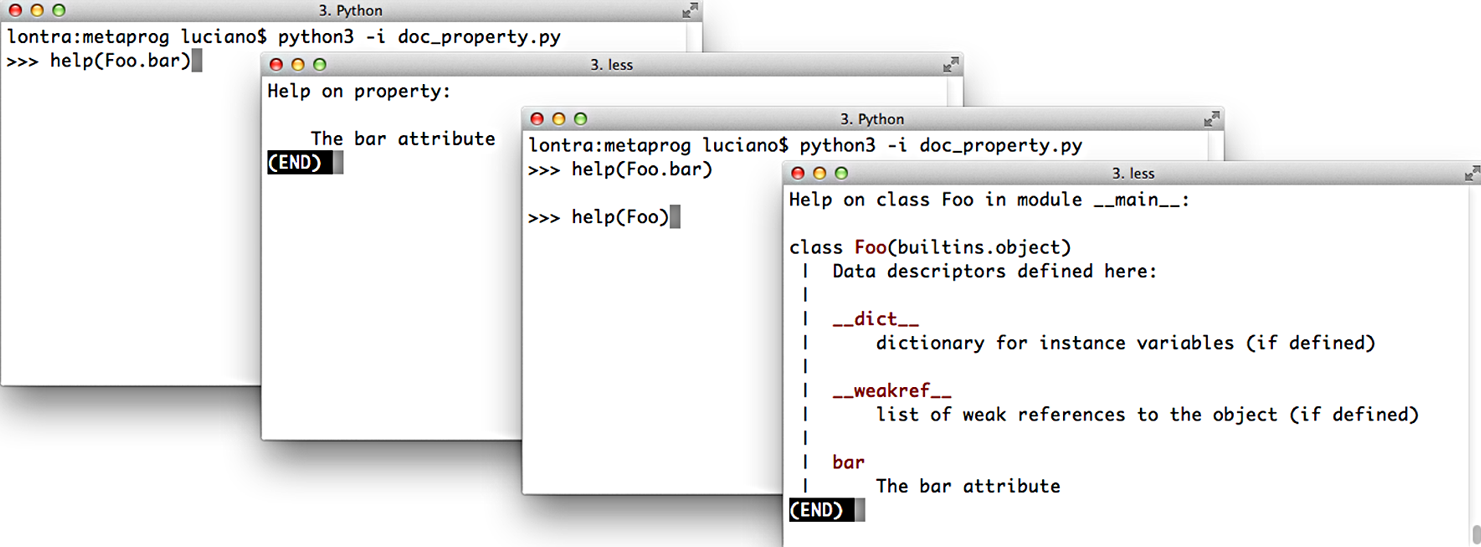
Figure 22-1. Screenshots of the Python console when issuing the commands help(Foo.bar) and help(Foo). Source code is in Example 22-26.
Example 22-26. Documentation for a property
classFoo:@propertydefbar(self):"""The bar attribute"""returnself.__dict__['bar']@bar.setterdefbar(self,value):self.__dict__['bar']=value
Now that we have these property essentials covered, let’s go back to the issue of protecting both the weight and price attributes of LineItem so they only accept values greater than zero—but without implementing two nearly identical pairs of getters/setters by hand.
Coding a Property Factory
We’ll create a factory to create quantity properties—so named because the managed attributes represent quantities that can’t be negative or zero in the application. Example 22-27 shows the clean look of the LineItem class using two instances of quantity properties: one for managing the weight attribute, the other for price.
Example 22-27. bulkfood_v2prop.py: the quantity property factory in use
classLineItem:weight=quantity('weight')price=quantity('price')def__init__(self,description,weight,price):self.description=descriptionself.weight=weightself.price=pricedefsubtotal(self):returnself.weight*self.price
Use the factory to define the first custom property,
weight, as a class attribute.This second call builds another custom property,
price.Here the property is already active, making sure a negative or
0weightis rejected.The properties are also in use here, retrieving the values stored in the instance.
Recall that properties are class attributes. When building each quantity property, we need to pass the name of the LineItem attribute that will be managed by that specific property. Having to type the word weight twice in this line is unfortunate:
weight=quantity('weight')
But avoiding that repetition is complicated because the property has no way of knowing which class attribute name will be bound to it. Remember: the righthand side of an assignment is evaluated first, so when quantity() is invoked, the weight class attribute doesn’t even exist.
Note
Improving the quantity property so that the user doesn’t need to retype the attribute name is a nontrivial metaprogramming problem.
We’ll solve that problem in Chapter 23.
Example 22-28 lists the implementation of the quantity property factory.11
Example 22-28. bulkfood_v2prop.py: the quantity property factory
defquantity(storage_name):defqty_getter(instance):returninstance.__dict__[storage_name]defqty_setter(instance,value):ifvalue>0:instance.__dict__[storage_name]=valueelse:raiseValueError('value must be > 0')returnproperty(qty_getter,qty_setter)
The
storage_nameargument determines where the data for each property is stored; for theweight, the storage name will be'weight'.The first argument of the
qty_gettercould be namedself, but that would be strange because this is not a class body;instancerefers to theLineIteminstance where the attribute will be stored.qty_getterreferencesstorage_name, so it will be preserved in the closure of this function; the value is retrieved directly from theinstance.__dict__to bypass the property and avoid an infinite recursion.qty_setteris defined, also takinginstanceas first argument.The
valueis stored directly in theinstance.__dict__, again bypassing the property.Build a custom property object and return it.
The bits of Example 22-28 that deserve careful study revolve around the storage_name variable.
When you code each property in the traditional way,
the name of the attribute where you will store a value is hardcoded in the getter and setter methods.
But here, the qty_getter and qty_setter functions are generic,
and they depend on the storage_name variable to know where to
get/set the managed attribute in the instance __dict__.
Each time the quantity factory is called to build a property,
the storage_name must be set to a unique value.
The functions qty_getter and qty_setter will be wrapped by the property object created in the last line of the factory function. Later, when called to perform their duties, these functions will read the storage_name from their closures to determine where to retrieve/store the managed attribute values.
In Example 22-29, I create and inspect a LineItem instance, exposing the storage attributes.
Example 22-29. bulkfood_v2prop.py: exploring properties and storage attributes
>>> nutmeg = LineItem('Moluccan nutmeg', 8, 13.95)>>> nutmeg.weight, nutmeg.price(8, 13.95)>>> nutmeg.__dict__{'description': 'Moluccan nutmeg', 'weight': 8, 'price': 13.95}
Reading the
weightandpricethrough the properties shadowing the namesake instance attributes.Using
varsto inspect thenutmeginstance: here we see the actual instance attributes used to store the values.
Note how the properties built by our factory leverage the behavior described in “Properties Override Instance Attributes”: the weight property overrides the weight instance attribute so that every reference to self.weight or nutmeg.weight is handled by the property functions, and the only way to bypass the property logic is to access the instance __dict__ directly.
The code in Example 22-28 may be a bit tricky, but it’s concise: it’s identical in length to the decorated getter/setter pair defining just the weight property in Example 22-21. The LineItem definition in Example 22-27 looks much better without the noise of the getter/setters.
In a real system, that same kind of validation may appear in many fields, across several classes, and the quantity factory would be placed in a utility module to be used over and over again. Eventually that simple factory could be refactored into a more extensible descriptor class, with specialized subclasses performing different validations. We’ll do that in Chapter 23.
Now let us wrap up the discussion of properties with the issue of attribute deletion.
Handling Attribute Deletion
We can use the del statement to delete not only variables,
but also attributes:
>>>classDemo:...pass...>>>d=Demo()>>>d.color='green'>>>d.color'green'>>>deld.color>>>d.colorTraceback (most recent call last):File"<stdin>", line1, in<module>AttributeError:'Demo' object has no attribute 'color'
In practice, deleting attributes is not something we do every day in Python, and the requirement to handle it with a property is even more unusual. But it is supported, and I can think of a silly example to demonstrate it.
In a property definition, the @my_property.deleter decorator wraps the method in charge of deleting the attribute managed by the property.
As promised, silly Example 22-30 is inspired by the scene with the Black Knight from Monty Python and the Holy Grail.12
Example 22-30. blackknight.py
classBlackKnight:def__init__(self):self.phrases=[('an arm',"'Tis but a scratch."),('another arm',"It's just a flesh wound."),('a leg',"I'm invincible!"),('another leg',"All right, we'll call it a draw.")]@propertydefmember(self):('next member is:')returnself.phrases[0][0]@member.deleterdefmember(self):member,text=self.phrases.pop(0)(f'BLACK KNIGHT (loses {member}) -- {text}')
The doctests in blackknight.py are in Example 22-31.
Example 22-31. blackknight.py: doctests for Example 22-30 (the Black Knight never concedes defeat)
>>> knight = BlackKnight()>>> knight.membernext member is:'an arm'>>> del knight.memberBLACK KNIGHT (loses an arm) -- 'Tis but a scratch.>>> del knight.memberBLACK KNIGHT (loses another arm) -- It's just a flesh wound.>>> del knight.memberBLACK KNIGHT (loses a leg) -- I'm invincible!>>> del knight.memberBLACK KNIGHT (loses another leg) -- All right, we'll call it a draw.
Using the classic call syntax instead of decorators, the fdel argument configures the deleter function.
For example, the member property would be coded like this in the body of the BlackKnight class:
member=property(member_getter,fdel=member_deleter)
If you are not using a property, attribute deletion can also be handled by implementing the lower-level __delattr__ special method, presented in “Special Methods for Attribute Handling”. Coding a silly class with __delattr__ is left as an exercise to the procrastinating reader.
Properties are a powerful feature, but sometimes simpler or lower-level alternatives are preferable. In the final section of this chapter, we’ll review some of the core APIs that Python offers for dynamic attribute programming.
Essential Attributes and Functions for Attribute Handling
Throughout this chapter, and even before in the book, we’ve used some of the built-in functions and special methods Python provides for dealing with dynamic attributes. This section gives an overview of them in one place, because their documentation is scattered in the official docs.
Special Attributes that Affect Attribute Handling
The behavior of many of the functions and special methods listed in the following sections depend on three special attributes:
__class__-
A reference to the object’s class (i.e.,
obj.__class__is the same astype(obj)). Python looks for special methods such as__getattr__only in an object’s class, and not in the instances themselves. __dict__-
A mapping that stores the writable attributes of an object or class. An object that has a
__dict__can have arbitrary new attributes set at any time. If a class has a__slots__attribute, then its instances may not have a__dict__. See__slots__(next). __slots__-
An attribute that may be defined in a class to save memory.
__slots__is atupleof strings naming the allowed attributes.13 If the'__dict__'name is not in__slots__, then the instances of that class will not have a__dict__of their own, and only the attributes listed in__slots__will be allowed in those instances. Recall “Saving Memory with __slots__” for more.
Built-In Functions for Attribute Handling
These five built-in functions perform object attribute reading, writing, and introspection:
dir([object])-
Lists most attributes of the object. The official docs say
diris intended for interactive use so it does not provide a comprehensive list of attributes, but an “interesting” set of names.dircan inspect objects implemented with or without a__dict__. The__dict__attribute itself is not listed bydir, but the__dict__keys are listed. Several special attributes of classes, such as__mro__,__bases__, and__name__, are not listed bydireither. You can customize the output ofdirby implementing the__dir__special method, as we saw in Example 22-4. If the optionalobjectargument is not given,dirlists the names in the current scope. getattr(object, name[, default])-
Gets the attribute identified by the
namestring from theobject. The main use case is to retrieve attributes (or methods) whose names we don’t know beforehand. This may fetch an attribute from the object’s class or from a superclass. If no such attribute exists,getattrraisesAttributeErroror returns thedefaultvalue, if given. One great example of usinggettatris in theCmd.onecmdmethod in thecmdpackage of the standard library, where it is used to get and execute a user-defined command. hasattr(object, name)-
Returns
Trueif the named attribute exists in theobject, or can be somehow fetched through it (by inheritance, for example). The documentation explains: “This is implemented by calling getattr(object, name) and seeing whether it raises an AttributeError or not.” setattr(object, name, value)-
Assigns the
valueto the named attribute ofobject, if theobjectallows it. This may create a new attribute or overwrite an existing one. vars([object])-
Returns the
__dict__ofobject;varscan’t deal with instances of classes that define__slots__and don’t have a__dict__(contrast withdir, which handles such instances). Without an argument,vars()does the same aslocals(): returns adictrepresenting the local scope.
Special Methods for Attribute Handling
When implemented in a user-defined class, the special methods listed here handle attribute retrieval, setting, deletion, and listing.
Attribute access using either dot notation or the built-in functions getattr, hasattr, and setattr triggers the appropriate special methods listed here. Reading and writing attributes directly in the instance __dict__ does not trigger these special methods—and that’s the usual way to bypass them if needed.
Section “3.3.11. Special method lookup” of the “Data model” chapter warns:
For custom classes, implicit invocations of special methods are only guaranteed to work correctly if defined on an object’s type, not in the object’s instance dictionary.
In other words, assume that the special methods will be retrieved on the class itself, even when the target of the action is an instance. For this reason, special methods are not shadowed by instance attributes with the same name.
In the following examples, assume there is a class named Class, obj is an instance of Class, and attr is an attribute of obj.
For every one of these special methods, it doesn’t matter if the attribute access is done using dot notation or one of the built-in functions listed in “Built-In Functions for Attribute Handling”. For example, both obj.attr and getattr(obj, 'attr', 42) trigger Class.__getattribute__(obj, 'attr').
__delattr__(self, name)-
Always called when there is an attempt to delete an attribute using the
delstatement; e.g.,del obj.attrtriggersClass.__delattr__(obj, 'attr'). Ifattris a property, its deleter method is never called if the class implements__delattr__. __dir__(self)-
Called when
diris invoked on the object, to provide a listing of attributes; e.g.,dir(obj)triggersClass.__dir__(obj). Also used by tab-completion in all modern Python consoles. __getattr__(self, name)-
Called only when an attempt to retrieve the named attribute fails, after the
obj,Class, and its superclasses are searched. The expressionsobj.no_such_attr,getattr(obj, 'no_such_attr'), andhasattr(obj, 'no_such_attr')may triggerClass.__getattr__(obj, 'no_such_attr'), but only if an attribute by that name cannot be found inobjor inClassand its superclasses. __getattribute__(self, name)-
Always called when there is an attempt to retrieve the named attribute directly from Python code (the interpreter may bypass this in some cases, for example, to get the
__repr__method). Dot notation and thegetattrandhasattrbuilt-ins trigger this method.__getattr__is only invoked after__getattribute__, and only when__getattribute__raisesAttributeError. To retrieve attributes of the instanceobjwithout triggering an infinite recursion, implementations of__getattribute__should usesuper().__getattribute__(obj, name). __setattr__(self, name, value)-
Always called when there is an attempt to set the named attribute. Dot notation and the
setattrbuilt-in trigger this method; e.g., bothobj.attr = 42andsetattr(obj, 'attr', 42)triggerClass.__setattr__(obj, 'attr', 42).
Warning
In practice, because they are unconditionally called and affect practically every attribute access, the __getattribute__ and __setattr__ special methods are harder to use correctly than __getattr__, which only handles nonexisting attribute names. Using properties or descriptors is less error prone than defining these special methods.
This concludes our dive into properties, special methods, and other techniques for coding dynamic attributes.
Chapter Summary
We started our coverage of dynamic attributes by showing practical examples of simple classes to make it easier to deal with a JSON dataset. The first example was the FrozenJSON class that converted nested dicts and lists into nested FrozenJSON instances and lists of them. The FrozenJSON code demonstrated the use of the __getattr__ special method to convert data structures on the fly, whenever their attributes were read. The last version of FrozenJSON showcased the use of the __new__ constructor method to transform a class into a flexible factory of objects, not limited to instances of itself.
We then converted the JSON dataset to a dict storing instances of a Record class. The first rendition of Record was a few lines long and introduced the “bunch” idiom: using self.__dict__.update(**kwargs) to build arbitrary attributes from keyword arguments passed to __init__.
The second iteration added the Event class, implementing automatic retrieval of linked records through properties.
Computed property values sometimes require caching, and we covered a few ways of doing that.
After realizing that @functools.cached_property is not always applicable,
we learned about an alternative:
combining @property on top of @functools.cache, in that order.
Coverage of properties continued with the LineItem class, where a property was deployed to protect a weight attribute from negative or zero values that make no business sense. After a deeper look at property syntax and semantics, we created a property factory to enforce the same validation on weight and price, without coding multiple getters and setters. The property factory leveraged subtle concepts—such as closures, and instance attribute overriding by properties—to provide an elegant generic solution using the same number of lines as a single hand-coded property
definition.
Finally, we had a brief look at handling attribute deletion with properties, followed by an overview of the key special attributes, built-in functions, and special methods that support attribute metaprogramming in the core Python language.
Further Reading
The official documentation for the attribute handling and introspection built-in functions is Chapter 2, “Built-in Functions” of The Python Standard Library. The related special methods and the __slots__ special attribute are documented in The Python Language Reference in “3.3.2. Customizing attribute access”. The semantics of how special methods are invoked bypassing instances is explained in “3.3.9. Special method lookup”. In Chapter 4, “Built-in Types,” of The Python Standard Library, “4.13. Special Attributes” covers __class__ and __dict__ attributes.
Python Cookbook, 3rd ed., by David Beazley and Brian K. Jones (O’Reilly) has several recipes covering the topics of this chapter, but I will highlight three that are outstanding: “Recipe 8.8. Extending a Property in a Subclass” addresses the thorny issue of overriding the methods inside a property inherited from a superclass; “Recipe 8.15. Delegating Attribute Access” implements a proxy class showcasing most special methods from “Special Methods for Attribute Handling” in this book; and the awesome “Recipe 9.21. Avoiding Repetitive Property Methods,” which was the basis for the property factory function presented in Example 22-28.
Python in a Nutshell, 3rd ed., by Alex Martelli, Anna Ravenscroft, and Steve Holden (O’Reilly) is rigorous and objective. They devote only three pages to properties, but that’s because the book follows an axiomatic presentation style: the preceding 15 pages or so provide a thorough description of the semantics of Python classes from the ground up, including descriptors, which are how properties are actually implemented under the hood. So by the time Martelli et al., get to properties, they pack a lot of insights in those three pages—including what I selected to open this chapter.
Bertrand Meyer—quoted in the Uniform Access Principle definition in this chapter opening—pioneered the Design by Contract methodology, designed the Eiffel language, and wrote the excellent Object-Oriented Software Construction, 2nd ed. (Pearson). The first six chapters provide one of the best conceptual introductions to OO analysis and design I’ve seen. Chapter 11 presents Design by Contract, and Chapter 35 offers Meyer’s assessments of some influential object-oriented languages: Simula, Smalltalk, CLOS (the Common Lisp Object System), Objective-C, C++, and Java, with brief comments on some others. Only in the last page of the book does he reveal that the highly readable “notation” he uses as pseudocode is Eiffel.
1 Alex Martelli, Anna Ravenscroft, and Steve Holden, Python in a Nutshell, 3rd ed. (O’Reilly), p. 123.
2 Bertrand Meyer, Object-Oriented Software Construction, 2nd ed. (Pearson), p. 57.
3 OSCON—O’Reilly Open Source Conference—was a casualty of the COVID-19 pandemic. The original 744 KB JSON file I used for these examples is no longer online as of January 10, 2021. You’ll find a copy of osconfeed.json in the example code repository.
4 Two examples are AttrDict and addict.
5 The expression self.__data[name] is where a KeyError exception may occur. Ideally, it should be handled and an AttributeError raised instead, because that’s what is expected from __getattr__. The diligent reader is invited to code the error handling as an exercise.
6 The source of the data is JSON, and the only collection types in JSON data are dict and list.
7 By the way, Bunch is the name of the class used by Alex Martelli to share this tip in a recipe from 2001 titled “The simple but handy ‘collector of a bunch of named stuff’ class”.
8 This is actually a downside of Meyer’s Uniform Access Principle, which I mentioned in the opening of this chapter. Read the optional “Soapbox” if you’re interested in this discussion.
9 Source: @functools.cached_property documentation. I know Raymond Hettinger authored this explanation because he wrote it as a response to an issue I filed: bpo42781—functools.cached_property docs should explain that it is non-overriding. Hettinger is a major contributor to the official Python docs and standard library. He also wrote the excellent “Descriptor HowTo Guide”, a key resource for Chapter 23.
10 Direct quote by Jeff Bezos in the Wall Street Journal story, “Birth of a Salesman” (October 15, 2011). Note that as of 2021, you need a subscription to read the article.
11 This code is adapted from “Recipe 9.21. Avoiding Repetitive Property Methods” from Python Cookbook, 3rd ed., by David Beazley and Brian K. Jones (O’Reilly).
12 The bloody scene is available on Youtube as I review this in October 2021.
13 Alex Martelli points out that, although __slots__ can be coded as a list, it’s better to be explicit and always use a tuple, because changing the list in the __slots__ after the class body is processed has no effect, so it would be misleading to use a mutable sequence there.
14 Alex Martelli, Python in a Nutshell, 2nd ed. (O’Reilly), p. 101.
15 The reasons I am about to mention are given in the Dr. Dobbs Journal article titled “Java’s new Considered Harmful”, by Jonathan Amsterdam and in “Consider static factory methods instead of constructors,” which is Item 1 of the award-winning book Effective Java, 3rd ed., by Joshua Bloch (Addison-Wesley).