Chapter 21. Asynchronous Programming
The problem with normal approaches to asynchronous programming is that they’re all-or-nothing propositions. You rewrite all your code so none of it blocks or you’re just wasting your time.
Alvaro Videla and Jason J. W. Williams, RabbitMQ in Action1
This chapter addresses three major topics that are closely related:
-
Python’s
async def,await,async with, andasync forconstructs -
Objects supporting those constructs: native coroutines and asynchronous variants of context managers, iterables, generators, and comprehensions
-
asyncio and other asynchronous libraries
This chapter builds on the ideas of iterables and generators (Chapter 17, in particular “Classic Coroutines”), context managers (Chapter 18), and general concepts of concurrent programming (Chapter 19).
We’ll study concurrent HTTP clients similar to the ones we saw in Chapter 20, rewritten with native coroutines and asynchronous context managers, using the same HTTPX library as before, but now through its asynchronous API. We’ll also see how to avoid blocking the event loop by delegating slow operations to a thread or process executor.
After the HTTP client examples, we’ll see two simple asynchronous server-side applications,
one of them using the increasingly popular FastAPI framework.
Then
we’ll cover other language constructs enabled by the async/await keywords:
asynchronous generator functions, asynchronous comprehensions, and asynchronous generator expressions.
To emphasize the fact that those language features are not tied to asyncio, we’ll see
one example rewritten to use Curio—the elegant and innovative asynchronous framework invented by David Beazley.
To wrap up the chapter, I wrote a brief section on the advantages and pitfalls of asynchronous programming.
That’s a lot of ground to cover. We only have space for basic examples, but they will illustrate the most important features of each idea.
Tip
The asyncio documentation is much better after Yury Selivanov2 reorganized it, separating the few functions useful to application developers from the low-level API for creators of packages like web frameworks and database drivers.
For book-length coverage of asyncio, I recommend Using Asyncio in Python by Caleb Hattingh (O’Reilly). Full disclosure: Caleb is one of the tech reviewers of this book.
What’s New in This Chapter
When I wrote the first edition of Fluent Python, the asyncio library was provisional and
the async/await keywords did not exist.
Therefore, I had to update all examples in this chapter.
I also created new examples: domain probing scripts, a FastAPI web service, and
experiments with Python’s new asynchronous console mode.
New sections cover language features that did not exist at the time,
such as native coroutines, async with, async for, and the objects that support those constructs.
The ideas in “How Async Works and How It Doesn’t” reflect hard-earned lessons that I consider essential reading for anyone using asynchronous programming. They may save you a lot of trouble—whether you’re using Python or Node.js.
Finally, I removed several paragraphs about asyncio.Futures, which is now considered part of the low-level asyncio APIs.
A Few Definitions
At the start of “Classic Coroutines”, we saw that Python 3.5 and later offer three kinds of coroutines:
- Native coroutine
-
A coroutine function defined with
async def. You can delegate from a native coroutine to another native coroutine using theawaitkeyword, similar to how classic coroutines useyield from. Theasync defstatement always defines a native coroutine, even if theawaitkeyword is not used in its body. Theawaitkeyword cannot be used outside of a native coroutine.3 - Classic coroutine
-
A generator function that consumes data sent to it via
my_coro.send(data)calls, and reads that data by usingyieldin an expression. Classic coroutines can delegate to other classic coroutines usingyield from. Classic coroutines cannot be driven byawait, and are no longer supported by asyncio. - Generator-based coroutine
-
A generator function decorated with
@types.coroutine—introduced in Python 3.5. That decorator makes the generator compatible with the newawaitkeyword.
In this chapter, we focus on native coroutines as well as asynchronous generators:
- Asynchronous generator
-
A generator function defined with
async defand usingyieldin its body. It returns an asynchronous generator object that provides__anext__, a coroutine method to retrieve the next item.
@asyncio.coroutine has No Future4
The @asyncio.coroutine decorator for classic coroutines and
generator-based coroutines was deprecated in Python 3.8 and
is scheduled for removal in Python 3.11, according to
Issue 43216.
In contrast, @types.coroutine should remain, per
Issue 36921.
It is no longer supported by asyncio, but is used in low-level code in the
Curio and Trio asynchronous frameworks.
An asyncio Example: Probing Domains
Imagine you are about to start a new blog on Python, and you plan to register a domain using a Python keyword and the .DEV suffix—for example: AWAIT.DEV. Example 21-1 is a script using asyncio to check several domains concurrently. This is the output it produces:
$ python3 blogdom.py
  with.dev
+ elif.dev
+ def.dev
  from.dev
  else.dev
  or.dev
  if.dev
  del.dev
+ as.dev
  none.dev
  pass.dev
  true.dev
+ in.dev
+ for.dev
+ is.dev
+ and.dev
+ try.dev
+ not.dev
Note that the domains appear unordered.
If you run the script, you’ll see them displayed one after the other, with varying delays.
The + sign indicates your machine was able to resolve the domain via DNS.
Otherwise, the domain did not resolve and may be available.5
In blogdom.py, the DNS probing is done via native coroutine objects. Because the asynchronous operations are interleaved, the time needed to check the 18 domains is much less than checking them sequentially. In fact, the total time is practically the same as the time for the single slowest DNS response, instead of the sum of the times of all responses.
Example 21-1 shows the code for blogdom.py.
Example 21-1. blogdom.py: search for domains for a Python blog
#!/usr/bin/env python3importasyncioimportsocketfromkeywordimportkwlistMAX_KEYWORD_LEN=4asyncdefprobe(domain:str)->tuple[str,bool]:loop=asyncio.get_running_loop()try:awaitloop.getaddrinfo(domain,None)exceptsocket.gaierror:return(domain,False)return(domain,True)asyncdefmain()->None:names=(kwforkwinkwlistiflen(kw)<=MAX_KEYWORD_LEN)domains=(f'{name}.dev'.lower()fornameinnames)coros=[probe(domain)fordomainindomains]forcoroinasyncio.as_completed(coros):domain,found=awaitcoromark='+'iffoundelse''(f'{mark}{domain}')if__name__=='__main__':asyncio.run(main())

Set maximum length of keyword for domains, because shorter is better.

probereturns a tuple with the domain name and a boolean;Truemeans the domain resolved. Returning the domain name will make it easier to display the results.
Get a reference to the
asyncioevent loop, so we can use it next.
The
loop.getaddrinfo(…)coroutine-method returns a five-part tuple of parameters to connect to the given address using a socket. In this example, we don’t need the result. If we got it, the domain resolves; otherwise, it doesn’t.
mainmust be a coroutine, so that we can useawaitin it.
Generator to yield Python keywords with length up to
MAX_KEYWORD_LEN.
Generator to yield domain names with the
.devsuffix.
Build a list of coroutine objects by invoking the
probecoroutine with eachdomainargument.
asyncio.as_completedis a generator that yields coroutines that return the results of the coroutines passed to it in the order they are completed—not the order they were submitted. It’s similar tofutures.as_completed, which we saw in Chapter 20, Example 20-4.
At this point, we know the coroutine is done because that’s how
as_completedworks. Therefore, theawaitexpression will not block but we need it to get the result fromcoro. Ifcororaised an unhandled exception, it would be re-raised here.
asyncio.runstarts the event loop and returns only when the event loop exits. This is a common pattern for scripts that useasyncio: implementmainas a coroutine, and drive it withasyncio.runinside theif __name__ == '__main__':block.
Tip
The asyncio.get_running_loop function was added in Python 3.7 for use inside coroutines, as shown in probe.
If there’s no running loop, asyncio.get_running_loop raises RuntimeError.
Its implementation is simpler and faster than asyncio.get_event_loop, which may start an event loop if necessary.
Since Python 3.10, asyncio.get_event_loop is deprecated and
will eventually become an alias to asyncio.get_running_loop.
Guido’s Trick to Read Asynchronous Code
There are a lot of new concepts to grasp in asyncio, but the overall logic of
Example 21-1 is easy to follow if you employ a trick suggested by Guido van Rossum himself:
squint and pretend the async and await keywords are not there.
If you do that, you’ll realize that coroutines read like plain old sequential functions.
For example, imagine that the body of this coroutine…
asyncdefprobe(domain:str)->tuple[str,bool]:loop=asyncio.get_running_loop()try:awaitloop.getaddrinfo(domain,None)exceptsocket.gaierror:return(domain,False)return(domain,True)
…works like the following function, except that it magically never blocks:
defprobe(domain:str)->tuple[str,bool]:# no asyncloop=asyncio.get_running_loop()try:loop.getaddrinfo(domain,None)# no awaitexceptsocket.gaierror:return(domain,False)return(domain,True)
Using the syntax await loop.getaddrinfo(...) avoids blocking because
await suspends the current coroutine object.
For example, during the execution of the probe('if.dev') coroutine,
a new coroutine object is created by getaddrinfo('if.dev', None).
Awaiting it starts the low-level addrinfo query and yields control back to the event loop,
not to the probe(‘if.dev’) coroutine, which is suspended.
The event loop can then drive other pending coroutine objects, such as probe('or.dev').
When the event loop gets a response for the getaddrinfo('if.dev', None)
query, that specific coroutine object resumes and returns
control back to the probe('if.dev')—which was suspended at await—and
can now handle a possible exception and return the result tuple.
So far, we’ve only seen asyncio.as_completed and await applied to coroutines.
But they handle any awaitable object. That concept is explained next.
New Concept: Awaitable
The for keyword works with iterables.
The await keyword works with awaitables.
As an end user of asyncio, these are the awaitables you will see on a daily basis:
-
A native coroutine object, which you get by calling a native coroutine function
-
An
asyncio.Task, which you usually get by passing a coroutine object toasyncio.create_task()
However, end-user code does not always need to await on a Task.
We use asyncio.create_task(one_coro()) to schedule one_coro for concurrent execution,
without waiting for its return.
That’s what we did with the spinner coroutine in spinner_async.py (Example 19-4).
If you don’t expect to cancel the task or wait for it,
there is no need to keep the Task object returned from create_task.
Creating the task is enough to schedule the coroutine to run.
In contrast, we use await other_coro() to run other_coro right now
and wait for its completion because we need its result before we can proceed.
In spinner_async.py,
the supervisor coroutine did res = await slow() to execute slow and get its result.
When implementing asynchronous libraries or contributing to asyncio itself, you may also deal with these lower-level awaitables:
-
An object with an
__await__method that returns an iterator; for example, anasyncio.Futureinstance (asyncio.Taskis a subclass ofasyncio.Future) -
Objects written in other languages using the Python/C API with a
tp_as_async.am_awaitfunction, returning an iterator (similar to__await__method)
Existing codebases may also have one additional kind of awaitable: generator-based coroutine objects—which are in the process of being deprecated.
Note
PEP 492 states that the await expression
“uses the yield from implementation with an extra step of validating its argument”
and “await only accepts an awaitable.”
The PEP does not explain that implementation in detail, but refers to PEP 380, which introduced yield from.
I posted a detailed explanation in
“Classic Coroutines”,
section
“The Meaning of yield from”,
at fluentpython.com.
Now let’s study the asyncio version of a script that downloads a fixed set of flag images.
Downloading with asyncio and HTTPX
The flags_asyncio.py script downloads a fixed set of 20 flags from fluentpython.com. We first mentioned it in “Concurrent Web Downloads”, but now we’ll study it in detail, applying the concepts we just saw.
As of Python 3.10, asyncio only supports TCP and UDP directly, and there are no asynchronous HTTP client or server packages in the standard library. I am using HTTPX in all the HTTP client examples.
We’ll explore flags_asyncio.py from the bottom up—that is, looking first at the functions that set up the action in Example 21-2.
Warning
To make the code easier to read, flags_asyncio.py has no error handling.
As we introduce async/await, it’s useful to focus on the “happy path” initially,
to understand how regular functions and coroutines are arranged in a program.
Starting with “Enhancing the asyncio Downloader”, the examples include error handling and more features.
The flags_.py examples from this chapter and Chapter 20 share code and data, so I put them together in the example-code-2e/20-executors/getflags directory.
Example 21-2. flags_asyncio.py: startup functions
defdownload_many(cc_list:list[str])->int:returnasyncio.run(supervisor(cc_list))asyncdefsupervisor(cc_list:list[str])->int:asyncwithAsyncClient()asclient:to_do=[download_one(client,cc)forccinsorted(cc_list)]res=awaitasyncio.gather(*to_do)returnlen(res)if__name__=='__main__':main(download_many)
This needs to be a plain function—not a coroutine—so it can be passed to and called by the
mainfunction from the flags.py module (Example 20-2).Execute the event loop driving the
supervisor(cc_list)coroutine object until it returns. This will block while the event loop runs. The result of this line is whateversupervisorreturns.Asynchronous HTTP client operations in
httpxare methods ofAsyncClient, which is also an asynchronous context manager: a context manager with asynchronous setup and teardown methods (more about this in “Asynchronous Context Managers”).Build a list of coroutine objects by calling the
download_onecoroutine once for each flag to be retrieved.Wait for the
asyncio.gathercoroutine, which accepts one or more awaitable arguments and waits for all of them to complete, returning a list of results for the given awaitables in the order they were submitted.supervisorreturns the length of the list returned byasyncio.gather.
Now let’s review the top of flags_asyncio.py (Example 21-3). I reorganized the coroutines so we can read them in the order they are started by the event loop.
Example 21-3. flags_asyncio.py: imports and download functions
importasynciofromhttpximportAsyncClientfromflagsimportBASE_URL,save_flag,mainasyncdefdownload_one(client:AsyncClient,cc:str):image=awaitget_flag(client,cc)save_flag(image,f'{cc}.gif')(cc,end='',flush=True)returnccasyncdefget_flag(client:AsyncClient,cc:str)->bytes:url=f'{BASE_URL}/{cc}/{cc}.gif'.lower()resp=awaitclient.get(url,timeout=6.1,follow_redirects=True)returnresp.read()
httpxmust be installed—it’s not in the standard library.Reuse code from flags.py (Example 20-2).
download_onemust be a native coroutine, so it canawaitonget_flag—which does the HTTP request. Then it displays the code of the downloaded flag, and saves the image.get_flagneeds to receive theAsyncClientto make the request.The
getmethod of anhttpx.AsyncClientinstance returns aClientResponseobject that is also an asynchronous context manager.Network I/O operations are implemented as coroutine methods, so they are driven asynchronously by the
asyncioevent loop.
Note
For better performance, the save_flag call inside get_flag should be asynchronous, to avoid blocking the event loop.
However, asyncio does not provide an asynchronous filesystem API at this time—as Node.js does.
“Using asyncio.as_completed and a Thread” will show how to delegate save_flag to a thread.
Your code delegates to the httpx coroutines explicitly through await or implicitly
through the special methods of the asynchronous context managers,
such as AsyncClient and ClientResponse—as we’ll see in “Asynchronous Context Managers”.
The Secret of Native Coroutines: Humble Generators
A key difference between the classic coroutine examples we saw in “Classic Coroutines” and
flags_asyncio.py is that there are no visible .send() calls or yield expressions in the latter.
Your code sits between the asyncio library and the asynchronous libraries you are using,
such as HTTPX. This is illustrated in Figure 21-1.
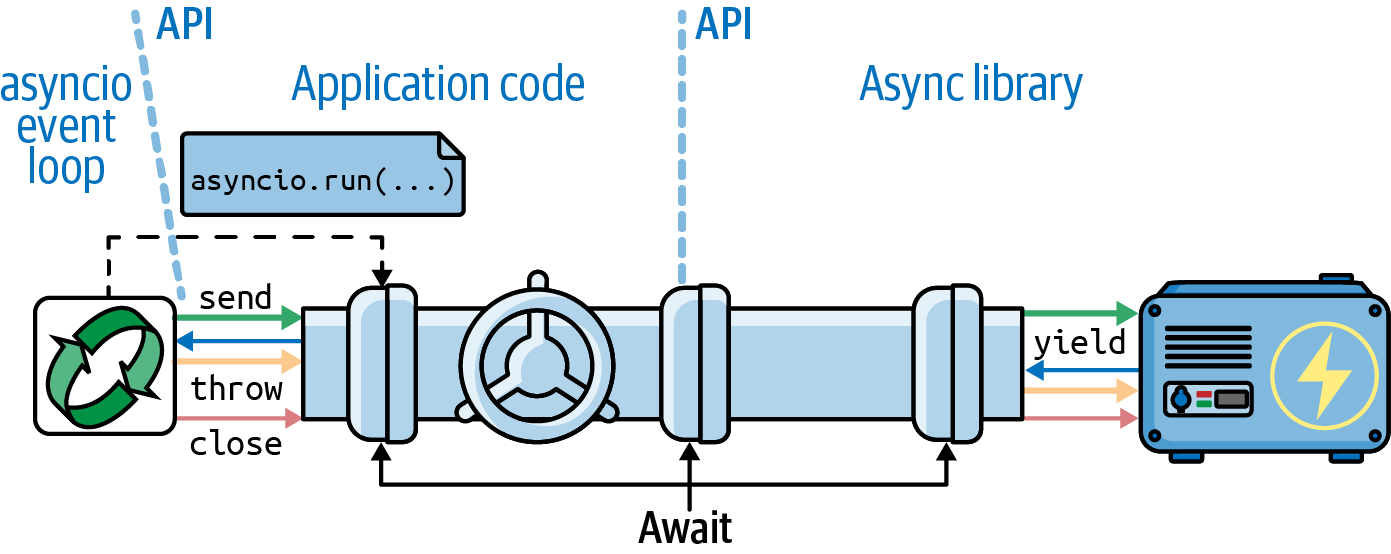
Figure 21-1. In an asynchronous program, a user’s function starts the event loop, scheduling an initial coroutine with asyncio.run. Each user’s coroutine drives the next with an await expression, forming a channel that enables communication between a library like HTTPX and the event loop.
Under the hood, the asyncio event loop makes the .send calls that drive your coroutines,
and your coroutines await on other coroutines, including library coroutines.
As mentioned, await borrows most of its implementation from yield from,
which also makes .send calls to drive coroutines.
The await chain eventually reaches a low-level awaitable,
which returns a generator that the event loop can drive in response to events such as timers or network I/O.
The low-level awaitables and generators at the end of these await chains are implemented deep into the libraries,
are not part of their APIs, and may be Python/C extensions.
Using functions like asyncio.gather and asyncio.create_task,
you can start multiple concurrent await channels,
enabling concurrent execution of multiple I/O operations driven by a single event loop,
in a single thread.
The All-or-Nothing Problem
Note that in Example 21-3, I could not reuse the get_flag function from
flags.py (Example 20-2).
I had to rewrite it as a coroutine to use the asynchronous API of HTTPX.
For peak performance with asyncio, we must replace every function that does I/O with an asynchronous version
that is activated with await or asyncio.create_task, so that control is given back to the event loop while the function waits for I/O. If you can’t rewrite a blocking function as a coroutine,
you should run it in a separate thread or process,
as we’ll see in “Delegating Tasks to Executors”.
That’s why I chose the epigraph for this chapter, which includes this advice: “You rewrite all your code so none of it blocks or you’re just wasting your time.”
For the same reason, I could not reuse the download_one function from flags_threadpool.py
(Example 20-3) either.
The code in Example 21-3 drives get_flag with await,
so download_one must also be a coroutine.
For each request, a download_one coroutine object is created in supervisor,
and they are all driven by the
asyncio.gather coroutine.
Now let’s study the async with statement that appeared in supervisor
(Example 21-2) and get_flag (Example 21-3).
Asynchronous Context Managers
In “Context Managers and with Blocks”, we saw how an object can be used to run code before and after the body of a with block, if its class provides the __enter__ and __exit__ methods.
Now, consider Example 21-4, from the asyncpg asyncio-compatible PostgreSQL driver documentation on transactions.
Example 21-4. Sample code from the documentation of the asyncpg PostgreSQL driver
tr=connection.transaction()awaittr.start()try:awaitconnection.execute("INSERT INTO mytable VALUES (1, 2, 3)")except:awaittr.rollback()raiseelse:awaittr.commit()
A database transaction is a natural fit for the context manager protocol:
the transaction has to be started, data is changed with connection.execute,
and then a rollback or commit must happen, depending on the outcome of the changes.
In an asynchronous driver like asyncpg, the setup and wrap-up need to be coroutines so that other operations can happen concurrently. However, the implementation of the classic with statement doesn’t support coroutines doing the work of __enter__ or __exit__.
That’s why PEP 492—Coroutines with async and await syntax
introduced the async with statement, which works with asynchronous context managers:
objects implementing the __aenter__ and __aexit__ methods as coroutines.
With async with, Example 21-4 can be written like this other snippet from the asyncpg documentation:
asyncwithconnection.transaction():awaitconnection.execute("INSERT INTO mytable VALUES (1, 2, 3)")
In the
asyncpg.Transaction class,
the __aenter__ coroutine method does await self.start(), and
the __aexit__ coroutine awaits on private __rollback or __commit coroutine methods,
depending on whether an exception occurred or not.
Using coroutines to implement Transaction as an asynchronous context manager allows asyncpg to handle many transactions concurrently.
Caleb Hattingh on asyncpg
Another really great thing about asyncpg is that it also works around PostgreSQL’s lack of high-concurrency support (it uses one server-side process per connection) by implementing a connection pool for internal connections to Postgres itself.
This means you don’t need additional tools like pgbouncer as explained in the asyncpg documentation.6
Back to flags_asyncio.py, the AsyncClient class of httpx is an asynchronous context manager, so it can use awaitables in its __aenter__ and __aexit__ special coroutine methods.
Note
“Asynchronous generators as context managers” shows how to use Python’s contextlib
to create an asynchronous context manager without having to write a class.
That explanation comes later in this chapter because of a prerequisite topic:
“Asynchronous Generator Functions”.
We’ll now enhance the asyncio flag download example with a progress bar, which will lead us to explore a bit more of the asyncio API.
Enhancing the asyncio Downloader
Recall from “Downloads with Progress Display and Error Handling” that the flags2 set of examples share the same command-line interface,
and they display a progress bar while the downloads are happening. They also include error handling.
Tip
I encourage you to play with the flags2 examples to develop an intuition of how concurrent HTTP clients perform.
Use the -h option to see the help screen in Example 20-10.
Use the -a, -e, and -l command-line options to control the number of downloads,
and the -m option to set the number of concurrent downloads.
Run tests against the LOCAL, REMOTE, DELAY, and ERROR servers.
Discover the optimum number of concurrent downloads to maximize throughput against each server.
Tweak the options for the test servers, as described in “Setting Up Test Servers”.
For instance, Example 21-5 shows an attempt to get 100 flags (-al 100) from the ERROR server,
using 100 concurrent requests (-m 100).
The 48 errors in the result
are either HTTP 418 or time-out errors—the expected (mis)behavior of the slow_server.py.
Example 21-5. Running flags2_asyncio.py
$ python3 flags2_asyncio.py -s ERROR -al 100 -m 100
ERROR site: http://localhost:8002/flags
Searching for 100 flags: from AD to LK
100 concurrent connections will be used.
100%|█████████████████████████████████████████| 100/100 [00:03<00:00, 30.48it/s]
--------------------
 52 flags downloaded.
 48 errors.
Elapsed time: 3.31s
Act Responsibly When Testing Concurrent Clients
Even if the overall download time is not much different between the threaded and asyncio HTTP clients, asyncio can send requests faster, so it’s more likely that the server will suspect a DoS attack. To really exercise these concurrent clients at full throttle, please use local HTTP servers for testing, as explained in “Setting Up Test Servers”.
Now let’s see how flags2_asyncio.py is implemented.
Using asyncio.as_completed and a Thread
In Example 21-3, we passed several coroutines to asyncio.gather,
which returns a list with results of the coroutines in the order they were submitted.
This means that asyncio.gather can only return when all the awaitables are done.
However, to update a progress bar, we need to get results as they are done.
Fortunately, there is an asyncio equivalent of the as_completed
generator function we used in the thread pool example with the progress bar (Example 20-16).
Example 21-6 shows the top of the flags2_asyncio.py script where the get_flag and download_one coroutines are defined. Example 21-7 lists the rest of the source, with supervisor and download_many.
This script is longer than flags_asyncio.py because of error handling.
Example 21-6. flags2_asyncio.py: top portion of the script; remaining code is in Example 21-7
importasynciofromcollectionsimportCounterfromhttpimportHTTPStatusfrompathlibimportPathimporthttpximporttqdm# type: ignorefromflags2_commonimportmain,DownloadStatus,save_flag# low concurrency default to avoid errors from remote site,# such as 503 - Service Temporarily UnavailableDEFAULT_CONCUR_REQ=5MAX_CONCUR_REQ=1000asyncdefget_flag(client:httpx.AsyncClient,base_url:str,cc:str)->bytes:url=f'{base_url}/{cc}/{cc}.gif'.lower()resp=awaitclient.get(url,timeout=3.1,follow_redirects=True)resp.raise_for_status()returnresp.contentasyncdefdownload_one(client:httpx.AsyncClient,cc:str,base_url:str,semaphore:asyncio.Semaphore,verbose:bool)->DownloadStatus:try:asyncwithsemaphore:image=awaitget_flag(client,base_url,cc)excepthttpx.HTTPStatusErrorasexc:res=exc.responseifres.status_code==HTTPStatus.NOT_FOUND:status=DownloadStatus.NOT_FOUNDmsg=f'not found: {res.url}'else:raiseelse:awaitasyncio.to_thread(save_flag,image,f'{cc}.gif')status=DownloadStatus.OKmsg='OK'ifverboseandmsg:(cc,msg)returnstatus
get_flagis very similar to the sequential version in Example 20-14. First difference: it requires theclientparameter.Second and third differences:
.getis anAsyncClientmethod, and it’s a coroutine, so we need toawaitit.Use the
semaphoreas an asynchronous context manager so that the program as a whole is not blocked; only this coroutine is suspended when the semaphore counter is zero. More about this in “Python’s Semaphores”.The error handling logic is the same as in
download_one, from Example 20-14.Saving the image is an I/O operation. To avoid blocking the event loop, run
save_flagin a thread.
All network I/O is done with coroutines in asyncio, but not file I/O. However, file I/O is also “blocking”—in the sense that reading/writing files takes thousands of times longer than reading/writing to RAM. If you’re using Network-Attached Storage, it may even involve network I/O under the covers.
Since Python 3.9, the asyncio.to_thread coroutine makes it easy to delegate file I/O
to a thread pool provided by asyncio.
If you need to support Python 3.7 or 3.8,
“Delegating Tasks to Executors” shows how to add a couple of lines to do it.
But first, let’s finish our study of the HTTP client code.
Throttling Requests with a Semaphore
Network clients like the ones we are studying should be throttled (i.e., limited) to avoid pounding the server with too many concurrent requests.
A semaphore is a synchronization primitive, more flexible than a lock. A semaphore can be held by multiple coroutines, with a configurable maximum number. This makes it ideal to throttle the number of active concurrent coroutines. “Python’s Semaphores” has more information.
In flags2_threadpool.py (Example 20-16),
the throttling was done by instantiating the ThreadPoolExecutor with
the required max_workers argument set to concur_req in the download_many function.
In flags2_asyncio.py, an asyncio.Semaphore is created by the supervisor function
(shown in Example 21-7)
and passed as the semaphore argument to download_one in Example 21-6.
Now let’s take a look at the rest of the script in Example 21-7.
Example 21-7. flags2_asyncio.py: script continued from Example 21-6
asyncdefsupervisor(cc_list:list[str],base_url:str,verbose:bool,concur_req:int)->Counter[DownloadStatus]:counter:Counter[DownloadStatus]=Counter()semaphore=asyncio.Semaphore(concur_req)asyncwithhttpx.AsyncClient()asclient:to_do=[download_one(client,cc,base_url,semaphore,verbose)forccinsorted(cc_list)]to_do_iter=asyncio.as_completed(to_do)ifnotverbose:to_do_iter=tqdm.tqdm(to_do_iter,total=len(cc_list))error:httpx.HTTPError|None=Noneforcorointo_do_iter:try:status=awaitcoroexcepthttpx.HTTPStatusErrorasexc:error_msg='HTTP error {resp.status_code} - {resp.reason_phrase}'error_msg=error_msg.format(resp=exc.response)error=excexcepthttpx.RequestErrorasexc:error_msg=f'{exc} {type(exc)}'.strip()error=excexceptKeyboardInterrupt:breakiferror:status=DownloadStatus.ERRORifverbose:url=str(error.request.url)cc=Path(url).stem.upper()(f'{cc} error: {error_msg}')counter[status]+=1returncounterdefdownload_many(cc_list:list[str],base_url:str,verbose:bool,concur_req:int)->Counter[DownloadStatus]:coro=supervisor(cc_list,base_url,verbose,concur_req)counts=asyncio.run(coro)returncountsif__name__=='__main__':main(download_many,DEFAULT_CONCUR_REQ,MAX_CONCUR_REQ)
supervisortakes the same arguments as thedownload_manyfunction, but it cannot be invoked directly frommainbecause it’s a coroutine and not a plain function likedownload_many.Create an
asyncio.Semaphorethat will not allow more thanconcur_reqactive coroutines among those using this semaphore. The value ofconcur_reqis computed by themainfunction from flags2_common.py, based on command-line options and constants set in each example.Create a list of coroutine objects, one per call to the
download_onecoroutine.Get an iterator that will return coroutine objects as they are done. I did not place this call to
as_completeddirectly in theforloop below because I may need to wrap it with thetqdmiterator for the progress bar, depending on the user’s choice for verbosity.Wrap the
as_completediterator with thetqdmgenerator function to display progress.Declare and initialize
errorwithNone; this variable will be used to hold an exception beyond thetry/exceptstatement, if one is raised.Iterate over the completed coroutine objects; this loop is similar to the one in
download_manyin Example 20-16.awaiton the coroutine to get its result. This will not block becauseas_completedonly produces coroutines that are done.This assignment is necessary because the
excvariable scope is limited to thisexceptclause, but I need to preserve its value for later.Same as before.
If there was an error, set the
status.
In verbose mode, extract the URL from the exception that was raised…

…and extract the name of the file to display the country code next.

download_manyinstantiates thesupervisorcoroutine object and passes it to the event loop withasyncio.run, collecting the countersupervisorreturns when the event loop ends.
In Example 21-7, we could not use the mapping of futures to country codes we saw in Example 20-16, because the awaitables returned by asyncio.as_completed are
the same awaitables we pass into the as_completed call. Internally, the asyncio
machinery may replace the awaitables we provide with others that will, in the end, produce the same results.8
Tip
Because I could not use the awaitables as keys to retrieve the country code from a dict in case of failure, I had to extract the country code from the exception.
To do that, I kept the exception in the error variable to retrieve outside of the try/except statement.
Python is not a block-scoped language: statements such as loops and try/except don’t create a local scope in the blocks they manage.
But if an except clause binds an exception to a variable, like the exc variables we just saw—that binding only exists within the block inside that particular except clause.
This wraps up the discussion of an asyncio example functionally equivalent to the flags2_threadpool.py we saw earlier.
The next example demonstrates the simple pattern of executing one asynchronous task
after another using coroutines.
This deserves our attention because anyone with previous experience with JavaScript knows
that running one asynchronous function after the other was the reason
for the nested coding pattern known as
pyramid of doom.
The await keyword makes that curse go away.
That’s why await is now part of Python and JavaScript.
Making Multiple Requests for Each Download
Suppose you want to save each country flag with the name of the country and the country code, instead of just the country code. Now you need to make two HTTP requests per flag: one to get the flag image itself, the other to get the metadata.json file in the same directory as the image—that’s where the name of the country is recorded.
Coordinating multiple requests in the same task is easy in the threaded script:
just make one request then the other, blocking the thread twice,
and keeping both pieces of data (country code and name) in local variables,
ready to use when saving the files.
If you needed to do the same in an asynchronous script with callbacks,
you needed nested functions so that the country code and name were available in their closures
until you could save the file, because each callback runs in a different local scope.
The await keyword provides relief from that,
allowing you to drive the asynchronous requests one after the other,
sharing the local scope of the driving coroutine.
Tip
If you are doing asynchronous application programming in modern Python with lots of callbacks, you are probably applying old patterns that don’t make sense in modern Python. That is justified if you are writing a library that interfaces with legacy or low-level code that does not support coroutines. Anyway, the StackOverflow Q&A, “What is the use case for future.add_done_callback()?” explains why callbacks are needed in low-level code, but are not very useful in Python application-level code these days.
The third variation of the asyncio flag downloading script has a few changes:
get_country-
This new coroutine fetches the metadata.json file for the country code, and gets the name of the country from it.
download_one-
This coroutine now uses
awaitto delegate toget_flagand the newget_countrycoroutine, using the result of the latter to build the name of the file to save.
Let’s start with the code for get_country (Example 21-8).
Note that it is very similar to get_flag from Example 21-6.
Example 21-8. flags3_asyncio.py: get_country coroutine
asyncdefget_country(client:httpx.AsyncClient,base_url:str,cc:str)->str:url=f'{base_url}/{cc}/metadata.json'.lower()resp=awaitclient.get(url,timeout=3.1,follow_redirects=True)resp.raise_for_status()metadata=resp.json()returnmetadata['country']
This coroutine returns a string with the country name—if all goes well.
metadatawill get a Pythondictbuilt from the JSON contents of the response.Return the country name.
Now let’s see the modified download_one in Example 21-9, which has only a few lines changed from the same coroutine in Example 21-6.
Example 21-9. flags3_asyncio.py: download_one coroutine
asyncdefdownload_one(client:httpx.AsyncClient,cc:str,base_url:str,semaphore:asyncio.Semaphore,verbose:bool)->DownloadStatus:try:asyncwithsemaphore:image=awaitget_flag(client,base_url,cc)asyncwithsemaphore:country=awaitget_country(client,base_url,cc)excepthttpx.HTTPStatusErrorasexc:res=exc.responseifres.status_code==HTTPStatus.NOT_FOUND:status=DownloadStatus.NOT_FOUNDmsg=f'not found: {res.url}'else:raiseelse:filename=country.replace('','_')awaitasyncio.to_thread(save_flag,image,f'{filename}.gif')status=DownloadStatus.OKmsg='OK'ifverboseandmsg:(cc,msg)returnstatus
Hold the
semaphoretoawaitforget_flag……and again for
get_country.Use the country name to create a filename. As a command-line user, I don’t like to see spaces in filenames.
Much better than nested callbacks!
I put the calls to get_flag and get_country in separate with blocks controlled by the semaphore because it’s good practice to hold semaphores and locks for the shortest possible time.
I could schedule both get_flag and get_country in parallel using asyncio.gather,
but if get_flag raises an exception, there is no image to save, so it’s pointless to
run get_country. But there are cases where it makes sense to use asyncio.gather to hit several APIs at the same time instead of waiting for one response before making the next request.
In flags3_asyncio.py, the await syntax appears six times, and async with three times.
Hopefully, you should be getting the hang of asynchronous programming in Python.
One challenge is to know when you have to use await and when you can’t use it.
The answer in principle is easy: you await coroutines and other awaitables,
such as asyncio.Task instances.
But some APIs are tricky, mixing coroutines and plain functions in seemingly arbitrary ways,
like the StreamWriter class we’ll use in Example 21-14.
Example 21-9 wrapped up the flags set of examples. Now let’s discuss the use of thread or process executors in asynchronous programming.
Delegating Tasks to Executors
One important advantage of Node.js over Python for asynchronous programming is the Node.js standard library, which provides async APIs for all I/O—not just for network I/O. In Python, if you’re not careful, file I/O can seriously degrade the performance of asynchronous applications, because reading and writing to storage in the main thread blocks the event loop.
In the download_one coroutine of Example 21-6,
I used this line to save the downloaded image to disk:
awaitasyncio.to_thread(save_flag,image,f'{cc}.gif')
As mentioned before, the asyncio.to_thread was added in Python 3.9.
If you need to support 3.7 or 3.8,
then replace that single line with the lines in Example 21-10.
Example 21-10. Lines to use instead of await asyncio.to_thread
loop=asyncio.get_running_loop()loop.run_in_executor(None,save_flag,image,f'{cc}.gif')
Get a reference to the event loop.
The first argument is the executor to use; passing
Noneselects the defaultThreadPoolExecutorthat is always available in theasyncioevent loop.You can pass positional arguments to the function to run, but if you need to pass keyword arguments, then you need to resort to
functool.partial, as described in therun_in_executordocumentation.
The newer asyncio.to_thread function is easier to use and more flexible,
as it also accepts keyword arguments.
The implementation of asyncio itself uses run_in_executor under the hood in a few places.
For example, the loop.getaddrinfo(…) coroutine we saw in Example 21-1
is implemented by calling the getaddrinfo function from the socket module—which
is a blocking function that may take seconds to return, as it depends on DNS
resolution.
A common pattern in asynchronous APIs is to wrap blocking
calls that are implementation details in coroutines using run_in_executor internally.
That way, you provide a consistent interface of coroutines to be driven with await,
and hide the threads you need to use for pragmatic reasons.
The Motor asynchronous driver for MongoDB
has an API compatible with async/await that is really a façade
around a threaded core that talks to the database server.
A. Jesse Jiryu Davis, the lead developer of Motor, explains his reasoning in
“Response to ‘Asynchronous Python and Databases’”.
Spoiler: Davis discovered that a thread pool was more performant in the particular use case
of a database driver—despite the myth that
asynchronous approaches are always faster than threads for network I/O.
The main reason to pass an explict Executor to loop.run_in_executor is to employ a ProcessPoolExecutor if the function to execute is CPU intensive,
so that it runs in a different Python process, avoiding contention for the GIL.
Because of the high start-up cost, it would be better to start the ProcessPoolExecutor
in the supervisor, and pass it to the coroutines that need to use it.
Caleb Hattingh—the author of Using Asyncio in Python (O’ Reilly)—is one of the tech reviewers of this book and suggested I add the following warning about executors and asyncio.
Caleb’s Warning about run_in_executors
Using run_in_executor can produce hard-to-debug problems
since cancellation doesn’t work the way one might expect.
Coroutines that use executors give merely the pretense of cancellation:
the underlying thread (if it’s a ThreadPoolExecutor) has no cancellation mechanism.
For example, a long-lived thread that is created inside a run_in_executor call
may prevent your asyncio program from shutting down cleanly:
asyncio.run will wait for the executor to fully shut down before returning,
and it will wait forever
if the executor jobs don’t stop somehow on their own.
My
greybeard inclination is to want that function to be named
run_in_executor_uncancellable.
We’ll now go from client scripts to writing servers with asyncio.
Writing asyncio Servers
The classic toy example of a TCP server is an echo server.
We’ll build slightly more interesting toys: server-side Unicode character search utilities,
first using HTTP with FastAPI, then using plain TCP with asyncio only.
These servers let users query for Unicode characters based on words in their standard names
from the unicodedata module we discussed in “The Unicode Database”.
Figure 21-2 shows a session with web_mojifinder.py,
the first server we’ll build.
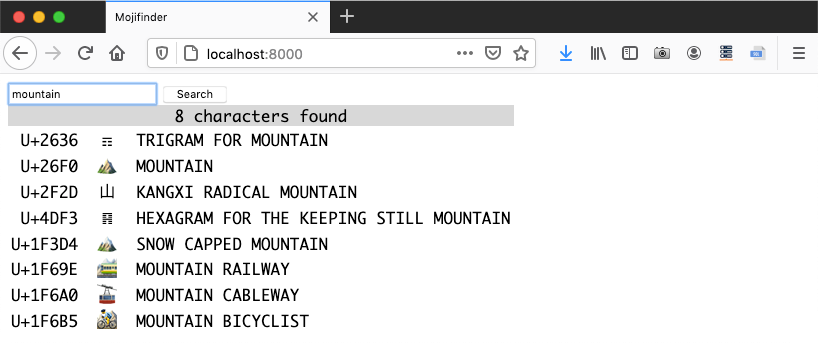
Figure 21-2. Browser window displaying search results for “mountain” from the web_mojifinder.py service.
The Unicode search logic in these examples is in the InvertedIndex class in the charindex.py module in the Fluent Python code repository. There’s nothing concurrent in that small module, so I’ll only give a brief overview in the optional box that follows. You can skip to the HTTP server implementation in “A FastAPI Web Service”.
A FastAPI Web Service
I wrote the next example—web_mojifinder.py—using FastAPI: one of the Python ASGI Web frameworks mentioned in “ASGI—Asynchronous Server Gateway Interface”. Figure 21-2 is a screenshot of the frontend. It’s a super simple SPA (Single Page Application): after the initial HTML download, the UI is updated by client-side JavaScript communicating with the server.
FastAPI is designed to implement backends for SPA and mobile apps,
which mostly consist of web API end points returning JSON responses instead of server-rendered HTML.
FastAPI leverages decorators, type hints, and code introspection to eliminate a lot of the boilerplate code for web APIs,
and also automatically publishes interactive OpenAPI—a.k.a. Swagger—documentation for the APIs we create.
Figure 21-4 shows the autogenerated /docs page for web_mojifinder.py.
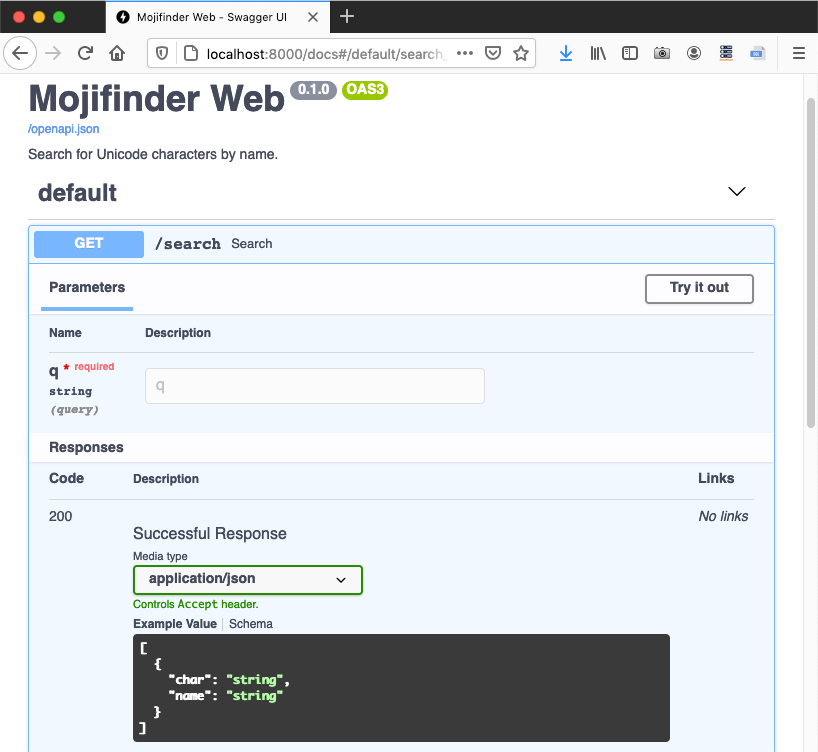
Figure 21-4. Autogenerated OpenAPI schema for the /search endpoint.
Example 21-11 is the code for web_mojifinder.py, but that’s just the backend code.
When you hit the root URL /, the server sends the form.html file, which has 81 lines of code, including 54 lines of JavaScript to communicate with the server and fill a table with the results. If you’re interested in reading plain framework-less JavaScript, please find
21-async/mojifinder/static/form.html in the
Fluent Python code repository.
To run web_mojifinder.py, you need to install two packages and their dependencies: FastAPI and uvicorn.10 This is the command to run Example 21-11 with uvicorn in development mode:
$ uvicorn web_mojifinder:app --reload
The parameters are:
web_mojifinder:app-
The package name, a colon, and the name of the ASGI application defined in it—
appis the conventional name. --reload-
Make uvicorn monitor changes to application source files and automatically reload them. Useful only during development.
Now let’s study the source code for web_mojifinder.py.
Example 21-11. web_mojifinder.py: complete source
frompathlibimportPathfromunicodedataimportnamefromfastapiimportFastAPIfromfastapi.responsesimportHTMLResponsefrompydanticimportBaseModelfromcharindeximportInvertedIndexSTATIC_PATH=Path(__file__).parent.absolute()/'static'app=FastAPI(title='Mojifinder Web',description='Search for Unicode characters by name.',)classCharName(BaseModel):char:strname:strdefinit(app):app.state.index=InvertedIndex()app.state.form=(STATIC_PATH/'form.html').read_text()init(app)@app.get('/search',response_model=list[CharName])asyncdefsearch(q:str):chars=sorted(app.state.index.search(q))return({'char':c,'name':name(c)}forcinchars)@app.get('/',response_class=HTMLResponse,include_in_schema=False)defform():returnapp.state.form# no main funcion
Unrelated to the theme of this chapter, but worth noting: the elegant use of the overloaded
/operator bypathlib.11This line defines the ASGI app. It could be as simple as
app = FastAPI(). The parameters shown are metadata for the autogenerated documentation.A pydantic schema for a JSON response with
charandnamefields.12Build the
indexand load the static HTML form, attaching both to theapp.statefor later use.Run
initwhen this module is loaded by the ASGI server.Route for the
/searchendpoint;response_modeluses thatCharNamepydantic model to describe the response format.FastAPI assumes that any parameters that appear in the function or coroutine signature that are not in the route path will be passed in the HTTP query string, e.g.,
/search?q=cat. Sinceqhas no default, FastAPI will return a 422 (Unprocessable Entity) status ifqis missing from the query string.Returning an iterable of
dictscompatible with theresponse_modelschema allows FastAPI to build the JSON response according to theresponse_modelin the@app.getdecorator.Regular functions (i.e., non-async) can also be used to produce responses.
This module has no main function. It is loaded and driven by the ASGI server—uvicorn in this example.
Example 21-11 has no direct calls to asyncio.
FastAPI is built on the Starlette ASGI toolkit, which in turn uses asyncio.
Also note that the body of search doesn’t use await, async with, or async for,
therefore it could be a plain function.
I defined search as a coroutine just to show that FastAPI knows how to handle it.
In a real app, most endpoints will query databases or hit other remote servers,
so it is a critical advantage of FastAPI—and ASGI frameworks in general—to
support coroutines that can take advantage of asynchronous libraries for network I/O.
Tip
The init and form functions I wrote to load and serve the static HTML form are
a hack to make the example short and easy to run.
The recommended best practice is to have a proxy/load-balancer in front of the ASGI server to handle all static assets, and also use a CDN (Content Delivery Network) when possible.
One such proxy/load-balancer is Traefik, a self-described “edge router” that “receives requests on behalf of your system and finds out which components are responsible for handling them.” FastAPI has project generation scripts that prepare your code to do that.
The typing enthusiast may have noticed that there are no return type hints in search and form.
Instead, FastAPI relies on the response_model= keyword argument in the route decorators.
The “Response Model” page in the FastAPI documentation explains:
The response model is declared in this parameter instead of as a function return type annotation, because the path function may not actually return that response model but rather return a dict, database object or some other model, and then use the
response_modelto perform the field limiting and serialization.
For example, in search, I returned a generator of dict items, not a list of CharName objects, but that’s good enough for FastAPI and pydantic to validate my data and build the appropriate JSON response compatible with response_model=list[CharName].
We’ll now focus on the tcp_mojifinder.py script that is answering the queries in Figure 21-5.
An asyncio TCP Server
The tcp_mojifinder.py program uses plain TCP to communicate
with a client like Telnet or Netcat,
so I could write it using asyncio without external dependencies—and without reinventing HTTP. Figure 21-5 shows text-based UI.
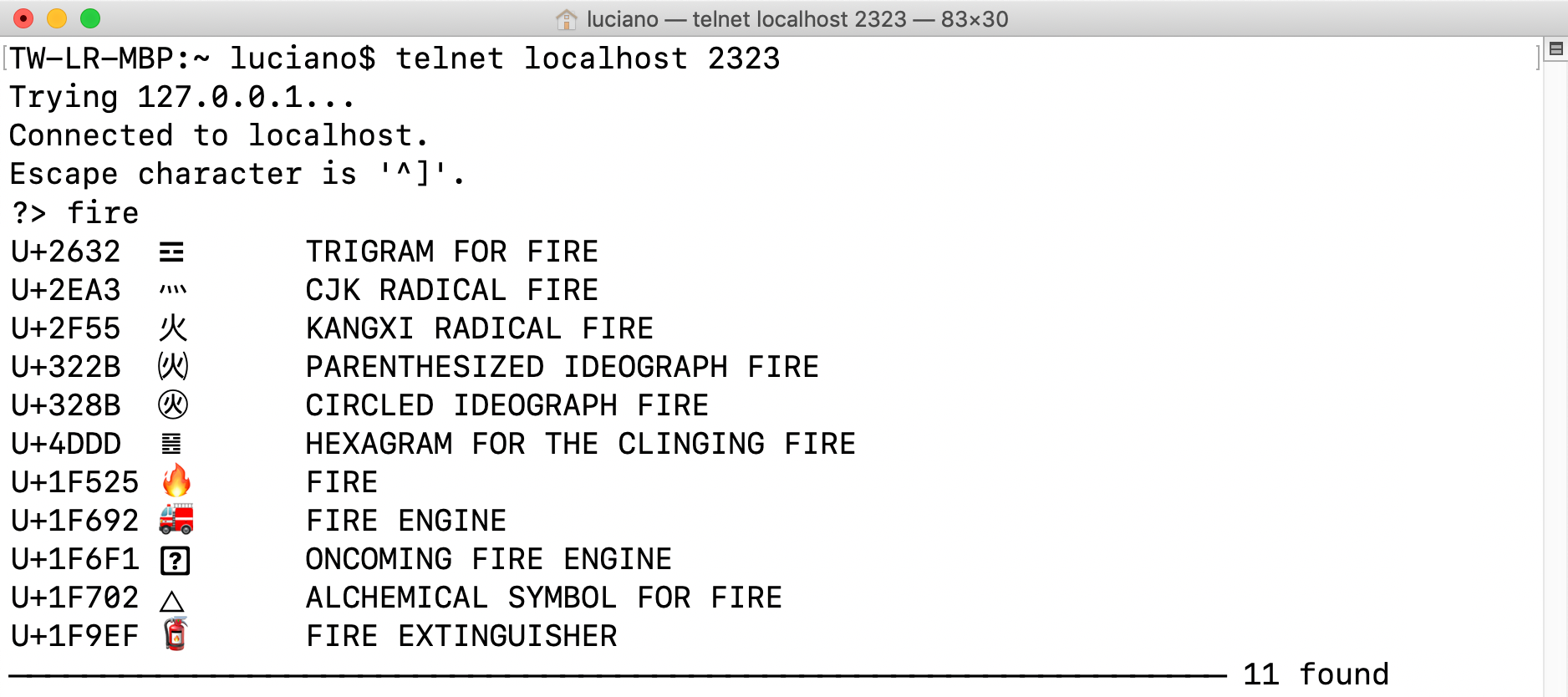
Figure 21-5. Telnet session with the tcp_mojifinder.py server: querying for “fire.”
This program is twice as long as web_mojifinder.py, so I split the presentation into three parts:
Example 21-12, Example 21-14, and Example 21-15.
The top of tcp_mojifinder.py—including the import statements—is
in Example 21-14,
but I will start by describing the supervisor coroutine and
the main function that drives the program.
Example 21-12. tcp_mojifinder.py: a simple TCP server; continues in Example 21-14
asyncdefsupervisor(index:InvertedIndex,host:str,port:int)->None:server=awaitasyncio.start_server(functools.partial(finder,index),host,port)socket_list=cast(tuple[TransportSocket,...],server.sockets)addr=socket_list[0].getsockname()(f'Serving on {addr}. Hit CTRL-C to stop.')awaitserver.serve_forever()defmain(host:str='127.0.0.1',port_arg:str='2323'):port=int(port_arg)('Building index.')index=InvertedIndex()try:asyncio.run(supervisor(index,host,port))exceptKeyboardInterrupt:('\nServer shut down.')if__name__=='__main__':main(*sys.argv[1:])
This
awaitquickly gets an instance ofasyncio.Server, a TCP socket server. By default,start_servercreates and starts the server, so it’s ready to receive connections.The first argument to
start_serverisclient_connected_cb, a callback to run when a new client connection starts. The callback can be a function or a coroutine, but it must accept exactly two arguments: anasyncio.StreamReaderand anasyncio.StreamWriter. However, myfindercoroutine also needs to get anindex, so I usedfunctools.partialto bind that parameter and obtain a callable that takes the reader and writer. Adapting user functions to callback APIs is the most common use case forfunctools.partial.hostandportare the second and third arguments tostart_server. See the full signature in theasynciodocumentation.This
castis needed because typeshed has an outdated type hint for thesocketsproperty of theServerclass—as of May 2021. See Issue #5535 on typeshed.13Display the address and port of the first socket of the server.
Although
start_serveralready started the server as a concurrent task, I need toawaiton theserver_forevermethod so that mysupervisoris suspended here. Without this line,supervisorwould return immediately, ending the loop started withasyncio.run(supervisor(…)), and exiting the program. The documentation forServer.serve_foreversays: “This method can be called if the server is already accepting connections.”Build the inverted index.14
Start the event loop running
supervisor.Catch the
KeyboardInterruptto avoid a distracting traceback when I stop the server with Ctrl-C on the terminal running it.
You may find it easier to understand how control flows in tcp_mojifinder.py if you study the output it generates on the server console, listed in Example 21-13.
Example 21-13. tcp_mojifinder.py: this is the server side of the session depicted in Figure 21-5
$ python3 tcp_mojifinder.py Building index.Serving on ('127.0.0.1', 2323). Hit Ctrl-C to stop.From ('127.0.0.1', 58192): 'cat face'To ('127.0.0.1', 58192): 10 results. From ('127.0.0.1', 58192): 'fire'To ('127.0.0.1', 58192): 11 results. From ('127.0.0.1', 58192): '\x00'Close ('127.0.0.1', 58192).^CServer shut down.$
Output by
main. Before the next line appears, I see a 0.6s delay on my machine while the index is built.Output by
supervisor.First iteration of a
whileloop infinder. The TCP/IP stack assigned port 58192 to my Telnet client. If you connect several clients to the server, you’ll see their various ports in the output.Second iteration of the
whileloop infinder.I hit Ctrl-C on the client terminal; the
whileloop infinderexits.The
findercoroutine displays this message then exits. Meanwhile the server is still running, ready to service another client.I hit Ctrl-C on the server terminal;
server.serve_foreveris cancelled, endingsupervisorand the event loop.Output by
main.
After main builds the index and starts the event loop, supervisor quickly displays the Serving on… message and is suspended at the await server.serve_forever() line. At that point, control flows into the event loop and stays there, occasionally coming back to the finder coroutine, which yields control back to the event loop whenever it needs to wait for the network to send or receive data.
While the event loop is alive, a new instance of the finder coroutine will be started for each client that connects to the server. In this way, many clients can be handled concurrently by this simple server. This continues until a KeyboardInterrupt occurs on the server or its process is killed by the OS.
Now let’s see the top of tcp_mojifinder.py, with the finder coroutine.
Example 21-14. tcp_mojifinder.py: continued from Example 21-12
importasyncioimportfunctoolsimportsysfromasyncio.trsockimportTransportSocketfromtypingimportcastfromcharindeximportInvertedIndex,format_resultsCRLF=b'\r\n'PROMPT=b'?>'asyncdeffinder(index:InvertedIndex,reader:asyncio.StreamReader,writer:asyncio.StreamWriter)->None:client=writer.get_extra_info('peername')whileTrue:writer.write(PROMPT)# can't await!awaitwriter.drain()# must await!data=awaitreader.readline()ifnotdata:breaktry:query=data.decode().strip()exceptUnicodeDecodeError:query='\x00'(f'From {client}: {query!r}')ifquery:iford(query[:1])<32:breakresults=awaitsearch(query,index,writer)(f'To {client}: {results} results.')writer.close()awaitwriter.wait_closed()(f'Close {client}.')
format_resultsis useful to display the results ofInvertedIndex.searchin a text-based UI such as the command line or a Telnet session.To pass
findertoasyncio.start_server, I wrapped it withfunctools.partial, because the server expects a coroutine or function that takes only thereaderandwriterarguments.Get the remote client address to which the socket is connected.
This loop handles a dialog that lasts until a control character is received from the client.
The
StreamWriter.writemethod is not a coroutine, just a plain function; this line sends the?>prompt.StreamWriter.drainflushes thewriterbuffer; it is a coroutine, so it must be driven withawait.StreamWriter.readlineis a coroutine that returnsbytes.If no bytes were received, the client closed the connection, so exit the loop.
Decode the
bytestostr, using the default UTF-8 encoding.A
UnicodeDecodeErrormay happen when the user hits Ctrl-C and the Telnet client sends control bytes; if that happens, replace the query with a null character, for simplicity.Log the query to the server console.
Exit the loop if a control or null character was received.
Do the actual
search; code is presented next.Log the response to the server console.

Close the
StreamWriter.
Wait for the
StreamWriterto close. This is recommended in the.close()method documentation.
Log the end of this client’s session to the server console.
The last piece of this example is the search coroutine, shown in Example 21-15.
Example 21-15. tcp_mojifinder.py: search coroutine
asyncdefsearch(query:str,index:InvertedIndex,writer:asyncio.StreamWriter)->int:chars=index.search(query)lines=(line.encode()+CRLFforlineinformat_results(chars))writer.writelines(lines)awaitwriter.drain()status_line=f'{"─"* 66} {len(chars)} found'writer.write(status_line.encode()+CRLF)awaitwriter.drain()returnlen(chars)
searchmust be a coroutine because it writes to aStreamWriterand must use its.drain()coroutine method.Query the inverted index.
This generator expression will yield byte strings encoded in UTF-8 with the Unicode codepoint, the actual character, its name, and a
CRLFsequence—e.g.,b'U+0039\t9\tDIGIT NINE\r\n').Send the
lines. Surprisingly,writer.writelinesis not a coroutine.But
writer.drain()is a coroutine. Don’t forget theawait!Build a status line, then send it.
Note that all network I/O in tcp_mojifinder.py is in bytes; we need to decode the bytes received from the network, and encode strings before sending them out. In Python 3, the default encoding is UTF-8, and that’s what I used implicitly in all encode and decode calls in this example.
Warning
Note that some of the I/O methods are coroutines and must be driven with await, while others are simple functions. For example, StreamWriter.write is a plain function, because it writes to a buffer.
On the other hand, StreamWriter.drain—which flushes the buffer and performs the network I/O—is a coroutine, as
is StreamReader.readline—but not StreamWriter.writelines! While I was writing the first edition of this book, the asyncio API docs were improved by clearly labeling coroutines as such.
The tcp_mojifinder.py code leverages the high-level asyncio Streams API that provides a ready-to-use server so you only need to implement a handler function, which can be a plain callback or a coroutine. There is also a lower-level Transports and Protocols API, inspired by the transport and protocols abstractions in the Twisted framework. Refer to the asyncio documentation for more information, including TCP and UDP echo servers and clients implemented with that lower-level API.
Our next topic is async for and the objects that make it work.
Asynchronous Iteration and Asynchronous Iterables
We saw in “Asynchronous Context Managers” how async with works with objects implementing the __aenter__ and __aexit__ methods returning awaitables—usually in the form of coroutine objects.
Similarly, async for works with asynchronous iterables: objects that implement __aiter__. However, __aiter__ must be a regular method—not a coroutine method—and it must return an asynchronous iterator.
An asynchronous iterator provides an __anext__ coroutine method that returns an awaitable—often a coroutine object. They are also expected to implement __aiter__, which usually returns self. This mirrors the important distinction of iterables and iterators we discussed in “Don’t Make the Iterable an Iterator for Itself”.
The aiopg asynchronous PostgreSQL driver documentation has an example that illustrates the use of async for to iterate over the rows of a database cursor:
asyncdefgo():pool=awaitaiopg.create_pool(dsn)asyncwithpool.acquire()asconn:asyncwithconn.cursor()ascur:awaitcur.execute("SELECT 1")ret=[]asyncforrowincur:ret.append(row)assertret==[(1,)]
In this example the query will return a single row, but in a realistic scenario you may have
thousands of rows in response to a SELECT query.
For large responses, the cursor will not be loaded with all the rows in a single batch.
Therefore it is important that async for row in cur:
does not block the event loop while the cursor may be waiting for additional rows.
By implementing the cursor as an asynchronous iterator, aiopg may yield to the event loop at each __anext__ call, and resume later when more rows arrive from PostgreSQL.
Asynchronous Generator Functions
You can implement an asynchronous iterator by writing a class with __anext__ and __aiter__,
but there is a simpler way: write a function declared with async def and use yield in its body.
This parallels how generator functions simplify the classic Iterator pattern.
Let’s study a simple example using async for and implementing an asynchronous generator.
In Example 21-1 we saw blogdom.py, a script that probed domain names.
Now suppose we find other uses for the probe coroutine we defined there,
and decide to put it into a new module—domainlib.py—together with a new
multi_probe asynchronous generator that takes a list of domain names and yields results as
they are probed.
We’ll look at the implementation of domainlib.py soon, but first let’s see how it is used with Python’s new asynchronous console.
Experimenting with Python’s async console
Since Python 3.8, you can run the interpreter with the -m asyncio command-line option to get an “async REPL”: a Python console that imports asyncio, provides a running event loop, and accepts await, async for, and async with at the top-level prompt—which otherwise are syntax errors when used outside of native coroutines.15
To experiment with domainlib.py, go to the 21-async/domains/asyncio/ directory in your local copy of the Fluent Python code repository. Then run:
$ python -m asyncio
You’ll see the console start, similar to this:
asyncio REPL3.9.1(v3.9.1:1e5d33e9b9, Dec72020,12:10:52)[Clang6.0(clang-600.0.57)]on darwin Use"await"directly instead of"asyncio.run()". Type"help","copyright","credits"or"license"formore information. >>> import asyncio >>>
Note how the header says you can use await instead of asyncio.run()—to drive coroutines and other awaitables.
Also: I did not type import asyncio.
The asyncio module is automatically imported
and that line makes that fact clear to the user.
Now let’s import domainlib.py and play with its two coroutines: probe and multi_probe (Example 21-16).
Example 21-16. Experimenting with domainlib.py after running python3 -m asyncio
>>>awaitasyncio.sleep(3,'Rise and shine!')'Rise and shine!'>>>fromdomainlibimport*>>>awaitprobe('python.org')Result(domain='python.org', found=True)>>>names='python.org rust-lang.org golang.org no-lang.invalid'.split()>>>asyncforresultinmulti_probe(names):...(*result,sep='\t')...golang.org Trueno-lang.invalid Falsepython.org Truerust-lang.org True>>>
Try a simple
awaitto see the asynchronous console in action. Tip:asyncio.sleep()takes an optional second argument that is returned when youawaitit.Drive the
probecoroutine.The
domainlibversion ofprobereturns aResultnamed tuple.Make a list of domains. The
.invalidtop-level domain is reserved for testing. DNS queries for such domains always get an NXDOMAIN response from DNS servers, meaning “that domain does not exist.”16Iterate with
async forover themulti_probeasynchronous generator to display the results.Note that the results are not in the order the domains were given to
multiprobe. They appear as each DNS response comes back.
Example 21-16 shows that multi_probe is an asynchronous generator because it is compatible with async for. Now let’s do a few more experiments, continuing from that example with Example 21-17.
Example 21-17. More experiments, continuing from Example 21-16
>>>probe('python.org')<coroutine object probe at 0x10e313740>>>>multi_probe(names)<async_generator object multi_probe at 0x10e246b80>>>>forrinmulti_probe(names):...(r)...Traceback (most recent call last):...TypeError:'async_generator' object is not iterable
Calling a native coroutine gives you a coroutine object.
Calling an asynchronous generator gives you an
async_generatorobject.We can’t use a regular
forloop with asynchronous generators because they implement__aiter__instead of__iter__.
Asynchronous generators are driven by async for, which can be a block statement (as seen in Example 21-16), and it also appears in asynchronous comprehensions, which we’ll cover soon.
Implementing an asynchronous generator
Now let’s study the code for domainlib.py, with the multi_probe asynchronous generator (Example 21-18).
Example 21-18. domainlib.py: functions for probing domains
importasyncioimportsocketfromcollections.abcimportIterable,AsyncIteratorfromtypingimportNamedTuple,OptionalclassResult(NamedTuple):domain:strfound:boolOptionalLoop=Optional[asyncio.AbstractEventLoop]asyncdefprobe(domain:str,loop:OptionalLoop=None)->Result:ifloopisNone:loop=asyncio.get_running_loop()try:awaitloop.getaddrinfo(domain,None)exceptsocket.gaierror:returnResult(domain,False)returnResult(domain,True)asyncdefmulti_probe(domains:Iterable[str])->AsyncIterator[Result]:loop=asyncio.get_running_loop()coros=[probe(domain,loop)fordomainindomains]forcoroinasyncio.as_completed(coros):result=awaitcoroyieldresult
NamedTuplemakes the result fromprobeeasier to read and debug.This type alias is to avoid making the next line too long for a book listing.
probenow gets an optionalloopargument, to avoid repeated calls toget_running_loopwhen this coroutine is driven bymulti_probe.An asynchronous generator function produces an asynchronous generator object, which can be annotated as
AsyncIterator[SomeType].Build list of
probecoroutine objects, each with a differentdomain.This is not
async forbecauseasyncio.as_completedis a classic generator.Await on the coroutine object to retrieve the result.
Yield
result. This line makesmulti_probean asynchronous generator.
Note
The for loop in Example 21-18 could be more concise:
forcoroinasyncio.as_completed(coros):yieldawaitcoro
Python parses that as yield (await coro), so it works.
I thought it could be confusing to use that shortcut in the first asynchronous generator example in the book, so I split it into two lines.
Given domainlib.py, we can demonstrate the use of the multi_probe asynchronous generator in domaincheck.py: a script that takes a domain suffix and searches for domains made from short Python keywords.
Here is a sample output of domaincheck.py:
$ ./domaincheck.py net
FOUND           NOT FOUND
=====           =========
in.net
del.net
true.net
for.net
is.net
                none.net
try.net
                from.net
and.net
or.net
else.net
with.net
if.net
as.net
                elif.net
                pass.net
                not.net
                def.net
Thanks to domainlib, the code for domaincheck.py is straightforward, as seen in Example 21-19.
Example 21-19. domaincheck.py: utility for probing domains using domainlib
#!/usr/bin/env python3importasyncioimportsysfromkeywordimportkwlistfromdomainlibimportmulti_probeasyncdefmain(tld:str)->None:tld=tld.strip('.')names=(kwforkwinkwlistiflen(kw)<=4)domains=(f'{name}.{tld}'.lower()fornameinnames)('FOUND\t\tNOT FOUND')('=====\t\t=========')asyncfordomain,foundinmulti_probe(domains):indent=''iffoundelse'\t\t'(f'{indent}{domain}')if__name__=='__main__':iflen(sys.argv)==2:asyncio.run(main(sys.argv[1]))else:('Please provide a TLD.',f'Example:{sys.argv[0]}COM.BR')
Generate keywords with length up to
4.Generate domain names with the given suffix as TLD.
Format a header for the tabular output.
Asynchronously iterate over
multi_probe(domains).Set
indentto zero or two tabs to put the result in the proper column.Run the
maincoroutine with the given command-line argument.
Generators have one extra use unrelated to iteration: they can be made into context managers. This also applies to asynchronous generators.
Asynchronous generators as context managers
Writing our own asynchronous context managers is not a frequent programming task,
but if you need to write one, consider using the
@asynccontextmanager decorator added to the contextlib module in Python 3.7.
That’s very similar to the @contextmanager decorator we studied in “Using @contextmanager”.
An interesting example combining @asynccontextmanager with loop.run_in_executor
appears in Caleb Hattingh’s book
Using Asyncio in Python. Example 21-20 is Caleb’s code—with a single change and added callouts.
Example 21-20. Example using @asynccontextmanager and loop.run_in_executor
fromcontextlibimportasynccontextmanager@asynccontextmanagerasyncdefweb_page(url):loop=asyncio.get_running_loop()data=awaitloop.run_in_executor(None,download_webpage,url)yielddataawaitloop.run_in_executor(None,update_stats,url)asyncwithweb_page('google.com')asdata:process(data)
The decorated function must be an asynchronous generator.
Minor update to Caleb’s code: use the lightweight
get_running_loopinstead ofget_event_loop.Suppose
download_webpageis a blocking function using the requests library; we run it in a separate thread to avoid blocking the event loop.All lines before this
yieldexpression will become the__aenter__coroutine-method of the asynchronous context manager built by the decorator. The value ofdatawill be bound to thedatavariable after theasclause in theasync withstatement below.Lines after the
yieldwill become the__aexit__coroutine method. Here, another blocking call is delegated to the thread executor.Use
web_pagewithasync with.
This is very similar to the sequential @contextmanager decorator.
Please see “Using @contextmanager” for more details,
including error handling at the yield line.
For another example of @asynccontextmanager, see the
contextlib documentation.
Now let’s wrap up our coverage of asynchronous generator functions by contrasting them with native coroutines.
Asynchronous generators versus native coroutines
Here are some key similarities and differences between a native coroutine and an asynchronous generator function:
-
Both are declared with
async def. -
An asynchronous generator always has a
yieldexpression in its body—that’s what makes it a generator. A native coroutine never containsyield. -
A native coroutine may
returnsome value other thanNone. An asynchronous generator can only use emptyreturnstatements. -
Native coroutines are awaitable: they can be driven by
awaitexpressions or passed to one of the manyasynciofunctions that take awaitable arguments, such ascreate_task. Asynchronous generators are not awaitable. They are asynchronous iterables, driven byasync foror by asynchronous comprehensions.
Async Comprehensions and Async Generator Expressions
PEP 530—Asynchronous Comprehensions introduced the use of async for and await in the syntax of comprehensions and generator expressions, starting with Python 3.6.
The only construct defined by PEP 530 that can appear outside an async def body is an asynchronous generator expression.
Defining and using an asynchronous generator expression
Given the multi_probe asynchronous generator from Example 21-18,
we could write another asynchronous generator returning only the names of the domains found.
Here is how—again using the asynchronous console launched with -m asyncio:
>>>fromdomainlibimportmulti_probe>>>names='python.org rust-lang.org golang.org no-lang.invalid'.split()>>>gen_found=(nameasyncforname,foundinmulti_probe(names)iffound)>>>gen_found<async_generator object <genexpr> at 0x10a8f9700>>>>asyncfornameingen_found:...(name)...golang.orgpython.orgrust-lang.org
The use of
async formakes this an asynchronous generator expression. It can be defined anywhere in a Python module.The asynchronous generator expression builds an
async_generatorobject—exactly the same type of object returned by an asynchronous generator function likemulti_probe.The asynchronous generator object is driven by the
async forstatement, which in turn can only appear inside anasync defbody or in the magic asynchronous console I used in this example.
To summarize: an asynchronous generator expression can be defined anywhere in your program, but it can only be consumed inside a native coroutine or asynchronous generator function.
The remaining constructs introduced by PEP 530 can only be defined and used inside native coroutines or asynchronous generator functions.
Asynchronous comprehensions
Yury Selivanov—the author of PEP 530—justifies the need for asynchronous comprehensions with three short code snippets reproduced next.
We can all agree that we should be able to rewrite this code:
result=[]asyncforiinaiter():ifi%2:result.append(i)
like this:
result=[iasyncforiinaiter()ifi%2]
In addition, given a native coroutine fun, we should be able to write this:
result=[awaitfun()forfuninfuncs]
Tip
Using await in a list comprehension is similar to using asyncio.gather.
But gather gives you more control over exception handling,
thanks to its optional return_exceptions argument.
Caleb Hattingh recommends always setting return_exceptions=True (the default is False).
Please see the
asyncio.gather documentation
for more.
Back to the magic asynchronous console:
>>>names='python.org rust-lang.org golang.org no-lang.invalid'.split()>>>names=sorted(names)>>>coros=[probe(name)fornameinnames]>>>awaitasyncio.gather(*coros)[Result(domain='golang.org', found=True),Result(domain='no-lang.invalid', found=False),Result(domain='python.org', found=True),Result(domain='rust-lang.org', found=True)]>>>[awaitprobe(name)fornameinnames][Result(domain='golang.org', found=True),Result(domain='no-lang.invalid', found=False),Result(domain='python.org', found=True),Result(domain='rust-lang.org', found=True)]>>>
Note that I sorted the list of names to show that the results come out in the order they were submitted, in both cases.
PEP 530 allows the use of async for and await in list comprehensions as well as in dict and set comprehensions. For example, here is a dict comprehension to store the results of multi_probe in the asynchronous console:
>>>{name:foundasyncforname,foundinmulti_probe(names)}{'golang.org': True, 'python.org': True, 'no-lang.invalid': False,'rust-lang.org': True}
We can use the await keyword in the expression before the for or async for clause,
and also in the expression after the if clause.
Here is a set comprehension in the asynchronous console,
collecting only the domains that were found:
>>>{namefornameinnamesif(awaitprobe(name)).found}{'rust-lang.org', 'python.org', 'golang.org'}
I had to put extra parentheses around the await expression due to the higher precedence of the
__getattr__ operator . (dot).
Again, all of these comprehensions can only appear inside an async def
body or in the enchanted asynchronous console.
Now let’s talk about a very important feature of
the async statements, async expressions, and the objects they create.
Those constructs are often used with asyncio but,
they are actually library independent.
async Beyond asyncio: Curio
Python’s async/await language constructs are not tied to any specific event loop or library.17
Thanks to the extensible API provided by special methods, anyone sufficiently motivated can write
their own asynchronous runtime environment and framework to drive native coroutines, asynchronous generators, etc.
That’s what David Beazley did in his
Curio project.
He was interested in rethinking how these new language features could be used in a framework built from scratch. Recall that asyncio was released in Python 3.4, and it used yield from instead of await, so its API could not leverage asynchronous context managers, asynchronous iterators,
and everything else that the async/await keywords made possible. As a result, Curio has a cleaner API and a simpler implementation, compared to asyncio.
Example 21-21 shows the blogdom.py script (Example 21-1) rewritten to use Curio.
Example 21-21. blogdom.py: Example 21-1, now using Curio
#!/usr/bin/env python3fromcurioimportrun,TaskGroupimportcurio.socketassocketfromkeywordimportkwlistMAX_KEYWORD_LEN=4asyncdefprobe(domain:str)->tuple[str,bool]:try:awaitsocket.getaddrinfo(domain,None)exceptsocket.gaierror:return(domain,False)return(domain,True)asyncdefmain()->None:names=(kwforkwinkwlistiflen(kw)<=MAX_KEYWORD_LEN)domains=(f'{name}.dev'.lower()fornameinnames)asyncwithTaskGroup()asgroup:fordomainindomains:awaitgroup.spawn(probe,domain)asyncfortaskingroup:domain,found=task.resultmark='+'iffoundelse''(f'{mark}{domain}')if__name__=='__main__':run(main())
probedoesn’t need to get the event loop, because……
getaddrinfois a top-level function ofcurio.socket, not a method of aloopobject—as it is inasyncio.A
TaskGroupis a core concept in Curio, to monitor and control several coroutines, and to make sure they are all executed and cleaned up.TaskGroup.spawnis how you start a coroutine, managed by a specificTaskGroupinstance. The coroutine is wrapped by aTask.Iterating with
async forover aTaskGroupyieldsTaskinstances as each is completed. This corresponds to the line in Example 21-1 usingfor … as_completed(…):.Curio pioneered this sensible way to start an asynchronous program in Python.
To expand on the last point: if you look at the asyncio code examples for the first edition of Fluent Python, you’ll see lines like these, repeated over and over:
loop=asyncio.get_event_loop()loop.run_until_complete(main())loop.close()
A Curio TaskGroup is an asynchronous context manager that replaces several ad hoc APIs and coding patterns in asyncio.
We just saw how iterating over a TaskGroup makes the asyncio.as_completed(…) function unnecessary.
Another example: instead of a special gather function, this snippet from the
“Task Groups” docs
collects the results of all tasks in the group:
asyncwithTaskGroup(wait=all)asg:awaitg.spawn(coro1)awaitg.spawn(coro2)awaitg.spawn(coro3)('Results:',g.results)
Task groups support structured concurrency:
a form of concurrent programming that constrains all the activity of
a group of asynchronous tasks to a single entry and exit point.
This is analogous to structured programming,
which eschewed the GOTO command and introduced block statements
to limit the entry and exit points of loops and subroutines.
When used as an asynchronous context manager,
a TaskGroup ensures that all tasks spawned inside are completed or cancelled,
and any exceptions raised, upon exiting the enclosed block.
Note
Structured concurrency will probably be adopted by asyncio in upcoming Python releases.
A strong indication appears in
PEP 654–Exception Groups and except*,
which was
approved for Python 3.11.
The “Motivation” section mentions
Trio’s “nurseries,” their name for task groups:
“Implementing a better task spawning API in asyncio, inspired by Trio nurseries,
was the main motivation for this PEP.”
Another important feature of Curio is better support for programming with coroutines and threads in the same codebase—a necessity in most nontrivial asynchronous programs.
Starting a thread with await spawn_thread(func, …) returns an AsyncThread object with a Task-like interface. Threads can call coroutines thanks to a special AWAIT(coro) function—named in all caps because await is now a keyword.
Curio also provides a UniversalQueue that can be used to coordinate the work among threads, Curio coroutines, and asyncio coroutines.
That’s right, Curio has features that allow it to run in a thread along with
asyncio in another thread, in the same process,
communicating via UniversalQueue and UniversalEvent.
The API for these “universal” classes is the same inside and outside of coroutines,
but in a coroutine, you need to prefix calls with await.
As I write this in October 2021, HTTPX is the first HTTP client library compatible with Curio, but I don’t know of any asynchronous database libraries that support it yet. In the Curio repository there is an impressive set of network programming examples, including one using WebSocket, and another implementing the RFC 8305—Happy Eyeballs concurrent algorithm for connecting to IPv6 endpoints with fast fallback to IPv4 if needed.
The design of Curio has been influential.
The Trio framework started by Nathaniel J. Smith
was heavily inspired by Curio.
Curio may also have prompted Python contributors to improve the usability of the asyncio API.
For example, in its earliest releases, asyncio users very often had to get and pass
around a loop object because some essential functions were either loop methods or required
a loop argument.
In recent versions of Python, direct access to the loop is not needed as often,
and in fact several functions that accepted an optional loop are now deprecating that argument.
Type Hinting Asynchronous Objects
The return type of a native coroutine describes what you get when you await on that coroutine,
which is the type of the object that appears in the return statements in the body
of the native coroutine function.18
This chapter provided many examples of annotated native coroutines,
including probe from Example 21-21:
asyncdefprobe(domain:str)->tuple[str,bool]:try:awaitsocket.getaddrinfo(domain,None)exceptsocket.gaierror:return(domain,False)return(domain,True)
If you need to annotate a parameter that takes a coroutine object, then the generic type is:
classtyping.Coroutine(Awaitable[V_co],Generic[T_co,T_contra,V_co]):...
That type, and the following types were introduced in Python 3.5 and 3.6 to annotate asynchronous objects:
classtyping.AsyncContextManager(Generic[T_co]):...classtyping.AsyncIterable(Generic[T_co]):...classtyping.AsyncIterator(AsyncIterable[T_co]):...classtyping.AsyncGenerator(AsyncIterator[T_co],Generic[T_co,T_contra]):...classtyping.Awaitable(Generic[T_co]):...
With Python ≥ 3.9, use the collections.abc equivalents of these.
I want to highlight three aspects of those generic types.
First: they are all covariant on the first type parameter, which is the type of the items yielded from these objects. Recall rule #1 of “Variance rules of thumb”:
If a formal type parameter defines a type for data that comes out of the object, it can be covariant.
Second: AsyncGenerator and Coroutine are contravariant on the second to last parameter.
That’s the type of the argument of the low-level .send() method that
the event loop calls to drive asynchronous generators and coroutines.
As such, it is an “input” type.
Therefore, it can be contravariant, per Variance Rule of Thumb #2:
If a formal type parameter defines a type for data that goes into the object after its initial construction, it can be contravariant.
Third: AsyncGenerator has no return type, in contrast with typing.Generator,
which we saw in “Generic Type Hints for Classic Coroutines”.
Returning a value by raising StopIteration(value) was one of
the hacks that enabled generators to operate as coroutines and support yield from,
as we saw in “Classic Coroutines”.
There is no such overlap among the asynchronous objects:
AsyncGenerator objects don’t return values, and are completely separate from
native coroutine objects, which are annotated with typing.Coroutine.
Finally, let’s briefly discuss the advantages and challenges of asynchronous programming.
How Async Works and How It Doesn’t
The sections closing this chapter discuss high-level ideas around asynchronous programming, regardless of the language or library you are using.
Let’s begin by explaining the #1 reason why asynchronous programming is appealing, followed by a popular myth, and how to deal with it.
Running Circles Around Blocking Calls
Ryan Dahl, the inventor of Node.js, introduces the philosophy of his project by saying “We’re doing I/O completely wrong.”19 He defines a blocking function as one that does file or network I/O, and argues that we can’t treat them as we treat nonblocking functions. To explain why, he presents the numbers in the second column of Table 21-1.
| Device | CPU cycles | Proportional “human” scale |
|---|---|---|
L1 cache |
3 |
3 seconds |
L2 cache |
14 |
14 seconds |
RAM |
250 |
250 seconds |
disk |
41,000,000 |
1.3 years |
network |
240,000,000 |
7.6 years |
To make sense of Table 21-1, bear in mind that modern CPUs with GHz clocks run billions of cycles per second. Let’s say that a CPU runs exactly 1 billion cycles per second. That CPU can make more than 333 million L1 cache reads in 1 second, or 4 (four!) network reads in the same time. The third column of Table 21-1 puts those numbers in perspective by multiplying the second column by a constant factor. So, in an alternate universe, if one read from L1 cache took 3 seconds, then a network read would take 7.6 years!
Table 21-1 explains why a disciplined approach to asynchronous programming can lead to high-performance servers. The challenge is achieving that discipline. The first step is to recognize that “I/O bound system” is a fantasy.
The Myth of I/O-Bound Systems
A commonly repeated meme is that asynchronous programming is good for “I/O bound systems.” I learned the hard way that there are no “I/O-bound systems.” You may have I/O-bound functions. Perhaps the vast majority of the functions in your system are I/O bound; i.e., they spend more time waiting for I/O than crunching data. While waiting, they cede control to the event loop, which can then drive some other pending task. But inevitably, any nontrivial system will have some parts that are CPU bound. Even trivial systems reveal that, under stress. In “Soapbox”, I tell the story of two asynchronous programs that struggled with CPU-bound functions slowing down the event loop with severe impact on performance.
Given that any nontrivial system will have CPU-bound functions, dealing with them is the key to success in asynchronous programming.
Avoiding CPU-Bound Traps
If you’re using Python at scale, you should have some automated tests designed specifically to detect performance regressions as soon as they appear. This is critically important with asynchronous code, but also relevant to threaded Python code—because of the GIL. If you wait until the slowdown starts bothering the development team, it’s too late. The fix will probably require some major makeover.
Here are some options for when you identify a CPU-hogging bottleneck:
-
Delegate the task to a Python process pool.
-
Delegate the task to an external task queue.
-
Rewrite the relevant code in Cython, C, Rust, or some other language that compiles to machine code and interfaces with the Python/C API, preferably releasing the GIL.
-
Decide that you can afford the performance hit and do nothing—but record the decision to make it easier to revert to it later.
The external task queue should be chosen and integrated as soon as possible at the start of the project, so that nobody in the team hesitates to use it when needed.
The last option—do nothing—falls in the category of technical debt.
Concurrent programming is a fascinating topic, and I would like to write a lot more about it. But it is not the main focus of this book, and this is already one of the longest chapters, so let’s wrap it up.
Chapter Summary
The problem with normal approaches to asynchronous programming is that they’re all-or-nothing propositions. You rewrite all your code so none of it blocks or you’re just wasting your time.
Alvaro Videla and Jason J. W. Williams, RabbitMQ in Action
I chose that epigraph for this chapter for two reasons.
At a high level, it reminds us to avoid blocking the event loop by delegating slow tasks to
a different processing unit, from a simple thread all the way to a distributed task queue.
At a lower level, it is also a warning: once you write your first async def,
your program is inevitably going to have more and more
async def, await, async with, and async for.
And using non-asynchronous libraries suddenly becomes a challenge.
After the simple spinner examples in Chapter 19, here our main focus was asynchronous programming with native coroutines, starting with the blogdom.py DNS probing example, followed by the concept of awaitables. While reading the source code of flags_asyncio.py, we found the first example of an asynchronous context manager.
The more advanced variations of the flag downloading program introduced two
powerful functions: the asyncio.as_completed generator and the loop.run_in_executor
coroutine. We also saw the concept and application of a semaphore to limit
the number of concurrent downloads—as expected from well-behaved HTTP clients.
Server-side asynchronous programming was presented through the mojifinder examples:
a FastAPI web service and tcp_mojifinder.py—the latter using just asyncio and the TCP protocol.
Asynchronous iteration and asynchronous iterables were the next major topic,
with sections on async for, Python’s async console, asynchronous generators,
asynchronous generator expressions, and asynchronous comprehensions.
The last example in the chapter was blogdom.py rewritten with the Curio framework,
to demonstrate how Python’s asynchronous features are not tied to the asyncio package.
Curio also showcases the concept of structured concurrency, which may have an
industry-wide impact, bringing more clarity to concurrent code.
Finally, the sections under “How Async Works and How It Doesn’t” discuss the main appeal of asynchronous programming, the misconception of “I/O-bound systems,” and dealing with the inevitable CPU-bound parts of your program.
Further Reading
David Beazley’s PyOhio 2016 keynote
“Fear and Awaiting in Async” is
a fantastic, live-coded introduction to the potential of the
language features made possible by Yury Selivanov’s contribution of the
async/await keywords in Python 3.5.
At one point, Beazley complains that await can’t be used in list comprehensions, but that was fixed by Selivanov in
PEP 530—Asynchronous Comprehensions,
implemented in Python 3.6 later in that same year.
Apart from that, everything else in Beazley’s keynote is timeless,
as he demonstrates how the asynchronous objects we saw in this chapter work,
without the help of any framework—just a simple run function using .send(None) to drive coroutines.
Only at the very end Beazley shows Curio,
which he started that year as an experiment to see how far can you go
doing asynchronous programming without a foundation of callbacks or futures, just coroutines.
As it turns out, you can go very far—as demonstrated by the evolution of Curio and
the later creation of Trio by Nathaniel J. Smith.
Curio’s documentation has links to more talks by Beazley on the subject.
Besides starting Trio, Nathaniel J. Smith wrote two deep blog posts that I highly recommend: “Some thoughts on asynchronous API design in a post-async/await world”, contrasting the design of Curio with that of asyncio,and “Notes on structured concurrency, or: Go statement considered harmful”, about structured concurrency. Smith also gave a long and informative answer to the question: “What is the core difference between asyncio and trio?” on StackOverflow.
To learn more about the asyncio package, I’ve mentioned the best written resources I know at the start of this chapter: the official documentation after the outstanding overhaul started by Yury Selivanov in 2018, and Caleb Hattingh’s book Using Asyncio in Python (O’Reilly). In the official documentation, make sure to read “Developing with asyncio”: documenting the asyncio debug mode, and also discussing common mistakes and traps and how to avoid them.
For a very accessible, 30-minute introduction to asynchronous programming in general and also asyncio,
watch Miguel Grinberg’s
“Asynchronous Python for the Complete Beginner”,
presented at PyCon 2017.
Another great introduction is
“Demystifying Python’s Async and Await Keywords”,
presented by Michael Kennedy, where among other things I learned about the
unsync
library that provides a decorator to delegate the execution of coroutines, I/O-bound functions, and CPU-bound functions to asyncio, threading, or multiprocessing as needed.
At EuroPython 2019, Lynn Root—a global leader of PyLadies—presented the excellent “Advanced asyncio: Solving Real-world Production Problems”, informed by her experience using Python as a staff engineer at Spotify.
In 2020, Łukasz Langa recorded a series of great videos about asyncio, starting with “Learn Python’s AsyncIO #1—The Async Ecosystem”. Langa also made the super cool video “AsyncIO + Music” for PyCon 2020 that not only shows asyncio applied in a very concrete event-oriented domain, but also explains it from the ground up.
Another area dominated by event-oriented programming is embedded systems.
That’s why Damien George added support for async/await in
his MicroPython interpreter for microcontrollers.
At PyCon Australia 2018, Matt Trentini demonstrated the
uasyncio
library, a subset of asyncio that is part of MicroPython’s standard library.
For higher-level thinking about async programming in Python, read the blog post “Python async frameworks—Beyond developer tribalism” by Tom Christie.
Finally, I recommend “What Color Is Your Function?” by Bob Nystrom, discussing the incompatible execution models of plain functions versus async functions—a.k.a. coroutines—in JavaScript, Python, C#, and other languages. Spoiler alert: Nystrom’s conclusion is that the language that got this right is Go, where all functions are the same color. I like that about Go. But I also think Nathaniel J. Smith has a point when he wrote “Go statement considered harmful”. Nothing is perfect, and concurrent programming is always hard.
1 Videla & Williams, RabbitMQ in Action (Manning), Chapter 4, “Solving Problems with Rabbit: coding and patterns,” p. 61.
2 Selivanov implemented async/await in Python, and wrote the related PEPs 492, 525, and 530.
3 There is one exception to this rule: if you run Python with the -m asyncio option, you can use await directly at the >>> prompt to drive a native coroutine. This is explained in “Experimenting with Python’s async console”.
4 Sorry, I could not resist it.
5 true.dev is available for USD 360/year as I write this. I see that for.dev is registered, but has no DNS configured.
6 This tip is quoted verbatim from a comment by tech reviewer Caleb Hattingh. Thanks, Caleb!
7 Thanks to Guto Maia who noted that the concept of a semaphore was not explained when he read the first edition draft for this chapter.
8 A detailed discussion about this can be found in a thread I started in the python-tulip group, titled “Which other futures may come out of asyncio.as_completed?”. Guido responds, and gives insight on the implementation of as_completed, as well as the close relationship between futures and coroutines in asyncio.
9 The boxed question mark in the screen shot is not a defect of the book or ebook you are reading. It’s the U+101EC—PHAISTOS DISC SIGN CAT character, which is missing from the font in the terminal I used. The Phaistos disc is an ancient artifact inscribed with pictograms, discovered in the island of Crete.
10 Instead of uvicorn, you may use another ASGI server, such as hypercorn or Daphne. See the official ASGI documentation page about implementations for more information.
11 Thanks to tech reviewer Miroslav Šedivý for highlighting good places to use pathlib in code examples.
12 As mentioned in Chapter 8, pydantic enforces type hints at runtime, for data validation.
13 Issue #5535 is closed as of October 2021, but Mypy did not have a new release since then, so the error persists.
14 Tech reviewer Leonardo Rochael pointed out that building the index could be delegated to another thread using loop.run_with_executor() in the supervisor coroutine, so the server would be ready to take requests immediately while the index is built. That’s true, but querying the index is the only thing this server does, so it would not be a big win in this example.
15 This is great for experimentation, like the Node.js console. Thanks to Yury Selivanov for yet another excellent contribution to asynchronous Python.
16 See RFC 6761—Special-Use Domain Names.
17 That’s in contrast with JavaScript, where async/await is hardwired to the built-in event loop and runtime environment, i.e., a browser, Node.js, or Deno.
18 This differs from the annotations of classic coroutines, as discussed in “Generic Type Hints for Classic Coroutines”.
19 Video: “Introduction to Node.js” at 4:55.
20 Using a single thread was the default setting until Go 1.5 was released. Years before, Go had already earned a well-deserved reputation for enabling highly concurrent networked systems. One more evidence that concurrency doesn’t require multiple threads or CPU cores.
21 Regardless of technical choices, this was probably the biggest mistake in this project: the stakeholders did not go for an MVP approach—delivering a Minimum Viable Product as soon as possible, and then adding features at a steady pace.