Chapter 20. Concurrent Executors
The people bashing threads are typically system programmers which have in mind use cases that the typical application programmer will never encounter in her life. [...] In 99% of the use cases an application programmer is likely to run into, the simple pattern of spawning a bunch of independent threads and collecting the results in a queue is everything one needs to know.
Michele Simionato, Python deep thinker1
This chapter focuses on the concurrent.futures.Executor classes
that encapsulate the pattern of
“spawning a bunch of independent threads and collecting the results in a queue,”
described by Michele Simionato.
The concurrent executors make this pattern almost trivial to use,
not only with threads but also with processes—useful for compute-intensive tasks.
Here I also introduce the concept of futures—objects representing the asynchronous execution of an operation, similar to JavaScript promises.
This primitive idea is the foundation not only of concurrent.futures
but also of the asyncio package, the subject of Chapter 21.
What’s New in This Chapter
I renamed the chapter from “Concurrency with Futures” to “Concurrent Executors” because the executors are the most important high-level feature covered here. Futures are low-level objects, focused on in “Where Are the Futures?”, but mostly invisible in the rest of the chapter.
All the HTTP client examples now use the new HTTPX library, which provides synchronous and asynchronous APIs.
The setup for the experiments in “Downloads with Progress Display and Error Handling” is now simpler,
thanks to the multithreaded server added to the
http.server
package in Python 3.7.
Previously, the standard library only had the single-threaded BaseHttpServer,
which was no good for experimenting with concurrent clients,
so I had to resort to external tools in the first edition of this book.
“Launching Processes with concurrent.futures” now demonstrates how an executor simplifies the code we saw in “Code for the Multicore Prime Checker”.
Finally, I moved most of the theory to the new Chapter 19, “Concurrency Models in Python”.
Concurrent Web Downloads
Concurrency is essential for efficient network I/O: instead of idly waiting for remote machines, the application should do something else until a response comes back.2
To demonstrate with code, I wrote three simple programs to download images of 20 country flags from the web.
The first one, flags.py, runs sequentially:
it only requests the next image when the previous one is downloaded and saved locally.
The other two scripts make concurrent downloads:
they request several images practically at the same time, and save them as they arrive.
The flags_threadpool.py script uses the concurrent.futures package,
while flags_asyncio.py uses asyncio.
Example 20-1 shows the result of running the three scripts, three times each. I also posted a 73s video on YouTube so you can watch them running while a macOS Finder window displays the flags as they are saved. The scripts are downloading images from fluentpython.com, which is behind a CDN, so you may see slower results in the first runs. The results in Example 20-1 were obtained after several runs, so the CDN cache was warm.
Example 20-1. Three typical runs of the scripts flags.py, flags_threadpool.py, and flags_asyncio.py
$ python3 flags.py BD BR CD CN DE EG ET FR ID IN IR JP MX NG PH PK RU TR US VN20 flags downloaded in 7.26s$ python3 flags.py BD BR CD CN DE EG ET FR ID IN IR JP MX NG PH PK RU TR US VN 20 flags downloaded in 7.20s $ python3 flags.py BD BR CD CN DE EG ET FR ID IN IR JP MX NG PH PK RU TR US VN 20 flags downloaded in 7.09s $ python3 flags_threadpool.py DE BD CN JP ID EG NG BR RU CD IR MX US PH FR PK VN IN ET TR 20 flags downloaded in 1.37s$ python3 flags_threadpool.py EG BR FR IN BD JP DE RU PK PH CD MX ID US NG TR CN VN ET IR 20 flags downloaded in 1.60s $ python3 flags_threadpool.py BD DE EG CN ID RU IN VN ET MX FR CD NG US JP TR PK BR IR PH 20 flags downloaded in 1.22s $ python3 flags_asyncio.pyBD BR IN ID TR DE CN US IR PK PH FR RU NG VN ET MX EG JP CD 20 flags downloaded in 1.36s $ python3 flags_asyncio.py RU CN BR IN FR BD TR EG VN IR PH CD ET ID NG DE JP PK MX US 20 flags downloaded in 1.27s $ python3 flags_asyncio.py RU IN ID DE BR VN PK MX US IR ET EG NG BD FR CN JP PH CD TR20 flags downloaded in 1.42s

The output for each run starts with the country codes of the flags as they are downloaded, and ends with a message stating the elapsed time.

It took flags.py an average 7.18s to download 20 images.

The average for flags_threadpool.py was 1.40s.

For flags_asyncio.py, 1.35s was the average time.

Note the order of the country codes: the downloads happened in a different order every time with the concurrent scripts.
The difference in performance between the concurrent scripts is not significant, but they are both more than five times faster than the sequential script—and this is just for the small task of downloading 20 files of a few kilobytes each. If you scale the task to hundreds of downloads, the concurrent scripts can outpace the sequential code by a factor or 20 or more.
Warning
While testing concurrent HTTP clients against public web servers, you may inadvertently launch a denial-of-service (DoS) attack,
or be suspected of doing so.
In the case of Example 20-1,
it’s OK to do it because those scripts are hardcoded to make only 20 requests.
We’ll use Python’s http.server package to run tests later in this chapter.
Now let’s study the implementations of two of the scripts tested in Example 20-1: flags.py and flags_threadpool.py. I will leave the third script, flags_asyncio.py, for Chapter 21, but I wanted to demonstrate all three together to make two points:
-
Regardless of the concurrency constructs you use—threads or coroutines—you’ll see vastly improved throughput over sequential code in network I/O operations, if you code it properly.
-
For HTTP clients that can control how many requests they make, there is no significant difference in performance between threads and coroutines.3
A Sequential Download Script
Example 20-2 contains the implementation of flags.py, the first script we ran in Example 20-1. It’s not very interesting, but we’ll reuse most of its code and settings to implement the concurrent scripts, so it deserves some attention.
Note
For clarity, there is no error handling in Example 20-2. We will deal with exceptions later, but here I want to focus on the basic structure of the code, to make it easier to contrast this script with the concurrent ones.
Example 20-2. flags.py: sequential download script; some functions will be reused by the other scripts
importtimefrompathlibimportPathfromtypingimportCallableimporthttpxPOP20_CC=('CN IN US ID BR PK NG BD RU JP''MX PH VN ET EG DE IR TR CD FR').split()BASE_URL='https://www.fluentpython.com/data/flags'DEST_DIR=Path('downloaded')defsave_flag(img:bytes,filename:str)->None:(DEST_DIR/filename).write_bytes(img)defget_flag(cc:str)->bytes:url=f'{BASE_URL}/{cc}/{cc}.gif'.lower()resp=httpx.get(url,timeout=6.1,follow_redirects=True)resp.raise_for_status()returnresp.contentdefdownload_many(cc_list:list[str])->int:forccinsorted(cc_list):image=get_flag(cc)save_flag(image,f'{cc}.gif')(cc,end='',flush=True)returnlen(cc_list)defmain(downloader:Callable[[list[str]],int])->None:DEST_DIR.mkdir(exist_ok=True)t0=time.perf_counter()count=downloader(POP20_CC)elapsed=time.perf_counter()-t0(f'\n{count} downloads in {elapsed:.2f}s')if__name__=='__main__':main(download_many)
Import the
httpxlibrary. It’s not part of the standard library, so by convention the import goes after the standard library modules and a blank line.List of the ISO 3166 country codes for the 20 most populous countries in order of decreasing population.
The directory with the flag images.4
Local directory where the images are saved.
Save the
imgbytes tofilenamein theDEST_DIR.
Given a country code, build the URL and download the image, returning the binary contents of the response.

It’s good practice to add a sensible timeout to network operations, to avoid blocking for several minutes for no good reason.

By default, HTTPX does not follow redirects.5

There’s no error handling in this script, but this method raises an exception if the HTTP status is not in the 2XX range—highly recommended to avoid silent failures.

download_manyis the key function to compare with the concurrent implementations.
Loop over the list of country codes in alphabetical order, to make it easy to see that the ordering is preserved in the output; return the number of country codes downloaded.

Display one country code at a time in the same line so we can see progress as each download happens. The
end=' 'argument replaces the usual line break at the end of each line printed with a space character, so all country codes are displayed progressively in the same line. Theflush=Trueargument is needed because, by default, Python output is line buffered, meaning that Python only displays printed characters after a line break.
mainmust be called with the function that will make the downloads; that way, we can usemainas a library function with other implementations ofdownload_manyin thethreadpoolandascyncioexamples.
Create
DEST_DIRif needed; don’t raise an error if the directory exists.
Record and report the elapsed time after running the
downloaderfunction.
Call
mainwith thedownload_manyfunction.
Tip
The HTTPX library is inspired by the Pythonic
requests package,
but is built on a more modern foundation.
Crucially, HTTPX provides synchronous and asynchronous APIs,
so we can use it in all HTTP client examples in this chapter and the next.
Python’s standard library provides the urllib.request module,
but its API is synchronous only, and is not user friendly.
There’s really nothing new to flags.py.
It serves as a baseline for comparing the other scripts, and I used it as a library to avoid redundant code when implementing them.
Now let’s see a reimplementation using concurrent.futures.
Downloading with concurrent.futures
The main features of the concurrent.futures package are the ThreadPoolExecutor and ProcessPoolExecutor classes,
which implement an API to submit callables for execution in different threads or processes, respectively.
The classes transparently manage a pool of worker threads or processes, and queues to distribute jobs and collect results.
But the interface is very high-level, and we don’t need to know about any of those details for a simple use case like our flag downloads.
Example 20-3 shows the easiest way to implement the downloads concurrently, using the ThreadPoolExecutor.map method.
Example 20-3. flags_threadpool.py: threaded download script using futures.ThreadPoolExecutor
fromconcurrentimportfuturesfromflagsimportsave_flag,get_flag,maindefdownload_one(cc:str):image=get_flag(cc)save_flag(image,f'{cc}.gif')(cc,end='',flush=True)returnccdefdownload_many(cc_list:list[str])->int:withfutures.ThreadPoolExecutor()asexecutor:res=executor.map(download_one,sorted(cc_list))returnlen(list(res))if__name__=='__main__':main(download_many)
Reuse some functions from the
flagsmodule (Example 20-2).Function to download a single image; this is what each worker will execute.
Instantiate the
ThreadPoolExecutoras a context manager; theexecutor.__exit__method will callexecutor.shutdown(wait=True), which will block until all threads are done.The
mapmethod is similar to themapbuilt-in, except that thedownload_onefunction will be called concurrently from multiple threads; it returns a generator that you can iterate to retrieve the value returned by each function call—in this case, each call todownload_onewill return a country code.Return the number of results obtained. If any of the threaded calls raises an exception, that exception is raised here when the implicit
next()call inside thelistconstructor tries to retrieve the corresponding return value from the iterator returned byexecutor.map.Call the
mainfunction from theflagsmodule, passing the concurrent version ofdownload_many.
Note that the download_one function from Example 20-3 is essentially the body of the for loop in the download_many function from Example 20-2. This is a common refactoring when writing concurrent code: turning the body of a sequential for loop into a function to be called concurrently.
Tip
Example 20-3 is very short because I was able to reuse most
functions from the sequential flags.py script.
One of the best features of concurrent.futures is to make it simple to
add concurrent execution on top of legacy sequential code.
The ThreadPoolExecutor constructor takes several arguments not shown,
but the first and most important one is max_workers, setting the maximum
number of worker threads to be executed.
When max_workers is None (the default),
ThreadPoolExecutor decides its value using the following expression—since Python 3.8:
max_workers=min(32,os.cpu_count()+4)
The rationale is explained in the ThreadPoolExecutor documentation:
This default value preserves at least 5 workers for I/O bound tasks. It utilizes at most 32 CPU cores for CPU bound tasks which release the GIL. And it avoids using very large resources implicitly on many-core machines.
ThreadPoolExecutornow reuses idle worker threads before startingmax_workersworker threads too.
To conclude: the computed default for max_workers is sensible, and ThreadPoolExecutor avoids starting new workers unnecessarily.
Understanding the logic behind max_workers may help you decide
when and how to set it yourself.
The library is called concurrency.futures, yet there are no futures to be seen in Example 20-3, so you may be wondering where they are. The next section explains.
Where Are the Futures?
Futures are core components of concurrent.futures and of asyncio,
but as users of these libraries we sometimes don’t see them.
Example 20-3 depends on futures behind the scenes,
but the code I wrote does not touch them directly.
This section is an overview of futures,
with an example that shows them in action.
Since Python 3.4, there are two classes named Future in the standard library: concurrent.futures.Future and asyncio.Future.
They serve the same purpose: an instance of either Future class represents a deferred computation that may or may not have completed.
This is somewhat similar to the Deferred class in Twisted, the Future class in Tornado, and Promise in modern JavaScript.
Futures encapsulate pending operations so that we can put them in queues, check whether they are done, and retrieve results (or exceptions) when they become available.
An important thing to know about futures is that you and I should not create them:
they are meant to be instantiated exclusively by the concurrency framework,
be it concurrent.futures or asyncio.
Here is why: a Future represents something that will eventually run,
therefore it must be scheduled to run, and that’s the job of the framework.
In particular, concurrent.futures.Future instances are created only
as the result of submitting a callable for execution with a concurrent.futures.Executor subclass.
For example, the Executor.submit() method takes a callable, schedules it to run, and returns a Future.
Application code is not supposed to change the state of a future: the concurrency framework changes the state of a future when the computation it represents is done, and we can’t control when that happens.
Both types of Future have a .done() method that is nonblocking and
returns a Boolean that tells you whether the callable wrapped by that future has executed or not.
However, instead of repeatedly asking whether a future is done, client code usually asks to be notified.
That’s why both Future classes have an .add_done_callback() method:
you give it a callable,
and the callable will be invoked with the future as the single argument when the future is done.
Be aware that the callback callable will run in the same worker thread or process that
ran the function wrapped in the future.
There is also a .result() method, which works the same in both classes when the future is done:
it returns the result of the callable,
or re-raises whatever exception might have been thrown when the callable was executed.
However, when the future is not done,
the behavior of the result method is very different between the two flavors of Future.
In a concurrency.futures.Future instance,
invoking f.result() will block the caller’s thread until the result is ready.
An optional timeout argument can be passed, and if the future is not done in the specified time,
the result method raises TimeoutError.
The asyncio.Future.result method does not support timeout,
and await is the preferred way to get the result of futures in
asyncio—but await doesn’t work with concurrency.futures.Future instances.
Several functions in both libraries return futures;
others use them in their implementation in a way that is transparent to the user.
An example of the latter is the Executor.map we saw in Example 20-3:
it returns an iterator in which __next__ calls the result method of each future,
so we get the results of the futures, and not the futures themselves.
To get a practical look at futures, we can rewrite Example 20-3 to use the concurrent.futures.as_completed function,
which takes an iterable of futures and returns an iterator that yields futures as they are done.
Using futures.as_completed requires changes to the download_many function only.
The higher-level executor.map call is replaced by two for loops:
one to create and schedule the futures, the other to retrieve their results.
While we are at it, we’ll add a few print calls to display each future before and after it’s done.
Example 20-4 shows the code for a new download_many function.
The code for download_many grew from 5 to 17 lines,
but now we get to inspect the mysterious futures.
The remaining functions are the same as in Example 20-3.
Example 20-4. flags_threadpool_futures.py: replacing executor.map with executor.submit and futures.as_completed in the download_many function
defdownload_many(cc_list:list[str])->int:cc_list=cc_list[:5]withfutures.ThreadPoolExecutor(max_workers=3)asexecutor:to_do:list[futures.Future]=[]forccinsorted(cc_list):future=executor.submit(download_one,cc)to_do.append(future)(f'Scheduled for {cc}: {future}')forcount,futureinenumerate(futures.as_completed(to_do),1):res:str=future.result()(f'{future} result: {res!r}')returncount
For this demonstration, use only the top five most populous countries.
Set
max_workersto3so we can see pending futures in the output.Iterate over country codes alphabetically, to make it clear that results will arrive out of order.
executor.submitschedules the callable to be executed, and returns afuturerepresenting this pending operation.Store each
futureso we can later retrieve them withas_completed.Display a message with the country code and the respective
future.as_completedyields futures as they are completed.Get the result of this
future.Display the
futureand its result.
Note that the future.result() call will never block in this example because the future
is coming out of as_completed.
Example 20-5 shows the output of one run of Example 20-4.
Example 20-5. Output of flags_threadpool_futures.py
$ python3 flags_threadpool_futures.py Scheduled for BR: <Future at 0x100791518 state=running>Scheduled for CN: <Future at 0x100791710 state=running> Scheduled for ID: <Future at 0x100791a90 state=running> Scheduled for IN: <Future at 0x101807080 state=pending>Scheduled for US: <Future at 0x101807128 state=pending> CN <Future at 0x100791710 state=finished returned str> result: 'CN'BR ID <Future at 0x100791518 state=finished returned str> result: 'BR'<Future at 0x100791a90 state=finished returned str> result: 'ID' IN <Future at 0x101807080 state=finished returned str> result: 'IN' US <Future at 0x101807128 state=finished returned str> result: 'US' 5 downloads in 0.70s
The futures are scheduled in alphabetical order; the
repr()of a future shows its state: the first three arerunning, because there are three worker threads.The last two futures are
pending, waiting for worker threads.The first
CNhere is the output ofdownload_onein a worker thread; the rest of the line is the output ofdownload_many.Here, two threads output codes before
download_manyin the main thread can display the result of the first thread.
Tip
I recommend experimenting with flags_threadpool_futures.py.
If you run it several times, you’ll see the order of the results varying.
Increasing max_workers to 5 will increase the variation in the order of the results.
Decreasing it to 1 will make this script run sequentially,
and the order of the results will always be the order of the submit calls.
We saw two variants of the download script using concurrent.futures: one in Example 20-3 with ThreadPoolExecutor.map and one in Example 20-4 with futures.as_completed.
If you are curious about the code for flags_asyncio.py, you may peek at Example 21-3 in Chapter 21, where it is explained.
Now let’s take a brief look at a simple way to work around the GIL for CPU-bound jobs using concurrent.futures.
Launching Processes with concurrent.futures
The concurrent.futures documentation page is subtitled “Launching parallel tasks.”
The package enables parallel computation on multicore machines because
it supports distributing work among multiple Python processes using the
ProcessPoolExecutor class.
Both ProcessPoolExecutor and ThreadPoolExecutor implement the
Executor interface,
so it’s easy to switch from a thread-based to a process-based solution using concurrent.futures.
There is no advantage in using a ProcessPoolExecutor for the flags download example or any I/O-bound job.
It’s easy to verify this; just change these lines in Example 20-3:
defdownload_many(cc_list:list[str])->int:withfutures.ThreadPoolExecutor()asexecutor:
To this:
defdownload_many(cc_list:list[str])->int:withfutures.ProcessPoolExecutor()asexecutor:
The constructor for ProcessPoolExecutor also has a max_workers parameter, which defaults to None. In that case, the executor limits the number of workers to the number returned by os.cpu_count().
Processes use more memory and take longer to start than threads,
so the real value
of ProcessPoolExecutor is in CPU-intensive jobs.
Let’s go back to the primality
test example of “A Homegrown Process Pool”,
rewriting it with
concurrent.futures.
Multicore Prime Checker Redux
In “Code for the Multicore Prime Checker” we studied procs.py, a script that checked the primality of some large numbers using multiprocessing.
In Example 20-6 we solve the same problem in the proc_pool.py program using a ProcessPoolExecutor. From the first import to the main() call at the end, procs.py has 43 nonblank lines of code, and proc_pool.py has 31—28% shorter.
Example 20-6. proc_pool.py: procs.py rewritten with ProcessPoolExecutor
importsysfromconcurrentimportfuturesfromtimeimportperf_counterfromtypingimportNamedTuplefromprimesimportis_prime,NUMBERSclassPrimeResult(NamedTuple):n:intflag:boolelapsed:floatdefcheck(n:int)->PrimeResult:t0=perf_counter()res=is_prime(n)returnPrimeResult(n,res,perf_counter()-t0)defmain()->None:iflen(sys.argv)<2:workers=Noneelse:workers=int(sys.argv[1])executor=futures.ProcessPoolExecutor(workers)actual_workers=executor._max_workers# type: ignore(f'Checking {len(NUMBERS)} numbers with {actual_workers} processes:')t0=perf_counter()numbers=sorted(NUMBERS,reverse=True)withexecutor:forn,prime,elapsedinexecutor.map(check,numbers):label='P'ifprimeelse''(f'{n:16} {label} {elapsed:9.6f}s')time=perf_counter()-t0(f'Total time: {time:.2f}s')if__name__=='__main__':main()
No need to import
multiprocessing,SimpleQueueetc.;concurrent.futureshides all that.The
PrimeResulttuple and thecheckfunction are the same as we saw in procs.py, but we don’t need the queues and theworkerfunction anymore.Instead of deciding ourselves how many workers to use if no command-line argument was given, we set
workerstoNoneand let theProcessPoolExecutordecide.Here I build the
ProcessPoolExecutorbefore thewithblock in ➐ so that I can display the actual number of workers in the next line._max_workersis an undocumented instance attribute of aProcessPoolExecutor. I decided to use it to show the number of workers when theworkersvariable isNone. Mypy correctly complains when I access it, so I put thetype: ignorecomment to silence it.Sort the numbers to be checked in descending order. This will expose a difference in the behavior of proc_pool.py when compared with procs.py. See the explanation after this example.
Use the
executoras a context manager.The
executor.mapcall returns thePrimeResultinstances returned bycheckin the same order as thenumbersarguments.
If you run Example 20-6, you’ll see the results appearing in strict descending order, as shown in Example 20-7.
In contrast, the ordering of the output of procs.py (shown in “Process-Based Solution”) is heavily influenced by the difficulty in
checking whether each number is a prime.
For example, procs.py shows the result for 7777777777777777 near the top,
because it has a low divisor, 7, so is_prime quickly determines it’s not a prime.
In contrast, 7777777536340681 is 881917092, so is_prime will take much longer to determine that it’s a composite number,
and even longer to find out that 7777777777777753 is prime—therefore both of these numbers appear near the end of the output of procs.py.
Running proc_pool.py, you’ll observe not only the descending order of the results, but also that the program will appear to be stuck after showing the result for 9999999999999999.
Example 20-7. Output of proc_pool.py
$ ./proc_pool.py Checking 20 numbers with 12 processes: 9999999999999999 0.000024s9999999999999917 P 9.500677s7777777777777777 0.000022s7777777777777753 P 8.976933s 7777777536340681 8.896149s 6666667141414921 8.537621s 6666666666666719 P 8.548641s 6666666666666666 0.000002s 5555555555555555 0.000017s 5555555555555503 P 8.214086s 5555553133149889 8.067247s 4444444488888889 7.546234s 4444444444444444 0.000002s 4444444444444423 P 7.622370s 3333335652092209 6.724649s 3333333333333333 0.000018s 3333333333333301 P 6.655039s 299593572317531 P 2.072723s 142702110479723 P 1.461840s 2 P 0.000001s Total time: 9.65s
This line appears very quickly.
This line takes more than 9.5s to show up.
All the remaining lines appear almost immediately.
Here is why proc_pool.py behaves in that way:
-
As mentioned before,
executor.map(check, numbers)returns the result in the same order as thenumbersare given. -
By default, proc_pool.py uses as many workers as there are CPUs—it’s what
ProcessPoolExecutordoes whenmax_workersisNone. That’s 12 processes in this laptop. -
Because we are submitting
numbersin descending order, the first is 9999999999999999; with 9 as a divisor, it returns quickly. -
The second number is 9999999999999917, the largest prime in the sample. This will take longer than all the others to check.
-
Meanwhile, the remaining 11 processes will be checking other numbers, which are either primes or composites with large factors, or composites with very small factors.
-
When the worker in charge of 9999999999999917 finally determines that’s a prime, all the other processes have completed their last jobs, so the results appear immediately after.
Note
Although the progress of proc_pool.py is not as visible as that of procs.py, the overall execution time is practically the same as depicted in Figure 19-2, for the same number of workers and CPU cores.
Understanding how concurrent programs behave is not straightforward,
so here’s is a second experiment that may help you visualize the operation of
Executor.map.
Experimenting with Executor.map
Let’s investigate Executor.map, now using a ThreadPoolExecutor with three workers running five callables that output timestamped messages. The code is in Example 20-8, the output in Example 20-9.
Example 20-8. demo_executor_map.py: Simple demonstration of the map method of ThreadPoolExecutor
fromtimeimportsleep,strftimefromconcurrentimportfuturesdefdisplay(*args):(strftime('[%H:%M:%S]'),end='')(*args)defloiter(n):msg='{}loiter({}): doing nothing for {}s...'display(msg.format('\t'*n,n,n))sleep(n)msg='{}loiter({}): done.'display(msg.format('\t'*n,n))returnn*10defmain():display('Script starting.')executor=futures.ThreadPoolExecutor(max_workers=3)results=executor.map(loiter,range(5))display('results:',results)display('Waiting for individual results:')fori,resultinenumerate(results):display(f'result {i}: {result}')if__name__=='__main__':main()
This function simply prints whatever arguments it gets, preceded by a timestamp in the format
[HH:MM:SS].loiterdoes nothing except display a message when it starts, sleep fornseconds, then display a message when it ends; tabs are used to indent the messages according to the value ofn.loiterreturnsn * 10so we can see how to collect results.Create a
ThreadPoolExecutorwith three threads.Submit five tasks to the
executor. Since there are only three threads, only three of those tasks will start immediately: the callsloiter(0),loiter(1), andloiter(2); this is a nonblocking call.Immediately display the
resultsof invokingexecutor.map: it’s a generator, as the output in Example 20-9 shows.The
enumeratecall in theforloop will implicitly invokenext(results), which in turn will invoke_f.result()on the (internal)_ffuture representing the first call,loiter(0). Theresultmethod will block until the future is done, therefore each iteration in this loop will have to wait for the next result to be ready.
I encourage you to run Example 20-8 and see the display being updated incrementally. While you’re at it, play with the max_workers argument for the ThreadPoolExecutor and with the range function that produces the arguments for the executor.map call—or replace it with lists of handpicked values to create different delays.
Example 20-9 shows a sample run of Example 20-8.
Example 20-9. Sample run of demo_executor_map.py from Example 20-8
$ python3 demo_executor_map.py [15:56:50] Script starting.[15:56:50] loiter(0): doing nothing for 0s...[15:56:50] loiter(0): done. [15:56:50] loiter(1): doing nothing for 1s...[15:56:50] loiter(2): doing nothing for 2s... [15:56:50] results: <generator object result_iterator at 0x106517168>[15:56:50] loiter(3): doing nothing for 3s...[15:56:50] Waiting for individual results: [15:56:50] result 0: 0[15:56:51] loiter(1): done.[15:56:51] loiter(4): doing nothing for 4s... [15:56:51] result 1: 10[15:56:52] loiter(2): done.[15:56:52] result 2: 20 [15:56:53] loiter(3): done. [15:56:53] result 3: 30 [15:56:55] loiter(4): done.[15:56:55] result 4: 40
This run started at 15:56:50.
The first thread executes
loiter(0), so it will sleep for 0s and return even before the second thread has a chance to start, but YMMV.6loiter(1)andloiter(2)start immediately (because the thread pool has three workers, it can run three functions concurrently).This shows that the
resultsreturned byexecutor.mapis a generator; nothing so far would block, regardless of the number of tasks and themax_workerssetting.Because
loiter(0)is done, the first worker is now available to start the fourth thread forloiter(3).This is where execution may block, depending on the parameters given to the
loitercalls: the__next__method of theresultsgenerator must wait until the first future is complete. In this case, it won’t block because the call toloiter(0)finished before this loop started. Note that everything up to this point happened within the same second: 15:56:50.loiter(1)is done one second later, at 15:56:51. The thread is freed to startloiter(4).The result of
loiter(1)is shown:10. Now theforloop will block waiting for the result ofloiter(2).The pattern repeats:
loiter(2)is done, its result is shown; same withloiter(3).There is a 2s delay until
loiter(4)is done, because it started at 15:56:51 and did nothing for 4s.
The Executor.map function is easy to use,
but often it’s preferable to get the results as they are ready,
regardless of the order they were submitted.
To do that, we need a combination of the Executor.submit
method and the futures.as_completed function, as we saw in Example 20-4. We’ll come back to this technique in “Using futures.as_completed”.
Tip
The combination of executor.submit and futures.as_completed is more flexible than executor.map because you can submit
different callables and arguments, while executor.map is designed to run the same callable on the different arguments. In addition,
the set of futures you pass to futures.as_completed may come from more than one executor—perhaps some were created by
a ThreadPoolExecutor instance, while others are from a
ProcessPoolExecutor.
In the next section, we will resume the flag download examples with new requirements that will force us to iterate over the results of futures.as_completed instead of using executor.map.
Downloads with Progress Display and Error Handling
As mentioned, the scripts in “Concurrent Web Downloads” have no error handling to make them easier to read and to contrast the structure of the three approaches: sequential, threaded, and asynchronous.
In order to test the handling of a variety of error conditions, I created the flags2 examples:
- flags2_common.py
-
This module contains common functions and settings used by all
flags2examples, including amainfunction, which takes care of command-line parsing, timing, and reporting results. That is really support code, not directly relevant to the subject of this chapter, so I will not list the source code here, but you can read it in the fluentpython/example-code-2e repository: 20-executors/getflags/flags2_common.py. - flags2_sequential.py
-
A sequential HTTP client with proper error handling and progress bar display. Its
download_onefunction is also used byflags2_threadpool.py. - flags2_threadpool.py
-
Concurrent HTTP client based on
futures.ThreadPoolExecutorto demonstrate error handling and integration of the progress bar. - flags2_asyncio.py
-
Same functionality as the previous example, but implemented with
asyncioandhttpx. This will be covered in “Enhancing the asyncio Downloader”, in Chapter 21.
Be Careful when Testing Concurrent Clients
When testing concurrent HTTP clients on public web servers, you may generate many requests per second, and that’s how denial-of-service (DoS) attacks are made. Carefully throttle your clients when hitting public servers. For testing, set up a local HTTP server. See “Setting Up Test Servers” for instructions.
The most visible feature of the flags2 examples is that they have an animated, text-mode progress bar implemented with the tqdm package. I posted a 108s video on YouTube to show the progress bar and contrast the speed of the three flags2 scripts. In the video, I start with the sequential
download, but I interrupt it after 32s because it was going to take more than 5 minutes to hit on 676 URLs and get 194 flags. I then run the threaded and asyncio scripts three times each, and every time they complete the job in 6s or less (i.e., more than 60 times faster). Figure 20-1 shows two screenshots: during and after running
flags2_threadpool.py.
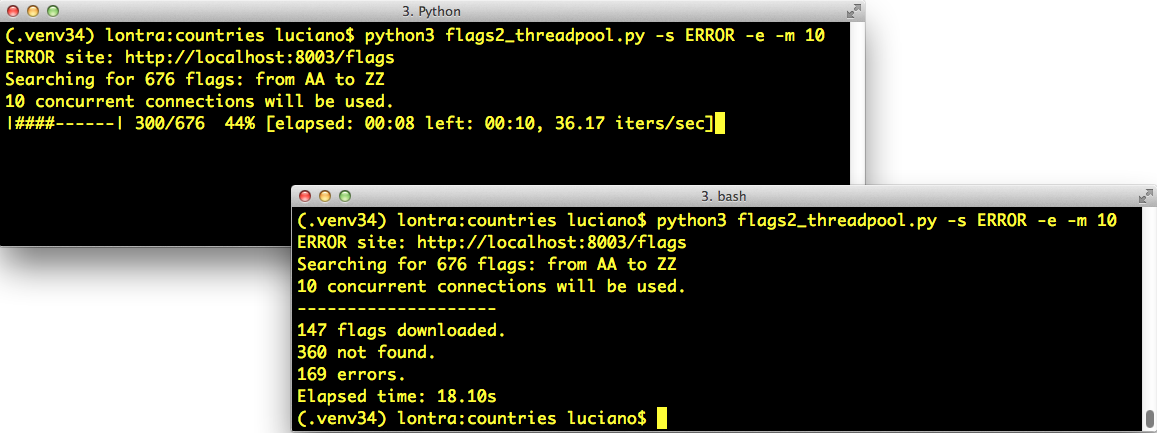
Figure 20-1. Top-left: flags2_threadpool.py running with live progress bar generated by tqdm; bottom-right: same terminal window after the script is finished.
The simplest tqdm example appears in an animated .gif in the project’s README.md. If you type the following code in the Python console after installing the tqdm package, you’ll see an animated progress bar where the comment is:
>>>importtime>>>fromtqdmimporttqdm>>>foriintqdm(range(1000)):...time.sleep(.01)...>>># -> progress bar will appear here <-
Besides the neat effect, the tqdm function is also interesting conceptually:
it consumes any iterable and produces an iterator which, while it’s consumed,
displays the progress bar and estimates the remaining time to complete all iterations.
To compute that estimate, tqdm needs to get an iterable that has a len,
or additionally receive the total= argument with the expected number of items.
Integrating tqdm with our flags2 examples provides an opportunity to look deeper into
how the concurrent scripts actually work, by forcing us to use the
futures.as_completed and the
asyncio.as_completed
functions so that tqdm can display progress as each future is
completed.
The other feature of the flags2 example is a command-line interface.
All three scripts accept the same options,
and you can see them by running any of the scripts with the -h option.
Example 20-10 shows the help text.
Example 20-10. Help screen for the scripts in the flags2 series
$ python3 flags2_threadpool.py -h
usage: flags2_threadpool.py [-h] [-a] [-e] [-l N] [-m CONCURRENT] [-s LABEL]
                            [-v]
                            [CC [CC ...]]

Download flags for country codes. Default: top 20 countries by population.

positional arguments:
  CC                    country code or 1st letter (eg. B for BA...BZ)

optional arguments:
  -h, --help            show this help message and exit
  -a, --all             get all available flags (AD to ZW)
  -e, --every           get flags for every possible code (AA...ZZ)
  -l N, --limit N       limit to N first codes
  -m CONCURRENT, --max_req CONCURRENT
                        maximum concurrent requests (default=30)
  -s LABEL, --server LABEL
                        Server to hit; one of DELAY, ERROR, LOCAL, REMOTE
                        (default=LOCAL)
  -v, --verbose         output detailed progress info
All arguments are optional. But the -s/--server is essential for testing:
it lets you choose which HTTP server and port will be used in the test.
Pass one of these case-insensitive labels to determine where the script will look for the flags:
LOCAL-
Use
http://localhost:8000/flags; this is the default. You should configure a local HTTP server to answer at port 8000. See the following note for instructions. REMOTE-
Use
http://fluentpython.com/data/flags; that is a public website owned by me, hosted on a shared server. Please do not pound it with too many concurrent requests. The fluentpython.com domain is handled by the Cloudflare CDN (Content Delivery Network) so you may notice that the first downloads are slower, but they get faster when the CDN cache warms up. DELAY-
Use
http://localhost:8001/flags; a server delaying HTTP responses should be listening to port 8001. I wrote slow_server.py to make it easier to experiment. You’ll find it in the 20-futures/getflags/ directory of the Fluent Python code repository. See the following note for instructions. ERROR-
Use
http://localhost:8002/flags; a server returning some HTTP errors should be listening on port 8002. Instructions are next.
Setting Up Test Servers
If you don’t have a local HTTP server for testing, I wrote setup instructions using only Python ≥ 3.9 (no external libraries) in 20-executors/getflags/README.adoc in the fluentpython/example-code-2e repository. In short, README.adoc describes how to use:
python3 -m http.server-
The
LOCALserver on port 8000 python3 slow_server.py-
The
DELAYserver on port 8001, which adds a random delay of .5s to 5s before each response python3 slow_server.py 8002 --error-rate .25-
The
ERRORserver on port 8002, which in addition to the random delay, has a 25% chance of returning a “418 I’m a teapot” error response
By default, each flags2*.py script will fetch the flags of the 20 most populous countries
from the LOCAL server (http://localhost:8000/flags) using a default number of concurrent connections,
which varies from script to script.
Example 20-11 shows
a sample run of the flags2_sequential.py script using all defaults.
To run it, you
need a local server, as explained in “Be Careful when Testing Concurrent Clients”.
Example 20-11. Running flags2_sequential.py with all defaults: LOCAL site, top 20 flags, 1 concurrent connection
$ python3 flags2_sequential.py
LOCAL site: http://localhost:8000/flags
Searching for 20 flags: from BD to VN
1 concurrent connection will be used.
--------------------
20 flags downloaded.
Elapsed time: 0.10s
You can select which flags will be downloaded in several ways. Example 20-12 shows how to download all flags with country codes starting with the letters A, B, or C.
Example 20-12. Run flags2_threadpool.py to fetch all flags with country codes prefixes A, B, or C from the DELAY server
$ python3 flags2_threadpool.py -s DELAY a b c
DELAY site: http://localhost:8001/flags
Searching for 78 flags: from AA to CZ
30 concurrent connections will be used.
--------------------
43 flags downloaded.
35 not found.
Elapsed time: 1.72s
Regardless of how the country codes are selected, the number of flags to fetch can be limited with the -l/--limit option. Example 20-13 demonstrates how to run exactly 100 requests, combining the -a option to get all flags with -l 100.
Example 20-13. Run flags2_asyncio.py to get 100 flags (-al 100) from the ERROR server, using 100 concurrent requests (-m 100)
$ python3 flags2_asyncio.py -s ERROR -al 100 -m 100
ERROR site: http://localhost:8002/flags
Searching for 100 flags: from AD to LK
100 concurrent connections will be used.
--------------------
73 flags downloaded.
27 errors.
Elapsed time: 0.64s
That’s the user interface of the flags2 examples. Let’s see how they are implemented.
Error Handling in the flags2 Examples
The common strategy in all three examples to deal with HTTP errors is that 404 errors (not found) are handled by the function in charge of downloading a single file (download_one). Any other exception propagates to be handled by the download_many function or the supervisor coroutine—in the asyncio example.
Once more, we’ll start by studying the sequential code, which is easier to follow—and mostly reused by the thread pool script. Example 20-14 shows the functions that perform the actual downloads in the flags2_sequential.py and flags2_threadpool.py scripts.
Example 20-14. flags2_sequential.py: basic functions in charge of downloading; both are reused in flags2_threadpool.py
fromcollectionsimportCounterfromhttpimportHTTPStatusimporthttpximporttqdm# type: ignorefromflags2_commonimportmain,save_flag,DownloadStatusDEFAULT_CONCUR_REQ=1MAX_CONCUR_REQ=1defget_flag(base_url:str,cc:str)->bytes:url=f'{base_url}/{cc}/{cc}.gif'.lower()resp=httpx.get(url,timeout=3.1,follow_redirects=True)resp.raise_for_status()returnresp.contentdefdownload_one(cc:str,base_url:str,verbose:bool=False)->DownloadStatus:try:image=get_flag(base_url,cc)excepthttpx.HTTPStatusErrorasexc:res=exc.responseifres.status_code==HTTPStatus.NOT_FOUND:status=DownloadStatus.NOT_FOUNDmsg=f'not found: {res.url}'else:raiseelse:save_flag(image,f'{cc}.gif')status=DownloadStatus.OKmsg='OK'ifverbose:(cc,msg)returnstatus
Import the
tqdmprogress-bar display library, and tell Mypy to skip checking it.7Import a couple of functions and an
Enumfrom theflags2_commonmodule.Raises
HTTPStetusErrorif the HTTP status code is not inrange(200, 300).download_onecatchesHTTPStatusErrorto handle HTTP code 404 specifically……by setting its local
statustoDownloadStatus.NOT_FOUND;DownloadStatusis anEnumimported from flags2_common.py.Any other
HTTPStatusErrorexception is re-raised to propagate to the caller.If the
-v/--verbosecommand-line option is set, the country code and status message are displayed; this is how you’ll see progress in verbose mode.
Example 20-15 lists the sequential version of the download_many function. This code is straightforward, but it’s worth studying to contrast with the concurrent versions coming up. Focus on how it reports progress, handles errors, and tallies downloads.
Example 20-15. flags2_sequential.py: the sequential implementation of download_many
defdownload_many(cc_list:list[str],base_url:str,verbose:bool,_unused_concur_req:int)->Counter[DownloadStatus]:counter:Counter[DownloadStatus]=Counter()cc_iter=sorted(cc_list)ifnotverbose:cc_iter=tqdm.tqdm(cc_iter)forccincc_iter:try:status=download_one(cc,base_url,verbose)excepthttpx.HTTPStatusErrorasexc:error_msg='HTTP error {resp.status_code} - {resp.reason_phrase}'error_msg=error_msg.format(resp=exc.response)excepthttpx.RequestErrorasexc:error_msg=f'{exc} {type(exc)}'.strip()exceptKeyboardInterrupt:breakelse:error_msg=''iferror_msg:status=DownloadStatus.ERRORcounter[status]+=1ifverboseanderror_msg:(f'{cc} error: {error_msg}')returncounter
This
Counterwill tally the different download outcomes:DownloadStatus.OK,DownloadStatus.NOT_FOUND, orDownloadStatus.ERROR.cc_iterholds the list of the country codes received as arguments, ordered alphabetically.If not running in verbose mode,
cc_iteris passed totqdm, which returns an iterator yielding the items incc_iterwhile also animating the progress bar.Make successive calls to
download_one.HTTP status code exceptions raised by
get_flagand not handled bydownload_oneare handled here.Other network-related exceptions are handled here. Any other exception will abort the script, because the
flags2_common.mainfunction that callsdownload_manyhas notry/except.Exit the loop if the user hits Ctrl-C.
If no exception escaped
download_one, clear the error message.If there was an error, set the local
statusaccordingly.Increment the counter for that
status.In verbose mode, display the error message for the current country code, if any.
Return
counterso thatmaincan display the numbers in the final report.
We’ll now study the refactored thread pool example, flags2_threadpool.py.
Using futures.as_completed
In order to integrate the tqdm progress bar and handle errors on each request,
the flags2_threadpool.py script uses futures.ThreadPoolExecutor with the futures.as_completed function we’ve already seen. Example 20-16 is the full listing of flags2_threadpool.py. Only the download_many function is implemented; the other functions are reused from flags2_common.py and flags2_sequential.py.
Example 20-16. flags2_threadpool.py: full listing
fromcollectionsimportCounterfromconcurrent.futuresimportThreadPoolExecutor,as_completedimporthttpximporttqdm# type: ignorefromflags2_commonimportmain,DownloadStatusfromflags2_sequentialimportdownload_oneDEFAULT_CONCUR_REQ=30MAX_CONCUR_REQ=1000defdownload_many(cc_list:list[str],base_url:str,verbose:bool,concur_req:int)->Counter[DownloadStatus]:counter:Counter[DownloadStatus]=Counter()withThreadPoolExecutor(max_workers=concur_req)asexecutor:to_do_map={}forccinsorted(cc_list):future=executor.submit(download_one,cc,base_url,verbose)to_do_map[future]=ccdone_iter=as_completed(to_do_map)ifnotverbose:done_iter=tqdm.tqdm(done_iter,total=len(cc_list))forfutureindone_iter:try:status=future.result()excepthttpx.HTTPStatusErrorasexc:error_msg='HTTP error {resp.status_code} - {resp.reason_phrase}'error_msg=error_msg.format(resp=exc.response)excepthttpx.RequestErrorasexc:error_msg=f'{exc} {type(exc)}'.strip()exceptKeyboardInterrupt:breakelse:error_msg=''iferror_msg:status=DownloadStatus.ERRORcounter[status]+=1ifverboseanderror_msg:cc=to_do_map[future](f'{cc} error: {error_msg}')returncounterif__name__=='__main__':main(download_many,DEFAULT_CONCUR_REQ,MAX_CONCUR_REQ)
Reuse
download_onefromflags2_sequential(Example 20-14).If the
-m/--max_reqcommand-line option is not given, this will be the maximum number of concurrent requests, implemented as the size of the thread pool; the actual number may be smaller if the number of flags to download is smaller.MAX_CONCUR_REQcaps the maximum number of concurrent requests regardless of the number of flags to download or the-m/--max_reqcommand-line option. It’s a safety precaution to avoid launching too many threads with their significant memory overhead.Create the
executorwithmax_workersset toconcur_req, computed by themainfunction as the smaller of:MAX_CONCUR_REQ, the length ofcc_list, or the value of the-m/--max_reqcommand-line option. This avoids creating more threads than necessary.This
dictwill map eachFutureinstance—representing one download—with the respective country code for error reporting.Iterate over the list of country codes in alphabetical order. The order of the results will depend on the timing of the HTTP responses more than anything, but if the size of the thread pool (given by
concur_req) is much smaller thanlen(cc_list), you may notice the downloads batched alphabetically.Each call to
executor.submitschedules the execution of one callable and returns aFutureinstance. The first argument is the callable, the rest are the arguments it will receive.Store the
futureand the country code in thedict.futures.as_completedreturns an iterator that yields futures as each task is done.If not in verbose mode, wrap the result of
as_completedwith thetqdmfunction to display the progress bar; becausedone_iterhas nolen, we must telltqdmwhat is the expected number of items as thetotal=argument, sotqdmcan estimate the work remaining.Iterate over the futures as they are completed.
Calling the
resultmethod on a future either returns the value returned by the callable, or raises whatever exception was caught when the callable was executed. This method may block waiting for a resolution, but not in this example becauseas_completedonly returns futures that are done.Handle the potential exceptions; the rest of this function is identical to the sequential
download_manyin Example 20-15), except for the next callout.To provide context for the error message, retrieve the country code from the
to_do_mapusing the currentfutureas key. This was not necessary in the sequential version because we were iterating over the list of country codes, so we knew the currentcc; here we are iterating over the futures.
Tip
Example 20-16 uses an idiom that is very useful with futures.as_completed: building a dict to map each future to other data that may be useful when the future is completed. Here the to_do_map maps each future to the country code assigned to it. This makes it easy to do follow-up processing with the result of the futures, despite the fact that they are produced out of order.
Python threads are well suited for I/O-intensive applications, and the concurrent.futures package makes it relatively simple to use for certain use cases. With ProcessPoolExecutor, you can also solve CPU-intensive problems on multiple cores—if the computations are “embarrassingly parallel”. This concludes our basic introduction to concurrent.futures.
Chapter Summary
We started the chapter by comparing two concurrent HTTP clients with a sequential one, demonstrating that the concurrent solutions show significant performance gains over the sequential script.
After studying the first example based on concurrent.futures, we took a closer look at future objects, either instances of concurrent.futures.Future or asyncio.Future, emphasizing what these classes have in common (their differences will be emphasized in Chapter 21). We saw how to create futures by calling Executor.submit, and iterate over completed futures with concurrent.futures.as_completed.
We then discussed the use of multiple processes with the concurrent.futures.ProcessPoolExecutor class, to go around the GIL and use multiple CPU cores to simplify the multicore prime checker we first saw in Chapter 19.
In the following section, we saw how the concurrent.futures.ThreadPoolExecutor works with a didactic example, launching tasks that did nothing for a few seconds, except for displaying their status with a timestamp.
Next we went back to the flag downloading examples. Enhancing them with a progress bar and proper error handling prompted further exploration of the future.as_completed generator function, showing a common pattern: storing futures in a dict to link further information to them when submitting, so that we can use that information when the future comes out of the as_completed iterator.
Further Reading
The concurrent.futures package was contributed by Brian Quinlan, who presented it in a great talk titled “The Future Is Soon!” at PyCon Australia 2010. Quinlan’s talk has no slides; he shows what the library does by typing code directly in the Python console. As a motivating example, the presentation features a short video with XKCD cartoonist/programmer Randall Munroe making an unintended DoS attack on Google Maps to build a colored map of driving times around his city. The formal introduction to the library is PEP 3148 - futures - execute computations asynchronously. In the PEP, Quinlan wrote that the concurrent.futures library was “heavily influenced by the Java java.util.concurrent package.”
For additional resources covering concurrent.futures,
please see Chapter 19.
All the references that cover Python’s threading and multiprocessing in “Concurrency with Threads and Processes” also cover concurrent.futures.
1 From Michele Simionato’s post, “Threads, processes and concurrency in Python: some thoughts”, summarized as “Removing the hype around the multicore (non) revolution and some (hopefully) sensible comment about threads and other forms of concurrency.”
2 Particularly if your cloud provider rents machines by the second, regardless of how busy the CPUs are.
3 For servers that may be hit by many clients, there is a difference: coroutines scale better because they use much less memory than threads, and also reduce the cost of context switching, which I mentioned in “Thread-Based Nonsolution”.
4 The images are originally from the CIA World Factbook, a public-domain, US government publication. I copied them to my site to avoid the risk of launching a DOS attack on cia.gov.
5 Setting follow_redirects=True is not needed for this example, but I wanted to highlight this important difference between HTTPX and requests. Also, setting follow_redirects=True in this example gives me flexibility to host the image files elsewhere in the future. I think the HTTPX default setting of follow_redirects=False is sensible because unexpected redirects can mask needless requests and complicate error diagnostics.
6 Your mileage may vary: with threads, you never know the exact sequencing of events that should happen nearly at the same time; it’s possible that, in another machine, you see loiter(1) starting before loiter(0) finishes, particularly because sleep always releases the GIL, so Python may switch to another thread even if you sleep for 0s.
7 As of September 2021, there are no type hints in the current release of tdqm. That’s OK. The world will not end because of that. Thank Guido for optional typing!
8 Slide #9 from “A Curious Course on Coroutines and Concurrency” tutorial presented at PyCon 2009.