Chapter 19. Concurrency Models in Python
Concurrency is about dealing with lots of things at once.
Parallelism is about doing lots of things at once.
Not the same, but related.
One is about structure, one is about execution.
Concurrency provides a way to structure a solution to solve a problem that may (but not necessarily) be parallelizable.
Rob Pike, co-inventor of the Go language1
This chapter is about how to make Python deal with “lots of things at once.” This may involve concurrent or parallel programming—even academics who are keen on jargon disagree on how to use those terms. I will adopt Rob Pike’s informal definitions in this chapter’s epigraph, but note that I’ve found papers and books that claim to be about parallel computing but are mostly about concurrency.2
Parallelism is a special case of concurrency, in Pike’s view. All parallel systems are concurrent, but not all concurrent systems are parallel. In the early 2000s we used single-core machines that handled 100 processes concurrently on GNU Linux. A modern laptop with 4 CPU cores is routinely running more than 200 processes at any given time under normal, casual use. To execute 200 tasks in parallel, you’d need 200 cores. So, in practice, most computing is concurrent and not parallel. The OS manages hundreds of processes, making sure each has an opportunity to make progress, even if the CPU itself can’t do more than four things at once.
This chapter assumes no prior knowledge of concurrent or parallel programming.
After a brief conceptual introduction,
we will study simple examples to introduce and compare Python’s core packages for concurrent programming: threading, multiprocessing, and asyncio.
The last 30% of the chapter is a high-level overview of third-party tools, libraries, application servers, and distributed task queues—all of which can enhance the performance and scalability of Python applications. These are all important topics, but beyond the scope of a book focused on core Python language features. Nevertheless, I felt it was important to address these themes in this second edition of Fluent Python, because Python’s fitness for concurrent and parallel computing is not limited to what the standard library provides. That’s why YouTube, DropBox, Instagram, Reddit, and others were able to achieve web scale when they started, using Python as their primary language—despite persistent claims that “Python doesn’t scale.”
What’s New in This Chapter
This chapter is new in the second edition of Fluent Python. The spinner examples in “A Concurrent Hello World” previously were in the chapter about asyncio. Here they are improved, and provide the first illustration of Python’s three approaches to concurrency: threads, processes, and native coroutines.
The remaining content is new, except for a few paragraphs that originally appeared in the chapters on concurrent.futures and asyncio.
“Python in the Multicore World” is different from the rest of the book: there are no code examples. The goal is to mention important tools that you may want to study to achieve high-performance concurrency and parallelism beyond what’s possible with Python’s standard library.
The Big Picture
There are many factors that make concurrent programming hard, but I want to touch on the most basic factor: starting threads or processes is easy enough, but how do you keep track of them?3
When you call a function,
the calling code is blocked until the function returns.
So you know when the function is done,
and you can easily get the value it returned.
If the function raises an exception,
the calling code can surround the call site with try/except to catch the error.
Those familiar options are not available when you start a thread or process: you don’t automatically know when it’s done, and getting back results or errors requires setting up some communication channel, such as a message queue.
Additionally, starting a thread or a process is not cheap, so you don’t want to start one of them just to perform a single computation and quit. Often you want to amortize the startup cost by making each thread or process into a “worker” that enters a loop and stands by for inputs to work on. This further complicates communications and introduces more questions. How do you make a worker quit when you don’t need it anymore? And how do you make it quit without interrupting a job partway, leaving half-baked data and unreleased resources—like open files? Again the usual answers involve messages and queues.
A coroutine is cheap to start.
If you start a coroutine using the await keyword,
it’s easy to get a value returned by it,
it can be safely cancelled,
and you have a clear site to catch exceptions.
But coroutines are often started by the asynchronous framework,
and that can make them as hard to monitor as threads or processes.
Finally, Python coroutines and threads are not suitable for CPU-intensive tasks, as we’ll see.
That’s why concurrent programming requires learning new concepts and coding patterns. Let’s first make sure we are on the same page regarding some core concepts.
A Bit of Jargon
Here are some terms I will use for the rest of this chapter and the next two:
- Concurrency
-
The ability to handle multiple pending tasks, making progress one at a time or in parallel (if possible) so that each of them eventually succeeds or fails. A single-core CPU is capable of concurrency if it runs an OS scheduler that interleaves the execution of the pending tasks. Also known as multitasking.
- Parallelism
-
The ability to execute multiple computations at the same time. This requires a multicore CPU, multiple CPUs, a GPU, or multiple computers in a cluster.
- Execution unit
-
General term for objects that execute code concurrently, each with independent state and call stack. Python natively supports three kinds of execution units: processes, threads, and coroutines.
- Process
-
An instance of a computer program while it is running, using memory and a slice of the CPU time. Modern desktop operating systems routinely manage hundreds of processes concurrently, with each process isolated in its own private memory space. Processes communicate via pipes, sockets, or memory mapped files—all of which can only carry raw bytes. Python objects must be serialized (converted) into raw bytes to pass from one process to another. This is costly, and not all Python objects are serializable. A process can spawn subprocesses, each called a child process. These are also isolated from each other and from the parent. Processes allow preemptive multitasking: the OS scheduler preempts—i.e., suspends—each running process periodically to allow other processes to run. This means that a frozen process can’t freeze the whole system—in theory.
- Thread
-
An execution unit within a single process. When a process starts, it uses a single thread: the main thread. A process can create more threads to operate concurrently by calling operating system APIs. Threads within a process share the same memory space, which holds live Python objects. This allows easy data sharing between threads, but can also lead to corrupted data when more than one thread updates the same object concurrently. Like processes, threads also enable preemptive multitasking under the supervision of the OS scheduler. A thread consumes less resources than a process doing the same job.
- Coroutine
-
A function that can suspend itself and resume later. In Python, classic coroutines are built from generator functions, and native coroutines are defined with
async def. “Classic Coroutines” introduced the concept, and Chapter 21 covers the use of native coroutines. Python coroutines usually run within a single thread under the supervision of an event loop, also in the same thread. Asynchronous programming frameworks such as asyncio, Curio, or Trio provide an event loop and supporting libraries for nonblocking, coroutine-based I/O. Coroutines support cooperative multitasking: each coroutine must explicitly cede control with theyieldorawaitkeyword, so that another may proceed concurrently (but not in parallel). This means that any blocking code in a coroutine blocks the execution of the event loop and all other coroutines—in contrast with the preemptive multitasking supported by processes and threads. On the other hand, each coroutine consumes less resources than a thread or process doing the same job. - Queue
-
A data structure that lets us put and get items, usually in FIFO order: first in, first out. Queues allow separate execution units to exchange application data and control messages, such as error codes and signals to terminate. The implementation of a queue varies according to the underlying concurrency model: the
queuepackage in Python’s standard library provides queue classes to support threads, while themultiprocessingandasynciopackages implement their own queue classes. Thequeueandasynciopackages also include queues that are not FIFO:LifoQueueandPriorityQueue. - Lock
-
An object that execution units can use to synchronize their actions and avoid corrupting data. While updating a shared data structure, the running code should hold an associated lock. This signals other parts of the program to wait until the lock is released before accessing the same data structure. The simplest type of lock is also known as a mutex (for mutual exclusion). The implementation of a lock depends on the underlying concurrency model.
- Contention
-
Dispute over a limited asset. Resource contention happens when multiple execution units try to access a shared resource—such as a lock or storage. There’s also CPU contention, when compute-intensive processes or threads must wait for the OS scheduler to give them a share of the CPU time.
Now let’s use some of that jargon to understand concurrency support in Python.
Processes, Threads, and Python’s Infamous GIL
Here is how the concepts we just saw apply to Python programming, in 10 points:
-
Each instance of the Python interpreter is a process. You can start additional Python processes using the multiprocessing or concurrent.futures libraries. Python’s subprocess library is designed to launch processes to run external programs, regardless of the languages used to write them.
-
The Python interpreter uses a single thread to run the user’s program and the memory garbage collector. You can start additional Python threads using the threading or concurrent.futures libraries.
-
Access to object reference counts and other internal interpreter state is controlled by a lock, the Global Interpreter Lock (GIL). Only one Python thread can hold the GIL at any time. This means that only one thread can execute Python code at any time, regardless of the number of CPU cores.
-
To prevent a Python thread from holding the GIL indefinitely, Python’s bytecode interpreter pauses the current Python thread every 5ms by default,4 releasing the GIL. The thread can then try to reacquire the GIL, but if there are other threads waiting for it, the OS scheduler may pick one of them to proceed.
-
When we write Python code, we have no control over the GIL. But a built-in function or an extension written in C—or any language that interfaces at the Python/C API level—can release the GIL while running time-consuming tasks.
-
Every Python standard library function that makes a syscall5 releases the GIL. This includes all functions that perform disk I/O, network I/O, and
time.sleep(). Many CPU-intensive functions in the NumPy/SciPy libraries, as well as the compressing/decompressing functions from thezlibandbz2modules, also release the GIL.6 -
Extensions that integrate at the Python/C API level can also launch other non-Python threads that are not affected by the GIL. Such GIL-free threads generally cannot change Python objects, but they can read from and write to the memory underlying objects that support the buffer protocol, such as
bytearray,array.array, and NumPy arrays. -
The effect of the GIL on network programming with Python threads is relatively small, because the I/O functions release the GIL, and reading or writing to the network always implies high latency—compared to reading and writing to memory. Consequently, each individual thread spends a lot of time waiting anyway, so their execution can be interleaved without major impact on the overall throughput. That’s why David Beazley says: “Python threads are great at doing nothing.”7
-
Contention over the GIL slows down compute-intensive Python threads. Sequential, single-threaded code is simpler and faster for such tasks.
-
To run CPU-intensive Python code on multiple cores, you must use multiple Python processes.
Here is a good summary from the threading module documentation:8
CPython implementation detail: In CPython, due to the Global Interpreter Lock, only one thread can execute Python code at once (even though certain performance-oriented libraries might overcome this limitation). If you want your application to make better use of the computational resources of multicore machines, you are advised to use
multiprocessingorconcurrent.futures.ProcessPoolExecutor. However, threading is still an appropriate model if you want to run multiple I/O-bound tasks simultaneously.
The previous paragraph starts with “CPython implementation detail” because the GIL is not part of the Python language definition. The Jython and IronPython implementations don’t have a GIL. Unfortunately, both are lagging behind—still tracking Python 2.7. The highly performant PyPy interpreter also has a GIL in its 2.7 and 3.7 versions—the latest as of June 2021.
Note
This section did not mention coroutines, because by default they share the same Python thread among themselves and with the supervising event loop provided by an asynchronous framework, therefore the GIL does not affect them. It is possible to use multiple threads in an asynchronous program, but the best practice is that one thread runs the event loop and all coroutines, while additional threads carry out specific tasks. This will be explained in “Delegating Tasks to Executors”.
A Concurrent Hello World
During a discussion about threads and how to avoid the GIL, Python contributor Michele Simionato posted an example that is like a concurrent “Hello World”: the simplest program to show how Python can “walk and chew gum.”
Simionato’s program uses multiprocessing,
but I adapted it to introduce threading and asyncio as well.
Let’s start with the threading version, which may look familiar if you’ve studied threads in Java or C.
Spinner with Threads
The idea of the next few examples is simple: start a function that blocks for 3 seconds while animating characters in the terminal to let the user know that the program is “thinking” and not stalled.
The script makes an animated spinner displaying each character in the string "\|/-" in the same screen position.9 When the slow computation finishes, the line with the spinner is cleared and the result is shown: Answer: 42.
Figure 19-1 shows the output of two versions of the spinning example: first with threads, then with coroutines. If you’re away from the computer, imagine the \ in the last line is spinning.

Figure 19-1. The scripts spinner_thread.py and spinner_async.py produce similar output: the repr of a spinner object and the text “Answer: 42”. In the screenshot, spinner_async.py is still running, and the animated message “/ thinking!” is shown; that line will be replaced by “Answer: 42” after 3 seconds.
Let’s review the spinner_thread.py script first. Example 19-1 lists the first two functions in the script, and Example 19-2 shows the rest.
Example 19-1. spinner_thread.py: the spin and slow functions
importitertoolsimporttimefromthreadingimportThread,Eventdefspin(msg:str,done:Event)->None:forcharinitertools.cycle(r'\|/-'):status=f'\r{char} {msg}'(status,end='',flush=True)ifdone.wait(.1):breakblanks=''*len(status)(f'\r{blanks}\r',end='')defslow()->int:time.sleep(3)return42

This function will run in a separate thread. The
doneargument is an instance ofthreading.Event, a simple object to synchronize threads.
This is an infinite loop because
itertools.cycleyields one character at a time, cycling through the string forever.
The trick for text-mode animation: move the cursor back to the start of the line with the carriage return ASCII control character (
'\r').
The
Event.wait(timeout=None)method returnsTruewhen the event is set by another thread; if thetimeoutelapses, it returnsFalse. The .1s timeout sets the “frame rate” of the animation to 10 FPS. If you want the spinner to go faster, use a smaller timeout.
Exit the infinite loop.

Clear the status line by overwriting with spaces and moving the cursor back to the beginning.

slow()will be called by the main thread. Imagine this is a slow API call over the network. Callingsleepblocks the main thread, but the GIL is released so the spinner thread can proceed.
Tip
The first important insight of this example is that time.sleep() blocks the calling thread but releases the GIL, allowing other Python threads to run.
The spin and slow functions will execute concurrently.
The main thread—the only thread when the program starts—will
start a new thread to run spin and then call slow.
By design, there is no API for terminating a thread in Python.
You must send it a message to shut down.
The threading.Event class is Python’s simplest signalling mechanism to coordinate threads.
An Event instance has an internal boolean flag that starts as False.
Calling Event.set() sets the flag to True.
While the flag is false, if a thread calls Event.wait(), it is blocked until another thread calls Event.set(), at which time Event.wait() returns True. If a timeout in seconds is given to Event.wait(s), this call returns False when the timeout elapses, or returns True as soon as Event.set() is called by another thread.
The supervisor function, listed in Example 19-2, uses an Event to signal the spin function to exit.
Example 19-2. spinner_thread.py: the supervisor and main functions
defsupervisor()->int:done=Event()spinner=Thread(target=spin,args=('thinking!',done))(f'spinner object: {spinner}')spinner.start()result=slow()done.set()spinner.join()returnresultdefmain()->None:result=supervisor()(f'Answer: {result}')if__name__=='__main__':main()
supervisorwill return the result ofslow.The
threading.Eventinstance is the key to coordinate the activities of themainthread and thespinnerthread, as explained further down.To create a new
Thread, provide a function as thetargetkeyword argument, and positional arguments to thetargetas a tuple passed viaargs.Display the
spinnerobject. The output is<Thread(Thread-1, initial)>, whereinitialis the state of the thread—meaning it has not started.Start the
spinnerthread.Call
slow, which blocks themainthread. Meanwhile, the secondary thread is running the spinner animation.Set the
Eventflag toTrue; this will terminate theforloop inside thespinfunction.
Wait until the
spinnerthread finishes.
Run the
supervisorfunction. I wrote separatemainandsupervisorfunctions to make this example look more like theasyncioversion in Example 19-4.
When the main thread sets the done event, the spinner thread will eventually notice and exit cleanly.
Now let’s take a look at a similar example using the multiprocessing package.
Spinner with Processes
The multiprocessing package supports running concurrent tasks in separate Python processes instead of threads.
When you create a multiprocessing.Process instance, a whole new Python interpreter is started as a child process in the background.
Since each Python process has its own GIL, this allows your program to use all available CPU cores—but that ultimately depends on the operating system scheduler.
We’ll see practical effects in “A Homegrown Process Pool”, but for this simple program it makes no real difference.
The point of this section is to introduce multiprocessing and show that its API emulates the threading API,
making it easy to convert simple programs from threads to processes,
as shown in spinner_proc.py (Example 19-3).
Example 19-3. spinner_proc.py: only the changed parts are shown; everything else is the same as spinner_thread.py
importitertoolsimporttimefrommultiprocessingimportProcess,Eventfrommultiprocessingimportsynchronizedefspin(msg:str,done:synchronize.Event)->None:# [snip] the rest of spin and slow functions are unchanged from spinner_thread.pydefsupervisor()->int:done=Event()spinner=Process(target=spin,args=('thinking!',done))(f'spinner object: {spinner}')spinner.start()result=slow()done.set()spinner.join()returnresult# [snip] main function is unchanged as well
The basic
multiprocessingAPI imitates thethreadingAPI, but type hints and Mypy expose this difference:multiprocessing.Eventis a function (not a class likethreading.Event) which returns asynchronize.Eventinstance……forcing us to import
multiprocessing.synchronize……to write this type hint.
Basic usage of the
Processclass is similar toThread.The
spinnerobject is displayed as<Process name='Process-1' parent=14868 initial>, where14868is the process ID of the Python instance running spinner_proc.py.
The basic API of threading and multiprocessing are similar,
but their implementation is very different, and multiprocessing
has a much larger API to handle the added complexity of multiprocess programming.
For example, one challenge when converting from threads to processes is how to communicate between processes that are isolated by the operating system and can’t share Python objects.
This means that objects crossing process boundaries have to be serialized and deserialized, which creates overhead.
In Example 19-3, the only data that crosses the process boundary is the Event state,
which is implemented with a low-level OS semaphore in the C code underlying the multiprocessing module.10
Tip
Since Python 3.8, there’s a
multiprocessing.shared_memory
package in the standard library, but it does not support instances of user-defined classes.
Besides raw bytes, the package allows processes to share a ShareableList, a mutable sequence
type that can hold a fixed number of items of types int, float, bool, and None,
as well as str and bytes up to 10 MB per item.
See the
ShareableList
documentation for more.
Now let’s see how the same behavior can be achieved with coroutines instead of threads or processes.
Spinner with Coroutines
Note
Chapter 21 is entirely devoted to asynchronous programming with coroutines. This is just a high-level introduction to contrast this approach with the threads and processes concurrency models. As such, we will overlook many details.
It is the job of OS schedulers to allocate CPU time to drive threads and processes. In contrast, coroutines are driven by an application-level event loop that manages a queue of pending coroutines, drives them one by one, monitors events triggered by I/O operations initiated by coroutines, and passes control back to the corresponding coroutine when each event happens. The event loop and the library coroutines and the user coroutines all execute in a single thread. Therefore, any time spent in a coroutine slows down the event loop—and all other coroutines.
The coroutine version of the spinner program is easier to understand if we start from the main function, then study the supervisor.
That’s what Example 19-4 shows.
Example 19-4. spinner_async.py: the main function and supervisor coroutine
defmain()->None:result=asyncio.run(supervisor())(f'Answer: {result}')asyncdefsupervisor()->int:spinner=asyncio.create_task(spin('thinking!'))(f'spinner object: {spinner}')result=awaitslow()spinner.cancel()returnresultif__name__=='__main__':main()
mainis the only regular function defined in this program—the others are coroutines.The
asyncio.runfunction starts the event loop to drive the coroutine that will eventually set the other coroutines in motion. Themainfunction will stay blocked untilsupervisorreturns. The return value ofsupervisorwill be the return value ofasyncio.run.Native coroutines are defined with
async def.asyncio.create_taskschedules the eventual execution ofspin, immediately returning an instance ofasyncio.Task.The
reprof thespinnerobject looks like<Task pending name='Task-2' coro=<spin() running at /path/to/spinner_async.py:11>>.The
awaitkeyword callsslow, blockingsupervisoruntilslowreturns. The return value ofslowwill be assigned toresult.The
Task.cancelmethod raises aCancelledErrorexception inside thespincoroutine, as we’ll see in Example 19-5.
Example 19-4 demonstrates the three main ways of running a coroutine:
asyncio.run(coro())-
Called from a regular function to drive a coroutine object that usually is the entry point for all the asynchronous code in the program, like the
supervisorin this example. This call blocks until the body ofcororeturns. The return value of therun()call is whatever the body ofcororeturns. asyncio.create_task(coro())-
Called from a coroutine to schedule another coroutine to execute eventually. This call does not suspend the current coroutine. It returns a
Taskinstance, an object that wraps the coroutine object and provides methods to control and query its state. await coro()-
Called from a coroutine to transfer control to the coroutine object returned by
coro(). This suspends the current coroutine until the body ofcororeturns. The value of the await expression is whatever the body ofcororeturns.
Note
Remember: invoking a coroutine as coro() immediately returns a coroutine object,
but does not run the body of the coro function.
Driving the body of coroutines is the job of the event loop.
Now let’s study the spin and slow coroutines in Example 19-5.
Example 19-5. spinner_async.py: the spin and slow coroutines
importasyncioimportitertoolsasyncdefspin(msg:str)->None:forcharinitertools.cycle(r'\|/-'):status=f'\r{char} {msg}'(status,flush=True,end='')try:awaitasyncio.sleep(.1)exceptasyncio.CancelledError:breakblanks=''*len(status)(f'\r{blanks}\r',end='')asyncdefslow()->int:awaitasyncio.sleep(3)return42
We don’t need the
Eventargument that was used to signal thatslowhad completed its job in spinner_thread.py (Example 19-1).Use
await asyncio.sleep(.1)instead oftime.sleep(.1), to pause without blocking other coroutines. See the experiment after this example.asyncio.CancelledErroris raised when thecancelmethod is called on theTaskcontrolling this coroutine. Time to exit the loop.The
slowcoroutine also usesawait asyncio.sleepinstead oftime.sleep.
Experiment: Break the spinner for an insight
Here is an experiment I recommend to understand how spinner_async.py works. Import the time module, then go to the slow coroutine and replace the line await asyncio.sleep(3) with a call to time.sleep(3), like in Example 19-6.
Example 19-6. spinner_async.py: replacing await asyncio.sleep(3) with time.sleep(3)
asyncdefslow()->int:time.sleep(3)return42
Watching the behavior is more memorable than reading about it. Go ahead, I’ll wait.
When you run the experiment, this is what you see:
-
The spinner object is shown, similar to this:
<Task pending name='Task-2' coro=<spin() running at /path/to/spinner_async.py:12>>. -
The spinner never appears. The program hangs for 3 seconds.
-
Answer: 42is displayed and the program ends.
To understand what is happening, recall that Python code using asyncio has only one flow of execution,
unless you’ve explicitly started additional threads or processes.
That means only one coroutine executes at any point in time.
Concurrency is achieved by control passing from one coroutine to another.
In Example 19-7, let’s focus on what happens in the supervisor and slow coroutines during the proposed experiment.
Example 19-7. spinner_async_experiment.py: the supervisor and slow coroutines
asyncdefslow()->int:time.sleep(3)return42asyncdefsupervisor()->int:spinner=asyncio.create_task(spin('thinking!'))(f'spinner object: {spinner}')result=awaitslow()spinner.cancel()returnresult
The
spinnertask is created, to eventually drive the execution ofspin.The display shows the
Taskis “pending.”The
awaitexpression transfers control to theslowcoroutine.time.sleep(3)blocks for 3 seconds; nothing else can happen in the program, because the main thread is blocked—and it is the only thread. The operating system will continue with other activities. After 3 seconds,sleepunblocks, andslowreturns.Right after
slowreturns, thespinnertask is cancelled. The flow of control never reached the body of thespincoroutine.
The spinner_async_experiment.py teaches an important lesson, as explained in the following warning.
Supervisors Side-by-Side
The line count of spinner_thread.py and spinner_async.py is nearly the same. The supervisor functions are the heart of these examples. Let’s compare them in detail. Example 19-8 lists only the supervisor from Example 19-2.
Example 19-8. spinner_thread.py: the threaded supervisor function
defsupervisor()->int:done=Event()spinner=Thread(target=spin,args=('thinking!',done))('spinner object:',spinner)spinner.start()result=slow()done.set()spinner.join()returnresult
For comparison, Example 19-9 shows the supervisor coroutine from Example 19-4.
Example 19-9. spinner_async.py: the asynchronous supervisor coroutine
asyncdefsupervisor()->int:spinner=asyncio.create_task(spin('thinking!'))('spinner object:',spinner)result=awaitslow()spinner.cancel()returnresult
Here is a summary of the differences and similarities to note between the two supervisor implementations:
-
An
asyncio.Taskis roughly the equivalent of athreading.Thread. -
A
Taskdrives a coroutine object, and aThreadinvokes a callable. -
A coroutine yields control explicitly with the
awaitkeyword. -
You don’t instantiate
Taskobjects yourself, you get them by passing a coroutine toasyncio.create_task(…). -
When
asyncio.create_task(…)returns aTaskobject, it is already scheduled to run, but aThreadinstance must be explicitly told to run by calling itsstartmethod. -
In the threaded
supervisor,slowis a plain function and is directly invoked by the main thread. In the asynchronoussupervisor,slowis a coroutine driven byawait. -
There’s no API to terminate a thread from the outside; instead, you must send a signal—like setting the
doneEventobject. For tasks, there is theTask.cancel()instance method, which raisesCancelledErrorat theawaitexpression where the coroutine body is currently suspended. -
The
supervisorcoroutine must be started withasyncio.runin themainfunction.
This comparison should help you understand how concurrent jobs are orchestrated with asyncio, in contrast to how it’s done with the Threading module, which may be more familiar to you.
One final point related to threads versus coroutines: if you’ve done any nontrivial programming with threads, you know how challenging it is to reason about the program because the scheduler can interrupt a thread at any time. You must remember to hold locks to protect the critical sections of your program, to avoid getting interrupted in the middle of a multistep operation—which could leave data in an invalid state.
With coroutines, your code is protected against interruption by default.
You must explicitly await to let the rest of the program run.
Instead of holding locks to synchronize the operations of multiple threads,
coroutines are “synchronized” by definition:
only one of them is running at any time.
When you want to give up control, you use await to yield control back to the scheduler.
That’s why it is possible to safely cancel a coroutine:
by definition, a coroutine can only be cancelled when it’s suspended at an await expression, so you can perform cleanup by handling the CancelledError exception.
The time.sleep() call blocks but does nothing. Now we’ll experiment with a CPU-intensive call to get a better understanding of the GIL, as well as the effect of CPU-intensive functions in asynchronous code.
The Real Impact of the GIL
In the threading code (Example 19-1),
you can replace the time.sleep(3) call in the slow function with an HTTP client request
from your favorite library, and the spinner will keep spinning.
That’s because a well-designed network library will release the GIL while waiting for the network.
You can also replace the asyncio.sleep(3) expression in the slow coroutine
to await for a response from a well-designed asynchronous network library,
because such libraries provide coroutines that yield control back to the event loop while waiting for the network.
Meanwhile, the spinner will keep spinning.
With CPU-intensive code, the story is different.
Consider the function is_prime in Example 19-10,
which returns True if the argument is a prime number,
False if it’s not.
Example 19-10. primes.py: an easy to read primality check, from Python’s ProcessPoolExecutor example
defis_prime(n:int)->bool:ifn<2:returnFalseifn==2:returnTrueifn%2==0:returnFalseroot=math.isqrt(n)foriinrange(3,root+1,2):ifn%i==0:returnFalsereturnTrue
The call is_prime(5_000_111_000_222_021) takes about 3.3s on the company laptop I am using now.12
Quick Quiz
Given what we’ve seen so far, please take the time to consider the following three-part question. One part of the answer is tricky (at least it was for me).
What would happen to the spinner animation if you made the following changes, assuming that
n = 5_000_111_000_222_021—that prime which my machine takes 3.3s to verify:
In spinner_proc.py, replace
time.sleep(3)with a call tois_prime(n)?In spinner_thread.py, replace
time.sleep(3)with a call tois_prime(n)?In spinner_async.py, replace
await asyncio.sleep(3)with a call tois_prime(n)?
Before you run the code or read on, I recommend figuring out the answers on your own. Then, you may want to copy and modify the spinner_*.py examples as suggested.
Now the answers, from easier to hardest.
1. Answer for multiprocessing
The spinner is controlled by a child process, so it continues spinning while the primality test is computed by the parent process.13
2. Answer for threading
The spinner is controlled by a secondary thread, so it continues spinning while the primality test is computed by the main thread.
I did not get this answer right at first: I was expecting the spinner to freeze because I overestimated the impact of the GIL.
In this particular example, the spinner keeps spinning because
Python suspends the running thread every 5ms (by default),
making the GIL available to other pending threads.
Therefore, the main thread running is_prime is interrupted every 5ms,
allowing the secondary thread to wake up and iterate once through the for loop,
until it calls the wait method of the done event,
at which time it will release the GIL.
The main thread will then grab the GIL, and the is_prime computation will proceed for another 5ms.
This does not have a visible impact on the running time of this specific example, because
the spin function quickly iterates once and releases the GIL as it waits for the done event,
so there is not much contention for the GIL.
The main thread running is_prime will have the GIL most of the time.
We got away with a compute-intensive task using threading in this simple experiment because there are only two threads: one hogging the CPU, and the other waking up only 10 times per second to update the spinner.
But if you have two or more threads vying for a lot of CPU time, your program will be slower than sequential code.
3. Answer for asyncio
If you call is_prime(5_000_111_000_222_021) in the slow coroutine of the spinner_async.py example,
the spinner will never appear.
The effect would be the same
we had in Example 19-6,
when we replaced await asyncio.sleep(3) with time.sleep(3):
no spinning at all.
The flow of control will pass from supervisor to slow, and then to is_prime.
When is_prime returns, slow returns as well, and supervisor resumes,
cancelling the spinner task before it is executed even once.
The program appears frozen for about 3s, then shows the answer.
So far, we’ve only experimented with a single call to a CPU-intensive function. The next section presents concurrent execution of multiple CPU-intensive calls.
A Homegrown Process Pool
Note
I wrote this section to show the use of multiple processes for CPU-intensive tasks, and the common pattern of using queues to distribute tasks and collect results.
Chapter 20 will show a simpler way of distributing tasks to processes:
a ProcessPoolExecutor from the concurrent.futures package, which uses queues internally.
In this section we’ll write programs to compute the primality of a sample of 20 integers, from 2 to 9,999,999,999,999,999—i.e., 1016 – 1, or more than 253. The sample includes small and large primes, as well as composite numbers with small and large prime factors.
The sequential.py program provides the performance baseline. Here is a sample run:
$ python3 sequential.py
               2  P  0.000001s
 142702110479723  P  0.568328s
 299593572317531  P  0.796773s
3333333333333301  P  2.648625s
3333333333333333     0.000007s
3333335652092209     2.672323s
4444444444444423  P  3.052667s
4444444444444444     0.000001s
4444444488888889     3.061083s
5555553133149889     3.451833s
5555555555555503  P  3.556867s
5555555555555555     0.000007s
6666666666666666     0.000001s
6666666666666719  P  3.781064s
6666667141414921     3.778166s
7777777536340681     4.120069s
7777777777777753  P  4.141530s
7777777777777777     0.000007s
9999999999999917  P  4.678164s
9999999999999999     0.000007s
Total time: 40.31
The results are shown in three columns:
-
The number to be checked.
-
Pif it’s a prime number, blank if not. -
Elapsed time for checking the primality for that specific number.
In this example, the total time is approximately the sum of the times for each check, but it is computed separately, as you can see in Example 19-12.
Example 19-12. sequential.py: sequential primality check for a small dataset
#!/usr/bin/env python3""" sequential.py: baseline for comparing sequential, multiprocessing, and threading code for CPU-intensive work. """fromtimeimportperf_counterfromtypingimportNamedTuplefromprimesimportis_prime,NUMBERSclassResult(NamedTuple):prime:boolelapsed:floatdefcheck(n:int)->Result:t0=perf_counter()prime=is_prime(n)returnResult(prime,perf_counter()-t0)defmain()->None:(f'Checking {len(NUMBERS)} numbers sequentially:')t0=perf_counter()forninNUMBERS:prime,elapsed=check(n)label='P'ifprimeelse''(f'{n:16} {label} {elapsed:9.6f}s')elapsed=perf_counter()-t0(f'Total time: {elapsed:.2f}s')if__name__=='__main__':main()
The
checkfunction (in the next callout) returns aResulttuple with the boolean value of theis_primecall and the elapsed time.check(n)callsis_prime(n)and computes the elapsed time to return aResult.For each number in the sample, we call
checkand display the result.Compute and display the total elapsed time.
Process-Based Solution
The next example, procs.py, shows the use of multiple processes to distribute the primality checks across multiple CPU cores. These are the times I get with procs.py:
$ python3 procs.py
Checking 20 numbers with 12 processes:
               2  P  0.000002s
3333333333333333     0.000021s
4444444444444444     0.000002s
5555555555555555     0.000018s
6666666666666666     0.000002s
 142702110479723  P  1.350982s
7777777777777777     0.000009s
 299593572317531  P  1.981411s
9999999999999999     0.000008s
3333333333333301  P  6.328173s
3333335652092209     6.419249s
4444444488888889     7.051267s
4444444444444423  P  7.122004s
5555553133149889     7.412735s
5555555555555503  P  7.603327s
6666666666666719  P  7.934670s
6666667141414921     8.017599s
7777777536340681     8.339623s
7777777777777753  P  8.388859s
9999999999999917  P  8.117313s
20 checks in 9.58s
The last line of the output shows that procs.py was 4.2 times faster than sequential.py.
Understanding the Elapsed Times
Note that the elapsed time in the first column is for checking that specific number. For example, is_prime(7777777777777753) took almost 8.4s to return True. Meanwhile, other processes were checking other numbers in parallel.
There were 20 numbers to check. I wrote procs.py to start a number of worker processes equal to the number of CPU cores, as determined by multiprocessing.cpu_count().
The total time in this case is much less than the sum of the elapsed time for the individual checks. There is some overhead in spinning up processes and in inter-process communication, so the end result is that the multiprocess version is only about 4.2 times faster than the sequential. That’s good, but a little disappointing considering the code launches 12 processes to use all cores on this laptop.
Note
The multiprocessing.cpu_count() function returns 12 on the MacBook Pro I’m using to write this chapter. It’s actually a 6-CPU Core-i7, but the OS reports 12 CPUs because of hyperthreading, an Intel technology which executes 2 threads per core. However, hyperthreading works better when one of the threads is not working as hard as the other thread in the same core—perhaps the first is stalled waiting for data after a cache miss, and the other is crunching numbers. Anyway, there’s no free lunch: this laptop performs like a 6-CPU machine for compute-intensive work that doesn’t use a lot of memory—like that simple primality test.
Code for the Multicore Prime Checker
When we delegate computing to threads or processes, our code does not call the worker function directly, so we can’t simply get a return value. Instead, the worker is driven by the thread or process library, and it eventually produces a result that needs to be stored somewhere. Coordinating workers and collecting results are common uses of queues in concurrent programming—and also in distributed systems.
Much of the new code in procs.py has to do with setting up and using queues. The top of the file is in Example 19-13.
Warning
SimpleQueue was added to multiprocessing in Python 3.9.
If you’re using an earlier version of Python,
you can replace SimpleQueue with Queue in Example 19-13.
Example 19-13. procs.py: multiprocess primality check; imports, types, and functions
importsysfromtimeimportperf_counterfromtypingimportNamedTuplefrommultiprocessingimportProcess,SimpleQueue,cpu_countfrommultiprocessingimportqueuesfromprimesimportis_prime,NUMBERSclassPrimeResult(NamedTuple):n:intprime:boolelapsed:floatJobQueue=queues.SimpleQueue[int]ResultQueue=queues.SimpleQueue[PrimeResult]defcheck(n:int)->PrimeResult:t0=perf_counter()res=is_prime(n)returnPrimeResult(n,res,perf_counter()-t0)defworker(jobs:JobQueue,results:ResultQueue)->None:whilen:=jobs.get():results.put(check(n))results.put(PrimeResult(0,False,0.0))defstart_jobs(procs:int,jobs:JobQueue,results:ResultQueue)->None:forninNUMBERS:jobs.put(n)for_inrange(procs):proc=Process(target=worker,args=(jobs,results))proc.start()jobs.put(0)
Trying to emulate
threading,multiprocessingprovidesmultiprocessing.SimpleQueue, but this is a method bound to a predefined instance of a lower-levelBaseContextclass. We must call thisSimpleQueueto build a queue, we can’t use it in type hints.multiprocessing.queueshas theSimpleQueueclass we need for type hints.PrimeResultincludes the number checked for primality. Keepingntogether with the other result fields simplifies displaying results later.This is a type alias for a
SimpleQueuethat themainfunction (Example 19-14) will use to send numbers to the processes that will do the work.Type alias for a second
SimpleQueuethat will collect the results inmain. The values in the queue will be tuples made of the number to be tested for primality, and aResulttuple.This is similar to sequential.py.
workergets a queue with the numbers to be checked, and another to put results.In this code, I use the number
0as a poison pill: a signal for the worker to finish. Ifnis not0, proceed with the loop.14Invoke the primality check and enqueue
PrimeResult.
Send back a
PrimeResult(0, False, 0.0)to let the main loop know that this worker is done.
procsis the number of processes that will compute the prime checks in parallel.
Enqueue the numbers to be checked in
jobs.
Fork a child process for each worker. Each child will run the loop inside its own instance of the
workerfunction, until it fetches a0from thejobsqueue.
Start each child process.

Enqueue one
0for each process, to terminate them.
Now let’s study the main function of procs.py in Example 19-14.
Example 19-14. procs.py: multiprocess primality check; main function
defmain()->None:iflen(sys.argv)<2:procs=cpu_count()else:procs=int(sys.argv[1])(f'Checking {len(NUMBERS)} numbers with {procs} processes:')t0=perf_counter()jobs:JobQueue=SimpleQueue()results:ResultQueue=SimpleQueue()start_jobs(procs,jobs,results)checked=report(procs,results)elapsed=perf_counter()-t0(f'{checked} checks in {elapsed:.2f}s')defreport(procs:int,results:ResultQueue)->int:checked=0procs_done=0whileprocs_done<procs:n,prime,elapsed=results.get()ifn==0:procs_done+=1else:checked+=1label='P'ifprimeelse''(f'{n:16} {label} {elapsed:9.6f}s')returncheckedif__name__=='__main__':main()
If no command-line argument is given, set the number of processes to the number of CPU cores; otherwise, create as many processes as given in the first argument.
jobsandresultsare the queues described in Example 19-13.Start
procprocesses to consumejobsand postresults.Retrieve the results and display them;
reportis defined in.Display how many numbers were checked and the total elapsed time.
The arguments are the number of
procsand the queue to post the results.Loop until all processes are done.
Get one
PrimeResult. Calling.get()on a queue block until there is an item in the queue. It’s also possible to make this nonblocking, or set a timeout. See theSimpleQueue.getdocumentation for details.If
nis zero, then one process exited; increment theprocs_donecount.Otherwise, increment the
checkedcount (to keep track of the numbers checked) and display the results.
The results will not come back in the same order the jobs were submitted.
That’s why I had to put n in each PrimeResult tuple.
Otherwise, I’d have no way to know which result belonged to each number.
If the main process exits before all subprocesses are done,
you may see confusing tracebacks on FileNotFoundError exceptions caused by an internal lock in multiprocessing.
Debugging concurrent code is always hard,
and debugging multiprocessing is even harder because of all the complexity behind the thread-like façade.
Fortunately, the ProcessPoolExecutor we’ll meet in Chapter 20 is easier to use and more robust.
Note
Thanks to reader Michael Albert who noticed the code I published during the early release had a race condition in Example 19-14. A race condition is a bug that may or may not occur depending on the order of actions performed by concurrent execution units. If “A” happens before “B,” all is fine; but it “B” happens first, something goes wrong. That’s the race.
If you are curious, this diff shows the bug and how I fixed it:
example-code-2e/commit/2c123057—but
note that I later refactored the example to delegate parts of main to the start_jobs and report functions. There’s a
README.md
file in the same directory explaining the problem and the solution.
Experimenting with More or Fewer Processes
You may want try running procs.py, passing arguments to set the number of worker processes. For example, this command…
$ python3 procs.py 2
…will launch two worker processes, producing results almost twice as fast as sequential.py—if your machine has at least two cores and is not too busy running other programs.
I ran procs.py 12 times with 1 to 20 processes, totaling 240 runs. Then I computed the median time for all runs with the same number of processes, and plotted Figure 19-2.
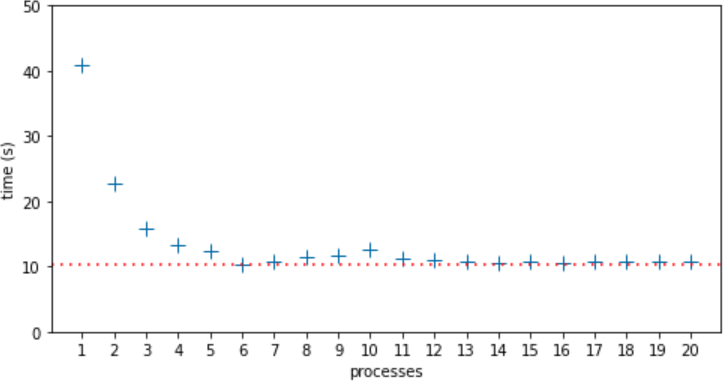
Figure 19-2. Median run times for each number of processes from 1 to 20. Highest median time was 40.81s, with 1 process. Lowest median time was 10.39s, with 6 processes, indicated by the dotted line.
In this 6-core laptop, the lowest median time was with 6 processes: 10.39s—marked by the dotted line in Figure 19-2. I expected the run time to increase after 6 processes due to CPU contention, and it reached a local maximum of 12.51s at 10 processes. I did not expect and I can’t explain why the performance improved at 11 processes and remained almost flat from 13 to 20 processes, with median times only slightly higher than the lowest median time at 6 processes.
Thread-Based Nonsolution
I also wrote threads.py, a version of procs.py using threading instead of multiprocessing. The code is very similar—as is usually the case when converting simple examples between these two APIs.16 Due to the GIL and the compute-intensive nature of is_prime, the threaded version is slower than the sequential code in Example 19-12, and it gets slower as the number of threads increase, because of CPU contention and the cost of context switching. To switch to a new thread, the OS needs to save CPU registers and update the program counter and stack pointer,
triggering expensive side effects like invalidating CPU caches and possibly even swapping memory pages.17
The next two chapters will cover more about concurrent programming in Python, using the high-level concurrent.futures library to manage threads and processes (Chapter 20) and the asyncio library for asynchronous programming (Chapter 21).
The remaining sections in this chapter aim to answer the question:
Given the limitations discussed so far, how is Python thriving in a multicore world?
Python in the Multicore World
Consider this citation from the widely quoted article “The Free Lunch Is Over: A Fundamental Turn Toward Concurrency in Software” by Herb Sutter:
The major processor manufacturers and architectures, from Intel and AMD to Sparc and PowerPC, have run out of room with most of their traditional approaches to boosting CPU performance. Instead of driving clock speeds and straight-line instruction throughput ever higher, they are instead turning en masse to hyper-threading and multicore architectures. March 2005. [Available online].
What Sutter calls the “free lunch” was the trend of software getting faster with no additional developer effort because CPUs were executing sequential code faster, year after year. Since 2004, that is no longer true: clock speeds and execution optimizations reached a plateau, and now any significant increase in performance must come from leveraging multiple cores or hyperthreading, advances that only benefit code that is written for concurrent execution.
Python’s story started in the early 1990s, when CPUs were still getting exponentially faster at sequential code execution. There was no talk about multicore CPUs except in supercomputers back then. At the time, the decision to have a GIL was a no-brainer. The GIL makes the interpreter faster when running on a single core, and its implementation simpler.18 The GIL also makes it easier to write simple extensions through the Python/C API.
Note
I just wrote “simple extensions” because an extension does not need to deal with the GIL at all. A function written in C or Fortran may be hundreds of times faster than the equivalent in Python.19 Therefore the added complexity of releasing the GIL to leverage multicore CPUs may not be needed in many cases. So we can thank the GIL for many extensions available for Python—and that is certainly one of the key reasons why the language is so popular today.
Despite the GIL, Python is thriving in applications that require concurrent or parallel execution, thanks to libraries and software architectures that work around the limitations of CPython.
Now let’s discuss how Python is used in system administration, data science, and server-side application development in the multicore, distributed computing world of 2021.
System Administration
Python is widely used to manage large fleets of servers, routers, load balancers, and network-attached storage (NAS). It’s also a leading option in software-defined networking (SDN) and ethical hacking. Major cloud service providers support Python through libraries and tutorials authored by the providers themselves or by their large communities of Python users.
In this domain, Python scripts automate configuration tasks by issuing commands to be carried out by the remote machines, so rarely there are CPU-bound operations to be done.
Threads or coroutines are well suited for such jobs.
In particular, the concurrent.futures package we’ll see in Chapter 20
can be used to perform the same operations on many remote machines at the same time without a lot of complexity.
Beyond the standard library, there are popular Python-based projects to manage server clusters: tools like Ansible and Salt, as well as libraries like Fabric.
There is also a growing number of libraries for system administration supporting coroutines and asyncio.
In 2016, Facebook’s Production Engineering team reported:
“We are increasingly relying on AsyncIO, which was introduced in Python 3.4,
and seeing huge performance gains as we move codebases away from Python 2.”
Data Science
Data science—including artificial intelligence—and scientific computing are very well served by Python. Applications in these fields are compute-intensive, but Python users benefit from a vast ecosystem of numeric computing libraries written in C, C++, Fortran, Cython, etc.—many of which are able to leverage multicore machines, GPUs, and/or distributed parallel computing in heterogeneous clusters.
As of 2021, Python’s data science ecosystem includes impressive tools such as:
- Project Jupyter
-
Two browser-based interfaces—Jupyter Notebook and JupyterLab—that allow users to run and document analytics code potentially running across the network on remote machines. Both are hybrid Python/JavaScript applications, supporting computing kernels written in different languages, all integrated via ZeroMQ—an asynchronous messaging library for distributed applications. The name Jupyter actually comes from Julia, Python, and R, the first three languages supported by the Notebook. The rich ecosystem built on top of the Jupyter tools include Bokeh, a powerful interactive visualization library that lets users navigate and interact with large datasets or continuously updated streaming data, thanks to the performance of modern JavaScript engines and browsers.
- TensorFlow and PyTorch
-
These are the top two deep learning frameworks, according to O’Reilly’s January 2021 report on usage of their learning resources during 2020. Both projects are written in C++, and are able to leverage multiple cores, GPUs, and clusters. They support other languages as well, but Python is their main focus and is used by the majority of their users. TensorFlow was created and is used internally by Google; PyTorch by Facebook.
- Dask
-
A parallel computing library that can farm out work to local processes or clusters of machines, “tested on some of the largest supercomputers in the world”—as their home page states. Dask offers APIs that closely emulate NumPy, pandas, and scikit-learn—the most popular libraries in data science and machine learning today. Dask can be used from JupyterLab or Jupyter Notebook, and leverages Bokeh not only for data visualization but also for an interactive dashboard showing the flow of data and computations across the processes/machines in near real time. Dask is so impressive that I recommend watching a video such as this 15-minute demo in which Matthew Rocklin—a maintainer of the project—shows Dask crunching data on 64 cores distributed in 8 EC2 machines on AWS.
These are only some examples to illustrate how the data science community is creating solutions that leverage the best of Python and overcome the limitations of the CPython runtime.
Server-Side Web/Mobile Development
Python is widely used in web applications and for the backend APIs supporting mobile applications. How is it that Google, YouTube, Dropbox, Instagram, Quora, and Reddit—among others—managed to build Python server-side applications serving hundreds of millions of users 24x7? Again, the answer goes way beyond what Python provides “out of the box.”
Before we discuss tools to support Python at scale, I must quote an admonition from the Thoughtworks Technology Radar:
High performance envy/web scale envy
We see many teams run into trouble because they have chosen complex tools, frameworks or architectures because they “might need to scale.” Companies such as Twitter and Netflix need to support extreme loads and so need these architectures, but they also have extremely skilled development teams able to handle the complexity. Most situations do not require these kinds of engineering feats; teams should keep their web scale envy in check in favor of simpler solutions that still get the job done.20
At web scale, the key is an architecture that allows horizontal scaling. At that point, all systems are distributed systems, and no single programming language is likely to be the right choice for every part of the solution.
Distributed systems is a field of academic research, but fortunately some practitioners have written accessible books anchored on solid research and practical experience. One of them is Martin Kleppmann, the author of Designing Data-Intensive Applications (O’Reilly).
Consider Figure 19-3, the first of many architecture diagrams in Kleppmann’s book. Here are some components I’ve seen in Python engagements that I worked on or have firsthand knowledge of:
-
Application caches:21 memcached, Redis, Varnish
-
Relational databases: PostgreSQL, MySQL
-
Document databases: Apache CouchDB, MongoDB
-
Full-text indexes: Elasticsearch, Apache Solr
-
Message queues: RabbitMQ, Redis
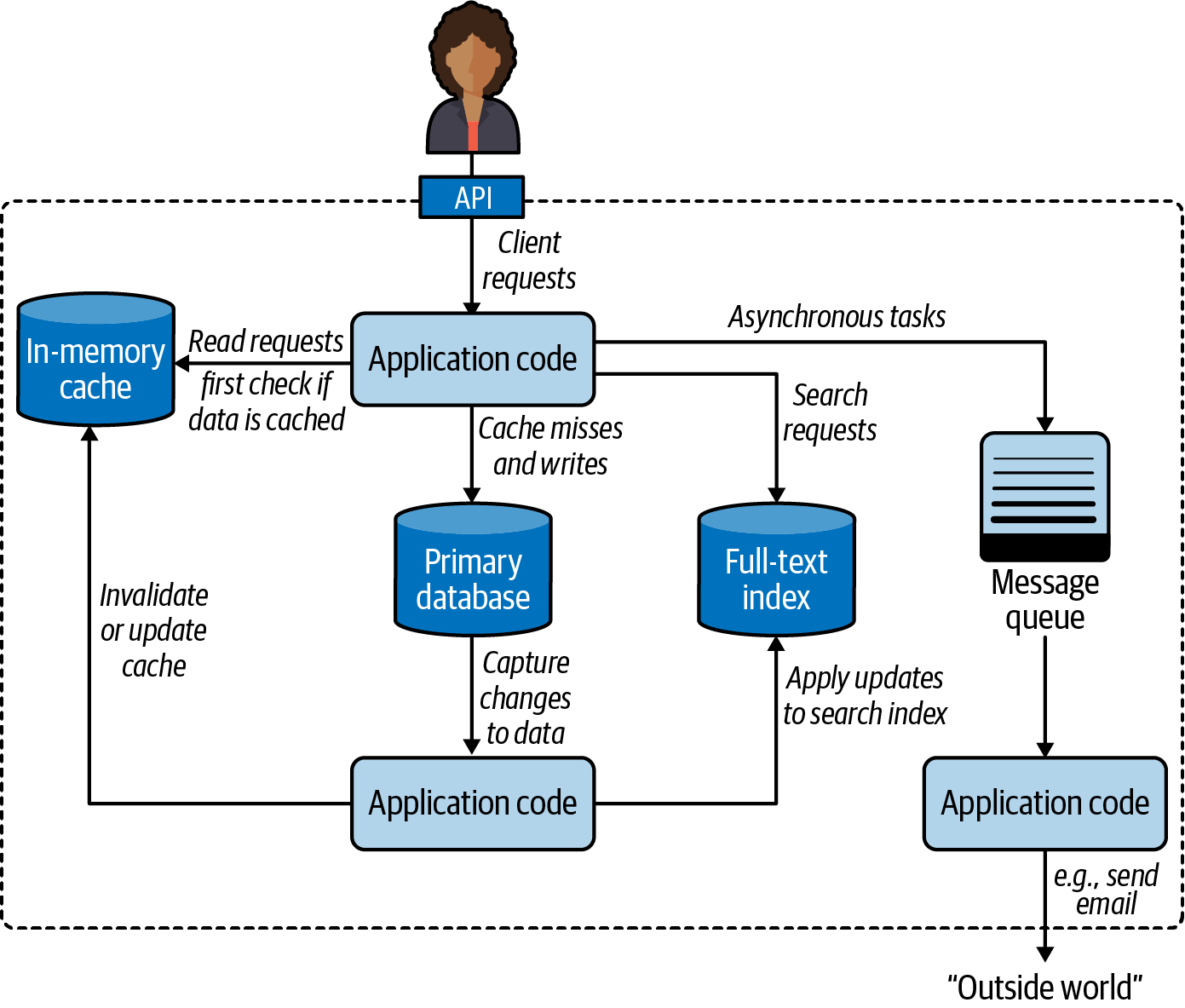
Figure 19-3. One possible architecture for a system combining several components.22
There are other industrial-strength open source products in each of those categories. Major cloud providers also offer their own proprietary alternatives.
Kleppmann’s diagram is general and language independent—as is his book. For Python server-side applications, two specific components are often deployed:
-
An application server to distribute the load among several instances of the Python application. The application server would appear near the top in Figure 19-3, handling client requests before they reached the application code.
-
A task queue built around the message queue on the righthand side of Figure 19-3, providing a higher-level, easier-to-use API to distribute tasks to processes running on other machines.
The next two sections explore these components that are recommended best practices in Python server-side deployments.
WSGI Application Servers
WSGI—the Web Server Gateway Interface—is a standard API for a Python framework or application to receive requests from an HTTP server and send responses to it.23 WSGI application servers manage one or more processes running your application, maximizing the use of the available CPUs.
Figure 19-4 illustrates a typical WSGI deployment.
Tip
If we wanted to merge the previous pair of diagrams, the content of the dashed rectangle in Figure 19-4 would replace the solid “Application code” rectangle at the top of Figure 19-3.
The best-known application servers in Python web projects are:
For users of the Apache HTTP server, mod_wsgi is the best option.
It’s as old as WSGI itself, but is actively maintained, and now provides a command-line launcher called mod_wsgi-express
that makes it easier to configure and more suitable for use in Docker containers.
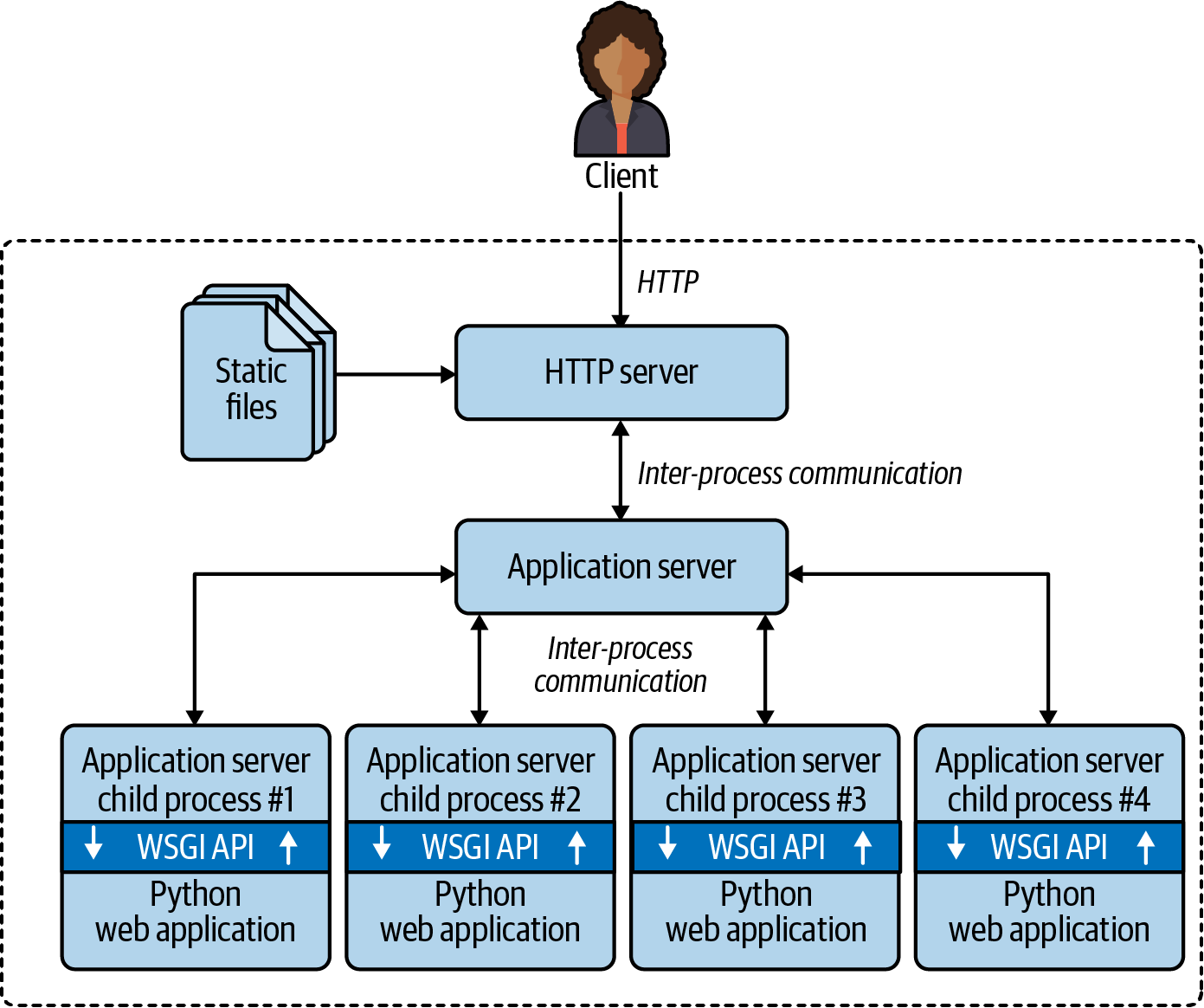
Figure 19-4. Clients connect to an HTTP server that delivers static files and routes other requests to the application server, which forks child processes to run the application code, leveraging multiple CPU cores. The WSGI API is the glue between the application server and the Python application code.
uWSGI and Gunicorn are the top choices in recent projects I know about. Both are often used with the NGINX HTTP server. uWSGI offers a lot of extra functionality, including an application cache, a task queue, cron-like periodic tasks, and many other features. On the flip side, uWSGI is much harder to configure properly than Gunicorn.25
Released in 2018, NGINX Unit is a new product from the makers of the well-known NGINX HTTP server and reverse proxy.
mod_wsgi and Gunicorn support Python web apps only, while uWSGI and NGINX Unit work with other languages as well. Please browse their docs to learn more.
The main point: all of these application servers can potentially use all CPU cores on the server by
forking multiple Python processes to run traditional web apps written in good old sequential code in Django, Flask, Pyramid, etc.
This explains why it’s been possible to earn a living as a Python web developer
without ever studying the threading, multiprocessing, or asyncio modules:
the application server handles concurrency transparently.
ASGI—Asynchronous Server Gateway Interface
WSGI is a synchronous API. It doesn’t support coroutines with async/await—the most efficient way to implement WebSockets or HTTP long polling in Python.
The ASGI specification is a successor to WSGI,
designed for asynchronous Python web
frameworks such as aiohttp, Sanic, FastAPI, etc.,
as well as Django and Flask, which are gradually adding asynchronous functionality.
Now let’s turn to another way of bypassing the GIL to achieve higher performance with server-side Python applications.
Distributed Task Queues
When the application server delivers a request to one of the Python processes running your code, your app needs to respond quickly: you want the process to be available to handle the next request as soon as possible. However, some requests demand actions that may take longer—for example, sending email or generating a PDF. That’s the problem that distributed task queues are designed to solve.
Celery and RQ are the best known open source task queues with Python APIs. Cloud providers also offer their own proprietary task queues.
These products wrap a message queue and offer a high-level API for delegating tasks to workers, possibly running on different machines.
Note
In the context of task queues, the words producer and consumer are used instead of traditional client/server terminology. For example, a Django view handler produces job requests, which are put in the queue to be consumed by one or more PDF rendering processes.
Quoting directly from Celery’s FAQ, here are some typical use cases:
Running something in the background. For example, to finish the web request as soon as possible, then update the users page incrementally. This gives the user the impression of good performance and “snappiness,” even though the real work might actually take some time.
Running something after the web request has finished.
Making sure something is done, by executing it asynchronously and using retries.
Scheduling periodic work.
Besides solving these immediate problems, task queues support horizontal scalability. Producers and consumers are decoupled: a producer doesn’t call a consumer, it puts a request in a queue. Consumers don’t need to know anything about the producers (but the request may include information about the producer, if an acknowledgment is required). Crucially, you can easily add more workers to consume tasks as demand grows. That’s why Celery and RQ are called distributed task queues.
Recall that our simple procs.py (Example 19-13) used two queues: one for job requests, the other for collecting results. The distributed architecture of Celery and RQ uses a similar pattern. Both support using the Redis NoSQL database as a message queue and result storage. Celery also supports other message queues like RabbitMQ or Amazon SQS, as well other databases for result storage.
This wraps up our introduction to concurrency in Python.
The next two chapters will continue this theme,
focusing on the concurrent.futures and asyncio packages of the standard library.
Chapter Summary
After a bit of theory, this chapter presented the spinner scripts implemented in each of Python’s three native concurrency programming models:
-
Threads, with the
threadingpackage -
Processes, with
multiprocessing -
Asynchronous coroutines with
asyncio
We then explored the real impact of the GIL with an experiment:
changing the spinner examples to compute the primality of a large integer and observe the resulting behavior.
This demonstrated graphically that CPU-intensive functions must be avoided in asyncio,
as they block the event loop.
The threaded version of the experiment worked—despite the GIL—because Python periodically interrupts threads,
and the example used only two threads:
one doing compute-intensive work, and the other driving the animation only 10 times per second.
The multiprocessing variant worked around the GIL,
starting a new process just for the animation, while the main process did the primality check.
The next example, computing several primes, highlighted the difference between multiprocessing and threading,
proving that only processes allow Python to benefit from multicore CPUs.
Python’s GIL makes threads worse than sequential code for heavy computations.
The GIL dominates discussions about concurrent and parallel computing in Python, but we should not overestimate its impact. That was the point of “Python in the Multicore World”. For example, the GIL doesn’t affect many use cases of Python in system administration. On the other hand, the data science and server-side development communities have worked around the GIL with industrial-strength solutions tailored to their specific needs. The last two sections mentioned two common elements to support Python server-side applications at scale: WSGI application servers and distributed task queues.
Further Reading
This chapter has an extensive reading list, so I split it into subsections.
Concurrency with Threads and Processes
The concurrent.futures library covered in Chapter 20 uses threads, processes, locks, and queues under the hood,
but you won’t see individual instances of them;
they’re bundled and managed by the higher-level abstractions of a ThreadPoolExecutor and a ProcessPoolExecutor.
If you want to learn more about the practice of concurrent programming with those low-level objects,
“An Intro to Threading in Python” by Jim Anderson is a good first read.
Doug Hellmann has a chapter titled “Concurrency with Processes, Threads, and Coroutines”
on his website and book,
The Python 3 Standard Library by Example
(Addison-Wesley).
Brett Slatkin’s Effective Python, 2nd ed. (Addison-Wesley),
David Beazley’s Python Essential Reference, 4th ed. (Addison-Wesley),
and Martelli et al., Python in a Nutshell, 3rd ed. (O’Reilly)
are other general Python references with significant coverage of threading and multiprocessing.
The vast multiprocessing official documentation includes useful advice in its
“Programming guidelines” section.
Jesse Noller and Richard Oudkerk contributed the multiprocessing package, introduced in PEP 371—Addition of the multiprocessing package to the standard library. The official documentation for the package is a 93 KB .rst file—that’s about 63 pages—making it one of the longest chapters in the Python standard library.
In High Performance Python, 2nd ed., (O’Reilly), authors Micha Gorelick and Ian Ozsvald include a chapter about multiprocessing with an example about checking for primes with a different strategy than our procs.py example. For each number, they split the range of possible factors—from 2 to sqrt(n)—into subranges, and make each worker iterate over one of the subranges.
Their divide-and-conquer approach is typical of scientific computing applications where the datasets are huge, and workstations (or clusters) have more CPU cores than users.
On a server-side system handling requests from many users, it is simpler and more efficient to
let each process work on one computation from start to finish—reducing the overhead of communication and coordination among processes.
Besides multiprocessing, Gorelick and Ozsvald present many other ways of developing and deploying high-performance data science applications leveraging multiple cores, GPUs, clusters, profilers, and compilers like Cython and Numba. Their last chapter, “Lessons from the Field,” is a valuable collection of short case studies contributed by other practitioners of high-performance computing in Python.
Advanced Python Development by Matthew Wilkes (Apress),
is a rare book that includes short examples to explain concepts,
while also showing how to build a realistic application ready for production:
a data aggregator, similar to DevOps monitoring systems or IoT data collectors for distributed sensors.
Two chapters in Advanced Python Development cover concurrent programming with threading and asyncio.
Jan Palach’s Parallel Programming with Python (Packt, 2014) explains the core concepts behind concurrency and parallelism, covering Python’s standard library as well as Celery.
“The Truth About Threads” is the title of Chapter 2 in Using Asyncio in Python by Caleb Hattingh (O’Reilly).26 The chapter covers the benefits and drawbacks of threading—with compelling quotes from several authoritative sources—making it clear that the fundamental challenges of threads have nothing to do with Python or the GIL. Quoting verbatim from page 14 of Using Asyncio in Python:
These themes repeat throughout:
Threading makes code hard to reason about.
Threading is an inefficient model for large-scale concurrency (thousands of concurrent tasks).
If you want to learn the hard way how difficult it is to reason about threads and locks—without risking your job—try the exercises in Allen Downey’s workbook, The Little Book of Semaphores (Green Tea Press). The exercises in Downey’s book range from easy to very hard to unsolvable, but even the easy ones are eye-opening.
The GIL
If you are intrigued about the GIL, remember we have no control over it from Python code,
so the canonical reference is in the C-API documentation:
Thread State and the Global Interpreter Lock.
The Python Library and Extension FAQ answers:
“Can’t we get rid of the Global Interpreter Lock?”.
Also worth reading are posts by Guido van Rossum and Jesse Noller (contributor of the multiprocessing package), respectively:
“It isn’t Easy to Remove the GIL” and
“Python Threads and the Global Interpreter Lock”.
CPython Internals by Anthony Shaw (Real Python) explains the implementation of the CPython 3 interpreter at the C programming level. Shaw’s longest chapter is “Parallelism and Concurrency”: a deep dive into Python’s native support for threads and processes, including managing the GIL from extensions using the C/Python API.
Finally, David Beazley presented a detailed exploration in “Understanding the Python GIL”.27 In slide #54 of the presentation, Beazley reports an increase in processing time for a particular benchmark with the new GIL algorithm introduced in Python 3.2. The issue is not significant with real workloads, according to a comment by Antoine Pitrou—who implemented the new GIL algorithm—in the bug report submitted by Beazley: Python issue #7946.
Concurrency Beyond the Standard Library
Fluent Python focuses on core language features and core parts of the standard library. Full Stack Python is a great complement to this book: it’s about Python’s ecosystem, with sections titled “Development Environments,” “Data,” “Web Development,” and “DevOps,” among others.
I’ve already mentioned two books that cover concurrency using the Python standard library that also include significant content on third-party libraries and tools: High Performance Python, 2nd ed. and Parallel Programming with Python. Francesco Pierfederici’s Distributed Computing with Python (Packt) covers the standard library and also the use of cloud providers and HPC (High-Performance Computing) clusters.
“Python, Performance, and GPUs” by Matthew Rocklin is “a status update for using GPU accelerators from Python,” posted in June 2019.
“Instagram currently features the world’s largest deployment of the Django web framework, which is written entirely in Python.” That’s the opening sentence of the blog post, “Web Service Efficiency at Instagram with Python”, written by Min Ni—a software engineer at Instagram. The post describes metrics and tools Instagram uses to optimize the efficiency of its Python codebase, as well as detect and diagnose performance regressions as it deploys its back end “30-50 times a day.”
Architecture Patterns with Python: Enabling Test-Driven Development, Domain-Driven Design, and Event-Driven Microservices by Harry Percival and Bob Gregory (O’Reilly) presents architectural patterns for Python server-side applications. The authors also made the book freely available online at cosmicpython.com.
Two elegant and easy-to-use libraries for parallelizing tasks over processes are
lelo by João S. O. Bueno and
python-parallelize by Nat Pryce.
The lelo package defines a @parallel decorator that you can apply to any function to magically make it unblocking:
when you call the decorated function, its execution is started in another process.
Nat Pryce’s python-parallelize package provides a parallelize generator that
distributes the execution of a for loop over multiple CPUs.
Both packages are built on the multiprocessing library.
Python core developer Eric Snow maintains a Multicore Python wiki, with notes about his and other people’s efforts to improve Python’s support for parallel execution. Snow is the author of PEP 554—Multiple Interpreters in the Stdlib. If approved and implemented, PEP 554 lays the groundwork for future enhancements that may eventually allow Python to use multiple cores without the overheads of multiprocessing. One of the biggest blockers is the complex interaction between multiple active subinterpreters and extensions that assume a single interpreter.
Mark Shannon—also a Python maintainer—created a useful table comparing concurrent models in Python, referenced in a discussion about subinterpreters between him, Eric Snow, and other developers on the python-dev mailing list. In Shannon’s table, the “Ideal CSP” column refers to the theoretical Communicating sequential processes model proposed by Tony Hoare in 1978. Go also allows shared objects, violating an essential constraint of CSP: execution units should communicate through message passing through channels.
Stackless Python (a.k.a. Stackless) is a fork of CPython implementing microthreads, which are application-level lightweight threads—as opposed to OS threads. The massively multiplayer online game EVE Online was built on Stackless, and engineers employed by the game company CCP were maintainers of Stackless for a while. Some features of Stackless were reimplemented in the Pypy interpreter and the greenlet package, the core technology of the gevent networking library, which in turn is the foundation of the Gunicorn application server.
The actor model of concurrent programming is at the core of the highly scalable Erlang and Elixir languages, and is also the model of the Akka framework for Scala and Java. If you want to try out the actor model in Python, check out the Thespian and Pykka libraries.
My remaining recommendations have few or zero mentions of Python, but are nevertheless relevant to readers interested in the theme of this chapter.
Concurrency and Scalability Beyond Python
RabbitMQ in Action by Alvaro Videla and Jason J. W. Williams (Manning) is a very well-written introduction to RabbitMQ and the Advanced Message Queuing Protocol (AMQP) standard, with examples in Python, PHP, and Ruby. Regardless of the rest of your tech stack, and even if you plan to use Celery with RabbitMQ under the hood, I recommend this book for its coverage of concepts, motivation, and patterns for distributed message queues, as well as operating and tuning RabbitMQ at scale.
I learned a lot reading Seven Concurrency Models in Seven Weeks, by Paul Butcher (Pragmatic Bookshelf), with the eloquent subtitle When Threads Unravel. Chapter 1 of the book presents the core concepts and challenges of programming with threads and locks in Java.28 The remaining six chapters of the book are devoted to what the author considers better alternatives for concurrent and parallel programming, as supported by different languages, tools, and libraries. The examples use Java, Clojure, Elixir, and C (for the chapter about parallel programming with the OpenCL framework). The CSP model is exemplified with Clojure code, although the Go language deserves credit for popularizing that approach. Elixir is the language of the examples illustrating the actor model. A freely available, alternative bonus chapter about actors uses Scala and the Akka framework. Unless you already know Scala, Elixir is a more accessible language to learn and experiment with the actor model and the Erlang/OTP distributed systems platform.
Unmesh Joshi of Thoughtworks has contributed several pages documenting “Patterns of Distributed Systems” to Martin Fowler’s blog. The opening page is a great introduction the topic, with links to individual patterns. Joshi is adding patterns incrementally, but what’s already there distills years of hard-earned experience in mission-critical systems.
Martin Kleppmann’s Designing Data-Intensive Applications (O’Reilly) is a rare book written by a practitioner with deep industry experience and advanced academic background. The author worked with large-scale data infrastructure at LinkedIn and two startups, before becoming a researcher of distributed systems at the University of Cambridge. Each chapter in Kleppmann’s book ends with an extensive list of references, including recent research results. The book also includes numerous illuminating diagrams and beautiful concept maps.
I was fortunate to be in the audience for Francesco Cesarini’s outstanding workshop on the architecture of reliable distributed systems at OSCON 2016: “Designing and architecting for scalability with Erlang/OTP” (video at the O’Reilly Learning Platform). Despite the title, 9:35 into the video, Cesarini explains:
Very little of what I am going to say will be Erlang-specific […]. The fact remains that Erlang will remove a lot of accidental difficulties to making systems which are resilient and which never fail, and are scalable. So it will be much easier if you do use Erlang, or a language running on the Erlang virtual machine.
That workshop was based on the last four chapters of Designing for Scalability with Erlang/OTP by Francesco Cesarini and Steve Vinoski (O’Reilly).
Programming distributed systems is challenging and exciting, but beware of web-scale envy. The KISS principle remains solid engineering advice.
Check out the paper “Scalability! But at what COST?” by Frank McSherry, Michael Isard, and Derek G. Murray. The authors identified parallel graph-processing systems presented in academic symposia that require hundreds of cores to outperform a “competent single-threaded implementation.” They also found systems that “underperform one thread for all of their reported configurations.”
Those findings remind me of a classic hacker quip:
My Perl script is faster than your Hadoop cluster.
1 Slide 8 of the talk “Concurrency Is Not Parallelism”.
2 I studied and worked with Prof. Imre Simon, who liked to say there are two major sins in science: using different words to mean the same thing and using one word to mean different things. Imre Simon (1943–2009) was a pioneer of computer science in Brazil who made seminal contributions to Automata Theory and started the field of Tropical Mathematics. He was also an advocate of free software and free culture.
3 This section was suggested by my friend Bruce Eckel—author of books about Kotlin, Scala, Java, and C++.
4 Call sys.getswitchinterval() to get the interval; change it with sys.setswitchinterval(s).
5 A syscall is a call from user code to a function of the operating system kernel. I/O, timers, and locks are some of the kernel services available through syscalls. To learn more, read the Wikipedia “System call” article.
6 The zlib and bz2 modules are specifically mentioned in a python-dev message by Antoine Pitrou, who contributed the time-slicing GIL logic to Python 3.2.
7 Source: slide 106 of Beazley’s “Generators: The Final Frontier” tutorial.
8 Source: last paragraph of the “Thread objects” section.
9 Unicode has lots of characters useful for simple animations, like the Braille patterns for example. I used the ASCII characters "\|/-" to keep the examples simple.
10 The semaphore is a fundamental building block that can be used to implement other synchronization mechanisms. Python provides different semaphore classes for use with threads, processes, and coroutines. We’ll see asyncio.Semaphore in “Using asyncio.as_completed and a Thread” (Chapter 21).
11 Thanks to tech reviewers Caleb Hattingh and Jürgen Gmach who did not let me overlook greenlet and gevent.
12 It’s a 15” MacBook Pro 2018 with a 6-core, 2.2 GHz Intel Core i7 CPU.
13 This is true today because you are probably using a modern OS with preemptive multitasking. Windows before the NT era and macOS before the OSX era were not “preemptive,” therefore any process could take over 100% of the CPU and freeze the whole system. We are not completely free of this kind of problem today but trust this graybeard: this troubled every user in the 1990s, and a hard reset was the only cure.
14 In this example, 0 is a convenient sentinel. None is also commonly used for that. Using 0 simplifies the type hint for PrimeResult and the code for worker.
15 Surviving serialization without losing our identity is a pretty good life goal.
16 See 19-concurrency/primes/threads.py in the Fluent Python code repository.
17 To learn more, see “Context switch” in the English Wikipedia.
18 These are probably the same reasons that prompted the creator of the Ruby language, Yukihiro Matsumoto, to use a GIL in his interpreter as well.
19 As an exercise in college, I had to implement the LZW compression algorithm in C. But first I wrote it in Python, to check my understanding of the spec. The C version was about 900× faster.
20 Source: Thoughtworks Technology Advisory Board, Technology Radar—November 2015.
21 Contrast application caches—used directly by your application code—with HTTP caches, which would be placed on the top edge of Figure 19-3 to serve static assets like images, CSS, and JS files. Content Delivery Networks (CDNs) offer another type of HTTP cache, deployed in data centers closer to the end users of your application.
22 Diagram adapted from Figure 1-1, Designing Data-Intensive Applications by Martin Kleppmann (O’Reilly).
23 Some speakers spell out the WSGI acronym, while others pronounce it as one word rhyming with “whisky.”
24 uWSGI is spelled with a lowercase “u,” but that is pronounced as the Greek letter “µ,” so the whole name sounds like “micro-whisky” with a “g” instead of the “k.”
25 Bloomberg engineers Peter Sperl and Ben Green wrote “Configuring uWSGI for Production Deployment”, explaining how many of the default settings in uWSGI are not suitable for many common deployment scenarios. Sperl presented a summary of their recommendations at EuroPython 2019. Highly recommended for users of uWSGI.
26 Caleb is one of the tech reviewers for this edition of Fluent Python.
27 Thanks to Lucas Brunialti for sending me a link to this talk.
28 Python’s threading and concurrent.futures APIs are heavily influenced by the Java standard library.
29 The Erlang community uses the term “process” for actors. In Erlang, each process is a function in its own loop, so they are very lightweight and it’s feasible to have millions of them active at once in a single machine—no relation to the heavyweight OS processes we’ve been talking about elsewhere in this chapter. So here we have examples of the two sins described by Prof. Simon: using different words to mean the same thing, and using one word to mean different things.