Chapter 18. with, match, and else Blocks
Context managers may end up being almost as important as the subroutine itself. We’ve only scratched the surface with them. […] Basic has a
withstatement, there arewithstatements in lots of languages. But they don’t do the same thing, they all do something very shallow, they save you from repeated dotted [attribute] lookups, they don’t do setup and tear down. Just because it’s the same name don’t think it’s the same thing. Thewithstatement is a very big deal.1Raymond Hettinger, eloquent Python evangelist
This chapter is about control flow features that are not so common in other languages, and for this reason tend to be overlooked or underused in Python. They are:
-
The
withstatement and context manager protocol -
Pattern matching with
match/case -
The
elseclause infor,while, andtrystatements
The with statement sets up a temporary context and reliably tears it down,
under the control of a context manager object.
This prevents errors and reduces boilerplate code,
making APIs at the same time safer and easier to use.
Python programmers are finding lots of uses for with blocks beyond automatic file closing.
We’ve seen pattern matching in previous chapters,
but here we’ll see how the grammar of a language
can be expressed as sequence patterns.
That observation explains why match/case is an effective tool
to create language processors that are easy to understand and extend.
We’ll study a complete interpreter for a small but
functional subset of the Scheme language.
The same ideas could be applied to develop a template language
or a DSL (Domain-Specific Language) to encode business rules
in a larger system.
The else clause is not a big deal,
but it does help convey intention when properly used
together with for, while, and try.
What’s New in This Chapter
“Pattern Matching in lis.py: A Case Study” is a new section.
I updated “The contextlib Utilities” to cover
a few features of the contextlib module added since Python 3.6,
and the new parenthesized context managers syntax introduced in Python 3.10.
Let’s start with the powerful with statement.
Context Managers and with Blocks
Context manager objects exist to control a with statement, just like iterators exist to control a for statement.
The with statement was designed to simplify some common uses of try/finally,
which guarantees that some operation is performed after a block of code,
even if the block is terminated by return, an exception, or a sys.exit() call.
The code in the finally clause usually releases a critical resource
or restores some previous state that was temporarily changed.
The Python community is finding new, creative uses for context managers. Some examples from the standard library are:
-
Managing transactions in the
sqlite3module—see “Using the connection as a context manager”. -
Safely handling locks, conditions, and semaphores—as described in the
threadingmodule documentation. -
Setting up custom environments for arithmetic operations with
Decimalobjects—see thedecimal.localcontextdocumentation. -
Patching objects for testing—see the
unittest.mock.patchfunction.
The context manager interface consists of the __enter__ and __exit__ methods.
At the top of the with, Python calls the __enter__ method of the context manager object.
When the with block completes or terminates for any reason,
Python calls __exit__ on the context manager object.
The most common example is making sure a file object is closed. Example 18-1 is a detailed demonstration of using with to close a file.
Example 18-1. Demonstration of a file object as a context manager
>>>withopen('mirror.py')asfp:...src=fp.read(60)...>>>len(src)60>>>fp<_io.TextIOWrapper name='mirror.py' mode='r' encoding='UTF-8'>>>>fp.closed,fp.encoding(True, 'UTF-8')>>>fp.read(60)Traceback (most recent call last):File"<stdin>", line1, in<module>ValueError:I/O operation on closed file.

fpis bound to the opened text file because the file’s__enter__method returnsself.
Read
60Unicode characters fromfp.
The
fpvariable is still available—withblocks don’t define a new scope, as functions do.
We can read the attributes of the
fpobject.
But we can’t read more text from
fpbecause at the end of thewithblock, theTextIOWrapper.__exit__method was called, and it closed the file.
The first callout in Example 18-1 makes a subtle but crucial point:
the context manager object is the result of evaluating the expression after with,
but the value bound to the target variable (in the as clause)
is the result returned by the __enter__ method of the context manager object.
It just happens that the open() function returns an instance of TextIOWrapper, and its __enter__ method returns self.
But in a different class, the __enter__ method may also return some other object
instead of the context manager instance.
When control flow exits the with block in any way,
the __exit__ method is invoked on the context manager object,
not on whatever was returned by __enter__.
The as clause of the with statement is optional. In the case of open,
we always need it to get a reference to the file, so that we can call methods on it.
But some context managers return None because they have no useful object to give back to the user.
Example 18-2 shows the operation of a perfectly frivolous context manager designed to highlight the distinction between the context manager and the object returned by its __enter__ method.
Example 18-2. Test-driving the LookingGlass context manager class
>>>frommirrorimportLookingGlass>>>withLookingGlass()aswhat:...('Alice, Kitty and Snowdrop')...(what)...pordwonSdnayttiK,ecilAYKCOWREBBAJ>>>what'JABBERWOCKY'>>>('Back to normal.')Backtonormal.
The context manager is an instance of
LookingGlass; Python calls__enter__on the context manager and the result is bound towhat.Print a
str, then the value of the target variablewhat. The output of eachprintwill come out reversed.Now the
withblock is over. We can see that the value returned by__enter__, held inwhat, is the string'JABBERWOCKY'.Program output is no longer reversed.
Example 18-3 shows the implementation of LookingGlass.
Example 18-3. mirror.py: code for the LookingGlass context manager class
importsysclassLookingGlass:def__enter__(self):self.original_write=sys.stdout.writesys.stdout.write=self.reverse_writereturn'JABBERWOCKY'defreverse_write(self,text):self.original_write(text[::-1])def__exit__(self,exc_type,exc_value,traceback):sys.stdout.write=self.original_writeifexc_typeisZeroDivisionError:('Please DO NOT divide by zero!')returnTrue
Python invokes
__enter__with no arguments besidesself.Hold the original
sys.stdout.writemethod, so we can restore it later.Monkey-patch
sys.stdout.write, replacing it with our own method.Return the
'JABBERWOCKY'string just so we have something to put in the target variablewhat.Our replacement to
sys.stdout.writereverses thetextargument and calls the original implementation.
Python calls
__exit__withNone, None, Noneif all went well; if an exception is raised, the three arguments get the exception data, as described after this example.
Restore the original method to
sys.stdout.write.
If the exception is not
Noneand its type isZeroDivisionError, print a message…
…and return
Trueto tell the interpreter that the exception was handled.
If
__exit__returnsNoneor any falsy value, any exception raised in thewithblock will be propagated.
Tip
When real applications take over standard output, they often want to replace sys.stdout with another file-like object for a while, then switch back to the original. The contextlib.redirect_stdout context manager does exactly that: just pass it the file-like object that will stand in for sys.stdout.
The interpreter calls the __enter__ method with no arguments—beyond the implicit self. The three arguments passed to __exit__ are:
exc_type-
The exception class (e.g.,
ZeroDivisionError). exc_value-
The exception instance. Sometimes, parameters passed to the exception constructor—such as the error message—can be found in
exc_value.args. traceback-
A
tracebackobject.2
For a detailed look at how a context manager works, see Example 18-4, where
LookingGlass is used outside of a with block, so we can manually call its __enter__ and __exit__ methods.
Example 18-4. Exercising LookingGlass without a with block
>>>frommirrorimportLookingGlass>>>manager=LookingGlass()>>>manager# doctest: +ELLIPSIS<mirror.LookingGlassobjectat0x...>>>>monster=manager.__enter__()>>>monster=='JABBERWOCKY'eurT>>>monster'YKCOWREBBAJ'>>>manager# doctest: +ELLIPSIS>...tatcejbossalGgnikooL.rorrim<>>>manager.__exit__(None,None,None)>>>monster'JABBERWOCKY'
Instantiate and inspect the
managerinstance.Call the manager’s
__enter__method and store result inmonster.monsteris the string'JABBERWOCKY'. TheTrueidentifier appears reversed because all output viastdoutgoes through thewritemethod we patched in__enter__.
Parenthesized Context Managers in Python 3.10
Python 3.10 adopted a new, more powerful parser, allowing new syntax beyond what was possible with the older LL(1) parser. One syntax enhancement was to allow parenthesized context managers, like this:
with(CtxManager1()asexample1,CtxManager2()asexample2,CtxManager3()asexample3,):...
Prior to 3.10, we’d have to write that as nested with blocks.
The standard library includes the contextlib package with handy
functions, classes, and decorators for building, combining, and using
context managers.
The contextlib Utilities
Before rolling your own context manager classes, take a look at
contextlib—“Utilities for with-statement contexts”
in the Python documentation.
Maybe what you are about to build already exists,
or there is a class or some callable that will make your job easier.
Besides the redirect_stdout context manager mentioned right after Example 18-3, redirect_stderr was added in Python 3.5—it does the same as the former, but for output directed to stderr.
The contextlib package also includes:
closing-
A function to build context managers out of objects that provide a
close()method but don’t implement the__enter__/__exit__interface. suppress-
A context manager to temporarily ignore exceptions given as arguments.
nullcontext-
A context manager that does nothing, to simplify conditional logic around objects that may not implement a suitable context manager. It serves as a stand-in when conditional code before the
withblock may or may not provide a context manager for thewithstatement—added in Python 3.7.
The contextlib module provides classes and a decorator that are more widely applicable than the decorators just mentioned:
@contextmanager-
A decorator that lets you build a context manager from a simple generator function, instead of creating a class and implementing the interface. See “Using @contextmanager”.
AbstractContextManager-
An ABC that formalizes the context manager interface, and makes it a bit easier to create context manager classes by subclassing—added in Python 3.6.
ContextDecorator-
A base class for defining class-based context managers that can also be used as function decorators, running the entire function within a managed context.
ExitStack-
A context manager that lets you enter a variable number of context managers. When the
withblock ends,ExitStackcalls the stacked context managers’__exit__methods in LIFO order (last entered, first exited). Use this class when you don’t know beforehand how many context managers you need to enter in yourwithblock; for example, when opening all files from an arbitrary list of files at the same time.
With Python 3.7, contextlib added AbstractAsyncContextManager, @asynccontextmanager, and AsyncExitStack.
They are similar to the equivalent utilities without the async part of the name, but designed for use with the new async with statement, covered in Chapter 21.
The most widely used of these utilities is the @contextmanager decorator, so it deserves more attention. That decorator is also interesting because it shows a use for the yield statement unrelated to iteration.
Using @contextmanager
The @contextmanager decorator is an elegant and practical tool that brings together three distinctive Python features: a function decorator, a generator, and the with statement.
Using @contextmanager reduces the boilerplate of creating a context manager: instead of writing a whole class with __enter__/__exit__ methods, you just implement a generator with a single yield that should produce whatever you want the __enter__ method to return.
In a generator decorated with @contextmanager, yield splits the body of the function in two parts: everything before the yield will be executed at the beginning of the with block when the interpreter calls __enter__; the code after yield will run when __exit__ is called at the end of the block.
Example 18-5 replaces the LookingGlass class from Example 18-3 with a generator function.
Example 18-5. mirror_gen.py: a context manager implemented with a generator
importcontextlibimportsys@contextlib.contextmanagerdeflooking_glass():original_write=sys.stdout.writedefreverse_write(text):original_write(text[::-1])sys.stdout.write=reverse_writeyield'JABBERWOCKY'sys.stdout.write=original_write
Apply the
contextmanagerdecorator.Preserve the original
sys.stdout.writemethod.reverse_writecan calloriginal_writelater because it is available in its closure.Replace
sys.stdout.writewithreverse_write.Yield the value that will be bound to the target variable in the
asclause of thewithstatement. The generator pauses at this point while the body of thewithexecutes.When control exits the
withblock, execution continues after theyield; here the originalsys.stdout.writeis restored.
Example 18-6 shows the looking_glass function in operation.
Example 18-6. Test-driving the looking_glass context manager function
>>>frommirror_genimportlooking_glass>>>withlooking_glass()aswhat:...('Alice, Kitty and Snowdrop')...(what)...pordwonSdnayttiK,ecilAYKCOWREBBAJ>>>what'JABBERWOCKY'>>>('back to normal')backtonormal
The only difference from Example 18-2 is the name of the context manager:
looking_glassinstead ofLookingGlass.
The contextlib.contextmanager decorator wraps the function in a class that implements the __enter__ and __exit__ methods.3
The __enter__ method of that class:
-
Calls the generator function to get a generator object—let’s call it
gen. -
Calls
next(gen)to drive it to theyieldkeyword. -
Returns the value yielded by
next(gen), to allow the user to bind it to a variable in thewith/asform.
When the with block terminates, the __exit__ method:
-
Checks whether an exception was passed as
exc_type; if so,gen.throw(exception)is invoked, causing the exception to be raised in theyieldline inside the generator function body. -
Otherwise,
next(gen)is called, resuming the execution of the generator function body after theyield.
Example 18-5 has a flaw:
if an exception is raised in the body of the with block,
the Python interpreter will catch it and raise it again in the yield expression inside looking_glass.
But there is no error handling there,
so the looking_glass generator will terminate without ever restoring
the original sys.stdout.write method, leaving the system in an invalid state.
Example 18-7 adds special handling of the ZeroDivisionError exception, making it functionally equivalent to the class-based Example 18-3.
Example 18-7. mirror_gen_exc.py: generator-based context manager implementing exception handling—same external behavior as Example 18-3
importcontextlibimportsys@contextlib.contextmanagerdeflooking_glass():original_write=sys.stdout.writedefreverse_write(text):original_write(text[::-1])sys.stdout.write=reverse_writemsg=''try:yield'JABBERWOCKY'exceptZeroDivisionError:msg='Please DO NOT divide by zero!'finally:sys.stdout.write=original_writeifmsg:(msg)
Create a variable for a possible error message; this is the first change in relation to Example 18-5.
Handle
ZeroDivisionErrorby setting an error message.Undo monkey-patching of
sys.stdout.write.Display error message, if it was set.
Recall that the __exit__ method tells the interpreter that it has handled the exception by returning a truthy value; in that case, the interpreter suppresses the exception.
On the other hand, if __exit__ does not explicitly return a value,
the interpreter gets the usual None, and propagates the exception.
With @contextmanager, the default behavior is inverted:
the __exit__ method provided by the decorator assumes any exception sent into the generator is handled and should be suppressed.
Tip
Having a try/finally (or a with block) around the yield is an unavoidable price of using @contextmanager, because you never know what the users of your context manager are going to do inside the with block.4
A little-known feature of @contextmanager is that the
generators decorated with it can also be used as decorators
themselves.5
That happens because @contextmanager is implemented with the
contextlib.ContextDecorator class.
Example 18-8 shows the looking_glass context manager from
Example 18-5 used as decorator.
Example 18-8. The looking_glass context manager also works as a decorator
>>>@looking_glass()...defverse():...('The time has come')...>>>verse()emocsahemitehT>>>('back to normal')backtonormal
looking_glassdoes its job before and after the body ofverseruns.This confirms that the original
sys.writewas restored.
Contrast Example 18-8 with
Example 18-6, where looking_glass is used
as a context manager.
An interesting real-life example of @contextmanager outside of the standard library is Martijn Pieters’ in-place file rewriting using a context manager. Example 18-9 shows how it’s used.
Example 18-9. A context manager for rewriting files in place
importcsvwithinplace(csvfilename,'r',newline='')as(infh,outfh):reader=csv.reader(infh)writer=csv.writer(outfh)forrowinreader:row+=['new','columns']writer.writerow(row)
The inplace function is a context manager that gives you two handles—infh and outfh in the example—to the same file, allowing your code to read and write to it at the same time. It’s easier to use than the standard library’s fileinput.input function (which also provides a context manager, by the way).
If you want to study Martijn’s inplace source code (listed in the post), find the yield keyword: everything before it deals with setting up the context, which entails creating a backup file, then opening and yielding references to the readable and writable file handles that will be returned by the __enter__ call. The __exit__ processing after the yield closes the file handles and restores the file from the backup if something went wrong.
This concludes our overview of the with statement and context managers.
Let’s turn to match/case in the context of a complete example.
Pattern Matching in lis.py: A Case Study
In “Pattern Matching Sequences in an Interpreter” we saw examples of sequence patterns
extracted from the evaluate function of Peter Norvig’s lis.py
interpreter, ported to Python 3.10.
In this section I want to give a broader overview of how lis.py works,
and also explore all the case clauses of evaluate,
explaining not only the patterns but also what the interpreter does in each case.
Besides showing more pattern matching, I wrote this section for three reasons:
-
Norvig’s lis.py is a beautiful example of idiomatic Python code.
-
The simplicity of Scheme is a master class of language design.
-
Learning how an interpreter works gave me a deeper understanding of Python and programming languages in general—interpreted or compiled.
Before looking at the Python code, let’s get a little taste of Scheme so you can make sense of this case study—in case you haven’t seen Scheme or Lisp before.
Scheme Syntax
In Scheme there is no distinction between expressions and statements,
like we have in Python. Also, there are no infix operators.
All expressions use prefix notation like (+ x 13) instead of x + 13.
The same prefix notation is used for function calls—e.g., (gcd x 13)—and
special forms—e.g., (define x 13),
which we’d write as the assignment statement x = 13 in
Python.
The notation used by Scheme and most Lisp dialects is known as S-expression.6
Example 18-10 shows a simple example in Scheme.
Example 18-10. Greatest common divisor in Scheme
(define(modmn)(-m(*n(quotientmn))))(define(gcdmn)(if(=n0)m(gcdn(modmn))))(display(gcd1845))
Example 18-10 shows three Scheme expressions:
two function definitions—mod and gcd—and a call to display,
which will output 9, the result of (gcd 18 45).
Example 18-11 is the same code in Python (shorter than an English explanation of the recursive
Euclidean algorithm).
Example 18-11. Same as Example 18-10, written in Python
defmod(m,n):returnm-(m//n*n)defgcd(m,n):ifn==0:returnmelse:returngcd(n,mod(m,n))(gcd(18,45))
In idiomatic Python, I’d use the % operator instead of reinventing mod,
and it would be more efficient to use a while loop instead of recursion.
But I wanted to show two function definitions,
and make the examples as similar as possible,
to help you read the Scheme code.
Scheme has no iterative control flow commands like while or for.
Iteration is done with recursion.
Note how there are no assignments in the Scheme and Python examples.
Extensive use of recursion and minimal use of assignment
are hallmarks of programming in a functional style.7
Now let’s review the code of the Python 3.10 version of lis.py. The complete source code with tests is in the 18-with-match/lispy/py3.10/ directory of the GitHub repository fluentpython/example-code-2e.
Imports and Types
Example 18-12 shows the first lines of lis.py.
The use of TypeAlias and the | type union operator require Python 3.10.
Example 18-12. lis.py: top of the file
importmathimportoperatorasopfromcollectionsimportChainMapfromitertoolsimportchainfromtypingimportAny,TypeAlias,NoReturnSymbol:TypeAlias=strAtom:TypeAlias=float|int|SymbolExpression:TypeAlias=Atom|list
The types defined are:
Symbol-
Just an alias for
str. In lis.py,Symbolis used for identifiers; there is no string data type with operations such as slicing, splitting, etc.8 Atom-
A simple syntactic element, such as a number or a
Symbol—as opposed to a composite structure made of distinct parts, like a list. Expression-
The building blocks of Scheme programs are expressions made of atoms and lists, possibly nested.
The Parser
Norvig’s parser is 36 lines of code showcasing the power of Python applied to handling the simple recursive syntax of S-expression—without string data, comments, macros, and other features of standard Scheme that make parsing more complicated (Example 18-13).
Example 18-13. lis.py: the main parsing functions
defparse(program:str)->Expression:"Read a Scheme expression from a string."returnread_from_tokens(tokenize(program))deftokenize(s:str)->list[str]:"Convert a string into a list of tokens."returns.replace('(',' ( ').replace(')',' ) ').split()defread_from_tokens(tokens:list[str])->Expression:"Read an expression from a sequence of tokens."# more parsing code omitted in book listing
The main function of that group is parse, which takes an S-expression as a str
and returns an Expression object, as defined in Example 18-12:
an Atom or a list that may contain more atoms and nested lists.
Norvig uses a smart trick in tokenize:
he adds spaces before and after each parenthesis in the input and then splits it,
resulting in a list of syntactic tokens with '(' and ')'
as separate tokens.
This shortcut works because there is no string type in the little Scheme of lis.py, so every '(' or ')' is an expression delimiter.
The recursive parsing code is in read_from_tokens,
a 14-line function that you can read in the
fluentpython/example-code-2e repository.
I will skip it because I want to focus on the other parts of the interpreter.
Here are some doctests extracted from lispy/py3.10/examples_test.py:
>>>fromlisimportparse>>>parse('1.5')1.5>>>parse('ni!')'ni!'>>>parse('(gcd 18 45)')['gcd', 18, 45]>>>parse('''...(define double...(lambda (n)...(* n 2)))...''')['define', 'double', ['lambda', ['n'], ['*', 'n', 2]]]
The parsing rules for this subset of Scheme are simple:
-
A token that looks like a number is parsed as a
floatorint. -
Anything else that is not
'('or')'is parsed as aSymbol—astrto be used as an identifier. This includes source text like+,set!, andmake-counterthat are valid identifiers in Scheme but not in Python. -
Expressions inside
'('and')'are recursively parsed as lists containing atoms or as nested lists that may contain atoms and more nested lists.
Using the terminology of the Python interpreter, the output of parse is an AST (Abstract Syntax Tree):
a convenient representation of the Scheme program as nested lists forming a tree-like structure,
where the outermost list is the trunk, inner lists are the branches, and atoms are the leaves (Figure 18-1).
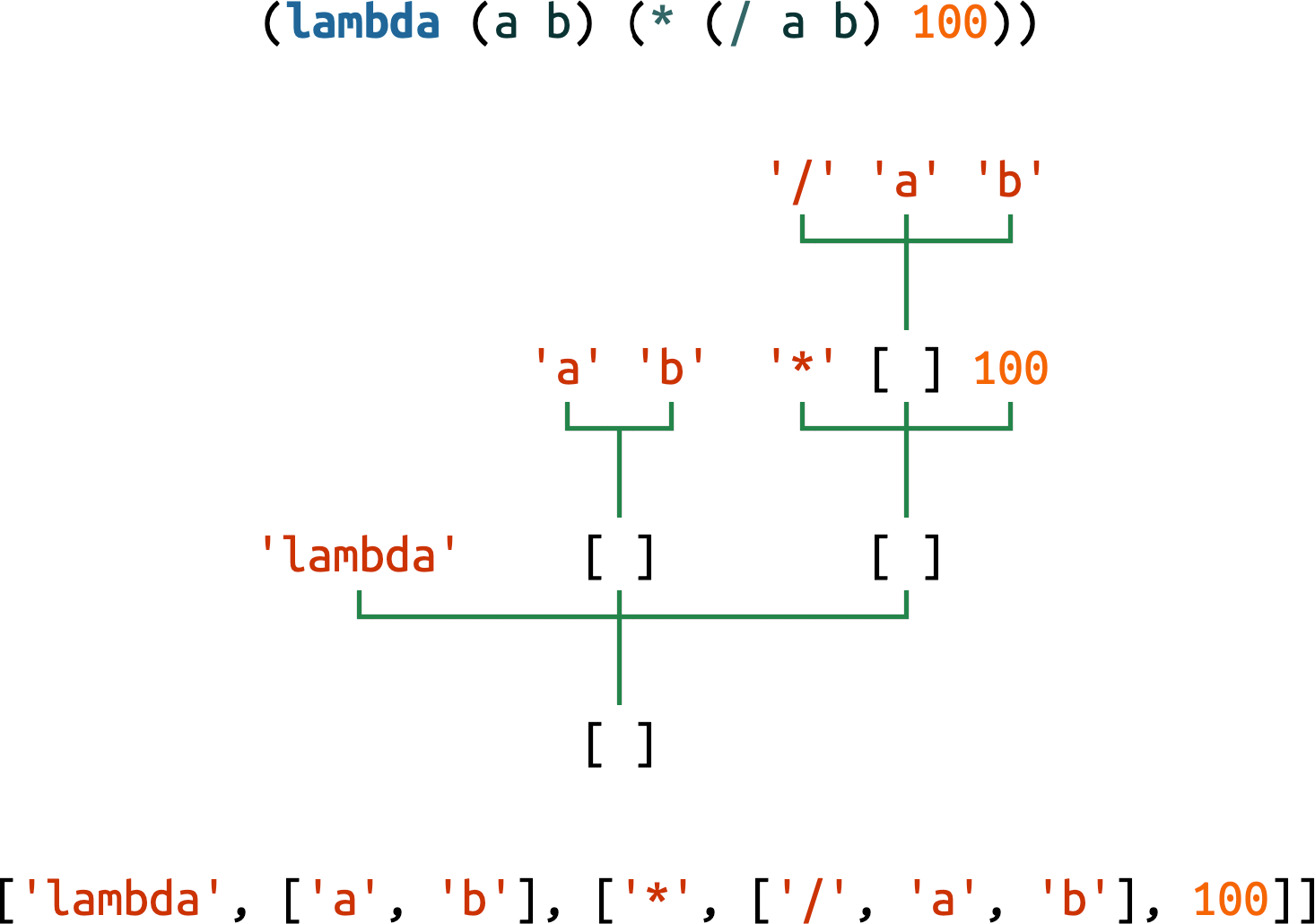
Figure 18-1. A Scheme lambda expression represented as source code (concrete syntax), as a tree, and as a sequence of Python objects (abstract syntax).
The Environment
The Environment class extends collections.ChainMap, adding
a change method to update a value inside one of the chained dicts,
which ChainMap instances hold in a list of mappings: the self.maps attribute.
The change method is needed to support the Scheme (set! …) form, described later; see Example 18-14.
Example 18-14. lis.py: the Environment class
classEnvironment(ChainMap[Symbol,Any]):"A ChainMap that allows changing an item in-place."defchange(self,key:Symbol,value:Any)->None:"Find where key is defined and change the value there."formapinself.maps:ifkeyinmap:map[key]=value# type: ignore[index]returnraiseKeyError(key)
Note that the change method only updates existing keys.9
Trying to change a key that is not found raises KeyError.
This doctest shows how Environment works:
>>>fromlisimportEnvironment>>>inner_env={'a':2}>>>outer_env={'a':0,'b':1}>>>env=Environment(inner_env,outer_env)>>>env['a']2>>>env['a']=111>>>env['c']=222>>>envEnvironment({'a': 111, 'c': 222}, {'a': 0, 'b': 1})>>>env.change('b',333)>>>envEnvironment({'a': 111, 'c': 222}, {'a': 0, 'b': 333})
When reading values,
Environmentworks asChainMap: keys are searched in the nested mappings from left to right. That’s why the value ofain theouter_envis shadowed by the value ininner_env.Assigning with
[]overwrites or inserts new items, but always in the first mapping,inner_envin this example.env.change('b', 333)seeks the'b'key and assigns a new value to it in-place, in theouter_env.
Next is the standard_env() function, which builds and returns an Environment loaded
with predefined functions, similar to Python’s __builtins__ module that is always available (Example 18-15).
Example 18-15. lis.py: standard_env() builds and returns the global environment
defstandard_env()->Environment:"An environment with some Scheme standard procedures."env=Environment()env.update(vars(math))# sin, cos, sqrt, pi, ...env.update({'+':op.add,'-':op.sub,'*':op.mul,'/':op.truediv,# omitted here: more operator definitions'abs':abs,'append':lambda*args:list(chain(*args)),'apply':lambdaproc,args:proc(*args),'begin':lambda*x:x[-1],'car':lambdax:x[0],'cdr':lambdax:x[1:],# omitted here: more function definitions'number?':lambdax:isinstance(x,(int,float)),'procedure?':callable,'round':round,'symbol?':lambdax:isinstance(x,Symbol),})returnenv
To summarize, the env mapping is loaded with:
-
All functions from Python’s
mathmodule -
Selected operators from Python’s
opmodule -
Simple but powerful functions built with Python’s
lambda -
Python built-ins renamed, like
callableasprocedure?, or directly mapped, likeround
The REPL
Norvig’s REPL (read-eval-print-loop) is easy to understand but not user-friendly (see Example 18-16).
If no command-line arguments are given to lis.py,
the repl() function is invoked by main()—defined at the end of the module.
At the lis.py> prompt, we must enter correct and complete expressions; if
we forget to close one parenthesis, lis.py crashes.10
Example 18-16. The REPL functions
defrepl(prompt:str='lis.py> ')->NoReturn:"A prompt-read-eval-print loop."global_env=Environment({},standard_env())whileTrue:ast=parse(input(prompt))val=evaluate(ast,global_env)ifvalisnotNone:(lispstr(val))deflispstr(exp:object)->str:"Convert a Python object back into a Lisp-readable string."ifisinstance(exp,list):return'('+' '.join(map(lispstr,exp))+')'else:returnstr(exp)
Here is a quick explanation about these two functions:
repl(prompt: str = 'lis.py> ') -> NoReturn-
Calls
standard_env()to provide built-in functions for the global environment, then enters an infinite loop, reading and parsing each input line, evaluating it in the global environment, and displaying the result—unless it’sNone. Theglobal_envmay be modified byevaluate. For example, when a user defines a new global variable or named function, it is stored in the first mapping of the environment—the emptydictin theEnvironmentconstructor call in the first line ofrepl. lispstr(exp: object) -> str-
The inverse function of
parse: given a Python object representing an expression,parsereturns the Scheme source code for it. For example, given['+', 2, 3], the result is'(+ 2 3)'.
The Evaluator
Now we can appreciate the beauty of Norvig’s expression evaluator—made
a little prettier with match/case.
The evaluate function in Example 18-17 takes
an Expression built by parse and an Environment.
The body of evaluate is a single match statement with an expression exp as the subject.
The case patterns express the syntax and semantics of Scheme with amazing clarity.
Example 18-17. evaluate takes an expression and computes its value
KEYWORDS=['quote','if','lambda','define','set!']defevaluate(exp:Expression,env:Environment)->Any:"Evaluate an expression in an environment."matchexp:caseint(x)|float(x):returnxcaseSymbol(var):returnenv[var]case['quote',x]:returnxcase['if',test,consequence,alternative]:ifevaluate(test,env):returnevaluate(consequence,env)else:returnevaluate(alternative,env)case['lambda',[*parms],*body]ifbody:returnProcedure(parms,body,env)case['define',Symbol(name),value_exp]:env[name]=evaluate(value_exp,env)case['define',[Symbol(name),*parms],*body]ifbody:env[name]=Procedure(parms,body,env)case['set!',Symbol(name),value_exp]:env.change(name,evaluate(value_exp,env))case[func_exp,*args]iffunc_expnotinKEYWORDS:proc=evaluate(func_exp,env)values=[evaluate(arg,env)forarginargs]returnproc(*values)case_:raiseSyntaxError(lispstr(exp))
Let’s study each case clause and what it does.
In some cases I added comments showing an S-expression that would
match the pattern when parsed into a Python list.
Doctests extracted from
examples_test.py demonstrate each case.
Evaluating numbers
caseint(x)|float(x):returnx
- Subject:
-
Instance of
intorfloat. - Action:
-
Return value as is.
- Example:
-
>>>fromlisimportparse,evaluate,standard_env>>>evaluate(parse('1.5'),{})1.5
Evaluating symbols
caseSymbol(var):returnenv[var]
- Subject:
-
Instance of
Symbol, i.e., astrused as an identifier. - Action:
-
Look up
varinenvand return its value. - Examples:
-
>>>evaluate(parse('+'),standard_env())<built-in function add>>>>evaluate(parse('ni!'),standard_env())Traceback (most recent call last):...KeyError:'ni!'
(quote …)
The quote special form treats atoms and lists as data instead of expressions to be evaluated.
# (quote (99 bottles of beer))case['quote',x]:returnx
- Subject:
-
List starting with the symbol
'quote', followed by one expressionx. - Action:
-
Return
xwithout evaluating it. - Examples:
-
>>>evaluate(parse('(quote no-such-name)'),standard_env())'no-such-name'>>>evaluate(parse('(quote (99 bottles of beer))'),standard_env())[99, 'bottles', 'of', 'beer']>>>evaluate(parse('(quote (/ 10 0))'),standard_env())['/', 10, 0]
Without quote, each expression in the test would raise an error:
-
no-such-namewould be looked up in the environment, raisingKeyError -
(99 bottles of beer)cannot be evaluated because the number 99 is not aSymbolnaming a special form, operator, or function -
(/ 10 0)would raiseZeroDivisionError
(if …)
# (if (< x 0) 0 x)case['if',test,consequence,alternative]:ifevaluate(test,env):returnevaluate(consequence,env)else:returnevaluate(alternative,env)
- Subject:
-
List starting with
'if'followed by three expressions:test,consequence, andalternative. - Action:
-
Evaluate
test:-
If true, evaluate
consequenceand return its value. -
Otherwise, evaluate
alternativeand return its value.
-
- Examples:
-
>>>evaluate(parse('(if (= 3 3) 1 0))'),standard_env())1>>>evaluate(parse('(if (= 3 4) 1 0))'),standard_env())0
The consequence and alternative branches must be single expressions.
If more than one expression is needed in a branch, you can combine
them with (begin exp1 exp2…), provided as a function in lis.py—see
Example 18-15.
(lambda …)
Scheme’s lambda form defines anonymous functions.
It doesn’t suffer from the limitations of Python’s lambda:
any function that can be written in Scheme can be written using the (lambda …) syntax.
# (lambda (a b) (/ (+ a b) 2))case['lambda'[*parms],*body]ifbody:returnProcedure(parms,body,env)
- Subject:
-
List starting with
'lambda', followed by:-
List of zero or more parameter names.
-
One or more expressions collected in
body(the guard ensures thatbodyis not empty).
-
- Action:
-
Create and return a new
Procedureinstance with the parameter names, the list of expressions as the body, and the current environment. - Example:
-
>>>expr='(lambda (a b) (* (/ a b) 100))'>>>f=evaluate(parse(expr),standard_env())>>>f# doctest: +ELLIPSIS<lis.Procedure object at 0x...>>>>f(15,20)75.0
The Procedure class implements the concept of a closure:
a callable object holding parameter names,
a function body, and a reference to the environment
in which the function is defined.
We’ll study the code for Procedure in a moment.
(define …)
The define keyword is used in two different syntactic forms.
The simplest is:
# (define half (/ 1 2))case['define',Symbol(name),value_exp]:env[name]=evaluate(value_exp,env)
- Subject:
-
List starting with
'define', followed by aSymboland an expression. - Action:
-
Evaluate the expression and put its value into
env, usingnameas key. - Example:
-
>>>global_env=standard_env()>>>evaluate(parse('(define answer (* 7 6))'),global_env)>>>global_env['answer']42
The doctest for this case creates a global_env so that we can
verify that evaluate puts answer into that Environment.
We can use that simple define form to create variables or to bind names to anonymous functions,
using (lambda …) as the value_exp.
Standard Scheme provides a shortcut for defining named functions.
That’s the second define form:
# (define (average a b) (/ (+ a b) 2))case['define',[Symbol(name),*parms],*body]ifbody:env[name]=Procedure(parms,body,env)
- Subject:
-
List starting with
'define', followed by:-
A list starting with a
Symbol(name), followed by zero or more items collected into a list namedparms. -
One or more expressions collected in
body(the guard ensures thatbodyis not empty).
-
- Action:
-
-
Create a new
Procedureinstance with the parameter names, the list of expressions as the body, and the current environment. -
Put the
Procedureintoenv, usingnameas key.
-
The doctest in Example 18-18 defines a function named % that computes a percentage and adds it to the global_env.
Example 18-18. Defining a function named % that computes a percentage
>>>global_env=standard_env()>>>percent='(define (% ab) (* (/ a b) 100))'>>>evaluate(parse(percent),global_env)>>>global_env['%']# doctest: +ELLIPSIS<lis.Procedure object at 0x...>>>>global_env['%'](170,200)85.0
After calling evaluate, we check that % is bound to a Procedure
that takes two numeric arguments and returns a percentage.
The pattern for the second define case does not enforce that the items in parms are all Symbol instances.
I’d have to check that before building the Procedure,
but I didn’t—to keep the code as easy to follow as Norvig’s.
(set! …)
The set! form changes the value of a previously defined variable.11
# (set! n (+ n 1))case['set!',Symbol(name),value_exp]:env.change(name,evaluate(value_exp,env))
- Subject:
-
List starting with
'set!', followed by aSymboland an expression. - Action:
-
Update the value of
nameinenvwith the result of evaluating the expression.
The Environment.change method traverses the chained environments from local to global,
and updates the first occurrence of name with the new value.
If we were not implementing the 'set!' keyword,
we could use Python’s ChainMap as the Environment type everywhere in this interpreter.
Now we get to a function call.
Function call
# (gcd (* 2 105) 84)case[func_exp,*args]iffunc_expnotinKEYWORDS:proc=evaluate(func_exp,env)values=[evaluate(arg,env)forarginargs]returnproc(*values)
- Subject:
-
List with one or more items.
The guard ensures that
func_expis not one of['quote', 'if', 'define', 'lambda', 'set!']—listed right beforeevaluatein Example 18-17.The pattern matches any list with one or more expressions, binding the first expression to
func_expand the rest toargsas a list, which may be empty. - Action:
-
-
Evaluate
func_expto obtain a functionproc. -
Evaluate each item in
argsto build a list of argument values. -
Call
procwith the values as separate arguments, returning the result.
-
- Example:
-
>>>evaluate(parse('(% (* 12 14) (- 500 100))'),global_env)42.0
This doctest continues from Example 18-18:
it assumes global_env has a function named %.
The arguments given to % are arithmetic expressions,
to emphasize that the arguments are evaluated before the function is called.
The guard in this case is needed because [func_exp, *args]
matches any sequence subject with one or more items.
However, if func_exp is a keyword,
and the subject did not match any previous case,
then it is really a syntax error.
Catch syntax errors
If the subject exp does not match any of the previous cases,
the catch-all case raises a SyntaxError:
case_:raiseSyntaxError(lispstr(exp))
Here is an example of a malformed (lambda …) reported as a SyntaxError:
>>>evaluate(parse('(lambda is not like this)'),standard_env())Traceback (most recent call last):...SyntaxError:(lambda is not like this)
If the case for function call did not have
that guard rejecting keywords, the (lambda is not like this)
expression would be handled as a function call,
which would raise KeyError because 'lambda' is not part of the environment—just like lambda is not a Python built-in function.
Procedure: A Class Implementing a Closure
The Procedure class could very well be named Closure,
because that’s what it represents:
a function definition together with an environment.
The function definition includes the name of the parameters and the expressions that make up the body of the function.
The environment is used when the function is called to provide the values of
the free variables: variables that appear in the body of the function but
are not parameters, local variables, or global variables.
We saw the concepts of closure and free variable in “Closures”.
We learned how to use closures in Python, but now we can dive deeper and see how a closure is implemented in lis.py:
classProcedure:"A user-defined Scheme procedure."def__init__(self,parms:list[Symbol],body:list[Expression],env:Environment):self.parms=parmsself.body=bodyself.env=envdef__call__(self,*args:Expression)->Any:local_env=dict(zip(self.parms,args))env=Environment(local_env,self.env)forexpinself.body:result=evaluate(exp,env)returnresult
Called when a function is defined by the
lambdaordefineforms.Save the parameter names, body expressions, and environment for later use.
Called by
proc(*values)in the last line of thecase [func_exp, *args]clause.Build
local_envmappingself.parmsas local variable names, and the givenargsas values.Build a new combined
env, puttinglocal_envfirst, and thenself.env—the environment that was saved when the function was defined.Iterate over each expression in
self.body, evaluating it in the combinedenv.Return the result of the last expression evaluated.
There are a couple of simple functions after evaluate in
lis.py: run reads a complete Scheme program and executes it,
and main calls run or repl, depending on the command line—similar to what Python does.
I will not describe those functions because there’s nothing new in them.
My goals were to share with you the beauty of Norvig’s little interpreter,
to give more insight into how closures work,
and to show how match/case is a great addition to Python.
To wrap up this extended section on pattern matching, let’s formalize the concept of an OR-pattern.
Using OR-patterns
A series of patterns separated by | is an
OR-pattern:
it succeeds if any of the subpatterns succeed.
The pattern in “Evaluating numbers” is an OR-pattern:
caseint(x)|float(x):returnx
All subpatterns in an OR-pattern must use the same variables.
This restriction is necessary to ensure that
the variables are available to the guard expression and the case body,
regardless of the subpattern that matched.
Warning
In the context of a case clause, the | operator has a special meaning.
It does not trigger the __or__ special method, which
handles expressions like a | b in other contexts,
where it is overloaded to perform operations such as set union or integer bitwise-or,
depending on the operands.
An OR-pattern is not restricted to appear at the top level of a pattern.
You can also use | in subpatterns.
For example, if we wanted lis.py to accept the Greek letter λ (lambda)12
as well as the lambda keyword, we can rewrite the pattern like this:
# (λ (a b) (/ (+ a b) 2) )case['lambda'|'λ',[*parms],*body]ifbody:returnProcedure(parms,body,env)
Now we can move to the third and last subject of this chapter:
the unusual places where an else clause may appear in Python.
Do This, Then That: else Blocks Beyond if
This is no secret, but it is an underappreciated language feature:
the else clause can be used not only in if statements but also in for, while, and try statements.
The semantics of for/else, while/else, and try/else are closely related, but very different from if/else.
Initially, the word else actually hindered my understanding of these features, but eventually I got used to it.
Here are the rules:
for-
The
elseblock will run only if and when theforloop runs to completion (i.e., not if theforis aborted with abreak). while-
The
elseblock will run only if and when thewhileloop exits because the condition became falsy (i.e., not if thewhileis aborted with abreak). try-
The
elseblock will run only if no exception is raised in thetryblock. The official docs also state: “Exceptions in theelseclause are not handled by the precedingexceptclauses.”
In all cases, the else clause is also skipped if an exception or a return, break,
or continue statement causes control to jump out of the main block of the compound statement.
Note
I think else is a very poor choice for the keyword in all cases except if.
It implies an excluding alternative, like, “Run this loop, otherwise do that,”
but the semantics for else in loops is the opposite: “Run this loop, then do that.”
This suggests then as a better keyword—which would also make sense in the try context:
“Try this, then do that.”
However, adding a new keyword is a breaking change to the language—not an easy decision to make.
Using else with these statements often makes the code easier to read and
saves the trouble of setting up control flags or coding extra if statements.
The use of else in loops generally follows the pattern of this snippet:
foriteminmy_list:ifitem.flavor=='banana':breakelse:raiseValueError('No banana flavor found!')
In the case of try/except blocks, else may seem redundant at first.
After all, the after_call() in the following snippet will run only if the dangerous_call() does not raise an exception, correct?
try:dangerous_call()after_call()exceptOSError:log('OSError...')
However, doing so puts the after_call() inside the try block for no good reason.
For clarity and correctness, the body of a try block should only have the statements that may generate the expected exceptions. This is better:
try:dangerous_call()exceptOSError:log('OSError...')else:after_call()
Now it’s clear that the try block is guarding against possible errors in dangerous_call() and not in after_call().
It’s also explicit that after_call() will only execute if no exceptions are raised in the try block.
In Python, try/except is commonly used for control flow, and not just for error handling. There’s even an acronym/slogan for that documented in the official Python glossary:
- EAFP
Easier to ask for forgiveness than permission. This common Python coding style assumes the existence of valid keys or attributes and catches exceptions if the assumption proves false. This clean and fast style is characterized by the presence of many try and except statements. The technique contrasts with the LBYL style common to many other languages such as C.
The glossary then defines LBYL:
- LBYL
Look before you leap. This coding style explicitly tests for pre-conditions before making calls or lookups. This style contrasts with the EAFP approach and is characterized by the presence of many if statements. In a multi-threaded environment, the LBYL approach can risk introducing a race condition between “the looking” and “the leaping.” For example, the code, if key in mapping: return mapping[key] can fail if another thread removes key from mapping after the test, but before the lookup. This issue can be solved with locks or by using the EAFP approach.
Given the EAFP style, it makes even more sense to know and use else blocks well in try/except statements.
Note
When the match statement was discussed, some people (including me) thought it should also have
an else clause.
In the end it was decided that it wasn’t needed because case _: does the same job.13
Chapter Summary
This chapter started with context managers and the meaning of the with statement, quickly moving beyond its common use to automatically close opened files. We implemented a custom context manager: the LookingGlass class with the __enter__/__exit__ methods, and saw how to handle exceptions in the __exit__ method. A key point that Raymond Hettinger made in his PyCon US 2013 keynote is that with is not just for resource management; it’s a tool for factoring out common setup and teardown code, or any pair of operations that need to be done before and after another procedure.14
We reviewed functions in the contextlib standard library module. One of them, the @contextmanager decorator, makes it possible to implement a context manager using a simple generator with one yield—a leaner solution than coding a class with at least two methods. We reimplemented the LookingGlass as a looking_glass generator function, and discussed how to do exception handling when using @contextmanager.
Then we studied Peter Norvig’s elegant lis.py,
a Scheme interpreter written in idiomatic Python,
refactored to use match/case in evaluate—the
function at the core of any interpreter.
Understanding how evaluate works required reviewing a little bit of Scheme,
a parser for S-expressions, a simple REPL,
and the construction of nested scopes through an Environment
subclass of collection.ChainMap.
In the end, lis.py became a vehicle to explore much more than pattern matching.
It shows how the different parts of an interpreter work together,
illuminating core features of Python itself: why reserved keywords are necessary,
how scoping rules work, and how closures are built and used.
Further Reading
Chapter 8, “Compound Statements,” in The Python Language Reference says pretty much everything there is to say about else clauses in if, for, while, and try statements. Regarding Pythonic usage of try/except, with or without else, Raymond Hettinger has a brilliant answer to the question “Is it a good practice to use try-except-else in Python?” in StackOverflow. Python in a Nutshell, 3rd ed., by Martelli et al., has a chapter about exceptions with an excellent discussion of the EAFP style, crediting computing pioneer Grace Hopper for coining the phrase, “It’s easier to ask forgiveness than permission.”
The Python Standard Library, Chapter 4, “Built-in Types,” has a section devoted to
“Context Manager Types”. The __enter__/__exit__ special methods are also documented in The Python Language Reference in “With Statement Context Managers”. Context managers were introduced in PEP 343—The “with” Statement.
Raymond Hettinger highlighted the with statement as a “winning language feature” in his PyCon US 2013 keynote. He also showed some interesting applications of context managers in his talk, “Transforming Code into Beautiful, Idiomatic Python”, at the same conference.
Jeff Preshing’s blog post “The Python with Statement by Example” is interesting for the examples using context managers with the pycairo graphics library.
The contextlib.ExitStack class is based on an original idea by Nikolaus Rath, who wrote a short post explaining why its useful:
“On the Beauty of Python’s ExitStack”. In that text, Rath submits that ExitStack is similar but more flexible than the defer statement in Go—which I think is one of the best ideas in that language.
Beazley and Jones devised context managers for very different purposes in their Python Cookbook, 3rd ed. “Recipe 8.3. Making Objects Support the Context-Management Protocol” implements a LazyConnection class whose instances are context managers that open and close network connections automatically in with blocks. “Recipe 9.22. Defining Context Managers the Easy Way” introduces a context manager for timing code, and another for making transactional changes to a list object: within the with block, a working copy of the list instance is made, and all changes are applied to that working copy. Only when the with block completes without an exception, the working copy replaces the original list. Simple and ingenious.
Peter Norvig describes his small Scheme interpreters in the posts “(How to Write a (Lisp) Interpreter (in Python))” and “(An ((Even Better) Lisp) Interpreter (in Python))”. The code for lis.py and lispy.py is the norvig/pytudes repository. My repository fluentpython/lispy includes the mylis forks of lis.py, updated to Python 3.10, with a nicer REPL, command-line integration, examples, more tests, and references for learning more about Scheme. The best Scheme dialect and environment to learn and experiment is Racket.
1 PyCon US 2013 keynote: “What Makes Python Awesome”; the part about with starts at 23:00 and ends at 26:15.
2 The three arguments received by self are exactly what you get if you call sys.exc_info() in the finally block of a try/finally statement. This makes sense, considering that the with statement is meant to replace most uses of try/finally, and calling sys.exc_info() was often necessary to determine what clean-up action would be required.
3 The actual class is named _GeneratorContextManager. If you want to see exactly how it works, read its source code in Lib/contextlib.py in Python 3.10.
4 This tip is quoted literally from a comment by Leonardo Rochael, one of the tech reviewers for this book. Nicely said, Leo!
5 At least I and the other technical reviewers didn’t know it until Caleb Hattingh told us. Thanks, Caleb!
6 People complain about too many parentheses in Lisp, but thoughtful indentation and a good editor mostly take care of that issue. The main readability problem is using the same (f …) notation for function calls and special forms like (define …), (if …), and (quote …) that don’t behave at all like function calls.
7 To make iteration through recursion practical and efficient, Scheme and other functional languages implement proper tail calls. For more about this, see “Soapbox”.
8 But Norvig’s second interpreter, lispy.py, supports strings as a data type, as well as advanced features like syntactic macros, continuations, and proper tail calls. However, lispy.py is almost three times longer than lis.py—and much harder to understand.
9 The # type: ignore[index] comment is there because of typeshed issue #6042, which is unresolved as I review this chapter. ChainMap is annotated as MutableMapping, but the type hint in the maps attribute says it’s a list of Mapping, indirectly making the whole ChainMap immutable as far as Mypy is concerned.
10 As I studied Norvig’s lis.py and lispy.py, I started a fork named mylis that adds some features, including a REPL that accepts partial S-expressions and prompts for the continuation, similar to how Python’s REPL knows we are not finished and presents the secondary prompt (...) until we enter a complete expression or statement that can be evaluated. mylis also handles a few errors gracefully, but it’s still easy to crash. It’s not nearly as robust as Python’s REPL.
11 Assignment is one of the first features taught in many programming tutorials, but set! only appears on page 220 of the best known Scheme book, Structure and Interpretation of Computer Programs, 2nd ed., by Abelson et al. (MIT Press), a.k.a. SICP or the “Wizard Book.” Coding in a functional style can take us very far without the state changes that are typical of imperative and object-oriented programming.
12 The official Unicode name for λ (U+03BB) is GREEK SMALL LETTER LAMDA. This is not a typo: the character is named “lamda” without the “b” in the Unicode database. According to the English Wikipedia article “Lambda”, the Unicode Consortium adopted that spelling because of “preferences expressed by the Greek National Body.”
13 Watching the discussion in the python-dev mailing list I thought one reason why else was rejected was the lack of consensus on how to indent it within match: should else be indented at the same level as match, or at the same level as case?