Chapter 17. Iterators, Generators, and Classic Coroutines
When I see patterns in my programs, I consider it a sign of trouble. The shape of a program should reflect only the problem it needs to solve. Any other regularity in the code is a sign, to me at least, that I’m using abstractions that aren’t powerful enough—often that I’m generating by hand the expansions of some macro that I need to write.
Paul Graham, Lisp hacker and venture capitalist1
Iteration is fundamental to data processing: programs apply computations to data series, from pixels to nucleotides. If the data doesn’t fit in memory, we need to fetch the items lazily—one at a time and on demand. That’s what an iterator does. This chapter shows how the Iterator design pattern is built into the Python language so you never need to code it by hand.
Every standard collection in Python is iterable. An iterable is an object that provides an iterator, which Python uses to support operations like:
-
forloops -
List, dict, and set comprehensions
-
Unpacking assignments
-
Construction of collection instances
This chapter covers the following topics:
-
How Python uses the
iter()built-in function to handle iterable objects -
How to implement the classic Iterator pattern in Python
-
How the classic Iterator pattern can be replaced by a generator function or generator expression
-
How a generator function works in detail, with line-by-line descriptions
-
Leveraging the general-purpose generator functions in the standard library
-
Using
yield fromexpressions to combine generators -
Why generators and classic coroutines look alike but are used in very different ways and should not be mixed
What’s New in This Chapter
“Subgenerators with yield from” grew from one to six pages.
It now includes simpler experiments demonstrating the behavior of generators with yield from,
and an example of traversing a tree data structure, developed step-by-step.
New sections explain the type hints for Iterable, Iterator, and Generator types.
The last major section of this chapter, “Classic Coroutines”, is a 9-page introduction to a topic that filled a 40-page chapter in the first edition. I updated and moved the “Classic Coroutines” chapter to a post in the companion website because it was the most challenging chapter for readers, but its subject matter is less relevant after Python 3.5 introduced native coroutines—which we’ll study in Chapter 21.
We’ll get started studying how the iter() built-in function makes sequences iterable.
A Sequence of Words
We’ll start our exploration of iterables by implementing a Sentence class:
you give its constructor a string with some text, and then you can iterate word by word.
The first version will implement the sequence protocol,
and it’s iterable because all sequences are iterable—as we’ve seen since Chapter 1.
Now we’ll see exactly why.
Example 17-1 shows a Sentence class that extracts words from a text by index.
Example 17-1. sentence.py: a Sentence as a sequence of words
importreimportreprlibRE_WORD=re.compile(r'\w+')classSentence:def__init__(self,text):self.text=textself.words=RE_WORD.findall(text)def__getitem__(self,index):returnself.words[index]def__len__(self):returnlen(self.words)def__repr__(self):return'Sentence(%s)'%reprlib.repr(self.text)

.findallreturns a list with all nonoverlapping matches of the regular expression, as a list of strings.
self.wordsholds the result of.findall, so we simply return the word at the given index.
To complete the sequence protocol, we implement
__len__although it is not needed to make an iterable.
reprlib.repris a utility function to generate abbreviated string representations of data structures that can be very large.2
By default, reprlib.repr limits the generated string to 30 characters. See the console session in Example 17-2 to see how Sentence is used.
Example 17-2. Testing iteration on a Sentence instance
>>>s=Sentence('"The time has come,"the Walrus said,')>>>sSentence('"The time ha... Walrus said,')>>>forwordins:...(word)ThetimehascometheWalrussaid>>>list(s)['The', 'time', 'has', 'come', 'the', 'Walrus', 'said']
A sentence is created from a string.
Note the output of
__repr__using...generated byreprlib.repr.Sentenceinstances are iterable; we’ll see why in a moment.Being iterable,
Sentenceobjects can be used as input to build lists and other iterable types.
In the following pages, we’ll develop other Sentence classes that pass the tests in Example 17-2.
However, the implementation in Example 17-1 is different from the others because it’s also a sequence, so you can get words by index:
>>>s[0]'The'>>>s[5]'Walrus'>>>s[-1]'said'
Python programmers know that sequences are iterable. Now we’ll see precisely why.
Why Sequences Are Iterable: The iter Function
Whenever Python needs to iterate over an object x, it automatically calls iter(x).
The iter built-in function:
-
Checks whether the object implements
__iter__, and calls that to obtain an iterator. -
If
__iter__is not implemented, but__getitem__is, theniter()creates an iterator that tries to fetch items by index, starting from 0 (zero). -
If that fails, Python raises
TypeError, usually saying'C' object is not iterable, whereCis the class of the target object.
That is why all Python sequences are iterable: by definition, they all implement __getitem__.
In fact, the standard sequences also implement __iter__, and yours should too,
because iteration via __getitem__ exists for backward compatibility and may be gone in the
future—although it is not deprecated as of Python 3.10, and I doubt it will ever be removed.
As mentioned in “Python Digs Sequences”, this is an extreme form of duck typing: an object is considered iterable not only when it implements the special method __iter__, but also when it implements __getitem__. Take a look:
>>>classSpam:...def__getitem__(self,i):...('->',i)...raiseIndexError()...>>>spam_can=Spam()>>>iter(spam_can)<iterator object at 0x10a878f70>>>>list(spam_can)-> 0[]>>>fromcollectionsimportabc>>>isinstance(spam_can,abc.Iterable)False
If a class provides __getitem__, the iter() built-in accepts an instance of that class as iterable and builds an iterator from the instance.
Python’s iteration machinery will call __getitem__ with indexes starting from 0, and will take an IndexError as a
signal that there are no more items.
Note that although spam_can is iterable (its __getitem__ could provide items), it is not recognized as such by an isinstance against abc.Iterable.
In the goose-typing approach, the definition for an iterable is simpler but not as flexible: an object is considered iterable if it implements the __iter__ method.
No subclassing or registration is required, because abc.Iterable implements the __subclasshook__, as seen in “Structural Typing with ABCs”. Here is a demonstration:
>>>classGooseSpam:...def__iter__(self):...pass...>>>fromcollectionsimportabc>>>issubclass(GooseSpam,abc.Iterable)True>>>goose_spam_can=GooseSpam()>>>isinstance(goose_spam_can,abc.Iterable)True
Tip
As of Python 3.10, the most accurate way to check whether an object x is iterable is to call iter(x)
and handle a TypeError exception if it isn’t.
This is more accurate than using isinstance(x, abc.Iterable),
because iter(x) also considers the legacy __getitem__ method, while the Iterable ABC does not.
Explicitly checking whether an object is iterable may not be worthwhile if right after the check you are going to iterate over the object.
After all, when the iteration is attempted on a noniterable,
the exception Python raises is clear enough: TypeError: 'C' object is not iterable.
If you can do better than just raising TypeError,
then do so in a try/except block instead of doing an explicit check.
The explicit check may make sense if you are holding on to the object to iterate over it later;
in this case, catching the error early makes debugging easier.
The iter() built-in is more often used by Python itself than by our own code.
There’s a second way we can use it, but it’s not widely known.
Using iter with a Callable
We can call iter() with two arguments to create an iterator from a function or any callable object.
In this usage, the first argument must be a callable to be invoked repeatedly (with no arguments) to produce values,
and the second argument is a
sentinel:
a marker value which, when returned by the callable,
causes the iterator to raise StopIteration instead of yielding the sentinel.
The following example shows how to use iter to roll a six-sided die until a 1 is rolled:
>>>defd6():...returnrandint(1,6)...>>>d6_iter=iter(d6,1)>>>d6_iter<callable_iterator object at 0x10a245270>>>>forrollind6_iter:...(roll)...4363
Note that the iter function here returns a callable_iterator.
The for loop in the example may run for a very long time, but it will never display 1,
because that is the sentinel value. As usual with iterators,
the d6_iter object in the example becomes useless once exhausted.
To start over, we must rebuild the iterator by invoking iter() again.
The documentation for iter
includes the following explanation and example code:
One useful application of the second form of
iter()is to build a block-reader. For example, reading fixed-width blocks from a binary database file until the end of file is reached:
fromfunctoolsimportpartialwithopen('mydata.db','rb')asf:read64=partial(f.read,64)forblockiniter(read64,b''):process_block(block)
For clarity, I’ve added the read64 assignment, which is not in the
original example.
The partial() function is necessary because the callable given
to iter() must not require arguments.
In the example, an empty bytes object is the sentinel,
because that’s what f.read returns when there are no more bytes to read.
The next section details the relationship between iterables and iterators.
Iterables Versus Iterators
From the explanation in “Why Sequences Are Iterable: The iter Function” we can extrapolate a definition:
- iterable
-
Any object from which the
iterbuilt-in function can obtain an iterator. Objects implementing an__iter__method returning an iterator are iterable. Sequences are always iterable, as are objects implementing a__getitem__method that accepts 0-based indexes.
It’s important to be clear about the relationship between iterables and iterators: Python obtains iterators from iterables.
Here is a simple for loop iterating over a str. The str 'ABC' is the iterable here. You don’t see it, but there is an iterator behind the curtain:
>>>s='ABC'>>>forcharins:...(char)...ABC
If there was no for statement and we had to emulate the for machinery by hand with a while loop, this is what we’d have to write:
>>>s='ABC'>>>it=iter(s)>>>whileTrue:...try:...(next(it))...exceptStopIteration:...delit...break...ABC
Build an iterator
itfrom the iterable.Repeatedly call
nexton the iterator to obtain the next item.The iterator raises
StopIterationwhen there are no further items.Release reference to
it—the iterator object is discarded.
Exit the loop.
StopIteration signals that the iterator is exhausted.
This exception is handled internally by the iter() built-in that is part of the logic of for loops and other iteration contexts like list comprehensions, iterable unpacking, etc.
Python’s standard interface for an iterator has two methods:
__next__-
Returns the next item in the series, raising
StopIterationif there are no more. __iter__-
Returns
self; this allows iterators to be used where an iterable is expected, for example, in aforloop.
That interface is formalized in the collections.abc.Iterator ABC,
which declares the __next__ abstract method,
and subclasses Iterable—where the abstract __iter__ method is declared.
See Figure 17-1.
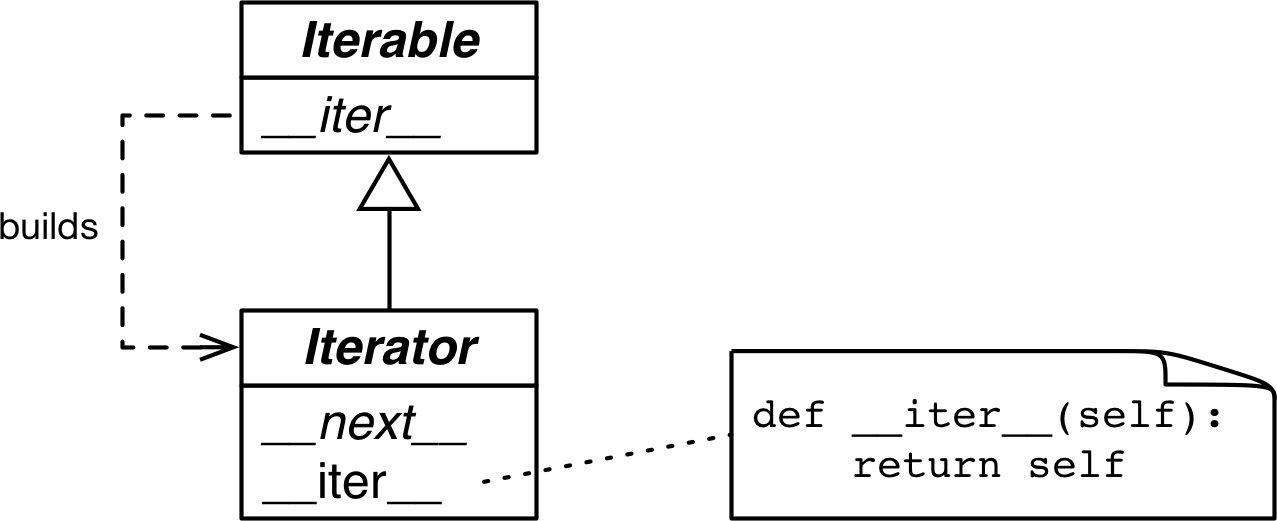
Figure 17-1. The Iterable and Iterator ABCs. Methods in italic are abstract. A concrete Iterable.__iter__ should return a new Iterator instance. A concrete Iterator must implement __next__. The Iterator.__iter__ method just returns the instance itself.
The source code for collections.abc.Iterator is in Example 17-3.
Example 17-3. abc.Iterator class; extracted from Lib/_collections_abc.py
classIterator(Iterable):__slots__=()@abstractmethoddef__next__(self):'Return the next item from the iterator. When exhausted, raise StopIteration'raiseStopIterationdef__iter__(self):returnself@classmethoddef__subclasshook__(cls,C):ifclsisIterator:return_check_methods(C,'__iter__','__next__')returnNotImplemented
__subclasshook__supports structural type checks withisinstanceandissubclass. We saw it in “Structural Typing with ABCs”._check_methodstraverses the__mro__of the class to check whether the methods are implemented in its base classes. It’s defined in that same Lib/_collections_abc.py module. If the methods are implemented, theCclass will be recognized as a virtual subclass ofIterator. In other words,issubclass(C, Iterable)will returnTrue.
Warning
The Iterator ABC abstract method is it.__next__() in Python 3 and it.next() in Python 2. As usual, you should avoid calling special methods directly.
Just use the next(it): this built-in function does the right thing in Python 2 and 3—which is useful for those migrating codebases from 2 to 3.
The Lib/types.py module source code in Python 3.9 has a comment that says:
# Iterators in Python aren't a matter of type but of protocol.  A large
# and changing number of builtin types implement *some* flavor of
# iterator.  Don't check the type!  Use hasattr to check for both
# "__iter__" and "__next__" attributes instead.
In fact, that’s exactly what the __subclasshook__ method of the abc.Iterator ABC does.
Tip
Given the advice from Lib/types.py and the logic implemented in Lib/_collections_abc.py, the best way to check if an object x is an iterator is to call isinstance(x, abc.Iterator). Thanks to Iterator.__subclasshook__, this test works even if the class of x is not a real or virtual subclass of Iterator.
Back to our Sentence class from Example 17-1, you can clearly see how the iterator is built by iter() and consumed by next() using the Python console:
>>>s3=Sentence('Life of Brian')>>>it=iter(s3)>>>it# doctest: +ELLIPSIS<iterator object at 0x...>>>>next(it)'Life'>>>next(it)'of'>>>next(it)'Brian'>>>next(it)Traceback (most recent call last):...StopIteration>>>list(it)[]>>>list(iter(s3))['Life', 'of', 'Brian']
Create a sentence
s3with three words.Obtain an iterator from
s3.next(it)fetches the next word.There are no more words, so the iterator raises a
StopIterationexception.Once exhausted, an iterator will always raise
StopIteration, which makes it look like it’s empty.
To go over the sentence again, a new iterator must be built.
Because the only methods required of an iterator are __next__ and __iter__,
there is no way to check whether there are remaining items, other than to call next() and catch StopIteration.
Also, it’s not possible to “reset” an iterator.
If you need to start over, you need to call iter() on the iterable that built the iterator in the first place.
Calling iter() on the iterator itself won’t help either,
because—as mentioned—Iterator.__iter__ is implemented by returning self,
so this will not reset a depleted
iterator.
That minimal interface is sensible, because in reality not all iterators are resettable. For example, if an iterator is reading packets from the network, there’s no way to rewind it.3
The first version of Sentence from Example 17-1 was iterable thanks to
the special treatment the iter() built-in gives to sequences.
Next, we will implement Sentence variations that implement __iter__ to return iterators.
Sentence Classes with __iter__
The next variations of Sentence implement the standard iterable protocol,
first by implementing the Iterator design pattern, and then with generator functions.
Sentence Take #2: A Classic Iterator
The next Sentence implementation follows the blueprint of the classic Iterator design pattern from the
Design Patterns book.
Note that it is not idiomatic Python, as the next refactorings will make very clear.
But it is useful to show the distinction between an iterable collection and an iterator that works with it.
The Sentence class in Example 17-4 is iterable because it implements the __iter__ special method,
which builds and returns a SentenceIterator. That’s how an iterable and an iterator are related.
Example 17-4. sentence_iter.py: Sentence implemented using the Iterator pattern
importreimportreprlibRE_WORD=re.compile(r'\w+')classSentence:def__init__(self,text):self.text=textself.words=RE_WORD.findall(text)def__repr__(self):returnf'Sentence({reprlib.repr(self.text)})'def__iter__(self):returnSentenceIterator(self.words)classSentenceIterator:def__init__(self,words):self.words=wordsself.index=0def__next__(self):try:word=self.words[self.index]exceptIndexError:raiseStopIteration()self.index+=1returnworddef__iter__(self):returnself
The
__iter__method is the only addition to the previousSentenceimplementation. This version has no__getitem__, to make it clear that the class is iterable because it implements__iter__.__iter__fulfills the iterable protocol by instantiating and returning an iterator.SentenceIteratorholds a reference to the list of words.self.indexdetermines the next word to fetch.Get the word at
self.index.If there is no word at
self.index, raiseStopIteration.
Increment
self.index.
Return the word.

Implement
self.__iter__.
The code in Example 17-4 passes the tests in Example 17-2.
Note that implementing __iter__ in SentenceIterator is not actually needed
for this example to work,
but it is the right thing to do: iterators are supposed to
implement both __next__ and __iter__,
and doing so makes our iterator pass
the issubclass(SentenceIterator, abc.Iterator) test.
If we had subclassed
SentenceIterator from abc.Iterator, we’d inherit the concrete abc.Iterator.__iter__ method.
That is a lot of work (for us spoiled Python programmers, anyway).
Note how most code in SentenceIterator deals with managing the internal state of the iterator.
Soon we’ll see how to avoid that bookkeeping.
But first, a brief detour to address an implementation shortcut that may be tempting, but is just wrong.
Don’t Make the Iterable an Iterator for Itself
A common cause of errors in building iterables and iterators is to confuse the two.
To be clear: iterables have an __iter__ method that instantiates a new iterator every time.
Iterators implement a __next__ method that returns individual items, and an __iter__ method that returns self.
Therefore, iterators are also iterable, but iterables are not iterators.
It may be tempting to implement __next__ in addition to __iter__ in the Sentence class,
making each Sentence instance at the same time an iterable and iterator over itself.
But this is rarely a good idea. It’s also a common antipattern, according to Alex Martelli who has a lot of experience reviewing Python code at Google.
The “Applicability” section about the Iterator design pattern in the Design Patterns book says:
Use the Iterator pattern
to access an aggregate object’s contents without exposing its internal representation.
to support multiple traversals of aggregate objects.
to provide a uniform interface for traversing different aggregate structures (that is, to support polymorphic iteration).
To “support multiple traversals,” it must be possible to obtain multiple independent iterators from the same iterable instance, and each iterator must keep its own internal state, so a proper implementation of the pattern requires each call to iter(my_iterable) to create a new, independent, iterator. That is why we need the SentenceIterator class in this example.
Now that the classic Iterator pattern is properly demonstrated, we can let it go.
Python incorporated the yield keyword from Barbara Liskov’s
CLU language,
so we don’t need to “generate by hand” the code to implement iterators.
The next sections present more idiomatic versions of Sentence.
Sentence Take #3: A Generator Function
A Pythonic implementation of the same functionality uses a generator, avoiding all the work to implement the SentenceIterator class. A proper explanation of the generator comes right after Example 17-5.
Example 17-5. sentence_gen.py: Sentence implemented using a generator
importreimportreprlibRE_WORD=re.compile(r'\w+')classSentence:def__init__(self,text):self.text=textself.words=RE_WORD.findall(text)def__repr__(self):return'Sentence(%s)'%reprlib.repr(self.text)def__iter__(self):forwordinself.words:yieldword# done!
Iterate over
self.words.Yield the current
word.Explicit
returnis not necessary; the function can just “fall through” and return automatically. Either way, a generator function doesn’t raiseStopIteration: it simply exits when it’s done producing values.4No need for a separate iterator class!
Here again we have a different implementation of Sentence that passes the tests in Example 17-2.
Back in the Sentence code in Example 17-4, __iter__ called the SentenceIterator constructor to build an iterator and return it. Now the iterator in Example 17-5 is in fact a generator object, built automatically when the __iter__ method is called, because __iter__ here is a generator function.
A full explanation of generators follows.
How a Generator Works
Any Python function that has the yield keyword in its body is a generator function: a function which, when called, returns a generator object. In other words, a generator function is a generator factory.
Tip
The only syntax distinguishing a plain function from a generator function is the fact that the latter has a yield keyword somewhere in its body. Some argued that a new keyword like gen should be used instead of def to declare generator functions, but Guido did not agree. His arguments are in PEP 255 — Simple Generators.5
Example 17-6 shows the behavior of a simple generator function.6
Example 17-6. A generator function that yields three numbers
>>> def gen_123(): ... yield 1
The body of a generator function often has
yieldinside a loop, but not necessarily; here I just repeatyieldthree times.Looking closely, we see
gen_123is a function object.But when invoked,
gen_123()returns a generator object.Generator objects implement the
Iteratorinterface, so they are also iterable.We assign this new generator object to
g, so we can experiment with it.Because
gis an iterator, callingnext(g)fetches the next item produced byyield.When the generator function returns, the generator object raises
StopIteration.
A generator function builds a generator object that wraps the body of the function.
When we invoke next() on the generator object,
execution advances to the next yield in the function body,
and the next() call evaluates to the value yielded when the function body is suspended.
Finally, the enclosing generator object created by Python
raises StopIteration when the function body returns,
in accordance with the Iterator protocol.
Tip
I find it helpful to be rigorous when talking about values obtained from a generator. It’s confusing to say a generator “returns” values. Functions return values. Calling a generator function returns a generator. A generator yields values. A generator doesn’t “return” values in the usual way: the return statement in the body of a generator function causes StopIteration to be raised by the generator object. If you return x in the generator, the caller can retrieve the value of x from the StopIteration exception, but usually that is done automatically using the yield from syntax, as we’ll see in “Returning a Value from a Coroutine”.
Example 17-7 makes the interaction between a for loop and the body of the function more explicit.
Example 17-7. A generator function that prints messages when it runs
>>>defgen_AB():...('start')...yield'A'...('continue')...yield'B'...('end.')...>>>forcingen_AB():...('-->',c)...start--> Acontinue--> Bend.>>>
The first implicit call to
next()in theforloop at will print 'start'and stop at the firstyield, producing the value'A'.The second implicit call to
next()in theforloop will print'continue'and stop at the secondyield, producing the value'B'.The third call to
next()will print'end.'and fall through the end of the function body, causing the generator object to raiseStopIteration.To iterate, the
formachinery does the equivalent ofg = iter(gen_AB())to get a generator object, and thennext(g)at each iteration.The loop prints
-->and the value returned bynext(g). This output will appear only after the output of theprintcalls inside the generator function.The text
startcomes fromprint('start')in the generator body.yield 'A'in the generator body yields the value A consumed by theforloop, which gets assigned to thecvariable and results in the output--> A.Iteration continues with a second call to
next(g), advancing the generator body fromyield 'A'toyield 'B'. The textcontinueis output by the secondprintin the generator body.yield 'B'yields the value B consumed by theforloop, which gets assigned to thecloop variable, so the loop prints--> B.
Iteration continues with a third call to
next(it), advancing to the end of the body of the function. The textend.appears in the output because of the thirdprintin the generator body.
When the generator function runs to the end, the generator object raises
StopIteration. Theforloop machinery catches that exception, and the loop terminates cleanly.
Now hopefully it’s clear how Sentence.__iter__ in Example 17-5 works: __iter__ is a generator function which, when called, builds a generator object that implements the Iterator interface, so the SentenceIterator class is no longer needed.
That second version of Sentence is more concise than the first, but it’s not as lazy as it could be. Nowadays, laziness is considered a good trait, at least in programming languages and APIs. A lazy implementation postpones producing values to the last possible moment. This saves memory and may avoid wasting CPU cycles, too.
Lazy Sentences
The final variations of Sentence are lazy, taking advantage of a lazy function from the re module.
Sentence Take #4: Lazy Generator
The Iterator interface is designed to be lazy: next(my_iterator) yields one item at a time.
The opposite of lazy is eager: lazy evaluation and eager evaluation are technical terms in programming language theory.
Our Sentence implementations so far have not been lazy because
the __init__ eagerly builds a list of all words in the text,
binding it to the self.words attribute.
This requires processing the entire text,
and the list may use as much memory as the text itself
(probably more; it depends on how many nonword characters are in the text).
Most of this work will be in vain if the user only iterates over the first couple of words.
If you wonder, “Is there a lazy way of doing this in Python?” the answer is often “Yes.”
The re.finditer function is a lazy version of re.findall.
Instead of a list, re.finditer returns a generator yielding re.MatchObject instances on demand.
If there are many matches, re.finditer saves a lot of memory.
Using it, our third version of Sentence is now lazy:
it only reads the next word from the text when it is needed.
The code is in Example 17-8.
Example 17-8. sentence_gen2.py: Sentence implemented using a generator function calling the re.finditer generator function
importreimportreprlibRE_WORD=re.compile(r'\w+')classSentence:def__init__(self,text):self.text=textdef__repr__(self):returnf'Sentence({reprlib.repr(self.text)})'def__iter__(self):formatchinRE_WORD.finditer(self.text):yieldmatch.group()
No need to have a
wordslist.finditerbuilds an iterator over the matches ofRE_WORDonself.text, yieldingMatchObjectinstances.match.group()extracts the matched text from theMatchObjectinstance.
Generators are a great shortcut, but the code can be made even more concise with a generator expression.
Sentence Take #5: Lazy Generator Expression
We can replace simple generator functions like the one in the previous Sentence class (Example 17-8) with a generator expression.
As a list comprehension builds lists, a generator expression builds generator objects.
Example 17-9 contrasts their behavior.
Example 17-9. The gen_AB generator function is used by a list comprehension, then by a generator expression
>>>defgen_AB():...('start')...yield'A'...('continue')...yield'B'...('end.')...>>>res1=[x*3forxingen_AB()]startcontinueend.>>>foriinres1:...('-->',i)...--> AAA--> BBB>>>res2=(x*3forxingen_AB())>>>res2<generator object <genexpr> at 0x10063c240>>>>foriinres2:...('-->',i)...start--> AAAcontinue--> BBBend.
This is the same
gen_ABfunction from Example 17-7.The list comprehension eagerly iterates over the items yielded by the generator object returned by
gen_AB():'A'and'B'. Note the output in the next lines:start,continue,end.This
forloop iterates over theres1list built by the list comprehension.The generator expression returns
res2, a generator object. The generator is not consumed here.Only when the
forloop iterates overres2, this generator gets items fromgen_AB. Each iteration of theforloop implicitly callsnext(res2), which in turn callsnext()on the generator object returned bygen_AB(), advancing it to the nextyield.Note how the output of
gen_AB()interleaves with the output of theprintin theforloop.
We can use a generator expression to further reduce the code in the Sentence class. See Example 17-10.
Example 17-10. sentence_genexp.py: Sentence implemented using a generator expression
importreimportreprlibRE_WORD=re.compile(r'\w+')classSentence:def__init__(self,text):self.text=textdef__repr__(self):returnf'Sentence({reprlib.repr(self.text)})'def__iter__(self):return(match.group()formatchinRE_WORD.finditer(self.text))
The only difference from Example 17-8 is the __iter__ method, which here is not a generator function (it has no yield) but uses a generator expression to build a generator and then returns it. The end result is the same: the caller of __iter__ gets a generator object.
Generator expressions are syntactic sugar: they can always be replaced by generator functions, but sometimes are more convenient. The next section is about generator expression usage.
When to Use Generator Expressions
I used several generator expressions when implementing the Vector class in Example 12-16. Each of these methods has a generator expression: __eq__, __hash__, __abs__, angle, angles, format, __add__, and __mul__.
In all those methods, a list comprehension would also work, at the cost of using more memory to store the intermediate list values.
In Example 17-10, we saw that a generator expression is a syntactic shortcut to create a generator without defining and calling a function. On the other hand, generator functions are more flexible: we can code complex logic with multiple statements, and we can even use them as coroutines, as we’ll see in “Classic Coroutines”.
For the simpler cases, a generator expression is easier to read at a glance, as the
Vector example shows.
My rule of thumb in choosing the syntax to use is simple: if the generator expression spans more than a couple of lines, I prefer to code a generator function for the sake of readability.
Syntax Tip
When a generator expression is passed as the single argument to a function or constructor, you don’t need to write a set of parentheses for the function call and another to enclose the generator expression. A single pair will do, like in the Vector call from the __mul__ method in Example 12-16, reproduced here:
def__mul__(self,scalar):ifisinstance(scalar,numbers.Real):returnVector(n*scalarforninself)else:returnNotImplemented
However, if there are more function arguments after the generator expression,
you need to enclose it in parentheses to avoid a SyntaxError.
The Sentence examples we’ve seen demonstrate generators playing the role of the
classic Iterator pattern: retrieving items from a collection.
But we can also use generators to yield values independent of a data source.
The next section shows an example.
But first, a short discussion on the overlapping concepts of iterator and generator.
An Arithmetic Progression Generator
The classic Iterator pattern is all about traversal: navigating some data structure. But a standard interface based on a method to fetch the next item in a series is also useful when the items are produced on the fly, instead of retrieved from a collection. For example, the range built-in generates a bounded arithmetic progression (AP) of integers. What if you need to generate an AP of numbers of any type, not only integers?
Example 17-11 shows a few console tests of an ArithmeticProgression class we will see in a moment.
The signature of the constructor in Example 17-11 is ArithmeticProgression(begin, step[, end]).
The complete signature of the range built-in is range(start, stop[, step]).
I chose to implement a different signature because the step is mandatory but end is optional in an arithmetic progression.
I also changed the argument names from start/stop to begin/end to make it clear that I opted for a different signature.
In each test in Example 17-11, I call list() on the result to inspect the generated values.
Example 17-11. Demonstration of an ArithmeticProgression class
>>>ap=ArithmeticProgression(0,1,3)>>>list(ap)[0,1,2]>>>ap=ArithmeticProgression(1,.5,3)>>>list(ap)[1.0,1.5,2.0,2.5]>>>ap=ArithmeticProgression(0,1/3,1)>>>list(ap)[0.0,0.3333333333333333,0.6666666666666666]>>>fromfractionsimportFraction>>>ap=ArithmeticProgression(0,Fraction(1,3),1)>>>list(ap)[Fraction(0,1),Fraction(1,3),Fraction(2,3)]>>>fromdecimalimportDecimal>>>ap=ArithmeticProgression(0,Decimal('.1'),.3)>>>list(ap)[Decimal('0'),Decimal('0.1'),Decimal('0.2')]
Note that the type of the numbers in the resulting arithmetic progression follows the type of begin + step, according to the numeric coercion rules of Python arithmetic. In Example 17-11, you see lists of int, float, Fraction, and Decimal numbers.
Example 17-12 lists the implementation of the ArithmeticProgression class.
Example 17-12. The ArithmeticProgression class
classArithmeticProgression:def__init__(self,begin,step,end=None):self.begin=beginself.step=stepself.end=end# None -> "infinite" seriesdef__iter__(self):result_type=type(self.begin+self.step)result=result_type(self.begin)forever=self.endisNoneindex=0whileforeverorresult<self.end:yieldresultindex+=1result=self.begin+self.step*index
__init__requires two arguments:beginandstep;endis optional, if it’sNone, the series will be unbounded.Get the type of adding
self.beginandself.step. For example, if one isintand the other isfloat,result_typewill befloat.This line makes a
resultwith the same numeric value ofself.begin, but coerced to the type of the subsequent additions.7For readability, the
foreverflag will beTrueif theself.endattribute isNone, resulting in an unbounded series.This loop runs
foreveror until the result matches or exceedsself.end. When this loop exits, so does the function.The current
resultis produced.The next potential result is calculated. It may never be yielded, because the
whileloop may terminate.
In the last line of Example 17-12,
instead of adding self.step to the previous result each time around the loop,
I opted to ignore the previous result and each new result by
adding self.begin to self.step multiplied by index.
This avoids the cumulative effect of floating-point errors after successive additions.
These simple experiments make the difference clear:
>>>100*1.1110.00000000000001>>>sum(1.1for_inrange(100))109.99999999999982>>>1000*1.11100.0>>>sum(1.1for_inrange(1000))1100.0000000000086
The ArithmeticProgression class from Example 17-12 works as intended,
and is a another example of using a generator function to implement the __iter__ special method.
However, if the whole point of a class is to build a generator by implementing __iter__,
we can replace the class with a generator function. A generator
function is, after all, a generator factory.
Example 17-13 shows a generator function called aritprog_gen that does the same job as ArithmeticProgression but with less code. The tests in Example 17-11 all pass if you just call aritprog_gen instead of ArithmeticProgression.8
Example 17-13. The aritprog_gen generator function
defaritprog_gen(begin,step,end=None):result=type(begin+step)(begin)forever=endisNoneindex=0whileforeverorresult<end:yieldresultindex+=1result=begin+step*index
Example 17-13 is elegant, but always remember: there are plenty of ready-to-use generators in the standard library,
and the next section will show a shorter implementation using the itertools module.
Arithmetic Progression with itertools
The itertools module in Python 3.10 has 20 generator functions that can be combined in a variety of interesting ways.
For example, the itertools.count function returns a generator that yields numbers. Without arguments, it yields a series of integers starting with 0. But you can provide optional start and step values to achieve a result similar to our aritprog_gen
functions:
>>>importitertools>>>gen=itertools.count(1,.5)>>>next(gen)1>>>next(gen)1.5>>>next(gen)2.0>>>next(gen)2.5
Warning
itertools.count never stops, so if you call list(count()), Python will try to build a list that would fill all the memory chips ever made.
In practice, your machine will become very grumpy long before the call fails.
On the other hand, there is the itertools.takewhile function: it returns a generator that consumes another generator and stops when a given predicate evaluates to False. So we can combine the two and write this:
>>>gen=itertools.takewhile(lambdan:n<3,itertools.count(1,.5))>>>list(gen)[1, 1.5, 2.0, 2.5]
Leveraging takewhile and count, Example 17-14 is even more concise.
Example 17-14. aritprog_v3.py: this works like the previous aritprog_gen functions
importitertoolsdefaritprog_gen(begin,step,end=None):first=type(begin+step)(begin)ap_gen=itertools.count(first,step)ifendisNone:returnap_genreturnitertools.takewhile(lambdan:n<end,ap_gen)
Note that aritprog_gen in Example 17-14 is not a generator function: it has no yield in its body.
But it returns a generator, just as a generator function does.
However, recall that itertools.count adds the step repeatedly,
so the floating-point series it produces are not as precise as Example 17-13.
The point of Example 17-14 is: when implementing generators, know what is available in the standard library, otherwise there’s a good chance you’ll reinvent the wheel. That’s why the next section covers several ready-to-use generator functions.
Generator Functions in the Standard Library
The standard library provides many generators, from plain-text file objects providing line-by-line iteration, to the awesome os.walk function, which yields filenames while traversing a directory tree, making recursive filesystem searches as simple as a for loop.
The os.walk generator function is impressive, but in this section I want to focus on general-purpose functions that take arbitrary iterables as arguments and return generators that yield selected, computed, or rearranged items. In the following tables, I summarize two dozen of them, from the built-in, itertools, and functools modules. For convenience, I grouped them by high-level functionality, regardless of where they are defined.
The first group contains the filtering generator functions: they yield a subset of items produced by the input iterable, without changing the items themselves. Like takewhile, most functions listed in Table 17-1 take a predicate, which is a one-argument Boolean function that will be applied to each item in the input to determine whether the item is included in the output.
| Module | Function | Description |
|---|---|---|
|
|
Consumes two iterables in parallel; yields items from |
|
|
Consumes |
(built-in) |
|
Applies |
|
|
Same as |
|
|
Yields items from a slice of |
|
|
Yields items while |
The console listing in Example 17-15 shows the use of all the functions in Table 17-1.
Example 17-15. Filtering generator functions examples
>>>defvowel(c):...returnc.lower()in'aeiou'...>>>list(filter(vowel,'Aardvark'))['A', 'a', 'a']>>>importitertools>>>list(itertools.filterfalse(vowel,'Aardvark'))['r', 'd', 'v', 'r', 'k']>>>list(itertools.dropwhile(vowel,'Aardvark'))['r', 'd', 'v', 'a', 'r', 'k']>>>list(itertools.takewhile(vowel,'Aardvark'))['A', 'a']>>>list(itertools.compress('Aardvark',(1,0,1,1,0,1)))['A', 'r', 'd', 'a']>>>list(itertools.islice('Aardvark',4))['A', 'a', 'r', 'd']>>>list(itertools.islice('Aardvark',4,7))['v', 'a', 'r']>>>list(itertools.islice('Aardvark',1,7,2))['a', 'd', 'a']
The next group contains the mapping generators: they yield items computed from each individual item in the input iterable—or iterables, in the case of map and starmap.9 The generators in Table 17-2 yield one result per item in the input iterables. If the input comes from more than one iterable, the output stops as soon as the first input iterable is exhausted.
| Module | Function | Description |
|---|---|---|
|
|
Yields accumulated sums; if |
(built-in) |
|
Yields 2-tuples of the form |
(built-in) |
|
Applies |
|
|
Applies |
Example 17-16 demonstrates some uses of itertools.accumulate.
Example 17-16. itertools.accumulate generator function examples
>>>sample=[5,4,2,8,7,6,3,0,9,1]>>>importitertools>>>list(itertools.accumulate(sample))[5, 9, 11, 19, 26, 32, 35, 35, 44, 45]>>>list(itertools.accumulate(sample,min))[5, 4, 2, 2, 2, 2, 2, 0, 0, 0]>>>list(itertools.accumulate(sample,max))[5, 5, 5, 8, 8, 8, 8, 8, 9, 9]>>>importoperator>>>list(itertools.accumulate(sample,operator.mul))[5, 20, 40, 320, 2240, 13440, 40320, 0, 0, 0]>>>list(itertools.accumulate(range(1,11),operator.mul))[1, 2, 6, 24, 120, 720, 5040, 40320, 362880, 3628800]
Running sum.
Running minimum.
Running maximum.
Running product.
Factorials from
1!to10!.
The remaining functions of Table 17-2 are shown in Example 17-17.
Example 17-17. Mapping generator function examples
>>>list(enumerate('albatroz',1))[(1, 'a'), (2, 'l'), (3, 'b'), (4, 'a'), (5, 't'), (6, 'r'), (7, 'o'), (8, 'z')]>>>importoperator>>>list(map(operator.mul,range(11),range(11)))[0, 1, 4, 9, 16, 25, 36, 49, 64, 81, 100]>>>list(map(operator.mul,range(11),[2,4,8]))[0, 4, 16]>>>list(map(lambdaa,b:(a,b),range(11),[2,4,8]))[(0, 2), (1, 4), (2, 8)]>>>importitertools>>>list(itertools.starmap(operator.mul,enumerate('albatroz',1)))['a', 'll', 'bbb', 'aaaa', 'ttttt', 'rrrrrr', 'ooooooo', 'zzzzzzzz']>>>sample=[5,4,2,8,7,6,3,0,9,1]>>>list(itertools.starmap(lambdaa,b:b/a,...enumerate(itertools.accumulate(sample),1)))[5.0, 4.5, 3.6666666666666665, 4.75, 5.2, 5.333333333333333,5.0, 4.375, 4.888888888888889, 4.5]
Number the letters in the word, starting from
1.Squares of integers from
0to10.Multiplying numbers from two iterables in parallel: results stop when the shortest iterable ends.
This is what the
zipbuilt-in function does.Repeat each letter in the word according to its place in it, starting from
1.Running average.
Next, we have the group of merging generators—all of these yield items from multiple input iterables. chain and chain.from_iterable consume the input iterables sequentially (one after the other), while product, zip, and zip_longest consume the input iterables in parallel. See Table 17-3.
| Module | Function | Description |
|---|---|---|
|
|
Yields all items from |
|
|
Yields all items from each iterable produced by |
|
|
Cartesian product: yields N-tuples made by combining items from each input iterable, like nested |
(built-in) |
|
Yields N-tuples built from items taken from the iterables in parallel, silently stopping when the first iterable is exhausted, unless |
|
|
Yields N-tuples built from items taken from the iterables in parallel, stopping only when the last iterable is exhausted, filling the blanks with the |
a The | ||
Example 17-18 shows the use of the itertools.chain and zip generator functions and their siblings. Recall that the zip function is named after the zip fastener or zipper (no relation to compression). Both zip and itertools.zip_longest were introduced in “The Awesome zip”.
Example 17-18. Merging generator function examples
>>>list(itertools.chain('ABC',range(2)))['A', 'B', 'C', 0, 1]>>>list(itertools.chain(enumerate('ABC')))[(0, 'A'), (1, 'B'), (2, 'C')]>>>list(itertools.chain.from_iterable(enumerate('ABC')))[0, 'A', 1, 'B', 2, 'C']>>>list(zip('ABC',range(5),[10,20,30,40]))[('A', 0, 10), ('B', 1, 20), ('C', 2, 30)]>>>list(itertools.zip_longest('ABC',range(5)))[('A', 0), ('B', 1), ('C', 2), (None, 3), (None, 4)]>>>list(itertools.zip_longest('ABC',range(5),fillvalue='?'))[('A', 0), ('B', 1), ('C', 2), ('?', 3), ('?', 4)]
chainis usually called with two or more iterables.chaindoes nothing useful when called with a single iterable.But
chain.from_iterabletakes each item from the iterable, and chains them in sequence, as long as each item is itself iterable.Any number of iterables can be consumed by
zipin parallel, but the generator always stops as soon as the first iterable ends. In Python ≥ 3.10, if thestrict=Trueargument is given and an iterable ends before the others,ValueErroris raised.itertools.zip_longestworks likezip, except it consumes all input iterables to the end, padding output tuples withNone, as needed.The
fillvaluekeyword argument specifies a custom padding value.
The itertools.product generator is a lazy way of computing Cartesian products, which we built using list comprehensions with more than one for clause in
“Cartesian Products”. Generator expressions with multiple for clauses can also be used to produce Cartesian products lazily. Example 17-19 demonstrates
itertools.product.
Example 17-19. itertools.product generator function examples
>>>list(itertools.product('ABC',range(2)))[('A', 0), ('A', 1), ('B', 0), ('B', 1), ('C', 0), ('C', 1)]>>>suits='spades hearts diamonds clubs'.split()>>>list(itertools.product('AK',suits))[('A', 'spades'), ('A', 'hearts'), ('A', 'diamonds'), ('A', 'clubs'),('K', 'spades'), ('K', 'hearts'), ('K', 'diamonds'), ('K', 'clubs')]>>>list(itertools.product('ABC'))[('A',), ('B',), ('C',)]>>>list(itertools.product('ABC',repeat=2))[('A', 'A'), ('A', 'B'), ('A', 'C'), ('B', 'A'), ('B', 'B'),('B', 'C'), ('C', 'A'), ('C', 'B'), ('C', 'C')]>>>list(itertools.product(range(2),repeat=3))[(0, 0, 0), (0, 0, 1), (0, 1, 0), (0, 1, 1), (1, 0, 0),(1, 0, 1), (1, 1, 0), (1, 1, 1)]>>>rows=itertools.product('AB',range(2),repeat=2)>>>forrowinrows:(row)...('A', 0, 'A', 0)('A', 0, 'A', 1)('A', 0, 'B', 0)('A', 0, 'B', 1)('A', 1, 'A', 0)('A', 1, 'A', 1)('A', 1, 'B', 0)('A', 1, 'B', 1)('B', 0, 'A', 0)('B', 0, 'A', 1)('B', 0, 'B', 0)('B', 0, 'B', 1)('B', 1, 'A', 0)('B', 1, 'A', 1)('B', 1, 'B', 0)('B', 1, 'B', 1)
The Cartesian product of a
strwith three characters and arangewith two integers yields six tuples (because3 * 2is6).The product of two card ranks (
'AK') and four suits is a series of eight tuples.Given a single iterable,
productyields a series of one-tuples—not very useful.The
repeat=Nkeyword argument tells the product to consume each input iterableNtimes.
Some generator functions expand the input by yielding more than one value per input item. They are listed in Table 17-4.
| Module | Function | Description |
|---|---|---|
|
|
Yields combinations of |
|
|
Yields combinations of |
|
|
Yields numbers starting at |
|
|
Yields items from |
|
|
Yields successive overlapping pairs taken from the input iterablea |
|
|
Yields permutations of |
|
|
Yields the given item repeatedly, indefinitely unless a number of |
a | ||
The count and repeat functions from itertools return generators that conjure items out of nothing:
neither of them takes an iterable as input. We saw itertools.count in “Arithmetic Progression with itertools”.
The cycle
generator makes a backup of the input iterable and yields its items repeatedly.
Example 17-20 illustrates the use of count, cycle, pairwise, and repeat.
Example 17-20. count, cycle, pairwise, and repeat
>>>ct=itertools.count()>>>next(ct)0>>>next(ct),next(ct),next(ct)(1, 2, 3)>>>list(itertools.islice(itertools.count(1,.3),3))[1, 1.3, 1.6]>>>cy=itertools.cycle('ABC')>>>next(cy)'A'>>>list(itertools.islice(cy,7))['B', 'C', 'A', 'B', 'C', 'A', 'B']>>>list(itertools.pairwise(range(7)))[(0, 1), (1, 2), (2, 3), (3, 4), (4, 5), (5, 6)]>>>rp=itertools.repeat(7)>>>next(rp),next(rp)(7, 7)>>>list(itertools.repeat(8,4))[8, 8, 8, 8]>>>list(map(operator.mul,range(11),itertools.repeat(5)))[0, 5, 10, 15, 20, 25, 30, 35, 40, 45, 50]
Build a
countgeneratorct.Retrieve the first item from
ct.I can’t build a
listfromct, becausectnever stops, so I fetch the next three items.I can build a
listfrom acountgenerator if it is limited byisliceortakewhile.Build a
cyclegenerator from'ABC'and fetch its first item,'A'.A
listcan only be built if limited byislice; the next seven items are retrieved here.For each item in the input,
pairwiseyields a 2-tuple with that item and the next—if there is a next item. Available in Python ≥ 3.10.Build a
repeatgenerator that will yield the number7forever.A
repeatgenerator can be limited by passing thetimesargument: here the number8will be produced4times.A common use of
repeat: providing a fixed argument inmap; here it provides the5multiplier.
The combinations, combinations_with_replacement, and permutations generator functions—together with product—are
called the combinatorics generators in the itertools documentation page.
There is a close relationship between itertools.product and the remaining combinatoric functions as well,
as Example 17-21 shows.
Example 17-21. Combinatoric generator functions yield multiple values per input item
>>>list(itertools.combinations('ABC',2))[('A', 'B'), ('A', 'C'), ('B', 'C')]>>>list(itertools.combinations_with_replacement('ABC',2))[('A', 'A'), ('A', 'B'), ('A', 'C'), ('B', 'B'), ('B', 'C'), ('C', 'C')]>>>list(itertools.permutations('ABC',2))[('A', 'B'), ('A', 'C'), ('B', 'A'), ('B', 'C'), ('C', 'A'), ('C', 'B')]>>>list(itertools.product('ABC',repeat=2))[('A', 'A'), ('A', 'B'), ('A', 'C'), ('B', 'A'), ('B', 'B'), ('B', 'C'),('C', 'A'), ('C', 'B'), ('C', 'C')]
All combinations of
len()==2from the items in'ABC'; item ordering in the generated tuples is irrelevant (they could be sets).All combinations of
len()==2from the items in'ABC', including combinations with repeated items.All permutations of
len()==2from the items in'ABC'; item ordering in the generated tuples is relevant.Cartesian product from
'ABC'and'ABC'(that’s the effect ofrepeat=2).
The last group of generator functions we’ll cover in this section are designed to yield all items in the input iterables, but rearranged in some way. Here are two functions that return multiple generators: itertools.groupby and itertools.tee. The other generator function in this group, the reversed built-in, is the only one covered in this section that does not accept any iterable as input, but only sequences. This makes sense: because reversed will yield the items from last to first, it only works with a sequence with a known length. But it avoids the cost of making a reversed copy of the sequence by yielding each item as needed. I put the itertools.product function together with the merging generators in Table 17-3 because they all consume more than one iterable, while the generators in Table 17-5 all accept at most one input iterable.
| Module | Function | Description |
|---|---|---|
|
|
Yields 2-tuples of the form |
(built-in) |
|
Yields items from |
|
|
Yields a tuple of n generators, each yielding the items of the input iterable independently |
Example 17-22 demonstrates the use of itertools.groupby and the reversed built-in. Note that itertools.groupby assumes that the input iterable is sorted by the grouping criterion, or at least that the items are clustered by that criterion—even if not completely sorted.
Tech reviewer Miroslav Šedivý suggested this use case:
you can sort the datetime objects chronologically, then groupby weekday to get a group of Monday data, followed by Tuesday data, etc., and then by Monday (of the next week) again, and so on.
Example 17-22. itertools.groupby
>>>list(itertools.groupby('LLLLAAGGG'))[('L', <itertools._grouper object at 0x102227cc0>),('A', <itertools._grouper object at 0x102227b38>),('G', <itertools._grouper object at 0x102227b70>)]>>>forchar,groupinitertools.groupby('LLLLAAAGG'):...(char,'->',list(group))...L -> ['L', 'L', 'L', 'L']A -> ['A', 'A',]G -> ['G', 'G', 'G']>>>animals=['duck','eagle','rat','giraffe','bear',...'bat','dolphin','shark','lion']>>>animals.sort(key=len)>>>animals['rat', 'bat', 'duck', 'bear', 'lion', 'eagle', 'shark','giraffe', 'dolphin']>>>forlength,groupinitertools.groupby(animals,len):...(length,'->',list(group))...3 -> ['rat', 'bat']4 -> ['duck', 'bear', 'lion']5 -> ['eagle', 'shark']7 -> ['giraffe', 'dolphin']>>>forlength,groupinitertools.groupby(reversed(animals),len):...(length,'->',list(group))...7 -> ['dolphin', 'giraffe']5 -> ['shark', 'eagle']4 -> ['lion', 'bear', 'duck']3 -> ['bat', 'rat']>>>
groupbyyields tuples of(key, group_generator).Handling
groupbygenerators involves nested iteration: in this case, the outerforloop and the innerlistconstructor.Sort
animalsby length.Again, loop over the
keyandgrouppair, to display thekeyand expand thegroupinto alist.Here the
reversegenerator iterates overanimalsfrom right to left.
The last of the generator functions in this group is iterator.tee, which has a unique behavior: it yields multiple generators from a single input iterable, each yielding every item from the input. Those generators can be consumed independently, as shown in Example 17-23.
Example 17-23. itertools.tee yields multiple generators, each yielding every item of the input generator
>>>list(itertools.tee('ABC'))[<itertools._tee object at 0x10222abc8>, <itertools._tee object at 0x10222ac08>]>>>g1,g2=itertools.tee('ABC')>>>next(g1)'A'>>>next(g2)'A'>>>next(g2)'B'>>>list(g1)['B', 'C']>>>list(g2)['C']>>>list(zip(*itertools.tee('ABC')))[('A', 'A'), ('B', 'B'), ('C', 'C')]
Note that several examples in this section used combinations of generator functions. This is a great feature of these functions: because they take generators as arguments and return generators, they can be combined in many different ways.
Now we’ll review another group of iterable-savvy functions in the standard library.
Iterable Reducing Functions
The functions in Table 17-6 all take an iterable and return a single result.
They are known as “reducing,” “folding,” or “accumulating” functions.
We can implement every one of the built-ins listed here with functools.reduce,
but they exist as built-ins because they address some common use cases more easily.
A longer explanation about functools.reduce appeared in “Vector Take #4: Hashing and a Faster ==”.
In the case of all and any, there is an important optimization functools.reduce does not support:
all and any short-circuit—i.e., they stop consuming the iterator as soon as the result is determined.
See the last test with any in Example 17-24.
| Module | Function | Description |
|---|---|---|
(built-in) |
|
Returns |
(built-in) |
|
Returns |
(built-in) |
|
Returns the maximum value of the items in |
(built-in) |
|
Returns the minimum value of the items in |
|
|
Returns the result of applying |
(built-in) |
|
The sum of all items in |
a May also be called as b May also be called as | ||
The operation of all and any is exemplified in Example 17-24.
Example 17-24. Results of all and any for some sequences
>>>all([1,2,3])True>>>all([1,0,3])False>>>all([])True>>>any([1,2,3])True>>>any([1,0,3])True>>>any([0,0.0])False>>>any([])False>>>g=(nfornin[0,0.0,7,8])>>>any(g)True>>>next(g)8
anyiterated overguntilgyielded7; thenanystopped and returnedTrue.That’s why
8was still remaining.
Another built-in that takes an iterable and returns something else is sorted.
Unlike reversed, which is a generator function, sorted builds and returns a new list.
After all, every single item of the input iterable must be read so they can be sorted,
and the sorting happens in a list, therefore sorted just returns that list after it’s done.
I mention sorted here because it does consume an arbitrary iterable.
Of course, sorted and the reducing functions only work with iterables that eventually stop.
Otherwise, they will keep on collecting items and never return a result.
Note
If you’ve gotten this far,
you’ve seen the most important and useful content of this chapter.
The remaining sections cover advanced generator features that most of us don’t see or need very often,
such as the yield from construct and classic coroutines.
There are also sections about type hinting iterables, iterators, and classic coroutines.
The yield from syntax provides a new way of combining generators. That’s next.
Subgenerators with yield from
The yield from expression syntax was introduced in Python 3.3 to allow a generator to delegate work to a subgenerator.
Before yield from was introduced, we used a for loop
when a generator needed to yield values produced from another generator:
>>>defsub_gen():...yield1.1...yield1.2...>>>defgen():...yield1...foriinsub_gen():...yieldi...yield2...>>>forxingen():...(x)...11.11.22
We can get the same result using yield from, as you can see in Example 17-25.
Example 17-25. Test-driving yield from
>>>defsub_gen():...yield1.1...yield1.2...>>>defgen():...yield1...yield fromsub_gen()...yield2...>>>forxingen():...(x)...11.11.22
In Example 17-25, the for loop is the client code,
gen is the delegating generator, and sub_gen is the subgenerator.
Note that yield from pauses gen, and sub_gen takes over until it is exhausted.
The values yielded by sub_gen pass through gen directly to the client for loop.
Meanwhile, gen is suspended and cannot see the values passing through it.
Only when sub_gen is done, gen resumes.
When the subgenerator contains a return statement with a value,
that value can be captured in the delegating generator by using yield from as part of an expression.
Example 17-26 demonstrates.
Example 17-26. yield from gets the return value of the subgenerator
>>>defsub_gen():...yield1.1...yield1.2...return'Done!'...>>>defgen():...yield1...result=yield fromsub_gen()...('<--',result)...yield2...>>>forxingen():...(x)...11.11.2<-- Done!2
Now that we’ve seen the basics of yield from, let’s study a couple of simple but practical examples of its use.
Reinventing chain
We saw in Table 17-3 that itertools provides a chain generator that yields items from several iterables,
iterating over the first, then the second, and so on up to the last.
This is a homemade implementation of chain with nested for loops in Python:10
>>>defchain(*iterables):...foritiniterables:...foriinit:...yieldi...>>>s='ABC'>>>r=range(3)>>>list(chain(s,r))['A', 'B', 'C', 0, 1, 2]
The chain generator in the preceding code is delegating to each iterable it in turn,
by driving each it in the inner for loop.
That inner loop can be replaced with a yield from expression,
as shown in the next console listing:
>>>defchain(*iterables):...foriiniterables:...yield fromi...>>>list(chain(s,t))['A', 'B', 'C', 0, 1, 2]
The use of yield from in this example is correct, and the code reads better,
but it seems like syntactic sugar with little real gain.
Now let’s develop a more interesting example.
Traversing a Tree
In this section, we’ll see yield from in a script to traverse a tree structure.
I will build it in baby steps.
The tree structure for this example is Python’s exception hierarchy. But the pattern can be adapted to show a directory tree or any other tree structure.
Starting from BaseException at level zero, the exception hierarchy is five levels deep as of Python 3.10. Our first baby step is to show level zero.
Given a root class, the tree generator in Example 17-27 yields its name and stops.
Example 17-27. tree/step0/tree.py: yield the name of the root class and stop
deftree(cls):yieldcls.__name__defdisplay(cls):forcls_nameintree(cls):(cls_name)if__name__=='__main__':display(BaseException)
The output of Example 17-27 is just one line:
BaseException
The next baby step takes us to level 1.
The tree generator will yield the name of the root class and the names of each direct subclass.
The names of the subclasses are indented to reveal the hierarchy.
This is the output we want:
$ python3 tree.py
BaseException
    Exception
    GeneratorExit
    SystemExit
    KeyboardInterrupt
Example 17-28 produces that output.
Example 17-28. tree/step1/tree.py: yield the name of root class and direct subclasses
deftree(cls):yieldcls.__name__,0forsub_clsincls.__subclasses__():yieldsub_cls.__name__,1defdisplay(cls):forcls_name,levelintree(cls):indent=''*4*level(f'{indent}{cls_name}')if__name__=='__main__':display(BaseException)
To support the indented output, yield the name of the class and its level in the hierarchy.
Use the
__subclasses__special method to get a list of subclasses.Yield name of subclass and level 1.
Build indentation string of
4spaces timeslevel. At level zero, this will be an empty string.
In Example 17-29, I refactor tree to separate the special case of the root class from the subclasses,
which are now handled in the sub_tree generator.
At yield from, the tree generator is suspended, and sub_tree takes over yielding values.
Example 17-29. tree/step2/tree.py: tree yields the root class name, then delegates to sub_tree
deftree(cls):yieldcls.__name__,0yield fromsub_tree(cls)defsub_tree(cls):forsub_clsincls.__subclasses__():yieldsub_cls.__name__,1defdisplay(cls):forcls_name,levelintree(cls):indent=''*4*level(f'{indent}{cls_name}')if__name__=='__main__':display(BaseException)
Delegate to
sub_treeto yield the names of the subclasses.Yield the name of each subclass and level 1. Because of the
yield from sub_tree(cls)insidetree, these values bypass thetreegenerator function completely…… and are received directly here.
In keeping with the baby steps method, I’ll write the simplest code I can imagine to reach level 2.
For depth-first tree traversal,
after yielding each node in level 1,
I want to yield the children of that node in level 2, before resuming level 1.
A nested for loop takes care of that, as in Example 17-30.
Example 17-30. tree/step3/tree.py: sub_tree traverses levels 1 and 2 depth-first
deftree(cls):yieldcls.__name__,0yield fromsub_tree(cls)defsub_tree(cls):forsub_clsincls.__subclasses__():yieldsub_cls.__name__,1forsub_sub_clsinsub_cls.__subclasses__():yieldsub_sub_cls.__name__,2defdisplay(cls):forcls_name,levelintree(cls):indent=' '*4*level(f'{indent}{cls_name}')if__name__=='__main__':display(BaseException)
This is the result of running step3/tree.py from Example 17-30:
$ python3 tree.py
BaseException
    Exception
        TypeError
        StopAsyncIteration
        StopIteration
        ImportError
        OSError
        EOFError
        RuntimeError
        NameError
        AttributeError
        SyntaxError
        LookupError
        ValueError
        AssertionError
        ArithmeticError
        SystemError
        ReferenceError
        MemoryError
        BufferError
        Warning
    GeneratorExit
    SystemExit
    KeyboardInterrupt
You may already know where this is going, but I will stick to baby steps one more time:
let’s reach level 3 by adding yet another nested for loop.
The rest of the program is unchanged, so Example 17-31 shows only the sub_tree generator.
Example 17-31. sub_tree generator from tree/step4/tree.py
defsub_tree(cls):forsub_clsincls.__subclasses__():yieldsub_cls.__name__,1forsub_sub_clsinsub_cls.__subclasses__():yieldsub_sub_cls.__name__,2forsub_sub_sub_clsinsub_sub_cls.__subclasses__():yieldsub_sub_sub_cls.__name__,3
There is a clear pattern in Example 17-31.
We do a for loop to get the subclasses of level N.
Each time around the loop, we yield a subclass of level N,
then start another for loop to visit level N+1.
In “Reinventing chain”, we saw how we can replace a nested for loop driving a generator with yield from on the same generator.
We can apply that idea here, if we make sub_tree accept a level parameter, and yield from it recursively,
passing the current subclass as the new root class with the next level number.
See Example 17-32.
Example 17-32. tree/step5/tree.py: recursive sub_tree goes as far as memory allows
deftree(cls):yieldcls.__name__,0yield fromsub_tree(cls,1)defsub_tree(cls,level):forsub_clsincls.__subclasses__():yieldsub_cls.__name__,levelyield fromsub_tree(sub_cls,level+1)defdisplay(cls):forcls_name,levelintree(cls):indent=' '*4*level(f'{indent}{cls_name}')if__name__=='__main__':display(BaseException)
Example 17-32 can traverse trees of any depth, limited only by Python’s recursion limit. The default limit allows 1,000 pending functions.
Any good tutorial about recursion will stress the importance of having a base case to avoid infinite recursion.
A base case is a conditional branch that returns without making a recursive call.
The base case is often implemented with an if statement.
In Example 17-32, sub_tree has no if, but there is an implicit conditional in the for loop:
if cls.__subclasses__() returns an empty list, the body of the loop is not executed, therefore no recursive call happens.
The base case is when the cls class has no subclasses.
In that case, sub_tree yields nothing. It just returns.
Example 17-32 works as intended,
but we can make it more concise by recalling the pattern we observed when we reached level 3 (Example 17-31):
we yield a subclass with level N, then start a nested for loop to visit level N+1.
In Example 17-32 we replaced that nested loop with yield from.
Now we can merge tree and sub_tree into a single generator.
Example 17-33 is the last step for this example.
Example 17-33. tree/step6/tree.py: recursive calls of tree pass an incremented level argument
deftree(cls,level=0):yieldcls.__name__,levelforsub_clsincls.__subclasses__():yield fromtree(sub_cls,level+1)defdisplay(cls):forcls_name,levelintree(cls):indent=' '*4*level(f'{indent}{cls_name}')if__name__=='__main__':display(BaseException)
At the start of “Subgenerators with yield from”, we saw how yield from connects the subgenerator directly to the client code,
bypassing the delegating generator.
That connection becomes really important when generators are used as coroutines
and not only produce but also consume values from the client code, as we’ll see in “Classic Coroutines”.
After this first encounter with yield from, let’s turn to type hinting iterables and iterators.
Generic Iterable Types
Python’s standard library has many functions that accept iterable arguments.
In your code, such functions can be annotated like the zip_replace function we saw in Example 8-15,
using collections.abc.Iterable (or typing.Iterable if you must support Python 3.8 or earlier, as explained in “Legacy Support and Deprecated Collection Types”). See Example 17-34.
Example 17-34. replacer.py returns an iterator of tuples of strings
fromcollections.abcimportIterableFromTo=tuple[str,str]defzip_replace(text:str,changes:Iterable[FromTo])->str:forfrom_,toinchanges:text=text.replace(from_,to)returntext
Define type alias; not required, but makes the next type hint more readable. Starting with Python 3.10,
FromToshould have a type hint oftyping.TypeAliasto clarify the reason for this line:FromTo: TypeAlias = tuple[str, str].Annotate
changesto accept anIterableofFromTotuples.
Iterator types don’t appear as often as Iterable types,
but they are also simple to write.
Example 17-35 shows the familiar Fibonacci generator, annotated.
Example 17-35. fibo_gen.py: fibonacci returns a generator of integers
fromcollections.abcimportIteratordeffibonacci()->Iterator[int]:a,b=0,1whileTrue:yieldaa,b=b,a+b
Note that the type Iterator is used for generators coded as functions with yield,
as well as iterators written “by hand” as classes with __next__.
There is also a collections.abc.Generator type
(and the corresponding deprecated typing.Generator)
that we can use to annotate generator objects,
but it is needlessly verbose for generators used as iterators.
Example 17-36, when checked with Mypy, reveals
that the Iterator type is really a simplified special case
of the Generator type.
Example 17-36. itergentype.py: two ways to annotate iterators
fromcollections.abcimportIteratorfromkeywordimportkwlistfromtypingimportTYPE_CHECKINGshort_kw=(kforkinkwlistiflen(k)<5)ifTYPE_CHECKING:reveal_type(short_kw)long_kw:Iterator[str]=(kforkinkwlistiflen(k)>=4)ifTYPE_CHECKING:reveal_type(long_kw)
Generator expression that yields Python keywords with less than
5characters.Mypy infers:
typing.Generator[builtins.str*, None, None].11This also yields strings, but I added an explicit type hint.
Revealed type:
typing.Iterator[builtins.str].
abc.Iterator[str] is consistent-with abc.Generator[str, None, None],
therefore Mypy issues no errors for type checking in Example 17-36.
Iterator[T] is a shortcut for Generator[T, None, None].
Both annotations mean “a generator that yields items of type T,
but that does not consume or return values.”
Generators able to consume and return values are coroutines, our next topic.
Classic Coroutines
Note
PEP 342—Coroutines via Enhanced Generators
introduced the .send() and other features that made it possible to use generators
as coroutines. PEP 342 uses the word “coroutine” with the same meaning I am using here.
It is unfortunate that Python’s official documentation and standard library now use inconsistent terminology to refer to generators used as coroutines, forcing me to adopt the “classic coroutine” qualifier to contrast with the newer “native coroutine” objects.
After Python 3.5 came out, the trend is to use “coroutine” as a synonym for “native coroutine.”
But PEP 342 is not deprecated, and classic coroutines still work
as originally designed, although they are no longer supported by asyncio.
Understanding classic coroutines in Python is confusing because they are actually generators used in a different way. So let’s step back and consider another feature of Python that can be used in two ways.
We saw in “Tuples Are Not Just Immutable Lists” that we can use tuple instances as records or as immutable sequences.
When used as a record, a tuple is expected to have a specific number of items, and each item may have a different type.
When used as immutable lists, a tuple can have any length, and all items are expected to have the same type.
That’s why there are two different ways to annotate tuples with type hints:
# A city record with name, country, and population:city:tuple[str,str,int]# An immutable sequence of domain names:domains:tuple[str,...]
Something similar happens with generators.
They are commonly used as iterators, but they can also be used as coroutines.
A coroutine is really a generator function,
created with the yield keyword in its body.
And a coroutine object is physically a generator object.
Despite sharing the same underlying implementation in C,
the use cases of generators and coroutines in Python are so
different that there are two ways to type hint them:
# The `readings` variable can be bound to an iterator# or generator object that yields `float` items:readings:Iterator[float]# The `sim_taxi` variable can be bound to a coroutine# representing a taxi cab in a discrete event simulation.# It yields events, receives `float` timestamps, and returns# the number of trips made during the simulation:sim_taxi:Generator[Event,float,int]
Adding to the confusion, the typing module authors decided to name
that type Generator, when in fact it describes the API of a
generator object intended to be used as a coroutine,
while generators are more often used as simple iterators.
The
typing documentation
describes the formal type parameters of Generator like this:
Generator[YieldType,SendType,ReturnType]
The SendType is only relevant when the generator is used as a coroutine.
That type parameter is the type of x in the call gen.send(x).
It is an error to call .send() on a generator that was coded
to behave as an iterator instead of a coroutine.
Likewise, ReturnType is only meaningful to annotate a coroutine,
because iterators don’t return values like regular functions.
The only sensible operation on a generator used as an iterator is
to call next(it) directly or indirectly via for loops and
other forms of iteration. The YieldType is the type of the value
returned by a call to next(it).
The Generator type has the same type parameters as typing.Coroutine:
Coroutine[YieldType,SendType,ReturnType]
The
typing.Coroutine documentation
actually says:
“The variance and order of type variables correspond to those of Generator.”
But typing.Coroutine (deprecated)
and collections.abc.Coroutine (generic since Python 3.9)
are intended to annotate only native coroutines, not classic coroutines.
If you want to use type hints with classic coroutines,
you’ll suffer through the confusion of annotating them as
Generator[YieldType, SendType, ReturnType].
David Beazley created some of the best talks and most comprehensive workshops about classic coroutines. In his PyCon 2009 course handout, he has a slide titled “Keeping It Straight,” which reads:
Generators produce data for iteration
Coroutines are consumers of data
To keep your brain from exploding, don’t mix the two concepts together
Coroutines are not related to iteration
Note: There is a use of having `yield` produce a value in a coroutine, but it’s not tied to iteration.12
Now let’s see how classic coroutines work.
Example: Coroutine to Compute a Running Average
While discussing closures in Chapter 9,
we studied objects to compute a running average.
Example 9-7 shows a class and Example 9-13 presents
a higher-order function returning a function that keeps the total and count variables across invocations in a closure.
Example 17-37 shows how to do the same with a coroutine.13
Example 17-37. coroaverager.py: coroutine to compute a running average
fromcollections.abcimportGeneratordefaverager()->Generator[float,float,None]:total=0.0count=0average=0.0whileTrue:term=yieldaveragetotal+=termcount+=1average=total/count
This function returns a generator that yields
floatvalues, acceptsfloatvalues via.send(), and does not return a useful value.14This infinite loop means the coroutine will keep on yielding averages as long as the client code sends values.
The
yieldstatement here suspends the coroutine, yields a result to the client, and—later—gets a value sent by the caller to the coroutine, starting another iteration of the infinite loop.
In a coroutine, total and count can be local variables:
no instance attributes or closures are needed to keep the context
while the coroutine is suspended waiting for the next .send().
That’s why coroutines are attractive replacements for callbacks in asynchronous programming—they keep local state between activations.
Example 17-38 runs doctests to show the averager coroutine in operation.
Example 17-38. coroaverager.py: doctest for the running average coroutine in Example 17-37
>>>coro_avg=averager()>>>next(coro_avg)0.0>>>coro_avg.send(10)10.0>>>coro_avg.send(30)20.0>>>coro_avg.send(5)15.0
Create the coroutine object.
Start the coroutine. This yields the initial value of
average: 0.0.Now we are in business: each call to
.send()yields the current average.
In Example 17-38,
the call next(coro_avg) makes the coroutine advance to the yield, yielding the initial value for average.
You can also start the coroutine by calling coro_avg.send(None)—this is actually what the next() built-in does.
But you can’t send any value other than None,
because the coroutine can only accept a sent value when it is suspended at a yield line.
Calling next() or .send(None) to advance to the first yield is known as “priming the coroutine.”
After each activation, the coroutine is suspended precisely at the yield keyword,
waiting for a value to be sent.
The line coro_avg.send(10) provides that value, causing the coroutine to activate.
The yield expression resolves to the value 10, assigning it to the term variable.
The rest of the loop updates the total, count, and average variables.
The next iteration in the while loop yields the average, and
the coroutine is again suspended at the yield keyword.
The attentive reader may be anxious to know how the execution of an averager instance
(e.g., coro_avg) may be terminated, because its body is an infinite loop.
We don’t usually need to terminate a generator,
because it is garbage collected as soon as there are no more valid references to it.
If you need to explicitly terminate it, use the .close() method, as shown in Example 17-39.
Example 17-39. coroaverager.py: continuing from Example 17-38
>>>coro_avg.send(20)16.25>>>coro_avg.close()>>>coro_avg.close()>>>coro_avg.send(5)Traceback(mostrecentcalllast):...StopIteration
coro_avgis the instance created in Example 17-38.The
.close()method raisesGeneratorExitat the suspendedyieldexpression. If not handled in the coroutine function, the exception terminates it.GeneratorExitis caught by the generator object that wraps the coroutine—that’s why we don’t see it.Calling
.close()on a previously closed coroutine has no effect.Trying
.send()on a closed coroutine raisesStopIteration.
Besides the .send() method,
PEP 342—Coroutines via Enhanced Generators
also introduced a way for a coroutine to return a value.
The next section shows how.
Returning a Value from a Coroutine
We’ll now study another coroutine to compute an average. This version will not yield partial results. Instead, it returns a tuple with the number of terms and the average. I’ve split the listing in two parts: Example 17-40 and Example 17-41.
Example 17-40. coroaverager2.py: top of the file
fromcollections.abcimportGeneratorfromtypingimportUnion,NamedTupleclassResult(NamedTuple):count:int# type: ignoreaverage:floatclassSentinel:def__repr__(self):returnf'<Sentinel>'STOP=Sentinel()SendType=Union[float,Sentinel]
The
averager2coroutine in Example 17-41 will return an instance ofResult.The
Resultis actually a subclass oftuple, which has a.count()method that I don’t need. The# type: ignorecomment prevents Mypy from complaining about having acountfield.15A class to make a sentinel value with a readable
__repr__.The sentinel value that I’ll use to make the coroutine stop collecting data and return a result.
I’ll use this type alias for the second type parameter of the coroutine
Generatorreturn type, theSendTypeparameter.
The SendType definition also works in Python 3.10,
but if you don’t need to support earlier versions, it is better to write it like this,
after importing TypeAlias from
typing:
SendType:TypeAlias=float|Sentinel
Using | instead of typing.Union is so concise and readable that I’d probably not create that type alias,
but instead I’d write the signature of averager2 like this:
defaverager2(verbose:bool=False)->Generator[None,float|Sentinel,Result]:
Now, let’s study the coroutine code itself (Example 17-41).
Example 17-41. coroaverager2.py: a coroutine that returns a result value
defaverager2(verbose:bool=False)->Generator[None,SendType,Result]:total=0.0count=0average=0.0whileTrue:term=yieldifverbose:('received:',term)ifisinstance(term,Sentinel):breaktotal+=termcount+=1average=total/countreturnResult(count,average)
For this coroutine, the yield type is
Nonebecause it does not yield data. It receives data of theSendTypeand returns aResulttuple when done.Using
yieldlike this only makes sense in coroutines, which are designed to consume data. This yieldsNone, but receives atermfrom.send(term).If the
termis aSentinel, break from the loop. Thanks to thisisinstancecheck……Mypy allows me to add
termto thetotalwithout flagging an error that I can’t add afloatto an object that may be afloator aSentinel.This line will be reached only if a
Sentinelis sent to the coroutine.
Now let’s see how we can use this coroutine, starting with a simple example that doesn’t actually produce a result (Example 17-42).
Example 17-42. coroaverager2.py: doctest showing .cancel()
>>>coro_avg=averager2()>>>next(coro_avg)>>>coro_avg.send(10)>>>coro_avg.send(30)>>>coro_avg.send(6.5)>>>coro_avg.close()
Recall that
averager2does not yield partial results. It yieldsNone, which Python’s console omits.Calling
.close()in this coroutine makes it stop but does not return a result, because theGeneratorExitexception is raised at theyieldline in the coroutine, so thereturnstatement is never reached.
Now let’s make it work in Example 17-43.
Example 17-43. coroaverager2.py: doctest showing StopIteration with a Result
>>>coro_avg=averager2()>>>next(coro_avg)>>>coro_avg.send(10)>>>coro_avg.send(30)>>>coro_avg.send(6.5)>>>try:...coro_avg.send(STOP)...exceptStopIterationasexc:...result=exc.value...>>>resultResult(count=3,average=15.5)
Sending the
STOPsentinel makes the coroutine break from the loop and return aResult. The generator object that wraps the coroutine then raisesStopIteration.The
StopIterationinstance has avalueattribute bound to the value of thereturnstatement that terminated the coroutine.Believe it or not!
This idea of “smuggling” the return value out of the coroutine wrapped in a StopIteration exception
is a bizarre hack. Nevertheless, this bizarre hack is part of
PEP 342—Coroutines via Enhanced Generators,
and is documented with the
StopIteration exception,
and in the “Yield expressions”
section of Chapter 6 of
The Python Language Reference.
A delegating generator can get the return value of a coroutine directly using the
yield from syntax, as shown in Example 17-44.
Example 17-44. coroaverager2.py: doctest showing StopIteration with a Result
>>>defcompute():...res=yield fromaverager2(True)...('computed:',res)...returnres...>>>comp=compute()>>>forvin[None,10,20,30,STOP]:...try:...comp.send(v)...exceptStopIterationasexc:...result=exc.valuereceived:10received:20received:30received:<Sentinel>computed:Result(count=3,average=20.0)>>>resultResult(count=3,average=20.0)
reswill collect the return value ofaverager2; theyield frommachinery retrieves the return value when it handles theStopIterationexception that marks the termination of the coroutine. WhenTrue, theverboseparameter makes the coroutine print the value received, to make its operation visible.Keep an eye out for the output of this line when this generator runs.
Return the result. This will also be wrapped in
StopIteration.Create the delegating coroutine object.
This loop will drive the delegating coroutine.
First value sent is
None, to prime the coroutine; last is the sentinel to stop it.Catch
StopIterationto fetch the return value ofcompute.After the lines output by
averager2andcompute, we get theResultinstance.
Even though the examples here don’t do much, the code is hard to follow.
Driving the coroutine with .send() calls and retrieving results is complicated,
except with yield from—but we can only use that syntax inside a delegating generator/coroutine,
which must ultimately be driven by some nontrivial code, as shown in Example 17-44.
The previous examples show that using coroutines directly is cumbersome and confusing.
Add exception handling and the coroutine .throw() method,
and examples become even more convoluted.
I won’t cover .throw() in this book because—like .send()—it is only useful to drive coroutines “by hand,”
but I don’t recommend doing that, unless you are creating a new coroutine-based framework from scratch.
Note
If you are interested in deeper coverage of classic coroutines—including
the .throw() method—please check out
“Classic Coroutines”
at the fluentpython.com companion website.
That post includes Python-like pseudocode detailing how yield from drives generators and coroutines,
as well as a a small discrete event simulation demonstrating a form of
concurrency using coroutines without an asynchronous programming framework.
In practice, productive work with coroutines requires the support of a specialized framework.
That is what asyncio provided for classic coroutines way back in Python 3.3.
With the advent of native coroutines in Python 3.5,
the Python core developers are gradually phasing out support for classic coroutines in asyncio.
But the underlying mechanisms are very similar.
The async def syntax makes native coroutines easier to spot in code,
which is a great benefit.
Inside, native coroutines use await instead of yield from to delegate to other coroutines.
Chapter 21 is all about that.
Now let’s wrap up the chapter with a mind-bending section about covariance and contravariance in type hints for coroutines.
Generic Type Hints for Classic Coroutines
Back in “Contravariant types”,
I mentioned typing.Generator as one of the few standard library
types with a contravariant type parameter.
Now that we’ve studied classic coroutines,
we are ready to make sense of this generic type.
Here is how typing.Generator was declared
in the typing.py module of Python 3.6:16
T_co=TypeVar('T_co',covariant=True)V_co=TypeVar('V_co',covariant=True)T_contra=TypeVar('T_contra',contravariant=True)# many lines omittedclassGenerator(Iterator[T_co],Generic[T_co,T_contra,V_co],extra=_G_base):
That generic type declaration means that a Generator
type hint requires those three type parameters we’ve seen before:
my_coro:Generator[YieldType,SendType,ReturnType]
From the type variables in the formal parameters,
we see that YieldType and ReturnType are covariant,
but SendType is contravariant.
To understand why, consider that YieldType and ReturnType are “output” types.
Both describe data that comes out of the coroutine object—i.e.,
the generator object when used as a coroutine object.
It makes sense that these are covariant,
because any code expecting a coroutine that yields floats
can use a coroutine that yields integers.
That’s why Generator is covariant on its
YieldType parameter.
The same reasoning applies to the ReturnType
parameter—also covariant.
Using the notation introduced in “Covariant types”,
the covariance of the first and third parameters
is expressed by the :> symbols pointing in the same direction:
                       float :> int
Generator[float, Any, float] :> Generator[int, Any, int]
YieldType and ReturnType are examples of the
first rule of “Variance rules of thumb”:
If a formal type parameter defines a type for data that comes out of the object, it can be covariant.
On the other hand, SendType is an “input” parameter:
it is the type of the value argument for the .send(value) method of the coroutine object.
Client code that needs to send floats to a coroutine
cannot use a coroutine with int as the SendType
because float is not a subtype of int.
In other words, float is not consistent-with int.
But the client can use a coroutine with complex as the SendType,
because float is a subtype of complex,
therefore float is consistent-with complex.
The :> notation makes the contravariance of the second parameter visible:
                     float :> int
Generator[Any, float, Any] <: Generator[Any, int, Any]
This is an example of the second Variance Rule of Thumb:
If a formal type parameter defines a type for data that goes into the object after its initial construction, it can be contravariant.
This merry discussion of variance completes the longest chapter in the book.
Chapter Summary
Iteration is so deeply embedded in the language that I like to say that Python groks iterators.17 The integration of the Iterator pattern in the semantics of Python is a prime example of how design patterns are not equally applicable in all programming languages. In Python, a classic Iterator implemented “by hand” as in Example 17-4 has no practical use, except as a didactic example.
In this chapter, we built a few versions of a class to iterate over individual words in text files that may be very long.
We saw how Python uses the iter() built-in to create iterators from sequence-like objects.
We build a classic iterator as a class with __next__(),
and then we used generators to make each successive refactoring of the Sentence class more concise and readable.
We then coded a generator of arithmetic progressions and showed how to leverage the itertools module to make it simpler.
An overview of most general-purpose generator functions in the standard library followed.
We then studied yield from expressions in the context of simple generators
with the chain and tree examples.
The last major section was about classic coroutines, a topic of waning importance after native coroutines were added in Python 3.5.
Although difficult to use in practice, classic coroutines are the foundation of native coroutines,
and the yield from expression is the direct precursor of await.
Also covered were type hints for Iterable, Iterator, and Generator types—with
the latter providing a concrete and rare example of a contravariant type parameter.
Further Reading
A detailed technical explanation of generators appears in The Python Language Reference in “6.2.9. Yield expressions”. The PEP where generator functions were defined is PEP 255—Simple Generators.
The itertools module documentation is excellent because of all the examples included. Although the functions in that module are implemented in C, the documentation shows how some of them would be written in Python, often by leveraging other functions in the module. The usage examples are also great; for instance, there is a snippet showing how to use the accumulate function to amortize a loan with interest, given a list of payments over time. There is also an “Itertools Recipes”
section with additional high-performance functions that use the itertools functions as building blocks.
Beyond Python’s standard library, I recommend the More Itertools package, which follows the fine itertools tradition in providing powerful generators with plenty of examples and some useful recipes.
Chapter 4, “Iterators and Generators,” of Python Cookbook, 3rd ed., by David Beazley and Brian K. Jones (O’Reilly), has 16 recipes covering this subject from many different angles, focusing on practical applications. It includes some illuminating recipes with yield from.
Sebastian Rittau—currently a top contributor of typeshed—explains why iterators should be iterable, as he noted in 2006 that, “Java: Iterators are not Iterable”.
The yield from syntax is explained with examples in the “What’s New in Python 3.3” section of PEP 380—Syntax for Delegating to a Subgenerator.
My post
“Classic Coroutines”
at fluentpython.com
explains yield from in depth, including Python pseudocode of its implementation
in C.
David Beazley is the ultimate authority on Python generators and coroutines. The Python Cookbook, 3rd ed., (O’Reilly) he coauthored with Brian Jones has numerous recipes with coroutines. Beazley’s PyCon tutorials on the subject are famous for their depth and breadth. The first was at PyCon US 2008: “Generator Tricks for Systems Programmers”. PyCon US 2009 saw the legendary “A Curious Course on Coroutines and Concurrency” (hard-to-find video links for all three parts: part 1, part 2, and part 3). His tutorial from PyCon 2014 in Montréal was “Generators: The Final Frontier”, in which he tackles more concurrency examples—so it’s really more about topics in Chapter 21. Dave can’t resist making brains explode in his classes, so in the last part of “The Final Frontier,” coroutines replace the classic Visitor pattern in an arithmetic expression evaluator.
Coroutines allow new ways of organizing code, and just as recursion or polymorphism (dynamic dispatch), it takes some time getting used to their possibilities. An interesting example of classic algorithm rewritten with coroutines is in the post “Greedy algorithm with coroutines”, by James Powell.
Brett Slatkin’s Effective Python, 1st ed. (Addison-Wesley)
has an excellent short chapter titled “Consider Coroutines to Run Many Functions Concurrently.”
That chapter is not in the second edition of Effective Python,
but it is still available online as a sample chapter.
Slatkin presents the best example of driving coroutines with yield from that I’ve seen:
an implementation of John Conway’s Game of Life in which coroutines manage the state of each cell as the game runs.
I refactored the code for the Game of Life example—separating the functions and classes that implement the game from the testing snippets used in Slatkin’s original code.
I also rewrote the tests as doctests, so you can see the output of the various coroutines and classes without running the script. The refactored example is posted as a GitHub gist.
1 From “Revenge of the Nerds”, a blog post.
2 We first used reprlib in “Vector Take #1: Vector2d Compatible”.
3 Thanks to tech reviewer Leonardo Rochael for this fine example.
4 When reviewing this code, Alex Martelli suggested the body of this method could simply be return iter(self.words). He is right: the result of calling self.words.__iter__() would also be an iterator, as it should be. However, I used a for loop with yield here to introduce the syntax of a generator function, which requires the yield keyword, as we’ll see in the next section. During review of the second edition of this book, Leonardo Rochael suggested yet another shortcut for the body of __iter__: yield from self.words. We’ll also cover yield from later in this chapter.
5 Sometimes I add a gen prefix or suffix when naming generator functions, but this is not a common practice. And you can’t do that if you’re implementing an iterable, of course: the necessary special method must be named __iter__.
6 Thanks to David Kwast for suggesting this example.
7 In Python 2, there was a coerce() built-in function, but it’s gone in Python 3. It was deemed unnecessary because the numeric coercion rules are implicit in the arithmetic operator methods. So the best way I could think of to coerce the initial value to be of the same type as the rest of the series was to perform the addition and use its type to convert the result. I asked about this in the Python-list and got an excellent response from Steven D’Aprano.
8 The 17-it-generator/ directory in the Fluent Python code repository includes doctests and a script, aritprog_runner.py, which runs the tests against all variations of the aritprog*.py scripts.
9 Here, the term “mapping” is unrelated to dictionaries, but has to do with the map built-in.
10 chain and most itertools functions are written in C.
11 As of version 0.910, Mypy still uses the deprecated typing types.
12 Slide 33, “Keeping It Straight,” in “A Curious Course on Coroutines and Concurrency”.
13 This example is inspired by a snippet from Jacob Holm in the Python-ideas list, message titled “Yield-From: Finalization guarantees”. Some variations appear later in the thread, and Holm further explains his thinking in message 003912.
14 In fact, it never returns unless some exception breaks the loop. Mypy 0.910 accepts both None and typing.NoReturn as the generator return type parameter—but it also accepts str in that position, so apparently it can’t fully analyze the coroutine code at this time.
15 I considered renaming the field, but count is the best name for the local variable in the coroutine, and is the name I used for this variable in similar examples in the book, so it makes sense to use the same name in the Result field. I don’t hesitate to use # type: ignore to avoid the limitations and annoyances of static type checkers when submission to the tool would make the code worse or needlessly complicated.
16 Since Python 3.7, typing.Generator and other types that correspond to ABCs in collections.abc were refactored with a wrapper around the corresponding ABC, so their generic parameters aren’t visible in the typing.py source file. That’s why I refer to Python 3.6 source code here.
17 According to the Jargon file, to grok is not merely to learn something, but to absorb it so “it becomes part of you, part of your identity.”
18 Gamma et. al., Design Patterns: Elements of Reusable Object-Oriented Software, p. 261.
19 The code is in Python 2 because one of its optional dependencies is a Java library named Bruma, which we can import when we run the script with Jython—which does not yet support Python 3.
20 The library used to read the complex .mst binary is actually written in Java, so this functionality is only available when isis2json.py is executed with the Jython interpreter, version 2.5 or newer. For further details, see the README.rst file in the repository. The dependencies are imported inside the generator functions that need them, so the script can run even if only one of the external libraries is available.