Chapter 16. Operator Overloading
There are some things that I kind of feel torn about, like operator overloading. I left out operator overloading as a fairly personal choice because I had seen too many people abuse it in C++.
James Gosling, creator of Java1
In Python, you can compute compound interest using a formula written like this:
interest=principal*((1+rate)**periods-1)
Operators that appear between operands, like 1 + rate, are infix operators.
In Python, the infix operators can handle any arbitrary type.
Thus, if you are dealing with real money,
you can make sure that principal, rate, and periods are exact numbers—instances of the Python decimal.Decimal class—and
that formula will work as written, producing an exact result.
But in Java, if you switch from float to BigDecimal to get exact results,
you can’t use infix operators anymore, because they only work with the primitive types.
This is the same formula coded to work with BigDecimal numbers in Java:
BigDecimalinterest=principal.multiply(BigDecimal.ONE.add(rate).pow(periods).subtract(BigDecimal.ONE));
It’s clear that infix operators make formulas more readable. Operator overloading is necessary to support infix operator notation with user-defined or extension types, such as NumPy arrays. Having operator overloading in a high-level, easy-to-use language was probably a key reason for the huge success of Python in data science, including financial and scientific applications.
In “Emulating Numeric Types” (Chapter 1) we saw some trivial implementations of operators in a bare-bones Vector class. The __add__ and __mul__ methods in Example 1-2 were written to show how special methods support operator overloading, but there are subtle problems in their implementations that we overlooked. Also, in Example 11-2, we noted that the Vector2d.__eq__ method considers this to be True: Vector(3, 4) == [3, 4]—which may or not make sense. We will address these matters in this chapter, as well as:
-
How an infix operator method should signal it cannot handle an operand
-
Using duck typing or goose typing to deal with operands of various types
-
The special behavior of the rich comparison operators (e.g.,
==,>,<=, etc.) -
The default handling of augmented assignment operators such as
+=, and how to overload them
What’s New in This Chapter
Goose typing is a key part of Python, but the numbers ABCs
are not supported in static typing, so I changed Example 16-11
to use duck typing instead of an explicit isinstance check against numbers.Real.2
I covered the @ matrix multiplication operator in the first edition of Fluent Python as an upcoming change when 3.5 was still in alpha.
Accordingly, that operator is no longer in a side note, but is integrated in the flow of the chapter in “Using @ as an Infix Operator”.
I leveraged goose typing to make the implementation
of __matmul__ safer than the one in the first edition,
without compromising on
flexibility.
“Further Reading” now has a couple of new references—including a blog post by Guido van Rossum.
I also added mentions of two libraries that showcase effective use of operator overloading outside the domain of mathematics:
pathlib and Scapy.
Operator Overloading 101
Operator overloading allows user-defined objects to interoperate with infix operators such as + and |, or unary operators like - and ~. More generally, function invocation (()), attribute access (.), and item access/slicing ([]) are also operators in Python, but this chapter covers unary and infix operators.
Operator overloading has a bad name in some circles. It is a language feature that can be (and has been) abused, resulting in programmer confusion, bugs, and unexpected performance bottlenecks. But if used well, it leads to pleasurable APIs and readable code. Python strikes a good balance among flexibility, usability, and safety by imposing some limitations:
-
We cannot change the meaning of the operators for the built-in types.
-
We cannot create new operators, only overload existing ones.
-
A few operators can’t be overloaded:
is,and,or,not(but the bitwise&,|,~, can).
In Chapter 12, we already had one infix operator in Vector: ==, supported by the __eq__ method. In this chapter, we’ll improve the implementation of __eq__ to better handle operands of types other than Vector. However, the rich comparison operators (==, !=, >, <, >=, <=) are special cases in operator overloading, so we’ll start by overloading four arithmetic operators in Vector: the unary - and +, followed by the infix + and *.
Let’s start with the easiest topic: unary operators.
Unary Operators
The Python Language Reference, “6.5. Unary arithmetic and bitwise operations” lists three unary operators, shown here with their associated special methods:
-, implemented by__neg__+, implemented by__pos__-
Arithmetic unary plus. Usually
x == +x, but there are a few cases when that’s not true. See “When x and +x Are Not Equal” if you’re curious. ~, implemented by__invert__-
Bitwise not, or bitwise inverse of an integer, defined as
~x == -(x+1). Ifxis2then~x == -3.3
The “Data Model” chapter of The Python Language Reference also lists the abs() built-in function as a unary operator. The associated special method is __abs__, as we’ve seen before.
It’s easy to support the unary operators. Simply implement the appropriate special method, which will take just one argument: self. Use whatever logic makes sense in your class, but stick to the general rule of operators: always return a new object. In other words, do not modify the receiver (self), but create and return a new instance of a suitable type.
In the case of - and +, the result will probably be an instance of the same class as self. For unary +, if the receiver is immutable you should return self; otherwise, return a copy of self. For abs(), the result should be a scalar number.
As for ~, it’s difficult to say what would be a sensible result if you’re not dealing with bits in an integer.
In the pandas data analysis package, the tilde negates boolean filtering conditions; see
“Boolean indexing” in the pandas documentation for examples.
As promised before, we’ll implement several new operators on the Vector class from Chapter 12. Example 16-1 shows the __abs__ method we already had in Example 12-16, and the newly added __neg__ and __pos__ unary operator method.
Example 16-1. vector_v6.py: unary operators - and + added to Example 12-16
def__abs__(self):returnmath.hypot(*self)def__neg__(self):returnVector(-xforxinself)def__pos__(self):returnVector(self)

To compute
-v, build a newVectorwith every component ofselfnegated.
To compute
+v, build a newVectorwith every component ofself.
Recall that Vector instances are iterable, and the Vector.__init__ takes an iterable argument, so the implementations of __neg__ and __pos__ are short and sweet.
We’ll not implement __invert__, so if the user tries ~v on a Vector instance, Python will raise TypeError with a clear message: “bad operand type for unary ~: 'Vector'.”
The following sidebar covers a curiosity that may help you win a bet about unary + someday.
Overloading + for Vector Addition
The Vector class is a sequence type,
and the section “3.3.6. Emulating container types”
in the “Data Model” chapter of the official Python documentation says that sequences should
support the + operator for concatenation and * for repetition.
However, here we will implement + and * as mathematical vector operations,
which are a bit harder but more meaningful for a Vector type.
Tip
If users want to concatenate or repeat Vector instances,
they can convert them to tuples or lists, apply the operator,
and convert back—thanks to the fact that Vector is iterable
and can be constructed from an iterable:
>>>v_concatenated=Vector(list(v1)+list(v2))>>>v_repeated=Vector(tuple(v1)*5)
Adding two Euclidean vectors results in a new vector in which the components are the pairwise additions of the components of the operands. To illustrate:
>>>v1=Vector([3,4,5])>>>v2=Vector([6,7,8])>>>v1+v2Vector([9.0, 11.0, 13.0])>>>v1+v2==Vector([3+6,4+7,5+8])True
What happens if we try to add two Vector instances of different lengths? We could raise an error, but considering practical applications (such as information retrieval), it’s better to fill out the shortest Vector with zeros. This is the result we want:
>>>v1=Vector([3,4,5,6])>>>v3=Vector([1,2])>>>v1+v3Vector([4.0, 6.0, 5.0, 6.0])
Given these basic requirements, we can implement __add__ like in Example 16-4.
Example 16-4. Vector.__add__ method, take #1
# inside the Vector classdef__add__(self,other):pairs=itertools.zip_longest(self,other,fillvalue=0.0)returnVector(a+bfora,binpairs)
pairsis a generator that produces tuples(a, b), whereais fromself, andbis fromother. Ifselfandotherhave different lengths,fillvaluesupplies the missing values for the shortest iterable.A new
Vectoris built from a generator expression, producing one addition for each(a, b)frompairs.
Note how __add__ returns a new Vector instance,
and does not change self or other.
Warning
Special methods implementing unary or infix operators should never change the value of the operands. Expressions with such operators are expected to produce results by creating new objects. Only augmented assignment operators may change the first operand (self), as discussed in “Augmented Assignment Operators”.
Example 16-4 allows adding Vector to a Vector2d, and Vector to a tuple or to any iterable that produces numbers, as Example 16-5 proves.
Example 16-5. Vector.__add__ take #1 supports non-Vector objects, too
>>>v1=Vector([3,4,5])>>>v1+(10,20,30)Vector([13.0, 24.0, 35.0])>>>fromvector2d_v3importVector2d>>>v2d=Vector2d(1,2)>>>v1+v2dVector([4.0, 6.0, 5.0])
Both uses of + in Example 16-5 work because __add__ uses zip_longest(…), which can consume any iterable, and the generator expression to build the new Vector merely performs a + b with the pairs produced by zip_longest(…), so an iterable producing any number items will do.
However, if we swap the operands (Example 16-6), the mixed-type additions fail.
Example 16-6. Vector.__add__ take #1 fails with non-Vector left operands
>>>v1=Vector([3,4,5])>>>(10,20,30)+v1Traceback (most recent call last):File"<stdin>", line1, in<module>TypeError:can only concatenate tuple (not "Vector") to tuple>>>fromvector2d_v3importVector2d>>>v2d=Vector2d(1,2)>>>v2d+v1Traceback (most recent call last):File"<stdin>", line1, in<module>TypeError:unsupported operand type(s) for +: 'Vector2d' and 'Vector'
To support operations involving objects of different types, Python implements a special dispatching mechanism for the infix operator special methods. Given an expression a + b, the interpreter will perform these steps (also see Figure 16-1):
-
If
ahas__add__, calla.__add__(b)and return result unless it’sNotImplemented. -
If
adoesn’t have__add__, or calling it returnsNotImplemented, check ifbhas__radd__, then callb.__radd__(a)and return result unless it’sNotImplemented. -
If
bdoesn’t have__radd__, or calling it returnsNotImplemented, raiseTypeErrorwith an unsupported operand types message.
Tip
The __radd__ method is called the “reflected” or “reversed” version of __add__. I prefer to call them “reversed” special methods.4
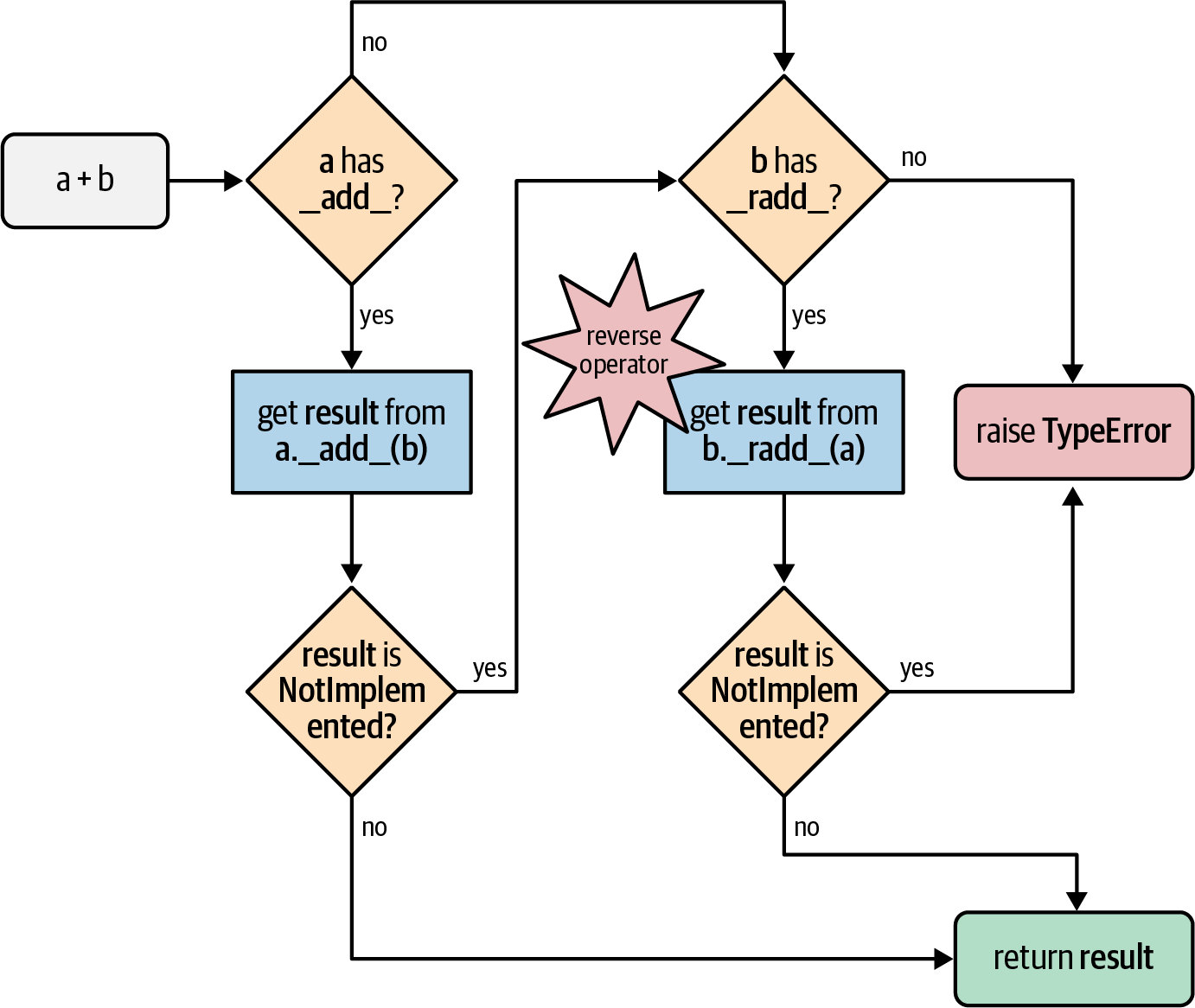
Figure 16-1. Flowchart for computing a + b with __add__ and __radd__.
Therefore, to make the mixed-type additions in Example 16-6 work, we need to implement the Vector.__radd__ method, which Python will invoke as a fallback if the left operand does not implement __add__, or if it does but returns NotImplemented to signal that it doesn’t know how to handle the right operand.
Warning
Do not confuse NotImplemented with NotImplementedError. The first, NotImplemented, is a special singleton value that an infix operator special method should return to tell the interpreter it cannot handle a given operand. In contrast, NotImplementedError is an exception that stub methods in abstract classes may raise to warn that subclasses must implement them.
The simplest implementation of __radd__ that works is shown in Example 16-7.
Example 16-7. The Vector methods __add__ and __radd__
# inside the Vector classdef__add__(self,other):pairs=itertools.zip_longest(self,other,fillvalue=0.0)returnVector(a+bfora,binpairs)def__radd__(self,other):returnself+other
No changes to
__add__from Example 16-4; listed here because__radd__uses it.__radd__just delegates to__add__.
Often, __radd__ can be as simple as that: just invoke the proper operator, therefore delegating to __add__ in this case. This applies to any commutative operator; + is commutative when dealing with numbers or our vectors, but it’s not commutative when concatenating sequences in Python.
If __radd__ simply calls __add__, here is another way to achieve the same effect:
def__add__(self,other):pairs=itertools.zip_longest(self,other,fillvalue=0.0)returnVector(a+bfora,binpairs)__radd__=__add__
The methods in Example 16-7 work with Vector objects, or any iterable with numeric items, such as a Vector2d, a tuple of integers, or an array of floats. But if provided with a noniterable object, __add__ raises an exception with a message that is not very helpful, as in Example 16-8.
Example 16-8. Vector.__add__ method needs an iterable operand
>>>v1+1Traceback (most recent call last):File"<stdin>", line1, in<module>File"vector_v6.py", line328, in__add__pairs=itertools.zip_longest(self,other,fillvalue=0.0)TypeError:zip_longest argument #2 must support iteration
Even worse, we get a misleading message if an operand is iterable but its items cannot be added to the float items in the Vector. See Example 16-9.
Example 16-9. Vector.__add__ method needs an iterable with numeric items
>>>v1+'ABC'Traceback (most recent call last):File"<stdin>", line1, in<module>File"vector_v6.py", line329, in__add__returnVector(a+bfora,binpairs)File"vector_v6.py", line243, in__init__self._components=array(self.typecode,components)File"vector_v6.py", line329, in<genexpr>returnVector(a+bfora,binpairs)TypeError:unsupported operand type(s) for +: 'float' and 'str'
I tried to add Vector and a str, but the message complains about float and str.
The problems in Examples 16-8 and 16-9 actually go deeper than obscure error messages: if an operator special method cannot return a valid result because of type incompatibility, it should return NotImplemented and not raise TypeError. By returning NotImplemented, you leave the door open for the implementer of the other operand type to perform the operation when Python tries the reversed method call.
In the spirit of duck typing, we will refrain from testing the type of the other operand, or the type of its elements. We’ll catch the exceptions and return NotImplemented. If the interpreter has not yet reversed the operands, it will try that. If the reverse method call returns NotImplemented, then Python will raise TypeError with a standard error message like “unsupported operand type(s) for +: Vector and str.”
The final implementation of the special methods for Vector addition is in Example 16-10.
Example 16-10. vector_v6.py: operator + methods added to vector_v5.py (Example 12-16)
def__add__(self,other):try:pairs=itertools.zip_longest(self,other,fillvalue=0.0)returnVector(a+bfora,binpairs)exceptTypeError:returnNotImplementeddef__radd__(self,other):returnself+other
Note that __add__ now catches a TypeError and returns NotImplemented.
Warning
If an infix operator method raises an exception, it aborts the operator dispatch algorithm. In the particular case of TypeError, it is often better to catch it and return NotImplemented. This allows the interpreter to try calling the reversed operator method, which may correctly handle the computation with the swapped operands, if they are of different types.
At this point, we have safely overloaded the + operator by writing __add__ and __radd__. We will now tackle another infix operator: *.
Overloading * for Scalar Multiplication
What does Vector([1, 2, 3]) * x mean? If x is a number, that would be a scalar product, and the result would be a new Vector with each component multiplied by x—also known as an elementwise multiplication:
>>>v1=Vector([1,2,3])>>>v1*10Vector([10.0, 20.0, 30.0])>>>11*v1Vector([11.0, 22.0, 33.0])
Note
Another kind of product involving Vector operands would be the dot product of two vectors—or matrix multiplication,
if you take one vector as a 1 × N matrix and the other as an N × 1 matrix.
We will implement that operator in our Vector class in “Using @ as an Infix Operator”.
Back to our scalar product, again we start with the simplest __mul__ and __rmul__ methods that could possibly work:
# inside the Vector classdef__mul__(self,scalar):returnVector(n*scalarforninself)def__rmul__(self,scalar):returnself*scalar
Those methods do work, except when provided with incompatible operands.
The scalar argument has to be a number that when multiplied by a float produces another float (because our Vector class uses an array of floats internally).
So a complex number will not do, but the scalar can be an int, a bool (because bool is a subclass of int), or even a fractions.Fraction instance.
In Example 16-11, the __mul__ method does not make an explicit type check on scalar,
but instead converts it into
a float, and returns NotImplemented if that fails.
That’s a clear example of duck
typing.
Example 16-11. vector_v7.py: operator * methods added
classVector:typecode='d'def__init__(self,components):self._components=array(self.typecode,components)# many methods omitted in book listing, see vector_v7.py# in https://github.com/fluentpython/example-code-2edef__mul__(self,scalar):try:factor=float(scalar)exceptTypeError:returnNotImplementedreturnVector(n*factorforninself)def__rmul__(self,scalar):returnself*scalar
If
scalarcannot be converted tofloat……we don’t know how to handle it, so we return
NotImplementedto let Python try__rmul__on thescalaroperand.
In this example,
__rmul__works fine by just performingself * scalar, delegating to the__mul__method.
With Example 16-11, we can multiply Vectors by scalar values of the usual, and not so usual, numeric types:
>>>v1=Vector([1.0,2.0,3.0])>>>14*v1Vector([14.0, 28.0, 42.0])>>>v1*TrueVector([1.0, 2.0, 3.0])>>>fromfractionsimportFraction>>>v1*Fraction(1,3)Vector([0.3333333333333333, 0.6666666666666666, 1.0])
Now that we can multiply Vector by scalars, let’s see how to implement Vector by Vector products.
Note
In the first edition of Fluent Python, I used goose typing in Example 16-11: I checked the scalar argument of __mul__ with isinstance(scalar, numbers.Real).
Now I avoid using the numbers ABCs because they are not supported by PEP 484,
and using types at runtime that cannot also be statically checked seems a bad idea to me.
Alternatively, I could have checked against the typing.SupportsFloat protocol that we saw in “Runtime Checkable Static Protocols”. I chose duck typing in that example because I think fluent Pythonistas should be comfortable with that coding pattern.
On the other hand, __matmul__ in Example 16-12 is
a good example of goose typing, new in this second edition.
Using @ as an Infix Operator
The @ sign is well-known as the prefix of function decorators,
but since 2015, it can also be used as an infix operator.
For years, the dot product was written as numpy.dot(a, b) in NumPy.
The function call notation makes longer formulas harder to translate from mathematical notation to Python,5
so the numerical computing community lobbied for
PEP 465—A dedicated infix operator for matrix multiplication,
which was implemented in Python 3.5.
Today, you can write a @ b to compute the dot product of two NumPy arrays.
The @ operator is supported by the special methods __matmul__, __rmatmul__, and __imatmul__,
named for “matrix multiplication.”
These methods are not used anywhere in the standard library at this time,
but are recognized by the interpreter since Python 3.5, so the NumPy team—and the rest of us—can support the @ operator in user-defined types.
The parser was also changed to handle the new operator (a @ b was a syntax error in Python 3.4).
These simple tests show how @ should work with Vector instances:
>>>va=Vector([1,2,3])>>>vz=Vector([5,6,7])>>>va@vz==38.0# 1*5 + 2*6 + 3*7True>>>[10,20,30]@vz380.0>>>va@3Traceback (most recent call last):...TypeError:unsupported operand type(s) for @: 'Vector' and 'int'
Example 16-12 shows the code of the relevant special methods.
Example 16-12. vector_v7.py: operator @ methods
classVector:# many methods omitted in book listingdef__matmul__(self,other):if(isinstance(other,abc.Sized)andisinstance(other,abc.Iterable)):iflen(self)==len(other):returnsum(a*bfora,binzip(self,other))else:raiseValueError('@ requires vectors of equal length.')else:returnNotImplementeddef__rmatmul__(self,other):returnself@other
Both operands must implement
__len__and__iter__……and have the same length to allow…
…a beautiful application of
sum,zip, and generator expression.
New zip() Feature in Python 3.10
The zip built-in accepts a strict keyword-only optional argument since Python 3.10. When strict=True, the function raises ValueError when
the iterables have different lengths. The default is False.
This new strict behavior is in line with Python’s
fail fast philosophy.
In Example 16-12,
I’d replace the inner if with a try/except ValueError
and add strict=True to the zip call.
Example 16-12 is a good example of goose typing in practice.
If we tested the other operand against Vector,
we’d deny users the flexibility of using lists or arrays as operands to @.
As long as one operand is a Vector, our @ implementation supports
other operands that are instances of abc.Sized and abc.Iterable.
Both of these ABCs implement the __subclasshook__,
therefore any object providing __len__ and __iter__ satisfies
our test—no need to actually subclass those ABCs or even register with them, as explained in
“Structural Typing with ABCs”.
In particular, our Vector class does not subclass either abc.Sized
or abc.Iterable, but it does pass the isinstance checks against
those ABCs because it has the necessary methods.
Let’s review the arithmetic operators supported by Python, before diving into the special category of “Rich Comparison Operators”.
Wrapping-Up Arithmetic Operators
Implementing +, *, and @, we saw the most common patterns for coding infix operators.
The techniques we described are applicable to all operators listed in Table 16-1 (the in-place operators will be covered in “Augmented Assignment Operators”).
| Operator | Forward | Reverse | In-place | Description |
|---|---|---|---|---|
|
|
|
|
Addition or concatenation |
|
|
|
|
Subtraction |
|
|
|
|
Multiplication or repetition |
|
|
|
|
True division |
|
|
|
|
Floor division |
|
|
|
|
Modulo |
|
|
|
|
Returns tuple of floor division quotient and modulo |
|
|
|
|
Exponentiationa |
|
|
|
|
Matrix multiplication |
|
|
|
|
Bitwise and |
| |
|
|
|
Bitwise or |
|
|
|
|
Bitwise xor |
|
|
|
|
Bitwise shift left |
|
|
|
|
Bitwise shift right |
a | ||||
Rich Comparison Operators
The handling of the rich comparison operators ==, !=, >, <, >=, and <= by the Python interpreter is similar to what we just saw, but differs in two important aspects:
-
The same set of methods is used in forward and reverse operator calls. The rules are summarized in Table 16-2. For example, in the case of
==, both the forward and reverse calls invoke__eq__, only swapping arguments; and a forward call to__gt__is followed by a reverse call to__lt__with the arguments swapped. -
In the case of
==and!=, if the reverse method is missing, or returnsNotImplemented, Python compares the object IDs instead of raisingTypeError.
| Group | Infix operator | Forward method call | Reverse method call | Fallback |
|---|---|---|---|---|
Equality |
|
|
|
Return |
|
|
|
Return |
|
Ordering |
|
|
|
Raise |
|
|
|
Raise |
|
|
|
|
Raise |
|
|
|
|
Raise |
Given these rules, let’s review and improve the behavior of the Vector.__eq__ method, which was coded as follows in vector_v5.py (Example 12-16):
classVector:# many lines omitteddef__eq__(self,other):return(len(self)==len(other)andall(a==bfora,binzip(self,other)))
That method produces the results in Example 16-13.
Example 16-13. Comparing a Vector to a Vector, a Vector2d, and a tuple
>>>va=Vector([1.0,2.0,3.0])>>>vb=Vector(range(1,4))>>>va==vbTrue>>>vc=Vector([1,2])>>>fromvector2d_v3importVector2d>>>v2d=Vector2d(1,2)>>>vc==v2dTrue>>>t3=(1,2,3)>>>va==t3True
Two
Vectorinstances with equal numeric components compare equal.A
Vectorand aVector2dare also equal if their components are equal.A
Vectoris also considered equal to atupleor any iterable with numeric items of equal value.
The result in Example 16-13 is probably not desirable.
Do we really want a Vector to be considered equal to a tuple containing the same numbers?
I have no hard rule about this; it depends on the application context.
The “Zen of Python” says:
In the face of ambiguity, refuse the temptation to guess.
Excessive liberality in the evaluation of operands may lead to surprising results, and programmers hate surprises.
Taking a clue from Python itself, we can see that [1,2] == (1, 2) is False. Therefore, let’s be conservative and do some type checking. If the second operand is a
Vector instance (or an instance of a Vector subclass), then use the same logic as the current __eq__. Otherwise, return NotImplemented and let Python handle that. See Example 16-14.
Example 16-14. vector_v8.py: improved __eq__ in the Vector class
def__eq__(self,other):ifisinstance(other,Vector):return(len(self)==len(other)andall(a==bfora,binzip(self,other)))else:returnNotImplemented
If the
otheroperand is an instance ofVector(or of aVectorsubclass), perform the comparison as before.Otherwise, return
NotImplemented.
If you run the tests in Example 16-13 with the new Vector.__eq__ from Example 16-14, what you get now is shown in Example 16-15.
Example 16-15. Same comparisons as Example 16-13: last result changed
>>>va=Vector([1.0,2.0,3.0])>>>vb=Vector(range(1,4))>>>va==vbTrue>>>vc=Vector([1,2])>>>fromvector2d_v3importVector2d>>>v2d=Vector2d(1,2)>>>vc==v2dTrue>>>t3=(1,2,3)>>>va==t3False
Same result as before, as expected.
Same result as before, but why? Explanation coming up.
Different result; this is what we wanted. But why does it work? Read on…
Among the three results in Example 16-15, the first one is no news, but the last two were caused by __eq__ returning NotImplemented in Example 16-14. Here is what happens in the example with a Vector and a Vector2d, vc == v2d, step-by-step:
-
To evaluate
vc == v2d, Python callsVector.__eq__(vc, v2d). -
Vector.__eq__(vc, v2d)verifies thatv2dis not aVectorand returnsNotImplemented. -
Python gets the
NotImplementedresult, so it triesVector2d.__eq__(v2d, vc). -
Vector2d.__eq__(v2d, vc)turns both operands into tuples and compares them: the result isTrue(the code forVector2d.__eq__is in Example 11-11).
As for the comparison va == t3, between Vector and tuple in Example 16-15, the actual steps are:
-
To evaluate
va == t3, Python callsVector.__eq__(va, t3). -
Vector.__eq__(va, t3)verifies thatt3is not aVectorand returnsNotImplemented. -
Python gets the
NotImplementedresult, so it triestuple.__eq__(t3, va). -
tuple.__eq__(t3, va)has no idea what aVectoris, so it returnsNotImplemented. -
In the special case of
==, if the reversed call returnsNotImplemented, Python compares object IDs as a last resort.
We don’t need to implement __ne__ for != because the fallback behavior of __ne__ inherited from object suits us:
when __eq__ is defined and does not return NotImplemented, __ne__ returns that result negated.
In other words, given the same objects we used in Example 16-15, the results for != are consistent:
>>>va!=vbFalse>>>vc!=v2dFalse>>>va!=(1,2,3)True
The __ne__ inherited from object works like the following code—except that the original is written in C:6
def__ne__(self,other):eq_result=self==otherifeq_resultisNotImplemented:returnNotImplementedelse:returnnoteq_result
After covering the essentials of infix operator overloading, let’s turn to a different class of operators: the augmented assignment operators.
Augmented Assignment Operators
Our Vector class already supports the augmented assignment operators += and *=. That’s because augmented assignment works with immutable receivers by creating new instances and rebinding the lefthand variable.
Example 16-16 shows them in action.
Example 16-16. Using += and *= with Vector instances
>>>v1=Vector([1,2,3])>>>v1_alias=v1>>>id(v1)4302860128>>>v1+=Vector([4,5,6])>>>v1Vector([5.0, 7.0, 9.0])>>>id(v1)4302859904>>>v1_aliasVector([1.0, 2.0, 3.0])>>>v1*=11>>>v1Vector([55.0, 77.0, 99.0])>>>id(v1)4302858336
Create an alias so we can inspect the
Vector([1, 2, 3])object later.Remember the ID of the initial
Vectorbound tov1.Perform augmented addition.

The expected result…

…but a new
Vectorwas created.
Inspect
v1_aliasto confirm the originalVectorwas not altered.
Perform augmented multiplication.

Again, the expected result, but a new
Vectorwas created.
If a class does not implement the in-place operators listed in Table 16-1, the augmented assignment operators work as syntactic sugar: a += b is evaluated exactly as a = a + b. That’s the expected behavior for immutable types, and if you have __add__, then += will work with no additional code.
However, if you do implement an in-place operator method such as __iadd__, that method is called to compute the result of a += b. As the name says, those operators are expected to change the lefthand operand in place, and not create a new object as the result.
Warning
The in-place special methods should never be implemented for immutable types like our Vector class. This is fairly obvious, but worth stating anyway.
To show the code of an in-place operator, we will extend the BingoCage class from Example 13-9 to implement __add__ and __iadd__.
We’ll call the subclass AddableBingoCage. Example 16-17 is the behavior we want for the + operator.
Example 16-17. The + operator creates a new AddableBingoCage instance
>>>vowels='AEIOU'>>>globe=AddableBingoCage(vowels)>>>globe.inspect()('A','E','I','O','U')>>>globe.pick()invowelsTrue>>>len(globe.inspect())4>>>globe2=AddableBingoCage('XYZ')>>>globe3=globe+globe2>>>len(globe3.inspect())7>>>void=globe+[10,20]Traceback(mostrecentcalllast):...TypeError:unsupportedoperandtype(s)for+:'AddableBingoCage'and'list'
Create a
globeinstance with five items (each of thevowels).Pop one of the items, and verify it is one of the
vowels.Confirm that the
globeis down to four items.Create a second instance, with three items.
Create a third instance by adding the previous two. This instance has seven items.
Attempting to add an
AddableBingoCageto alistfails withTypeError. That error message is produced by the Python interpreter when our__add__method returnsNotImplemented.
Because an AddableBingoCage is mutable, Example 16-18 shows how it will work when we implement __iadd__.
Example 16-18. An existing AddableBingoCage can be loaded with += (continuing from Example 16-17)
>>>globe_orig=globe>>>len(globe.inspect())4>>>globe+=globe2>>>len(globe.inspect())7>>>globe+=['M','N']>>>len(globe.inspect())9>>>globeisglobe_origTrue>>>globe+=1Traceback(mostrecentcalllast):...TypeError:rightoperandin+=mustbe'Tombola'oraniterable
Create an alias so we can check the identity of the object later.
globehas four items here.An
AddableBingoCageinstance can receive items from another instance of the same class.The righthand operand of
+=can also be any iterable.Throughout this example,
globehas always referred to the same object asglobe_orig.Trying to add a noniterable to an
AddableBingoCagefails with a proper error message.
Note that the += operator is more liberal than + with regard to the second operand. With +, we want both operands to be of the same type (AddableBingoCage, in this case), because if we accepted different types, this might cause confusion as to the type of the result. With the +=, the situation is clearer: the lefthand object is updated in place, so there’s no doubt about the type of the result.
Tip
I validated the contrasting behavior of + and += by observing how the list built-in type works. Writing my_list + x, you can only concatenate one list to another list, but if you write my_list += x, you can extend the lefthand list with items from any iterable x on the righthand side.
This is how the list.extend() method works: it accepts any iterable argument.
Now that we are clear on the desired behavior for AddableBingoCage, we can look at its implementation in Example 16-19.
Recall that BingoCage, from Example 13-9, is a concrete
subclass of the Tombola ABC from Example 13-7.
Example 16-19. bingoaddable.py: AddableBingoCage extends BingoCage to support + and +=
fromtombolaimportTombolafrombingoimportBingoCageclassAddableBingoCage(BingoCage):def__add__(self,other):ifisinstance(other,Tombola):returnAddableBingoCage(self.inspect()+other.inspect())else:returnNotImplementeddef__iadd__(self,other):ifisinstance(other,Tombola):other_iterable=other.inspect()else:try:other_iterable=iter(other)exceptTypeError:msg=('right operand in += must be'"'Tombola'or an iterable")raiseTypeError(msg)self.load(other_iterable)returnself
AddableBingoCageextendsBingoCage.Our
__add__will only work with an instance ofTombolaas the second operand.In
__iadd__, retrieve items fromother, if it is an instance ofTombola.Otherwise, try to obtain an iterator over
other.7If that fails, raise an exception explaining what the user should do. When possible, error messages should explicitly guide the user to the solution.
If we got this far, we can load the
other_iterableintoself.Very important: augmented assignment special methods of mutable objects must return
self. That’s what users expect.
We can summarize the whole idea of in-place operators by contrasting the return statements that produce results in __add__ and __iadd__ in Example 16-19:
__add__-
The result is produced by calling the constructor
AddableBingoCageto build a new instance. __iadd__-
The result is produced by returning
self, after it has been modified.
To wrap up this example, a final observation on Example 16-19: by design, no __radd__ was coded in AddableBingoCage, because there is no need for it. The forward method __add__ will only deal with righthand operands of the same type, so if Python is trying to compute a + b, where a is an AddableBingoCage and b is not, we return NotImplemented—maybe the class of b can make it work. But if the expression is b + a and b is not an AddableBingoCage, and it returns NotImplemented, then it’s better to let Python give up and raise TypeError because we cannot handle b.
Tip
In general, if a forward infix operator method (e.g., __mul__) is designed to work only with operands of the same type as self, it’s useless to implement the corresponding reverse method (e.g., __rmul__) because that, by definition, will only be invoked when dealing with an operand of a different type.
This concludes our exploration of operator overloading in Python.
Chapter Summary
We started this chapter by reviewing some restrictions Python imposes on operator overloading: no redefining of operators in the built-in types themselves, overloading limited to existing operators, with a few
operators left out (is, and, or, not).
We got down to business with the unary operators, implementing __neg__ and __pos__. Next came the infix operators, starting with +, supported by the __add__ method. We saw that unary and infix operators are supposed to produce results by creating new objects, and should never change their operands. To support operations with other types, we return the NotImplemented special value—not an exception—allowing the interpreter to try again by swapping the operands and calling the reverse special method for that operator (e.g., __radd__). The algorithm Python uses to handle infix operators is summarized in the flowchart in Figure 16-1.
Mixing operand types requires detecting operands we can’t handle. In this chapter, we did this in two ways: in the duck typing way, we just went ahead and tried the operation, catching a TypeError exception if it happened; later, in __mul__ and
__matmul__, we did it with an explicit isinstance test. There are pros and cons to these approaches: duck typing is more flexible, but explicit type checking is more
predictable.
In general, libraries should leverage duck typing—opening the door for objects regardless of their types, as long as they support the necessary operations.
However, Python’s operator dispatch algorithm may produce misleading error messages or unexpected results when combined with duck typing.
For this reason, the discipline of type checking using isinstance calls against ABCs is often useful when writing special methods for operator overloading.
That’s the technique dubbed goose typing by Alex Martelli—which we saw in “Goose Typing”.
Goose typing is a good compromise between flexibility and safety, because existing or future user-defined types can be declared as actual or virtual subclasses of an ABC.
In addition, if an ABC implements the __subclasshook__,
then objects pass isinstance checks against that ABC by providing the required methods—no subclassing or registration required.
The next topic we covered was the rich comparison operators. We implemented == with __eq__ and discovered that Python provides a handy implementation of != in the __ne__ inherited from the object base class. The way Python evaluates these operators along with >, <, >=, and <= is slightly different, with special logic for choosing the reverse method, and fallback handling for == and !=, which never generate errors because Python compares the object IDs as a last resort.
In the last section, we focused on augmented assignment operators. We saw that Python handles them by default as a combination of plain operator followed by assignment, that is: a += b is evaluated exactly as a = a + b. That always creates a new object, so it works for mutable or immutable types. For mutable objects, we can implement in-place special methods such as __iadd__ for +=, and alter the value of the lefthand operand. To show this at work, we left behind the immutable Vector class and worked on implementing a BingoCage subclass to support += for adding items to the random pool, similar to the way the list built-in supports += as a shortcut for the list.extend() method. While doing this, we discussed how + tends to be stricter than += regarding the types it accepts. For sequence types, + usually requires that both operands are of the same type, while += often accepts any iterable as the righthand operand.
Further Reading
Guido van Rossum wrote a good defense of operator overloading in “Why operators are useful”. Trey Hunner blogged “Tuple ordering and deep comparisons in Python”, arguing that the rich comparison operators in Python are more flexible and powerful than programmers may realize when coming from other languages.
Operator overloading is one area of Python programming where isinstance tests are common.
The best practice around such tests is goose typing, covered in “Goose Typing”.
If you skipped that, make sure to read it.
The main reference for the operator special methods is the “Data Model” chapter of the Python documentation. Another relevant reading is “9.1.2.2. Implementing the arithmetic operations” in the numbers module of The Python Standard Library.
A clever example of operator overloading appeared in the pathlib package, added in Python 3.4.
Its Path class overloads the / operator to build filesystem paths from strings, as shown in this example from the documentation:
>>>p=Path('/etc')>>>q=p/'init.d'/'reboot'>>>qPosixPath('/etc/init.d/reboot')
Another nonarithmetic example of operator overloading is in the Scapy library, used to “send, sniff, dissect, and forge network packets.”
In Scapy, the / operator builds packets by stacking fields from different network layers. See “Stacking layers” for details.
If you are about to implement comparison operators, study functools.total_ordering.
That is a class decorator that automatically generates methods for all rich comparison operators in any class that defines at least a couple of them.
See the functools module docs.
If you are curious about operator method dispatching in languages with dynamic typing, two seminal readings are “A Simple Technique for Handling Multiple Polymorphism” by Dan Ingalls (member of the original Smalltalk team), and “Arithmetic and Double Dispatching in Smalltalk-80” by Kurt J. Hebel and Ralph Johnson (Johnson became famous as one of the authors of the original Design Patterns book). Both papers provide deep insight into the power of polymorphism in languages with dynamic typing, like Smalltalk, Python, and Ruby. Python does not use double dispatching for handling operators as described in those articles. The Python algorithm using forward and reverse operators is easier for user-defined classes to support than double dispatching, but requires special handling by the interpreter. In contrast, classic double dispatching is a general technique you can use in Python or any object-oriented language beyond the specific context of infix operators, and in fact Ingalls, Hebel, and Johnson use very different examples to describe it.
The article, “The C Family of Languages: Interview with Dennis Ritchie, Bjarne Stroustrup, and James Gosling”, from which I quoted the epigraph for this chapter, appeared in Java Report, 5(7), July 2000, and C++ Report, 12(7), July/August 2000, along with two other snippets I used in this chapter’s “Soapbox” (next). If you are into programming language design, do yourself a favor and read that interview.
1 Source: “The C Family of Languages: Interview with Dennis Ritchie, Bjarne Stroustrup, and James Gosling”.
2 The remaining ABCs in Python’s standard library are still valuable for goose typing and static typing. The issue with the numbers ABCs is explained in “The numbers ABCs and Numeric Protocols”.
3 See https://en.wikipedia.org/wiki/Bitwise_operation#NOT for an explanation of the bitwise not.
4 The Python documentation uses both terms. The “Data Model” chapter uses “reflected,” but “9.1.2.2. Implementing the arithmetic operations” in the numbers module docs mention “forward” and “reverse” methods, and I find this terminology better, because “forward” and “reversed” clearly name each of the directions, while “reflected” doesn’t have an obvious opposite.
5 See “Soapbox” for a discussion of the problem.
6 The logic for object.__eq__ and object.__ne__ is in function object_richcompare in Objects/typeobject.c in the CPython source code.
7 The iter built-in function will be covered in the next chapter. Here I could have used tuple(other), and it would work, but at the cost of building a new tuple when all the .load(…) method needs is to iterate over its argument.