Chapter 12. Special Methods for Sequences
Don’t check whether it is-a duck: check whether it quacks-like-a duck, walks-like-a duck, etc., etc., depending on exactly what subset of duck-like behavior you need to play your language-games with. (
comp.lang.python, Jul. 26, 2000)Alex Martelli
In this chapter, we will create a class to represent a multidimensional Vector
class—a significant step up from the two-dimensional Vector2d of Chapter 11.
Vector will behave like a standard Python immutable flat sequence.
Its elements will be floats, and it will support the following by the end of this chapter:
-
Basic sequence protocol:
__len__and__getitem__ -
Safe representation of instances with many items
-
Proper slicing support, producing new
Vectorinstances -
Aggregate hashing, taking into account every contained element value
-
Custom formatting language extension
We’ll also implement dynamic attribute access with __getattr__
as a way of replacing the read-only properties we used in Vector2d—although this is not typical of sequence types.
The code-intensive presentation will be interrupted by a conceptual discussion about the idea of protocols as an informal interface. We’ll talk about how protocols and duck typing are related, and its practical implications when you create your own types.
What’s New in This Chapter
There are no major changes in this chapter. There is a new, brief discussion of
the typing.Protocol in a tip box near the end of “Protocols and Duck Typing”.
In “A Slice-Aware __getitem__”, the implementation of __getitem__ in Example 12-6 is
more concise and robust than the example in the first edition,
thanks to duck typing and operator.index.
This change carried over to later implementations of Vector in this chapter and in Chapter 16.
Let’s get started.
Vector: A User-Defined Sequence Type
Our strategy to implement Vector will be to use composition, not inheritance. We’ll store the components in an array of floats, and will implement the methods needed for our Vector to behave like an immutable flat sequence.
But before we implement the sequence methods, let’s make sure we have a baseline implementation of Vector that is compatible with our earlier Vector2d class—except where such compatibility would not make sense.
Vector Take #1: Vector2d Compatible
The first version of Vector should be as compatible as possible with our earlier Vector2d class.
However, by design, the Vector constructor is not compatible with the Vector2d constructor. We could make Vector(3, 4) and Vector(3, 4, 5) work, by taking arbitrary arguments with *args in __init__, but the best practice for a sequence constructor is to take the data as an iterable argument in the constructor, like all built-in sequence types do. Example 12-1 shows some ways of instantiating our new Vector objects.
Example 12-1. Tests of Vector.__init__ and Vector.__repr__
>>>Vector([3.1,4.2])Vector([3.1, 4.2])>>>Vector((3,4,5))Vector([3.0, 4.0, 5.0])>>>Vector(range(10))Vector([0.0, 1.0, 2.0, 3.0, 4.0, ...])
Apart from a new constructor signature, I made sure every test I did with Vector2d (e.g., Vector2d(3, 4)) passed and produced the same result with a two-component Vector([3, 4]).
Warning
When a Vector has more than six components, the string produced by repr() is abbreviated with ... as seen in the last line of Example 12-1. This is crucial in any collection type that may contain a large number of items, because repr is used for debugging—and you don’t want a single large object to span thousands of lines in your console or log. Use the reprlib module to produce limited-length representations, as in Example 12-2. The reprlib module was named repr in Python 2.7.
Example 12-2 lists the implementation of our first version of Vector (this example builds on the code shown in Examples 11-2 and 11-3).
Example 12-2. vector_v1.py: derived from vector2d_v1.py
fromarrayimportarrayimportreprlibimportmathclassVector:typecode='d'def__init__(self,components):self._components=array(self.typecode,components)def__iter__(self):returniter(self._components)def__repr__(self):components=reprlib.repr(self._components)components=components[components.find('['):-1]returnf'Vector({components})'def__str__(self):returnstr(tuple(self))def__bytes__(self):return(bytes([ord(self.typecode)])+bytes(self._components))def__eq__(self,other):returntuple(self)==tuple(other)def__abs__(self):returnmath.hypot(*self)def__bool__(self):returnbool(abs(self))@classmethoddeffrombytes(cls,octets):typecode=chr(octets[0])memv=memoryview(octets[1:]).cast(typecode)returncls(memv)

The
self._componentsinstance “protected” attribute will hold anarraywith theVectorcomponents.
To allow iteration, we return an iterator over
self._components.1
Use
reprlib.repr()to get a limited-length representation ofself._components(e.g.,array('d', [0.0, 1.0, 2.0, 3.0, 4.0, ...])).
Remove the
array('d',prefix, and the trailing)before plugging the string into aVectorconstructor call.
Build a
bytesobject directly fromself._components.
Since Python 3.8,
math.hypotaccepts N-dimensional points. I used this expression before:math.sqrt(sum(x * x for x in self)).
The only change needed from the earlier
frombytesis in the last line: we pass thememoryviewdirectly to the constructor, without unpacking with*as we did before.
The way I used reprlib.repr deserves some elaboration. That function produces safe representations of large or recursive structures by limiting the length of the output string and marking the cut with '...'. I wanted the repr of a Vector to look like Vector([3.0, 4.0, 5.0]) and not Vector(array('d', [3.0, 4.0, 5.0])), because the fact that there is an array inside a Vector is an implementation detail. Because these constructor calls build identical Vector objects, I prefer the simpler syntax using a list argument.
When coding __repr__, I could have produced the simplified components display with this expression: reprlib.repr(list(self._components)). However, this would be wasteful, as I’d be copying every item from self._components to a list just to use the list repr. Instead, I decided to apply reprlib.repr to the self._components array directly, and then chop off the characters outside of the []. That’s what the second line of __repr__ does in Example 12-2.
Tip
Because of its role in debugging, calling repr() on an object should never raise an exception. If something goes wrong inside your implementation of __repr__, you must deal with the issue and do your best to produce some serviceable output that gives the user a chance of identifying the receiver (self).
Note that the __str__, __eq__, and __bool__ methods are unchanged from Vector2d, and only one character was changed in frombytes (a * was removed in the last line). This is one of the benefits of making the original Vector2d iterable.
By the way, we could have subclassed Vector from Vector2d, but I chose not to do it for two reasons. First, the incompatible constructors really make subclassing not advisable. I could work around that with some clever parameter handling in __init__, but the second reason is more important: I want Vector to be a standalone example of a class implementing the sequence protocol. That’s what we’ll do next, after a discussion of the term protocol.
Protocols and Duck Typing
As early as Chapter 1, we saw that you don’t need to inherit from any special class to create a fully functional sequence type in Python; you just need to implement the methods that fulfill the sequence protocol. But what kind of protocol are we talking about?
In the context of object-oriented programming, a protocol is an informal interface, defined only in documentation and not in code. For example, the sequence protocol in Python entails just the __len__ and __getitem__ methods. Any class Spam that implements those methods with the standard signature and semantics can be used anywhere a sequence is expected. Whether Spam is a subclass of this or that is irrelevant; all that matters is that it provides the necessary methods. We saw that in Example 1-1, reproduced here in Example 12-3.
Example 12-3. Code from Example 1-1, reproduced here for convenience
importcollectionsCard=collections.namedtuple('Card',['rank','suit'])classFrenchDeck:ranks=[str(n)forninrange(2,11)]+list('JQKA')suits='spades diamonds clubs hearts'.split()def__init__(self):self._cards=[Card(rank,suit)forsuitinself.suitsforrankinself.ranks]def__len__(self):returnlen(self._cards)def__getitem__(self,position):returnself._cards[position]
The FrenchDeck class in Example 12-3 takes advantage of many Python facilities because it implements the sequence protocol,
even if that is not declared anywhere in the code.
An experienced Python coder will look at it and understand that it is a sequence, even if it subclasses object.
We say it is a sequence because it behaves like one, and that is what matters.
This became known as duck typing, after Alex Martelli’s post quoted at the beginning of this chapter.
Because protocols are informal and unenforced, you can often get away with implementing just part of a protocol, if you know the specific context where a class will be used. For example, to support iteration, only __getitem__ is required; there is no need to provide __len__.
Tip
With PEP 544—Protocols: Structural subtyping (static duck typing),
Python 3.8 supports protocol classes: typing constructs, which we studied in “Static Protocols”.
This new use of the word protocol in Python has a related but different meaning.
When I need to differentiate them, I write static protocol to refer to the protocols formalized in protocol classes,
and dynamic protocol for the traditional sense.
One key difference is that static protocol implementations must provide all methods defined in the protocol class.
“Two Kinds of Protocols” in Chapter 13 has more details.
We’ll now implement the sequence protocol in Vector, initially without proper support for slicing, but later adding that.
Vector Take #2: A Sliceable Sequence
As we saw with the FrenchDeck example, supporting the sequence protocol is really easy if you can delegate to a sequence attribute in your object, like our self._components array. These __len__ and __getitem__ one-liners are a good start:
classVector:# many lines omitted# ...def__len__(self):returnlen(self._components)def__getitem__(self,index):returnself._components[index]
With these additions, all of these operations now work:
>>>v1=Vector([3,4,5])>>>len(v1)3>>>v1[0],v1[-1](3.0, 5.0)>>>v7=Vector(range(7))>>>v7[1:4]array('d', [1.0, 2.0, 3.0])
As you can see, even slicing is supported—but not very well. It would be better if a slice of a Vector was also a Vector instance and not an array. The old FrenchDeck class has a similar problem: when you slice it, you get a list. In the case of Vector, a lot of functionality is lost when slicing produces plain arrays.
Consider the built-in sequence types: every one of them, when sliced, produces a new instance of its own type, and not of some other type.
To make Vector produce slices as Vector instances, we can’t just delegate the slicing to array.
We need to analyze the arguments we get in __getitem__ and do the right thing.
Now, let’s see how Python turns the syntax my_seq[1:3] into arguments for my_seq.__getitem__(...).
How Slicing Works
A demo is worth a thousand words, so take a look at Example 12-4.
Example 12-4. Checking out the behavior of __getitem__ and slices
>>>classMySeq:...def__getitem__(self,index):...returnindex...>>>s=MySeq()>>>s[1]1>>>s[1:4]slice(1, 4, None)>>>s[1:4:2]slice(1, 4, 2)>>>s[1:4:2,9](slice(1, 4, 2), 9)>>>s[1:4:2,7:9](slice(1, 4, 2), slice(7, 9, None))
For this demonstration,
__getitem__merely returns whatever is passed to it.A single index, nothing new.
The notation
1:4becomesslice(1, 4, None).slice(1, 4, 2)means start at 1, stop at 4, step by 2.Surprise: the presence of commas inside the
[]means__getitem__receives a tuple.The tuple may even hold several
sliceobjects.
Now let’s take a closer look at slice itself in Example 12-5.
Example 12-5. Inspecting the attributes of the slice class
>>>slice<class 'slice'>>>>dir(slice)['__class__', '__delattr__', '__dir__', '__doc__', '__eq__','__format__', '__ge__', '__getattribute__', '__gt__','__hash__', '__init__', '__le__', '__lt__', '__ne__','__new__', '__reduce__', '__reduce_ex__', '__repr__','__setattr__', '__sizeof__', '__str__', '__subclasshook__','indices', 'start', 'step', 'stop']
sliceis a built-in type (we saw it first in “Slice Objects”).Inspecting a
slice, we find the data attributesstart,stop, andstep, and anindicesmethod.
In Example 12-5, calling dir(slice) reveals an indices attribute, which turns out to be a very interesting but little-known method. Here is what help(slice.indices) reveals:
S.indices(len) -> (start, stop, stride)-
Assuming a sequence of length
len, calculate thestartandstopindices, and thestridelength of the extended slice described byS. Out-of-bounds indices are clipped just like they are in a normal slice.
In other words, indices exposes the tricky logic that’s implemented in the built-in sequences to gracefully handle missing or negative indices and slices that are longer than the original sequence. This method produces “normalized” tuples of nonnegative start, stop, and stride integers tailored to a sequence of the given length.
Here are a couple of examples, considering a sequence of len == 5, e.g., 'ABCDE':
>>>slice(None,10,2).indices(5)(0, 5, 2)>>>slice(-3,None,None).indices(5)(2, 5, 1)
'ABCDE'[:10:2]is the same as'ABCDE'[0:5:2].'ABCDE'[-3:]is the same as'ABCDE'[2:5:1].
In our Vector code, we’ll not need the slice.indices() method because when we get a slice argument we’ll delegate its handling to the _components array.
But if you can’t count on the services of an underlying sequence, this method can be a huge time saver.
Now that we know how to handle slices, let’s take a look at the improved Vector.__getitem__ implementation.
A Slice-Aware __getitem__
Example 12-6 lists the two methods needed to make Vector behave as a sequence: __len__ and __getitem__ (the latter now implemented to handle slicing correctly).
Example 12-6. Part of vector_v2.py: __len__ and __getitem__ methods added to
Vector class from vector_v1.py (see Example 12-2)
def__len__(self):returnlen(self._components)def__getitem__(self,key):ifisinstance(key,slice):cls=type(self)returncls(self._components[key])index=operator.index(key)returnself._components[index]
If the
keyargument is aslice……get the class of the instance (i.e.,
Vector) and……invoke the class to build another
Vectorinstance from a slice of the_componentsarray.If we can get an
indexfromkey……return the specific item from
_components.
The operator.index() function calls the __index__ special method.
The function and the special method were defined in PEP 357—Allowing Any Object to be Used for Slicing, proposed by Travis Oliphant to allow any of the numerous types of integers in NumPy to be used as indexes and slice arguments. The key difference between operator.index() and int() is that the former is intended for this specific purpose. For example, int(3.14) returns 3, but operator.index(3.14) raises TypeError because a float should not be used as an index.
Note
Excessive use of isinstance may be a sign of bad OO design, but handling slices in __getitem__ is a justified use case. In the first edition, I also used an isinstance test on key to test if it was an integer. Using operator.index avoids this test, and raises TypeError with a very informative message if we can’t get the index from key.
See the last error message from Example 12-7.
Once the code in Example 12-6 is added to the Vector class, we have proper slicing behavior, as Example 12-7 demonstrates.
Example 12-7. Tests of enhanced Vector.__getitem__ from Example 12-6
>>> v7 = Vector(range(7))>>> v7[-1]6.0>>> v7[1:4]Vector([1.0, 2.0, 3.0])>>> v7[-1:]Vector([6.0])>>> v7[1,2]Traceback (most recent call last):...TypeError: 'tuple' object cannot be interpreted as an integer
Vector Take #3: Dynamic Attribute Access
In the evolution from Vector2d to Vector, we lost the ability to access vector components by name (e.g., v.x, v.y). We are now dealing with vectors that may have a large number of components. Still, it may be convenient to access the first few components with shortcut letters such as x, y, z instead of v[0], v[1], and v[2].
Here is the alternative syntax we want to provide for reading the first four components of a vector:
>>>v=Vector(range(10))>>>v.x0.0>>>v.y,v.z,v.t(1.0, 2.0, 3.0)
In Vector2d, we provided read-only access to x and y using the @property decorator (Example 11-7). We could write four properties in Vector, but it would be tedious. The __getattr__ special method provides a better way.
The __getattr__ method is invoked by the interpreter when attribute lookup fails. In simple terms, given the expression my_obj.x, Python checks if the my_obj instance has an attribute named x; if not, the search goes to the class
(my_obj.__class__), and then up the inheritance graph.2 If the x attribute is not found, then the __getattr__ method defined in the class of my_obj is called with self and the name of the attribute as a string (e.g., 'x').
Example 12-8 lists our __getattr__ method. Essentially it checks whether the attribute being sought is one of the letters xyzt and if so, returns the corresponding vector component.
Example 12-8. Part of vector_v3.py: __getattr__ method added to the Vector class
__match_args__=('x','y','z','t')def__getattr__(self,name):cls=type(self)try:pos=cls.__match_args__.index(name)exceptValueError:pos=-1if0<=pos<len(self._components):returnself._components[pos]msg=f'{cls.__name__!r} object has no attribute {name!r}'raiseAttributeError(msg)
Set
__match_args__to allow positional pattern matching on the dynamic attributes supported by__getattr__.3Get the
Vectorclass for later use.Try to get the position of
namein__match_args__..index(name)raisesValueErrorwhennameis not found; setposto-1. (I’d rather use a method likestr.findhere, buttupledoesn’t implement it.)If the
posis within range of the available components, return the component.If we get this far, raise
AttributeErrorwith a standard message text.
It’s not hard to implement __getattr__, but in this case it’s not enough. Consider the bizarre interaction in Example 12-9.
Example 12-9. Inappropriate behavior: assigning to v.x raises no error, but introduces an inconsistency
>>>v=Vector(range(5))>>>vVector([0.0, 1.0, 2.0, 3.0, 4.0])>>>v.x0.0>>>v.x=10>>>v.x10>>>vVector([0.0, 1.0, 2.0, 3.0, 4.0])
Access element
v[0]asv.x.Assign new value to
v.x. This should raise an exception.Reading
v.xshows the new value,10.However, the vector components did not change.
Can you explain what is happening?
In particular, why does v.x return 10 the second time if that value is not in the vector components array?
If you don’t know right off the bat, study the explanation of __getattr__ given right before Example 12-8.
It’s a bit subtle, but a very important foundation to understand a lot of what comes later in the book.
After you’ve given it some thought, proceed and we’ll explain exactly what happened.
The inconsistency in Example 12-9 was introduced because of the way __getattr__ works: Python only calls that method as a fallback, when the object does not have the named attribute. However, after we assign v.x = 10, the v object now has an x attribute, so __getattr__ will no longer be called to retrieve v.x: the interpreter will just return the value 10 that is bound to v.x. On the other hand, our implementation of __getattr__ pays no attention to instance attributes other than self._components, from where it retrieves the values of the “virtual attributes” listed in __match_args__.
We need to customize the logic for setting attributes in our Vector class in order to avoid this inconsistency.
Recall that in the latest Vector2d examples from Chapter 11, trying to assign to the .x or .y instance attributes raised AttributeError. In Vector, we want the same exception with any attempt at assigning to all single-letter lowercase attribute names, just to avoid confusion. To do that, we’ll implement __setattr__, as listed in Example 12-10.
Example 12-10. Part of vector_v3.py: __setattr__ method in the Vector class
def__setattr__(self,name,value):cls=type(self)iflen(name)==1:ifnameincls.__match_args__:error='readonly attribute {attr_name!r}'elifname.islower():error="can't set attributes'a'to'z'in {cls_name!r}"else:error=''iferror:msg=error.format(cls_name=cls.__name__,attr_name=name)raiseAttributeError(msg)super().__setattr__(name,value)
Special handling for single-character attribute names.
If
nameis one of__match_args__, set specific error message.If
nameis lowercase, set error message about all single-letter names.Otherwise, set blank error message.
If there is a nonblank error message, raise
AttributeError.Default case: call
__setattr__on superclass for standard behavior.
Tip
The super() function provides a way to access methods of superclasses dynamically, a necessity in a dynamic language supporting multiple inheritance like Python. It’s used to delegate some task from a method in a subclass to a suitable method in a superclass, as seen in Example 12-10. There is more about super in “Multiple Inheritance and Method Resolution Order”.
While choosing the error message to display with AttributeError, my first check was the behavior of the built-in complex type, because they are immutable and have a pair of data attributes, real and imag. Trying to change either of those in a complex instance raises AttributeError with the message "can't set attribute". On the other hand, trying to set a read-only attribute protected by a property as we did in “A Hashable Vector2d” produces the message "read-only attribute". I drew inspiration from both wordings to set the error string in __setitem__, but was more explicit about the forbidden attributes.
Note that we are not disallowing setting all attributes, only single-letter, lowercase ones, to avoid confusion with the supported read-only attributes x, y, z, and t.
Warning
Knowing that declaring __slots__ at the class level prevents setting new instance attributes, it’s tempting to use that feature instead of implementing __setattr__ as we did. However, because of all the caveats discussed in “Summarizing the Issues with __slots__”, using __slots__ just to prevent instance attribute creation is not recommended. __slots__ should be used only to save memory, and only if that is a real issue.
Even without supporting writing to the Vector components, here is an important takeaway from this example: very often when you implement __getattr__, you need to code __setattr__ as well, to avoid inconsistent behavior in your objects.
If we wanted to allow changing components, we could implement __setitem__ to enable v[0] = 1.1 and/or __setattr__ to make v.x = 1.1 work. But Vector will remain immutable because we want to make it hashable in the coming section.
Vector Take #4: Hashing and a Faster ==
Once more we get to implement a __hash__ method.
Together with the existing __eq__, this will make Vector instances hashable.
The __hash__ in Vector2d (Example 11-8) computed the hash of a tuple built with the two components, self.x and self.y.
Now we may be dealing with thousands of components, so building a tuple may be too costly.
Instead, I will apply the ^ (xor) operator to the hashes of every component in succession, like this: v[0] ^ v[1] ^ v[2]. That is what the functools.reduce function is for. Previously I said that reduce is not as popular as before,4 but computing the hash of all vector components is a good use case for it. Figure 12-1 depicts the general idea of the reduce function.
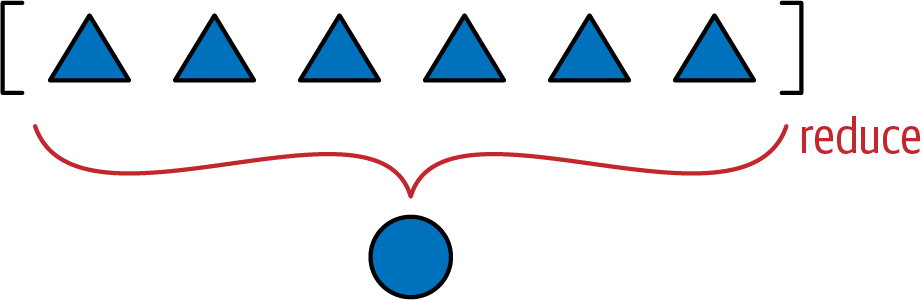
Figure 12-1. Reducing functions—reduce, sum, any, all—produce a single aggregate result from a sequence or from any finite iterable object.
So far we’ve seen that functools.reduce() can be replaced by sum(), but now let’s properly explain how it works. The key idea is to reduce a series of values to a single value. The first argument to reduce() is a two-argument function, and the second argument is an iterable. Let’s say we have a two-argument function fn and a list lst. When you call reduce(fn, lst), fn will be applied to the first pair of elements—fn(lst[0], lst[1])—producing a first result, r1. Then fn is applied to r1 and the next element—fn(r1, lst[2])—producing a second result, r2. Now fn(r2, lst[3]) is called to produce r3 … and so on until the last element, when a single result, rN, is returned.
Here is how you could use reduce to compute 5! (the factorial of 5):
>>>2*3*4*5# the result we want: 5! == 120120>>>importfunctools>>>functools.reduce(lambdaa,b:a*b,range(1,6))120
Back to our hashing problem, Example 12-11 shows the idea of computing the aggregate xor by doing it in three ways: with a for loop and two reduce calls.
Example 12-11. Three ways of calculating the accumulated xor of integers from 0 to 5
>>>n=0>>>foriinrange(1,6):...n^=i...>>>n1>>>importfunctools>>>functools.reduce(lambdaa,b:a^b,range(6))1>>>importoperator>>>functools.reduce(operator.xor,range(6))1
Aggregate xor with a
forloop and an accumulator variable.functools.reduceusing an anonymous function.functools.reducereplacing customlambdawithoperator.xor.
From the alternatives in Example 12-11, the last one is my favorite, and the for loop comes second. What is your preference?
As seen in “The operator Module”, operator provides the functionality of all Python infix operators in function form, lessening the need for lambda.
To code Vector.__hash__ in my preferred style, we need to import the functools and operator modules. Example 12-12 shows the relevant changes.
Example 12-12. Part of vector_v4.py: two imports and __hash__ method added to the Vector class from vector_v3.py
fromarrayimportarrayimportreprlibimportmathimportfunctoolsimportoperatorclassVector:typecode='d'# many lines omitted in book listing...def__eq__(self,other):returntuple(self)==tuple(other)def__hash__(self):hashes=(hash(x)forxinself._components)returnfunctools.reduce(operator.xor,hashes,0)# more lines omitted...
Import
functoolsto usereduce.Import
operatorto usexor.No change to
__eq__; I listed it here because it’s good practice to keep__eq__and__hash__close in source code, because they need to work together.Create a generator expression to lazily compute the hash of each component.
Feed
hashestoreducewith thexorfunction to compute the aggregate hash code; the third argument,0, is the initializer (see the next warning).
Warning
When using reduce, it’s good practice to provide the third argument, reduce(function, iterable, initializer), to prevent this exception: TypeError: reduce() of empty sequence with no initial value (excellent message: explains the problem and how to fix it). The initializer is the value returned if the sequence is empty and is used as the first argument in the reducing loop, so it should be the identity value of the operation. As examples, for +, |, ^ the initializer should be 0, but for *, & it should be 1.
As implemented, the __hash__ method in Example 12-12 is a perfect example of a map-reduce computation (Figure 12-2).
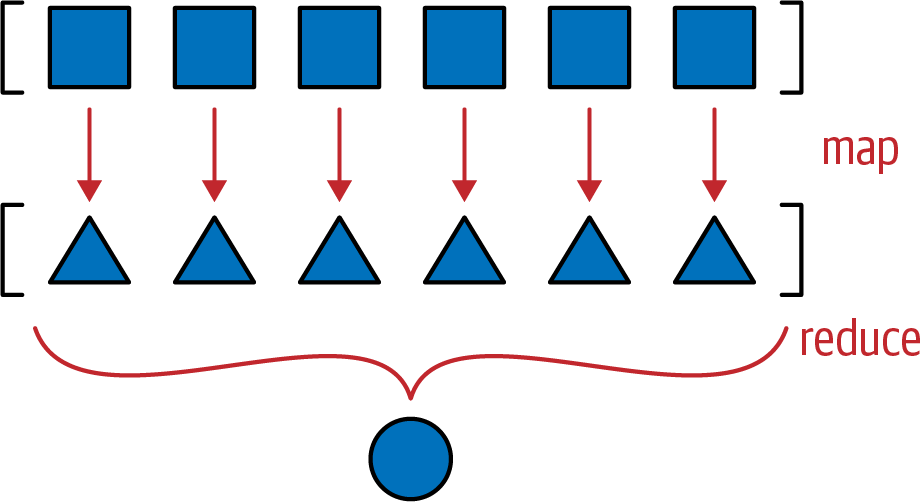
Figure 12-2. Map-reduce: apply function to each item to generate a new series (map), then compute the aggregate (reduce).
The mapping step produces one hash for each component, and the reduce step aggregates all hashes with the xor operator. Using map instead of a genexp makes the mapping step even more visible:
def__hash__(self):hashes=map(hash,self._components)returnfunctools.reduce(operator.xor,hashes)
Tip
The solution with map would be less efficient in Python 2, where the map function builds a new list with the results. But in Python 3, map is lazy: it creates a generator that yields the results on demand, thus saving memory—just like the generator expression we used in the __hash__ method of Example 12-8.
While we are on the topic of reducing functions, we can replace our quick implementation of __eq__ with another one that will be cheaper in terms of processing and memory, at least for large vectors. As introduced in Example 11-2, we have this very concise implementation of __eq__:
def__eq__(self,other):returntuple(self)==tuple(other)
This works for Vector2d and for Vector—it even considers Vector([1, 2]) equal to (1, 2), which may be a problem, but we’ll overlook that for now.5 But for Vector instances that may have thousands of components, it’s very inefficient. It builds two tuples copying the entire contents of the operands just to use the __eq__ of the tuple type. For Vector2d (with only two components), it’s a good shortcut, but not for the large multidimensional vectors. A better way of comparing one Vector to another Vector or iterable would be Example 12-13.
Example 12-13. The Vector.__eq__ implementation using zip in a for loop for more efficient comparison
def__eq__(self,other):iflen(self)!=len(other):returnFalsefora,binzip(self,other):ifa!=b:returnFalsereturnTrue
If the
lenof the objects are different, they are not equal.zipproduces a generator of tuples made from the items in each iterable argument. See “The Awesome zip” ifzipis new to you. In, the lencomparison is needed becausezipstops producing values without warning as soon as one of the inputs is exhausted.As soon as two components are different, exit returning
False.Otherwise, the objects are equal.
Tip
The zip function is named after the zipper fastener because the physical device works by interlocking pairs of teeth taken from both zipper sides, a good visual analogy for what zip(left, right) does. No relation to compressed files.
Example 12-13 is efficient, but the all function can produce the same aggregate computation of the for loop in one line: if all comparisons between corresponding components in the operands are True, the result is True. As soon as one comparison is False, all returns False. Example 12-14 shows how __eq__ looks using all.
Example 12-14. The Vector.__eq__ implementation using zip and all: same logic as Example 12-13
def__eq__(self,other):returnlen(self)==len(other)andall(a==bfora,binzip(self,other))
Note that we first check that the operands have equal length, because zip will stop at the shortest operand.
Example 12-14 is the implementation we choose for __eq__ in vector_v4.py.
We wrap up this chapter by bringing back the __format__ method from Vector2d to Vector.
Vector Take #5: Formatting
The __format__ method of Vector will resemble that of Vector2d, but instead of providing a custom display in polar coordinates, Vector will use spherical coordinates—also known as “hyperspherical” coordinates, because now we support n dimensions, and spheres are “hyperspheres” in 4D and beyond.6 Accordingly, we’ll change the custom format suffix from 'p' to 'h'.
Tip
As we saw in “Formatted Displays”, when extending the Format Specification Mini-Language, it’s best to avoid reusing format codes supported by built-in types. In particular, our extended mini-language also uses the float formatting codes 'eEfFgGn%' in their original meaning, so we definitely must avoid these. Integers use 'bcdoxXn' and strings use 's'. I picked 'p' for Vector2d polar coordinates. Code 'h' for hyperspherical coordinates is a good choice.
For example, given a Vector object in 4D space (len(v) == 4), the 'h' code will produce a display like <r, Φ₁, Φ₂, Φ₃>, where r is the magnitude (abs(v)), and the remaining numbers are the angular components Φ₁, Φ₂, Φ₃.
Here are some samples of the spherical coordinate format in 4D, taken from the doctests of vector_v5.py (see Example 12-16):
>>>format(Vector([-1,-1,-1,-1]),'h')'<2.0, 2.0943951023931957, 2.186276035465284, 3.9269908169872414>'>>>format(Vector([2,2,2,2]),'.3eh')'<4.000e+00, 1.047e+00, 9.553e-01, 7.854e-01>'>>>format(Vector([0,1,0,0]),'0.5fh')'<1.00000, 1.57080, 0.00000, 0.00000>'
Before we can implement the minor changes required in __format__, we need to code a pair of support methods: angle(n) to compute one of the angular coordinates (e.g., Φ₁), and angles() to return an iterable of all angular coordinates. I will not describe the math here; if you’re curious, Wikipedia’s “n-sphere” entry has the formulas I used to calculate the spherical coordinates from the Cartesian coordinates in the Vector components array.
Example 12-16 is a full listing of vector_v5.py consolidating all we’ve implemented since “Vector Take #1: Vector2d Compatible” and introducing custom formatting.
Example 12-16. vector_v5.py: doctests and all code for the final Vector class; callouts highlight additions needed to support __format__
""" A multidimensional ``Vector`` class, take 5 A ``Vector`` is built from an iterable of numbers:: >>> Vector([3.1, 4.2]) Vector([3.1, 4.2]) >>> Vector((3, 4, 5)) Vector([3.0, 4.0, 5.0]) >>> Vector(range(10)) Vector([0.0, 1.0, 2.0, 3.0, 4.0, ...]) Tests with two dimensions (same results as ``vector2d_v1.py``):: >>> v1 = Vector([3, 4]) >>> x, y = v1 >>> x, y (3.0, 4.0) >>> v1 Vector([3.0, 4.0]) >>> v1_clone = eval(repr(v1)) >>> v1 == v1_clone True >>> print(v1) (3.0, 4.0) >>> octets = bytes(v1) >>> octets b'd\\x00\\x00\\x00\\x00\\x00\\x00\\x08@\\x00\\x00\\x00\\x00\\x00\\x00\\x10@' >>> abs(v1) 5.0 >>> bool(v1), bool(Vector([0, 0])) (True, False) Test of ``.frombytes()`` class method: >>> v1_clone = Vector.frombytes(bytes(v1)) >>> v1_clone Vector([3.0, 4.0]) >>> v1 == v1_clone True Tests with three dimensions:: >>> v1 = Vector([3, 4, 5]) >>> x, y, z = v1 >>> x, y, z (3.0, 4.0, 5.0) >>> v1 Vector([3.0, 4.0, 5.0]) >>> v1_clone = eval(repr(v1)) >>> v1 == v1_clone True >>> print(v1) (3.0, 4.0, 5.0) >>> abs(v1) # doctest:+ELLIPSIS 7.071067811... >>> bool(v1), bool(Vector([0, 0, 0])) (True, False) Tests with many dimensions:: >>> v7 = Vector(range(7)) >>> v7 Vector([0.0, 1.0, 2.0, 3.0, 4.0, ...]) >>> abs(v7) # doctest:+ELLIPSIS 9.53939201... Test of ``.__bytes__`` and ``.frombytes()`` methods:: >>> v1 = Vector([3, 4, 5]) >>> v1_clone = Vector.frombytes(bytes(v1)) >>> v1_clone Vector([3.0, 4.0, 5.0]) >>> v1 == v1_clone True Tests of sequence behavior:: >>> v1 = Vector([3, 4, 5]) >>> len(v1) 3 >>> v1[0], v1[len(v1)-1], v1[-1] (3.0, 5.0, 5.0) Test of slicing:: >>> v7 = Vector(range(7)) >>> v7[-1] 6.0 >>> v7[1:4] Vector([1.0, 2.0, 3.0]) >>> v7[-1:] Vector([6.0]) >>> v7[1,2] Traceback (most recent call last): ... TypeError: 'tuple' object cannot be interpreted as an integer Tests of dynamic attribute access:: >>> v7 = Vector(range(10)) >>> v7.x 0.0 >>> v7.y, v7.z, v7.t (1.0, 2.0, 3.0) Dynamic attribute lookup failures:: >>> v7.k Traceback (most recent call last): ... AttributeError: 'Vector' object has no attribute 'k' >>> v3 = Vector(range(3)) >>> v3.t Traceback (most recent call last): ... AttributeError: 'Vector' object has no attribute 't' >>> v3.spam Traceback (most recent call last): ... AttributeError: 'Vector' object has no attribute 'spam' Tests of hashing:: >>> v1 = Vector([3, 4]) >>> v2 = Vector([3.1, 4.2]) >>> v3 = Vector([3, 4, 5]) >>> v6 = Vector(range(6)) >>> hash(v1), hash(v3), hash(v6) (7, 2, 1) Most hash codes of non-integers vary from a 32-bit to 64-bit CPython build:: >>> import sys >>> hash(v2) == (384307168202284039 if sys.maxsize > 2**32 else 357915986) True Tests of ``format()`` with Cartesian coordinates in 2D:: >>> v1 = Vector([3, 4]) >>> format(v1) '(3.0, 4.0)' >>> format(v1, '.2f') '(3.00, 4.00)' >>> format(v1, '.3e') '(3.000e+00, 4.000e+00)' Tests of ``format()`` with Cartesian coordinates in 3D and 7D:: >>> v3 = Vector([3, 4, 5]) >>> format(v3) '(3.0, 4.0, 5.0)' >>> format(Vector(range(7))) '(0.0, 1.0, 2.0, 3.0, 4.0, 5.0, 6.0)' Tests of ``format()`` with spherical coordinates in 2D, 3D and 4D:: >>> format(Vector([1, 1]), 'h') # doctest:+ELLIPSIS '<1.414213..., 0.785398...>' >>> format(Vector([1, 1]), '.3eh') '<1.414e+00, 7.854e-01>' >>> format(Vector([1, 1]), '0.5fh') '<1.41421, 0.78540>' >>> format(Vector([1, 1, 1]), 'h') # doctest:+ELLIPSIS '<1.73205..., 0.95531..., 0.78539...>' >>> format(Vector([2, 2, 2]), '.3eh') '<3.464e+00, 9.553e-01, 7.854e-01>' >>> format(Vector([0, 0, 0]), '0.5fh') '<0.00000, 0.00000, 0.00000>' >>> format(Vector([-1, -1, -1, -1]), 'h') # doctest:+ELLIPSIS '<2.0, 2.09439..., 2.18627..., 3.92699...>' >>> format(Vector([2, 2, 2, 2]), '.3eh') '<4.000e+00, 1.047e+00, 9.553e-01, 7.854e-01>' >>> format(Vector([0, 1, 0, 0]), '0.5fh') '<1.00000, 1.57080, 0.00000, 0.00000>' """fromarrayimportarrayimportreprlibimportmathimportfunctoolsimportoperatorimportitertoolsclassVector:typecode='d'def__init__(self,components):self._components=array(self.typecode,components)def__iter__(self):returniter(self._components)def__repr__(self):components=reprlib.repr(self._components)components=components[components.find('['):-1]returnf'Vector({components})'def__str__(self):returnstr(tuple(self))def__bytes__(self):return(bytes([ord(self.typecode)])+bytes(self._components))def__eq__(self,other):return(len(self)==len(other)andall(a==bfora,binzip(self,other)))def__hash__(self):hashes=(hash(x)forxinself)returnfunctools.reduce(operator.xor,hashes,0)def__abs__(self):returnmath.hypot(*self)def__bool__(self):returnbool(abs(self))def__len__(self):returnlen(self._components)def__getitem__(self,key):ifisinstance(key,slice):cls=type(self)returncls(self._components[key])index=operator.index(key)returnself._components[index]__match_args__=('x','y','z','t')def__getattr__(self,name):cls=type(self)try:pos=cls.__match_args__.index(name)exceptValueError:pos=-1if0<=pos<len(self._components):returnself._components[pos]msg=f'{cls.__name__!r} object has no attribute {name!r}'raiseAttributeError(msg)defangle(self,n):r=math.hypot(*self[n:])a=math.atan2(r,self[n-1])if(n==len(self)-1)and(self[-1]<0):returnmath.pi*2-aelse:returnadefangles(self):return(self.angle(n)forninrange(1,len(self)))def__format__(self,fmt_spec=''):iffmt_spec.endswith('h'):# hyperspherical coordinatesfmt_spec=fmt_spec[:-1]coords=itertools.chain([abs(self)],self.angles())outer_fmt='<{}>'else:coords=selfouter_fmt='({})'components=(format(c,fmt_spec)forcincoords)returnouter_fmt.format(','.join(components))@classmethoddeffrombytes(cls,octets):typecode=chr(octets[0])memv=memoryview(octets[1:]).cast(typecode)returncls(memv)
Import
itertoolsto usechainfunction in__format__.Compute one of the angular coordinates, using formulas adapted from the n-sphere article.
Create a generator expression to compute all angular coordinates on demand.
Use
itertools.chainto produce genexp to iterate seamlessly over the magnitude and the angular coordinates.Configure a spherical coordinate display with angular brackets.
Configure a Cartesian coordinate display with parentheses.
Create a generator expression to format each coordinate item on demand.

Plug formatted components separated by commas inside brackets or parentheses.
Note
We are making heavy use of generator expressions in __format__, angle, and angles, but our focus here is in providing __format__ to bring Vector to the same implementation level as Vector2d. When we cover generators in Chapter 17, we’ll use some of the code in Vector as examples, and then the generator tricks will be explained in detail.
This concludes our mission for this chapter. The Vector class will be enhanced with infix operators in Chapter 16, but our goal here was to explore techniques for coding special methods that are useful in a wide variety of collection classes.
Chapter Summary
The Vector example in this chapter was designed to be compatible with Vector2d, except for the use of a different constructor signature accepting a single iterable argument, just like the built-in sequence types do. The fact that Vector behaves as a sequence just by implementing __getitem__ and __len__ prompted a discussion of protocols, the informal interfaces used in duck-typed languages.
We then looked at how the my_seq[a:b:c] syntax works behind the scenes, by creating a slice(a, b, c) object and handing it to __getitem__. Armed with this knowledge, we made Vector respond correctly to slicing, by returning new Vector instances, just like a Pythonic sequence is expected to do.
The next step was to provide read-only access to the first few Vector components using notation such as my_vec.x. We did it by implementing __getattr__. Doing that opened the possibility of tempting the user to assign to those special components by writing my_vec.x = 7, revealing a potential bug. We fixed it by implementing __setattr__ as well, to forbid assigning values to single-letter attributes. Very often, when you code a __getattr__ you need to add __setattr__ too, in order to avoid inconsistent behavior.
Implementing the __hash__ function provided the perfect context for using functools.reduce, because we needed to apply the xor operator ^ in succession to the hashes of all Vector components to produce an aggregate hash code for the whole Vector. After applying reduce in __hash__, we used the all reducing built-in to create a more efficient __eq__ method.
The last enhancement to Vector was to reimplement the __format__ method from Vector2d by supporting spherical coordinates as an alternative to the default Cartesian coordinates. We used quite a bit of math and several generators to code __format__ and its auxiliary functions, but these are implementation details—and we’ll come back to the generators in Chapter 17. The goal of that last section was to support a custom format, thus fulfilling the promise of a Vector that could do everything a Vector2d did, and more.
As we did in Chapter 11, here we often looked at how standard Python objects behave, to emulate them and provide a “Pythonic” look-and-feel to Vector.
In Chapter 16, we will implement several infix operators on Vector. The math will be much simpler than in the angle() method here, but exploring how infix operators work in Python is a great lesson in OO design. But before we get to operator overloading, we’ll step back from working on one class and look at organizing multiple classes with interfaces and inheritance, the subjects of Chapters 13 and 14.
Further Reading
Most special methods covered in the Vector example also appear in the Vector2d example from Chapter 11, so the references in “Further Reading” are all relevant here.
The powerful reduce higher-order function is also known as fold, accumulate, aggregate, compress, and inject. For more information, see Wikipedia’s “Fold (higher-order function)” article, which presents applications of that higher-order function with emphasis on functional programming with recursive data structures. The article also includes a table listing fold-like functions in dozens of programming languages.
“What’s New in Python 2.5” has a short explanation of __index__, designed to support __getitem__ methods, as we saw in “A Slice-Aware __getitem__”.
PEP 357—Allowing Any Object to be Used for Slicing details the need for it from the perspective of an implementor of a C-extension—Travis Oliphant, the primary creator of NumPy. Oliphant’s many contributions to Python made it a leading scientific computing language, which then positioned it to lead the way in machine learning applications.
1 The iter() function is covered in Chapter 17, along with the __iter__ method.
2 Attribute lookup is more complicated than this; we’ll see the gory details in Part V. For now, this simplified explanation will do.
3 Although __match_args__ exists to support pattern matching in Python 3.10, setting this attribute is harmless in previous versions of Python. In the first edition of this book, I named it shortcut_names. With the new name it does double duty: it supports positional patterns in case clauses, and it holds the names of the dynamic attributes supported by special logic in __getattr__ and __setattr__.
4 The sum, any, and all cover the most common uses of reduce. See the discussion in “Modern Replacements for map, filter, and reduce”.
5 We will seriously consider the matter of Vector([1, 2]) == (1, 2) in “Operator Overloading 101”.
6 The Wolfram Mathworld website has an article on hypersphere; on Wikipedia, “hypersphere” redirects to the “n-sphere” entry.
7 I adapted the code for this presentation: in 2003, reduce was a built-in, but in Python 3 we need to import it; also, I replaced the names x and y with my_list and sub, for sub-list.