Chapter 7. Functions as First-Class Objects
I have never considered Python to be heavily influenced by functional languages, no matter what people say or think. I was much more familiar with imperative languages such as C and Algol 68 and although I had made functions first-class objects, I didn’t view Python as a functional programming language.
Guido van Rossum, Python BDFL1
Functions in Python are first-class objects. Programming language researchers define a “first-class object” as a program entity that can be:
-
Created at runtime
-
Assigned to a variable or element in a data structure
-
Passed as an argument to a function
-
Returned as the result of a function
Integers, strings, and dictionaries are other examples of first-class objects in Python—nothing fancy here. Having functions as first-class objects is an essential feature of functional languages, such as Clojure, Elixir, and Haskell. However, first-class functions are so useful that they’ve been adopted by popular languages like JavaScript, Go, and Java (since JDK 8), none of which claim to be “functional languages.”
This chapter and most of Part III explore the practical applications of treating functions as objects.
Tip
The term “first-class functions” is widely used as shorthand for “functions as first-class objects.” It’s not ideal because it implies an “elite” among functions. In Python, all functions are first-class.
What’s New in This Chapter
The section “The Nine Flavors of Callable Objects” was titled “The Seven Flavors of Callable Objects” in the first edition of this book. The new callables are native coroutines and asynchronous generators, introduced in Python 3.5 and 3.6, respectively. Both are covered in Chapter 21, but they are mentioned here along with the other callables for completeness.
“Positional-Only Parameters” is a new section, covering a feature added in Python 3.8.
I moved the discussion of runtime access to function annotations to “Reading Type Hints at Runtime”. When I wrote the first edition, PEP 484—Type Hints was still under consideration, and people used annotations in different ways. Since Python 3.5, annotations should conform to PEP 484. Therefore, the best place to cover them is when discussing type hints.
Note
The first edition of this book had sections about the introspection of function objects that were too low-level and distracted from the main subject of this chapter. I merged those sections into a post titled “Introspection of Function Parameters” at fluentpython.com.
Now let’s see why Python functions are full-fledged objects.
Treating a Function Like an Object
The console session in Example 7-1 shows that Python functions are objects. Here we create a function, call it, read its __doc__ attribute, and check that the function object itself is an instance of the function class.
Example 7-1. Create and test a function, then read its __doc__ and check its type
>>>deffactorial(n):..."""returns n!"""...return1ifn<2elsen*factorial(n-1)...>>>factorial(42)1405006117752879898543142606244511569936384000000000>>>factorial.__doc__'returns n!'>>>type(factorial)<class 'function'>

This is a console session, so we’re creating a function at “runtime.”

__doc__is one of several attributes of function objects.
factorialis an instance of thefunctionclass.
The __doc__ attribute is used to generate the help text of an object. In the Python console, the command help(factorial) will display a screen like Figure 7-1.
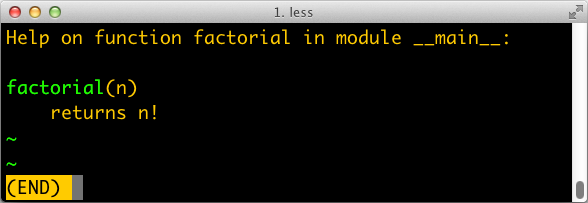
Figure 7-1. Help screen for factorial; the text is built from the __doc__ attribute of the function.
Example 7-2 shows the “first class” nature of a function object.
We can assign it a variable fact and call it through that name.
We can also pass factorial as an argument to the
map function.
Calling map(function, iterable) returns an iterable
where each item is the result of calling the first argument (a function)
to successive elements of the second argument (an iterable),
range(10) in this example.
Example 7-2. Use factorial through a different name, and pass factorial as an argument
>>>fact=factorial>>>fact<function factorial at 0x...>>>>fact(5)120>>>map(factorial,range(11))<map object at 0x...>>>>list(map(factorial,range(11)))[1, 1, 2, 6, 24, 120, 720, 5040, 40320, 362880, 3628800]
Having first-class functions enables programming in a functional style. One of the hallmarks of functional programming is the use of higher-order functions, our next topic.
Higher-Order Functions
A function that takes a function as an argument or returns a function as the result is a higher-order function.
One example is map, shown in Example 7-2.
Another is the built-in function sorted:
the optional key argument lets you provide a function to be applied to each item for sorting,
as we saw in “list.sort Versus the sorted Built-In”.
For example, to sort a list of words by length,
pass the len function as the key, as in Example 7-3.
Example 7-3. Sorting a list of words by length
>>>fruits=['strawberry','fig','apple','cherry','raspberry','banana']>>>sorted(fruits,key=len)['fig', 'apple', 'cherry', 'banana', 'raspberry', 'strawberry']>>>
Any one-argument function can be used as the key. For example, to create a rhyme dictionary it might be useful to sort each word spelled backward. In Example 7-4, note that the words in the list are not changed at all; only their reversed spelling is used as the sort criterion, so that the berries appear together.
Example 7-4. Sorting a list of words by their reversed spelling
>>>defreverse(word):...returnword[::-1]>>>reverse('testing')'gnitset'>>>sorted(fruits,key=reverse)['banana', 'apple', 'fig', 'raspberry', 'strawberry', 'cherry']>>>
In the functional programming paradigm, some of the best known higher-order functions are map, filter, reduce, and apply.
The apply function was deprecated in Python 2.3 and removed in Python 3 because it’s no longer necessary.
If you need to call a function with a dynamic set of arguments, you can write fn(*args, **kwargs) instead of apply(fn, args, kwargs).
The map, filter, and reduce higher-order functions are still around, but better alternatives are available for most of their use cases, as the next section shows.
Modern Replacements for map, filter, and reduce
Functional languages commonly offer the map, filter, and reduce higher-order functions
(sometimes with different names).
The map and filter functions are still built-ins in Python 3,
but since the introduction of list comprehensions and generator expressions, they are not as important.
A listcomp or a genexp does the job of map and filter combined, but is more readable.
Consider Example 7-5.
Example 7-5. Lists of factorials produced with map and filter compared to alternatives coded as list comprehensions
>>>list(map(factorial,range(6)))[1, 1, 2, 6, 24, 120]>>>[factorial(n)forninrange(6)][1, 1, 2, 6, 24, 120]>>>list(map(factorial,filter(lambdan:n%2,range(6))))[1, 6, 120]>>>[factorial(n)forninrange(6)ifn%2][1, 6, 120]>>>
Build a list of factorials from 0! to 5!.
Same operation, with a list comprehension.
List of factorials of odd numbers up to 5!, using both
mapandfilter.
List comprehension does the same job, replacing
mapandfilter, and makinglambdaunnecessary.
In Python 3, map and filter return generators—a form of iterator—so their direct substitute is now a generator expression (in Python 2, these functions returned lists, therefore their closest alternative was a listcomp).
The reduce function was demoted from a built-in in Python 2 to the functools module in Python 3. Its most common use case, summation, is better served by the sum built-in available since Python 2.3 was released in 2003. This is a big win in terms of readability and performance (see Example 7-6).
Example 7-6. Sum of integers up to 99 performed with reduce and sum
>>>fromfunctoolsimportreduce>>>fromoperatorimportadd>>>reduce(add,range(100))4950>>>sum(range(100))4950>>>
Starting with Python 3.0,
reduceis no longer a built-in.Import
addto avoid creating a function just to add two numbers.Sum integers up to 99.
Same task with
sum—no need to import and callreduceandadd.
Note
The common idea of sum and reduce is to apply some operation to successive items in a series,
accumulating previous results, thus reducing a series of values to a single value.
Other reducing built-ins are all and any:
all(iterable)-
Returns
Trueif there are no falsy elements in the iterable;all([])returnsTrue. any(iterable)-
Returns
Trueif any element of theiterableis truthy;any([])returnsFalse.
I give a fuller explanation of reduce in “Vector Take #4: Hashing and a Faster ==”
where an ongoing example provides a meaningful context for the use of this function.
The reducing functions are summarized later in the book when iterables are in focus, in “Iterable Reducing Functions”.
To use a higher-order function, sometimes it is convenient to create a small, . one-off function. That is why anonymous functions exist. We’ll cover them next.
Anonymous Functions
The lambda keyword creates an anonymous function within a Python expression.
However, the simple syntax of Python limits the body of lambda functions to be pure expressions.
In other words, the body cannot contain other Python statements such as while, try, etc.
Assignment with = is also a statement, so it cannot occur in a lambda.
The new assignment expression syntax using := can be used—but if you need it,
your lambda is probably too complicated and hard to read,
and it should be refactored into a regular function using def.
The best use of anonymous functions is in the context of an argument list for a higher-order function.
For example, Example 7-7 is the rhyme index example from
Example 7-4 rewritten with lambda, without defining a reverse function.
Example 7-7. Sorting a list of words by their reversed spelling using lambda
>>>fruits=['strawberry','fig','apple','cherry','raspberry','banana']>>>sorted(fruits,key=lambdaword:word[::-1])['banana', 'apple', 'fig', 'raspberry', 'strawberry', 'cherry']>>>
Outside the limited context of arguments to higher-order functions, anonymous functions are rarely useful in Python.
The syntactic restrictions tend to make nontrivial lambdas either unreadable or unworkable.
If a lambda is hard to read, I strongly advise you follow Fredrik Lundh’s refactoring advice.
The lambda syntax is just syntactic sugar: a lambda expression creates a function object just like the def statement.
That is just one of several kinds of callable objects in Python.
The following section reviews all of them.
The Nine Flavors of Callable Objects
The call operator () may be applied to other objects
besides functions.
To determine whether an object is callable, use the callable() built-in function.
As of Python 3.9, the data model documentation lists nine callable types:
- User-defined functions
- Built-in functions
-
A function implemented in C (for CPython), like
lenortime.strftime. - Built-in methods
- Methods
-
Functions defined in the body of a class.
- Classes
-
When invoked, a class runs its
__new__method to create an instance, then__init__to initialize it, and finally the instance is returned to the caller. Because there is nonewoperator in Python, calling a class is like calling a function.2 - Class instances
-
If a class defines a
__call__method, then its instances may be invoked as functions—that’s the subject of the next section. - Generator functions
-
Functions or methods that use the
yieldkeyword in their body. When called, they return a generator object. - Native coroutine functions
-
Functions or methods defined with
async def. When called, they return a coroutine object. Added in Python 3.5. - Asynchronous generator functions
-
Functions or methods defined with
async defthat haveyieldin their body. When called, they return an asynchronous generator for use withasync for. Added in Python 3.6.
Generators, native coroutines, and asynchronous generator functions are unlike other callables in that their return values are never application data, but objects that require further processing to yield application data or perform useful work. Generator functions return iterators. Both are covered in Chapter 17. Native coroutine functions and asynchronous generator functions return objects that only work with the help of an asynchronous programming framework, such as asyncio. They are the subject of Chapter 21.
Tip
Given the variety of existing callable types in Python, the safest way to determine whether an object is callable is to use the callable() built-in:
>>> abs, str, 'Ni!'
(<built-in function abs>, <class 'str'>, 'Ni!')
>>> [callable(obj) for obj in (abs, str, 'Ni!')]
[True, True, False]
We now move on to building class instances that work as callable objects.
User-Defined Callable Types
Not only are Python functions real objects, but arbitrary Python objects may also be made to behave like functions. Implementing a __call__ instance method is all it takes.
Example 7-8 implements a BingoCage class. An instance is built from any iterable, and stores an internal list of items, in random order. Calling the instance pops an item.3
Example 7-8. bingocall.py: A BingoCage does one thing: picks items from a shuffled list
importrandomclassBingoCage:def__init__(self,items):self._items=list(items)random.shuffle(self._items)defpick(self):try:returnself._items.pop()exceptIndexError:raiseLookupError('pick from empty BingoCage')def__call__(self):returnself.pick()
__init__accepts any iterable; building a local copy prevents unexpected side effects on anylistpassed as an argument.shuffleis guaranteed to work becauseself._itemsis alist.The main method.
Raise exception with custom message if
self._itemsis empty.
Shortcut to
bingo.pick():bingo().
Here is a simple demo of Example 7-8. Note how a bingo instance can be invoked as a function,
and the callable() built-in recognizes it as a callable object:
>>>bingo=BingoCage(range(3))>>>bingo.pick()1>>>bingo()0>>>callable(bingo)True
A class implementing __call__ is an easy way to create function-like objects that have some
internal state that must be kept across invocations, like the remaining items in the BingoCage.
Another good use case for __call__ is implementing decorators. Decorators must be callable,
and it is sometimes convenient to “remember” something between calls of the decorator
(e.g., for memoization—caching the results of expensive computations for later use)
or to split a complex implementation into separate methods.
The functional approach to creating functions with internal state is to use closures. Closures, as well as decorators, are the subject of Chapter 9.
Now let’s explore the powerful syntax Python offers to declare function parameters and pass arguments into them.
From Positional to Keyword-Only Parameters
One of the best features of Python functions is the extremely flexible parameter handling mechanism.
Closely related are the use of * and ** to unpack iterables and mappings into separate arguments when we call a function.
To see these features in action, see the code for Example 7-9 and tests showing its use in Example 7-10.
Example 7-9. tag generates HTML elements; a keyword-only argument class_ is used to pass “class” attributes as a workaround because class is a keyword in Python
deftag(name,*content,class_=None,**attrs):"""Generate one or more HTML tags"""ifclass_isnotNone:attrs['class']=class_attr_pairs=(f' {attr}="{value}"'forattr,valueinsorted(attrs.items()))attr_str=''.join(attr_pairs)ifcontent:elements=(f'<{name}{attr_str}>{c}</{name}>'forcincontent)return'\n'.join(elements)else:returnf'<{name}{attr_str} />'
The tag function can be invoked in many ways, as Example 7-10 shows.
Example 7-10. Some of the many ways of calling the tag function from Example 7-9
>>>tag('br')'<br />'>>>tag('p','hello')'<p>hello</p>'>>>(tag('p','hello','world'))<p>hello</p><p>world</p>>>>tag('p','hello',id=33)'<p id="33">hello</p>'>>>(tag('p','hello','world',class_='sidebar'))<pclass="sidebar">hello</p><pclass="sidebar">world</p>>>>tag(content='testing',name="img")'<img content="testing"/>'>>>my_tag={'name':'img','title':'Sunset Boulevard',...'src':'sunset.jpg','class':'framed'}>>>tag(**my_tag)'<img class="framed"src="sunset.jpg"title="Sunset Boulevard"/>'
A single positional argument produces an empty
tagwith that name.Any number of arguments after the first are captured by
*contentas atuple.Keyword arguments not explicitly named in the
tagsignature are captured by**attrsas adict.The
class_parameter can only be passed as a keyword argument.The first positional argument can also be passed as a keyword.

Prefixing the
my_tagdictwith**passes all its items as separate arguments, which are then bound to the named parameters, with the remaining caught by**attrs. In this case we can have a'class'key in the argumentsdict, because it is a string, and does not clash with theclassreserved word.
Keyword-only arguments are a feature of Python 3.
In Example 7-9, the class_ parameter can only be given as a keyword argument—it will never capture unnamed positional arguments. To specify keyword-only arguments when defining a function, name them after the argument prefixed with *. If you don’t want to support variable positional arguments but still want keyword-only arguments, put a * by itself in the signature, like this:
>>>deff(a,*,b):...returna,b...>>>f(1,b=2)(1, 2)>>>f(1,2)Traceback (most recent call last):File"<stdin>", line1, in<module>TypeError:f() takes 1 positional argument but 2 were given
Note that keyword-only arguments do not need to have a default value: they can be mandatory, like b in the preceding example.
Positional-Only Parameters
Since Python 3.8, user-defined function signatures may specify positional-only parameters.
This feature always existed for built-in functions, such as divmod(a, b),
which can only be called with positional parameters, and not as divmod(a=10, b=4).
To define a function requiring positional-only parameters, use / in the parameter list.
This example from “What’s New In Python 3.8”
shows how to emulate the divmod built-in function:
defdivmod(a,b,/):return(a//b,a%b)
All arguments to the left of the / are positional-only. After the /, you may specify other arguments, which work as usual.
Warning
The / in the parameter list is a syntax error in Python 3.7 or earlier.
For example, consider the tag function from Example 7-9.
If we want the name parameter to be positional only, we can add a / after it in the function signature, like this:
deftag(name,/,*content,class_=None,**attrs):...
You can find other examples of positional-only parameters in “What’s New In Python 3.8” and in PEP 570.
After diving into Python’s flexible argument declaration features, the remainder of this chapter covers the most useful packages in the standard library for programming in a functional style.
Packages for Functional Programming
Although Guido makes it clear that he did not design Python to be a functional programming language,
a functional coding style can be used to good extent,
thanks to first-class functions, pattern matching, and the support of packages like operator and functools,
which we cover in the next two sections.
The operator Module
Often in functional programming it is convenient to use an arithmetic operator as a function. For example, suppose you want to multiply a sequence of numbers to calculate factorials without using recursion. To perform summation, you can use sum, but there is no equivalent function for multiplication. You could use reduce—as we saw in “Modern Replacements for map, filter, and reduce”—but this requires a function to multiply two items of the sequence. Example 7-11 shows how to solve this using lambda.
Example 7-11. Factorial implemented with reduce and an anonymous function
fromfunctoolsimportreducedeffactorial(n):returnreduce(lambdaa,b:a*b,range(1,n+1))
The operator module provides function equivalents for dozens of operators so you don’t have to code trivial functions like lambda a, b: a*b.
With it, we can rewrite Example 7-11 as Example 7-12.
Example 7-12. Factorial implemented with reduce and operator.mul
fromfunctoolsimportreducefromoperatorimportmuldeffactorial(n):returnreduce(mul,range(1,n+1))
Another group of one-trick lambdas that operator replaces are functions to pick items from sequences or read attributes from objects:
itemgetter and attrgetter are factories that build custom functions to do that.
Example 7-13 shows a common use of itemgetter: sorting a list of tuples by the value of one field.
In the example, the cities are printed sorted by country code (field 1). Essentially, itemgetter(1) creates a function that, given a collection, returns the item at index 1.
That’s easier to write and read than lambda fields: fields[1], which does the same thing.
Example 7-13. Demo of itemgetter to sort a list of tuples (data from Example 2-8)
>>>metro_data=[...('Tokyo','JP',36.933,(35.689722,139.691667)),...('Delhi NCR','IN',21.935,(28.613889,77.208889)),...('Mexico City','MX',20.142,(19.433333,-99.133333)),...('New York-Newark','US',20.104,(40.808611,-74.020386)),...('São Paulo','BR',19.649,(-23.547778,-46.635833)),...]>>>>>>fromoperatorimportitemgetter>>>forcityinsorted(metro_data,key=itemgetter(1)):...(city)...('São Paulo', 'BR', 19.649, (-23.547778, -46.635833))('Delhi NCR', 'IN', 21.935, (28.613889, 77.208889))('Tokyo', 'JP', 36.933, (35.689722, 139.691667))('Mexico City', 'MX', 20.142, (19.433333, -99.133333))('New York-Newark', 'US', 20.104, (40.808611, -74.020386))
If you pass multiple index arguments to itemgetter, the function it builds will return tuples with the extracted values, which is useful for sorting on multiple keys:
>>>cc_name=itemgetter(1,0)>>>forcityinmetro_data:...(cc_name(city))...('JP', 'Tokyo')('IN', 'Delhi NCR')('MX', 'Mexico City')('US', 'New York-Newark')('BR', 'São Paulo')>>>
Because itemgetter uses the [] operator, it supports not only sequences but also mappings and any class that implements __getitem__.
A sibling of itemgetter is attrgetter, which creates functions to extract object attributes by name. If you pass attrgetter several attribute names as arguments, it also returns a tuple of values. In addition, if any argument name contains a . (dot), attrgetter navigates through nested objects to retrieve the attribute. These behaviors are shown in Example 7-14. This is not the shortest console session because we need to build a nested structure to showcase the handling of dotted attributes by attrgetter.
Example 7-14. Demo of attrgetter to process a previously defined list of namedtuple called metro_data (the same list that appears in Example 7-13)
>>>fromcollectionsimportnamedtuple>>>LatLon=namedtuple('LatLon','lat lon')>>>Metropolis=namedtuple('Metropolis','name cc pop coord')>>>metro_areas=[Metropolis(name,cc,pop,LatLon(lat,lon))...forname,cc,pop,(lat,lon)inmetro_data]>>>metro_areas[0]Metropolis(name='Tokyo', cc='JP', pop=36.933, coord=LatLon(lat=35.689722,lon=139.691667))>>>metro_areas[0].coord.lat35.689722>>>fromoperatorimportattrgetter>>>name_lat=attrgetter('name','coord.lat')>>>>>>forcityinsorted(metro_areas,key=attrgetter('coord.lat')):...(name_lat(city))...('São Paulo', -23.547778)('Mexico City', 19.433333)('Delhi NCR', 28.613889)('Tokyo', 35.689722)('New York-Newark', 40.808611)
Use
namedtupleto defineLatLon.Also define
Metropolis.Build
metro_areaslist withMetropolisinstances; note the nested tuple unpacking to extract(lat, lon)and use them to build theLatLonfor thecoordattribute ofMetropolis.Reach into element
metro_areas[0]to get its latitude.Define an
attrgetterto retrieve thenameand thecoord.latnested attribute.Use
attrgetteragain to sort list of cities by latitude.
Use the
attrgetterdefined in to show only the city name and latitude.
Here is a partial list of functions defined in operator (names starting with _ are omitted, because they are mostly implementation details):
>>>[namefornameindir(operator)ifnotname.startswith('_')]['abs', 'add', 'and_', 'attrgetter', 'concat', 'contains','countOf', 'delitem', 'eq', 'floordiv', 'ge', 'getitem', 'gt','iadd', 'iand', 'iconcat', 'ifloordiv', 'ilshift', 'imatmul','imod', 'imul', 'index', 'indexOf', 'inv', 'invert', 'ior','ipow', 'irshift', 'is_', 'is_not', 'isub', 'itemgetter','itruediv', 'ixor', 'le', 'length_hint', 'lshift', 'lt', 'matmul','methodcaller', 'mod', 'mul', 'ne', 'neg', 'not_', 'or_', 'pos','pow', 'rshift', 'setitem', 'sub', 'truediv', 'truth', 'xor']
Most of the 54 names listed are self-evident. The group of names prefixed with i and the name of another operator—e.g., iadd, iand, etc.—correspond to the augmented assignment operators—e.g., +=, &=, etc. These change their first argument in place, if it is mutable; if not, the function works like the one without the i prefix: it simply returns the result of the operation.
Of the remaining operator functions, methodcaller is the last we will cover. It is somewhat similar to attrgetter and itemgetter in that it creates a function on the fly. The function it creates calls a method by name on the object given as argument, as shown in Example 7-15.
Example 7-15. Demo of methodcaller: second test shows the binding of extra arguments
>>>fromoperatorimportmethodcaller>>>s='The time has come'>>>upcase=methodcaller('upper')>>>upcase(s)'THE TIME HAS COME'>>>hyphenate=methodcaller('replace',' ','-')>>>hyphenate(s)'The-time-has-come'
The first test in Example 7-15 is there just to show methodcaller at work, but if you need to use the str.upper as a function, you can just call it on the str class and pass a string as an argument, like this:
>>>str.upper(s)'THE TIME HAS COME'
The second test in Example 7-15 shows that methodcaller can also do a partial application to freeze some arguments, like the functools.partial function does. That is our next subject.*Bold Text*opmod07
Freezing Arguments with functools.partial
The functools module provides several higher-order functions.
We saw reduce in “Modern Replacements for map, filter, and reduce”.
Another is partial: given a callable, it produces a new callable with some of the arguments of the original callable bound to predetermined values.
This is useful to adapt a function that takes one or more arguments to an API that requires a callback with fewer arguments.
Example 7-16 is a trivial demonstration.
Example 7-16. Using partial to use a two-argument function where a one-argument callable is required
>>>fromoperatorimportmul>>>fromfunctoolsimportpartial>>>triple=partial(mul,3)>>>triple(7)21>>>list(map(triple,range(1,10)))[3, 6, 9, 12, 15, 18, 21, 24, 27]
Create new
triplefunction frommul, binding the first positional argument to3.Test it.
Use
triplewithmap;mulwould not work withmapin this example.
A more useful example involves the unicode.normalize function that we saw in “Normalizing Unicode for Reliable Comparisons”. If you work with text from many languages, you may want to apply unicode.normalize('NFC', s) to any string s before comparing or storing it. If you do that often, it’s handy to have an nfc function to do so, as in Example 7-17.
Example 7-17. Building a convenient Unicode normalizing function with partial
>>>importunicodedata,functools>>>nfc=functools.partial(unicodedata.normalize,'NFC')>>>s1='café'>>>s2='cafe\u0301'>>>s1,s2('café', 'café')>>>s1==s2False>>>nfc(s1)==nfc(s2)True
partial takes a callable as first argument, followed by an arbitrary number of positional and keyword arguments to bind.
Example 7-18 shows the use of partial with the tag function from Example 7-9, to freeze one positional argument and one keyword argument.
Example 7-18. Demo of partial applied to the function tag from Example 7-9
>>>fromtaggerimporttag>>>tag<function tag at 0x10206d1e0>>>>fromfunctoolsimportpartial>>>picture=partial(tag,'img',class_='pic-frame')>>>picture(src='wumpus.jpeg')'<img class="pic-frame" src="wumpus.jpeg" />'>>>picturefunctools.partial(<function tag at 0x10206d1e0>, 'img', class_='pic-frame')>>>picture.func<function tag at 0x10206d1e0>>>>picture.args('img',)>>>picture.keywords{'class_': 'pic-frame'}
Import
tagfrom Example 7-9 and show its ID.Create the
picturefunction fromtagby fixing the first positional argument with'img'and theclass_keyword argument with'pic-frame'.pictureworks as expected.partial()returns afunctools.partialobject.4A
functools.partialobject has attributes providing access to the original function and the fixed arguments.
The functools.partialmethod function does the same job as partial, but is designed to work with methods.
The functools module also includes higher-order functions designed to be used as function decorators,
such as cache and singledispatch, among others.
Those
functions are covered in Chapter 9,
which also explains how to implement custom
decorators.
Chapter Summary
The goal of this chapter was to explore the first-class nature of functions in Python. The main ideas are that you can assign functions to variables, pass them to other functions, store them in data structures, and access function attributes, allowing frameworks and tools to act on that information.
Higher-order functions, a staple of functional programming, are common in Python.
The sorted, min, and max built-ins, and functools.partial are examples of commonly used higher-order functions in the language.
Using map, filter, and reduce is not as common as it used to be, thanks to
list comprehensions (and similar constructs like generator expressions)
and the addition of reducing built-ins like sum, all, and any.
Callables come in nine different flavors since Python 3.6, from the simple functions created with lambda to instances of classes implementing __call__.
Generators and coroutines are also callable, although their behavior is very different from other callables.
All callables can be detected by the callable() built-in. Callables offer rich syntax for declaring formal parameters, including keyword-only parameters, positional-only parameters, and annotations.
Lastly, we covered some functions from the operator module and functools.partial, which facilitate functional programming by minimizing the need for the functionally challenged lambda syntax.
Further Reading
The next chapters continue our exploration of programming with function objects. Chapter 8 is devoted to type hints in function parameters and return values. Chapter 9 dives into function decorators—a special kind of higher-order function—and the closure mechanism that makes them work. Chapter 10 shows how first-class functions can simplify some classic object-oriented design patterns.
In The Python Language Reference, “3.2. The standard type hierarchy” presents the nine callable types, along with all the other built-in types.
Chapter 7 of the Python Cookbook, 3rd ed. (O’Reilly), by David Beazley and Brian K. Jones, is an excellent complement to the current chapter as well as Chapter 9 of this book, covering mostly the same concepts with a different approach.
See PEP 3102—Keyword-Only Arguments if you are interested in the rationale and use cases for that feature.
A great introduction to functional programming in Python is A. M. Kuchling’s “Python Functional Programming HOWTO”. The main focus of that text, however, is the use of iterators and generators, which are the subject of Chapter 17.
The StackOverflow question “Python: Why is functools.partial necessary?” has a highly informative (and funny) reply by Alex Martelli, coauthor of the classic Python in a Nutshell (O’Reilly).
Reflecting on the question “Is Python a functional language?”, I created one of my favorite talks, “Beyond Paradigms,” which I presented at PyCaribbean, PyBay, and PyConDE. See the slides and video from the Berlin presentation—where I met Miroslav Šedivý and Jürgen Gmach, two of the technical reviewers of this book.
1 “Origins of Python’s ‘Functional’ Features”, from Guido’s The History of Python blog.
2 Calling a class usually creates an instance of that same class, but other behaviors are possible by overriding __new__. We’ll see an example of this in “Flexible Object Creation with __new__”.
3 Why build a BingoCage when we already have random.choice? The choice function may return the same item multiple times, because the picked item is not removed from the collection given. Calling BingoCage never returns duplicate results—as long as the instance is filled with unique values.
4 The source code for functools.py reveals that functools.partial is implemented in C and is used by default. If that is not available, a pure-Python implementation of partial is available since Python 3.4.
5 There is also the problem of lost indentation when pasting code to web forums, but I digress.