Chapter 3. Dictionaries and Sets
Python is basically dicts wrapped in loads of syntactic sugar.
Lalo Martins, early digital nomad and Pythonista
We use dictionaries in all our Python programs. If not directly in our code,
then indirectly because the dict type is a fundamental part of Python’s implementation.
Class and instance attributes, module namespaces,
and function keyword arguments are some of the core Python constructs represented by dictionaries in memory.
The __builtins__.__dict__ stores all built-in types, objects, and functions.
Because of their crucial role, Python dicts are highly optimized—and continue to get improvements. Hash tables are the engines behind Python’s high-performance dicts.
Other built-in types based on hash tables are set and frozenset. These offer richer APIs and operators than the sets you may have encountered in other popular languages. In particular, Python sets implement all the fundamental operations from set theory, like union, intersection, subset tests, etc. With them, we can express algorithms in a more declarative way, avoiding lots of nested loops and conditionals.
Here is a brief outline of this chapter:
-
Modern syntax to build and handle
dictsand mappings, including enhanced unpacking and pattern matching -
Common methods of mapping types
-
Special handling for missing keys
-
Variations of
dictin the standard library -
The
setandfrozensettypes -
Implications of hash tables in the behavior of sets and dictionaries
What’s New in This Chapter
Most changes in this second edition cover new features related to mapping types:
-
“Modern dict Syntax” covers enhanced unpacking syntax and different ways of merging mappings—including the
|and|=operators supported bydictssince Python 3.9. -
“Pattern Matching with Mappings” illustrates handling mappings with
match/case, since Python 3.10. -
“collections.OrderedDict” now focuses on the small but still relevant differences between
dictandOrderedDict—considering thatdictkeeps the key insertion order since Python 3.6. -
New sections on the view objects returned by
dict.keys,dict.items, anddict.values: “Dictionary Views” and “Set Operations on dict Views”.
The underlying implementation of dict and set still relies on hash tables,
but the dict code has two important optimizations
that save memory and preserve the insertion order of the keys in dict.
“Practical Consequences of How dict Works” and “Practical Consequences of How Sets Work”
summarize what you need to know to use them well.
Note
After adding more than 200 pages in this second edition, I moved the optional section “Internals of sets and dicts” to the fluentpython.com companion website. The updated and expanded 18-page post includes explanations and diagrams about:
-
The hash table algorithm and data structures, starting with its use in
set, which is simpler to understand. -
The memory optimization that preserves key insertion order in
dictinstances (since Python 3.6). -
The key-sharing layout for dictionaries holding instance attributes—the
__dict__of user-defined objects (optimization implemented in Python 3.3).
Modern dict Syntax
The next sections describe advanced syntax features to build, unpack, and process mappings.
Some of these features are not new in the language, but may be new to you.
Others require Python 3.9 (like the | operator) or Python 3.10 (like match/case).
Let’s start with one of the best and oldest of these features.
dict Comprehensions
Since Python 2.7, the syntax of listcomps and genexps was adapted to dict comprehensions (and set comprehensions as well, which we’ll soon visit). A dictcomp (dict comprehension) builds a dict instance by taking key:value pairs from any iterable. Example 3-1 shows the use of dict comprehensions to build two dictionaries from the same list of tuples.
Example 3-1. Examples of dict comprehensions
>>>dial_codes=[...(880,'Bangladesh'),...(55,'Brazil'),...(86,'China'),...(91,'India'),...(62,'Indonesia'),...(81,'Japan'),...(234,'Nigeria'),...(92,'Pakistan'),...(7,'Russia'),...(1,'United States'),...]>>>country_dial={country:codeforcode,countryindial_codes}>>>country_dial{'Bangladesh': 880, 'Brazil': 55, 'China': 86, 'India': 91, 'Indonesia': 62,'Japan': 81, 'Nigeria': 234, 'Pakistan': 92, 'Russia': 7, 'United States': 1}>>>{code:country.upper()...forcountry,codeinsorted(country_dial.items())...ifcode<70}{55: 'BRAZIL', 62: 'INDONESIA', 7: 'RUSSIA', 1: 'UNITED STATES'}

An iterable of key-value pairs like
dial_codescan be passed directly to thedictconstructor, but…
…here we swap the pairs:
countryis the key, andcodeis the value.
Sorting
country_dialby name, reversing the pairs again, uppercasing values, and filtering items withcode < 70.
If you’re used to listcomps, dictcomps are a natural next step. If you aren’t, the spread of the comprehension syntax means it’s now more profitable than ever to become fluent in it.
Unpacking Mappings
PEP 448—Additional Unpacking Generalizations enhanced the support of mapping unpackings in two ways, since Python 3.5.
First, we can apply ** to more than one argument in a function call.
This works when keys are all strings and unique across all arguments
(because duplicate keyword arguments are forbidden):
>>>defdump(**kwargs):...returnkwargs...>>>dump(**{'x':1},y=2,**{'z':3}){'x': 1, 'y': 2, 'z': 3}
Second, ** can be used inside a dict literal—also multiple times:
>>>{'a':0,**{'x':1},'y':2,**{'z':3,'x':4}}{'a': 0, 'x': 4, 'y': 2, 'z': 3}
In this case, duplicate keys are allowed. Later occurrences overwrite previous ones—see the value mapped to x in the example.
This syntax can also be used to merge mappings, but there are other ways. Please read on.
Merging Mappings with |
Python 3.9 supports using | and |= to merge mappings.
This makes sense, since these are also the set union operators.
The | operator creates a new mapping:
>>>d1={'a':1,'b':3}>>>d2={'a':2,'b':4,'c':6}>>>d1|d2{'a': 2, 'b': 4, 'c': 6}
Usually the type of the new mapping will be the same as the type of the left operand—d1 in the example—but
it can be the type of the second operand if user-defined types are involved,
according to the operator overloading rules we explore in
Chapter 16.
To update an existing mapping in place, use |=.
Continuing from the previous example, d1 was not changed, but now it is:
>>>d1{'a': 1, 'b': 3}>>>d1|=d2>>>d1{'a': 2, 'b': 4, 'c': 6}
Tip
If you need to maintain code to run on Python 3.8 or earlier, the “Motivation” section of PEP 584—Add Union Operators To dict provides a good summary of other ways to merge mappings.
Pattern Matching with Mappings
The match/case statement supports subjects that are mapping objects.
Patterns for mappings look like dict literals, but they can match
instances of any actual or virtual subclass of collections.abc.Mapping.1
In Chapter 2 we focused on sequence patterns only,
but different types of patterns can be combined and nested.
Thanks to destructuring,
pattern matching is a powerful tool to process
records structured like nested mappings and sequences,
which we often need to read from JSON APIs and
databases with semi-structured schemas, like MongoDB, EdgeDB, or PostgreSQL.
Example 3-2 demonstrates that.
The simple type hints in get_creators make it clear that it takes a dict and returns
a list.
Example 3-2. creator.py: get_creators() extracts names of creators from media records
defget_creators(record:dict)->list:matchrecord:case{'type':'book','api':2,'authors':[*names]}:returnnamescase{'type':'book','api':1,'author':name}:return[name]case{'type':'book'}:raiseValueError(f"Invalid'book'record: {record!r}")case{'type':'movie','director':name}:return[name]case_:raiseValueError(f'Invalid record: {record!r}')
Match any mapping with
'type': 'book', 'api' :2, and an'authors'key mapped to a sequence. Return the items in the sequence, as a newlist.Match any mapping with
'type': 'book', 'api' :1, and an'author'key mapped to any object. Return the object inside alist.Any other mapping with
'type': 'book'is invalid, raiseValueError.
Match any mapping with
'type': 'movie'and a'director'key mapped to a single object. Return the object inside alist.
Any other subject is invalid, raise
ValueError.
Example 3-2 shows some useful practices for handling semi-structured data such as JSON records:
-
Include a field describing the kind of record (e.g.,
'type': 'movie') -
Include a field identifying the schema version (e.g.,
'api': 2') to allow for future evolution of public APIs -
Have
caseclauses to handle invalid records of a specific type (e.g.,'book'), as well as a catch-all
Now let’s see how get_creators handles some concrete doctests:
>>>b1=dict(api=1,author='Douglas Hofstadter',...type='book',title='Gödel, Escher, Bach')>>>get_creators(b1)['Douglas Hofstadter']>>>fromcollectionsimportOrderedDict>>>b2=OrderedDict(api=2,type='book',...title='Python in a Nutshell',...authors='Martelli Ravenscroft Holden'.split())>>>get_creators(b2)['Martelli', 'Ravenscroft', 'Holden']>>>get_creators({'type':'book','pages':770})Traceback (most recent call last):...ValueError:Invalid 'book' record: {'type': 'book', 'pages': 770}>>>get_creators('Spam, spam, spam')Traceback (most recent call last):...ValueError:Invalid record: 'Spam, spam, spam'
Note that the order of the keys in the patterns is irrelevant,
even if the subject is an OrderedDict as b2.
In contrast with sequence patterns, mapping patterns succeed on partial matches.
In the doctests, the b1 and b2 subjects include a 'title' key that does not appear in any 'book' pattern, yet they match.
There is no need to use **extra to match extra key-value pairs,
but if you want to capture them as a dict, you can prefix one variable with **.
It must be the last in the pattern,
and **_ is forbidden because it would be redundant.
A simple example:
>>>food=dict(category='ice cream',flavor='vanilla',cost=199)>>>matchfood:...case{'category':'ice cream',**details}:...(f'Ice cream details:{details}')...Ice cream details: {'flavor': 'vanilla', 'cost': 199}
In “Automatic Handling of Missing Keys” we’ll study defaultdict and other
mappings where key lookups via __getitem__ (i.e., d[key])
succeed because missing items are created on the fly.
In the context of pattern matching,
a match succeeds only if the subject already has the required keys
at the top of the match
statement.
Tip
The automatic handling of missing keys is not triggered because
pattern matching always uses the d.get(key, sentinel)
method—where the default sentinel is a special marker value
that cannot occur in user data.
Moving on from syntax and structure, let’s study the API of mappings.
Standard API of Mapping Types
The collections.abc module provides the Mapping and MutableMapping ABCs describing the interfaces of dict and similar types. See Figure 3-1.
The main value of the ABCs is documenting and formalizing the standard interfaces for mappings, and serving as criteria for isinstance tests in code that needs to support mappings in a broad sense:
>>>my_dict={}>>>isinstance(my_dict,abc.Mapping)True>>>isinstance(my_dict,abc.MutableMapping)True
Tip
Using isinstance with an ABC is often better than checking whether a function argument is of the concrete dict type, because then alternative mapping types can be used. We’ll discuss this in detail in Chapter 13.
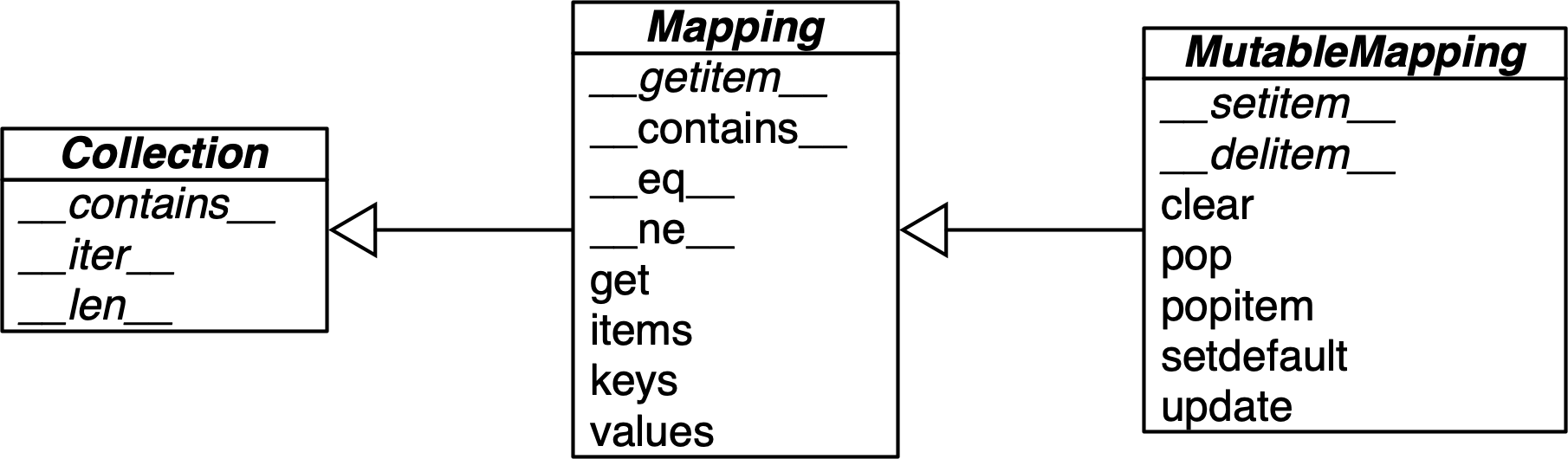
Figure 3-1. Simplified UML class diagram for the MutableMapping and its superclasses from collections.abc (inheritance arrows point from subclasses to superclasses; names in italic are abstract classes and abstract methods).
To implement a custom mapping, it’s easier to extend collections.UserDict,
or to wrap a dict by composition, instead of subclassing these ABCs.
The collections.UserDict class and all concrete mapping classes in the standard library encapsulate
the basic dict in their implementation, which in turn is built on a hash table.
Therefore, they all share the limitation that the keys must be hashable
(the values need not be hashable, only the keys).
If you need a refresher, the next section explains.
What Is Hashable
Here is part of the definition of hashable adapted from the Python Glossary:
An object is hashable if it has a hash code which never changes during its lifetime (it needs a
__hash__()method), and can be compared to other objects (it needs an__eq__()method). Hashable objects which compare equal must have the same hash code.2
Numeric types and flat immutable types str and bytes are all hashable.
Container types are hashable if they are immutable and all contained objects are also hashable.
A frozenset is always hashable, because every element it contains must be hashable by definition.
A tuple is hashable only if all its items are hashable. See tuples tt, tl, and tf:
>>>tt=(1,2,(30,40))>>>hash(tt)8027212646858338501>>>tl=(1,2,[30,40])>>>hash(tl)Traceback (most recent call last):File"<stdin>", line1, in<module>TypeError:unhashable type: 'list'>>>tf=(1,2,frozenset([30,40]))>>>hash(tf)-4118419923444501110
The hash code of an object may be different depending on the version of Python, the machine architecture, and because of a salt added to the hash computation for security reasons.3 The hash code of a correctly implemented object is guaranteed to be constant only within one Python process.
User-defined types are hashable by default because their hash code is their id(), and the __eq__() method inherited from the object class simply compares the object IDs. If an object implements a custom __eq__() that takes into account its internal state, it will be hashable only if its __hash__() always returns the same hash code. In practice, this requires that __eq__() and __hash__() only take into account instance attributes that never change during the life of the object.
Now let’s review the API of the most commonly used mapping types in Python: dict, defaultdict, and OrderedDict.
Overview of Common Mapping Methods
The basic API for mappings is quite rich. Table 3-1 shows the methods implemented by dict and two popular variations: defaultdict and OrderedDict, both defined in the collections module.
| dict | defaultdict | OrderedDict | ||
|---|---|---|---|---|
|
● |
● |
● |
Remove all items |
|
● |
● |
● |
|
|
● |
● |
● |
Shallow copy |
|
● |
Support for |
||
|
● |
Callable invoked by |
||
|
● |
● |
● |
|
|
● |
● |
● |
New mapping from keys in iterable, with optional initial value (defaults to |
|
● |
● |
● |
Get item with key |
|
● |
● |
● |
|
|
● |
● |
● |
Get view over items— |
|
● |
● |
● |
Get iterator over keys |
|
● |
● |
● |
Get view over keys |
|
● |
● |
● |
|
|
● |
Called when |
||
|
● |
Move |
||
|
● |
● |
● |
Support for |
|
● |
● |
● |
Support for |
|
● |
● |
● |
Remove and return value at |
|
● |
● |
● |
Remove and return the last inserted item as |
|
● |
● |
● |
Support for |
|
● |
● |
● |
Support for |
|
● |
● |
● |
If |
|
● |
● |
● |
|
|
● |
● |
● |
Update |
|
● |
● |
● |
Get view over values |
a b c Reversed operators are explained in Chapter 16. | ||||
The way d.update(m) handles its first argument m is a prime example of duck typing:
it first checks whether m has a keys method and, if it does, assumes it is a mapping.
Otherwise, update() falls back to iterating over m, assuming its items are (key, value) pairs.
The constructor for most Python mappings uses the logic of update() internally,
which means they can be initialized from other mappings or
from any iterable object producing (key, value) pairs.
A subtle mapping method is setdefault().
It avoids redundant key lookups when we need to update the value of an item in place.
The next section shows how to use it.
Inserting or Updating Mutable Values
In line with Python’s fail-fast philosophy, dict access with d[k] raises an error when k is not an existing key. Pythonistas know that d.get(k, default) is an alternative to d[k] whenever a default value is more convenient than handling KeyError. However, when you retrieve a mutable value and want to update it, there is a better way.
Consider a script to index text, producing a mapping where each key is a word, and the value is a list of positions where that word occurs, as shown in Example 3-3.
Example 3-3. Partial output from Example 3-4 processing the “Zen of Python”;
each line shows a word and a list of occurrences coded as pairs:
(line_number, column_number)
$ python3 index0.py zen.txt a[(19,48),(20,53)]Although[(11,1),(16,1),(18,1)]ambiguity[(14,16)]and[(15,23)]are[(21,12)]aren[(10,15)]at[(16,38)]bad[(19,50)]be[(15,14),(16,27),(20,50)]beats[(11,23)]Beautiful[(3,1)]better[(3,14),(4,13),(5,11),(6,12),(7,9),(8,11),(17,8),(18,25)]...
Example 3-4 is a suboptimal script written to show one case where dict.get is not the best way to handle a missing key.
I adapted it from an example by Alex Martelli.4
Example 3-4. index0.py uses dict.get to fetch and update a list of word occurrences from the index (a better solution is in Example 3-5)
"""Build an index mapping word -> list of occurrences"""importreimportsysWORD_RE=re.compile(r'\w+')index={}withopen(sys.argv[1],encoding='utf-8')asfp:forline_no,lineinenumerate(fp,1):formatchinWORD_RE.finditer(line):word=match.group()column_no=match.start()+1location=(line_no,column_no)# this is ugly; coded like this to make a pointoccurrences=index.get(word,[])occurrences.append(location)index[word]=occurrences# display in alphabetical orderforwordinsorted(index,key=str.upper):(word,index[word])
Get the list of occurrences for
word, or[]if not found.Append new location to
occurrences.Put changed
occurrencesintoindexdict; this entails a second search through theindex.In the
key=argument ofsorted, I am not callingstr.upper, just passing a reference to that method so thesortedfunction can use it to normalize the words for sorting.5
The three lines dealing with occurrences in Example 3-4 can be replaced by a single line using dict.setdefault. Example 3-5 is closer to Alex Martelli’s code.
Example 3-5. index.py uses dict.setdefault to fetch and update a list of word occurrences from the index in a single line; contrast with Example 3-4
"""Build an index mapping word -> list of occurrences"""importreimportsysWORD_RE=re.compile(r'\w+')index={}withopen(sys.argv[1],encoding='utf-8')asfp:forline_no,lineinenumerate(fp,1):formatchinWORD_RE.finditer(line):word=match.group()column_no=match.start()+1location=(line_no,column_no)index.setdefault(word,[]).append(location)# display in alphabetical orderforwordinsorted(index,key=str.upper):(word,index[word])
Get the list of occurrences for
word, or set it to[]if not found;setdefaultreturns the value, so it can be updated without requiring a second search.
In other words, the end result of this line…
my_dict.setdefault(key,[]).append(new_value)
…is the same as running…
ifkeynotinmy_dict:my_dict[key]=[]my_dict[key].append(new_value)
…except that the latter code performs at least two searches for key—three if it’s not found—while setdefault does it all with a single lookup.
A related issue, handling missing keys on any lookup (and not only when inserting), is the subject of the next section.
Automatic Handling of Missing Keys
Sometimes it is convenient to have mappings that return some made-up value when a missing key is searched. There are two main approaches to this: one is to use a defaultdict instead of a plain dict. The other is to subclass dict or any other mapping type and add a __missing__ method. Both solutions are covered next.
defaultdict: Another Take on Missing Keys
A collections.defaultdict instance creates items with a default value on demand whenever a missing key is searched using d[k] syntax.
Example 3-6 uses defaultdict to provide another elegant solution to the word index task from Example 3-5.
Here is how it works: when instantiating a defaultdict, you provide a callable to produce a default value whenever __getitem__ is passed a nonexistent key argument.
For example, given a defaultdict created as dd = defaultdict(list), if 'new-key' is not in dd, the expression dd['new-key'] does the following steps:
-
Calls
list()to create a new list. -
Inserts the list into
ddusing'new-key'as key. -
Returns a reference to that list.
The callable that produces the default values is held in an instance attribute named default_factory.
Example 3-6. index_default.py: using defaultdict instead of the setdefault method
"""Build an index mapping word -> list of occurrences"""importcollectionsimportreimportsysWORD_RE=re.compile(r'\w+')index=collections.defaultdict(list)withopen(sys.argv[1],encoding='utf-8')asfp:forline_no,lineinenumerate(fp,1):formatchinWORD_RE.finditer(line):word=match.group()column_no=match.start()+1location=(line_no,column_no)index[word].append(location)# display in alphabetical orderforwordinsorted(index,key=str.upper):(word,index[word])
Create a
defaultdictwith thelistconstructor asdefault_factory.If
wordis not initially in theindex, thedefault_factoryis called to produce the missing value, which in this case is an emptylistthat is then assigned toindex[word]and returned, so the.append(location)operation always succeeds.
If no default_factory is provided, the usual KeyError is raised for missing keys.
Warning
The default_factory of a defaultdict is only invoked to provide default values for __getitem__ calls, and not for the other methods.
For example, if dd is a defaultdict, and k is a missing key, dd[k] will call the default_factory to create a default value,
but dd.get(k) still returns None, and k in dd is False.
The mechanism that makes defaultdict work by calling default_factory is the __missing__ special method, a feature that we discuss next.
The __missing__ Method
Underlying the way mappings deal with missing keys is the aptly named __missing__ method. This method is not defined in the base dict class, but dict is aware of it: if you subclass dict and provide a __missing__ method, the standard dict.__getitem__ will call it whenever a key is not found, instead of raising KeyError.
Suppose you’d like a mapping where keys are converted to str when looked up. A concrete use case is a device library for IoT,6 where a programmable board with general-purpose I/O pins (e.g., a Raspberry Pi or an Arduino) is represented by a Board class with a my_board.pins attribute, which is a mapping of physical pin identifiers to pin software objects. The physical pin identifier may be just a number or a string like "A0" or "P9_12". For consistency, it is desirable that all keys in board.pins are strings, but it is also convenient looking up a pin by number, as in my_arduino.pin[13], so that beginners are not tripped when they want to blink the LED on pin 13 of their Arduinos. Example 3-7 shows how such a mapping would work.
Example 3-7. When searching for a nonstring key, StrKeyDict0 converts it to str when it is not found
Testsforitemretrievalusing`d[key]`notation::>>>d=StrKeyDict0([('2','two'),('4','four')])>>>d['2']'two'>>>d[4]'four'>>>d[1]Traceback(mostrecentcalllast):...KeyError:'1'Testsforitemretrievalusing`d.get(key)`notation::>>>d.get('2')'two'>>>d.get(4)'four'>>>d.get(1,'N/A')'N/A'Testsforthe`in`operator::>>>2indTrue>>>1indFalse
Example 3-8 implements a class StrKeyDict0 that passes the preceding doctests.
Tip
A better way to create a user-defined mapping type is to subclass collections.UserDict instead of dict (as we will do in Example 3-9). Here we subclass dict just to show that __missing__ is supported by the built-in dict.__getitem__ method.
Example 3-8. StrKeyDict0 converts nonstring keys to str on lookup (see tests in Example 3-7)
classStrKeyDict0(dict):def__missing__(self,key):ifisinstance(key,str):raiseKeyError(key)returnself[str(key)]defget(self,key,default=None):try:returnself[key]exceptKeyError:returndefaultdef__contains__(self,key):returnkeyinself.keys()orstr(key)inself.keys()
StrKeyDict0inherits fromdict.Check whether
keyis already astr. If it is, and it’s missing, raiseKeyError.Build
strfromkeyand look it up.The
getmethod delegates to__getitem__by using theself[key]notation; that gives the opportunity for our__missing__to act.If a
KeyErrorwas raised,__missing__already failed, so we return thedefault.
Search for unmodified key (the instance may contain non-
strkeys), then for astrbuilt from the key.
Take a moment to consider why the test isinstance(key, str) is necessary in the __missing__ implementation.
Without that test, our __missing__ method would work OK for any key k—str or not str—whenever str(k) produced an existing key.
But if str(k) is not an existing key, we’d have an infinite recursion.
In the last line of __missing__, self[str(key)] would call __getitem__, passing that str key, which in turn would call __missing__ again.
The __contains__ method is also needed for consistent behavior in this example, because the operation k in d calls it, but the method inherited from dict does not fall back to invoking __missing__. There is a subtle detail in our implementation of __contains__: we do not check for the key in the usual Pythonic way—k in my_dict—because str(key) in self would recursively call __contains__. We avoid this by explicitly looking up the key in self.keys().
A search like k in my_dict.keys() is efficient in Python 3 even for very large mappings because dict.keys() returns a view,
which is similar to a set, as we’ll see in “Set Operations on dict Views”.
However, remember that k in my_dict does the same job, and is faster because it avoids
the attribute lookup to find the .keys method.
I had a specific reason to use self.keys() in the __contains__ method in
Example 3-8.
The check for the unmodified key—key in self.keys()—is necessary for correctness because StrKeyDict0
does not enforce that all keys in the dictionary must be of type str.
Our only goal with this simple example is to make searching “friendlier” and not enforce types.
Warning
User-defined classes derived from standard library mappings
may or may not use __missing__ as a fallback in their
implementations of __getitem__, get, or __contains__,
as explained in the next section.
Inconsistent Usage of __missing__ in the Standard Library
Consider the following scenarios, and how the missing key lookups are affected:
dictsubclass-
A subclass of
dictimplementing only__missing__and no other method. In this case,__missing__may be called only ond[k], which will use the__getitem__inherited fromdict. collections.UserDictsubclass-
Likewise, a subclass of
UserDictimplementing only__missing__and no other method. Thegetmethod inherited fromUserDictcalls__getitem__. This means__missing__may be called to handle lookups withd[k]andd.get(k). abc.Mappingsubclass with the simplest possible__getitem__-
A minimal subclass of
abc.Mappingimplementing__missing__and the required abstract methods, including an implementation of__getitem__that does not call__missing__. The__missing__method is never triggered in this class. abc.Mappingsubclass with__getitem__calling__missing__-
A minimal subclass of
abc.Mappingimplementing__missing__and the required abstract methods, including an implementation of__getitem__that calls__missing__. The__missing__method is triggered in this class for missing key lookups made withd[k],d.get(k), andk in d.
See missing.py in the example code repository for demonstrations of the scenarios described here.
The four scenarios just described assume minimal implementations.
If your subclass implements __getitem__, get, and __contains__,
then you can make those methods use __missing__ or not, depending on your needs.
The point of this section is to show that you must be careful when subclassing standard library
mappings to use __missing__, because the base classes support different behaviors by default.
Don’t forget that the behavior of setdefault and update is also affected by key lookup.
And finally, depending on the logic of your __missing__,
you may need to implement special logic in __setitem__,
to avoid inconsistent or surprising behavior.
We’ll see an example of this in “Subclassing UserDict Instead of dict”.
So far we have covered the dict and defaultdict mapping types, but the standard library comes with other mapping implementations, which we discuss next.
Variations of dict
In this section is an overview of mapping types included in the standard library, besides defaultdict, already covered in “defaultdict: Another Take on Missing Keys”.
collections.OrderedDict
Now that the built-in dict also keeps the keys ordered since Python 3.6, the most common reason to use OrderedDict is writing code that is backward compatible with earlier Python versions.
Having said that, Python’s documentation lists some remaining differences between dict and OrderedDict, which I quote here—only reordering the items for relevance in daily use:
-
The equality operation for
OrderedDictchecks for matching order. -
The
popitem()method ofOrderedDicthas a different signature. It accepts an optional argument to specify which item is popped. -
OrderedDicthas amove_to_end()method to efficiently reposition an element to an endpoint. -
The regular
dictwas designed to be very good at mapping operations. Tracking insertion order was secondary. -
OrderedDictwas designed to be good at reordering operations. Space efficiency, iteration speed, and the performance of update operations were secondary. -
Algorithmically,
OrderedDictcan handle frequent reordering operations better thandict. This makes it suitable for tracking recent accesses (for example, in an LRU cache).
collections.ChainMap
A ChainMap instance holds a list of mappings that can be searched as one.
The lookup is performed on each input mapping in the order it appears in the constructor call,
and succeeds as soon as the key is found in one of those mappings.
For example:
>>>d1=dict(a=1,b=3)>>>d2=dict(a=2,b=4,c=6)>>>fromcollectionsimportChainMap>>>chain=ChainMap(d1,d2)>>>chain['a']1>>>chain['c']6
The ChainMap instance does not copy the input mappings, but holds references to them.
Updates or insertions to a ChainMap only affect the first input mapping.
Continuing from the previous example:
>>>chain['c']=-1>>>d1{'a': 1, 'b': 3, 'c': -1}>>>d2{'a': 2, 'b': 4, 'c': 6}
ChainMap is useful to implement interpreters for languages with nested scopes,
where each mapping represents a scope context,
from the innermost enclosing scope to the outermost scope.
The “ChainMap objects” section of the collections docs
has several examples of ChainMap usage,
including this snippet inspired by the basic rules of variable lookup in Python:
importbuiltinspylookup=ChainMap(locals(),globals(),vars(builtins))
Example 18-14 shows a ChainMap subclass used to
implement an interpreter for a subset of the Scheme programming language.
collections.Counter
A mapping that holds an integer count for each key.
Updating an existing key adds to its count.
This can be used to count instances of hashable objects or as a multiset (discussed later in this section).
Counter implements the + and - operators to combine tallies, and other useful methods such as most_common([n]),
which returns an ordered list of tuples with the n most common items and their counts; see the documentation.
Here is Counter used to count letters in words:
>>>ct=collections.Counter('abracadabra')>>>ctCounter({'a': 5, 'b': 2, 'r': 2, 'c': 1, 'd': 1})>>>ct.update('aaaaazzz')>>>ctCounter({'a': 10, 'z': 3, 'b': 2, 'r': 2, 'c': 1, 'd': 1})>>>ct.most_common(3)[('a', 10), ('z', 3), ('b', 2)]
Note that the 'b' and 'r' keys are tied in third place, but ct.most_common(3) shows only three counts.
To use collections.Counter as a multiset, pretend each key is an element in the set, and the count is the number of occurrences of that element in the set.
shelve.Shelf
The shelve module in the standard library provides persistent storage for a mapping of
string keys to Python objects serialized in the pickle binary format.
The curious name of shelve makes sense when you realize that pickle jars are stored on shelves.
The shelve.open module-level function returns a shelve.Shelf instance—a simple key-value DBM database backed by the dbm module, with these characteristics:
-
shelve.Shelfsubclassesabc.MutableMapping, so it provides the essential methods we expect of a mapping type. -
In addition,
shelve.Shelfprovides a few other I/O management methods, likesyncandclose. -
A
Shelfinstance is a context manager, so you can use awithblock to make sure it is closed after use. -
Keys and values are saved whenever a new value is assigned to a key.
-
The keys must be strings.
-
The values must be objects that the
picklemodule can serialize.
The documentation for the shelve, dbm, and pickle modules provides more details and some caveats.
Warning
Python’s pickle is easy to use in the simplest cases, but has several drawbacks.
Read Ned Batchelder’s
“Pickle’s nine flaws”
before adopting any solution involving pickle.
In his post, Ned mentions other serialization formats to consider.
OrderedDict, ChainMap, Counter, and Shelf are ready to use but can also be customized by subclassing.
In contrast, UserDict is intended only as a base class to be
extended.
Subclassing UserDict Instead of dict
It’s better to create a new mapping type by extending collections.UserDict rather than dict.
We realize that when we try to extend our StrKeyDict0 from Example 3-8 to make sure that any keys added to the mapping are stored as str.
The main reason why it’s better to subclass UserDict rather than dict is that
the built-in has some implementation shortcuts that end up forcing us to override methods
that we can just inherit from UserDict with no problems.7
Note that UserDict does not inherit from dict, but uses composition:
it has an internal dict instance, called data, which holds the actual items.
This avoids undesired recursion when coding special methods like __setitem__, and simplifies the coding of __contains__, compared to Example 3-8.
Thanks to UserDict, StrKeyDict (Example 3-9) is more concise than StrKeyDict0 (Example 3-8), but it does more: it stores all keys as str, avoiding unpleasant surprises if the instance is built or updated with data containing nonstring keys.
Example 3-9. StrKeyDict always converts nonstring keys to str on insertion, update, and lookup
importcollectionsclassStrKeyDict(collections.UserDict):def__missing__(self,key):ifisinstance(key,str):raiseKeyError(key)returnself[str(key)]def__contains__(self,key):returnstr(key)inself.datadef__setitem__(self,key,item):self.data[str(key)]=item
StrKeyDictextendsUserDict.__missing__is exactly as in Example 3-8.__contains__is simpler: we can assume all stored keys arestr, and we can check onself.datainstead of invokingself.keys()as we did inStrKeyDict0.__setitem__converts anykeyto astr. This method is easier to overwrite when we can delegate to theself.dataattribute.
Because UserDict extends abc.MutableMapping, the remaining methods that make StrKeyDict a full-fledged mapping are inherited from UserDict, MutableMapping, or Mapping. The latter have several useful concrete methods, in spite of being abstract base classes (ABCs). The following methods are worth noting:
MutableMapping.update-
This powerful method can be called directly but is also used by
__init__to load the instance from other mappings, from iterables of(key, value)pairs, and keyword arguments. Because it usesself[key] = valueto add items, it ends up calling our implementation of__setitem__. Mapping.get-
In
StrKeyDict0(Example 3-8), we had to code our owngetto return the same results as__getitem__, but in Example 3-9 we inheritedMapping.get, which is implemented exactly likeStrKeyDict0.get(see the Python source code).
Tip
Antoine Pitrou authored PEP 455—Adding a key-transforming dictionary to collections and a patch to enhance the collections module with a TransformDict, that is more general than StrKeyDict and preserves the keys as they are provided, before the transformation is applied. PEP 455 was rejected in May 2015—see Raymond Hettinger’s rejection message. To experiment with TransformDict, I extracted Pitrou’s patch from issue18986 into a standalone module (03-dict-set/transformdict.py in the Fluent Python second edition code repository).
We know there are immutable sequence types, but how about an immutable mapping? Well, there isn’t a real one in the standard library, but a stand-in is available. That’s next.
Immutable Mappings
The mapping types provided by the standard library are all mutable,
but you may need to prevent users from changing a mapping by accident.
A concrete use case can be found, again,
in a hardware programming library like Pingo, mentioned in “The __missing__ Method”:
the board.pins mapping represents the physical GPIO pins on the device.
As such, it’s useful to prevent inadvertent updates to board.pins because
the hardware can’t be changed via software,
so any change in the mapping would make it inconsistent with the physical reality of the device.
The types module provides a wrapper class called MappingProxyType, which, given a mapping, returns a mappingproxy instance that is a read-only but dynamic proxy for the original mapping. This means that updates to the original mapping can be seen in the mappingproxy, but changes cannot be made through it. See Example 3-10 for a brief demonstration.
Example 3-10. MappingProxyType builds a read-only mappingproxy instance from a dict
>>>fromtypesimportMappingProxyType>>>d={1:'A'}>>>d_proxy=MappingProxyType(d)>>>d_proxymappingproxy({1: 'A'})>>>d_proxy[1]'A'>>>d_proxy[2]='x'Traceback (most recent call last):File"<stdin>", line1, in<module>TypeError:'mappingproxy' object does not support item assignment>>>d[2]='B'>>>d_proxymappingproxy({1: 'A', 2: 'B'})>>>d_proxy[2]'B'>>>
Items in
dcan be seen throughd_proxy.Changes cannot be made through
d_proxy.d_proxyis dynamic: any change indis reflected.
Here is how this could be used in practice in the hardware programming scenario:
the constructor in a concrete Board subclass would fill a private mapping with the pin objects,
and expose it to clients of the API via a public .pins attribute implemented as a mappingproxy.
That way the clients would not be able to add, remove, or change pins by accident.
Next, we’ll cover views—which allow high-performance operations on a dict, without unnecessary copying of data.
Dictionary Views
The dict instance methods .keys(), .values(), and .items() return instances of
classes called dict_keys, dict_values, and dict_items, respectively.
These dictionary views are read-only projections of the internal data structures used in the dict implementation.
They avoid the memory overhead of the equivalent Python 2 methods
that returned lists duplicating data already in the target dict,
and they also replace the old methods that returned iterators.
Example 3-11 shows some basic operations supported by all dictionary views.
Example 3-11. The .values() method returns a view of the values in a dict
>>>d=dict(a=10,b=20,c=30)>>>values=d.values()>>>valuesdict_values([10, 20, 30])>>>len(values)3>>>list(values)[10, 20, 30]>>>reversed(values)<dict_reversevalueiterator object at 0x10e9e7310>>>>values[0]Traceback (most recent call last):File"<stdin>", line1, in<module>TypeError:'dict_values' object is not subscriptable
The
reprof a view object shows its content.We can query the
lenof a view.Views are iterable, so it’s easy to create lists from them.
Views implement
__reversed__, returning a custom iterator.We can’t use
[]to get individual items from a view.
A view object is a dynamic proxy.
If the source dict is updated, you can immediately see the changes through an existing view.
Continuing from Example 3-11:
>>>d['z']=99>>>d{'a': 10, 'b': 20, 'c': 30, 'z': 99}>>>valuesdict_values([10, 20, 30, 99])
The classes dict_keys, dict_values, and dict_items are internal:
they are not available via __builtins__ or any standard library module,
and even if you get a reference to one of them, you can’t use it to create a view from scratch in Python code:
>>>values_class=type({}.values())>>>v=values_class()Traceback (most recent call last):File"<stdin>", line1, in<module>TypeError:cannot create 'dict_values' instances
The dict_values class is the simplest dictionary view—it implements only the __len__, __iter__, and __reversed__ special methods.
In addition to these methods, dict_keys and dict_items implement several set methods, almost as many as the frozenset class.
After we cover sets, we’ll have more to say about dict_keys and dict_items in “Set Operations on dict Views”.
Now let’s see some rules and tips informed by the way dict is implemented under the hood.
Practical Consequences of How dict Works
The hash table implementation of Python’s dict is very efficient, but it’s important to understand the practical effects of this design:
-
Keys must be hashable objects. They must implement proper
__hash__and__eq__methods as described in “What Is Hashable”. -
Item access by key is very fast. A
dictmay have millions of keys, but Python can locate a key directly by computing the hash code of the key and deriving an index offset into the hash table, with the possible overhead of a small number of tries to find a matching entry. -
Key ordering is preserved as a side effect of a more compact memory layout for
dictin CPython 3.6, which became an official language feature in 3.7. -
Despite its new compact layout, dicts inevitably have a significant memory overhead. The most compact internal data structure for a container would be an array of pointers to the items.8 Compared to that, a hash table needs to store more data per entry, and Python needs to keep at least one-third of the hash table rows empty to remain efficient.
-
To save memory, avoid creating instance attributes outside of the
__init__method.
That last tip about instance attributes comes from the fact that
Python’s default behavior is to store instance attributes
in a special __dict__ attribute, which is a dict attached to each instance.9
Since PEP 412—Key-Sharing Dictionary
was implemented in Python 3.3,
instances of a class can share a common hash table, stored with the class.
That common hash table is shared by the __dict__ of each new instance that
has the same attributes names as the first instance of that class when __init__ returns.
Each instance __dict__ can then hold only its own attribute values as a simple array of pointers.
Adding an instance attribute after __init__ forces Python
to create a new hash table just for the __dict__ of that one instance
(which was the default behavior for all instances before Python 3.3).
According to PEP 412, this optimization reduces memory use by 10% to 20% for object-oriented programs.
The details of the compact layout and key-sharing optimizations are rather complex. For more, please read “Internals of sets and dicts” at fluentpython.com.
Now let’s dive into sets.
Set Theory
Sets are not new in Python, but are still somewhat underused. The set type and its immutable sibling frozenset first appeared as modules in the Python 2.3 standard library, and were promoted to built-ins in Python 2.6.
Note
In this book, I use the word “set” to refer both to set and frozenset. When talking specifically about the set class, I use constant width font: set.
A set is a collection of unique objects. A basic use case is removing duplication:
>>>l=['spam','spam','eggs','spam','bacon','eggs']>>>set(l){'eggs', 'spam', 'bacon'}>>>list(set(l))['eggs', 'spam', 'bacon']
Tip
If you want to remove duplicates but also preserve the order of the first occurrence of each item, you can now use a plain dict to do it, like this:
>>>dict.fromkeys(l).keys()dict_keys(['spam', 'eggs', 'bacon'])>>>list(dict.fromkeys(l).keys())['spam', 'eggs', 'bacon']
Set elements must be hashable. The set type is not hashable, so you can’t build a set with nested set instances.
But frozenset is hashable, so you can have frozenset elements inside a set.
In addition to enforcing uniqueness, the set types implement many set operations as infix operators, so, given two sets a and b, a | b returns their union, a & b computes the intersection, a - b the difference, and a ^ b the symmetric difference. Smart use of set operations can reduce both the line count and the execution time of Python programs, at the same time making code easier to read and reason about—by removing loops and conditional logic.
For example, imagine you have a large set of email addresses (the haystack) and a smaller set of addresses (the needles) and you need to count how many needles occur in the haystack. Thanks to set intersection (the & operator) you can code that in a simple line (see Example 3-12).
Example 3-12. Count occurrences of needles in a haystack, both of type set
found=len(needles&haystack)
Without the intersection operator, you’d have to write Example 3-13 to accomplish the same task as Example 3-12.
Example 3-13. Count occurrences of needles in a haystack (same end result as Example 3-12)
found=0forninneedles:ifninhaystack:found+=1
Example 3-12 runs slightly faster than Example 3-13. On the other hand, Example 3-13 works for any iterable objects needles and haystack, while Example 3-12 requires that both be sets. But, if you don’t have sets on hand, you can always build them on the fly, as shown in Example 3-14.
Example 3-14. Count occurrences of needles in a haystack; these lines work for any iterable types
found=len(set(needles)&set(haystack))# another way:found=len(set(needles).intersection(haystack))
Of course, there is an extra cost involved in building the sets in Example 3-14, but if either the needles or the haystack is already a set, the alternatives in Example 3-14 may be cheaper than Example 3-13.
Any one of the preceding examples are capable of searching 1,000 elements in a haystack of 10,000,000 items in about 0.3 milliseconds—that’s close to 0.3 microseconds per element.
Besides the extremely fast membership test (thanks to the underlying hash table), the set and frozenset built-in types provide a rich API to create new sets or, in the case of set, to change existing ones. We will discuss the operations shortly, but first a note about syntax.
Set Literals
The syntax of set literals—{1}, {1, 2}, etc.—looks exactly like the math notation, with one important exception: there’s no literal notation for the empty set, so we must remember to write set().
Syntax Quirk
Don’t forget that to create an empty set, you should use the constructor without an argument: set(). If you write {}, you’re creating an empty dict—this hasn’t changed in Python 3.
In Python 3, the standard string representation of sets always uses the {…} notation, except for the empty set:
>>>s={1}>>>type(s)<class 'set'>>>>s{1}>>>s.pop()1>>>sset()
Literal set syntax like {1, 2, 3} is both faster and more readable than calling the constructor (e.g., set([1, 2, 3])). The latter form is slower because, to evaluate it, Python has to look up the set name to fetch the constructor, then build a list, and finally pass it to the constructor. In contrast, to process a literal like {1, 2, 3}, Python runs a specialized BUILD_SET bytecode.10
There is no special syntax to represent frozenset literals—they must be created by calling the constructor. The standard string representation in Python 3 looks like a frozenset constructor call. Note the output in the console session:
>>>frozenset(range(10))frozenset({0, 1, 2, 3, 4, 5, 6, 7, 8, 9})
Speaking of syntax, the idea of listcomps was adapted to build sets as well.
Set Comprehensions
Set comprehensions (setcomps) were added way back in Python 2.7, together with the dictcomps that we saw in “dict Comprehensions”. Example 3-15 shows how.
Example 3-15. Build a set of Latin-1 characters that have the word “SIGN” in their Unicode names
>>>fromunicodedataimportname>>>{chr(i)foriinrange(32,256)if'SIGN'inname(chr(i),'')}{'§', '=', '¢', '#', '¤', '<', '¥', 'µ', '×', '$', '¶', '£', '©','°', '+', '÷', '±', '>', '¬', '®', '%'}
Import
namefunction fromunicodedatato obtain character names.Build set of characters with codes from 32 to 255 that have the word
'SIGN'in their names.
The order of the output changes for each Python process, because of the salted hash mentioned in “What Is Hashable”.
Syntax matters aside, let’s now consider the behavior of sets.
Practical Consequences of How Sets Work
The set and frozenset types are both implemented with a hash table. This has these effects:
-
Set elements must be hashable objects. They must implement proper
__hash__and__eq__methods as described in “What Is Hashable”. -
Membership testing is very efficient. A set may have millions of elements, but an element can be located directly by computing its hash code and deriving an index offset, with the possible overhead of a small number of tries to find a matching element or exhaust the search.
-
Sets have a significant memory overhead, compared to a low-level array pointers to its elements—which would be more compact but also much slower to search beyond a handful of elements.
-
Element ordering depends on insertion order, but not in a useful or reliable way. If two elements are different but have the same hash code, their position depends on which element is added first.
-
Adding elements to a set may change the order of existing elements. That’s because the algorithm becomes less efficient if the hash table is more than two-thirds full, so Python may need to move and resize the table as it grows. When this happens, elements are reinserted and their relative ordering may change.
See “Internals of sets and dicts” at fluentpython.com for details.
Let’s now review the rich assortment of operations provided by sets.
Set Operations
Figure 3-2 gives an overview of the methods you can use on mutable and immutable sets. Many of them are special methods that overload operators, such as & and >=. Table 3-2 shows the math set operators that have corresponding operators or methods in Python. Note that some operators and methods perform in-place changes on the target set (e.g., &=, difference_update, etc.). Such operations make no sense in the ideal world of mathematical sets, and are not implemented in frozenset.
Tip
The infix operators in Table 3-2 require that both operands be sets, but all other methods take one or more iterable arguments.
For example, to produce the union of four collections, a, b, c, and d, you can call a.union(b, c, d), where a must be a set, but b, c, and d can be iterables of any type that produce hashable items.
If you need to create a new set with the union of four iterables, instead of updating an existing set, you can write {*a, *b, *c, *d} since Python 3.5 thanks to
PEP 448—Additional Unpacking Generalizations.
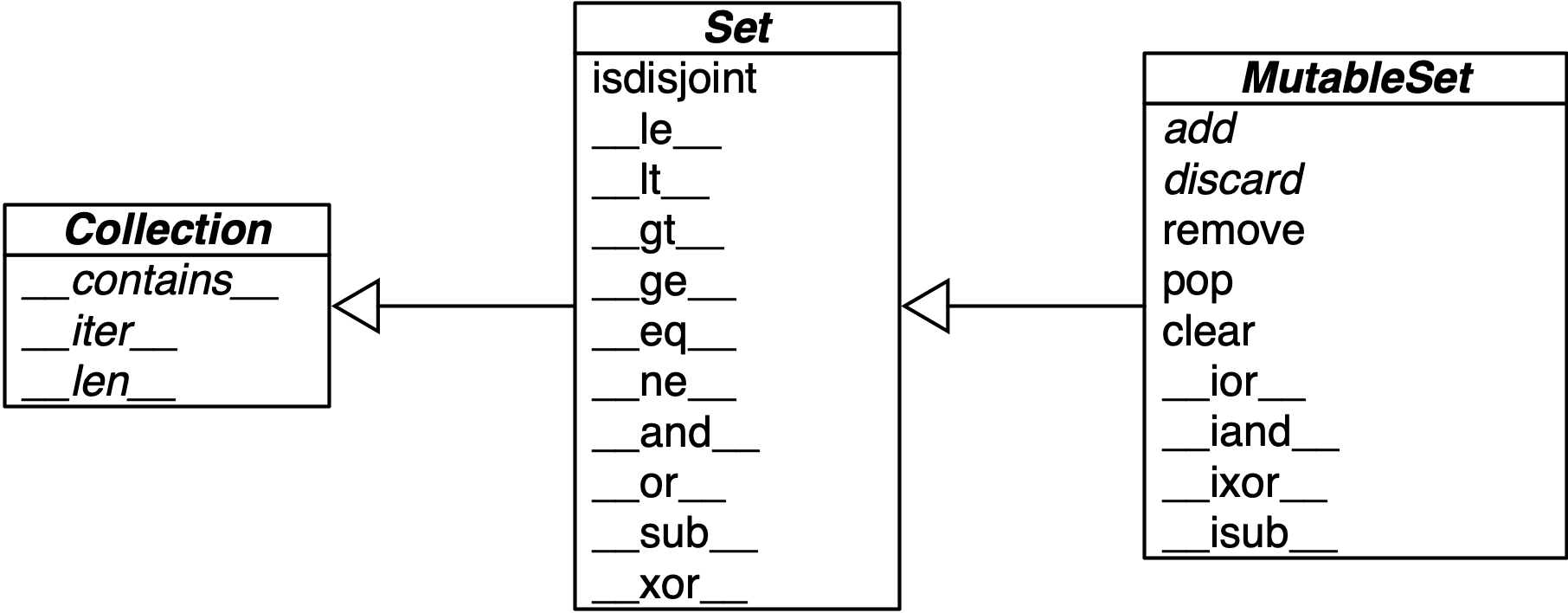
Figure 3-2. Simplified UML class diagram for MutableSet and its superclasses from collections.abc (names in italic are abstract classes and abstract methods; reverse operator methods omitted for brevity).
| Math symbol | Python operator | Method | Description |
|---|---|---|---|
S ∩ Z |
|
|
Intersection of |
|
|
Reversed |
|
|
Intersection of |
||
|
|
|
|
|
|
||
S ∪ Z |
|
|
Union of |
|
|
Reversed |
|
|
Union of |
||
|
|
|
|
|
|
||
S \ Z |
|
|
Relative complement or difference between |
|
|
Reversed |
|
|
Difference between |
||
|
|
|
|
|
|
||
S ∆ Z |
|
|
Symmetric difference (the complement of the intersection |
|
|
Reversed |
|
|
Complement of |
||
|
|
|
|
|
|
Table 3-3 lists set predicates: operators and methods that return True or False.
| Math symbol | Python operator | Method | Description |
|---|---|---|---|
S ∩ Z = ∅ |
|
|
|
e ∈ S |
|
|
Element |
S ⊆ Z |
|
|
|
|
|
||
S ⊂ Z |
|
|
|
S ⊇ Z |
|
|
|
|
|
||
S ⊃ Z |
|
|
|
In addition to the operators and methods derived from math set theory, the set types implement other methods of practical use, summarized in Table 3-4.
| set | frozenset | ||
|---|---|---|---|
|
● |
Add element |
|
|
● |
Remove all elements of |
|
|
● |
● |
Shallow copy of |
|
● |
Remove element |
|
|
● |
● |
Get iterator over |
|
● |
● |
|
|
● |
Remove and return an element from |
|
|
● |
Remove element |
This completes our overview of the features of sets. As promised in “Dictionary Views”, we’ll now see how two of the dictionary view types behave very much like a frozenset.
Set Operations on dict Views
Table 3-5 shows that the view objects returned by the dict methods .keys() and .items() are remarkably similar to frozenset.
| frozenset | dict_keys | dict_items | Description | |
|---|---|---|---|---|
|
● |
● |
● |
|
|
● |
● |
● |
Reversed |
|
● |
● |
● |
|
|
● |
Shallow copy of |
||
|
● |
Difference between |
||
|
● |
Intersection of |
||
|
● |
● |
● |
|
|
● |
|
||
|
● |
|
||
|
● |
● |
● |
Get iterator over |
|
● |
● |
● |
|
|
● |
● |
● |
|
|
● |
● |
● |
Reversed |
|
● |
● |
Get iterator over |
|
|
● |
● |
● |
Reversed |
|
● |
● |
● |
|
|
● |
Complement of |
||
|
● |
Union of |
||
|
● |
● |
● |
|
|
● |
● |
● |
Reversed |
In particular, dict_keys and dict_items implement the special methods to support
the powerful set operators & (intersection), | (union), - (difference), and ^ (symmetric difference).
For example, using & is easy to get the keys that appear in two dictionaries:
>>>d1=dict(a=1,b=2,c=3,d=4)>>>d2=dict(b=20,d=40,e=50)>>>d1.keys()&d2.keys(){'b', 'd'}
Note that the return value of & is a set.
Even better: the set operators in dictionary views are compatible with set instances.
Check this out:
>>>s={'a','e','i'}>>>d1.keys()&s{'a'}>>>d1.keys()|s{'a', 'c', 'b', 'd', 'i', 'e'}
Warning
A dict_items view only works as a set if all values in the dict
are hashable. Attempting set operations on a dict_items view with
an unhashable value raises TypeError: unhashable type 'T', with T as the
type of the offending value.
On the other hand, a dict_keys view can always be used as a set,
because every key is hashable—by definition.
Using set operators with views will save a lot of loops and ifs when inspecting the contents of dictionaries in your code. Let Python’s efficient implementation in C work for you!
With this, we can wrap up this chapter.
Chapter Summary
Dictionaries are a keystone of Python.
Over the years, the familiar {k1: v1, k2: v2} literal syntax was enhanced
to support unpacking with **, pattern matching, as well as dict comprehensions.
Beyond the basic dict, the standard library offers handy, ready-to-use specialized mappings like defaultdict, ChainMap, and Counter, all defined in the collections module. With the new dict implementation, OrderedDict is not as useful as before, but should remain in the standard library for backward compatibility—and has specific characteristics that dict doesn’t have, such as taking into account key ordering in == comparisons. Also in the collections module is the UserDict, an easy to use base class to create custom mappings.
Two powerful methods available in most mappings are setdefault and update. The setdefault method can update items holding mutable values—for example, in a dict of list values—avoiding a second search for the same key. The update method allows bulk insertion or overwriting of items from any other mapping, from iterables providing (key, value) pairs, and from keyword arguments. Mapping constructors also use update internally, allowing instances to be initialized from mappings, iterables, or keyword arguments.
Since Python 3.9, we can also use the |= operator to update a mapping,
and the | operator to create a new one from the union of two mappings.
A clever hook in the mapping API is the __missing__ method, which lets you customize what happens when a key is not found when using the d[k] syntax that invokes __getitem__.
The collections.abc module provides the Mapping and MutableMapping abstract base classes as standard interfaces, useful for runtime type checking.
The MappingProxyType from the types module creates an immutable façade for a mapping
you want to protect from accidental change.
There are also ABCs for Set and
MutableSet.
Dictionary views were a great addition in Python 3, eliminating the memory overhead of the Python 2 .keys(), .values(), and .items() methods that built lists duplicating data in the target dict instance. In addition, the dict_keys and dict_items classes support the most useful operators and methods of frozenset.
Further Reading
In The Python Standard Library documentation, “collections—Container datatypes”, includes examples and practical recipes with several mapping types. The Python source code for the module Lib/collections/__init__.py is a great reference for anyone who wants to create a new mapping type or grok the logic of the existing ones. Chapter 1 of the Python Cookbook, 3rd ed. (O’Reilly) by David Beazley and Brian K. Jones has 20 handy and insightful recipes with data structures—the majority using dict in clever ways.
Greg Gandenberger advocates for the continued use of collections.OrderedDict, on the grounds that “explicit is better than implicit,” backward compatibility, and the fact that some tools and libraries assume the ordering of dict keys is irrelevant—his post: “Python Dictionaries Are Now Ordered. Keep Using OrderedDict”.
PEP 3106—Revamping dict.keys(), .values() and .items() is where Guido van Rossum presented the dictionary views feature for Python 3. In the abstract, he wrote that the idea came from the Java Collections Framework.
PyPy was the first Python interpreter to implement Raymond Hettinger’s proposal of compact dicts, and they blogged about it in “Faster, more memory efficient and more ordered dictionaries on PyPy”, acknowledging that a similar layout was adopted in PHP 7, described in PHP’s new hashtable implementation. It’s always great when creators cite prior art.
At PyCon 2017, Brandon Rhodes presented “The Dictionary Even Mightier”, a sequel to his classic animated presentation “The Mighty Dictionary”—including animated hash collisions!
Another up-to-date, but more in-depth video on the internals of Python’s dict is “Modern Dictionaries”
by Raymond Hettinger, where he tells that after initially failing to sell compact dicts to the CPython core devs, he lobbied the PyPy team, they adopted it,
the idea gained traction, and was finally contributed to CPython 3.6 by INADA Naoki.
For all details, check out the extensive comments in the CPython code for Objects/dictobject.c and the design document Objects/dictnotes.txt.
The rationale for adding sets to Python is documented in PEP 218—Adding a Built-In Set Object Type. When PEP 218 was approved, no special literal syntax was adopted for sets. The set literals were created for Python 3 and backported to Python 2.7, along with dict and set comprehensions. At PyCon 2019, I presented
“Set Practice: learning from Python’s set types”
describing use cases of sets in real programs, covering their API design, and the implementation of uintset, a set class for integer elements using a bit vector instead of a hash table, inspired by an example in Chapter 6 of the excellent The Go Programming Language, by Alan Donovan and Brian Kernighan (Addison-Wesley).
IEEE’s Spectrum magazine has a story about Hans Peter Luhn, a prolific inventor who patented a punched card deck to select cocktail recipes depending on ingredients available, among other diverse inventions including…hash tables! See “Hans Peter Luhn and the Birth of the Hashing Algorithm”.
1 A virtual subclass is any class registered by calling the .register() method of an ABC, as explained in “A Virtual Subclass of an ABC”. A type implemented via Python/C API is also eligible if a specific marker bit is set. See Py_TPFLAGS_MAPPING.
2 The Python Glossary entry for “hashable” uses the term “hash value” instead of hash code. I prefer hash code because that is a concept often discussed in the context of mappings, where items are made of keys and values, so it may be confusing to mention the hash code as a value. In this book, I only use hash code.
3 See PEP 456—Secure and interchangeable hash algorithm to learn about the security implications and solutions adopted.
4 The original script appears in slide 41 of Martelli’s “Re-learning Python” presentation. His script is actually a demonstration of dict.setdefault, as shown in our Example 3-5.
5 This is an example of using a method as a first-class function, the subject of Chapter 7.
6 One such library is Pingo.io, no longer under active development.
7 The exact problem with subclassing dict and other built-ins is covered in “Subclassing Built-In Types Is Tricky”.
8 That’s how tuples are stored.
9 Unless the class has a __slots__ attribute, as explained in “Saving Memory with __slots__”.
10 This may be interesting, but is not super important. The speed up will happen only when a set literal is evaluated, and that happens at most once per Python process—when a module is initially compiled. If you’re curious, import the dis function from the dis module and use it to disassemble the bytecodes for a set literal—e.g., dis('{1}')—and a set call—dis('set([1])')