One of the biggest changes to enterprise applications in the last few years has been the rise of Web-browser-based user interfaces. They bring with them a lot of advantages: no client software to install, a common UI approach, and easy universal access. Also, many environments make it easy to build a Web app.
Preparing a Web app begins with the server software itself. Usually this has some form of configuration file that indicates which URLs are to be handled by which programs. Often a single Web server can handle many kinds of programs. These programs may be dynamic and can be added to a server by placing them in an appropriate directory. The Web server’s job is to interpret the URL of a request and hand over control to a Web server program. There are two main forms of structuring a program in a Web server: as a script or as a server page.
The script form is a program, usually with functions or methods to handle the HTTP call. Examples include CGI scripts and Java servlets. The program text can do pretty much anything a program can do, and the script can be broken down into subroutines, and can create and use other services. It gets data from the Web page by examining the HTTP request object, which is a string. In some environments it does this by regular expression searching of the request string—Perl’s ease of doing this makes it a popular choice for CGI scripts. Other platforms, such as Java servlets, do this parsing for the programmer, which allows the programmer to access the information from the request through a keyword interface. This at least means less regular expressions to mess with. The output of the Web server is another string—the response—which the script can write to using the usual write stream operations in the language.
Writing an HTML response through stream commands is uncomfortable for programmers, and nearly impossible for nonprogrammers, who would otherwise be comfortable preparing HTML pages. This has led to the idea of server pages, where the program is structured around the returning text page. You write the return page in HTML and insert into the HTML scriptlets of code to execute at certain points. Examples of this approach include PHP, ASP, and JSP.
The server page approach works well when there’s little processing of the response, such as “Show me the details of album # 1234.” Things get a lot more messy when you have to make decisions based on the input, such as different display formats for classical and jazz albums.
Because the script style works best for interpreting the request and the server page style works best for formatting a response, there’s the obvious option to use a script for request interpretation and a server page for response formatting. This separation is in fact an old idea that first surfaced in user interfaces with the pattern Model View Controller (330). Combine it with the essential notion that nonpresentation logic should be factored out and we have a very good fit for the concepts of this pattern.
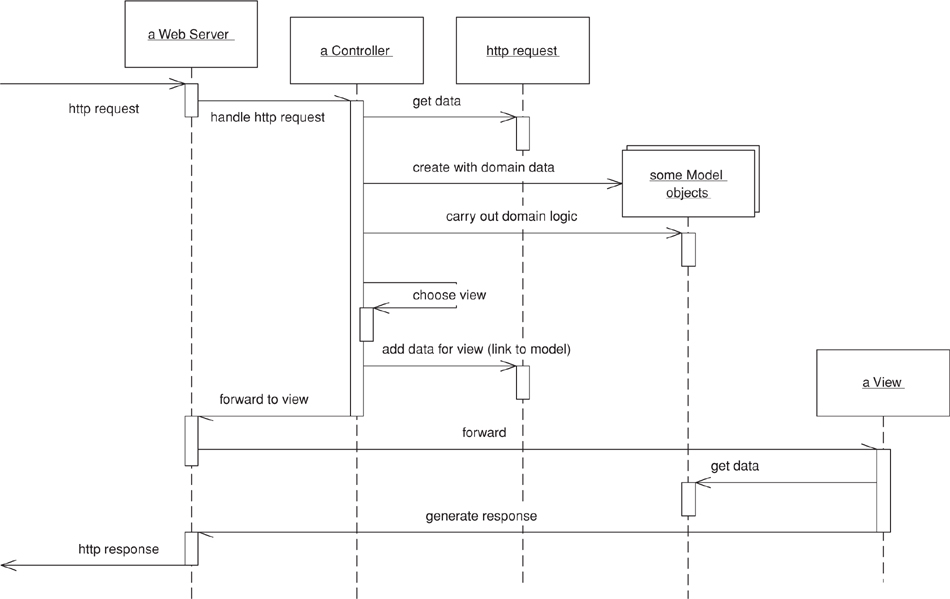
Model View Controller (330) (see Figure 4.1) is a widely referenced pattern but one that’s often misunderstood. Indeed, before Web apps appeared on the scene, most presentations of Model View Controller (330) I sat through would get it wrong. A main reason for the confusion was the use of the word “controller.” Controller is used in a number of different contexts, and I’ve usually found it used in a different way to that described in Model View Controller (330). As a result I prefer to use the term input controller for the controller in Model View Controller (330).
Figure 4.1. A broad-brush picture of how the model, view, and input controller roles work together in a Web server. The controller handles the request, gets the model to do the domain logic, and then gets the view to create a response based on the model.
A request comes in to an input controller, which pulls information off the request. It then forwards the business logic to an appropriate model object. The model object talks to the data source and does everything indicated by the request as well as gather information for the response. When it’s done it returns control to the input controller, which looks at the results and decides which view is needed to display the response. It then passes control, together with the response data, to the view. The input controller’s handoff to the view often isn’t always a straight call but often involves forwarding with the data placed in an agreed place on some form of HTTP session object that’s shared between the input controller and the view.
The first, and most important, reason for applying Model View Controller (330) is to ensure that the models are completely separated from the Web presentation. This makes it easier to modify the presentation as well as easier to add additional presentations later. Putting the processing into separate Transaction Script (110) or Domain Model (116) objects will make it easier to test them as well. This is particularly important if you’re using a server page as your view.
At this point we come to a second use of the word “controller.” A lot of user-interface designs separate the presentation objects from the domain objects with an intermediate layer of Application Controller (379) objects. The purpose of an Application Controller (379) is to handle the flow of an application, deciding which screens should appear in which order. It may appear as part of the presentation layer, or you can think of it as a separate layer that mediates between the presentation and domain layers. Application Controllers (379) may be written to be independent of any particular presentation, in which case they can be reused between presentations. This works well if you have different presentations with the same basic flow and navigation, although often it’s best to give different presentations a different flow.
Not all systems need an Application Controller (379). They’re useful if your system has a lot of logic about the order of screens and the navigation between them. They’re also useful if you haven’t got a simple mapping between your pages and the actions on the domain. But if someone can pretty much see any screen in any order, you’ll probably have little need for an Application Controller (379). A good test is this: If the machine is in control of the screen flow, you need an Application Controller (379); if the user is in control, you don’t.
On the view side there are three patterns to think about: Transform View (361), Template View (350), and Two Step View (365). These give rise to essentially two choices: whether to use Transform View (361) or Template View (350), and whether either of them uses one stage or a Two Step View (365). The basic patterns for Transform View (361) and Template View (350) are single stage. Two Step View (365) is a variation you can apply to either.
I’ll start with the choice between Template View (350) and Transform View (361). Template View (350) allows you write the presentation in the structure of the page and embed markers into the page to indicate where dynamic content needs to go. Quite a few popular platforms are based on this pattern, many of which are the server pages technologies (ASP, JSP, PHP) that allow you to put a full programming language into the page. This clearly provides a lot of power and flexibility; sadly, it also leads to very messy code that’s difficult to maintain. As a result if you use server page technology you must be very disciplined to keep programming logic out of the page structure, often by using a helper object.
The Transform View (361) uses a transform style of program. The usual example is XSLT. This can be very effective if you’re working with domain data that’s in XML format or can easily be converted to it. An input controller picks the appropriate XSLT stylesheet and applies it to XML gleaned from the model.
If you use procedural scripts as your view, you can write the code in the style of either Transform View (361) or Template View (350) or in some interesting mix of the two. I’ve noticed that most scripts follow one of these two patterns as their main form.
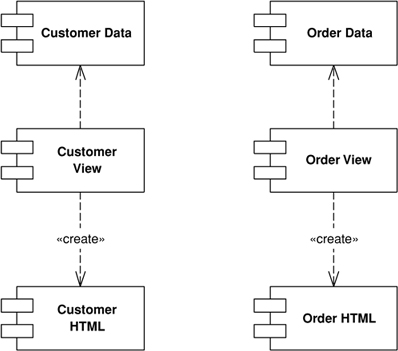
The second decision is whether to be single stage (see Figure 4.2) or to use Two Step View (365). A single-stage view mostly has one view component for each screen in the application. The view takes domain oriented data and renders it in HTML. I say “mostly” because similar logical screens may share views. Even so, most of the time you can think of it as one view per screen.
Figure 4.2. A single-stage view.
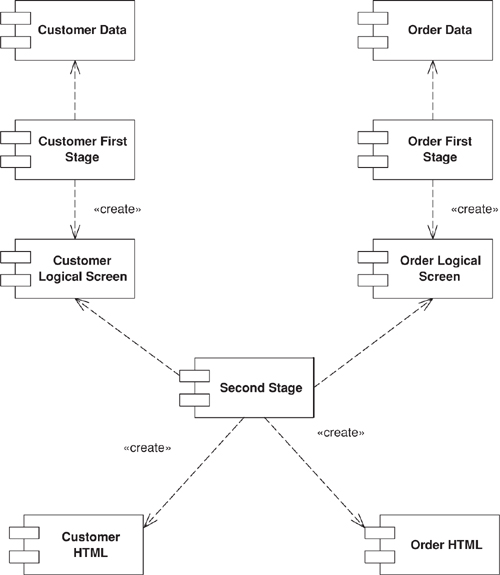
A two-stage view (Figure 4.3) breaks this process into two stages, producing a logical screen from the domain data and then rendering it in HTML. There’s one first-stage view for each screen but only one second-stage view for the whole application.
Figure 4.3. A two-stage view.
The advantage of the Two Step View (365) is that it puts the decision of what HTML to use in a single place. This makes global changes to the HTML easy since there’s only one object to alter in order to alter every screen on the site. Of course, you only get that advantage if your logical presentation stays the same, so it works best with sites where different screens use the same basic layout. Highly design intensive sites won’t be able to come up with a good logical screen structure.
Two Step View (365) works even better if you have a Web application where its services are being used by multiple front-end customers, such as multiple airlines fronting the same basic reservation system. Within the limits of the logical screen, each front end can have a different appearance by using a different second stage. In a similar way you can use a Two Step View (365) to handle different output devices, with separate second stages for a regular Web browser and for a palmtop. Again, the limitation is that you can have the two share a common logical screen, which may not be possible if the UIs are very different, such as in a browser and a cell phone.
There are two patterns for the input controller. The most common is an input controller object for every page on your Web site. In the simplest case this Page Controller (333) can be a server page itself, combining the roles of view and input controller. In many implementations it makes things easier to split the input controller into a separate object. The input controller can then create appropriate models to do the processing and instantiate a view to return the result. Often you’ll find that there isn’t quite a one-to-one relationship between Page Controllers (333) and views. A more precise thought is that you have a Page Controller (333) for each action, where an action is a button or link. Most of the time the actions correspond to pages, but occasionally they don’t—such as a link that may go to a couple of different pages depending some condition.
With any input controller there are two responsibilities—handling the HTTP request and deciding what to do with it—and it often makes sense to separate them. A server page can handle the request, delegating a separate helper object to decide what to do with it. Front Controller (344) goes further in this separation by having only one object handling all requests. This single handler interprets the URL to figure out what kind of request it’s dealing with and creates a separate object to process it. In this way you can centralize all HTTP handling within a single object, avoiding the need to reconfigure the Web server whenever you change the action structure of the site.
Most books on Web server technologies provide a chapter or two on good server designs, although these are often buried in the technological descriptions. An excellent discussion of Java Web design is Chapter 9 of [Brown et al.]. The best source for further patterns is [Alur et al.]; most of these patterns can be used in non-Java situations. I stole the terminology on separating input and application controllers from [Knight and Dai].