12.2 Interface Design
It should be clear by now that writing a modern operating system is not easy. But where does one begin? Probably the best place to begin is to think about the interfaces it provides. An operating system provides a set of abstractions, mostly implemented by data types (e.g., files) and operations on them (e.g., read). Together, these form the interface to its users. Note that in this context the users of the operating system are programmers who write code that use system calls, not people running application programs.
In addition to the main system-call interface, most operating systems have additional interfaces. For example, some programmers need to write device drivers to insert into the operating system. These drivers see certain features and can make certain procedure calls. These features and calls also define an interface, but a very different one from one application programmers see. All of these interfaces must be carefully designed if the system is to succeed.
12.2.1 Guiding Principles
Are there any principles that can guide interface design? We believe there are. In Chap. 9, we already discussed Saltzer and Schroeder’s principles for a secure design. There are also principles for a good design in general. Briefly summarized, they are simplicity, completeness, and the ability to be implemented efficiently.
Principle 1: Simplicity
A simple interface is easier to understand and implement in a bug-free way. All system designers should memorize this famous quote from the pioneer French aviator and writer, Antoine de xupéry::
Perfection is reached not when there is no longer anything to add, but when there is no longer anything to take away.
If you want to get really picky, he didn’t say that. He said:
Il semble que la perfection soit atteinte non quand il n’y a plus rien à ajouter, mais quand il n’y a plus rien à retrancher.
But you get the idea. Memorize it either way.
This principle says that less is better than more, at least in the operating system itself. Another way to say this is the KISS principle: Keep It Simple, Stupid.
Principle 2: Completeness
Of course, the interface must make it possible to do everything that the users need to do, that is, it must be complete. This brings us to another famous quote, this one from Albert Einstein:
Everything should be as simple as possible, but no simpler.
In other words, the operating system should do exactly what is needed of it and no more. If users need to store data, it must provide some mechanism for storing data. If users need to communicate with each other, the operating system has to provide a communication mechanism, and so on. In his 1991 Turing Award lecture, Fernando Corbato´, one of the designers of CTSS and MULTICS, combined the concepts of simplicity and completeness and said:
First, it is important to emphasize the value of simplicity and elegance, for complexity has a way of compounding difficulties and as we have seen, creating mistakes. My definition of elegance is the achievement of a given functionality with a minimum of mechanism and a maximum of clarity.
The key idea here is minimum of mechanism. In other words, every feature, function, and system call should carry its own weight. It should do one thing and do it well. When a member of the design team proposes extending a system call or adding some new feature, the others should ask whether something awful would happen if it were left out. If the answer is: ‘‘No, but somebody might find this feature useful some day,’’ put it in a user-level library, not in the operating system, even if it is slower that way. Not every feature has to be faster than a speeding bullet. The goal is to preserve what Corbato´ called minimum of mechanism.
Let us briefly consider two examples from our own experience: MINIX (Tanenbaum, 2016) and Amoeba (Tanenbaum et al., 1990). For all intents and purposes, MINIX initially had only three kernel calls: send, receive, and sendrec. The system is structured as a collection of processes, with the memory manager, the file system, and each device driver being a separate schedulable process. To a first approximation, all the kernel does is schedule user-space processes and handle message passing between them. Consequently, only two system calls were needed: send, to send a message, and receive, to receive one. The third call, sendrec, is simply an optimization for efficiency reasons to allow a message to be sent and the reply to be requested with only one kernel trap. Everything else is done by requesting some other process (e.g., the file-system process or the disk driver) to do the work. The most recent version of MINIX added two additional calls, both for asynchronous communication. The senda call sends an asynchronous message. The kernel will attempt to deliver the message, but the application does not wait for this; it just keeps running. Similarly, the system uses the notify call to deliver short notifications. For instance, the kernel can notify a device driver in user space that something happened—much like an interrupt. There is no message associated with a notification. When the kernel delivers a notification to process, all it does is flip a bit in a per-process bitmap indicating that something happened. Because it is so simple, it can be fast and the kernel does not need to worry about what message to deliver if the process receives the same notification twice. It is worth observing that while the number of calls is still very small, it is growing. Bloat is inevitable. Resistance is futile.
Of course, these are just the kernel calls. Running a POSIX compliant system on top of it requires implementing a lot of POSIX system calls. But the beauty of it is that they all map on just a tiny set of kernel calls. With a system that is (still) so simple, there is a chance we may even get it right.
Amoeba is even simpler. It has only one system call: perform remote procedure call. This call sends a message and waits for a reply. It is essentially the same as MINIX’ sendrec. Everything else is built on this one call. Whether or not synchronous communication is the way to go is another matter, one that we will return to in Sec. 12.3.
Principle 3: Efficiency
The third guideline is efficiency of implementation. If a feature or system call cannot be implemented efficiently, it is probably not worth having. It should also be intuitively obvious to the programmer about how much a system call costs. For example, UNIX programmers expect the lseek system call to be cheaper than the read system call because the former just changes a pointer in memory while the latter performs disk I/O. If the intuitive costs are wrong, programmers will write inefficient programs.
12.2.2 Paradigms
Once the goals have been established, the design can begin. A good starting place is thinking about how the customers will view the system. One of the most important issues is how to make all the features of the system hang together well and present what is often called architectural coherence. In this regard, it is important to distinguish two kinds of operating system ‘‘customers.’’ On the one hand, there are the users, who interact with application programs; on the other are the programmers, who write them. The former mostly deal with the GUI; the latter mostly deal with the system call interface. If the intention is to have a single GUI that pervades the complete system, as in MacOS, the design should begin there. If, on the other hand, the intention is to support many possible GUIs, such as in UNIX, the system-call interface should be designed first. Doing the GUI first is essentially a top-down design. The issues are what features it will have, how the user will interact with it, and how the system should be designed to support it. For example, if most programs display icons on the screen and then wait for the user to click on one of them, this suggests an event-driven model for the GUI and probably also for the operating system. On the other hand, if the screen is mostly full of text windows, then a model in which processes read from the keyboard is probably better.
Doing the system-call interface first is a bottom-up design. Here the issues are what kinds of features programmers in general need. Actually, not many special features are needed to support a GUI. For example, the UNIX windowing system, X, is just a big C program that does reads and writes on the keyboard, mouse, and screen. X was developed long after UNIX and did not require many changes to the operating system to get it to work. This experience validated the fact that UNIX was sufficiently complete.
User-Interface Paradigms
For both the GUI-level interface and the system-call interface, the most important aspect is having a good paradigm (sometimes called a metaphor) to provide a way of looking at the interface. Many GUIs for desktop machines use the WIMP paradigm that we discussed in Chap. 5. This paradigm uses point-and-click, pointand-double-click, dragging, and other idioms throughout the interface to provide an architectural coherence to the whole. Often there are additional requirements for programs, such as having a menu bar with FILE, EDIT, and other entries, each of which has certain well-known menu items. In this way, users who know one program can quickly learn another.
However, the WIMP user interface is not the only one possible. Tablets, smartphones, and some laptops use touch screens to allow users to interact more directly and more intuitively with the device. Some palmtop computers use a stylized handwriting interface. Dedicated multimedia devices may use a video-recorder-like interface. And of course, voice input has a completely different paradigm. What is important is not so much the paradigm chosen, but the fact that there is a single overriding paradigm that unifies the entire user interface.
Whatever paradigm is chosen, it is important that all application programs use it. Consequently, the system designers need to provide libraries and tool kits to application developers that give them access to procedures that produce the uniform look-and-feel. Without tools, application developers will all do something different. User interface design is important, but it is not the subject of this book, so we will now drop back down to the subject of the operating system interface.
Execution Paradigms
Architectural coherence is important at the user level, but equally important at the system-call interface level. It is often useful to distinguish between the execution paradigm and the data paradigm, so we will do both, starting with the former.
Two execution paradigms are widespread: algorithmic and event driven. The algorithmic paradigm is based on the idea that a program is started to perform some function that it knows in advance or gets from its parameters. That function might be to compile a program, do the payroll, or fly an airplane to San Francisco. The basic logic is hardwired into the code, with the program making system calls from time to time to get user input, obtain operating system services, and so on. This approach is outlined in Fig. 12-1(a).
Figure 12-1
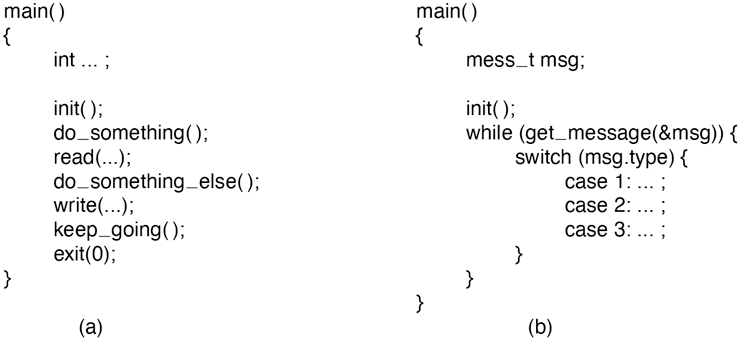
(a) Algorithmic code. (b) Event-driven code.
The other execution paradigm is the event-driven paradigm of Fig. 12-1(b). Here the program performs some kind of initialization, for example, by displaying a certain screen, and then waits for the operating system to tell it about the first event. The event is often a key being struck or a mouse movement. This design is useful for highly interactive programs.
Each of these ways of doing business engenders its own programming style. In the algorithmic paradigm, algorithms are central and the operating system is regarded as a service provider. In the event-driven paradigm, the operating system also provides services, but this role is overshadowed by its role as a coordinator of user activities and a generator of events that are consumed by processes.
Data Paradigms
The execution paradigm is not the only one exported by the operating system. An equally important one is the data paradigm. The key question here is how system structures and devices are presented to the programmer. In early FORTRAN batch systems, everything was modeled as a sequential magnetic tape. Card decks read in were treated as input tapes, card decks to be punched were treated as output tapes, and output for the printer was treated as an output tape. Disk files were also treated as tapes. Random access to a file was possible only by rewinding the tape corresponding to the file and reading it again.
The mapping was done using job control cards like these:
MOUNT(TAPE08, REEL781)RUN(INPUT, MYDATA, OUTPUT, PUNCH, TAPE08)
The first card instructed the operator to go get tape reel 781 from the tape rack and mount it on tape drive 8. The second card instructed the operating system to run the just-compiled FORTRAN program, mapping INPUT (meaning the card reader) to logical tape 1, disk file MYDATA to logical tape 2, the printer (called OUTPUT) to logical tape 3, the card punch (called PUNCH) to logical tape 4, and physical tape drive 8 to logical tape 5.
FORTRAN had a well-defined syntax for reading and writing logical tapes. By reading from logical tape 1, the program got card input. By writing to logical tape 3, output would later appear on the printer. By reading from logical tape 5, tape reel 781 could be read in, and so on. Note that the tape idea was just a paradigm to integrate the card reader, printer, punch, disk files, and tapes. In this example, only logical tape 5 was a physical tape; the rest were ordinary (spooled) disk files. It was a primitive paradigm, but it was a start in the right direction.
Later came UNIX, which goes much further using the model of ‘‘everything is a file.’’ Using this paradigm, all I/O devices are treated as files and can be opened and manipulated as ordinary files. The C statements
fd1 = open(“file1”, O_RDWR);fd2 = open(“/dev/tty”, O_RDWR)’
open a true disk file and the user’s terminal Subsequent statements can use fd1 and fd2 to read and write them, respectively. From that point on, there is no difference between accessing the file and accessing the terminal, except that seeks on the terminal are not allowed.
Not only does UNIX unify files and I/O devices, but it also allows other processes to be accessed over pipes as files. Furthermore, when mapped files are supported, a process can get at its own virtual memory as though it were a file. Finally, in versions of UNIX that support the /proc file system, the C statement
fd3 = open(“/proc/501”, O_RDWR);allows the process to (try to) access process 501’s memory for reading and writing using file descriptor fd3, something useful for, say, a debugger.
Of course, just because someone says that everything is a file does not mean it is true—for everything. For instance, UNIX network sockets may resemble files somewhat, but they have their own, fairly different, socket API. Another operating system, Plan 9 from Bell Labs, has not compromised and does not provide specialized interfaces for network sockets and such. As a result, the Plan 9 design is arguably cleaner.
Windows tries to make everything look like an object. Once a process has acquired a valid handle to a file, process, semaphore, mailbox, or other kernel object, it can perform operations on it. This paradigm is even more general than that of UNIX and much more general than that of FORTRAN.
Unifying paradigms occur in other contexts as well. One of them is worth mentioning here: the Web. The paradigm behind the Web is that cyberspace is full of documents, each of which has a URL. By typing in a URL or clicking on an entry backed by a URL, you get the document. In reality, many ‘‘documents’’ are not documents at all, but are generated by a program or shell script when a request comes in. For example, when a user asks an online store for a list of songs by a particular artist, the document is generated on-the-fly by a program; it certainly did not exist before the query was made.
We have now seen four cases: namely, everything is a tape, file, object, or document. In all four cases, the intention is to unify data, devices, and other resources to make them easier to deal with. Every operating system should have such a unifying data paradigm.
12.2.3 The System-Call Interface
If one believes in Corbato´’s dictum of minimal mechanism, then the operating system should provide as few system calls as it can get away with, and each one should be as simple as possible (but no simpler). A unifying data paradigm can play a major role in helping here. For example, if files, processes, I/O devices, and much more all look like files or objects, then they can all be read with a single read system call. Otherwise it may be necessary to have separate calls for read_file, read_proc, and read_tty, among others.
Sometimes, system calls may need several variants, but it is often good practice to have one call that handles the general case, with different library procedures to hide this fact from the programmers. For example, UNIX has a system call for overlaying a process’ virtual address space, exec. The most general call is
exec(name, argp, envp);which loads the executable file name and gives it arguments pointed to by argp and environment variables pointed to by envp. Sometimes it is convenient to list the arguments explicitly, so the library contains procedures that are called as follows:
execl(name, arg0, arg1, ..., argn, 0);execle(name, arg0, arg1, ..., argn, envp);
All these procedures do is stick the arguments in an array and then call exec to do the real work. This arrangement is the best of both worlds: a single straightforward system call keeps the operating system simple, yet the programmer gets the convenience of various ways to call exec.
Of course, trying to have one call to handle every possible case can easily get out of hand. In UNIX creating a process requires two calls: fork followed by exec. The former has no parameters; the latter has three. In contrast, the WinAPI call for creating a process, CreateProcess, has 10 parameters, one of which is a pointer to a structure with an additional 18 parameters.
A long time ago, someone should have asked whether something awful would happen if some of these had been omitted. The truthful answer would have been in some cases programmers might have to do more work to achieve a particular effect, but the net result would have been a simpler, smaller, and more reliable operating system. Of course, the person proposing the parameter version might have added: ‘‘But users like all these features.’’ The rejoinder might have been they like systems that use little memory and never crash even more. Tradeoffs between more functionality at the cost of more memory are at least visible and can be given a price tag (since the price of memory is known). However, it is hard to estimate the additional crashes per year some feature will add and whether the users would make the same choice if they knew the hidden price. This effect can be summarized in Tanenbaum’s first law of software:
Adding more code adds more bugs.
Adding more features adds more code and thus adds more bugs. Programmers who believe adding new features does not add new bugs either are new to computers or believe the tooth fairy is out there watching over them.
Simplicity is not the only issue that comes out when designing system calls. An important consideration is Lampson’s (1984) slogan:
Don’t hide power.
If the hardware has an extremely efficient way of doing something, it should be exposed to the programmers in a simple way and not buried inside some other abstraction. The purpose of abstractions is to hide undesirable properties, not hide desirable ones. For example, suppose the hardware has a special way to move large bitmaps around the screen (i.e., the video RAM) at high speed. It would be justified to have a new system call to get at this mechanism, rather than just provide ways to read video RAM into main memory and write it back again. The new call should just move bits and nothing else. It should mirror the underlying hardware capability. If a system call is fast, users can always build more convenient interfaces on top of it. If it is slow, nobody will use it.
Another design issue is connection-oriented vs. connectionless calls. The Windows and UNIX system calls for reading a file are connection-oriented, like using the telephone. First you open a file, then you read it, finally you close it. Some remote file-access protocols are also connection-oriented. For example, to use FTP, the user first logs in to the remote machine, reads the files, and then logs out.
On the other hand, some remote file-access protocols are connectionless. The Web protocol (HTTP) is connectionless. To read a Web page you just ask for it; there is no advance setup required (a TCP connection is required, but this is at a lower level of protocol. HTTP itself is connectionless).
The trade-off between any connection-oriented mechanism and a connectionless one is the additional work required to set up the mechanism (e.g., open the file), and the gain from not having to do it on (possibly many) subsequent calls. For file I/O on a single machine, where the setup cost is low, probably the standard way (first open, then use) is the best way. For remote file systems, a case can be made both ways.
Another issue relating to the system-call interface is its visibility. The list of POSIX-mandated system calls is easy to find. All UNIX systems support these, as well as a small number of other calls, but the complete list is always public. In contrast, Microsoft has never made the list of Windows system calls public. Instead the WinAPI and other APIs have been made public, but these contain vast numbers of library calls (over 10,000) but only a small number are true system calls. The argument for making all the system calls public is that it lets programmers know what is cheap (functions performed in user space) and what is expensive (kernel calls). The argument for not making them public is that it gives the implementers the flexibility of changing the actual underlying system calls to make them better without breaking user programs. As we saw in Sec. 9.7.7, the original designers simply got it wrong with the access system call, but now we are stuck with it.