11.11 Security in Windows
NT was originally designed to meet the U.S. Department of Defense’s C2 security requirements (DoD 5200.28-STD), the Orange Book, which secure DoD systems must meet. This standard requires operating systems to have certain properties in order to be classified as secure enough for certain kinds of military work. Although Windows was not specifically designed for C2 compliance, it inherits many security properties from the original security design of NT, including these:
Secure login with anti-spoofing measures.
Discretionary access controls.
Privileged access controls.
Address-space protection per process.
New pages must be zeroed before being mapped in.
Security auditing.
Let us review these items briefly. Secure login means that the system administrator can require all users to have a password in order to log in. Spoofing is when a malicious user writes a program that displays the login prompt or screen and then walks away from the computer in the hope that an innocent user will sit down and enter a name and password. The name and password are then written to disk and the user is told that login has failed. Windows prevents this attack by instructing users to hit CTRL-ALT-DEL to log in. This key sequence is always captured by the keyboard driver, which then invokes a system program that puts up the genuine login screen. This procedure works because there is no way for user processes to disable CTRL-ALT-DEL processing in the keyboard driver. But NT can and does disable use of the CTRL-ALT-DEL secure attention sequence in some cases, particularly for consumers and in systems that have accessibility for the disabled enabled, on phones, tablets, and the Xbox, where there is almost never a physical keyboard with a user entering commands.
In Windows 10 and newer releases, password-less authentication schemes are preferred over passwords, which are either hard-to-remember or easy-to-guess. Windows Hello is the umbrella name for the set of password-less authentication technologies users can use to log into Windows. Hello supports biometrics-based face, iris, and fingerprint recognition as well as per-device PIN. The data path from the infrared camera hardware to the VTL1 trustlet that implements face recognition is protected against VTL0 access via Virtualization-based Security memory and IOMMU protections. Biometric data is encrypted by the trustlet and stored on disk.
Discretionary access controls allow the owner of a file or other object to say who can use it and in what way. Privileged access controls allow the system administrator (superuser) to override them when needed. Address-space protection simply means that each process has its own protected virtual address space not accessible by any unauthorized process. The next item means that when the process heap grows, the pages mapped in are initialized to zero so that processes cannot find any old information put there by the previous owner (hence the zeroed page list in Fig. 11-37, which provides a supply of zeroed pages for this purpose). Finally, security auditing allows the administrator to produce a log of certain security-related events.
While the Orange Book does not specify what is to happen when someone steals your notebook computer, in large organizations one theft a week is not unusual. Consequently, Windows provides tools that a conscientious user can use to minimize the damage when a notebook is stolen or lost (e.g., secure login, encrypted files, etc.). In addition, organizations can use a mechanism called Group Policy to push down such secure machine configuration for all of its users before they can gain access to corporate network resources.
In the next section, we will describe the basic concepts behind Windows security. After that we will look at the security system calls. Finally, we will conclude by seeing how security is implemented and learn about Windows’ defenses against online threats.
11.11.1 Fundamental Concepts
Every Windows user (and group) is identified by an SID (Security ID). SIDs are binary numbers with a short header followed by a long random component. Each SID is intended to be unique worldwide. When a user starts up a process, the process and its threads run under the user’s SID. Most of the security system is designed to make sure that each object can be accessed only by threads with authorized SIDs.
Each process has an access token that specifies an SID and other properties. The token is normally created by winlogon, as described below. The format of the token is shown in Fig. 11-55. Processes can call GetTokenInformation to acquire this information. The header contains some administrative information. The expiration time field could tell when the token ceases to be valid, but it is currently not used. The Groups field specifies the groups to which the process belongs. The default DACL (Discretionary ACL) is the access control list assigned to objects created by the process if no other ACL is specified. The user SID tells who owns the process. The restricted SIDs are to allow untrustworthy processes to take part in jobs with trustworthy processes but with less power to do damage.
Figure 11-55

Structure of an access token.
Finally, the privileges listed, if any, give the process special powers denied ordinary users, such as the right to shut the machine down or access files to which access would otherwise be denied. In effect, the privileges split up the power of the superuser into several rights that can be assigned to processes individually. In this way, a user can be given some superuser power, but not all of it. In summary, the access token tells who owns the process and which defaults and powers are associated with it.
When a user logs in, winlogon gives the initial process an access token. Subsequent processes normally inherit this token on down the line. A process’ access token initially applies to all the threads in the process. However, a thread can acquire a different access token during execution, in which case the thread’s access token overrides the process’ access token. In particular, a client thread can pass its access rights to a server thread to allow the server to access the client’s protected files and other objects. This mechanism is called impersonation. It is implemented by the transport layers (i.e., ALPC, named pipes, and TCP/IP) and used by RPC to communicate from clients to servers. The transports use internal interfaces in the kernel’s security reference monitor component to extract the security context for the current thread’s access token and ship it to the server side, where it is used to construct a token which can be used by the server to impersonate the client.
Another basic concept is the security descriptor. Every object has a security descriptor associated with it that tells who can perform which operations on it. The security descriptors are specified when the objects are created. The NTFS file system and the registry maintain a persistent form of security descriptor, which is used to create the security descriptor for File and Key objects (the object-manager objects representing open instances of files and keys).
A security descriptor consists of a header followed by a DACL with one or more ACEs (Access Control Entries). The two main kinds of elements are Allow and Deny. An Allow element specifies an SID and a bitmap that specifies which operations processes that SID may perform on the object. A Deny element works the same way, except a match means the caller may not perform the operation. For example, Ida has a file whose security descriptor specifies that everyone has read access, Elvis has no access. Cathy has read/write access, and Ida herself has full access. This simple example is illustrated in Fig. 11-56. The SID Everyone refers to the set of all users, but it is overridden by any explicit ACEs that follow.
Figure 11-56
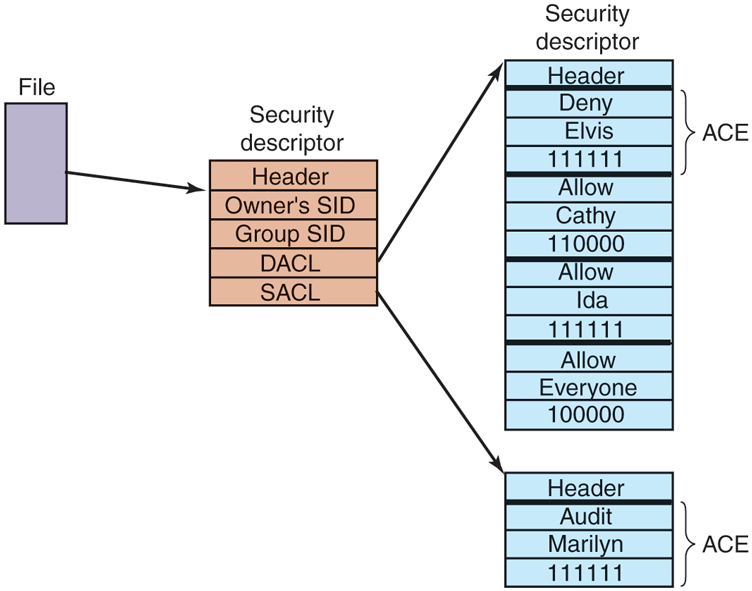
An example security descriptor for a file.
In addition to the DACL, a security descriptor also has a SACL (System Access Control list), which is like a DACL except that it specifies not who may use the object, but which operations on the object are recorded in the systemwide security event log. In Fig. 11-56, every operation that Marilyn performs on the file will be logged. The SACL also contains the integrity level, which we will describe shortly.
11.11.2 Security API Calls
Most of the Windows access-control mechanism is based on security descriptors. The usual pattern is that when a process creates an object, it provides a security descriptor as one of the parameters to the CreateProcess, CreateFile, or other object-creation call. This security descriptor then becomes the security descriptor attached to the object, as we saw in Fig. 11-56. If no security descriptor is provided in the object-creation call, the default security in the caller’s access token (see Fig. 11-55) is used instead.
Many of the Win32 API security calls relate to the management of security descriptors, so we will focus on those here. The most important calls are listed in Fig. 11-57. To create a security descriptor, storage for it is first allocated and then initialized using InitializeSecurityDescriptor. This call fills in the header. If the owner SID is not known, it can be looked up by name using LookupAccountSid. It can then be inserted into the security descriptor. The same holds for the group SID, if any. Normally, these will be the caller’s own SID and one of the called’s groups, but the system administrator can fill in any SIDs.
Figure 11-57
| Win32 API function | Description |
|---|---|
| InitializeSecurityDescriptor | Prepare a new security descriptor for use |
| LookupAccountSid | Look up the SID for a given user name |
| SetSecurityDescriptorOwner | Enter the owner SID in the security descriptor |
| SetSecurityDescriptorGroup | Enter a group SID in the security descriptor |
| InitializeAcl | Initialize a DACL or SACL |
| AddAccessAllowedAce | Add a new ACE to a DACL or SACL allowing access |
| AddAccessDeniedAce | Add a new ACE to a DACL or SACL denying access |
| DeleteAce | Remove an ACE from a DACL or SACL |
| SetSecurityDescriptorDacl | Attach a DACL to a security descriptor |
The principal Win32 API functions for security.
At this point, the security descriptor’s DACL (or SACL) can be initialized with InitializeAcl. ACL entries can be added using AddAccessAllowedAce and AddAccessDeniedAce. These calls can be repeated multiple times to add as many ACE entries as are needed. DeleteAce can be used to remove an entry, that is, when modifying an existing ACL rather than when constructing a new ACL. When the ACL is ready, SetSecurityDescriptorDacl can be used to attach it to the security descriptor. Finally, when the object is created, the newly minted security descriptor can be passed as a parameter to have it attached to the object.
11.11.3 Implementation of Security
Security in a stand-alone Windows system is implemented by a number of components, most of which we have already seen (networking is a whole other story and beyond the scope of this chapter). Logging in is handled by winlogon and authentication is handled by lsass. The result of a successful login is a new GUI shell (explorer.exe) with its associated access token. This process uses the SECURITY and SAM hives in the registry. The former sets the general security policy and the latter contains the security information for the individual users, as discussed in Sec. 11.2.3.
Once a user is logged in, security operations happen when an object is opened for access. Every OpenXXX call requires the name of the object being opened and the set of rights needed. During processing of the open, the security reference monitor (see Fig. 11-11) checks to see if the caller has all the rights required. It performs this check by looking at the caller’s access token and the DACL associated with the object. It goes down the list of ACEs in the ACL in order. As soon as it finds an entry that matches the caller’s SID or one of the caller’s groups, the access found there is taken as definitive. If all the rights the caller needs are available, the open succeeds; otherwise it fails.
DACLs can have Deny entries as well as Allow entries, as we have seen. For this reason, it is usual to put entries denying access in front of entries granting access in the ACL, so that a user who is specifically denied access cannot get in via a back door by being a member of a group that has legitimate access.
After an object has been opened, a handle to it is returned to the caller. On subsequent calls, the only check that is made is whether the operation now being tried was in the set of operations requested at open time, to prevent a caller from opening a file for reading and then trying to write on it. Additionally, calls on handles may result in entries in the audit logs, as required by the SACL.
Windows added another security facility to deal with common problems securing the system by ACLs. There are new mandatory integrity-level SIDs in the process token, and objects specify an integrity-level ACE in the SACL. The integrity level prevents write-access to objects no matter what ACEs are in the DACL. There are five major integrity levels: untrusted, low, medium, high, and system. In particular, the integrity-level scheme is used to protect against a web browser process that has been compromised by an attacker (perhaps by the user ill-advisedly downloading code from an unknown Website). In addition to using severely restricted tokens, browser sandboxes run with an integrity level of low or untrusted. By default all files and registry keys in the system have an integrity level of medium, so browsers running with lower integrity levels cannot modify them.
Even though highly security-conscious applications like browsers make use of system mechanisms to follow the principle of least privilege, there are many popular applications that do not. In addition, there is the chronic problem in Windows where most users run as administrators. The design of Windows does not require users to run as administrators, but many common operations unnecessarily required administrator rights and most user accounts ended up getting created as administrators. This also led to many programs acquiring the habit of storing data in global registry and file system locations to which only administrators have write access. This neglect over many releases made it just about impossible to use Windows successfully if you were not an administrator. Being an administrator all the time is dangerous. Not only can user errors easily damage the system, but if the user is somehow fooled or attacked and runs code that is trying to compromise the system, the code will have administrative access, and can bury itself deep in the system.
In order to deal with this problem, Windows introduced UAC (User Account Control). With UAC, even administrator users run with standard user rights. If an attempt is made to perform an operation requiring administrator access, the system overlays a special desktop and takes control so that only input from the user can authorize the access (similarly to how CTRL-ALT-DEL works for C2 security). This is called an elevation. Under the covers, UAC creates two tokens for the user session during administrator user logon: one is a regular administrator token and the other is a restricted token for the same user, but with the administrator rights stripped. Applications launched by the user are assigned the standard token, but when elevation is necessary and is approved, the process switches to the actual administrator token.
Of course, without becoming administrator it is possible for an attacker to destroy what the user really cares about, namely his personal files. But UAC does help foil existing types of attacks, and it is always easier to recover a compromised system if the attacker was unable to modify any of the system data or files.
Another important security feature in Windows is support for protected processes. As we mentioned earlier, protected processes provide a stronger security boundary from user-mode attacks, including from administrators. Normally, the user (as represented by a token object) defines the privilege boundary in the system. When a process is created, the user has access to the process through any number of kernel facilities for process creation, debugging, path names, thread injection, and so on. Protected processes are shut off from user-mode access. Usermode callers cannot read or write its virtual memory, cannot inject code or threads into its address space. The original use of this was to allow digital rights management software to better protect content. Later, protected processes were expanded to more user-friendly purposes, like securing the system against attackers rather than securing content against attacks by the system owner. While protected processes are able to thwart straightforward attacks, defending a process against administrator users is very difficult without hardware-based isolation. Administrators can easily load drivers into kernel-mode and access any VTL0 process. As such, protected processes should be viewed as a layer of defense, but not more.
As mentioned above, the lsass process handles user authentication and therefore needs to maintain various secrets associated with credentials like password hashes and Kerberos tickets in its address space. As such, it runs as a protected process to guard against user-mode attacks, but malicious kernel-mode code can easily leak these secrets. Credential Guard is a VBS feature introduced in Windows 10 which protects these secrets in an IUM trustlet called LsaIso.exe. lsass communicates with LsaIso to perform authentication such that credential secrets are never exposed to VTL0 and even kernel-mode malware cannot steal them.
Microsoft’s efforts to improve the security of Windows have been accelerating since early 2000s as more and more attacks have been launched against systems around the world. Attackers range from casual hackers to paid professionals to very sophisticated nation states with virtually unlimited resources engaging in cyber warfare. Some of these attacks have been very successful, taking entire countries and major corporations offline, and incurring costs of billions of dollars.
11.11.4 Security Mitigations
It would be great for users if computer software (and hardware) did not have any bugs, particularly bugs that are exploitable by hackers to take control of their computer and steal their information, or use their computer for illegal purposes such as distributed denial-of-service attacks, compromising other computers, and distribution of spam or other illicit materials. Unfortunately, this is not yet feasible in practice, and computers continue to have security vulnerabilities. The industry continues to make progress towards producing more secure systems code with better developer training, more rigorous security reviews and improved source code annotations (e.g., SAL) with associated static analysis tools. On the validation front, intelligent fuzzers automatically stress-test interfaces with random inputs to cover all code paths and address sanitizers inject checks for invalid memory accesses to find bugs. More and more systems code is moving to languages like Rust with strong memory safety guarantees. On the hardware front, research and development of new CPU features like Intel’s CET (Control-flow Enforcement Technology) ARM’s MTE (Memory Tagging Extensions) and the emerging CHERI architecture help eliminate classes of vulnerabilities as we will describe below.
As long as humans continue to build software, it is going to have bugs, many of which lead to security vulnerabilities. Microsoft has been following a multipronged approach pretty successfully since Windows Vista to mitigate these vulnerabilities such that they are difficult and costly to leverage by attackers. The components of this strategy are listed below.
Eliminate classes of vulnerabilities.
Break exploitation techniques.
Contain damage and prevent persistence of exploits.
Limit the window of time to exploit vulnerabilities.
Let us study each of these components in more detail.
Eliminating Vulnerabilities
Most code vulnerabilities stem from small coding errors that lead to buffer overruns, using memory after it is freed, type-confusion due to incorrect casts and using uninitialized memory. These vulnerabilities allow an attacker to disrupt code flow by overwriting return addresses, virtual function pointers, and other data that control the execution or behavior of programs. Indeed, memory safety issues have consistently accounted for about 70% of exploitable bugs in Windows.
Many of these problems can be avoided if type-safe languages such as C# and Rust are used instead of C and C++. Fortunately, a lot of new development is shifting to these languages. And even with these unsafe languages many vulnerabilities can be avoided if students and professional developers are better trained to understand the pitfalls of parameter and data validation, and the many dangers inherent in memory allocation APIs. After all, many of the software engineers who write code at Microsoft today were students only a few years earlier, just as many of you reading this case study are now. Many books are available on the kinds of small coding errors that are exploitable in pointer-based languages and how to avoid them (e.g., Howard and LeBlank, 2009).
Compiler-based techniques can also make C/C++ code safer. Windows 11 build system leverages a mitigation called InitAll which zero-initializes stack variables and simple types to eliminate vulnerabilities due to uninitialized variables.
There’s also significant investment in hardware advances to help eliminate memory safety vulnerabilities. One of them is the ARMv8.5 Memory Tagging Extensions. This associates a 4-bit memory tag, stored elsewhere in RAM with each 16-byte granule of memory. Pointers also have a tag field (in reserved address bits) which is set, for example, by memory allocators. When memory is accessed via the pointer, the CPU compares its tag with the tag stored in memory and raises an exception if a mismatch occurs. This approach eliminates bugs like buffer overruns because the memory beyond the buffer will have a different tag. Windows does not currently support MTE. CHERI is a more comprehensive approach that uses 128-bit unforgeable capabilities to access memory, providing very finegrained access control. It is a promising approach with durable safety guarantees, but it has a much higher implementation cost compared to extensions like MTE because it requires porting and recompiling all software.
Breaking Exploitation Techniques
The security landscape is constantly changing. The broad availability of the Internet made it much easier for attackers to exploit vulnerabilities at a much larger scale, causing significant damage. At the same time, digital transformation is moving more and more enterprise processes into software, thus creating new targets for attackers. As software defenses improve, attackers continually adapt and invent new types of exploits. It’s a cat-and-mouse game, but exploits are certainly getting harder to build and deploy.
In the early 2000s, life was much easier for attackers. It was possible to exploit stack buffer overruns to copy code to the stack, overwrite the function return address to start executing the code when the function returns. Over multiple releases, several OS mitigations almost completely wiped out this attack vector. The first one was /GS (Guarded Stack), released in Windows XP Service Pack 2. /GS is a randomized stack canary implementation where a function entry point saves a known value, called a security cookie on its stack and verifies, before returning, that the cookie has not been overwritten. Since the security cookie is generated randomly at process creation time and combined with the stack frame address, it is not easy to guess. So, /GS provides good protection against linear buffer overflows, but does not detect the overflows until the end of the function and does not detect out-of-band writes to the return address if canary is not corrupted.
Another important security mitigation included in Windows XP Service Pack 2 was DEP (Data Execution Prevention). DEP leverages processor support for the No-eXecute (NX) protection in page table entries to properly mark non-code portions of the address space, such as thread stacks and heap data, as non-executable. As a result, the practice of exploiting stack or heap buffer overruns and copying code to the stack or heap for execution was no longer possible. In response, attackers started resorting to ROP (Return-Oriented Programming) which involves overwriting the function return address or function pointers to point them at executable code fragments (typically OS DLLs) already loaded in the address space. Such code fragments ending with ’ return instruction, called gadgets, can be strung together by overwriting the stack with pointers to the desired fragments to run. It turns out there are enough usable gadgets in most address spaces to construct any program; and tools exist to find them. Also, in a given release, OS DLLs were loaded at consistent addresses, so ROP attacks were easy to put together once the gadgets were identified.
With Windows Vista, however, ROP attacks became much more difficult to mount because of ASLR (Address Space Layout Randomizations), a feature where the layout of code and data in the user-mode address space is randomized. Even though ASLR was not enabled for every single binary initially—allowing attackers to use non-ASLR’d binaries for ROP attacks—Windows 8 enabled ASLR for all binaries. Windows 10 also brought ASLR to kernel-mode. Addresses of all kernel-mode code, pools, and critical data structures like the PFN database and page tables are all randomized. It should be noted that ASLR is far more effective in a 64-bit address space since there are a lot more addresses to choose from vs. 32-bit, making attacks like heap spraying to overwrite virtual function pointers impractical.
With these mitigations in place, attackers must find and exploit an arbitrary read/write vulnerability discover locations of DLLs, heaps, or stacks. Then, they need to corrupt function pointers or return addresses to gain control via ROP. Even if an attacker has defeated ASLR and can read or write anything in the victim address space, Windows has additional mitigations to prevent the attacker from gaining arbitrary code execution. There are two aspects of these mitigations, preventing control-flow hijacking and preventing arbitrary code generation.
In order to hijack control flow, most exploits corrupt a function pointer (typically a C++ virtual function table) to redirect it to a ROP gadget. CFG (Control Flow Guard) is a mitigation that enforces coarse-grained control-flow integrity for indirect calls (such as virtual method calls) to prevent such attacks. It relies on metadata placed in code binaries which describe the set of code locations that can be called indirectly. During module load, this information is encoded by the kernel into a process-global bitmap, called the CFG bitmap, covering every binary in the address space. The CFG bitmap is protected to be read-only in user-mode. Each indirect call site performs a CFG check to verify that the target address is indeed marked as indirectly callable in the global bitmap. If not, the process is terminated. Since the vast majority of functions in a binary are not intended to be called indirectly, CFG significantly cuts down the options available to an attacker when corrupting function pointers. In particular, function pointers can only point to the first instruction of a function, aligned at 16-bytes, rather than arbitrary ROP gadgets.
With Windows 10, it became possible to enable CFG in kernel-mode with KCFG (Kernel CFG) even though it was only enabled with Virtualization-based security. Unsurprisingly, KCFG leverages VSM to enable the Secure Kernel to maintain the CFG bitmap and prevent anybody in VTL0 kernel-mode from modifying it. With Windows 11, Kernel CFG is enabled by default on all machines.
One weakness in CFG is that every indirect call target is treated the same; a function pointer can call any indirectly callable function regardless of the number or types of parameters. An improved version of CFG, called XFG (Extended Flow Guard) was developed to address this shortcoming. Instead of a global bitmap, XFG relies on function signature hashes to ensure that a call site is compatible with the target of a function pointer. Each indirectly-callable function is preceded by a hash covering its complete type, including the number and types of its parameters. Each call site knows the signature hash of the function it is intending to call and validates whether the target of the function pointer is a match. As a result, XFG is much more selective than CFG in its validation and does not leave too many options to attackers. Even though the initial release of Windows 11 does not include XFG, it is present in Windows Insider flights and is likely to ship in a subsequent official release.
CFG and XFG only protect the forward edge of code flow by validating indirect calls. However, as we described earlier, many attacks corrupt stack return addresses to hijack code flow when the victim function returns. Reliably defending against return address hijacking using a software-only mechanism turns out to be very difficult. In fact, Microsoft internally implemented such a defense in 2017, called RFG (Return Flow Guard). RFG used a software shadow stack into which return addresses on the call stack were saved on function entry and validated by the function epilogue. Even though an incredible amount of engineering effort went into this project across the compiler, operating systems, and security teams, the project was ultimately shelved because an internal security researcher identified an attack with a high success rate that corrupted the return address on the stack before it was copied to the shadow stack. Such an attack was previously considered, but thought to be infeasible due to its low expected success rate. RFG also relied on the shadow stack being hidden from software running in the process (otherwise an attacker could just corrupt the shadow stack as well). Soon after RFG was canceled, other security researchers identified reliable ways to locate such frequently accessed data structures in the address space. These were some very important takeaways from the project: security features that rely on hiding things and probabilistic mechanisms do not tend to be durable.
A robust defense against return address hijacking had to wait until Intel’s CET was released in late 2020. CET is a hardware implementation of shadow stacks without any (known) race conditions and does not depend on keeping the shadow stacks hidden. When CET is enabled, the function call instruction pushes the return address to both the call stack and the shadow stack and the subsequent return compares them. The shadow stack is identified to the processor by PTE entries and is not writable by regular store instructions. Windows 10 implemented support for CET in user-mode and Windows 11 extended protection to kernel-mode with KCET (Kernel-mode CET). Similar to KCFG, KCET relies on the Secure Kernel to protect and maintain the shadow stack for each thread.
An alternative approach to defending against return address hijacking is ARM’s PAC (Pointer Authentication) mechanism. Instead of maintaining a shadow stack, PAC cryptographically signs return addresses on the stack and verifies the signature before returning. The same mechanism can be used to protect other function pointers to implement forward-edge code-flow integrity (which is handled through CFG on Windows). In general, PAC is considered to be a weaker protection than CET because it relies on the secrecy of the keys used for signing and authentication, but it also may be subject to substitution attacks when the same stack location is reused for a different call. Regardless, PAC is much stronger than having no protection, so Windows 11 is built with PAC instructions and supports PAC in user-mode. In its documentation, Microsoft refers to these return address protection mechanisms generically as HSP (Hardware-enforced Stack Protection).
So far, we described how Windows protects forward and backward control-flow integrity using CFG and HSP. Defending against arbitrary code execution also requires that the code itself is protected. Attackers should not be able to overwrite existing code and they should not be able to load unauthorized code or generate new code in the address space. In fact, careful readers may have noticed that the protection offered by CFG/KCFG, CET/KCET, or PAC can trivially be defeated if the relevant instructions are simply overwritten by the attacker.
CIG (Code Integrity Guard) is the Windows 10 security feature which allows a process to require that all code binaries loaded into the process be signed by a recognized entity, thus preventing arbitrary, attacker-controlled code from loading into the process. In kernel-mode, 64-bit Windows has always required drivers to be properly signed. The remaining attack vectors are closed off with ACG (Arbitrary Code Guard) which enforces two restrictions:
Code is immutable: Also known as WˆX, it ensures that Writable and Executable page protections cannot both be enabled on a page.
Data cannot become code: Executable pages can only be born; page protections cannot be changed to enable execution later.
The kernel memory manager enforces CIG and ACG on processes that opt-in. Since many applications rely on code injection into other processes, CIG and ACG cannot be enabled globally due to compatibility concerns, but sensitive processes that do not do this (like browsers) do enable them.
In kernel-mode, ACG guarantees are provided by HVCI (Hypervisor-enforced Code Integrity), which is a Virtualization-based Security component and lives in the Secure Kernel. It leverages SLAT protections to enforce WˆX and code signing requirements for VTL1 kernel mode and for code that loads into IUM trustlets. Windows 11 enables HVCI by default. When VBS is not enabled, a kernel component called PatchGuard is responsible for enforcing code integrity. With no VBS and therefore no SLAT protection, it is not possible to deterministically prevent attacks on code. PatchGuard relies on capturing hashes of pristine code pages and verifying the hash at random times in the future. As such, it does not prevent code modification, but will typically detect it over time, unless the attacker is able to restore things back to their original state in time. In order to evade detection and tamper, PatchGuard keeps itself hidden and its data structures obfuscated.
Attackers who possess an arbitrary read/write primitive do not always attack code, or code-flow; they can also attack various data structures to gain execution or change system behavior. For that reason, PatchGuard also verifies the integrity of numerous kernel data structures, global variables, function pointers, and sensitive processor registers which can be used to take control of the system. With VBS enabled, HyperGuard, the VTL1 counterpart to PatchGuard is responsible for maintaining the integrity of kernel data structures. Many of these data structures can be protected deterministically via SLAT protections and secure intercepts that can be configured to fire when VTL0 modifies sensitive processor registers. And KCFG protects function pointers. Still, maintaining the integrity of writable data structures like the list of processes or object type descriptors cannot easily be done with SLAT protections, so even when HyperGuard is enabled, PatchGuard is still active, albeit in a reduced functionality mode. Figure 11-58 summarizes the security facilities we have discussed.
Figure 11-58
| Mitigation | VBS-only | Description |
|---|---|---|
| InitAll | No | Zero-initializes stack variables to avoid vulnerabilities |
| /GS | No | Add canary to stack frames to protect return addresses |
| DEP | No | Data Execution Prevention. Stacks and heaps are not executable |
| ASLR/KASLR | No | Randomize user/kernel address space to make ROP attacks difficult |
| CFG | No | Control Flow Guard. Protect integrity of forward-edge control flow |
| KCFG | Yes | Kernel-mode CFG. Secure Kernel maintains CFG bitmap |
| XFG | No | Extended Flow Guard. Much finer grained protection than CFG |
| CET | No | Strong defense against ROP attacks using shadow stacks |
| KCET | Yes | Kernel-mode CET. Secure Kernel maintains shadow stacks. |
| PAC | No | Protects stack return addresses using signatures |
| CIG | No | Enforces that code binaries are properly signed |
| ACG | No | User-mode enforcement for WˆX and that data cannot become code |
| HVCI | Yes | Kernel-mode enforcement for WˆX and that data cannot become code |
| PatchGuard | No | Detect attempts to modify kernel code and data |
| HyperGuard | Yes | Stronger protection than PatchGuard |
| Windows Defender | No | Built-in antimalware software |
Some of the principal security protections in Windows.
Containing Damage
Despite all efforts to prevent exploits, it is possible (and likely) that malicious intrusions will happen sooner or later. In the security world, it is not wise to rely on a single layer of security. Damage containment mechanisms in Windows provide additional defense-in-depth against attacks that are able to work around existing mitigations. These are all the sandboxing mechanisms we have already covered in this chapter:
AppContainers (Sec. 11.2.1)
Browser Sandbox (Sec. 11.11.3)
Microsoft Defender Application Guard (Sec. 11.10.2)
Windows Sandbox (Sec. 11.10.2)
IUM Trustlets (Sec. 11.10.3)
Limiting Window of Time to Exploit
The most direct way to limit exploitation of a security bug is to fix or mitigate the issue and to deploy broadly as quickly as possible. Windows Update is an automated service providing fixes to security vulnerabilities by patching the affected programs and libraries within Windows. Many of the vulnerabilities fixed were reported by security researchers, and their contributions are acknowledged in the notes attached to each fix. Ironically the security updates themselves pose a significant risk. Many vulnerabilities used by attackers are exploited only after a fix has been published by Microsoft. This is because reverse engineering the fixes themselves is the primary way most hackers discover vulnerabilities in systems. Systems that did not have all known updates immediately applied are thus susceptible to attack. The security research community is usually insistent that companies patch all vulnerabilities found within a reasonable time. The current monthly patch frequency used by Microsoft is a compromise between keeping the community happy and how often users must deal with patching to keep their systems safe.
A significant cause of delay in fixing security issues is the need for a reboot after the updated binaries are deployed to customer machines. Reboots are very inconvenient when many applications are open and the user is in the middle of work. The situation is similar on server machines where any downtime may result in Websites, file servers, database becoming inaccessible. In cloud datacenters, host OS downtime results in all hosted virtual machines becoming unavailable. In summary, there’s never a good time to reboot machines to install security updates.
As a result, many customer machines remain vulnerable to attacks for multiple days even though the fix is sitting on their disk. Windows Update does its best to nudge the user to reboot, but it needs to walk a fine line between securing the machine and upsetting the user by forcing a reboot.
Hotpatching is a reboot-less update technology that can eliminate these difficult trade-offs. Instead of replacing binaries on disk with updated ones, hotpatching deploys a patch binary, loads it into memory at runtime, and dynamically redirects code flow from the base binary to the patch binary based on metadata embedded in the patch binary. Instead of replacing entire binaries, hotpatching works at the individual function level and redirects only select functions to their updated versions in the patch binary. These are called forward patches. Unmodified functions always run in the base binary such that they can be patched later, if necessary. As a result, if an updated function in the patch binary calls an unmodified function, the unmodified function needs to be back-patched to the base binary. In addition, if patch functions need to access global variables, such accesses need to be redirected to the base binary’s globals through an indirection.
Patch binaries are regular portable executable (PE) images that include patch metadata. Patch metadata identifies the base image to which the patch applies and lists the image-relative addresses of the functions to patch, including forward and backward patches. Due to the differences in instruction sets, patch application differs slightly between x64 and arm64, but code flow remains the same. In both cases, an HPAT (Hotpatch Address Table) is allocated right after every binary (including patch binaries). Each HPAT entry is populated with the necessary code to redirect execution to the target. So, the act of applying a forward or backward patch to a function amounts to overwriting the first instruction of the function to make it jump to its corresponding HPAT entry. On x64, this requires 6 bytes of padding to be present before every function, but arm64 does not have that requirement.
Figure 11-59 illustrates code and data flow in a hotpatch with an example where functions foo() and baz() are updated in mylib_patch.dll. When applying this patch, the patch engine is going to populate the HPAT for mylib.dll with redirection code targeting foo() and baz() in the patch binary, labeled as foo’ and baz’. Also, since foo() calls bar() and bar() was not updated, the patch engine is going to populate the HPAT for the patch binary to redirect bar() back to its implementation in the base binary. Finally, since foo() references a global variable, the code emitted by the compiler for foo() in the patch binary will indirectly access the global through a pointer. So, the patch engine will also update that pointer to refer to the global variable in the base binary.
Figure 11-59
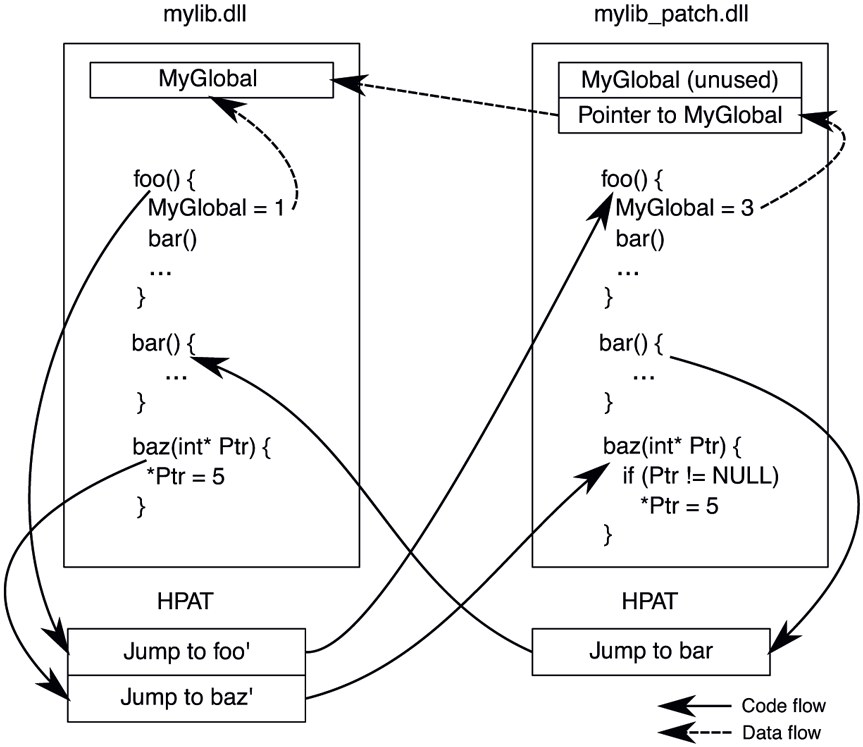
Hotpatch application for mylib.dll. Functions foo() and baz() are updated in the patch binary, mylib_patch.dll.
Hotpatching is supported for user-mode, kernel-mode, VTL1 kernel-mode and even the hypervisor. User-mode hotpatches are applied by NTOS, VTL0 kernelmode hotpatches are applied by the Secure Kernel (which is also able to patch itself) and the hypervisor patches itself. As such, VBS is a prerequisite for hotpatching. NTOS is responsible for validating proper signing for user-mode hotpatches and SK validates all other types of hotpatches such that a malicious actor cannot just hotpatch the kernel.
Hotpatching is vital for the Azure fleet and has been in use since mid-2010s. Every month, millions of machines in datacenters are hotpatched with various fixes and feature updates, with zero downtime for customer virtual machines. Hotpatching is also supported on the Azure Edition of Windows Server 2019 and 2022. These operating systems can be configured to receive cumulative hotpatch packages from Windows Update for multiple months followed by a reboot-required, non-hotpatch update. A regular reboot-required update is necessary every few months because it is not always possible to fix every issue with a hotpatch.
Antimalware
In addition to all the security mechanisms we described in this section, another layer of defense is antimalware software which has become a critical tool for combating malicious code. Antimalware can detect and quarantine malicious code even before it gets to attack. Windows includes a full-featured antimalware package called Windows Defender. This type of software hooks into kernel operations to detect malware inside files, as well as recognize the behavioral patterns that are used by specific instances (or general categories) of malware. These behaviors include the techniques used to survive reboots, modify the registry to alter system behavior, and launching particular processes and services needed to implement an attack. Windows Defender provides a good protection against common malware and similar software packages are also available from third-party providers.