11.7 Input/Output in Windows
The goals of the Windows I/O manager are to provide a fundamentally extensive and flexible framework for efficiently handling a very wide variety of I/O devices and services, support automatic device discovery and driver installation (plug and play) and efficient power management for devices and the CPU—all using a fundamentally asynchronous structure that allows computation to overlap with I/O transfers. There are many hundreds of thousands of devices that work with Windows. For a large number of common devices, it is not even necessary to install a driver, because there is already a driver that shipped with the Windows operating system. But even so, counting all the revisions, there are almost a million distinct driver binaries that run on Windows. In the following sections, we will examine some of the issues relating to I/O.
11.7.1 Fundamental Concepts
The I/O manager is on intimate terms with the plug-and-play manager. The basic idea behind plug and play is that of an enumerable bus. Many buses, including PC Card, PCI, PCIe, AGP, USB, IEEE 1394, EIDE, SCSI, and SATA, have been designed so that the plug-and-play manager can send a request to each slot and ask the device there to identify itself. Having discovered what is out there, the plug-and-play manager allocates hardware resources, such as interrupt levels, locates the appropriate drivers, and loads them into memory. As each driver is loaded, a driver object is created for it. And then for each device, at least one device object is allocated. For some buses, such as SCSI, enumeration happens only at boot time, but for other buses, such as USB, it can happen at any time, requiring close cooperation between the plug-and-play manager, the bus drivers (which actually do the enumerating), and the I/O manager.
In Windows, all the file systems, antivirus filters, volume managers, network protocol stacks, and even kernel services that have no associated hardware are implemented using I/O drivers. The system configuration must be set to cause some of these drivers to load, because there is no associated device to enumerate on the bus. Others, like the file systems, are loaded by special code that detects they are needed, such as the file-system recognizer that looks at a raw volume and deciphers what type of file system format it contains.
An interesting feature of Windows is its support for dynamic disks. These disks may span multiple partitions and even multiple disks and may be reconfigured on the fly, without even having to reboot. In this way, logical volumes are no longer constrained to a single partition or even a single disk so that a single file system may span multiple drives in a transparent way. This property turned out to be difficult to support for software since a disk typically contains multiple partitions and thus multiple volumes, but with dynamic disks, a volume can span multiple disks and the underlying disks are individually visible to software as well, potentially causing confusion.
Starting with Windows 10, dynamic disks were effectively superseded by storage spaces, a new feature that provides virtualization of physical storage hardware. With storage spaces, a user can create virtual disks backed by potentially different underlying disk media, called the storage pool. The point is that these virtual disks are presented to the system as being actual disk device objects (as opposed to virtual volumes presented by dynamic disks). This property makes storage spaces much more straightforward to work with.
Since its introduction, numerous features have been added to storage spaces beyond virtual disks. One interesting feature is called thin provisioning. This refers to the ability to create a virtual disk that is larger than the total size of the underlying storage pool. Actual physical storage is only allocated as the virtual disk is used. If the available space in the storage pool starts running low, the administrator is alerted and additional disks can be added to the pool at which point storage spaces will automatically redistribute allocated blocks between the new disks.
The I/O to volumes can be filtered by a special Windows driver to produce volume shadow copies. The filter driver creates a snapshot of the volume which can be separately mounted and represents a volume at a previous point in time. It does this by keeping track of changes after the snapshot point. This is very convenient for recovering files that were accidentally deleted, or traveling back in time to see the state of a file at periodic snapshots made in the past.
But shadow copies are also valuable for making accurate backups of server systems. The operating system works with server applications to have them reach a convenient point for making a clean backup of their persistent state on the volume. Once all the applications are ready, the system initializes the snapshot of the volume and then tells the applications that they can continue. The backup is made of the volume state at the point of the snapshot. And the applications were only blocked for a very short time rather than having to go offline for the duration of the backup.
Applications participate in the snapshot process, so the backup reflects a state that is easy to recover in case there is a future failure. Otherwise, the backup might still be useful, but the state it captured would look more like the state if the system had crashed. Recovering from a system error at the point of a crash can be more difficult or even impossible since crashes occur at arbitrary times in the execution of the application. Murphy’s Law says that crashes are most likely to occur at the worst possible time, that is, when the application data is in a state where recovery is impossible.
Another aspect of Windows is its support for asynchronous I/O. It is possible for a thread to start an I/O operation and then continue executing in parallel with the I/O. This feature is especially important on servers. There are various ways the thread can find out that the I/O has completed. One is to specify an event object at the time the call is made and then wait on it eventually. Another is to specify a queue to which a completion event will be posted by the system when the I/O is done. A third is to provide a callback procedure that the system calls when the I/O has completed. A fourth is to poll a location in memory that the I/O manager updates when the I/O completes.
The final aspect that we will mention is prioritized I/O. I/O priority is determined by the priority of the issuing thread, or it can be explicitly set. There are five priorities specified: critical, high, normal, low, and very low. Critical is reserved for the memory manager to avoid deadlocks that could otherwise occur when the system experiences extreme memory pressure. Low and very low priorities are used by background processes, like the disk defragmentation service and spyware scanners and desktop search, which are attempting to avoid interfering with normal operations of the system. Most I/O gets normal priority, but multimedia applications can mark their I/O as high to avoid glitches. Multimedia applications can alternatively use bandwidth reservation to request guaranteed bandwidth to access time-critical files, like music or video. The I/O system will provide the application with the optimal transfer size and the number of outstanding I/O operations that should be maintained to allow the I/O system to achieve the requested bandwidth guarantee.
11.7.2 Input/Output API Calls
The system call APIs provided by the I/O manager are not very different from those offered by most other operating systems. The basic operations are open, read, write, ioctl, and close, but there are also plug-and-play and power operations, operations for setting parameters, as well as calls for flushing system buffers, and so on. At the Win32 layer, these APIs are wrapped by interfaces that provide higher-level operations specific to particular devices. At the bottom, though, these wrappers open devices and perform these basic types of operations. Even some metadata operations, such as file rename, are implemented without specific system calls. They just use a special version of the ioctl operations. This will make more sense when we explain the implementation of I/O device stacks and the use of IRPs by the I/O manager.
The native NT I/O system calls, in keeping with the general philosophy of Windows, take numerous parameters and include many variations. Figure 11-40 lists the primary system-call interfaces to the I/O manager. NtCreateFile is used to open existing or new files. It provides security descriptors for new files, a rich description of the access rights requested, and gives the creator of new files some control over how blocks will be allocated. NtReadFile and NtWriteFile take a file handle, buffer, and length. They also take an explicit file offset and allow a key to be specified for accessing locked ranges of bytes in the file. Most of the parameters are related to specifying which of the different methods to use for reporting completion of the (possibly asynchronous) I/O, as described earlier.
Figure 11-40
| I/O system call | Description |
|---|---|
| NtCreateFile | Open new or existing files or devices |
| NtReadFile | Read from a file or device |
| NtWriteFile | Write to a file or device |
| NtQueryDirectoryFile | Request information about a directory, including files |
| NtQueryVolumeInformationFile | Request information about a volume |
| NtSetVolumeInformationFile | Modify volume information |
| NtNotifyChangeDirectoryFile | Finishes when any file in the directory or subtree is modified |
| NtQueryInformationFile | Request information about a file |
| NtSetInformationFile | Modify file information |
| NtLockFile | Lock a range of bytes in a file |
| NtUnlockFile | Remove a range lock |
| NtFsControlFile | Miscellaneous operations on a file |
| NtFlushBuffersFile | Flush in-memory file buffers to disk |
| NtCancelIoFile | Cancel outstanding I/O operations on a file |
| NtDeviceIoControlFile | Special operations on a device |
Native NT API calls for performing I/O.
NtQueryDirectoryFile is an example of a standard paradigm in the executive where various Query APIs exist to access or modify information about specific types of objects. In this case, it is file objects that refer to directories. A parameter specifies what type of information is being requested, such as a list of the names in the directory or detailed information about each file that is needed for an extended directory listing. Since this is really an I/O operation, all the standard ways of reporting that the I/O completed are supported. NtQueryVolumeInformationFile is like the directory query operation, but expects a file handle which represents an open volume which may or may not contain a file system. Unlike for directories, there are parameters than can be modified on volumes, and thus there is a separate API NtSetVolumeInformationFile.
NtNotifyChangeDirectoryFile is an example of an interesting NT paradigm. Threads can do I/O to determine whether any changes occur to objects (mainly file-system directories, as in this case, or registry keys). Because the I/O is asynchronous the thread returns and continues, and is only notified later when something is modified. The pending request is queued in the file system as an outstanding I/O operation using an I/O Request Packet. Notifications are problematic if you want to remove a file-system volume from the system, because the I/O operations are pending. So Windows supports facilities for canceling pending I/O operations, including support in the file system for forcibly dismounting a volume with pending I/O.
NtQueryInformationFile is the file-specific version of the system call for directories. It has a companion system call, NtSetInformationFile. These interfaces access and modify all sorts of information about file names, file features like encryption and compression and sparseness, and other file attributes and details, including looking up the internal file id or assigning a unique binary name (object id) to a file.
These system calls are essentially a form of ioctl specific to files. The set operation can be used to rename or delete a file. But note that they take handles, not file names, so a file first must be opened before being renamed or deleted. They can also be used to rename the alternative data streams on NTFS (see Sec. 11.8).
Separate APIs, NtLockFile and NtUnlockFile, exist to set and remove byterange locks on files. NtCreateFile allows access to an entire file to be restricted by using a sharing mode. An alternative is these lock APIs, which apply mandatory access restrictions to a range of bytes in the file. Reads and writes must supply a key matching the key provided to NtLockFile in order to operate on the locked ranges.
Similar facilities exist in UNIX, but there it is discretionary whether applications heed the range locks. NtFsControlFile is much like the preceding Query and Set operations, but is a more generic operation aimed at handling file-specific operations that do not fit within the other APIs. For example, some operations are specific to a particular file system.
Finally, there are miscellaneous calls such as NtFlushBuffersFile. Like the UNIX sync call, it forces file-system data to be written back to disk. NtCancelIoFile cancels outstanding I/O requests for a particular file, and NtDeviceIoControlFile implements ioctl operations for devices. The list of operations is actually much longer. There are system calls for deleting files by name, and for querying the attributes of a specific file—but these are just wrappers around the other I/O manager operations we have listed and did not really need to be implemented as separate system calls. There are also system calls for dealing with I/O completion ports, a queuing facility in Windows that helps multithreaded servers make efficient use of asynchronous I/O operations by readying threads by demand and reducing the number of context switches required to service I/O on dedicated threads.
11.7.3 Implementation of I/O
The Windows I/O system consists of the plug-and-play services, the device power manager, the I/O manager, and the device-driver model. Plug-and-play detects changes in hardware configuration and builds or tears down the device stacks for each device, as well as causing the loading and unloading of device drivers. The device power manager adjusts the power state of the I/O devices to reduce system power consumption when devices are not in use. The I/O manager provides support for manipulating I/O kernel objects, and IRP-based operations like IoCallDrivers and IoCompleteRequest. But most of the work required to support Windows I/O is implemented by the device drivers themselves.
Device Drivers
To make sure that device drivers work well with the rest of Windows, Microsoft has defined the WDM (Windows Driver Model) that device drivers are expected to conform with. The WDK (Windows Driver Kit) contains examples and documentation to help developers produce drivers which conform to the WDM. Most Windows drivers start out as copies of an appropriate sample driver from the WDK, which is then modified by the driver writer.
Microsoft also provides a driver verifier which validates many of the actions of drivers to be sure that they conform to the WDM requirements for the structure and protocols for I/O requests, memory management, and so on. The verifier ships with the system, and administrators can control it by running verifier.exe, which allows them to configure which drivers are to be checked and how extensive (i.e., expensive) the checks should be.
Even with all the support for driver development and verification, it is still very difficult to write even simple drivers in Windows, so Microsoft has built a system of wrappers called the WDF (Windows Driver Foundation) that runs on top of WDM and simplifies many of the more common requirements, mostly related to correct interaction with device power management and plug-and-play operations.
To further simplify driver writing, as well as increase the robustness of the system, WDF includes the UMDF (User-Mode Driver Framework) for writing drivers as services that execute in processes. And there is the KMDF (Kernel-Mode Driver Framework) for writing drivers as services that execute in the kernel, but with many of the details of WDM made automagical. Since underneath it is the WDM that provides the driver model, that is what we will focus on in this section.
Devices in Windows are represented by device objects. Device objects are also used to represent hardware, such as buses, as well as software abstractions like file systems, network protocol engines, and kernel extensions, such as antivirus filter drivers. All these are organized by producing what Windows calls a device stack, as previously shown in Fig. 11-14.
I/O operations are initiated by the I/O manager calling an executive API IoCallDriver with pointers to the top device object and to the IRP representing the I/O request. This routine finds the driver object associated with the device object. The operation types that are specified in the IRP generally correspond to the I/O manager system calls described earlier, such as create, read, and close.
Figure 11-41 shows the relationships for a single level of the device stack. For each of these operations, a driver must specify an entry point. IoCallDriver takes the operation type out of the IRP, uses the device object at the current level of the device stack to find the driver object, and indexes into the driver dispatch table with the operation type to find the corresponding entry point into the driver. The driver is then called and passed the device object and the IRP.
Figure 11-41
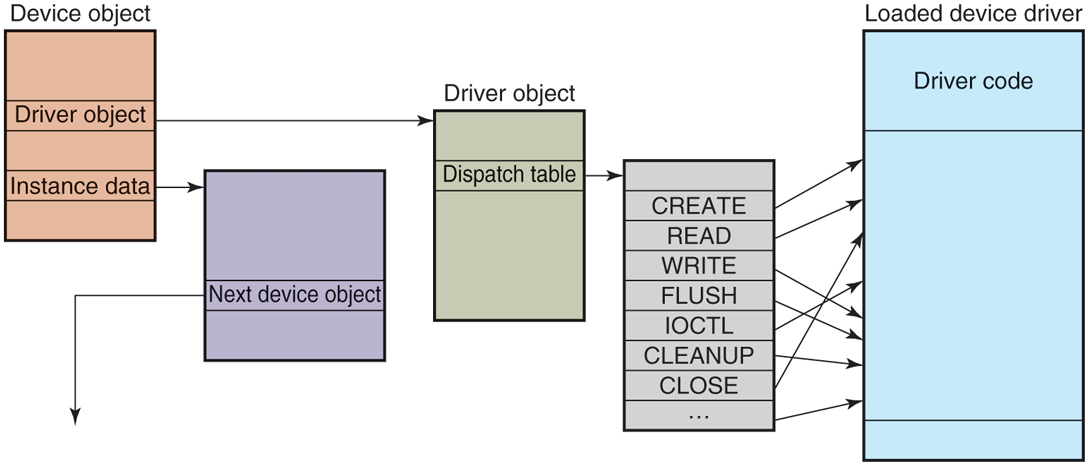
A single level in a device stack.
Once a driver has finished processing the request represented by the IRP, it has three options. It can call IoCallDriver again, passing the IRP and the next device object in the device stack. It can declare the I/O request to be completed and return to its caller. Or it can queue the IRP internally and return to its caller, having declared that the I/O request is still pending. This latter case results in an asynchronous I/O operation, at least if all the drivers above in the stack agree and also return to their callers.
I/O Request Packets
Figure 11-42 shows the major fields in the IRP. The bottom of the IRP is a dynamically sized array containing fields that can be used by each driver for the device stack handling the request. These stack fields also allow a driver to specify the routine to call when completing an I/O request. During completion each level of the device stack is visited in reverse order, and the completion routine assigned by each driver is called in turn. At each level, the driver can continue to complete the request or decide there is still more work to do and leave the request pending, suspending the I/O completion for the time being.
Figure 11-42
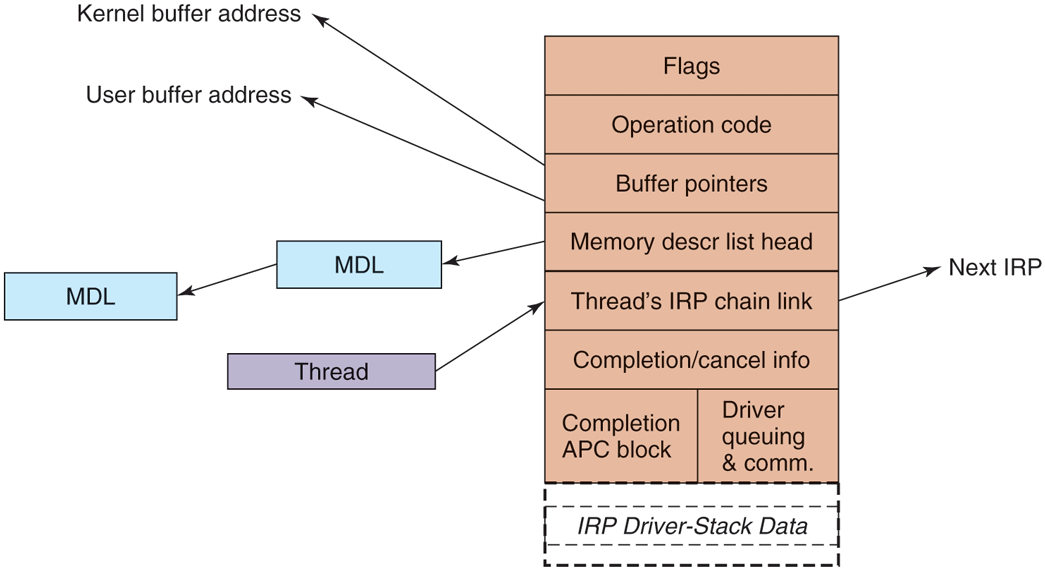
The major fields of an I/O Request Packet.
When allocating an IRP, the I/O manager has to know how deep the particular of the stack depth in a field in each device object as the device stack is formed. Note that there is no formal definition of what the next device object is in any stack. That information is held in private data structures belonging to the previous driver on the stack. In fact, the stack does not really have to be a stack at all. At any layer a driver is free to allocate new IRPs, continue to use the original IRP, send an I/O operation to a different device stack, or even switch to a system worker thread to continue execution.
The IRP contains flags, an operation code for indexing into the driver dispatch table, buffer pointers for possibly both kernel and user buffers, and a list of MDLs (Memory Descriptor Lists) which are used to describe the physical pages represented by the buffers, that is, for DMA operations. There are fields used for cancellation and completion operations. The fields in the IRP that are used to queue the IRP to devices while it is being processed are reused when the I/O operation has finally completed to provide memory for the APC control object used to call the I/O manager’s completion routine in the context of the original thread. There is also a link field used to link all the outstanding IRPs to the initiating thread.
Device Stacks
A driver in Windows may do all the work by itself, or drivers may also be stacked, which means that a request may pass through a sequence of drivers, each doing part of the work. Two stacked drivers are also illustrated in Fig. 11-43.
Figure 11-43
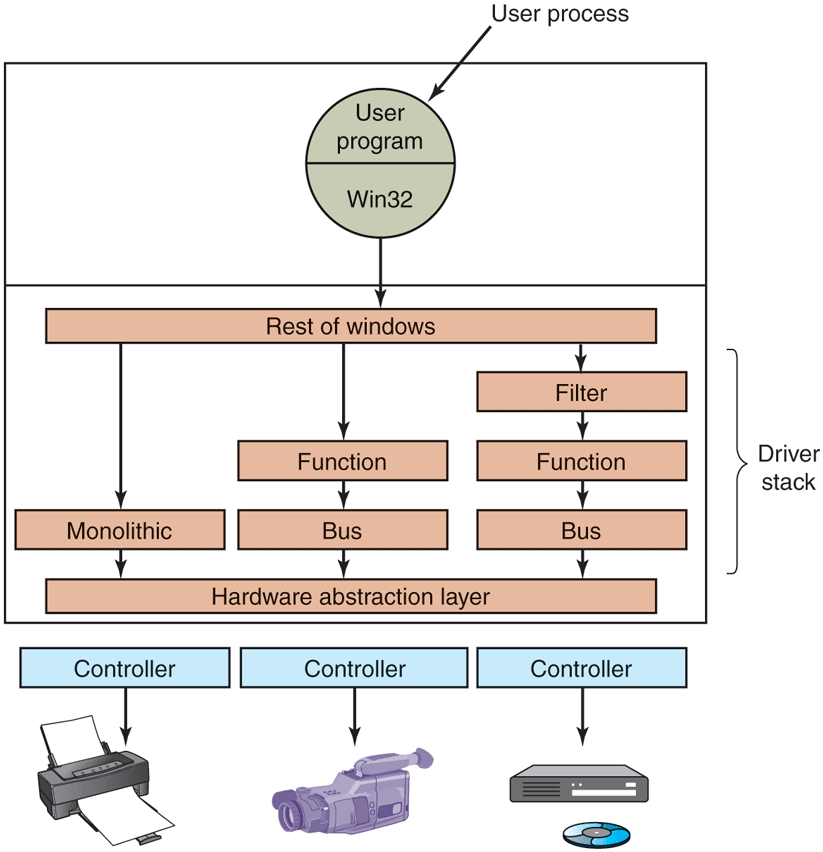
Windows allows drivers to be stacked to work with a specific instance of a device. The stacking is represented by device objects.
One common use for stacked drivers is to separate the bus management from the functional work of controlling the device. Bus management on the PCI bus is quite complicated on account of many kinds of modes and bus transactions. By separating this work from the device-specific part, driver writers are freed from learning how to control the bus. They can just use the standard bus driver in their stack. Similarly, USB and SCSI drivers have a device-specific part and a generic part, with common drivers being supplied by Windows for the generic part.
Another use of stacking drivers is to be able to insert filter drivers into the stack. We have already looked at the use of file-system filter drivers, which are inserted above the file system. Filter drivers are also used for managing physical hardware. A filter driver performs some transformation on the operations as the IRP flows down the device stack, as well as during the completion operation with the IRP flows back up through the completion routines each driver specified. For example, a filter driver could compress data on the way to the disk or encrypt data on the way to the network. Putting the filter here means that neither the application program nor the true device driver has to be aware of it, and it works automatically for all data going to (or coming from) the device.
Kernel-mode device drivers are a serious problem for the reliability and stability of Windows. Most of the kernel crashes in Windows are due to bugs in device drivers. Because kernel-mode device drivers all share the same address space with the kernel and executive layers, errors in the drivers can corrupt system data structures, or worse, create security vulnerabilities. Some of these bugs are due to the astonishingly large numbers of device drivers that exist for Windows, or to the development of drivers by less-experienced system programmers. The bugs are also due to the enormous amount of detail involved in writing a correct driver for Windows.
The I/O model is powerful and flexible, but all I/O is fundamentally asynchronous, so race conditions can abound. Windows 2000 added the plug-and-play and device power management facilities from the Win9x systems to the NT-based Windows for the first time. This put a large number of requirements on drivers to deal correctly with devices coming and going while I/O packets are in the middle of being processed. Users of PCs frequently dock/undock devices, close the lid and toss notebooks into briefcases, and generally do not worry at all about whether the little green activity light happens to still be on. Writing device drivers that work correctly in this environment can be very challenging, which is why WDF was developed to simplify the Windows Driver Model.
Many books are available about the Windows Driver Model and the newer Windows Driver Foundation (Orwick and Smith, 2007; Viscarola et al., 2007; Kanetkar, 2008; Vostokov, 2009; Reeves, 2010; and Yosifovich, 2019).