11.5 Memory Management
Windows has an extremely sophisticated and complex virtual memory system. It has a number of Win32 functions for using it, implemented by the memory manager—the largest component of NTOS. In the following sections, we will look at the fundamental concepts, the Win32 API calls, and finally the implementation.
11.5.1 Fundamental Concepts
Since Windows 11 supports only 64-bit machines, this chapter is only going to consider 64-bit processes on 64-bit machines. 32-bit emulation on 64-bit machines was described in the WoW64 section earlier.
In Windows, every user process has its own virtual address space, split equally between kernel-mode and user-mode. Today’s 64-bit processors generally implement 48-bits of virtual addresses resulting in a 256 TB total address space. When the full 64-bit addresses are not implemented, hardware requires that all the unimplemented bits be the same as the highest implemented bit. Addresses in this format are called canonical. This approach helps ensure that applications and operating systems do not rely on storing information in these bits to make future expansion possible. Out of the 256 TB address space, user-mode takes the lower 128 TB, kernel-mode takes the upper 128 TB. Even though this may sound, pretty big, a nontrivial portion is actually already reserved for various categories of data, security mitigations as well as for performance optimizations.
On today’s 64-bit processors, the 48-bits of virtual addresses are mapped using a 4-level page table scheme where each page table is 4 KB in size and each PTE (Page Table Entry) is 8 bytes with 512 PTEs per page table. As a result, each page table is indexed by 9 bits of the virtual address and the remaining 12 bits of the 48-bit virtual address is the byte index into the 4 KB page. The physical address of the topmost level table is contained in a special processor register, and this register is updated during context switches between processes. This virtual to physical address translation is shown in Fig. 11-30. Windows also takes advantage of the hardware support for larger page sizes (where available), where a page directory entry can map a 2-MB large page or a page directory parent entry can map a 1-GB huge page.
Figure 11-30
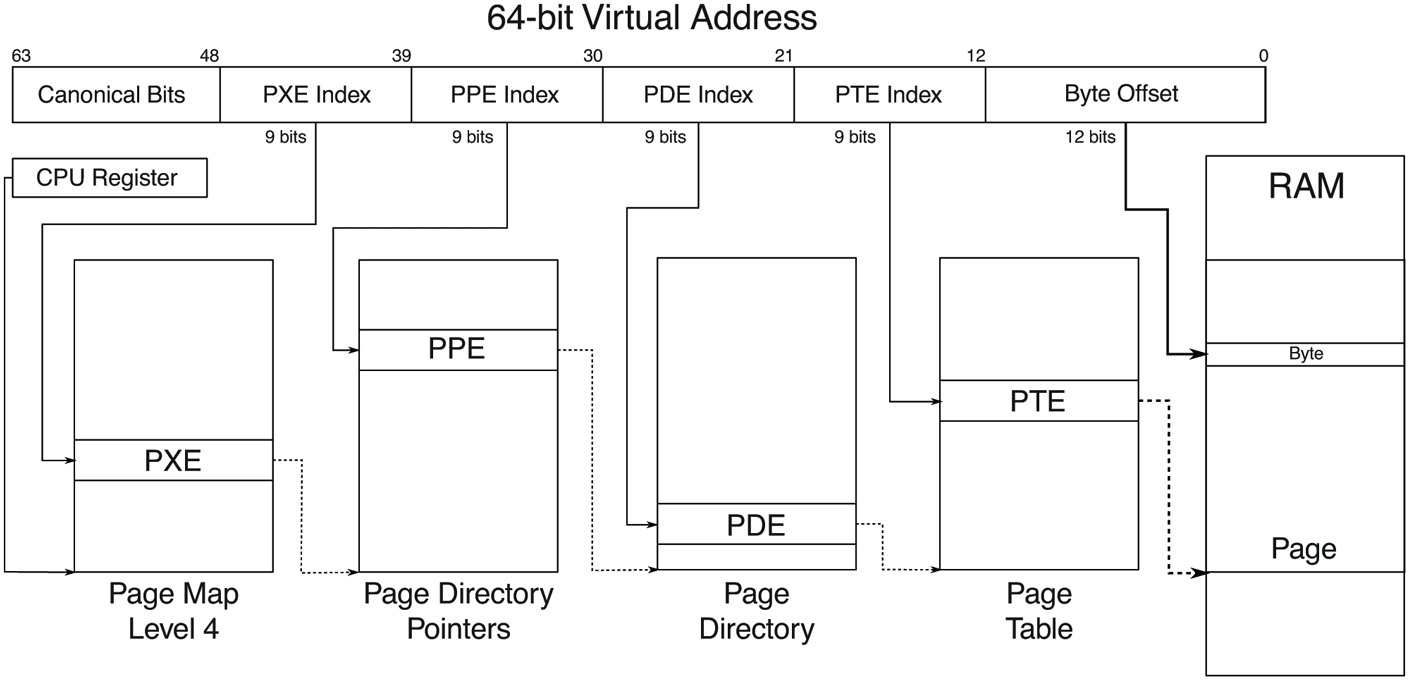
Virtual to physical address translation with a 4-level page table scheme implementing 48-bits of virtual address.
Emerging hardware implements 57-bits of virtual addresses using a 5-level page table. Windows 11 supports these processors and provides 128 PB of address space on such machines. In our discussion, we will generally stick to the more common 48-bit implementations.
The virtual address space layouts for two 64-bit processes are shown in Fig. 11-31 in simplified form. The bottom and top 64 KB of each process’ virtual address space is normally unmapped. This choice was made intentionally to help catch programming errors and mitigate the exploitability of certain types of vulnerabilities.
Figure 11-31
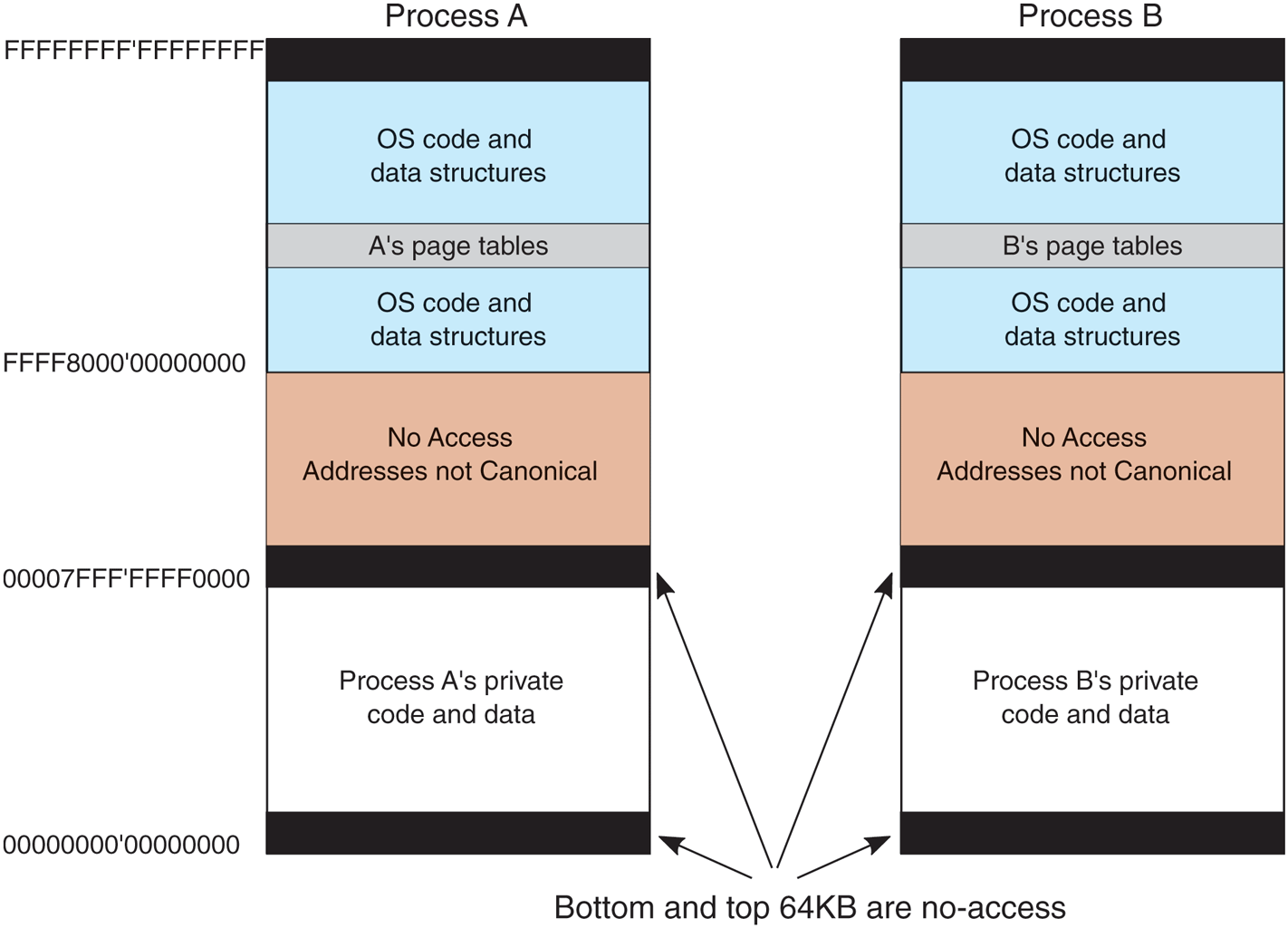
Virtual address space layout for three 64-bit user processes. The white areas are private per process. The shaded areas are shared among all processes.
Starting at 64 KB comes the user’s private code and data. This extends up to 128 TB – 64 KB. The upper 128 TB of the address space is called the kernel address space and contains the operating system, including the code, data, paged and nonpaged pools, and numerous other OS data structures. The kernel address space is shared among all user processes, except for per-process and per-session data like page tables and session pool. Of course, this part of the address space is only accessible while running in kernel-mode, so any access attempt from usermode will result in an access violation. The reason for sharing the process’ virtual memory with the kernel is that when a thread makes a system call, it traps into kernel mode and can continue running without changing the memory map by updating the special processor register. All that has to be done is switch to the thread’s kernel stack. From a performance point of view, this is a big win, and something UNIX does as well. Because the process’ user-mode pages are still accessible, the kernel-mode code can read parameters and access buffers without having to switch back and forth between address spaces or temporarily double-mapping pages into both. The trade-off being made here is less private address space per process in return for faster system calls.
Windows allows threads to attach themselves to other address spaces while running in the kernel. Attachment to an address space allows the thread to access all of the user-mode address space, as well as the portions of the kernel address space that are specific to a process, such as the self-map for the page tables. However, threads must switch back to their original address space before returning to user mode, of course.
Virtual Address Allocation
Each page of virtual addresses can be in one of three states: invalid, reserved, or committed. An invalid page is not currently mapped to a memory section object and a reference to it causes a page fault that results in an access violation. Once code or data is mapped onto a virtual page, the page is said to be committed. A committed page does not necessarily have a physical page allocated for it, but the operating system has ensured that a physical page is guaranteed to be available when necessary. A page fault on a committed page results in mapping the page containing the virtual address that caused the fault onto one of the pages represented by the section object or stored in the pagefile. Often this will require allocating a physical page and performing I/O on the file represented by the section object to read in the data from disk. But page faults can also occur simply because the page table entry needs to be updated, as the physical page referenced is still cached in memory, in which case I/O is not required. These are called soft faults. We will discuss them in more detail shortly.
A virtual page can also be in the reserved state. A reserved virtual page is invalid but has the property that those virtual addresses will never be allocated by the memory manager for another purpose. As an example, when a new thread is created, many pages of user-mode stack space are reserved in the process’ virtual address space, but only one page is committed. As the stack grows, the virtual memory manager will automatically commit additional pages under the covers, until the reservation is almost exhausted. The reserved pages function as guard pages to keep the stack from growing too far and overwriting other process data. Reserving all the virtual pages means that the stack can eventually grow to its maximum size without the risk that some of the contiguous pages of virtual address space needed for the stack might be given away for another purpose. In addition to the invalid, reserved, and committed attributes, pages also have other attributes, such as being readable, writable, and executable.
Pagefiles
An interesting trade-off occurs with assignment of backing store to committed pages that are not being mapped to specific files. These pages use the pagefile. The question is how and when to map the virtual page to a specific location in the pagefile. A simple strategy would be to assign each virtual page to a page in one of the paging files on disk at the time the virtual page was committed. This would guarantee that there was always a known place to write out each committed page should it be necessary to evict it from memory, but it would require a much larger pagefile than necessary and would not be able to support small pagefiles.
Windows uses a just-in-time strategy. Committed pages that are backed by the pagefile are not assigned space in the pagefile until the time that they have to be paged out. The memory manager maintains a system-wide commit limit which is the sum of RAM size and the total size of all pagefiles. As non-paged or pagefilebacked virtual memory is committed, system-wide commit charge is increased until it reaches the commit limit at which point commit requests start failing. This strict commit tracking ensures that pagefile space will be available when a committed page needs to be paged out. No disk space is allocated for pages that are never paged out. If the total virtual memory is less than the available physical memory, a pagefile is not needed at all. This is convenient for embedded systems based on Windows. It is also the way the system is booted, since pagefiles are not initialized until the first user-mode process, smss.exe, begins running.
With demand-paging, requests to read pages from disk need to be initiated right away, as the thread that encountered the missing page cannot continue until this page-in operation completes. The possible optimizations for faulting pages into memory involve attempting to prepage additional pages in the same I/O operation, called page fault clustering. However, operations that write modified pages to disk are not normally synchronous with the execution of threads. The just-intime strategy for allocating pagefile space takes advantage of this to boost the performance of writing modified pages to the pagefile. Modified pages are grouped together and written in big chunks. Since the allocation of space in the pagefile does not happen until the pages are being written, the number of seeks required to write a batch of pages can be optimized by allocating the pagefile pages to be near each other, or even making them contiguous.
While grouping modified pages into bigger chunks before writing to pagefile is beneficial for disk write efficiency, it does not necessarily help make in-page operations any faser. In fact, if pages from different processes or discontiguous virtual addresses are combined together, it becomes impossible to cluster pagefile reads during in-page operations since subsequent virtual addresses belonging to the faulting process may be scattered across the pagefile. In order to optimize pagefile read efficiency for groups of virtual pages that are expected to be used together, Windows supports the concept of pagefile reservations. Ranges of pagefile can be soft-reserved for process virtual memory pages such that when those pages are about to be written to the pagefile, they are written to their reserved locations instead. While this can make pagefile writing less efficient compared to not having such reservations, subsequent page-in operations proceed much quicker because of improved clustering and sequential disk reads. Since in-page operations directly block application progress, they are generally more important for system performance than pagefile write efficiency. These are soft reservations, so if the pagefile is full and no other space is available, the memory manager will overwrite unoccupied reserved space.
When pages stored in the pagefile are read into memory, they keep their allocation in the pagefile until the first time they are modified. If a page is never modified, it will go onto a list of cached physical pages, called the standby list, where it can be reused without having to be written back to disk. If it is modified, the memory manager will free the pagefile space and the only copy of the page will be in memory. The memory manager implements this by marking the page as read-only after it is loaded. The first time a thread attempts to write the page the memory manager will detect this situation and free the pagefile page, grant write access to the page, and then have the thread try again.
Windows supports up to 16 pagefiles, normally spread out over separate disks to achieve higher I/O bandwidth. Each one has an initial size and a maximum size it can grow to later if needed, but it is better to create these files to be the maximum size at system installation time. If it becomes necessary to grow a pagefile when the file system is much fuller, it is likely that the new space in the pagefile will be highly fragmented, reducing performance.
The operating system keeps track of which virtual page maps onto which part of which paging file by writing this information into the page table entries for the process for private pages, or into prototype page table entries associated with the section object for shared pages. In addition to the pages that are backed by the pagefile, many pages in a process are mapped to regular files in the file system.
The executable code and read-only data in a program file (e.g., an EXE or DLL) can be mapped into the address space of whatever process is using it. Since these pages cannot be modified, they never need to be paged out and end up on the standby list as cached pages when they are no longer in use and can immediately be reused. When the page is needed again in the future, the memory manager will read the page in from the program file.
Sometimes pages that start out as read-only end up being modified, for example, setting a breakpoint in the code when debugging a process, or fixing up code to relocate it to different addresses within a process, or making modifications to data pages that started out shared. In cases like these, Windows, like most modern operating systems, supports a type of page called copy-on-write. These pages start out as ordinary mapped pages, but when an attempt is made to modify any part of the page the memory manager makes a private, writable copy. It then updates the page table for the virtual page so that it points at the private copy and has the thread retry the write—which will succeed the second time. If that copy later needs to be paged out, it will be written to the pagefile rather than the original file,
Besides mapping program code and data from EXE and DLL files, ordinary files can be mapped into memory, allowing programs to reference data from files without doing read and write operations. I/O operations are still needed, but they are provided implicitly by the memory manager using the section object to represent the mapping between pages in memory and the blocks in the files on disk.
Section objects do not have to refer to a file. They can refer to anonymous regions of memory, called pagefile-backed sections. By mapping pagefile-backed section objects into multiple processes, memory can be shared without having to allocate a file on disk. Since sections can be given names in the NT namespace, processes can rendezvous by opening sections by name, as well as by duplicating and passing handles between processes.
11.5.2 Memory-Management System Calls
The Win32 API contains a number of functions that allow a process to manage its virtual memory explicitly. The most important of these functions are listed in Fig. 11-32. All of them operate on a region consisting of either a single page or a sequence of two or more pages that are consecutive in the virtual address space. Of course, processes do not have to manage their memory; paging happens automatically, but these calls give processes additional power and flexibility. Most applications use higher-level heap APIs to allocate and free dynamic memory. Heap implementations build on top of these lower-level memory management calls to manage smaller blocks of memory.
Figure 11-32
| Win32 API function | Description |
|---|---|
| VirtualAlloc | Reserve or commit a region |
| VirtualFree | Release or decommit a region |
| VirtualProtect | Change the read/write/execute protection on a region |
| VirtualQuery | Inquire about the status of a region |
| VirtualLock | Make a region memory resident (i.e., disable paging for it) |
| VirtualUnlock | Make a region pageable in the usual way |
| CreateFileMapping | Create a file-mapping object and (optionally) assign it a name |
| MapViewOfFile | Map (part of) a file into the address space |
| UnmapViewOfFile | Remove a mapped file from the address space |
| OpenFileMapping | Open a previously created file-mapping object |
The principal Win32 API functions for managing virtual memory in Windows.
The first four API functions are used to allocate, free, protect, and query regions of virtual address space. Allocated regions always begin on 64-KB boundaries to minimize porting problems to future architectures with pages larger than current ones as well as reducing virtual address space fragmentation. The actual amount of address space allocated can be less than 64 KB, but must be a multiple of the page size. The next two APIs give a process the ability to hardwire pages in memory so they will not be paged out and to undo this property. A real-time program might need pages with this property to avoid page faults to disk during critical operations, for example. A limit is enforced by the operating system to prevent processes from getting too greedy. The pages actually can be removed from memory, but only if the entire process is swapped out. When it is brought back, all the locked pages are reloaded before any thread can start running again. Although not shown in Fig. 11-32, Windows also has native API functions to allow a process to read/write the virtual memory of a different process over which it has been given control, that is, for which it has a handle (see Fig. 11-7).
The last four API functions listed are for managing sections (i.e., file-backed or pagefile-backed sections). To map a file, a file-mapping object must first be created with CreateFileMapping (see Fig. 11-8). This function returns a handle to the file-mapping object (i.e., a section object) and optionally enters a name for it into the Win32 namespace so that other processes can use it, too. The next two functions map and unmap views on section objects from a process’ virtual address space. The last API can be used by a process to map share a mapping that another process created with CreateFileMapping, usually one created to map anonymous memory. In this way, two or more processes can share regions of their address spaces. This technique allows them to write in limited regions of each other’s virtual memory.
11.5.3 Implementation of Memory Management
Windows supports a single linear 256 TB demand-paged address space per process. Segmentation is not supported in any form. As noted earlier, page size is 4 KB on all processor architectures supported by Windows today. In addition, the memory manager can use 2-MB large pages or even 1-GB huge pages to improve the effectiveness of the TLB (Translation Lookaside Buffer) in the processor’s memory management unit. Use of large and huge pages by the kernel and large applications significantly improves performance by improving the hit rate for the TLB as well as enabling a shallower and thus faster hardware page table walk when a TLB miss does occur. Large and huge pages are simply composed of aligned, contiguous runs of 4 KB pages. As such, these pages are considered nonpageable since paging and reusing them for single pages would make it very difficult, if not impossible, for the memory manager to construct a large or huge page when the application accesses it again.
Unlike the scheduler, which selects individual threads to run and does not care much about processes, the memory manager deals entirely with processes and does not care much about threads. After all, processes, not threads, own the address space and that is what the memory manager is concerned with. When a region of virtual address space is allocated, as four of them have been for process A in Fig. 11-33, the memory manager creates a VAD (Virtual Address Descriptor) for it, listing the range of addresses mapped, the section representing the backing store file and offset where it is mapped, and the permissions. When the first page is touched, the necessary page table hierarchy is created and corresponding page table entries are filled in as physical pages are allocated to back the VAD. An address space is completely defined by the list of its VADs. The VADs are organized into a balanced tree, so that the descriptor for a particular address can be found efficiently. This scheme supports sparse address spaces. Unused areas between the mapped regions use no memory or disk so they are essentially free.
Figure 11-33
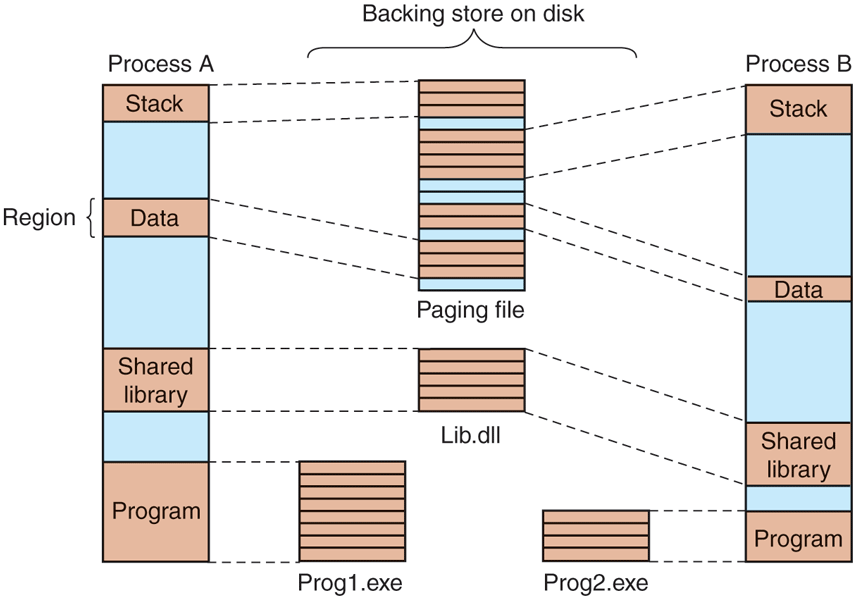
Mapped regions with their shadow pages on disk. The lib.dll file is mapped into two address spaces at the same time.
Page-Fault Handling
Windows is a demand-paged operating system, meaning that physical pages are generally not allocated and mapped into a process address space until they are actually accessed by some process (although there is also prepaging the background for performance reasons), Demand paging in the memory manager is driven by page faults. On each page fault, a trap to the kernel occurs and the CPU enters kernel mode. The kernel then builds a machine-independent descriptor telling what happened and passes this to the memory-manager part of the executive. The memory manager then checks the access for validity. If the faulted page falls within a committed region and access is allowed, it looks up the address in the VAD tree and finds (or creates) the process page table entry.
Generally, pageable memory falls into one of two categories: private pages and shareable pages. Private pages only have meaning within the owning process; they are not shareable with other processes. As such, these pages become free pages when the process terminates. For example, VirtualAlloc calls allocate private memory for the process. Shareable pages represent memory that can be shared with other processes. Mapped files and pagefile-backed sections fall into this category. Since these pages have relevance outside of the process, they get cached in memory (on the standby or modified lists) even after the process terminates because some other process might need them. Each page fault can be considered as being in one of five categories:
The page referenced is not committed.
Access to a page has been attempted in violation of the permissions.
A shared copy-on-write page was about to be modified.
The stack needs to grow.
The page referenced is committed but not currently mapped in.
The first and second cases are due to programming errors. If a program attempts to use an address which is not supposed to have a valid mapping, or attempts an invalid operation (like attempting to write a read-only page), this is called an access violation and causes the memory manager to raise an exception, which, if not handled, results in termination of the process. Access violations are often the result of bad pointers, including accessing memory that was freed and unmapped from the process.
The third case has the same symptoms as the second one (an attempt to write to a read-only page), but the treatment is different. Because the page has been marked as copy-on-write, the memory manager does not report an access violation, but instead makes a private copy of the page for the current process and then returns control to the thread that attempted to write the page. The thread will retry the write, which will now complete without causing a fault.
The fourth case occurs when a thread pushes a value onto its stack and crosses onto a page which has not been allocated yet. The memory manager is programmed to recognize this as a special case. As long as there is still room in the virtual pages reserved for the stack, the memory manager will supply a new physical page, zero it, and map it into the process. When the thread resumes running, it will retry the access and succeed this time around.
Finally, the fifth case is a normal page fault. However, it has several subcases. If the page is mapped by a file, the memory manager must search its data structures, such as the prototype page table associated with the section object to be sure that there is not already a copy in memory. If there is, say in another process or on the standby or modified page lists, it will just share it—perhaps marking it as copyon-write if changes are not supposed to be shared. If there is not already a copy, the memory manager will allocate a free physical page and arrange for the file page to be copied in from disk, unless another page is already transitioning in from disk, in which case it is only necessary to wait for the transition to complete.
When the memory manager can satisfy a page fault by finding the needed page in memory rather than reading it in from disk, the fault is classified as a soft fault. If the copy from disk is needed, it is a hard fault. Soft faults are much cheaper and have little impact on application performance compared to hard faults. Soft faults can occur because a shared page has already been mapped into another process, or the needed page was trimmed from the process’ working set but is being requested again before it has had a chance to be reused. A common sub-category of soft faults is demand-zero faults. These indicate that a zeroed page should be allocated and mapped in, for example, when the first access to a VirtualAlloc’d address occurs. When trimming private pages from process working sets, Windows checks if the page is entirely zero. If so, instead of putting the page on the modified list and writing it out to the pagefile, the memory manager frees the page and encodes the PTE to indicate a demand-zero fault on next access. Soft faults can also occur because pages have been compressed to effectively increase the size of physical memory. For most configurations of CPU, memory, and I/O in current systems, it is more efficient to use compression rather than incur the I/O expense (performance and energy) required to read a page from disk. We will cover memory compression in more detail later in this section.
When a physical page is no longer mapped by the page table in any process, it goes onto one of three lists: free, modified, or standby. Pages that will never be needed again, such as stack pages of a terminating process, are freed immediately. Pages that may be faulted again go to either the modified list or the standby list, depending on whether or not the dirty bit was set for any of the page table entries that mapped the page since it was last read from disk. Pages in the modified list will be eventually written to disk, then moved to the standby list.
Since soft faults are much quicker to satisfy than hard faults, a big performance improvement opportunity is to prepage or prefetch into the standby list, data that is expected to be used soon. Windows makes heavy use of prefetch in several ways:
Page fault clustering: When satisfying hard page faults from files or from the pagefile, the memory manager reads additional pages, up to a total of 64 KB, as long as the next page in the file corresponds to the next virtual page. That is almost always the case for regular files so mechanisms like pagefile reservations we described earlier in the section help clustering efficiency for pagefiles.
Application-launch prefetching: Application launches are generally very consistent from launch to launch: the same application and DLL pages are accessed. Windows takes advantage of this behavior by tracing the set of file pages accessed during an application launch, persisting this history on disk, identifying those pages that are indeed consistently accessed and prefetching them during the next launch potentially seconds before the application actually needs them. When the pages to prefetch are already resident in memory, no disk I/Os are issued, but when they are not, application-launch prefetch routinely issues hundreds of I/O requests to disk which significantly improves disk read efficiency on both rotational and solid state disks.
Working set in-swap: The working set of a process in Windows is composed of the set of user-mode virtual addresses that are mapped by valid PTEs, that is, addresses that can be accessed without a page fault. Normally, when the memory manager detects memory pressure, it trims pages from process working sets in order to generate more available memory. The UWP application model provides an opportunity for a more optimized approach due to its lifetime management. UWP applications are suspended via their job objects when they are no longer visible and resumed when the user switches back to them. This reduces CPU consumption and power usage.
Working set out-swap. Working set out-swap involves reserving preferably sequential space in the pagefile for each page in the process working set and remembering the set of pages that are in the working set. In order to improve the chances of finding sequential space, Windows actually creates and uses a separate pagefile called swapfile.sys exclusively for working set out-swap. When under memory pressure, the entire working set of the UWP application is emptied at once and since each page is reserved sequential space in the swapfile, pages removed from the working set can be written out very efficiently with large, sequential I/Os. When the UWP application is about to be resumed, the memory manager performs a working set inswap operation where it prefetches the out-swapped pages from the swapfile, using large, sequential reads, directly into the working set. In addition to maximizing disk read bandwidth, this also avoids any subsequent soft-faults because the working set is fully restored to its state before suspension.
Superfetch: Today’s desktop systems generally have 8, 16, 32, 64, or even more GBs of memory installed, and this memory is largely empty after a system boot. Similarly, memory contents can experience significant disruptions, for example, when the user runs a big game, which pushes out everything else to disk, and then exits the game. Having GBs of empty memory is lost opportunity because the next application launch or switching to an old browser tab will need to page in lots of data from disk. Would it not be better if there was a mechanism to populate empty memory pages with useful data in the background, and cache them on the standby list? That’s what Superfetch does. It’s a user-mode service for proactive memory management. It tracks frequently-used file pages and prefetches them into the standby list when free memory is available. Superfetch also tracks paged out private pages of important applications and brings these into memory as well. As opposed to the earlier forms of prefetch, which are just-in-time, Superfetch employs background prefetch, using low-priority I/O requests in order to avoid creating disk contention with higher-priority disk reads.
Page Tables
The format of the page table entries differs depending on the processor architecture. For the x64 architecture, the entries for a mapped page are shown in Fig. 11-34. If an entry is marked valid, its contents are interpreted by the hardware so that the virtual address can be translated into the correct physical page. Unmapped pages also have entries, but they are marked invalid and the hardware ignores the rest of the entry. The software format is somewhat different from the hardware format and is determined by the memory manager. For example, for an unmapped page that must be allocated and zeroed before it may be used, that fact is noted in the page table entry.
Figure 11-34
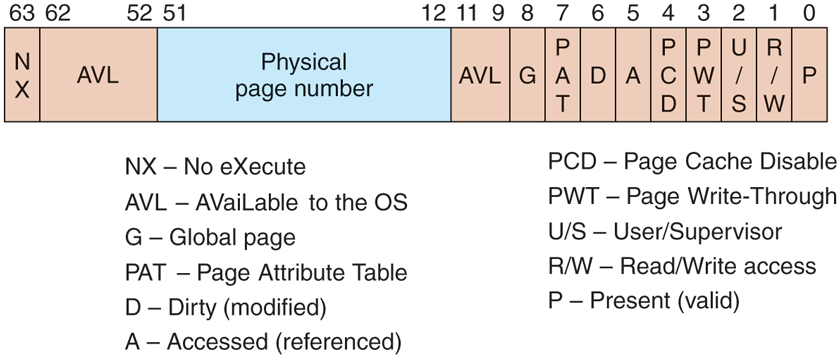
A page table entry (PTE) for a mapped page on the Intel x86 and AMD x64 architectures.
Two important bits in the page table entry are updated by the hardware directly. These are the access (A) and dirty (D) bits. These bits keep track of when a particular page mapping has been used to access the page and whether that access could have modified the page by writing it. This really helps the performance of the system because the memory manager can use the access bit to implement the LRU (Least-Recently Used) style of paging. The LRU principle says that pages that have not been used the longest are the least likely to be used again soon. The access bit allows the memory manager to determine that a page has been accessed. The dirty bit lets the memory manager know that a page may have been modified, or more significantly, that a page has not been modified. If a page has not been modified since being read from disk, the memory manager does not have to write the contents of the page to disk before using it for something else.
The page table entries in Fig. 11-34 refer to physical page numbers, not virtual page numbers. To update entries in the page table hierarchy, the kernel needs to use virtual addresses. Windows maps the page table hierarchy for the current process into kernel virtual address space using a clever self-map technique, as shown in Fig. 11-35. By making an entry (the self-map PXE entry) in the top-level page table point to the top-level page table, the Windows memory manager creates virtual addresses that can be used to refer to the entire page table hierarchy. Figure 11-35 shows two example virtual address translations (a) for the self-map entry and (b) for a page table entry. The self-map occupies the same 512 GB of kernel virtual address space for every process because a top-level PXE entry maps 512 GB.
Figure 11-35
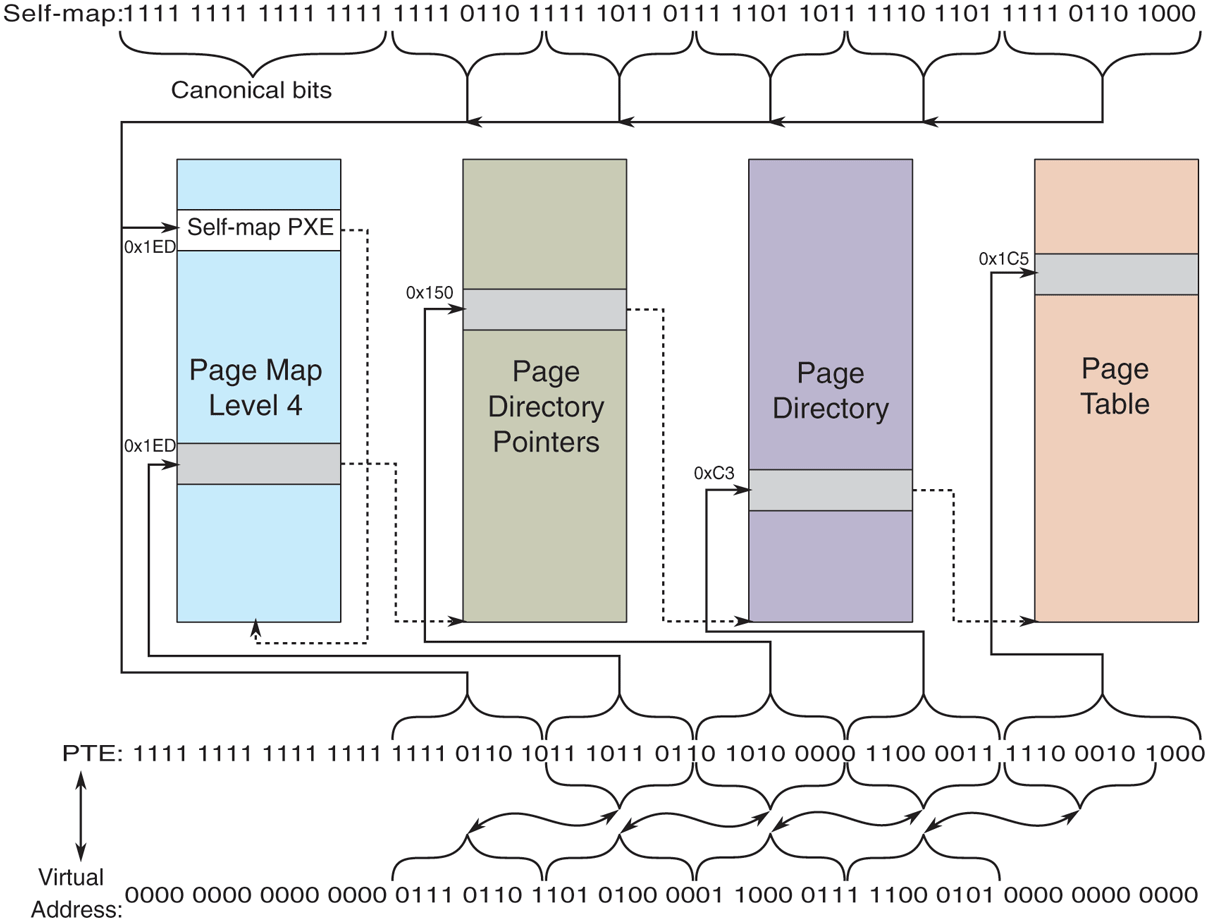
The Windows self-map entries are used to map the physical pages of the page table hierarchy into kernel virtual addresses. This makes conversion between a virtual address and its PTE address very easy.
The Page Replacement Algorithm
When the number of free physical memory pages starts to get low, the memory manager starts working to make more physical pages available by removing them from user-mode processes as well as the system process, which represents kernelmode use of pages. The goal is to have the most important virtual pages present in memory and the others on disk. The trick is in determining what important means. In Windows this is answered by making heavy use of the working-set concept. Each process (not each thread) has a working set. This set consists of the mapped-in pages that are in memory and thus can be referenced without a page fault. The size and composition of the working set fluctuates in unpredictable ways as the process’ threads run, of course.
Working sets come into play only when the available physical memory is getting low in the system. Otherwise processes are allowed to consume memory as they choose, often far exceeding the working-set maximum. But when the system comes under memory pressure, the memory manager starts to squeeze processes back into their working sets, starting with processes that are over their maximum by the most. There are three levels of activity by the working-set manager, all of which is periodic based on a timer. New activity is added at each level:
Lots of memory available: Scan pages resetting access bits and using their values to represent the age of each page. Keep an estimate of the unused pages in each working set.
Memory getting tight: For any process with a significant proportion of unused pages, stop adding pages to the working set and start replacing the oldest pages whenever a new page is needed. The replaced pages go to the standby or modified list.
Memory is tight: Trim (i.e., reduce) working sets by removing the oldest pages.
The working set manager runs every second, called from the balance set manager thread. The working-set manager throttles the amount of work it does to keep from overloading the system. It also monitors the writing of pages on the modified list to disk to be sure that the list does not grow too large, waking the Modified-PageWriter thread as needed.
Physical Memory Management
Above we mentioned three different lists of physical pages, the free list, the standby list, and the modified list. There is a fourth list which contains free pages that have been zeroed. The system frequently needs pages that contain all zeros. When new pages are given to processes, or the final partial page at the end of a file is read, a zero page is needed. It is time consuming to fill a page with zeros on demand, so it is better to create zero pages in the background using a low-priority thread. There is also a fifth list used to hold pages that have been detected as having hardware errors (i.e., through hardware error detection).
All pages in the system are managed using a data structure called the PFN database (Page Frame Number database), as shown in Fig. 11-36. The PFN database is a table indexed by physical page frame number where each entry represents the state of the corresponding physical page, using different formats for different page types (e.g., sharable vs. private). For pages that are in use, the PFN entry contains information about how many references exist to the page and how many page table entries reference it such that the system can track when the page is no longer in use. There is also a pointer to the PTE which references the physical page. For private pages, this is the address of the hardware PTE but for shareable pages, it is the address of the prototype PTE. To be able to edit the PTE when in a different process address space, the PFN entry also contains the page frame index of the page that contains the PTE.
Figure 11-36
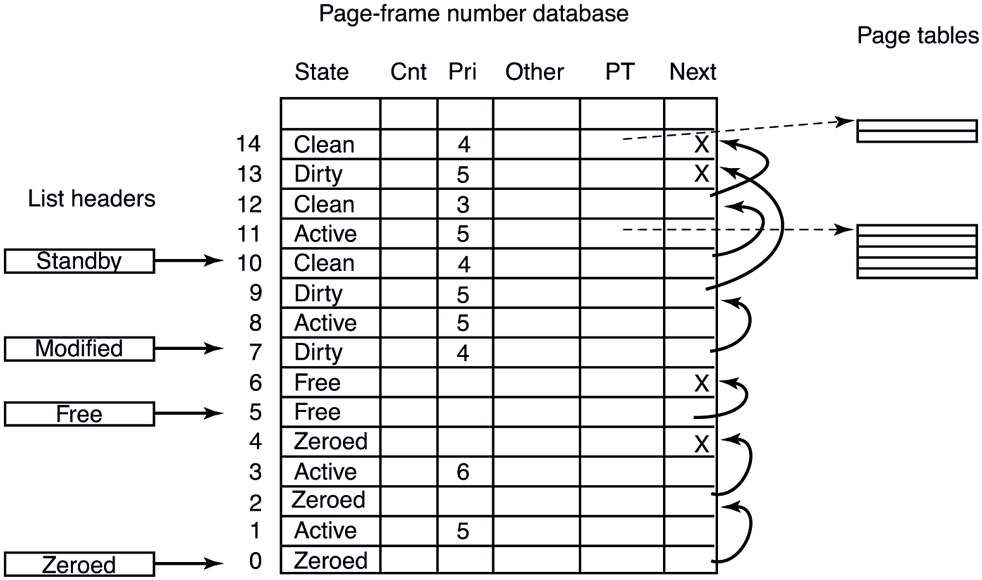
Some of the fields in the page-frame database for a valid page.
Additionally the PFN entry contains forward and backward links for the aforementioned page lists and various flags, such as read in progress, write in progress, and so on. To save space, the lists are linked together with fields referring to the next element by its index within the table rather than pointers. The table entries for the physical pages are also used to summarize the dirty bits found in the various page table entries that point to the physical page (i.e., because of shared pages). There is also information used to represent differences in memory pages on larger server systems which have memory that is faster from some processors than from others, namely NUMA machines.
One important PFN entry field is priority. The memory manager maintains page priority for every physical page. Page priorities range from 0 to 7 and reflect how ‘‘important’’ a page is or how likely it is to get re-accessed. The memory manager ensures that higher-priority pages are more likely to remain in memory rather than getting paged out and reused. Working set trimming policy takes page priority into account by trimming lower-priority pages before higher-priority ones even if they are more recently accessed. Even though we generally talk about the standby list as if it is a single list, it is actually composed of eight lists, one for each priority. When a page is inserted into the standby list, it is linked to the appropriate sublist based on its priority. When the memory manager is repurposing pages off the standby list, it does so starting with the lowest-priority sublists. That way, higher-priority pages are more likely to avoid getting repurposed.
Pages are moved between the working sets and the various lists based on actions taken by the processes themselves as well as the working-set manager and other system threads. Let us examine the transitions. When the working-set manager removes pages from a working set, or when a process unmaps a file from its address space, the removed pages goes on the bottom of the standby or modified list, depending on its cleanliness. This transition is shown as (1) in Fig. 11-37.
Figure 11-37
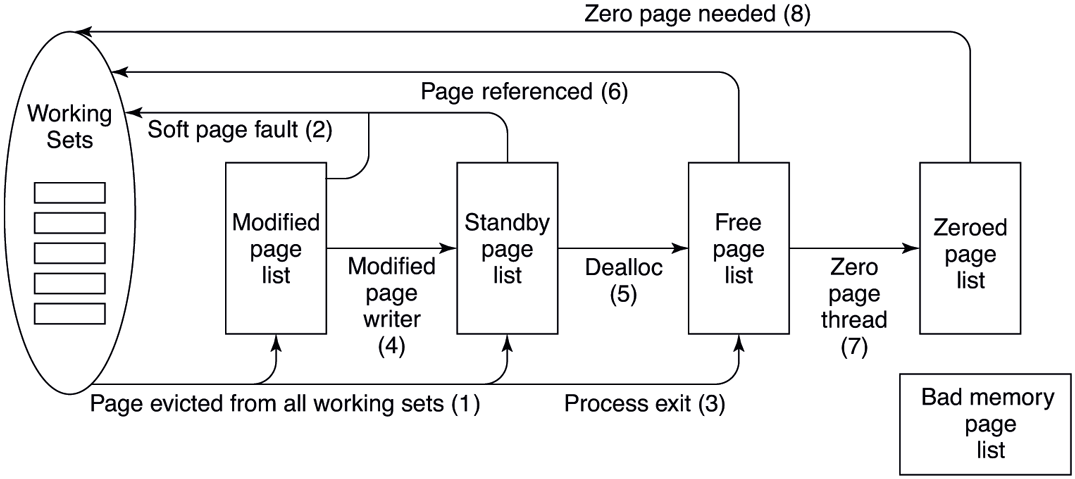
The various page lists and the transitions between them.
Pages on both lists are still live pages, so if a page fault occurs and one of these pages is needed, it is removed from the list and faulted back into the working set without any disk I/O (2). When a process exits, its private pages are not live anymore, so they move to the free list regardless of whether they were in the working set or on the modified or standby lists (3). Any pagefile space in use by the process is also freed.
Other transitions are caused by other system threads. Every 4 seconds the balance set manager thread runs and looks for processes all of whose threads have been idle for a certain number of seconds. If it finds any such processes, their kernel stacks are unpinned from physical memory and their pages are moved to the standby or modified lists, also shown as (1).
Two other system threads, the mapped page writer and the modified page writer, wake up periodically to see if there are enough clean pages. If not, they take pages from the top of the modified list, write them back to disk, and then move them to the standby list (4). The former handles writes to mapped files and the latter handles writes to the pagefiles. The result of these writes is to transform modified (dirty) pages into standby (clean) pages.
The reason for having two threads is that a mapped file might have to grow as a result of the write, and growing it requires access to on-disk data structures to allocate a free disk block. If there is no room in memory to bring them in when a page has to be written, a deadlock could result. The other thread can solve the problem by writing out pages to a paging file.
The other transitions in Fig. 11-37 are as follows. If a process takes an action to end the lifetime of a group of pages, for example, by decommitting private pages or closing the last handle on a pagefile-backed section or deleting a file, the associated pages become free (5). When a page fault requires a page frame to hold the page about to be read in, the page frame is taken from the free list (6), if possible. It does not matter that the page may still contain confidential information because it is about to be overwritten in its entirety.
The situation is different during demand-zero faults, for example, when a stack grows or when a process takes a page fault on a newly committed private page. In that case, an empty page frame is needed and the security rules require the page to contain all zeros. For this reason, another kernel system thread, the ZeroPage thread, runs at the lowest priority (see Fig. 11-26), erasing pages that are on the free list and putting them on the zeroed page list (7). Whenever the CPU is idle and there are free pages, they might as well be zeroed since a zeroed page is potentially more useful than a free page and it costs nothing to zero the page when the CPU is idle. On big servers with terabytes of memory distributed across multiple processor sockets, it can take a long time to zero all that memory. Even though zeroing memory might be thought of as a background activity, when a cloud provider needs to start a new VM and give it terabytes of memory, zeroing pages can easily be the bottleneck. For this reason, the ZeroPage thread is actually composed of multiple threads assigned to each processor and carefully managed to maximize throughput.
The existence of all these lists leads to some subtle policy choices. For example, suppose that a page has to be brought in from disk and the free list is empty. The system is now forced to choose between taking a clean page from the standby list (which might otherwise have been faulted back in later) or an empty page from the zeroed page list (throwing away the work done in zeroing it). Which is better?
The memory manager has to decide how aggressively the system threads should move pages from the modified list to the standby list. Having clean pages around is better than having dirty pages around (since clean ones can be reused instantly), but an aggressive cleaning policy means more disk I/O and there is some chance that a newly cleaned page may be faulted back into a working set and dirtied again anyway. In general, Windows resolves these kinds of trade-offs through algorithms, heuristics, guesswork, historical precedent, rules of thumb, and administrator-controlled parameter settings.
Page Combining
One of the interesting optimizations the memory manager performs to optimize system memory usage is called page combining. UNIX systems do this, too, but they call it ‘‘deduplication,’’ as discussed in Chap. 3. Page combining is the act of single-instancing identical pages in memory and freeing the redundant ones. Periodically, the memory manager scans process private pages and identifies identical ones by computing hashes to pick candidates and then performing a byte-bybyte comparison after blocking any modification to candidate pages. Once identical pages are found, these private pages are converted to shareable pages transparently to the process. Each PTE is marked copy-on-write such that if any of the sharing processes writes to a combined page, they get their own copy.
In practice, page combining results in fairly significant memory savings because many processes load the same system DLLs at the same addresses which result in many identical pages due to copy-on-written import address table pages, writable data sections and even heap allocations with identical contents. Interestingly, the most common combined page is entirely composed of zeroes, indicating that a lot of code allocates and zeroes memory, but does not write to it afterwards.
While page combining sounds like a broadly applicable optimization, it has various security implications that must be considered. Even though page combining happens without application involvement and is hidden from applications—for example, when they call Win32 APIs to query whether a certain virtual address range is private or shareable—it is possible for an attacker to determine whether a virtual page is combined with others by timing how long it takes to write to the page (and other clever tricks). This can allow the attacker to infer contents of pages in other, potentially more privileged, processes leading to information disclosure. For this reason, Windows does not combine pages across different security domains, except for ‘‘well-known’’ page contents like all-zeroes.
11.5.4 Memory Compression
Another significant performance optimization in Windows memory management is memory compression. It’s a feature enabled by default on client systems, but off by default on server systems. Memory compression aims to fit more data into physical memory by compressing currently unused pages such that they take up less space. As a result, it reduces hard page faults and replaces them with soft faults involving a decompression step. Finally, it reduces the volume of pagefile writes as well since all data written to the pagefile is now compressed. Memory compression is implemented in an executive component called the store manager which closely integrates with the memory manager and exposes to it a simple key-value interface to add, retrieve, and remove pages.
Let us follow the journey of a private page in a process working set as it goes through the compression pipeline, illustrated in Fig. 11-38. When the memory manager decides to trim the page from the working set based on its normal policies, the private page ends up on the modified list. At some point, the memory manager decides, again based on usual policies, to gather pages from the modified list to write to the pagefile.
Figure 11-38
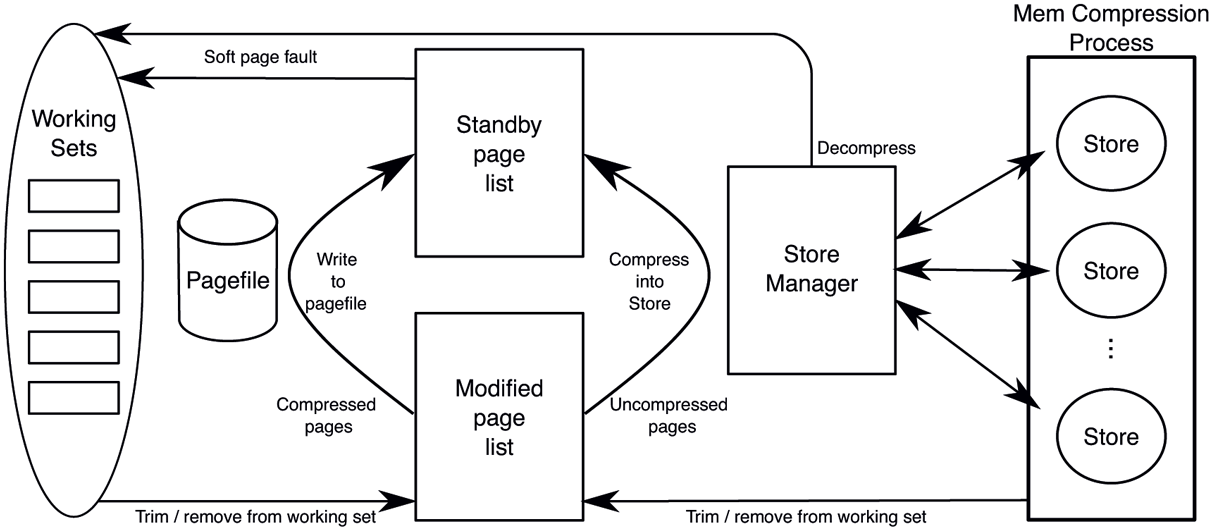
Page transitions with memory compression (free/zero lists and mapped files omitted for clarity).
Since our page is not compressed, the memory manager calls the store manager’s SmPageWrite routine to add the page to a store. The store manager chooses an appropriate store (more on this later), compresses the page into it and returns to the memory manager. Since the page contents have been safely compressed into a store, the memory manager sets its page priority to the lowest (zero) and inserts into the standby list. It could have freed the page, but caching it at low priority is generally a better option because it avoids decompression in case the page may get soft-faulted from the standby list. Let us assume the page has been repurposed off the priority 0 standby sublist and now the process decides to write to the page. That access will result in a page fault and the memory manager will determine that the page is saved to the store manager (rather than the pagefile), so it will allocate a new physical page and call SmPageRead to retrieve page contents into the new physical page. The store manager will route the request to the appropriate store which will find and decompress the data into the target page.
Astute readers may notice that the store manager behaves almost exactly like a regular pagefile, albeit a compressed one. In fact, the memory manager treats the store manager just like another pagefile. During system initialization, if memory compression is enabled, the memory manager creates a virtual pagefile to represent the store manager. The size of the virtual pagefile is largely arbitrary, but it limits how many pages can be saved in the store manager at one time, so an appropriate size based on the system commit limit is picked. For most intents and purposes, the virtual pagefile is a real pagefile: it uses one of the 16 pagefile slots and has the same underlying bitmap data structures to manage available space. However, it does not have a backing file and, instead, uses the store manager SmPageRead and SmPageWrite interface to perform I/O. So, during modified page writing, a virtual pagefile offset is allocated for the uncompressed page and the pagefile offset combined with the pagefile number is used as the key to identify the page when handing it over to the store manager. After the page is compressed, the PFN entry and the PTE associated with the page is updated with pagefile index and offset exactly as it is done for a regular pagefile write. When pages in the virtual pagefile are modified or freed and corresponding pagefile space marked free, a system thread called the store eviction thread is notified to evict the corresponding keys from store manager via SmPageEvict. One difference between regular pagefiles and the store manager virtual pagefile is that whereas clean pages faulted into working sets are not removed from regular pagefiles, they are evicted from the store manager to avoid keeping both the uncompressed and the compressed copy of the page in memory.
As indicated in Fig. 11-38, the store manager can manage multiple stores. A system store is created at boot time as the default store for modified pages. Additional, per-process stores can also be created for individual processes. In practice, this is done for UWP applications. The store manager picks the appropriate store for an incoming modified page based on the owning process.
When the store manager initializes at boot time, it creates the MemCompression system process which provides the user-mode address space for all stores to allocate their backing memory into which incoming pages are compressed. This backing store is regular private pageable memory, allocated with a variant of VirtualAlloc. As such, the memory manager may choose to trim these pages from the MemCompression process working set or a store may decide to explicitly remove them. Once removed, these pages go to the modified list as usual, but since they are coming from the MemCompression process, and thus, are already compressed, the memory manager writes them directly to the pagefile. That’s why, when memory compression is enabled, all writes to the pagefile contain compressed data from the MemCompression process.
We mentioned above how UWP applications get their own stores rather than using the system store. This is done to optimize the working set in-swap operation we described earlier. When a per-process store is present, the out-swap proceeds normally at UWP application suspend time except that no pagefile reservation is made. This is because the pages will go to the store manager virtual pagefile and sequentiality is not important since the allocated offsets are only used to construct keys to associate with pages. Later, when the UWP process working set is emptied due to memory pressure, all pages are compressed into the per-process store.
At this point, the compressed pages of the per-process store are out-swapped, reserving sequential space in the swapfile. If memory pressure continues, these compressed pages may be explicitly emptied or trimmed from the MemCompression process working set, get written out to the pagefile and remain cached on the standby list or leave memory. When the UWP application is about to be resumed, during working set in-swap, the system carefully choreographs disk read and decompression operations to maximize parallelism and efficiency. First, a store inswap is kicked off to bring the compressed pages belonging to the store into the MemCompression process working set from the swapfile using large, sequential I/Os. Of course, if the compressed pages never left memory (which is very likely), no actual I/Os need to be issued. In parallel, the working set in-swap for the UWP process is initiated, which uses multiple threads to decompress pages from the per-process store. The precise ordering of pages for these two operations ensures that they make progress in parallel with no unnecessary delays to reconstruct the UWP process working set quickly.
11.5.5 Memory Partitions
A memory partition is an instantiation of the memory manager with its own isolated slice of RAM to manage. Being kernel objects, they support naming and security. There are NT APIs for creating and managing them as well as allocating memory from them using partition handles. Memory can be hot-added into a partition or moved between partitions. At boot time, the system creates the initial memory partition called the system partition which owns all memory on the machine and houses the default instance of memory management. The system partition is actually named and can be seen in the object manager namespace at \KernelObjects\MemoryPartition0.
Memory partitions are mainly targeted at two scenarios: memory isolation and workload isolation. Memory isolation is when memory needs to be set aside for later allocation. For such scenarios, a memory partition can be created and appropriate memory can be added to it (e.g., a mix of 4 KB/2 MB/1 GB pages from select NUMA nodes). Later, pages can be allocated from the partition using regular physical memory allocation APIs which have variants that accept memory partition handles or object pointers. Azure servers which host customer VMs utilize this approach to set aside memory for VMs and ensure that other activity on the server is not going to interfere with that memory. It’s important to understand that this is very different from simply pre-allocating these pages because the full set of memory management interfaces to allocate, free, and efficient zeroing of memory is available within the partition.
Workload isolation is necessary in situations where multiple separate workloads need to run concurrently without interfering with one another. In such scenarios, isolating the workloads’ CPU usage (e.g., by affinitizing workloads to different processor cores) is not sufficient. Memory is another resource that needs isolation. Otherwise, one workload can easily interfere with others by repurposing all pages on the standby list (causing others to take more hard faults) or by dirtying lots of pagefile- and file-backed memory (depleting available memory and causing new memory allocations to block until dirty pages are written out) or by fragmenting physical memory and slowing down large or huge page allocations.
Memory partitions can provide the necessary workload isolation. By associating a memory partition with a job object, it is possible to confine a process tree to a memory partition and use the job object interfaces to set the desired CPU and disk I/O restrictions for complete resource isolation.
Being an instance of memory management, a memory partition includes the following major components as shown in Fig. 11-39:
-
Page lists: Each partition owns its isolated slice of physical memory, so it maintains its own free, zero, standby, and modified page lists.
System process: Each partition creates its own minimal system process called ‘‘PartitionSystem.’’ This process provides the address space to map executables during load as well as housing per-partition system threads.
System threads: Fundamental memory management threads such as the zero page thread, the working set manager thread, the modified and mapped page writer threads are all created per-partition. In addition, other components such as the cache manager we will discuss in Sec. 11.6 also maintain per-partition threads. Finally, each partition has its dedicated system thread pool such that kernel components can queue work to it without worrying about contention from other workloads.
Pagefiles: Each partition has its own set of pagefiles and associated modified page writer thread. This is critical for maintaining its own commit.
Resource tracking: Each partition holds its own memory management resources such as commit and available memory to independently drive policies such as working set trimming and pagefile writing.
Figure 11-39
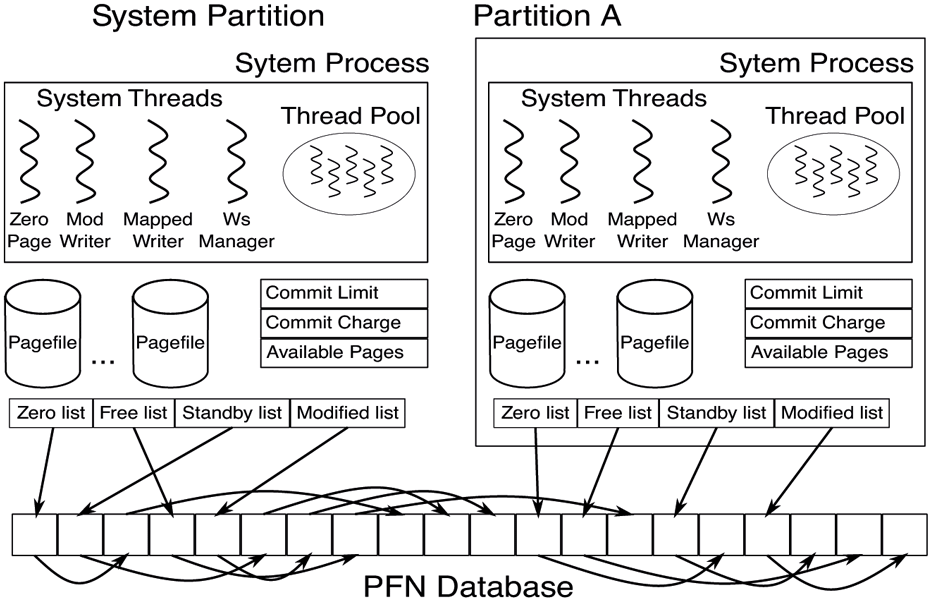
Memory partition data structures.
Notably, a memory partition does not include its own PFN database. Instead, it maintains a data structure describing the memory ranges it is responsible for and uses the system global PFN database entries. Also, most threads and data structures are initialized on demand. For example, the modified page writer thread is not necessary until a pagefile is created in the partition.
All in all, memory management is a highly complex executive component with many data structures, algorithms, and heuristics. It attempts to be largely self tuning, but there are also many knobs that administrators can tweak to affect system performance. A number of these knobs and the associated counters can be viewed using tools in the various tool kits mentioned earlier. Probably the most important thing to remember here is that memory management in real systems is a lot more than just one simple page replacement algorithm like clock or aging.