11.4 Processes and Threads in Windows
Windows has a number of concepts for managing the CPU and grouping resources together. In the following sections, we will examine these, discussing some of the relevant Win32 API calls, and show how they are implemented.
11.4.1 Fundamental Concepts
In Windows, processes are generally containers for programs. They hold the virtual address space, the handles that refer to kernel-mode objects, and threads. In their role as a container for threads, they hold common resources used for thread execution, such as the pointer to the quota structure, the shared token object, and default parameters used to initialize threads—including the priority and scheduling class. Each process has user-mode system data, called the PEB (Process Environment Block). The PEB includes the list of loaded modules (i.e., the EXE and DLLs), the memory containing environment strings, the current working directory, and data for managing the process’ heaps—as well as lots of special-case Win32 cruft that has been added over time.
Threads are the kernel’s abstraction for scheduling the CPU in Windows. Priorities are assigned to each thread based on the priority value in the containing process. Threads can also be affinitized to run only on certain processors. This helps concurrent programs running on multi-core processors to explicitly spread out work. Each thread has two separate call stacks, one for execution in user mode and one for kernel mode. There is also a TEB (Thread Environment Block) that keeps user-mode data specific to the thread, including per-thread storage called TLS (Thread Local Storage), and fields for Win32, language and cultural localization, and other specialized fields that have been added by various facilities.
Besides the PEBs and TEBs, there is another data structure that kernel mode shares with each process, namely, user shared data. This is a page that is writable by the kernel, but read-only in every user-mode process. It contains a number of values maintained by the kernel, such as various forms of time, version information, amount of physical memory, and a large number of shared flags used by various user-mode components, such as COM, terminal services, and the debuggers. The use of this read-only shared page is purely a performance optimization, as the values could also be obtained by a system call into kernel mode. But system calls are much more expensive than a single memory access, so for some system-maintained fields, such as the time, this makes a lot of sense. The other fields, such as the current time zone, change infrequently (except on airborne computers), but code that relies on these fields must query them often just to see if they have changed. As with many performance optimizations, it is a bit ugly, but it works.
Processes
The most fundamental component of a process in Windows is its address space. If the process is intended for running a program (and most are), process creation allows a section backed by an executable file on disk to be specified, which gets mapped into the address space and prepared for execution. When a process is created, the creating process receives a handle that allows it to modify the new process by mapping sections, allocating virtual memory, writing parameters and environmental data, duplicating file descriptors into its handle table, and creating threads. This is very different from how processes are created in UNIX and reflects the difference in the target systems for the original designs of UNIX vs. Windows.
As described in Sec. 11.1, UNIX was designed for 16-bit single-processor systems that used swapping to share memory among processes. In such systems, having the process as the unit of concurrency and using an operation like fork to create processes was a brilliant idea. To run a new process with small memory and no virtual memory hardware, processes in memory have to be swapped out to disk to create space. UNIX originally implemented fork simply by swapping out the parent process and handing its physical memory to the child. The operation was almost free. Programmers love things that are free.
In contrast, the hardware environment at the time Cutler’s team wrote NT was 32-bit multiprocessor systems with virtual memory hardware to share 1–16 MB of physical memory. Multiprocessors provide the opportunity to run parts of programs concurrently, so NT used processes as containers for sharing memory and object resources, and used threads as the unit of concurrency for scheduling.
Today’s systems have 64-bit address spaces, dozens of processing cores and terabytes of RAM. SSDs have displaced rotating magnetic hard disks and virtualization is rampant. So far, Windows’ design has held up well as it continued evolving and scaling to keep up with advancing hardware. Future systems are likely to have even more cores, faster and bigger RAM. The difference between memory and storage may start disappearing with phase-change memories that retain their contents when powered off, yet very fast to access. Dedicated co-processors are making a comeback to offload operations like memory movement, encryption, and compression to specialized circuits that improve performance and conserve power. Security is more important than ever before and we may start seeing emerging hardware designs based on the CHERI (Capability Hardware Enhanced RISC Instructions) architecture (Woodruff et al., 2014) with 128-bit capability-based pointers. Windows and UNIX will continue to be adapted to new hardware realities, but what will be really interesting is to see what new operating systems are designed specifically for systems based on these advances.
Jobs and Fibers
Windows can group processes together into jobs. Jobs group processes in order to apply constraints to them and the threads they contain, such as limiting resource use via a shared quota or enforcing a restricted token that prevents threads from accessing many system objects. The most significant property of jobs for resource management is that once a process is in a job, all processes’ threads in those processes create will also be in the job. There is no escape. As suggested by the name, jobs were designed for situations that are more like batch processing than ordinary interactive computing.
In Windows, jobs are most frequently used to group together the processes that are executing UWP applications. The processes that comprise a running application need to be identified to the operating system so it can manage the entire application on behalf of the user. Management includes setting resource priorities as well as deciding when to suspend, resume, or terminate, all of which happens through job facilities.
Figure 11-22 shows the relationship between jobs, processes, threads, and fibers. Jobs contain processes. Processes contain threads. But threads do not contain fibers. The relationship of threads to fibers is normally many-to-many.
Figure 11-22
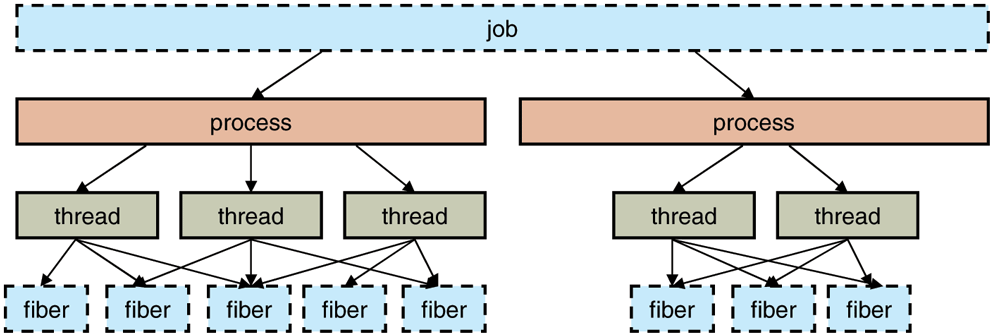
The relationship between jobs, processes, threads, and fibers. Jobs and fibers are optional; not all processes are in jobs or contain fibers.
Fibers are cooperatively scheduled user-mode execution contexts which can be switched very quickly without entering kernel mode. As such, they are useful when an application wants to schedule its own execution contexts, minimizing the overhead of thread scheduling by the kernel.
While fibers may sound promising on paper, they face many difficulties in practice. Most of the Win32 libraries are completely unaware of fibers, and applications that attempt to use fibers as if they were threads will encounter various failures. The kernel has no knowledge of fibers, and when a fiber enters the kernel, the thread it is executing on may block and the kernel will schedule an arbitrary thread on the processor, making it unavailable to run other fibers. For these reasons, fibers are rarely used except when porting code from other systems that explicitly need the functionality provided by fibers.
Thread Pools
The Win32 thread pool is a facility that builds on top of the Windows thread model to provide a better abstraction for certain types of programs. Thread creation is too expensive to be invoked every time a program wants to execute a small task concurrently with other tasks in order to take advantage of multiple processors. Tasks can be grouped together into larger tasks but this reduces the amount of exploitable concurrency in the program. An alternative approach is for a program to allocate a limited number of threads and maintain a queue of tasks that need to be run. As a thread finishes the execution of a task, it takes another one from the queue. This model separates the resource-management issues (how many processors are available and how many threads should be created) from the programming model (what is a task and how are tasks synchronized). Windows formalizes this solution into the Win32 thread pool, a set of APIs for automatically managing a dynamic pool of threads and dispatching tasks to them.
Thread pools are not a perfect solution, because when a thread blocks for some resource in the middle of a task, the thread cannot switch to a different task. But, the thread pool will inevitably create more threads than there are processors available, so that runnable threads are available to be scheduled even when other threads have blocked. The thread pool is integrated with many of the common synchronization mechanisms, such as awaiting the completion of I/O or blocking until a kernel event is signaled. Synchronization can be used as triggers for queuing a task so threads are not assigned the task before it is ready to run.
The implementation of the thread pool uses the same queue facility provided for synchronization with I/O completion, together with a kernel-mode thread factory which adds more threads to the process as needed to keep the available number of processors busy. Small tasks exist in many applications, but particularly in those that provide services in the client/server model of computing, where a stream of requests are sent from the clients to the server. Use of a thread pool for these scenarios improves the efficiency of the system by reducing the overhead of creating threads and moving the decisions about how to manage the threads in the pool out of the application and into the operating system.
A summary of CPU execution abstractions is given in Fig. 11-23.
Figure 11-23
| Name | Description | Notes |
|---|---|---|
| Job | Collection of processes that share quotas and limits | Used in AppContainers |
| Process | Container for holding resources | |
| Thread | Entity scheduled by the kernel | |
| Fiber | Lightweight thread managed entirely in user space | Rarely used |
| Thread pool | Task-oriented programming model | Built on top of threads |
Basic concepts used for CPU and resource management.
Threads
Every process normally starts out with one thread, but new ones can be created dynamically. Threads form the basis of CPU scheduling, as the operating system always selects a thread to run, not a process. Consequently, every thread has a state (ready, running, blocked, etc.), whereas processes do not have scheduling states. Threads can be created dynamically by a Win32 call that specifies the address within the enclosing process’ address space at which it is to start running.
Every thread has a thread ID, which is taken from the same space as the process IDs, so a single ID can never be in use for both a process and a thread at the same time. Process and thread IDs are multiples of four because they are actually allocated by the executive using a special handle table set aside for allocating IDs. The system is reusing the scalable handle-management facility illustrated in Figs. 11-16 and 11-17. The handle table does not have references for objects, but does use the pointer field to point at the process or thread so that the lookup of a process or thread by ID is very efficient. FIFO ordering of the list of free handles is turned on for the ID table in recent versions of Windows so that IDs are not immediately reused. The problems with immediate reuse are explored in the problems at the end of this chapter.
A thread normally runs in user mode, but when it makes a system call it switches to kernel mode and continues to run as the same thread with the same properties and limits it had in user mode. Each thread has two stacks, one for use when it is in user mode and one for use when it is in kernel mode. Whenever a thread enters the kernel, it switches to the kernel-mode stack. The values of the user-mode registers are saved in a CONTEXT data structure at the base of the kernel-mode stack. Since the only way for a user-mode thread to not be running is for it to enter the kernel, the CONTEXT for a thread always contains its register state when it is not running. The CONTEXT for each thread can be examined and modified from any process with a handle to the thread.
Threads normally run using the access token of their containing process, but in certain cases related to client/server computing, a thread running in a service process can impersonate its client, using a temporary access token based on the client’s token so it can perform operations on the client’s behalf. (In general, a service cannot use the client’s actual token as the client and server may be running on different systems.)
Threads are also the normal focal point for I/O. Threads block when performing synchronous I/O, and the outstanding I/O request packets for asynchronous I/O are linked to the thread. When a thread is finished executing, it can exit. Any I/O requests pending for the thread will be canceled. When the last thread still active in a process exits, the process terminates.
Please remember that threads are a scheduling concept, not a resource-ownership concept. Any thread is able to access all the objects that belong to its process. All it has to do is use the handle value and make the appropriate Win32 call. There is no restriction on a thread that it cannot access an object because a different thread created or opened it. The system does not even keep track of which thread created which object. Once an object handle has been put in a process’ handle table, any thread in the process can use it, even it if is impersonating a different user.
As described previously, in addition to the normal threads that run within user processes Windows has a number of system threads that run only in kernel mode and are not associated with any user process. All such system threads run in a special process called the system process. This process has its own user-mode address space which can be used by system threads as necessary. It provides the environment that threads execute in when they are not operating on behalf of a specific user-mode process. We will study some of these threads later when we come to memory management. Some perform administrative tasks, such as writing dirty pages to the disk, while others form the pool of worker threads that are assigned to run specific short-term tasks delegated by executive components or drivers that need to get some work done in the system process.
11.4.2 Job, Process, Thread, and Fiber Management API Calls
New processes are created using the Win32 API function CreateProcess. This function has many parameters and lots of options. It takes the name of the file to be executed, the command-line strings (unparsed), and a pointer to the environment strings. There are also some flags and values that control many details such as how security is configured for the process and first thread, debugger configuration, and scheduling priorities. A flag also specifies whether open handles in the creator are to be passed to the new process. The function also takes the current working directory for the new process and an optional data structure with information about the GUI Window the process is to use. Rather than returning just a process ID for the new process, Win32 returns both handles and IDs, both for the new process and for its initial thread.
The large number of parameters reveals a number of differences from the design of process creation in UNIX.
The actual search path for finding the program to execute is buried in the library code for Win32, but managed more explicitly in UNIX.
The current working directory is a kernel-mode concept in UNIX but a user-mode string in Windows. Windows does open a handle on the current directory for each process, with the same annoying effect as in UNIX: you cannot delete the directory, unless it happens to be across the network, in which case you can delete it.
UNIX parses the command line and passes an array of parameters, while Win32 leaves argument parsing up to the individual program. As a consequence, different programs may handle wildcards (e.g., *.txt) and other special symbols in an inconsistent way.
Whether file descriptors can be inherited in UNIX is a property of the handle. In Windows, it is a property of both the handle and a parameter to process creation.
Win32 is GUI oriented, so new processes are directly passed information about their primary window, while this information is passed as parameters to GUI applications in UNIX.
Windows does not have a SETUID bit as a property of the executable, but one process can create a process that runs as a different user, as long as it can obtain a token with that user’s credentials.
The process and thread handle returned from Windows can be used at any time to modify the new process/thread in many ways, including modifying the virtual memory, injecting threads into the process, and altering the execution of threads. UNIX makes modifications to the new process only between the
forkandexeccalls, and only in limited ways asexecthrows out all the user-mode state of the process.
Some of these differences are historical and philosophical. UNIX was designed to be command-line oriented rather than GUI oriented like Windows. UNIX users are more sophisticated, and they understand concepts like PATH variables. Windows inherited a lot of legacy from MS-DOS.
The comparison is also skewed because Win32 is a user-mode wrapper around the native NT process execution, much as the system library function wraps fork/exec in UNIX. The actual NT system calls for creating processes and threads, NtCreateProcess and NtCreateThread, are simpler than the Win32 versions. The main parameters to NT process creation are a handle on a section representing the program file to run, a flag specifying whether the new process should, by default, inherit handles from the creator, and parameters related to the security model. All the details of setting up the environment strings and creating the initial thread are left to user-mode code that can use the handle on the new process to manipulate its virtual address space directly.
To support the POSIX subsystem, native process creation has an option to create a new process by copying the virtual address space of another process rather than mapping a section object for a new program. This is used only to implement fork for POSIX, and not exposed by Win32. Since POSIX no longer ships with Windows, process duplication has little use—though sometimes enterprising developers come up with special uses, similar to uses of fork without exec in UNIX. One such interesting usage is process crashdump generation. When a process crashes and a dump needs to be generated, a clone of the address space is created using the native NT process creation API, but without handle duplication. This allows crashdump generation to take its time while the crashing process can be safely restarted without encountering violations, for example due to files still being open by its clone.
Thread creation passes the CPU context to use for the new thread (which includes the stack pointer and initial instruction pointer), a template for the TEB, and a flag saying whether the thread should be immediately run or created in a suspended state (waiting for somebody to call NtResumeThread on its handle). Creation of the user-mode stack and pushing of the argv/argc parameters is left to usermode code calling the native NT memory-management APIs on the process handle.
In the Windows Vista release, a new native API for processes, NtCreateUserProcess, was added which moves many of the user-mode steps into the kernelmode executive and combines process creation with creation of the initial thread. The reason for the change was to support the use of processes as security boundaries. Normally, all processes created by a user are considered to be equally trusted. It is the user, as represented by a token, that determines where the trust boundary is. NtCreateUserProcess allows processes to also provide trust boundaries, but this means that the creating process does not have sufficient rights regarding a new process handle to implement the details of process creation in user mode for processes that are in a different trust environment. The primary use of a process in a different trust boundary (which are called protected processes) is to support forms of digital rights management, which protect copyrighted material from being used improperly. Of course, protected processes only target user-mode attacks against protected content and cannot prevent kernel-mode attacks.
Interprocess Communication
Threads can communicate in a wide variety of ways, including pipes, named pipes, mailslots, sockets, remote procedure calls, and shared files. Pipes have two modes: byte and message, selected at creation time. Byte-mode pipes work the same way as in UNIX. Message-mode pipes are somewhat similar but preserve message boundaries, so that four writes of 128 bytes will be read as four 128-byte messages, and not as one 512-byte message, as might happen with byte-mode pipes. Named pipes also exist and have the same two modes as regular pipes. Named pipes can also be used over a network but regular pipes cannot.
Mailslots are a feature of the now-defunct OS/2 operating system implemented in Windows for compatibility. They are similar to pipes in some ways, but not all. For one thing, they are one way, whereas pipes are two way. They could be used over a network but do not provide guaranteed delivery. Finally, they allow the sending process to broadcast a message to many receivers, instead of to just one receiver. Both mailslots and named pipes are implemented as file systems in Windows, rather than executive functions. This allows them to be accessed over the network using the existing remote file-system protocols.
Sockets are like pipes, except that they normally connect processes on different machines. For example, one process writes to a socket and another one on a remote machine reads from it. Sockets can be used on a single machine, but they are less efficient than pipes. Sockets were originally designed for Berkeley UNIX, and the implementation was made widely available. Some of the Berkeley code and data structures are still present in Windows today, as acknowledged in the release notes for the system.
RPCs are a way for process A to have process B call a procedure in B’s address space on A’s behalf and return the result to A. Various restrictions on the parameters exist. For example, it makes no sense to pass a pointer to a different process, so data structures have to be packaged up and transmitted in a nonprocess-specific way. RPC is normally implemented as an abstraction layer on top of a transport layer. In the case of Windows, the transport can be TCP/IP sockets, named pipes, or ALPC. ALPC is a message-passing facility in the kernel-mode executive. It is optimized for communicating between processes on the local machine and does not operate across the network. The basic design is for sending messages that generate replies, implementing a lightweight version of remote procedure call which the RPC package can build on top of to provide a richer set of features than available in ALPC. ALPC is implemented using a combination of copying parameters and temporary allocation of shared memory, based on the size of the messages.
Finally, processes can share objects. Among these are section objects, which can be mapped into the virtual address space of different processes at the same time. All writes done by one process then appear in the address spaces of the other processes. Using this mechanism, the shared buffer used in producer-consumer problems can easily be implemented.
Synchronization
Processes can also use various types of synchronization objects. Just as Windows provides numerous interprocess communication mechanisms, it also provides numerous synchronization mechanisms, including events, semaphores, mutexes, and various user-mode primitives. All of these mechanisms work with threads, not processes, so that when a thread blocks on a semaphore, other threads in that process (if any) are not affected and can continue to run.
One of the most fundamental synchronization primitives exposed by the kernel is the Event. Events are kernel-mode objects and thus have security descriptors and handles. Event handles can be duplicated using DuplicateHandle and passed to another process so that multiple processes can synchronize on the same event. An event can also be given a name in the Win32 namespace and have an ACL set to protect it. Sometimes sharing an event by name is more appropriate than duplicating the handle.
As we have described previously, there are two kinds of events: notification events and synchronization events. An event can be in one of two states: signaled or not-signaled. A thread can wait for an event to be signaled with WaitForSingleObject. If another thread signals an event with SetEvent, what happens depends on the type of event. With a notification event, all waiting threads are released and the event stays set until manually cleared with ResetEvent. With a synchronization event, if one or more threads are waiting, exactly one thread is released and the event is cleared. An alternative operation is PulseEvent, which is like SetEvent except that if nobody is waiting, the pulse is lost and the event is cleared. In contrast, a SetEvent that occurs with no waiting threads is remembered by leaving the event in the signaled state so a subsequent thread that calls a wait API for the event will not actually wait.
Semaphores can be created using the CreateSemaphore Win32 API function, which can also initialize it to a given value and define a maximum value as well. Like events, semaphores are also kernel-mode objects. Calls for up and down exist, although they have the somewhat odd names of ReleaseSemaphore (up) and WaitForSingleObject (down). It is also possible to give WaitForSingleObject a timeout, so the calling thread can be released eventually, even if the semaphore remains at 0. WaitForSingleObject and WaitForMultipleObjects are the common interfaces used for waiting on the dispatcher objects discussed in Sec. 11.3. While it would have been possible to wrap the single-object version of these APIs in a wrapper with a somewhat more semaphore-friendly name, many threads use the multiple-object version which may include waiting for multiple flavors of synchronization objects as well as other events like process or thread termination, I/O completion, and messages being available on sockets and ports.
Mutexes are also kernel-mode objects used for synchronization, but simpler than semaphores because they do not have counters. They are essentially locks, with API functions for locking WaitForSingleObject and unlocking ReleaseMutex. Like semaphore handles, mutex handles can be duplicated and passed between processes so that threads in different processes can access the same mutex.
Another synchronization mechanism is called Critical Sections, which implement the concept of critical regions. These are similar to mutexes in Windows, except local to the address space of the creating thread. Because critical sections are not kernel-mode objects, they do not have explicit handles or security descriptors and cannot be passed between processes. Locking and unlocking are done with EnterCriticalSection and LeaveCriticalSection, respectively. Because these API functions are performed initially in user space and make kernel calls only when blocking is needed, they are much faster than mutexes. Critical sections are optimized to combine spin locks (on multiprocessors) with the use of kernel synchronization only when necessary. In many applications, most critical sections are so rarely contended or have such short hold times that it is never necessary to allocate a kernel synchronization object. This results in a very significant saving in kernel memory.
SRW locks (Slim Reader-Writer locks) are another type of process-local lock implemented in user-mode like critical sections, but they support both exclusive and shared acquisition via the AcquireSRWLockExclusive and AcquireSRWLockShared APIs and the corresponding release functions. When the lock is held shared, if an exclusive acquire arrives (and starts waiting), subsequent shared acquire attempts block to avoid starving exclusive waiters. A big advantage of SRW locks is that they are the size of a pointer which allows them to be used for granular synchronization of small data structures. Unlike critical sections, SRW locks do not support recursive acquisition which is generally not a good idea anyway.
Sometimes applications need to check some state protected by a lock and wait until a condition is satisfied in a synchronized way. Examples are producer-consumer or bounded buffer problems. Windows provides Condition variables for these situations. They allow the caller to atomically release a lock, either a critical section or an SRW lock, and enter a sleeping state using SleepConditionVariableCS and SleepConditionVariableSRW APIs. A thread changing the state can wake any waiters via WakeConditionVariable or WakeAllConditionVariable.
Two other useful user-mode synchronization primitives provided by Windows are WaitOnAddress and InitOnceExecuteOnce. WaitOnAddress is called to wait for the value at the specified address to be modified. The application must call either WakeByAddressSingle (or WakeByAddressAll) after modifying the location to wake either the first (or all) of the threads that called WaitOnAddress on that location. The advantage of this API over using events is that it is not necessary to allocate an explicit event for synchronization. Instead, the system hashes the address of the location to find a list of all the waiters for changes to a given address. WaitOnAddress functions similar to the sleep/wakeup mechanism found in the UNIX kernel. Critical sections mentioned earlier actually use the WaitOnAddress primitive for its implementation. InitOnceExecuteOnce can be used to ensure that an initialization routine is run exactly one time in a program. Correct initialization of data structures is surprisingly hard in multithreaded programs and this primitive provides a very simple way to ensure correctness and high-performance.
So far, we discussed the most popular synchronization mechanisms provided by Windows to user-mode programs. There are many more primitives exposed to kernel-mode callers. Some examples are EResources which are reader-writer locks typically used by the file system stack which support unusual scenarios such as cross-thread lock ownership transfer. FastMutex is an exclusive lock similar to a critical section and PushLocks are the kernel-mode analogue of SRW locks. A high-performance variant of pushlocks, called the Cache-aware PushLock, is implemented to provide scalability even on machines with hundreds of processor cores. A cache-aware pushlock is composed of many pushlocks, one for each processor (or small groups of processors). It is targeted at scenarios where exclusive acquires are rare. Shared acquires only acquire the local pushlock associated with the processor while exclusive acquires must acquire every pushlock. Only acquiring a local lock in the common case results in much more efficient processor cache behavior especially on multi-NUMA machines. While the cache-aware pushlock is great for scalability, it does have a large memory cost and is therefore not always appropriate to use for small, multiplicative data structures. The Auto-expand PushLock provides a good compromise: it starts out as a single pushlock, taking up only two pointers worth of space, but automatically ‘‘expands’’ to become a cache-aware pushlock when it detects a high degree of cache contention due to concurrent shared acquires.
A summary of these synchronization primitives is given in Fig. 11-24.
Figure 11-24
| Primitive | Kernel object | Kernel/User | Shared/Exclusive |
|---|---|---|---|
| Event | Yes | Both | N/A |
| Semaphore | Yes | Both | N/A |
| Mutex | Yes | Both | Exclusive |
| Critical Section | No | User-mode | Exclusive |
| SRW Lock | No | User-mode | Shared |
| Condition Variable | No | User-mode | N/A |
| InitOnce | No | User-mode | N/A |
| WaitOnAddress | No | User-mode | N/A |
| EResource | No | Kernel-mode | Shared |
| FastMutex | No | Kernel-mode | Exclusive |
| PushLock | No | Kernel-mode | Shared |
| Cache-aware PushLock | No | Kernel-mode | Shared |
| Auto-expand PushLock | No | Kernel-mode | Shared |
Summary of synchronization primitives provided by Windows.
11.4.3 Implementation of Processes and Threads
In this section, we will get into more detail about how Windows creates a process (and the initial thread). Because Win32 is the most documented interface, we will start there. But we will quickly work our way down into the kernel and understand the implementation of the native API call for creating a new process. We will focus on the main code paths that get executed whenever processes are created, as well as look at a few of the details that fill in gaps in what we have covered so far.
A process is created when another process makes the Win32 CreateProcess call. This call invokes a user-mode procedure in kernelbase.dll that makes a call to NtCreateUserProcess in the kernel to create the process in several steps.
Convert the executable file name given as a parameter from a Win32 path name to an NT path name. If the executable has just a name without a directory path name, it is searched for in the directories listed in the default directories (which include, but are not limited to, those in the PATH variable in the environment).
Bundle up the process-creation parameters and pass them, along with the full path name of the executable program, to the native API
NtCreateUserProcess.Running in kernel mode,
NtCreateUserProcessprocesses the parameters, then opens the program image and creates a section object that can be used to map the program into the new process’ virtual address space.The process manager allocates and initializes the process object (the kernel data structure representing a process to both the kernel and executive layers).
The memory manager creates the address space for the new process by allocating and initializing the page directories and the virtual address descriptors which describe the kernel-mode portion, including the process-specific regions, such as the self-map page-directory entries that gives each process kernel-mode access to the physical pages in its entire page table using kernel virtual addresses. (We will describe the self map in more detail in Sec. 11.5.)
A handle table is created for the new process, and all the handles from the caller that are allowed to be inherited are duplicated into it.
The shared user page is mapped, and the memory manager initializes the working-set data structures used for deciding what pages to trim from a process when physical memory is low. The executable image represented by the section object are mapped into the new process’ user-mode address space.
The executive creates and initializes the user-mode PEB, which is used by both user mode processes and the kernel to maintain processwide state information, such as the user-mode heap pointers and the list of loaded libraries (DLLs).
Virtual memory is allocated in the new process and used to pass parameters, including the environment strings and command line.
A process ID is allocated from the special handle table (ID table) the kernel maintains for efficiently allocating locally unique IDs for processes and threads.
A thread object is allocated and initialized. A user-mode stack is allocated along with the Thread Environment Block. The CONTEXT record which contains the thread’s initial values for the CPU registers (including the instruction and stack pointers) is initialized.
The process object is added to the global list of processes. Handles for the process and thread objects are allocated in the caller’s handle table. An ID for the initial thread is allocated from the ID table.
NtCreateUserProcessreturns to user mode with the new process created, containing a single thread that is ready to run but suspended.If the NT API fails, the Win32 code checks to see if this might be a process belonging to another subsystem like WoW64. Or perhaps the program is marked that it should be run under the debugger. These special cases are handled with special code in the user-mode
CreateProcesscode.If
NtCreateUserProcesswas successful, there is still some work to be done. Win32 processes have to be registered with the Win32 subsystem process, csrss.exe. Kernelbase.dll sends a message to csrss telling it about the new process along with the process and thread handles so it can duplicate itself. The process and threads are entered into the subsystems’ tables so that they have a complete list of all Win32 processes and threads. The subsystem then displays a cursor containing a pointer with an hourglass to tell the user that something is going on but that the cursor can be used in the meanwhile. When the process makes its first GUI call, usually to create a window, the cursor is removed (it times out after 2 seconds if no call is forthcoming).If the process is restricted, such as low-rights Internet browser, the token is modified to restrict what objects the new process can access.
If the application program was marked as needing to be shimmed to run compatibly with the current version of Windows, the specified shims are applied. Shims usually wrap library calls to slightly modify their behavior, such as returning a fake version number or delaying the freeing of memory to work around bugs in applications.
Finally, call
NtResumeThreadto unsuspend the thread and return the structure to the caller containing the IDs and handles for the process and thread that were just created.
In earlier versions of Windows, much of the algorithm for process creation was implemented in the user-mode procedure which would create a new process in using multiple system calls and by performing other work using the NT native APIs that support implementation of subsystems. These steps were moved into the kernel to reduce the ability of the parent process to manipulate the child process in the cases where the child is running a protected program, such as one that implements DRM to protect movies from piracy.
The original native API, NtCreateProcess, is still supported by the system, so much of process creation could still be done within user mode of the parent process—as long as the process being created is not a protected process.
Generally, when kernel-mode component need to map files or allocate memory in a user-mode address space, they can use the system process. However, sometimes a dedicated address space is desired for better isolation since the system process user-mode address space is accessible to all kernel-mode entities. For such needs, Windows supports the concept of a Minimal Process. A minimal process is just an address space; its creation skips over most of the steps described above since it is not intended for execution. It has no shared user page, or a PEB, or any user-mode threads. No DLLs are mapped in its address space; it is entirely empty at creation. And it certainly does not register with the Win32 subsystem. In fact, minimal processes are only exposed to operating system kernel components; not even drivers. Some examples of kernel components that use minimal processes are listed below:
Registry: The registry creates a minimal process called ‘‘Registry’’ and maps its registry hives into the user-mode address space of the process. This protects the hive data from potential corruption due to bugs in drivers.
Memory Compression: The memory compression component uses a minimal process called ‘‘Memory Compression’’ to hold its compressed data. Just like the registry, the goal is to avoid corruption. Also, having its own process allows setting of per-process policies like working set limits. We will discuss memory compression in more detail in Sec. 11.5.
Memory Partitions: A memory partition represents a subset of memory with its own isolated instance of memory management. It is used for subdividing memory for dedicated purposes and to run isolated workloads which should not interfere with one another due to memory management mechanisms. Each memory partition comes with its minimal system process, called ‘‘PartitionSystem,’’ into which the memory manager can map executables that are being loaded in that partition. We will cover memory partitions in Sec. 11.5.
Scheduling
The Windows kernel does not use a central scheduling thread. Instead, when a thread cannot run any more, the thread is directed into the scheduler to see which thread to switch to. The following conditions invoke scheduling.
A running thread blocks on an I/O, lock, event, semaphore, etc.
The thread signals an object (e.g., calls
SetEventon an event).The quantum expires.
In case 1, the thread is already in the kernel to carry out the operation on the dispatcher or I/O object. It cannot possibly continue, so it calls the scheduler code to pick its successor and load that thread’s CONTEXT record to resume running it.
In case 2, the running thread is in the kernel, too. However, after signaling some object, it can definitely continue because signaling an object never blocks. Still, the thread is required to call the scheduler to see if the result of its action has readied a thread with a higher scheduling priority that is now ready to run. If so, a thread switch occurs since Windows is fully preemptive (i.e., thread switches can occur at any moment, not just at the end of the current thread’s quantum). However, if multiple CPUs are present, a thread that was made ready may be scheduled on a different CPU and the original thread can continue to execute on the current CPU even though its scheduling priority is lower.
In case 3, an interrupt to kernel mode occurs, at which point the thread executes the scheduler code to see who runs next. Depending on what other threads are waiting, the same thread may be selected, in which case it gets a new quantum and continues running. Otherwise a thread switch happens.
The scheduler is also called under two other conditions:
An I/O operation completes.
A timed wait expires.
In the first case, a thread may have been waiting on this I/O and is now released to run. A check has to be made to see if it should preempt the running thread since there is no guaranteed minimum run time. The scheduler is not run in the interrupt handler itself (since that may keep interrupts turned off too long). Instead, a DPC is queued for slightly later, after the interrupt handler is done. In the second case, a thread has done a down on a semaphore or blocked on some other object, but with a timeout that has now expired. Again it is necessary for the interrupt handler to queue a DPC to avoid having it run during the clock interrupt handler. If a thread has been made ready by this timeout, the scheduler will be run. If the newly runnable thread has higher priority, the current thread is preempted as in case 1.
Now we come to the actual scheduling algorithm. The Win32 API provides two APIs to influence thread scheduling. First, there is a call SetPriorityClass that sets the priority class of all the threads in the caller’s process. The allowed values are real-time, high, above normal, normal, below normal, and idle. The priority class determines the relative priorities of processes. The process priority class can also be used by a process to temporarily mark itself as being background, meaning that it should not interfere with any other activity in the system. Note that the priority class is established for the process, but it affects the actual priority of every thread in the process by setting a base priority that each thread starts with when created.
The second Win32 API is SetThreadPriority. It sets the relative priority of a thread (possibly, but not necessarily, the calling thread) with respect to the priority class of its process. The allowed values are time critical, highest, above normal, normal, below normal, lowest, and idle. Time-critical threads get the highest nonreal-time scheduling priority, while idle threads get the lowest, irrespective of the priority class. The other priority values adjust the base priority of a thread with respect to the normal value determined by the priority class ( 0, respectively). The use of priority classes and relative thread priorities makes it easier for applications to decide what priorities to specify.
The scheduler works as follows. The system has 32 priorities, numbered from 0 to 31. The combinations of priority class and relative priority are mapped onto 32 absolute thread priorities according to the table of Fig. 11-25. The number in the table determines the thread’s base priority. In addition, every thread has a current priority, which may be higher (but not lower) than the base priority and which we will discuss shortly.
Figure 11-25
| Win32 process class priorities | |||||||
|---|---|---|---|---|---|---|---|
| Win32 thread priorities | |||||||
| Real-time | High | Above normal | Normal | Below normal | Idle | ||
| Time critical | 31 | 15 | 15 | 15 | 15 | 15 | |
| Highest | 26 | 15 | 12 | 10 | 8 | 6 | |
| Above normal | 25 | 14 | 11 | 9 | 7 | 5 | |
| Normal | 24 | 13 | 10 | 8 | 6 | 4 | |
| Below normal | 23 | 12 | 9 | 7 | 5 | 3 | |
| Lowest | 22 | 11 | 8 | 6 | 4 | 2 | |
| Idle | 16 | 1 | 1 | 1 | 1 | 1 | |
Mapping of Win32 priorities to Windows priorities.
To use these priorities for scheduling, the system maintains an array of 32 lists of threads, corresponding to priorities 0 through 31 derived from the table of Fig. 11-25. Each list contains ready threads at the corresponding priority. The basic scheduling algorithm consists of searching the array from priority 31 down to priority 0. As soon as a nonempty list is found, the thread at the head of the queue is selected and run for one quantum. If the quantum expires, the thread goes to the end of the queue at its priority level and the thread at the front is chosen next. In other words, when there are multiple threads ready at the highest priority level, they run round robin for one quantum each. If no thread is ready, the idle thread is selected for execution in order to idle the processor—that is, set it to a low power state waiting for an interrupt to occur.
It should be noted that scheduling is done by picking a thread without regard to which process that thread belongs. Thus, the scheduler does not first pick a process and then pick a thread in that process. It only looks at the threads. It does not consider which thread belongs to which process except to determine if it also needs to switch address spaces when switching threads.
To improve the scalability of the scheduling algorithm for multiprocessors with a high number of processors, the scheduler partitions the global set of ready threads into multiple separate ready queues each with its own array of 32 lists. These ready queues exist in two forms, processor local ready queues that are associated with a single processor and shared ready queues that are associated with groups of processors. A thread is only eligible to be placed into a shared ready queue if it is capable of running on all processors associated with the queue. When a processor needs to select a new thread to run due to a thread blocking, it will first consult the ready queues to which it is associated and only consult ready queues associated with other processors if no candidate threads could be found locally.
As an additional improvement, the scheduler tries hard not to have to take the locks that protect access to the ready queue lists. Instead, it sees if it can directly dispatch a thread that is ready to run to the processor where it should run rather than add it to a ready queue.
Some multiprocessor systems have complex memory topologies where CPUs have their own local memory and while they can execute programs and access data out of other processors memory, this comes at a performance cost. These systems are called NUMA (NonUniform Memory Access) machines. Additionally, some multiprocessor systems have complex cache hierarchies where only some of the processor cores in a physical CPU share a last-level cache. The scheduler is aware of these complex topologies and tries to optimize thread placement by assigning each thread an ideal processor. The scheduler then tries to schedule each thread to a processor that is as close topologically to its ideal processor as possible. If a thread cannot be scheduled to a processor immediately, then it will be placed in a ready queue associated with its ideal processor, preferably the shared ready queue. However, if the thread is incapable of running on some processors associated with that queue, for example due to an affinity restriction, it will be placed in the ideal processor’s local ready queue. The memory manager also uses the ideal processor to determine which physical pages should be allocated to satisfy page faults, preferring to choose pages from the NUMA node belonging to the faulting thread’s ideal processor.
The array of queue headers is shown in Fig. 11-26. The figure shows that there are actually four categories of priorities: real-time, user, zero, and idle, which is effectively These deserve some comment. Priorities 16–31 are called system, and are intended to build systems that satisfy real-time constraints, such as deadlines needed for multimedia presentations. Threads with real-time priorities run before any of the threads with dynamic priorities, but not before DPCs and ISRs. If a real-time application wants to run on the system, it may require device drivers that are careful not to run DPCs or ISRs for any extended time as they might cause the real-time threads to miss their deadlines.
Figure 11-26
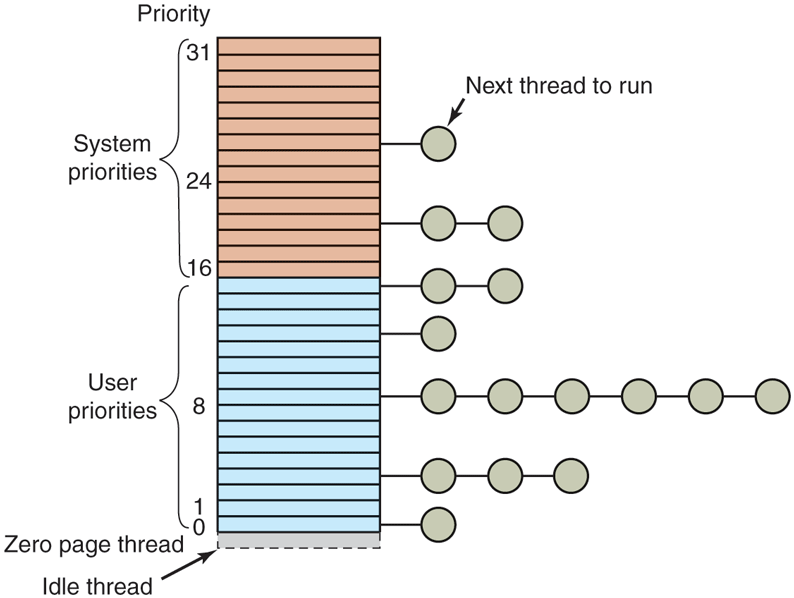
Windows supports 32 priorities for threads.
Ordinary users may not create real-time threads. If a user thread ran at a higher priority than, say, the keyboard or mouse thread and got into a loop, the keyboard or mouse thread would never run, effectively hanging the system. The right to set the priority class to real-time requires a special privilege to be enabled in the process’ token. Normal users do not have this privilege.
Application threads normally run at priorities 1–15. By setting the process and thread priorities, an application can determine which threads get preference. The ZeroPage system threads run at priority 0 and convert free pages into pages of all zeroes. There is a separate ZeroPage thread for each real processor.
Each thread has a base priority based on the priority class of the process and the relative priority of the thread. But the priority used for determining which of the 32 lists a ready thread is queued on is determined by its current priority, which is normally the same as the base priority—but not always. Under certain conditions, the current priority of a thread is adjusted by the kernel above its base priority. Since the array of Fig. 11-26 is based on the current priority, changing this priority affects scheduling. These priority adjustments can be classified into two types: priority boost and priority floors.
First let us discuss priority boosts. Boosts are temporary adjustments to thread priority and are generally applied when a thread enters the ready state. For example, when an I/O operation completes and releases a waiting thread, the priority is boosted to give it a chance to run again quickly and start more I/O. The idea here is to keep the I/O devices busy. The amount of boost depends on the I/O device, typically 1 for a disk, 2 for a serial line, 6 for the keyboard, and 8 for the sound card.
Similarly, if a thread was waiting on a semaphore, mutex, or other event, when it is released, it gets boosted by two levels if it is in the foreground process (the process controlling the window to which keyboard input is sent) and one level otherwise. This fix tends to raise interactive processes above the big crowd at level 8. Finally, if a GUI thread wakes up because window input is now available, it gets a boost for the same reason.
These boosts are not forever. They take effect immediately and can cause rescheduling of the CPU. But if a thread uses all of its next quantum, it loses one priority level and moves down one queue in the priority array. If it uses up another full quantum, it moves down another level, and so on until it hits its base level, where it remains until it is boosted again. A thread cannot be boosted into or within the real-time priority range, non-realtime threads can be boosted to at most a priority of 15 and realtime threads cannot be boosted at all.
The second class of priority adjustment is a priority floor. Unlike boosts which apply an adjustment relative to a thread’s base priority, priority floors apply a constraint that a thread’s absolute current priority must never fall below a given minimum priority. This constraint is not linked to the thread quantum and persists until explicitly removed.
One case in which priority floors are used is illustrated in Fig. 11-27. Imagine that on a single processor machine, a thread T1 running in kernel-mode at priority 4 gets preempted by a priority 8 thread T2 after acquiring a pushlock. Then, a priority 12 thread T3 arrives, preempts T2 and blocks trying to acquire the pushlock held by T1. At this point, both T1 and T2 are runnable, but T2 has higher priority, so it continues running even though it is effectively preventing T3, a higher priority thread, from making progress because T1 is not able to run to release the pushlock. This situation is a very well-known problem called priority inversion. Windows addresses priority inversion between kernel threads through a facility in the thread scheduler called Autoboost. Autoboost automatically tracks resource dependencies between threads and applies priority floors to raise the scheduling priority of threads that hold resources needed by higher-priority threads. In this case, Autoboost would determine that the owner of the pushlock needs to be raised to the maximum priority of the waiters, so it would apply a priority floor of 12 to T1 until it releases the lock, thus resolving the inversion.
Figure 11-27
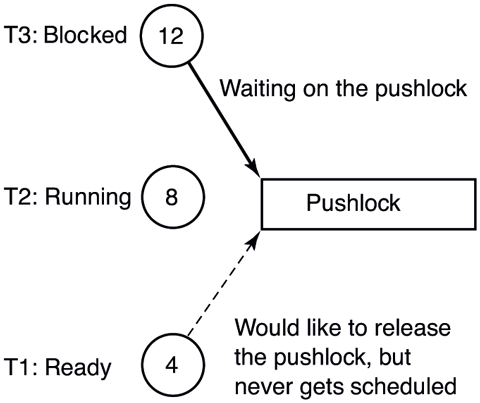
An example of priority inversion.
In some multiprocessor systems, there are multiple types of processors with varying performance and efficiency characteristics. On these systems with heterogeneous processors, the scheduler must take these varying performance and efficiency characteristics into account in order to make optimal scheduling decisions. The Windows kernel does this through a thread scheduling property called the QoS class (Quality-of-Service class), which classifies threads based on their importance to the user and their performance requirements. Windows defines six QoS classes: high, medium, low, eco, multimedia, and deadline. In general, threads with a higher QoS class are threads that are more important to the user and thus require higher performance, for example threads that belong to a process that is in the foreground. Threads with a lower QoS class are threads that are less important and favor efficiency over performance, for example threads performing background maintenance work. Classification of threads into QoS levels is done by the scheduler through a number of heuristics considering attributes such as whether a thread belongs to a process with a foreground window or belongs to a process that is playing audio. Applications can also provide explicit process and thread level hints about their importance via the SetProcessInformation and SetThreadInformation Win32 APIs. From the thread’s QoS class, the scheduler derives several more specific scheduling properties based on the system’s power policy.
Firstly, the system’s power policy can be configured to restrict work to a particular type of processor. For example, the system can be configured to allow low QoS work to run only on the most efficient processors in the system in order to achieve maximum efficiency for this work at the expense of performance. These restrictions are considered by the scheduler when deciding which processor a thread should be scheduled to.
Secondly, a thread’s QoS determines whether it prefers scheduling for performance or efficiency. The scheduler maintains two rankings of the system’s processors: one in order of performance and another in order of efficiency. System power policy determines which of these orderings should be used by the scheduler for each QoS class when it is searching for an idle processor upon which to run a thread.
Finally, a thread’s QoS determines how important a thread’s desire for performance or efficiency is relative to other threads of differing QoS. This importance ordering is used to determine which threads get access to the more performant processors in the system when the more performant cores are over utilized. Note that this is different from a thread’s priority in that thread priority determines the set of threads that will run at a given point in time whereas importance controls which of the threads out of that set will be given their preferred placement. This is accomplished via a scheduler policy referred to as core trading. If a thread that prefers performance is being scheduled and the scheduler is unable to find an idle high-performance processor, but is able to locate a low-performance processor, the scheduler will check whether one of the high-performance processors is running a lower importance thread. If so, it will swap the processor assignments to place the higher importance thread on the more performant processor and place the lower importance thread on the less performant processor.
Windows runs on PCs, which usually have only a single interactive session active at a time. However, Windows also supports a terminal server mode which supports multiple interactive sessions over the network using the remote desktop protocol. When running multiple user sessions, it is easy for one user to interfere with another by consuming too much processor resources. Windows implements a fair-share algorithm, DFSS (Dynamic Fair-Share Scheduling), which keeps sessions from running excessively. DFSS uses scheduling groups to organize the threads in each session. Within each group, the threads are scheduled according to normal Windows scheduling policies, but each group is given more or less access to the processors based on how much the group has been running in aggregate. The relative priorities of the groups are adjusted slowly to allow ignore short bursts of activity and reduce the amount a group is allowed to run only if it uses excessive processor time over long periods.
11.4.4 WoW64 and Emulation
Application compatibility has always been the hallmark of Windows to maintain and grow its user and developer base. As hardware evolves and Windows gets ported to new processor architectures, retaining the ability to run existing software has consistently been important for customers (and therefore Microsoft). For this reason, the 64-bit version of Windows XP, released in 2001, included WoW64 (Windows-on-Windows), an emulation layer for running unmodified 32-bit applications on 64-bit Windows. OriginalO, WoW64 only ran 32-bit x86 applications on IA-64 and then x64, but Windows 10 further expanded the scope of WoW64 to run 32-bit ARM applications as well as x86 applications on arm64.
WoW64 Design
At its heart, WoW64 is a paravirtualization layer which makes the 32-bit application believe that it is running on a 32-bit system. In this context, the 32-bit architecture is called the guest and the 64-bit OS is the host. Such virtualization could have been done by using a virtual machine with full 32-bit Windows running in it. In fact, Windows 7 had a feature called XP Mode which did exactly that. However, virtual machine-based approaches are much more expensive due to the memory and CPU overhead of running two operating systems. Also hiding all the seams between the operating systems and making the user feel like she’s using a single operating system is difficult. Instead, WoW64 emulates a 32-bit system at the system call layer, in user-mode. The application and all of its 32-bit dependencies load and run normally. Their system calls are redirected to the WoW64 layer which converts them to 64-bit and makes the actual system call through the host ntdll.dll. This essentially eliminates all overhead and the 64-bit kernel-mode code is largely unaware of the 32-bit emulation; it runs just like any other process.
Figure 11-28 shows the composition of a WoW64 process and the WoW64 layers compared to a native 64-bit process. WoW64 processes contain both 32-bit code for the guest (composed of application and 32-bit OS binaries) and 64-bit native code for the WoW64 layer and ntdll.dll. At process creation time, the kernel prepares the address space similar to what a 32-bit OS would. 32-bit versions of data structures such as PEB and TEB are created and the 32-bit WoW64-aware ntdll.dll is mapped into the process along with the 32-bit application executable. Each thread has a 32-bit stack and a 64-bit stack which are switched when transitioning between the two layers (much like how entering kernel-mode switches to the thread’s kernel stack and back). All 32-bit components and data structures use the low 4 GB of the process address space so all addresses fit within guest pointers.
Figure 11-28
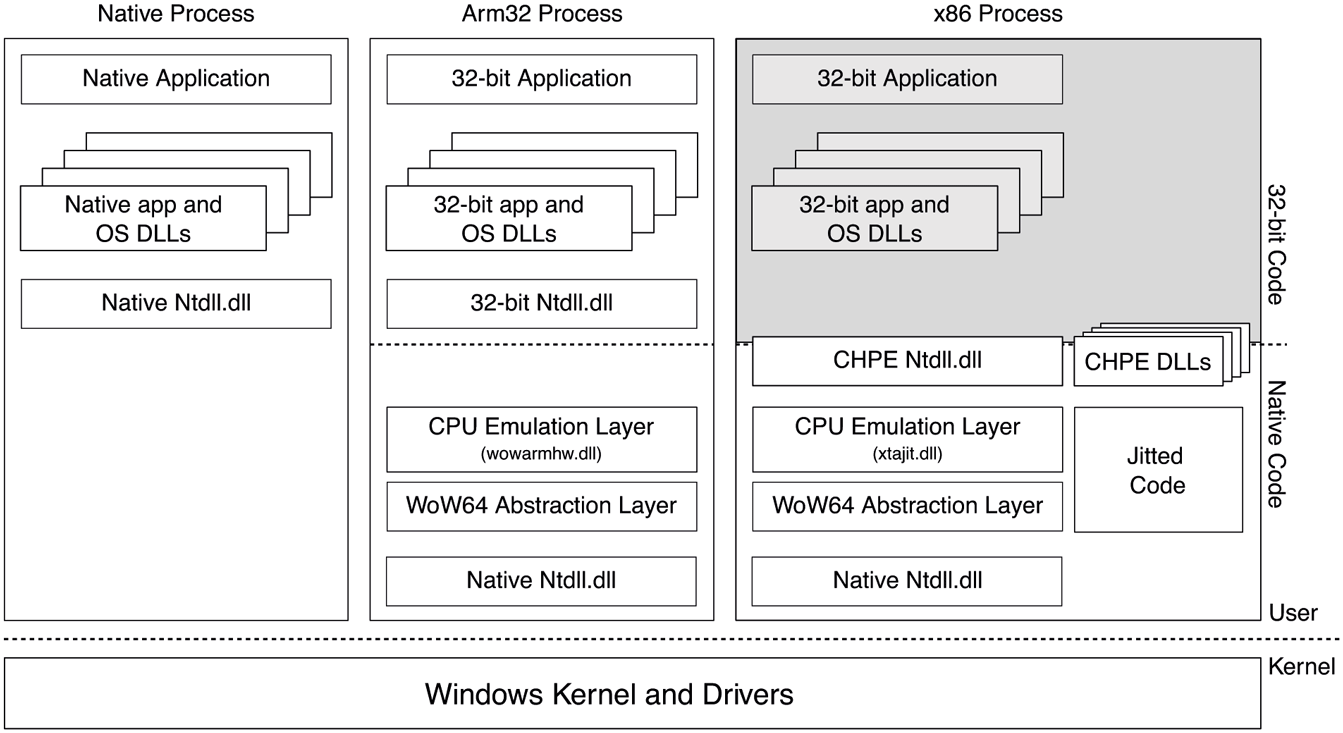
Native vs. WoW64 processes on an arm64 machine. Shaded areas indicate emulated code.
Native layer sits underneath the guest code and is composed of WoW64 DLLs as well as the native ntdll.dll and the normal 64-bit PEB and TEBs. This layer effectively acts as the 32-bit kernel for the guest. There are two categories of WoW64 DLLs: the WoW64 abstraction layer (wow64.dll, wow64base.dll and wow64win.dll) and the CPU emulation layer. The WoW64 abstraction layer is largely platform-independent and acts as the thunk layer, which receives 32-bit system calls and converts them to 64-bit calls, accounting for differences in types and structure layout. Some of the simpler system calls which do not need extensive type conversion go through an optimized path called Turbo Thunks in the CPU emulation layer to make direct system calls into the kernel. Otherwise, wow64.dll handles NT system calls and wow64win.dll handles system calls that land in win32k.sys. Exception dispatching is also conducted by this layer which translates the 64-bit exception record generated by the kernel to 32-bit and dispatches to the guest ntdll.dll. Finally, the WoW64 abstraction layer performs the namespace redirection necessary for 32-bit applications. For example, when a 32-bit application accesses c:\Windows\System32, it is redirected to c:\Windows\SysWoW64 or c:\Windows\SysArm32 as appropriate. Similarly, some registry paths, for example those under the SOFTWARE hive, are redirected to a subkey called WoW6432Node or WoWAA32Node, for x64 or arm64, respectively. That way, if the 32-bit and the 64-bit versions of the same component run, they do not overwrite each other’s registry state.
The WoW64 CPU emulation layer is very much architecture dependent. Its job is to execute the machine code for the guest architecture. In many cases, the host CPU can actually execute guest instructions after going through a mode switch. So, when running x86 code on x64 or arm32 code on arm64, the CPU emulation layer only needs to switch the CPU mode and start running guest code. That’s what wow64cpu.dll and wowarmhw.dll do. However, that’s not possible when running an x86 guest on arm64. In that case, the CPU emulation layer (xtajit.dll) needs to perform binary translation to parse and emulate x86 instructions. While many emulation strategies exist, xtajit.dll performs jitting, that is, just-in-time generation of native code from guest instructions. In addition, xtajit.dll communicates with an NT service called XtaCache to persist jitted code on disk such that it can prevent re-jitting the same code when the guest binary runs again.
As mentioned earlier, WoW64 guests run with guest versions of OS binaries that live in SysWoW64 for (x86) or SysArm32 (arm32) directories under c:\Windows. From a performance perspective, that’s OK if the host CPU can execute guest instructions, but when jitting is necessary, having to jit and cache OS binaries is not ideal. A better approach could have been to pre-jit these OS binaries and ship them with the OS. That’s still not ideal because jitting arm64 instructions from x86 instructions misses a lot of the context that exists in source code and results in suboptimal code due to the architectural differences between x86 and arm64. For example, the strongly ordered memory model of the x86 vs. the weak memory model or arm64 forces the jitter to pessimistically add expensive memory barrier instructions.
A much better option is to enhance the compiler toolchain to pre-compile the OS binaries from source code to arm64 directly, but in an x86-compatible way. That means the compiler uses x86 types and structures, but generates arm64 instructions along with thunks to perform calling convention adjustments for calls from and to x86 code. For example, x86 function calls generally pass parameters on the stack whereas the arm64 calling convention expects them in registers. Any x86 assembly code is linked into the binary as is. These types of binaries containing both x86-compatible arm64 code as well as x86 code are called CHPE (Compiled Hybrid Portable Executable) binaries. They are stored under c:\Windows\SyChpe32 and are loaded whenever the x86 application tries to load a DLL from SysWoW64, providing improved performance by almost completely eliminating emulation for OS code. Figure 11-28 shows CHPE DLLs in the address space of the emulated x86 process on an arm64 machine.
x64 Emulation on arm64
The first arm64 release of Windows 10 in 2017 only supported emulating 32-bit x86 programs. While most Windows software has a 32-bit version, an increasing number of popular applications, especially games, are only available as x64. For that reason, Microsoft added support for x64-on-arm64 emulation in Windows 11. It’s pretty remarkable that one can run x86, x64, arm32, and arm64 applications on the arm64 version of Windows 11.
There are many similarities between how emulation is implemented for x86 and x64 guest architectures as shown in Fig. 11-29. Instruction emulation still happens via a jitter, xtajit64.dll, which has been ported to support x64 machine code. Since a given process cannot have both x86 and x64 code, either xtajit.dll or xtajit64.dll is loaded, as appropriate. Jitted code is persisted via the XtaCache NT service, as before. User-mode OS binaries intended to load into x64 processes are built using a hybrid binary interface similar to CHPE, called ARM64EC ARM 64 Emulation Compatible. ARM64EC binaries contain arm64 machine code, compiled using x64 types and behaviors with thunks to perform calling convention adjustments. As such, other than x64 assembly code which may be linked into these binaries, there’s no need for any instruction emulation and they run at native speed.
Figure 11-29
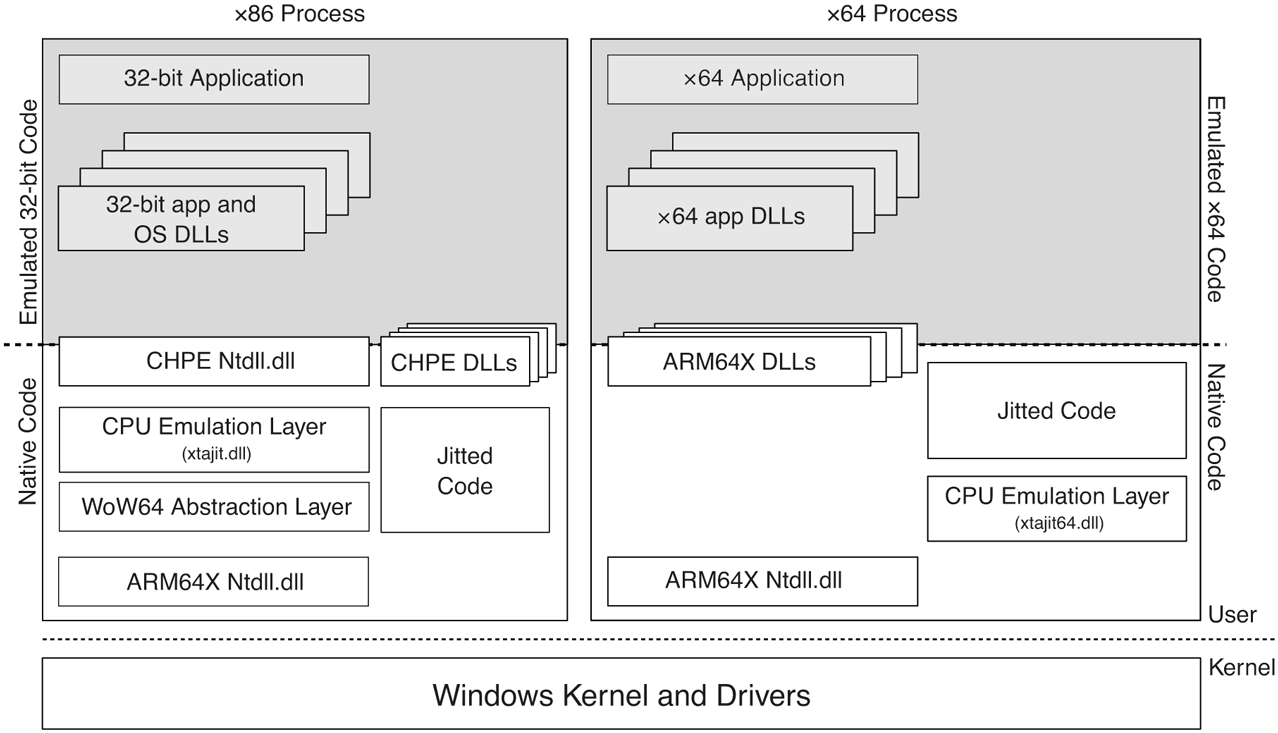
Comparison of x86 and x64 emulation infrastructure on an arm64 machine. Shaded areas indicate emulated code.
There are also some big differences between x86 and x64 emulation. First of all, x64 emulation does not rely at all on the WoW64 infrastructure because no 32-bit to 64-bit thunking or redirection of file system or registry paths is necessary; these are already 64-bit applications and use 64-bit types and data structures. In fact, ARM64EC binaries which do not contain any x64 code can run just like native arm64 binaries with no intervention by the emulator; ARM64EC is effectively a second native architecture supported on arm64. The remaining role of the WoW64 abstraction layer has been moved into the ARM64EC ntdll.dll which loads in x64 processes. This ntdll is enlightened to allow loading x64 binaries and summon the xtajit64 jitter to emulate x64 machine code.
At this point, careful readers might be asking themselves: given that no file system redirection exists for x64 applications on arm64, would not an x64 process end up loading the arm64 native DLL if, for example, it tries to load c:\windows\system32\kernelbase.dll? The answer is yes and no. Yes, the x64 process will load the kernelbase.dll under the system32 directory (which normally contains native binaries), but the DLL will be transformed in memory depending on whether it gets loaded into an x64 process or an arm64 process. This is possible because arm64 uses a new type of portable executable (PE) binary called ARM64X for user-mode OS binaries. ARM64X binaries contain both native arm64 code as well as x64 compatible code (ARM64EC or x64 machine code) and the necessary metadata to switch between the two personalities. On disk, these files look like regular native arm64 binaries: the machine type field in the PE header indicates arm64 and export tables point to native arm64 code. However, when this binary is loaded into an x64 process, the kernel memory manager transforms the process’ view of the binary by applying modifications described by the metadata similar to how relocation fixups are performed. The PE header machine type field, the export and import table pointers are adjusted to make the binary appear as an ARM64EC binary to the process.
In addition to helping eliminate file system redirection, ARM64X binaries provide another significant benefit. For most functions compiled into the binary, the native arm64 compiler and the ARM64EC compiler will generate identical arm64 machine instructions. Such code can be single-instanced in the ARM64X binary rather than being stored as two copies, thus reducing binary size as well as allowing the same code pages to be shared in memory between arm64 and x64 processes.