11.2 Programming Windows
It is now time to start our technical study of Windows. Before getting into the details of the internal structure, however, we will take a look at the native NT API for system calls, the Win32 programming subsystem introduced as part of NTbased Windows, and the WinRT programming environment first introduced with Windows 8.
Figure 11-4 shows the layers of the Windows operating system. Beneath the GUI layers of Windows are the programming interfaces that applications build on. As in most operating systems, these consist largely of code libraries (DLLs) to which programs dynamically link for access to operating system features. Some of these libraries are client libraries which use RPCs (Remote Procedure Calls) to communicate with operating system services running in separate processes.
Figure 11-4
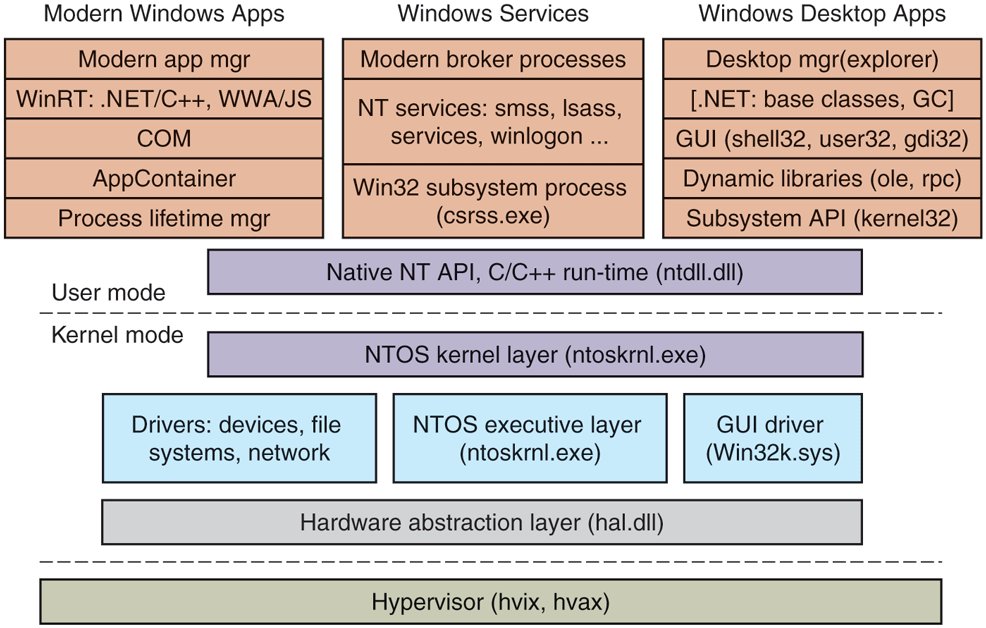
The programming layers in Modern Windows.
The core of the NT operating system is the NTOS kernel-mode program (ntoskrnl.exe), which provides the traditional system-call interfaces upon which the rest of the operating system is built. In Windows, only programmers at Microsoft write to the native system-call layer. The published user-mode interfaces all belong to operating system personalities that are implemented using subsystems that run on top of the NTOS layers.
Originally, NT supported three personalities: OS/2, POSIX, and Win32. OS/2 was discarded in Windows XP. Support for POSIX was finally removed in Windows 8.1. Today all Windows applications are written using APIs that are built on top of the Win32 subsystem, such as the WinRT API used for building Universal Windows Platform applications or the cross-platform CoreFX API in the .NET (Core) software framework. Furthermore, through the win32metadata GitHub project, Microsoft publishes a description of the entire Win32 API surface in a standard format (called ECMA-335) such that language projections can be built to allow the API to be called from arbitrary languages like C# and Rust. This allows applications written in languages other than C/C++ to work on Windows.
11.2.1 Universal Windows Platform
The Universal Windows Platform, introduced with Windows 10 based on the modern application platform in Windows 8, represented the first significant change to the application model for Windows programs since Win32. The WinRT API as well as a significant subset of the Win32 API surface is available to UWP applications, allowing them to target multiple device families with the same underlying code while taking advantage of unique device capabilities via device family-specific extensions. UWP is the only supported platform for apps on the Xbox gaming console, the HoloLens mixed reality device, and the Surface Hub collaboration device.
WinRT APIs are carefully curated to avoid various ‘‘sharp edges’’ of the Win32 API to provide more consistent security, user privacy and app isolation properties. They have projections into various languages such as C++, C#, and even JavaScript allowing developer flexibility. In early Windows 10 releases, the subset of the Win32 API available to UWP apps was too limited. For example, various threading or virtual memory APIs were out-of-bounds. This created friction for developers and made it more difficult to port software libraries and frameworks to support UWP. Over time, more and more Win32 APIs were made available to UWP applications.
In addition to the API differences, the application model for UWP apps is different from traditional Win32 programs in several ways.
First, unlike traditional Win32 processes, the processes running UWP applications have their lifetimes managed by the operating system. When a user switches away from an application, the system gives it a couple of seconds to save its state and then ceases to give it further processor resources until the user switches back to the application. If the system runs low on resources, the operating system may terminate the application’s processes without the application ever running again. When the user switches back to the application at some time in the future, it will be restarted by the operating system. Applications that need to run tasks in the background must specifically arrange to do so using a new set of WinRT APIs. Background activity is carefully managed by the system to improve battery life and prevent interference with the foreground application the user is currently using. These changes were made to make Windows function better on mobile devices, where users frequently switch from app to app and back quickly and often.
Second, in the Win32 desktop world, applications are deployed by running an installer that is part of the application. This scheme leaves clean up in the hands of the application and frequently results in leftover files or settings when the application is uninstalled, leading to ‘‘winrot.’’ UWP applications come in an MSIX package which is basically a zip file containing application binaries along with a manifest that declares the components of the application and how they should integrate with the system. That way, the operating system can install and uninstall the application cleanly and reliably. Typically, UWP applications are distributed and deployed via the Microsoft Store, similar to the model on iOS and Android devices.
Finally, when a modern application is running, it always executes in a sandbox called an AppContainer. Sandboxing process execution is a security technique for isolating less trusted code so that it cannot freely tamper with the system or user data. The Windows AppContainer treats each application as a distinct user, and uses Windows security facilities to keep the application from accessing arbitrary system resources. When an application does need access to a system resource, there are WinRT APIs that communicate to broker processes which do have access to more of the system, such as a user’s files.
Despite its many advantages, UWP did not gain widespread traction with developers. This is primarily because the cost of switching existing apps to UWP outweighed the benefits of getting access to the WinRT API and being able to run on multiple Windows device families. Restricted access to the Win32 API and the restructuring necessary to work with the UWP application model meant that apps essentially needed to be rewritten.
To remedy these drawbacks and ‘‘bridge the gap’’ between Win32 desktop app development and UWP, Microsoft is on a path to unify these application models with the Windows App SDK (Software Development Kit) previously called Project Reunion. Windows App SDK is a set of open-source libraries on GitHub, providing a modern, uniform API surface available to all Windows applications. It allows developers to add new functionality previously only exposed to UWP, without having to rewrite their applications from scratch. Windows App SDK contains the following major components:
WinUI, a XAML-based modern UI framework.
C++, Rust, C# language projections to expose WinRT API to all apps.
MSIX SDK, which allows any application to be packaged and deployed via MSIX.
We briefly covered some of the programming frameworks that developers can use to develop applications for Windows. While these applications built on different frameworks rely on different libraries at higher levels, they ultimately depend on the Win32 subsystem and the native NT API. We will study those shortly.
11.2.2 Windows Subsystems
As shown in Fig. 11-5, NT subsystems are constructed out of four components: a subsystem process, a set of libraries, hooks in CreateProcess, and support in the kernel. A subsystem process is really just a service. The only special property is that it is started by the smss.exe (session manager) program—the initial user-mode program started by NT—in response to a request from CreateProcess in Win32 or the corresponding API in a different subsystem. Although Win32 is the only remaining subsystem supported, Windows still maintains the subsystem model, including the csrss.exe Win32 subsystem process.
Figure 11-5
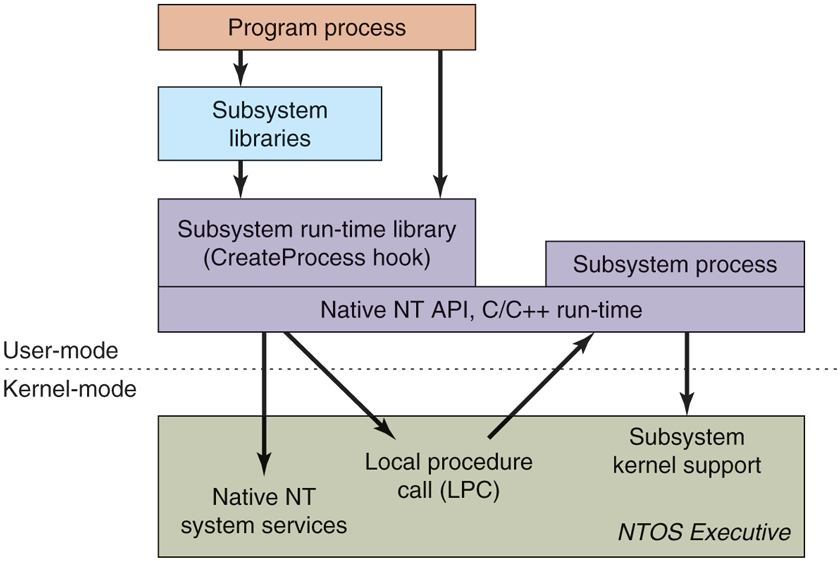
The components used to build NT subsystems.
The set of libraries both implements higher-level operating-system functions specific to the subsystem and also contains the stub routines which communicate between processes using the subsystem (shown on the left) and the subsystem process itself (shown on the right). Calls to the subsystem process normally take place using the kernel-mode LPC (Local Procedure Call) facilities, which implement cross-process procedure calls.
The hook in Win32 CreateProcess detects which subsystem each program requires by looking at the binary image. It then asks smss.exe to start the subsystem process (if it is not already running). The subsystem process then takes over responsibility for loading the program.
The NT kernel was designed to have a lot of general-purpose facilities that can be used for writing operating-system-specific subsystems. But there is also special code that must be added to correctly implement each subsystem. As examples, the native NtCreateProcess system call implements process duplication in support of POSIX fork system call, and the kernel implements a particular kind of string table for Win32 (called atoms) which allows read-only strings to be efficiently shared across processes.
The subsystem processes are native NT programs which use the native system calls provided by the NT kernel and core services, such as smss.exe and lsass.exe (local security administration). The native system calls include cross-process facilities to manage virtual addresses, threads, handles, and exceptions in the processes created to run programs written to use a particular subsystem.
11.2.3 The Native NT Application Programming Interface
Like all other operating systems, Windows has a set of system calls it can perform. In Windows, these are implemented in the NTOS executive layer that runs in kernel mode. Microsoft has published very few of the details of these native system calls. They are used internally by lower-level programs that ship as part of the operating system (mainly services and the subsystems), as well as kernel-mode device drivers. The native NT system calls do not really change very much from release to release, but Microsoft chose not to make them public so that applications written for Windows would be based on Win32 and thus more likely to work with both the MS-DOS-based and NT-based Windows systems, since the Win32 API is common to both.
Most of the native NT system calls operate on kernel-mode objects of one kind or another, including files, processes, threads, pipes, semaphores, and so on. Figure 11-6 gives a list of some of the common categories of kernel-mode objects supported by the kernel in Windows. Later, when we discuss the object manager, we will provide further details on the specific object types.
Figure 11-6
| Object category | Examples |
|---|---|
| Synchronization | Semaphores, mutexes, events, IPC ports, I/O completion queues |
| I/O | Files, devices, drivers, timers |
| Program | Jobs, processes, threads, sections, tokens |
| Win32 GUI | Desktops, application callbacks |
Common categories of kernel-mode object types.
Sometimes use of the term object regarding the data structures manipulated by the operating system can be confusing because it is mistaken for object-oriented. Windows operating system objects do provide data hiding and abstraction, but they lack some of the most basic properties of object-oriented systems such as inheritance and polymorphism, so Windows is not object-oriented in the technical sense.
In the native NT API, calls are available to create new kernel-mode objects or access existing ones. Every call creating or opening an object returns a handle to the caller. A handle in Windows is somewhat analogous to a file descriptor in UNIX, except that it can be used for more types of objects than just files. The handle can subsequently be used to perform operations on the object. Handles are specific to the process that created them. In general, handles cannot be passed directly to another process and used to refer to the same object. However, under certain circumstances, it is possible to duplicate a handle into the handle table of other processes in a protected way, allowing processes to share access to objects—even if the objects are not accessible in the namespace. The process duplicating each handle must itself have handles for both the source and target process.
Every object has a security descriptor associated with it, telling in detail who may and may not perform what kinds of operations on the object based on the access requested. When handles are duplicated between processes, new access restrictions can be added that are specific to the duplicated handle. Thus, a process can duplicate a read-write handle and turn it into a read-only version in the target process.
Figure 11-7 shows a sampling of the native APIs, all of which use explicit handles to manipulate kernel-mode objects such as processes, threads, IPC ports, and sections (which are used to describe memory objects that can be mapped into address spaces). NtCreateProcess returns a handle to a newly created process object, representing an executing instance of the program represented by the SectionHandle. DebugPortHandle is used to communicate with a debugger when giving it control of the process after an exception (e.g., dividing by zero or accessing invalid memory). ExceptPortHandle is used to communicate with a subsystem process when errors occur and are not handled by an attached debugger.
Figure 11-7
| NtCreateProcess(&ProcHandle, Access, SectionHandle, DebugPortHandle, ExceptPortHandle, ...) |
| NtCreateThread(&ThreadHandle, ProcHandle, Access, ThreadContext, CreateSuspended, ...) |
| NtAllocateVirtualMemory(ProcHandle, Addr, Size, Type, Protection, ...) |
| NtMapViewOfSection(SectHandle, ProcHandle, Addr, Size, Protection, ...) |
| NtReadVirtualMemory(ProcHandle, Addr, Size, ...) |
| NtWriteVirtualMemory(ProcHandle, Addr, Size, ...) |
| NtCreateFile(&FileHandle, FileNameDescriptor, Access, ...) |
| NtDuplicateObject(srcProcHandle, srcObjHandle, dstProcHandle, dstObjHandle, ...) |
Examples of native NT API calls that use handles to manipulate objects across process boundaries.
NtCreateThread takes ProcHandle because it can create a thread in any process for which the calling process has a handle (with sufficient access rights). In a similar vein, NtAllocateVirtualMemory, NtMapViewOfSection, NtReadVirtualMemory, and NtWriteVirtualMemory allow one process not only to operate on its own address space, but also to allocate virtual addresses, map sections, and read or write virtual memory in other processes. NtCreateFile is the native API call for creating a new file or opening an existing one. NtDuplicateObject is the API call for duplicating handles from one process to another.
Kernel-mode objects are, of course, not unique to Windows. UNIX systems also support a variety of kernel-mode objects, such as files, network sockets, pipes, devices, processes, and interprocess communication (IPC) facilities, including shared memory, message ports, semaphores, and I/O devices. In UNIX, there are a variety of ways of naming and accessing objects, such as file descriptors, process IDs, and integer IDs for SystemV IPC objects, and i-nodes for devices. The implementation of each class of UNIX objects is specific to the class. Files and sockets use different facilities than the SystemV IPC mechanisms or processes or devices.
Kernel objects in Windows use a uniform facility based on handles and names in the NT namespace to reference kernel objects, along with a unified implementation in a centralized object manager. Handles are per-process but, as described above, can be duplicated into another process. The object manager allows objects to be given names when they are created, and then opened by name to get handles for the objects.
The object manager uses Unicode (wide characters) to represent names in the NT namespace. Unlike UNIX, NT does not generally distinguish between upperand lowercase (it is case preserving but case insensitive). The NT namespace is a hierarchical tree-structured collection of directories, symbolic links, and objects.
The object manager also provides facilities for synchronization, security, and object lifetime management. Whether the general facilities provided by the object manager are made available to users of any particular object is up to the executive components, as they provide the native APIs that manipulate each object type.
It is not only applications that use objects managed by the object manager. The operating system itself can also create and use objects—and does so heavily. Most of these objects are created to allow one component of the system to store some information for a substantial period of time or to pass some data structure to another component, and yet benefit from the naming and lifetime support of the object manager. For example, when a device is discovered, one or more device objects are created to represent the device and to logically describe how the device is connected to the rest of the system. To control the device, a device driver is loaded, and a driver object is created holding its properties and providing pointers to the functions it implements for processing the I/O requests. Within the operating system, the driver is then referred to by using its object. The driver can also be accessed directly by name rather than indirectly through the devices it controls (e.g., to set parameters governing its operation from user mode).
Unlike UNIX, which places the root of its namespace in the file system, the root of the NT namespace is maintained in the kernel’s virtual memory. This means that NT must recreate its top-level namespace every time the system boots. Using kernel virtual memory allows NT to store information in the namespace without first having to start the file system running. It also makes it much easier for NT to add new types of kernel-mode objects to the system because the formats of the file systems themselves do not have to be modified for each new object type.
A named object can be marked permanent, meaning that it continues to exist until explicitly deleted or the system reboots, even if no process currently has a handle for the object. Such objects can even extend the NT namespace by providing parse routines that allow the objects to function somewhat like mount points in UNIX. File systems and the registry use this facility to mount volumes and hives (parts of the registry) onto the NT namespace. Accessing the device object for a volume gives access to the raw volume, but the device object also represents an implicit mount of the volume into the NT namespace. The individual files on a volume can be accessed by concatenating the volume-relative file name onto the end of the name of the device object for that volume.
Permanent names are also used to represent synchronization objects and shared memory, so that they can be shared by processes without being continually recreated as processes stop and start. Device objects and often driver objects are given permanent names, giving them some of the persistence properties of the special inodes kept in the /dev directory of UNIX.
We will describe many more of the features in the native NT API in the next section, where we discuss the Win32 APIs that provide wrappers around the NT system calls.
11.2.4 The Win32 Application Programming Interface
The Win32 function calls are collectively called the Win32 API. These interfaces are publicly disclosed and fully documented. They are implemented as library procedures that either wrap the native NT system calls used to get the work done or, in some cases, do the work right in user mode. Though the native NT APIs are not published, most of the functionality they provide is accessible through the Win32 API. The existing Win32 API calls do not change with new releases of Windows to maintain application compatibility, though many new functions are added to the API.
Figure 11-8 shows various low-level Win32 API calls and the native NT API calls that they wrap. What is interesting about the figure is how uninteresting the mapping is. Most low-level Win32 functions have native NT equivalents, which is not surprising as Win32 was designed with NT in mind. In many cases, the Win32 layer must manipulate the Win32 parameters to map them onto NT, for example, canonicalizing path names and mapping onto the appropriate NT path names, including special MS-DOS device names (like LPT:). The Win32 APIs for creating processes and threads also must notify the Win32 subsystem process, csrss.exe, that there are new processes and threads for it to supervise, as we will describe in Sec. 11.4. It’s worth noting that while the Win32 API is built on the NT API, not all of the NT API is exposed through Win32.
Figure 11-8
| Win32 call | Native NT API call |
|---|---|
| CreateProcess | NtCreateProcess |
| CreateThread | NtCreateThread |
| SuspendThread | NtSuspendThread |
| CreateSemaphore | NtCreateSemaphore |
| ReadFile | NtReadFile |
| DeleteFile | NtSetInformationFile |
| CreateFileMapping | NtCreateSection |
| VirtualAlloc | NtAllocateVirtualMemory |
| MapViewOfFile | NtMapViewOfSection |
| DuplicateHandle | NtDuplicateObject |
| CloseHandle | NtClose |
Examples of Win32 API calls and the native NT API calls that they wrap.
Some Win32 calls take path names, whereas the equivalent NT calls use handles. So the wrapper routines have to open the files, call NT, and then close the handle at the end. The wrappers also translate the Win32 APIs from ANSI to Unicode. The Win32 functions shown in Fig. 11-8 that use strings as parameters are actually two APIs, for example, CreateProcessW and CreateProcessA. The strings passed to the latter API must be translated to Unicode before calling the underlying NT API, since NT works only with Unicode.
Since few changes are made to the existing Win32 interfaces in each release of Windows, in theory, the binary programs that ran correctly on any previous release will continue to run correctly on a new release. In practice, there are often many compatibility problems with new releases. Windows is so complex that a few seemingly inconsequential changes can cause application failures. And applications themselves are often to blame, since they frequently make explicit checks for specific operating system versions or fall victim to their own latent bugs that are exposed when they run on a new release. Nevertheless, Microsoft makes an effort in every release to test a wide variety of applications to find incompatibilities and either correct them or provide application-specific workarounds.
Windows supports two special execution environments both called WOW (Windows-on-Windows). WoW32 is used on 32-bit x86 systems to run 16-bit Windows 3.x applications by mapping the system calls and parameters between the 16-bit and 32-bit worlds. The last version of Windows to include the WoW32 execution environment was Windows 10. Since Windows 11 requires a 64-bit processor and those processors cannot run 16-bit code, WoW32 is no longer supported. WoW64, which allows 32-bit applications to run on 64-bit systems, continues to be supported on Windows 11. In fact, starting with Windows 10, WoW64 is enhanced to enable running 32-bit x86 applications on arm64 hardware via instruction emulation. Windows 11 further extends emulation capabilities to run 64-bit x64 applications on arm64. Section 11.4.4 describes the WoW64 and emulation infrastructure in more detail.
The Windows API philosophy is very different from the UNIX philosophy. In the latter, the operating system functions are simple, with few parameters and few places where there are multiple ways to perform the same operation. Win32 provides very comprehensive interfaces with many parameters, often with three or four ways of doing the same thing, and mixing together low-level and high-level functions, like CreateFile and CopyFile.
This means Win32 provides a very rich set of interfaces, but it also introduces much complexity due to the poor layering of a system that intermixes both highlevel and low-level functions in the same API. For our study of operating systems, only the low-level functions of the Win32 API that wrap the native NT API are relevant, so those are what we will focus on.
Win32 has calls for creating and managing both processes and threads. There are also many calls that relate to interprocess communication, such as creating, destroying, and using mutexes, semaphores, events, communication ports, and other IPC objects.
Although much of the memory-management system is invisible to programmers, one important feature is visible: namely the ability of a process to map a file onto a region of its virtual memory. This allows threads running in a process the ability to read and write parts of the file using pointers without having to explicitly perform read and write operations to transfer data between the disk and memory. With memory-mapped files the memory-management system itself performs the I/Os as needed (demand paging).
Windows implements memory-mapped files using a combination of three facilities. First it provides interfaces which allow processes to manage their own virtual address space, including reserving ranges of addresses for later use. Second, Win32 supports an abstraction called a file mapping, which is used to represent addressable objects like files (a file mapping is called a section in the NT layer which is a better name because section objects do not have to represent files). Most often, file mappings are created using a file handle to refer to memory backed by files, but they can also be created to refer to memory backed by the system pagefile by using a NULL file handle.
The third facility maps views of file mappings into a process’ address space. Win32 allows only a view to be created for the current process, but the underlying NT facility is more general, allowing views to be created for any process for which you have a handle with the appropriate permissions. Separating the creation of a file mapping from the operation of mapping the file into the address space is a different approach than used in the mmap function in UNIX.
In Windows, the file mappings are kernel-mode objects represented by a handle. Like most handles, file mappings can be duplicated into other processes. Each of these processes can map the file mapping into its own address space as it sees fit. This is useful for sharing memory between processes without having to create files for sharing. At the NT layer, file mappings (sections) can also be made persistent in the NT namespace and accessed by name.
An important area for many programs is file I/O. In the basic Win32 view, a file is just a linear sequence of bytes. Win32 provides over 70 calls for creating and destroying files and directories, opening and closing files, reading and writing them, requesting and setting file attributes, locking ranges of bytes, and many more fundamental operations on both the organization of the file system and access to individual files.
There are also various advanced facilities for managing data in files. In addition to the primary data stream, files stored on the NTFS file system can have additional data streams. Files (and even entire volumes) can be encrypted. Files can be compressed and/or represented as a sparse stream of bytes where missing regions of data in the middle occupy no storage on disk. File-system volumes can be organized out of multiple separate disk partitions using different levels of RAID storage. Modifications to files or directory subtrees can be detected through a notification mechanism or by reading the journal that NTFS maintains for each volume.
Each file-system volume is implicitly mounted in the NT namespace, according to the name given to the volume, so a file \foo\bar might be named, for example, \Device\HarddiskVolume1\foo\bar. Internal to each NTFS volume, mount points (called reparse points in Windows) and symbolic links are supported to help organize the individual volumes.
The low-level I/O model in Windows is fundamentally asynchronous. Once an I/O operation is begun, the system call can return and allow the thread which initiated the I/O to continue in parallel with the I/O operation. Windows supports cancellation, as well as a number of different mechanisms for threads to synchronize with I/O operations when they complete. Windows also allows programs to specify that I/O should be synchronous when a file is opened, and many library functions, such as the C library and many Win32 calls, specify synchronous I/O for compatibility or to simplify the programming model. In these cases, the executive will explicitly synchronize with I/O completion before returning to user mode.
Another area for which Win32 provides calls is security. Every thread is associated with a kernel-mode object, called a token, which provides information about the identity and privileges associated with the thread. Every object can have an ACL (Access Control List) telling in great detail precisely which users may access it and which operations they may perform on it. This approach provides for fine-grained security in which specific users can be allowed or denied specific access to every object. The security model is extensible, allowing applications to add new security rules, such as limiting the hours access is permitted.
The Win32 namespace is different than the native NT namespace described in the previous section. Only parts of the NT namespace are visible to Win32 APIs (though the entire NT namespace can be accessed through a Win32 hack that uses special prefix strings, like ‘‘\\ .’’). In Win32, files are accessed relative to drive letters. The NT directory \DosDevices contains a set of symbolic links from drive letters to the actual device objects. For example, \DosDevices\C: might be a link to \Device\HarddiskVolume1. This directory also contains links for other Win32 devices, such as COM1:, LPT:, and NUL: (for the serial and printer ports and the all-important null device). \DosDevices is really a symbolic link to \?? which was chosen for efficiency. Another NT directory, \BaseNamedObjects, is used to store miscellaneous named kernel-mode objects accessible through the Win32 API. These include synchronization objects like semaphores, shared memory, timers, communication ports, and device names.
In addition to low-level system interfaces we have described, the Win32 API also supports many calls for GUI operations, including all the calls for managing the graphical interface of the system. There are calls for creating, destroying, managing, and using windows, menus, tool bars, status bars, scroll bars, dialog boxes, icons, and many more items that appear on the screen. There are calls for drawing geometric figures, filling them in, managing the color palettes they use, dealing with fonts, and placing icons on the screen. In contrast, in Linux, none of this is in the kernel. Finally, there are calls for dealing with the keyboard, mouse, and other human-input devices as well as audio, printing, and other output devices.
The GUI operations work directly with the win32k.sys driver using special interfaces to access these functions in kernel mode from user-mode libraries. Since these calls do not involve the core system calls in the NTOS executive, we will not say more about them.
11.2.5 The Windows Registry
The root of the NT namespace is maintained in the kernel. Storage, such as file-system volumes, is attached to the NT namespace. Since the NT namespace is constructed afresh every time the system boots, how does the system know about any specific details of the system configuration? The answer is that Windows attaches a special kind of file system (optimized for small files) to the NT namespace. This file system is called the registry. The registry is organized into separate volumes called hives. Each hive is kept in a separate file (in the directory C:\Windows\system32\config\ of the boot volume). When a Windows system boots, a hive named SYSTEM is loaded into memory by the boot program that loads the kernel and other boot files, such as boot drivers, from the boot volume.
Windows keeps much crucial information in the SYSTEM hive, including information about what drivers to use with what devices, what software to run initially, and many parameters governing the operation of the system. This information is used even by the boot program itself to determine which drivers are boot drivers, being needed immediately upon boot. Such drivers include those that understand the file system and disk drivers for the volume containing the operating system itself.
Other configuration hives are used after the system boots to describe information about the software installed on the system, particular users, and the classes of user-mode COM (Component Object-Model) objects that are installed on the system. Login information for local users is kept in the SAM (Security Access Manager) hive. Information for network users is maintained by the lsass service in the security hive and coordinated with the network directory servers so that users can have a common account name and password across an entire network. A list of the hives used in Windows is shown in Fig. 11-9.
Figure 11-9
| Hive file | Mounted name | Use |
|---|---|---|
| SYSTEM | HKLM\SYSTEM | OS configuration information, used by kernel |
| HARDWARE | HKLM\HARDWARE | In-memory hive recording hardware detected |
| BCD | HKLM\BCD* | Boot Configuration Database |
| SAM | HKLM\SAM | Local user account information |
| SECURITY | HKLM\SECURITY | lsass’ account and other security information |
| DEFAULT | HKEY_USERS\.DEFAULT | Default hive for new users |
| NTUSER.DAT | HKEY_USERS\<user id> | User-specific hive, kept in home directory |
| SOFTWARE | HKLM\SOFTWARE | Application classes registered by COM |
| COMPONENTS | HKLM\COMPONENTS | Manifests and dependencies for sys. components |
The registry hives in Windows. HKLM is a shorthand for HKEY_LOCAL_MACHINE.
Prior to the introduction of the registry, configuration information in Windows was kept in hundreds of .ini (initialization) files spread across the disk. The registry gathers these files into a central store, which is available early in the process of booting the system. This is important for implementing Windows plug-and-play functionality. Unfortunately, the registry has become very seriously disorganized over time as Windows has evolved. There are poorly defined conventions about how the configuration information should be arranged, and many applications take an ad hoc approach, leading to interference between them. Also, even though most applications do not, by default, run with administrative privileges, they can escalate to get full privileges and modify system parameters in the registry directly, potentially destabilizing the system. Fixing the registry would break a lot of software.
This is one of the problems UWP application model and more specifically its AppContainer sandbox aims to solve. UWP applications cannot directly access or modify the registry. Rules are somewhat more relaxed for MSIX packaged applications: access to the registry is allowed, but their registry namespace is virtualized such that writes to global or per-user locations are redirected to per-user-per-app locations. This mechanism prevents such applications from potentially destabilizing the system by modifying system settings and eliminates risk of interference between multiple applications.
The registry is accessible to Win32 applications. There are calls to create and delete keys, look up values within keys, and more. Some of the more useful ones are listed in Fig. 11-10.
Figure 11-10
| Win32 API function | Description |
|---|---|
| RegCreateKeyEx | Create a new registry key |
| RegDeleteKey | Delete a registry key |
| RegOpenKeyEx | Open a key to get a handle to it |
| RegEnumKeyEx | Enumerate the subkeys subordinate to the key of the handle |
| RegQueryValueEx | Look up the data for a value within a key |
| RegSetValueEx | Modifies data for a value within a key |
| RegFlushKey | Persist any modifications on the given key to disk |
Some of the Win32 API calls for using the registry
The registry is a cross between a file system and a database, and yet really unlike either. It’s really a key-value store with hierarchical keys. Entire books have been written describing the registry (Hipson, 2002; Halsey and Bettany, 2015; and Ngoie, 2021) and many companies have sprung up to sell special software just to manage the complexity of the registry.
To explore the registry, Windows has a GUI program called regedit that allows you to open and explore the directories (called keys) and data items (called values). Microsoft’s PowerShell scripting language can also be useful for walking through the keys and values of the registry as if they were directories and files. A more interesting tool to use is procmon, which is available from Microsoft’s tools’ Website: https://www.microsoft.com/technet/sysinternals. Procmon watches all the registry accesses that take place in the system and is very illuminating. Some programs will access the same key over and over tens of thousands of times.
Registry APIs are some of the most frequently used Win32 APIs in the system. They need to be fast and reliable. So, the registry implements caching of registry data in memory for fast access, but also persists data on disk to avoid losing too many changes even when RegFlushKey is not called. Because registry integrity is so critical to correct system functioning, the registry uses write-ahead-logging similar to database systems to record modifications sequentially into log files before actually modifying hive files. This approach ensures consistency with minimal overhead and allows recovery of registry data in the face of system crashes or power outages.