11.1 History of Windows Through Windows 11
Microsoft’s development of the Windows operating system for PC-based computers as well as servers can be divided into four eras: MS-DOS, MS-DOS-based Windows, NT-based Windows, and Modern Windows. Technically, each of these systems is substantially different from the others. Each was dominant during different decades in the history of the personal computer. Figure 11-1 shows the dates of the major Microsoft operating system releases for desktop computers. Below we will briefly sketch each of the eras shown in the table.
Figure 11-1
| Year | MS–DOS | MS-DOS based Windows | NT-based Windows | Modern Windows | Notes |
|---|---|---|---|---|---|
| 1981 | 1.0 | Initial release for IBM PC | |||
| 1983 | 2.0 | Support for PC/XT | |||
| 1984 | 3.0 | Support for PC/AT | |||
| 1990 | 3.0 | Ten million copies in 2 years | |||
| 1991 | 5.0 | Added memory management | |||
| 1992 | 3.1 | Ran only on 286 and later | |||
| 1993 | NT 3.1 | Supported 32-bit x86, MIPS, Alpha | |||
| 1995 | 7.0 | 95 | NT 3.51 | MS-DOS embedded in Win 95 NT supports PowerPC |
|
| 1996 | NT 4.0 | NT has Windows 95 look and feel | |||
| 1998 | 98 | ||||
| 2000 | 8.0 | Me | 2000 | Win Me was inferior to Win 98 NT supports IA-64 |
|
| 2001 | XP | Replaced Win 98. NT supports x64 |
|||
| 2006 | Vista | Vista could not supplant XP | |||
| 2009 | 7 | Significantly improved upon Vista | |||
| 2012 | 8 | First Modern version, supports ARM | |||
| 2013 | 8.1 | Fixed complaints about Windows 8 | |||
| 2015-2020 | 10 | Unified OS for multiple devices Rapid releases every 6 months Reached 1.3B devices |
|||
| 2021 | 11 | Fresh new UI Broader application support Higher security baseline |
Major releases in the history of Microsoft operating systems for desktop PCs.
11.1.1 1980s: MS-DOS
In the early 1980s IBM, at the time the biggest and most powerful computer company in the world, was developing a personal computer based the Intel 8088 microprocessor. Since the mid-1970s, Microsoft had become the leading provider of the BASIC programming language for 8-bit microcomputers based on the 8080 and Z-80. When IBM approached Microsoft about licensing BASIC for the new IBM PC, Microsoft readily agreed to the deal and suggested that IBM contact Digital Research to license its CP/M operating system since Microsoft was not then in the operating system business. IBM did that, but the president of Digital Research, Gary Kildall, was too busy to meet with IBM. This was probably the worst blunder in all of business history. Had he licensed CP/M to IBM, Kildall would probably have become the richest man on the planet. Rebuffed by Kildall, IBM came back to Bill Gates, the cofounder of Microsoft, and asked for help again. Within a short time, Microsoft bought a CP/M clone from a local company, Seattle Computer Products, ported it to the IBM PC, and licensed it to IBM. It was then renamed MS-DOS 1.0 (MicroSoft Disk Operating System) and shipped with the first IBM PC in 1981.
MS-DOS was a 16-bit real-mode, single-user, command-line-oriented operating system consisting of 8 KB of memory resident code. Over the next decade, both the PC and MS-DOS continued to evolve, adding more features and capabilities. By 1986, when IBM built the PC/AT based on the Intel 286, MS-DOS had grown to be 36 KB, but it continued to be a command-line-oriented, one-application-at-a-time, operating system.
11.1.2 1990s: MS-DOS-based Windows
Inspired by the graphical user interface of a system developed by Doug Engelbart at Stanford Research Institute and later improved at Xerox PARC, and their commercial progeny, the Apple Lisa and the Apple Macintosh, Microsoft decided to give MS-DOS a graphical user interface that it called Windows. The first two versions of Windows (1985 and 1987) were not very successful, due in part to the limitations of the PC hardware available at the time. In 1990, Microsoft released Windows 3.0 for the Intel 386 and sold over one million copies in six months.
Windows 3.0 was not a true operating system, but a graphical environment built on top of MS-DOS, which was still in control of the machine and the file system. All programs ran in the same address space and a bug in any one of them could bring the whole system to a frustrating halt.
In August 1995, Windows 95 was released. It contained many of the features of a full-blown operating system, including virtual memory, process management, and multiprogramming, and introduced 32-bit programming interfaces. However, it still lacked security, and provided poor isolation between applications and the operating system such that a bug in one program can crash the entire system or cause a system-wide hang. Thus, the problems with instability continued, even with the subsequent releases of Windows 98 and Windows Me, where MS-DOS was still there running 16-bit assembly code in the heart of the Windows operating system.
11.1.3 2000s: NT-based Windows
By the end of the 1980s, Microsoft realized that continuing to evolve an operating system with MS-DOS at its center was not the best way to go. PC hardware was continuing to increase in speed and capability and ultimately the PC market would collide with the desktop, workstation, and enterprise-server computing markets, where UNIX was the dominant operating system. Microsoft was also concerned that the Intel microprocessor family might not continue to be competitive, as it was already being challenged by RISC architectures. To address these issues, Microsoft recruited a group of engineers from DEC (Digital Equipment Corporation) led by Dave Cutler, one of the key designers of DEC’s VMS operating system (among others). Cutler was chartered to develop a brand-new 32-bit operating system that was intended to implement OS/2, the operating system API that Microsoft was jointly developing with IBM at the time. The original design documents by Cutler’s team called the system NT OS/2.
Cutler’s system was called NT (New Technology) (and also because the original target processor was the new Intel 860, code-named the N10). NT was designed to be portable across different processors and emphasized security and reliability, as well as compatibility with the MS-DOS-based versions of Windows. Cutler’s background at DEC shows in various places, with there being more than a passing similarity between the design of NT and that of VMS and other operating systems designed by Cutler, shown in Fig. 11-2.
Figure 11-2
| Year | DEC operating system | Characteristics |
|---|---|---|
| 1973 | RSX-11M | 16-bit, multiuser, real-time, swapping |
| 1978 | VAX/VMS | 32-bit, virtual memory |
| 1987 | VAXELAN | Real-time |
| 1988 | PRISM/Mica | Canceled in favor of MIPS/Ultrix |
DEC operating systems developed by Dave Cutler.
Programmers familiar only with UNIX find the architecture of NT to be quite different. This is not just because of the influence of VMS, but also because of the differences in the computer systems that were common at the time of design. UNIX was first designed in the 1970s for single-processor, 16-bit, tiny-memory, swapping systems where the process was the unit of concurrency and composition, and fork/exec were inexpensive operations (since swapping systems frequently copy processes to disk anyway). NT was designed in the early 1990s, when multiprocessor, 32-bit, multimegabyte, virtual memory systems were common. In NT, threads are the units of concurrency, dynamic libraries are the units of composition, and fork/exec are implemented by a single operation to create a new process and run another program without first making a copy.
The first version of NT-based Windows (Windows NT 3.1) was released in 1993. It was called 3.1 to correspond with the then-current consumer Windows 3.1. The joint project with IBM had foundered, so though the OS/2 interfaces were still supported, the primary interfaces were 32-bit extensions of the Windows APIs, called Win32. Between the time NT was started and first shipped, Windows 3.0 had been released and had become extremely successful commercially. It too was able to run Win32 programs, but using the Win32s compatibility library.
Like the first version of MS-DOS-based Windows, NT-based Windows was not initially successful. NT required more memory, there were few 32-bit applications available, and incompatibilities with device drivers and applications caused many customers to stick with MS-DOS-based Windows which Microsoft was still improving, releasing Windows 95 in 1995. Windows 95 provided native 32-bit programming interfaces like NT, but better compatibility with existing 16-bit software and applications. Not surprisingly, NT’s early success was in the server market, competing with VMS and NetWare.
NT did meet its portability goals, with additional releases in 1994 and 1995 adding support for (little-endian) MIPS and PowerPC architectures. The first major upgrade to NT came with Windows NT 4.0 in 1996. This system had the power, security, and reliability of NT, but also sported the same user interface as the bythen very popular Windows 95.
Figure 11-3 shows the relationship of the Win32 API to Windows. Having a common API across both the MS-DOS-based and NT-based Windows was important to the success of NT.
Figure 11-3
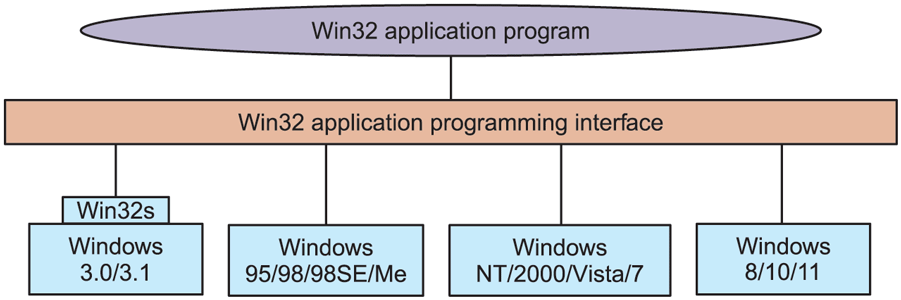
The Win32 API allows programs to run on almost all versions of Windows.
This compatibility made it much easier for users to migrate from Windows 95 to NT, and the operating system became a strong player in the high-end desktop market as well as servers. However, customers were not as willing to adopt other processor architectures, and of the four architectures Windows NT 4.0 supported in 1996, only the x86 (i.e., Pentium family) was still actively supported by the time of the next major release, Windows 2000.
Windows 2000 represented a significant evolution for NT. The key technologies added were plug-and-play (for consumers who installed a new PCI card, eliminating the need to fiddle with jumpers), network directory services (for enterprise customers), improved power management (for notebook computers), and an improved GUI (for everyone).
The technical success of Windows 2000 led Microsoft to push toward the deprecation of Windows 98 by enhancing the application and device compatibility of the next NT release, Windows XP. Windows XP included a friendlier new look-and-feel to the graphical interface, bolstering Microsoft’s strategy of hooking consumers and reaping the benefit as they pressured their employers to adopt systems with which they were already familiar. The strategy was overwhelmingly successful, with Windows XP being installed on hundreds of millions of PCs over its first few years, allowing Microsoft to achieve its goal of effectively ending the era of MS-DOS-based Windows.
Microsoft followed up Windows XP by embarking on an ambitious release to kindle renewed excitement among PC consumers. The result, Windows Vista, was completed in late 2006, more than five years after Windows XP shipped. Windows Vista boasted yet another redesign of the graphical interface, and new OS features under the covers. There were many changes in customer-visible experiences and capabilities. The technologies under the covers of the system improved substantially, with much clean-up of the code and many improvements in performance, scalability, and reliability. The server version of Vista (Windows Server 2008) was delivered about a year after the consumer version. It shares, with Vista, the same core system components, such as the kernel, drivers, and low-level libraries and programs.
The human story of the early development of NT is related in the book Showstopper (Zachary, 1994). The book tells a lot about the key people involved and the difficulties of undertaking such an ambitious software development project.
11.1.4 Windows Vista
The release of Windows Vista culminated Microsoft’s most extensive operating system project to date. The initial plans were so ambitious that a couple of years into its development Vista had to be restarted with a smaller scope. Plans to rely heavily on Microsoft’s type-safe, garbage-collected .NET language C# were shelved, as were some significant features such as the WinFS unified storage system for searching and organizing data from many different sources. The size of the full operating system is staggering. The original NT release of 3 million lines of C/C++ had grown to 16 million in NT 4, 30 million in 2000, and 50 million in XP. By Windows Vista, the line count had grown to 70 million and has continued to grow every since.
Much of the size is due to Microsoft’s emphasis on adding many new features to its products in every release. In the main system32 directory, there are 1600 DLLs (Dynamic Link Libraries) and 400 EXEs (Executables), and that does not include the other directories containing the myriad of applets included with the operating system that allow users to surf the Web, play music and video, send email, scan documents, organize photos, and even make movies. Because Microsoft wants customers to switch to new versions, it maintains compatibility by generally keeping all the features, APIs, applets (small applications), etc., from the previous version. Few things ever get deleted. The result is that Windows was growing dramatically larger from release to release. Windows’ distribution media had moved from floppy, to CD, and with Windows Vista, to DVD. Technology had been keeping up, however, and faster processors and larger memories made it possible for computers to get faster despite all this bloat.
Unfortunately for Microsoft, Windows Vista was released at a time when customers were becoming enthralled with inexpensive computers, such as low-end notebooks and netbook computers. These machines used slower processors to save cost and battery life, and in their earlier generations limited memory sizes. At the same time, processor performance ceased to improve at the same rate it had previously due to the difficulties in dissipating the heat created by ever-increasing clock speeds. Moore’s law continued to hold, but the additional transistors were going into new features and multiple processors rather than improvements in single-processor performance. The substantial growth in Windows Vista meant that it performed poorly on these computers relative to Windows XP, and the release was never widely accepted.
The issues with Windows Vista were addressed in the subsequent release, Windows 7. Microsoft invested heavily in testing and performance automation, new telemetry technology, and extensively strengthened the teams charged with improving performance, reliability, and security. Though Windows 7 had relatively few functional changes compared to Windows Vista, it was better engineered and more efficient. Windows 7 quickly supplanted Vista and ultimately Windows XP to be the most popular version of Windows within a few years after its release.
11.1.5 Windows 8
By the time Windows 7 finally shipped, the computing industry once again began to change dramatically. The success of the Apple iPhone as a portable computing device, and the advent of the Apple iPad, had heralded a sea-change which led to the dominance of lower-cost Android phones and tablets, much as Microsoft had dominated the desktop in the first three decades of personal computing. Small, portable, yet powerful devices and ubiquitous fast networks were creating a world where mobile computing and network-based services were becoming the dominant paradigm. The old world of desktop and notebook computers was replaced by machines with small screens that ran applications readily downloadable from dedicated app stores. These applications were not the traditional variety, like word processing, spreadsheets, and connecting to corporate servers. Instead, they provided access to services such as Web search, social networking, games, Wikipedia, streaming music and video, shopping, and personal navigation. The business models for computing were also changing, with user data collection and advertising opportunities becoming the largest economic force behind computing.
Microsoft began a process to redesign itself as a devices and services company in order to better compete with Google and Apple. It needed an operating system it could deploy across a wide spectrum of devices: phones, tablets, game consoles, laptops, desktops, servers, and the cloud. Windows thus underwent an even bigger evolution than with Windows Vista, resulting in Windows 8. However, this time Microsoft applied the lessons from Windows 7 to create a well-engineered, performant product with less bloat.
Windows 8 built on the modular OneCore operating system composition approach to produce a small operating system core that could be extended onto different devices. The goal was for each of the operating systems for specific devices to be built by extending this core with new user interfaces and features, yet provide as common an experience for users as possible. This approach was successfully applied to Windows Phone 8, which shares most of the core binaries with desktop and server Windows. Support of phones and tablets by Windows required support for the popular ARM architecture (arm32), as well as new Intel processors targeting those devices. What makes Windows 8 part of the Modern Windows era are the fundamental changes in the programming models, as we will examine in the next section.
Windows 8 was not received to universal acclaim. In particular, the lack of the Start Button on the taskbar (and its associated menu) was viewed by many users as a huge mistake. Others objected to using a tablet-like, touch-first interface on a desktop machine with a large monitor and a mouse. Over the following two years, Microsoft responded to this and other criticisms by releasing an update in 2013 called Windows 8.1 which itself was refreshed again in the spring of 2014. This version made significant progress toward fixing these problems while at the same time introducing a host of new features, such as better cloud integration, improved functionality for apps bundled with Windows, and numerous performance improvements which actually lowered the minimum system requirements for Windows for the first time ever.
11.1.6 Windows 10
Windows 10 was the culmination of Microsoft’s multi-device OS vision which started with Windows 8. It provided a single, unified operating system and application development platform for desktop/laptop computers, tablets, smartphones, allin-one devices, Xbox, Hololens, and the Surface Hub collaboration device. Apps written for the new UWP (Universal Windows Platform) could target multiple device families with the same underlying code and be distributed from the Windows Store. Up until that time, developer interest in Windows 8’s modern application platform was low and Microsoft wanted to shift developer mindshare from the competing iOS and Android platforms to Windows.
Internally, teams working on Windows and Windows Phone were merged into a single organization and produced a converged OS which unified the application development platform under UWP. Windows Mobile 10 was the mobile edition of Windows 10 targeted at smartphones and tablets, built out of a single code base. OneCore-based OS composition allowed each Windows edition to share a common core, but provided its own unique user-interface and features.
Ultimately, Windows 10 was the most successful release of Windows ever with over 1.3 billion devices running it, as of fall 2021. Ironically, this success cannot be attributed to developer enthusiasm over UWP or the popularity of Windows 10 Mobile because neither really happened. Windows 10 Mobile was discontinued in 2017, and while UWP is alive and well, it is not nearly the most popular platform for developing Windows applications.
Windows 10 provided a familiar user interface and numerous usability improvements which worked well on desktop/laptop computers as well as tablets and ‘‘convertible’’ devices. A public beta program called the Windows Insider Program was started early in Windows 10 development cycle to regularly share preview builds of the operating system with ‘‘Windows Insiders.’’ The program was very successful with several hundred thousand enthusiasts testing and evaluating weekly builds. This arrangement allowed Windows developers access to end-user feedback and telemetry which helped improve the product with every 6-month release.
Windows 10 leveraged virtual machine technology to significantly improve security. Biometric and multi-factor authentication simplified the user logon experience and made it safer. Virtualization-based security helped protect sensitive information from even kernel-mode attacks while providing an isolated runtime environment for certain applications. Taking advantage of the latest hardware features from chip manufacturers (including support for the 64-bit ARM architecture complete with transparent emulation of x86 applications), Windows 10 improved performance and battery life with new devices while keeping its minimum hardware requirements constant and allowed Windows 7 users to upgrade as official support for the OS ended.
11.1.7 Windows 11
Windows 11 is the most recent version of Windows, publicly made available on October 5, 2021. It brings numerous usability improvements such as a fresh, rejuvenated UI, more efficient window management and multitasking capabilities especially on bigger and multiple monitor configurations. Following the remote and hybrid work/learning trend, it provides deeper integration with the Teams collaboration software as well as Microsoft 365 cloud productivity suite.
While the user interface updates are the most talked-about features of any new OS, and most relevant to the typical user, the latest Windows has plenty of advances under the hood. In keeping up with hardware developments, Windows 11 adds various performance, power, and scalability optimizations to take better advantage of increased number of processor cores, with support up to 2048 logical processors and more than 64 processors per socket. Perhaps more importantly, Windows 11 breaks new ground in application compatibility: emulation of x64 applications is now supported on 64-bit ARM devices and it is even possible to run Android applications. The most significant advance Windows 11 brings, however, is the much higher security baseline. While many of its security features were present on earlier releases, Windows 11 sets its minimum hardware requirements such that all of these security protections (such as Secure Boot, Device Guard, Application Guard, and kernel-mode Control Flow Guard) can be used. All of them are enabled by default. The higher security baseline, along with new security features such as kernel-mode Hardware Stack Protection, makes Windows 11 the most secure version of Windows ever.
In the rest of this chapter, we will describe how Windows 11 works, how it is structured, and what these security features do. Although we will use the generic name of ‘‘Windows,’’ all subsequent sections in this chapter refer to Windows 11.