10.6 The Linux File System
The most visible part of any operating system, including Linux, is the file system. In the following sections, we will examine the basic ideas behind the Linux file system, the system calls, and how the file system is implemented. Some of these ideas derive from MULTICS, and many of them have been copied by MSDOS, Windows, and other systems, but others are unique to UNIX-based systems. The Linux design is especially interesting because it clearly illustrates the principle of Small is Beautiful. With minimal mechanism and a very limited number of system calls, Linux nevertheless provides a powerful and elegant file system.
10.6.1 Fundamental Concepts
The initial Linux file system was the MINIX 1 file system. However, because it limited file names to 14 characters (in order to be compatible with UNIX Version 7) and its maximum file size was 64 MB (which was overkill on the 10-MB hard disks of its era), there was interest in better file systems almost from the beginning of the Linux development, which began about 5 years after MINIX 1 was released. The first improvement was the ext file system, which allowed file names of 255 characters and files of 2 GB, but it was slower than the MINIX 1 file system, so the search continued for a while. Eventually, the ext2 file system was invented, with long file names, long files, and better performance, and it has become the main file system. However, Linux supports several dozen file systems using the Virtual File System (VFS) layer (described in the next section). When Linux is linked, a choice is offered of which file systems should be built into the kernel. Others can be dynamically loaded as modules during execution, if need be.
A Linux file is a sequence of 0 or more bytes containing arbitrary information. No distinction is made between ASCII files, binary files, or any other kinds of files. The meaning of the bits in a file is entirely up to the file’s owner. The system does not care. File names are limited to 255 characters, and all the ASCII characters except NUL are allowed in file names, so a file name consisting of three carriage returns is a legal file name (but not an especially convenient one).
By convention, many programs (for example, compilers) expect file names to consist of a base name and an extension, separated by a dot (which counts as a character). Thus prog.c is typically a C program, prog.py is typically a Python program, and prog.o is usually an object file (compiler output). These conventions are not enforced by the operating system but some compilers and other programs expect them. Extensions may be of any length, and files may have multiple extensions, as in prog.java.gz, which is probably a gzip compressed Java program.
Files can be grouped together in directories for convenience. Directories are stored as files and to a large extent can be treated like files. Directories can contain subdirectories, leading to a hierarchical file system. The root directory is called/and always contains several subdirectories. The/character is also used to separate directory names, so that the name /usr/ast/x denotes the file x located in the directory ast, which itself is in the /usr directory. Some of the major directories near the top of the tree are shown in Fig. 10-23.
Figure 10-23
Directory |
Contents |
|---|---|
bin |
Binary (executable) programs |
dev |
Special files for I/O devices |
etc |
Miscellaneous system files |
lib |
Libraries |
usr |
User directories |
Some important directories found in most Linux systems.
There are two ways to specify file names in Linux, both to the shell and when opening a file from inside a program. The first way is by means of an absolute path, which means telling how to get to the file starting at the root directory. An example of an absolute path is /usr/ast/books/mos5/chap-10. This tells the system to look in the root directory for a directory called usr, then look there for another directory, ast. In turn, this directory contains a directory books, which contains the directory mos5, which contains the file chap-10.
Absolute path names are often long and inconvenient. For this reason, Linux allows users and processes to designate the directory in which they are currently working as the working directory. Path names can also be specified relative to the working directory. A path name specified relative to the working directory is a relative path. For example, if /usr/ast/books/mos5 is the working directory, then the shell command
cp chap-10 backup-10has exactly the same effect as the longer command
cp /usr/ast/books/mos5/chap-10 /usr/ast/books/mos5/backup-10It frequently occurs that a user needs to refer to a file that belongs to another user, or at least is located elsewhere in the file tree. For example, if two users are sharing a file, it will be located in a directory belonging to one of them, so the other will have to use an absolute path name to refer to it (or change the working directory). If this is long enough, it may become irritating to have to keep typing it. Linux provides a solution by allowing users to make a new directory entry that points to an existing file. Such an entry is called a link.
As an example, consider the situation of Fig. 10-24(a). Aron and Nathan are working together on a project, and each of them needs access to the other’s files. If Aron has /usr/aron as his working directory, he can refer to the file x in Nathan’s directory as /usr/nathan/x. Alternatively, Aron can create a new entry in his directory, as shown in Fig. 10-24(b), after which he can use x to mean /usr/nathan/x.
Figure 10-24
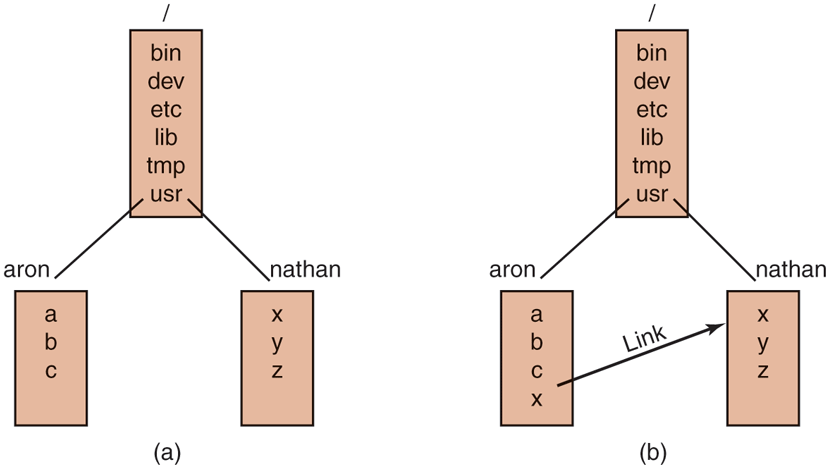
(a) Before linking. (b) After linking.
In the example just discussed, we suggested that before linking, the only way for Aron to refer to Nathan’s file x was by using its absolute path. Actually, this is not really true. When a directory is created, two entries, . and .., are automatically made in it. The former refers to the working directory itself. The latter refers to the directory’s parent, that is, the directory in which it itself is listed. Thus from /usr/aron, another path to Nathan’s file x is .. /nathan/x.
In addition to regular files, Linux also supports character special files and block special files. Character special files are used to model serial I/O devices, such as keyboards and printers. Opening and reading from /dev/tty reads from the keyboard; opening and writing to /dev/lp writes to the printer. Block special files, often with names like /dev/hd1, can be used to read and write raw disk partitions without regard to the file system. Thus, a seek to byte k followed by a read will begin reading from the kth byte on the corresponding partition, completely ignoring the i-node and file structure. Raw block devices are used for paging and swapping by programs that lay down file systems (e.g., mkfs), and by programs that fix sick file systems (e.g., fsck), for example.
Many computers have two or more disks. On mainframes at banks, for example, it is frequently necessary to have 100 or more disks on a single machine, in order to hold the huge databases required. Personal computers may have an internal disk or SSD and an external USB drive for backups. When there are multiple disk drives, the question arises of how to handle them.
One solution is to put a self-contained file system on each one and just keep them separate. Consider, for example, the situation shown in Fig. 10-25(a). Here we have a hard disk, which we call C:, and a USB external drive, which we call D:. Each has its own root directory and files. With this solution, the user has to specify both the device and the file when anything other than the default is needed. For instance, to copy a file x to a directory d (assuming C is the default), one would type
cp D:/x /a/d/xFigure 10-25
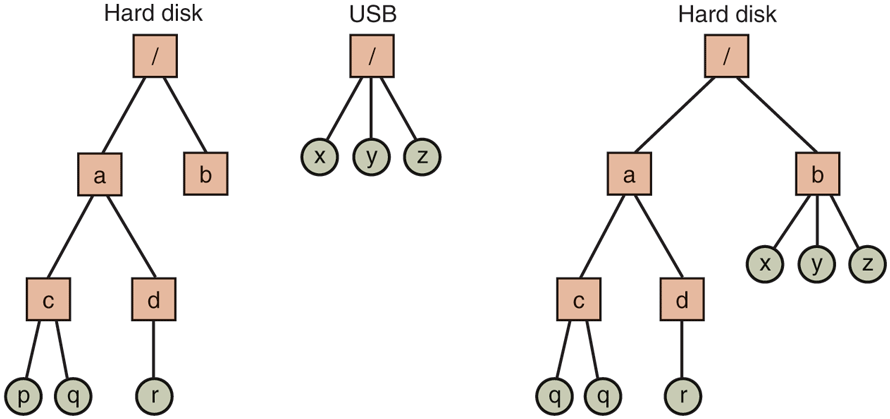
(a) Separate file systems. (b) After mounting.
This is the approach taken by a number of systems, including Windows, which it inherited from MS-DOS in a century long ago.
The Linux solution is to allow one disk to be mounted in another disk’s file tree. In our example, we could mount the USB drive on the directory /b, yielding the file system of Fig. 10-25(b). The user now sees a single file tree, and no longer has to be aware of which file resides on which device. The above copy command now becomes
cp /b/x /a/d/xexactly the same as it would have been if everything had been on the hard disk in the first place.
Another interesting property of the Linux file system is locking. In some applications, two or more processes may be using the same file at the same time, which may lead to race conditions. One solution is to program the application with critical regions. However, if the processes belong to independent users who do not even know each other, this kind of coordination is generally inconvenient.
Consider, for example, a database consisting of many files in one or more directories that are accessed by unrelated users. It is certainly possible to associate a semaphore with each directory or file and achieve mutual exclusion by having processes do a down operation on the appropriate semaphore before accessing the data. The disadvantage, however, is that a whole directory or file is then made inaccessible, even though only one record may be needed.
For this reason, POSIX provides a flexible and fine-grained mechanism for processes to lock as little as a single byte and as much as an entire file in one indivisible operation. The locking mechanism requires the caller to specify the file to be locked, the starting byte, and the number of bytes. If the operation succeeds, the system makes a table entry noting that the bytes in question (e.g., a database record) are locked.
Two kinds of locks are provided, shared locks and exclusive locks. If a portion of a file already contains a shared lock, a second attempt to place a shared lock on it is permitted, but an attempt to put an exclusive lock on it will fail. If a portion of a file contains an exclusive lock, all attempts to lock any part of that portion will fail until the lock has been released. In order to successfully place a lock, every byte in the region to be locked must be available.
When placing a lock, a process must specify whether it wants to block or not in the event that the lock cannot be placed. If it chooses to block, when the existing lock has been removed, the process is unblocked and the lock is placed. If the process chooses not to block when it cannot place a lock, the system call returns immediately, with the status code telling whether the lock succeeded or not. If it did not, the caller has to decide what to do next (e.g., wait and try again).
Locked regions may overlap. In Fig. 10-26(a) we see that process A has placed a shared lock on bytes 4 through 7 of some file. Later, process B places a shared lock on bytes 6 through 9, as shown in Fig. 10-26(b). Finally, C locks bytes 2 through 11. As long as all these locks are shared, they can coexist.
Figure 10-26
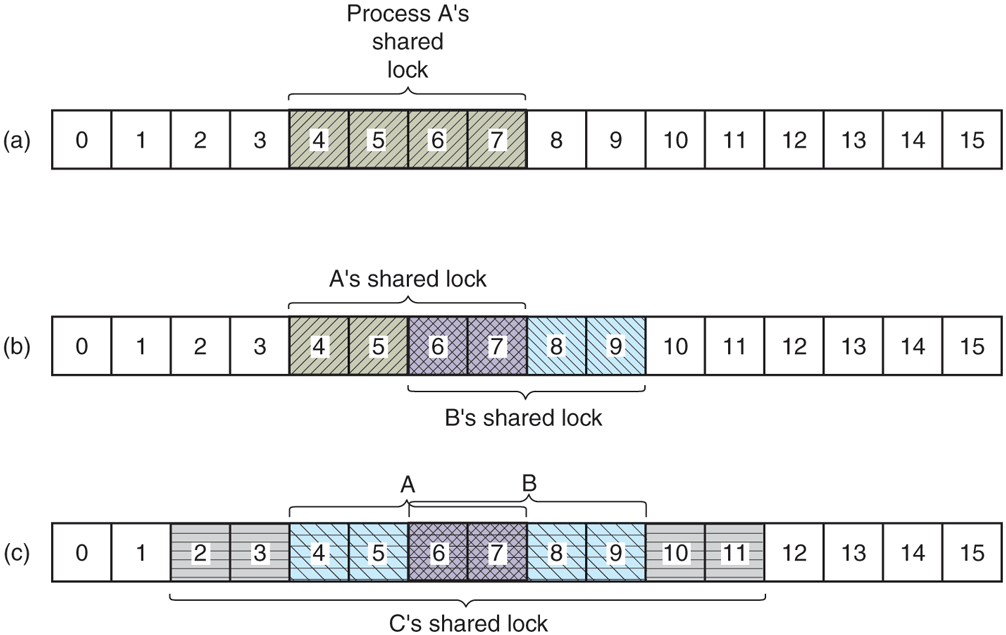
(a) A file with one lock. (b) Adding a second lock. (c) A third one.
Now consider what happens if a process tries to acquire an exclusive lock to byte 9 of the file of Fig. 10-26(c), with a request to block if the lock fails. Since two previous locks cover this block, the caller will block and will remain blocked until both B and C release their locks.
10.6.2 File-System Calls in Linux
Many system calls relate to files and the file system. First we will look at the system calls that operate on individual files. Later we will examine those that involve directories or the file system as a whole. To create a new file, the creat call can be used. (When Ken Thompson was once asked what he would do differently if he had the chance to reinvent UNIX, he replied that he would spell creat as create this time.) parameters provide the name of the file and the protection mode. Thus
fd = creat("abc", mode);creates a file called abc with the protection bits taken from mode. These bits determine which users may access the file and how. They will be described later.
The creat call not only creates a new file, but also opens it for writing. To allow subsequent system calls to access the file, a successful creat returns a small nonnegative integer called a file descriptor, fd in the example above. If a creat is done on an existing file, that file is truncated to length 0 and its contents are discarded. Additionally, files can also be created using the open call with appropriate arguments.
Now let us continue looking at the main file-system calls, which are listed in Fig. 10-27. To read or write an existing file, the file must first be opened by calling open or creat. This call specifies the file name to be opened and how it is to be opened: for reading, writing, or both. Various options can be specified as well. Like creat, the call to open returns a file descriptor that can be used for reading or writing. Afterward, the file can be closed by close, which makes the file descriptor available for reuse on a subsequent creat or open. Both the creat and open calls always return the lowest-numbered file descriptor not currently in use.
Figure 10-27
System call |
Description |
|---|---|
fd = creat(name, mode) |
One way to create a new file |
fd = open(file, how, ...) |
Open a file for reading, writing, or both |
s = close(fd) |
Close an open file |
n = read(fd, buffer, nbytes) |
Read data from a file into a buffer |
n = write(fd, buffer, nbytes) |
Write data from a buffer into a file |
position = lseek(fd, offset, whence) |
Move the file pointer |
s = stat(name, &buf) |
Get a file’s status information |
s = fstat(fd, &buf) |
Get a file’s status information |
s = pipe(&fd[0]) |
Create a pipe |
s = fcntl(fd, cmd, ...) |
File locking and other operations |
Some system calls relating to files. The return code s is if an error has occurred; fd is a file descriptor, and position is a file offset. The parameters should be self-explanatory.
When a program starts executing in the standard way, file descriptors 0, 1, and 2 are already opened for standard input, standard output, and standard error, respectively. In this way, a filter, such as the sort program, can just read its input from file descriptor 0 and write its output to file descriptor 1, without having to know what files they are. This mechanism works because the shell arranges for these values to refer to the correct (redirected) files before the program is started.
The most heavily used calls are undoubtedly read and write. Each one has three parameters: a file descriptor (telling which open file to read or write), a buffer address (telling where to put the data or get the data from), and a count (telling how many bytes to transfer). That is all there is. It is a very simple design. A typical call is
n = read(fd, buffer, nbytes);Although nearly all programs read and write files sequentially, some programs need to be able to access any part of a file at random. Associated with each file is a pointer that indicates the current position in the file. When reading (or writing) sequentially, it normally points to the next byte to be read (written). If the pointer is at, say, 4096, before 1024 bytes are read, it will automatically be moved to 5120 after a successful read system call. The lseek call changes the value of the position pointer, so that subsequent calls to read or write can begin anywhere in the file, or even beyond the end of it. It is called lseek to avoid conflicting with seek, a nowobsolete call that was formerly used on 16-bit computers for seeking.
Lseek has three parameters: the first one is the file descriptor for the file; the second is a file position; the third tells whether the file position is relative to the beginning of the file, the current position, or the end of the file. The value returned by lseek is the absolute position in the file after the file pointer is changed. Slightly ironically, lseek is the only file system call that never causes a real disk operation because all it does is update the current file position, which is a number in memory.
For each file, Linux keeps track of the file mode (regular, directory, special file), size, time of last modification, and other information. Programs can ask to see this information via the stat system call. The first parameter is the file name. The second is a pointer to a structure where the information requested is to be put. The fields in the structure are shown in Fig. 10-28. The fstat call is the same as stat except that it operates on an open file (whose name may not be known) rather than on a path name.
Figure 10-28
Device the file is on |
I-node number (which file on the device) |
File mode (includes protection information) |
Number of links to the file |
Identity of the file’s owner |
Group the file belongs to |
File size (in bytes) |
Creation time |
Time of last access |
Time of last modification |
The fields returned by the stat system call.
The pipe system call is used to create shell pipelines. It creates a kind of pseudofile, which buffers the data between the pipeline components, and returns file descriptors for both reading and writing the buffer. In a pipeline such as
sort <in | head –30file descriptor 1 (standard output) in the process running sort would be set (by the shell) to write to the pipe, and file descriptor 0 (standard input) in the process running head would be set to read from the pipe. In this way, sort just reads from file descriptor 0 (set to the file in) and writes to file descriptor 1 (the pipe) without even being aware that these have been redirected. If they have not been redirected, sort will automatically read from the keyboard and write to the screen (the default devices). Similarly, when head reads from file descriptor 0, it is reading the data sort put into the pipe buffer without even knowing that a pipe is in use. This is a clear example of how a simple concept (redirection) with a simple implementation (file descriptors 0 and 1) can lead to a powerful tool (connecting programs in arbitrary ways without having to modify them at all).
The last system call in Fig. 10-27 is fcntl. It is used to lock and unlock files, apply shared or exclusive locks, and perform a few other file-specific operations.
Now let us look at some system calls that relate more to directories or the file system as a whole, rather than just to one specific file. Some common ones are listed in Fig. 10-29. Directories are created and destroyed using mkdir and rmdir, respectively. A directory can be removed only if it is empty.
Figure 10-29
System call |
Description |
|---|---|
s = mkdir(path, mode) |
Create a new directory |
s = rmdir(path) |
Remove a directory |
s = link(oldpath, newpath) |
Create a link to an existing file |
s = unlink(path) |
Unlink a file |
s = chdir(path) |
Change the wor king directory |
dir = opendir(path) |
Open a directory for reading |
s = closedir(dir) |
Close a directory |
dirent = readdir(dir) |
Read one directory entry |
rewinddir(dir) |
Rewind a directory so it can be reread |
Some system calls relating to directories. The return code s is if an error has occurred; dir identifies a directory stream, and dirent is a directory entry. The parameters should be self-explanatory.
As we saw in Fig. 10-24, linking to a file creates a new directory entry that points to an existing file. The link system call creates the link. The parameters specify the original and new names, respectively. Directory entries are removed with unlink. When the last link to a file is removed, the file is automatically deleted. For a file that has never been linked, the first unlink causes it to disappear.
The working directory is changed by the chdir system call. Doing so has the effect of changing the interpretation of relative path names.
The last four calls of Fig. 10-29 are for reading directories. They can be opened, closed, and read, analogous to ordinary files. Each call to readdir returns exactly one directory entry in a fixed format. There is no way for users to write in a directory (in order to maintain the integrity of the file system). Files can be added to a directory using creat or link and removed using unlink. There is also no way to seek to a specific file in a directory, but rewinddir allows an open directory to be read again from the beginning.
10.6.3 Implementation of the Linux File System
In this section, we will first look at the abstractions supported by the Virtual File System layer. The VFS hides from higher-level processes and applications the differences among many types of file systems supported by Linux, whether they are residing on local devices or are stored remotely and need to be accessed over the network. Devices and other special files are also accessed through the VFS layer. Next, we will describe the implementation of the first widespread Linux file system, ext2, or the second extended file system. Afterward, we will discuss the improvements in the ext4 file system. A wide variety of other file systems are also in use. All Linux systems can handle multiple disk partitions, each with a different file system on it.
The Linux Virtual File System
In order to enable applications to interact with different file systems, implemented on different types of local or remote devices, Linux takes an approach used in other UNIX systems: the Virtual File System (VFS). VFS defines a set of basic file-system abstractions and the operations which are allowed on these abstractions. Invocations of the system calls described in the previous section access the VFS data structures, determine the exact file system where the accessed file belongs, and via function pointers stored in the VFS data structures invoke the corresponding operation in the specified file system.
Figure 10-30 summarizes the four main file-system structures supported by VFS. The superblock contains critical information about the layout of the file system. Destruction of the superblock will render the file system unreadable. The inodes (short for index-nodes, but never called that, although some lazy people drop the hyphen and call them inodes) each describe exactly one file. Note that in Linux, directories and devices are also represented as files, thus they will have corresponding i-nodes. Both superblocks and i-nodes have a corresponding structure maintained on the physical disk where the file system resides.
Figure 10-30
Object |
Description |
Operation |
|---|---|---|
Superblock |
specific file-system |
read_inode, sync_fs |
Dentry |
directory entry, single component of a path |
d_compare, d_delete |
I-node |
specific file |
create, link |
File |
open file associated with a process |
read, write |
File-system abstractions supported by the VFS.
In order to facilitate certain directory operations and traversals of paths, such as /usr/ast/bin, VFS supports a dentry data structure which represents a directory entry. This data structure is created by the file system on the fly. Directory entries are cached in what is called the dentry_cache. For instance, the dentry_cache would contain entries for /, /usr, /usr/ast, and the like. If multiple processes access the same file through the same hard link (i.e., same path), their file object will point to the same entry in this cache.
Finally, the file data structure is an in-memory representation of an open file, and is created in response to the open system call. It supports operations such as read, write, sendfile, lock, and other system calls described in the previous section.
The actual file systems implemented underneath the VFS need not use the exact same abstractions and operations internally. They must, however, implement file-system operations semantically equivalent to those specified with the VFS objects. The elements of the operations data structures for each of the four VFS objects are pointers to functions in the underlying file system.
The Linux Ext2 File System
We next describe one of the earlier on-disk file systems used in Linux: ext2. The first Linux release used the MINIX 1 file system and was limited by short file names (chosen for UNIX V7 compatibility) and 64-MB file sizes. The MINIX 1 file system was eventually replaced by the first extended file system, ext, which permitted both longer file names and larger file sizes. Due to its performance inefficiencies, ext was replaced by its successor, ext2, which reached widespread use.
An ext2 Linux disk partition contains a file system with the layout shown in Fig. 10-31. Block 0 is not used by Linux and contains code to boot the computer. Following block 0, the disk partition is divided into groups of blocks, irrespective of where the disk cylinder boundaries fall. Each group is organized as follows.
Figure 10-31
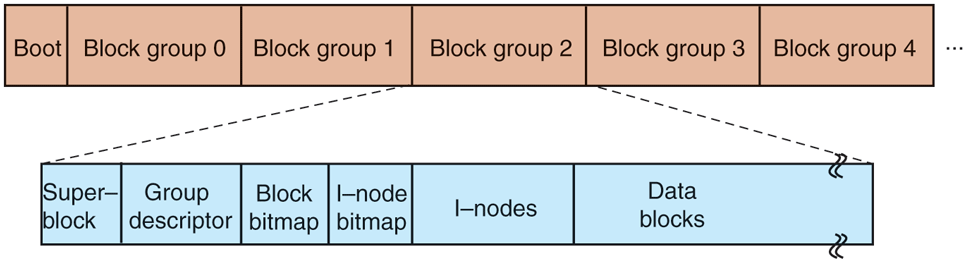
Disk layout of the Linux ext2 file system.
The first block is the superblock. It contains information about the layout of the file system, including the number of i-nodes, the number of disk blocks, and the start of the list of free disk blocks (typically a few hundred entries). Next comes the group descriptor, which contains information about the location of the bitmaps, the number of free blocks and i-nodes in the group, and the number of directories in the group. This information is important since ext2 attempts to spread directories evenly over the disk.
Two bitmaps are used to keep track of the free blocks and free i-nodes, respectively, a choice inherited from the MINIX 1 file system (and in contrast to most UNIX file systems, which use a free list). Each map is one block long. With a 1-KB block, this design limits a block group to 8192 blocks and 8192 i-nodes. The former is a real restriction but, in practice, the latter is not. With 4-KB blocks, the numbers are four times larger.
Following the superblock are the i-nodes themselves. They are numbered from 1 up to some maximum. Each i-node is 128 bytes long and describes exactly one file. An i-node contains accounting information (including all the information returned by stat, which simply takes it from the i-node), as well as enough information to locate all the disk blocks that hold the file’s data.
Following the i-nodes are the data blocks. All the files and directories are stored here. If a file or directory consists of more than one block, the blocks need not be contiguous on the disk. In fact, the blocks of a large file are likely to be spread all over the disk.
I-nodes corresponding to directories are dispersed throughout the disk block groups. Ext2 makes an effort to collocate ordinary files in the same block group as the parent directory, and data files in the same block as the original file i-node, provided that there is sufficient space. This idea was borrowed from the Berkeley Fast File System (McKusick et al., 1984). The bitmaps are used to make quick decisions regarding where to allocate new file-system data. When new file blocks are allocated, ext2 also preallocates a number (eight) of additional blocks for that file, so as to minimize the file fragmentation due to future write operations. This scheme balances the file-system load across the entire disk. It also performs well due to its tendencies for collocation and reduced fragmentation.
To access a file, it must first use one of the Linux system calls, such as open, which requires the file’s path name. The path name is parsed to extract individual directories. If a relative path is specified, the lookup starts from the process’ current directory, otherwise it starts from the root directory. In either case, the i-node for the first directory can easily be located: there is a pointer to it in the process descriptor, or, in the case of a root directory, it is typically stored in a predetermined block on disk.
The directory file allows file names up to 255 characters and is illustrated in Fig. 10-32. Each directory consists of some integral number of disk blocks so that directories can be written atomically to the disk. Within a directory, entries for files and directories are in unsorted order, with each entry directly following the one before it. Entries may not span disk blocks, so often there are some number of unused bytes at the end of each disk block.
Figure 10-32
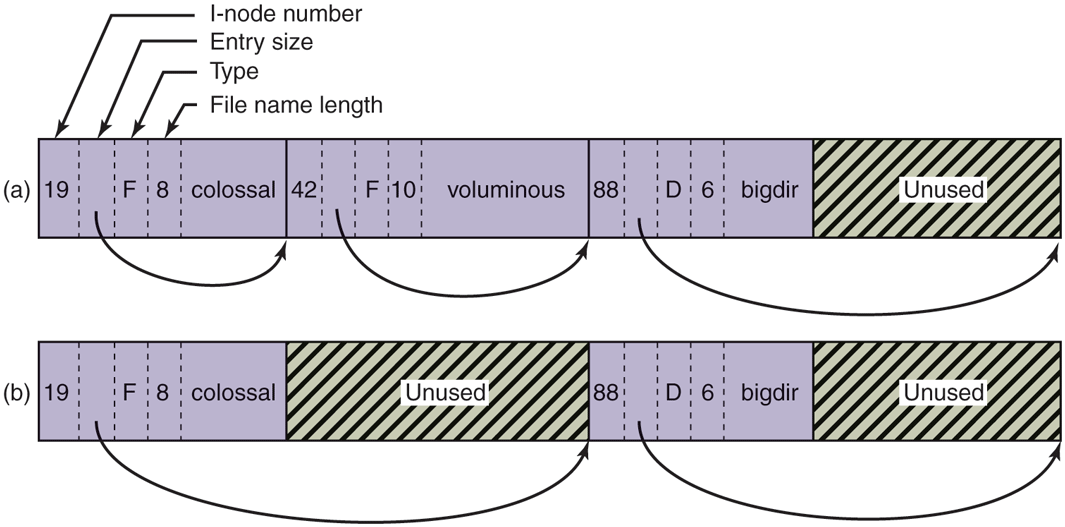
(a) A Linux directory with three files. (b) The same directory after the file voluminous has been removed.
Each directory entry in Fig. 10-32 consists of four fixed-length fields and one variable-length field. The first field is the i-node number, 19 for the file colossal, 42 for the file voluminous, and 88 for the directory bigdir. Next comes a field rec len, telling how big the entry is (in bytes), possibly including some padding after the name. This field is needed to find the next entry for the case that the file name is padded by an unknown length. That is the meaning of the arrow in Fig. 10-32. Then comes the type field: file, directory, and so on. The last fixed field is the length of the actual file name in bytes, 8, 10, and 6 in this example. Finally, comes the file name itself, terminated by a 0 byte and padded out to a 32-bit boundary. Additional padding may follow that.
In Fig. 10-32(b) we can see the same directory after the entry for voluminous has been removed from the directory. All the removal has done is increase the size of the total entry field for colossal, turning the former field for voluminous into padding for the first entry. This padding can be used for a subsequent entry, of course.
Since directories are searched linearly, it can take a long time to find an entry at the end of a large directory. Therefore, the system maintains a cache of recently accessed directories. This cache is searched using the name of the file, and if a hit occurs, the costly linear search is avoided. A dentry object is entered in the dentry cache for each of the path components, and, through its i-node, the directory is searched for the subsequent path element entry, until the actual file i-node is reached.
For instance, to look up a file specified with an absolute path name, such as /usr/ast/file, the following steps are required. First, the system locates the root directory, which generally uses i-node 2, especially when i-node 1 is reserved for bad-block handling. It places an entry in the dentry cache for future lookups of the root directory. Then it looks up the string ‘‘usr’’ in the root directory, to get the inode number of the /usr directory, which is also entered in the dentry cache. This inode is then fetched, and the disk blocks are extracted from it, so the /usr directory can be read and searched for the string ‘‘ast’’. Once this entry is found, the i-node number for the /usr/ast directory can be taken from it. Armed with the i-node number of the /usr/ast directory, this i-node can be read and the directory blocks located. Finally, ‘‘file’’ is looked up and its i-node number found. Thus, the use of a relative path name is not only more convenient for the user, but it also saves a substantial amount of work for the system.
If the file is present, the system extracts the i-node number and uses it as an index into the i-node table (on disk) to locate the corresponding i-node and bring it into memory. The i-node is put in the i-node table, a kernel data structure that holds all the i-nodes for currently open files and directories. The format of the inode entries, as a bare minimum, must contain all the fields returned by the stat system call so as to make stat work (see Fig. 10-28). In Fig. 10-33 we show some of the fields included in the i-node structure supported by the Linux file-system layer. The actual i-node structure contains quite a few more fields, since the same structure is also used to represent directories, devices, and other special files. The i-node structure also contains fields reserved for future use. History has shown that unused bits do not remain that way for long.
Figure 10-33
Field |
Bytes |
Description |
|---|---|---|
Mode |
2 |
File type, protection bits, setuid, setgid bits |
Nlinks |
2 |
Number of directory entries pointing to this i-node |
Uid |
2 |
UID of the file owner |
Gid |
2 |
GID of the file owner |
Size |
4 |
File size in bytes |
Addr |
60 |
Address of first 12 disk blocks, then 3 indirect blocks |
Gen |
1 |
Generation number (incremented every time i-node is reused) |
Atime |
4 |
Time the file was last accessed |
Mtime |
4 |
Time the file was last modified |
Ctime |
4 |
Time the i-node was last changed (except the other times) |
Some fields in the i-node structure in Linux.
Let us now see how the system reads a file. Remember that a typical call to the library procedure for invoking the read system call looks like this:
n = read(fd, buffer, nbytes);When the kernel gets control, all it has to start with are these three parameters and the information in its internal tables relating to the user. One of the items in the internal tables is the file-descriptor array. It is indexed by a file descriptor and contains one entry for each open file (up to the maximum number, often 32).
The idea is to start with this file descriptor and end up with the corresponding i-node. Let us consider one possible design: just put a pointer to the i-node in the file-descriptor table. Although simple, unfortunately this method does not work. The problem is as follows. Associated with every file descriptor is a file position that tells at which byte the next read (or write) will start. Where should it go? One possibility is to put it in the i-node table. However, this approach fails if two or more unrelated processes happen to open the same file at the same time because each one has its own file position.
A second possibility is to put the file position in the file-descriptor table. In that way, every process that opens a file gets its own private file position. Unfortunately this scheme fails too, but the reasoning is more subtle and has to do with the nature of file sharing in Linux. Consider a shell script, s, consisting of two commands, p1 and p2, to be run in order. If the shell script is called by the command
s >xit is expected that p1 will write its output to x, and then p2 will write its output to x also, starting at the place where p1 stopped.
When the shell forks off p1, x is initially empty, so p1 just starts writing at file position 0. However, when p1 finishes, some mechanism is needed to make sure that the initial file position that p2 sees is not 0 (which it would be if the file position were kept in the file-descriptor table), but the value p1 ended with.
The way this is achieved is shown in Fig. 10-34. The trick is to introduce a new table, the open-file-description table, between the file descriptor table and the i-node table, and put the file position (and read/write bit) there. In this figure, the parent is the shell and the child is first p1 and later p2. When the shell forks off p1, its user structure (including the file-descriptor table) is an exact copy of the shell’s, so both of them point to the same open-file-description table entry. When p1 finishes, the shell’s file descriptor is still pointing to the open-file description containing p1’s file position. When the shell now forks off p2, the new child automatically inherits the file position, without either it or the shell even having to know what that position is.
Figure 10-34
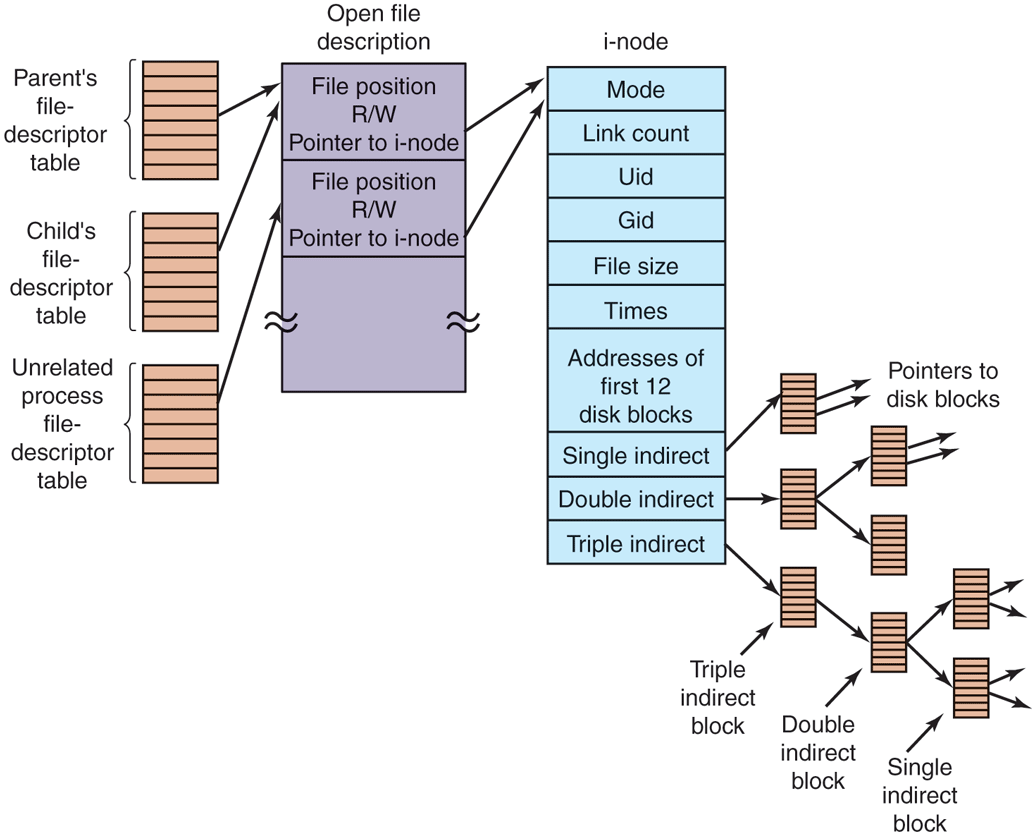
The relation between the file-descriptor table, the open-filedescription table, and the i-node table.
However, if an unrelated process opens the file, it gets its own open-filedescription entry, along with its own file position, which is just what is needed. Thus the whole point of the open-file-description table is to allow a parent and child to share a file position, but to provide unrelated processes with their own values.
Getting back to the problem of doing the read, we have now shown how the file position and i-node are located. The i-node contains the disk addresses of the first 12 blocks of the file. If the file position falls in the first 12 blocks, the block is read and the data are copied to the user. For files longer than 12 blocks, a field in the i-node contains the disk address of a single indirect block, as shown in Fig. 10-34. This block contains the disk addresses of more disk blocks. For example, if a block is 1 KB and a disk address is 4 bytes, the single indirect block can hold 256 disk addresses. Thus this scheme works for files of up to 268 KB.
Beyond that, a double indirect block is used. It contains the addresses of 256 single indirect blocks, each of which holds the addresses of 256 data blocks. This mechanism is sufficient to handle files up to blocks (67,119,104 bytes). If even this is not enough, the i-node has space for a triple indirect block. Its pointers point to many double indirect blocks. This addressing scheme can handle file sizes of 1-KB blocks (16 GB). For 8-KB block sizes, the addressing scheme can support file sizes up to 64 TB.
The Linux Ext4 File System
In order to prevent all data loss after system crashes and power failures, the ext2 file system would have to write out each data block to disk as soon as it was created. The latency incurred during the required disk-head seek operation would be so high that the performance would be intolerable. Therefore, writes are delayed, and changes may not be committed to disk for up to 30 sec, which is a very long time interval in the context of modern computer hardware.
To improve the robustness of the file system, Linux relies on journaling file systems. Ext3, a successor of the ext2 file system, is an example of a journaling file system. Ext4, a follow-on of ext3, is also a journaling file system, but unlike ext3, it changes the block addressing scheme used by its predecessors, thereby supporting both larger files and larger overall file-system sizes. Today, it is considered to be the most popular among the Linux file systems. We will describe some of its features next.
The basic idea behind a journaling file system is to maintain a journal, which describes all file-system operations in sequential order. By sequentially writing out changes to the file-system data or metadata (i-nodes, superblock, etc.), the operations do not suffer from the overheads of disk-head movement during random disk accesses. Eventually, the changes will be written out, committed, to the appropriate disk location, and the corresponding journal entries can be discarded. If a system crash or power failure occurs before the changes are committed, during restart the system will detect that the file system was not unmounted properly, traverse the journal, and apply the file-system changes described in the journal log.
Ext4 is designed to be highly compatible with ext2 and ext3, although its core data structures and disk layout are modified. Regardless, a file system which has been unmounted as an ext2 system can be subsequently mounted as an ext4 system and offer the journaling capability.
The journal is a file managed as a circular buffer. The journal may be stored on the same or a separate device from the main file system. Since the journal operations are not ‘‘journaled’’ themselves, these are not handled by the same ext4 file system. Instead, a separate JBD (Journaling Block Device) is used to perform the journal read/write operations.
JBD supports three main data structures: log record, atomic operation handle, and transaction. A log record describes a low-level file-system operation, typically resulting in changes within a block. Since a system call such as write includes changes at multiple places—i-nodes, existing file blocks, new file blocks, list of free blocks, etc.—related log records are grouped in atomic operations. Ext4 notifies JBD of the start and end of system-call processing, so that JBD can ensure that either all log records in an atomic operation are applied, or none of them. Finally, primarily for efficiency reasons, JBD treats collections of atomic operations as transactions. Log records are stored consecutively within a transaction. JBD will allow portions of the journal file to be discarded only after all log records belonging to a transaction are safely committed to disk.
Since writing out a log entry for each disk change may be costly, ext4 may be configured to keep a journal of all disk changes, or only of changes related to the file-system metadata (the i-nodes, superblocks, etc.). Journaling only metadata gives less system overhead and results in better performance but does not make any guarantees against corruption of file data. Several other journaling file systems maintain logs of only metadata operations (e.g., SGI’s XFS). In addition, the reliability of the journal can be further improved via checksumming.
Key modification in ext4 compared to its predecessors is the use of extents. Extents represent contiguous blocks of storage, for instance 128 MB of contiguous 4-KB blocks vs. individual storage blocks, as referenced in ext2. Unlike its predecessors, ext4 does not require metadata operations for each block of storage. This scheme also reduces fragmentation for large files. As a result, ext4 can provide faster file system operations and support larger files and file system sizes. For instance, for a block size of 1 KB, ext4 increases the maximum file size from 16 GB to 16 TB, and the maximum file system size to 1 EB (Exabyte).
The /proc File System
Another Linux file system is the /proc (process) file system, an idea originally devised in the 8th edition of UNIX from Bell Labs and later copied in 4.4BSD and System V. However, Linux extends the idea in several ways. The basic concept is that for every process in the system, a directory is created in /proc. The name of the directory is the process PID expressed as a decimal number. For example, /proc/619 is the directory corresponding to the process with PID 619. In this directory are files that appear to contain information about the process, such as its command line, environment strings, and signal masks. In fact, these files do not exist on the disk. When they are read, the system retrieves the information from the actual process as needed and returns it in a standard format.
Many of the Linux extensions relate to other files and directories located in /proc. They contain a wide variety of information about the CPU, disk partitions, devices, interrupt vectors, kernel counters, file systems, loaded modules, and much more. Unprivileged user programs may read much of this information to learn about system behavior in a safe way. Some of these files may be written to in order to change system parameters.
10.6.4 NFS: The Network File System
Networking has played a major role in Linux, and UNIX in general, right from the beginning (the first UNIX network was built to move new kernels from the PDP-11/70 to the Interdata 8/32 during the port to the latter). In this section, we will examine Sun Microsystem’s NFS (Network File System), which is used on all modern Linux systems to join the file systems on separate computers into one logical whole. NSF version 3 was introduced in 1994. Currently, the most recent version is NSFv4. It was originally introduced in 2000 and provides several enhancements over the previous NFS architecture. Three aspects of NFS are of interest: the architecture, the protocol, and the implementation. We will now examine these in turn, first in the context of the simpler NFS version 3, then we will turn to the enhancements included in v4.
NFS Architecture
The basic idea behind NFS is to allow an arbitrary collection of clients and servers to share a common file system. In many cases, all the clients and servers are on the same LAN, but this is not required. It is also possible to run NFS over a wide area network if the server is far from the client. For simplicity, we will speak of clients and servers as though they were on distinct machines, but in fact, NFS allows every machine to be both a client and a server at the same time.
Each NFS server exports one or more of its directories for access by remote clients. When a directory is made available, so are all of its subdirectories, so actually entire directory trees are normally exported as a unit. The list of directories a server exports is maintained in a file, often /etc/exports, so these directories can be exported automatically whenever the server is booted. Clients access exported directories by mounting them. When a client mounts a (remote) directory, it becomes part of its directory hierarchy, as shown in Fig. 10-35.
Figure 10-35
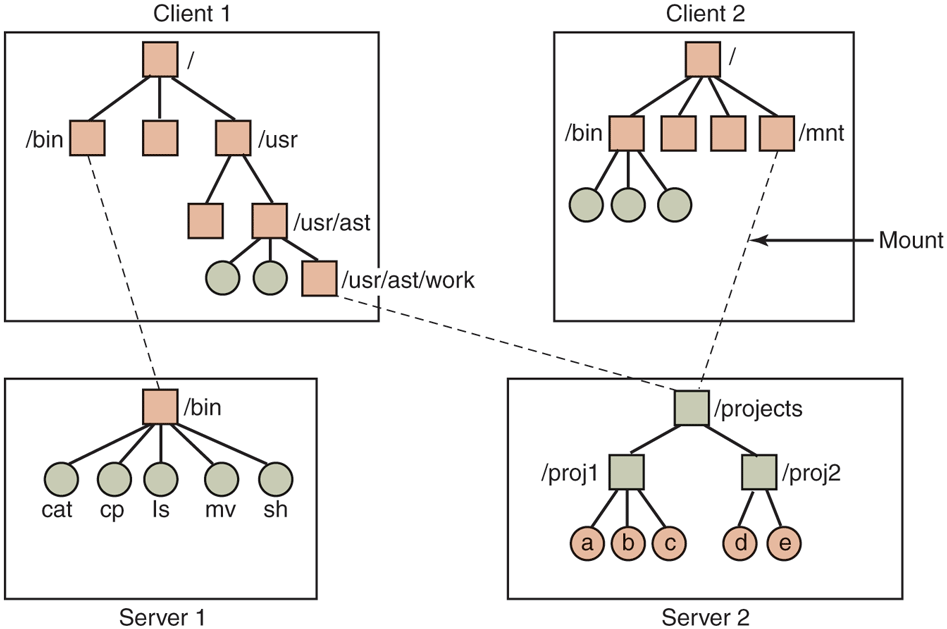
Examples of remote mounted file systems. Directories are shown as squares and files as circles.
In this example, client 1 has mounted the bin directory of server 1 on its own bin directory, so it can now refer to the shell as /bin/sh and get the shell on server 1. Diskless workstations often have only a skeleton file system (in RAM) and get all their files from remote servers like this. Similarly, client 1 has mounted server 2’s directory /projects on its directory /usr/ast/work so it can now access file a as /usr/ast/work/proj1/a. Finally, client 2 has also mounted the projects directory and can also access file a, only as /mnt/proj1/a. As seen here, the same file can have different names on different clients due to its being mounted in a different place in the respective trees. The mount point is entirely local to the clients; the server does not know where it is mounted on any of its clients.
NFS Protocols
Since one of the goals of NFS is to support a heterogeneous system, with clients and servers possibly running different operating systems on different hardware, it is essential that the interface between the clients and servers be well defined. Only then is anyone able to write a new client implementation and expect it to work correctly with existing servers, and vice versa.
NFS accomplishes this goal by defining two client-server protocols. A protocol is a set of requests sent by clients to servers, along with the corresponding replies sent by the servers back to the clients.
The first NFS protocol handles mounting. A client can send a path name to a server and request permission to mount that directory somewhere in its directory hierarchy. The place where it is to be mounted is not contained in the message, as the server does not care where it is to be mounted. If the path name is legal and the directory specified has been exported, the server returns a file handle to the client. The file handle contains fields uniquely identifying the file-system type, the disk, the i-node number of the directory, and security information. Subsequent calls to read and write files in the mounted directory or any of its subdirectories use the file handle. It is somewhat analogous to the file descriptors returned by the creat and open calls on local files.
When Linux boots, it runs the /etc/rc shell script before going multiuser. Commands to mount remote file systems can be placed in this script, thus automatically mounting the necessary remote file systems before allowing any logins. Alternatively, most versions of Linux also support automounting. This feature allows a set of remote directories to be associated with a local directory. None of these remote directories are mounted (or their servers even contacted) when the client is booted. Instead, the first time a remote file is opened, the operating system sends a message to each of the servers. The first one to reply wins, and its directory is mounted.
Automounting has two principal advantages over static mounting via the /etc/rc file. First, if one of the NFS servers named in /etc/rc happens to be down, it is impossible to bring the client up, at least not without some difficulty, delay, and quite a few error messages. If the user does not even need that server at the moment, all that work is wasted. Second, by allowing the client to try a set of servers in parallel, a degree of fault tolerance can be achieved (because only one of them needs to be up), and the performance can be improved (by choosing the first one to reply—presumably the least heavily loaded).
On the other hand, it is tacitly assumed that all the file systems specified as alternatives for the automount are identical. Since NFS provides no support for file or directory replication, it is up to the user to arrange for all the file systems to be the same. Consequently, automounting is most often used for read-only file systems containing system binaries and other files that rarely change.
The second NFS protocol is for directory and file access. Clients can send messages to servers to manipulate directories and read and write files. They can also access file attributes, such as file mode, size, and time of last modification. Most Linux system calls are supported by NFS, with the perhaps surprising exceptions of open and close.
The omission of open and close is not an accident. It is fully intentional. It is not necessary to open a file before reading it, nor to close it when done. Instead, to read a file, a client sends the server a lookup message containing the file name, with a request to look it up and return a file handle, which is a structure that identifies the file (i.e., contains a file system identifier and i-node number, among other data). Unlike an open call, this lookup operation does not copy any information into internal system tables. The read call contains the file handle of the file to read, the offset in the file to begin reading, and the number of bytes desired. Each such message is self-contained. The advantage of this scheme is that the server does not have to remember anything about open connections in between calls to it. Thus if a server crashes and then recovers, no information about open files is lost, because there is none. A server like this that does not maintain state information about open files is said to be stateless.
Unfortunately, the NFS method makes it difficult to achieve the exact Linux file semantics. For example, in Linux a file can be opened and locked so that other processes cannot access it. When the file is closed, the locks are released. In a stateless server such as NFS, locks cannot be associated with open files, because the server does not know which files are open. NFS therefore needs a separate, additional mechanism to handle locking.
NFS uses the standard UNIX protection mechanism, with the rwx bits for the owner, group, and others (mentioned in Chap. 1 and discussed in detail below). Originally, each request message simply contained the user and group IDs of the caller, which the NFS server used to validate the access. In effect, it trusted the clients not to cheat. Several years’ experience abundantly demonstrated that such an assumption was—how shall we put it?—rather naive. Currently, public key cryptography can be used to establish a secure key for validating the client and server on each request and reply. When this option is used, a malicious client cannot impersonate another client because it does not know that client’s secret key.
NFS Implementation
Although the implementation of the client and server code is independent of the NFS protocols, most Linux systems use a three-layer implementation similar to that of Fig. 10-36. The top layer is the system-call layer. This handles calls like open, read, and close. After parsing the call and checking the parameters, it invokes the second layer, the Virtual File System (VFS) layer.
Figure 10-36
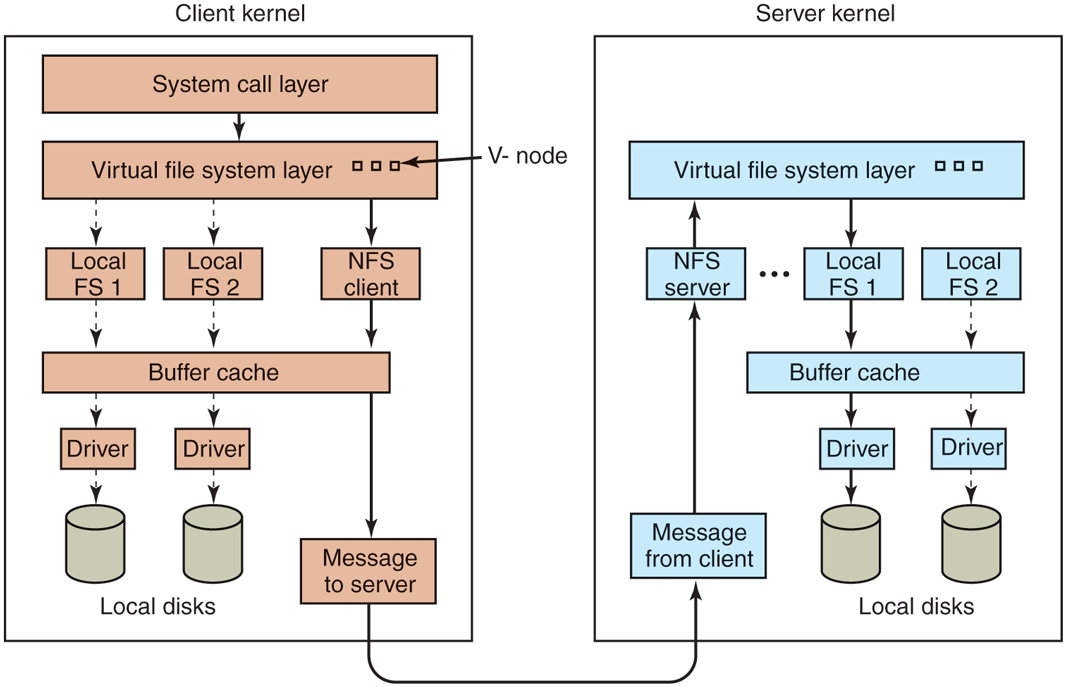
The NFS layer structure.
The task of the VFS layer is to maintain a table with one entry for each open file. The VFS layer additionally has an entry, a virtual i-node, or v-node, for every open file. The term v-node comes from BSD. In Linux, v-nodes are (confusingly) referred to as generic i-nodes, in contrast to the file system-specific i-nodes stored on disk. V-nodes are used to tell whether the file is local or remote. For remote files, enough information is provided to be able to access them. For local files, the file system and i-node are recorded because modern Linux systems can support multiple file systems (e.g., ext4fs, /proc, XFS, etc.). Although VFS was invented to support NFS, most modern Linux systems now support it as an integral part of the operating system, even if NFS is not used.
To see how v-nodes are used, let us trace a sequence of mount, open, and read system calls. To mount a remote file system, the system administrator (or /etc/rc) calls the mount program specifying the remote directory, the local directory on which it is to be mounted, and other information. The mount program parses the name of the remote directory to be mounted and discovers the name of the NFS server on which the remote directory is located. It then contacts that machine, asking for a file handle for the remote directory. If the directory exists and is available for remote mounting, the server returns a file handle for the directory. Finally, it makes a mount system call, passing the handle to the kernel.
The kernel then constructs a v-node for the remote directory and asks the NFS client code in Fig. 10-36 to create an r-node (remote i-node) in its internal tables to hold the file handle. The v-node points to the r-node. Each v-node in the VFS layer will ultimately contain either a pointer to an r-node in the NFS client code, or a pointer to an i-node in one of the local file systems (shown as dashed lines in Fig. 10-36). Thus, from the v-node it is possible to see if a file or directory is local or remote. If it is local, the correct file system and i-node can be located. If it is remote, the remote host and file handle can be located.
When a remote file is opened on the client, at some point during the parsing of the path name, the kernel hits the directory on which the remote file system is mounted. It sees that this directory is remote and in the directory’s v-node finds the pointer to the r-node. It then asks the NFS client code to open the file. The NFS client code looks up the remaining portion of the path name on the remote server associated with the mounted directory and gets back a file handle for it. It makes an r-node for the remote file in its tables and reports back to the VFS layer, which puts in its tables a v-node for the file that points to the r-node. Again here we see that every open file or directory has a v-node that points to either an r-node or an i-node.
The caller is given a file descriptor for the remote file. This file descriptor is mapped onto the v-node by tables in the VFS layer. Note that no table entries are made on the server side. Although the server is prepared to provide file handles upon request, it does not keep track of which files happen to have file handles outstanding and which do not. When a file handle is sent to it for file access, it checks the handle, and if it is valid, uses it. Validation can include verifying an authentication key contained in the RPC headers, if security is enabled.
When the file descriptor is used in a subsequent system call, for example, read, the VFS layer locates the corresponding v-node, and from that determines whether it is local or remote and also which i-node or r-node describes it. It then sends a message to the server containing the handle, the file offset (which is maintained on the client side, not the server side), and the byte count. For efficiency reasons, transfers between client and server are done in large chunks, normally 8192 bytes, even if fewer bytes are requested. The chunk size is configurable, up to a limit, and must be a multiple of 4 KB.
When the request message arrives at the server, it is passed to the VFS layer there, which determines which local file system holds the requested file. The VFS layer then makes a call to that local file system to read and return the bytes. These data are then passed back to the client. After the client’s VFS layer has gotten the 8-KB chunk it asked for, it automatically issues a request for the next chunk, so it will have it should it be needed shortly. This feature, known as read ahead, improves performance considerably.
For writes, an analogous path is followed from client to server. Also, transfers are done in 8-KB chunks here, too. If a write system call supplies fewer than 8 KB of data, the data are just accumulated locally. Only when the entire 8-KB chunk is full is it sent to the server. However, when a file is closed, all of its data are sent to the server immediately.
Another technique used to improve performance is caching, as in ordinary UNIX. Servers cache data to avoid disk accesses, but this is invisible to the clients. Clients maintain two caches, one for file attributes (i-nodes) and one for file data. When either an i-node or a file block is needed, a check is made to see if it can be satisfied out of the cache. If so, network traffic can be avoided.
While client caching helps performance enormously, it also introduces some nasty problems. Suppose that two clients are both caching the same file block and one of them modifies it. When the other one reads the block, it gets the old (stale) value. The cache is not coherent.
Given the potential severity of this problem, the NFS implementation does several things to mitigate it. For one, associated with each cache block is a timer. When the timer expires, the entry is discarded. Normally, the timer is 3 sec for data blocks and 30 sec for directory blocks. Doing this reduces the risk somewhat. In addition, whenever a cached file is opened, a message is sent to the server to find out when the file was last modified. If the last modification occurred after the local copy was cached, the cache copy is discarded and the new copy fetched from the server. Finally, once every 30 sec a cache timer expires, and all the dirty (i.e., modified) blocks in the cache are sent to the server. While not perfect, these patches make the system highly usable in most practical circumstances.
NFS Version 4
Version 4 of the Network File System was designed to simplify certain operations from its predecessor. In contrast to NSFv3, which is described above, NFSv4 is a stateful file system. This permits open operations to be invoked on remote files, since the remote NFS server will maintain all file-system-related structures, including the file pointer. Read operations then need not include absolute read ranges, but can be incrementally applied from the previous file-pointer position. This results in shorter messages, and also in the ability to bundle multiple NFSv3 operations in one network transaction.
The stateful nature of NFSv4 makes it easy to integrate the variety of NFSv3 protocols described earlier in this section into one coherent protocol. There is no need to support separate protocols for mounting, caching, locking, or secure operations. NFSv4 also works better with both Linux (and UNIX in general) and Windows file-system semantics.