10.5 Input/Output in Linux
The I/O system in Linux is fairly straightforward and the same as in other UNICES. Basically, all I/O devices are made to look like files and are accessed as such with the same read and write system calls that are used to access all ordinary files. In some cases, device parameters must be set, and this is done using a special system call. We will study these issues in the following sections.
10.5.1 Fundamental Concepts
Like all computers, those running Linux have I/O devices such as disks, printers, and networks connected to them. Some way is needed to allow programs to access these devices. Although various solutions are possible, the Linux one is to integrate the devices into the file system as what are called special files. Each I/O device is assigned a path name, usually in /dev. For example, a disk might be /dev/hd1, a printer might be /dev/lp, and the network might be /dev/net.
These special files can be accessed the same way as any other files. No special commands or system calls are needed. The usual open, read, and write system calls will do just fine. For example, the command
cp file /dev/lpcopies the file to printer, causing it to be printed (assuming that the user has permission to access /dev/lp). Programs can open, read, and write special files exactly the same way as they do regular files. In fact, cp in the above example is not even aware that it is printing. In this way, no special mechanism is needed for doing I/O.
Special files are divided into two categories, block and character. A block special file is one consisting of a sequence of numbered blocks. The key property of the block special file is that each block can be individually addressed and accessed. In other words, a program can open a block special file and read, say, block 124 without first having to read blocks 0 to 123. Block special files are typically used for disks (and SSDs, of course).
Character special files are normally used for devices that input or output a character stream. Keyboards, printers, networks, mice, plotters, and most other I/O devices that accept or produce data for people use character special files. It is not possible (or even meaningful) to seek to block 124 on a mouse.
Associated with each special file is a device driver that handles the corresponding device. Each driver has what is called a major device number that serves to identify it. If a driver supports multiple devices, say, two disks of the same type, each disk has a minor device number that identifies it. Together, the major and minor device numbers uniquely specify every I/O device. In few cases, a single driver handles two closely related devices. For example, the driver corresponding to /dev/tty controls both the keyboard and the screen, often thought of as a single device, the terminal.
Although most character special files cannot be randomly accessed, they often need to be controlled in ways that block special files do not. Consider, for example, input typed on the keyboard and displayed on the screen. When a user makes a typing error and wants to erase the last character typed, he presses some key. Some people prefer to use backspace, and others prefer DEL. Similarly, to erase the entire line just typed, many conventions abound. Traditionally @ was used, but with the spread of email (which uses @ within email address), many systems have adopted CTRL-U or some other character. Likewise, to interrupt the running program, some special key must be hit. Here, too, different people have different preferences. CTRL-C is a common choice, but it is not universal.
Rather than making a choice and forcing everyone to use it, Linux allows all these special functions and many others to be customized by the user. A special system call is generally provided for setting these options. This system call also handles tab expansion, enabling and disabling of character echoing, conversion between carriage return and line feed, and similar items. The system call is not permitted on regular files or block special files.
10.5.2 Networking
Another example of I/O is networking, as pioneered by Berkeley UNIX and taken over by Linux more or less verbatim. The key concept in the Berkeley design is the socket. Sockets are analogous to mailboxes and telephone wall sockets in that they allow users to interface to the network, just as mailboxes allow people to interface to the postal system and telephone wall sockets allow them to plug in telephones and connect to the telephone system. The sockets’ position is shown in Fig. 10-19.
Figure 10-19
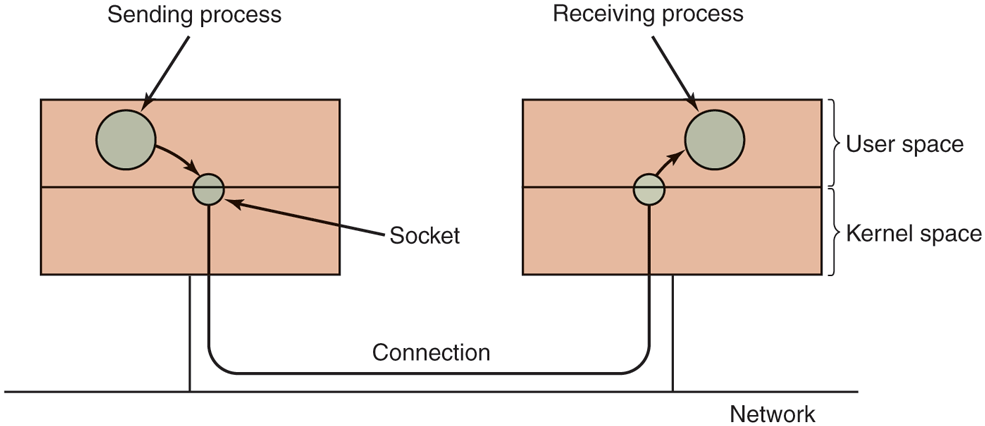
The uses of sockets for networking.
Sockets can be created and destroyed dynamically. Creating a socket returns a file descriptor, which is needed for establishing a connection, reading data, writing data, and releasing the connection.
Each socket supports a particular type of networking, specified when the socket is created. The most common types are as follows:
Reliable connection-oriented byte stream.
Reliable connection-oriented packet stream.
Unreliable packet transmission.
The first socket type allows two processes on different machines to establish the equivalent of a pipe between them. Bytes are pumped in at one end and they come out in the same order at the other. The system guarantees that all bytes that are sent correctly arrive and in the same order they were sent.
The second type is rather similar to the first one, except that it preserves packet boundaries. If the sender makes five separate calls to write, each for 512 bytes, and the receiver asks for 2560 bytes, with a type 1 socket all 2560 bytes will be returned at once. With a type 2 socket, only 512 bytes will be returned. Four more calls are needed to get the rest. The third type of socket is used to give the user access to the raw network. This type is especially useful for real-time applications, and for those situations in which the user wants to implement a specialized error handling scheme. Packets may be lost or reordered by the network. There are no guarantees, as in the first two cases. The advantage of this mode is higher performance, which sometimes outweighs reliability (e.g., for multimedia delivery, in which being fast counts for more than being right).
When a socket is created, one of the parameters specifies the protocol to be used for it. For reliable byte streams, the most popular protocol is TCP (Transmission Control Protocol). For unreliable packet-oriented transmission, UDP (User Datagram Protocol) is the usual choice. Both of these are layered on top of IP (Internet Protocol). All of these protocols originated with the U.S. Dept. of Defense’s ARPANET, and now form the basis of the Internet. There is no common protocol for reliable packet streams.
Before a socket can be used for networking, it must have an address bound to it. This address can be in one of several naming domains. The most common one is the Internet naming domain, which uses 32-bit integers for naming endpoints in Version 4 and 128-bit integers in Version 6 (Version 5 was an experimental system that never made it to the major leagues).
Once sockets have been created on both the source and destination computers, a connection can be established between them (for connection-oriented communication). One party makes a listen system call on a local socket, which creates a buffer and blocks until data arrive. The other makes a connect system call, giving as parameters the file descriptor for a local socket and the address of a remote socket. If the remote party accepts the call, it creates a new socket (since it may need the original one to continue to listen for other connection requests), and the system then establishes a connection between the caller’s socket and the newly created remote socket.
Once a connection has been established, it functions analogously to a pipe. A process can read and write from it using the file descriptor for its local socket. When the connection is no longer needed, it can be closed in the usual way, via the close system call.
10.5.3 Input/Output System Calls in Linux
Each I/O device in a Linux system generally has a special file associated with it. Most I/O can be done by just using the proper file, eliminating the need for special system calls. Nevertheless, sometimes there is a need for something that is device specific. Prior to POSIX, most UNIX systems had a system call ioctl that performed a large number of device-specific actions on special files. Over the course of the years, it had gotten to be quite a mess. POSIX cleaned it up by splitting its functions into separate function calls primarily for terminal devices. In Linux and modern UNIX systems, whether each one is a separate system call or they share a single system call or something else is implementation dependent.
The first four calls listed in Fig. 10-20 are used to set and get the terminal speed. Different calls are provided for input and output because some modems operate at split speed. For example, old videotex systems allowed people to access public databases with short requests from the home to the server at with replies coming back at This standard was adopted at a time when 1200 bits/sec both ways was too expensive for home use. Times change in the networking world. This asymmetry still persists, with some telephone companies offering inbound service at 40 Mbps and outbound service at 10 Mbps, or some other asymmetric arrangement. With fiber optics, the inbound and outbound speeds are generally the same, for example,
Figure 10-20
Function call |
Description |
|---|---|
s = cfsetospeed(&ter mios, speed) |
Set the output speed |
s = cfsetispeed(&ter mios, speed) |
Set the input speed |
s = cfgetospeed(&ter mios, speed) |
Get the output speed |
s = cfgtetispeed(&ter mios, speed) |
Get the input speed |
s = tcsetattr(fd, opt, &termios) |
Set the attributes |
s = tcgetattr(fd, &termios) |
Get the attributes |
The main POSIX calls for managing the terminal.
The last two calls in the list are for setting and reading back all the special characters used for erasing characters and lines, interrupting processes, and so on. In addition, they enable and disable echoing, handle flow control, and perform similar functions. Additional I/O function calls also exist, but they are somewhat specialized, so we will not discuss them further. In addition, ioctl is still available.
10.5.4 Implementation of Input/Output in Linux
I/O in Linux is implemented by a collection of device drivers, one per device type. The function of the drivers is to isolate the rest of the system from the idiosyncrasies of the hardware. By providing standard interfaces between the drivers and the rest of the operating system, most of the I/O system can be put into the machine-independent part of the kernel.
When the user accesses a special file, the file system determines the major and minor device numbers belonging to it and whether it is a block special file or a character special file. The major device number is used to index into one of two internal hash tables containing data structures for character or block devices. The structure thus located contains pointers to the procedures to call to open the device, read the device, write the device, and so on. The minor device number is passed as a parameter. Adding a new device type to Linux means adding a new entry to one of these tables and supplying the corresponding procedures to handle the various operations on the device.
Some of the operations which may be associated with different character devices are shown in Fig. 10-21. Each row refers to a single I/O device (i.e., a single driver). The columns represent the functions that all character drivers must support. Several other functions also exist. When an operation is performed on a character special file, the system indexes into the hash table of character devices to select the proper structure, then calls the corresponding function to have the work performed. Thus each of the file operations contains a pointer to a function contained in the corresponding driver.
Figure 10-21
Device |
Open |
Close |
Read |
Write |
Ioctl |
Other |
|---|---|---|---|---|---|---|
Null |
null |
null |
null |
null |
null |
… |
Memory |
null |
null |
mem_read |
mem_write |
null |
… |
Keyboard |
k_open |
k_close |
k_read |
error |
k_ioctl |
… |
Tty |
tty_open |
tty_close |
tty_read |
tty_write |
tty_ioctl |
… |
Printer |
lp_open |
lp_close |
error |
lp_write |
lp_ioctl |
… |
Some of the file operations supported for typical character devices.
Each driver is split into two parts, both of which are part of the Linux kernel and both of which run in kernel mode. The top half runs in the context of the caller and interfaces to the rest of Linux. The bottom half runs in kernel context and interacts with the device. Drivers are allowed to make calls to kernel procedures for memory allocation, timer management, DMA control, and other things. The set of kernel functions that may be called is defined in a document called the DriverKernel Interface. Writing device drivers for Linux is covered in detail in Cooperstein (2009) and Corbet et al. (2009).
The I/O system is split into two major components: the handling of block special files and the handling of character special files. We will now look at each of these components in turn.
The goal of the part of the system that does I/O on block special files (e.g., disks) is to minimize the number of transfers that must be done. To accomplish this goal, Linux has a cache between the disk drivers and the file system, as illustrated in Fig. 10-22. Prior to the 2.2 kernel, Linux maintained completely separate page and buffer caches, so a file residing in a disk block could be cached in both caches. Newer versions of Linux have a unified cache. A generic block layer holds these components together, performs the necessary translations between disk sectors, blocks, buffers and pages of data, and enables the operations on them.
Figure 10-22
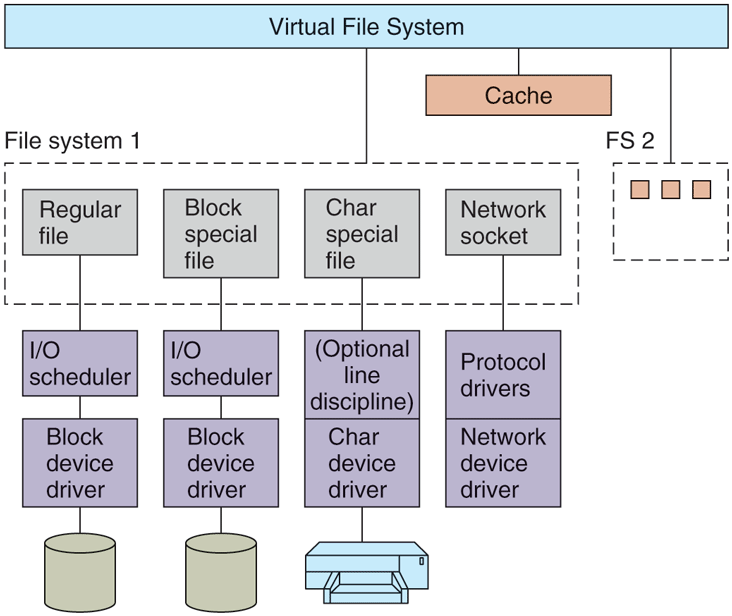
The Linux I/O system showing one file system in detail.
The cache is a table in the kernel for holding thousands of the most recently used blocks. When a block is needed from a disk for whatever reason (i-node, directory, or data), a check is first made to see if it is in the cache. If it is present in the cache, the block is taken from there and a disk access is avoided, thereby resulting in great improvements in system performance.
If the block is not in the page cache, it is read from the disk into the cache and from there copied to where it is needed. Since the page cache has room for only a fixed number of blocks, the page-replacement algorithm described in the previous section is invoked.
The page cache works for writes as well as for reads. When a program writes a block, it goes to the cache, not to the disk. The kernel worker threads will flush the block to disk in the event the cache grows above a specified value. In addition, to avoid having blocks stay too long in the cache before being written to the disk, all dirty blocks are written to the disk every 30 seconds.
New types of storage devices are memory-like, in that they can be accessed more quickly and at smaller block granularity (even few bytes or a cacheline). In such cases, moving data in-and-out between the storage device and an in-memory cache is an overkill. Starting with the 4.0 kernel, Linux supports DAX (Direct Access for files). With DAX, the cache is removed and reads and writes are directly issued to the storage device.
In order to reduce the latency of repetitive disk-head movements, or of random I/O accesses in general, Linux relies on an I/O scheduler. Its purpose is to reorder or bundle read/write requests to block devices. There are many scheduler variants, optimized for different types of workloads. The basic Linux scheduler is based on the original Linux elevator scheduler. The operations of the elevator scheduler can be summarized as follows: Disk operations are sorted in a doubly linked list, ordered by the address of the sector of the disk request. New requests are inserted in this list in a sorted manner. This prevents repeated costly disk-head movements. The request list is subsequently merged so that adjacent operations are issued via a single disk request. The basic elevator scheduler can lead to starvation. Therefore, the revised version of the Linux disk scheduler includes two additional lists, maintaining read or write operations ordered by their deadlines. The default deadlines are 0.5 sec for reads and 5 sec for writes. If a system-defined deadline for the oldest write operation is about to expire, that write request will be serviced before any of the requests on the main doubly linked list.
In addition to regular disk files, there are also block special files, sometimes called raw block files. These files allow programs to access the disk using absolute block numbers, without regard to the file system. They are most often used for things like paging and system maintenance.
The interaction with character devices is simple. Since character devices produce or consume streams of characters, or bytes of data, support for random access makes little sense. One exception is the use of line disciplines. A line discipline can be associated with a terminal device, represented via the structure tty_struct, and it represents an interpreter for the data exchanged with the terminal device. For instance, local line editing can be done (i.e., erased characters and lines can be removed), carriage returns can be mapped onto line feeds, and other special processing can be completed. However, if a process wants to interact on every character, it can put the line in raw mode, in which case the line discipline will be bypassed. Not all devices have line disciplines.
Output works in a similar way, expanding tabs to spaces, converting line feeds to adding filler characters following carriage returns on slow mechanical terminals, and so on. Like input, output can go through the line discipline (cooked mode) or bypass it (raw mode). Raw mode is especially useful when sending binary data to other computers over a serial line and for GUIs. Here, no conversions are desired.
The interaction with network devices is different. While network devices also produce/consume streams of characters, their asynchronous nature makes them less suitable for easy integration under the same interface as other character devices. The networking device driver produces packets consisting of multiple bytes of data, along with network headers. These packets are then routed through a series of network protocol drivers, and ultimately are passed to the user-space application. A key data structure is the socket buffer structure, skbuff, which is used to represent portions of memory filled with packet data. The data in an skbuff buffer do not always start at the start of the buffer. As they are being processed by various protocols in the networking stack, protocol headers may be removed, or added. The user processes interact with networking devices via sockets, which in Linux support the original BSD socket API. The protocol drivers can be bypassed and direct access to the underlying network device is enabled via raw_sockets. Only the superuser is allowed to create raw sockets.
10.5.5 Modules in Linux
For decades, UNIX device drivers were statically linked into the kernel so they were all present in memory whenever the system was booted. Given the environment in which UNIX grew up, commonly departmental minicomputers and then high-end workstations, with their small and unchanging sets of I/O devices, this scheme worked well. Basically, a computer center built a kernel containing drivers for the I/O devices it actually had and that was it. If next year the center bought a new disk, it relinked the kernel. No big deal.
With the arrival of Linux on the PC platform, suddenly all that changed. The number of I/O devices available on the PC is orders of magnitude larger than on any minicomputer. In addition, although all Linux users have (or can easily get) the full source code, probably the vast majority would have considerable difficulty adding a driver, updating all the device-driver related data structures, relinking the kernel, and then installing it as the bootable system (not to mention dealing with the aftermath of building a kernel that does not boot).
Linux solved this problem with the concept of loadable modules. These are chunks of code that can be loaded into the kernel while the system is running. Most commonly these are character or block device drivers, but they can also be entire file systems, network protocols, performance monitoring tools, or anything else desired.
When a module is loaded, several things have to happen. First, the module has to be relocated on the fly, during loading. Second, the system has to check to see if the resources the driver needs are available (e.g., interrupt request levels) and if so, mark them as in use. Third, any interrupt vectors that are needed must be set up. Fourth, the appropriate driver switch table has to be updated to handle the new major device type. Finally, the driver is allowed to run to perform any device-specific initialization it may need. Once all these steps are completed, the driver is fully installed, the same as any statically installed driver. Other modern UNIX systems now also support loadable modules.
It is worth noting that loadable modules are a security nightmare. Putting a piece of foreign code that may or may not have been vetted carefully and which might contain security holes and backdoors into the kernel can create huge security problems. Loadable modules should only be fetched from a source known to be completely trustworthy.