10.3 Processes in Linux
In the previous sections, we started out by looking at Linux as viewed from the keyboard, that is, what the user sees in an xterm window. We gave examples of shell commands and utility programs that are frequently used. We ended with a brief overview of the system structure. Now it is time to dig deeply into the kernel and look more closely at the basic concepts Linux supports, namely, processes, memory, the file system, and input/output. These notions are important because the system calls—the interface to the operating system itself—manipulate them. For example, system calls exist to create processes and threads, allocate memory, open files, and do I/O.
Unfortunately, with so many distributions of Linux in existence (and old versions of the kernel still widely used), there are some differences between them. In this chapter, we will emphasize the features common to all of them rather than focus on any one specific version. Thus in certain sections (especially implementation sections), the discussion may not apply equally to every version.
10.3.1 Fundamental Concepts
The main active entities in a Linux system are the processes. Linux processes are very similar to the classical sequential processes that we studied in Chap. 2. Each process runs a single program and initially has a single thread of control. In other words, it has one program counter, which keeps track of the next instruction to be executed. Linux allows a process to create additional threads once it starts.
Linux is a multiprogramming system, so multiple, independent processes may be running at the same time. Furthermore, each user may have several active processes at once, so on a large system, there may be hundreds or even thousands of processes running. In fact, on most single-user workstations, even when the user is absent, dozens of background processes, called daemons, are running. These are started by a shell script when the system is booted. (‘‘Daemon’’ is a variant spelling of ‘‘demon,’’ which is a self-employed evil spirit.)
A typical daemon is the cron daemon. It wakes up once a minute to check if there is any work for it to do. If so, it does the work. Then it goes back to sleep until it is time for the next check.
This daemon is needed because it is possible in Linux to schedule activities minutes, hours, days, or even months in the future. For example, suppose a user has a dentist appointment at 3 o’clock next Tuesday. He can make an entry in the cron daemon’s database telling the daemon to beep at him at, say, 2:30. When the appointed day and time arrives, the cron daemon sees that it has work to do, and starts up the beeping program as a new process.
The cron daemon is also used to start up periodic activities, such as making daily disk backups at 4 A.M., or reminding forgetful users every year on October 31 to stock up on trick-or-treat goodies for Halloween. Other daemons handle incoming and outgoing electronic mail, manage the line printer queue, check if there are enough free pages in memory, and so forth. Daemons are straightforward to implement in Linux because each one is a separate process, independent of all other processes.
Processes are created in Linux in an especially simple manner. The fork system call creates an exact copy of the original process. The forking process is called the parent process. The new process is called the child process. The parent and child each have their own, private memory images. If the parent subsequently changes any of its variables, the changes are not visible to the child, and vice versa. Open files are shared between parent and child. That is, if a certain file was open in the parent before the fork, it will continue to be open in both the parent and the child afterward. Changes made to the file by either one will be visible to the other. This behavior is only reasonable, because these changes are also visible to any unrelated process that opens the file.
The fact that the memory images, variables, registers, and everything else are identical in the parent and child leads to a small difficulty: How do the processes know which one should run the parent code and which one should run the child code? The secret is that the fork system call returns a 0 to the child and a nonzero value, the child’s PID (Process Identifier), to the parent. Both processes normally check the return value and act accordingly, as shown in Fig. 10-4.
Figure 10-4
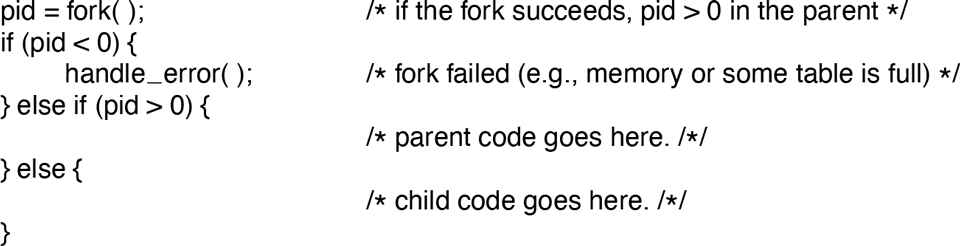
Process creation in Linux.
Processes are named by their PIDs. When a process is created, the parent is given the child’s PID, as mentioned above. If the child wants to know its own PID, there is a system call, getpid, that provides it. PIDs are used in a variety of ways. For example, when a child terminates, the parent is given the PID of the child that just finished. This can be important because a parent may have many children. Since children may also have children, an original process can build up an entire tree of children, grandchildren, and further descendants.
Processes in Linux can communicate with each other using a form of message passing. It is possible to create a channel between two processes into which one process can write a stream of bytes for the other to read. These channels are called pipes. Synchronization is possible because when a process tries to read from an empty pipe it is blocked until data are available.
Shell pipelines are implemented with pipes. When the shell sees a line like
sort <f | headit creates two processes, sort and head, and sets up a pipe between them in such a way that sort’s standard output is connected to head’s standard input. In this way, all the data that sort writes go directly to head, instead of going to a file. If the pipe fills, the system stops running sort until head has removed some data from it.
Processes can also communicate in another way besides pipes: software interrupts. A process can send what is called a signal to another process. Processes can tell the system what they want to happen when an incoming signal arrives. The choices available are to ignore it, to catch it, or to let the signal kill the process. Terminating the process is the default for most signals. If a process elects to catch signals sent to it, it must specify a signal-handling procedure. When a signal arrives, control will abruptly switch to the handler. When the handler is finished and returns, control goes back to where it came from, analogous to hardware I/O interrupts. A process can send signals only to members of its process group, which consists of its parent (and further ancestors), siblings, and children (and further descendants). A process may also send a signal to all members of its process group with a single system call.
Signals are also used for other purposes. For example, if a process is doing floating-point arithmetic, and inadvertently divides by 0 (something that mathematicians tend to frown upon), it gets a SIGFPE (floating-point exception) signal. Some of the signals that are required by POSIX are listed in Fig. 10-5. Many Linux systems have additional signals as well, but programs using them may not be portable to other versions of Linux and UNIX in general.
Figure 10-5
Signal |
Cause |
|---|---|
SIGABRT |
Sent to abort a process and force a core dump |
SIGALRM |
The alarm clock has gone off |
SIGFPE |
A floating-point error has occurred (e.g., division by 0) |
SIGHUP |
The telecommunications connection was lost |
SIGILL |
The process has tried to execute an illegal instruction |
SIGQUIT |
The user has hit the key requesting a core dump |
SIGKILL |
Sent to kill a process (cannot be caught or ignored) |
SIGPIPE |
The process has written to a pipe which has no readers |
SIGSEGV |
The process has referenced an invalid memory address |
SIGTERM |
Used to request that a process terminate gracefully |
SIGUSR1 |
Available for application-defined purposes |
SIGUSR2 |
Available for application-defined purposes |
Some of the signals required by POSIX.
10.3.2 Process-Management System Calls in Linux
Let us now look at the Linux system calls dealing with process management. The main ones are listed in Fig. 10-6. Fork is a good place to start the discussion. The fork system call, supported also by other traditional UNIX systems, is the main way to create a new process in Linux systems. (We will discuss another alternative in the following section.) It creates an exact duplicate of the original process, including all the file descriptors, registers, and everything else. After the fork, the original process and the copy (the parent and child) go their separate ways. All the variables have identical values at the time of the fork, but since the entire parent address space is copied to create the child, subsequent changes in one of them do not affect the other. The fork call returns a value, which is zero in the child, and equal to the child’s PID in the parent. Using the returned PID, the two processes can see which is the parent and which is the child.
Figure 10-6
System call |
Description |
|---|---|
pid = fork( ) |
Create a child process identical to the parent |
pid = waitpid(pid, &statloc, opts) |
Wait for a child to terminate |
s = execve(name, argv, envp) |
Replace a process’ core image |
exit(status) |
Terminate process execution and return status |
s = sigaction(sig, &act, &oldact) |
Define action to take on signals |
s = sigreturn(&context) |
Return from a signal |
s = sigprocmask(how, &set, &old) |
Examine or change the signal mask |
s = sigpending(set) |
Get the set of blocked signals |
s = sigsuspend(sigmask) |
Replace the signal mask and suspend the process |
s = kill(pid, sig) |
Send a signal to a process |
residual = alarm(seconds) |
Set the alarm clock |
s = pause( ) |
Suspend the caller until the next signal |
Some system calls relating to processes. The return code s is if an error has occurred, pid is a process ID, and residual is the remaining time in the previous alarm. The parameters are what the names suggest.
In most cases, after a fork, the child will need to execute different code from the parent. Consider the case of the shell. It reads a command from the terminal, forks off a child process, waits for the child to execute the command, and then reads the next command when the child terminates. To wait for the child to finish, the parent executes a waitpid system call, which just waits until the child terminates (any child if more than one exists). Waitpid has three parameters. The first one allows the caller to wait for a specific child. If it is any old child (i.e., the first child to terminate) will do. The second parameter is the address of a variable that will be set to the child’s exit status (normal or abnormal termination and exit value). This allows the parent to know the fate of its child. The third parameter determines whether the caller blocks or returns if no child is already terminated.
In the case of the shell, the child process must execute the command typed by the user. It does this by using the exec system call, which causes its entire core image to be replaced by the file named in its first parameter. A highly simplified shell illustrating the use of fork, waitpid, and exec is shown in Fig. 10-7.
Figure 10-7
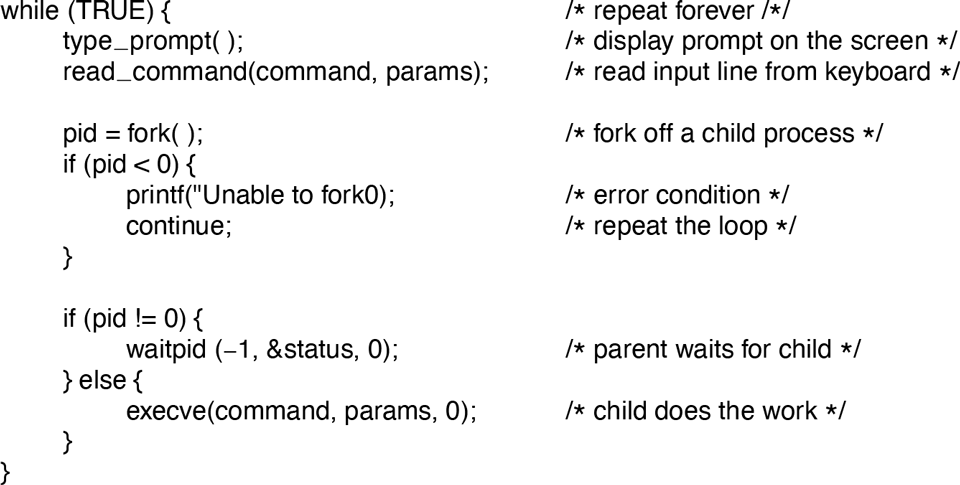
A highly simplified shell.
In the most general case, exec has three parameters: the name of the file to be executed, a pointer to the argument array, and a pointer to the environment array. These will be described shortly. Various library procedures, such as execl, execv, execle, and execve, are provided to allow the parameters to be omitted or specified in various ways. All of these procedures invoke the same underlying system call. Although the system call is exec, there is no library procedure with this name; one of the others must be used.
Let us consider the case of a command typed to the shell, such as
cp file1 file2used to copy file1 to file2. After the shell has forked, the child locates and executes the file cp and passes it information about the files to be copied.
The main program of cp (and many other programs) contains the function declaration
main(argc, argv, envp)where argc is a count of the number of items on the command line, including the program name. For the example above, argc is 3.
The second parameter, argv, is a pointer to an array. Element i of that array is a pointer to the ith string on the command line. In our example, argv[0] would point to the two-character string ‘‘cp’’. Similarly, argv[1] would point to the five-character string ‘‘file1’’ and argv[2] would point to the five-character string ‘‘file2’’.
The third parameter of main, envp, is a pointer to the environment, an array of strings containing assignments of the form used to pass information such as the terminal type and home directory name to a program. In Fig. 10-7, no environment is passed to the child, so that the third parameter of execve is a zero.
If exec seems complicated, do not despair; it is the most complex system call. All the rest are much simpler. As an example of a simple one, consider exit, which processes should use when they are finished executing. It has one parameter, the exit status (0 to 255), which is returned to the parent in the variable status of the waitpid system call. The low-order byte of status contains the termination status, with 0 being normal termination and the other values being various error conditions. The high-order byte contains the child’s exit status (0 to 255), as specified in the child’s call to exit. For example, if a parent process executes the statement
n = waitpid(−1, &status, 0);it will be suspended until some child process terminates. If the child exits with, say, 4 as the parameter to exit, the parent will be awakened with n set to the child’s PID and status set to 0x0400 (0x as a prefix means hexadecimal in C). The loworder byte of status relates to signals; the next one is the value the child returned in its call to exit.
If a process exits and its parent has not yet waited for it, the process enters a kind of suspended animation called the zombie state—the living dead. When the parent finally waits for it, the process terminates.
Several system calls relate to signals, which are used in a variety of ways. For example, if a user accidentally tells a text editor to display the entire contents of a very long file, and then realizes the error, some way is needed to interrupt the editor. The usual choice is for the user to hit some special key (e.g., DEL or CTRLC), which sends a signal to the editor. The editor catches the signal and stops.
To announce its willingness to catch this (or any other) signal, the process can use the sigaction system call. The first parameter is the signal to be caught (see Fig. 10-5). The second is a pointer to a structure giving a pointer to the signal-handling procedure, as well as some other bits and flags. The third one points to a structure where the system returns information about signal handling currently in effect, in case it must be restored later.
The signal handler may run for as long as it wants to. In practice, though, signal handlers are usually fairly short. When the signal-handling procedure is done, it returns to the point from which it was interrupted.
The sigaction system call can also be used to cause a signal to be ignored, or to restore the default action, which is killing the process.
Hitting the DEL or CTRL key is not the only way to send a signal. The kill system call allows a process to signal another related process. The choice of the name ‘‘kill’’ for this system call is not an especially good one, since most processes send signals to other ones with the intention that they be caught. However, a signal that is not caught, does, indeed, kill the recipient.
For many real-time applications, a process needs to be interrupted after a specific time interval to do something, such as to retransmit a potentially lost packet over an unreliable communication line. To handle this situation, the alarm system call has been provided. The parameter specifies an interval, in seconds, after which a SIGALRM signal is sent to the process. A process may have only one alarm outstanding at any instant. If an alarm call is made with a parameter of 10 seconds, and then 3 seconds later another alarm call is made with a parameter of 20 seconds, only one signal will be generated, 20 seconds after the second call. The first signal is canceled by the second call to alarm. If the parameter to alarm is zero, any pending alarm signal is canceled. If an alarm signal is not caught, the default action is taken and the signaled process is killed. Technically, alarm signals may be ignored, but that is a pointless thing to do. Why would a program ask to be signaled later on and then ignore the signal?
It sometimes occurs that a process has nothing to do until a signal arrives. For example, consider a computer-aided instruction program that is testing reading speed and comprehension. It displays some text on the screen and then calls alarm to signal it after 30 seconds. While the student is reading the text, the program has nothing to do. It could sit in a tight loop doing nothing, but that would waste CPU time that a background process or other user might need. A better solution is to use the pause system call, which tells Linux to suspend the process until the next signal arrives. Woe be it to the program that calls pause with no alarm pending.
10.3.3 Implementation of Processes and Threads in Linux
A process in Linux is like an iceberg: you only see the part above the water, but there is also an important part underneath. Every process has a user part that runs the user program. However, when one of its threads makes a system call, it traps to kernel mode and begins running in kernel context, with a different memory map and full access to all machine resources. It is still the same thread, but now with more power and also its own kernel mode stack and kernel mode program counter. These are important because a system call can block partway through, for example, waiting for a disk operation to complete. The program counter and registers are then saved so the thread can be restarted in kernel mode later.
The Linux kernel internally represents processes as tasks, via the structure task_struct. Unlike other OS approaches (which make a distinction between a process, lightweight process, and thread), Linux uses the task structure to represent any execution context. Therefore, a single-threaded process will be represented with one task structure and a multithreaded process will have one task structure for each of the user-level threads. Finally, the kernel itself is multithreaded, and has kernel-level threads which are not associated with any user process and are executing kernel code. We will return to the treatment of multithreaded processes (and threads in general) later in this section.
For each process, a process descriptor of type task_struct is resident in memory at all times. It contains vital information needed for the kernel’s management of all processes, including scheduling parameters, lists of open-file descriptors, and so on. The process descriptor along with memory for the kernel-mode stack for the process are created upon process creation.
For compatibility with other UNIX systems, Linux identifies processes via the PID. The kernel organizes all processes in a doubly linked list of task structures. In addition to accessing process descriptors by traversing the linked lists, the PID can be mapped to the address of the task structure, and the process information can be accessed immediately.
The task structure contains a variety of fields. Some of these fields contain pointers to other data structures or segments, such as those containing information about open files. Some of these segments are related to the user-level structure of the process, which is not of interest when the user process is not runnable. Therefore, these may be swapped or paged out, in order not to waste memory on information that is not needed. For example, although it is possible for a process to be sent a signal while it is swapped out, it is not possible for it to read a file. For this reason, information about signals must be in memory all the time, even when the process is not present in memory. On the other hand, information about file descriptors can be kept in the user structure and brought in only when the process is in memory and runnable.
The information in the process descriptor falls into a number of broad categories that can be roughly described as follows:
Scheduling parameters. Process priority, amount of CPU time consumed recently, amount of time spent sleeping recently. Together, these are used to determine which process to run next.
Memory image. Pointers to the text, data, and stack segments, or page tables. If the text segment is shared, the text pointer points to the shared text table. When the process is not in memory, information about how to find its parts on disk is here too.
Signals. Masks showing which signals are being ignored, which are being caught, which are being temporarily blocked, and which are in the process of being delivered.
Machine registers. When a trap to the kernel occurs, the machine registers (including the floating-point ones, if used) are saved here.
System call state. Information about the current system call, including the parameters, and results.
File descriptor table. When a system call involving a file descriptor is invoked, the file descriptor is used as an index into this table to locate the in-core data structure (i-node) corresponding to this file.
Accounting. Pointer to a table that keeps track of the user and system CPU time used by the process. Some systems also maintain limits here on the amount of CPU time a process may use, the maximum size of its stack, the number of page frames it may consume, and other items.
Kernel stack. A fixed stack for use by the kernel part of the process.
Miscellaneous. Current process state, event being waited for, if any, time until alarm clock goes off, PID, PID of the parent process, and user and group identification.
Keeping this information in mind, it is now easy to explain how processes are created in Linux. The mechanism for creating a new process is actually fairly straightforward. A new process descriptor and user area are created for the child process and filled in largely from the parent. The child is given a unique PID not used by any other process, its memory map is set up, and it is given shared access to its parent’s files. Then its registers are set up and it is ready to run.
When a fork system call is executed, the calling process traps to the kernel and creates a task structure and few other accompanying data structures, such as the kernel-mode stack and a thread_info structure. This structure is allocated at a fixed offset from the process’ end-of-stack, and contains few process parameters, along with the address of the process descriptor. By storing the process descriptor’s address at a fixed location, Linux needs only few efficient operations to locate the task structure for a running process.
The majority of the process-descriptor contents are filled out based on the parent’s descriptor values. Linux then looks for an available PID, that is, not one currently in use by any process, and updates the PID hash-table entry to point to the new task structure. In case of collisions in the hash table, process descriptors may be chained. It also sets the fields in the task_struct to point to the corresponding previous/next process on the task array.
In principle, it should now allocate memory for the child’s data and stack segments, and to make exact copies of the parent’s segments, since the semantics of fork say that no memory is shared between parent and child. The text segment may be either copied or shared since it is read only. At this point, the child is ready to run.
However, copying memory is expensive, so all modern Linux systems cheat. They give the child its own page tables, but have them point to the parent’s pages, only marked read only. Whenever either process (the child or the parent) tries to write on a page, it gets a protection fault. The kernel sees this and then allocates a new copy of the page to the faulting process and marks it read/write. In this way, only pages that are actually written have to be copied. This mechanism is called COW (Copy On Write). It has the additional benefit of not requiring two copies of the program in memory, thus saving RAM.
After the child process starts running, the code running there (a copy of the shell in our example) does an exec system call giving the command name as a parameter. The kernel now finds and verifies the executable file, copies the arguments and environment strings to the kernel, and releases the old address space and its page tables.
Now the new address space must be created and filled in. If the system supports mapped files, as Linux and virtually all other UNIX-based systems do, the new page tables are set up to indicate that no pages are in memory, except perhaps one stack page, but that the address space is backed by the executable file on disk. When the new process starts running, as soon as it touches memory to fetch the first instruction, it will immediately get a page fault, which will cause the first page of code to be paged in from the executable file. In this way, nothing has to be loaded in advance, so programs can start quickly and fault in just those pages they need and no more. (This strategy is really just demand paging in its most pure form, as we discussed in Chap. 3.) Finally, the arguments and environment strings are copied to the new stack, the signals are reset, and the registers are initialized to all zeros. At this point, the new command can start running.
Figure 10-8 illustrates the steps described above through the following example. After the user types the command, ls, the shell creates a new process by forking off a clone of itself. The new shell then calls exec to overlay its memory with the contents of the executable file ls. After that, ls can start.
Figure 10-8
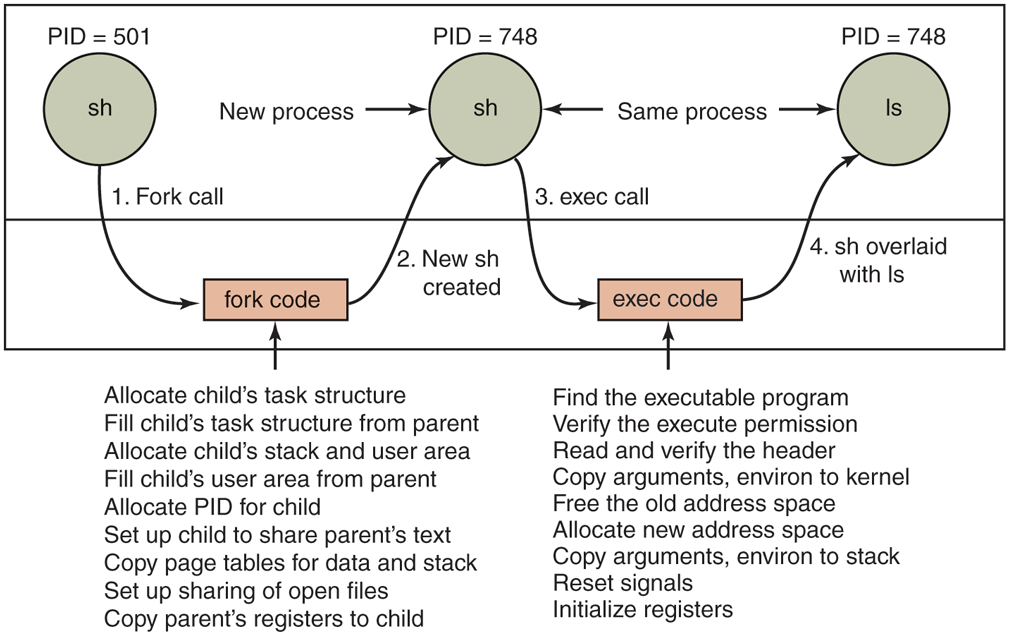
The steps in executing the command ls typed to the shell.
Threads in Linux
We discussed threads in a general way in Chap. 2. Here we will focus on kernel threads in Linux, particularly on the differences among the Linux thread model and other UNIX systems. In order to better understand the unique capabilities provided by the Linux model, we start with a discussion of some of the challenging decisions present in multithreaded systems.
The main issue in introducing threads is maintaining the correct traditional UNIX semantics. First consider fork. Suppose that a process with multiple (kernel) threads does a fork system call. Should all the other threads be created in the new process? For the moment, let us answer that question with yes. Suppose that one of the other threads was blocked reading from the keyboard. Should the corresponding thread in the new process also be blocked reading from the keyboard? If so, which one gets the next line typed? If not, what should that thread be doing in the new process?
The same problem holds for many other things threads can do. In a single-threaded process, the problem does not arise because the one and only thread cannot be blocked when calling fork. Now consider the case that the other threads are not created in the child process. Suppose that one of the not-created threads holds a mutex that the one-and-only thread in the new process tries to acquire after doing the fork. The mutex will never be released and the one thread will hang forever. Numerous other problems exist, too. There is no simple solution.
File I/O is another problem area. Suppose that one thread is blocked reading from a file and another thread closes the file or does an lseek to change the current file pointer. What happens next? Who knows?
Signal handling is another thorny issue. Should signals be directed at a specific thread or just at the process? A SIGFPE (floating-point exception) should probably be caught by the thread that caused it. What if it does not catch it? Should just that thread be killed, or all threads? Now consider the SIGINT signal, generated by the user at the keyboard. Which thread should catch that? Should all threads share a common set of signal masks? All solutions to these and other problems usually cause something to break somewhere. Getting the semantics of threads right (not to mention the code) is a nontrivial business.
Linux supports kernel threads in an interesting way that is worth looking at. The implementation is based on ideas from 4.4BSD, but kernel threads were not enabled in that distribution because Berkeley ran out of money before the C library could be rewritten to solve the problems discussed earlier.
Historically, processes were resource containers and threads were the units of execution. A process contained one or more threads that shared the address space, open files, signal handlers, alarms, and everything else. Everything was clear and simple as described above.
In 2000, Linux introduced a powerful new system call, clone, that blurred the distinction between processes and threads and possibly even inverted the primacy of the two concepts. Clone is not present in any other version of UNIX. Classically, when a new thread was created, the original thread(s) and the new one shared everything but their registers. In particular, file descriptors for open files, signal handlers, alarms, and other global properties were per process, not per thread. What clone did was make it possible for each of these aspects and others to be process specific or thread specific. It is called as follows:
pid = clone(function, stack_ptr, sharing_flags, arg);The call creates a new thread, either in the current process or in a brand new process, depending on sharing_flags. If the new thread is in the current process, it shares the address space with the existing threads, and every subsequent write to any byte in the address space by any thread is immediately visible to all the other threads in the process. On the other hand, if the address space is not shared, then the new thread gets an exact copy of the address space, but subsequent writes by the new thread are not visible to the old ones. These semantics are the same as POSIX. Clone generalizes fork while preserving legacy semantics where needed.
In both cases, the new thread begins executing at function, which is called with arg as its only parameter. Also in both cases, the new thread gets its own private stack, with the stack pointer initialized to stack_ptr.
The sharing_flags parameter is a bitmap that allows a finer grain of sharing than traditional UNIX systems. Each of the bits can be set independently of the other ones, and each of them determines whether the new thread copies some data structure or shares it with the calling thread. Figure 10-9 shows some of the items that can be shared or copied according to bits in sharing_flags.
Figure 10-9
Flag |
Meaning when set |
Meaning when cleared |
|---|---|---|
CLONE_VM |
Create a new thread |
Create a new process |
CLONE_FS |
Share umask, root, and wor king dirs |
Do not share them |
CLONE_FILES |
Share the file descriptors |
Copy the file descriptors |
CLONE_SIGHAND |
Share the signal handler table |
Copy the table |
CLONE_PARENT |
New thread has same parent as caller |
New thread’s parent is caller |
Bits in the sharing_flags bitmap.
The CLONE_VM bit determines whether the virtual memory (i.e., address space) is shared with the old threads or copied. If it is set, the new thread just moves in with the existing ones, so the clone call effectively creates a new thread in an existing process. If the bit is cleared, the new thread gets its own private address space. Having its own address space means that the effect of its STORE instructions is not visible to the existing threads. This behavior is similar to fork, except as noted below. Creating a new address space is effectively the definition of a new process.
The CLONE_FS bit controls sharing of the root and working directories and of the umask flag. Even if the new thread has its own address space, if this bit is set, the old and new threads share working directories. This means that a call to chdir by one thread changes the working directory of the other thread, even though the other thread may have its own address space. In UNIX, a call to chdir by a thread always changes the working directory for other threads in its process, but never for threads in another process. Thus this bit enables a kind of sharing not possible in traditional UNIX versions.
The CLONE_FILES bit is analogous to the CLONE_FS bit. If set, the new thread shares its file descriptors with the old ones, so calls to lseek by one thread are visible to the other ones, again as normally holds for threads within the same process but not for threads in different processes. Similarly, CLONE_SIGHAND enables or disables the sharing of the signal handler table between the old and new threads. If the table is shared, even among threads in different address spaces, then changing a handler in one thread affects the handlers in the others.
Finally, every process has a parent. The CLONE_PARENT bit controls who the parent of the new thread is. It can either be the same as the calling thread (in which case the new thread is a sibling of the caller) or it can be the calling thread itself, in which case the new thread is a child of the caller. There are a few other bits that control other items, but they are less important.
This fine-grained sharing is possible because Linux maintains separate data structures for the various items listed in Sec. 10.3.3 (scheduling parameters, memory image, and so on). The task structure just points to these data structures, so it is easy to make a new task structure for each cloned thread and have it point either to the old thread’s scheduling, memory, and other data structures or to copies of them. The fact that such fine-grained sharing is possible does not mean that it is useful, however, especially since traditional UNIX versions do not offer this functionality. A Linux program that takes advantage of it is then no longer portable to UNIX.
The Linux thread model raises another difficulty. UNIX systems associate a single PID with a process, independent of whether it is single- or multithreaded. In order to be compatible with other UNIX systems, Linux distinguishes between a process identifier (PID) and a task identifier (TID). Both fields are stored in the task structure. When clone is used to create a new process that shares nothing with its creator, PID is set to a new value; otherwise, the task receives a new TID, but inherits the PID. In this manner, all threads in a process will receive the same PID as the first thread in the process.
10.3.4 Scheduling in Linux
We will now look at the Linux scheduling algorithm. To start with, Linux threads are kernel threads, so scheduling is based on threads, not processes.
Linux distinguishes the following classes of threads for scheduling purposes:
Real-time FIFO.
Real-time round robin.
Sporadic.
Timesharing.
Real-time FIFO threads are the highest priority and are not preemptable except by a newly readied real-time FIFO thread with even higher priority. Real-time roundrobin threads are the same as real-time FIFO threads except that they have time quanta associated with them, and are preemptable by the clock. If multiple realtime round-robin threads are ready, each one is run for its quantum, after which it goes to the end of the list of real-time round-robin threads. Neither of these classes is actually real time in any sense. Deadlines cannot be specified and guarantees are not given. The sporadic scheduling class is used for sporadic or aperiodic threads, and makes it possible to limit their execution time within a period, so as not to jeopardize other real-time threads. These classes are simply higher priority than threads in the standard timesharing class. The reason Linux calls them real time is that Linux is conformant to the P1003.4 standard (‘‘real-time’’ extensions to UNIX) which uses those names. The real-time threads are internally represented with priority levels from 0 to 99, 0 being the highest and 99 the lowest real-time priority level.
The conventional, non-real-time threads form a separate class and are scheduled by a separate algorithm so they do not compete with the real-time threads. Internally, these threads are associated with priority levels from 100 to 139, that is, Linux internally distinguishes among 140 priority levels (for real-time and nonreal-time tasks). As for the real-time round-robin threads, Linux allocates CPU time to the non-real-time tasks based on their requirements and their priority levels. In Linux, time is measured as the number of clock ticks. In older Linux versions, the clock ran at 1000 Hz and each tick was 1 ms, called a jiffy. In newer versions, the tick frequency can be configured to 500, 250 or even 1 Hz. In order to avoid wasting CPU cycles for servicing the timer interrupt, the kernel can even be configured in ‘‘tickless’’ mode. This is useful when there is only one process running in the system, or when the CPU is idle and needs to go into power-saving mode. Finally, on newer systems, high-resolution timers allow the kernel to keep track of time in sub-jiffy granularity.
Like most UNIX systems, Linux associates a nice value with each thread. The default is 0, but this can be changed using the nice(value) system call, where value ranges from to This value determines the static priority of each thread. A user computing to a billion places in the background might put this call in his program to be nice to the other users. Only the system administrator may ask for better than normal service (meaning values from to ). Deducing the reason for this rule is left as an exercise for the reader.
Next, we will describe in more detail two of the Linux scheduling algorithms. Their internals are closely related to the design of the runqueue, a key data structure used by the scheduler to track all runnable tasks in the system and select the next one to run. A runqueue is associated with each CPU in the system.
Historically, a popular Linux scheduler was the Linux O(1) scheduler. It received its name because it was able to perform task-management operations, such as selecting a task or enqueueing a task on the runqueue, in constant time, independent of the total number of tasks in the system. In the O(1) scheduler, the runqueue is organized in two arrays, called active and expired. As depicted in Fig. 10-10(a), each of these is an array of 140 list heads, each corresponding to a different priority. Each list head points to a doubly linked list of processes at a given priority. The basic operation of the scheduler can be described as follows.
Figure 10-10
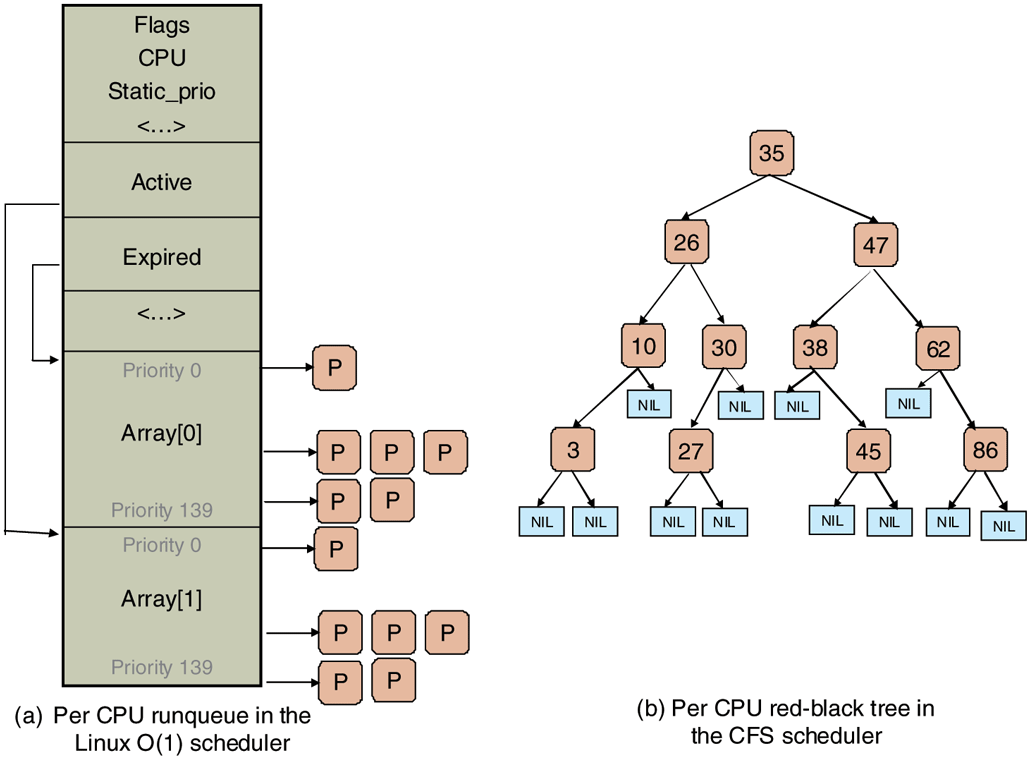
Illustration of Linux runqueue data structures for (a) the Linux O(1) scheduler, and (b) the Completely Fair Scheduler.
The scheduler selects a task from the highest-priority list in the active array. If that task’s timeslice (quantum) expires, it is moved to the expired list (potentially at a different priority level). If the task blocks, for instance to wait on an I/O event, before its timeslice expires, once the event occurs and its execution can resume, it is placed back on the original active array, and its timeslice is decremented to reflect the CPU time it already used. Once its timeslice is fully exhausted, it, too, will be placed on the expired array. When there are no more tasks in the active array, the scheduler simply swaps the pointers, so the expired arrays now become active, and vice versa. This method ensures that low-priority tasks will not starve (except when real-time FIFO threads completely hog the CPU, which is unlikely).
Here, different priority levels are assigned different timeslice values, with higher quanta assigned to higher-priority processes. For instance, tasks running at priority level 100 will receive time quanta of 800 msec, whereas tasks at priority level of 139 will receive 5 msec.
The idea here is to get processes out of the kernel fast. If a process is trying to read a disk file, making it wait a second between read calls will slow it down enormously. It is far better to let it run immediately after each request is completed, so that it can make the next one quickly. Similarly, if a process was blocked waiting for keyboard input, it is clearly an interactive process, and as such should be given a high priority as soon as it is ready in order to ensure that interactive processes get good service. In this light, CPU-bound processes basically get any service that is left over when all the I/O bound and interactive processes are blocked.
Since Linux does not know a priori whether a task is I/Oor CPU-bound, it relies on continuously maintaining interactivity heuristics. In this manner, Linux distinguishes between static and dynamic priority. The threads’ dynamic priority is continuously recalculated, so as to (1) reward interactive threads, and (2) punish CPU-hogging threads. In the O(1) scheduler, the maximum priority bonus is since lower-priority values correspond to higher priority received by the scheduler. The maximum priority penalty is The scheduler maintains a sleep_avg variable associated with each task. Whenever a task is awakened, this variable is incremented. Whenever a task is preempted or when its quantum expires, this variable is decremented by the corresponding value. This value is used to dynamically map the task’s bonus to values from to The scheduler recalculates the new priority level as a thread is moved from the active to the expired list.
The O(1) scheduling algorithm refers to the scheduler made popular in the early versions of the 2.6 kernel, and was first introduced in the unstable 2.5 kernel. Prior algorithms exhibited poor performance in multiprocessor settings and did not scale well with an increased number of tasks. Since the description presented in the above paragraphs indicates that a scheduling decision can be made through access to the appropriate active list, it can be done in constant O(1) time, independent of the number of processes in the system. However, in spite of the desirable property of constant-time operation, the O(1) scheduler had significant shortcomings. Most notably, the heuristics used to determine the interactivity of a task, and therefore its priority level, were complex and imperfect, and resulted in poor performance for interactive tasks.
To address this issue, Ingo Molnar, who also created the O(1) scheduler, proposed a new scheduler called CFS (Completely Fair Scheduler). CFS was based on ideas originally developed by Con Kolivas for an earlier scheduler, and was first integrated into the 2.6.23 release of the kernel. It is still the default scheduler for the non-real-time tasks.
The main idea behind CFS is to use a red-black tree as the runqueue data structure. Tasks are ordered in the tree based on the amount of time they spend running on the CPU, called vruntime. CFS accounts for the tasks’ running time with nanosecond granularity. As shown in Fig. 10-10(b), each internal node in the tree corresponds to a task. The children to the left correspond to tasks which had less time on the CPU, and therefore will be scheduled sooner, and the children to the right on the node are those that have consumed more CPU time thus far. The leaves in the tree do not play any role in the scheduler.
The scheduling algorithm can be summarized as follows. CFS always schedules the task which has had least amount of time on the CPU, typically the leftmost node in the tree. Periodically, CFS increments the task’s vruntime value based on the time it has already run, and compares this to the current leftmost node in the tree. If the running task still has smaller vruntime, it will continue to run. Otherwise, it will be inserted at the appropriate place in the red-black tree, and the CPU will be given to task corresponding to the new leftmost node.
To account for differences in task priorities and ‘‘niceness,’’ CFS changes the effective rate at which a task’s virtual time passes when it is running on the CPU. For lower-priority tasks, time passes more quickly, their vruntime value will increase more rapidly, and, depending on other tasks in the system, they will lose the CPU and be reinserted in the tree sooner than if they had a higher priority value. In this manner, CFS avoids using separate runqueue structures for different priority levels.
In summary, selecting a node to run can be done in constant time, whereas inserting a task in the runqueue is done in time, where N is the number of tasks in the system. Given the levels of load in current systems, this continues to be acceptable, but as the compute capacity of the nodes, and the number of tasks they can run, increase, particularly in the server space, it is possible that new scheduling algorithms will be needed in the future.
Besides the basic scheduling algorithm, the Linux scheduler includes special features particularly useful for multiprocessor or multicore platforms. First, the runqueue structure is associated with each CPU in the multiprocessing platform. The scheduler tries to maintain benefits from affinity scheduling, and to schedule tasks on the CPU on which they were previously executing. Second, a set of system calls is available to further specify or modify the affinity requirements of a select thread. Finally, the scheduler performs periodic load balancing across runqueues of different CPUs to ensure that the system load is well balanced, while still meeting certain performance or affinity requirements.
The scheduler considers only runnable tasks, which are placed on the appropriate runqueue. Tasks which are not runnable and are waiting on various I/O operations or other kernel events are placed on another data structure, waitqueue. A waitqueue is associated with each event that tasks may wait on. The head of the waitqueue includes a pointer to a linked list of tasks and a spinlock. The spinlock is necessary so as to ensure that the waitqueue can be concurrently manipulated through both the main kernel code and interrupt handlers or other asynchronous invocations.
10.3.5 Synchronization in Linux
In the previous section, we mentioned that Linux uses spinlocks to prevent concurrent modifications to data structures like the waitqueues. In fact, the kernel code contains synchronization variables in numerous locations. We will next briefly summarize the synchronization constructs available in Linux.
Earlier Linux kernels had just one big kernel lock. This proved highly inefficient, particularly on multiprocessor platforms, since it prevented processes on different CPUs from executing kernel code concurrently. Hence, many new synchronization points were introduced at much finer granularity.
Linux provides several types of synchronization variables, both used internally in the kernel, and available to user-level applications and libraries. At the lowest level, Linux provides wrappers around the hardware-supported atomic instructions, via operations such as atomic set and atomic read. In addition, since modern hardware reorders memory operations, Linux provides memory barriers. Using operations like rmb and wmb guarantees that all read/write memory operations preceding the barrier call have completed before any subsequent accesses take place.
More commonly used synchronization constructs are the higher-level ones. Threads that do not wish to block (for performance or correctness reasons) use spinlocks and spin read/write locks. The current Linux version implements the so-called ‘‘ticket-based’’ spinlock, which has excellent performance on SMP and multicore systems. Threads that are allowed to or need to block use constructs like mutexes and semaphores. Linux supports nonblocking calls like mutex trylock and sem trywait to determine the status of the synchronization variable without blocking. Other types of synchronization variables, like futexes, completions, ‘‘readcopy-update’’ (RCU) locks, etc., are also supported. Finally, synchronization between the kernel and the code executed by interrupt-handling routines can also be achieved by dynamically disabling and enabling the corresponding interrupts.
10.3.6 Booting Linux
Details vary from platform to platform, but in general the following steps represent the boot process. When the computer starts, the BIOS performs Power-On-Self-Test (POST) and initial device discovery and initialization, since the OS’ boot process may rely on access to disks, screens, keyboards, and so on. Next, the first sector of the boot disk, the MBR (Master Boot Record), is read into a fixed memory location and executed. This sector contains a small (512-byte) program that loads a standalone program called boot from the boot device, such as a SATA or SCSI disk. The boot program first copies itself to a fixed high-memory address to free up low memory for the operating system.
Once moved, boot reads the root directory of the boot device. To do this, it must understand the file system and directory format, which is the case with some bootloaders such as GRUB (GRand Unified Bootloader). Other bootloaders, such as Intel’s LILO, do not rely on any specific file system. Instead, they need a block map and low-level addresses, which describe physical sectors, heads, and cylinders, to find the relevant sectors to be loaded.
Then boot reads in the operating system kernel and jumps to it. At this point, it has finished its job and the kernel is running.
The kernel start-up code is written in assembly language and is highly machine dependent. Typical work includes setting up the kernel stack, identifying the CPU type, calculating the amount of RAM present, disabling interrupts, enabling the MMU, and finally calling the C-language main procedure to start the main part of the operating system.
The C code also has considerable initialization to do, but this is more logical than physical. It begins by allocating a message buffer to help debug problems. As initialization proceeds, messages are written here about what is happening, so that they can be fished out after a boot failure by a special diagnostic program. Think of this as the operating system’s cockpit flight recorder (the black box investigators look for after a plane crash).
Next the kernel data structures are allocated. Most are of fixed size, but a few, such as the page cache and certain page table structures, depend on the amount of RAM available.
At this point, the system begins autoconfiguration. Using configuration files telling what kinds of I/O devices might be present, it begins probing the devices to see which ones actually are present. If a probed device responds to the probe, it is added to a table of attached devices. If it fails to respond, it is assumed to be absent and ignored henceforth. Unlike traditional UNIX versions, Linux device drivers do not need to be statically linked and may be loaded dynamically (as can be done in all versions of MS-DOS and Windows, incidentally).
The arguments for and against dynamically loading drivers are interesting and worth stating explicitly. The main argument for dynamic loading is that a single binary can be shipped to customers with divergent configurations and have it automatically load the drivers it needs, possibly even over a network. The main argument against dynamic loading is security. If you are running a secure site, such as a bank’s database or a corporate Web server, you probably want to make it impossible for anyone to insert random code into the kernel. The system administrator may keep the operating system sources and object files on a secure machine, do all system builds there, and ship the kernel binary to other machines over a local area network. If drivers cannot be loaded dynamically, this scenario prevents machine operators and others who know the superuser password from injecting malicious or buggy code into the kernel. Furthermore, at large sites, the hardware configuration is known exactly at the time the system is compiled and linked. Changes are rare so having to relink the system when a new device is added is not an issue.
Once all the hardware has been configured, the next thing to do is to carefully handcraft process 0, set up its stack, and run it. Process 0 continues initialization, doing things like programming the real-time clock, mounting the root file system, and creating init (process 1) and the page daemon (process 2).
Init checks its flags to see if it is supposed to come up single user or multiuser. In the former case, it forks off a process that executes the shell and waits for this process to exit. In the latter case, it forks off a process that executes the system initialization shell script, /etc/rc, which can do file system consistency checks, mount additional file systems, start daemon processes, and so on. Then it reads /etc/ttys, which lists the terminals and some of their properties. For each enabled terminal, it forks off a copy of itself, which does some housekeeping and then executes a program called getty.
Getty sets the line speed and other properties for each line (some of which may be modems, for example), and then displays
login:on the terminal’s screen and tries to read the user’s name from the keyboard. When someone sits down at the terminal and provides a login name, getty terminates by executing /bin/login, the login program. Login then asks for a password, encrypts it, and verifies it against the encrypted password stored in the password file,/etc/passwd. If it is correct, login replaces itself with the user’s shell, which then waits for the first command. If it is incorrect, login just asks for another user name. This mechanism is shown in Fig. 10-11 for a system with three terminals.
Figure 10-11
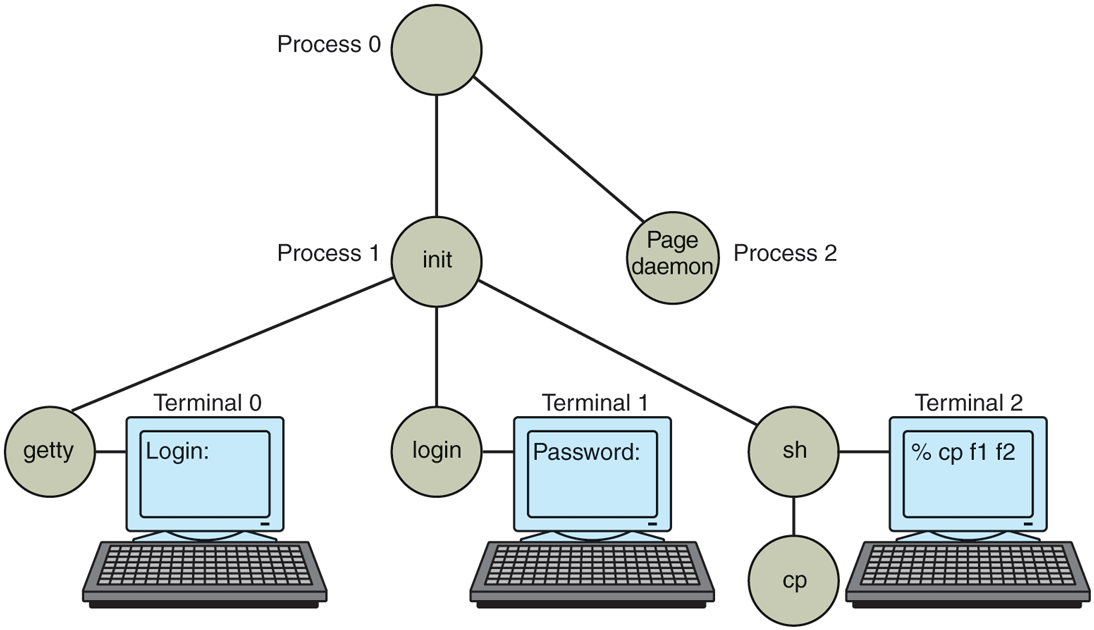
The sequence of processes used to boot some Linux systems.
In the figure, the getty process running for terminal 0 is still waiting for input. On terminal 1, a user has typed a login name, so getty has overwritten itself with login, which is asking for the password. A successful login has already occurred on terminal 2, causing the shell to type the prompt (%). The user then typed
cp f1 f2which has caused the shell to fork off a child process and have that process execute the cp program. The shell is blocked, waiting for the child to terminate, at which time the shell will type another prompt and read from the keyboard. If the user at terminal 2 had typed cc instead of cp, the main program of the C compiler would have been started, which in turn would have forked off more processes to run the various compiler passes.