10.2 Overview of Linux
In this section, we will provide a general introduction to Linux and how it is used, for the benefit of readers not already familiar with it. Nearly all of this material applies to just about all UNIX variants with only small deviations. Although Linux has several graphical interfaces, the focus here is on how Linux appears to a programmer working in a shell window on X. Subsequent sections will focus on system calls and how it works inside.
10.2.1 Linux Goals
UNIX was always an interactive system designed to handle multiple processes and multiple users at the same time. It was designed by programmers, for programmers, to use in an environment in which the majority of the users are relatively sophisticated and are engaged in (often quite complex) software development projects. In many cases, a large number of programmers are actively cooperating to produce a single system, so UNIX has extensive facilities to allow people to work together and share information in controlled ways. The model of a group of experienced programmers working together closely to produce advanced software is obviously very different from the personal-computer model of a single beginner working alone with a word processor, and this difference is reflected throughout UNIX from start to finish. It is only natural that Linux inherited many of these goals, even though the first version was for a personal computer.
What is it that good programmers really want in a system? To start with, most like their systems to be simple, elegant, and consistent. For example, at the lowest level, a file should just be a collection of bytes. Having different classes of files for sequential access, random access, keyed access, remote access, and so on (as mainframes do) just gets in the way. Similarly, if the command
ls A*means list all the files beginning with ‘‘A’’ then the command
rm A*should mean remove all the files beginning with ‘‘A’’ and not remove the one file whose two-character name consists of an ‘‘A’’ and an asterisk. This characteristic is sometimes called the principle of least surprise.
Another thing that experienced programmers generally want is power and flexibility. This means that a system should have a small number of basic elements that can be combined in an infinite variety of ways to suit the application. One of the basic guidelines behind Linux is that every program should do just one thing and do it well. Thus compilers do not produce listings, because other programs can do that better.
Finally, most programmers have a strong dislike for useless redundancy. Why type copy when cp is clearly enough to make it abundantly clear what you want? It is a complete waste of valuable hacking time. To extract all the lines containing the string ‘‘ard’’ from the file f, the Linux programmer merely types
grep ard fThe opposite approach is to have the programmer first select the grep program (with no arguments), and then have grep announce itself by saying: ‘‘Hi, I’m grep, I look for patterns in files. Please enter your pattern.’’ After getting the pattern, grep prompts for a file name. Then it asks if there are any more file names. Finally, it summarizes what it is going to do and asks if that is correct. While this kind of user interface may be suitable for rank novices, it drives skilled programmers up the wall. What they want is a servant, not a nanny.
10.2.2 Interfaces to Linux
Linux system can be regarded as a kind of pyramid, as illustrated in Fig. 10-1. At the bottom is the hardware, consisting of the CPU, memory, disks, a monitor and keyboard, and other devices. Running on the bare hardware is the operating system. Its function is to control the hardware and provide a system call interface to all the programs. These system calls allow user programs to create and manage processes, files, and other resources.
Figure 10-1
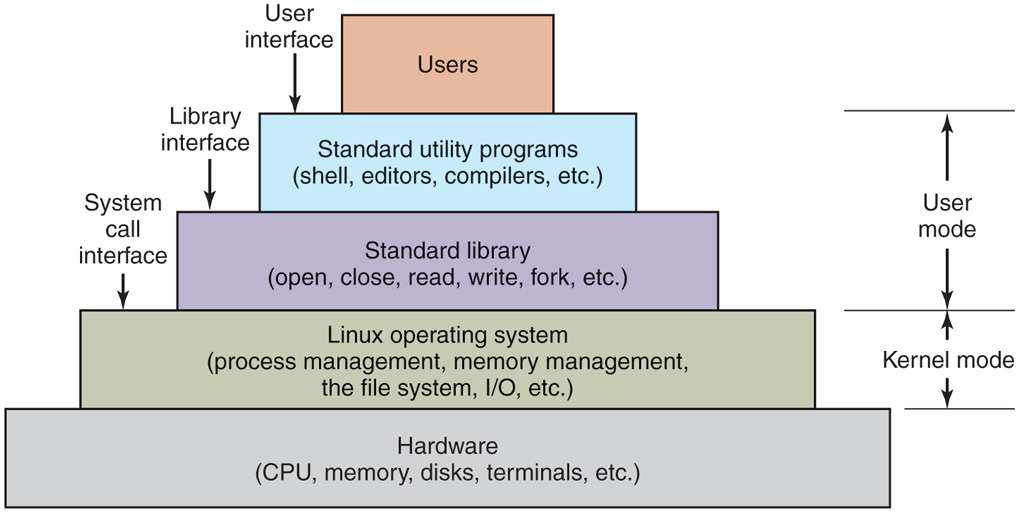
The layers in a Linux system.
Programs make system calls by putting the arguments in registers (or sometimes, on the stack), and issuing trap instructions to switch from user mode to kernel mode. Since there is no way to write a trap instruction in C, a library is provided, with one procedure per system call. These procedures are written in assembly language but can be called from C. Each one first puts its arguments in the proper place, then executes the trap instruction. Thus to execute the read system call, a C program can call the read library procedure. As an aside, it is the library interface, and not the system call interface, that is specified by POSIX. In other words, POSIX tells which library procedures a conformant system must supply, what their parameters are, what they must do, and what results they must return. It does not even mention the actual system calls.
In addition to the operating system and system call library, all versions of Linux supply a large number of standard programs, some of which are specified by the POSIX 1003.1-2017 standard, and some of which differ between Linux versions. These include the command processor (shell), compilers, editors, text-processing programs, and file-manipulation utilities. It is these programs that a user at the keyboard invokes. Thus, we can speak of three different interfaces to Linux: the true system call interface, the library interface, and the interface formed by the set of standard utility programs.
Most of the common personal computer distributions of Linux have replaced this keyboard-oriented user interface with a mouse- or a touchscreen-oriented graphical user interface, without changing the operating system itself at all. It is precisely this flexibility that makes Linux so popular and has allowed it to survive numerous changes in the underlying technology so well.
The GUI for Linux is similar to the first GUIs developed for UNIX systems in the 1970s, and popularized by Macintosh and later Windows for PC platforms. The GUI creates a desktop environment, a familiar metaphor with windows, icons, folders, toolbars, and drag-and-drop capabilities. A full desktop environment contains a window manager, which controls the placement and appearance of windows, as well as various applications, and provides a consistent graphical interface. Popular desktop environments for Linux include GNOME (GNU Network Object Model Environment) and KDE (K Desktop Environment).
GUIs on Linux are supported by the X Windowing System, or commonly X11 or just X, which defines communication and display protocols for manipulating windows on bitmap displays for UNIX and UNIX-like systems. The X server is the main component which controls devices such as the keyboard, mouse, and screen and is responsible for redirecting input to or accepting output from client programs. The actual GUI environment is typically built on top of a low-level library, xlib, which contains the functionality to interact with the X server. The graphical interface extends the basic functionality of X11 by enriching the window view, providing buttons, menus, icons, and other options. The X server can be started manually, from a command line, but is typically started during the boot process by a display manager, which displays the graphical login screen for the user.
When working on Linux systems through a graphical interface, users may use mouse clicks to run applications or open files, drag and drop to copy files from one location to another, and so on. In addition, users may invoke a terminal emulator program, or xterm, which provides them with the basic command-line interface to the operating system. Its description is given in the following section.
10.2.3 The Shell
Although Linux systems have a graphical user interface, most programmers and sophisticated users still prefer a command-line interface, called the shell. Often they start one or more shell windows from the graphical user interface and just work in them. The shell command-line interface is much faster to use, more powerful, easily extensible, and does not give the user RSI from having to use a mouse all the time. Below we will briefly describe the bash shell (bash). It is heavily based on the original UNIX shell, Bourne shell (written by Steve Bourne, then at Bell Labs). Its name is an acronym for Bourne Again SHell. Many other shells are also in use (ksh, csh, etc.), but bash is the default shell in most Linux systems.
When the shell starts up, it initializes itself, then types a prompt character, often a percent or dollar sign, on the screen and waits for the user to type a command line.
When the user types a command line, the shell extracts the first word from it, where word here means a run of characters delimited by a space or tab. It then assumes this word is the name of a program to be run, searches for this program, and if it finds it, runs the program. The shell then suspends itself until the program terminates, at which time it tries to read the next command. What is important here is simply the observation that the shell is an ordinary user program. All it needs is the ability to read from the keyboard and write to the monitor and the power to execute other programs.
Commands may take arguments, which are passed to the called program as character strings. For example, the command line
cp src destinvokes the cp program with two arguments, src and dest. This program interprets the first one to be the name of an existing file. It makes a copy of this file and calls the copy dest.
Not all arguments are file names. In
head −20 filethe first argument, tells head to print the first 20 lines of file, instead of the default number of lines, 10. Arguments that control the operation of a command or specify an optional value are called flags, and by convention are indicated with a dash. The dash is required to avoid ambiguity, because the command
head 20 fileis perfectly legal, and tells head to first print the initial 10 lines of a file called 20, and then print the initial 10 lines of a second file called file. Most Linux commands accept multiple flags and arguments.
To make it easy to specify multiple file names, the shell accepts magic characters, sometimes called wild cards. An asterisk, for example, matches all possible strings, so
ls *.ctells ls to list all the files whose name ends in .c. If files named x.c, y.c, and z.c all exist, the above command is equivalent to typing
ls x.c y.c z.cAnother wild card is the question mark, which matches any one character. A list of characters inside square brackets selects any of them, so
ls [ape]*lists all files beginning with ‘‘a’’, ‘‘p’’, or ‘‘e’’.
A program like the shell does not have to open the terminal (keyboard and monitor) in order to read from it or write to it. Instead, when it (or any other program) starts up, it automatically has access to a file called standard input (for reading), a file called standard output (for writing normal output), and a file called standard error (for writing error messages). Normally, all three default to the terminal, so that reads from standard input come from the keyboard and writes to standard output or standard error go to the screen. Many Linux programs read from standard input and write to standard output as the default. For example,
sortinvokes the sort program, which reads lines from the terminal (until the user types a CTRL-D, to indicate end of file), sorts them alphabetically, and writes the result to the screen.
It is also possible to redirect standard input and standard output, as that is often useful. The syntax for redirecting standard input uses a less-than symbol followed by the input file name. Similarly, standard output is redirected using a greater-than symbol It is permitted to redirect both in the same command. For example, the command
sort <in >outcauses sort to take its input from the file in and write its output to the file out. Since standard error has not been redirected, any error messages go to the screen. A program that reads its input from standard input, does some processing on it, and writes its output to standard output is called a filter.
Consider the following command line consisting of three separate commands separated by semicolons:
sort <in >temp; head –30 <temp; rm tempIt first runs sort, taking the input from in and writing the output to temp. When that has been completed, the shell runs head, telling it to print the first 30 lines of temp and print them on standard output, which defaults to the terminal. Finally, the temporary file is removed. It does not go to some special recycling bin. It is gone with the wind, forever.
It frequently occurs that the first program in a command line produces output that is used as input to the next program. In the above example, we used the file temp to hold this output. However, Linux provides a simpler construction to do the same thing. In
sort <in | head –30the vertical bar, called the pipe symbol, says to take the output from sort and use it as the input to head, eliminating the need for creating, using, and removing the temporary file. A collection of commands connected by pipe symbols, called a pipeline, may contain arbitrarily many commands. A four-component pipeline is shown by the following example:
grep ter *.t | sort | head –20 | tail –5 >fooHere all the lines containing the string ‘‘ter’’ in all the files ending in .t are written to standard output, where they are sorted. The first 20 of these are selected out by head, which passes them to tail, which writes the last five (i.e., lines 16 to 20 in the sorted list) to foo. This is an example of how Linux provides basic building blocks (numerous filters), each of which does one job, along with a mechanism for them to be put together in almost limitless ways.
Linux is a general-purpose multiprogramming system. A single user can run several programs at once, each as a separate process. The shell syntax for running a process in the background is to follow its command with an ampersand. Thus
wc –l <a >b &runs the word-count program, wc, to count the number of lines (–l flag) in its input, a, writing the result to b, but does it in the background. As soon as the command has been typed, the shell types the prompt and is ready to accept and handle the next command. Pipelines can also be put in the background, for example, by
sort <x | head &Multiple pipelines can run in the background simultaneously.
It is also possible to put a list of shell commands in a file and then start a shell with this file as standard input. The (second) shell just processes them in order, the same as it would with commands typed on the keyboard. Files containing shell commands are called shell scripts. Shell scripts may assign values to shell variables and then read them later. They may also have parameters, and use if, for, while, and case constructs. Thus a shell script is really a program written in shell language. The Berkeley C shell is an alternative shell designed to make shell scripts (and the command language in general) look like C programs in many respects. Since the shell is just another user program, other people have written and distributed a variety of other shells. Users are free to choose whatever shells they like.
10.2.4 Linux Utility Programs
The command-line (shell) user interface to Linux consists of a large number of standard utility programs. Roughly speaking, these programs can be divided into six categories, as follows:
File and directory manipulation commands.
Filters.
Program development tools, such as editors and compilers.
Text processing.
System administzration.
Miscellaneous.
The POSIX 1003.1-2017 standard specifies the syntax and semantics of 160 of these, primarily in the first three categories. The idea of standardizing them is to make it possible for anyone to write shell scripts that use these programs and work on all Linux systems.
In addition to these standard utilities, there are many application programs as well, of course, such as Web browsers, media players, image viewers, office suites, games, and so on.
Let us consider some examples of these programs, starting with file and directory manipulation.
cp a bcopies file a to b, leaving the original file intact. In contrast,
mv a bcopies a to b but removes the original. In effect, it moves the file rather than really making a copy in the usual sense. Several files can be concatenated using cat, which reads each of its input files and copies them all to standard output, one after another. Files can be removed by the rm command. The chmod command allows the owner to change the rights bits to modify access permissions. Directories can be created with mkdir and removed with rmdir. To see a list of the files in a directory, ls can be used. It has a vast number of flags to control how much detail about each file is shown (e.g., size, owner, group, creation date), to determine the sort order (e.g., alphabetical, by time of last modification, reversed), to specify the layout on the screen, and much more.
We have already seen several filters: grep extracts lines containing a given pattern from standard input or one or more input files; sort sorts its input and writes it on standard output; head extracts the initial lines of its input; tail extracts the final lines of its input. Other filters defined by 1003.1 are cut and paste, which allow columns of text to be cut and pasted into files; od, which converts its (usually binary) input to ASCII text, in octal, decimal, or hexadecimal; tr, which does character translation (e.g., lowercase to uppercase), and pr, which formats output for the printer, including options to include running heads, page numbers, and so on.
Compilers and programming tools include cc, which calls the C compiler, and ar, which collects library procedures into archive files.
Another important tool is make, which is used to maintain large programs whose source code consists of multiple files. Typically, some of these are header files, which contain type, variable, macro, and other declarations. Source files often include these using a special include directive. This way, two or more source files can share the same declarations. However, if a header file is modified, it is necessary to find all the source files that depend on it and recompile them. The function of make is to keep track of which file depends on which header, and similar things, and arrange for all the necessary compilations to occur automatically. Nearly all Linux programs, except some of the very smallest ones, are set up to be compiled with make.
A selection of the POSIX utility programs is listed in Fig. 10-2, along with a short description of each. All Linux systems have them and many more.
Figure 10-2
Program |
Typical use |
|---|---|
cat |
Concatenate multiple files to standard output |
chmod |
Change file protection mode |
cp |
Copy one or more files |
cut |
Cut columns of text from a file |
grep |
Search a file for some pattern |
head |
Extract the first lines of a file |
ls |
List directory |
make |
Compile files to build a binary |
mkdir |
Make a directory |
od |
Octal dump a file |
paste |
Paste columns of text into a file |
pr |
Format a file for printing |
ps |
List running processes |
rm |
Remove one or more files |
rmdir |
Remove a directory |
sort |
Sort a file of lines alphabetically |
tail |
Extract the last lines of a file |
tr |
Translate between character sets |
A few of the common Linux utility programs required by POSIX.
10.2.5 Kernel Structure
In Fig. 10-1 we saw the overall structure of a Linux system. Now let us zoom in and look more closely at the kernel as a whole before examining the various parts, such as process scheduling and the file system.
The kernel sits directly on the hardware and enables interactions with I/O devices and the memory management unit and controls CPU access to them. At the lowest level, as shown in Fig. 10-3 it contains interrupt handlers, which are the primary way for interacting with devices, and the low-level dispatching mechanism. This dispatching occurs when an interrupt happens. The low-level code here stops the running process, saves its state in the kernel process structures, and starts the appropriate driver. Process dispatching also happens when the kernel completes some operations and it is time to start up a user process again. The dispatching code is in assembler and is quite distinct from scheduling.
Figure 10-3
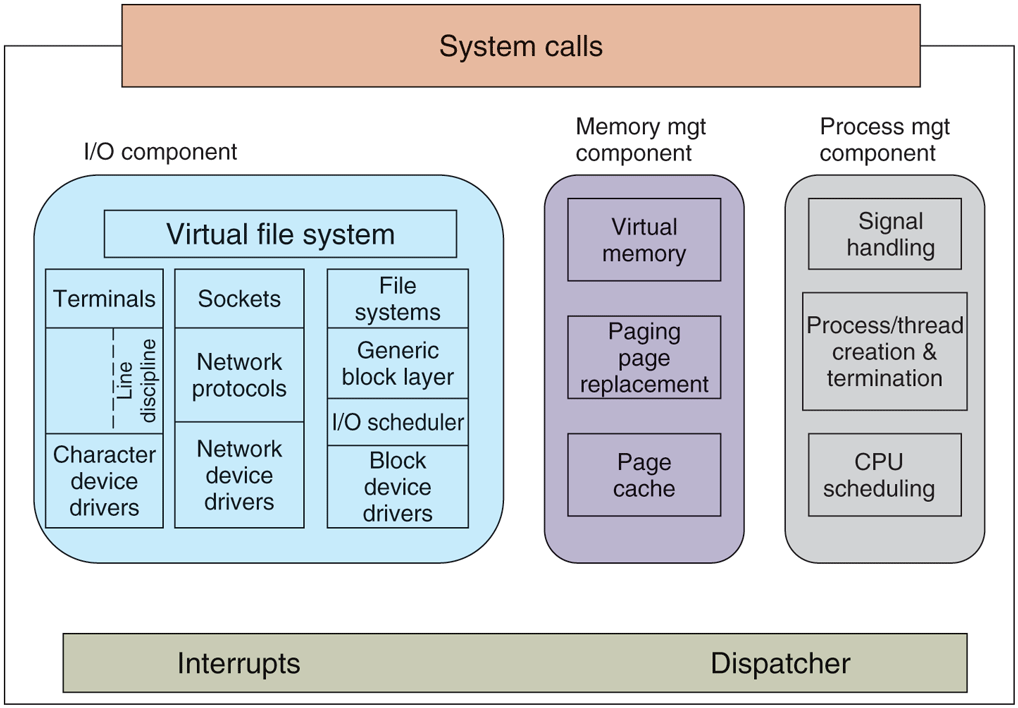
Structure of the Linux kernel.
Next, we divide the various kernel subsystems into three main components. The I/O component in Fig. 10-3 contains all kernel pieces responsible for interacting with devices and performing network and storage I/O operations. At the highest level, the I/O operations are all integrated under a VFS (Virtual File System) layer. That is, at the top level, performing a read operation on a file, whether it is in memory or on disk, is the same as performing a read operation to retrieve a character from a terminal input. At the lowest level, all I/O operations pass through some device driver. All Linux drivers are classified as either character-device drivers or block-device drivers, the main difference being that seeks and random accesses are allowed on block devices and not on character devices. Technically, network devices are really character devices, but they are handled somewhat differently, so that it is probably clearer to separate them, as has been done in the figure.
Above the device-driver level, the kernel code is different for each device type. Character devices may be used in two different ways. Some programs, such as visual editors like vi and emacs, want every keystroke as it is hit. Raw terminal (tty) I/O makes this possible. Other software, such as the shell, is line oriented, allowing users to edit the whole line before hitting ENTER to send it to the program. In this case, the character stream from the terminal device is passed through a so-called line discipline, and appropriate formatting is applied.
Networking software is often modular, with different devices and protocols supported. The layer above the network drivers handles a kind of routing function, making sure that the right packet goes to the right device or protocol handler. Most Linux systems contain the full functionality of a hardware router within the kernel, although the performance is less than that of a hardware router. Above the router code is the actual protocol stack, including IP and TCP, but also many additional protocols. Overlaying all the network is the socket interface, which allows programs to create sockets for particular networks and protocols, getting back a file descriptor for each socket to use later.
On top of the disk drivers is the I/O scheduler, which is responsible for ordering and issuing disk-operation requests in a way that tries to conserve wasteful disk head movement or to meet some other system policy.
At the very top of the block-device column are the file systems. Linux may, and in fact does, have multiple file systems coexisting concurrently. In order to hide the gruesome architectural differences of various hardware devices from the file system implementation, a generic block-device layer provides an abstraction used by all file systems.
In the right half of Fig. 10-3 are the other two key components of the Linux kernel. These two are responsible for the memory and process management tasks. Memory-management tasks include maintaining the virtual to physical-memory page mappings, maintaining a cache of recently accessed pages and implementing a good page-replacement policy, and on-demand bringing in new pages of needed code and data into memory.
The key responsibility of the process-management component is the creation and termination of processes. It also includes the process scheduler, which chooses which process or, rather, thread to run next. As we shall see in the next section, the Linux kernel treats both processes and threads simply as executable entities, and will schedule them based on a global scheduling policy. Finally, code for signal handling also belongs to this component.
While the three components are represented separately in the figure, they are highly interdependent. File systems typically access files through the block devices. However, in order to hide the large latencies of disk accesses, files are copied into the page cache in main memory. Some files may even be dynamically created and may have only an in-memory representation, such as files providing some run-time resource usage information. In addition, the virtual memory system may rely on a disk partition or in-file swap area to back up parts of the main memory when it needs to free up certain pages, and therefore relies on the I/O component. Numerous other interdependencies exist.
In addition to the static in-kernel components, Linux supports dynamically loadable modules. These modules can be used to add or replace the default device drivers, file system, networking, or other kernel codes. The modules are not shown in Fig. 10-3.
Finally, at the very top is the system call interface into the kernel. All system calls come here, causing a trap which switches the execution from user mode into protected kernel mode and passes control to one of the kernel components described earlier.