9.4 Authentication
Every secured computer system must require all users to be authenticated at login time. After all, if the operating system cannot be sure who the user is, it cannot know which files and other resources he or she can access. While authentication may sound like a trivial topic, it is a bit more complicated than you might expect. Read on.
User authentication is one of those things we meant by ‘‘ontogeny recapitulates phylogeny’’ in Sec. 1.5.7. Early mainframes, such as the ENIAC, did not have an operating system, let alone a login procedure. Later mainframe batch and timesharing systems generally did have a login procedure for authenticating jobs and users.
Early minicomputers (e.g., PDP-1 and PDP-8) did not have a login procedure, but with the spread of UNIX on the PDP-11 minicomputer, logging in was again needed. Early personal computers (e.g., Apple II and the original IBM PC) did not have a login procedure, but more sophisticated personal computer operating systems, such as Linux and Windows, do (although foolish users can disable it). Machines on corporate LANs almost always have a login procedure configured so that users cannot bypass it. Finally, many people nowadays (indirectly) log into remote computers to do Internet banking, engage in e-shopping, download music, and other commercial activities. All of these things require authenticated login, so user authentication is once again an important topic.
Having determined that authentication is often important, the next step is to find a good way to achieve it. Most methods of authenticating users when they attempt to log in are based on one of three general principles, namely identifying
Something the user knows.
Something the user has.
Something the user is.
Sometimes two of these are required for additional security. These principles lead to different authentication schemes with different complexities and security properties. In the following sections, we will examine each of these in turn.
9.4.1 Passwords
The most widely used form of authentication is to require the user to type a login name and a password. Password protection is easy to understand and easy to implement. The simplest implementation just keeps a central list of (login-name, password) pairs. The login name typed in is looked up in the list and the typed password is compared to the stored password. If they match, the login is allowed; if they do not match, the login is rejected.
It goes almost without saying that while a password is being typed in, the computer should not display the typed characters, to keep them from prying eyes near the monitor. With Windows, as each character is typed, an asterisk is displayed. With most UNIX systems, nothing at all is displayed while the password is being typed. These schemes have different properties. The Windows scheme may make it easy for absent-minded users to see how many characters they have typed so far, but it also discloses the password length to ‘‘eavesdroppers’’ (for some reason, English has a word for auditory snoopers but not for visual snoopers, other than perhaps Peeping Tom, which does not seem right in this context). From a security perspective, silence is golden.
Another area in which not quite getting it right has serious security implications is illustrated in Fig. 9-14. In Fig. 9-14(a), a successful login is shown, with system output in uppercase and user input in lowercase. In Fig. 9-14(b), a failed attempt by a cracker to log into System A is shown. In Fig. 9-14(c) a failed attempt by a cracker to log into System B is shown.
Figure 9-14
LOGIN: mitch PASSWORD: FooBar!-7 SUCCESSFUL LOGIN |
LOGIN: carol INVALID LOGIN NAME LOGIN: |
LOGIN: carol PASSWORD: Idunno INVALID LOGIN LOGIN: |
| (a) | (b) | (c) |
(a) A successful login. (b) Login rejected after name is entered. (c) Login rejected after name and password are typed.
In Fig. 9-14(b), the system complains as soon as it sees an invalid login name. This is a megamistake, as it allows the cracker to keep trying login names until she finds a valid one. In Fig. 9-14(c), the cracker is always asked for a password and gets no feedback about whether the login name itself is valid. All she learns is that the login name plus password combination tried is wrong.
As an aside on login procedures, most notebook computers are configured to require a login name and password to protect their contents in the event they are lost or stolen. While better than nothing, it is not much better than nothing. Anyone who gets hold of the notebook can turn it on and immediately go into the BIOS setup program by hitting DEL or F8 or some other BIOS-specific key (usually displayed on the screen) before the operating system is started. Once there, he can change the boot sequence, telling it to boot from a USB stick before trying the hard disk. The finder then inserts a USB stick containing a complete operating system and boots from it. Once running, the disk can be mounted (in UNIX) or accessed as the D: drive (Windows). To prevent this kind of situation, most BIOSes allow the user to password protect the BIOS setup program so that only the owner can change the boot sequence. If you have a notebook computer, stop reading now. Go put a password on your BIOS, then come back.
Another thing that modern systems tend to do is encrypt all content on your drive. This is a good thing. It ensures that even if attackers manage to read the raw blocks from your drive, they will see only garbled data. Again, if you do not have this enabled, put down this book and go fix this first.
Weak Passwords
Often, crackers break in simply by connecting to the target computer (e.g., over the Internet) and trying many (login name, password) combinations until they find one that works. Many people use their own name in one form or another as their login name. For someone whose full name is ‘‘Ellen Ann Smith,’’ ellen, smith, ellen smith, ellen-smith, ellen.smith, esmith, easmith, and eas are all reasonable candidates. Armed with one of those books entitled 4096 Names for Your New Baby, plus a telephone book full of last names, a cracker can easily compile a computerized list of potential login names appropriate to the country being attack%ed (ellen smith might work fine in the United States or England, but probably not in Japan).
Of course, guessing the login name is not enough. The password has to be guessed, too. How hard is that? Easier than you think. The classic work on password security was done by Morris and Thompson (1979) on UNIX systems. They compiled a list of likely passwords: first and last names, street names, city names, words from a moderate-sized dictionary (also words spelled backward), syntactically valid license plate numbers, etc. They then compared their list to the system password file to see if there were any matches. Over 86% of all passwords turned up in their list.
Lest anyone think that better-quality users pick better-quality passwords, rest assured that they do not. When in 2012, 6.4 million LinkedIn (hashed) passwords leaked to the Web after a hack, many people had fun analyzing the results. The most popular password was ‘‘password.’’ The second most popular was “123456” (“1234”, “12345”, and “12345678” were also in the top 10). Not exactly uncrackable. In fact, crackers can compile a list of potential login names and a list of potential passwords without much work and run a program to try them on as many computers as they can.
This is similar to what researchers at IOActive did a few years back. They scanned a long list of home routers and set-top boxes to see if they were vulnerable to the simplest possible attack. Rather than trying out many login names and passwords, as we suggested, they tried only the well-known default login and password installed by the manufacturers. Users are supposed to change these values immediately, but it appears that many do not. The researchers found that hundreds of thousands of such devices are potentially vulnerable. Perhaps even more worrying, the Stuxnet attack on an Iranian nuclear facility made good use of the fact that the Siemens computers controlling the centrifuges used a default password—one that had been circulating on the Internet for years.
The growth of the Web has made the problem worse. Instead of having only one password, many people now have dozens or hundreds. Since remembering them all is too hard, they tend to choose simple, weak passwords and reuse them on many Websites (Florencio and Herley, 2007; and Taiabul Haque et al., 2013).
Does it really matter if passwords are easy to guess? Yes, absolutely. In 1998, the San Jose Mercury News reported that a Berkeley resident, Peter Shipley, had set up several unused computers as war dialers, which dialed all 10,000 telephone numbers belonging to an exchange [e.g., (415) 770-xxxx], usually in random order to thwart telephone companies that frown upon such usage and try to detect it. After making 2.6 million calls, he located 20,000 computers in the Bay Area, 200 of which had no security at all.
The Internet has been a godsend to crackers. It takes all the drudgery out of their work. No more phone numbers to dial (and no more dial tones to wait for). ‘‘War dialing’’ now works like this. A cracker may write a script ping (send a network packet) to a set of IP addresses. If it receives any response at all, the script subsequently tries to set up a TCP connection to all the possible services that may be running on the machine. As mentioned earlier, this mapping out of what is running on which computer is known as portscanning and instead of writing a script from scratch, the attacker may just as well use specialized tools like nmap that provide a wide range of advanced portscanning techniques. Now that the attacker knows which servers are running on which machine, the next step is to launch the attack. For instance, if the attacker wanted to probe the password protection, he would connect to those services that use this method of authentication, like the telnet or ssh servers, or even Web servers. We have already seen that default and otherwise weak password enable attackers to harvest a large number of accounts, sometimes with full administrator rights.
UNIX Password Security
Some (older) operating systems keep the password file on the disk in unencrypted form (plaintext), but protected by the usual system protection mechanisms. Having all the passwords in a disk file in unencrypted form is just looking for trouble because all too often many people have access to it. These may include system administrators, machine operators, maintenance personnel, programmers, management, and maybe even some secretaries.
A better solution, used in UNIX systems, works like this. The login program asks the user to type his name and password. The password is immediately ‘‘encrypted’’ by using it as a key to encrypt a fixed block of data. Effectively, a one-way function is being run, with the password as input and a function of the password as output. This process is not really encryption, but it is easier to speak of it as ‘‘encryption.’’ The login program then reads the password file, which is just a series of ASCII lines, one per user, until it finds the line containing the user’s login name. If the (encrypted) password contained in this line matches the encrypted password just computed, the login is permitted, otherwise it is refused. The advantage of this scheme is that no one, not even the superuser, can look up any users’ passwords because they are not stored in unencrypted form anywhere in the system. For illustration purposes, we assume for now that the encrypted password is stored in the password file itself. Later, we will see, this is no longer the case for modern variants of UNIX.
If the attacker manages to get hold of the encrypted password, the scheme can be attacked, as follows. A cracker first builds a dictionary of likely passwords the way Morris and Thompson did. At leisure, these are encrypted using the known algorithm. It does not matter how long this process takes because it is done in advance of the break-in. Now armed with a list of (password, encrypted password) pairs, the cracker strikes. He reads the (publicly accessible) password file and strips out all the encrypted passwords. These are compared to the encrypted passwords in his list. For every hit, the login name and unencrypted password are now known. A simple shell script can automate this process so it can be carried out in a fraction of a second. A typical run of the script will yield dozens of passwords.
After recognizing the possibility of this attack, Morris and Thompson described a technique that renders the attack almost useless. Their idea is to associate an n-bit random number, called the salt, with each password. The random number is changed whenever the password is changed. The random number is stored in the password file in unencrypted form, so that everyone can read it. Instead of just storing the encrypted password in the password file, the password and the random number are first concatenated and then encrypted together. This encrypted result is then stored in the password file, as shown in Fig. 9-15 for a password file with five users, Bobbie, Tony, Laura, Mark, and Deborah. Each user has one line in the file, with three entries separated by commas: login name, salt, and encrypted password The notation e(Dog, 4238) represents the result of concatenating Bobbie’s password, Dog, with her randomly assigned salt, 4238, and running it through the encryption function, e. It is the result of that encryption that is stored as the third field of Bobbie’s entry.
Figure 9-15
| Bobbie, 4238, e(Dog, 4238) |
| Tony, 2918, e(6%%TaeFF, 2918) |
| Laura, 6902, e(Shakespeare, 6902) |
| Mark, 1694, e(XaB#Bwcz, 1694) |
| Deborah, 1092, e(LordByron,1092) |
The use of salt to defeat precomputation of encrypted passwords.
Now consider the implications for a cracker who wants to build up a list of likely passwords, encrypt them, and save the results in a sorted file, f, so that any encrypted password can be looked up easily. If an intruder suspects that Dog might be a password, it is no longer sufficient just to encrypt Dog and put the result in f. He has to encrypt strings, such as Dog0000, Dog0001, Dog0002, and so forth and enter all of them in f. This technique increases the size of f by UNIX uses this method with This increases the file size and work factor for the attacker by 4096.
For additional security, modern versions of UNIX typically store the encrypted passwords in a separate ‘‘shadow’’ file that, unlike the password file, is only readable by root. The combination of salting the password file and making it unreadable except indirectly (and slowly) can generally withstand most attacks on it.
One-Time Passwords
Most superusers exhort their mortal users to change their passwords once a month. Unfortunately, nobody ever does this. Even more extreme is changing the password with every login, leading to one-time passwords. When one-time passwords are used, the user gets a book containing a list of passwords. Each login uses the next password in the list. If an intruder ever discovers a password, it will not do him any good, since next time a different password must be used. It is suggested that the user try to avoid losing the password book.
Actually, a book is not needed due to an elegant scheme devised by Leslie Lamport that allows a user to log in securely over an insecure network using onetime passwords (Lamport, 1981). Lamport’s method can be used to allow a user running on a home PC to log in to a server over the Internet, even though intruders may see and copy down all the traffic in both directions. Furthermore, no secrets have to be stored in the file system of either the server or the user’s PC. The method is sometimes called a one-way hash chain.
The algorithm is based on a one-way function, that is, a function that has the property that given x it is easy to find y, but given y it is computationally infeasible to find x. The input and output should be the same length, for example, 256 bits.
The user picks a secret password that he memorizes. He also picks an integer, n, which is how many one-time passwords the algorithm is able to generate. As an example, consider , although in practice a much larger value of n would be used. If the secret password is s, the first password is given by running the oneway function n times:
The second password is given by running the one-way function times:
The third password runs f twice and the fourth password runs it once. In general, The key fact to note here is that given any password in the sequence, it is easy to compute the previous one in the numerical sequence but impossible to compute the next one. For example, given it is easy to find but impossible to find
The server is initialized with which is just This value is stored in the password file entry associated with the user’s login name along with the integer 1, indicating that the next password required is When the user wants to log in for the first time, he sends his login name to the server, which responds by sending the integer in the password file, 1. The user’s machine responds with which can be computed locally from s, which is typed in on the spot. The server then computes and compares this to the value stored in the password file If the values match, the login is permitted, the integer is incremented to 2, and overwrites in the password file.
On the next login, the server sends the user a 2, and the user’s machine computes The server then computes and compares it to the entry in the password file. If the values match, the login is permitted, the integer is incremented to 3, and overwrites in the password file. The property that makes this scheme work is that even though an intruder may capture he has no way to compute from it, only which has already been used and is now worthless. When all n passwords have been used up, the server is reinitialized with a new secret key.
Challenge-Response Authentication
A variation on the password idea is to have each new user provide a long list of questions and answers that are then stored on the server securely (e.g., in encrypted form). The questions should be chosen so that the user does not need to write them down. Possible questions that could be asked are:
Who is Marjolein’s sister?
On what street was your elementary school?
What did Mrs. Ellis teach?
At login, the server asks one of them at random and checks the answer. To make this scheme practical, though, many question-answer pairs would be needed.
Another variation is challenge-response. When this is used, the user picks an algorithm when signing up as a user, for example When the user logs in, the server sends the user an argument, say 7, in which case the user types 49. The algorithm can be different in the morning and afternoon, on different days of the week, and so on.
If the user’s device has real computing power, such as a personal computer, a personal digital assistant, or a cell phone, a more powerful form of challengeresponse can be used. In advance, the user selects a secret key, k, which is initially brought to the server system by hand. A copy is also kept (securely) on the user’s computer. At login time, the server sends a random number, r, to the user’s computer, which then computes and sends that back, where f is a publicly known function. The server then does the computation itself and checks if the result sent back agrees with the computation. The advantage of this scheme over a password is that even if a wiretapper sees and records all the traffic in both directions, she will learn nothing that helps her next time. Of course, the function, f, has to be complicated enough that k cannot be deduced, even given a large set of observations. Cryptographic hash functions are good choices, with the argument being the XOR of r and k. These functions are known to be hard to reverse.
9.4.2 Authentication Using a Physical Object
The second method for authenticating users is to check for some physical object they have rather than something they know. Metal door keys have been used for centuries for this purpose. Nowadays, the physical object used is often a plastic card that is inserted into a reader associated with the computer. Normally, the user must not only insert the card, but must also type in a password, to prevent someone from using a lost or stolen card. Viewed this way, using a bank’s ATM (Automated Teller Machine) starts out with the user logging in to the bank’s computer via a remote terminal (the ATM) using a plastic card and a password (currently a 4-digit PIN code in most countries, but this is just to avoid the expense of putting a full QWERTY keyboard on the ATM machine).
Information-bearing plastic cards come in two varieties: magnetic stripe cards and chip cards. Magnetic stripe cards hold about 140 bytes of information written on a piece of magnetic tape glued to the back of the card. This information can be read out by the terminal and then sent to a central computer. Often the information contains the user’s password (e.g., PIN code) so the terminal can perform an identity check even if the link to the main computer is down. Typically the password is encrypted by a key known only to the bank. These cards cost about $0.10 to $0.50, depending on whether there is a hologram sticker on the front and the production volume. As a way to identify users in general, magnetic stripe cards are risky because the equipment to read and write them is cheap and widespread.
Chip cards contain a tiny integrated circuit (chip) on them. These cards can be subdivided into two categories: stored value cards and smart cards. Stored value cards contain a small amount of memory (often only a few KB) using ROM technology to allow the value to be remembered when the card is removed from the reader and thus the power turned off. There is no CPU on the card, so the value stored must be changed by an external CPU (in the reader). These cards are mass produced by the millions for well under and are used, for example, as prepaid telephone cards. When a call is made, the telephone just decrements the value in the card, but no money actually changes hands. For this reason, these cards are generally issued by one company for use on only its machines (e.g., telephones or vending machines). They could be used for login authentication by storing a 1-KB password in them that the reader would send to the central computer, but in practoce this is rarely, if ever, done.
Smart cards can be used to hold money, as do stored value cards, but with much better security and universality. The cards can be loaded with money at an ATM machine or at home over the telephone using a special reader supplied by the bank. When inserted into a merchant’s reader, the user can authorize the card to deduct a certain amount of money from the card (by typing YES), causing the card to send a little encrypted message to the merchant. The merchant can later turn the message over to a bank to be credited for the amount paid.
An advantage of smart cards over, say, credit or debit cards, is that they do not need an online connection to a bank. If you do not believe this is an advantage, try the following experiment. Try to buy a single candy bar at a store and insist on paying by credit card. If the merchant objects, say you have no cash with you and besides, you need the frequent flyer miles. You will discover that the merchant is not enthusiastic about the idea (because the associated bank charges dwarf the profit on the item). This makes smart cards useful for small store purchases, parking meters, vending machines, and many other devices that normally require coins.
Smart cards have other potentially valuable uses (e.g., encoding the bearer’s allergies and other medical conditions in a secure way for use in emergencies), but this is not the place to tell that story. Our interest here is how they can be used for secure login authentication. The basic idea is simple: a smart card is a small, tamperproof computer that can engage in a discussion, called a protocol, with a central computer to authenticate the user. For example, a user wishing to buy things at an e-commerce Website could insert a smart card into a home reader attached to his PC. The e-commerce site would not only use the smart card to authenticate the user in a more secure way than a password, but could also deduct the purchase price from the smart card directly, eliminating a great deal of the overhead (and risk) associated with using a credit card for online purchases.
Various authentication schemes can be used with a smart card. A particularly simple challenge-response works like this. The server sends a 1024-bit random number to the smart card, which then adds the user’s 1024-bit password stored in the card’s ROM to it. The sum is then squared and the middle 1024 bits are sent back to the server, which knows the user’s password and can compute whether the result is correct or not. The sequence is shown in Fig. 9-16. If a wiretapper sees both messages, he will not be able to make much sense out of them, and recording them for future use is pointless because on the next login, a different 1024-bit random number will be sent. In practice, a much better algorithm is used.
Figure 9-16
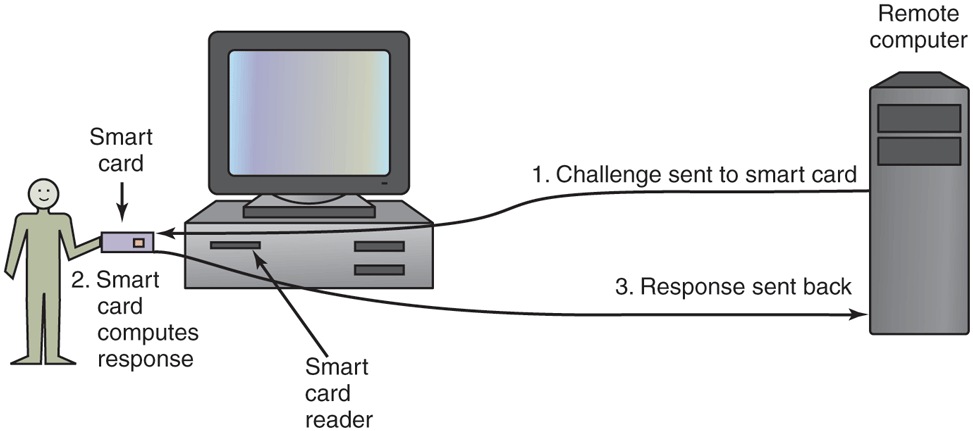
Use of a smart card for authentication.
9.4.3 Authentication Using Biometrics
The third authentication method measures physical characteristics of the user that are hard to forge. These are called biometrics (Boulgouris et al., 2010; and Campisi, 2013). For example, many operating systems for smart phones and notebooks use face recognition and/or fingerprints to verify the user’s identity.
A typical biometrics system has two parts: enrollment and identification. During enrollment, the user’s characteristics are measured and the results digitized. Then significant features are extracted and stored in a record associated with the user. The record can be kept in a central database (e.g., for logging in to a remote computer), or stored on a smart card that the user carries around and inserts into a remote reader (e.g., at an ATM machine).
The other part is identification. The user shows up and provides a login name. Then the system makes the measurement again. If the new values match the ones sampled at enrollment time, the login is accepted; otherwise it is rejected. The login name is needed because the measurements are never exact, so it is difficult to index them and then search the index. Also, two people might have the same characteristics, so requiring the measured characteristics to match those of a specific user is stronger than just requiring them to match those of any user.
The characteristic chosen should have enough variability that the system can distinguish among many people without error. For example, hair color is not a good indicator because too many people share the same color. Also, the characteristic should not vary over time and with some people, hair color does not have this property. Similarly a person’s voice may be different due to a cold and a face may look different due to a beard or makeup not present at enrollment time. Since later samples are never going to match the enrollment values exactly, the system designers have to decide how good the match has to be to be accepted. In particular, they have to decide whether it is worse to reject a legitimate user once in a while or let an imposter get in once in a while. An e-commerce site might decide that rejecting a loyal customer might be worse than accepting a small amount of fraud, whereas a nuclear weapons site might decide that refusing access to a genuine employee was better than letting random strangers in twice a year.
An important point here is that any authentication scheme must be psychologically acceptable to the user community. Even something as nonintrusive as storing fingerprints online, may be unacceptable to people because they associate fingerprints with criminals. Using fingerprints to unlock a phone is all right though.