9.2 Controlling Access to Resources
Security is easier to achieve if there is a clear model of what is to be protected and who is allowed to do what. Quite a bit of work has been done in this area, so we can only scratch the surface in this brief treatment. We will focus on a few general models and the mechanisms for enforcing them.
9.2.1 Protection Domains
A computer system contains many resources, or ‘‘objects,’’ that need to be protected. These objects can be hardware (e.g., CPUs, memory pages, disk drives, or printers) or software (e.g., processes, files, databases, or semaphores).
Each object has a unique name by which it is referenced, and a finite set of operations that processes are allowed to carry out on it. The read and write operations are appropriate to a file; up and down make sense on a semaphore.
It is obvious that a way is needed to prohibit processes from accessing objects that they are not authorized to access. Furthermore, this mechanism must also make it possible to restrict processes to a subset of the legal operations when that is needed. For example, process A may be entitled to read, but not write, file F. The mechanism must allow this.
So far, we have casually wielded the term security domain to refer to virtual machines, operating system kernels, and processes that all need to be isolated from each other and that all have their own privileges. In order to discuss different security mechanisms, it is useful to define slightly more formally, the related concept of protection domain. A protection domain is a set of (object, rights) pairs. Each pair specifies an object and some subset of the operations that can be performed on it. Protection and security domains are closely related. Every security domain, such as a process P or a virtual machine V is in a particular protection domain D that determines what rights it has. A right in this context means permission to perform one of the operations. Often a protection domain corresponds to a single user, telling what the user can do and not do, but it can also be more general than just one user. For example, the members of a programming team working on some project might all belong to the same protection domain so that they can all access the project files.
In some cases, protection domains are organized in a hierarchy. As long as a virtual machine (VM) is in a protection domain, no program in the VM may perform operations that do not agree with the protection domain. However, it does not mean that all the programs in the VM can perform all operations in the protection domain; some will have only a subset of the access rights. In other words, the higher-level protection domains will be constrained by the lower-level protection domain.
How objects are allocated to protection domains depends on the specifics of who needs to perform what operations on what objects. However, one basic concept, as we have seen, is the POLA or need to know. In general, security works best when each domain has the minimum objects and privileges to do its work— and no more.
Figure 9-3 shows three domains, showing the objects in each domain and the rights (Read, Write, eXecute) available on each object. Note that Printer1 is in two domains at the same time, with the same rights in each. File1 is also in two domains, with different rights in each one.
Figure 9-3
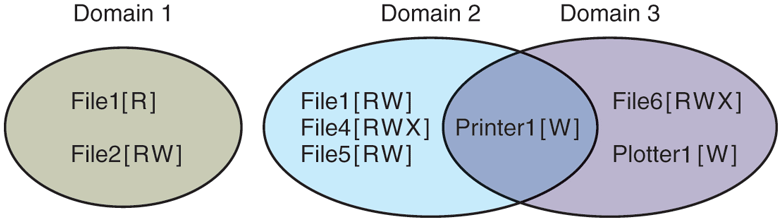
Three protection domains.
At every instant of time, each process (or in general, security domain) runs in some protection domain. In other words, there is some collection of objects it can access, and for each object it has some set of rights. Processes can also switch from protection domain to protection domain during execution. The rules for protection domain switching are highly system dependent.
To make the idea of a protection domain more concrete, let us look at UNIX (including Linux, FreeBSD, and friends). In UNIX, the domain of a process is defined by its UID and GID. When users log in, their shells get the UID and GID contained in their entry in the password file and these are inherited by all its children. Given any (UID, GID) combination, it is possible to make a complete list of all objects (files, including I/O devices represented by special files, etc.) that can be accessed, and whether they can be accessed for reading, writing, or executing. Two processes with the same (UID, GID) combination will have access to exactly the same set of objects. Processes with different (UID, GID) values will have access to a different set of files, although there may be considerable overlap.
Furthermore, each process in UNIX has two halves: the user part and the kernel part. When the process does a system call, it switches from the user part to the kernel part. The kernel part has access to a different set of objects from the user part. For example, the kernel can access all the pages in physical memory, the entire disk, and all the other protected resources. Thus, a system call causes a protection domain switch.
When a process does an exec on a file with the SETUID or SETGID bit on, it acquires a new effective UID or GID. With a different (UID, GID) combination, it has a different set of files and operations available. Running a program with SETUID or SETGID is also a protection domain switch, since the rights available change.
This is another point where the concepts of security domain and protection domain differ. In our use of the term security domain, we simply refer to the SETUID process and that security domain does not change. In contrast, the protection domain changes when a process changes the effective UID.
In this section, we are interested in access rights. In the remainder of this section, whenever we say domain, we mean protection domain. If we do want to talk about security domains, we will say so explicitly.
An important question is how the system keeps track of which object belongs to which protection domain. Conceptually, at least, one can envision a large matrix, with the rows being domains and the columns being objects. Each box lists the rights, if any, that the domain contains for the object. The matrix for Fig. 9-3 is shown in Fig. 9-4. Given this matrix and the current domain number, the system can tell if an access to a given object in a particular way from a specified domain is allowed.
Figure 9-4
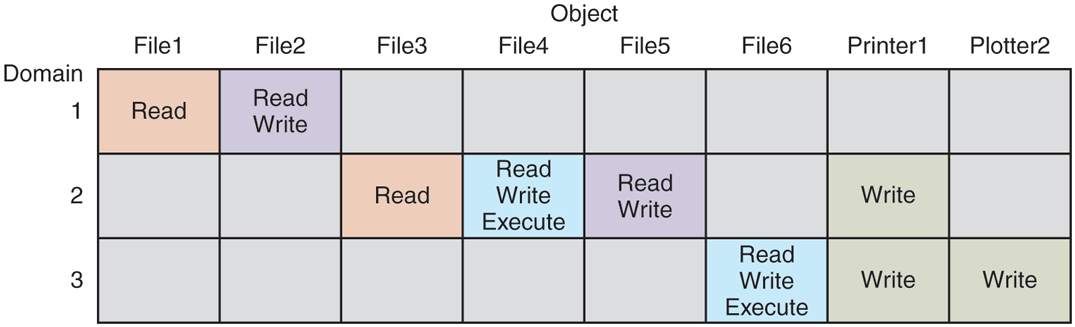
A protection matrix.
Domain switching itself can be easily included in the matrix model by realizing that a domain is itself an object, with the operation enter. Figure 9-5 shows the matrix of Fig. 9-4 again, only now with the three domains as objects themselves. Processes in domain 1 can switch to domain 2, but once there, they cannot go back. This situation models executing a SETUID program in UNIX. No other domain switches are permitted in this example.
Figure 9-5
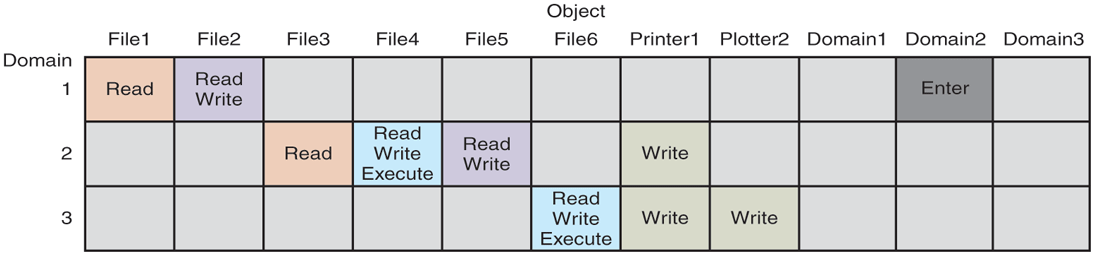
A protection matrix with domains as objects.
9.2.2 Access Control Lists
In practice, actually storing the matrix of Fig. 9-5 is rarely done because it is large and sparse. Most domains have no access at all to most objects, so storing a very large, mostly empty, matrix is a waste of disk space. Two methods that are practical, however, are storing the matrix by rows or by columns, and then storing only the nonempty elements. The two approaches are surprisingly different. In this section, we will look at storing it by column; in the next we will study storing it by row.
The first technique consists of associating with each object an (ordered) list containing all the domains that may access the object, and how. This list is called the ACL (Access Control List) and is illustrated in Fig. 9-6. Here we see three processes, each belonging to a different domain, A, B, and C, and three files F1, F2 and F3. For simplicity, we will assume that each domain corresponds to exactly one user, in this case, users A, B, and C. Often in the security literature the users are called subjects or principals, to contrast them with the things owned, the objects, such as files.
Figure 9-6
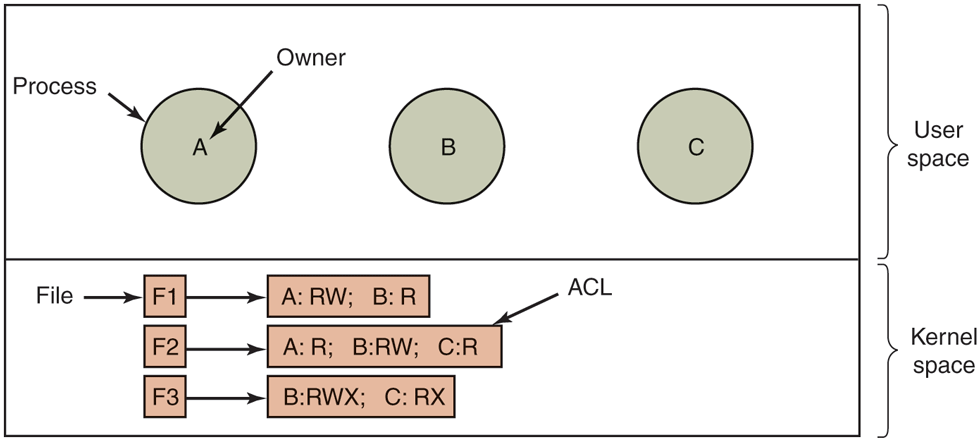
Use of access control lists to manage file access.
Each file has an ACL associated with it. File F1 has two entries in its ACL (separated by a semicolon). The first entry says that any process owned by user A may read and write the file. The second entry says that any process owned by user B may read the file. All other accesses by these users and all accesses by other users are forbidden (adhering to the principle of fail-safe defaults). Note that the rights are granted by user, not by process. As far as the protection system goes, any process owned by user A can read and write file F1. It does not matter if there is one such process or 100 of them. It is the owner, not the process ID, that matters.
File F2 has three entries in its ACL: A, B, and C can all read the file, and B can also write it. No other accesses are allowed. File F3 is apparently an executable program, since B and C can both read and execute it. B can also write it.
This example illustrates the most basic form of protection with ACLs. More sophisticated systems are often used in practice. To start with, we have shown only three rights so far: read, write, and execute. There may be additional rights as well. Some of these may be generic, that is, apply to all objects, and some may be object specific. Examples of generic rights are destroy object and copy object. These could hold for any object, no matter what type it is. Object-specific rights might include append message for a mailbox object and sort alphabetically for a directory object.
So far, our ACL entries have been for individual users. Many systems support the concept of a group of users. Groups have names and can be included in ACLs. Two variations on the semantics of groups are possible. In some systems, each process has a user ID (UID) and group ID (GID). In such systems, an ACL entry contains entries of the form
UID1, GID1: rights1; UID2, GID2: rights2; ...Under these conditions, when a request is made to access an object, a check is made using the caller’s UID and GID. If they are present in the ACL, the rights listed are available. If the (UID, GID) combination is not in the list, the access is not permitted.
Using groups this way effectively introduces the concept of a role. Consider a computer installation in which Tana is system administrator, and thus in the group sysadm. However, suppose that the company also has some clubs for employees and Tana is a member of the pigeon fanciers club. Club members belong to the group pigfan and have access to the company’s computers for managing their pigeon database. A portion of the ACL might be as shown in Fig. 9-7.
Figure 9-7
| File | Access control list |
|---|---|
Password |
tana, sysadm: RW |
Pigeon data |
bill, pigfan: RW; tana, pigfan: RW; ... |
Two access control lists.
If Tana tries to access one of these files, the result depends on which group she is currently logged in as. When she logs in, the system may ask her to choose which of her groups she is currently using, or there might even be different login names and/or passwords to keep them separate. The point of this scheme is to prevent Tana from accessing the password file when she currently has her pigeon fancier’s hat on. She can do that only when logged in as the system administrator.
In some cases, a user may have access to certain files independent of which group she is currently logged in as. That case can be handled by introducing the concept of a wildcard, which means everyone. For example, the entry
tana, *: RWfor the password file would give Tana access no matter which group she was currently in as.
Yet another possibility is that if a user belongs to any of the groups that have certain access rights, the access is permitted. The advantage here is that a user belonging to multiple groups does not have to specify which group to use at login time. All of them count all of the time. A disadvantage of this approach is that it provides less encapsulation: Tana can edit the password file during a pigeon club meeting.
The use of groups and wildcards introduces the possibility of selectively blocking a specific user from accessing a file. For example, the entry
anna, *: (none); *, *: RWgives the entire world except for Anna read and write access to the file. This works because the entries are scanned in order, and the first one that applies is taken; subsequent entries are not even examined. A match is found for Anna on the first entry and the access rights, in this case, ‘‘none’’ are found and applied. The search is terminated at that point. The fact that the rest of the world has access is never even seen.
The other way of dealing with groups is not to have ACL entries consist of (UID, GID) pairs, but to have each entry be a UID or a GID. For example, an entry for the file pigeon_data could be
debbie: RW; emma: RW; pigfan: RWmeaning that Debbie and Emma, and all members of the pigfan group have read and write access to the file.
It sometimes occurs that a user or a group has certain permissions with respect to a file that the file owner later wishes to revoke. With access-control lists, it is relatively straightforward to revoke a previously granted access. All that has to be done is edit the ACL to make the change. However, if the ACL is checked only when a file is opened, most likely the change will take effect only on future calls to open. Any file that is already open will continue to have the rights it had when it was opened, even if the user is no longer authorized to access the file.
On UNIX systems such as Linux and FreeBSD, you can use the commands getfacl and setfacl to inspect and set the access control list, respectively. In practice, many users limit themselves to regulating the access to files using the wellknown UNIX read, write, and execute permissions for the ‘‘user’’ (owner), ‘‘group,’’ and ‘‘other’’ (everybody else), but access control lists give them finergrained control over who gets access to what. For instance, suppose we have a file hello.txt with the following file permissions:
-rw-r------1 herbertb staff 6 Nov 20 11:05 hello.txtIn other words, the file has read/write permission for the owner, read permissions for everyone in group staff, and no permissions for everybody else. Using access control lists, Herbert can give a user Yossarian read/write permissions to the file without adding him to the group staff or making the file accessible to everybody else, as follows:
setfacl -m u:yossarian:rw hello.txtWindows similarly allows users to inspect and configure the access control lists from its PowerShell using the get-Acl and set-Acl commands. MacOS also supports ACLs, but it rolled the commands into the chmod command.
9.2.3 Capabilities
The other way of slicing up the matrix of Fig. 9-5 is by rows. When this method is used, associated with each process (or, in general, security domain) is a list of objects that may be accessed, along with an indication of which operations are permitted on each, in other words, its domain. This list is called a capability list (or C-list) and the individual items on it are called capabilities. This idea has been around for half a century but is still widely used (Dennis and Van Horn, 1966; Fabry, 1974). A set of three processes and their capability lists is shown in Fig. 9-8.
Figure 9-8
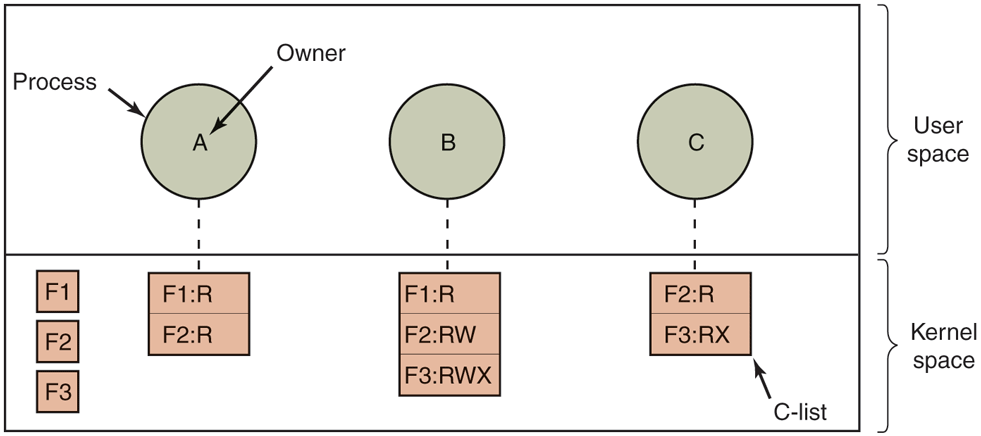
When capabilities are used, each process has a capability list.
Each capability grants the owner certain rights on a certain object. In Fig. 9-8, the process owned by user A can read files F1 and F2, for example. Usually, a capability consists of a file (or more generally, an object) identifier and a bitmap for the various rights. In a UNIX-like system, the file identifier would probably be the i-node number. Capability lists are themselves objects and may be pointed to from other capability lists, thus facilitating sharing of subdomains.
It is fairly obvious that capability lists must be protected from user tampering. Three methods of protecting them are known. The first way requires a tagged architecture, a hardware design in which each memory word has an extra (or tag) bit that tells whether the word contains a capability or not. The tag bit is not used by arithmetic, comparison, or similar ordinary instructions, and it can be modified only by programs running in kernel mode (i.e., the operating system). Tagged-architecture machines have been built and can be made to work quite well (Feustal, 1972). The IBM AS/400 is a popular example.
The second way is to keep the C-list inside the operating system. Capabilities are then referred to by their position in the capability list. A process might say: ‘‘Read 1 KB from the file pointed to by capability 2.’’ This form of addressing is similar to using file descriptors in UNIX. Hydra (Wulf et al., 1974) worked this way.
The third way is to keep the C-list in user space, but manage the capabilities cryptographically so that users cannot tamper with them. This approach is particularly suited to distributed systems and works as follows. When a client process sends a message to a remote server, for example, a file server, to create an object for it, the server creates the object and generates a long random number, the check field, to go with it. A slot in the server’s file table is reserved for the object and the check field is stored there along with the addresses of the disk blocks. In UNIX terms, the check field is stored on the server in the i-node. It is not sent back to the user and never put on the network. The server then generates and returns a capability to the user of the form shown in Fig. 9-9.
Figure 9-9

A cryptographically protected capability.
The capability returned to the user contains the server’s identifier, the object number (the index into the server’s tables, essentially, the i-node number), and the rights, stored as a bitmap. For a newly created object, all the rights bits are turned on, of course, because the owner can do everything. The last field consists of the concatenation of the object, rights, and check field run through a cryptographically secure one-way function, f. A cryptographically secure one-way function is a function that has the property that given x it is easy to find y, but given y it is computationally infeasible to find x. We will discuss them in detail in Section 9.5. For now, it suffices to know that with a good one-way function, even a determined attacker will not be able to guess the check field, even if he knows all the other fields in the capability.
When the user wishes to access the object, she sends the capability to the server as part of the request. The server then extracts the object number to index into its tables to find the object. It then computes f (Object, Rights, Check), taking the first two parameters from the capability itself and the third from its own tables. If the result agrees with the fourth field in the capability, the request is honored; otherwise, it is rejected. If a user tries to access someone else’s object, she will not be able to fabricate the fourth field correctly since she does not know the check field, and the request will be rejected.
A user can ask the server to produce a weaker capability, for example, for readonly access. First the server verifies that the capability is valid. If so, it computes f (Object, New_rights, Check) and generates a new capability putting this value in the fourth field. Note that the original Check value is used because other outstanding capabilities depend on it.
This new capability is sent back to the requesting process. The user can now give this to a friend by just sending it in a message. If the friend turns on rights bits that should be off, the server will detect this when the capability is used since the f value will not correspond to the false rights field. Since the friend does not know the true check field, he cannot fabricate a capability that corresponds to the false rights bits. This scheme was developed for the Amoeba system (Tanenbaum et al., 1990).
In addition to the specific object-dependent rights, such as read and execute, capabilities (both kernel and cryptographically protected) usually have generic rights which are applicable to all objects. Examples of generic rights are
Copy capability: create a new capability for the same object.
Copy object: create a duplicate object with a new capability.
Remove capability: delete an entry from the C-list; object unaffected.
Destroy object: permanently remove an object and a capability.
A last remark worth making about capability systems is that revoking access to an object is quite difficult in the kernel-managed version. It is hard for the system to find all the outstanding capabilities for any object to take them back, since they may be stored in C-lists all over the disk. One approach is to have each capability point to an indirect object, rather than to the object itself. By having the indirect object point to the real object, the system can always break that connection, thus invalidating the capabilities. (When a capability to the indirect object is later presented to the system, the user will discover that the indirect object is now pointing to a null object.)
In the Amoeba scheme, revocation is easy. All that needs to be done is change the check field stored with the object. In one blow, all existing capabilities are invalidated. However, neither scheme allows selective revocation, that is, taking back, say, Joanna’s permission, but nobody else’s. This defect is generally recognized to be a problem with all capability systems.
Another general problem is making sure the owner of a valid capability does not give a copy to 1000 of his best friends. Having the kernel manage capabilities, as in Hydra, solves the problem, but this solution does not work well in a distributed system such as Amoeba.
Very briefly summarized, ACLs and capabilities have somewhat complementary properties. Capabilities are very efficient because if a process says “Open the file pointed to by capability 3” no checking is needed. With ACLs, a (potentially long) search of the ACL may be needed. If groups are not supported, then granting everyone read access to a file requires enumerating all users in the ACL. Capabilities also allow a process to be encapsulated easily, whereas ACLs do not. On the other hand, ACLs allow selective revocation of rights, which capabilities do not. Finally, if an object is removed and the capabilities are not or vice versa, problems arise. ACLs do not suffer from this problem.
Most users are familiar with ACLs, because they are common in operating systems like Windows and UNIX. However, capabilities are not that uncommon either. For instance, the L4 kernel that runs on many smartphones from many manufacturers (typically alongside or underneath other operating systems like Android) is capability based. Likewise, the FreeBSD has embraced Capsicum, bringing capabilities to a popular member of the UNIX family. While Linux also has a notion of capabilities, it is important to emphasize that these are very different and not ‘‘real’’ capabilities in the (Dennis and Van Horn, 1966) sense of the word.