7.11 Case Study: Vmware
Since 1999, VMware, Inc. has been the leading commercial provider of hypervisor-based virtualization solutions with products for desktops, servers, the cloud, and now even on cell phones. It provides not only hypervisors but also the software that manages virtual machines on a large scale.
We will start this case study with a brief history of how the company got started. We will then describe VMware Workstation, a type 2 hypervisor and the company’s first product, the challenges in its design and the key elements of the solution. We then describe the evolution of VMware Workstation over the years. We conclude with a description of ESX Server, VMware’s type 1 hypervisor.
7.11.1 The Early History of VMware
Although the idea of using virtual machines was popular in the 1960s and 1970s in both the computing industry and academic research, interest in virtualization was totally lost after the 1980s and the rise of the personal computer industry. Only IBM’s mainframe division still cared about virtualization. Indeed, the computer architectures designed at the time, and in particular Intel’s x86 architecture, did not provide architectural support for virtualization (i.e., they failed the Popek/Goldberg criteria). This is extremely unfortunate, since the 386 CPU, a complete redesign of the 286, was done a decade after the Popek-Goldberg paper, and the designers should have known better.
In 1997, at Stanford, three of the future founders of VMware had built a prototype hypervisor called Disco (Bugnion et al., 1997), with the goal of running commodity operating systems (in particular UNIX) on a very large scale multiprocessor then being developed at Stanford: the FLASH machine. During that project, the authors realized that using virtual machines could solve, simply and elegantly, a number of hard system software problems: rather than trying to solve these problems within existing operating systems, one could innovate in a layer below existing operating systems. The key observation of Disco was that, while the high complexity of modern operating systems made innovation difficult, the relative simplicity of a virtual machine monitor and its position in the software stack provided a powerful foothold to address limitations of operating systems. Although Disco was aimed at very large servers, and designed for the MIPS architecture, the authors realized that the same approach could equally apply, and be commercially relevant, for the x86 marketplace.
And so, VMware, Inc. was founded in 1998 with the specific goal of bringing virtualization to the x86 architecture and the personal computer industry. VMware’s first product (VMware Workstation) was the first virtualization solution available for 32-bit x86-based platforms. The product was first released in 1999, and came in two variants: VMware Workstation for Linux, a type 2 hypervisor that ran on top of Linux host operating systems, and VMware Workstation for Windows, which similarly ran on top of Windows NT. Both variants had identical functionality: users could create multiple virtual machines by specifying first the characteristics of the virtual hardware (such as how much memory to give the virtual machine, or the size of the virtual disk) and could then install the operating system of their choice within the virtual machine, typically from the (virtual) CDROM.
VMware Workstation was largely aimed at developers and IT professionals. Before the introduction of virtualization, a developer routinely had two computers on his desk, a stable one for development and a second one where he could reinstall the system software as needed. With virtualization, the second test system became a virtual machine.
Soon, VMware started developing a second and more complex product, which would be released as ESX Server in 2001. ESX Server leveraged the same virtualization engine as VMware Workstation, but packaged it as part of a type 1 hypervisor. In other words, ESX Server ran directly on the hardware without requiring a host operating system. The ESX hypervisor was designed for intense workload consolidation and contained many optimizations to ensure that all resources (CPU, memory, and I/O) were efficiently and fairly allocated among the virtual machines. For example, it was the first to introduce the concept of ballooning to rebalance memory between virtual machines (Waldspurger, 2002).
ESX Server was aimed at the server consolidation market. Before the introduction of virtualization, IT administrators would typically buy, install, and configure a new server for every new task or application that they had to run in the data center. The result was that the infrastructure was very inefficiently utilized: servers at the time were typically used at 10% of their capacity (during peaks). With ESX Server, IT administrators could consolidate many independent virtual machines into a single server, saving time, money, rack space, and electrical power.
In 2002, VMware introduced its first management solution for ESX Server, originally called Virtual Center, and today called vSphere. It provided a single point of management for a cluster of servers running virtual machines: an IT administrator could now simply log into the Virtual Center application and control, monitor, or provision thousands of virtual machines running throughout the enterprise. With Virtual Center came another innovation, VMotion (Nelson et al., 2005), which allowed the live migration of a running virtual machine over the network. For the first time, an IT administrator could move a running computer from one location to another without having to reboot the operating system, restart applications, or even lose network connections.
7.11.2 VMware Workstation
VMware Workstation was the first virtualization product for 32-bit x86 computers. The subsequent adoption of virtualization had a profound impact on the industry and on the computer science community: in 2009, the ACM awarded its authors the ACM Software System Award for VMware Workstation 1.0 for Linux. The original VMware Workstation is described in a detailed technical article (Bugnion et al., 2012). Here we provide a summary of that paper.
The idea was that a virtualization layer could be useful on commodity platforms built from x86 CPUs and primarily running the Microsoft Windows operating systems (a.k.a. the WinTel platform). The benefits of virtualization could help address some of the known limitations of the WinTel platform, such as application interoperability, operating system migration, reliability, and security. In addition, virtualization could easily enable the coexistence of operating system alternatives, in particular, Linux.
Although there existed decades’ worth of research and commercial development of virtualization technology on mainframes, the x86 computing environment was sufficiently different that new approaches were necessary. For example, mainframes were vertically integrated, meaning that a single vendor engineered the hardware, the hypervisor, the operating systems, and most of the applications.
In contrast, the x86 industry was (and still is) disaggregated into at least four different categories: (a) Intel and AMD make the processors; (b) Microsoft offers Windows and the open source community offers Linux; (c) a third group of companies builds the I/O devices and peripherals and their corresponding device drivers; and (d) a fourth group of system integrators such as HP and Dell put together computer systems for retail sale. For the x86 platform, virtualization would first need to be inserted without the support of any of these industry players.
Because this disaggregation was a fact of life, VMware Workstation differed from classic virtual machine monitors that were designed as part of single-vendor architectures with explicit support for virtualization. Instead, VMware Workstation was designed for the x86 architecture and the industry built around it. VMware Workstation addressed these new challenges by combining well-known virtualiza4G tion techniques, techniques from other domains, and new techniques into a single solution.
We now discuss the specific technical challenges in building VMware Workstation.
7.11.3 Challenges in Bringing Virtualization to the x86
Recall our definition of hypervisors and virtual machines: hypervisors apply the well-known principle of adding a level of indirection to the domain of computer hardware. They provide the abstraction of virtual machines: multiple copies of the raw underlying hardware, each running an independent operating system instance. The virtual machines are isolated from other virtual machines, appear each as a duplicate of the underlying hardware, and ideally run with the same speed as the real machine. VMware adapted these core attributes of a virtual machine to an x86-based target platform as follows:
Compatibility. The notion of an ‘‘essentially identical environment’’ meant that any x86 operating system, and all of its applications, would be able to run without modifications as a virtual machine. A hypervisor needed to provide sufficient compatibility at the hardware level such that users could run whichever operating system (down to the update and patch version) they wished to install within a particular virtual machine, without restrictions.
Performance. The overhead of the hypervisor had to be sufficiently low that users could use a virtual machine as their primary work environment. As a goal, the designers of VMware aimed to run relevant workloads at near native speeds, and in the worst case to run them on then-current processors with the same performance as if they were running natively on the immediately prior generation of processors. This was based on the observation that most x86 software was not designed to run only on the latest generation of CPUs.
Isolation. A hypervisor had to guarantee the isolation of the virtual machine without making any assumptions about the software running inside. That is, a hypervisor needed to be in complete control of resources. Software running inside virtual machines had to be prevented from any access that would allow it to subvert the hypervisor. Similarly, a hypervisor had to ensure the privacy of all data not belonging to the virtual machine. A hypervisor had to assume that the guest operating system could be infected with unknown, malicious code (a much bigger concern today than during the mainframe era).
There was an inevitable tension between these three requirements. For example, total compatibility in certain areas might lead to a prohibitive impact on performance, in which case VMware’s designers had to compromise. However, they ruled out any trade-offs that might compromise isolation or expose the hypervisor to attacks by a malicious guest. Overall, four major challenges emerged:
The x86 architecture was not virtualizable. It had virtualization-sensitive, nonprivileged instructions, which violated the Popek and Goldberg criteria for strict virtualization. For example, the POPF instruction has a different (yet nontrapping) semantics depending on whether the currently running software is allowed to disable interrupts or not. This ruled out the traditional trap-and-emulate approach to virtualization. Even engineers from Intel Corporation were convinced their processors could not be virtualized in any practical sense.
The x86 architecture was of daunting complexity. The x86 architecture was a notoriously complicated CISC architecture, including legacy support for multiple decades of backward compatibility. Over the years, it had introduced four main modes of operations (real, protected, v8086, and system management), each of which enabled in different ways the hardware’s segmentation model, paging mechanisms, protection rings, and security features (such as call gates).
x86 machines had diverse peripherals. Although there were only two major x86 processor vendors, the personal computers of the time could contain an enormous variety of add-in cards and devices, each with their own vendor-specific device drivers. Virtualizing all these peripherals was infeasible. This had two implications: it applied to both the front end (the virtual hardware exposed in the virtual machines) and the back end (the real hardware that the hypervisor needed to be able to control) of peripherals.
Need for a simple user experience. Classic hypervisors were installed in the factory, similar to the firmware found in today’s computers. Since VMware was a startup, its users would have to add the hypervisors to existing systems after the fact. VMware needed a software delivery model with an easy installation procedure to speed-up adoption.
7.11.4 VMware Workstation: Solution Overview
This section describes at a high level how VMware Workstation addressed the challenges mentioned in the previous section.
VMware Workstation is a type 2 hypervisor that consists of distinct modules. One important module is the VMM, which is responsible for executing the virtual machine’s instructions. A second important module is the VMX, which interacts with the host operating system.
The section covers first how the VMM solves the nonvirtualizability of the x86 architecture. Then, we describe the operating system-centric strategy used by the designers throughout the development phase. Next, we look at the design of the virtual hardware platform, which addresses half of the peripheral diversity challenge. Finally, we discuss the role of the host operating system, in particular the interaction between the VMM and VMX components.
Virtualizing the x86 Architecture
The VMM runs the actual virtual machine; it enables it to make forward progress. A VMM built for a virtualizable architecture uses a technique known as trap-and-emulate to execute the virtual machine’s instruction sequence directly, but safely, on the hardware. When this is not possible, one approach is to specify a virtualizable subset of the processor architecture, and port the guest operating systems to that newly defined platform. This technique is known as paravirtualization (Barham et al., 2003; Whitaker et al., 2002) and requires source-code level modifications of the operating system. Put bluntly, paravirtualization modifies the guest to avoid doing anything that the hypervisor cannot handle. Paravirtualization was infeasible at VMware because of the compatibility requirement and the need to run operating systems whose source code was not available, in particular Windows.
An alternative would have been to employ an all-emulation approach. In this, the instructions of the virtual machines are emulated by the VMM on the hardware (rather than directly executed). This can be quite efficient; prior experience with the SimOS (Rosenblum et al., 1997) machine simulator showed that the use of techniques such as dynamic binary translation running in a user-level program could limit overhead of complete emulation to a factor-of-five slowdown. Although this is quite efficient, and certainly useful for simulation purposes, a factor-of-five slowdown was clearly inadequate and would not meet the desired performance requirements.
The solution to this problem combined two key insights. First, although trapand-emulate direct execution could not be used to virtualize the entire x86 architecture all the time, it could actually be used some of the time. In particular, it could be used during the execution of application programs, which accounted for most of the execution time on relevant workloads. The reasons is that these virtualization sensitive instructions are not sensitive all the time; rather they are sensitive only in certain circumstances. For example, the POPF instruction is virtualization-sensitive when the software is expected to be able to disable interrupts (e.g., when running the operating system), but is not virtualization-sensitive when software cannot disable interrupts (in practice, when running nearly all user-level applications).
Figure 7-8 shows the modular building blocks of the original VMware VMM. We see that it consists of a direct-execution subsystem, a binary translation subsystem, and a decision algorithm to determine which subsystem should be used. Both subsystems rely on some shared modules, for example to virtualize memory through shadow page tables, or to emulate I/O devices.
Figure 7-8
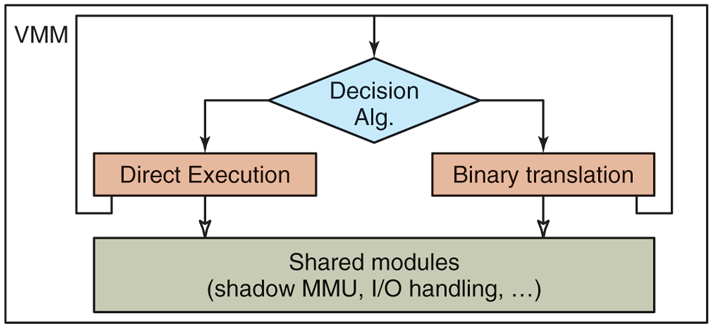
High-level components of the VMware virtual machine monitor (in the absence of hardware support).
The direct-execution subsystem is preferred, and the dynamic binary translation subsystem provides a fallback mechanism whenever direct execution is not possible. This is the case for example whenever the virtual machine is in such a state that it could issue a virtualization-sensitive instruction. Therefore, each subsystem constantly reevaluates the decision algorithm to determine whether a switch of subsystems is possible (from binary translation to direct execution) or necessary (from direct execution to binary translation). This algorithm has a number of input parameters, such as the current execution ring of the virtual machine, whether interrupts can be enabled at that level, and the state of the segments. For example, binary translation must be used if any of the following is true:
The virtual machine is currently running in kernel mode (ring 0 in the x86 architecture).
The virtual machine can disable interrupts and issue I/O instructions (in the x86 architecture, when the I/O privilege level is set to the ring level).
The virtual machine is currently running in real mode, a legacy 16-bit execution mode used by the BIOS among other things.
The actual decision algorithm contains a few additional conditions. The details can be found in Bugnion et al. (2012). Interestingly, the algorithm does not depend on the instructions that are stored in memory and may be executed, but only on the value of a few virtual registers; therefore, it can be evaluated very efficiently in just a handful of instructions.
The second key insight was that by properly configuring the hardware, particularly using the x86 segment protection mechanisms carefully, system code under dynamic binary translation could also run at near-native speeds. This is very different than the factor-of-five slowdown normally expected of machine simulators.
The difference can be explained by comparing how a dynamic binary translator converts a simple instruction that accesses memory. To emulate such an instruction in software, a classic binary translator emulating the full x86 instruction-set architecture would have to first verify whether the effective address is within the range of the data segment, then convert the address into a physical address, and finally to copy the referenced word into the simulated register. Of course, these various steps can be optimized through caching, in a way very similar to how the processor cached page-table mappings in a translation-lookaside buffer. But even such optimizations would lead to an expansion of individual instructions into an instruction sequence.
The VMware binary translator performs none of these steps in software. Instead, it configures the hardware so that this simple instruction can be reissued with the identical instruction. This is possible only because the VMware VMM (of which the binary translator is a component) has previously configured the hardware to match the exact specification of the virtual machine: (a) the VMM uses shadow page tables, which ensures that the memory management unit can be used directly (rather than emulated) and (b) the VMM uses a similar shadowing approach to the segment descriptor tables (which played a big role in the 16-bit and 32-bit software running on older x86 operating systems).
There are, of course, complications and subtleties. One important aspect of the design is to ensure the integrity of the virtualization sandbox, that is, to ensure that no software running inside the virtual machine (including malicious software) can tamper with the VMM. This problem is generally known as software fault isolation and adds run-time overhead to each memory access if the solution is implemented in software. Here also, the VMware VMM uses a different, hardware-based approach. It splits the address space into two disjoint zones. The VMM reserves for its own use the top 4 MB of the address space. This frees up the rest (that is, since we are talking about a 32-bit architecture) for the use by the virtual machine. The VMM then configures the segmentation hardware so that no virtual machine instructions (including ones generated by the binary translator) can ever access the top 4-MB region of the address space.
A Guest Operating System Centric Strategy
Ideally, a VMM should be designed without worrying about the guest operating system running in the virtual machine, or how that guest operating system configures the hardware. The idea behind virtualization is to make the virtual machine interface identical to the hardware interface so that all software that runs on the hardware will also run in a virtual machine. Unfortunately, this approach is practical only when the architecture is virtualizable and simple. In the case of x86, the overwhelming complexity of the architecture was clearly a problem.
The VMware engineers simplified the problem by focusing only on a selection of supported guest operating systems. In its first release, VMware Workstation supported officially only Linux, Windows 3.1, Windows 95/98, and Windows NT as guest operating systems. Over the years, new operating systems were added to the list with each revision of the software. Nevertheless, the emulation was good enough that it ran some unexpected operating systems, such as MINIX 3, perfectly, right out of the box.
This simplification did not change the overall design—the VMM still provided a faithful copy of the underlying hardware, but it helped guide the development process. In particular, engineers had to worry only about combinations of features that were used in practice by the supported guest operating systems.
For example, the x86 architecture contains four privilege rings in protected mode (ring 0 to ring 3) but no operating system uses ring 1 or ring 2 in practice (save for OS/2, a long-dead operating system from IBM). So rather than figure out how to correctly virtualize ring 1 and ring 2, the VMware VMM simply had code to detect if a guest was trying to enter into ring 1 or ring 2, and, in that case, would stop execution of the virtual machine. This not only removed unnecessary code, but more importantly it allowed the VMware VMM to assume that ring 1 and ring 2 would never be used by the virtual machine, and therefore that it could use these rings for its own purposes. In fact, the VMware VMM’s binary translator runs at ring 1 to virtualize ring 0 code.
The Virtual Hardware Platform
So far, we have primarily discussed the problem associated with the virtualization of the x86 processor. But an x86-based computer is much more than its processor. It also has a chipset, some firmware, and a set of I/O peripherals to control disks, network cards, CD-ROM, keyboard, etc.
The diversity of I/O peripherals in x86 personal computers made it impossible to match the virtual hardware to the real, underlying hardware. Whereas there were only a handful of x86 processor models in the market, with only minor variations in instruction-set level capabilities, there were thousands of I/O devices, most of which had no publicly available documentation of their interface or functionality. VMware’s key insight was to not attempt to have the virtual hardware match the specific underlying hardware, but instead have it always match some configuration composed of selected, canonical I/O devices. Guest operating systems then used their own existing, built-in mechanisms to detect and operate these (virtual) devices.
The virtualization platform consisted of a combination of multiplexed and emulated components. Multiplexing meant configuring the hardware so it can be directly used by the virtual machine, and shared (in space or time) across multiple virtual machines. Emulation meant exporting a software simulation of the selected, canonical hardware component to the virtual machine. Figure 7-9 illustrates that VMware Workstation used multiplexing for processor and memory and emulation for everything else.
Figure 7-9
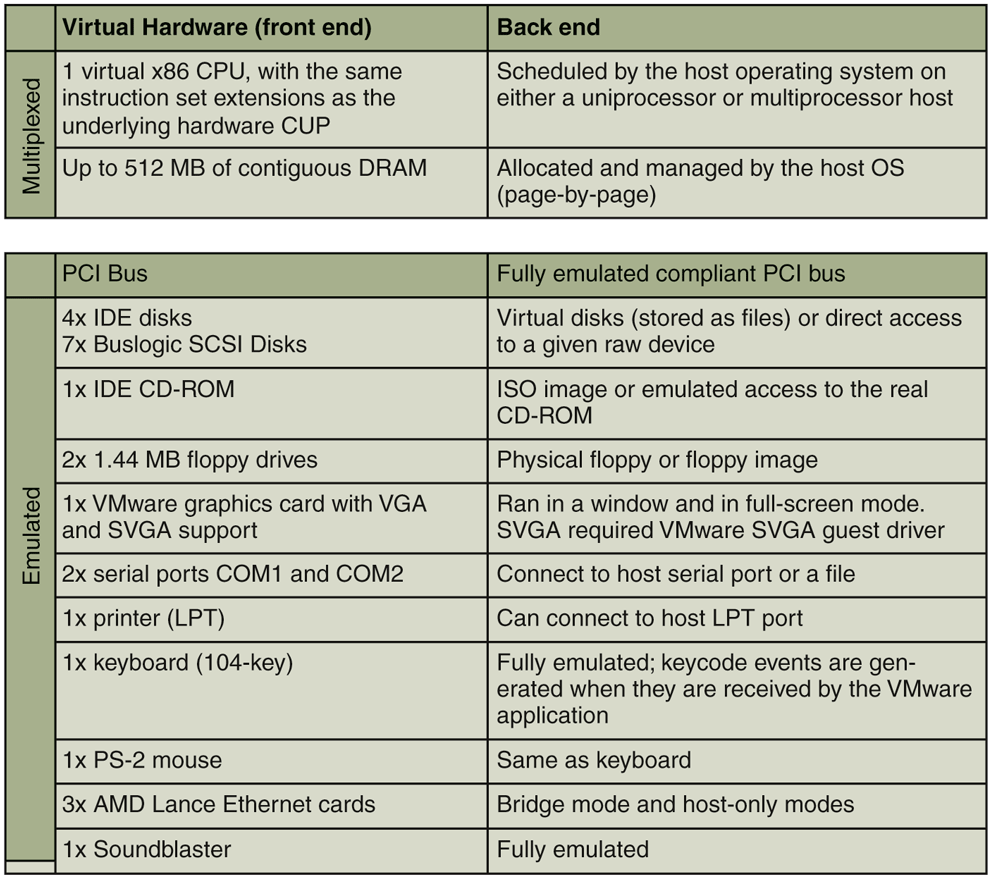
Virtual hardware configuration options of the early VMware Workstation, ca. 2000.
For the multiplexed hardware, each virtual machine had the illusion of having one dedicated CPU and a configurable, but a fixed amount of contiguous RAM starting at physical address 0.
Architecturally, the emulation of each virtual device was split between a frontend component, which was visible to the virtual machine, and a back-end component, which interacted with the host operating system (Waldspurger and Rosenblum, 2012). The front-end was essentially a software model of the hardware device that could be controlled by unmodified device drivers running inside the virtual machine. Regardless of the specific corresponding physical hardware on the host, the front end always exposed the same device model.
For example, the first Ethernet device front end was the AMD PCnet ‘‘Lance’’ chip, once a popular 10-Mbps plug-in board on PCs, and the back end provided network connectivity to the host’s physical network. Ironically, VMware kept supporting the PCnet device long after physical Lance boards were no longer available, and actually achieved I/O that was orders of magnitude faster than 10 Mbps (Sugerman et al., 2001). For storage devices, the original front ends were an IDE controller and a Buslogic Controller, and the back end was typically either a file in the host file system, such as a virtual disk or an ISO 9660 image, or a raw resource such as a drive partition or the physical CD-ROM.
Splitting front ends from back ends had another benefit: a VMware virtual machine could be copied from computer to another computer, possibly with different hardware devices. Yet, the virtual machine would not have to install new device drivers since it only interacted with the front-end component. This attribute, called hardware-independent encapsulation, has a huge benefit today in server environments and in cloud computing. It enabled subsequent innovations such as suspend/resume, checkpointing, and the transparent migration of live virtual machines across physical boundaries (Nelson et al., 2005). In the cloud, it allows customers to deploy their virtual machines on any available server, without having to worry of the details of the underlying hardware.
The Role of the Host Operating System
The final critical design decision in VMware Workstation was to deploy it ‘‘on top’’ of an existing operating system. This classifies it as a type 2 hypervisor. The choice had two main benefits.
First, it would address the second part of peripheral diversity challenge. VMware implemented the front-end emulation of the various devices, but relied on the device drivers of the host operating system for the back end. For example, VMware Workstation would read or write a file in the host file system to emulate a virtual disk device, or draw in a window of the host’s desktop to emulate a video card. As long as the host operating system had the appropriate drivers, VMware Workstation could run virtual machines on top of it.
Second, the product could install and feel like a normal application to a user, making adoption easier. Like any application, the VMware Workstation installer simply writes its component files onto an existing host file system, without perturbing the hardware configuration (no reformatting of a disk, creating of a disk partition, or changing of BIOS settings). In fact, VMware Workstation could be installed and start running virtual machines without requiring even rebooting the host operating system, at least on Linux hosts.
However, a normal application does not have the necessary hooks and APIs necessary for a hypervisor to multiplex the CPU and memory resources, which is essential to provide near-native performance. In particular, the core x86 virtualization technology described above works only when the VMM runs in kernel mode and can furthermore control all aspects of the processor without any restrictions. This includes the ability to change the address space (to create shadow page tables), to change the segment tables, and to change all interrupt and exception handlers.
A device driver has more direct access to the hardware, in particular if it runs in kernel mode. Although it could (in theory) issue any privileged instructions, in practice a device driver is expected to interact with its operating system using welldefined APIs, and does not (and should never) arbitrarily reconfigure the hardware. And since hypervisors call for a massive reconfiguration of the hardware (including the entire address space, segment tables, exception and interrupt handlers), running the hypervisor as a device driver was also not a realistic option.
Since none of these assumptions are supported by host operating systems, running the hypervisor as a device driver (in kernel mode) was also not an option.
These stringent requirements led to the development of the VMware Hosted Architecture. In it, as shown in Fig. 7-10, the software is broken into three separate and distinct components.
Figure 7-10
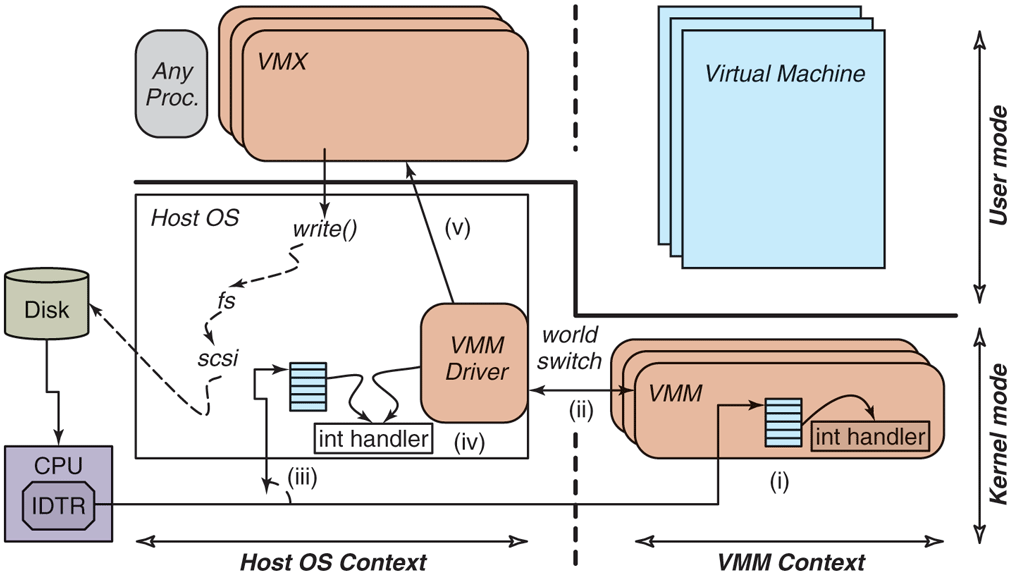
The VMware Hosted Architecture and its three components: VMX, VMM driver, and VMM.
These components each have different functions and operate independently from one another:
A user-space program (the VMX) which the user perceives to be the VMware program. The VMX performs all UI functions, starts the virtual machine, and then performs most of the device emulation (front end), and makes regular system calls to the host operating system for the back end interactions. There is typically one multithreaded VMX process per virtual machine.
A small kernel-mode device driver (the VMX driver), which gets installed within the host operating system. It is used primarily to allow the VMM to run by temporarily suspending the entire host operating system. There is one VMX driver installed in the host operating system, typically at boot time.
The VMM, which includes all the software necessary to multiplex the CPU and the memory, including the exception handlers, the trap-andemulate handlers, the binary translator, and the shadow paging module. The VMM runs in kernel mode, but it does not run in the context of the host operating system. In other words, it cannot rely directly on services offered by the host operating system, but it is also not constrained by any rules or conventions imposed by the host operating system. There is one VMM instance for each virtual machine, created when the virtual machine starts.
VMware Workstation appears to run on top of an existing operating system, and, in fact, its VMX does run as a process of that operating system. However, the VMM operates at system level, in full control of the hardware, and without depending on any way on the host operating system. Figure 7-10 shows the relationship between the entities: the two contexts (host operating system and VMM) are peers to each other, and each has a user-level and a kernel component. When the VMM runs (the right half of the figure), it reconfigures the hardware, handles all I/O interrupts and exceptions, and can therefore safely temporarily remove the host operating system from its virtual memory. For example, the location of the interrupt table is set within the VMM by assigning the IDTR register to a new address. Conversely, when the host operating system runs (the left half of the figure), the VMM and its virtual machine are equally removed from its virtual memory.
This transition between these two totally independent system-level contexts is a world switch. The name itself emphasizes that everything about the software changes during a world switch, in contrast with the regular context switch implemented by an operating system. Figure 7-11 shows the difference between the two. The regular context switch between processes ‘‘A’’ and ‘‘B’’ swaps the user portion of the address space and the registers of the two processes, but leaves a number of critical system resources unmodified. For example, the kernel portion of the address space is identical for all processes, and the exception handlers are also not modified. In contrast, the world switch changes everything: the entire address space, all exception handlers, privileged registers, etc. In particular, the kernel address space of the host operating system is mapped only when running in the host operating system context. After the world switch into the VMM context, it has been removed from the address space altogether, freeing space to run both the VMM and the virtual machine. Although this sounds complicated, this can be implemented quite efficiently and takes only 45 x86 machine-language instructions to execute.
Figure 7-11
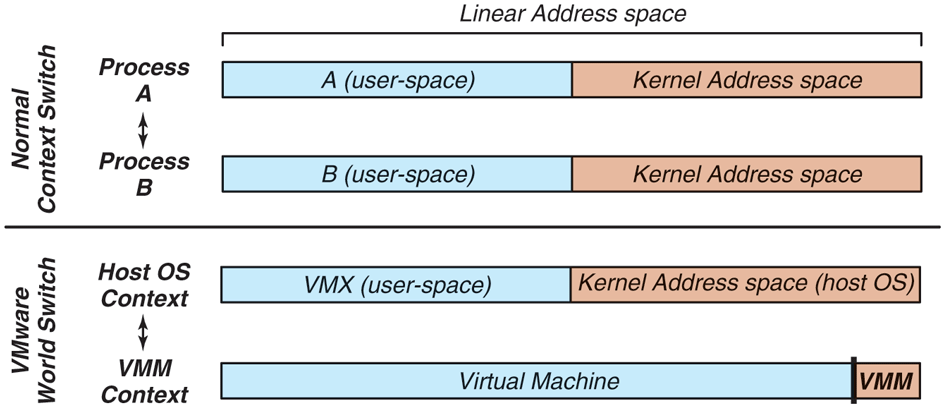
Difference between a normal context switch and a world switch.
The careful reader will have wondered: what of the guest operating system’s kernel address space? The answer is simply that it is part of the virtual machine address space, and is present when running in the VMM context. Therefore, the guest operating system can use the entire address space, and in particular the same locations in virtual memory as the host operating system. This is very specifically what happens when the host and guest operating systems are the same (e.g., both are Linux). Of course, this all ‘‘just works’’ because of the two independent contexts and the world switch between the two.
The same reader will then wonder: what of the VMM area, at the very top of the address space? As we discussed above, it is reserved for the VMM itself, and those portions of the address space cannot be directly used by the virtual machine. Luckily, that small 4-MB portion is not frequently used by the guest operating systems since each access to that portion of memory must be individually emulated and induces noticeable software overhead.
Going back to Fig. 7-10: it further illustrates the various steps that occur when a disk interrupt happens while the VMM is executing (step i). Of course, the VMM cannot handle the interrupt since it does not have the back-end device driver. In (ii), the VMM does a world switch back to the host operating system. Specifically, the world-switch code returns control to the VMware driver, which in (iii) emulates the same interrupt that was issued by the disk. So in step (iv), the interrupt handler of the host operating system runs through its logic, as if the disk interrupt had occurred while the VMware driver (but not the VMM!) was running. Finally, in step (v), the VMware driver returns control to the VMX application. At this point, the host operating system may choose to schedule another process, or keep running the VMware VMX process. If the VMX process keeps running, it will then resume execution of the virtual machine by doing a special call into the device driver, which will generate a world switch back into the VMM context. As you see, this is a neat trick that hides the entire VMM and virtual machine from the host operating system. More importantly, it provides the VMM complete freedom to reprogram the hardware as it sees fit.
7.11.5 The Evolution of VMware Workstation
The technology landscape has changed dramatically in the decade following the development of the original VMware Virtual Machine Monitor.
The hosted architecture is still used today for state-of-the-art interactive hypervisors such as VMware Workstation, VMware Player, and VMware Fusion (the product aimed at Apple macOS host operating systems), and even in VMware’s product aimed at cell phones (Barr et al., 2010). The world switch, and its ability to separate the host operating system context from the VMM context, remains the foundational mechanism of VMware’s hosted products today. Although the implementation of the world switch has evolved through the years, for example, to support 64-bit systems, the fundamental idea of having totally separate address spaces for the host operating system and the VMM remains valid today.
In contrast, the approach to the virtualization of the x86 architecture changed rather dramatically with the introduction of hardware-assisted virtualization. Hardware-assisted virtualizations, such as Intel VT-x and AMD-v were introduced in two phases. The first phase, starting in 2005, was designed with the explicit purpose of eliminating the need for either paravirtualization or binary translation (Uhlig et al., 2005). Starting in 2007, the second phase provided hardware support in the MMU in the form of nested page tables. This eliminated the need to maintain shadow page tables in software. Today, VMware’s hypervisors mostly uses a hardware-based, trap-and-emulate approach (as formalized by Popek and Goldberg four decades earlier) whenever the processor supports both virtualization and nested page tables.
The emergence of hardware support for virtualization had a significant impact on VMware’s guest operating system centric-strategy. In the original VMware Workstation, the strategy was used to dramatically reduce implementation complexity at the expense of compatibility with the full architecture. Today, full architectural compatibility is expected due to hardware support. The current VMware guest operating system-centric strategy focuses on performance optimizations for selected guest operating systems.
7.11.6 ESX Server: VMware’s type 1 Hypervisor
In 2001, VMware released a different product, called ESX Server, aimed at the server marketplace. Here, VMware’s engineers took a different approach: rather than creating a type 2 solution running on top of a host operating system, they decided to build a type 1 solution that would run directly on the hardware.
Figure 7-12 shows the high-level architecture of ESX Server. It combines an existing component, the VMM, with a true hypervisor running directly on the bare metal. The VMM performs the same function as in VMware Workstation, which is to run the virtual machine in an isolated environment that is a duplicate of the x86 architecture. As a matter of fact, the VMMs used in the two products use the same source code base, and they are largely identical. The ESX hypervisor replaces the host operating system. But rather than implementing the full functionality expected of an operating system, its only goal is to run the various VMM instances and to efficiently manage the physical resources of the machine. ESX Server therefore contains the usual subsystem found in an operating system, such as a CPU scheduler, a memory manager, and an I/O subsystem, with each subsystem optimized to run virtual machines.
Figure 7-12
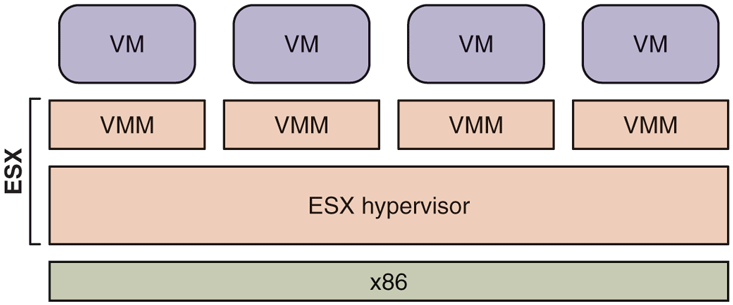
ESX Server: VMware’s type 1 hypervisor.
The absence of a host operating system required VMware to directly address the issues of peripheral diversity and user experience described earlier. For peripheral diversity, VMware restricted ESX Server to run only on well-known and certified server platforms, for which it had device drivers. As for the user experience, ESX Server (unlike VMware Workstation) required users to install a new system image on a boot partition.
Despite the drawbacks, the trade-off made sense for dedicated deployments of virtualization in data centers, consisting of hundreds or thousands of physical servers, and often (many) thousands of virtual machines. Such deployments are sometimes referred today as private clouds. There, the ESX Server architecture provides substantial benefits in terms of performance, scalability, manageability, and features. For example:
The CPU scheduler ensures that each virtual machine gets a fair share of the CPU (to avoid starvation). It is also designed so that the different virtual CPUs of a given multiprocessor virtual machine are scheduled at the same time.
The memory manager is optimized for scalability, in particular to run virtual machines efficiently even when they need more memory than is actually available on the computer. To achieve this result, ESX Server first introduced the notion of ballooning and transparent page sharing for virtual machines (Waldspurger, 2002).
The I/O subsystem is optimized for performance. Although VMware Workstation and ESX Server often share the same front-end emulation components, the back ends are totally different. In the VMware Workstation case, all I/O flows through the host operating system and its API, which often adds overhead. This is particularly true in the case of networking and storage devices. With ESX Server, these device drivers run directly within the ESX hypervisor, without requiring a world switch.
The back ends also typically relied on abstractions provided by the host operating system. For example, VMware Workstation stores virtual machine images as regular (but very large) files on the host file system. In contrast, ESX Server has VMFS (Vaghani, 2010), a file system optimized specifically to store virtual machine images and ensure high I/O throughput. This allows for extreme levels of performance. For example, VMware demonstrated back in 2011 that a single ESX Server could issue 1 million disk operations per second (VMware, 2011).
ESX Server made it easy to introduce new capabilities, which required the tight coordination and specific configuration of multiple components of a computer. For example, ESX Server introduced VMotion, the first virtualization solution that could migrate a live virtual machine from one machine running ESX Server to another machine running ESX Server, while it was running. This achievement required the coordination of the memory manager, the CPU scheduler, and the networking stack.
Over the years, new features were added to ESX Server. ESX Server evolved into ESXi, a small-footprint alternative that is sufficiently small in size to be preinstalled in the firmware of servers. Today, ESXi is VMware’s most important product and serves as the foundation of the vSphere suite.