7.3 Type 1 and Type 2 Hypervisors
Goldberg (1972) distinguished between two approaches to virtualization. One kind of hypervisor, dubbed a type 1 hypervisor, is illustrated in Fig. 7-1(a). Technically, it is like an operating system, since it is the only program running in the most privileged mode. Its job is to support multiple copies of the actual hardware, called virtual machines, similar to the processes a normal operating system runs.
Figure 7-1
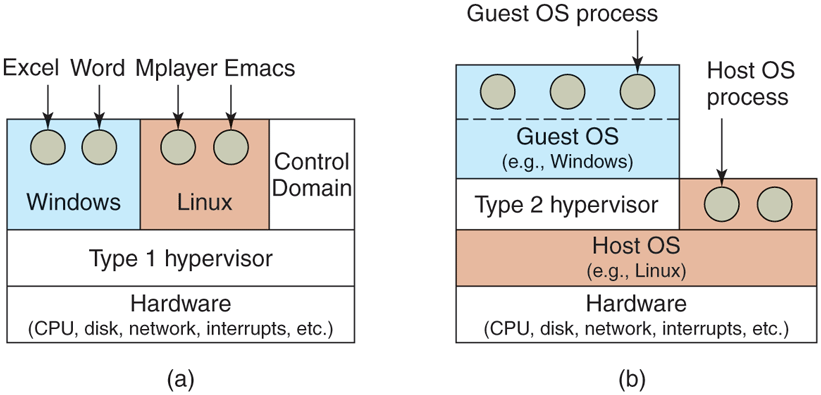
Location of type 1 and type 2 hypervisors.
In contrast, a type 2 hypervisor, shown in Fig. 7-1(b), is a different kind of animal. It is a program that relies on, say, Windows or Linux to allocate and schedule resources, very much like a regular process. Of course, the type 2 hypervisor still pretends to be a full computer with a CPU and various devices. Both types of hypervisor must execute the machine’s instruction set in a safe manner. For instance, an operating system running on top of the hypervisor may change and even mess up its own page tables, but not those of others.
The operating system running on top of the hypervisor in both cases is called the guest operating system. For a type 2 hypervisor, the operating system running on the hardware is called the host operating system. The first type 2 hypervisor on the x86 market was VMware Workstation (Bugnion et al., 2012). In this section, we introduce the general idea. A study of VMware in more detail follows in Sec. 7.12.
Type 2 hypervisors, sometimes referred to as hosted hypervisors, depend for much of their functionality on a host operating system such as Windows, Linux, or macOS. When it starts for the first time, it acts like a newly booted computer and expects to find a DVD, USB drive, or CD-ROM containing an operating system in the drive. This time, however, the drive could be a virtual device. For instance, it is possible to store the image as an ISO file on the hard drive of the host and have the hypervisor pretend it is reading from a proper DVD drive. It then installs the operating system to its virtual disk (again really just a Windows, Linux, or macOS file) by running the installation program found on the DVD. Once the guest operating system is installed on the virtual disk, it can be booted and run. It is completely unaware that it has been tricked.
The various categories of virtualization we have discussed are summarized in the table of Fig. 7-2 for both type 1 and type 2 hypervisors. For each combination of hypervisor and kind of virtualization, some examples are given.
Figure 7-2
| Virtualizaton method | Type 1 hypervisor | Type 2 hypervisor |
|---|---|---|
| Virtualization without HW support | ESX Server 1.0 | VMware Workstation 1 |
| Paravirtualization | Xen 1.0 | VirtualBox |
| Virtualization with HW support | vSphere, Xen, Hyper-V | VMware Fusion, KVM, Parallels |
| Process virtualization | Wine |
Examples of hypervisors. Type 1 hypervisors run on the bare metal, whereas type 2 hypervisors use the services of an existing host operating system.