5.8 Power Management
The first general-purpose electronic computer, the ENIAC, had 18,000 vacuum tubes and consumed 140,000 watts of power. As a result, it ran up a nontrivial electricity bill. After the invention of the transistor, power usage dropped dramatically and the computer industry lost interest in power requirements. However, nowadays power management is back in the spotlight for several reasons, and the operating system is playing a role here.
Let us start with desktop PCs. A desktop PC often has a 200-watt power supply (which is typically 85% efficient, that is, loses 15% of the incoming energy to heat). If 100 million of these machines are turned on at once worldwide, together they use 20,000 megawatts of electricity. This is the total output of 20 average-sized nuclear power plants. If power requirements could be cut in half, we could get rid of 10 nuclear power plants. From an environmental point of view, getting rid of 10 nuclear power plants (or an equivalent number of fossil-fuel plants) is a big win for the planet.
The other place where power is a very big issue is on battery-powered computers, including notebooks, smartphones, and tablets, among others. The heart of the problem is that the batteries cannot hold enough charge to last very long, a few hours at most. Furthermore, despite massive research efforts by battery companies, computer companies, and consumer electronics companies, progress is glacial. To an industry used to a doubling of performance every 18 months (Moore’s law), having no progress at all seems like a violation of the laws of physics, but that is the current situation. As a consequence, making computers use less energy so existing batteries last longer is high on everyone’s agenda. The operating system plays a major role here, as we will see below.
At the lowest level, hardware vendors are trying to make their electronics more energy efficient. Techniques used include reducing transistor size, employing dynamic voltage scaling, using low-swing and adiabatic buses, and similar techniques. These are outside the scope of this book.
There are two general approaches to reducing energy consumption. The first one is for the operating system to turn off parts of the computer (mostly I/O devices) when they are not in use because a device that is off uses little or no energy. The second one is for the application program to use less energy, possibly degrading the quality of the user experience, in order to stretch out battery time. We will look at each of these approaches in turn, but first we will say a little bit about hardware design with respect to power usage.
5.8.1 Hardware Issues
Batteries come in two general types: disposable and rechargeable. Disposable batteries (most commonly AAA, AA, and D cells) can be used to run handheld devices, but do not have enough energy to power notebook computers with large bright screens. A rechargeable battery, in contrast, can store enough energy to power a notebook for a few hours. Nickel cadmium batteries used to dominate here, but they gave way to nickel metal hydride batteries, which last longer and do not pollute the environment quite as badly when they are eventually discarded. Lithium ion batteries are even better, and may be recharged without first being fully drained, but their capacities are also severely limited. Most modern portable devices use lithium ion batteries. All battery manufacturers understand that the patent on a notebook battery that lasts 40 hours of heavy use is worth billions of dollars, but the physics is tough.
The general approach most computer vendors take to battery conservation is to design the CPU, memory, and I/O devices to have multiple states: on, sleeping, hibernating, and off. To use the device, it must be on. When the device will not be needed for a short time, it can be put to sleep, which reduces energy consumption. It can be awakened quickly by typing a character or moving the mouse. When it is not expected to be needed for a longer interval, it can be made to hibernate, which reduces energy consumption even more. The trade-off here is that getting a device out of hibernation often takes more time and energy than getting it out of sleep state. Finally, when a device is off, it does nothing and consumes no power. Not all devices have all these states, but when they do, it is up to the operating system to manage the state transitions at the right moments.
Power management brings up a number of questions that the operating system has to deal with. Many of them relate to resource hibernation—selectively and temporarily turning off devices, or at least reducing their power consumption when they are idle. Questions that must be answered include these: Which devices can be controlled? Are they on/off, or are there intermediate states? How much power is saved in the low-power states? Is energy expended to restart the device? Must some context be saved when going to a low-power state? How long does it take to go back to full power? Of course, the answers to these questions vary from device to device, so the operating system must be able to deal with a range of possibilities.
Various researchers have examined notebook computers to see where the power goes. The top three energy sinks are the display, the hard disk (if present), and CPU, in that order. In other words, these components are obvious targets for saving energy. On devices like smartphones, there may be other power drains, like the radio and GPS. Although we focus on displays, disks, CPUs, and memory in this section, the principles are the same for other peripherals.
5.8.2 Operating System Issues
The operating system plays a key role in energy management. It controls all the devices, so it must decide what to shut down and when to shut it down. If it shuts down a device and that device is needed again quickly, there may be an annoying delay while it is restarted. On the other hand, if it waits too long to shut down a device, energy is wasted for nothing.
The trick is to find algorithms and heuristics that let the operating system make good decisions about what to shut down and when. The trouble is that ‘‘good’’ is highly subjective. One user may find it acceptable that after 30 seconds of not using the computer it takes 2 seconds for it to respond to a keystroke. Another user may swear like a sailor under the same conditions. In the absence of audio input, the computer cannot tell these users apart.
The Display
Let us now look at the big spenders of the energy budget to see what can be done about each one. One of the biggest items in everyone’s energy budget is the display. To get a bright sharp image, the screen must be backlit and that takes substantial energy. Many operating systems attempt to save energy here by shutting down the display when there has been no activity for some number of minutes. Often the user can decide what the shutdown interval is, thus pushing the trade-off between frequent blanking of the screen and draining the battery quickly back to the user (who probably really does not want it). Turning off the display is a sleep state because it can be regenerated (from the video RAM) almost instantaneously when any key is struck or the pointing device is moved.
The Hard Disk
Another major villain is the hard disk, assuming your machine has one. It takes substantial energy to keep it spinning at high speed, even if there are no accesses. Many computers, especially notebooks, spin the disk down after a certain number of minutes of being idle. When it is next needed, it is spun up again. Unfortunately, a stopped disk is hibernating rather than sleeping because it takes quite a few seconds to spin it up again, which causes noticeable delays for the user.
In addition, restarting the disk consumes considerable energy. As a consequence, every disk has a characteristic time, that is its break-even point, often in the range 5 to 15 sec. Suppose that the next disk access is expected to come some time t in the future. If it takes less energy to keep the disk spinning rather than spin it down and then spin it up so quickly. If the energy saved makes it worth spinning the disk down and then up again much later. If a good prediction could be made (e.g., based on past access patterns), the operating system could make good shutdown predictions and save energy. In practice, most systems are conservative and stop the disk only after a few minutes of inactivity.
Another way to save disk energy is to have a substantial disk cache in RAM or flash. If a needed block is in the cache, an idle disk does not have to be restarted to satisfy the read. Similarly, if a write to the disk can be buffered in the cache, a stopped disk does not have to restarted just to handle the write. The disk can remain off until the cache fills up or a read miss happens.
Another way to avoid unnecessary disk starts is for the operating system to keep running programs informed about the disk state by sending them messages or signals. Some programs have discretionary writes that can be skipped or delayed. For example, a word processor may be set up to write the file being edited to disk every few minutes. If at the moment it would normally write the file out, the word processor knows that the disk is off, it can delay this write until it is turned on.
The CPU
The CPU can also be managed to save energy. In particular, a CPU can be put to sleep in software, reducing power usage to almost zero. The only thing it can do in this state is wake up when an interrupt occurs. Therefore, whenever the CPU goes idle, either waiting for I/O or because there is no work to do, it goes to sleep.
On many computers, there is a relationship between CPU voltage, clock cycle, and power usage. The CPU voltage can often be reduced in software, which saves energy but also reduces the clock cycle (approximately linearly). Since power consumed is proportional to the square of the voltage, cutting the voltage in half makes the CPU about half as fast but at 1/4 the power.
This property can be exploited for programs with well-defined deadlines, such as multimedia viewers that have to decompress and display a frame every 40 msec, but go idle if they do it faster. Suppose that a CPU uses x joules while running full blast for 40 msec and joules running at half speed. If a video player can decompress and display a frame in 20 msec, the operating system can run at full power for 20 msec and then shut down for 20 msec for a total energy usage of joules. Alternatively, it can run at half power and just make the deadline, but use only joules instead. A comparison of running at full speed and full power for some time interval and at half speed and one-quarter power for twice as long is shown in Fig. 5-40. In both cases the same work is done, but in Fig. 5-40(b) only half the energy is consumed doing it.
Figure 5-40
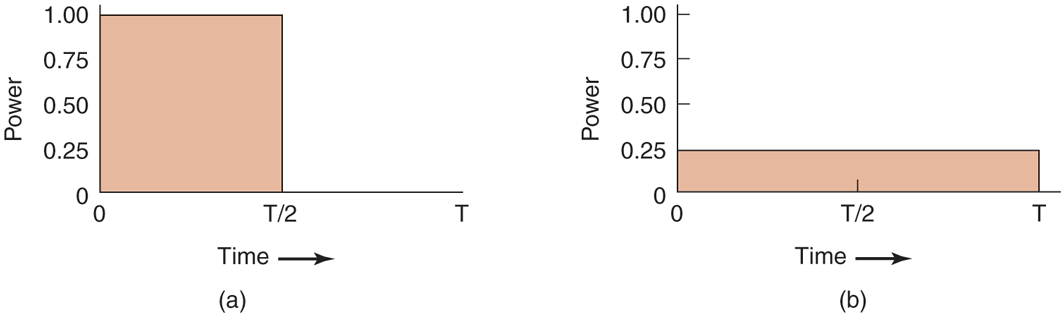
(a) Running at full clock speed. (b) Cutting voltage by two cuts clock speed by two and power consumption by four.
In a similar vein, if a user is typing at 1 char/sec, but the work needed to process the character takes 100 msec, it is better for the operating system to detect the long idle periods and slow the CPU down by a factor of 10. In short, running slowly is more energy efficient than running quickly.
In general, CPUs have several sleep modes, typically referred to as C-states. is the active state, while represent sleep states, whereby the processor clock is stopped (and no instructions are executed) and certain parts of the CPU are powered down. Figure 5-41 shows an example of some of the C-states of a modern processor. The transition from to a higher C-state can be triggered by special instructions. For instance, on Intel x86 the HLT instruction will drive the CPU from to while the MWAIT <new C-state> instruction allows the operating system to specify the new C-state explicitly. Specific events (such as interrupts) trigger a return to the active state
Figure 5-41
| State | Name | Meaning |
|---|---|---|
| Active | CPU executes instructions. | |
| Auto Halt | CPU's core clock off , other components (e.g., bus interface and interrupt controller still run at full speed so processor can return to execution almost immediately. | |
| Stop Clock | Core + bus clocks are off, but CPU maintains software-visible state. | |
| Deep Sleep | Even the clock generator is off. CPU flushes internal caches. No snooping/cache coherence. | |
| Deeper Sleep | Brilliant name for a state where the CPU voltage is reduced also. | |
| ⋯ | (More C-states are possible) |
Example C-States in modern processors (based on Intel terminology). As these states are model specific, you may well find that they are different for the CPU inside your own computer.
Processors may have additional modes to save power further. For instance, a set of predefined power states (or P-states) that control both the frequency and the voltage at which the processor operates. In other words, these are not sleep states, but (slower or faster) forms of the active state. For instance, in a specific processor may operate at its maximum performance of 3.6GHz and 1.4V, in at 3.4GHz and 1.35V and so on, until we get to a minimum level of, say, 2.8GHz and 1.2V. These power states may be controlled by software, but often the CPU itself tries to pick the right P-state for the current situation. For instance, when it notices that the utilization decreases, it may try to reduce the performance and hence the power consumption of the CPU by automatically switching to higher P-states.
Interestingly, scaling down the CPU cores does not always imply a reduction in performance. Hruby et al. (2013) show that sometimes the performance of the network stack improves with slower cores. The explanation is that a core can be too fast for its own good. For instance, imagine a CPU with several fast cores, where one core is responsible for the transmission of network packets on behalf of a producer running on another core. The producer and the network stack communicate directly via shared memory and they both run on dedicated cores. The producer performs a fair amount of computation and cannot quite keep up with the core of the network stack. On a typical run, the network stack will transmit all it has to transmit and poll the shared memory for some amount of time to see if there is really no more data to transmit. Finally, it will give up and go to sleep, because continuous polling is very bad for power consumption. Shortly after, the producer provides more data, but now the network stack is fast sleep. Waking up the stack takes time and slows down the throughput. One possible solution is never to sleep, but this is not attractive either because doing so would increase the power consumption—exactly the opposite of what we are trying to achieve. A much more attractive solution is to run the network stack on a slower core, so that it is constantly busy (and thus never sleeps), while still reducing the power consumption. If the network core is slowed down carefully, its performance will be better than a configuration where all cores are blazingly fast.
The Memory
Two possible options exist for saving energy with the memory. First, the cache can be flushed and then switched off (see in Fig. 5-41). It can always be reloaded from main memory with no loss of information. The reload can be done dynamically and quickly, so turning off the cache is entering a sleep state
A more drastic option is to write the contents of main memory to secondary storage, then switch off the main memory itself. This approach is hibernation, since virtually all power can be cut to memory at the expense of a substantial reload time, especially if the SSD is off, too. When the memory is cut off, the CPU either has to be shut off as well or has to execute out of ROM. If the CPU is off, the interrupt that wakes it up has to cause it to jump to code in ROM so the memory can be reloaded before being used. Despite all the overhead, switching off the memory for long periods of time (e.g., hours) may be worth it if restarting in a few seconds is considered much more desirable than rebooting the operating system from disk, which often takes a minute or more.
Wireless Communication
Increasingly many portable computers have a wireless connection to the outside world (e.g., the Internet). The radio transmitter and receiver required are often first-class power hogs. In particular, if the radio receiver is always on in order to listen for incoming email, the battery may drain fairly quickly. On the other hand, if the radio is switched off after, say, 1 minute of being idle, incoming messages may be missed, which is clearly undesirable.
One efficient solution to this problem has been proposed by Kravets and Krishnan (1998). The heart of their solution exploits the fact that mobile devices (e.g., smartphones) communicate with fixed base stations that have large memories and disks and no power constraints. What they propose is to have the mobile computer send a message to the base station when it is about to turn off the radio. From that time on, the base station buffers incoming messages on its disk. The mobile computer may indicate explicitly how long it is planning to sleep, or simply inform the base station when it switches on the radio again. At that point any accumulated messages can be sent to it.
Outgoing messages that are generated while the radio is off are buffered on the mobile computer. If the buffer threatens to fill up, the radio is turned on and the queue transmitted to the base station.
When should the radio be switched off? One possibility is to let the user or the application program decide. Another is to turn it off after some number of seconds of idle time. When should it be switched on again? Again, the user or program could decide, or it could be switched on periodically to check for inbound traffic and transmit any queued messages. Of course, it also should be switched on when the output buffer is close to full. Various other heuristics are possible.
An example of a wireless technology supporting such a power-management scheme can be found in 802.11 (‘‘WiFi’’) networks. In 802.11, a mobile computer can notify the access point that it is going to sleep but it will wake up before the base station sends the next beacon frame. The access point sends out these frames periodically. At that point the access point can tell the mobile computer that it has data pending. If there is no such data, the mobile computer can sleep again until the next beacon frame.
Thermal Management
A somewhat different, but still energy-related issue, is thermal management. Modern CPUs get extremely hot due to their high speed. Desktop machines normally have an internal electric fan to blow the hot air out of the chassis. Since reducing power management is usually not a driving issue with desktop machines, the fan is usually on all the time.
With notebooks, the situation is different. The operating system has to monitor the temperature continuously. When it gets close to the maximum allowable temperature, the operating system has a choice. It can switch on the fan, which makes noise and consumes power. Alternatively, it can reduce power consumption by reducing the backlighting of the screen, slowing down the CPU, being more aggressive about spinning down the disk, and so on.
Some input from the user may be valuable as a guide. For example, a user could specify in advance that the noise of the fan is objectionable, so the operating system would reduce power consumption instead.
Battery Management
In ye olde days, a battery just provided current until it was fully drained, at which time it stopped. Not any more. Mobile devices now use smart batteries now, which can communicate with the operating system. Upon request from the operating system, they can report on things like their maximum voltage, current voltage, maximum charge, current charge, maximum drain rate, current drain rate, and more. Most mobile devices have programs that can be run to query and display all these parameters. Smart batteries can also be instructed to change various operational parameters under control of the operating system.
Some notebooks have multiple batteries. When the operating system detects that one battery is about to go, it has to arrange for a graceful cutover to the next one, without causing any glitches during the transition. When the final battery is on its last legs, it is up to the operating system to warn the user and then cause an orderly shutdown, for example, making sure that the file system is not corrupted.
Driver Interface
Several operating systems have an elaborate mechanism for doing power management called ACPI (Advanced Configuration and Power Interface). The operating system can send any conformant driver commands asking it to report on the capabilities of its devices and their current states. This feature is especially important when combined with plug and play because just after it is booted, the operating system does not even know what devices are present, let alone their properties with respect to energy consumption or power manageability.
It can also send commands to drivers instructing them to cut their power levels (based on the capabilities that it learned earlier, of course). There is also some traffic the other way. In particular, when a device such as a keyboard or a mouse detects activity after a period of idleness, this is a signal to the system to go back to (near) normal operation.
5.8.3 Application Program Issues
So far we have looked at ways the operating system can reduce energy usage by various kinds of devices. But there is another approach as well: tell the programs to use less energy, even if this means providing a poorer user experience (better a poorer experience than no experience when the battery dies and the lights go out). Typically, this information is passed on when the battery charge is below some threshold. It is then up to the programs to decide between degrading performance to lengthen battery life or to maintain performance and risk running out of energy.
The question is: how can a program degrade its performance to save energy? The answer is application-specific. For instance, a video player that normally plays video in full color at 30 frames/sec could save energy by abandoning the color information and displaying the video in black and white. Another form of degradation is to reduce the frame rate, which leads to flicker and gives the movie a jerky quality. Still another form of degradation is to reduce the number of pixels in both directions, either by lowering the spatial resolution or making the displayed image smaller. Measures of this type saved about 30% of the energy.
Another solution is to alternate between local and remote processing. For instance, we may save power by pushing a computationally expensive operation to the cloud rather than executing it on, say, a smartphone. Whether this is a good idea is a tradeoff between the cost of executing things locally versus the energy cost of operating the radio. Of course, other considerations such as performance (will the delay go up?), security (do we trust the cloud with our computation?), and reliability (what if we do not have connectivity?) also play a role.
There are many other things that applications could do. Of course, they generally mean that the application must be designed with power management in mind. Doing do is especially interesting for battery-powered devices, where accepting some quality degradation means that the user can run longer on a given battery.