5.2 Principles of I/O Software
Let us now turn away from the I/O hardware and look at the I/O software. First we will look at its goals and then at the different ways I/O can be done from the point of view of the operating system.
5.2.1 Goals of the I/O Software
A key concept in the design of I/O software is known as device independence. What it means is that we should be able to write programs that can access any I/O device without having to specify the device in advance. For example, a program that reads a file as input should be able to read a file on a hard disk, an SSD, or a USB stick without having to be modified for each different device. Similarly, one should be able to type a command such as
sort <input >outputand have it work with input coming from any kind of storage device or the keyboard and the output going to any kind of storage device or the screen. It is up to the operating system to take care of the problems caused by the fact that these devices really are different and require very different command sequences to read or write.
Closely related to device independence is the goal of uniform naming. The name of a file or a device should simply be a string or an integer and not depend on the device in any way. In UNIX, all disks can be integrated in the file-system hierarchy in arbitrary ways so the user need not be aware of which name corresponds to which device. For example, a USB stick can be mounted on top of the directory /usr/ast/backup so that copying a file to /usr/ast/backup/monday copies the file to the USB stick. In this way, all files and devices are addressed the same way: by a path name.
Another important issue for I/O software is error handling. In general, errors should be handled as close to the hardware as possible. If the controller discovers a read error, it should try to correct the error itself if it can. If it cannot, then the device driver should handle it, perhaps by just trying to read the block again. Many errors are transient, such as read errors caused by specks of dust on the read head of a disk, and will frequently go away if the operation is repeated. Only if the lower layers are not able to deal with the problem should the upper layers be told about it. In many cases, error recovery can be done transparently at a low level without the upper levels even knowing about the error.
Still another important issue is that of synchronous (blocking) versus asynchronous (interrupt-driven) transfers. Most physical I/O is asynchronous, that is, the CPU starts the transfer and goes off to do something else until the interrupt arrives. User programs are much easier to write if the I/O operations are blocking—after a read system call the program is automatically suspended until the data are available in the buffer. It is up to the operating system to make operations that are actually interrupt-driven look blocking to the user programs. However, some very high-performance applications need to control all the details of the I/O, so operating systems also make asynchronous I/O available to them.
Another issue for the I/O software is buffering. Often data that come off a device cannot be stored directly in their final destination. For example, when a packet comes in off the network, the operating system does not know where to put it until it has stored the packet somewhere and examined it to see which port it is addressed to. Also, some devices have severe real-time constraints (for example, digital audio devices), so the data must be put into an output buffer in advance to decouple the rate at which the buffer is filled from the rate at which it is emptied, in order to avoid buffer underruns. Buffering involves considerable copying and often has a major impact on I/O performance.
The final concept that we will mention here is sharable versus dedicated devices. Some I/O devices, such as disks and SSDs, can be used by many users at the same time. No problems are caused by multiple users having open files on the same storage devices at the same time. Other devices, such as printers, have to be dedicated to a single user until that user is finished. Then another user can have the printer. Having two or more users writing characters intermixed at random to the same page will definitely not work. Scanners are like that as well. Introducing dedicated (unshared) devices also introduces a variety of problems, such as deadlocks. Again, the operating system must be able to handle both shared and dedicated devices in a way that avoids problems.
5.2.2 Programmed I/O
There are three fundamentally different ways that I/O can be performed. In this section we will look at the first one (programmed I/O). In the next two sections we will examine the others (interrupt-driven I/O and I/O using DMA). The simplest form of I/O is to have the CPU do all the work. This method is called programmed I/O.
It is simplest to illustrate how programmed I/O works by means of an example. Consider a user process that wants to print the eight-character string ‘‘ABCDEFGH’’ on the printer via a serial interface. Displays on small embedded systems sometimes work this way. The software first assembles the string in a buffer in user space, as shown in Fig. 5-7(a).
Figure 5-7
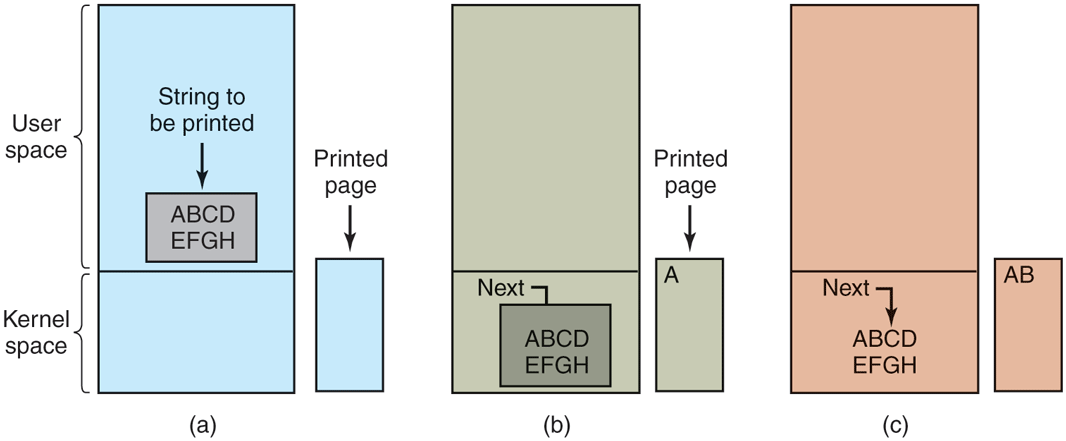
Steps in printing a string.
The user process then acquires the printer for writing by making a system call to open it. If the printer is currently in use by another process, this call will fail and return an error code or will block until the printer is available, depending on the operating system and the parameters of the call. Once it has the printer, the user process makes a system call telling the operating system to print the string.
The operating system then (usually) copies the buffer with the string to an array, in kernel space, where it is more easily accessed (because the kernel may have to change the memory map to get at user space) and also safe from modification by the user process. It then checks to see if the printer is currently available. If not, it waits until it is. As soon as the printer is available, the operating system copies the first character to the printer’s data register, in this example using memory-mapped I/O. This action activates the printer. The character may not appear yet because some printers buffer a line or a page before printing anything. In Fig. 5-7(b), however, we see that the first character has been printed and that the system has marked the ‘‘B’’ as the next character to be printed.
As soon as it has copied the first character to the printer, the operating system checks to see if the printer is ready to accept another one. Generally, the printer has a second register, which gives its status. The act of writing to the data register causes the status to become not ready. When the printer controller has processed the current character, it indicates its availability by setting some bit in its status register or putting some value in it.
At this point, the operating system waits for the printer to become ready again. When that happens, it prints the next character, as shown in Fig. 5-7(c). This loop continues until the entire string has been printed. Then control returns to the user process.
The actions followed by the operating system are briefly summarized in Fig. 5-8. First, the data are copied to the kernel. Then the operating system enters a tight loop, outputting the characters one at a time. The essential aspect of programmed I/O, clearly illustrated in this figure, is that after outputting a character, the CPU continuously polls the device to see if it is ready to accept another one. This behavior is often called polling or busy waiting.
Figure 5-8

Writing a string to the printer using programmed I/O.
Programmed I/O is simple but has the disadvantage of tying up the CPU full time until all the I/O is done. If the time to ‘‘print’’ a character is very short (because all the printer is doing is copying the new character to an internal buffer), then busy waiting is fine. Also, in an embedded system, where the CPU has nothing else to do, busy waiting is fine. However, in more complex systems, where the CPU has other work to do, busy waiting is inefficient. A better I/O method is needed.
5.2.3 Interrupt-Driven I/O
Now let us consider the case of printing on a printer that does not buffer characters but prints each one as soon as it arrives. If the printer can print, say 100 characters/sec, each character takes 10 msec to print. This means that after every character is written to the printer’s data register, the CPU will sit in an idle loop for 10 msec waiting to be allowed to output the next character. This is more than enough time to do a context switch and run some other process for nearly all of the 10 msec that would otherwise be wasted.
The way to allow the CPU to do something else while waiting for the printer to become ready is to use interrupts. When the system call to print the string is made, the buffer is copied to kernel space, as we showed earlier, and the first character is copied to the printer as soon as it is willing to accept a character. At that point, the CPU calls the scheduler and some other process is run. The process that asked for the string to be printed is blocked until the entire string has printed. The work done on the system call is shown in Fig. 5-9(a).
Figure 5-9
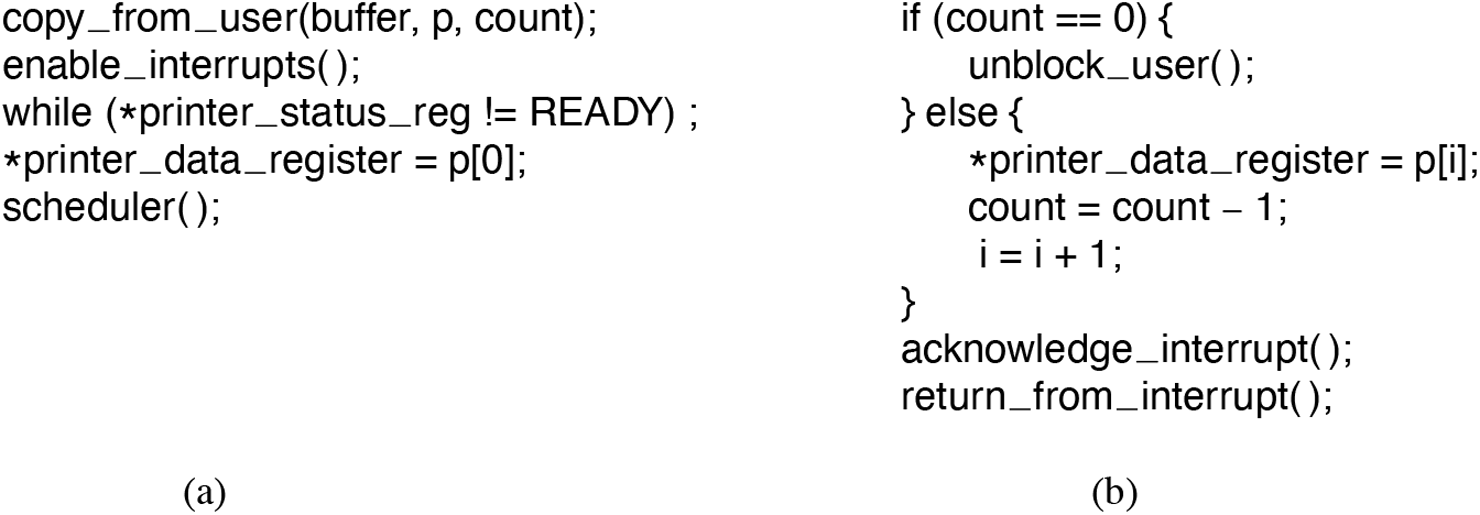
Writing a string to the printer using interrupt-driven I/O. (a) Code executed at the time the print system call is made. (b) Interrupt service procedure for the printer.
When the printer has printed the character and is prepared to accept the next one, it generates an interrupt. This interrupt stops the current process and saves its state. Then the printer interrupt-service procedure is run. A crude version of this code is shown in Fig. 5-9(b). If there are no more characters to print, the interrupt handler takes some action to unblock the user. Otherwise, it outputs the next character, acknowledges the interrupt, and returns to the process that was running just before the interrupt, which continues from where it left off.
5.2.4 I/O Using DMA
An obvious disadvantage of interrupt-driven I/O is that an interrupt occurs on every character. Interrupts take time, so this scheme wastes a certain amount of CPU time. A solution is to use DMA. Here the idea is to let the DMA controller feed the characters to the printer one at time, without the CPU being bothered. In essence, DMA is programmed I/O, only with the DMA controller doing all the work, instead of the main CPU. This strategy requires special hardware (the DMA controller) but frees up the CPU during the I/O to do other work. An outline of the code is given in Fig. 5-10.
Figure 5-10

Printing a string using DMA. (a) Code executed when the print system call is made. (b) Interrupt-service procedure.
The big win with DMA is reducing the number of interrupts from one per character to one per buffer printed. If there are many characters and interrupts are slow, this can be a major improvement. On the other hand, the DMA controller is usually much slower than the main CPU. If the DMA controller is not capable of driving the device at full speed, or the CPU usually has nothing to do anyway while waiting for the DMA interrupt, then interrupt-driven I/O or even programmed I/O may be better. Most of the time, though, DMA is worth it.