4.5 Example File Systems
In the following sections, we will discuss several example file systems, ranging from quite simple to more sophisticated. Since modern UNIX file systems and Windows’s native file system are covered in the chapter on UNIX (Chapter 10) and the chapter on Windows (Chapter 11), we will not cover those systems here. We will, however, examine their predecessors below. As we have mentioned before, variants of the MS-DOS file system are still in use in digital cameras, portable music players, electronic picture frames, USB sticks, and other devices, so studying them is definitely still relevant.
4.5.1 The MS-DOS File System
The MS-DOS file system is the one the first IBM PCs came with. It was the main file system up through Windows 98 and Windows ME. It is still supported on Windows 10 and Windows 11. However, it and an extension of it (FAT-32) have become widely used for many embedded systems. Most digital cameras use it. Many MP3 players use it exclusively. Electronic picture frames use it. Some memory cards use it. Many other simple devices that store music, images, and so on still use it. It is still the preferred file system for disks and other devices that need to be read by both Windows and MacOS. Thus, the number of electronic devices using the MS-DOS file system is vastly larger now than at any time in the past, and certainly much larger than the number using the more modern NTFS file system. For that reason alone, it is worth looking at in some detail.
To read a file, an MS-DOS program must first make an open system call to get a handle for it. The open system call specifies a path, which may be either absolute or relative to the current working directory. The path is looked up component by component until the final directory is located and read into memory. It is then searched for the file to be opened.
Although MS-DOS directories are variable sized, they use a fixed-size 32-byte directory entry. The format of an MS-DOS directory entry is shown in Fig. 4-32. It contains the file name, attributes, creation date and time, starting block, and exact file size. File names shorter than characters are left justified and padded with spaces on the right, in each field separately. The Attributes field is new and contains bits to indicate that a file is read-only, needs to be archived, is hidden, or is a system file. Read-only files cannot be written. This is to protect them from accidental damage. The archived bit has no actual operating system function (i.e., MSDOS does not examine or set it). The intention is to allow user-level archive programs to clear it upon archiving a file and to have other programs set it when modifying a file. In this way, a backup program can just examine this attribute bit on every file to see which files to back up. The hidden bit can be set to prevent a file from appearing in directory listings. Its main use is to avoid confusing novice users with files they might not understand. Finally, the system bit also hides files. In addition, system files cannot accidentally be deleted using the del command. The main components of MS-DOS have this bit set.
Figure 4-32
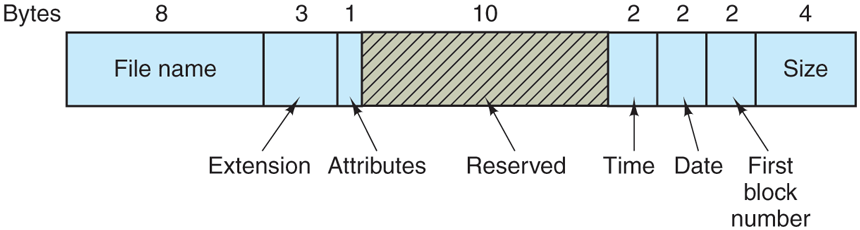
The MS-DOS directory entry.
The directory entry also contains the date and time the file was created or last modified. The time is accurate only to because it is stored in a 2-byte field, which can store only 65,536 unique values (a day contains 86,400 seconds). The time field is subdivided into seconds (5 bits), minutes (6 bits), and hours (5 bits). The date counts in days using three subfields: day (5 bits), month (4 bits), and year-1980 (7 bits). With a 7-bit number for the year and time beginning in 1980, the highest expressible year is 2107. Thus. MS-DOS has a built-in Y2108 problem. To avoid catastrophe, MS-DOS users should begin with Y2108 compliance as early as possible. If MS-DOS had used the combined date and time fields as a 32-bit seconds counter, it could have represented every second exactly and delayed the catastrophe until 2116.
MS-DOS stores the file size as a 32-bit number, so in theory files can be as large as 4 GB. However, other limits (described below) restrict the maximum file size to 2 GB or less. A surprisingly large part of the entry (10 bytes) is unused.
MS-DOS keeps track of file blocks via a file allocation table in main memory. The directory entry contains the number of the first file block. This number is used as an index into a 64K entry FAT in main memory. By following the chain, all the blocks can be found. The operation of the FAT is illustrated in Fig. 4-14.
The FAT file system comes in three versions: FAT-12, FAT-16, and FAT-32, depending on how many bits a disk address contains. Actually, FAT-32 is something of a misnomer, since only the low-order 28 bits of the disk addresses are used. It should have been called FAT-28, but powers of two sound so much neater.
Another variant of the FAT file system is exFAT, which Microsoft introduced for large removable devices. Apple licensed exFAT, so that there is one modern file system that can be used to transfer files both ways between Windows and MacOS computers. Since exFAT is proprietary and Microsoft has not released the specification, we will not discuss it further here.
For all FATs, the disk block can be set to some multiple of 512 bytes (possibly different for each partition), with the set of allowed block sizes (called cluster sizes by Microsoft) being different for each variant. The first version of MS-DOS used FAT-12 with 512-byte blocks, giving a maximum partition size of bytes (actually only bytes because 10 of the disk addresses were used as special markers, such as end of file, bad block, etc.). With these parameters, the maximum disk partition size was about 2 MB and the size of the FAT table in memory was 4096 entries of 2 bytes each. Using a 12-bit table entry would have been too slow.
This system worked well for floppy disks, but when hard disks came out, it became a problem. Microsoft solved the problem by allowing additional block sizes of 1 KB, 2 KB, and 4 KB. This change preserved the structure and size of the FAT-12 table, but allowed disk partitions of up to 16 MB.
Since MS-DOS supported four disk partitions per disk drive, the new FAT-12 file system worked up to 64-MB disks. Beyond that, something had to give. What happened was the introduction of FAT-16, with 16-bit disk pointers. Additionally, block sizes of 8 KB, 16 KB, and 32 KB were permitted. (32,768 is the largest power of two that can be represented in 16 bits.) The FAT-16 table now occupied 128 KB of main memory all the time, but with the larger memories by then available, it was widely used and rapidly replaced the FAT-12 file system. The largest disk partition that can be supported by FAT-16 is 2 GB (64K entries of 32 KB each) and the largest disk, 8 GB, namely four partitions of 2 GB each. For quite a while, that was good enough.
But not forever. For business letters, this limit is not a problem, but for storing digital video using the DV standard, a 2-GB file holds just over 9 minutes of video. As a consequence of the fact that a PC disk can support only four partitions, the largest video that can be stored on a disk is about 38 minutes, no matter how large the disk is. This limit also means that the largest video that can be edited on line is less than 19 minutes, since both input and output files are needed.
Starting with the second release of Windows 95, the FAT-32 file system, with its 28-bit disk addresses, was introduced and the version of MS-DOS underlying Windows 95 was adapted to support FAT-32. In this system, partitions could theoretically be bytes, but they are actually limited to 2 TB (2048 GB) because internally the system keeps track of partition sizes in 512-byte sectors using a 32-bit number, and is 2 TB. The maximum partition size for various block sizes and all three FAT types is shown in Fig. 4-33.
Figure 4-33
| Block size | FAT-12 | FAT-16 | FAT-32 |
|---|---|---|---|
| 0.5 KB | 2 MB | ||
| 1 KB | 4 MB | ||
| 2 KB | 8 MB | 128 MB | |
| 4 KB | 16 MB | 256 MB | 1 TB |
| 8 KB | 512 MB | 2 TB | |
| 16 KB | 1024 MB | 2 TB | |
| 32 KB | 2048 MB | 2 TB |
Maximum partition size for different block sizes. The empty boxes represent forbidden combinations.
In addition to supporting larger disks, the FAT-32 file system has two other advantages over FAT-16. First, an 8-GB disk using FAT-32 can be a single partition. Using FAT-16 it has to be four partitions, which appears to the Windows user as the C:, D:, E:, and F: logical disk drives. It is up to the user to decide which file to place on which drive and keep track of what is where.
The other advantage of FAT-32 over FAT-16 is that for a given size disk partition, a smaller block size can be used. For example, for a 2-GB disk partition, FAT-16 must use 32-KB blocks; otherwise with only 64K available disk addresses, it cannot cover the whole partition. In contrast, FAT-32 can use, for example, 4-KB blocks for a 2-GB disk partition. The advantage of the smaller block size is that most files are much shorter than 32 KB. If the block size is 32 KB, a file of 10 bytes ties up 32 KB of disk space. If the average file is, say, 8 KB, then with a 32-KB block, three quarters of the disk will be wasted, not a terribly efficient way to use the disk. With an 8-KB file and a 4-KB block, there is no disk wastage, but the price paid is more RAM eaten up by the FAT. With a 4-KB block and a 2-GB disk partition, there are 512K blocks, so the FAT must have 512K entries in memory (occupying 2 MB of RAM).
MS-DOS uses the FAT to keep track of free disk blocks. Any block that is not currently allocated is marked with a special code. When MS-DOS needs a new disk block, it searches the FAT for an entry containing this code. Thus no bitmap or free list is required.
4.5.2 The UNIX V7 File System
Even early versions of UNIX had a fairly sophisticated multiuser file system since it was derived from MULTICS. Below we will discuss the V7 file system, the one for the PDP-11 that made UNIX famous. We will examine a modern UNIX file system in the context of Linux in Chapter 10.
The file system is in the form of a tree starting at the root directory, with the addition of links, forming a directed acyclic graph. File names can be up to 14 characters and can contain any ASCII characters except/(because that is the separator between components in a path) and NUL (because that is used to pad out names shorter than 14 characters). NUL has the numerical value of 0.
A UNIX directory entry contains one entry for each file in that directory. Each entry is extremely simple because UNIX uses the i-node scheme illustrated in Fig. 4-15. A directory entry contains only two fields: the file name (14 bytes) and the number of the i-node for that file (2 bytes), as shown in Fig. 4-34. These parameters limit the number of files per file system to 64K.
Figure 4-34
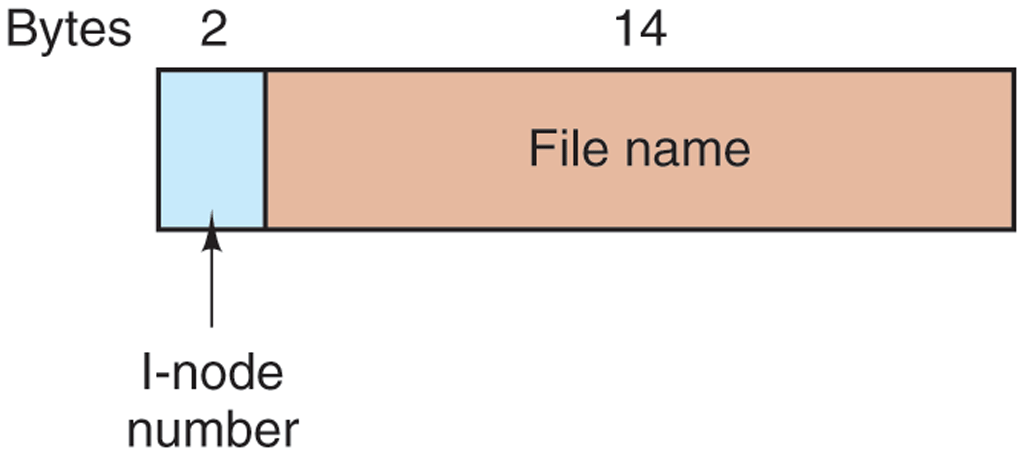
A UNIX V7 directory entry.
Like the i-node of Fig. 4-15, the UNIX i-node contains some attributes. The attributes contain the file size, three times (creation, last access, and last modification), owner, group, protection information, and a count of the number of directory entries that point to the i-node. The latter field is needed due to links. Whenever a new link is made to an i-node, the count in the i-node is increased. When a link is removed, the count is decremented. When it gets to 0, the i-node is reclaimed and the disk blocks are put back in the free list.
Keeping track of disk blocks is done using a generalization of Fig. 4-15 in order to handle very large files. The first 10 disk addresses are stored in the i-node itself, so for small files, all the necessary information is right in the i-node, which is fetched from disk to main memory when the file is opened. For somewhat larger files, one of the addresses in the i-node is the address of a disk block called a single indirect block. This block contains additional disk addresses. If this still is not enough, another address in the i-node, called a double indirect block, contains the address of a block that contains a list of single indirect blocks. Each of these single indirect blocks points to a few hundred data blocks. If even this is not enough, a triple indirect block can also be used. The complete picture is given in Fig. 4-35.
Figure 4-35
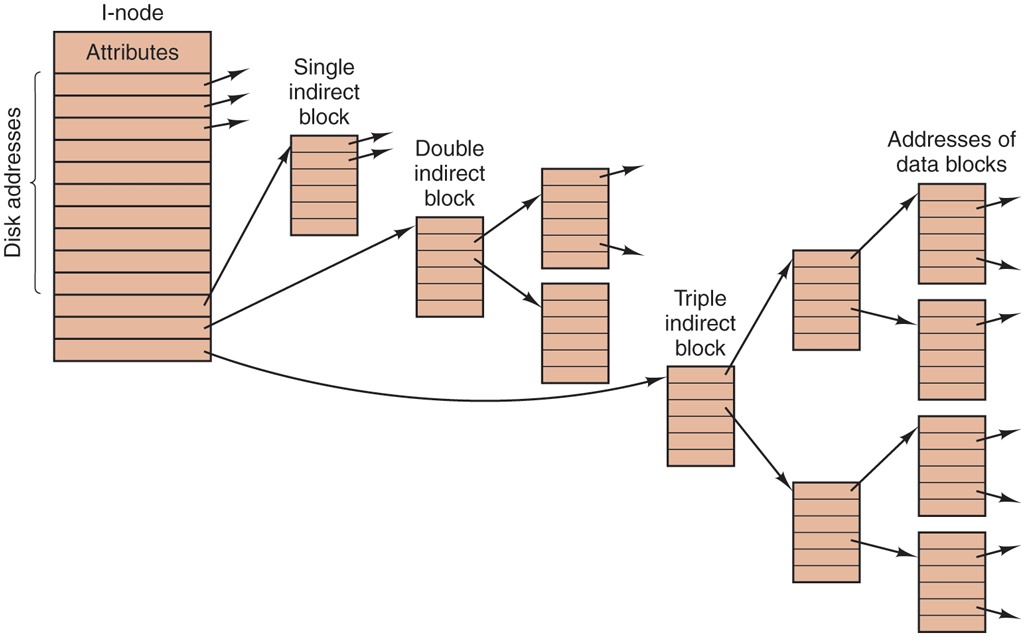
A UNIX i-node.
When a file is opened, the file system must take the file name supplied and locate its disk blocks. Let us consider how the path name /usr/ast/mbox is looked up. We will use UNIX as an example, but the algorithm is basically the same for all hierarchical directory systems. First the file system locates the root directory. In UNIX its i-node is located at a fixed place on the disk. From this i-node, it locates the root directory, which can be anywhere on the disk, but say block 1.
After that it reads the root directory and looks up the first component of the path, usr, in the root directory to find the i-node number of the file /usr. Locating an i-node from its number is straightforward, since each one has a fixed location on the disk. From this i-node, the system locates the directory for /usr and looks up the next component, ast, in it. When it has found the entry for ast, it has the i-node for the directory /usr/ast. From this i-node it can find the directory itself and look up mbox. The i-node for this file is then read into memory and kept there until the file is closed. The lookup process is illustrated in Fig. 4-36.
Figure 4-36
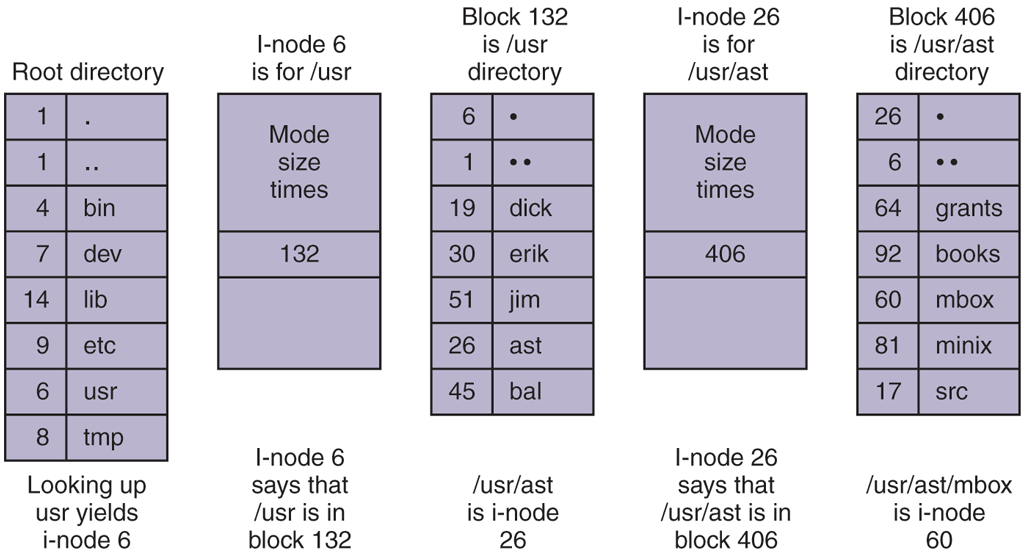
The steps in looking up /usr/ast/mbox.
Relative path names are looked up the same way as absolute ones, only starting from the working directory instead of from the root directory. Every directory has entries for . and .. which are put there when the directory is created. The entry . has the i-node number for the current directory, and the entry for .. has the i-node number for the parent directory. Thus, a procedure looking up ../chris/prog.c simply looks up .. in the working directory, finds the i-node number for the parent directory, and searches that directory for chris. No special mechanism is needed to handle these names. As far as the directory system is concerned, they are just ordinary ASCII strings, just the same as any other names. The only bit of trickery here is that .. in the root directory points to itself.