4.4 File-System Management and Optimization
Making the file system work is one thing; making it work efficiently and robustly in real life is something quite different. In the following sections, we will look at some of the issues involved in managing disks.
4.4.1 Disk-Space Management
Files are normally stored on disk, so management of disk space is a major concern to file-system designers. Two general strategies are possible for storing an n byte file: n consecutive bytes of disk space are allocated, or the file is split up into a number of (not necessarily) contiguous blocks†. The same trade-off is present in memory-management systems between pure segmentation and paging.
As we have seen, storing a file simply as a contiguous sequence of bytes has the obvious problem that if a file grows, it may have to be moved on the disk. The same problem holds for segments in memory, except that moving a segment in memory is a relatively fast operation compared to moving a file from one disk position to another. For this reason, nearly all file systems chop files up into fixedsize blocks that need not be adjacent.
Block Size
Once it has been decided to store files in fixed-size blocks, the question arises how big the block should be. Given the way hard disks are organized, the sector, the track, and the cylinder are obvious candidates for the unit of allocation (although these are all device dependent, which is a minus). In flash-based systems, the flash page size is another candidate, while in a paging system, the memory page size is also a major contender.
Since magnetic disks have served as the storage work horse for years and led to many of the design choices, such as the common 4 KB block size still used today, let us consider them first. On a hard disk, having a large block size means that every file, even a 1-byte file, ties up an entire block. It also means that small files waste a large amount of disk space. On the other hand, a small block size means that most files will span multiple blocks and thus need multiple seeks and rotational delays to read them, reducing performance. Thus if the allocation unit is too large, we waste space; if it is too small, we waste time. The block size of 4 KB is considered a reasonable compromise for average users.
As an example, consider a disk with 1 MB per track, a rotation time of 8.33 msec, and an average seek time of 5 msec. The time in milliseconds to read a block of k bytes is then the sum of the seek, rotational delay, and transfer times:
The dashed curve of Fig. 4-23 shows the data rate for such a disk as a function of block size. To compute the space efficiency, we need to make an assumption about the mean file size. For simplicity, let us assume that all files are 4 KB. While this is clearly not true in practice, it turns out that modern file systems are littered with files of a few kilobytes in size (e.g., icons, emojis, and emails) so this is not a crazy number either. The solid curve of Fig. 4-23 shows the space efficiency as a function of block size.
Figure 4-23
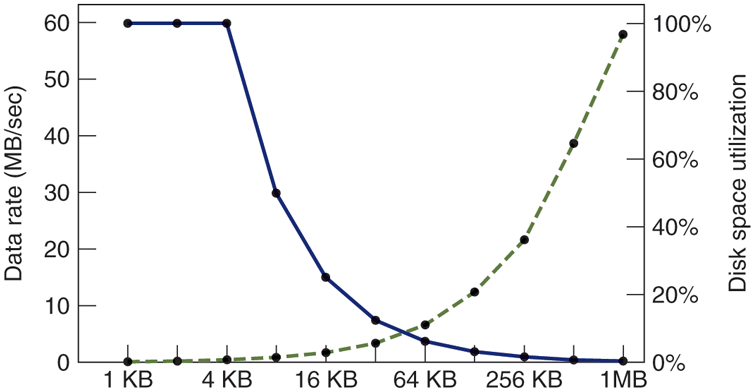
The dashed curve (left-hand scale) gives the data rate of a disk. The solid curve (right-hand scale) gives the disk-space efficiency. All files are 4 KB.
The two curves can be understood as follows. The access time for a block is completely dominated by the seek time and rotational delay, so given that it is going to cost 9 msec to access a block, the more data that are fetched, the better. Hence, the data rate goes up almost linearly with block size (until the transfers take so long that the transfer time begins to matter).
Now consider space efficiency. With 4-KB files and 1-KB, 2-KB, or 4-KB blocks, files use 4, 2, and 1 block, respectively, with no wastage. With an 8-KB block and 4-KB files, the space efficiency drops to 50%, and with a 16-KB block it is down to 25%. In reality, few files are an exact multiple of the disk block size, so some space is always wasted in the last block of a file.
What the curves show, however, is that performance and space utilization are inherently in conflict. Small blocks are bad for performance but good for diskspace utilization. For these data, no reasonable compromise is available. The size closest to where the two curves cross is 64 KB, but the data rate is only 6.6 MB/sec and the space efficiency is about 7%, neither of which is very good. Historically, file systems have chosen sizes in the 1-KB to 4-KB range, but with disks now exceeding multiple TB, it might be better to increase the block size and accept the wasted disk space. Disk space is hardly in short supply any more.
So far we have looked at the optimal block size from the perspective of a hard disk and observed that if the allocation unit is too large, we waste space, while if it is too small, we waste time. With flash storage, we incur memory waste not just for large disk blocks, but also for smaller ones that do not fill up a flash page.
Keeping Track of Free Blocks
Once a block size has been chosen, the next issue is how to keep track of free blocks. Two methods are widely used, as shown in Fig. 4-24. The first one consists of using a linked list of disk blocks, with each block holding as many free disk block numbers as will fit. With a 1-KB block and a 32-bit disk block number, each block on the free list holds the numbers of 255 free blocks. (One slot is required for the pointer to the next block.) Consider a 1-TB disk, which has about 1 billion disk blocks. To store all these addresses at 255 per block requires about 4 million blocks. Generally, free blocks are used to hold the free list, so the storage is essentially free.
Figure 4-24
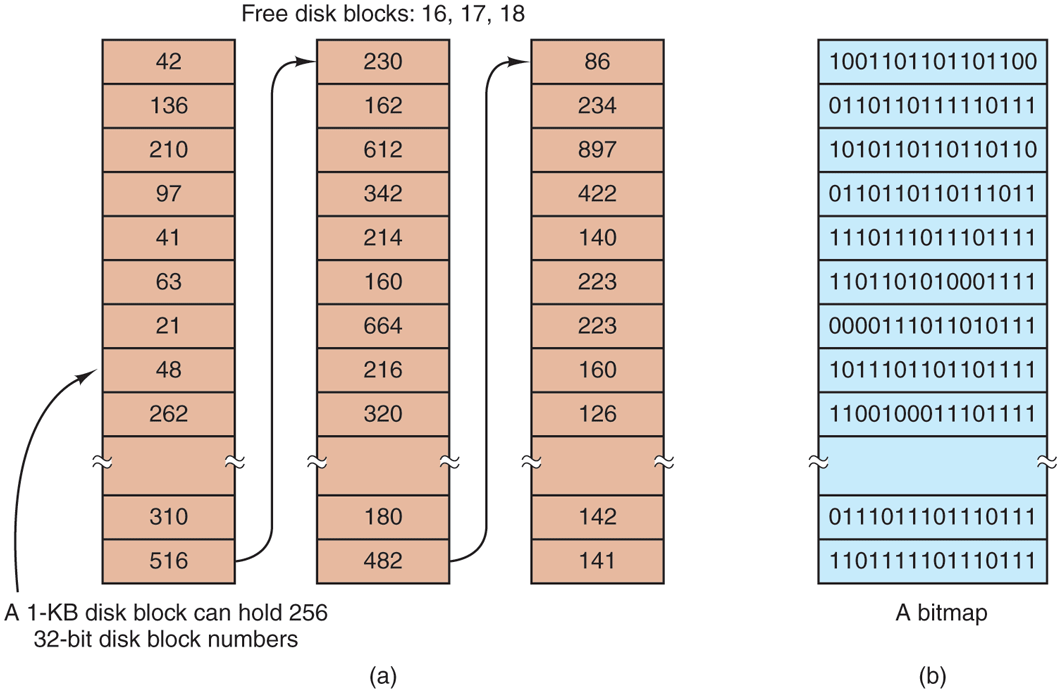
(a) Storing the free list on a linked list. (b) A bitmap.
The other free-space management technique is the bitmap. A disk with n blocks requires a bitmap with n bits. Free blocks are represented by 1s in the map, allocated blocks by 0s (or vice versa). For our example 1-TB disk, we need 1 billion bits for the map, which requires around 130,000 1-KB blocks to store. It is not surprising that the bitmap requires less space, since it uses 1 bit per block, vs. 32 bits in the linked-list model. Only if the disk is nearly full (i.e., has few free blocks) will the linked-list scheme require fewer blocks than the bitmap.
If free blocks tend to come in long runs of consecutive blocks, the free-list system can be modified to keep track of runs of blocks rather than single blocks. An 8-, 16-, or 32-bit count could be associated with each block giving the number of consecutive free blocks. In the best case, a basically empty disk could be represented by two numbers: the address of the first free block followed by the count of free blocks. On the other hand, if the disk becomes severely fragmented, keeping track of runs is less efficient than keeping track of individual blocks because not only must the address be stored, but also the count.
This issue illustrates a problem operating system designers often have. There are multiple data structures and algorithms that can be used to solve a problem, but choosing the best one requires data that the designers do not have and will not have until the system is deployed and heavily used. And even then, the data may not be available. For instance, while we may measure the file size distribution and disk usage in one or two environments, we have little idea if these numbers are representative of home computers, corporate computers, government computers, not to mention tablets and smartphones, and others.
Getting back to the free list method for a moment, only one block of pointers need be kept in main memory. When a file is created, the needed blocks are taken from the block of pointers. When it runs out, a new block of pointers is read in from the disk. Similarly, when a file is deleted, its blocks are freed and added to the block of pointers in main memory. When this block fills up, it is written to disk.
Under certain circumstances, this method leads to unnecessary disk I/O. Consider the situation of Fig. 4-25(a), in which the block of pointers in memory has room for only two more entries. If a three-block file is freed, the pointer block overflows and has to be written to disk, leading to the situation of Fig. 4-25(b). If a three-block file is now written, the full block of pointers has to be read in again, taking us back to Fig. 4-25(a). If the three-block file just written was a temporary file, when it is freed, another disk write is needed to write the full block of pointers back to the disk. In short, when the block of pointers is almost empty, a series of short-lived temporary files can cause a lot of disk I/O.
Figure 4-25
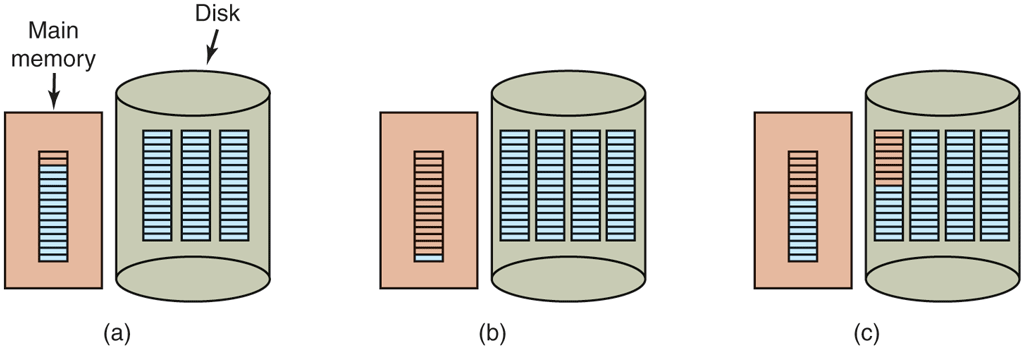
(a) An almost-full block of pointers to free disk blocks in memory and three blocks of pointers on disk. (b) Result of freeing a three-block file. (c) An alternative strategy for handling the three free blocks. The shaded entries represent pointers to free disk blocks.
An alternative approach that avoids most of this disk I/O is to split the full block of pointers. Thus instead of going from Fig. 4-25(a) to Fig. 4-25(b), we go from Fig. 4-25(a) to Fig. 4-25(c) when three blocks are freed. Now the system can handle a series of temporary files without doing any disk I/O. If the block in memory fills up, it is written to the disk, and the half-full block from the disk is read in. The idea here is to keep most of the pointer blocks on disk full (to minimize disk usage), but keep the one in memory about half full, so it can handle both file creation and file removal without disk I/O on the free list.
With a bitmap, it is also possible to keep just one block in memory, going to disk for another only when it becomes completely full or empty. An additional benefit of this approach is that by doing all the allocation from a single block of the bitmap, the disk blocks will be close together, thus minimizing disk-arm motion. Since the bitmap is a fixed-size data structure, if the kernel is (partially) paged, the bitmap can be put in virtual memory and have pages of it paged in as needed.
Disk Quotas
To prevent people from hogging too much disk space, multiuser operating systems often provide a mechanism for enforcing disk quotas. The idea is that the system administrator assigns each user a maximum allotment of files and blocks, and the operating system makes sure that the users do not exceed their quotas. A typical mechanism is described below.
When a user opens a file, the attributes and disk addresses are located and put into an open-file table in main memory. Among the attributes is an entry telling who the owner is. Any increases in the file’s size will be charged to the owner’s quota.
A second table contains the quota record for every user with a currently open file, even if the file was opened by someone else. This table is shown in Fig. 4-26. It is an extract from a quota file on disk for the users whose files are currently open. When all the files are closed, the record is written back to the quota file.
Figure 4-26
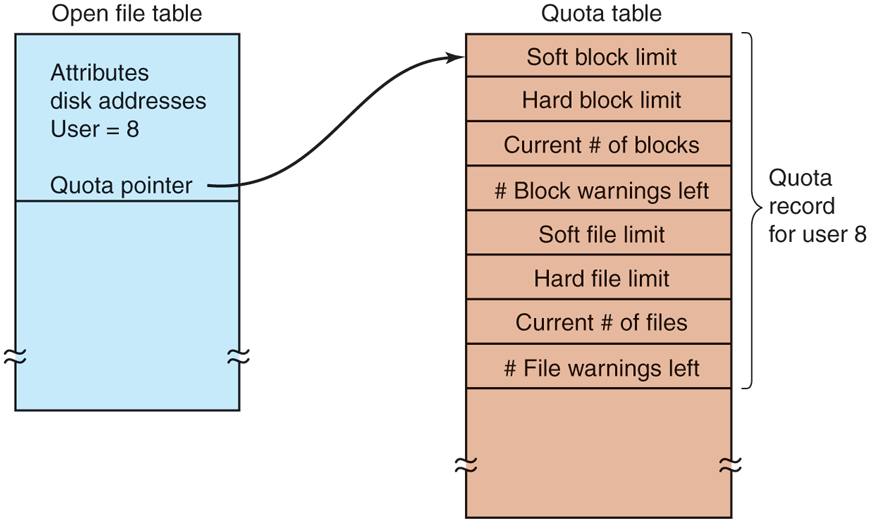
Quotas are kept track of on a per-user basis in a quota table.
When a new entry is made in the open-file table, a pointer to the owner’s quota record is entered into it, to make it easy to find the various limits. Every time a block is added to a file, the total number of blocks charged to the owner is incremented, and a check is made against both the hard and soft limits. The soft limit may be exceeded, but the hard limit may not. An attempt to append to a file when the hard block limit has been reached will result in an error. Analogous checks also exist for the number of files to prevent a user from hogging all the i-nodes.
When a user attempts to log in, the system examines the quota file to see if the user has exceeded the soft limit for either number of files or number of disk blocks. If either limit has been violated, a warning is displayed, and the count of warnings remaining is reduced by one. If the count ever gets to zero, the user has ignored the warning one time too many, and is not permitted to log in. Getting permission to log in again will require some discussion with the system administrator.
This method has the property that users may go above their soft limits during a login session, provided they remove the excess before logging out. The hard limits may never be exceeded.
4.4.2 File-System Backups
Destruction of a file system is often a far greater disaster than destruction of a computer. If a computer is destroyed by fire, lightning surges, or a cup of coffee poured onto the keyboard, it is annoying and will cost money, but generally a replacement can be purchased with a minimum of fuss. Inexpensive personal computers can even be replaced within an hour by just going to a computer store (except at universities, where issuing a purchase order takes three committees, five signatures, and 90 days).
If a computer’s file system is irrevocably lost, whether due to hardware or software failures, restoring all the information will be difficult, time consuming, and in many cases, impossible. For the people whose programs, documents, tax records, customer files, databases, marketing plans, or other data are gone forever, the consequences can be catastrophic. While the file system cannot offer any protection against physical destruction of the equipment and media, it can help protect the information. It is pretty straightforward: make backups. But that is not quite as simple as it sounds. Let us take a look.
Most people do not think making backups of their files is worth the time and effort—until one fine day their disk abruptly dies, at which time most of them undergo an instantaneous change of heart. Companies, however, (usually) well understand the value of their data and generally do a backup at least once a day, to a large disk or even good old-fashioned tape. Tape is still very cost efficient, costing less than $10/TB; no other medium comes close to that price. For companies with petabytes or exabytes of data, cost of the backup medium matters. Nevertheless, making backups is not quite as trivial as it sounds, so we will examine some of the related issues below.
Backups are generally made to handle one of two potential problems:
Recover from disaster
Recover from user mistakes
The first one covers getting the computer running again after a disk crash, fire, flood, or some other natural catastrophe. In practice, these things do not happen very often, which is why many people do not bother with backups. These people also tend not to have fire insurance on their houses for the same reason.
The second reason is that users often accidentally remove files that they later need again. This problem occurs so often that when a file is ‘‘removed’’ in Windows, it is not deleted at all, but just moved to a special directory, the recycle bin, so it can be fished out and restored easily later. Backups take this principle further and allow files that were removed days, even weeks, ago to be restored from old backup tapes.
Making a backup takes a long time and occupies a large amount of space, so doing it efficiently and conveniently is important. These considerations raise the following issues. First, should the entire file system be backed up or only part of it? At many installations, the executable (binary) programs are kept in a limited part of the file-system tree. It is not necessary to back up these files if they can all be reinstalled from the manufacturer’s Website. Also, most systems have a directory for temporary files. There is usually no reason to back it up either. In UNIX, all the special files (I/O devices) are kept in a directory /dev. Not only is backing up this directory not necessary, it is downright dangerous because the backup program would hang forever if it tried to read each of these to completion. In short, it is usually desirable to back up only specific directories and everything in them rather than the entire file system.
Second, it is wasteful to back up files that have not changed since the previous backup, which leads to the idea of incremental dumps. The simplest form of incremental dumping is to make a complete dump (backup) periodically, say weekly or monthly, and to make a daily dump of only those files that have been modified since the last full dump. Even better is to dump only those files that have changed since they were last dumped. While this scheme minimizes dumping time, it makes recovery more complicated, because first the most recent full dump has to be restored, followed by all the incremental dumps in reverse order. To ease recovery, more sophisticated incremental dumping schemes are often used.
Third, since immense amounts of data are typically dumped, it may be desirable to compress the data before writing them to backup storage. However, with many compression algorithms, a single bad spot on the backup storage can foil the decompression algorithm and make an entire file or even an entire backup storage unreadable. Thus the decision to compress the backup stream must be carefully considered.
Fourth, it is difficult to perform a backup on an active file system. If files and directories are being added, deleted, and modified during the dumping process, the resulting dump may be inconsistent. However, since making a dump may take hours, it may be necessary to take the system offline for much of the night to make the backup, something that is not always acceptable. For this reason, algorithms have been devised for making rapid snapshots of the file-system state by copying critical data structures, and then requiring future changes to files and directories to copy the blocks instead of updating them in place (Hutchinson et al., 1999). In this way, the file system is effectively frozen at the moment of the snapshot, so it can be backed up at leisure afterward.
Fifth and last, making backups introduces many nontechnical problems into an organization. The best online security system in the world may be useless if the system administrator keeps all the backup disks (or tapes) in his office and leaves it open and unguarded whenever he walks down the hall to get coffee. All a spy has to do is pop in for a second, put one tiny disk or tape in his pocket, and saunter off jauntily. Goodbye security. Also, making a daily backup has little use if the fire that burns down the computers also burns up all the backup media. For this reason, the backups should be kept off-site, but that introduces more security risks because now two sites must be secured. While these practical administration issues should be taken into account in any organization, below we will discuss only the technical issues involved in making file-system backups.
Two strategies can be used for dumping a disk to a backup medium: a physical dump or a logical dump. A physical dump starts at block 0 of the disk, writes all the disk blocks onto the output disk in order, and stops when it has copied the last one. Such a program is so simple that it can probably be made 100% bug free, something that can probably not be said about any other useful program.
Nevertheless, it is worth making several comments about physical dumping. For one thing, there is no value in backing up unused disk blocks. If the dumping program can obtain access to the free-block data structure, it can avoid dumping unused blocks. However, skipping unused blocks requires writing the number of each block in front of the block (or the equivalent), since it is no longer true that block k on the backup was block k on the disk.
A second concern is dumping bad blocks. It is nearly impossible to manufacture large disks without any defects. Some bad blocks are always present. Sometimes when a low-level format is done, the bad blocks are detected, marked as bad, and replaced by spare blocks reserved at the end of each track for just such emergencies. In many cases, the disk controller handles bad-block replacement transparently without the operating system even knowing about it.
However, sometimes blocks go bad after formatting, in which case the operating system will eventually detect them. Usually, it solves the problem by creating a ‘‘file’’ consisting of all the bad blocks—just to make sure they never appear in the free-block pool and are never assigned. Needless to say, this file is completely unreadable.
If all bad blocks are remapped by the disk controller and hidden from the operating system as just described, physical dumping works fine. On the other hand, if they are visible to the operating system and maintained in one or more bad-block files or bitmaps, it is absolutely essential that the physical dumping program get access to this information and avoid dumping them to prevent endless disk read errors while trying to back up the bad-block file.
Windows systems have paging and hibernation files that are not needed in the event of a restore and should not be backed up in the first place. Specific systems may also have other internal files that should not be backed up, so the dumping program needs to be aware of them.
The main advantages of physical dumping are simplicity and great speed (basically, it can run at the speed of the disk). The main disadvantages are the inability to skip selected directories, make incremental dumps, and restore individual files upon request. For these reasons, most installations make logical dumps.
A logical dump starts at one or more specified directories and recursively dumps all files and directories found there that have changed since some given base date (e.g., the last backup for an incremental dump or system installation for a full dump). Thus, in a logical dump, the dump disk gets a series of carefully identified directories and files, which makes it easy to restore a specific file or directory upon request.
Since logical dumping is the most common form, let us examine a common algorithm in detail using the example of Fig. 4-27 to guide us. Most UNIX systems use this algorithm. In the figure, we see a file tree with directories (squares) and files (circles). The shaded items have been modified since the base date and thus need to be dumped. The unshaded ones do not need to be dumped.
Figure 4-27
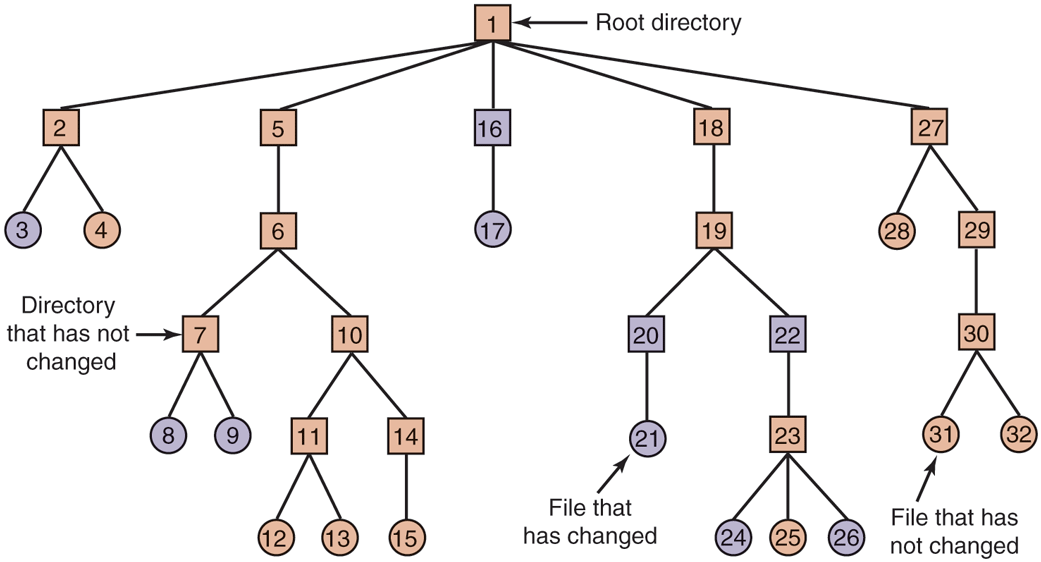
A file system to be dumped. The squares are directories and the circles are files. The shaded items have been modified since the last dump. Each directory and file is labeled by its i-node number.
This algorithm also dumps all directories (even unmodified ones) that lie on the path to a modified file or directory for two reasons. The first reason is to make it possible to restore the dumped files and directories to a fresh file system on a different computer. In this way, the dump and restore programs can be used to transport entire file systems between computers.
The second reason for dumping unmodified directories above modified files is to make it possible to incrementally restore a single file (possibly to handle recovery from user mistakes rather than system failure). Suppose that a full file-system dump is done Sunday evening and an incremental dump is done on Monday evening. On Tuesday, the directory /usr/jhs/proj/nr3 is removed, along with all the directories and files under it. On Wednesday morning bright and early, suppose the user wants to restore the file /usr/jhs/proj/nr3/plans/summary. However, it is not possible to just restore the file summary because there is no place to put it. The directories nr3 and plans must be restored first. To get their owners, modes, times, and whatever, correct, these directories must be present on the dump disk even though they themselves were not modified since the previous full dump.
The dump algorithm maintains a bitmap indexed by i-node number with several bits per i-node. Bits will be set and cleared in this map as the algorithm proceeds. The algorithm operates in four phases. Phase 1 begins at the starting directory (the root in this example) and examines all the entries in it. For each modified file, its i-node is marked in the bitmap. Each directory is also marked (whether or not it has been modified) and then recursively inspected.
At the end of phase 1, all modified files and all directories have been marked in the bitmap, as shown (by shading) in Fig. 4-28(a). Phase 2 conceptually recursively walks the tree again, unmarking any directories that have no modified files or directories in them or under them. This phase leaves the bitmap as shown in Fig. 4-28(b). Note that directories 10, 11, 14, 27, 29, and 30 are now unmarked because they contain nothing under them that has been modified. They will not be dumped. By way of contrast, directories 5 and 6 will be dumped even though they themselves have not been modified because they will be needed to restore today’s changes to a fresh machine. For efficiency, phases 1 and 2 can be combined in one tree walk.
Figure 4-28
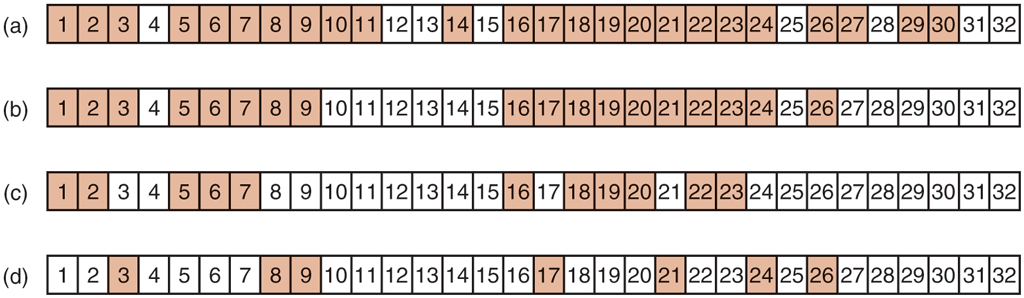
Bitmaps used by the logical dumping algorithm.
At this point, it is known which directories and files must be dumped. These are the ones that are marked in Fig. 4-28(b). Phase 3 then consists of scanning the i-nodes in numerical order and dumping all the directories that are marked for dumping. These are shown in Fig. 4-28(c). Each directory is prefixed by the directory’s attributes (owner, times, etc.) so that they can be restored. Finally, in phase 4, the files marked in Fig. 4-28(d) are also dumped, again prefixed by their attributes. This completes the dump.
Restoring a file system from the dump disk is straightforward. To start with, an empty file system is created on the disk. Then the most recent full dump is restored. Since the directories appear first on the dump disk, they are all restored first, giving a skeleton of the file system. Then the files themselves are restored. This process is then repeated with the first incremental dump made after the full dump, then the next one, and so on.
Although logical dumping is straightforward, there are a few tricky issues. For one, since the free block list is not a file, it is not dumped and hence it must be reconstructed from scratch after all the dumps have been restored. Doing so is always possible since the set of free blocks is just the complement of the set of blocks contained in all the files combined.
Another issue is links. If a file is linked to two or more directories, it is important that the file is restored only one time and that all the directories that are supposed to point to it do so.
Still another issue is the fact that UNIX files may contain holes. It is permitted to open a file, write a few bytes, then seek to a distant file offset and write a few more bytes. The blocks in between are not part of the file and should not be dumped and must not be restored. Core dump files often have a hole of hundreds of megabytes between the data segment and the stack. If not handled properly, each restored core file will fill this area with zeros and thus be the same size as the virtual address space (e.g., bytes, or worse yet, bytes).
Finally, special files, named pipes, and the like (anything that is not a real file) should never be dumped, no matter in which directory they may occur (they need not be confined to /dev). For more information about file-system backups, see Zwicky (1991) and Chervenak et al., (1998).
4.4.3 File-System Consistency
Another area where reliability is an issue is file-system consistency. Many file systems read blocks, modify them, and write them out later. If the system crashes before all the modified blocks have been written out, the file system can be left in an inconsistent state. This problem is especially critical if some of the blocks that have not been written out are i-node blocks, directory blocks, or blocks containing the free list.
To deal with inconsistent file systems, most computers have a utility program that checks file-system consistency. For example, UNIX has fsck; Windows has sfc (and others). This utility can be run whenever the system is booted, especially after a crash. The description below tells how fsck works. Sfc is somewhat different because it works on a different file system, but the general principle of using the file system’s inherent redundancy to repair it is still a valid one. All file-system checkers verify each file system (disk partition) independently of the other ones. It is also important to note that some file systems, such the journaling file systems discussed earlier, are designed such that they do not require administrators to run a separate file system consistency checker after a crash, because they can handle most inconsistencies themselves.
Two kinds of consistency checks can be made: blocks and files. To check for block consistency, the program builds two tables, each one containing a counter for each block, initially set to 0. The counters in the first table keep track of how many times each block is present in a file; the counters in the second table record how often each block is present in the free list (or the bitmap of free blocks).
The program then reads all the i-nodes using a raw device, which ignores the file structure and just returns all the disk blocks starting at 0. Starting from an inode, it is possible to build a list of all the block numbers used in the corresponding file. As each block number is read, its counter in the first table is incremented. The program then examines the free list or bitmap to find all the blocks that are not in use. Each occurrence of a block in the free list results in its counter in the second table being incremented.
If the file system is consistent, each block will have a 1 either in the first table or in the second table, as illustrated in Fig. 4-29(a). However, as a result of a crash, the tables might look like Fig. 4-29(b), in which block 2 does not occur in either table. It will be reported as being a missing block. While missing blocks do no real harm, they waste space and thus reduce the capacity of the disk. The solution to missing blocks is straightforward: the file system checker just adds them to the free list.
Figure 4-29
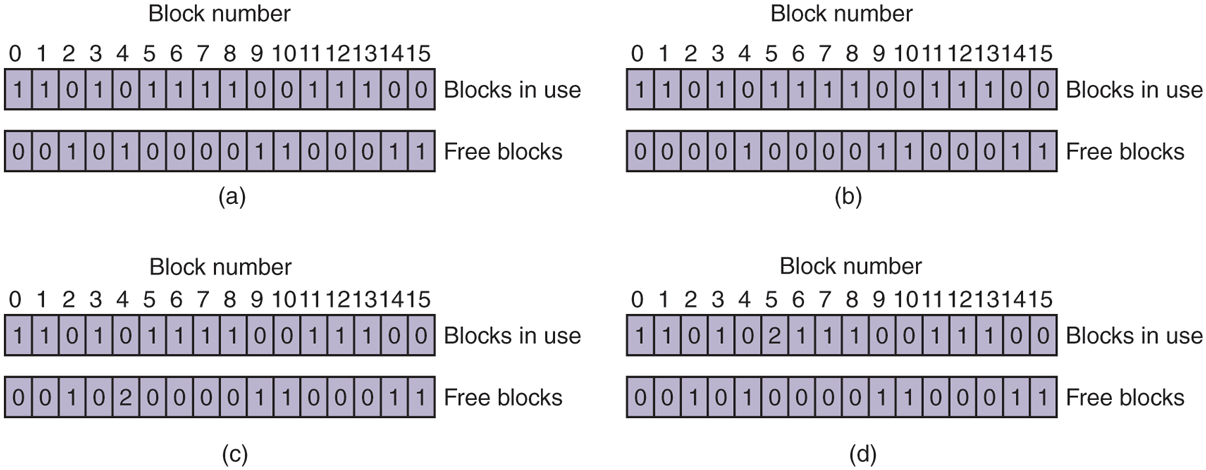
File-system states. (a) Consistent. (b) Missing block. (c) Duplicate block in free list. (d) Duplicate data block.
Another situation that might occur is that of Fig. 4-29(c). Here we see a block, number 4, that occurs twice in the free list. (Duplicates can occur only if the free list is really a list; with a bitmap it is impossible.) The solution here is also simple: rebuild the free list.
The worst thing that can happen is that the same data block is present in two or more files, as shown in Fig. 4-29(d) with block 5. If either of these files is removed, block 5 will be put on the free list, leading to a situation in which the same block is both in use and free at the same time. If both files are removed, the block will be put onto the free list twice.
The appropriate action for the file-system checker to take is to allocate a free block, copy the contents of block 5 into it, and insert the copy into one of the files. In this way, the information content of the files is unchanged (although almost assuredly one is garbled), but the file-system structure is at least made consistent. The error should be reported, to allow the user to inspect the damage.
In addition to checking to see that each block is properly accounted for, the file-system checker also checks the directory system. It, too, uses a table of counters, but these are per file, rather than per block. It starts at the root directory and recursively descends the tree, inspecting each directory in the file system. For every i-node in every directory, it increments a counter for that file’s usage count. Remember that due to hard links, a file may appear in two or more directories. Symbolic links do not count and do not cause the counter for the target file to be incremented.
When the checker is all done, it has a list, indexed by i-node number, telling how many directories contain each file. It then compares these numbers with the link counts stored in the i-nodes themselves. These counts start at 1 when a file is created and are incremented each time a (hard) link is made to the file. In a consistent file system, both counts will agree. However, two kinds of errors can occur: the link count in the i-node can be too high or it can be too low.
If the link count is higher than the number of directory entries, then even if all the files are removed from the directories, the count will still be nonzero and the i-node will not be removed. This error is not serious, but it wastes space on the disk with files that are not in any directory. It should be fixed by setting the link count in the i-node to the correct value.
The other error is potentially catastrophic. If two directory entries are linked to a file, but the i-node says that there is only one, when either directory entry is removed, the i-node count will go to zero. When an i-node count goes to zero, the file system marks it as unused and releases all of its blocks. This action will result in one of the directories now pointing to an unused i-node, whose blocks may soon be assigned to other files. Again, the solution is just to force the link count in the i-node to the actual number of directory entries.
These two operations, checking blocks and checking directories, are often integrated for efficiency reasons (i.e., only one pass over the i-nodes is required). Other checks are also possible. For example, directories have a definite format, with i-node numbers and ASCII names. If an i-node number is larger than the number of i-nodes on the disk, the directory has been damaged.
Furthermore, each i-node has a mode, some of which are legal but strange, such as 007, which allows the owner and his group no access at all, but allows outsiders to read, write, and execute the file. It might be useful to at least report files that give outsiders more rights than the owner. Directories with more than, say, 1000 entries are also suspicious. Files located in user directories, but which are owned by the superuser and have the SETUID bit on, are potential security problems because such files acquire the powers of the superuser when executed by any user. With a little effort, one can put together a fairly long list of technically legal but still peculiar situations that might be worth reporting.
The previous paragraphs have discussed the problem of protecting the user against crashes. Some file systems also worry about protecting the user against himself. If the user intends to type
rm *.oto remove all the files ending with .o (compiler-generated object files), but accidentally types
rm * .o(note the space after the asterisk), rm will remove all the files in the current directory and then complain that it cannot find .o. This is a catastrophic error from which recovery is virtually impossible without heroic efforts and special software. In Windows, files that are removed are placed in the recycle bin (a special directory), from which they can later be retrieved if need be. Of course, no storage is reclaimed until they are actually deleted from this directory.
4.4.4 File-System Performance
Access to hard disk is much slower than access to flash storage and much slower still than access to memory. Reading a 32-bit memory word might take 10 nsec. Reading from a hard disk might proceed at 100 MB/sec, which is four times slower per 32-bit word, but to this must be added 5–10 msec to seek to the track and then wait for the desired sector to arrive under the read head. If only a single word is needed, the memory access is on the order of a million times as fast as disk access. As a result of this difference in access time, many file systems have been designed with various optimizations to improve performance. In this section, we will cover three of them.
Caching
The most common technique used to reduce disk accesses is the block cache or buffer cache. (Cache is pronounced ‘‘cash’’ and is derived from the French cacher, meaning to hide.) In this context, a cache is a collection of blocks that logically belong on the disk but are being kept in memory for performance reasons.
Various algorithms can be used to manage the cache, but a common one is to check all read requests to see if the needed block is in the cache. If it is, the read request can be satisfied without a disk access. If the block is not in the cache, it is first read into the cache and then copied to wherever it is needed. Subsequent requests for the same block can be satisfied from the cache.
Operation of the cache is illustrated in Fig. 4-30. Since there are many (often thousands of) blocks in the cache, some way is needed to determine quickly if a given block is present. The usual way is to hash the device and disk address and look up the result in a hash table. All the blocks with the same hash value are chained together on a linked list so that the collision chain can be followed.
Figure 4-30
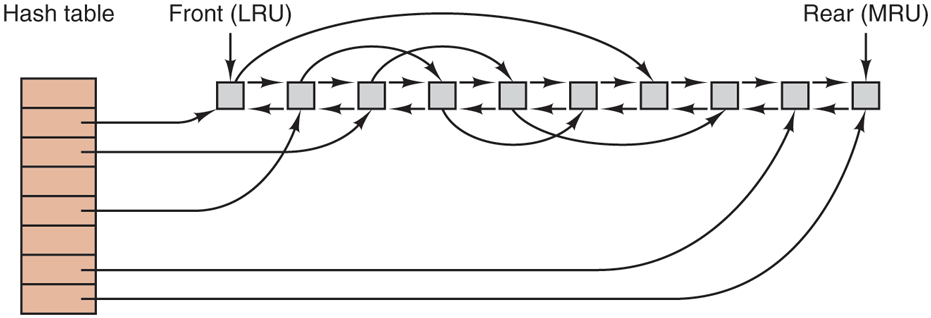
The buffer cache data structures.
When a block has to be loaded into a full cache, some block has to be removed (and rewritten to the disk if it has been modified since being brought in). This situation is very much like paging, and all the usual page-replacement algorithms described in Chapter 3, such as FIFO, second chance, and LRU, are applicable. One pleasant difference between paging and caching is that cache references are relatively infrequent, so that it is feasible to keep all the blocks in exact LRU order with linked lists.
In Fig. 4-30, we see that in addition to the collision chains starting at the hash table, there is also a bidirectional list running through all the blocks in the order of usage, with the least recently used block on the front of this list and the most recently used block at the end. When a block is referenced, it can be removed from its position on the bidirectional list and put at the end. In this way, exact LRU order can be maintained.
Unfortunately, there is a catch. Now that we have a situation in which exact LRU is possible, it turns out that LRU is undesirable. The problem has to do with the crashes and file-system consistency discussed in the previous section. If a critical block, such as an i-node block, is read into the cache and modified, but not rewritten to the disk, a crash will leave the file system in an inconsistent state. If the i-node block is put at the end of the LRU chain, it may be quite a while before it reaches the front and is rewritten to the disk.
Furthermore, some blocks, such as i-node blocks, are rarely referenced two times within a short interval. These considerations lead to a modified LRU scheme, taking two factors into account:
Is the block likely to be needed again soon?
Is the block essential to the consistency of the file system?
For both questions, blocks can be divided into categories such as i-node blocks, indirect blocks, directory blocks, full data blocks, and partially full data blocks. Blocks that will probably not be needed again soon go on the front, rather than the rear of the LRU list, so their buffers will be reused quickly. Blocks that might be needed again soon, such as a partly full block that is being written, go on the end of the list, so they will stay around for a long time.
The second question is independent of the first one. If the block is essential to the file-system consistency (basically, everything except data blocks), and it has been modified, it should be written to disk immediately, regardless of which end of the LRU list it is put on. By writing critical blocks quickly, we greatly reduce the probability that a crash will wreck the file system. While a user may be unhappy if one of his files is ruined in a crash, he is likely to be far more unhappy if the whole file system is lost.
Even with this measure to keep the file-system integrity intact, it is undesirable to keep data blocks in the cache too long before writing them out. Consider the plight of someone who is using a personal computer to write a book. Even if our writer periodically tells the editor to write the file being edited to the disk, there is a good chance that everything will still be in the cache and nothing on the disk. If the system crashes, the file-system structure will not be corrupted, but a whole day’s work will be lost.
This situation need not happen often before we have a fairly unhappy user. Systems take two approaches to dealing with it. The UNIX way is to have a system call, sync, which forces all the modified blocks out onto the disk immediately. When the system is started up, a program, usually called update, is started up in the background to sit in an endless loop issuing sync calls, sleeping for 30 sec between calls. As a result, no more than 30 seconds of work is lost due to a crash.
Although Windows now has a system call equivalent to sync, called FlushFileBuffers, in the past it did not. Instead, it had a different strategy that was in some ways better than the UNIX approach (and in some ways worse). What it did was to write every modified block to disk as soon as it was written to the cache. Caches in which all modified blocks are written back to the disk immediately are called write-through caches. They require more disk I/O than nonwrite-through caches. The difference between these two approaches can be seen when a program writes a 1-KB block full, one character at a time. UNIX will collect all the characters in the cache and write the block out once every 30 seconds, or whenever the block is removed from the cache. With a write-through cache, there is a disk access for every character written. Of course, most programs do internal buffering, so they normally write not a character, but a line or a larger unit on each write system call.
A consequence of this difference in caching strategy is that just removing a disk from a UNIX system without doing a sync will almost always result in lost data, and frequently in a corrupted file system as well. With write-through caching, no problem arises. These differing strategies were chosen because UNIX was developed in an environment in which all disks were hard disks and not removable, whereas the first Windows file system was inherited from MS-DOS, which started out in the floppy-disk world. As hard disks became the norm, the UNIX approach, with its better efficiency (but worse reliability), became the norm, and it is also used now on Windows for hard disks. However, NTFS takes other measures (e.g., journaling) to improve reliability, as discussed earlier.
At this point, it is worth discussing the relationship between the buffer cache and the page cache. Conceptually they are different in that a page cache caches pages of files to optimize file I/O, while a buffer cache simply caches disk blocks. The buffer cache, which predates the page cache, really behaves like disk, except that the reads and writes access memory. The reason people added a page cache was that it seemed a good idea to move the cache higher up in the stack, so file requests could be served without going through the file system code and all its complexities. Phrased differently: files are in the page cache and disk blocks in the buffer cache. In addition, a cache at a higher level without need for the file system made it easier to integrate it with the memory management subsystem—as befitting a component called page cache. However, it has probably not escaped your notice that the files in the page cache are typically on disk also, so that their data are now in both of the caches.
Some operating systems therefore integrate the buffer cache with the page cache. This is especially attractive when memory-mapped files are supported. If a file is mapped onto memory, then some of its pages may be in memory because they were demand paged in. Such pages are hardly different from file blocks in the buffer cache. In this case, they can be treated the same way, with a single cache for both file blocks and pages. Even if the functions are still distinct, they point to the same data. For instance, as most data has both a file and a block representation, the buffer cache simply point into the page cache—leaving only one instance of the data cached in memory.
Block Read Ahead
A second technique for improving perceived file-system performance is to try to get blocks into the cache before they are needed to increase the hit rate. In particular, many files are read sequentially. When the file system is asked to produce block k in a file, it does that, but when it is finished, it makes a sneaky check in the cache to see if block is already there. If it is not, it schedules a read for block in the hope that when it is needed, it will have already arrived in the cache. At the very least, it will be on the way.
Of course, this read-ahead strategy works only for files that are actually being read sequentially. If a file is being randomly accessed, read ahead does not help. In fact, it hurts by tying up disk bandwidth reading in useless blocks and removing potentially useful blocks from the cache (and possibly tying up more disk bandwidth writing them back to disk if they are dirty). To see whether read ahead is worth doing, the file system can keep track of the access patterns to each open file. For example, a bit associated with each file can keep track of whether the file is in ‘‘sequential-access mode’’ or ‘‘random-access mode.’’ Initially, the file is given the benefit of the doubt and put in sequential-access mode. However, whenever a seek is done, the bit is cleared. If sequential reads start happening again, the bit is set once again. In this way, the file system can make a reasonable guess about whether it should read ahead or not. If it gets it wrong once in a while, it is not a disaster, just a little bit of wasted disk bandwidth.
Reducing Disk-Arm Motion
Caching and read ahead are not the only ways to increase file-system performance. Another important technique for hard disks is to reduce the amount of disk-arm motion by putting blocks that are likely to be accessed in sequence close to each other, preferably in the same cylinder. When an output file is written, the file system has to allocate the blocks one at a time, on demand. If the free blocks are recorded in a bitmap, and the whole bitmap is in main memory, it is easy enough to choose a free block as close as possible to the previous block. With a free list, part of which is on disk, it is much harder to allocate blocks close together.
However, even with a free list, some block clustering can be done. The trick is to keep track of disk storage not in blocks, but in groups of consecutive blocks. If all sectors consist of 512 bytes, the system could use 1-KB blocks (2 sectors) but allocate disk storage in units of 2 blocks (4 sectors). This is not the same as having 2-KB disk blocks, since the cache would still use 1-KB blocks and disk transfers would still be 1 KB, but reading a file sequentially on an otherwise idle system would reduce the number of seeks by a factor of two, considerably improving performance. A variation on the same theme is to take account of rotational positioning. When allocating blocks, the system attempts to place consecutive blocks in a file in the same cylinder.
Another performance bottleneck in systems that use i-nodes or anything like them is that reading even a short file requires two disk accesses: one for the i-node and one for the block. In many file systems, the i-node placement is like the one shown in Fig. 4-31(a). Here all the i-nodes are near the start of the disk, so the average distance between an i-node and its blocks will be half the number of cylinders, requiring long seeks. This is clearly inefficient and needs to be improved.
Figure 4-31
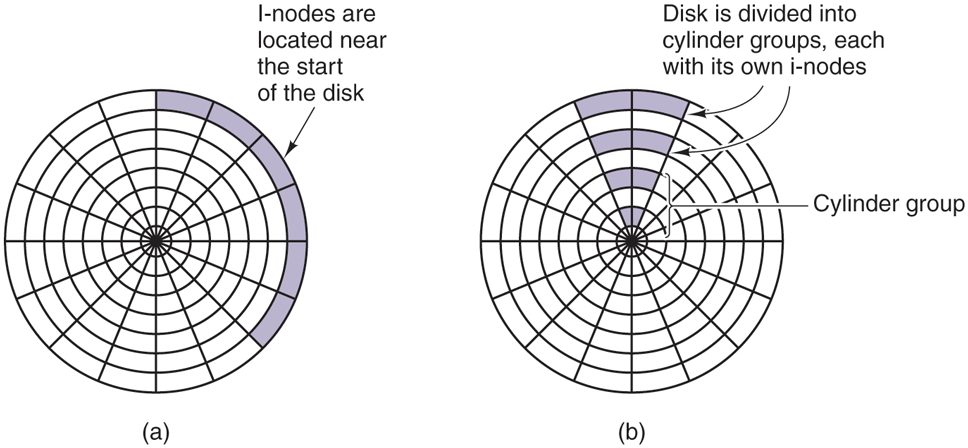
(a) I-nodes placed at the start of the disk. (b) Disk divided into cylinder groups, each with its own blocks and i-nodes.
One easy performance improvement is to put the i-nodes in the middle of the disk, rather than at the start, thus reducing the average seek between the i-node and the first block by a factor of two. Another idea, shown in Fig. 4-31(b), is to divide the disk into cylinder groups, each with its own i-nodes, blocks, and free list (McKusick et al., 1984). When creating a new file, any i-node can be chosen, but an attempt is made to find a block in the same cylinder group as the i-node. If none is available, then a block in a nearby cylinder group is used.
Of course, disk-arm movement and rotation time are relevant only if the disk has them and are not relevant for SSDs, which have no moving parts whatsoever. For these drives, built on the same technology as flash cards, random (read) accesses are just as fast as sequential ones and many of the problems of traditional disks go away (only for new ones emerge).
4.4.5 Defragmenting Disks
When the operating system is initially installed, the programs and files it needs are installed consecutively starting at the beginning of the disk, each one directly following the previous one. All free disk space is in a single contiguous unit following the installed files. However, as time goes on, files are created and removed and typically the disk becomes badly fragmented, with files and holes all over the place. As a consequence, when a new file is created, the blocks used for it may be spread all over the disk, giving poor performance.
The performance can be restored by moving files around to make them contiguous and to put all (or at least most) of the free space in one or more large contiguous regions on the disk. Windows has a program, defrag, that does precisely this. Windows users should run it regularly, except on SSDs.
Defragmentation works better on file systems that have a lot of free space in a contiguous region at the end of the partition. This space allows the defragmentation program to select fragmented files near the start of the partition and copy all their blocks to the free space. Doing so frees up a contiguous block of space near the start of the partition into which the original or other files can be placed contiguously. The process can then be repeated with the next chunk of disk space, etc.
Some files cannot be moved, including the paging file, the hibernation file, and the journaling log, because the administration that would be required to do this is more trouble than it is worth. In some systems, these are fixed-size contiguous areas anyway, so they do not have to be defragmented. The one time when their lack of mobility is a problem is when they happen to be near the end of the partition and the user wants to reduce the partition size. The only way to solve this problem is to remove them altogether, resize the partition, and then recreate them afterward.
Linux file systems (especially ext3 and ext4) generally suffer less from defragmentation than Windows systems due to the way disk blocks are selected, so manual defragmentation is rarely required. Also, SSDs do not suffer from fragmentation at all. In fact, defragmenting an SSD is counterproductive. Not only is there no gain in performance, but SSDs wear out, so defragmenting them merely shortens their lifetimes.
4.4.6 Compression and Deduplication
In the ‘‘Age of Data,’’ people tend to have, well, a lot of data. All these data must find a home on a storage device and often that home fills up quickly with cat pictures, cat videos, and other essential information. Of course, we can always buy a new and bigger SSD, but it would be nice if we could prevent it from filling up quite so quickly.
The simplest technique to use scarce storage space more efficiently is compression. Besides manually compressing files or folders, we can use a file system that compresses specific folders or even all data automatically. File systems such as NTFS (on Windows), Btrfs (Linux), and ZFS (on a variety of operating systems) all offer compression as an option. The compression algorithms commonly look for repeating sequences of data which they then encode efficiently. For instance, when writing file data they may discover that the 133 bytes at offset 1737 in the file are the same as the 133 bytes at offset 1500, so instead of writing the same bytes again, they insert a marker (237,133)—indicating that these 133 bytes can be found at a distance of 237 before the current offset.
Besides eliminating redundancy within a single file, several popular file systems also remove redundancy across files. On systems that store data from many users, for instance in a cloud or server environment, it is common to find files that contain the same data, as multiple users store the same documents, binaries, or videos. Such data duplication is even more pronounced in backup storage. If users back up all their important files every week, each new backup probably contains (mostly) the same data.
Rather than storing the same data multiple times, several file systems implement deduplication to eliminate duplicate copies—exactly like the deduplication of pages in the memory subsystem that we discussed in the previous chapter. This is a very common phenomenon in operating systems: a technique (in this case deduplication) that is a good idea in one subsystem, is often a good idea in other subsystems also. Here we discuss deduplication in file systems, but the technique is also used in networking to prevent the same data from being sent over the network multiple times.
File system deduplication is possible at the granularity of files, portions of files, or even individual disk blocks. Nowadays, many file systems perform deduplication on fixed-size chunks of, say, 128 KB. When the deduplication procedure detects that two files contain chunks that are exactly the same, it will keep only a single physical copy that is shared by both files. Of course, as soon as the chunk in one of the files is overwritten, a unique copy must be made so that the changes do not affect the other file.
Deduplication can be done inline or post-process. With inline deduplication, the file system calculates a hash for every chunk that it is about to write and compares it to the hashes of existing chunks. If the chunk is already present, it will refrain from actually writing out the data and instead add a reference to the existing chunk. Of course, the additional calculations take time and slow down the write. In contrast, post-process deduplication always writes out the data and performs the hashing and comparisons in the background, without slowing down the process’ file operations. Which method is better is debated almost as hotly as which editor is best, Emacs or Vi (even though the answer to that question is, of course, Emacs). As the astute reader may have noticed, there is a problem with the use of hashes to determine chunk equivalence: even if it happens rarely, the pigeonhole principle says that chunks with different content may have the same hash. Some implementations of deduplication gloss over this little inconvenience and accept the (very low) probability of getting things wrong, but there also exist solutions that verify whether the chunks are truly equivalent before deduplicating them.
4.4.7 Secure File Deletion and Disk Encryption
However sophisticated the access restrictions at the level of the operating system, the physical bits on the hard disk or SSDs can always be read back by taking out the storage device and reading them back in another machine. This has many implications. For instance, the operating system may ‘‘delete’’ a file by removing it from the directories and freeing up the i-node for reuse, but that does not remove the content of the file on disk. Thus, an attacker can simply read the raw disk blocks to bypass all file system permissions, no matter how restrictive they are.
In fact, securely deleting data on disk is not easy. If the disk is old and not needed any more but the data must not fall into the wrong hands under any conditions, the best approach is to get a large flowerpot. Put in some thermite, put the disk in, and cover it with more thermite. Then light it and watch it burn nicely at 2500°C. Recovery will be impossible, even for a pro. If you are unfamiliar with the properties of thermite, it is strongly recommended that you do not try this at home.
However, if you want to reuse the disk, this technique is clearly not appropriate. Even if you overwrite the original content with zeros, it may not be enough. On some hard disks, data stored on the disk leave magnetic traces in areas close to the actual tracks. So even if the normal content in the tracks is zeroed out, a highly motivated and sophisticated attacker (such as a government intelligence agency) could still recover the original content by carefully inspecting the adjacent areas. In addition, there may be copies of the file in unexpected places on the disk (for instance, as a backup or in a cache), and these need to be wiped also. SSDs have even worse problems, as the file system has no control over what flash blocks are overwritten and when, since this is determined by the FTL. Usually by overwriting a disk with three to seven passes, alternating zeros and random numbers, will securely erase it though. There is software available to do this.
One way to make it impossible to recover data from disk, deleted or not, is by encrypting everything that is on the disk. Full disk encryption is available on all modern operating systems. As long as you do not write the password on a Post-It note stuck somewhere on your computer, full disk encryption with a powerful encryption algorithm will keep your data safe even if the disk falls in the hands of the baddies.
Full disk encryption is sometimes also provided by the storage devices themselves in the form of Self-Encrypting Drives (SEDs) with onboard cryptographic capabilities to do the encryption and decryption, leading to a performance boost as the cryptographic calculations are offloaded from the CPU. Unfortunately, researchers found that many SEDs have critical security weaknesses due to specification, design, and implementation issues (Meijer and Van Gastel, 2019).
As an example of full disk encryption, Windows makes use of the capabilities of such SEDs if they are present. If not, it takes care of the encryption itself, using a secret key, the volume master key, in a standard encryption algorithm called Advanced Encryption Standard (AES). Full disk encryption on Windows was designed to be as unobtrusive as possible and many users are blissfully unaware that their data are encrypted on disk. The volume master key used to encrypt or decrypt the data on regular (i.e., non SED) storage devices can be obtained by decrypting the (itself encrypted) key either with the user password or with the recovery key (that was automatically generated the first time the file system was encrypted), or by extracting the key from a special-purpose cryptoprocessor known as the Trusted Platform Module, or TPM. Either way, once it has the key, Windows can encrypt or decrypt the disk data as required.