3.6 Implementation Issues
Implementers of virtual memory systems have to make choices among the major theoretical algorithms, such as second chance versus aging, local versus global page allocation, and demand paging versus prepaging. But they also have to be aware of a number of practical implementation issues as well. In this section, we will take a look at a few of the common problems and some solutions.
3.6.1 Operating System Involvement with Paging
There are four times when the operating system has paging-related work to do: process creation time, process execution time, page fault time, and process termination time. We will now briefly examine each of these to see what has to be done.
When a new process is created in a paging system, the operating system has to determine how large the program and data will be (initially) and create a page table for them. Space has to be allocated in memory for the page table and it has to be initialized. The page table need not be resident when the process is swapped out but has to be in memory when the process is running. In addition, space has to be allocated in the swap area on nonvolatile storage so that when a page is swapped out, it has somewhere to go. The swap area also has to be initialized with program text and data so that when the new process starts getting page faults, the pages can be brought in. Some systems page the program text directly from the executable file, thus saving space on disk or SSD and initialization time. Finally, information about the page table and swap area on nonvolatile storage must be recorded in the process table.
When a process is scheduled for execution, the MMU has to be reset for the new process. In addition, unless the entries in the TLB are explicitly tagged with an identifier for the processes to which they belong (using so-called tagged TLBs), the TLB has to be flushed to get rid of traces of the previously executing process. After all, we do not want to have a memory access in one process to erroneously touch the page frame of another process. Further, the new process’ page table has to be made current, usually by copying it or a pointer to it to some hardware register(s). Optionally, some or all of the process’ pages can be brought into memory to reduce the number of page faults initially (e.g., it is certain that the page pointed to by the program counter will be needed).
When a page fault occurs, the operating system has to read out hardware registers to determine which virtual address caused the fault. From this information, it must compute which page is needed and locate that page on nonvolatile storage. It must then find an available page frame in which to put the new page, evicting some old page if need be. Then it must read the needed page into the page frame. Finally, it must back up the program counter to have it point to the faulting instruction and let that instruction execute again.
When a process exits, the operating system must release its page table, its pages, and the nonvolatile storage space that the pages occupy when they are on disk or SSD. If some of the pages are shared with other processes, the pages in memory and on nonvolatile storage can be released only when the last process using them has terminated.
3.6.2 Page Fault Handling
We are finally in a position to describe in detail what happens on a page fault. Slightly simplified, the sequence of events is as follows:
The hardware traps to the kernel, saving the program counter on the stack. On most machines, some information about the state of the current instruction is saved in special CPU registers.
An assembly-code interrupt service routine is started to save the registers and other volatile information, to keep the operating system from destroying it. It then calls the page fault handler.
The operating system tries to discover which virtual page is needed. Often one of the hardware registers contains this information. If not, the operating system must retrieve the program counter, fetch the instruction, and parse it in software to figure out what it was doing when the fault hit.
Once the virtual address that caused the fault is known, the system checks to see if this address is valid and the protection is consistent with the access. If not, the process is sent a signal or killed. If the address is valid and no protection fault has occurred, the system checks to see if a page frame is free. If no frames are free, the page replacement algorithm is run to select a victim.
If the page frame selected is dirty, the page is scheduled for transfer to nonvolatile storage, and a context switch takes place, suspending the faulting process and letting another one run until the disk or SSD transfer has completed. In any event, the frame is marked as busy to prevent it from being used for another purpose.
As soon as the page frame is clean (either immediately or after it is written to nonvolatile storage), the operating system looks up the disk address where the needed page is, and schedules a disk or SSD operation to bring it in. While the page is being loaded, the faulting process is still suspended and another user process is run, if one is available.
When the disk or SSD interrupt indicates that the page has arrived, the page tables are updated to reflect its position, and the frame is marked as being in the normal state.
The faulting instruction is backed up to the state it had when it began and the program counter is reset to point to that instruction.
The faulting process is scheduled, and the operating system returns to the (assembly-language) routine that called it.
This routine reloads the registers and other state information and returns to user space to continue execution where it left off.
3.6.3 Instruction Backup
So far, we simply said that when a program references a page that is not in memory, the instruction causing the fault is stopped partway through and a trap to the operating system occurs. After the operating system has fetched the page needed, it must restart the instruction causing the trap. This is easier said than done.
To see the nature of this problem at its worst, consider a CPU that has instructions with two addresses, such as the Motorola 680x0, widely used in embedded systems. The instruction
MOV.L #6(A1),2(A0)is 6 bytes, for example (see Fig. 3-27). In order to restart the instruction, the operating system must determine where the first byte of the instruction is. The value of the program counter at the time of the trap depends on which operand faulted and how the CPU’s microcode has been implemented.
Figure 3-27
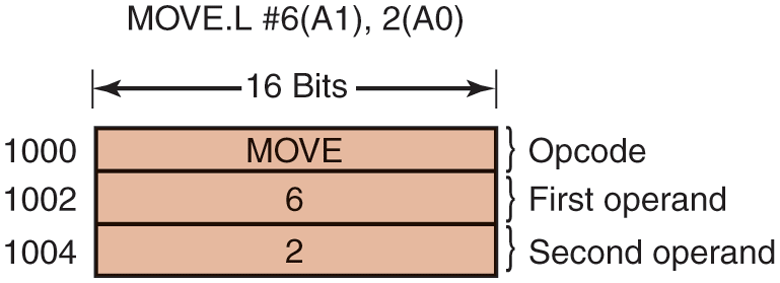
An instruction causing a page fault.
In Fig. 3-27, we have an instruction starting at address 1000 that makes three memory references: the instruction word and two offsets for the operands. Depending on which of these three memory references caused the page fault, the program counter might be 1000, 1002, or 1004 at the time of the fault. It is often impossible for the operating system to determine unambiguously where the instruction began. If the program counter is 1002 at the time of the fault, the operating system has no way of telling whether the word in 1002 is a memory address associated with an instruction at 1000 (e.g., the address of an operand) or an opcode.
Bad as this problem may be, it could have been worse. Some 680x0 addressing modes use autoincrementing, which means that a side effect of executing the instruction is to increment one (or more) registers. Instructions that use autoincrement mode can also fault. Depending on the details of the microcode, the increment may be done before the memory reference, in which case the operating system must decrement the register in software before restarting the instruction. Or, the autoincrement may be done after the memory reference, in which case it will not have been done at the time of the trap and must not be undone by the operating system. Autodecrement mode also exists and causes a similar problem. The precise details of whether autoincrements and autodecrements have or have not been done before the corresponding memory references may differ from instruction to instruction and from CPU model to CPU model.
Fortunately, on some machines the CPU designers provide a solution, usually in the form of a hidden internal register into which the program counter is copied just before each instruction is executed. These machines may also have a second register telling which registers have already been autoincremented or autodecremented, and by how much. Given this information, the operating system can unambiguously undo all the effects of the faulting instruction so that it can be restarted. If this information is not available, the operating system has to jump through hoops to figure out what happened and how to repair it. The problem could have been solved in hardware but that would have made the hardware more expensive so it was decided to leave it to the software.
3.6.4 Locking Pages in Memory
Although we have not discussed I/O much in this chapter, the fact that a computer has virtual memory does not mean that I/O is absent. Virtual memory and I/O interact in subtle ways. Consider a process that has just issued a system call to read from some file or device into a buffer within its address space. While waiting for the I/O to complete, the process is suspended and another process is allowed to run. This other process gets a page fault.
If the paging algorithm is global, there is a small, but nonzero, chance that the page containing the I/O buffer will be chosen to be removed from memory. If an I/O device is currently in the process of doing a DMA transfer to that page, removing it will cause part of the data to be written in the buffer where they belong, and part of the data to be written over the just-loaded page. One solution to this problem is to lock pages engaged in I/O in memory so that they will not be removed. Locking a page is often called pinning it in memory. Another solution is to do all I/O to kernel buffers and then copy the data to user pages later. However, this requires an extra copy and thus slows everything down.
3.6.5 Backing Store
In our discussion of page replacement algorithms, we saw how a page is selected for removal. We have not said much about where on nonvolatile storage it is put when it is paged out. Let us now describe some of the issues related to disk/SSD management.
The simplest algorithm for allocating page space on nonvolatile storage is to have a special swap partition on the disk or, even better, on a separate storage device from the file system (to balance the I/O load). UNIX systems traditionally work like this. This partition does not have a normal file system on it, which eliminates all the overhead of converting offsets in files to block addresses. Instead, block numbers relative to the start of the partition are used throughout.
When the system is booted, this swap partition is empty and is represented in memory as a single entry giving its origin and size. In the simplest scheme, when the first process is started, a chunk of the partition area the size of the first process is reserved and the remaining area reduced by that amount. As new processes are started, they are assigned chunks of the swap partition equal in size to their core images. As they finish, their storage space is freed. The swap partition is managed as a list of free chunks. Better algorithms will be discussed in Chap. 10.
Associated with each process is the nonvolatile storage address of its swap area, that is, where on the swap partition its image is kept. This information is kept in the process table. Calculating the address to write a page to becomes simple: just add the offset of the page within the virtual address space to the start of the swap area. However, before a process can start, the swap area must be initialized. One way is to copy the entire process image to the swap area, so that it can be brought in as needed. The other is to load the entire process in memory and let it be paged out as needed.
However, this simple model has a problem: processes can increase in size after starting. Although the program text is usually fixed, the data area can sometimes grow, and the stack can always grow. Consequently, it may be better to reserve separate swap areas for the text, data, and stack and allow each of these areas to consist of more than one chunk on the nonvolatile storage.
The other extreme is to allocate nothing in advance and allocate space on nonvolatile storage for each page when it is swapped out and deallocate it when it is swapped back in. In this way, processes in memory do not tie up any swap space. The disadvantage is that a disk address is needed in memory to keep track of each page on nonvolatile storage. In other words, there must be a table per process telling for each page on nonvolatile storage where it is. The two alternatives are shown in Fig. 3-28.
Figure 3-28
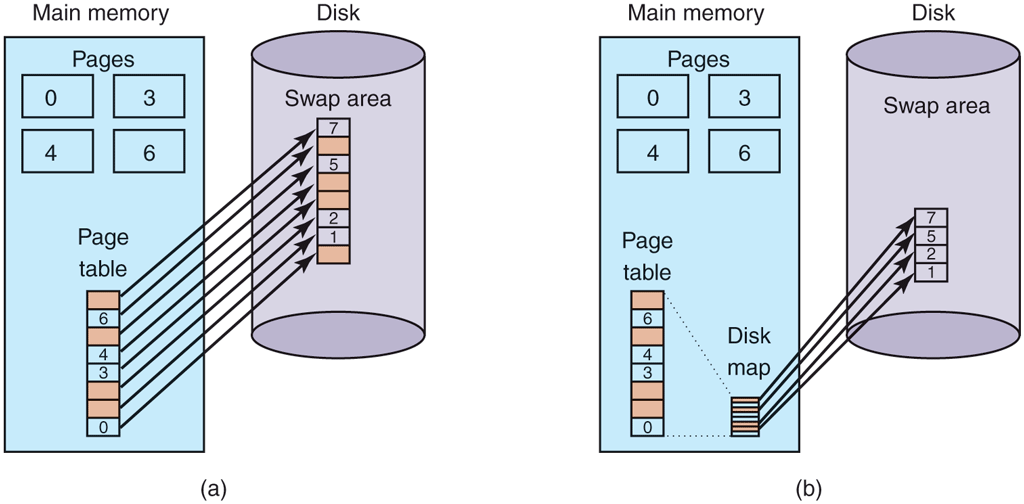
(a) Paging to a static swap area. (b) Backing up pages dynamically.
In Fig. 3-28(a), a page table with eight pages is shown. Pages 0, 3, 4, and 6 are in main memory. Pages 1, 2, 5, and 7 are on disk. The swap area on disk is as large as the process virtual address space (eight pages), with each page having a fixed location to which it is written when it is evicted from main memory. Calculating this address requires knowing only where the process’ paging area begins, since pages are stored in it contiguously in order of their virtual page number. A page that is in memory always has a shadow copy on disk, but this copy may be out of date if the page has been modified since being loaded. The shaded pages in memory indicate pages not present in memory. The shaded pages on the disk are (in principle) superseded by the copies in memory, although if a memory page has to be swapped back to disk and it has not been modified since it was loaded, the (shaded) disk copy will be used.
In Fig. 3-28(b), pages do not have fixed addresses on disk. When a page is swapped out, an empty disk page is chosen on the fly and the disk map (which has room for one disk address per virtual page) is updated accordingly. A page in memory has no copy on disk. The pages’ entries in the disk map contain an invalid disk address or a bit marking them as not in use.
Having a fixed swap partition is not always possible. For example, no disk or SSD partitions may be available. In this case, one or more large, preallocated files within the normal file system can be used. Windows uses this approach. However, an optimization can be used here to reduce the amount of nonvolatile storage space needed. Since the program text of every process came from some (executable) file in the file system, the executable file can be used as the swap area. Better yet, since the program text is generally read only, when memory is tight and program pages have to be evicted from memory, they are just discarded and read in again from the executable file when needed. Shared libraries can also work this way.
3.6.6 Separation of Policy and Mechanism
An important principle for managing the complexity of any system is to split policy from mechanism. We will illustrate how this principle can be applied to memory management by having most of the memory manager run as a user-level process—a separation that was first done in Mach (Young et al., 1987) on which we base the discussion below.
A simple example of how policy and mechanism can be separated is shown in Fig. 3-29. Here the memory management system is divided into three parts:
A low-level MMU handler.
A page fault handler that is part of the kernel.
An external pager running in user space.
All the details of how the MMU works are encapsulated in the MMU handler, which is machine-dependent code and has to be rewritten for each new platform the operating system is ported to. The page-fault handler is machine-independent code and contains most of the mechanism for paging. The policy is largely determined by the external pager, which runs as a user process.
Figure 3-29
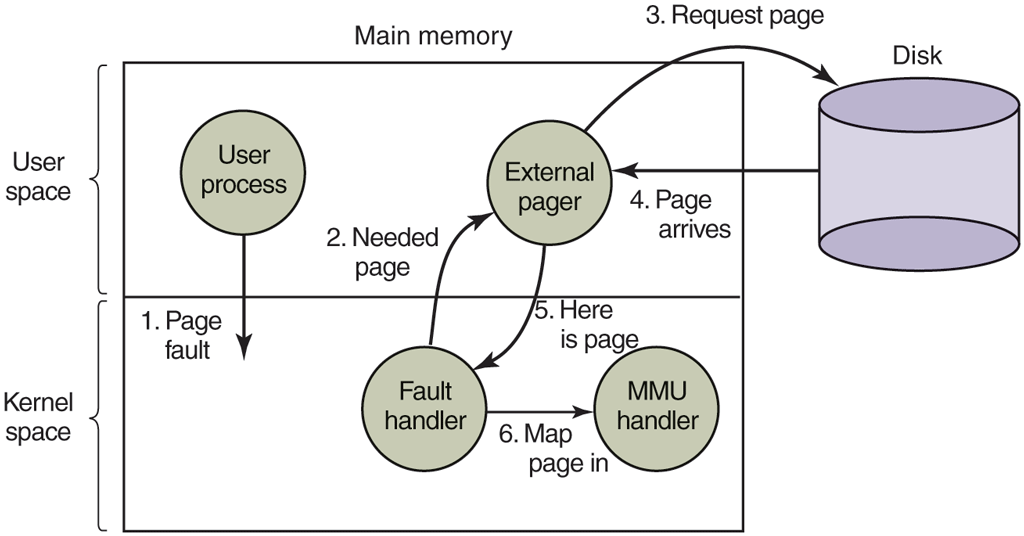
Page fault handling with an external pager.
When a process starts up, the external pager is notified in order to set up the process’ page map and allocate the necessary backing store on nonvolatile storage if need be. As the process runs, it may map new objects into its address space, so the external pager is once again notified.
Once the process starts running, it may get a page fault. The fault handler figures out which virtual page is needed and sends a message to the external pager, telling it the problem. The external pager then reads the needed page in from the nonvolatile storage and copies it to a portion of its own address space. Then it tells the fault handler where the page is. The fault handler then unmaps the page from the external pager’s address space and asks the MMU handler to put it into the user’s address space at the right place. Then the user process can be restarted.
This implementation leaves open where the page replacement algorithm is put. It would be cleanest to have it in the external pager, but there are some problems with this approach. Principal among these is that the external pager does not have access to the R and M bits of all the pages. These bits play a role in many of the paging algorithms. Thus, either some mechanism is needed to pass this information up to the external pager, or the page replacement algorithm must go in the kernel. In the latter case, the fault handler tells the external pager which page it has selected for eviction and provides the data, either by mapping it into the external pager’s address space or including it in a message. Either way, the external pager writes the data to nonvolatile storage.
The main advantage of this implementation is more modular code and greater flexibility. The main disadvantage is the extra overhead of crossing the user-kernel boundary several times and the overhead of the various messages being sent between the pieces of the system. The subject is controversial, but as computers get faster and faster, and the software gets more and more complex, in the long run sacrificing some performance for more reliable software may well be acceptable to most implementers and users. Some operating systems that implement paging in the operating system kernel, such as Linux, nowadays also offer support for ondemand paging in user processes (see for instance userfaultfd).