3.3 Virtual Memory
While base and limit registers can be used to create the abstraction of address spaces, there is another problem that has to be solved: managing bloatware. While memory sizes are increasing rapidly, software sizes are increasing much faster. In the 1980s, many universities ran a timesharing system with dozens of (more-or-less satisfied) users running simultaneously on a 4-MB VAX. Now Microsoft recommends having at least 2 GB for 64-bit Windows 10.
As a consequence of these developments, there is a need to run programs that are too large to fit in memory, and there is certainly a need to have systems that can support multiple programs running simultaneously, each of which fits in memory but all of which collectively exceed memory. Swapping is not an attractive option if your computer is equipped with a hard disk, since a typical SATA disk has a peak transfer rate of several hundreds of MB/sec, which means it takes seconds to swap out a 1-GB program and the same to swap in a 1-GB program. While SSDs are considerably faster, even here the overhead is substantial.
The problem of programs larger than memory has been around since the beginning of computing, albeit in limited areas, such as science and engineering (simulating the creation of the universe or even simulating a new aircraft takes a lot of memory). A solution adopted in the 1960s was to split programs into little pieces, called overlays. When a program started, all that was loaded into memory was the overlay manager, which immediately loaded and ran overlay 0. When it was done, it would tell the overlay manager to load overlay 1, either above overlay 0 in memory (if there was space for it) or on top of overlay 0 (if there was no space). Some overlay systems were highly complex, allowing many overlays in memory at once. The overlays were kept on nonvolatile storage and swapped in and out of memory by the overlay manager.
Although the actual work of swapping overlays in and out was done by the operating system, the work of splitting the program into pieces had to be done manually by the programmer. Splitting large programs up into small, modular pieces was time consuming, boring, and error prone. Few programmers were good at this. It did not take long before someone thought of a way to turn the whole job over to the computer.
The method that was devised (Fotheringham, 1961) has come to be known as virtual memory. The basic idea behind virtual memory is that each program has its own address space, which is broken up into chunks called pages. Each page is a contiguous range of addresses. These pages are mapped onto physical memory, but not all pages have to be in physical memory at the same time to run the program. When the program references a part of its address space that is in physical memory, the hardware performs the necessary mapping on the fly. When the program references a part of its address space that is not in physical memory, the operating system is alerted to go get the missing piece and re-execute the instruction that failed.
In a sense, virtual memory is a generalization of the base-and-limit-register idea. The 8088 had separate base registers (but no limit registers) for text and data. With virtual memory, instead of having separate relocation for just the text and data segments, the entire address space can be mapped onto physical memory in fairly small units. Different implementations of virtual memory make different choices with respect to these units. Nowadays most systems use a technique called paging where the units are fixed-size units of, say, 4 KB. In contrast, an alternative solution known as segmentation uses entire variable-size segments as units. We will look at both solutions, but focus on paging, as segmentation is not really used these days anymore.
Virtual memory works just fine in a multiprogramming system, with bits and pieces of many programs in memory at once. While a program is waiting for pieces of itself to be read in, the CPU can be given to another process.
3.3.1 Paging
Most virtual memory systems use a technique called paging, which we will now describe. On any computer, programs reference a set of memory addresses. When a program executes an instruction like
MOV REG,1000it does so to copy the contents of memory address 1000 to REG (assuming the first operand represents the destination and the second the source). Addresses can be generated using indexing, base registers, and various other ways.
These program-generated addresses are called virtual addresses and form the virtual address space. On computers without virtual memory, the virtual address is put directly onto the memory bus and causes the physical memory word with the same address to be read or written. When virtual memory is used, the virtual addresses do not go directly to the memory bus. Instead, they go to an MMU (Memory Management Unit) that maps the virtual addresses onto the physical memory addresses, as illustrated in Fig. 3-8.
Figure 3-8
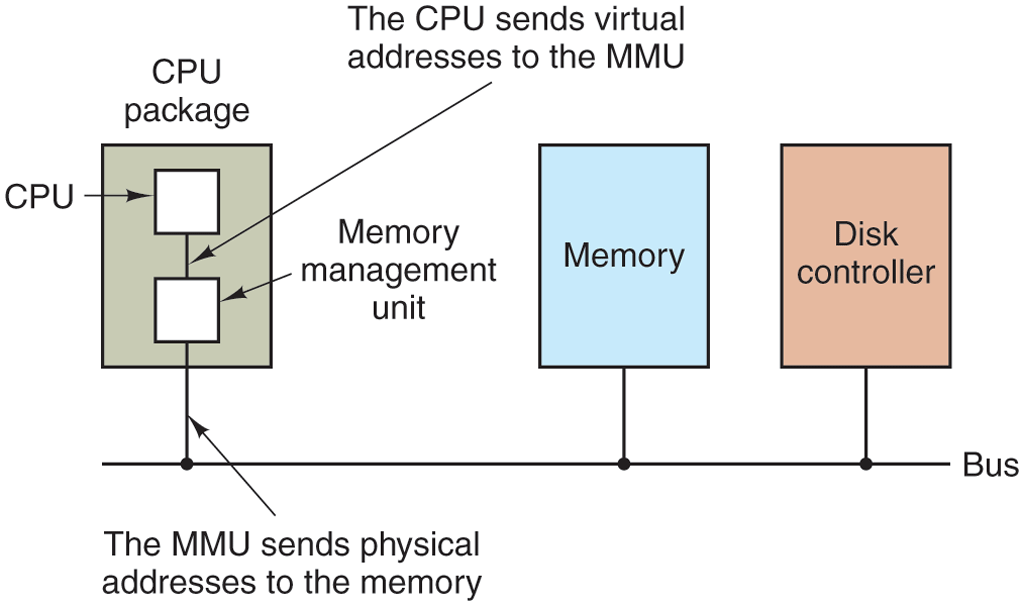
The position and function of the MMU. Here the MMU is shown as being a part of the CPU chip because it commonly is nowadays. However, logically it could be a separate chip and was years ago.
A very simple example of how this mapping works is shown in Fig. 3-9. In this example, we have a computer that generates 16-bit addresses, from 0 up to These are the virtual addresses. This computer, however, has only 32 KB of physical memory. So although 64-KB programs can be written, they cannot be loaded into memory in their entirety and run. A complete copy of a program’s core image, up to 64 KB, must be present on the disk or SSD, however, so that pieces can be brought in dynamically as needed.
Figure 3-9
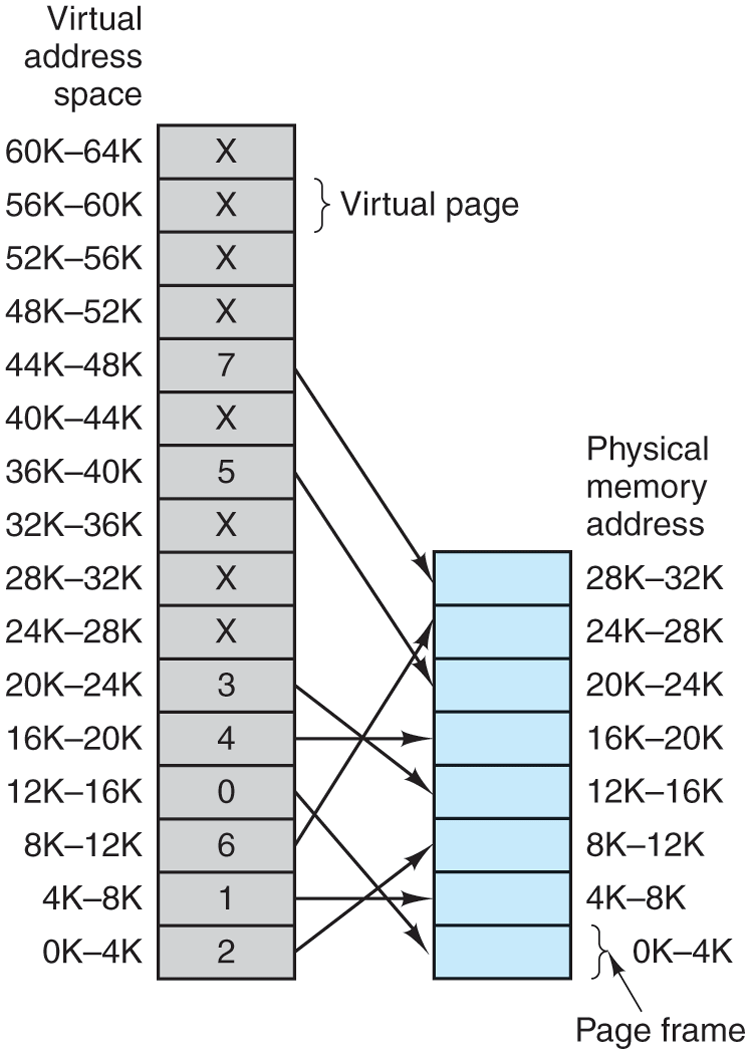
The relation between virtual addresses and physical memory addresses is given by the page table. Every page begins on a multiple of 4096 and ends 4095 addresses higher, so 4K–8K really means 4096–8191 and 8K–12K means 8192–12287.
The virtual address space consists of fixed-size units called pages. The corresponding units in the physical memory are called page frames. The pages and page frames are the same size. In this example they are 4 KB, but page sizes from 512 bytes to a gigabyte have been used in real systems. With 64 KB of virtual address space and 32 KB of physical memory, we get 16 virtual pages and 8 page frames. Transfers between RAM and nonvolatile storage are always in whole pages. Many processors support multiple page sizes that can be mixed and matched as the operating system sees fit. For instance, the x86-64 architecture supports 4-KB, 2-MB, and 1-GB pages, so we could use 4-KB pages for user applications and a single 1-GB page for the kernel. We will see later why it is sometimes better to use a single large page, rather than a large number of small ones.
The notation in Fig. 3-9 is as follows. The range marked 0K–4K means that the virtual or physical addresses in that page are 0 to 4095. The range 4K–8K refers to addresses 4096 to 8191, and so on. Each page contains exactly 4096 addresses starting at a multiple of 4096 and ending one shy of a multiple of 4096.
When the program tries to access address 0, for example, using the instruction
MOV REG,0virtual address 0 is sent to the MMU. The MMU sees that this virtual address falls in page 0, that is, in the range of 0 to 4095, which according to its mapping is page frame 2 (8192 to 12287). It thus transforms the address to 8192 and outputs address 8192 onto the bus. The memory knows nothing at all about the MMU and just sees a request for reading or writing address 8192, which it honors. Thus, the MMU has effectively mapped all virtual addresses between 0 and 4095 onto physical addresses 8192 to 12287.
Similarly, the instruction
MOV REG,8192is effectively transformed into
MOV REG,24576because virtual address 8192 (in virtual page 2) is mapped onto 24576 (in physical page frame 6). As a third example, virtual address 20500 is 20 bytes from the start of virtual page 5 (virtual addresses 20480 to 24575) and maps onto physical address .
By itself, this ability to map the 16 virtual pages onto any of the eight page frames by setting the MMU’s map appropriately does not solve the problem that the virtual address space is larger than the physical memory. Since we have only eight physical page frames, only eight of the virtual pages in Fig. 3-9 are mapped onto physical memory. The others, shown as a cross in the figure, are not mapped. In the actual hardware, a Present/absent bit keeps track of which pages are physically present in memory.
What happens if the program references an unmapped address, for example, by using the instruction
MOV REG,32780which is byte 12 within virtual page 8 (starting at 32768)? The MMU sees that the page is unmapped (indicated by a cross in the figure) and causes the CPU to trap to the operating system, called a page fault. The operating system picks a little-used page frame and writes its contents back to the disk (if it is not already there). It then fetches (also from the disk) the page that was just referenced into the page frame just freed, changes the map, and restarts the trapped instruction.
For example, if the operating system decided to evict page frame 1 from memory, it would load virtual page 8 at physical address 4096 and make two changes to the MMU map. First, it would mark virtual page 1’s entry as unmapped, to trap any future accesses to virtual addresses between 4096 and 8191. Then it would replace the cross in virtual page 8’s entry with a 1, so that when the trapped instruction is reexecuted, it will map virtual address 32780 to physical address
Now let us look inside the MMU to see how it works and why we have chosen to use a page size that is a power of 2. In Fig. 3-10 we see an example of a virtual address, 8196 (0010000000000100 in binary), being mapped using the MMU map of Fig. 3-9. The incoming 16-bit virtual address is split into a 4-bit page number and a 12-bit offset. With 4 bits for the page number, we can have 16 pages, and with 12 bits for the offset, we can address all 4096 bytes within a page.
Figure 3-10
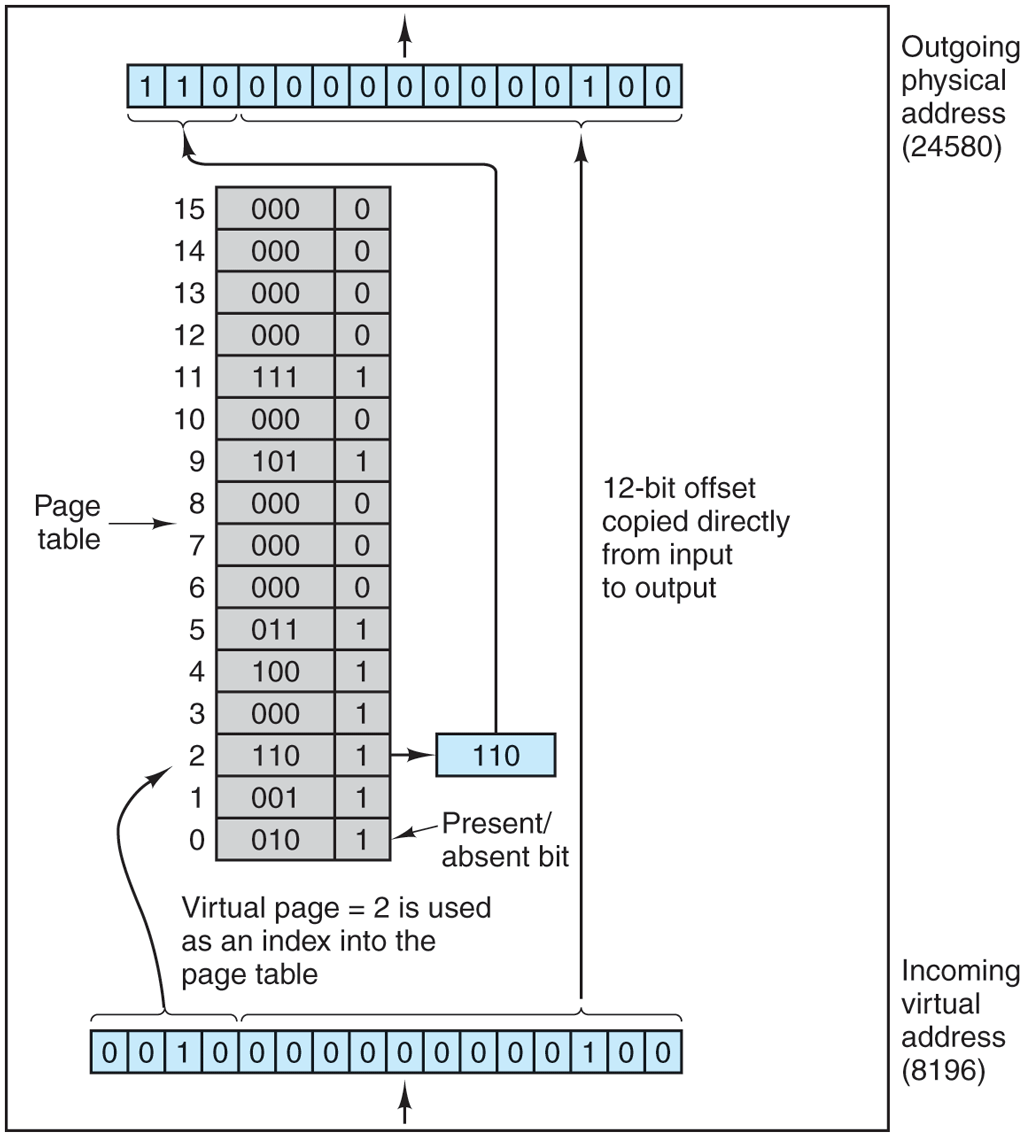
The internal operation of the MMU with 16 4-KB pages.
The page number is used as an index into the page table, yielding the number of the page frame that corresponds to that virtual page. If the Present/absent bit is 0, a trap to the operating system is caused. If the bit is 1, the page frame number found in the page table is copied to the high-order 3 bits of the output register, along with the 12-bit offset, which is copied unmodified from the incoming virtual address. Together they form a 15-bit physical address. The output register is then put onto the memory bus as the physical memory address.
In our examples, we are using 16-bit addresses to make the text and figures easier to understand. Modern PCs use 32-bit or 64-bit addresses. In principle, a computer with 32-bit addresses and 4-KB pages could use exactly the same method discussed above. The page table would need entries. On a computer with gigabytes of RAM, that is doable. However, 64-bit addresses and 4-KB pages would require entries in the page table, also known as a ‘‘hell of a lot’’. That is definitely not doable, so other techniques are needed. We will discuss them shortly.
3.3.2 Page Tables
In a simple implementation, the mapping of virtual addresses onto physical addresses can be summarized as follows: the virtual address is split into a virtual page number (high-order bits) and an offset (low-order bits). For example, with a 16-bit address and a 4-KB page size, the upper 4 bits could specify one of the 16 virtual pages and the lower 12 bits would then specify the byte offset (0 to 4095) within the selected page. However, a split with 3 or 5 or some other number of bits for the page is also possible. Different splits imply different page sizes.
The virtual page number is used as an index into the page table to find the entry for that virtual page. From the page table entry, the page frame number (if any) is found. The page frame number is attached to the high-order end of the offset, replacing the virtual page number, to form a physical address that can be sent to the memory.
Thus, the purpose of the page table is to map virtual pages onto page frames. Mathematically speaking, the page table is a function, with the virtual page number as the argument and the physical frame number as result. Using the result of this function, the virtual page field in a virtual address can be replaced by a page frame field, thus forming a physical memory address.
In this chapter, we worry only about virtual memory and not full virtualization. In other words: no virtual machines yet. We will see in Chap. 7 that each virtual machine requires its own virtual memory and as a result the page table organization becomes much more complicated—involving shadow or nested page tables and more. Even without such arcane configurations, paging and virtual memory are fairly sophisticated, as we shall see.
Structure of a Page Table Entry
Let us now turn from the structure of the page tables in the large, to the details of a single page table entry. The exact layout of an entry in the page table is highly machine dependent, but the kind of information present is roughly the same from machine to machine. In Fig. 3-11, we present a sample page table entry. The size varies from computer to computer, but 64 bits is a common size on today’s general purpose computers. The most important field is the Page frame number. After all, the goal of the page mapping is to output this value. If the page size is 4-KB (i.e., bytes), we only need the most significant 52 bits for the page frame number†, leaving 12 bits to encode other information about the page. For instance, the Present/absent bit indicates whether the entry is valid and can be used. If this bit is 0, the virtual page to which the entry belongs is not currently in memory. Accessing a page table entry with this bit set to 0 causes a page fault.
Figure 3-11

A typical page table entry.
The Protection bits tell what kinds of access are permitted. In the simplest form, this field contains 1 bit, with 0 for read/write and 1 for read only. A more sophisticated arrangement is having 3 bits, one bit each for enabling reading, writing, and executing the page. Somewhat related is the Supervisor bit that indicates whether the page is accessible only to privileged code, i.e., the operating system (or supervisor) or also to user programs. Any attempt by a user program to access a supervisor page will result in a fault.
The Modified and Referenced bits keep track of page usage. When a page is written to, the hardware automatically sets the Modified bit. This bit is of value when the operating system decides to reclaim a page frame. If the page in it has been modified (i.e., is ‘‘dirty’’), it must be written back to nonvolatile storage. If it has not been modified (i.e., is ‘‘clean’’), it can just be abandoned, since the copy on disk or SSD is still valid. The bit is sometimes called the dirty bit, since it reflects the page’s state.
The Referenced bit is set whenever a page is referenced, either for reading or for writing. Its value is used to help the operating system choose a page to evict when a page fault occurs. Pages that are not being used are far better candidates than pages that are, and this bit plays an important role in several of the page replacement algorithms that we will study later in this chapter.
Finally, the last bit allows caching to be disabled for the page. This feature is important for pages that map onto device registers rather than memory. If the operating system is sitting in a tight loop waiting for some I/O device to respond to a command it was just given, it is essential that the hardware keep fetching the word from the device, and not use an old cached copy. With this bit, caching can be turned off. Machines that have a separate I/O space and do not use memory-mapped I/O do not need this bit.
Note that the disk address (the address of the block on the disk or SSD) used to hold the page when it is not in memory is not part of the page table. The reason is simple. The page table holds only that information the hardware needs to translate a virtual address to a physical address. Information the operating system needs to handle page faults is kept in software tables inside the operating system. The hardware does not need it.
Before getting into more implementation issues, it is worth pointing out again that what virtual memory fundamentally does is create a new abstraction—the address space—which is an abstraction of physical memory, just as a process is an abstraction of the physical processor (CPU). Virtual memory can be implemented by breaking the virtual address space up into pages, and mapping each one onto some page frame of physical memory or having it (temporarily) unmapped. Thus this section is basically about an abstraction created by the operating system and how that abstraction is managed.
Also, it may be good to emphasize that all memory accesses made by software use virtual addresses. This is not just true for the user processes, but also for the operating system. In other words, the kernel has its own mappings in page tables also. Whenever a process executes a system call, the operating system page tables must be used. Because a context switch (which requires swapping page tables) is not cheap, some systems employ a clever trick and simply map the operating system’s page tables in every user process, but with the Supervisor bit indicating that these pages can only be accessed by the operating system. Thus, when the user process tries to access such a page, it will trigger an exception. However, when the user process performs a system call, there is no need to switch page tables anymore: all the kernel page tables and the user page tables are available for the operating system to. Doing so speeds up the system call. Generally, when the operating system is mapped into user processes, it is mapped in at the top of the address space so as not interfere with user programs, which start at or near 0. Sometimes user programs start at 4K instead of 0 so that references to address 0 (which is often an error) are trapped.
3.3.3 Speeding Up Paging
We have just seen the basics of virtual memory and paging. It is now time to go into more detail about possible implementations. In any paging system, two major issues must be faced:
The mapping from virtual address to physical address must be fast.
Even if the virtual address space itself is huge, the page table must not be too large.
The first point is a consequence of the fact that the virtual-to-physical mapping must be done on every memory reference. All instructions must ultimately come from memory and many of them reference operands in memory as well. Consequently, it is necessary to make one, two, or sometimes more page table references per instruction. If an instruction execution takes, say, 1 nsec, the page table lookup must be done in under 0.2 nsec to avoid having the mapping become a major bottleneck.
The second point follows from the fact that all modern computers use virtual addresses of at least 32 bits, with 64 bits becoming the norm for desktops and notebooks. Even if a modern processor uses only 48 out of the 64 bits for addressing, with a 4-KB page size, a 48-bit address space has 64 billion pages. With 64 billion pages in the virtual address space, the page table must have 64 billion entries of 64 bits each. Most people will agree that using hundreds of gigabytes just to store the page table is a tad excessive. And remember that each process needs its own page table (because it has its own virtual address space).
The need for fast page mapping for large address spaces is a very significant constraint on the way computers are built nowadays. The simplest design (at least conceptually) is to have a single page table consisting of an array of fast hardware registers, with one entry for each virtual page, indexed by virtual page number, as shown in Fig. 3-10. When a process is started up, the operating system loads the registers with the process’ page table, taken from a copy kept in main memory. During process execution, no more memory references are needed for the page table. The advantages of this method are that it is straightforward and requires no memory references during mapping. A disadvantage is that it is unbearably expensive if the page table is large; it is just not practical most of the time. Another one is that having to load the full page table at every context switch would completely kill performance.
At the other extreme, the page table can be entirely in main memory. All the hardware needs then is a single register that points to the start of the page table. This design allows the virtual-to-physical map to be changed at a context switch by reloading one register. Of course, it has the disadvantage of requiring one or more memory references to read page table entries during the execution of each instruction, making it very slow.
Translation Lookaside Buffers
Let us now look at some widely implemented schemes for speeding up paging and for handling large virtual address spaces, starting with the former. The starting point of most optimization techniques is that the page table is in memory. Potentially, this design has an enormous impact on performance. Consider, for example, a 1-byte instruction that copies one register to another. In the absence of paging, this instruction makes only one memory reference, to fetch the instruction. With paging, at least one additional memory reference will be needed, to access the page table. Since execution speed is generally limited by the rate at which the CPU can get instructions and data out of the memory, having to make two memory references per memory reference reduces performance by half. Under these conditions, no one would use paging.
Computer designers have known about this problem for years and have come up with a solution. Their solution is based on the observation that most programs tend to make a large number of references to a small number of pages, and not the other way around. Thus only a small fraction of the page table entries are heavily read; the rest are barely used at all.
The solution that has been devised is to equip computers with a small hardware device for mapping virtual addresses to physical addresses without going through the page table. The device, called a TLB (Translation Lookaside Buffer) or sometimes an associative memory, is illustrated in Fig. 3-12. It is usually inside the MMU and consists of a small number of entries, eight in this example, but rarely more than 256. Each entry contains information about one page, including the virtual page number, a bit that is set when the page is modified, the protection code (read/write/execute permissions), and the physical page frame in which the page is located. These fields have a one-to-one correspondence with the fields in the page table, except for the virtual page number, which is not needed in the page table. Another bit indicates whether the entry is valid (i.e., in use) or not.
Figure 3-12
| Valld | VIrtual page | ModIfIed | ProtectIon | Page frame |
|---|---|---|---|---|
| 1 | 140 | 1 | RW | 31 |
| 1 | 20 | 0 | R X | 38 |
| 1 | 130 | 1 | RW | 29 |
| 1 | 129 | 1 | RW | 62 |
| 1 | 19 | 0 | R X | 50 |
| 1 | 21 | 0 | R X | 45 |
| 1 | 860 | 1 | RW | 14 |
| 1 | 861 | 1 | RW | 75 |
A TLB to speed up paging.
An example that might generate the TLB of Fig. 3-12 is a process in a loop that spans virtual pages 19, 20, and 21, so that these TLB entries have protection codes for reading and executing. The main data currently being used (say, an array being processed) are on pages 129 and 130. Page 140 contains the indices used in the array calculations. Finally, the stack is on pages 860 and 861.
Let us now see how the TLB functions. When a virtual address is presented to the MMU for translation, the hardware first checks to see if its virtual page number is present in the TLB by comparing it to all the entries simultaneously (i.e., in parallel). Doing so requires special hardware, which all MMUs with TLBs have. If a valid match is found and the access does not violate the protection bits, the page frame is taken directly from the TLB, without going to the page table in memory.
If the virtual page number is present in the TLB but the instruction is trying to write on a read-only page, a protection fault is generated.
The interesting case is what happens when the virtual page number is not in the TLB. The MMU detects the miss and does an ordinary page table lookup. It then evicts one of the entries from the TLB and replaces it with the page table entry just looked up. Thus if that page is used again soon, the second time it will result in a TLB hit rather than a miss. When an entry is purged from the TLB, the modified bit is copied back into the page table entry in memory. The other values are already there, except the reference bit. When the TLB is loaded from the page table, all the fields are taken from memory.
If the operating system wants to change the bits in the page table entry (e.g., to make a read-only page writable), it will do so by modifying it in memory. However, to make sure that the next write to that pages succeeds, it must also flush the corresponding entry with the old permission bits from the TLB.
Software TLB Management
Up until now, we have assumed that every machine with paged virtual memory has page tables recognized by the hardware, plus a TLB. In this design, TLB management and handling TLB faults are done entirely by the MMU hardware. Traps to the operating system occur only when a page is not in memory.
This assumption is true for many CPUs. However, some RISC machines, including the SPARC, MIPS, and (the now dead) HP PA, provide support for page management in software. On these machines, the TLB entries are explicitly loaded by the operating system. When a TLB miss occurs, instead of the MMU going to the page tables to find and fetch the needed page reference, it just generates a TLB fault and tosses the problem into the lap of the operating system. The system must find the page, remove an entry from the TLB, enter the new one, and restart the instruction that faulted. And, of course, all of this must be done in a handful of instructions because TLB misses occur much more frequently than page faults.
Be sure you understand why TLB misses are far more common than page faults. It is an important point. The key is that there are usually thousands of pages in memory so page faults are rare but TLBs typically hold only 64 entries, so TLB misses happen all the time. Hardware manufacturers could reduce the number of TLB misses by increasing the size of the TLB, but that is expensive and the chip area an increased TLB would take would leave less space for other important features such as caches. Chip design is full of trade-offs.
Surprisingly enough, if the TLB is moderately large (say, 64 entries) to reduce the miss rate, software management of the TLB turns out to be acceptably efficient. The main gain here is a much simpler MMU, which frees up area on the chip for caches and other features that can improve performance.
It is essential to understand the difference between different kinds of misses. A soft miss occurs when the page referenced is not in the TLB, but is in memory. All that is needed here is for the TLB to be updated. No disk (or SSD) I/O is needed. Typically a soft miss takes 10–20 machine instructions to handle and can be completed in a couple of nanoseconds. In contrast, a hard miss occurs when the page itself is not in memory (and of course, also not in the TLB). An access to the disk or SSD is required to bring in the page, which can take up to milliseconds, depending on the nonvolatile storage being used. A hard miss is easily a million times slower than a soft miss. Looking up the mapping in the page table hierarchy is known as a page table walk.
Actually, it is worse than that. A miss is not just soft or hard. Some misses are slightly softer (or slightly harder) than other misses. For instance, suppose the page walk does not find the page in the process’ page table and the program thus incurs a page fault. There are three possibilities. First, the page may actually be in memory, but not in this process’ page table. For instance, the page may have been brought in from nonvolatile storage by another process. In that case, we do not need to access the nonvolatile storage again, but merely map the page appropriately in the page tables. This is a pretty soft miss that is known as a minor page fault. Second, a major page fault occurs if the page needs to be brought in from nonvolatile storage. Third, it is possible that the program simply accessed an invalid address and no mapping needs to be added in the TLB at all. In that case, the operating system typically kills the program with a segmentation fault. Only in this case did the program do something wrong. All other cases are automatically fixed by the hardware and/or the operating system—at the cost of some performance.
3.3.4 Page Tables for Large Memories
TLBs can be used to speed up virtual-to-physical address translation over the original page-table-in-memory scheme. But that is not the only problem we have to tackle. Another problem is how to deal with very large virtual address spaces. Below we will discuss two ways of dealing with them.
Multilevel Page Tables
As a first approach, consider the use of a multilevel page table. A simple example is shown in Fig. 3-13. In Fig. 3-13(a) we have a 32-bit virtual address that is partitioned into a 10-bit PT1 field, a 10-bit PT2 field, and a 12-bit Offset field. Since offsets are 12 bits, pages are 4 KB, and there are a total of of them.
Figure 3-13
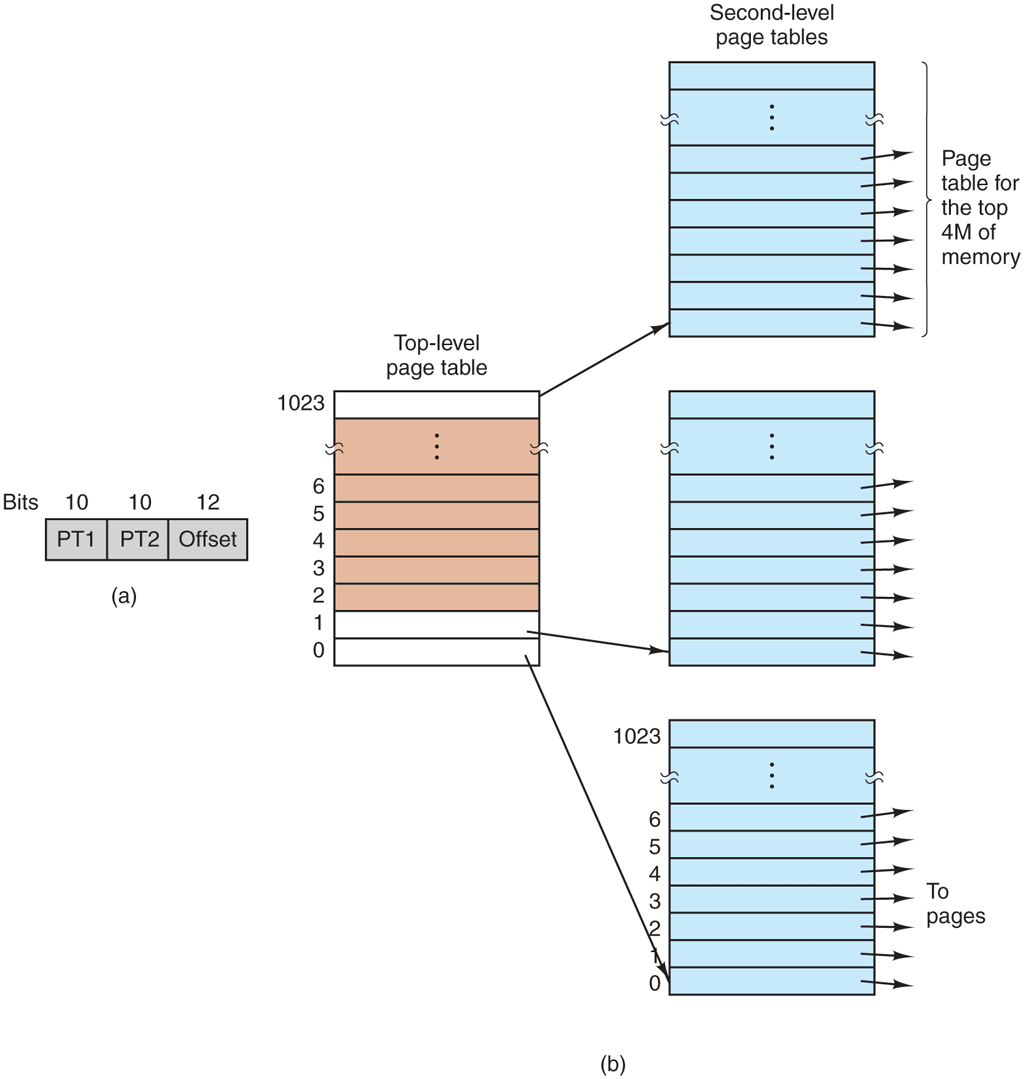
(a) A 32-bit address with two page table fields. (b) Two-level page tables.
The secret to the multilevel page table method is to avoid keeping all the page tables in memory all the time. In particular, those that are not needed should not be kept around. Suppose, for example, that a process needs 12 megabytes: the bottom 4 megabytes of memory for program text, the next 4 megabytes for data, and the top 4 megabytes for the stack. In between the top of the data and the bottom of the stack is a gigantic hole that is not used.
In Fig. 3-13(b), we see how the two-level page table works. On the left we see the top-level page table, with 1024 entries, corresponding to the 10-bit PT1 field. When a virtual address is presented to the MMU, it first extracts the PT1 field and uses this value as an index into the top-level page table. Each of these 1024 (or ) entries in the top-level page table represents 4M (or ) because the entire 4-gigabyte (i.e., 32-bit) virtual address space has been chopped into chunks of 4096 (or ) bytes.
The entry located by indexing into the top-level page table yields the address or the page frame number of a second-level page table. Entry 0 of the top-level page table points to the page table for the program text, entry 1 points to the page table for the data, and entry 1023 points to the page table for the stack. The other (shaded) entries are not used. The PT2 field is now used as an index into the selected second-level page table to find the page frame number for the page itself.
As an example, consider the 32-bit virtual address 0x00403004 (4,206,596 decimal), which is bytes into the data area. This virtual address corresponds to and The MMU first uses PT1 to index into the top-level page table and obtain entry 1, which corresponds to addresses 4M to It then uses PT2 to index into the second-level page table just found and extract entry 3, corresponding to addresses 12288 to 16383 within its 4M chunk (i.e., absolute addresses 4,206,592 to 4,210,687). This contains the page frame number of the page containing virtual address 0x00403004. If that page is not in memory, the Present/absent bit in the page table entry will have the value zero, causing a page fault. If the page is present in memory, the page frame number taken from the second-level page table is combined with the offset (4) to construct the physical address. This address is put on the bus and sent to memory.
The interesting thing to note about Fig. 3-13 is that although the address space contains over a million pages, only four page tables are needed: the top-level table, and the second-level tables for 0 to 4M (for the program text), 4M to 8M (for the data), and the top 4M (for the stack). The Present/absent bits in the remaining 1021 entries of the top-level page table are set to 0, forcing a page fault if they are ever accessed. Should this occur, the operating system will notice that the process is trying to reference memory that it is not supposed to and will take appropriate action, such as sending it a signal or killing it. In this example, we have chosen round numbers for the various sizes and have picked PT1 equal to PT2, but in actual practice other values are also possible, of course.
The two-level page table system of Fig. 3-13 can be expanded to three, four, or more levels. Additional levels give more flexibility. For instance, Intel’s 32 bit 80386 processor (launched in 1985) was able to address up to 4-GB of memory, using a two-level page table that consisted of a page directory whose entries pointed to page tables, which, in turn, pointed to the actual 4-KB page frames. Both the page directory and the page tables each contained 1024 entries, giving a total of addressable bytes, as desired.
Ten years later, the Pentium Pro introduced another level: the page directory pointer table. In addition, it extended each entry in each level of the page table hierarchy from 32 bits to 64 bits, so that it could address memory above the 4-GB boundary. As it had only 4 entries in the page directory pointer table, 512 in each page directory, and 512 in each page table, the total amount of memory it could address was still limited to a maximum of 4 GB. When proper 64-bit support was added to the x86 family (originally by AMD), the additional level could have been called the ‘‘page directory pointer table pointer’’ or something equally horrible. That would have been perfectly in line with how chip makers tend to name things. Mercifully, they did not do this. The alternative they cooked up, ‘‘page map level 4,’’ may not be a terribly catchy name either, but at least it is short and a bit clearer. At any rate, these processors now use all 512 entries in all tables, yielding an amount of addressable memory of bytes. They could have added another level, but they probably thought that 256 TB would be sufficient for a while.
Turns out they were wrong. Some of the newer processors have support for a fifth level to extend the size of addresses to 57 bits. With such an address space, one can address up to 128 petabytes. This is a lot of bytes. It allows huge files to be mapped in. Of course, the downside of so many levels is that page table walks become even more expensive.
Inverted Page Tables
An alternative to ever-increasing levels in a paging hierarchy is known as inverted page tables. They were first used by such processors as the PowerPC, the UltraSPARC, and the Itanium (sometimes referred to as ‘‘Itanic,’’ as it was not quite the success Intel had hoped for). It has now gone the way of the Amazon Fire Phone, Apple Newton, AT&T Picture Phone, Betamax video recorder, DeLorean car, Ford Edsel, and Windows Vista.
Inverted page tables, however, live on. In this design, there is one entry per page frame in real memory, rather than one entry per page of virtual address space. For example, with 64-bit virtual addresses, a 4-KB page size, and 16 GB of RAM, an inverted page table requires only 4,194,304 entries. The entry keeps track of which (process, virtual page) is located in the page frame.
Although inverted page tables save lots of space, at least when the virtual address space is much larger than the physical memory, they have a serious downside: virtual-to-physical translation becomes much, much harder. When process n references virtual page p, the hardware can no longer find the physical page by using p as an index into the page table. Instead, it must search the entire inverted page table for an entry Furthermore, this search must be done on every memory reference, not just on page faults. Searching a 256K table on every memory reference is not the way to make your machine blindingly fast.
The way out of this dilemma is to make use of the TLB. If the TLB can hold all of the heavily used pages, translation can happen just as fast as with regular page tables. On a TLB miss, however, the inverted page table has to be searched in software. One feasible way to accomplish this search is to have a hash table hashed on the virtual address. All the virtual pages currently in memory that have the same hash value are chained together, as shown in Fig. 3-14. If the hash table has as many slots as the machine has physical pages, the average chain will be only one entry long, greatly speeding up the mapping. Once the page frame number has been found, the new (virtual, physical) pair is entered into the TLB.
Figure 3-14
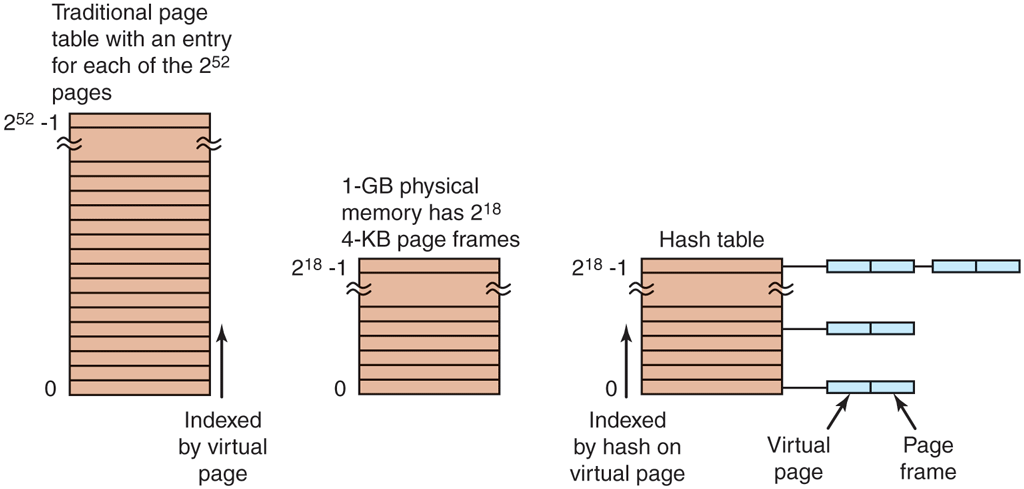
Comparison of a traditional page table with an inverted page table.
Inverted page tables are used on 64-bit machines because even with a very large page size, the number of page table entries is gigantic. For example, with 4-MB pages and 64-bit virtual addresses, page table entries are needed.