3.1 No Memory Abstraction
The simplest memory abstraction is to have no abstraction at all. Early mainframe computers (before 1960), early minicomputers (before 1970), and early personal computers (before 1980) had no memory abstraction. Every program simply saw the physical memory. When a program executed an instruction like
MOV REGISTER1,1000the computer just moved the contents of physical memory location 1000 to REGISTER1. Thus, the model of memory presented to the programmer was simply physical memory, a set of addresses from 0 to some maximum, each address corresponding to a cell containing some number of bits, commonly eight.
Under these conditions, it was not possible to have two running programs in memory at the same time. If the first program wrote a new value to, say, location 2000, this would erase whatever value the second program was storing there. Nothing would work and both programs would crash almost immediately.
Even with the model of memory being just physical memory, several options are possible. Three variations are shown in Fig. 3-1. The operating system may be at the very bottom of memory in RAM (Random Access Memory), as shown in Fig. 3-1(a), or it may be in ROM (Read-Only Memory) at the top of memory, as shown in Fig. 3-1(b), or the device drivers may be at the top of memory in a ROM and the rest of the system in RAM down below, as shown in Fig. 3-1(c). The first model was formerly used on mainframes and minicomputers but is rarely used any more. The second model is used on some handheld computers and embedded systems. The third model was used by early personal computers (e.g., running MSDOS), where the portion of the system in the ROM is called the BIOS (Basic Input Output System). Models (a) and (c) have the disadvantage that a bug in the user program can wipe out the operating system, possibly with disastrous results.
Figure 3-1
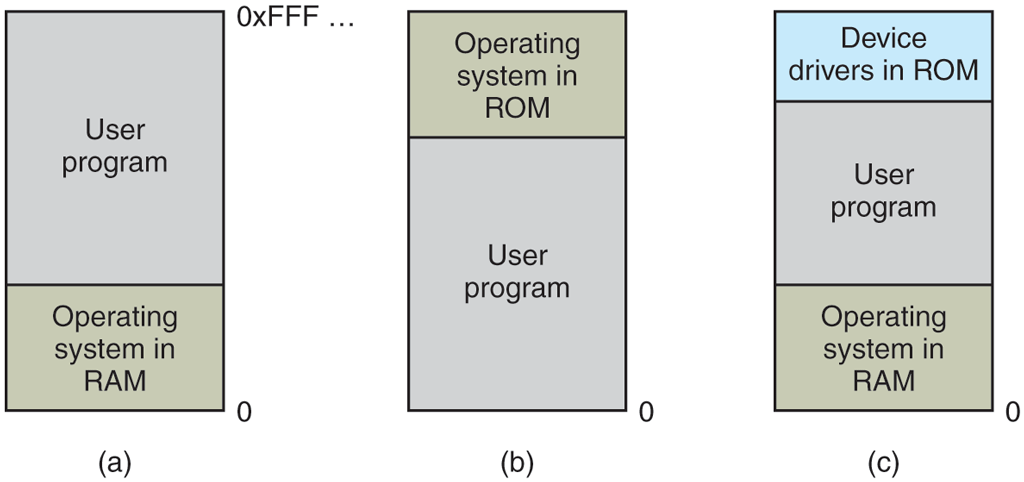
Three simple ways of organizing memory with an operating system and one user process. Other possibilities also exist.
When the system is organized in this way, generally only one process at a time can be running. As soon as the user types a command, the operating system copies the requested program from nonvolatile storage to memory and executes it. When the process finishes, the operating system displays a prompt character and waits for a user new command. When the operating system receives the command, it loads a new program into memory, overwriting the first one.
One way to get some parallelism in a system with no memory abstraction is to program with multiple threads. Since all threads in a process are supposed to see the same memory image, the fact that they are forced to is not a problem. While this idea works, it is of limited use since what people often want is unrelated programs to be running at the same time, something the threads abstraction does not provide. Furthermore, any system that is so primitive as to provide no memory abstraction is unlikely to provide a threads abstraction.
3.1.1 Running Multiple Programs Without a Memory Abstraction
However, even with no memory abstraction, it is possible to run multiple programs at the same time. What the operating system has to do is save the entire contents of memory to a file on nonvolatile storage, then bring in and run the next program. As long as there is only one program at a time in memory, there are no conflicts. This concept (swapping) will be discussed below.
With the addition of some special hardware, it is possible to run multiple programs concurrently, even without swapping. The early models of the IBM 360 solved the problem as follows. Memory was divided into 2-KB blocks and each was assigned a 4-bit protection key held in special registers inside the CPU. A machine with a 1-MB memory needed only 512 of these 4-bit registers for a total of 256 bytes of key storage. The PSW (Program Status Word) also contained a 4-bit key. The 360 hardware trapped any attempt by a running process to access memory with a protection code different from the PSW key. Since only the operating system could change the protection keys, user processes were prevented from interfering with one another and with the operating system itself.
Nevertheless, this solution had a major drawback, depicted in Fig. 3-2. Here we have two programs, each 16 KB in size, as shown in Fig. 3-2(a) and (b). The former is shaded to indicate that it has a different memory key than the latter. The first program starts out by jumping to address 24, which contains a MOV instruction. The second program starts out by jumping to address 28, which contains a CMP instruction. The instructions that are not relevant to this discussion are not shown. When the two programs are loaded consecutively in memory starting at address 0, we have the situation of Fig. 3-2(c). For this example, we assume the operating system is in high memory and thus not shown.
Figure 3-2
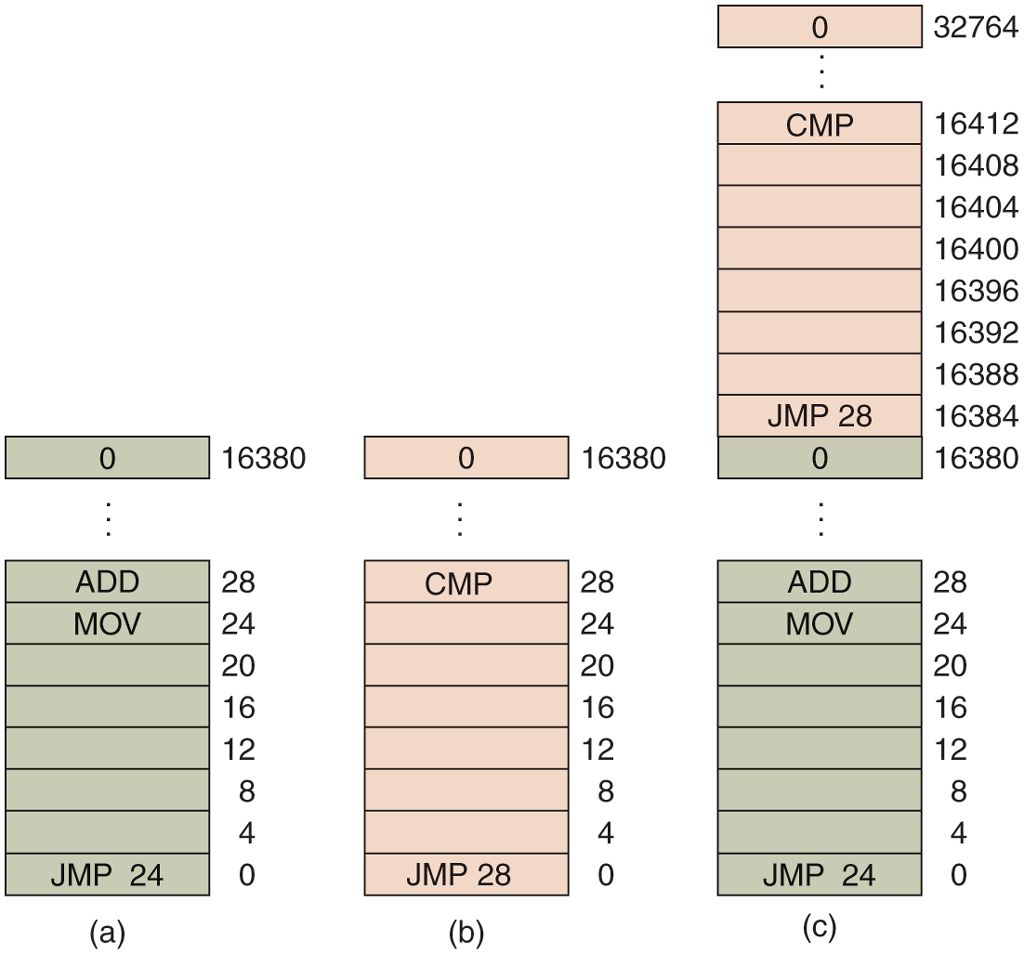
Illustration of the relocation problem. (a) A 16-KB program. (b) Another 16-KB program. (c) The two programs loaded consecutively into memory.
After the programs are loaded, they can be run. Since they have different memory keys, neither one can damage the other. But the problem is of a different nature. When the first program starts, it executes the JMP 24 instruction, which jumps to the instruction, as expected. This program functions normally.
However, after the first program has run long enough, the operating system may decide to run the second program, which has been loaded above the first one, at address 16,384. The first instruction executed is JMP 28, which jumps to the ADD instruction in the first program, instead of the CMP instruction it is supposed to jump to. The program will most likely crash in well under 1 sec.
The core problem here is that the two programs both reference absolute physical memory. That is not what we want at all. What we want is that each program can reference a private set of addresses local to it. We will show how this can be accomplished shortly. What the IBM 360 did as a stop-gap solution was modify the second program on the fly as it loaded it into memory using a technique known as static relocation. It worked like this. When a program was loaded at address 16,384, the constant 16,384 was added to every program address during the load process (so “JMP 28” became “JMP 16,412”, etc.).While this mechanism works if done right, it is not a very general solution and slows down loading. Furthermore, it requires extra information in all executable programs to indicate which words contain (relocatable) addresses and which do not. After all, the “28” in Fig. 3-2(b) has to be relocated but an instruction like
MOV REGISTER1,28which moves the number 28 to REGISTER1 must not be relocated. The loader needs some way to tell what is an address and what is a constant.
Finally, as we pointed out in Chap. 1, history tends to repeat itself in the computer world. While direct addressing of physical memory is but a distant memory (sorry) on mainframes, minicomputers, desktop computers, notebooks, and smartphones, the lack of a memory abstraction is still common in embedded and smart card systems. Devices such as radios, washing machines, and microwave ovens are all full of software (in ROM) these days, and in most cases the software addresses absolute memory. This works because all the programs are known in advance and users are not free to run their own software on their toaster.
In fact, history loops back upon itself in interesting ways. For instance, modern Intel x86 processors have advanced forms of memory management and isolation (as we shall see), far more powerful than the simple combination of protection keys and static relocation in the IBM 360. Nevertheless, Intel started adding these exact (and seemingly old-fashioned) protection keys to its CPUs only in 2017, more than 50 years after the first IBM 360 came into use. Now they are touted as an important security-enhancing innovation.
Conversely, where high-end embedded systems (such as smartphones) have elaborate operating systems, simpler ones do not. In some cases, there is an operating system, but it is just a library that is linked with the application program and provides system calls for performing I/O and other common tasks. The e-Cos operating system is a common example of an operating system as library.