2.2 Threads
In traditional operating systems, each process has an address space and a single thread of control. In fact, that is almost the definition of a process. Nevertheless, in many situations, it is useful to have multiple threads of control in the same address space running in quasi-parallel, as though they were (almost) separate processes (except for the shared address space). In the following sections, we will discuss threads and their implications. Later we will look at an alternative solution.
2.2.1 Thread Usage
Why would anyone want to have a kind of process within a process? It turns out there are several reasons for having these miniprocesses, called threads. Let us now examine some of them. The main reason for having threads is that in many applications, multiple activities are going on at once. Some of these may block from time to time. By decomposing such an application into multiple sequential threads that run in quasi-parallel, the programming model becomes simpler.
We have seen this argument once before. It is precisely the argument for having processes. Instead of thinking about interrupts, timers, and context switches, we can think about parallel processes. Only now with threads we add a new element: the ability for the parallel entities to share an address space and all of its data among themselves. This ability is essential for certain applications, which is why having multiple processes (with their separate address spaces) will not work.
A second argument for having threads is that since they are lighter weight than processes, they are easier (i.e., faster) to create and destroy. In many systems, creating a thread goes 10–100 times faster than creating a process. When the number of threads needed changes dynamically and rapidly, this property is useful to have.
A third reason for having threads is also a performance argument. Threads yield no performance gain when all of them are CPU bound, but when there is substantial computing and also substantial I/O, having threads allows these activities to overlap, thus speeding up the application.
Finally, threads are useful on systems with multiple CPUs, where real parallelism is possible. We will come back to this issue in Chap. 8.
It is easiest to see why threads are useful by looking at some concrete examples. As a first example, consider a word processor. Word processors usually display the document being created on the screen formatted exactly as it will appear on the printed page. In particular, all the line breaks and page breaks are in their correct and final positions, so that the user can inspect them and change the document if need be (e.g., to eliminate widows and orphans—incomplete top and bottom lines on a page, which are considered esthetically unpleasing).
Suppose that the user is writing a book. From the author’s point of view, it is easiest to keep the entire book as a single file to make it easier to search for topics, perform global substitutions, and so on. Alternatively, each chapter might be a separate file. However, having every section and subsection as a separate file is a real nuisance when global changes have to be made to the entire book, since then hundreds of files have to be individually edited, one at a time. For example, if proposed standard xxxx is approved just before the book goes to press, all occurrences of ‘‘Draft Standard xxxx’’ have to be changed to ‘‘Standard xxxx’’ at the last minute. If the entire book is one file, typically a single command can do all the substitutions. In contrast, if the book is spread over 300 files, each one must be edited separately.
Now consider what happens when the user suddenly deletes one sentence from page 1 of an 800-page book. After checking the changed page for correctness, she now wants to make another change on page 600 and types in a command telling the word processor to go to that page (possibly by searching for a phrase occurring only there). The word processor is now forced to reformat the entire book up to page 600 on the spot because it does not know what the first line of page 600 will be until it has processed all the previous pages. There may be a substantial delay before page 600 can be displayed, leading to an unhappy user.
Threads can help here. Suppose that the word processor is written as a twothreaded program. One thread interacts with the user and the other handles reformatting in the background. As soon as the sentence is deleted from page 1, the interactive thread tells the reformatting thread to reformat the whole book. Meanwhile, the interactive thread continues to listen to the keyboard and mouse and responds to simple commands like scrolling page 1 while the other thread is computing madly in the background. With a little luck, the reformatting will be completed before the user asks to see page 600, so it can be displayed instantly.
While we are at it, why not add a third thread? Many word processors have a feature of automatically saving the entire file to disk every few minutes to protect the user against losing a day’s work in the event of a program crash, system crash, or power failure. The third thread can handle the disk backups without interfering with the other two. The situation with three threads is shown in Fig. 2-7.
Figure 2-7
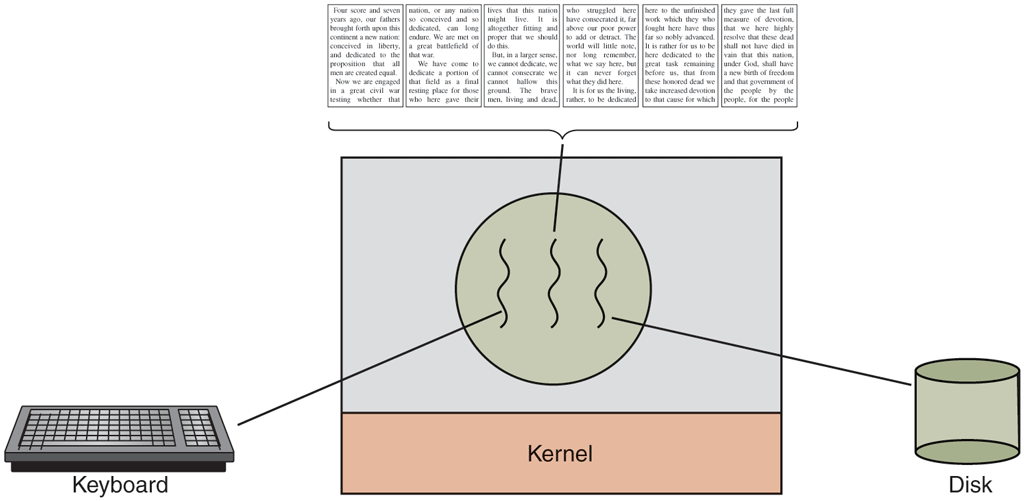
A word processor with three threads.
If the program were single-threaded, then whenever a disk backup started, commands from the keyboard and mouse would be ignored until the backup was finished. The user would surely perceive this as sluggish performance. Alternatively, keyboard and mouse events could interrupt the disk backup, allowing good performance but leading to a complex interrupt-driven programming model. With three threads, the programming model is much simpler. The first thread just interacts with the user. The second thread reformats the document when told to. The third thread writes the contents of RAM to disk periodically.
It should be clear that having three separate processes would not work here because all three threads need to operate on the document. By having three threads instead of three processes, they share a common memory and thus all have access to the document being edited. With three processes this would be impossible.
An analogous situation exists with many other interactive programs. For example, an electronic spreadsheet is a program that allows a user to maintain a matrix, some of whose elements are data provided by the user. Other elements are computed based on the input data using potentially complex formulas. A spreadsheet that computes the predicted annual profit of a substantial company might have hundreds of pages and thousands of complex formulas based on hundreds of input variables. When a user changes one input variable, many cells may have to be recomputed. By having a background thread do the recomputation, the interactive thread can allow the user to make additional changes while the computation is going on. Similarly, a third thread can handle periodic backups to disk on its own.
Now consider yet another example of where threads can be useful: a server for a Website. Requests for pages come in and the requested page is sent back to the client. At most Websites, some pages are more commonly accessed than other pages. For example, Samsung’s home page is accessed far more than a page deep in the tree containing the detailed technical specifications of any smartphone model. Web servers use this fact to improve performance by maintaining a collection of heavily used pages in main memory to eliminate the need to go to disk to get them. Such a collection is called a cache and is used in many other contexts as well. We saw CPU caches in Chap. 1, for example.
One way to organize the Web server is shown in Fig. 2-8(a). Here one thread, the dispatcher, reads incoming requests for work from the network. After examining the request, it chooses an idle (i.e., blocked) worker thread and hands it the request, possibly by writing a pointer to the message into a special word associated with each thread. The dispatcher then wakes up the sleeping worker, moving it from blocked state to ready state.
Figure 2-8
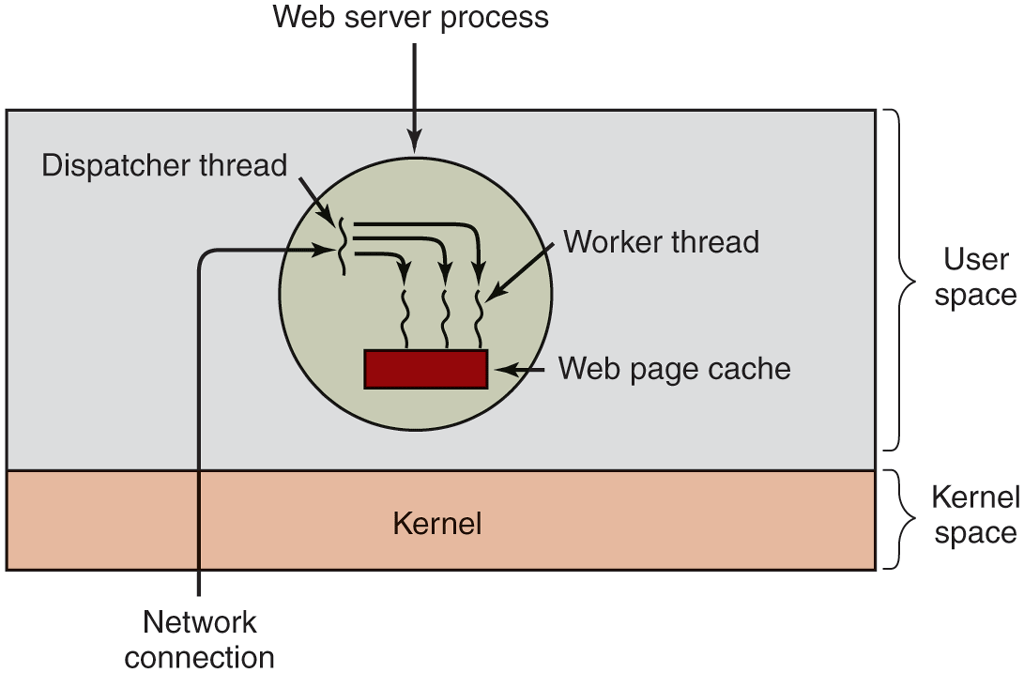
A multithreaded Web server.
When the worker wakes up, it checks to see if the request can be satisfied from the Web page cache, to which all threads have access. If not, it starts a read operation to get the page from the disk and blocks until the disk operation completes. When the thread blocks on the disk operation, another thread is chosen to run, possibly the dispatcher, in order to acquire more work, or possibly another worker that is now ready to run.
This model allows the server to be written as a collection of sequential threads. The dispatcher’s program consists of an infinite loop for getting a work request and handing it off to a worker. Each worker’s code consists of an infinite loop consisting of accepting a request from the dispatcher and checking the Web cache to see if the page is present. If so, it is returned to the client, and the worker blocks waiting for a new request. If not, it gets the page from the disk, returns it to the client, and blocks waiting for a new request.
A rough outline of the code is given in Fig. 2-9. Here, as in the rest of this book, TRUE is assumed to be the constant 1. Also, buf and page are structures appropriate for holding a work request and a Web page, respectively.
Figure 2-9
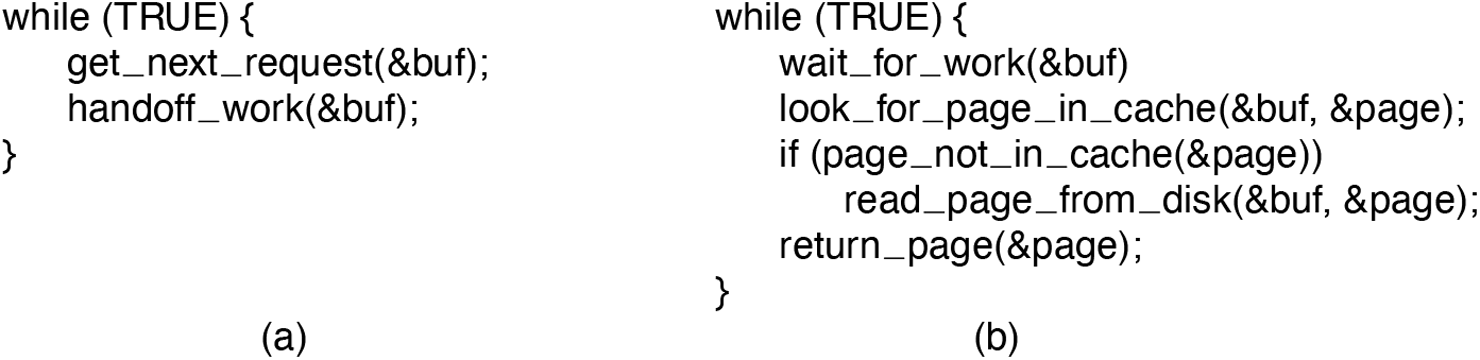
A rough outline of the code for Fig. 2-8. (a) Dispatcher thread.(b) Worker thread.
Consider how the Web server could be written in the absence of threads. One possibility is to have it operate as a single thread. The main loop of the Web server gets a request, examines it, and carries it out to completion before getting the next one. While waiting for the disk, the server is idle and does not process any other incoming requests. If the Web server is running on a dedicated machine, as is commonly the case, the CPU is simply idle while the Web server is waiting for the disk. The net result is that many fewer requests/sec can be processed. Thus, threads gain considerable performance, but each thread is programmed sequentially, in the usual way. We will look at an alternative, event-driven, approach later.
A third example where threads are useful is in applications that must process very large amounts of data. The normal approach is to read in a block of data, process it, and then write it out again. The problem here is that if only blocking system calls are available, the process blocks while data are coming in and data are going out. Having the CPU go idle when there is lots of computing to do is clearly wasteful and should be avoided if possible.
Threads offer a solution. The process could be structured with an input thread, a processing thread, and an output thread. The input thread reads data into an input buffer. The processing thread takes data out of the input buffer, processes them, and puts the results in an output buffer. The output buffer writes these results back to disk. In this way, input, output, and processing can all be going on at the same time. Of course, this model works only if a system call blocks only the calling thread, not the entire process.
2.2.2 The Classical Thread Model
Now that we have seen why threads might be useful and how they can be used, let us investigate the idea a bit more closely. The process model is based on two independent concepts: resource grouping and execution. Sometimes it is useful to separate them; this is where threads come in. First we will look at the classical thread model; after that we will examine the Linux thread model, which blurs the line between processes and threads.
One way of looking at a process is that it is a convenient way to group together related resources. A process has an address space that contains program text and data, as well as other resources. These resources may include open files, child processes, pending alarms, signal handlers, accounting information, and more. By putting them together in the form of a process, they can be managed more easily.
The other concept a process has is a thread of execution, usually shortened to just thread. The thread has a program counter associated with it that keeps track of which instruction to execute next. It has registers, which hold its current working variables. It also has a stack, which contains the thread’s execution history, one frame for each procedure called but not yet returned from. Although a thread must execute in some process, the thread and its process are different concepts and can be treated separately. Processes are used to group resources together; threads are the entities scheduled for execution on the CPU.
What threads add to the process model is to allow multiple executions to take place in the same process environment (and address space), to a large degree independent of one another. Having multiple threads running in parallel in one process is analogous to having multiple processes running in parallel in one computer. In the former case, the threads share an address space and other resources. In the latter case, processes share physical memory, disks, printers, and other resources. Because threads have some of the properties of processes, they are sometimes called lightweight processes. The term multithreading is also used to describe the situation of allowing multiple threads in the same process. As we saw in Chap. 1, some CPUs have direct hardware support for multithreading and allow a thread switch to happen on a nanosecond time scale.
In Fig. 2-10(a) we see three traditional processes. Each process has its own address space and a single thread of control. In contrast, in Fig. 2-10(b) we see a single process with three threads of control. Although in both cases we have three threads, in Fig. 2-10(a) each of them operates in a different address space, whereas in Fig. 2-10(b) all three of them share the same address space.
Figure 2-10
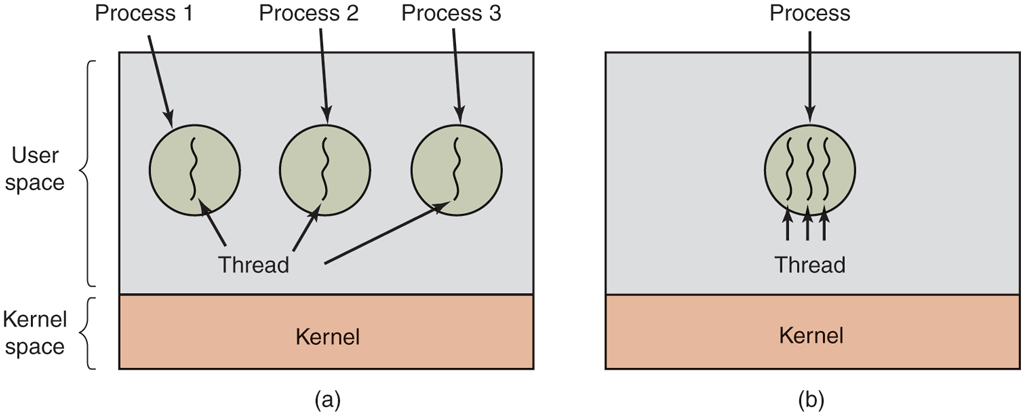
(a) Three processes each with one thread. (b) One process with three threads.
When a multithreaded process is run on a single-CPU system, the threads take turns running. In Fig. 2-1, we saw how multiprogramming of processes works. By switching back and forth among multiple processes, the system gives the illusion of separate sequential processes running in parallel. Multithreading works the same way. The CPU switches rapidly back and forth among the threads, providing the illusion that the threads are running in parallel, albeit on a slower CPU. With three compute-bound threads in a process, the threads would appear to be running in parallel, each one on a CPU with one-third the speed of the real CPU.
The different threads in a process are not as independent as different processes. All threads have exactly the same address space, which means that they also share the same global variables. Since every thread can access every memory address within the process’ address space, one thread can read, write, or even wipe out another thread’s stack. There is no protection between threads because (1) it is impossible, and (2) it should not be necessary. Unlike different processes, which may be from different users and which may be mutually hostile to one another, a process is always owned by a single user, who has presumably created multiple threads so that they can cooperate, not fight with each other. In addition to sharing an address space, all the threads can share the same set of open files, child processes, signals, alarms, and so forth, as shown in Fig. 2-11. Thus, the organization of Fig. 2-10(a) would be used when the three processes are essentially unrelated, whereas Fig. 2-10(b) would be appropriate when the three threads are actually part of the same job and are actively and closely cooperating with each other.
Figure 2-11
Per-process items Address space Global variables Open files Child processes Pending alarms Signals and signal handlers Accounting infor mation |
Per-thread items Program counter Registers Stack State |
The first column lists some items shared by all threads in a process. The second one lists some items private to each thread.
The items in the first column are process properties, not thread properties. For example, if one thread opens a file, that file is visible to the other threads in the process and they can read and write it. This is logical, since the process is the unit of resource management, not the thread. If each thread had its own address space, open files, pending alarms, and so on, it would be a separate process. What we are trying to achieve with the thread concept is the ability for multiple threads of execution to share a set of resources so that they can work together closely to perform some task.
Like a traditional process (i.e., a process with only one thread), a thread can be in any one of several states: running, blocked, ready, or terminated. A running thread currently has the CPU and is active. In contrast, a blocked thread is waiting for some event to unblock it. For example, when a thread performs a system call to read from the keyboard, it is blocked until input is typed. A thread can block waiting for some external event to happen or for some other thread to unblock it. A ready thread is scheduled to run and will as soon as its turn comes up. The transitions between thread states are the same as those between process states and are illustrated in Fig. 2-2.
It is important to realize that each thread has its own stack, as illustrated in Fig. 2-12. Each thread’s stack contains one frame for each procedure called but not yet returned from. This frame contains the procedure’s local variables and the return address to use when the procedure call has finished. For example, if procedure X calls procedure Y and Y calls procedure Z, then while Z is executing, the frames for X, Y, and Z will all be on the stack. Each thread will generally call different procedures and thus have a different execution history. This is why each thread needs its own stack.
Figure 2-12
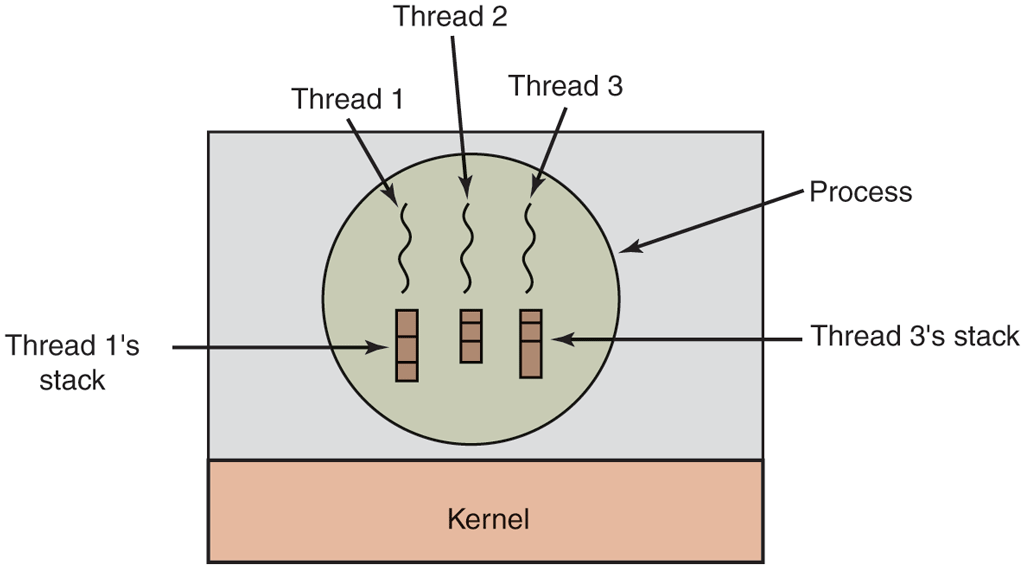
Each thread has its own stack.
When multithreading is present, processes usually start with a single thread present. This thread has the ability to create new threads by calling a library procedure such as thread_create. A parameter to thread_create specifies the name of a procedure for the new thread to run. It is not necessary (or even possible) to specify anything about the new thread’s address space, since it automatically runs in the address space of the creating thread. Sometimes threads are hierarchical, with a parent-child relationship, but often no such relationship exists, with all threads being equal. With or without a hierarchical relationship, the creating thread is usually returned a thread identifier that names the new thread.
When a thread has finished its work, it can exit by calling a library procedure, say, thread_exit. It then vanishes and is no longer schedulable. In some thread systems, one thread can wait for a (specific) thread to exit by calling a procedure, for example, thread_join. This procedure blocks the calling thread until a (specific) thread has exited. In this regard, thread creation and termination is very much like process creation and termination, with approximately the same options as well.
Another common thread call is thread_yield, which allows a thread to voluntarily give up the CPU to let another thread run. Such a call is important because there is no clock interrupt to actually enforce multiprogramming as there is with processes. Thus, it is important for threads to be polite and voluntarily surrender the CPU from time to time to give other threads a chance to run. Other calls allow one thread to wait for another thread to finish some work, for a thread to announce that it has finished some work, and so on.
While threads are often useful, they also introduce a number of serious complications into the programming model. To start with, consider the effects of the UNIX fork system call. If the parent process has multiple threads, should the child also have them? If not, the process may not function properly, since all of them may be essential. However, if the child process gets as many threads as the parent, what happens if a thread in the parent was blocked on a read call, say, from the keyboard? Are two threads now blocked on the keyboard, one in the parent and one in the child? When a line is typed, do both threads get a copy of it? Only the parent? Only the child? The same problem exists with open network connections. The designers of the operating system have to make choices clear and carefully define the semantics so users will understand the behavior of the threads.
We will look at some of these issues and observe that the solutions are often pragmatic. For instance, on a system such as Linux, a fork of a multithreaded process will create only a single thread in the child. However, using Posix threads a program can use the pthread_atfork() call to register fork handlers (procedures that are called when a fork occurs), so it can start additional threads and do whatever is needed to get going properly again. Even so, it is important to note that many of these issues are design choices and different systems may opt for different solutions. For now, the most important thing to remember is that the relation between threads and fork can be quite complex.
Another class of problems is related to the fact that threads share many data structures. What happens if one thread closes a file while another one is still reading from it? Suppose one thread notices that there is too little memory and starts allocating more memory. Partway through, a thread switch occurs, and the new thread also notices that there is too little memory and also starts allocating more memory. Memory will probably be allocated twice. These problems can be solved with some effort, but careful thought and design are needed to make multithreaded programs work correctly.
2.2.3 POSIX Threads
To make it possible to write portable threaded programs, IEEE has defined a standard for threads in IEEE standard 1003.1c. The threads package it defines is called Pthreads. Most UNIX systems support it. The standard defines over 60 function calls, which is far too many to go over here. Instead, we will just describe a few of the major ones to give an idea of how it works. The calls we will describe below are listed in Fig. 2-13.
Figure 2-13
| Thread call | Description |
|---|---|
pthread_create |
Create a new thread |
pthread_exit |
Terminate the calling thread |
pthread_join |
Wait for a specific thread to exit |
pthread_yield |
Release the CPU to let another thread run |
pthread_attr_init |
Create and initialize a thread’s attribute structure |
pthread_attr_destroy |
Remove a thread’s attribute structure |
Some of the Pthreads function calls.
All Pthreads threads have certain properties. Each one has an identifier, a set of registers (including the program counter), and a set of attributes, which are stored in an attribute structure. The attributes include the stack size, scheduling parameters, and other items needed to use the thread.
A new thread is created using the pthread_create call. The thread identifier of the newly created thread is returned as the function value. This call is intentionally very much like the fork system call (except with parameters), with the thread identifier playing the role of the PID, mostly for identifying threads referenced in other calls. When a thread has finished the work it has been assigned, it can terminate by calling pthread_exit. This call stops the thread and releases its stack.
Often a thread has a need to wait for another thread to finish its work and exit before it can continue. The thread that is waiting calls pthread_join to wait for a specific other thread to terminate. The thread identifier of the thread to wait for is given as a parameter.
Sometimes it happens that a thread is not logically blocked, but feels that it has run long enough and wants to give another thread a chance to run. It can accomplish this goal by calling pthread_yield. There is no such call for processes because the assumption there is that processes are fiercely competitive and each wants all the CPU time it can get (although a very public-spirited process could call sleep to yield the CPU briefly). However, since the threads of a process are working together and their code is invariably written by the same programmer, sometimes the programmer wants them to give each other another chance.
The next two thread calls deal with attributes. Pthread_attr_init creates the attribute structure associated with a thread and initializes it to the default values. These values (such as the priority) can be changed by manipulating fields in the attribute structure.
Finally, pthread_attr_destroy removes a thread’s attribute structure, freeing up its memory. It does not affect threads using it; they continue to exist.
To get a better feel for how Pthreads works, consider the simple example of Fig. 2-14. Here the main program loops NUMBER_OF_THREADS times, creating a new thread on each iteration, after announcing its intention. If the thread creation fails, it prints an error message and then exits. After creating all the threads, the main program exits.
Figure 2-14
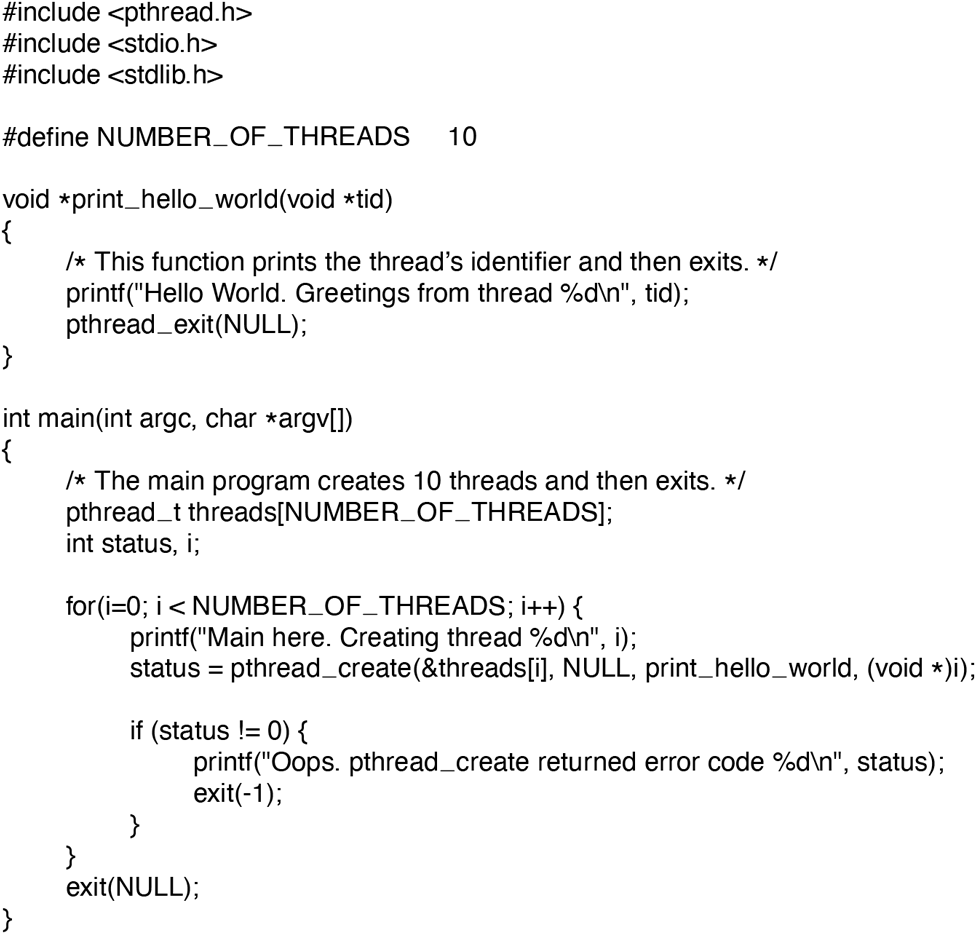
An example program using threads.
When a thread is created, it prints a one-line message announcing itself, then it exits. The order in which the various messages are interleaved is nondeterminate and may vary on consecutive runs of the program.
The Pthreads calls described above are not the only ones. We will examine some of the others after we have discussed process and thread synchronization.
2.2.4 Implementing Threads in User Space
There are two main places to implement threads: user space and the kernel. The choice is a bit controversial, and a hybrid implementation is also possible. We will now describe these methods, along with their advantages and disadvantages.
The first method is to put the threads package entirely in user space. The kernel knows nothing about them. As far as the kernel is concerned, it is managing ordinary, single-threaded processes. The first, and most obvious, advantage is that a user-level threads package can be implemented on an operating system that does not support threads. All operating systems used to fall into this category, and even now some still do. With this approach, threads are implemented by a library.
All of these implementations have the same general structure, illustrated in Fig. 2-15(a). The threads run on top of a run-time system, which is a collection of procedures that manage threads. We have seen four of these already: pthread_create, pthread_exit, pthread_join, and pthread_yield, but usually there are more.
Figure 2-15
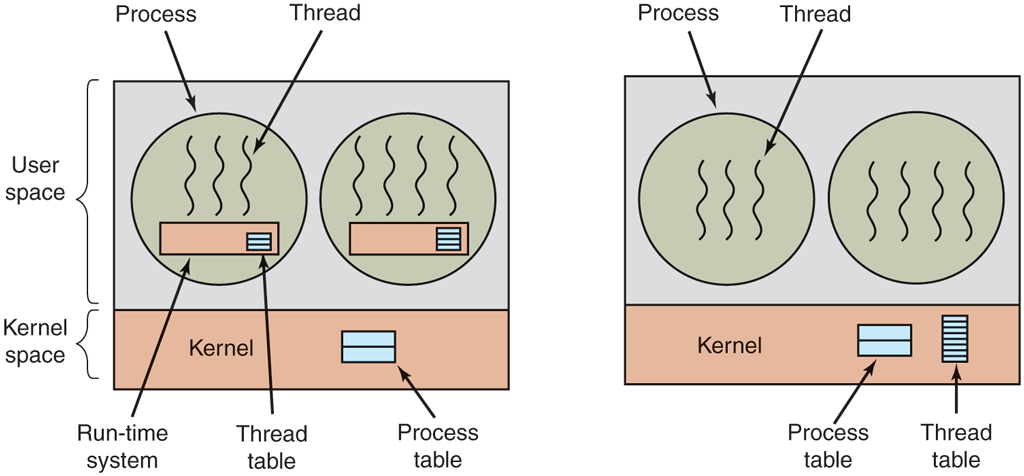
(a) A user-level threads package. (b) A threads package managed by the kernel.
When threads are managed in user space, each process needs its own private thread table to keep track of the threads in that process. This table is analogous to the kernel’s process table, except that it keeps track only of the per-thread properties, such as each thread’s program counter, stack pointer, registers, state, and so forth. The thread table is managed by the run-time system. When a thread is moved to the ready or blocked state, the information needed to restart it is stored in the thread table, exactly the same way as the kernel stores information about processes in the process table.
When a thread does something that may cause it to become blocked locally, for example, waiting for another thread in its process to complete some work, it calls a run-time system procedure. This procedure checks to see if the thread must be put into blocked state. If so, it stores the thread’s registers (i.e., its own) in the thread table, looks in the table for a ready thread to run, and reloads the machine registers with the new thread’s saved values. As soon as the stack pointer and program counter have been switched, the new thread comes to life again automatically. If the machine happens to have an instruction to store all the registers and another one to load them all, the entire thread switch can be done in just a handful of instructions. Doing thread switching like this is at least an order of magnitude— maybe more—faster than trapping to the kernel and is a strong argument in favor of user-level threads packages.
In addition, when a thread is finished running for the moment, for example, when it calls thread_yield, the code of thread_yield saves the thread’s information in the thread table and then calls the thread scheduler to pick another thread to run. The procedure that saves the thread’s state and the scheduler are just local procedures, so invoking them is much more efficient than making a kernel call. There is no need for a trap, a context switch, flushing of caches, and so on. This makes thread scheduling very fast.
User-level threads also have other advantages. They allow each process to have its own customized scheduling algorithm. For some applications, for example, those with a garbage-collector thread, not having to worry about a thread being stopped at an inconvenient moment is a plus. They also scale better, since kernel threads invariably require some table space and stack space in the kernel, which can be a problem if there is a very large number of threads.
Despite their better performance, user-level threads packages have some major problems. First among these is the problem of how blocking system calls are implemented. Suppose that a thread reads from the keyboard before any keys have been hit. Letting the thread actually make the system call is unacceptable, since this will stop all the threads. One of the main goals of having threads in the first place was to allow each thread to use blocking calls, but to prevent one blocked thread from affecting the others. With blocking system calls, it is hard to see how this goal can be achieved readily.
The system calls could all be changed to be nonblocking (e.g., a read on the keyboard would just return 0 bytes if no characters were already buffered), but requiring changes to the operating system is unattractive. Besides, one argument for user-level threads was precisely that they could run with existing operating systems. In addition, changing the semantics of read will require changes to many user programs.
Another alternative is available in the event that it is possible to tell in advance if a call will block. In most versions of UNIX, a system call, select, exists, which allows the caller to tell whether a prospective read will block. When this call is present, the library procedure read can be replaced with a new one that first does a select call and then does the read call only if it is safe (i.e., will not block). If the read call will block, the call is not made. Instead, another thread is run. The next time the run-time system gets control, it can check again to see if the read is now safe. This approach requires rewriting parts of the system call library, and is inefficient and inelegant, but there is little choice. The code placed around the system call to do the checking is called a wrapper. (As we shall see, many operating systems have even more efficient mechanisms for asynchronous I/O, such as epoll on Linux and kqueue on FreeBSD).
Somewhat analogous to the problem of blocking system calls is the problem of page faults. We will study these in Chap. 3. For the moment, suffice it to say that computers can be set up in such a way that not all of the program is in main memory at once. If the program calls or jumps to an instruction that is not in memory, a page fault occurs and the operating system will go and get the missing instruction (and its neighbors) from disk. This is called a page fault. The process is blocked while the necessary instruction is being located and read in. If a thread causes a page fault, the kernel, unaware of even the existence of threads, naturally blocks the entire process until the disk I/O is complete, even though other threads might be runnable.
Another problem with user-level thread packages is that if a thread starts running, no other thread in that process will ever run unless the first thread voluntarily gives up the CPU. Within a single process, there are no clock interrupts, making it impossible to schedule processes in round-robin fashion (taking turns). Unless a thread exits the run-time system of its own free will, the scheduler will never run.
One possible solution to the problem of threads running forever is to have the run-time system request a clock signal (interrupt) once a second to give it control, but this, too, is crude and messy to program. Periodic clock interrupts at a higher frequency are not always possible, and even if they are, the total overhead may be substantial. Furthermore, a thread might also need a clock interrupt, interfering with the run-time system’s use of the clock.
Another, and really the most devastating, argument against user-level threads is that programmers typically want threads precisely in applications where threads block often, as, for example, in a multithreaded Web server. These threads are constantly making system calls. Once a trap has occurred to the kernel to carry out the system call, it is hardly any more work for the kernel to switch threads if the old one has blocked, and having the kernel do this eliminates the need for constantly making select system calls to see if read system calls are safe. For applications that are CPU bound and rarely block, what is the point of having threads at all? No one would seriously propose computing the first n prime numbers or playing chess using threads because there is nothing to be gained by doing it that way.
2.2.5 Implementing Threads in the Kernel
Now let us consider having the kernel know about and manage the threads. As shown in Fig. 2-15(b), there is now no need for a run-time system or thread table in each process. Instead, the kernel has a thread table that keeps track of all the threads in the system. When a thread wants to create a new thread or destroy an existing thread, it makes a kernel call, which then does the creation or destruction by updating the kernel thread table.
The kernel’s thread table holds each thread’s registers, state, and other information. The information is the same as with user-level threads, but now kept in the kernel instead of in user space (inside the run-time system). This information is a subset of the information that traditional kernels maintain about their singlethreaded processes, that is, the process state. In addition, the kernel also maintains the traditional process table to keep track of processes.
All calls that might block a thread are implemented as system calls, at considerably greater cost than a call to a run-time system procedure. When a thread blocks, the kernel may choose to run either another thread from the same process (if one is ready) or a thread from a different process. With user-level threads, the run-time system keeps running threads from its own process until the kernel takes the CPU away from it (or there are no ready threads left to run).
Due to the relatively greater cost of creating and destroying threads in the kernel, some systems take an environmentally correct approach and recycle their threads. When a thread is destroyed, it is marked as not runnable, but its kernel data structures are not otherwise affected. Later, when a new thread must be created, an old thread is reactivated, saving some overhead. Thread recycling is also possible for user-level threads, but since the thread-management overhead is much smaller, there is less incentive to do this.
Kernel threads do not require any new, nonblocking system calls. In addition, if one thread in a process causes a page fault, the kernel can easily check to see if the process has any other runnable threads, and if so, run one of them while waiting for the required page to be brought in from the disk. Their main disadvantage is that the cost of a system call is substantial, so if thread operations (creation, termination, etc.) are common, much more overhead will be incurred.
While kernel threads solve some problems, they do not solve all problems. For example, we still have to think about what happens when a multithreaded process forks. Does the new process have as many threads as the old one did, or does it have just one? In many cases, the best choice depends on what the process is planning to do next. If it is going to call exec to start a new program, probably one thread is the correct choice, but if it continues to execute, reproducing all the threads is probably best.
Another issue with threads is signals. Remember that signals are sent to processes, not to threads, at least in the classical model. When a signal comes in, which thread should handle it? Possibly threads could register their interest in certain signals, so when a signal came in it would be given to the thread that said it wants it. On Linux, for instance, a signal may be handled by any thread and the lucky winner is selected by the operating system, but we can simply block the signal on all threads except one. If two or more threads register for the same signal, the operating system picks a thread (say, at random) and lets it handle the signal. Anyway, these are only some of the problems threads introduce, and there are more. Unless the programmer is very careful, it is easy to make mistakes.
2.2.6 Hybrid Implementations
Various ways have been investigated to try to combine the advantages of userlevel threads with kernel-level threads. One way is use kernel-level threads and then multiplex user-level threads onto some or all of them, as shown in Fig. 2-16. When this approach is used, the programmer can determine how many kernel threads to use and how many user-level threads to multiplex on each one. This model gives the ultimate flexibility.
Figure 2-16
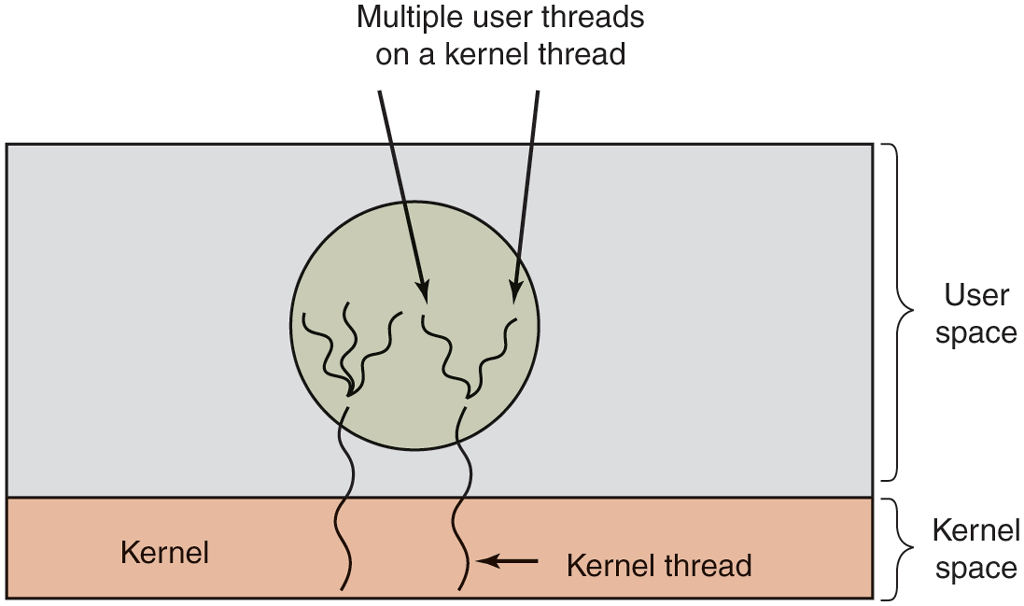
Multiplexing user-level threads onto kernel-level threads.
With this approach, the kernel is aware of only the kernel-level threads and thus schedules those. Some of those threads may have multiple user-level threads multiplexed on top of them. These user-level threads are created, destroyed, and scheduled just like user-level threads in a process that runs on an operating system without multithreading capability. In this model, each kernel-level thread has some set of user-level threads that take turns using it.
2.2.7 Making Single-Threaded Code Multithreaded
Many existing programs were written for single-threaded processes. Converting these to multithreading is much trickier than it may at first appear. Below we will examine just a few of the pitfalls.
As a start, the code of a thread normally consists of multiple procedures, just like a process. These may have local variables, global variables, and parameters. Local variables and parameters do not cause any trouble, but variables that are global to a thread but not global to the entire program are a problem. These are variables that are global in the sense that many procedures within the thread use them (as they might use any global variable), but other threads should logically leave them alone.
As an example, consider the errno variable maintained by UNIX. When a process (or a thread) makes a system call that fails, the error code is put into errno. In Fig. 2-17, thread 1 executes the system call access to find out if it has permission to access a certain file. The operating system returns the answer in the global variable errno. After control has returned to thread 1, but before it has a chance to read errno, the scheduler decides that thread 1 has had enough CPU time for the moment and switches to thread 2. Thread 2 executes an open call that fails, which causes errno to be overwritten and thread 1’s access code to be lost forever. When thread 1 starts up later, it will read the wrong value and behave incorrectly.
Figure 2-17
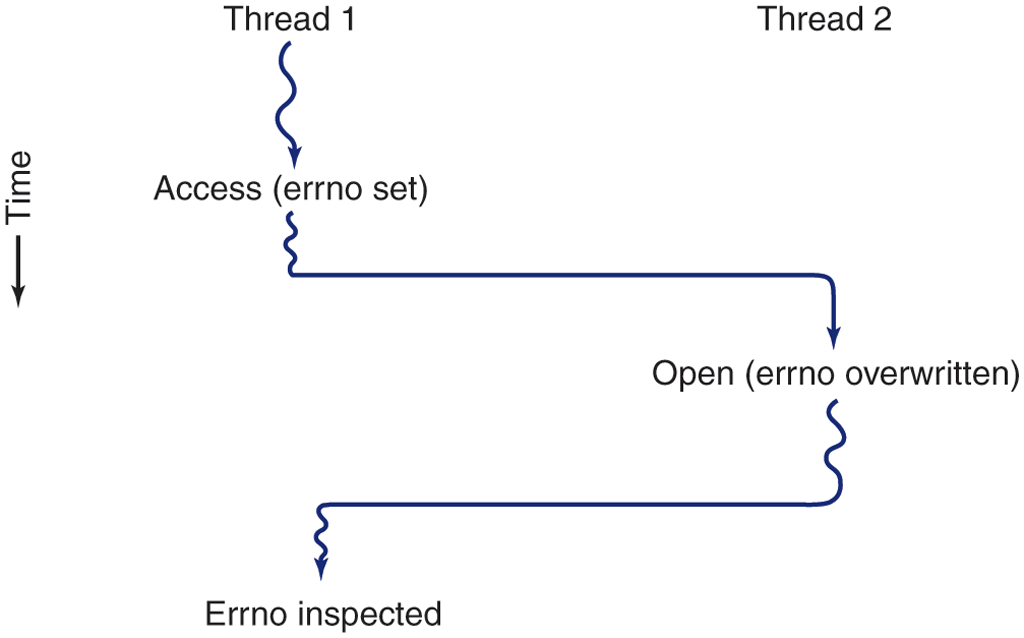
Conflicts between threads over the use of a global variable.
Various solutions to this problem are possible. One is to prohibit global variables altogether. However worthy this ideal may be, it conflicts with much existing software. Another is to assign each thread its own private global variables, as shown in Fig. 2-18. In this way, each thread has its own private copy of errno and other global variables, so conflicts are avoided. In effect, this decision creates a new scoping level, variables visible to all the procedures of a thread (but not to other threads), in addition to the existing scoping levels of variables visible only to one procedure and variables visible everywhere in the program.
Figure 2-18
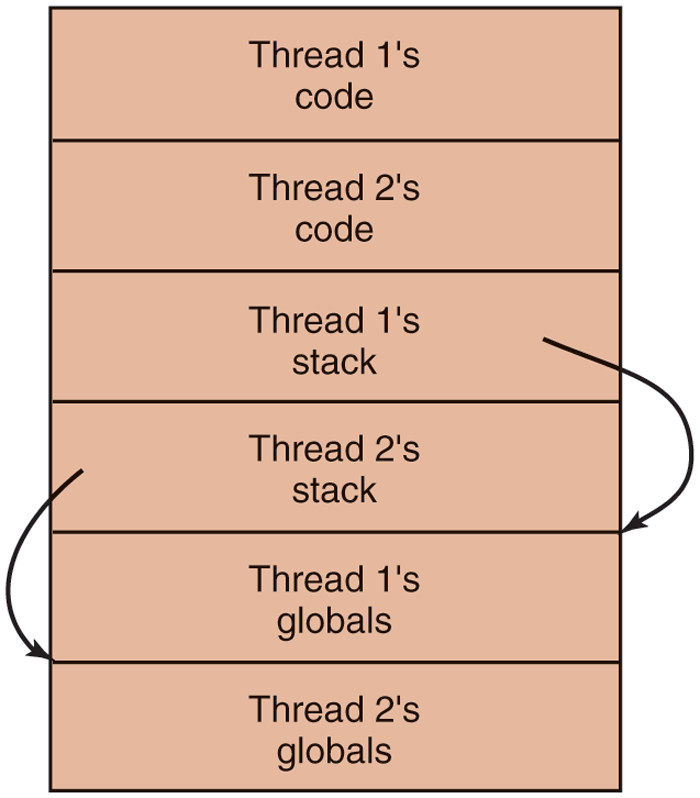
Threads can have private global variables.
Accessing the private global variables is a bit tricky, however, since most programming languages have a way of expressing local variables and global variables, but not intermediate forms. It is possible to allocate a chunk of memory for the globals and pass it to each procedure in the thread as an extra parameter. While hardly an elegant solution, it works.
Alternatively, new library procedures can be introduced to create, set, and read these threadwide global variables. The first call might look like this:
create_global("bufptr");It allocates storage for a pointer called bufptr on the heap or in a special storage area reserved for the calling thread. No matter where the storage is allocated, only the calling thread has access to the global variable. If another thread creates a global variable with the same name, it gets a different storage location that does not conflict with the existing one.
Two calls are needed to access global variables: one for writing them and the other for reading them. For writing, something like
set_global("bufptr", &buf);will do. It stores the value of a pointer in the storage location previously created by the call to create_global. To read a global variable, the call might look like
bufptr = read_global("bufptr");It returns the address stored in the global variable, so its data can be accessed.
The next problem in turning a single-threaded program into a multithreaded one is that many library procedures are not reentrant. That is, they were not designed to have a second call made to any given procedure while a previous call has not yet finished. For example, sending a message over the network may well be programmed to assemble the message in a fixed buffer within the library, then to trap to the kernel to send it. What happens if one thread has assembled its message in the buffer, then a clock interrupt forces a switch to a second thread that immediately overwrites the buffer with its own message?
Similarly, memory-allocation procedures such as malloc in UNIX, maintain crucial tables about memory usage, for example, a linked list of available chunks of memory. While malloc is busy updating these lists, they may temporarily be in an inconsistent state, with pointers that point nowhere. If a thread switch happens to occur while the tables are inconsistent and a new call comes in from a different thread, an invalid pointer may be used, leading to a program crash. Fixing all these problems effectively means rewriting the entire library. Doing so is a nontrivial activity with a real possibility of introducing subtle errors.
A different solution is to provide each procedure with a wrapper that sets a bit to mark the library as being in use. Any attempt for another thread to use a library procedure while a previous call has not yet completed is blocked. Although this approach can be made to work, it greatly eliminates potential parallelism.
Next, consider signals. Some signals are logically thread specific; others are not. For example, if a thread calls alarm, it makes sense for the resulting signal to go to the thread that made the call. However, when threads are implemented entirely in user space, the kernel does not even know about threads and can hardly direct the signal to the right one. An additional complication occurs if a process may only have one alarm pending at a time and several threads call alarm independently.
Other signals, such as keyboard interrupt, are not thread specific. Who should catch them? One designated thread? All the threads? Furthermore, what happens if one thread changes the signal handlers without telling other threads about it? And what happens if one thread wants to catch a particular signal (say, the user hitting CTRL-C), and another thread wants this signal to terminate the process? This situation can arise if one or more threads run standard library procedures and others are user-written. Clearly, these wishes are incompatible. In general, signals are difficult enough to manage even in a single-threaded environment. Going to a multithreaded environment does not make them any easier to handle.
One last problem introduced by threads is stack management. In many systems, when a process’ stack overflows, the kernel just provides that process with more stack automatically. When a process has multiple threads, it must also have multiple stacks. If the kernel is not aware of all these stacks, it cannot grow them automatically upon stack fault. In fact, it may not even realize that a memory fault is related to the growth of some thread’s stack.
These problems are certainly not insurmountable, but they do show that just introducing threads into an existing system without a fairly substantial system redesign is not going to work at all. The semantics of system calls may have to be redefined and libraries rewritten, at the very least. And all of these things must be done in such a way as to remain backward compatible with existing programs for the limiting case of a process with only one thread. For additional information about threads, see Cook (2008) and Rodrigues et al. (2010).