2.1 Processes
All modern computers often do several things at the same time. People used to working with computers may not be fully aware of this fact, so a few examples may make the point clearer. First consider a Web server. Requests come in from all over asking for Web pages. When a request comes in, the server checks to see if the page needed is in the cache. If it is, it is sent back; if it is not, a disk request is started to fetch it. However, from the CPU’s perspective, disk requests take eternity. While waiting for a disk request to complete, many more requests may come in. If there are multiple disks present, some or all of the newer ones may be fired off to other disks long before the first request is satisfied. Clearly some way is needed to model and control this concurrency. Processes (and especially threads) can help here.
Now consider a user PC. When the system is booted, many processes are secretly started, often unknown to the user. For example, a process may be started up to wait for incoming email. Another process may run on behalf of the antivirus program to check periodically if any new virus definitions are available. In addition, explicit user processes may be running, printing files and backing up the user’s photos on a USB stick, all while the user is surfing the Web. All this activity has to be managed, and a multiprogramming system supporting multiple processes comes in very handy here. Even simple computing devices, such as smartphones and tablets, can support multiple processes.
In any multiprogramming system, each CPU switches from process to process quickly, running each for tens or maybe hundreds of milliseconds. While strictly speaking, at any one instant each CPU is running only one process, in the course of 1 second it may work on several of them, giving the illusion of parallelism. Sometimes people speak of pseudoparallelism in this context, to contrast it with the true hardware parallelism of multiprocessor systems (which have two or more CPUs sharing the same physical memory). Keeping track of multiple, parallel activities is hard for people to do. Therefore, operating system designers over the years have evolved a conceptual model (sequential processes) that makes parallelism easier to deal with. That model, its uses, and some of its consequences form the subject of this chapter.
2.1.1 The Process Model
In this model, all the runnable software on the computer, sometimes including the operating system, is organized into a number of sequential processes, or just processes for short. A process is just an instance of an executing program, including the current values of the program counter, registers, and variables. Conceptually, each process has its own virtual CPU. In reality, of course, each real CPU switches back and forth from process to process, but to understand the system, it is much easier to think about a collection of processes running in (pseudo) parallel than to try to keep track of how each CPU switches from program to program. Switching rapidly back and forth like this is known as multiprogramming, as we saw in Chap. 1.
In Fig. 2-1(a), we see a computer multiprogramming four programs in memory. In Fig. 2-1(b) we see four processes, each with its own flow of control (i.e., its own logical program counter), and each one running independently of the other ones. Of course, there is only one physical program counter, so when each process runs, its logical program counter is loaded into the real program counter. When it is finished (for the time being), the physical program counter is saved in the process’ stored logical program counter in memory. In Fig. 2-1(c) we see that, viewed over a long enough time interval, all the processes have made progress, but at any given instant only one process is actually running.
Figure 2-1
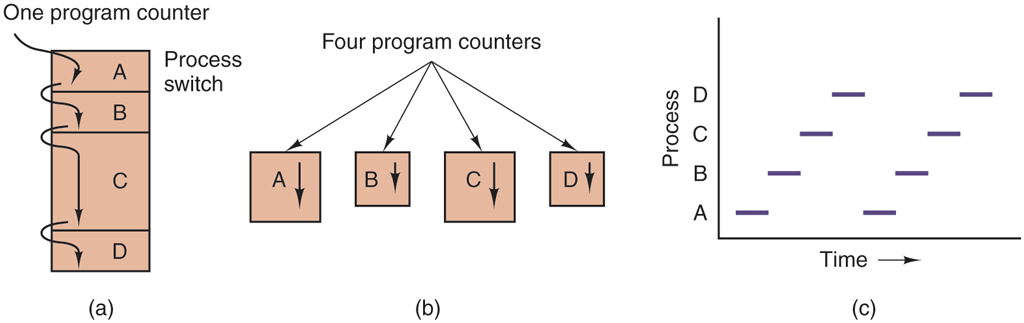
(a) Multiprogramming four programs. (b) Conceptual model of four independent, sequential processes. (c) Only one program is active at once.
In this chapter, we will assume there is only one CPU. Often that assumption does not hold, since new chips are often multicore, with two, four, or more cores. We will look at multicore chips and multiprocessors in general in Chap. 8, but for the time being, it is simpler just to think of one CPU at a time. So when we say that a CPU can really run only one process at a time, if there are two cores (or CPUs) each of them can run only one process at a time.
With the CPU switching back and forth among multiple processes, the rate at which a process performs its computation will not be uniform and probably not even reproducible if the same processes are run again. Thus, processes must not be programmed with built-in assumptions about their speed. Consider, for example, an audio process that plays music to accompany a high-quality video run by another core. Because the audio should start a little later than the video, it signals the video server to start playing, and then runs an idle loop 10,000 times before playing back the audio. All goes well, if the loop is a reliable timer, but if the CPU decides to switch to another process during the idle loop, the audio process may not run again until the corresponding video frames have already come and gone, and the video and audio will be annoyingly out of sync. When a process has critical real-time requirements like this, that is, particular events must occur within a specified number of milliseconds, special measures must be taken to ensure that they do occur. Normally, however, most processes are not affected by the underlying multiprogramming of the CPU or the relative speeds of different processes.
The difference between a process and a program is subtle, but absolutely crucial. An analogy may help you here. Consider a culinary-minded computer scientist who is baking a birthday cake for his young daughter. He has a birthday cake recipe and a kitchen well stocked with all the input: flour, eggs, sugar, extract of vanilla, and so on. In this analogy, the recipe is the program, that is, an algorithm expressed in some suitable notation, the computer scientist is the processor (CPU), and the cake ingredients are the input data. The process is the activity consisting of our baker reading the recipe, fetching the ingredients, and baking the cake.
Now imagine that the computer scientist’s son comes running in screaming his head off, saying that he has been stung by a bee. The computer scientist records where he was in the recipe (the state of the current process is saved), gets out a first-aid book, and begins following the directions in it. Here we see the processor being switched from one process (baking) to a higher-priority process (administering medical care), each having a different program (recipe versus first aid book). When the bee sting has been taken care of, the computer scientist goes back to his cake, continuing at the point where he left off.
The key idea here is that a process is an activity of some kind. It has a program, input, output, and a state. A single processor may be shared among several processes, with some scheduling algorithm being accustomed to determine when to stop work on one process and service a different one. In contrast, a program is something that may be stored on disk, not doing anything.
It is worth noting that if a program is running twice, it counts as two processes. For example, it is often possible to start a word processor twice or print two files at the same time if two printers are available. The fact that two processes happen to be running the same program does not matter; they are distinct processes. The operating system may be able to share the code between them so only one copy is in memory, but that is a technical detail that does not change the conceptual situation of two processes running.
2.1.2 Process Creation
Operating systems need some way to create processes. In very simple systems, or in systems designed for running only a single application (e.g., the controller in a microwave oven), it may be possible to have all the processes that will ever be needed be present when the system comes up. In general-purpose systems, however, some way is needed to create and terminate processes as needed during operation. We will now look at some of the issues.
Four principal events cause processes to be created:
System initialization
Execution of a process-creation system call by a running process
A user request to create a new process
Initiation of a batch job
When an operating system is booted, typically numerous processes are created. Some of these processes are foreground processes, that is, processes that interact with (human) users and perform work for them. Others run in the background and are not associated with particular users, but instead have some specific function. For example, one background process may be designed to accept incoming email, sleeping most of the day but suddenly springing to life when email arrives. Another background process may be designed to accept incoming requests for Web pages hosted on that machine, waking up when a request arrives to service the request. Processes that stay in the background to handle some activity such as email, Web pages, news, printing, and so on are called daemons. Large systems commonly have dozens of them. In UNIX†, the ps program can be used to list the running processes. In Windows, the task manager can be used.
In addition to the processes created at boot time, new processes can be created afterward as well. Often a running process will issue system calls to create one or more new processes to help it do its job. Creating new processes is particularly useful when the work to be done can easily be formulated in terms of several related, but otherwise independent interacting processes. For example, if a large amount of data are being fetched over a network for subsequent processing, it may be convenient to create one process to fetch the data and put them in a shared buffer while a second process removes the data items and processes them. On a multiprocessor, allowing each process to run on a different CPU may also make the job go faster.
In interactive systems, users can start a program by typing a command or (double) clicking on an icon. Taking either of these actions starts a new process and runs the selected program in it. In command-based UNIX systems running the X Window System, the new process takes over the window in which it was started. In Windows, when a process is started it does not have a window, but it can create one (or more) and most do. In both systems, users may have multiple windows open at once, each running some process. Using the mouse, the user can select a window and interact with the process, for example, providing input when needed.
The last situation in which processes are created applies only to batch systems found on large mainframes. Think of inventory management at the end of a day at a chain of stores—calculating what to order, analyzing per-store product popularity, etc. Here users can submit batch jobs to the system (possibly remotely). When the operating system decides it has the resources to run another job, it creates a new process and runs the next job from the input queue in it.
Technically, in all these cases, a new process is created by having an existing process execute a process creation system call. That process may be a running user process, a system process invoked from the keyboard or mouse, or a batch-manager process. What that process does is execute a system call to create the new process. This system call tells the operating system to create a new process and indicates, directly or indirectly, which program to run in it. To get the ball rolling, the very first process is hard-crafted when the system is booted.
In UNIX, there is only one system call to create a new process: fork. This call creates an exact clone of the calling process. After the fork, the two processes, the parent and the child, have the same memory image, the same environment strings, and the same open files. That is all there is. Usually, the child process then executes execve or a similar system call to change its memory image and run a new program. For example, when a user types a command, say, sort, to the shell, the shell forks off a child process and the child executes sort. The reason for this two-step process is to allow the child to manipulate its file descriptors after the fork but before the execve in order to accomplish redirection of standard input, standard output, and standard error.
In Windows, in contrast, a single Win32 function call, CreateProcess, handles both process creation and loading the correct program into the new process. This call has 10 parameters, which include the program to be executed, the command-line parameters to feed that program, various security attributes, bits that control whether open files are inherited, priority information, a specification of the window to be created for the process (if any), and a pointer to a structure in which information about the newly created process is returned to the caller. In addition to CreateProcess, Win32 has about 100 other functions for managing and synchronizing processes and related topics.
In both UNIX and Windows systems, after a process is created, the parent and child have their own distinct address spaces. If either process changes a word in its address space, the change is not visible to the other process. In traditional UNIX, the child’s initial address space is a copy of the parent’s, but there are definitely two distinct address spaces involved; no writable memory is shared. Some UNIX implementations share the program text between the two since that cannot be modified. Alternatively, the child may share all of the parent’s memory, but in that case the memory is shared copy-on-write, which means that whenever either of the two wants to modify part of the memory, that chunk of memory is explicitly copied first to make sure the modification occurs in a private memory area. Again, no writable memory is shared. It is, however, possible for a newly created process to share some of its creator’s other resources, such as open files. In Windows, the parent’s and child’s address spaces are different from the start.
2.1.3 Process Termination
After a process has been created, it starts running and does whatever its job is. However, nothing lasts forever, not even processes. Sooner or later the new process will terminate, usually due to one of the following conditions:
Normal exit (voluntary)
Error exit (voluntary)
Fatal error (involuntary)
Killed by another process (involuntary)
Most processes terminate because they have done their work. When a compiler has compiled the program given to it, the compiler executes a system call to tell the operating system that it is finished. This call is exit in UNIX and ExitProcess in Windows. Screen-oriented programs also support voluntary termination. Word processors, Internet browsers, and similar programs always have an icon or menu item that the user can click to tell the process to remove any temporary files it has open and then terminate.
The second reason for termination is that the process discovers a fatal error. For example, if a user types the command
cc foo.cto compile the program foo.c and no such file exists, the compiler simply announces this fact and exits. Screen-oriented interactive processes generally do not exit when given bad parameters. Instead they pop up a dialog box and ask the user to try again.
The third reason for termination is an error caused by the process, often due to a program bug. Examples include executing an illegal instruction, referencing nonexistent memory, or dividing by zero. In some systems (e.g., UNIX), a process can tell the operating system that it wishes to handle certain errors itself, in which case the process is signaled (interrupted) instead of terminated when one of the errors occurs.
The fourth reason a process might terminate is that the process executes a system call telling the operating system to kill some other process. In UNIX this call is kill. The corresponding Win32 function is TerminateProcess. In both cases, the killer must have the necessary authorization to do in the killee. In some systems, when a process terminates, either voluntarily or otherwise, all processes it created are immediately killed as well. Neither UNIX nor Windows works this way, however.
2.1.4 Process Hierarchies
In some systems, when a process creates another process, the parent process and child process continue to be associated in certain ways. The child process can itself create more processes, forming a process hierarchy. Note that unlike plants and animals that use sexual reproduction, a process has only one parent (but zero, one, two, or more children). So a process is more like a hydra than like, say, a cow.
In UNIX, a process and all of its children and further descendants together form a process group. When a user sends a signal from the keyboard (e.g., by pressing CTRL-C), the signal is delivered to all members of the process group currently associated with the keyboard (usually all active processes that were created in the current window). Individually, each process can catch the signal, ignore the signal, or take the default action, which is to be killed by the signal.
As another example of where the process hierarchy plays a key role, let us look at how UNIX initializes itself when it is started, just after the computer is booted. A special process, called init, is present in the boot image. When it starts running, it reads a file telling how many terminals there are. Then it forks off a new process per terminal. These processes wait for someone to log in. If a login is successful, the login process executes a shell to accept commands. These commands may start up more processes, and so forth. Thus, all the processes in the whole system belong to a single tree, with init at the root.
In contrast, Windows has no concept of a process hierarchy. All processes are equal. The only hint of a process hierarchy is that when a process is created, the parent is given a special token (called a handle) that it can use to control the child. However, it is free to pass this token to some other process, thus invalidating the hierarchy. Processes in UNIX cannot disinherit their children.
2.1.5 Process States
Although each process is an independent entity, with its own program counter and internal state, processes often need to interact with other processes. One process may generate some output that another process uses as input. In the command
cat chapter1 chapter2 chapter3 | grep treethe first process, running cat, concatenates and outputs three files. The second process, running grep, selects all lines containing the word ‘‘tree.’’ Depending on the relative speeds of the two processes (which depends on both the relative complexity of the programs and how much CPU time each one has had), it may happen that grep is ready to run, but there is no input waiting for it. It must then block until some input is available.
When a process blocks, it does so because logically it cannot continue, typically because it is waiting for input that is not yet available. It is also possible for a process that is conceptually ready and able to run to be stopped because the operating system has decided to allocate the CPU to another process for a while. These two conditions are completely different. In the first case, the suspension is inherent in the problem (you cannot process the user’s command line until it has been typed). In the second case, it is a technicality of the system (not enough CPUs to give each process its own private processor). In Fig. 2-2 we see a state diagram showing the three states a process may be in:
-
Running (actually using the CPU at that instant).
Ready (runnable; temporarily stopped to let another process run).
Blocked (unable to run until some external event happens).
Figure 2-2
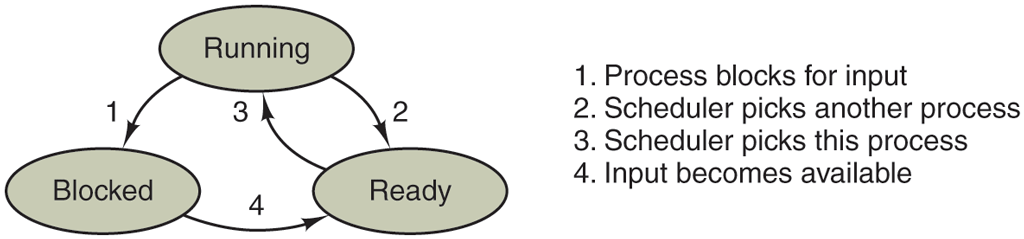
A process can be in running, blocked, or ready state. Transitions between these states are as shown.
Logically, the first two states are similar. In both cases the process is willing to run, only in the second one, there is temporarily no CPU available for it. The third state is fundamentally different from the first two in that the process cannot run, even if the CPU is idle and has nothing else to do.
Four transitions are possible among these three states, as shown. Transition 1 occurs when the operating system discovers that a process cannot continue right now. In some systems the process can execute a system call, such as pause, to get into blocked state. In other systems, including UNIX, when a process reads from a pipe or special file (e.g., a terminal) and there is no input available, the process is automatically blocked.
Transitions 2 and 3 are caused by the process scheduler, a part of the operating system, without the process even knowing about them. Transition 2 occurs when the scheduler decides that the running process has run long enough, and it is time to let another process have some CPU time. Transition 3 occurs when all the other processes have had their fair share and it is time for the first process to get the CPU to run again. The subject of scheduling, that is, deciding which process should run when and for how long, is an important one; we will look at it later in this chapter. Many algorithms have been devised to try to balance the competing demands of efficiency for the system as a whole and fairness to individual processes. We will study some of them later in this chapter.
Transition 4 occurs when the external event for which a process was waiting (such as the arrival of some input) happens. If no other process is running at that instant, transition 3 will be triggered and the process will start running. Otherwise it may have to wait in ready state for a little while until the CPU is available and its turn comes.
Using the process model, it becomes much easier to think about what is going on inside the system. Some of the processes run programs that carry out commands typed in by a user. Other processes are part of the system and handle tasks such as carrying out requests for file services or managing the details of running a disk or a tape drive. When a disk interrupt occurs, the system makes a decision to stop running the current process and run the disk process, which was blocked waiting for that interrupt. Thus, instead of thinking about interrupts, we can think about user processes, disk processes, terminal processes, and so on, which block when they are waiting for something to happen. When the disk has been read or the character typed, the process waiting for it is unblocked and is eligible to run again.
This view gives rise to the model shown in Fig. 2-3. Here the lowest level of the operating system is the scheduler, with a variety of processes on top of it. All the interrupt handling and details of actually starting and stopping processes are hidden away in what is here called the scheduler, which is actually not much code. The rest of the operating system is nicely structured in process form. Few real systems are as nicely structured as this, however.
Figure 2-3
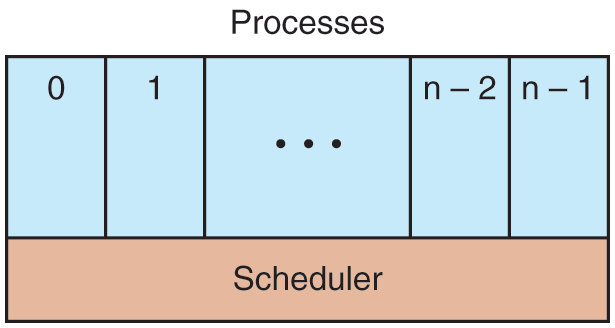
The lowest layer of a process-structured operating system handles interrupts and scheduling. Above that layer are sequential processes.
2.1.6 Implementation of Processes
To implement the process model, the operating system maintains a table (an array of structures), called the process table, with one entry per process. (Some authors call these entries process control blocks.) This entry contains important information about the process’ state, including its program counter, stack pointer, memory allocation, the status of its open files, its accounting and scheduling information, and everything else about the process that must be saved when the process is switched from running to ready or blocked state so that it can be restarted later as if it had never been stopped.
Figure 2-4 shows some of the key fields in a typical system. The fields in the first column relate to process management. The other two relate to memory management and file management, respectively. It should be noted that precisely which fields the process table has is highly system dependent, but this figure gives a general idea of the kinds of information needed.
Figure 2-4
Process management Registers Program counter Program status word Stack pointer Process state Priority Scheduling parameters Process ID Parent process Process group Signals Time when process started CPU time used Children’s CPU time Time of next alarm |
Memory management Pointer to text segment info Pointer to data segment info Pointer to stack segment info |
File management Root directory Wor king directory File descriptors Group ID |
Some of the fields of a typical process-table entry.
Now that we have looked at the process table, it is possible to explain a little more about how the illusion of multiple sequential processes is maintained on one (or each) CPU and also explain interrupts in more detail than we were able to do in Chap. 1. Associated with each I/O class is a location (typically at a fixed location near the bottom of memory) called the interrupt vector. It contains the address of the ISR (Interrupt Service Routine). Suppose that user process 3 is running when a disk interrupt happens. User process 3’s program counter, program status word, and sometimes one or more registers are pushed onto the (current) stack by the interrupt hardware. The computer then jumps to the address in the interrupt vector. That is all the hardware does. From here on, it is up to the ISR in software.
All interrupts start by saving the registers, often in the process table entry for the current process. Then the information pushed onto the stack by the interrupt is removed and the stack pointer is set to point to a temporary stack used by the process handler. Actions such as saving the registers and setting the stack pointer cannot even be expressed in high-level languages such as C, so they are performed by a small assembly-language routine, usually the same one for all interrupts since the work of saving the registers is identical, no matter the cause of the interrupt.
When this routine is finished, it calls a C procedure to do the rest of the work for this specific interrupt type. (We assume the operating system is written in C, the usual choice for all operating systems used in production.) When it has done its job, possibly making some process now ready, the scheduler is called to see what to run next. After that, control is passed back to the assembly-language code to load up the registers and memory map for the now-current process and start it running. Interrupt handling and scheduling are summarized in Fig. 2-5. It is worth noting that the details vary somewhat from system to system.
Figure 2-5
|
Skeleton of what the lowest level of the operating system does when an interrupt occurs. The details may vary between operating systems.
A process may be interrupted thousands of times during its execution, but the key idea is that after each interrupt the interrupted process returns to precisely the same state it was in before the interrupt occurred.
2.1.7 Modeling Multiprogramming
When multiprogramming is used, the CPU utilization can be improved. Crudely put, if the average process computes only 20% of the time it is sitting in memory, then with five processes in memory at once the CPU should be busy all the time. This model is unrealistically optimistic, however, since it tacitly assumes that all five processes will never be waiting for I/O at the same time.
A better model is to look at CPU usage from a probabilistic viewpoint. Suppose that a process spends a fraction p of its time waiting for I/O to complete. With n processes in memory at once, the probability that all n processes are waiting for I/O (in which case the CPU will be idle) is The CPU utilization is then given by the formula
Figure 2-6 shows, for different values of p (or ‘‘I/O wait’’), the CPU utilization as a function of n, which is called the degree of multiprogramming.
Figure 2-6
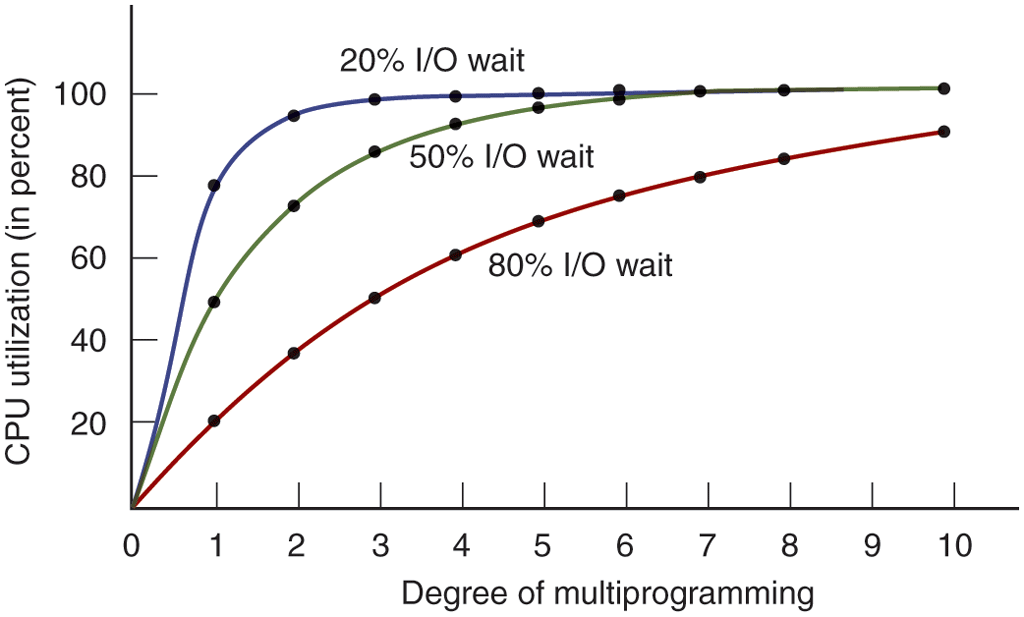
CPU utilization as a function of the number of processes in memory.
From the figure it is clear that if processes spend 80% of their time waiting for I/O, at least 10 processes must be in memory at once to get the CPU waste below 10%. When you realize that an interactive process waiting for a user to type something at a terminal (or click on an icon) is in I/O wait state, it should be clear that I/O wait times of 80% and more are not unusual. But even on servers, processes doing a lot of disk I/O will often have this percentage or more.
For the sake of accuracy, it should be pointed out that the probabilistic model just described is only an approximation. It implicitly assumes that all n processes are independent, meaning that it is quite acceptable for a system with five processes in memory to have three running and two waiting. But with a single CPU, we cannot have three processes running at once, so a process becoming ready while the CPU is busy will have to wait. Thus, the processes are not independent. A more accurate model can be constructed using queueing theory, but the point we are making—multiprogramming lets processes use the CPU when it would otherwise become idle—is, of course, still valid, even if the true curves of Fig. 2-6 are slightly different from those shown in the figure.
Even though the model of Fig. 2-6 is fairly simple-minded, it can nevertheless be used to make specific, although approximate, predictions about CPU performance. Suppose, for example, that a computer has 8 GB of memory, with the operating system and its tables taking up 2 GB and each user program also taking up 2 GB. These sizes allow three user programs to be in memory at once. With an 80% average I/O wait, we have a CPU utilization (ignoring operating system overhead) of or about 49%. Adding another 8 GB of memory allows the system to go from three-way multiprogramming to seven-way multiprogramming, thus raising the CPU utilization to 79%. In other words, the additional 8 GB will raise the throughput by 30%.
Adding yet another 8 GB would increase CPU utilization only from 79% to 91%, thus raising the throughput by only another 12%. Using this model, the computer’s owner might decide that the first addition was a good investment but that the second was not.