1.7 Operating System Structure
Now that we have seen what operating systems look like on the outside (i.e., the programmer’s interface), it is time to take a look inside. In the following sections, we will examine six different structures that have been tried, in order to get some idea of the spectrum of possibilities. These are by no means exhaustive, but they give an idea of some designs that have been tried in practice. The six designs we will discuss here are monolithic systems, layered systems, microkernels, client-server systems, virtual machines, and exo- and unikernels.
1.7.1 Monolithic Systems
By far the most common organization, the monolithic approach is to run the entire operating system as a single program in kernel mode. The operating system is written as a collection of procedures, linked together into a single large executable binary program. When this technique is used, each procedure in the system is free to call any other one, if the latter provides some useful computation that the former needs. Being able to call any procedure you want is very efficient, but having thousands of procedures that can call each other without restriction may also lead to a system that is unwieldy and difficult to understand. Also, a crash in any of these procedures will take down the entire operating system.
To construct the actual object program of the operating system when this approach is used, one first compiles all the individual procedures (or the files containing the procedures) and then binds them all together into a single executable file using the system linker. In terms of information hiding, there is essentially none—every procedure is visible to every other procedure (as opposed to a structure containing modules or packages, in which much of the information is hidden away inside modules, and only the officially designated entry points can be called from outside the module).
Even in monolithic systems, however, it is possible to have some structure. The services (system calls) provided by the operating system are requested by putting the parameters in a well-defined place (e.g., on the stack) and then executing a trap instruction. This instruction switches the machine from user mode to kernel mode and transfers control to the operating system, shown as step 6 in Fig. 1-17. The operating system then fetches the parameters and determines which system call is to be carried out. After that, it indexes into a table that contains in slot k a pointer to the procedure that carries out system call k (step 7 in Fig. 1-17).
This organization suggests a basic structure for the operating system:
A main program that invokes the requested service procedure.
A set of service procedures that carry out the system calls.
A set of utility procedures that help the service procedures.
In this model, for each system call there is one service procedure that takes care of it and executes it. The utility procedures do things that are needed by several service procedures, such as fetching data from user programs. This division of the procedures into three layers is shown in Fig. 1-24.
Figure 1-24
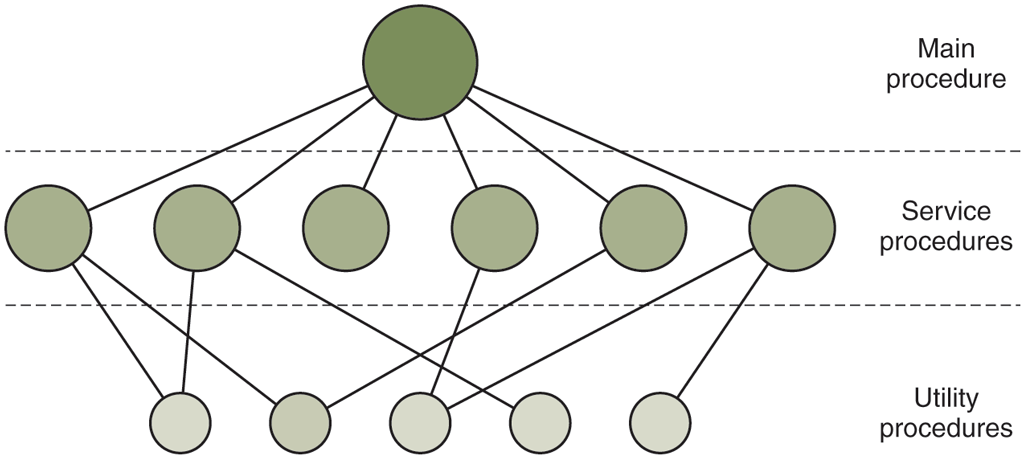
A simple structuring model for a monolithic system.
In addition to the core operating system that is loaded when the computer is booted, many operating systems support loadable extensions, such as I/O device drivers and file systems. These components are loaded on demand. In UNIX they are called shared libraries. In Windows they are called DLLs (Dynamic-Link Libraries). They have file extension .dll and the C:\Windows\system32 directory on Windows systems has well over 1000 of them.
1.7.2 Layered Systems
A generalization of the approach of Fig. 1-24 is to organize the operating system as a hierarchy of layers, each one constructed upon the one below it. The first system constructed in this way was the THE system built at the Technische Hogeschool Eindhoven in the Netherlands by E. W. Dijkstra (1968) and his students. The THE system was a simple batch system for a Dutch computer, the Electrologica X8, which had 32K of 27-bit words (bits were expensive back then).
The system had six layers, as shown in Fig. 1-25. Layer 0 dealt with allocation of the processor, switching between processes when interrupts occurred or timers expired. Above layer 0, the system consisted of sequential processes, each of which could be programmed without having to worry about the fact that multiple processes were running on a single processor. In other words, layer 0 provided the basic multiprogramming of the CPU.
Figure 1-25
| Layer | Function |
|---|---|
| 5 | The operator |
| 4 | User programs |
| 3 | Input/output management |
| 2 | Operator-process communication |
| 1 | Memory and drum management |
| 0 | Processor allocation and multiprogramming |
Structure of the THE operating system.
Layer 1 did the memory management. It allocated space for processes in main memory and on a 512K word drum used for holding parts of processes (pages) for which there was no room in main memory. Above layer 1, processes did not have to worry about whether they were in memory or on the drum; the layer 1 software took care of making sure pages were brought into memory at the moment they were needed and removed when they were not needed.
Layer 2 handled communication between each process and the operator console (that is, the user). On top of this layer, each process effectively had its own operator console. Layer 3 took care of managing the I/O devices and buffering the information streams to and from them. Above layer 3 each process could deal with abstract I/O devices with nice properties, instead of real devices with many peculiarities. Layer 4 was where the user programs were found. They did not have to worry about process, memory, console, or I/O management. The system operator process was located in layer 5.
A further generalization of the layering concept was present in the MULTICS system. Instead of layers, MULTICS was described as having a series of concentric rings, with the inner ones being more privileged than the outer ones (which is effectively the same thing). When a procedure in an outer ring wanted to call a procedure in an inner ring, it had to make the equivalent of a system call, that is, a TRAP instruction whose parameters were carefully checked for validity before the call was allowed to proceed. Although the entire operating system was part of the address space of each user process in MULTICS, the hardware made it possible to designate individual procedures (memory segments, actually) as protected against reading, writing, or executing.
Whereas the THE layering scheme was really only a design aid, because all the parts of the system were ultimately linked together into a single executable program, in MULTICS, the ring mechanism was very much present at run time and enforced by the hardware. The advantage of the ring mechanism is that it can easily be extended to structure user subsystems. For example, a professor could write a program to test and grade student programs and run this program in ring n, with the student programs running in ring so that they could not change their grades.
1.7.3 Microkernels
With the layered approach, the designers have a choice where to draw the kernel-user boundary. Traditionally, all the layers went in the kernel, but that is not necessary. In fact, a strong case can be made for putting as little as possible in kernel mode because bugs in the kernel can bring down the system instantly. In contrast, user processes have less power so that a bug there may not be fatal.
Various researchers have repeatedly studied the number of bugs per 1000 lines of code (e.g., Basilli and Perricone, 1984; and Ostrand and Weyuker, 2002). Bug density depends on module size, module age, and more, but a ballpark figure for serious industrial systems is between two and ten bugs per thousand lines of code. This means that a monolithic operating system of five million lines of code is likely to contain between 10,000 and 50,000 kernel bugs. Not all of these are fatal, of course, since some bugs may be things like a minor misspelling in an error message is rarely needed.
The basic idea behind the microkernel design is to achieve high reliability by splitting the operating system up into small, well-defined modules, only one of which—the microkernel—runs in kernel mode and the rest run as relatively powerless ordinary user processes. In particular, by running each device driver and file system as a separate user process, a bug in one of these can crash that component, but cannot crash the entire system. Thus, a bug in the audio driver will cause the sound to be garbled or stop, but will not crash the computer. In contrast, in a monolithic system with all the drivers in the kernel, a buggy audio driver can easily reference an invalid memory address and bring the system to a grinding halt instantly.
Many microkernels have been implemented and deployed for decades (Haertig et al., 1997; Heiser et al., 2006; Herder et al., 2006; Hildebrand, 1992; Kirsch et al., 2005; Liedtke, 1993, 1995, 1996; Pike et al., 1992; and Zuberi et al., 1999). With the exception of macOS, which is based on the Mach microkernel (Accetta et al., 1986), common desktop operating systems do not use microkernels. However, they are dominant in real-time, industrial, avionics, and military applications that are mission critical and have very high reliability requirements. A few of the better-known microkernels include Integrity, K42, L4, PikeOS, QNX, Symbian, and MINIX 3. We now give a brief overview of MINIX 3, which has taken the idea of modularity to the limit, breaking most of the operating system up into a number of independent user-mode processes. MINIX 3 is a POSIX-conformant, open source system freely available at www.minix3.org (Giuffrida et al., 2012; Giuffrida et al., 2013; Herder et al., 2006; Herder et al., 2009; and Hruby et al., 2013). Intel adopted MINIX 3 for its management engine in virtually all its CPUs.
The MINIX 3 microkernel is only about 15,000 lines of C and some 1400 lines of assembler for very low-level functions such as catching interrupts and switching processes. The C code manages and schedules processes, handles interprocess communication (by passing messages between processes), and offers a set of about 40 kernel calls to allow the rest of the operating system to do its work. These calls perform functions like hooking handlers to interrupts, moving data between address spaces, and installing memory maps for new processes. The process structure of MINIX 3 is shown in Fig. 1-26, with the kernel call handlers labeled Sys. The device driver for the clock is also in the kernel because the scheduler interacts closely with it. The other device drivers run as separate user processes.
Figure 1-26
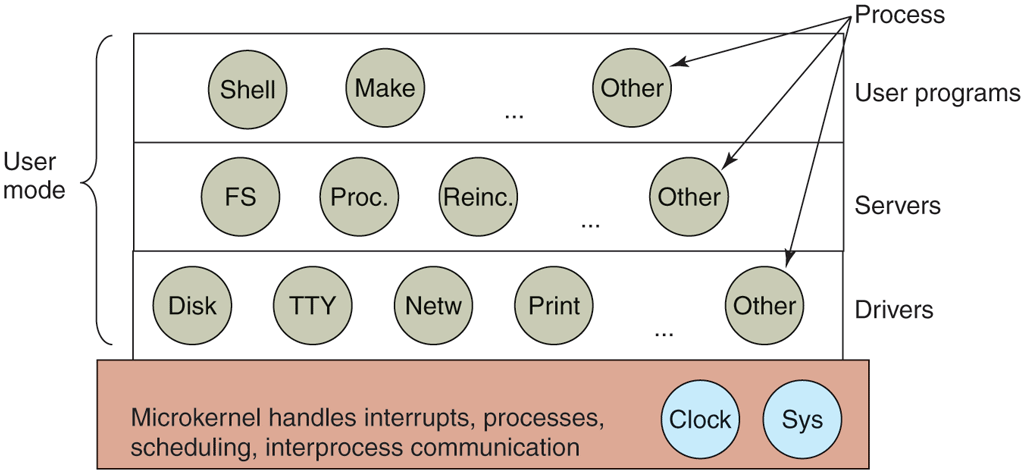
Simplified structure of the MINIX system.
Outside the kernel, the system is structured as three layers of processes all running in user mode. The lowest layer contains the device drivers. Since they run in user mode, they do not have physical access to the I/O port space and cannot issue I/O commands directly. Instead, to program an I/O device, the driver builds a structure telling which values to write to which I/O ports and makes a kernel call telling the kernel to do the write. This approach means that the kernel can check to see that the driver is writing (or reading) from I/O it is authorized to use. Consequently (and unlike a monolithic design), a buggy audio driver cannot accidentally write on the SSD or disk.
Above the drivers is another user-mode layer containing the servers, which do most of the work of the operating system. One or more file servers manage the file system(s), the process manager creates, destroys, and manages processes, and so on. User programs obtain operating system services by sending short messages to the servers asking for the POSIX system calls. For example, a process needing to do a read sends a message to one of the file servers telling it what to read.
One interesting server is the reincarnation server, whose job is to check if the other servers and drivers are functioning correctly. In the event that a faulty one is detected, it is automatically replaced without any user intervention. In this way, the system is self-healing and can achieve high reliability.
The system has many restrictions limiting the power of each process. As mentioned, drivers can touch only authorized I/O ports, but access to kernel calls is also controlled on a per-process basis, as is the ability to send messages to other processes. Processes can also grant limited permission for other processes to have the kernel access their address spaces. As an example, a file system can grant permission for the disk driver to let the kernel put a newly read-in disk block at a specific address within the file system’s address space. The sum total of all these restrictions is that each driver and server has exactly the power to do its work and nothing more, thus greatly limiting the damage a buggy component can do. Restricting what a component can do to exactly that what it needs to do its work is known as the POLA (Principle of Least Authority) an important design principle for building secure systems. We will discuss other such principles in Chap. 9.
An idea somewhat related to having a minimal kernel is to put the mechanism for doing something in the kernel but not the policy. To make this point better, consider the scheduling of processes. A relatively simple scheduling algorithm is to assign a numerical priority to every process and then have the kernel run the highest-priority process that is runnable. The mechanism—in the kernel—is to look for the highest-priority process and run it. The policy—assigning priorities to processes—can be done by user-mode processes. In this way, policy and mechanism can be decoupled and the kernel can be made smaller.
1.7.4 Client-Server Model
A slight variation of the microkernel idea is to distinguish two classes of processes, the servers, each of which provides some service, and the clients, which use these services. This model is known as the client-server model. The essence is the presence of client processes and server processes.
Communication between clients and servers is often by message passing. To obtain a service, a client process constructs a message saying what it wants and sends it to the appropriate service. The service then does the work and sends back the answer. If the client and server happen to run on the same machine, certain optimizations are possible, but conceptually, we are still talking about message passing here.
A generalization of this idea is to have the clients and servers run on different computers, connected by a local or wide-area network, as depicted in Fig. 1-27. Since clients communicate with servers by sending messages, the clients need not know whether the messages are handled locally on their own machines, or whether they are sent across a network to servers on a remote. machine. As far as the client is concerned, the same thing happens in both cases: requests are sent and replies come back. Thus, the client-server model is an abstraction that can be used for a single machine or for a network of machines.
Figure 1-27
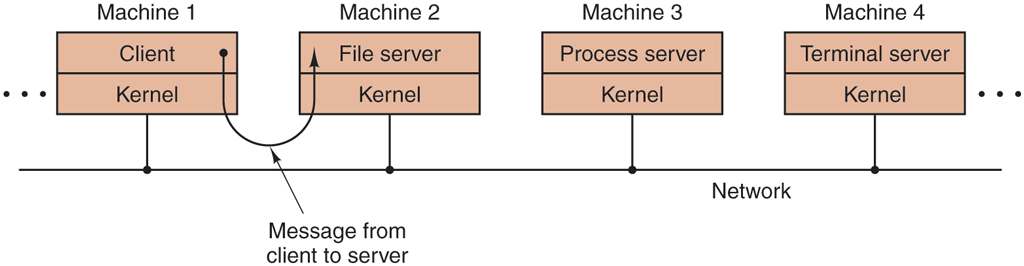
The client-server model over a network.
Increasingly many systems involve users at their home PCs as clients and large machines elsewhere running as servers. In fact, much of the Web operates this way. A PC sends a request for a Web page to the server and the Web page comes back. This is a typical use of the client-server model in a network.
1.7.5 Virtual Machines
The initial releases of OS/360 were strictly batch systems. Nevertheless, many 360 users wanted to be able to work interactively at a terminal, so various groups, both inside and outside IBM, decided to write timesharing systems for it. The official IBM timesharing system, TSS/360, was delivered late, and when it finally arrived it was so big and slow that few sites converted to it. It was eventually abandoned after its development had consumed some $50 million (Graham, 1970). But a group at IBM’s Scientific Center in Cambridge, Massachusetts, produced a radically different system that IBM eventually accepted as a product. A linear descendant of it, called z/VM, is now widely used on IBM’s current mainframes, the zSeries, which are heavily used in large corporate data centers, for example, as e-commerce servers that handle hundreds or thousands of transactions per second and use databases whose sizes run to millions of gigabytes.
VM/370
This system, originally called CP/CMS and later renamed VM/370 (Seawright and MacKinnon, 1979), was based on an astute observation: a timesharing system provides (1) multiprogramming and (2) an extended machine with a more convenient interface than the bare hardware. The essence of VM/370 is to completely separate these two functions.
The heart of the system, called a virtual machine monitor, runs on the bare hardware and does the multiprogramming, providing not one, but several virtual machines to the next layer up, as shown in Fig. 1-28. However, unlike all other operating systems, these virtual machines are not extended machines, with files and other nice features. Instead, they are exact copies of the bare hardware, including kernel/user mode, I/O, interrupts, and everything else the real machine has.
Figure 1-28
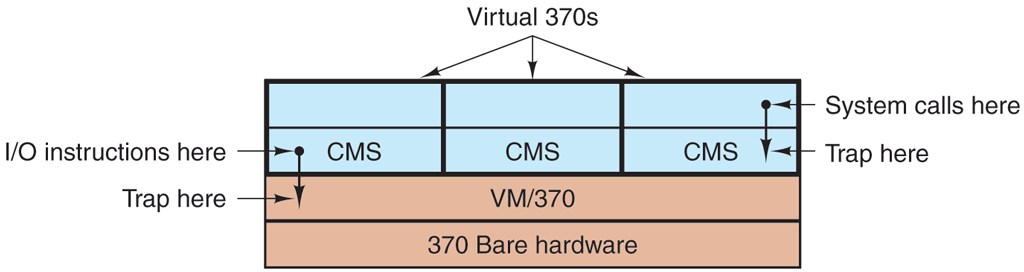
The structure of VM/370 with CMS.
Because each virtual machine is identical to the true hardware, each one can run any operating system that will run directly on the bare hardware. Different virtual machines can, and frequently do, run different operating systems. On the original IBM VM/370 system, some ran OS/360 or one of the other large batch or transaction-processing operating systems, while others ran a single-user, interactive system called CMS (Conversational Monitor System) for interactive timesharing users. The latter was popular with programmers.
When a CMS program executed a system call, the call was trapped to the operating system in its own virtual machine, not to VM/370, just as it would be were it running on a real machine instead of a virtual one. CMS then issued the normal hardware I/O instructions for reading its virtual disk or whatever was needed to carry out the call. These I/O instructions were trapped by VM/370, which then performed them as part of its simulation of the real hardware. By completely separating the functions of multiprogramming and providing an extended machine, each of the pieces could be much simpler, more flexible, and much easier to maintain.
In its modern incarnation, z/VM is usually used to run multiple complete operating systems rather than stripped-down single-user systems like CMS. For example, the zSeries is capable of running one or more Linux virtual machines along with traditional IBM operating systems.
Virtual Machines Rediscovered
While IBM has had a virtual-machine product available for four decades, and a few other companies, including Oracle and Hewlett-Packard, have recently added virtual-machine support to their high-end enterprise servers, the idea of virtualization has largely been ignored in the PC world until recently. But in the past decades, a combination of new needs, new software, and new technologies have combined to make it a hot topic.
First the needs. Many companies have traditionally run their mail servers, Web servers, FTP servers, and other servers on separate computers, sometimes with different operating systems. They see virtualization as a way to run them all on the same machine without having a crash of one server bring down the rest.
Virtualization is also popular in the Web hosting world. Without virtualization, Web hosting customers are forced to choose between shared hosting (which just gives them a login account on a Web server, but no control over the server software) and dedicated hosting (which gives them their own machine, which is very flexible but not cost effective for small to medium Websites). When a Web hosting company offers virtual machines for rent, a single physical machine can run many virtual machines, each of which appears to be a complete machine. Customers who rent a virtual machine can run whatever operating system and software they want to, but at a fraction of the cost of a dedicated server (because the same physical machine supports many virtual machines at the same time).
Another use of virtualization is for end users who want to be able to run two or more operating systems at the same time, say Windows and Linux, because some of their favorite application packages run on one and some run on the other. This situation is illustrated in Fig. 1-29(a), where the term ‘‘virtual machine monitor’’ has been renamed type 1 hypervisor, which is commonly used nowadays because ‘‘virtual machine monitor’’ requires more keystrokes than people are prepared to put up with now. Note that many authors use the terms interchangeably though.
Figure 1-29
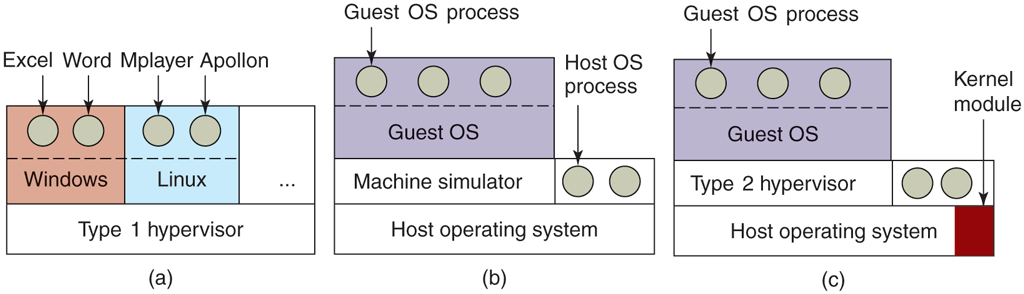
(a) A type 1 hypervisor. (b) A pure type 2 hypervisor. (c) A practical type 2 hypervisor.
While no one disputes the attractiveness of virtual machines today, the problem then was implementation. In order to run virtual machine software on a computer, its CPU must be virtualizable (Popek and Goldberg, 1974). In a nutshell, here is the problem. When an operating system running on a virtual machine (in user mode) executes a privileged instruction, such as modifying the PSW or doing I/O, it is essential that the hardware trap to the virtual-machine monitor so the instruction can be emulated in software. On some CPUs—notably the Pentium, its predecessors, and its clones—attempts to execute privileged instructions in user mode are just ignored. This property made it impossible to have virtual machines on this hardware, which explains the lack of interest in the x86 world. Of course, there were interpreters for the Pentium, such as Bochs, that ran on the Pentium, but with a performance loss of one to two orders of magnitude, they were not useful for serious work.
This situation changed as a result of several academic research projects in the 1990s and early years of this millennium, notably Disco at Stanford (Bugnion et al., 1997) and Xen at Cambridge University (Barham et al., 2003). These research papers led to several commercial products (e.g., VMware Workstation and Xen) and a revival of interest in virtual machines. Besides VMware and Xen, popular hypervisors today include KVM (for the Linux kernel), VirtualBox (by Oracle), and Hyper-V (by Microsoft).
Some of the early research projects improved the performance over interpreters like Bochs by translating blocks of code on the fly, storing them in an internal cache, and then reusing them if they were executed again. This improved the performance considerably, and led to what we will call machine simulators, as shown in Fig. 1-29(b). However, although this technique, known as binary translation, helped improve matters, the resulting systems, while good enough to publish papers about in academic conferences, were still not fast enough to use in commercial environments where performance matters a lot.
The next step in improving performance was to add a kernel module to do some of the heavy lifting, as shown in Fig. 1-29(c). In practice now, all commercially available hypervisors, such as VMware Workstation, use this hybrid strategy (and have many other improvements as well). They are called type 2 hypervisors by everyone, so we will (somewhat grudgingly) go along and use this name in the rest of this book, even though we would prefer to called them type 1.7 hypervisors to reflect the fact that they are not entirely user-mode programs. In Chap. 7, we will describe in detail how VMware Workstation works and what the various pieces do.
In practice, the real distinction between a type 1 hypervisor and a type 2 hypervisor is that a type 2 makes uses of a host operating system and its file system to create processes, store files, and so on. A type 1 hypervisor has no underlying support and must perform all these functions itself.
After a type 2 hypervisor is started, it reads the installation image file for the chosen guest operating system and installs the guest OS on a virtual disk, which is just a big file in the host operating system’s file system. Type 1 hypervisors cannot do this because there is no host operating system to store files on. They must manage their own storage on a raw disk partition.
When the guest operating system is booted, it does the same thing it does on the actual hardware, typically starting up some background processes and then a GUI. To the user, the guest operating system behaves the same way it does when running on the bare metal even though that is not the case here.
A different approach to handling control instructions is to modify the operating system to remove them. This approach is not true virtualization. Instead it is called paravirtualization. We will discuss virtualization in Chap. 7.
The Java Virtual Machine
Another area where virtual machines are used, but in a somewhat different way, is for running Java programs. When Sun Microsystems invented the Java programming language, it also invented a virtual machine (i.e., a computer architecture) called the JVM (Java Virtual Machine). Sun no longer exists today (because Oracle bought the company), but Java is still with us. The Java compiler produces code for JVM, which then typically is executed by a software JVM interpreter. The advantage of this approach is that the JVM code can be shipped over the Internet to any computer that has a JVM interpreter and run there. If the compiler had produced SPARC or x86 binary programs, for example, they could not have been shipped and run anywhere as easily. (Of course, Sun could have produced a compiler that produced SPARC binaries and then distributed a SPARC interpreter, but JVM is a much simpler architecture to interpret.) Another advantage of using JVM is that if the interpreter is implemented properly, which is not completely trivial, incoming JVM programs can be checked for safety and then executed in a protected environment so they cannot steal data or do any damage.
Containers
Besides full virtualization, we can also run multiple instances of an operating system on a single machine at the same time by having the operating system itself support different systems, or containers. Containers are provided by the host operating system such as Windows or Linux and mostly run just the user mode portion of an operating system. Each container shares the host operating system kernel and typically the binaries and libraries in a read-only fashion. This way, a Linux host can support many Linux containers. Since a container does not contain a full operating system, it can be extremely lightweight.
Of course, there are downsides to containers also. First, it is not possible to run a container with a completely different operating system from that of the host. Also, unlike virtual machines, there is no strict resource partitioning. The container may be restricted in what it may access on SSD or disk and how much CPU time it gets, but all containers still share the resources in the underlying host operating system. Phrased differently, containers are process-level isolated. This means that a container that messes with the stability of the underlying kernel will also affect other containers.
1.7.6 Exokernels and Unikernels
Rather than cloning the actual machine, as is done with virtual machines, another strategy is partitioning it, in other words, giving each user a subset of the resources. Thus one virtual machine might get disk blocks 0 to 1023, the next one might get blocks 1024 to 2047, and so on.
At the bottom layer, running in kernel mode, is a program called the exokernel (Engler et al., 1995). Its job is to allocate resources to virtual machines and then check attempts to use them to make sure no machine is trying to use somebody else’s resources. Each user-level virtual machine can run its own operating system, as on VM/370 and the Pentium virtual 8086s, except that each one is restricted to using only the resources it has asked for and been allocated.
The advantage of the exokernel scheme is that it saves a layer of mapping. In the other designs, each virtual machine thinks it has its own disk or SSD, with blocks running from 0 to some maximum, so the virtual machine monitor must maintain tables to remap disk block addresses (and all other resources). With the exokernel, this remapping is not needed. The exokernel need only keep track of which virtual machine has been assigned which resource. This method still has the advantage of separating the multiprogramming (in the exokernel) from the user operating system code (in user space), but with less overhead, since all the exokernel has to do is keep the virtual machines out of each other’s hair.
The operating system functions were linked with the applications in the virtual machine in the form of a LibOS (Library Operating System), that needed only the functionality for the application(s) running in the user-level virtual machine. This idea, like so many others, was forgotten for a few decades, only to be rediscovered in recent years, in the form of Unikernels, minimal LibOS-based systems that contain just enough functionality to support a single application (such as a Web server) on a virtual machine. Unikernels have the potential to be highly efficient as protection between the operating system (LibOS) and application is not needed: since there is only one application on the virtual machine, all code can run in kernel mode.