1.6 System Calls
We have seen that operating systems have two main functions: providing abstractions to user programs and managing the computer’s resources. For the most part, the interaction between user programs and the operating system deals with the former; for example, creating, writing, reading, and deleting files. The resource--management part is largely transparent to the users and done automatically. Thus, the interface between user programs and the operating system is primarily about dealing with the abstractions. To really understand what operating systems do, we must examine this interface closely. The system calls available in the interface vary from one operating system to another, but the underlying concepts are similar.
We are thus forced to make a choice between (1) vague generalities (‘‘operating systems have system calls for reading files’’) and (2) some specific system (‘‘UNIX has a read system call with three parameters: one to specify the file, one to tell where the data are to be put, and one to tell how many bytes to read’’).
We have chosen the latter approach. It’s more work that way, but it gives more insight into what operating systems really do. Although this discussion specifically refers to POSIX (International Standard 9945-1), hence also to UNIX, System V, BSD, Linux, MINIX 3, and so on, most other modern operating systems have system calls that perform the same functions, even if the details differ. Since the actual mechanics of issuing a system call are highly machine dependent and often must be expressed in assembly code, a procedure library is provided to make it possible to make system calls from C programs and often from other languages as well.
It is useful to keep the following in mind. Any single-CPU computer can execute only one instruction at a time. If a process is running a user program in user mode and needs a system service, such as reading data from a file, it has to execute a trap instruction to transfer control to the operating system. The operating system then figures out what the calling process wants by inspecting the parameters. Then it carries out the system call and returns control to the instruction following the system call. In a sense, making a system call is like making a special kind of procedure call—only system calls enter the kernel and procedure calls do not.
To make the system-call mechanism clearer, let us take a quick look at the read system call. As mentioned above, it has three parameters: the first one specifying the file, the second one pointing to the buffer, and the third one giving the number of bytes to read. Like nearly all system calls, it is invoked from C programs by calling a library procedure with the same name as the system call: read. A call from a C program might look like this:
count = read(fd, buffer, nbytes);The system call (and the library procedure) returns the number of bytes actually read in count. This value is normally the same as nbytes, but may be smaller, if, for example, end-of-file is encountered while reading.
If the system call cannot be carried out owing to an invalid parameter or a disk error, count is set to and the error number is put in a global variable, errno. Programs should always check the results of a system call to see if an error occurred.
System calls are performed in a series of steps. To make this concept clearer, let us examine the read call discussed above. In preparation for calling the read library procedure, which actually makes the read system call, the calling program first prepares the parameters, for instance by storing them in a set of registers that by convention are used for parameters. For instance, on x86-64 CPUs, Linux, FreeBSD, Solaris, and macOS use the System V AMD64 ABI calling convention, which means that the first six parameters are passed in registers RDI, RSI, RDX, RCX, R8, and R9. If there are more than six arguments, the remainder will be pushed onto the stack. As we have only three arguments for read library procedure, this is shown as steps 1–3 in Fig. 1-17.
Figure 1-17
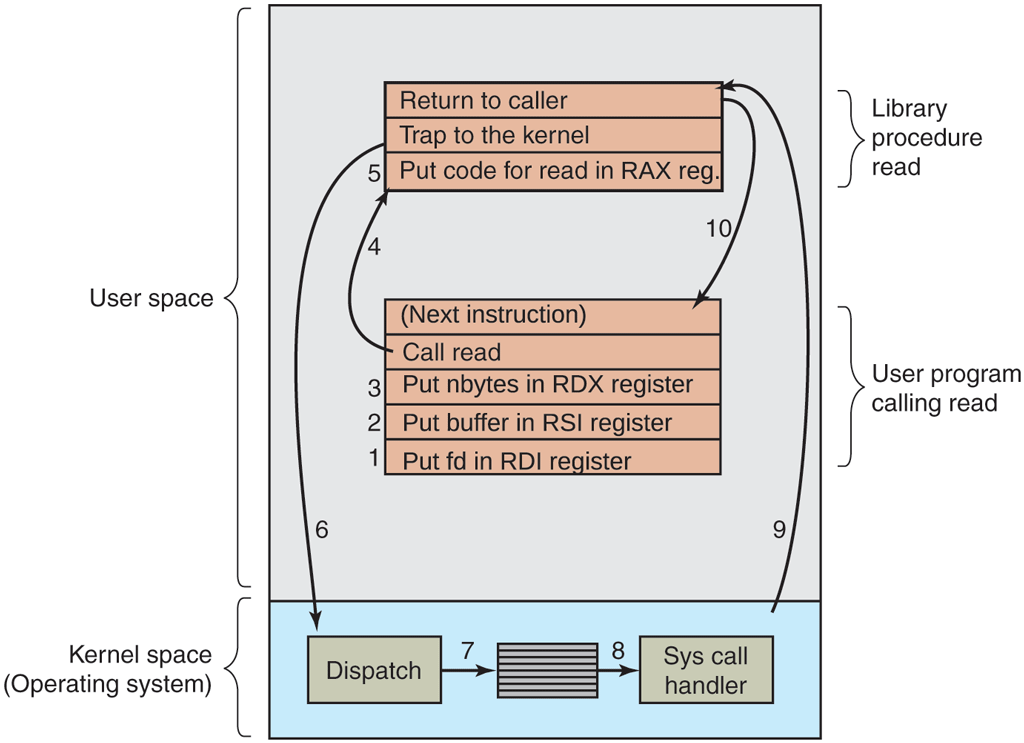
The 10 steps in making the system call read(fd, buffer, nbytes).
The first and third parameters are passed by value, but the second parameter is a reference, meaning that the address of the buffer is passed, not the contents of the buffer. Then comes the actual call to the library procedure (step 4). This instruction is the normal procedure-call instruction used to call all procedures.
The library procedure, written in assembly language, typically puts the system-call number in a place where the operating system expects it, such as the RAX register (step 5). Then it executes a trap instruction (such the X86-64 SYSCALL instruction) to switch from user mode to kernel mode and start execution at a fixed address within the kernel (step 6). The trap instruction is actually fairly similar to the procedure-call instruction in the sense that the instruction following it is taken from a distant location and the return address is saved on the stack for use later.
Nevertheless, the trap instruction also differs from the procedure-call instruction in two fundamental ways. First, as a side effect, it switches into kernel mode. The procedure call instruction does not change the mode. Second, rather than giving a relative or absolute address where the procedure is located, the trap instruction cannot jump to an arbitrary address. Depending on the architecture, either it jumps to a single fixed location (this is the case for the x86-4 SYSCALL instruction) or there is an 8-bit field in the instruction giving the index into a table in memory containing jump addresses, or equivalent.
The kernel code that starts following the trap examines the system-call number in the RAX register and then dispatches to the correct system-call handler, usually via a table of pointers to system-call handlers indexed on system-call number (step 7). At that point, the system-call handler runs (step 8). Once it has completed its work, control may be returned to the user-space library procedure at the instruction following the trap instruction (step 9). This procedure then returns to the user program in the usual way procedure calls return (step 10), which then continues with the next instruction in the program (step 11).
In step 9 above, we said ‘‘may be returned to the user-space library procedure’’ for good reason. The system call may block the caller, preventing it from continuing. For example, if it is trying to read from the keyboard and nothing has been typed yet, the caller has to be blocked. In this case, the operating system will look around to see if some other process can be run next. Later, when the desired input is available, this process will get the attention of the system and run steps 9 and 10.
In the following sections, we will examine some of the most heavily used POSIX system calls, or more specifically, the library procedures that make those system calls. POSIX has about 100 procedure calls. Some of the most important ones are listed in Fig. 1-18, grouped for convenience in four categories. In the text, we will briefly examine each call to see what it does.
Figure 1-18
| Process management | |||
|---|---|---|---|
| Call | Description | ||
| Create a child process identical to the parent | |||
| Wait for a child to terminate | |||
| Replace a process' core image | |||
| exit (status) | Terminate process execution and return status | ||
| File management | |||
| Call | Description | ||
| Open a file for reading, writing, or both | |||
| Close an open file | |||
| Read data from a file into a buffer | |||
| Write data from a buffer into a file | |||
| Move the file pointer | |||
| Get a file's status information | |||
| Directory- and file-system management | |||
| Call | Description | ||
| Create a new directory | |||
| Remove an empty directory | |||
| Create a new entry, name2, pointing to name1 | |||
| Remove a directory entry | |||
| Mount a file system | |||
| Unmount a file system | |||
| Miscellaneous | |||
| Call | Description | ||
| Change the working directory | |||
| Change a file's protection bits | |||
| Send a signal to a process | |||
| Get the elapsed time since Jan. 1, 1970 | |||
Some of the major POSIX system calls. The return code s is if an error has occurred. The return codes are as follows: pid is a process id, fd is a file descriptor, n is a byte count, position is an offset within the file, and seconds is the elapsed time. The parameters are explained in the text.
To a large extent, the services offered by these calls determine most of what the operating system has to do, since the resource management on personal computers is minimal (at least compared to big machines with multiple users). The services include things like creating and terminating processes, creating, deleting, reading, and writing files, managing directories, and performing input and output.
As an aside, it is worth pointing out that the mapping of POSIX procedure calls onto system calls is not one-to-one. The POSIX standard specifies a number of procedures that a conformant system must supply, but it does not specify whether they are system calls, library calls, or something else. If a procedure can be carried out without invoking a system call (i.e., without trapping to the kernel), it will usually be done in user space for reasons of performance. However, most of the POSIX procedures do invoke system calls, usually with one procedure mapping directly onto one system call. In a few cases, especially where several required procedures are only minor variations of one another, one system call handles more than one library call.
1.6.1 System Calls for Process Management
The first group of calls in Fig. 1-18 deals with process management. Fork is a good place to start the discussion. Fork is the only way to create a new process in POSIX. It creates an exact duplicate of the original process, including all the file descriptors, registers—everything. After the fork, the original process and the copy (the parent and child) go their separate ways. All the variables have identical values at the time of the fork, but since the parent’s data are copied to create the child, subsequent changes in one of them do not affect the other one. In fact, the memory of the child may be shared copy-on-write with the parent. This means that parent and child share a single physical copy of the memory until one of the two modifies a value at a location in memory—in which case the operating system makes a copy of the small chunk of memory containing that location. Doing so minimizes the amount of memory that needs to be copied a priori, as much can remain shared. Moreover, part of the memory, for instance, the program text does not change at, so it can always be shared between parent and child. The fork call returns a value, which is zero in the child and equal to the child’s PID (Process IDentifier) in the parent. Using the returned PID, the two processes can see which one is the parent process and which one is the child process.
In most cases, after a fork, the child will need to execute different code from the parent. Consider the case of the shell. It reads a command from the terminal, forks off a child process, waits for the child to execute the command, and then reads the next command when the child terminates. To wait for the child to finish, the parent executes a waitpid system call, which just waits until the child terminates (any child if more than one exists). Waitpid can wait for a specific child, or for any old child by setting the first parameter to When waitpid completes, the address pointed to by the second parameter, statloc, will be set to the child process’ exit status (normal or abnormal termination and exit value). Various options are also provided, specified by the third parameter. For example, returning immediately if no child has already exited.
Now consider how fork is used by the shell. When a command is typed, the shell forks off a new process. This child process must execute the user command. It does this by using the execve system call, which causes its entire core image to be replaced by the file named in its first parameter. A highly simplified shell illustrating the use of fork, waitpid, and execve is shown in Fig. 1-19.
Figure 1-19
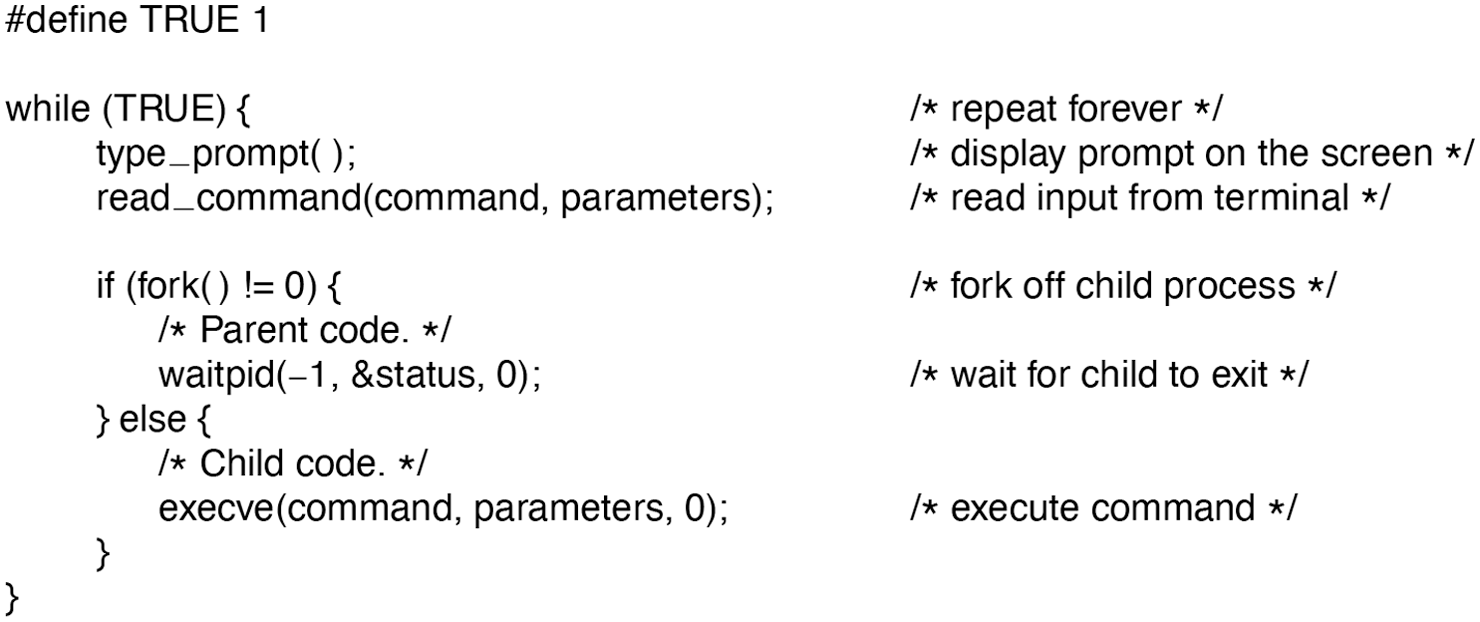
A stripped-down shell. Throughout this book, TRUE is assumed to be defined as 1.
In the most general case, execve has three parameters: the name of the file to be executed, a pointer to the argument array, and a pointer to the environment array. These will be described shortly. Various library routines, including execl, execv, execle, and execve, are provided to allow the parameters to be omitted or specified in various ways. Throughout this book we will use the name exec to represent the system call invoked by all of these.
Let us consider the case of a command such as
cp file1 file2used to copy file1 to file2. After the shell has forked, the child process locates and executes the file cp and passes to it the names of the source and target files.
The main program of cp (and main program of most other C programs) contains the declaration
main(argc, argv, envp)where argc is a count of the number of items on the command line, including the program name. For the example above, argc is 3.
The second parameter, argv, is a pointer to an array. Element i of that array is a pointer to the ith string on the command line. In our example, argv[0] would point to the string ‘‘cp’’, argv[1] would point to the string “file1”, and argv[2] would point to the string “file2”.
The third parameter of main, envp, is a pointer to the environment, an array of strings containing assignments of the form used to pass information such as the terminal type and home directory name to programs. There are library procedures that programs can call to get the environment variables, which are often used to customize how a user wants to perform certain tasks (e.g., the default printer to use). In Fig. 1-19, no environment is passed to the child, so the third parameter of execve is a zero.
If exec seems complicated, do not despair; it is (semantically) the most complex of all the POSIX system calls. All the other ones are much simpler. As an example of a simple one, consider exit, which processes should use when they are finished executing. It has one parameter, the exit status (0 to 255), which is returned to the parent via statloc in the waitpid system call.
Processes in UNIX have their memory divided up into three segments: the text segment (i.e., the program code), the data segment (i.e., the variables), and the stack segment. The data segment grows upward and the stack grows downward, as shown in Fig. 1-20. Between them is a gap of unused address space. The stack grows into the gap automatically, as needed, but expansion of the data segment is done explicitly by using a system call, brk, which specifies the new address where the data segment is to end. This call, however, is not defined by the POSIX standard, since programmers are encouraged to use the malloc library procedure for dynamically allocating storage, and the underlying implementation of malloc was not thought to be a suitable subject for standardization since few programmers use it directly and it is doubtful that anyone even notices that brk is not in POSIX. (In most systems, there are other memory areas also, for instance those create with the mmap system call, which creates a new virtual memory areas, but we will get to those later.)
Figure 1-20
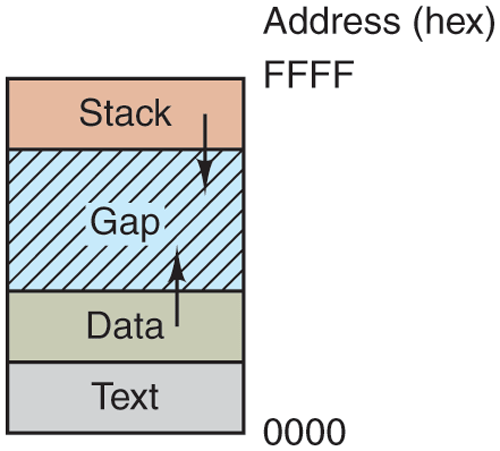
Processes have three segments: text, data, and stack.
1.6.2 System Calls for File Management
Many system calls relate to the file system. In this section, we will look at calls that operate on individual files; in the next one we will examine those that involve directories or the file system as a whole.
To read or write a file, it must first be opened. This call specifies the file name to be opened, either as an absolute path name or relative to the working directory, as well as a code of O_RDONLY, O_WRONLY, or O_RDWR, meaning open for reading, writing, or both. To create a new file, the O_CREAT parameter is used. The file descriptor returned can then be used for reading or writing. Afterward, the file can be closed by close, which makes the file descriptor available for reuse on a subsequent open.
The most heavily used calls are undoubtedly read and write. We saw read earlier. Write has the same parameters.
Although most programs read and write files sequentially, for some applications programs need to be able to access any part of a file at random. Associated with each file is a pointer that indicates the current position in the file. When reading (writing) sequentially, it normally points to the next byte to be read (written). The lseek call changes the value of the position pointer, so that subsequent calls to read or write can begin anywhere in the file.
Lseek has three parameters: the first is the file descriptor for the file, the second is a file position, and the third tells whether the file position is relative to the beginning of the file, the current position, or the end of the file. The value returned by lseek is the absolute position in the file (in bytes) after changing the pointer.
For each file, UNIX keeps track of the file mode (regular file, special file, directory, and so on), size, time of last modification, and other information. Programs can ask to see this information via the stat system call. The first parameter specifies the file to be inspected; the second one is a pointer to a structure where the information is to be put. The fstat calls does the same thing for an open file.
1.6.3 System Calls for Directory Management
In this section, we will look at some system calls that relate more to directories or the file system as a whole, rather than just to one specific file as in the previous section. The first two calls, mkdir and rmdir, create and remove empty directories, respectively. The next call is link. Its purpose is to allow the same file to appear under two or more names, often in different directories. A typical use is to allow several members of the same programming team to share a common file, with each of them having the file appear in his own directory, possibly under different names. Sharing a file is not the same as giving every team member a private copy; having a shared file means that changes that any member of the team makes are instantly visible to the other members—there is only one file. When copies are made of a file, subsequent changes made to one copy do not affect the others.
To see how link works, consider the situation of Fig. 1-21(a). Here are two users, ast and jim, each having his own directory with some files. If ast now executes a program containing the system call
Figure 1-21
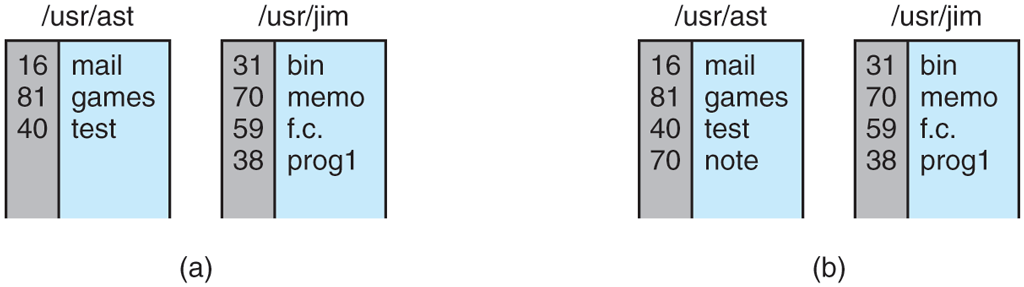
(a) Two directories before linking /usr/jim/memo to ast’s directory. (b) The same directories after linking.
link(“/usr/jim/memo”, “/usr/ast/note”);the file memo in jim’s directory is now entered into ast’s directory under the name note. Thereafter, /usr/jim/memo and /usr/ast/note refer to the same file. As an aside, whether user directories are kept in /usr, /user, /home, or somewhere else is simply a decision made by the local system administrator.
Understanding how link works will probably make clearer what it does. Every file in UNIX has a unique number, its i-number, that identifies it. This i-number is an index into a table of i-nodes, one per file, telling who owns the file, where its disk blocks are, and so on†. A directory is simply a file containing a set of (i-number, ASCII name) pairs. In the first versions of UNIX, each directory entry was 16 bytes—2 bytes for the i-number and 14 bytes for the name. Now a more complicated structure is needed to support long file names, but conceptually a directory is still a set of (i-number, ASCII name) pairs. In Fig. 1-21, mail has i-number 16, and so on. What link does is simply create a brand new directory entry with a (possibly new) name, using the i-number of an existing file. In Fig. 1-21(b), two entries have the same i-number (70) and thus refer to the same file. If either one is later removed, using the unlink system call, the other one remains. If both are removed, UNIX sees that no entries to the file exist (a field in the i-node keeps track of the number of directory entries pointing to the file), so the file is removed from the SSD or disk and its blocks are returned to the free block pool.
As we have mentioned earlier, the mount system call allows two file systems to be merged into one. A common situation is to have the root file system, containing the binary (executable) versions of the common commands and other heavily used files, on an SSD/hard disk (sub)partition and user files on another (sub)partition. Further, the user can then insert a USB disk with files to be read.
By executing the mount system call, the USB file system can be attached to the root file system, as shown in Fig. 1-22. A typical statement in C to mount is
Figure 1-22
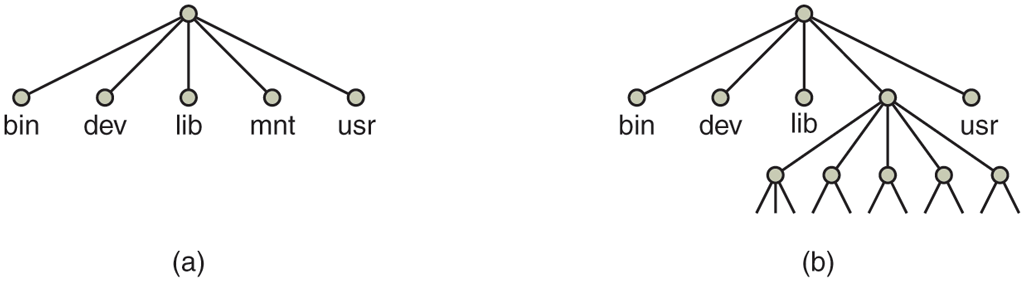
(a) File system before the mount. (b) File system after the mount.
mount(“/dev/sdb0”, “/mnt”, 0);where the first parameter is the name of a block special file for USB drive 0, the second parameter is the place in the tree where it is to be mounted, and the third parameter tells whether the file system is to be mounted read-write or read-only.
After the mount call, a file on drive 0 can be accessed by just using its path from the root directory or the working directory, without regard to which drive it is on. In fact, second, third, and fourth drives can also be mounted anywhere in the tree. The mount call makes it possible to integrate removable media into a single integrated file hierarchy, without having to worry about which device a file is on. Although this example involves USB drives, portions of hard disks (often called partitions or minor devices) can also be mounted this way, as well as external hard disks and SSDs. When a file system is no longer needed, it can be unmounted with the umount system call. After that, it is no longer accessible. Of course, if it is needed later on, it can be mounted again.
1.6.4 Miscellaneous System Calls
A variety of other system calls exist as well. We will look at just four of them here. The chdir call changes the current working directory. After the call
chdir(“/usr/ast/test”);an open on the file xyz will open /usr/ast/test/xyz. The concept of a working directory eliminates the need for typing (long) absolute path names all the time.
In UNIX every file has a mode used for protection. The mode includes the read-write-execute bits for the owner, group, and others. The chmod system call makes it possible to change the mode of a file. For example, to make a file readonly by everyone except the owner, one could execute
chmod(“file”, 0644);The kill system call is the way users and user processes send signals. If a process is prepared to catch a particular signal, then when it arrives, a signal handler is run. If the process is not prepared to handle a signal, then its arrival kills the process (hence the name of the call).
POSIX defines a number of procedures for dealing with time. For example, time just returns the current time in seconds, with 0 corresponding to Jan. 1, 1970 at midnight (just as the day was starting, not ending). On computers using 32-bit words, the maximum value time can return is seconds (assuming an unsigned integer is used). This value corresponds to a little over 136 years. Thus in the year 2106, 32-bit UNIX systems will go berserk, not unlike the famous Y2K problem that would have wreaked havoc with the world’s computers in 2000, were it not for the massive effort the IT industry put into fixing the problem. If you currently have a 32-bit UNIX system, you are advised to trade it in for a 64-bit one sometime before the year 2106.
1.6.5 The Windows API
So far we have focused primarily on UNIX. Now it is time to look briefly at Windows. Windows and UNIX differ in a fundamental way in their respective programming models. A UNIX program consists of code that does something or other, making system calls to have certain services performed. In contrast, a Windows program is normally event driven. The main program waits for some event to happen, then calls a procedure to handle it. Typical events are keys being struck, the mouse being moved, a mouse button being pushed, or a USB drive inserted or removed from the computer. Handlers are then called to process the event, update the screen, and update the internal program state. All in all, this leads to a somewhat different style of programming than with UNIX, but since the focus of this book is on operating system function and structure, these different programming models will not concern us much more.
Of course, Windows also has system calls. With UNIX, there is almost a oneto-one relationship between the system calls (e.g., read) and the library procedures (e.g., read) used to invoke the system calls. In other words, for each system call, there is roughly one library procedure that is called to invoke it, as indicated in Fig. 1-17. Furthermore, POSIX has only on the order of 100 procedure calls.
With Windows, the situation is radically different. To start with, the library calls and the actual system calls are highly decoupled. Microsoft has defined a set of procedures called the WinAPI, Win32 API, or Win64 API (Application Programming Interface) that programmers are expected to use to get operating system services. This interface is (partially) supported on all versions of Windows since Windows 95. By decoupling the API interface that programmer’s use from the actual system calls, Microsoft retains the ability to change the actual system calls in time (even from release to release) without invalidating existing programs. What actually constitutes Win32 is also slightly ambiguous because recent versions of Windows have many new calls that were not previously available. In this section, Win32 means the interface supported by all versions of Windows. Win32 provides compatibility among versions of Windows. Win64 is largely Win32 with bigger pointers so we will focus on Win32 here.
The number of Win32 API calls is extremely large, numbering in the thousands. Furthermore, while many of them do invoke system calls, a substantial number are carried out entirely in user space. As a consequence, with Windows it is impossible to see what is a system call (i.e., performed by the kernel) and what is simply a user-space library call. In fact, what is a system call in one version of Windows may be done in user space in a different version, and vice versa. When we discuss the Windows system calls in this book, we will use the Win32 procedures (where appropriate) since Microsoft guarantees that these will be stable over time. But it is worth remembering that not all of them are true system calls (i.e., traps to the kernel).
The Win32 API has a huge number of calls for managing windows, geometric figures, text, fonts, scrollbars, dialog boxes, menus, and other features of the GUI. To the extent that the graphics subsystem runs in the kernel (true on some versions of Windows but not on all), these are system calls; otherwise they are just library calls. Should we discuss these calls in this book or not? Since they are not really related to the function of an operating system, we have decided not to, even though they may be carried out by the kernel. Readers interested in the Win32 API should consult one of the many books on the subject (e.g., Yosifovich, 2020).
Even introducing all the Win32 API calls here is out of the question, so we will restrict ourselves to those calls that roughly correspond to the functionality of the UNIX calls listed in Fig. 1-18. These are listed in Fig. 1-23.
Figure 1-23
| UNIX | Win32 | Description |
|---|---|---|
| fork | CreateProcess | Create a new process |
| waitpid | WaitForSingleObject | Can wait for a process to exit |
| execve | ( none) | |
| exit | ExitProcess | Terminate execution |
| open | CreateFile | Create a file or open an existing file |
| close | CloseHandle | Close a file |
| read | ReadFile | Read data from a file |
| write | WriteFile | Write data to a file |
| Iseek | SetFilePointer | Move the file pointer |
| stat | GetFileAttributesEx | Get various file attributes |
| mkdir | CreateDirectory | Create a new directory |
| rmdir | RemoveDirectory | Remove an empty directory |
| link | (none) | Win32 does not support links |
| unlink | DeleteFile | Destroy an existing file |
| mount | (none) | Win32 does not support mount |
| umount | (none) | Win32 does not support mount, so no umount |
| chdir | SetCurrentDirectory | Change the current working directory |
| chmod | (none) | Win32 does not support security (although NT does) |
| kill | (none) | Win32 does not support signals |
| time | GetLocal Time | Get the current time |
The Win32 API calls that roughly correspond to the UNIX calls of Fig. 1-18. It is worth emphasizing that Windows has a very large number of other system calls, most of which do not correspond to anything in UNIX.
Let us now briefly go through the list of Fig. 1-23. CreateProcess creates a new process. It does the combined work of fork and execve in UNIX. It has many parameters specifying the properties of the newly created process. Windows does not have a process hierarchy like UNIX does, so there is no concept of a parent process and a child process. After a process is created, the creator and createe are equals. WaitForSingleObject is used to wait for an event. Many possible events can be waited for. If the parameter specifies a process, then the caller waits for the specified process to exit, which is done using ExitProcess.
The next six calls operate on files and are functionally similar to their UNIX counterparts although they differ in the parameters and details. Still, files can be opened, closed, read, and written pretty much as in UNIX. The SetFilePointer and GetFileAttributesEx calls set the file position and get some of the file attributes.
Windows has directories and they are created with CreateDirectory and RemoveDirectory API calls, respectively. There is also a notion of a current directory, set by SetCurrentDirectory. The current time of day is acquired using GetLocalTime.
The Win32 interface does not have links to files, mounted file systems, security, or signals, so the calls corresponding to the UNIX ones do not exist. Of course, Win32 has a huge number of other calls that UNIX does not have, especially for managing the GUI. For instance, Windows 11 has an elaborate security system and also supports file links.
One last note about Win32 is perhaps worth making. Win32 is not a terribly uniform or consistent interface. The main culprit here was the need to be backward compatible with the previous 16-bit interface used in Windows 3.x.