1.2 History of Operating Systems
Operating systems have been evolving through the years. In the following sections, we will briefly look at a few of the highlights. Since operating systems have historically been closely tied to the architecture of the computers on which they run, we will look at successive generations of computers to see what their operating systems were like. This mapping of operating system generations to computer generations is crude, but it does provide some structure where there would otherwise be none. The progression given below is largely chronological, but it has been a bumpy ride. Each development did not wait until the previous one nicely finished before getting started. There was a lot of overlap, not to mention many false starts and dead ends. Take this as a guide, not as the last word.
The first true digital computer was designed by the English mathematician Charles Babbage (1792–1871). Although Babbage spent most of his life and fortune trying to build his ‘‘analytical engine,’’ he never got it working properly because it was purely mechanical, and the technology of his day could not produce the required wheels, gears, and cogs to the high precision that he needed. Needless to say, the analytical engine did not have an operating system.
As an interesting historical aside, Babbage realized that he would need software for his analytical engine, so he hired a young woman named Ada Lovelace, who was the daughter of the famed British poet Lord Byron, as the world’s first programmer. The programming language Ada® is named after her.
1.2.1 The First Generation (1945–1955): Vacuum Tubes
After Babbage’s unsuccessful efforts, little progress was made in constructing digital computers until the World War II period, which stimulated an explosion of activity. Professor John Atanasoff and his graduate student Clifford Berry built what is now regarded as the first functioning digital computer at Iowa State University. It used 300 vacuum tubes. At roughly the same time, Konrad Zuse in Berlin built the Z3 computer out of electromechanical relays. In 1944, the Colossus was built and programmed by a group of scientists (including Alan Turing) at Bletchley Park, England, the Mark I was built by Howard Aiken at Harvard, and the ENIAC was built by William Mauchley and his graduate student J. Presper Eckert at the University of Pennsylvania. Some were binary, some used vacuum tubes, some were programmable, but all were very primitive and took seconds to perform even the simplest calculation.
In these early days, a single group of people (usually engineers) designed, built, programmed, operated, and maintained each machine. All programming was done in absolute machine language, or even worse yet, by wiring up electrical circuits by connecting thousands of cables to plugboards to control the machine’s basic functions. Programming languages were unknown (even assembly language was unknown). Operating systems were unheard of. The usual mode of operation was for the programmer to sign up for a block of time using the signup sheet on the wall, then come down to the machine room, insert his or her plugboard into the computer, and spend the next few hours hoping that none of the 20,000 or so vacuum tubes would burn out during the run. Virtually all the problems were simple straightforward mathematical and numerical calculations, such as grinding out tables of sines, cosines, and logarithms, or computing artillery trajectories.
By the early 1950s, the routine had improved somewhat with the introduction of punched cards. It was now possible to write programs on cards and read them in instead of using plugboards; otherwise, the procedure was the same.
1.2.2 The Second Generation (1955–1965): Transistors and Batch Systems
The introduction of the transistor in the mid-1950s changed the picture radically. Computers became reliable enough that they could be manufactured and sold to paying customers with the expectation that they would continue to function long enough to get useful work done. For the first time, there was a clear separation between designers, builders, operators, programmers, and maintenance personnel.
These machines, which are now called mainframes, were locked away in large, specially air-conditioned computer rooms, with staffs of professional operators to run them. Only large corporations or government agencies or universities could afford the multimillion-dollar price tag. To run a job (i.e., a program or set of programs), a programmer would first write the program on paper (in FORTRAN or assembler), then punch it on cards. The programmer would then bring the card deck down to the input room, hand it to one of the operators, and go drink coffee until the output was ready.
When the computer finished whatever job it was currently running, an operator would go over to the printer and tear off the output and carry it over to the output room, so that the programmer could collect it later. Then the operator would take one of the card decks that had been brought from the input room and read it in. If the FORTRAN compiler was needed, the operator would have to get it from a file cabinet and read it in. Much computer time was wasted while operators were walking around the machine room.
Given the high cost of the equipment, it is not surprising that people quickly looked for ways to reduce the wasted time. The solution generally adopted was the batch system. The idea behind it was to collect a tray full of jobs in the input room and then read them onto a magnetic tape using a small (relatively) inexpensive computer, such as the IBM 1401, which was quite good at reading cards, copying tapes, and printing output, but not at all good at numerical calculations. Other, much more expensive machines, such as the IBM 7094, were used for the real computing. This situation is shown in Fig. 1-3.
Figure 1-3
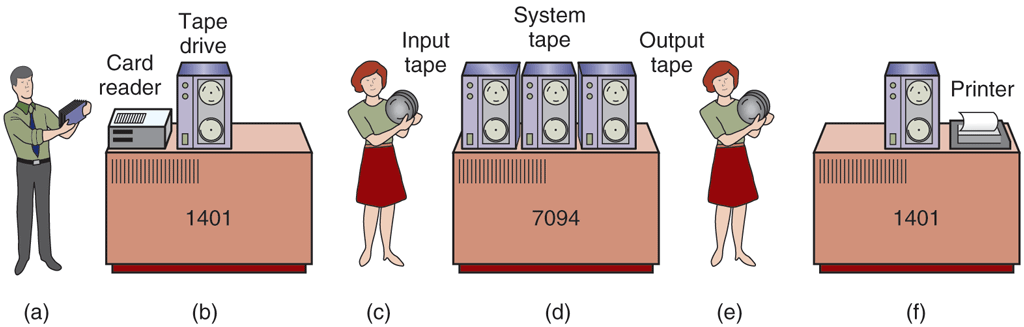
An early batch system. (a) Programmers bring cards to 1401. (b) 1401 reads batch of jobs onto tape. (c) Operator carries input tape to 7094. (d) 7094 does computing. (e) Operator carries output tape to 1401. (f) 1401 prints output.
After about an hour of collecting a batch of jobs, the cards were read onto a magnetic tape, which was carried into the machine room, where it was mounted on a tape drive. The operator then loaded a special program (the ancestor of today’s operating system), which read the first job from tape and ran it. The output was written onto a second tape, instead of being printed. After each job finished, the operating system automatically read the next job from the tape and began running it. When the whole batch was done, the operator removed the input and output tapes, replaced the input tape with the next batch, and brought the output tape to a 1401 for printing off line (i.e., not connected to the main computer).
The structure of a typical input job is shown in Fig. 1-4. It started out with a $JOB card, specifying the maximum run time in minutes, the account number to be charged, and the programmer’s name. Then came a $FORTRAN card, telling the operating system to load the FORTRAN compiler from the system tape. It was directly followed by the program to be compiled, and then a $LOAD card, directing the operating system to load the object program just compiled. (Compiled programs were often written on scratch tapes and had to be loaded explicitly.) Next came the $RUN card, telling the operating system to run the program with the data following it. Finally, the $END card marked the end of the job. These control cards were the forerunners of modern shells and command-line interpreters.
Figure 1-4
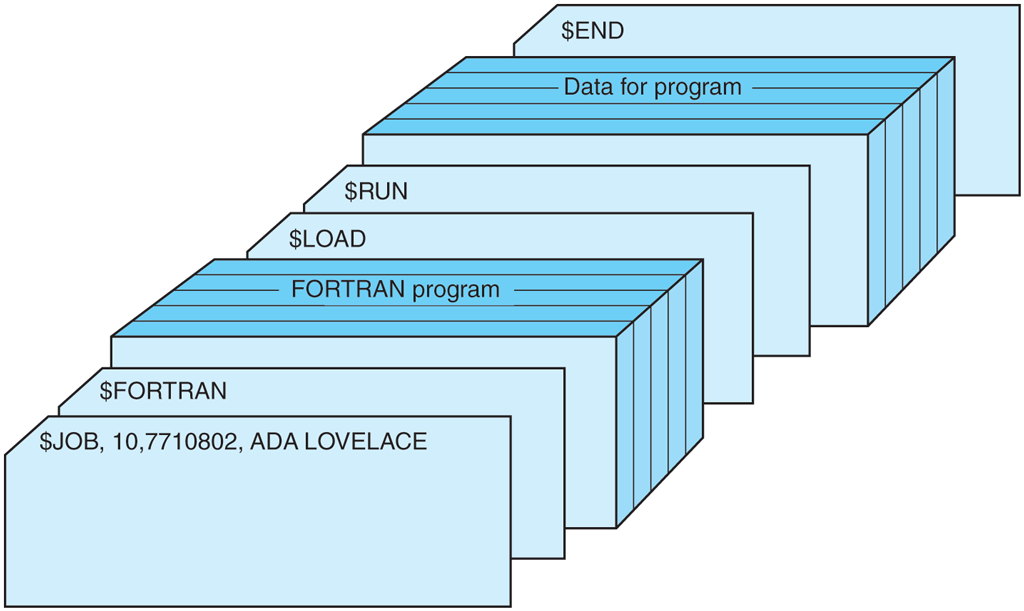
Structure of a typical FMS job.
Large, second-generation computers were used mostly for scientific and engineering calculations, such as solving the partial differential equations that often occur in physics and engineering. They were largely programmed in FORTRAN and assembly language. Typical operating systems were FMS (the Fortran Monitor System) and IBSYS, IBM’s operating system for the 7094.
1.2.3 The Third Generation (1965–1980): ICs and Multiprogramming
By the early 1960s, most computer manufacturers had two distinct and incompatible, product lines. On the one hand, there were the word-oriented, large-scale scientific computers, such as the 7094, which were used for industrial-strength numerical calculations in science and engineering. On the other hand, there were the character-oriented, commercial computers, such as the 1401, which were widely used for tape sorting and printing by banks and insurance companies.
Developing and maintaining two completely different product lines was an expensive proposition for the manufacturers. In addition, many new computer customers initially needed a small machine but later outgrew it and wanted a bigger machine that would run all their old programs, but faster.
IBM attempted to solve both of these problems at a single stroke by introducing the System/360. The 360 was a series of software-compatible machines ranging from 1401-sized models to much larger ones, more powerful than the mighty 7094. The machines differed only in price and performance (maximum memory, processor speed, number of I/O devices permitted, and so forth). Since they all had the same architecture and instruction set, programs written for one machine could run on all the others—at least in theory. (But as Yogi Berra reputedly said: ‘‘In theory, theory and practice are the same; in practice, they are not.’’) Since the 360 was designed to handle both scientific (i.e., numerical) and commercial computing, a single family of machines could satisfy the needs of all customers. In subsequent years, IBM came out with backward compatible successors to the 360 line, using more modern technology, known as the 370, 4300, 3080, and 3090. The zSeries is the most recent descendant of this line, although it has diverged considerably from the original.
The IBM 360 was the first major computer line to use (small-scale) ICs (Integrated Circuits), thus providing a major price/performance advantage over the second-generation machines, which were built up from individual transistors. It was an immediate and massive success, and the idea of a family of compatible computers was soon adopted by all the other major manufacturers. The descendants of these machines are still in use at computer centers today. Nowadays they are often used for managing huge databases (e.g., for airline reservation systems) or as servers for World Wide Web sites that must process thousands of requests per second.
The greatest strength of the ‘‘single-family’’ idea was simultaneously its greatest weakness. The original intention was that all software, including the operating system, OS/360, had to work on all models. It had to run on small systems, which often just replaced 1401s for copying cards to tape, and on very large systems, which often replaced 7094s for doing weather forecasting and other heavy computing. It had to be good on systems with few peripherals and on systems with many peripherals. It had to work in commercial environments and in scientific environments. Above all, it had to be efficient for all of these different uses.
There was no way that IBM (or anybody else for that matter) could write a piece of software to meet all those conflicting requirements. The result was an enormous and extraordinarily complex operating system, probably two to three orders of magnitude larger than FMS. It consisted of millions of lines of assembly language written by thousands of programmers, and contained thousands upon thousands of bugs, which necessitated a continuous stream of new releases in an attempt to correct them. Each new release fixed some bugs and introduced new ones, so the number of bugs probably remained constant over time.
One of the designers of OS/360, Fred Brooks, subsequently wrote a now-classic, witty, and incisive book (Brooks, 1995) describing his experiences with OS/360. While it would be impossible to summarize the book here, suffice it to say that the cover shows a herd of prehistoric beasts stuck in a tar pit. The cover of Silberschatz et al. (2012) makes a similar point about operating systems being dinosaurs. He also made the comment that adding programmers to a late software project makes it even later as well saying that it takes 9 months to produce a child, no matter how many women you assign to the project.
Despite its enormous size and problems, OS/360 and the similar third-generation operating systems produced by other computer manufacturers actually satisfied most of their customers reasonably well. They also popularized several key techniques absent in second-generation operating systems. Probably the most important of these was multiprogramming. On the 7094, when the current job paused to wait for a tape or other I/O operation to complete, the CPU simply sat idle until the I/O finished. With heavily CPU-bound scientific calculations, I/O is infrequent, so this wasted time is not significant. With commercial data processing, the I/O wait time can often be 80% or 90% of the total time, so something had to be done to avoid having the (expensive) CPU be idle so much.
The solution that evolved was to partition memory into several pieces, with a different job in each partition, as shown in Fig. 1-5. While one job was waiting for I/O to complete, another job could be using the CPU. If enough jobs could be held in main memory at once, the CPU could be kept busy nearly 100% of the time. Having multiple jobs safely in memory at once requires special hardware to protect each job against snooping and mischief by the other ones, but the 360 and other third-generation systems were equipped with this hardware.
Figure 1-5
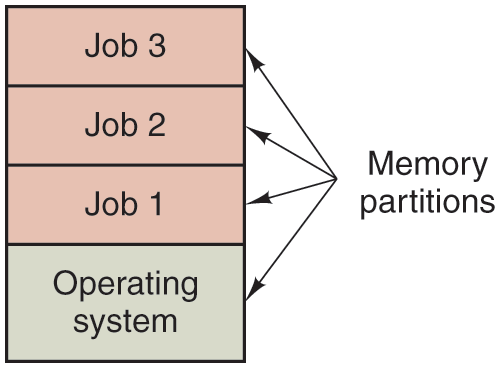
A multiprogramming system with three jobs in memory.
Another major feature present in third-generation operating systems was the ability to read jobs from cards onto the disk as soon as they were brought to the computer room. Then, whenever a running job finished, the operating system could load a new job from the disk into the now-empty partition and run it. This ability is called spooling (from Simultaneous Peripheral Operation On Line) and was also used for output. With spooling, the 1401s were no longer needed, and much carrying of tapes disappeared.
Although third-generation operating systems were well suited for big scientific calculations and massive commercial data-processing runs, they were still basically batch systems. Many programmers pined for the first-generation days when they had the machine all to themselves for a few hours, so they could debug their programs quickly. With third-generation systems, the time between submitting a job and getting back the output was often several hours, so a single misplaced comma could cause a compilation to fail, and the programmer to waste half a day. Programmers did not like that very much.
This desire for quick response time paved the way for timesharing, a variant of multiprogramming, in which each user has an online terminal. In a timesharing system, if 20 users are logged in and 17 of them are thinking or talking or drinking coffee, the CPU can be allocated in turn to the three jobs that want service. Since people debugging programs usually issue short commands (e.g., compile a fivepage procedure rather than long ones (e.g., sort a million-record file), the computer can provide fast, interactive service to a number of users and perhaps also work on big batch jobs in the background when the CPU is otherwise idle. The first general-purpose timesharing system, CTSS (Compatible Time Sharing System), was developed at M.I.T. on a specially modified 7094 (Corbató et al., 1962). However, timesharing did not really become popular until the necessary protection hardware became widespread during the third generation.
After the success of the CTSS system, M.I.T., Bell Labs, and General Electric (at that time a major computer manufacturer) decided to embark on the development of a ‘‘computer utility,’’ that is, a machine that would support some hundreds of simultaneous timesharing users. Their model was the electricity system—when you need electric power, you just stick a plug in the wall, and within reason, as much power as you need will be there. The designers of this system, known as MULTICS (MULTiplexed Information and Computing Service), envisioned one huge machine providing computing power for everyone in the Boston area. The idea that machines 10,000 times faster than their GE-645 mainframe would be sold (for well under $1000) by the millions only 40 years later was pure science fiction. Sort of like the idea of supersonic trans-Atlantic undersea trains now.
MULTICS was a mixed success. It was designed to support hundreds of users on a machine slower than a modern smartphone and with a million times less memory. This is not quite as crazy as it sounds, since in those days people knew how to write small, efficient programs, a skill that has subsequently been completely lost. There were many reasons that MULTICS did not take over the world, not the least of which is that it was written in the PL/I programming language, and the PL/I compiler was years late and barely worked at all when it finally arrived. In addition, MULTICS was enormously ambitious for its time, much like Charles Babbage’s analytical engine in the 19th century.
To make a long story short, MULTICS introduced many seminal ideas into the computer literature, but turning it into a serious product and a major commercial success was a lot harder than anyone had expected. Bell Labs dropped out of the project, and General Electric quit the computer business altogether. However, M.I.T. persisted and eventually got MULTICS working. It was ultimately sold as a commercial product by the company (Honeywell) that bought GE’s computer business when GE got tired of it and was installed by about 80 major companies and universities worldwide. While their numbers were small, MULTICS users were fiercely loyal. General Motors, Ford, and the U.S. National Security Agency, for example, shut down their MULTICS systems only in the late 1990s, 30 years after MULTICS was released, after years of begging Honeywell to update the hardware. The last MULTICS system was shut down amid a lot of tears in October 2000. Can you imagine hanging onto your PC for 30 years because you think it is so much better than everything else out there? That’s the kind of loyalty MULTICS inspired—and for good reason. It was hugely important.
By the end of the 20th century, the concept of a computer utility had fizzled out, but it came back in the form of cloud computing, in which relatively small computers (including smartphones, tablets, and the like) are connected to servers in vast and distant data centers where all the computing is done, with the local computer mostly handling the user interface. The motivation here is that most people do not want to administrate an increasingly complex and evolving computer system and would prefer to have that work done by a team of professionals, for example, people working for the company running the data center.
Despite its lack of commercial success, MULTICS had a huge influence on subsequent operating systems (especially UNIX and its derivatives, Linux, macOS, iOS, and FreeBSD). It is described in several papers and a book (Corbató and Vyssotsky, 1965; Daley and Dennis, 1968; Organick, 1972; Corbató et al., 1972; and Saltzer, 1974). It also has an active Website, located at www.multicians.org, with much information about the system, its designers, and its users.
Another major development during the third generation was the phenomenal growth of minicomputers, starting with the DEC PDP-1 in 1961. The PDP-1 had only 4K of 18-bit words, but at $120,000 per machine (less than 5% of the price of a 7094), it sold like hotcakes. For certain kinds of nonnumerical work, it was almost as fast as the 7094 and gave birth to a whole new industry. It was quickly followed by a series of other PDPs (unlike IBM’s family, all incompatible) culminating in the PDP-11.
One of the computer scientists at Bell Labs who had worked on the MULTICS project, Ken Thompson, subsequently found a small PDP-7 minicomputer that no one was using and set out to write a stripped-down, one-user version of MULTICS. This work later developed into the UNIX operating system, which became popular in the academic world, with government agencies, and with many companies.
The history of UNIX has been told elsewhere (e.g., Salus, 1994). Part of that story will be given in Chap. 10. For now, suffice it to say that because the source code was widely available, various organizations developed their own (incompatible) versions, which led to chaos. Two major versions developed, System V, from AT&T, and BSD (Berkeley Software Distribution) from the University of California at Berkeley. These had minor variants as well. To make it possible to write programs that could run on any UNIX system, IEEE developed a standard for UNIX, called POSIX, that most versions of UNIX now support. POSIX defines a minimal system-call interface that conformant UNIX systems must support. In fact, some other operating systems now also support the POSIX interface.
As an aside, it is worth mentioning that in 1987, one of the authors (Tanenbaum) released a small clone of UNIX, called MINIX, primarily for educational purposes. Functionally, MINIX is very similar to UNIX, including POSIX support. Since that time, the original version of MINIX has evolved into MINIX 3, which is highly modular and focused on very high reliability and available for free from the Website www.minix3.org. MINIX 3 has the ability to detect and replace faulty or even crashed modules (such as I/O device drivers) on the fly without a reboot and without disturbing running programs. A book describing its internal operation and listing the source code in an appendix is also available (Tanenbaum and Woodhull, 2006).
The desire for a free production (as opposed to educational) version of MINIX led a Finnish student, Linus Torvalds, to write Linux. This system was directly inspired by and developed on MINIX and originally supported various MINIX features (e.g., the MINIX file system). It has since been extended in many ways by many people but still retains some underlying structure common to MINIX and to UNIX. Readers interested in a detailed history of Linux and the open source movement might want to read Glyn Moody’s (2001) book. Most of what will be said about UNIX in this book thus applies to System V, MINIX, Linux, and other versions and clones of UNIX as well.
Interestingly, both Linux and MINIX have become widely used. Linux powers a huge share of the servers in data centers and forms the basis of Android which dominates the smartphone market. MINIX was adapted by Intel for a separate and somewhat secret ‘‘management’’ processor embedded in virtually all its chipsets since 2008. In other words, if you have an Intel CPU, you also run MINIX deep in your processor, even if your main operating system is, say, Windows or Linux.
1.2.4 The Fourth Generation (1980–Present): Personal Computers
With the development of LSI (Large Scale Integration) circuits—chips containing thousands of transistors on a square centimeter of silicon—the age of the personal computer dawned. In terms of architecture, personal computers (initially called microcomputers) were not all that different from minicomputers of the PDP-11 class, but in terms of price they certainly were different. Where the minicomputer made it possible for a department in a company or university to have its own computer, the microprocessor chip made it possible for a single individual to have his or her own personal computer.
In 1974, when Intel came out with the 8080, the first general-purpose 8-bit CPU, it wanted an operating system for it, in part to be able to test it. Intel asked one of its consultants, Gary Kildall, to write one. Kildall and a friend first built a controller for the newly released Shugart Associates 8-inch floppy disk and hooked the floppy disk up to the 8080, thus producing the first microcomputer with a disk. Kildall then wrote a disk-based operating system called CP/M (Control Program for Microcomputers) for it. Since Intel did not think that disk-based microcomputers had much of a future, when Kildall asked for the rights to CP/M, Intel granted his request. Kildall then formed a company, Digital Research, to further develop and sell CP/M.
In 1977, Digital Research rewrote CP/M to make it suitable for running on the many microcomputers using the 8080, Zilog Z80, and other CPU chips. Many application programs were written to run on CP/M, allowing it to completely dominate the world of microcomputing for about 5 years.
In the early 1980s, IBM designed the IBM PC and looked around for software to run on it. People from IBM contacted Bill Gates to license his BASIC interpreter. They also asked him if he knew of an operating system to run on the PC. Gates suggested that IBM contact Digital Research, then the world’s dominant operating systems company. Making what was without a doubt the worst business decision in recorded history, Kildall refused to meet with IBM, sending a subordinate instead. To make matters even worse, his lawyer even refused to sign IBM’s nondisclosure agreement covering the not-yet-announced PC. Consequently, IBM went back to Gates asking if he could provide them with an operating system.
When IBM came back to him, Gates quickly realized that a local computer manufacturer, Seattle Computer Products, had a suitable operating system, DOS (Disk Operating System). He approached them and asked to buy it (allegedly for $75,000), which they readily accepted. Gates then offered IBM a DOS/BASIC package, which IBM accepted. IBM wanted certain modifications, so Gates hired the person who wrote DOS, Tim Paterson, as an employee of Gates’ fledgling company, Microsoft, to make them. The revised system was renamed MS-DOS (MicroSoft Disk Operating System) and quickly came to dominate the IBM PC market. A key factor here was Gates’ (in retrospect, extremely wise) decision to sell MS-DOS to computer companies for bundling with their hardware, compared to Kildall’s attempt to sell CP/M to end users one at a time (at least initially). After all this transpired, Kildall died suddenly and unexpectedly from causes that have not been fully disclosed.
By the time the successor to the IBM PC, the IBM PC/AT, came out in 1983 with the Intel 80286 CPU, MS-DOS was firmly entrenched and CP/M was on its last legs. MS-DOS was later widely used on the 80386 and 80486. Although the initial version of MS-DOS was fairly primitive, subsequent versions included more advanced features, including many taken from UNIX. (Microsoft was well aware of UNIX, even selling a microcomputer version of it called XENIX during the company’s early years.)
CP/M, MS-DOS, and other operating systems for early microcomputers were all based on users typing in commands from the keyboard. That eventually changed due to research done by Doug Engelbart at Stanford Research Institute in the 1960s. Engelbart invented the Graphical User Interface, complete with windows, icons, menus, and mouse. These ideas were adopted by researchers at Xerox PARC and incorporated into machines they built.
One fine day, Steve Jobs, who co-invented the Apple computer in his garage, visited PARC, saw a GUI, and instantly realized its potential value, something Xerox management famously did not. This strategic blunder of incredibly gargantuan proportions led to a book entitled Fumbling the Future (Smith and Alexander, 1988). Jobs then embarked on building an Apple with a GUI. This project led to the Lisa, which was too expensive and failed commercially. Jobs’ second attempt, the Apple Macintosh, was an huge success, not only because it was much cheaper than the Lisa, but also because it was user friendly, meaning that it was intended for users who not only knew nothing about computers but furthermore had absolutely no intention whatsoever of learning. In the creative world of graphic design, professional digital photography, and professional digital video production, Macintoshes became widely used and their users loved them. In 1999, Apple adopted a kernel derived from Carnegie Mellon University’s Mach microkernel which was originally developed to replace the kernel of BSD UNIX. Thus, Apple’s macOS is a UNIX-based operating system, albeit with a distinctive interface.
When Microsoft decided to build a successor to MS-DOS, it was strongly influenced by the success of the Macintosh. It produced a GUI-based system called Windows, which originally ran on top of MS-DOS (i.e., it was more like a shell than a true operating system). For about 10 years, from 1985 to 1995, Windows was just a graphical environment on top of MS-DOS. However, starting in 1995 a freestanding version, Windows 95, was released that incorporated many operating system features into it, using the underlying MS-DOS system only for booting and running old MS-DOS programs. Microsoft rewrote much of the operating system from scratch for Windows NT, a full 32-bit system. The lead designer for Windows NT was David Cutler, who was also one of the designers of the VAX VMS operating system, so some ideas from VMS are present in NT. In fact, so many ideas from VMS were present in it that the owner of VMS, DEC, sued Microsoft. The case was settled out of court for an amount of money requiring many digits to express. Version 5 of Windows NT was renamed Windows 2000 in early 1999, and 2 years later Microsoft released a slightly upgraded version called Windows XP which had a longer run than other versions (6 years).
After Windows 2000, Microsoft broke up the Windows family into a client and a server line. The client line was based on XP and its successors, while the server line produced Windows Server 2003–2019 and now Windows Server vNext. Microsoft later also introduced a third line, for the embedded world. All of these families of Windows forked off their own variations in the form of service packs in a dizzying proliferation of versions. It was enough to drive some administrators (and writers of operating systems textbooks) balmy.
When in January 2007 Microsoft finally released the successor to Windows XP, which it called Vista, it came with a new graphical interface, improved security, and many new or upgraded user programs. It bombed. Users complained about high system requirements and restrictive licensing terms. Its successor, Windows 7, a much less resource hungry version of the operating system, quickly overtook it. In 2012, Windows 8 came out. It had a completely new look and feel, geared largely for touch screens. The company hoped that the new design would become the dominant operating system on a wide variety of devices: desktops, notebooks, tablets, phones, and home theater PCs. It did not. While Windows 8 (and especially Windows 8.1) were successful, their popularity was mostly limited to PCs. In fact, many people did not like the new design much and Microsoft reverted it in 2015 in Windows 10. A few years later, Windows 10 overtook Windows 7 as the most popular Windows version. Windows 11 was released in 2021.
The other major contender in the personal computer world comprises the UNIX family. UNIX, and especially Linux, is strongest on network and enterprise servers but also popular on desktop computers, notebooks, tablets, embedded systems, and smartphones. FreeBSD is also a popular UNIX derivative, originating from the BSD project at Berkeley. Every modern Mac runs a modified version of FreeBSD (macOS). UNIX derivatives are widely used on mobile devices, such as those running iOS 7 or Android.
Many UNIX users, especially experienced programmers, prefer a command-based interface to a GUI, so nearly all UNIX systems support a windowing system called the X Window System (also known as X11) produced at M.I.T. This system handles the basic window management, allowing users to create, delete, move, and resize windows using a mouse. Often a complete GUI-based desktop environment, such as Gnome or KDE, is available to run on top of X11, giving UNIX a look and feel something like the Macintosh or Microsoft Windows, for those UNIX users who want such a thing.
An interesting development that began during the mid-1980s was the development of network operating systems and distributed operating systems to manage a collection of computers (Van Steen and Tanenbaum, 2017). In a network operating system, the users are aware of the existence of multiple computers and can log in to remote machines and copy files from one machine to another. Each machine runs its own local operating system and has its own local user (or users). Such systems are not fundamentally different from single-processor operating systems. They obviously need a network interface and some low-level software to drive it, as well as programs to achieve remote login and remote file access, but these additions do not change the essential structure of the operating system.
A distributed operating system, in contrast, is one that appears to its users as a traditional uniprocessor system, even though it is actually composed of multiple processors. The users should not be aware of where their programs are being run or where their files are located; that should all be handled automatically and efficiently by the operating system.
True distributed operating systems require more than just adding a little code to a uniprocessor operating system, because distributed and centralized systems differ in certain critical ways. Distributed systems, for example, often allow applications to run on several processors at the same time, thus requiring more complex processor scheduling algorithms in order to optimize the amount of parallelism. Moreover, communication delays within the network often mean that these (and other) algorithms must run with incomplete, outdated, or even incorrect information. This situation differs radically from that in a single-processor system in which the operating system has complete information about the system state.
1.2.5 The Fifth Generation (1990–Present): Mobile Computers
Ever since detective Dick Tracy started talking to his ‘‘two-way radio wrist watch’’ in the 1940s comic strip, people have craved a communication device they could carry around wherever they went. The first real mobile phone appeared in 1946 and weighed some 40 kilos. You could take it wherever you went as long as you had a car in which to carry it.
The first true handheld phone appeared in the 1970s and, at roughly one kilogram, was positively featherweight. It was affectionately known as ‘‘the brick.’’ Pretty soon everybody wanted one. Today, mobile phone penetration in developed countries is close to 90% of the global population. We can make calls not just with our portable phones and wrist watches, but even with eyeglasses and other wearable items. Moreover, the phone part is no longer central. We receive email, surf the Web, text our friends, play games, navigate around heavy traffic—and do not even think twice about it.
While the idea of combining telephony and computing in a phone-like device has been around since the 1970s also, the first real smartphone did not appear until the mid-1990s when Nokia released the N9000, which literally combined two, mostly separate devices: a phone and a Personal Digital Assistant. In 1997, Ericsson coined the term smartphone for its GS88 ‘‘Penelope.’’
Now that smartphones have become ubiquitous, the competition between the operating systems is as fierce as in the PC world. At the time of writing, Google’s Android is the dominant operating system with Apple’s iOS a clear second, but this was not always the case and all may be different again in just a few years. If anything is clear in the world of smartphones, it is that it is not easy to stay king of the mountain for long.
After all, most smartphones in the first decade after their inception were running Symbian OS. It was the operating system of choice for popular brands like Samsung, Sony Ericsson, Motorola, and especially Nokia. However, other operating systems like RIM’s Blackberry OS (introduced for smartphones in 2002) and Apple’s iOS (released for the first iPhone in 2007) started eating into Symbian’s market share. Many expected that RIM would dominate the business market, while iOS would dominate on consumer devices. Symbian’s market share plummeted. In 2011, Nokia ditched Symbian and announced it would focus on Windows Phone as its primary platform. For some time, Apple and RIM were the toast of the town (although not nearly as dominant as Symbian had been), but it did not take very long for Android, a Linux-based operating system released by Google in 2008, to overtake all its rivals.
For phone manufacturers, Android had the advantage that it was open source and available under a permissive license. As a result, they could tinker with it and adapt it to their own hardware with ease. Also, it has a huge community of developers writing apps, mostly in the familiar Java programming language. Even so, the past years have shown that the dominance may not last, and Android’s competitors are eager to claw back some of its market share. We will look at Android in detail in Sec. 10.8.