1.1 What is an Operating System?
It is hard to pin down what an operating system is other than saying it is the software that runs in kernel mode—and even that is not always true. Part of the problem is that operating systems perform two essentially unrelated functions: providing application programmers (and application programs, naturally) a clean abstract set of resources instead of the messy hardware ones and managing these hardware resources. Depending on who is doing the talking, you might hear mostly about one function or the other. Let us now look at both.
1.1.1 The Operating System as an Extended Machine
The architecture (instruction set, memory organization, I/O, and bus structure) of most computers at the machine-language level is primitive and awkward to program, especially for input/output. To make this point more concrete, consider modern SATA (Serial ATA) hard disks used on most computers. A book (Deming, 2014) describing an early version of the interface to the disk—what a programmer would have to know to use the disk—ran over 450 pages. Since then, the interface has been revised multiple times and is even more complicated than it was in 2014. Clearly, no sane programmer would want to deal with this disk at the hardware level. Instead, a piece of software, called a disk driver, deals with the hardware and provides an interface to read and write disk blocks, without getting into the details. Operating systems contain many drivers for controlling I/O devices.
But even this level is much too low for most applications. For this reason, all operating systems provide yet another layer of abstraction for using disks: files. Using this abstraction, programs can create, write, and read files, without having to deal with the messy details of how the hardware actually works.
This abstraction is the key to managing all this complexity. Good abstractions turn a nearly impossible task into two manageable ones. The first is defining and implementing the abstractions. The second is using these abstractions to solve the problem at hand. One abstraction that almost every computer user understands is the file, as mentioned above. It is a useful piece of information, such as a digital photo, saved email message, song, or Web page. It is much easier to deal with photos, emails, songs, and Web pages than with the details of SATA (or other) disks. The job of the operating system is to create good abstractions and then implement and manage the abstract objects thus created. In this book, we will talk a lot about abstractions. They are one of the keys to understanding operating systems.
This point is so important that it is worth repeating but in different words. With all due respect to the industrial engineers who so very carefully designed the Apple Macintosh computers (now known simply as ‘‘Macs’’), hardware is grotesque. Real processors, memories, Flash drives, disks, and other devices are very complicated and present difficult, awkward, idiosyncratic, and inconsistent interfaces to the people who have to write software to use them. Sometimes this is due to the need for backward compatibility with older hardware. Other times it is an attempt to save money. Often, however, the hardware designers do not realize (or care) how much trouble they are causing for the software. One of the major tasks of the operating system is to hide the hardware and present programs (and their programmers) with nice, clean, elegant, consistent, abstractions to work with instead. Operating systems turn the awful into the beautiful, as shown in Fig. 1-2.
Figure 1-2
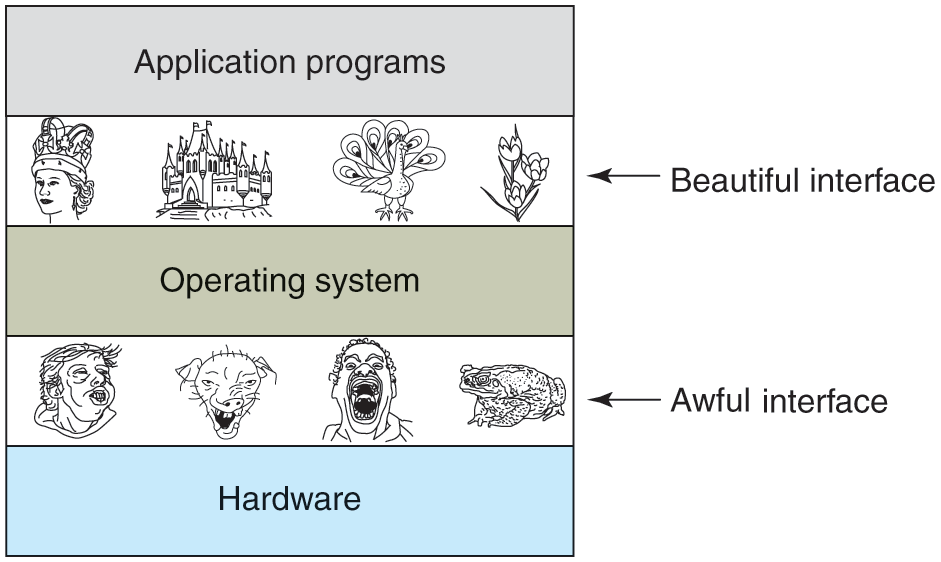
Operating systems turn awful hardware into beautiful abstractions.
It should be noted that the operating system’s real customers are the application programs (via the application programmers, of course). They are the ones who deal directly with the operating system and its abstractions. In contrast, end users deal with the abstractions provided by the user interface, either a command-line shell or a graphical interface. While the abstractions at the user interface may be similar to the ones provided by the operating system, this is not always the case. To make this point clearer, consider the normal Windows desktop and the line-oriented command prompt. Both are programs running on the Windows operating system and use the abstractions Windows provides, but they offer very different user interfaces. Similarly, a Linux user running Gnome or KDE sees a very different interface than a Linux user working directly on top of the underlying X Window System, but the underlying operating system abstractions are the same in both cases.
In this book, we will study the abstractions provided to application programs in great detail, but say rather little about user interfaces. That is a large and important subject, but one only peripherally related to operating systems.
1.1.2 The Operating System as a Resource Manager
The concept of an operating system as primarily providing abstractions to application programs is a top-down view. An alternative, bottom-up, view holds that the operating system is there to manage all the pieces of a complex system. Modern computers consist of processors, memories, timers, disks, mice, network interfaces, printers, touch screens, touch pad, and a wide variety of other devices. In the bottom-up view, the job of the operating system is to provide for an orderly and controlled allocation of the processors, memories, and I/O devices among the various programs wanting them.
Modern operating systems allow multiple programs to be in memory and run at the same time. Imagine what would happen if three programs running on some computer all tried to print their output simultaneously on the same printer. The first few lines of printout might be from program 1, the next few from program 2, then some from program 3, and so forth. The result would be utter chaos. The operating system can bring order to the potential chaos by buffering all the output destined for the printer on the disk or Flash drive. When one program is finished, the operating system can then copy its output from the disk file where it has been stored for the printer, while at the same time the other program can continue generating more output, oblivious to the fact that the output is not really going to the printer (yet).
When a computer (or network) has more than one user, managing and protecting the memory, I/O devices, and other resources is even more important since the users might otherwise interfere with one another. In addition, users often need to share not only hardware, but information (files, databases, etc.) as well. In short, this view of the operating system holds that its primary task is to keep track of which programs are using which resource, to grant resource requests, to account for usage, and to mediate conflicting requests from different programs and users.
Resource management includes multiplexing (sharing) resources in two different ways: in time and in space. When a resource is time multiplexed, different programs or users take turns using it. First one of them gets to use the resource, then another, and so on. For example, with only one CPU and multiple programs that want to run on it, the operating system first allocates the CPU to one program, then, after it has run long enough, another program gets to use the CPU, then another, and then eventually the first one again. Determining how the resource is time multiplexed—who goes next and for how long—is the task of the operating system. Another example of time multiplexing is sharing the printer. When multiple print jobs are queued up for printing on a single printer, a decision has to be made about which one is to be printed next.
The other kind of multiplexing is space multiplexing. Instead of the customers taking turns, each one gets part of the resource. For example, main memory is normally divided up among several running programs, so each one can be resident at the same time (for example, in order to take turns using the CPU). Assuming there is enough memory to hold multiple programs, it is more efficient to hold several programs in memory at once rather than give one of them the entire mem, especially if it only needs a small fraction of the total. Of course, this raises issues of fairness, protection, and so forth, and it is up to the operating system to solve them. Other resource that are space multiplexed are disks and Flash drives. In many systems, a single disk can hold files from many users at the same time. Allocating disk space and keeping track of who is using which disk blocks is a typical operating system task. By the way, people commonly refer to all nonvolatile memory as ‘‘disks,’’ but in this book we try to explicitly distinguish between disks, which have spinning magnetic platters, and SSDs (Solid State Drives), which are based on Flash memory and electronic rather than mechanical. Still, from a software point of view, SSDs are similar to disks in many (but not all) ways.