1 Introduction
A modern computer consists of one or more processors, some amount of main memory, hard disks or Flash drives, printers, a keyboard, a mouse, a display, network interfaces, and various other input/output devices. All in all, a complex system. If every application programmer had to understand how all these things work in detail, no code would ever get written. Furthermore, managing all these components and using them optimally is an exceedingly challenging job. For this reason, computers are equipped with a layer of software called the operating system, whose job is to provide user programs with a better, simpler, cleaner, model of the computer and to handle managing all the resources just mentioned. Operating systems are the subject of this book.
It is important to realize that smart phones and tablets (like the Apple iPad) are just computers in a smaller package with a touch screen. They all have operating systems. In fact, Apple’s iOS is fairly similar to macOS, which runs on Apple’s desktop and MacBook systems. The smaller form factor and touch screen really doesn’t change that much about what the operating system does. Android smartphones and tablets all run Linux as the true operating system on the bare hardware. What users perceive as ‘‘Android’’ is simply a layer of software running on top of Linux. Since macOS (and thus iOS) is derived from Berkeley UNIX and Linux is a clone of UNIX, by far the most popular operating system in the world is UNIX and its variants. For this reason, we will pay a lot of attention in this book to UNIX.
Most readers probably have had some experience with an operating system such as Windows, Linux, FreeBSD, or macOS, but appearances can be deceiving. The program that users interact with, usually called the shell when it is text based and the GUI (Graphical User Interface) (which is pronounced ‘‘gooey’’) when it uses icons, is actually not part of the operating system, although it uses the operating system to get its work done.
A simple overview of the main components under discussion here is given in Fig. 1-1. Here we see the hardware at the bottom. The hardware consists of chips, boards, Flash drives, disks, a keyboard, a monitor, and similar physical objects. On top of the hardware is the software. Most computers have two modes of operation: kernel mode and user mode. The operating system, the most fundamental piece of software, runs in kernel mode (also called supervisor mode) for at least some of its functionality. In this mode, it has complete access to all the hardware and can execute any instruction the machine is capable of executing. The rest of the software runs in user mode, in which only a subset of the machine instructions is available. In particular, those instructions that affect control of the machine, determine the security boundaries, or do I/O (Input/Output) are forbidden to user-mode programs. We will come back to the difference between kernel mode and user mode repeatedly throughout this book. It plays a crucial role in how operating systems work.
Figure 1-1
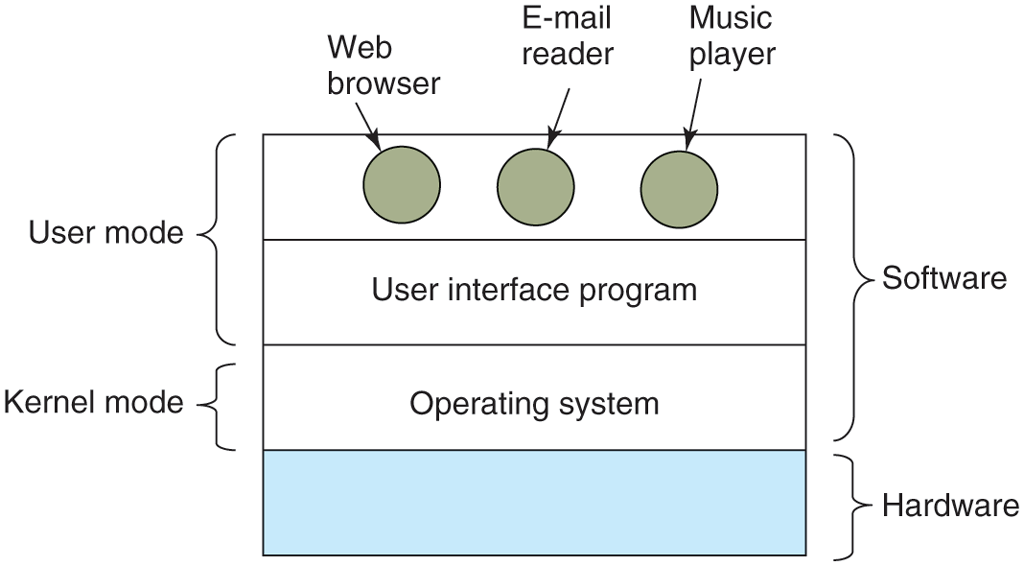
Where the operating system fits in.
The user interface program, shell or GUI, is the lowest level of user-mode software, and allows the user to start other programs, such as a Web browser, email reader, or music player. These programs, too, make heavy use of the operating system.
The placement of the operating system is shown in Fig. 1-1. It runs on the bare hardware and provides the base for all the other software.
An important distinction between the operating system and normal (user-mode) software is that if a user does not like a particular email reader, she is free to get a different one or write her own if she so chooses; she is typically not free to write her own clock interrupt handler, which is part of the operating system and is protected by hardware against attempts by users to modify it. This distinction, however, is sometimes blurred, for instance in embedded systems (which may not have kernel mode) or interpreted systems (such as Java-based systems that use interpretation, not hardware, to separate the components).
Also, in many systems there are programs that run in user mode but help the operating system or perform privileged functions. For example, there is often a program that allows users to change their passwords. It is not part of the operating system and does not run in kernel mode, but it clearly carries out a sensitive function and has to be protected in a special way. In some systems, this idea is carried to an extreme, and pieces of what is traditionally considered to be the operating system (such as the file system) run in user mode. In such systems, it is difficult to draw a clear boundary. Everything running in kernel mode is clearly part of the operating system, but some programs running outside it are arguably also part of it, or at least closely associated with it.
Operating systems differ from user (i.e., application) programs in ways other than where they reside. In particular, they are huge, complex, and very long-lived. The source code for Windows is over 50 million lines of code. The source code for Linux is over 20 million lines of code. Both are still growing. To conceive of what this means, think of printing out 50 million lines in book form, with 50 lines per page and 1000 pages per volume (about the size of this book). Each book would contain 50,000 lines of code. It would take 1000 volumes to list an operating system of this size. Now imagine a bookcase with 20 books per shelf and seven shelves or 140 books in all. It would take a bit over seven bookcases to hold the full code of Windows 10. Can you imagine getting a job maintaining an operating system and on the first day having your boss bring you to a room with these seven bookcases of code and say: ‘‘Go learn that.’’ And this is only for the part that runs in the kernel. No one at Microsoft understands all of Windows and probably most programmers there, even kernel programmers, understand only a small part of it. When essential shared libraries are included, the source code base gets much bigger. And this excludes basic application software (things like the browser, the media player, and so on).
It should be clear now why operating systems live a long time—they are very hard to write, and having written one, the owner is loath to throw it out and start again. Instead, such systems evolve over long periods of time. Windows 95/98/Me was basically one operating system and Windows NT/2000/XP/Vista/Windows 7/8/10 is a different one. They look similar to the users because Microsoft made very sure that the user interface of Windows 2000/XP/Vista/Windows 7 was quite similar to that of the system it was replacing, mostly Windows 98. This was not necessarily the case for Windows 8 and 8.1 which introduced a variety of changes in the GUI and promptly drew criticism from users who liked to keep things the same. Windows 10 reverted some of these changes and introduced a number of improvements. Windows 11 is built upon the framework of Windows 10. We will study Windows in detail in Chap. 11.
Besides Windows, the other main example we will use throughout this book is UNIX and its variants and clones. It, too, has evolved over the years, with versions like FreeBSD (and essentially, macOS) being derived from the original system, whereas Linux is a fresh code base, although very closely modeled on UNIX and highly compatible with it. The huge investment needed to develop a mature and reliable operating system from scratch led Google to adopt an existing one, Linux, as the basis of its Android operating system. We will use examples from UNIX throughout this book and look at Linux in detail in Chap. 10.
In this chapter, we will briefly touch on a number of key aspects of operating systems, including what they are, their history, what kinds are around, some of the basic concepts, and their structure. We will come back to many of these important topics in later chapters in more detail.