As we reflect on everything that we’ve covered about JavaScript in this book, it’s hard to think that anything could be missing. But the web is a living, breathing creature, and we can count on JavaScript to continue evolving in the years to come. Believe it or not, I skipped many important topics so that this book could fit in your hands (or on your mobile device). But I felt that one of these topics was important to discuss, at least in a small appendix: types for JavaScript.
In the programming world, there’s always been the epic struggle of choosing between typed and untyped languages. If you’ve read this far, you’ve already made that decision. Type systems come in many flavors. The spectrum includes strongly typed, statically typed, weakly typed, optionally typed, dynamically typed, and many more variations. What’s the reason for picking one over the other? You can ask ten people and get ten different answers. Although JavaScript is and always will be dynamically typed, this topic has received more attention as languages such as TypeScript, Elm, PureScript, and Reason continue to gain momentum. Where does this leave JavaScript?
Fortunately, you don’t have to switch to another language; you can use pluggable type extensions, which are widely used in industry, particularly with React’s PropTypes feature.
Having a type system is valuable because it helps prevent certain classes of errors. Computers are more effective than humans at parsing structured data, and types are restrictions or boundaries that provide the necessary structure to your code. By removing the freedom of being able to assign a variable to anything you can imagine, the computer can do its job much more effectively before you even type npm start. Think of types as placing the virtual walls you use to close off a section of the house with your smart vacuum cleaner; the device cleans much better that way.
This appendix teaches you some features of the third-party, pluggable Flow type system for JavaScript (https://flow.org), which is an alternative to TypeScript if you want to continue using JavaScript. You’ll learn about the benefits that a type checker can bring to a JavaScript project and the ways to annotate a variety of objects in your code. Even though I’m using Flow as a reference implementation for types, the library itself is not what’s important; the concepts are. The specific type annotations provided by Flow look similar to the ones provided by TypeScript, as well as ones you can find in some early TC39 strawman proposals. It’s likely that what you’ll learn here will be compatible with any upcoming proposal that JavaScript decides to adopt.
It’s a bit uncommon for a book on JavaScript to talk about static types, but this book isn’t your conventional JavaScript book, after all.
A bit of history is in order. JavaScript is considered to be the poster child for dynamically typed languages. So you’d be surprised to find out that a type system almost landed in JavaScript many years ago. The ECMAScript 4 proposal (http://mng.bz/NYe7) defined a type system for ECMAScript-based languages that JavaScript could adopt naturally. If you skim the document, you’ll find many similarities with the contents of this appendix. The type system was never officially released, however, due to (among other things) a lack of consensus among the big players of the time, including Macromedia, Netscape, and Microsoft.
But the conversation didn’t stop there. For some time now, other big web companies have tried to take a stab at this feature outside the standardization committees by creating new languages that compile to JavaScript or by pushing open source libraries that extend JavaScript syntax with annotations (such as metaprogramming) that a type checker tool can verify.
As you know, JavaScript is a weak, dynamically typed language. Now let’s add a third dimension: optionally typed (also known as pluggable types). Let’s unpack the following:
Weak—refers to the programming language’s ability to convert data types implicitly depending on use. It’s an optimistic approach to figuring out what the developer is trying to do. Here are a few examples (and see whether you can guess the last one):
!!'false' + 0      // 1
2 * true + false   // 2

!null + 1 + !!true // ?
Dynamic—Variable types are enforced at runtime instead of at compile time. The same variable can hold values of different types. Here’s an example:
let foo = 4
foo = function() {}

foo = [4]
Optionally (pluggable) typed—A pluggable type system is a collection of meta-annotations that you can bind to an optional type checker. In basic terms, the type system should not get in your way if you opt out; it’s purely optional. Also, you should be able to add type information progressively in places where you need it. Optional types are not an all-or-nothing deal. Section B.3 talks about some of the type annotations that you can use.
JavaScript’s type system is dynamic and weak, accompanied by a set of primitives you know well: string, boolean, number, symbol, null, function, and undefined. Don’t forget the quirky handling of null, which resolves to object. These primitive types don’t define any properties. So you might ask how this operation is possible: 3.14159 .toFixed(2). Invoking a method is possible because you can use their corresponding object wrappers—String, Number, and so on—to work with these types directly or indirectly. By indirectly, I mean that code written as '0'.repeat(64) gets automatically wrapped (boxed) and converted to new String('0').repeat(64), which does let you call methods.
With this basic set of types, we’ve been able to build an infinite amount of applications. These types are provided by the system; in JavaScript, you have no way to define your own custom data types. You can fix that situation by overlaying a type system, however.
In this appendix, you’ll be using the Flow library from Facebook. Like Babel, Flow plugs into your development tool belt. This library is simple to install and run, so I won’t bore you with the details. Rather, I’ll focus on the concepts, beginning by describing the benefits that types add to your JavaScript code.
In this section, I briefly go over some of the general benefits of programming with types. The goal is not to go in depth into this subject; tons of other books do a much more thorough job. The goal, rather, is to give you an idea of the benefits of using types to write enterprise-scale applications and how types fit under the modern JavaScript development umbrella.
I’m sure we’ve all asked ourselves at some point whether static wins over dynamic typing. The debate is probably evenly split. It’s important to mention that good coding practices can go a long way; by following best practices and using the language properly, you can write JavaScript code that is easy to read and reason about despite not having type hints of any kind.
Without a doubt, type information is incredibly valuable because it gives you code correctness—a measure of how your code adheres to the protocols and interfaces that you designed. (Are all your input and output types compatible, for example, and do your objects have the correct shape?) The importance of types stems from their ability to restrict and make your code more rigid and structured. These features are good, especially in JavaScript, in which you’re free to do anything and everything. As Reginald Braithwaite eloquently put it, “The strength of JavaScript is that you can do anything. The weakness is that you will.”
To set the tone, the next listing shows our proof-of-work algorithm with type information.
Listing B.1 Proof-of-work code with type information
const proofOfWork = (block: Block): Block => {                          ❶
   const hashPrefix: string = ''.padStart(block.difficulty, '0');       ❷
   do {
      block.nonce += nextNonce();
      block.hash = block.calculateHash();
   } while (!block.hash.toString().startsWith(hashPrefix));
   return block;
}

function nextNonce(): number {
   return randomInt(1, 10) + Date.now();
}

function randomInt(min: number, max: number): number {
   return Math.floor(Math.random() * (max - min)) + min;

}
❶ proofOfWork is a function of type Block => Block.
❷ hashPrefix is a variable of type string.
Notice the “: <type>” labels in front of all variables and function signatures in listing B.1. Functions and their return values should be typed as the input parameters. In this case, proofOfWork is a function that takes a Block object and returns a Block object—in short, a function from Block to Block or Block => Block. By having a clear contract, you can build correct expectations for how your APIs are meant to be used. Technically speaking, you can catch a lot of potential errors in the flow of your code at an early stage. Although this example may seem to be overkill for simple scripts or rapid prototype code, the benefits of a type system are obvious as the size of your code increases and refactoring becomes more complex. Also, IDEs can provide smart suggestions and checks that can make you more confident and productive.
Another benefit of types is that a compiler can trace through and look for inconsistencies in the inputs and outputs of your functions. So if you change the contract of some function from a major refactoring, you can be notified right away of any errors without having to run the function. Compilers help you catch hidden bugs that can occur as a result of type coercion. Your code might behave as though it works locally due to some hacky coercion rules (such as converting a string to a number or a truthy Boolean result), but most likely, it will fail with production-level use patterns. By that time, it’s too late to fix any problems.
Multiple studies and surveys suggest that type information reduces the number of bugs by at least 15%. In fact, the statically typed programming language Elm claims to have no runtime execution errors, ever. (By the way, Elms compiles to JavaScript.)
The fact that you code with JavaScript doesn’t mean you don’t care about types, however. You always need to know the type of the variable you’re working with to determine how to use it, which causes unnecessary burden on your already-overloaded brain. We JavaScript developers are forced to write lots of tests that cover as many paths of the code as possible to free us from carrying the entire structure of our applications in our heads.
NOTE To clarify, a type system is not a replacement for well-written tests.
Types shine beyond quick prototype scripts. For large enterprise development, the perceived additional typing time they add is probably much less than what you’d spend writing comments to explain how a function is used. Like tests, types help you document your code.
Here’s a list of some of the benefits you gain from type checking, in no particular order:
Self-documentation —Types guide development and can even make you more productive by allowing IDEs to infer more information about your code. If you see a variable named str, for example, does it refer to a string or to an observable stream? You’ll never know unless you have full context or crack open the code. You can use JSDoc to add documentation, which helps the IDE achieve some guidance, but it’s limited, and no check is being done.
Structured, rigid code —Types are your application’s blueprint. JavaScript’s object system is notorious for being flexible and malleable, allowing you to add properties to and remove properties from an object at runtime. This feature makes code hard to reason about, as you have to keep track of when objects might change state. Ease the cognitive load by defining the object’s shape ahead of time. This practice will make you think twice about mishandling object properties, and if you do, the type checker might warn you.
No API misuse — Because you can check inputs and outputs, you can avoid misusing or abusing APIs. Flow comes with type definitions for JavaScript core APIs out of the box. Without it, a subtle error occurs where new Array("2") is accepted when you meant to create an array of size 2, as in new Array(2).
Also, the type system can prevent you from calling functions with fewer arguments than it’s declared to accept. The check for Math.pow(2) fails because you’re missing the second exponent parameter, for example.
Autocheck of invariants —An invariant is an assertion that must always hold true during the life cycle of an object. An example is “A block’s difficulty value must not exceed 4.” You’d have to write code to check this invariant at the constructor each time or use the type system to check it for you.
Refactoring with greater confidence —Types can ensure that contracts are not violated by moving or changing the structure of your code.
Improved performance —Types help you write code that is easier to optimize in some JavaScript engines, such as V8. As you know, JavaScript allows you to call functions with as many arguments as you want. That’s not the case if you use types. The reason is that the restrictions imposed by the type checker ensure that functions remain monomorphic (guaranteed to have one input type) or at least polymorphic (two to four input types). The fewer input type variations a compiler has to account for on a given function, the better you can use the fast inline caches present inside the JavaScript engine to generate the most optimal performance. It’s easier to optimize storage on an array of equally typed values (all strings, for example) than it is for an array of two or three types.
Reduced potential for runtime execution errors —Types can free you from a whole class of errors that usually manifest as TypeError and ReferenceError. These errors can slip into production systems undetected and are hard to debug. Table B.1 summarizes some of these issues.
Table B.1 Errors preventable by type checking. All these errors can be caught during development instead of at runtime.
|
.foo); |
Cannot get |
||
As mentioned earlier, the language Elm claims that static typing is one of the reasons why it has no runtime execution errors. This won’t be the case for JavaScript, but at least you can see that a large chunk of errors are preventable.
For the sake of argument, here are some drawbacks of using types:
Steep learning curve —In a dynamic language, some concepts can be expressed with simple code. Adding type information to functions can be daunting because to make this information useful, you need to capture the variations of input and outputs that a function, such as curry, can handle. This task requires advanced understanding of the type system. Also, types for a function that relies mostly on data present in its lexical scope (closure) are not terribly useful.
Not portable —At the moment, JavaScript does not define any formal proposal for a type system. Such a proposal may be a reality in the distant future, but we’re quite far from one. Although there is some general consensus about the look and feel, as demonstrated by some of the leading tools, the type system is still vendor-specific.
Poor error reporting —Some type errors can be opaque and hard to trace, especially when implementing advanced type signatures.
Now that you understand the benefits and drawbacks of adding types, let’s look at some of Flow’s type annotations.
Types are compile time metadata that can describe runtime values. Although Flow has the capability to infer the types of your variables by analyzing your code, it’s still helpful to annotate it at key places to enable a much deeper analysis.
Flow is complete and extensive, and it offers a wide variety of type annotations, of which I’ll discuss a few. The Flow compiler analyzes files that have the //@flow pragma comment at the top. After Flow checks your files, and if everything looks good, you need to remove these annotations (because they are not valid JavaScript at the moment) by using another library or any transpiler, such as Babel.
I can’t cover the myriad type annotations available in Flow, but these six are used frequently in daily coding:
As in other statically typed, object-oriented languages, classes operate both as values and as types. Here’s an example:
class Block {
  //...
}

let block: Block = new Block(...);
This form of typing is known as nominal typing. You can also type the methods and fields inside the class, which is where you get the most benefit. The next listing shows an example with the Block class. I’ve omitted some parts for demonstration purposes.
Listing B.2 Block class with type information
class Block {
   index: number = 0;
   previousHash: string;
   timestamp: number;
   difficulty: Difficulty;      ❶
   data: Array<mixed>;          ❷
   nonce: number;

   constructor(index: number, previousHash: string,
            data: Array<mixed> = [], difficulty: Difficulty = 0) {

      // ...
   }


   isGenesis(): boolean {
      //...
   }


   //...
}
❶ Uses my own custom type called “Difficulty”
❷ “mixed” can be used as a placeholder for an array that can hold any type of object.
The type system will ensure that the properties of this class are used properly and assigned to the correct values. The line
const block: Block = new Block(1, '0'.repeat(64), ['a', 'b', 'c'], 2);
is valid, whereas this one issues a type warning:
const block: Block = new Block('1', '0'.repeat(64), ['a', 'b', 'c'], 2);

Cannot call Block with '1' bound to index because string is incompatible with number.
As you can see, the type checker prevents me from using string in place of number in the constructor. Classes like Block naturally become types and are processed by Flow accordingly. In section B.3.2, we take a look at interface types.
An interface is like a class, but it applies more broadly and has no implementation. Interfaces capture a set of reusable properties that multiple classes can implement. Remember from chapter 7 that our main model objects (Block, Transaction, and Blockchain) implemented a custom [Symbol('toJson')] property as a hook for a custom JSON serialization. This check happens at runtime, however, and nothing verifies whether an object implements this contract until you run the algorithm. Interfaces are a much better solution to this problem. Let’s model the same solution for which we used symbols in chapter 7, this time using interfaces, as shown in the next listing.
Listing B.3 Using interfaces instead of symbols
interface Serializable {
   toJson(): string
}

class Block implements Serializable
   toJson() {                           ❶
     // ...
   }
}
❶ Block is required to provide implementation of the interface methods from which it inherits.
Failing to provide the implementation results in the following type error:
Cannot implement Serializable with Block because property toJson is missing in Block but exists in Serializable.
Aside from classes and interfaces, object literals can also be typed.
As you saw earlier, you can assign an object the type of the class of which it’s an instance. Another option is to describe the structure or shape annotated when the object is created. This form of typing applies to object literals. Recall from chapter 4 that Money is a constructor function that returns an object with properties such as currency, amount, equals, toString, plus, and minus. We can define that data structure in the following way:
type MoneyObj = {
    currency: string,
    amount: number,
    equals: boolean,
    round: MoneyData,
    minus: MoneyData,
    plus: MoneyData
}

const money: MoneyObj = Money('₿', 0.1);
money.amount;  // 0.1
money.locale;
Cannot get money.locale because property locale is missing in MoneyObj
MoneyObj describes the shape of the object resulting from calling the Money function constructor. Also, if you were to mistype the name of a property, the type checker will let you know right away:
money.equls();
You won’t mind this helpful hint either:
Cannot call money.equls because property equls (did you mean equals?) is missing in MoneyObj.
As you know, Money is a function object, which means that you need to describe both the input as well as the output. This type is known as a function type.
The basic structure of a function type declaration is similar to that of an arrow function. It describes input types, followed by fat-arrow (=>), followed by the return type:
(...input) => output
In the case of Money, the constructor accepts currency and amount. If you were to inspect its type signature, it would look like this:
type Money = (currency: string, amount: number) => MoneyObj
Here’s a more interesting example from our functional programming topics in chapter 5. Recall that Validation.Success integrates the Functor mixin, which means that it has the ability to map functions to it. This trivial example may jog your memory:
const two: Success<number> = Success.of(2);
success.map(squared).get(); // 4
The next listing shows a simplified type definition for Success, which includes Functor.map.
Listing B.4 Static-typing a Success functor
class Success<T> {
    static of: (T) => Success<T>;      ❶

    isSuccess: true;
    isFailure: false;

    get: (void) => T;
    map: <Z>(T => Z) => Success<Z>;    ❷
}
❷ map is structure-preserving. It accepts a function and returns an instance of the same type (Success in this case).
Note In this appendix, I’m using a simple and concrete type definition of map. Theoretically, map should be defined generically for all types, also known as a Higher-Kinded Type (HKT), used in functional languages such as Haskell. HKTs require a powerful type system and are beyond what you can do with Flow and similar JavaScript libraries.
You may notice some weird annotations enclosed in comparison operators, such as <T>. These generic or polymorphic types occur often in software, especially when dealing with data structures and the Algebraic Data Type (ADT) pattern. Notice that map accepts a function (T => Z) and returns Success.
If you were to provide anything other than a function to map, the type checker would bark at you:
const fn = 'foo';
success.map(fn).get();

Cannot call success.map with fn bound to the first parameter because string is incompatible with function type.
The type system infers from its right-side value that fn is a string. This code caught that I was trying to use that value as a function.
Generic programming is incredibly powerful and enables any unknown type (usually known as T) to be used as a parameter to some algorithm. The algorithms you write might involve using different types of data structures, such as collections or ADTs, to be used as containers for the type of data you’re dealing with. A data structure that accepts a type parameter is known as a parameterized type.
Normally, when you code JavaScript (or any language, for that matter), you should stick to best practices to guide your coding effort. One example is creating arrays. An array, by definition, should be an indexed collection of like-typed items. But nothing prevents you from inserting elements of different types (other than the dreadful effort of writing the code to process this array). An array like this one is valid JavaScript:
['foo', null, block, {}, 2, Symbol('bar')]
I hate to see the function mapped to this array, as it probably will contain lots of if/else conditions trying to handle every type known in JavaScript. A type signature for this type of array would be Array<mixed>, which is unbounded and accepts any mix of types available in the language. Types are about restrictions, and in this case, restrictions are good.
Good JavaScript developers rarely mix types in the same array object, unless perhaps to create pairs of objects. Most of the time, we stick to the same type. How can you enforce this practice? You can set boundaries on the types of objects you accept. You could define an array of strings
const strs: Array<string> = ['foo', 'bar', 'baz'];
const strs: Array<Block> = [genesis, block1, block2];
At times, however, you don’t know the type of the items you’ll receive, but you want to benefit from type safety. Suppose that we call this type T. Let’s discuss an example with an ADT. A Validation container that can lift any type can be defined as Validation<T>, and the success branch would inherit this type as well (Success<T>):
class Success<T> {
    static of: (T) => Success<T>;

    isSuccess: true;
    isFailure: false;

    get: (void) => T;
    map: <Z>(T => Z) => Success<Z>;
}
Notice that I am passing the type parameter to key APIs such as of, get, and map. This technique adds type checking to every aspect of this API. Here’s an example:
const two: Success<number> = Success.of('foo');

Cannot assign Success.of(...) to two because string is incompatible with number
Unfolding the container is checked as well:
const two: Success<string> = Success.of('2');
Math.pow(two.get(), 2);

Cannot call Math.pow with two.get() bound to x because string is incompatible with number.
Here’s an example that shows you a type violation on a mapped function:
const success: Success<number> = Success.of(2);
success.map(x => x.toUpperCase()).get();

Cannot call x.toUpperCase because property toUpperCase is missing in Number.
Note You may have noticed that the type checker sometimes uses the primitive name of a type (number) or the wrapped version (Number). This situation happens when the violation involves accessing a property. Because primitives don’t have properties, JavaScript would attempt to wrap the primitive automatically before invoking a method such as toUpperCase(). In this case, the Number wrapper type doesn’t declare that function.
Furthermore, the type checker can perform deep checks by capturing type information in those parameters and applying it to the flow of your code. In the case of map
map: <Z>(T => Z) => Success<Z>
two type parameters are bound in this signature: T and Z. T is the type of the container’s value—number, in this case. Z stores the result and is inferred from the structure of your code. In this case, the type checker sees that toUpperCase() is a method that does not appear in the shape of type Number and alerts you accordingly.
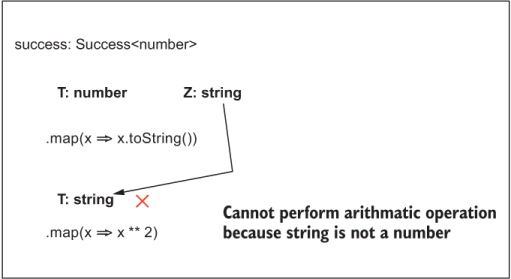
To show you the reach of the type checker, suppose that you were to map a second time. The environment you had on the first map call would transfer to the second call. Z would send its type into T, and the result would be captured once more by Z. Here’s an example:
success.map(x => x.toString()).map(x => x ** 2);

Cannot perform arithmetic operation because string is not a number.
Figure B.1 traces the inference process.
Figure B.1 The sequence of map calls, tracing the flow of types to find an invalid operation (exponentiation) being performed on a string
As you can see in figure B.1, after the value is converted to a string on the first call to map, the second call fails because x gets bound to string before the code attempts to perform arithmetic.
Another compelling use case for generic programming is streams. Providing type semantics to stream-based code gives you the chaining power of observables as well as code correctness applied to your business logic. Before we look at an example, as a fun little exercise, let’s use the annotations we’ve learned so far to describe the main interfaces of a stream. Because the Observable class is already loaded, we’ll use the convention of prefixing interfaces with I. So we get IObservable, Observer, and ISubscription, using a mix of generic interfaces, object, and function types:
type Observer<T> = {
   next: (value: T) => void,
   error?: (error: Error) => void,
   complete?: () => void
}

interface IObservable<T> {
   skip(count: number): IObservable<T>;
   filter(predicate: T => boolean): IObservable<T>;
   map<Z>(fn: T => Z): IObservable<Z>;
   reduce<Z>(acc: (
         accumulator: Z,
         value: T,
         index?: number,
         array?: Array<T>
      ) => Z, startwith?: T): IObservable<T>;
      subscribe(observer: Observer<T>): ISubscription;
}

interface ISubscription {
    unsubscribe(): void;
}
With the variable having the type information IObservable, there’s no need to follow the $ suffix convention any longer. There’s no doubt that you’re working with an observable. In this example, the type T bound to number flows through the entire Observable declaration, and the type checker can test it at every step of the pipeline:
const numbers: IObservable<number> = Observable.of(1, 2, 3, 4);

numbers.skip(1)
    .filter(isEven)
    .map(square)
    .reduce(add, 0)
    .subscribe({
        next: :: console.log
    });
The type system analyzes the sequence of calls and checks for compatibility between the observable operators and your business logic. Suppose that you inadvertently pass an incompatible function to one of the operators:
const toUpper = x => x.toUpperCase();

//...

numbers.skip(1)
       .filter(isEven)
       .map(toUpper);


Cannot call x.toUpperCase because property toUpperCase is missing in Number
You can create another flow diagram like figure B.2. The final type annotation I’ll discuss is related to what we learned about in chapter 5.
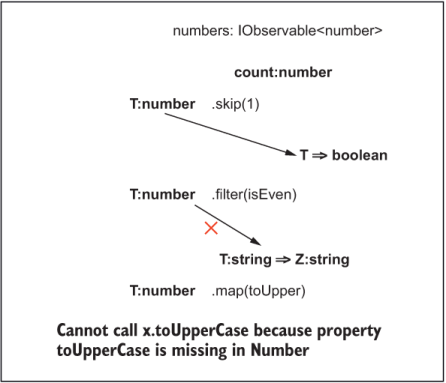
Figure B.2 Tracing the flow of types through the observable stream. Mapping toUpper causes a violation, as the expected event type is number.
A union type or choice type (such as Validation) signature defines a type that can be in one of a finite set of states at a time. You may know this type as an enumeration or enum. The Block class declares a parameter of type Difficulty. This type is a number that controls the amount of effort that the proof-of-work algorithm is required to spend. With a difficulty value of 5, for example, completing the proof of work could take hours, if not days. You’d definitely want to control the range of possible values.
To describe the possible values that this type can take, use a logical OR (|)operator, symbolizing union:
type Difficulty = 0 | 1 | 2 | 3;
A value of 0 turns off proof of work and completes instantly. As you turn the knob higher, proofOfWork takes a lot more effort to run.
Another common use case represents log levels like this:
type LogLevel = 'DEBUG' | 'INFO' | 'WARN' | 'ERROR';
Enumerations work seamlessly with switch statements, as the next listing shows.
Listing B.5 Using different log levels with an enum and a switch statement
const level: LogLevel = getLogLevel()

switch (level) {
  case 'DEBUG':
    //...
    break
  case 'INFO':
    //...
    break
  case 'WARN':
    //...
    break
  case 'ERROR':
    //...
    break;
                ❶
}
❶ There’s no need for a default clause because you’re guaranteed that this variable can be in no other state.
We can also use union types on custom objects. In chapter 5, we implemented the Validation ADT, which is a disjoint union with two branches: Success and Failure. Like Difficulty, the Validation object can be in only one of these two states. We can symbolize that condition in the same way. Here’s Validation with both of its branches:
class Success<T>  {
    static of: (T) => Success<T>;

    isSuccess: true;
    isFailure: false;

    get: (void) => T;

    map: <Z>(T => Z) => Success<Z>;
}

class Failure {
    isSuccess: false;
    isFailure: true;

    get: (void) => Error;

    map: (any => any) => Failure;
}

type Validation<T> = Success<T> | Failure;
As you can see, the Failure case is a much simpler type because it’s not meant to carry a value, which is why I used the keyword <any> to represent no type information needed.
The union operator is modeling two disjointed branches of code (figure B.3).
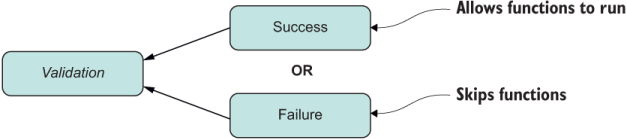
Figure B.3 Union type annotations model a logical OR describing two disjointed control flows.
You can use this type directly or indirectly in our Block class:
class Block {

   // ...


   isValid(): Validation<Block> {

      //...
   }
}
This variation is equivalent and works the same way:
class Block {

      // ...


   isValid(): Success<Block> | Failure {

      //...
   }
}
In my experience, types with classes, interfaces, objects, functions, generics, and unions are the ones that occur most often in day-to-day code and are likely to be the first included in any future proposal. But you can use many other type annotations. I encourage you to read about this technology on your own if you find it interesting. A good article to start with is at http://code.sgo.to/proposal-optional-types. Knowing what signatures are and what they mean will still be important for communicating efficiently about how functions are used and composed with the rest of your code. The good news is that type information is not an all-or-nothing route. You can start to add types progressively as you become more comfortable with them.
The JavaScript community has been active in this regard, developing everything from third-party extension libraries such as Flow to alt-JS languages such as Elm and PureScript. If you’re intrigued, some early proposals sitting in stage 0 revive the types conversation that left off in the days of ECMAScript 4:
Feel free to dig into these proposals if you’re interested in learning more.